Product Note: Marketing Cloud Growth and Advanced are editions of Marketing Cloud Next and have also been referred to as Agentforce Marketing.
Since Marketing Cloud Growth was introduced at the beginning of last year, more and more innovations with the platform have been coming out at a rapid pace by the team at Salesforce. The upcoming Winter 26’ release is no exception to this momentum. Note, the Winter ’26 updates will be available starting September 19th.
TL;DR – What’s the point, what do we love the most?
While the Winter 26’ release brings a ton of new features and enhancements, there are definitely some that stand out to us. Here’s a list of our favorites.
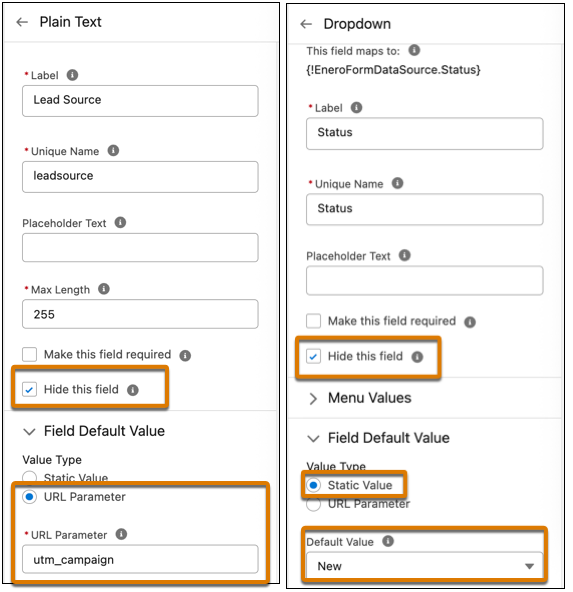
- Form fields can be set to “hidden” using a simple checkbox on the configuration screen.
- Form fields can be given a default value, and in addition, you can automatically set that value with a URL parameter. No need for JavaScript!
- Form handlers for external website forms.
- Reusable content blocks available when creating emails. This release brings some solid enhancements to the Email Builder!
- Enhanced reports and dashboards.
The Email Builder, Content & Messaging
Reusable Content Blocks
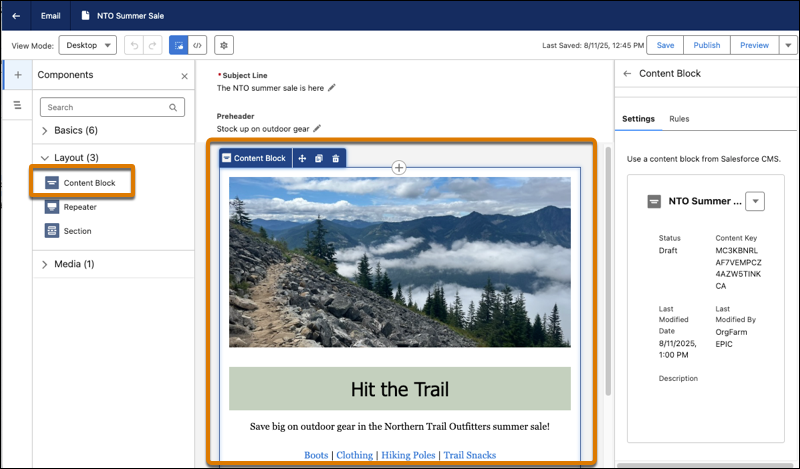
No more reinventing the wheel each time you create a new email layout! Content Blocks are exactly what the name suggests, bits of content you’ll want to use on multiple email assets. For example, banners, specially formatted footers, terms & conditions text, buttons or any other regular content you use often. Or, any combination of this content. For example, a content block can be an image, accompanying text and a CTA button below it. You’ll find the “content block” option under Layout and can easily drag blocks onto the email canvas. Content Blocks are stored in your Marketing Workspace along with your other content.
In addition, you can ramp up your personalization by creating Content Blocks for different audiences and apply variation rules that serve personalized content to the right recipients.
Email Templates
Marketing Cloud Account Engagement users will appreciate the addition of email templates! Email Template Campaigns allow your admins or campaign managers to create standardized, branded email campaigns that your marketers can simply use for their own marketing emails. No more cloning old assets.
Content Builder Agent
With the new Content Builder Agent, users can draft, revise, or optimize content in Marketing Cloud. The new agent helps marketers create assets, like email body copy, subject lines, or SMS messages. Just like other Agents, you help guide the output by providing brand/company information. To get started, from Agent Builder, find and select the new Content Builder Agent template.
Data Sources for Personalization
Within emails, marketers can now use other data sources that feed merge fields, repeaters, and dynamic content. Instead of using a data graph, which is currently how emails are personalized, users can change the data source within the Data Source panel to select different sources for the personalization.
UI Updates
Users will notice other small UI enhancements to the Email Builder. A few small changes to the names of buttons making the aforementioned personalization experience easier. Furthermore, you can update the Title, API Name, and Description of the email within the Builder instead of needing to click the Settings cog to access those fields.
Salesforce has cited additional UX enhancements regarding email setup and configuration, including branded link management, DNS entry support, and display names, in addition to bug fixes, but details are limited right now.
Updated Deliverability Dashboard
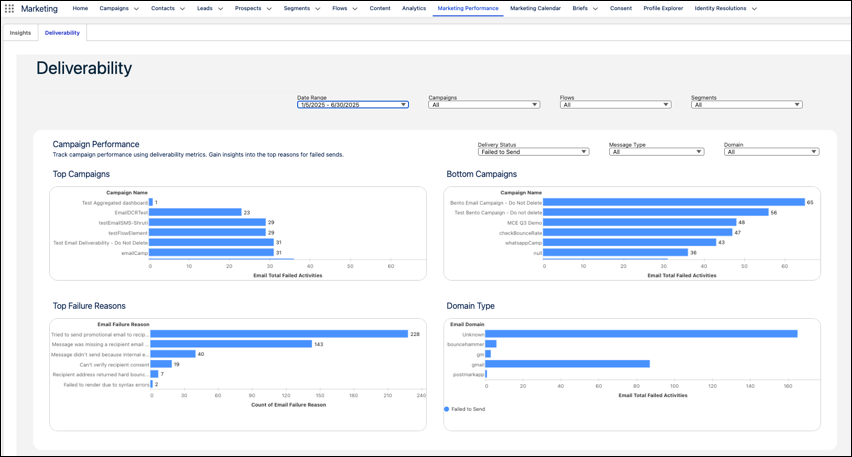
The Deliverability Dashboard has been enhanced to provide deeper insights for your email campaigns. There are new filters available for “domain” so you can review results by recipient domain, useful when reviewing failure reasons.
SMS & WhatsApp Enhancements
Additional countries are available for SMS marketing, but remember each of these countries has their own sender codes, compliance regulations, and multipliers. New regions include Hong Kong, Peru, and Singapore. WhatsApp reports metrics got a boost and now include click rate and open rate on the Insights dashboard. You can also filter by Sender Display Name. WhatsApp also includes more interactive messaging options in flows, including location sharing, CTA buttons, carousel messages which can integrate with your real-time product catalog. These new features also enable you to trigger flows based on customer responses!
Campaign Creation and Analysis with Agentforce
You’re now able to customize the flow for drafting and creating campaigns and briefs. The underlying flow can be customized by an admin to accommodate business needs. For example, the flow can assign a campaign owner, send notifications to other users, or add business logic like approval steps. Now, your marketing team can simply ask Agentforce to draft a brief or a campaign and adjust as needed. For those marketers who have leaned into the AI capabilities, this is a nice enhancement.
Marketers can also use Agentforce to see improved campaign performance insights. The Agentforce Action, “Generate Campaign Insights” retrieves performance metrics such as message opens, clicks, or unsubscribes, and generates a summary of key insights. Furthermore, your admin can customize this action in Flow Builder to focus on metrics that are most relevant to your users. These insights turn into action when you use the results to make campaign adjustments, like updating the subject line or changing the time between email sends.
Forms & Landing Pages
Form Field Enhancements
Hidden fields – (yay) are now available! Add fields that you want hidden, such as UTMs or Lead Source, and hide them simply by checking a box. Set a default value (another – yay) with two options: a static value (whatever text you want), or pull from a URL parameter! Can you tell, we’re super excited about these form enhancements?
Did somebody say Form Handlers?
Yes, Marketing Cloud Growth and Advanced now has form handlers, similar to Marketing Cloud Account Engagement, and they are used to capture data from external website forms. You can use them to capture leads, cases, and other records, so they’re more flexible than the form handler that Account Engagement users are used to because the flow can be configured to create different record types, not just Prospects. The form handlers also include a built-in honeypot field for spam protection, custom redirect URLs for successful or failed submissions, and web tracking to monitor user engagement and form performance.
Personalize Landing Pages
You can now personalize your landing pages using merge fields to include a prospect’s name, company, or other data. In addition, you can set up a real-time data graph in Data Cloud. Similar to enhanced personalization in emails, users can select it from the Data Sources panel while editing the landing page.
Landing Page Templates
In addition to Email templates, you can now add landing page templates as well. The Landing Page Builder also includes additional support for HTML tags and elements.
Other cool stuff
Push Notifications for your Mobile Apps
Engage with your customers using interactive push notifications on their mobile devices. The push types available are one media attachment, customized content, tap actions, Android-specific icons, and interactive buttons. The Carousel push type supports up to 6 swipeable cards, each with media, text, and individual tap actions.
When you add mobile app messaging channels to your campaigns, you’ll see aggregated metrics across all your different messages and campaigns. You can view metrics related to sends, deliveries, views, and interactions related to individual messages or entire campaigns.
Marketing Cloud Next in Sandboxes
You can now set up Marketing Cloud Next in your Sandbox. Create more complex flows and campaigns, test things out, and easily deploy them in production. This feature is available to both Growth and Advanced editions.
Smarter Identity Resolution Rulesets
Enhanced Identity Resolution Rulesets (IRR) help prevent duplicate records. In IRR setup, you’ll notice two additional match rules:
- Lead to Contact—Prevents duplication when leads become contacts.
- Device to Known—Matches web visitors to known profiles.
The original ruleset includes Normalized Email only, so if you already have this generated, you can manually edit the ruleset and add these new rules.
Multiple Scoring Models & Frequency Enhancements
You can now create multiple scoring models (think Scoring Categories in MCAE), which allows you to further customize your scoring model for both People and Accounts. Additionally, you can adjust the frequency that the scoring rules run, saving you data credits on unnecessary processing.

Reporting and Insights
As reporting and insights are a must in every marketer’s day-to-day, the Salesforce team is focused on creating easier reporting and enhanced filters, and visualizations. We’re happy to see some nice enhancements in this release.

Automated Winner Selection for Path Experiment
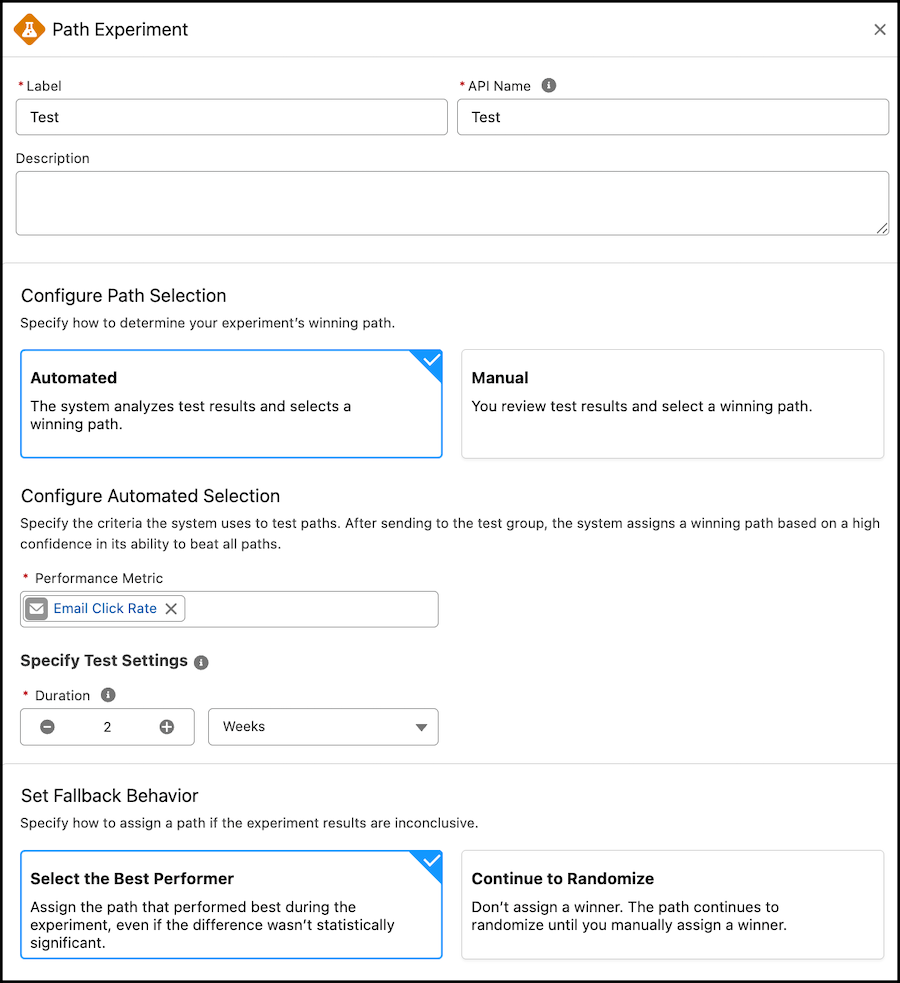
Path Experiment, available with Marketing Cloud Advanced Edition, allows Marketers to maximize engagement with their audience through testing. This feature allows marketers to test variations within marketing content, in channels, and even in cadence. With the Winter ‘26 release, Marketers can now configure automated Path Selection directly within the Path Experiment element. This allows the path to pick a winner based on your selected performance metric, such as email clicks, registrations, or purchases.
Business Units
Business Units are officially on their way to Marketing Cloud Growth and Advanced. This feature is going to have a limited GA during the Winter ‘26 release, but the Product team is making strides to ensure Business Units work out of the box for Marketers. In this initial release, Marketers can associate data spaces to their automations and flows to ensure data is kept secure and separate.
Final Thoughts
Overall, the Winter 26’ release brings some really nice enhancements to Marketing Cloud Next, with a majority of these terrific features being for Growth and Advanced Edition. Marketers using Account Engagement and Engagement should continue to learn more about these new features, so that they can understand how they can consider applying them to their own campaigns and experiences.
If you’re looking for guidance on how to navigate what’s next for your org with Marketing Cloud Growth/Advanced or Marketing Cloud Next, reach out to the Sercante team. Our experts can help you build a strategy and guide you through the next phase of your journey.