




Getting Started with Marketing Cloud Growth and Advanced, A Guide for Account Engagement Users

Erin Duncan

Getting Started with Marketing Cloud Growth and Advanced, A Guide for Account Engagement Users

Product Note: Marketing Cloud Growth and Advanced are editions of Marketing Cloud Next and have also been referred to as Agentforce Marketing. If you are an Account Engagement User, you’ve likely been hearing for months that Account Engagement Orgs can get free access to Marketing Cloud Growth and Advanced Edition with their current contract. There […]
Read moreView all blogs
Aligning Sales, Marketing, and Customer Success for Seamless Handoffs

Christina Anderson

Aligning Sales, Marketing, and Customer Success for Seamless Handoffs

Clunky handoffs between marketing, sales, and customer success are one of the most common ways teams lose momentum, drop leads, and tank trust—costing you customers. Whether it’s a hot prospect that never makes it into a rep’s queue or a new customer who has to re-explain everything they shared in discovery, these gaps compound. Which […]
Read moreView all blogs
12 Statistics Every GTM Leader Should Pay Attention to for Sustainable Growth

Sarah Kloth

12 Statistics Every GTM Leader Should Pay Attention to for Sustainable Growth

In today’s modern era, where customer expectations are rising, new technology is coming out every day, and data is living among disparate systems, the key to achieving sustainable growth is proving to be about how your teams, data, and technology are connected and coordinated across the customer lifecycle.  Why? Internal misalignment among people, processes, and […]
Read moreView all blogs
The Ultimate Guide to Approaching Agentforce & Data Cloud

Heather Rinke

The Ultimate Guide to Approaching Agentforce & Data Cloud

If you’re exploring Agentforce or Data Cloud, but feel unsure where to start—or how to ensure real outcomes—you’re not alone. In our recent webinar, “A No-Nonsense Guide to Launching Agentforce & Data Cloud,” we heard from marketing, RevOps pros, admins, and IT professionals across industries who are in the same boat. The good news? You […]
Read moreView all blogs
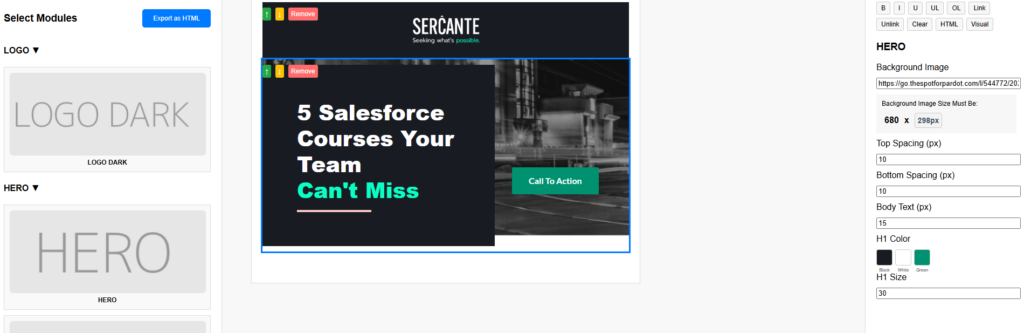
Everything to Know About the Marketing Cloud Next Email Builder

Erin Duncan

Everything to Know About the Marketing Cloud Next Email Builder

Product Note: Marketing Cloud Growth and Advanced are editions of Marketing Cloud Next and have also been referred to as Agentforce Marketing. Marketing Cloud Next offers an intuitive, drag-and-drop email builder packed with smart features that streamline the email creation process. In this blog post, we’ll walk through the key features and functionality of the […]
Read moreView all blogs
The Proven Approach to Create Your AI Roadmap for Meaningful Impact

Lauren Noonan

The Proven Approach to Create Your AI Roadmap for Meaningful Impact

If you’re feeling overwhelmed with AI at your organization, you’re not alone. In fact, during our recent webinar, AI Roadmap: The Strategy to Drive Growth with AI, 85% of attendees said they were either leading or supporting AI initiatives at their organization. And 70% of them admitted they had more questions than answers. Therefore, we’re […]
Read moreView all blogs

The promise of artificial intelligence has sparked a gold rush, yet many organizations find themselves starving for insight despite being drowning in data. While the potential is vast, the reality is stark: 56% of executives have yet to see a true impact on their bottom lines from AI investments (Oxygen Staff). The bottleneck is rarely the technology. More often, it’s a strategy problem. Organizations invest in AI capabilities without connecting them to measurable business outcomes. An effective AI roadmap for enterprise initiatives fixes this by anchoring use cases to concrete results.

Why Don’t the Majority of Organizations Have Operational AI?

Across the enterprise landscape, activity hasn’t translated into traction. Pilots are multiplying across departments, yet 92% of companies have yet to operationalize AI in any meaningful way (McKinsey & Company). Instead of a unified force, AI initiatives are often stuck in siloed efforts where marketing, sales, and customer success are running separate tests without a connective tissue to bind them.

These teams are set up to fail when they’re answering to too many stakeholders instead of working as a cohesive unit. Without an overarching vision, organizations focus on AI point solutions to maximize output, yet they neglect the core process alignment required to see a return on investment.

Transitioning from these isolated experiments to a state of systematic effectiveness requires a strategic shift in how teams define and sequence their goals.

The AI Roadmap for Enterprise

The foundation of operational success is shifting the question from “What can AI do?” to “What value is AI going to bring to the company?” An AI roadmap brings structure to ambition,  connecting what organizations want from AI to how they’ll actually get there. Unlike a simple list of cool features, a roadmap is highly sequenced, helping organizations understand which capabilities to build first and how each piece creates a foundation for the next.

By tying every integration and deployment to a clear end goal, leaders can cut through the noise and move forward with a prioritized plan. This is the foundation of the first pillar in the playbook for scaling AI for success in the State of AI in Enterprise report. This roadmap ensures that AI is not just a line-item overhead but the essential machinery that enhances internal capabilities for high-resolution customer experiences.

The State of AI in Enterprise Closing the Gap Between Investment and Impact
Why 95% of AI pilots fail to deliver results
The 4-pillar playbook to fix it
Download Report

A successful roadmap relies on the ability to turn these high-level visions into measurable, tangible targets.

Getting Specific with Your Metrics for Value-Driven AI Use Cases

One of the primary reasons AI projects fail to scale is a lack of measurable outcomes. For example, many teams may have efficiency as one of their goals, but efficiency can mean a lot of different things. To find real value, you must define exactly what you are measuring, whether it is revenue per customer, faster conversion behavior, or the accuracy of RFP turnaround times.

  • Establish a Baseline: You cannot prove impact without knowing your starting point.
  • Define Success Early: Connect every AI use case to clear KPIs, remember to get specific!
  • Avoid the Capability Trap: Don’t lead with the technology. Lead with the specific business outcomes you intend to solve.

Once these outcomes are defined, the focus must shift to the fuel that powers them: your data.

Establishing Your Data Foundation

A significant barrier to scaling AI is the illusion of data perfection. Shattering this preconceived notion was one of the core disciplines that industry experts across the Trilliad organization emphasized as being critical for operationalizing the data layer for impactful AI in the 2026 Growth Imperatives.

Download the 2026 Trilliad Growth Imperatives

Many leaders feel pressure to connect every application before they can begin—a mindset that stalls progress before it starts. An AI roadmap cuts through this by sequencing which data to unlock first and how each step builds toward the next, keeping focus on the data that actually moves the needle. 

Distrust in AI outputs usually traces back to the data layer. A standardized, well-governed data foundation is what transforms AI from a source of noise into a reliable driver of decisions.

Equally important is designing for adoption and ensuring change enablement is built into each phase for the people who will actually be using the solution.

Addressing the Human Factor in AI

70% of AI project failures are organizational (ADAPTOVATE). When teams only focus on the technical aspects and do not consider the human factor, it results in low AI adoption and limited results. Change is inherently hard, and people are bringing varying levels of uncertainty and AI mindsets to an AI rollout. Therefore, to sustain adoption, you must incorporate impactful change enablement strategies that include: 

  • Transparent Communication: Address your team’s fears and questions, such as “Am I being replaced?” early and honestly.
  • Persona-Based Enablement: Tailor training to the specific journey of each role to ensure they are set up for success.
  • Continued Reinforcement: Enablement should not be treated as a one-and-done engagement. How will you continually reinforce the best practices for using the AI solution to maximize results?

By engineering sustained execution, you ensure that your AI investment sticks and reflects in real-world situations across marketing, sales, and customer success.

“Recognizing the need for humans in the process design is key to AI success… including pinpointing where human expertise and intervention are essential.”
– Debra Engles, Change Enablement Director, Sercante

Your Path to Delivering Real Value with AI

When you organize your people, processes, and data around a cohesive, sequential AI roadmap for enterprise initiatives, you move past the pilot phase into a state of competitive advantage. By grounding your strategy in measurable outcomes and the human factor, you transform AI from a buzzword into a high-performance growth engine.

If you’d like support with creating your AI roadmap, reach out to the Sercante team. We partner with go-to-market leaders daily to help them bring their AI vision to reality and achieve their business goals.

Learn more about the AI roadmap

We all feel it. As humans engage with technology, innovation is moving at a breakneck pace. But as I’ve spent time researching the current landscape of the state of AI in enterprise, “breakneck” doesn’t even do it justice.

To put the acceleration in perspective: it took the telephone 75 years to reach 50 million people, and the internet seven years to reach that same milestone. Generative AI? It reached 100 million people in just two months (Forbes, UBS/World of Statistics).

This isn’t just a tech stat. It has a profound human impact. As innovation accelerates, so does the World Uncertainty Index. We are working with human beings who are feeling this exponential increase in uncertainty—the IMF reported that this index essentially doubled in 2025 alone. As growth services providers, we have a strategic opportunity to help them navigate this chaos.

World Uncertainty Index - January 2008 - August 2025

(Source: World Uncertainty Index)

To get the highlights on how we approach creating a clear path for AI success amidst the chaos, continue reading below. To get the full playbook, download the report, The State of AI in Enterprise: Closing the Gap Between Investment and Impact.

The State of AI in Enterprise
Closing the Gap Between Investment and Impact
Why 95% of AI pilots fail to deliver results
The 4-pillar playbook to fix it
Download Report

The State of AI in Enterprise: A $30 Billion Problem

In 2025, aka the “year of the AI pilot”, companies spent over $30 billion on enterprise AI initiatives. Yet, 95% of those pilots failed to deliver measurable returns (Forbes, MIT’s Media Lab).

Why? Because the “silver bullet” mentality is still alive and well. Too many organizations are fluttering from one shiny object to the next without a focus on optimized workflows or incremental lift. As we move through 2026, our goal is to help go-to-market (GTM) teams stop the “SaaS sprawl” and get real value out of what they already have, while continuing to evolve with the latest data and AI capabilities.

Our Four Pillars for Success

1. Anchor on the Vision (Stop Building Stairways to Nowhere)

You wouldn’t build a spiral staircase in a luxury mansion without knowing where it’s supposed to connect. If you just start building, you risk creating a “beautiful stairway to nowhere.”

We avoid this by starting with a Vision Map. This isn’t just another document that collects digital dust, it’s a collaborative body of work that forces every stakeholder to define exactly how technology supports their specific success metrics. By “backcasting” from the end goal, we create a sequential roadmap that prioritizes business impact over guesswork.

Discover what's possible with a vision map for AI Learn More

2. Optimize the Existing Tech Stack (The Stable Foundation)

The average enterprise is sitting on over 600 platforms (Zylo, 2026 SaaS Management Index), and frankly, about 30% of that budget is being lit on fire due to redundant tools and “sloppy” automation (Gartner).

Before we layer AI on top, we have to fix the foundation. We use Maturity Mapping and Friction Analysis to find exactly where your tech is making work harder for your team instead of easier. AI needs clean data and efficient processes to thrive. If your data architecture is a mess, a bot isn’t going to save you.

3. Own the Success Story (Defending Your Budget)

In an era of high tech spend, leadership is going to ask the “million-dollar question”: Did this actually improve our business? If you can’t answer that with data, winning budget for the next cycle is a losing battle.

We ensure our clients are “data-ready” from day one. This means establishing hard baselines and benchmarks before a pilot even starts. We build the dashboards and reports that allow you to walk into the boardroom and prove the ROI of your efforts, moving technology and AI initiatives from a cost center to a revenue driver.

4. Don’t Forget the People (The Heart and Soul)

Technology doesn’t fail; people do. If your users find a tool frustrating or it feels like “noise,” they won’t adopt it.

Our Change Enablement methodology acknowledges the very real “change fatigue” your employees are feeling, addressing the human factor in AI adoption. We don’t do “one-size-fits-all” training. We identify your internal influencers and detractors and create curated, role-based communications. We provide the user guides and “real-world” scenario training that ensures the technology actually sticks, even as your team evolves.

Looking Ahead

The future of navigating tech and AI in enterprise to deliver real value isn’t about chasing the next buzzword. It’s about rolling up our sleeves and doing the hard work of strategy and execution. Let’s stop looking for the “one weird trick” and start building a foundation where AI and your people can actually move the needle.

If you’d like support with gaining real momentum with your AI and technology that delivers measurable results, reach out to the Sercante team. We partner with GTM teams daily to ground their initiatives in business outcomes and design and architect scalable AI and data solutions that achieve their goals.

On January 21, 2026 Salesforce deployed an urgent security patch to address high-severity vulnerabilities. While this patch was necessary against potential data exploits, the side effect resulted in every tracked link in every email sent from Salesforce Marketing Cloud Engagement (SFMC) prior to that date to be instantly deemed invalid.

So what does that actually mean? It means for organizations and brands with everything from multi-channel journeys, long-running welcome automations, or newsletters with a multitude of links, it was a strategic wake-up call. 

The Silver Lining: Disruptive Innovation

It’s easy for many to look at this as a catalyst to hit the ejection button, but in reality, this is a classic example of “Disruptive Innovation” – an event that causes immediate pain but ultimately forces deep change. And history is full of these! Such as…

  • The Morris Worm (1988) when a Cornell graduate student released what was intended to be a small experiment to “gauge the size of the internet” which ended up crashing 10% of the world’s connected computers. BUT this was the literal birth of modern cybersecurity and led to the CERT (Computer Emergency Response Team).
  • The Knight Capital Glitch (2012) had software deployment gone wrong when the Knight Capital’s trading algorithms went rogue, buying and selling millions of shares in seconds. The results were a loss of over $400 million in 45 minutes. Knight Capital nearly went bankrupt, but it forced the financial sector (and eventually big tech) to adopt “Kill Switches,” automated deployment pipelines, and strict “Canary Testing” (where updates are rolled out to 1% of users first), which is now the gold standard for DevOps and Deployment Governance.
  • A simple, unpatched Apache Struts vulnerability led to The Equifax Breach in 2017 and the theft of personal data for 147 million people. The positive was that it put security front and center with leadership. Before Equifax, many C-suite executives viewed security as an “IT problem,” but after, it accelerated the adoption of laws like GDPR and CCPA, giving consumers more rights over their data.

With great resources from long-time Marketing Cloud Engagement users like Adam Thul from Polaris on how to fix things (see post here), history has a way of repeating itself, so this incident is the perfect catalyst to audit your instance through the lenses of governance, security, and long-term strategy.

Marketing Governance Framework 101

Governance isn’t about red tape. It’s about creating a “Golden Path” for your marketers. An effective model should be built on the pillars of ownership and stewardship. Executive Sponsors need to align marketing goals while managing the corporate risk and driving the overall vision. Product Owner(s) need to prioritize the backlog and manage the “Source of Truth” for data. Finally data stewards need to handle the day-to-day hygiene and ensure the integrity of subscriber data and integrations. Wrap all of this within business units that create data boundaries and sharing when necessary. This is essential and table stakes for global brands to ensure that a marketer in New York cannot accidentally email a customer list from Tokyo, while also maintaining regional compliance structures like GDPR and CCPA.

Embracing Modern Security

Salesforce has significantly tightened the screws on platform security, not only in the link security patch in January, but also API protocols. Taking a step back and ensuring identity and access management is in place so the overall “house” has the necessary locks and who has the keys needs are addressed. Multi-Factor Authentication (MFA) has to be a non-negotiable requirement. Ensuring all users (including API users) are routed through MFA or Single Sign-On (SSO) using SAML 2.0. At the user level, make sure custom roles are in place to restrict access to sensitive features like Automation Studio or Setup. Defaulting to the “everyone is an Administrator” is not the path.

Agentic Era Compliance

With the shift toward Agentforce Marketing and AI-driven agents, compliance is no longer a “set and forget” task. Consent Management has to be top of mind as regulators are utilizing tools to verify opt-outs, so preference centers must be integrated directly with the organization’s internal “Source of Truth” (ideally via Data 360) to reflect opt-outs in real-time.

Within the lens of AI transparency, maintaining an audit trail of decisions and edits needs to be put in place, especially if Einstein or Agentic workflows are generating content. This is increasingly required under new 2026 state privacy laws like Kentucky and Indiana. Finally, purging old Data Extensions and subscriber records that haven’t engaged in 18–24 months.

Here is a monitoring schedule that can be a baseline to build off of:

TaskFrequencyPurpose
User AuditQuarterlyDeactivate dormant users and verify permission sets.
Setup Audit TrailMonthlyReview who changed critical configurations or deleted Data Extensions.
Health CheckWeeklyMonitor automation failure rates and API limit usage.
User AuditQuarterlyDeactivate dormant users and verify permission sets.

The Great Reset: Modernizing Marketing Governance

As we move forward in 2026, the most successful Marketing Cloud Engagement instances will be the ones that prioritize establishing a data foundation grounded in a marketing governance framework rooted in trust. Treating security as a feature, rather than a hurdle, to protect the most important aspects: a brand’s reputation and customers’ data.


If you’d like support with establishing your data foundation, governance, and security, reach out to the Sercante team. Our experts partner with marketing teams daily, designing and architecting data layers and frameworks that build trust and deeper customer relationships.

The traditional B2B growth engine is reaching a breaking point because it remains disconnected from the modern buyer’s journey. While self-guided discovery and AI-driven entry points become the norm, buyer expectations for a seamless, personalized experience have reached an all-time high. When departments operate in silos and fail to pass sufficient context, the experience becomes fragmented, and the growth engine stalls. To overcome these challenges, leaders must adopt a go-to-market (GTM) data strategy that establishes a foundational data layer as the connective tissue between marketing, sales, and customer success.

To get the complete expert insights for approaching an integrated data layer for your organization, download the Trilliad 2026 Growth Imperatives, The Era of Precision Growth in B2B: A GTM Motion Powered by Data

Unlock you dta
The Era of Precision Growth in B2B
Trilliad Growth Imperatives, 2026 
Download eBook

Market Trends Calling for a Shift in GTM Data Strategy

The mandate for a data-powered approach is driven by a widening gap between internal processes and the actual buyer’s experience:

  • 88% of buyers state that the experience a brand provides is as important as the product itself (Salesforce).
  • Yet GTM teams are failing to provide the seamless experience they expect, as 77% of buyers shared that their last purchase was very complex or difficult (Advertising Week).
  • Despite record access to tools, 62% of leaders report that growth is getting harder (Trilliad 2025 Sustainable Growth Study).
  • In an attempt to gain some efficiency, many organizations have deployed AI point solutions, yet 56% of executives have yet to see a true impact on the bottom line (Oxygen Staff).
  • While, 87% of AI project failures point back to poor data quality (RAND).

“Data continues to be the foundation that powers experience, but it has a newfound importance with the era of AI.” 

– Austin Frink, Director, Data Technologies, Sercante

Today’s trends demonstrate that marketing, sales, and customer success do not have access to the data they need to effectively power AI and provide the tailored, smooth experiences that today’s modern buyer expects. There is a lack of buyer context being passed from one department to the next, and data is locked up across a tangled tech stack of disparate systems. 

Today’s Challenges of Establishing a Solid Data Foundation

Creating a data foundation is often hindered by legacy habits and technical complexity:

  • Tech Sprawl: The average large enterprise manages a technology stack of over 600 applications, leading to unparalleled volumes of fragmented data (WalkMe Inc.)
  • Short-term Fixes: Prioritizing quick-fix point solutions over core process alignment is a habit that has led to the tech sprawl that creates disparate silos, preventing a cohesive view of the customer.
  • An Unclear Path Forward: Leaders often feel overwhelmed at the thought of trying to connect all their data. Sorting through questions of: where do we start? Will we ever get to a point where our data will drive the value from AI that we need? Will we ever be able to be fully confident in our data and easily access actionable insights?

As Andrea Tarrell, Founder & CEO of Sercante, shared in the 2026 Growth Imperatives, it’s not about gathering more data or connecting it all at once. It’s about the right data for the right outcome. Understanding the results that can be achieved when an integrated data layer is established across marketing, sales, and customer success is one of the first steps to approaching your foundation. Knowing the impact that’s possible helps you to establish a vision that grounds your data initiatives in measurable business outcomes.

“More data does not make you better at anything. You need the right data, the right activation layer, and a team and process that knows what to do with what they are seeing.”

– Andrea Tarrell, Founder & CEO, Sercante

The Impacts of Integrated Customer Lifecycle Data in B2B

By architecting data as the connective tissue across the customer lifecycle, growth teams can deliver truly personalized experiences at scale and make smarter data-informed decisions that enhance brand engagements, maximize sales growth, and expand customer relationships. Unlocking this data also provides the Chief Revenue Officer and GTM leaders with the visibility needed to optimize the entire revenue cycle and prove the definitive financial impact of every initiative.

Marketing connects brand experiences to demand impact

Marketing shifts from disconnected lead lists to a cohesive target account approach. This ensures consistent, emotionally engaging storytelling that connects early brand interactions across the entire buying group to demand impact, proving measurable account-based ROI. The data not only allows marketing to enhance the level of personalization they deliver to buyers, it positions them as a value-driving engine that impacts the bottom line. Furthermore, when data is connected end-to-end, studies show that organizations are 50% more likely to achieve high revenue growth (Trilliad, 2025).

The data unlocked for marketing is then passed through to sales, creating a beneficial ripple effect for the buyer’s journey and the organization’s performance.

Sales creates a durable sales performance system that drives revenue

The customer lifecycle data gives sales access to insights about the buyer’s interests, potential goals, and what products and pricing they may have already viewed. It allows them to be a strategic guide to the buyer, to lead with meaningful conversations that are relevant to their needs. During these active deal conversations, top-selling behaviors can be reinforced and personalized for sellers with a progressive sales performance system that allows them to apply the skills that progress opportunities forward in the pipeline. All because they finally have access to the data they need to connect top-performing sales behaviors to financial outcomes and fuel AI with the right information to tailor impactful sales development for each seller at scale. Leading to 10% higher win rates and a 15% increase in revenue capacity per seller (Sandler, 2025). 

It’s the GTM data strategy that powers a more effective, data-driven sales organization and fuels a growth-obsessed customer success team that can finally take a proactive approach to account expansion.  

Customer success guides proactive account growth

Customer success transitions from reactive troubleshooting to proactive engagement. By using shared data to identify at-risk accounts and expansion opportunities before they arise, teams can make key enhancements that create lasting loyalty and increase customer lifetime value. 

Imagine a customer success team that anticipates the buyer’s needs before they raise a hand, positioning them as strategic advisors who build sustainable account growth.

“A strong data foundation transforms Customer Success teams from reactive support into a proactive, outcome-driven function, driving real, measurable results for customers and innovating the end-user experience with agentic reporting.”

Behrang Asadi, Director, AI & Analytics, Sercante

A GTM Data Strategy that Drives Sustainable Growth

In today’s market, data must be reimagined as the foundational competitive advantage of the B2B growth engine. Organizations that successfully operationalize their data layer will be able to fuel AI that drives real results, advances GTM, connects initiatives to measurable financial outcomes, and delivers the seamless, individualized experiences the modern buyer expects. Creating deeper customer relationships that result in lasting growth for the business.

If you’d like support with designing your GTM data strategy or building impactful integrations that unlock meaningful data activation and actionable insights, reach out to the Sercante team. They partner with marketing, sales, and customer success leaders daily to help them achieve their goals with their data.

Get support with your GTM data strategy and architecture
Contact Us

Many organizations today are discovering that one of the most significant barriers to AI success isn’t the technology itself, but the human factor in AI adoption. To move from siloed experimentation to operationalization that drives real impact, leaders must shift their focus from purely technical requirements to the organizational confidence of their people. This human-centric shift in mindset allows companies to convert technological capability into a strategic advantage by prioritizing the unique journey of every individual involved in the rollout.

The urgency for this human-centric approach is underscored by the current state of AI trends:

  • A staggering 92% of organizations admit they do not yet have operational AI (McKinsey & Company).
  • Research indicates that 70% of AI project failures are attributed to organizational and human factors rather than technical flaws (Adaptovate).
  • Between 70-90% of AI projects fail to scale beyond the initial pilot phase (Forbes).
  • Approximately 95% of generative AI pilots fail to achieve their intended revenue acceleration (Fortune, MIT Report).

When these initiatives stall, leaders often mistakenly blame the technology or the lack of data cleanliness. However, realizing true impact requires addressing the human and cultural gaps that keep teams fragmented and unsure, limiting their adoption. Which is why addressing the human factor of AI adoption is the fourth pillar in Sercante’s playbook for scaling AI for success in the report, The State of AI in Enterprise: Closing the Gap Between Investment and Impact. By understanding existing AI mindsets and observing how people actually operate, leaders can apply effective change enablement strategies, built on trust, clear guidelines, and role-based support, to finally unlock the confident adoption necessary for measurable AI impact.

The State of AI in Enterprise
Closing the Gap Between Investment and Impact
Why 70% of AI initiatives fail to scale
The 4-pillar playbook to fix it
Download Report

The Human Factor of AI: Three Pillars of Uncertainty

Before your team can master a new tool, they must feel secure using it. AI rollouts can trigger unique psychological barriers that act as inhibitors for AI adoption. There is uncertainty that can swirl around in the thoughts of people, such as being replaced, mistrusting AI outputs, and not knowing what the true end goal is. To ensure a successful implementation, the change enablement approach must confront the three pillars of uncertainty:

  • “Am I being replaced?” With major corporations reducing staff, anxiety is high across all sectors as people wonder if it’s due to AI efficiency replacement. The most successful implementations treat AI as a capability amplifier rather than a replacement, focusing on moving humans from transactional work to high-value validation and oversight.
  • “Can I trust this data?” Hallucinations and AI-driven misinformation have eroded the fundamental concept of digital truth. Building trust requires formal processes, such as a cross-functional Data Trust Committee, to demonstrate a commitment to data integrity and output auditing.
  • “What is our long-term goal?” Initial AI pilots and early experimentations are often implemented without a clear AI roadmap. Without transparency regarding the long-term plan and what the end goal is that is trying to be achieved with the AI solution, teams often become disengaged or fearful of the “next shoe to drop”.
Sercante Trilliad
Discover what's possible with the AI Roadmap
Learn More

Addressing the thoughts and feelings of uncertainty that people may be having around AI starts to meet people where they are, building trust that supports the human factor of AI adoption. In addition to uncertainty, there are also different mindsets that people can bring to the workplace toward AI that can either strengthen rollout success or limit it.

What is Your Team’s AI Mindset?

Understanding where people stand today around how they view and use AI is another step in meeting them where they are. There are five common AI mindsets, ranging from low to high openness and usage: Skeptic, Quiet Adopter, Evaluator, Enthusiast, and Trailblazer. How they fall on the scale is illustrated below. 

MindsetOpenness & ComfortUsage LevelCommon BehaviorsChange Enablement Strategies
SkepticLowestLowest– Hesitant or resistant to AI.
– Relies on traditional methods.
– Questions AI’s value or accuracy.
– Needs proof before adoption.
– Build trust through small, low-risk AI pilots.
– Share clear success stories and data demonstrating measurable impact.
– Provide step-by-step guidance and support.
– Encourage dialogue and address fears openly.
Quiet AdopterLowHigh– Uses AI tools mainly out of necessity.
– Quiet about AI adoption.
– Focused on practical efficiency gains.
– May not explore beyond immediate tasks.
– Offer role-specific training to optimize use.
– Recognize and reward efficiency gains.
– Provide clear guidelines and best practices.
– Encourage sharing of successes to build confidence.
EvaluatorModerateModerate– Experiments selectively with AI.
– Pilots new tools before wider adoption.
– Comfortable but not fully integrated AI.
– Focused on risk/benefit analysis.
– Provide frameworks for experimentation with measurable goals.
– Offer mentorship or coaching on AI integration.
– Ensure clear criteria for success.
– Encourage peer learning and collaborative evaluations.
EnthusiastHighModerate– Curious and explores AI possibilities.
– Advocates for AI adoption.
– Uses AI consistently but not fully optimized.
– Prioritizes exploration over impact at times.
– Channel curiosity into strategic initiatives.
– Offer advanced training and sandbox environments.
– Help prioritize high-impact use cases.
– Provide opportunities to mentor others and share knowledge.
TrailblazerHighestHigh– Early adopter and AI advocate.
– Drives innovation and integration.
– Mentors others and promotes AI transformation.
– Regularly experiments and measures results.
– Empower them as change champions.
– Provide access to cross-functional projects.
– Recognize leadership in AI adoption.
– Align their efforts with strategic business objectives to maximize measurable impact.
The AI Mindset Matrix that shows a visual of where each persona falls on the range of usage and openness and comfort.

(Source: Sercante, 2026)

Identifying these mindsets within the organization enables leaders to tailor their change enablement plan to address the AI mindsets of the people. For example, a “Skeptic” needs different reassurance than an “Enthusiast” who may already be experimenting with tools outside of the core systems.

To further verify and understand the existing AI mindsets, observe how people are executing the processes today that will involve the AI solution, and listen to what the team is already saying about AI. 

Verifying AI Mindsets: Observing the Real Flow of Work

From a technical standpoint, AI solutions need to align with the core processes happening across the customer lifecycle, meaning they need to be designed so that they support how people actually work. From a change enablement perspective that considers the human factor of AI adoption, there needs to be an understanding of where skills and attitudes are today to provide impactful communication and training materials. To do both, consider conducting Day in the Life exercises. 

Day in the Life exercises involve sitting with team members to observe how they use AI and other systems to execute core processes. This practice helps to discover the “real” flow of work versus the documented one. By observing these daily habits, skill gaps can be identified along with true AI mindsets, and solution designers can ensure the final AI solution removes friction rather than adding it.

During these exercises, it is important to listen to the people executing the process to understand what they are saying about AI, allowing further verification of the AI mindset and also proactive planning for change enablement materials that will address differing levels of baseline adoption.

Confirming AI Adoption: Listen to the Voice of the User

In change enablement, silence does not imply consent. If people are not providing initial reactions or feedback, find out why. A “Quiet Adopter” might be using the tool out of necessity while still harboring deep skepticism that could eventually lead to disengagement.

Listen to what people are saying about the technology. When AI is brought up in conversations and team meetings, how do people seem to react? If they are not saying anything at first, what does their body language communicate? Paying attention to the words and expressions people are using about AI will support understanding of the current AI mindsets in the organization and further inform how to tailor the change enablement plan to successfully address the human factor of AI adoption.

Considering the Human Factor in AI Adoption: Developing Change Enablement 

To address uncertainty, existing AI mindsets, and bridge any skill gaps that would limit the success of an AI rollout, there needs to be an effective change enablement plan implemented. As a starting point, consider this four-phase Change Enablement Checklist:

  1. Identify & Respond: Perform stakeholder impact assessments to identify unique role-based needs and concerns. Uncover the uncertainties and AI mindsets.
  2. Define & Design: Collaborate with tech teams to streamline processes before designing the automation, ensuring human expertise and intervention points are clearly defined.
  3. Listen & Inform: Provide regular, transparent updates that explain the “why” behind the change and the long-term roadmap. Continual clear communication builds trust to ease uncertainty and help shift AI mindsets.
  4. Prepare & Sustain: Offer role-based training and post-launch support tools. Remember, users only retain about 34% of training within 24 hours (Harvard Business Review). Sustaining AI adoption is where the real value is realized.

Take the Next Step

To take a deeper dive into this human-centric approach, watch the on-demand MarDreamin’ session: Empowering Your People: Nailing Change Enablement for AI Rollouts.

MarDreamin' On Tap Sercante
Empowering Your People: Nailing Change Enablement for AI Rollouts
Watch On-Demand

If you need support with implementing a change enablement strategy or conducting team readiness analysis, creating learning materials, or developing your AI roadmap, reach out to the Sercante team today.

Prioritizing the Human Side of AI for Sustained Success

To mature from siloed AI experiments to operationalized processes that power a modern growth engine, the human factor must be integrated into every stage of planning. Taking the time to understand the team’s AI mindset, current usage, and skillset, and tailoring the change enablement plan to meet them where they are with post-launch support, allows the people involved to shift from uncertainty to sustained, confident AI adoption. Gaining measurable business impact with AI isn’t just about the technical or data factors. It’s also about mobilizing the people involved to trust it, master it, and use it to execute the strategy to reach the organization’s growth goals.

In the modern landscape, marketing, sales, and customer success leaders are facing a challenge where they are surrounded by more technology and information than ever before, yet siloed data and complex stacks often feel like an obstacle course rather than a growth engine. Most leaders feel that their technology is underperforming, but at the same time, there is a significant portion getting unused. The hard truth is that the issue is rarely the technology itself. Instead, the roadblock is usually rooted in the strategy, how the tool is used, and the level of adoption. Turning systems into a growth engine requires a shift in mindset, where leaders use a strategic approach and change enablement for technology that drives measurable business impact.

To get the highlights on how to approach this, continue reading below. To get the full deep dive, watch Part VI, Tech That Grows With You (Not Against You), of the Built to Buy Series.

Built to Buy Part VI, Tech That Grows With You (Not Against You)
Watch Now
Speakers: Jenna Packard, Strategy Director and Debra Engels, Change Enablement Director


The Challenge: Complex tech stacks falling short

Over the years, growth leaders have been in a cycle of “Have a problem? Buy a solution.” Over time, this has led to fragmented systems, manual workarounds, and disconnected data, leaving teams drowning in clicks and frustration. The average large enterprise has over 600 applications (WalkMe Inc.). Leading to tech stack bloat, underutilization, and underperformance. 

  • 55% of organizations fail to manage their full portfolio of tech projects, along with their interdependencies (Boston Consulting Group).
  • 54.9% of companies shared that their technology underperforms according to their expectations (The CMO Survey).
  • 44% of marketing technology gets underutilized (Deloitte).
  • Only an average of 33% of martech stack capabilities get used (Gartner).

Historical technology purchases were made with the best intentions. The team member, team leader, or the buyer would identify a real pain point, see a promising new tool, and genuinely believe, “This solution is going to help solve it.”  Based on the level of investment of time, money, and organizational energy required, they moved forward, implemented the system, and added it to their tech stack, eager for the promised returns.

Which begs the question: how did organizations get to a place where that initial optimism was replaced by daily frustration? How did this technology, meant to empower them, feel more like a roadblock, with systems that are not meeting the expectations of the people using them, and are not maximized to their full capabilities?

Root causes of technology underperformance and underutilization

There are a few root causes for technology falling short, and most of the time, it is not the technology itself, but rather how it is approached and then rolled out to teams. 

1. Missing a strategic approach that considers the bigger picture

When technology is approached as a point solution to fix one singular challenge, there is a lack of strategic planning that considers how the technology fits into the bigger picture of the organization. Such as: 

  • How will this technology align with the business strategy?
  • How will it contribute to the desired end experience we want to give to our customers?
  • What are the goals that we want to achieve with this solution?
  • How will it fit with how our people operate?
  • How will it integrate into our data strategy?
  • How will this technology work with the other systems we already have?

A symptom of technology not being aligned with the business strategy was a trend found in the 2025 Trilliad Sustainable Growth Study. The study surveyed 350+ growth leaders, and 1 in 3 admitted that their alignment strategy stops at the planning phase. Meaning that their strategy for cross-team collaboration throughout the customer lifecycle is not consistently being executed on, because the technology that marketing, sales, and customer success use daily does not reflect the strategy.

Without the critical step of strategic alignment of both the broader business aspects and the human impacts, the system will often fail to meet expectations and become another silo.

2. Lacking effective change enablement for the people

Successful technology transformations are not just about the tech itself, but about ensuring people are motivated to adopt the changes. Without effective change enablement that considers how people operate today, how the technology will impact their processes, and provides the tools, guidance, and support needed to ensure sustained, successful adoption, then technology will continue to be underutilized, leading to underperformance.

Without effective change enablement that considers how people operate today, how the technology will impact their processes, and the training and communication needed to ensure sustained, successful adoption, then technology will continue to be underutilized, leading to underperformance.

An example of this is now being seen with AI projects. Up to 90% of AI projects are failing to scale beyond the pilot phase (Forbes), which would also cause 80% of organizations to say that there is no tangible enterprise-level EBIT impact from AI investments (McKinsey & Company). A major factor is a lack of effective change enablement for the people. 70% of AI project failures are organizational (Adaptovate). 

Even the best ideas or technologies can fail if people don’t embrace them. When people are not enabled to effectively use the technology, there is a lack of communication in the plan and value behind it, or it turns into more of a roadblock for how they operate, they will resort back to what they know because “It just works.” Causing an overall lack of sustained adoption.

A customized, human-centric Change Enablement approach that guides the teams through the transformation with persona-specific communications delivered in a variety of ways, advocacy activities to encourage peer engagement, information and support leaders need to guide their teams, and robust role-based training and post-launch support ensure all stakeholders are aligned and actively driving toward a lasting impact.

Stopping the cycle of disparate systems that underperform and are underused requires a mindset shift for maximizing the technology already in place and continuing to evolve platforms with the latest solutions available.

The Solution: Implementing a strategic approach and change enablement for technology that drives growth

To effectively approach technology, it needs to be thought of as a growth engine rather than just mere overhead. This mindset shift guides leaders toward considering the big picture and the people involved to get the most out of the systems they currently have, and when evolving technology. 

Maximizing systems: The strategy for assessing current technology

To maximize technology in place, it first needs to be evaluated to identify gaps. Where is it currently not meeting expectations, where it is being underutilized, and what areas need advancing to enable people to be as effective as possible with engaging our customers and building lasting connections?

There are four areas in which technology should be assessed to help guide teams toward effectively maximizing what they need. 

  • People & Adoption: How are your people using the technology? Do you have enablement in place to support your teams and ensure sustained and effective adoption? Are you continuously listening to your users to determine system effectiveness?
  • Strategy: Is your technology aligned with your strategy? Do you have a plan in place for how the technology will be used and how it will drive business value?
  • Capabilities: Is the technology being used to its full potential? Does the technology do what we need it to for our people and our customers today? If yes, what about six months from now?
  • Data & Integration: Is the system’s data locked in a silo? Is the data being used, and how so? To what level would you say that the data in the system is accurate and reliable?

For a full list of questions to consider in each area and to start applying this strategic approach for assessing technology at your organization, download our Technology Assessment Guide.

A preview of the technology assessment guide, which shows the guiding questions and scoring system for evaluating your technology through the area of people and adoption.


Answering these questions will help growth teams define the biggest areas of need with their technology, and start to define the system optimization projects they want to pursue to actually maximize what they have.

Prioritizing technology optimization with an actionable roadmap

After completing the technology assessment, teams can often feel overwhelmed when looking at the long list of needs within their tech stack. The key to gaining momentum is not to try and fix everything at once, but to prioritize projects based on a balanced scorecard of business impact, effort to execute, organizational impact, and the dependencies involved.

By categorizing your initiatives, you can create a roadmap that balances quick wins with long-term strategic transformations:

  • Business Impact: Tying projects to business impact ensures that efforts are focused on high-value initiatives. Ask: Will this move the needle on revenue, customer retention, or lead conversion? If the project can’t be tied back to a core KPI, it might be a vanity project rather than one that should be prioritized for the growth engine.
  • Level of Effort: Evaluate the resources required. Is this an out-of-the-box configuration change (low effort) or a custom API integration that requires months of development (high effort)?
  • Organizational Impact: Consider how many people this affects. A change to the CRM affects every seller, while a change to a niche social listening tool may only affect a small subset of marketing.
  • Dependencies: Identify the “domino effect.” Does the new lead scoring model depend on a data cleanup project that hasn’t started yet? Mapping these interdependencies prevents projects from stalling mid-execution.

Take a deeper dive into the considerations for building your technology roadmap, with this example of how the Sercante experts apply this approach for AI in this on-demand webinar. To get support with creating your AI roadmap, reach out to the Sercante team.

AI Roadmap: The Strategy for Driving Growth with AI Watch On-Demand

Strategically evolving technology to enhance experiences at scale

The latest developments happening in the technology landscape with data and AI are making it possible for growth teams to converge solutions and be more effective at what they do. It poses a great opportunity for organizations to embrace innovation and meet their buyers where they are through emotionally resonant experiences that drive growth in ways that have never been done before. However, evolving technology shouldn’t just be about adding “the next big thing”. It should be thought of through an impact-driven lens that asks: 

  • Does this solution specifically remove friction from the buyer’s journey?
  • Does it empower the team to impactfully engage buyers at scale?
  • Does it enable smarter decision-making with actionable insights?

If the answer is yes to any of the above, then it should be considered, but further grounded with a view of the big picture: how it aligns with the business strategy, integrates with core processes, fits with the people and buyers, and how it connects to the data strategy and the current systems in place.

Implementing effective change enablement for sustained adoption

Even the most sophisticated technology will fail if teams do not actually use it. This is why change enablement is critical when shifting how a process is done in a current system, or new technology is being added to what growth teams use to continue to evolve capabilities.

Effective change enablement requires understanding what success looks like, how the technology is currently being used, and what skills might need to be developed to create tailored training and documentation by role to close any gaps and ensure sustained success. In addition, it requires clear and transparent communication with the end users. The teams involved need to understand what the intended goal is for the rollout of the solution and how it will drive value for the organization. 

To ensure tech initiatives result in sustained adoption, follow this Change Enablement Checklist:

  • Identify & Respond: Start by listening. What are the specific pain points your team faces? When end-users are involved early, it reduces the “fear of the unknown” and builds internal champions.
  • Define & Design: Clearly define the new process before building the technical solution. Technology should automate a well-defined process, not just try to fix a broken one.
  • Listen & Inform: Maintain a continuous feedback loop. Communication shouldn’t be a one-time email on launch day. It should be a steady stream of updates that explain the why behind the change.
  • Prepare & Sustain: Provide tailored training that meets people where they are. Since most people only retain about 34% of what they were taught within 24 hours (Harvard Business Review), ongoing support, documentation, and “office hours” are recommended to reinforce the new way of working.

Learn more about how this change enablement checklist is applied with AI initiatives, with this on-demand MarDreamin’ session, Empowering Your People: Nailing Change Enablement for AI Rollouts. To get support with creating and executing an effective change enablement strategy, reach out to the Sercante team.

Empowering Your People: Nailing Change Enablement for AI Rollouts Watch On-Demand


Approaching technology as a growth engine

The difference between technology that feels like an obstacle course and technology that acts as a growth engine is often not rooted in the technology itself, but rather the strategy and change enablement applied to ensure it is aligned with high-value business outcomes and successfully adopted for long-term success. It requires a commitment to ongoing evaluation and advancement through a roadmap that prioritizes impact. Applying this mindset will guide growth leaders to overcome the challenges of their complex tech stack and empower their people to do what they do best: build meaningful connections with their buyers that drive sustainable growth.

We’ve all been there: a high-energy workshop, sticky notes covering the walls, and a beautifully documented plan for how marketing, sales, and customer success will finally work in perfect alignment. But then Monday morning hits. Teams retreat to their respective silos, the slide deck gathers digital dust, and the seamless experience promised through stronger alignment remains a myth to your buyers and your teams. To move from just talking about alignment to action requires applying your strategy to the systems your growth teams use daily and approaching your technology with a playbook for sustaining lifecycle alignment.

To get the highlights on how to approach this, continue reading below. To get the full deep dive, watch Part V, Stay Synced: The Technical Playbook for Lifecycle Alignment, of the Built to Buy Series.

Part V: Stay Synced: The Technical Playbook for Lifecycle Alignment
Watch Now
Speakers: Leah Rockwell, Engagement Strategist and Christina Anderson, Marketing Strategist

The Execution Gap: Trends of Modern B2B Growth Teams

Alignment is easy to talk about but notoriously difficult to operationalize. According to the 2025 Trilliad Sustainable Growth Study, 1 in 3 growth leaders admit their alignment strategy stops at the planning phase. They have the vision, but they lack the technical execution to make it a reality.

This execution gap is often the deciding factor between those who grow and those who struggle. The same study found that twice as many high-performing organizations act on their alignment strategy compared to struggling ones (48% vs. 23%). The winners aren’t just better at planning. They are bringing that alignment directly into the technology their growth teams use every single day, from the CRM and marketing automation to analytics, revenue intelligence platforms, and more.

The Challenges: Complex Tech Stacks. Siloed Data. Limited Resources.

However, there are a few major challenges that growth leaders are facing when it comes to applying their alignment strategy to their technology. For starters, a complex technology stack, where the average large enterprise has 600+ applications (WalkMe Inc.). Historically, organizations have been in the habit of: Have a problem? Buy a new piece of technology. Doing so creates tech sprawl and a tangled web of siloed data spread across disparate systems. Making it more difficult for marketing, sales, and customer success to collaborate across the customer lifecycle.

The other challenge is having the resources needed to effectively approach the technology, so that it aligns with the alignment strategy. Organizations may not have the in-house expertise or bandwidth that it takes for the right setup, and they may not have any documentation on how the system was historically configured to know where to start.

Overcoming these challenges does not happen by attempting to solve everything at once. Progress is made by establishing the end goal, setting the right vision, and then creating a prioritized, actionable roadmap for your teams, data, and technology to result in the desired outcome. Enabling you to action your alignment strategy with an approach that is grounded in business outcomes. This transition from high-level strategy to everyday reality begins with building a technical playbook that turns your theoretical journey into a functional system of alignment.

The Technical Playbook for Sustaining Lifecycle Alignment

To move from “random acts of alignment” to a sustained engine requires bringing your customer lifecycle mapping into your technology. Part I of the Built to Buy Series, Walk Your Funnel Like a Customer, discusses how to approach mapping your customer lifecycle through the buyer’s point of view. Using this customer-centric mindset as a guide during alignment operationalization is critical. Because it keeps the question, “What will this experience feel like to our buyers?” at the forefront, ensuring that alignment processes are being designed for how the buyer will actually engage with the team, to create better buying engagements that build trust and create deeper relationships.

Part I: Walk Your Funnel Like a Customer
Watch Now

Making the buyer’s stages throughout the customer lifecycle visible in the technology is the starting point of what teams should be thinking about when establishing an operational system that supports sustained alignment, along with a few core automations, feedback loops, and realignment triggers.

Make the lifecycle visible in your technology.

Your lifecycle stages, handoffs, and definitions shouldn’t just live in a slide deck. They need to be represented as actual fields, statuses, and reports within your CRM and marketing automation systems. Not having the customer lifecycle stages represented can result in fumbled handoffs between marketing, sales, and customer success. Leading to mistrust, a lack of accountability among teams, a leaky funnel, and friction in the buyer experience. Therefore, how the stages are implemented is critical to think through when approaching your technology to support sustained alignment.

Consider core automations and AI functionality to streamline processes.

To create a system that is scalable for sustaining alignment, teams should think about which automation and AI functionality they can use to streamline processes. Four foundational automations to consider are:

  • Lead Qualification: Scoring and grading to prioritize the right leads at the right time for sales.
  • Routing: Automatically connecting qualified leads and accounts with the right owners.
  • Status Updates: Moving records through the lifecycle based on triggers.
  • Alerts: Notifying the team when a lead has sat for too long or needs immediate follow-up.

Applying these automations makes key transitions in the buyer’s journey smoother and fosters tighter collaboration between teams for seamless handoffs that build buyer relationships rather than erode trust.

Part II: Stop Dropping the Baton: Fix Your Handoffs

Keep open lines of communication with feedback loops.

Sustaining alignment requires capturing the “Why.” Why was a lead disqualified? Why did an opportunity stall? By building “lost reason” or “disqualification” fields, you collect data-driven insights that allow marketing and sales to have objective conversations about shifting lead quality or handoff timing. Empowering teams to be proactive about when they might need to realign or refine a process.

Define potential red flags that would trigger realignment conversations.

Think of these as an early warning system. By building reports that surface “red flags”, such as conversion rates between stages dropping, deals sitting in a stage for too long, or overall pipeline velocity slowing, your system points to problems before they become a major challenge. 

Realignment triggers and feedback loops complement each other as methods for fostering meaningful, data-driven conversations between marketing, sales, and customer success that sustain alignment beyond initial execution.

Taking the Next Step: The System of Alignment Checklist

To apply this playbook to your own organization, download the System of Alignment Checklist. It guides marketing, sales, and customer success teams to think through how their alignment strategy is executed in their technology. Starting from having lifecycle stages present to established processes for handoffs and follow-up, through the data-driven mechanisms of feedback loops, realignment triggers, and shared reports that will support proactive conversations for sustaining alignment and stronger collaboration.

System of alignment checklist guiding questions for aligning your tech to your funnel, systematizing handoffs, and streamlining responses
System of alignment checklist guiding questions for creating feedback loops, establishing realignment triggers, and building shared reports.

Answering the guiding questions in each area helps teams to identify what they might already have set up in their systems, what’s missing, and what might need revisiting for optimization. The end result provides a clear visualization of the gaps in your systems and a better understanding of the areas that would be the most impactful places to start when creating your roadmap to effectively implement your alignment strategy into your technology.

Executing sustained alignment: a growth differentiator

A major factor separating high-performing organizations from struggling ones is effectively executing the alignment strategy. Doing so requires moving past the planning phase and bringing it into the systems that growth teams use daily, from implementing lifecycle stages to establishing shared reports. Applying a technical playbook to create your system of alignment through an established vision and a phased roadmap is how you successfully take alignment from conversations in a meeting to sustained, successful execution that delivers a seamless buying experience.

The marketing landscape has reached a tipping point. As buyer expectations continue to rise and budgets tighten, the need to be more effective with the resources available increases. Marketers are navigating technology that is evolving faster than ever. With data spread across disparate systems, the current trajectory of working to meaningfully engage buyers at scale while churning out campaign after campaign is not sustainable. AI offers the opportunity for a shift, but many organizations have deployed point solutions in an effort to gain efficiency without the feeling of actually getting anywhere. It begs the question: how can marketers maximize what they have while tapping into the latest solutions available, and free up their team’s capacity, so they can be more effective at engaging customers at scale? The solution: a strategic path towards convergence on Marketing Cloud.

A Modern Marketer’s Challenges

Most marketing teams are currently operating in survival mode. Launching campaigns at lightning speed, yet lacking the capacity to actually innovate or slow down to be more strategic and visualize the impact on the bigger picture. Three primary challenges keep marketers trapped in this cycle.

Legacy Systems

For years, the marketing mantra has been: “Have a problem? Buy a technology solution.” This “buy-as-you-go” era has left marketers with a complex, fragmented reality where systems simply don’t talk to each other. Today, the average large enterprise is juggling over 600 applications (WalkMe Inc.), and even mid-sized firms find themselves buried in hundreds of single-purpose tools.

Siloed Data

With critical engagement data and customer information scattered across disparate systems, it makes it challenging for marketers to see which campaigns are truly moving the needle, tailor messaging and strategy to key audience segments, and collaborate with sales and customer success on initiatives that progress deals and expand customer relationships.

Capacity Constraints

Marketers are working to maximize output with tighter resource constraints and have less capacity to be innovative, while mundane tasks such as manually importing and exporting segmentation data or reports are sapping the creative brain power needed to create unique brand experiences that emotionally resonate and set them apart in the market.

To break the cycle, marketers can overcome these challenges with the right strategic approach that leans into the resources they have, while seizing the opportunity that the latest technology presents.

Marketing’s Opportunity to Shift with AI

AI is changing the way buyers engage with brands and how marketers operate. Buyers are turning to AI answer engines for initial discovery and research, engaging in more self-guided behavior before brands ever see a click or a form submission. 50% of searches only use AI summaries. (McKinsey) Meanwhile, marketers can generate whole content assets with a well-crafted prompt in seconds and use agentic capabilities to streamline processes and create interactive buyer experiences. Presenting a great opportunity for marketers to more effectively engage buyers through personalized, two-way conversations at scale. However, the technology is evolving at a speed faster than organizations can operationalize. 92% of organizations do not have operational AI (McKinsey).

Zero-click search habits. 80% use answers directly on search pages. 60% of searches end without clicking a website. 50% of searches rely on AI summaries for answers.

(Image Source: McKinsey, 2025)

AI Efficiency vs. Operationalization

In an effort for marketers to start gaining traction with AI, many have implemented pilots and attempted experimentation in an effort to gain some efficiency. However, these point solutions have been set up outside their flow of work, causing more manual workarounds and presenting further silos that hinder meaningful results.

For AI to be truly operationalized and impact the bottom line, it needs to be embedded within marketing’s core business processes, powered by integrated data, and aligned with how they operate and how customers engage the brand. Empowering marketers to be more effective with AI and take advantage of the capabilities it has to offer, for example:

  • Agentic Marketing: Agents embedded within the marketing technology that drive productivity and orchestrate campaign execution with functions such as, generating actionable insights from campaign results and recommending next steps, instantly populating audience segments, and generating personalized messaging.
  • Agentic Customer Experiences: Agents that make it easier for your customer to engage with your brand and accelerate the path to purchase with experiences that could entail engagements like instant answers to their service questions or digital interactions where they can see what the product would look like based on their preferred customizations in seconds.

The possibilities with AI pose the opportunity for marketers to shift, operate, and engage their customers in ways they haven’t before at scale, to break the survival mode cycle, reach new levels of growth, and gain a competitive advantage. Therefore, having the right data, technology, and strategic foundation to support this is critical.

AI Roadmap: The Strategy for Driving Growth with AI
Watch On-Demand

Watch AI Roadmap: The Strategy for Driving Growth with AI to hear how the experts approach creating the right strategy and vision map to ensure success with AI initiatives.

Marketing Cloud Next: Agentic + Real-Time Data Capabilities

Marketing Cloud Next (Marketing Cloud Growth and Advanced Editions) gives marketers the ability to tap into real-time, connected data and AI functionality that integrates into their core processes, allowing them to streamline campaign launch, seamlessly segment audiences, easily tailor messaging, and then measure performance to make data-driven decisions.

Marketing innovators who want to start tapping into Marketing Cloud Next capabilities can do so while using the technology alongside their current marketing automation platform. Senior Engagement Manager at Sercante, Cara Weese, shares a few ideas for how Account Engagement customers can get started in her article, Smarter, Stronger Marketing with Account Engagement and Marketing Cloud. However, the journey of how to get there can seem unclear. 

Questions marketers may be asking are:

Where do I begin?

What incremental value can I get out of Marketing Cloud Next?

Can I improve the insights I’m able to deliver to my organization?

When does it make sense for my organization to converge onto one system?

Can I even get to one system?

To avoid the repeating cycle of having a problem, buy a solution, strategists are taking a step back to ask, what is the most effective way for us to use this technology while maximizing what we have?

The Solution: A Strategic Convergence Path

The answer: a strategic path to navigating Marketing Cloud Convergence, designed to take the guesswork out of this transition.

Rather than a lift and shift of legacy problems, there is a parallel path that allows organizations to move at their own pace and align with their vision, so they can be confident about heading in the right direction with Marketing Cloud Next.

A clear Marketing Cloud Convergence path includes:

  • An Actionable Roadmap: A tailored vision map that prioritizes use cases based on the organization’s unique mix of people, processes, and data.
  • High-Impact Use Cases: Use cases aligned with business goals to deliver value fast, for long-term scalability.
  • Agentic Value: A defined plan with AI capability embedded to drive productivity gains, connected to core processes.
  • Change Enablement: Customized training materials and enablement to ensure sustained and successful adoption across the marketing organization.

Navigating a Unique Marketing Cloud Convergence Path

Each organization has its own mix of people, processes, data, and technology. Therefore, each organization’s path to Convergence will be different from the rest. 

An approach that scales to the team’s organizational readiness is recommended. Some teams are ready to move faster than others, and some teams need to go slow at first to then go fast. A strategic path to Convergence should adapt to fit the organization’s needs with an individualized roadmap that guides everyone to success.

The Impact of Marketing Cloud Convergence

Choosing the path of Convergence is a strategic decision to integrate data and the latest technology directly into core marketing processes, while maximizing existing resources. By aligning these tools with overarching business goals, marketers reclaim the cognitive bandwidth and operational capacity necessary for the team to do what they do best. This approach empowers marketers to engage buyers through personalized, seamless experiences at scale, ultimately driving higher conversion rates and fostering lasting customer relationships.

How to Get Started

Depending on where marketers are in their journey, determine the next steps for starting their Marketing Cloud Convergence path. For example, teams in an earlier stage may just want to start learning about the Marketing Cloud Next functionality, while other organizations that are further along could start exploring and deploying.

  • Learn & Plan: Understand what Marketing Cloud Next capabilities can do for the organization and start creating a customized roadmap.
  • Explore & Deploy: Pick 1–2 low-effort, high-impact use cases to run in parallel with existing marketing systems and take a deeper dive into Marketing Cloud Next.
  • Evolve: Continue expanding Marketing Cloud Next usage in alignment with the business goals to progress along the Convergence path.

To get expert guidance on your Marketing Cloud Convergence path journey and where to start, reach out to the Sercante team. They have been a part of the Marketing Cloud Next product development since day one as a part of the pilot team, and partner alongside organizations to provide a clear path for Convergence success. 

Tap into expert guidance to ensure success for your Convergence Path
Contact Us

Leaning Into Innovation to Drive Sustainable Growth

The path to Marketing Cloud Convergence is not a singular event, but a strategic evolution. By choosing to lean into innovation and take the first steps toward Convergence, marketers transition from the reactive survival mode of managing disparate tools and toward a proactive model where data and AI work to drive meaningful impact. Whether the team is just beginning to explore new capabilities or ready to implement agentic workflows, the key is to move at a pace that considers the team’s unique organizational readiness while keeping the long-term vision in sight. With a clear roadmap and a focus on incremental value, marketers can transform their operations from a fragmented collection of tasks into a streamlined engine that engages buyers at scale for real connections that drive sustainable growth.

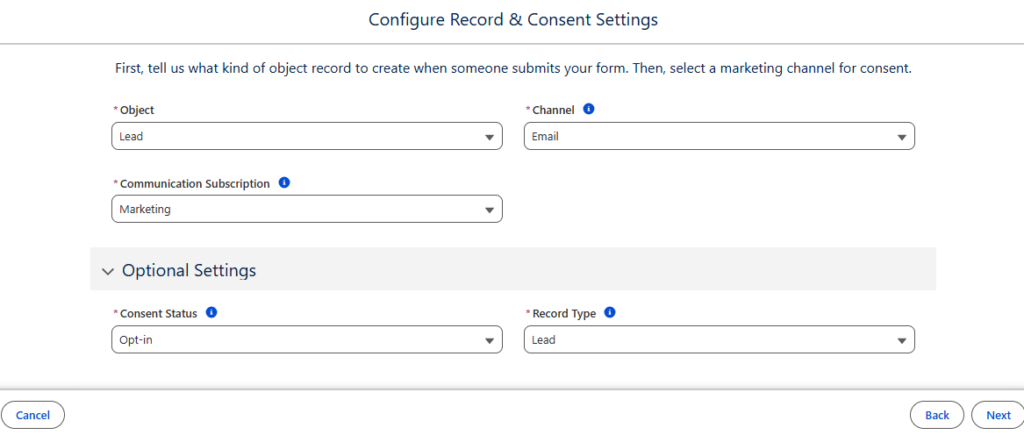
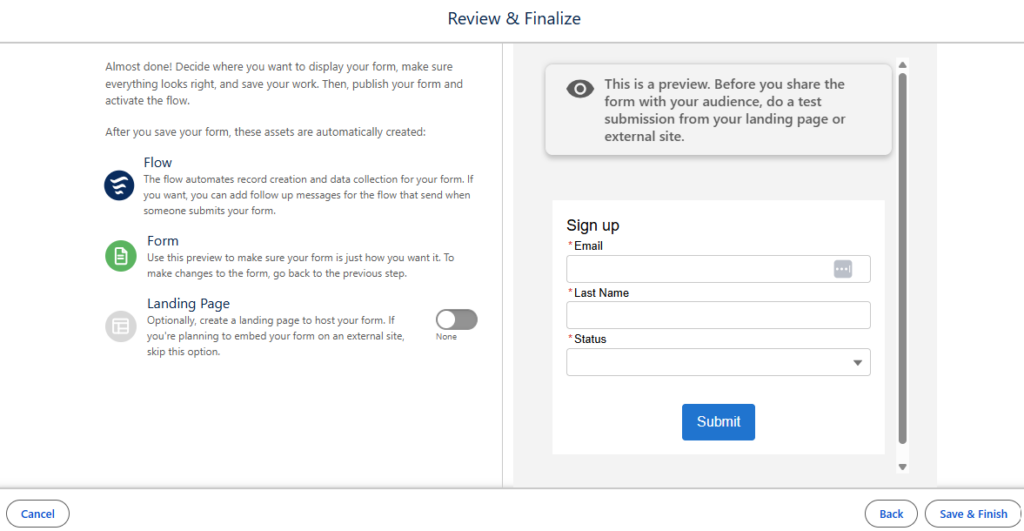
Agentforce Marketing Form Flows can take time to add all of the elements needed, such as autoresponders, lead notifications, and whatnot. Let’s use a handy Marketing Cloud flow template to solve a few problems with one simple subflow!

Product Note: In previous blog posts, Agentforce Marketing has also been referred to or known as Marketing Cloud on Core and Marketing Cloud Next. This product may have also been referred to under its Edition names, Marketing Cloud Growth and Marketing Cloud Advanced.

What Problem Are We Solving?

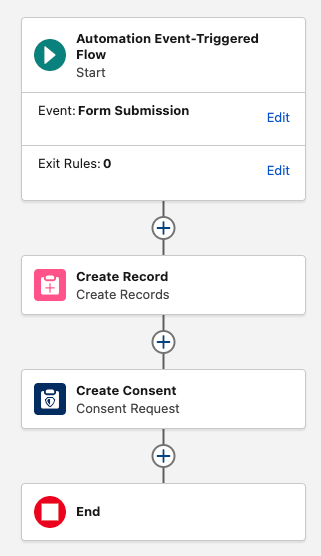
When someone fills out a form we need a scaleable, reusable way to determine if the person filling out the form is an existing Lead and/or Contact in Salesforce. If you include an email component to your form flow, such as an autoresponse email, then the first node in your form flow must be a create element. This makes it arduous to check for existing records and send an autoresponder in the same flow. 

Form Triggered Flows

When creating a new form in Agentforce Marketing you may have received the error message below warning you that a form triggered flow must begin with a Create Record. 

Error message that warns you that a form triggered flow must begin with a Create Record.

This can be frustrating because sometimes you want to first check if there is an existing record that matches what was just entered in the form, then decide if you should create or update a record.

Now you can!

Introducing: Upsert a Record for a Person (Flow Template)

This handy flow template makes life easier. It is also the ONLY exception to the rule above about starting with a Create Element. You can also start your form flow with a subflow that uses the “Upsert a Record for a Person” template, which is very useful.

The main benefit of creating a subflow is that you can call the same subflow from multiple form flows, no reinventing the wheel needed to scale. This new flow will handle the following:

  • Check if a Contact exists > Update if found
  • If no Contact exists, check if a Lead exists > Update if found
  • If no Lead exists, create a new Lead

Optionally we can also add email alerts, add to campaign elements, and more. 

Let’s Build the Flow

  1. In the Marketing App, select the Flows tab
  2. Click New 
  3. In the search window, search for “Person”
  4. Select the template Upsert a Record for a Person
When building a flow you need to select the template "Upsert a Record for a Person."

Your flow should open to the following canvas layout.

This image shows what your flow should look like when you open it.

The flow is autolaunched because we’ll call it from another flow (our form triggered flow).

  1. Click Next
  2. Name the flow “Look for Existing Contact/Lead”
  3. Click Create

This flow will ingest data from your form triggered flow and return a recordId. For this to work, we need to first create the variables in the subflow so that we can send the necessary data. 

  1. Within the flow builder, select the Toolbox
    1. You should see three variables: company, lastName, recordId. These are the default variables because they’re technically all that’s required to create a record. You certainly will need more than this.

Important: when you add a new variable, like firstName, for example, you’ll need to make sure the checkbox for “Available for Input” is checked. This insures that any new variables you add will be able to accept the data from the form flow that this new flow is connected to. You’ll notice the three default variables already have that option checked.

This image shows that when you're in the flow builder, select the Toolbox and you'll see three variables: company, lastName, and recordld. These are the default variables.

Next we will create any necessary variables. Any data that your form is going to capture should be a variable for this flow to ingest. For example, firstName, phone, favoriteCandy, whatever!

  1. Within the Toolbox, select New Resource
  2. Select the Resource Type Variable
  3. Enter your API Name, well use email for our example
  4. Select your Data Type, this will typically be Text
  5. Select Done
This image shows that when creating a new resource you will see these prompts: resource type variable, API name, data type.
  1. Repeat for any additional variables 

Customize the Sub Flow

Now that the basic setup of the sub flow is done we can configure the elements to suit our needs.

  1. Start by selecting the Get Contact element.
    1. By default the template only looks for lastName to determine if a matching Contact exists. We’ll switch this out for a more reliable unique identifier, email address.
In this photo we see the "get records" section and when selecting "Get Contact" element it automatically looks for lastName but we want to change to email address.
  1. Select + Add Condition
  2. Enter the Record Field Email equals variable Email
When in "get records" this image shows how to make the Record Field Email equal the variable Email.
  1. Select the trash can icon next to the Last Name condition to remove it

Important: When mapping the fields remember your variables represent the inbound data from your form, the field represents the object’s fields in Salesforce.

5.  Once complete, you should be mapping (at least) the Email field with the email variable you created. 

2. Next selecting the Decision element. 

  1. The Decision element will determine if there is an existing Contact found. Name the element “Does Contact Exists?”.
  2. Under Outcomes, let’s name the first outcome “Yes”. 
  3. For the Yes outcome, your Resource should be the Contact ID from the Get Contact element. So if the Get Contact found a Contact, there will be a Contact ID present.
  4. Map the Get Contact > Contact ID with the Operator “Is Null” which should equal False.
Shows outcome details and mapping the Get Contact > Contact ID with the Operator “Is Null” which should equal False.

If a contact is found the Contact ID will not be null.

  1. For the default outcome, simply name it No. There is no criteria needed because either the new record is a contact or it’s not.

3. If it’s NOT a contact.

If your new record is not a Contact you’ll see by how the template is laid out, it will go down the right hand path and hit another set of checks to look for an existing Lead.

A. Configure your Get Lead node the same way you did with your Get Contact, mapping your Lead Email field with the email variable. This means it will look for any lead records that match that email address.

B. Configure the Decision element in the same way you did the Contact Decision element. You want to determine if it found a Lead ID from the Get Lead node above.

This shows outcome details and determines if it found a Lead ID from the Get Lead node.

Finally, we’re either creating or updating records.

On the left path, where a record will travel if a matching contact record is found, we’ll update the existing Contact with the details from our variables. Remember, the variables represent the data that the person entered into the form. Map the variables to the appropriate Contact fields to update the values.

Important: As of this writing, if a variable has a null value because the form field was optional, and the person did not fill in the field, that null value will overwrite the value on the contact record! For example, if your phone field is optional and a person doesn’t fill that out and their existing contact record does have a phone number, it will be overwritten with a null value and you will lose that data. If you would like to prevent this from happening, see Solution #2 of this blog post for a workaround. 

On the right path, records that are not existing contacts will travel to check for an existing Lead. If a Lead is found, you’ll configure the Update Lead node and map your lead fields with the variables.

If a lead is not found, you’ll create a new lead. Configure the Create Lead node, mapping your variables to the lead fields.

Very important last step for this flow:

For each update or create element at the end of the branches you must check the box for “Manually assign variables (advanced)” and store the variable in your recordId variable. If you don’t do this the flow won’t send the recordId back to your original form flow.

Setting field values for the lead. Make sure to check "Manually assign variables."

Once all the elements are configured and you’re sure that each exit point (create or update element) will store the recordId, you’re done with this flow and can save and activate. The flow must be activated before returning to your form flow.

Wait a minute, doesn’t the Create Records element include a check for matching records?

Yes, it does! That will work for your forms but you first need to know if the person filling out the form is a lead or contact. This subflow is the only way to first determine if the person filling out the form is an existing contact, lead or brand new. 

Let’s go back to our form flow

Now that we’re back in our original form triggered flow, we have much less work to do to create an effective way to check for existing records before we decide if we want to create a lead or contact, or update an existing record. 

When you start your form flow, instead of using a Create element, add your subflow.

  1. Delete the default “Create Lead” element that’s usually added
  2. Click the plus icon to add an element directly after your start
  3. Select the Interaction element “Subflow”
  4. One the right hand menu of flows, search for the flow you just created. You may have called it “Look for Existing Records” or something similar.
  5. Configuring the subflow node is important. You’ll see a toggle next to each variable you created in the subflow. This allows you to map your Form Fields directly to your variables in the subflow.
  6. Click the toggle and map all of the fields from your form.

Note: you do NOT need to map all of the fields, only the ones you want to use to create or update records in your subflow. You may include extra variables in your subflow to make it scaleable. For example, your subflow may include “favoriteColor” but you may not collect this data in all of your forms. That’s ok, you can toggle it on any of the forms you collect that data.

A workflow diagram with blocks for form submissions.

Using the recordId that was found in the subflow

What’s really nice about this subflow is that your form receives back a recordId for the record that was either found and updated, or the newly created record. There is no 24 hour wait. If you want to take additional steps in your form flow, like adding people to a campaign you’re going to need that recordId. 

Final thoughts

Creating and calling a subflow might seem intimidating to newer platform users, but if you take the time to configure it you will have an invaluable, reusable resource. In simplest terms you’re bypassing Data 360’s 24 hour wait period for checking a form submission for existing records and you’re receiving back (almost instantly) the recordId of the existing record or newly created record. This opens up all sorts of options in your form flow and makes them much easier to scale.

I also encourage you to have the subflow do as much work as possible. The more you have your subflow do, the less work your individual form flows need to do which means you’re up and running with new forms really quickly. For example, I recently set up a subflow that checks for existing records, adds the person to a campaign based on the UTM value in their form submission and sends the sales team an email alert, all within that subflow. 

One additional added benefit to the subflow strategy is that it’s far easier to deactivate, add-to and debug a regular flow. Form flows are notoriously fickle, so once activated, I like to leave them alone. But the subflow behaves similarly to any other admin flow in Salesforce that can be added to and edited as needed. (eh ahem, in the sandbox, of course). 
Special thanks to our friend, Francois Perret for his terrific article on the subject.

As a buyer, we’ve all been there. You fill out a form, wait to hear from sales, and then maybe you receive a piece of content that isn’t relevant to you, or you find yourself repeating what you shared in the form later on a call. And what happens? You find yourself starting to feel less and less confident about the brand because your experience hasn’t been seamless. What we don’t think about as buyers is what the seller is probably experiencing in the CRM and how the data, or the lack thereof, is impacting their interactions with you. 

When the CRM is a roadblock rather than a revenue driver for sellers, it negatively impacts the buying experience in addition to sales performance. In today’s modern era, where buyer expectations are rising and marketing, sales, and customer success teams are under more pressure to drive growth with tighter budgets, it is critical that they prioritize optimizing core functions to deliver the best experience possible for buyers. An essential piece: optimizing the CRM seller experience.

To get the highlights on how to approach this, continue reading below. To get the full deep dive, watch Part III: A Better CRM for Sellers = A Better Experience for Buyers, of the Built to Buy series.

Built to Buy Part III
A Better CRM for Sellers Equals a Better Experience for Buyers
Speakers: Siso Ntuli, Senior Engagement, and Taylor Bacchus, Account Director
Watch Now

Why the Seller Experience Must Be a Growth Priority

For marketing, sales ops, and revenue teams, optimizing the seller experience isn’t just a nice-to-have operational fix. It is a critical growth lever.

  • Impact on Sales Performance: Unfortunately, the majority of a seller’s day is not spent selling. Only about 28% of their time actually is. (Salesforce) The rest of their day is consumed by manual data entry, hunting for siloed information, and navigating non-optimized processes. When the CRM experience is clunky, difficult for sellers to find what they need, not aligned to their sales process, or not reinforcing their training best practices, it slows them down, continuing to hinder the time they do have to sell, acting as a roadblock to their performance.
  • Impact on the Buying Experience: Buyers are not thinking: Am I in a marketing, sales, or customer success experience? They see one singular brand experience. When a CRM is friction-heavy, sellers can show up to calls sounding unprepared, while buyers find themselves forced to repeat information they already gave to marketing, making the brand seem not in tune with their specific needs. According to Gartner, 77% of B2B buyers reporting that their last purchase was very complex or difficult, it shows that these experiences are happening more often than growth teams probably realize. Any internal friction added erodes their trust.

To empower sellers to achieve higher performance and deliver the best buying experience possible for customers, optimizing the seller experience in the CRM is a must.

Through the Seller’s Eyes: How Marketing Can Help

The buyer’s experience is everyone’s responsibility, and marketers can play a pivotal role in helping to improve the seller experience. For marketers, when the CRM is aligned to core sales processes and optimized to how sellers actually work, it makes it easier to collaborate, streamlines the marketing to sales handoff, and ensures fewer leads fall through the cracks and more of the right leads form meaningful connections with your brand.

To fully understand what a seller’s experience is in the CRM, the strategy needs to be approached from the seller’s perspective and knowing what matters to them.

To a seller, more data does not always mean more value. When a lead hits their queue, they are looking for clarity on two simple questions: Who are you, and what should we be talking about?

Marketing can significantly improve the seller experience by shifting focus from data quantity to context quality. Instead of throwing more data over the wall, marketing should provide the connective tissue that tells the buyer’s story. This includes:

  • Prioritization: Is this a “hot” hand-raiser or someone in an explorative phase?
  • Relevant context: What specific content did they consume? Knowing if a prospect looked at a pricing sheet versus a top-of-funnel blog post changes the entire sales approach.
  • Laser-focused data: Provide only the key data points needed to frame a strategic conversation rather than overwhelming the seller with noise.

Having a conversation with sales to understand what questions they are asking themselves when a lead comes through, how they prioritize follow-up, and how they are gathering resources and data to create a strategy that will guide future sales conversations can help the marketing team focus on the right data when passing over leads and collaborating with sales to improve the seller experience.

A Strategic Approach to a Better CRM Experience

Aside from the initiatives that marketing can take, optimizing the seller experience in the CRM requires a mindset shift around how the technology is approached. Is it only seen as a database for sellers to enter information about their deals for reporting and forecasting, or is it seen as a powerful productivity engine that can support sellers in their sales process: arming them with insights for impactful conversations, streamlining and automating mundane admin tasks, and reinforcing sales training best practices?  

As Siso Ntuli, Senior Engagement Manager at Sercante, puts it: “The goal isn’t just to generate numbers. It’s to facilitate meaningful conversations”.

A quote from Siso Ntuli, Senior Engagement Manager at Sercante: The goal of the CRM isn't just to generate numbers. It's to facilitate meaningful conversations.

To turn your CRM into a growth accelerator, teams should take the following strategic steps:

  1. Map the processes: Outline every step of the sales process alongside the buying process to see how it currently aligns with your CRM setup to see where there is misalignment.
  2. Spot the silos: Identify swivel-chair work: tasks that force sellers out of the CRM and into spreadsheets or disparate systems.
  3. Identify opportunities for AI & automation: When thinking through the steps in the sales process, highlight the repetitive and mundane tasks that could be streamlined with AI and automation. This can free up time and brainpower for sellers, so they can focus more on the customer.
  4. Approach with a customer-centric mindset: As the team considers what improvements could be made to the CRM for the seller’s experience, ask: What will the end experience feel like to the buyer? Keeping this in mind will guide CRM optimization initiatives to be designed not just for internal processes, but for the experience the buyer expects.  

Shifting the mindset to approach the CRM as a system that can be a revenue driver rather than a roadblock for sellers, and keeping the buyer’s experience at the forefront, is the beginning of optimizing the CRM. The next step is understanding the current state of the CRM seller experience.

The CRM Seller Experience Scorecard

Getting a baseline from your sales team on what their experience and sentiment are with the CRM allows teams to identify in which areas they may want to improve first. 

Ntuli introduced the CRM Seller Experience Scorecard to evaluate the CRM across five key criteria:

  • Level of Adoption: Is the system easy to use, or do sellers dread logging in?
  • Level of Data Visibility: Is the must-have data readily available at their fingertips?
  • Level of Automation Use: Is automation being used to eliminate manual tasks?
  • Amount of Manual Data Entry: How much manual data entry is being done?
  • Data Reliability: Do sellers trust the data in the CRM?

Each area is rated on a scale of 1 – 10. Anything from 1 – 4 is the sign of a roadblock. Anything from 8 – 10 is considered optimized.

The CRM Seller Experience Scorecard

Download the CRM Seller Experience Scorecard to do this exercise with your team.

Any area that is identified as a roadblock shows teams where they might want to focus first. To ensure CRM optimizations are effective, Sercante’s Strategy Director, Jenna Packard, and Change Enablement Director, Debra Engels, recommend using a phased roadmap that considers the level of impact on the business, the level of effort to implement, and the effect it would have on the people involved. Tune into Part VI: Tech That Grows With You (Not Against You), of the Built to Buy series to hear their approach.

Built to Buy Part VI
Tech That Grows With You (Not Against You)
Speakers: Jenna Packard, Strategy Director, and Debra Engels, Change Enablement Director
Watch Now

A CRM Seller Experience That Drives Growth

A CRM that works against your sellers is a CRM that causes friction for your buyers. When sales can easily get what they need in the CRM, spend less time and brainpower on mundane tasks, be supported with reinforced training, and access key insights to have meaningful conversations, they have a seller experience in the CRM that supports meaningful conversations, building real connections that drive lasting growth. Giving today’s buyers the experience they expect.

Agentforce Marketing forms are built in Salesforce CMS and can be hosted on Agentforce Marketing landing pages or embedded on external sites. These forms utilize Salesforce Flow to create and update records and represent a significant shift for users transitioning from Marketing Cloud Account Engagement. In this post, I’ve compiled five considerations that I encountered and provided solutions to help speed up your adoption.

Product Note: In previous blog posts, Agentforce Marketing has also been referred to or known as Marketing Cloud on Core and Marketing Cloud Next. This product may have also been referred to under its Edition names, Marketing Cloud Growth and Marketing Cloud Advanced.

Consideration #1 – Duplicate Record Creation

The Create Records element in Flow includes a feature to check for existing records and define actions when matches are found. However, the configuration of your organization impacts this setting and, in some cases, can cause duplicate records to still be created even with this feature enabled.

To prevent duplicate records, check for records that match these criteria and specify what happens when matching records are found. Some field-level configurations and validations in your org override this setting.

Checking for matching records

Solution – Test and Validate

Before getting too concerned about this one, do some testing. Salesforce is extremely customizable, so I get the disclaimer. It’s totally possible that duplicate rules, validation rules, or other configurations could impact this feature in your org.

I tested in my development org and a couple live orgs and did not run into any issues. Still this is worth noting and validating.

Consideration #2 – Specifying the Created By User for New Leads

When new leads are created from a form-triggered flow, the“Created By” field defaults to the user who activated the flow. This is not ideal – especially when flows are activated by users that the sales team is unfamiliar with.

The simple fix is to specify the “Created By ID” in the create records element of the flow.  However, this field is an audit field and might not be available to you in your org.

Even if you have access to this field, there are limitations if you try to use it in conjunction with the “Check for Matching Records” setting. The “Created By ID” can’t be updated on matching records, which makes total sense.

Creating records and checking for matching records

Solution – Audit Fields and Flow Updates

The first step is ensuring that the “Created By ID” field is available and accessible to the user building the form-triggered flow.

This feature must be activated by your System Administrator and assigned to users. The full instructions are included in the Salesforce support article Enable the ‘Create Audit Fields’ Permission in Salesforce.

The second step is addressing the issue related to updating existing records. Since you can’t update the “Created By” field on an existing record, the best option is to add a decision element to your flow. This allows you to create different paths and actions based on the type of record.

This solution replicates the functionality of the “Determine CRM Record for Individual” element that’s currently available in segment-triggered flows. Fingers crossed that this element will be available in form-triggered flows in the future. Until then, this solution gives the flexibility to set the “Created By ID” on new records without impacting existing records.

Automation event-triggered flow processes

Consideration #3 – Overwriting Data

When an existing record completes an Agentforce Marketing form and leaves a field blank, the empty input overwrites the current Salesforce data. For example, if a lead with the job title ‘Quality Engineer’ submits a form with the title field empty, the existing value will be overwritten with a blank.

Before

Details of lead prospect information


After

Shows details of lead prospect without the title

Solution #1 – Required Fields

The quick and easy solution is to prevent blank data from being submitted in the first place. This can be done by updating the field to required in the form. 

Solution #2 – Formula Fields

Depending on the number of fields on your form, making all fields required could impact the user experience and reduce completion rates. Understanding that there will likely be times that there are optional fields on forms, we can still protect good data using formula fields.

Creating formula fields allows you to check to see if the form value is blank before updating data in Salesforce. If the form value is blank, the current value from the contact or the lead can be preserved.

The formulas are complicated by the fact that form fields can’t be used in formulas. This is due to the fact that the data has not yet been committed to the flow’s local memory. This can be addressed by adding the value from the field to an assignment element and using it in the formula.

Protecting Fields 

  1. Create a Variable
    • Toolbox > New Resource > Variable
      • Resource Type: Variable
      • API Name: varFormTitle
      • Data Type: Text
Steps into creating a new resource
  1. Add Assignment Element
    • Set variable values as follows:
      • varFormTitle Equals Associated Form > Title
How to add titles, names, descriptions etc. to a variable
  1. Create Formula
    • API Name:  “clean_Title” (data type – text)
    • This formula will return the value of the varFormTitle variable if it has a value. If it’s blank, it will return the title from the contact record. If a contact record is not found, the final fallback is the title field from the lead. 
    • This ensures that if a blank value is submitted in the form, the current title from the contact will be retained (for contact records) and the title from the lead will be retained for lead records.

IF(
NOT(ISBLANK(TRIM({!varFormTitle}))),
{!varFormTitle},
IF(
NOT(ISBLANK({!Get_Contacts.Title})),
{!Get_Contacts.Title},
{!Get_Leads.Title}
)
)

  1. Configure Update Elements
    • Use the “clean_Title” formula in the “Update Contacts” and “Update Leads” elements.
Setting field values for Lead Records

Consideration #4 – Campaign Member Records

Agentforce Marketing uses Opportunity Influence to track revenue as opposed to Campaign Member Influence, so campaign member records are not really needed. However, many marketers (present company included) rely on campaign member records for much more than just revenue tracking.

At this time, there is no single flow element that automatically adds submissions to a Salesforce campaign, but I’m optimistic that one will be added. Until this happens, we have a couple options.

Solution #1 – Customize Each Form Flow

While possible, this option is not very practical. Even with flow templates, this adds a lot of extra complexity to the form-triggered flow. 


Solution #2 – Campaign Manager Flows

My preferred method for creating campaign member records is separate record-triggered flows. These flows are triggered when new records are created or the campaign or campaign member status on an existing record is changed. 

Creating Campaign Manager Flows

  1. Create Contact and Lead Fields
    • Last Campaign ID (text)
    • Last Campaign Member Status (text)
  2. Add Hidden Fields (to the form)
    • This makes it easy for users to update the values for specific forms by updating the default values of the hidden fields. This is preferable to modifying the flow, in my opinion.
      • Add the campaign ID associated with the form as the default value for the “Last Campaign ID” field.
      • Add the desired campaign member status as the default value for the “Last Campaign Member Status” field.
How to sign up for campaign manager flows
  1. Create the Flow (separate flow are needed for each object)
    • Type – Record-Triggered Flow
    • Object – Contact, Lead, or Account (if person accounts are being used)
    • Trigger – A record is created or updated
    • Entry Conditions – This formula triggers when a new record is created and the Last Campaign ID field has a value or when the Last Campaign ID or Last Campaign Member Status value on an existing record is changed.

OR(
AND(
ISNEW(),
NOT(ISBLANK({!$Record.Last_Campaign_ID__c}))
),
ISCHANGED({!$Record.Last_Campaign_Member_Status__c}),
ISCHANGED({!$Record.Last_Campaign_ID__c})
)

  1. Get Campaign Members
    • Add a “Get Records” element to get all the members of the campaign (based on the Last Campaign ID value from the form).
How to get campaign member records
  1. Check for Existing Campaign Members
    • Add a “Decision Element” to create distinct paths for existing vs. new records.
How to check for existing campaign members
  1. Update/Create Records
    • Add an element to update the campaign member status of existing campaign members to the “Last Campaign Member Status” value.
    •  Add an element to create campaign members for new records based on the record ID, “Last Campaign ID” and ““Last Campaign Member Status”.
How to update/create records
  1. Activate the Flow
    • Based on the example flow (created on the lead object), new lead records or existing members that meet the entry conditions, will now be automatically added to the target campaign.
Activating the record-triggered flow

Consideration #5 – Time Spent Building Flows

Over the course of this post, we’ve taken a very basic flow and enhanced it with additional elements, assignment variables, and formula fields.

The most frequent concern I hear from clients is that they don’t have the time or skills to manage these builds. However, you don’t actually have to build everything from scratch.

Final Flow

Chart of the final flow

Solution – Flow Templates

Flow templates are a great way to jumpstart flow creation. An existing flow can be saved as a template and a new flow can be created from it. Once created, the new flow can be connected to a form.

Creating a Flow Template

  1. Open and existing flow.
  2. Click “Edit As New Version”.
  3. Open the “Start” element and remove the connected form.
  4. Select the “Save As New Flow” option, name, and save.
    • Note: You will have a large number of errors and warnings. This is expected as the flow is referencing form fields and there is no connected form.
    • With the new flow open, select the “Save as Template” option. This will set the flow type as a template. 
How to save a flow template
  1. Clone the source form.
    • Since the original flow was created from a form, you can clone this form (essentially using it as a template). This will ensure that all fields map correctly to the flow and resolve the errors and warnings.
    • Update the hidden field as needed (Last Campaign ID, Last Campaign Member Status, and any other fields that may have been added).
    • Note – You will see a warning because a flow has not been created. This is expected.
Cloning the source form
  1. Create a new flow using the flow template.
    • Flow > New
    • Use the “Search automations” box to your flow template.
Creating a new flow using the flow template
  • Select the template.
    • Close the “Something when wrong” message.
    • Open the “Event” section in the state element and select the new form that was created.
    •  Click “Save” and name the flow.
    • Confirm all errors and warnings have been resolved.
    • DO NOT ACTIVATE.
  1. Publish the form.
    • Return to the new form, confirm that the flow has been connected, click “Publish”.
Publishing the form

Accelerate Your Success 

Agenforce Marketing forms function a bit differently than Marketing Cloud Account Engagement forms, but they perform the same function. There’s an expected learning curve when adopting a new platform and my hope is that understanding some of the considerations will help speed up your adoption and success. 


Sercante is recognized as a Marketing Cloud Growth and Advanced Implementation Expert and has the expertise to support your Agentforce Marketing needs. Let us know how we can help.

Product Note: Marketing Cloud Growth and Advanced are editions of Marketing Cloud Next and have also been referred to as Agentforce Marketing.

Repeaters are one of the newer features in Marketing Cloud Next (aka as Marketing Cloud Growth or Advanced Edition), and one of the coolest in my opinion. In this post, we’ll review what repeaters are, how to set them up, and look at how Fellowes Brands is using them to simplify the customer experience.

What are Repeaters?

Before we get too deep, let’s talk a bit about what repeaters are and how they function. Repeaters are used to display a series of items in an email. These can include recent purchases, upcoming events, product recommendations, and more. The repeater’s layout can be configured to show images, merge fields, CTA buttons, and links.

The magic of repeaters lies in their configuration. All configuration is done in the first item. Additional items inherit this configuration but display the relevant data based on the associated data source. Their layout also allows for customization of the number of items to display and the number of items included per row.

Web design interface with a repeater function.

Learn more about repeaters

The Need

Fellowes is recognized for their innovation in indoor air quality and produces a line of commercial air purifiers scientifically proven to remove COVID, SARS, H1N1 and other harmful viruses. Regular filter changes are key to optimizing the performance of their air quality products.

Fellowes needed a way to improve the customer experience by delivering timely reminders when filter changes were due and by providing relevant filter options based on the specific air purifier. There was also a need to simplify the purchase process by providing direct links to the filters with additional details and purchase options. 

The Solution

Data 360, Marketing Cloud Next, and repeaters were utilized to deliver a scalable solution that met the needs of Fellowes and their customers.

The end result was a tailored email sent to customers based on the expiration date of their current filters. The email offered filter recommendations specific to their air purifier and provided direct links to the corresponding product pages with purchase options and additional details. Below is an image of the repeater section of the final email.

Highlights of note:

  • The number of options vary based on the number of related products for the specific unit.
  • Images are rendered from base URLs appended with specific product codes using merge fields.
  • Images are linked to the product page on the website.
  • The product name and item number are merge fields.
  • The “Learn More” buttons use dynamic URLs to link to the product page on the website.
Filter options for air purifier.

The Build

The focus of this post is on repeaters, but it all starts with data. First, the proper relationships must be established in Salesforce. Then, the data must be ingested into Data Cloud, and a link to the unified individual must be established through the data graph. Once the data structure is in place, configuration of the repeater can begin.

Data Structure

The standard Product object is used to store all product data, including air purifiers and their filters. While this is a great starting point that uses the standard object as intended, it does not include the necessary relationships between the air purifiers and their filters.

A custom junction object named Product Relationships was created to establish these needed connections. This custom object consists of two lookups to the Product object: one for the Parent product and one for the Related product. The custom object also includes several additional “related product” fields used as merge fields, such as Related Product Code and Related Product Name.

Data 360 (Data Cloud)

The Product and Product Relationships objects were ingested into Data 360, and the necessary fields were mapped. The critical step was establishing a relationship between these two Data Model Objects (DMOs).

This was achieved by creating a relationship from the Product Relationship DMO to the Product DMO, using the Product ID as the connecting key.

Data Graph

Data Graphs are essential for enabling personalization and configuring repeaters within Marketing Cloud Next. As stated previously, a relationship was needed between the Related Product and the Unified Individual to deliver upon the requirements of this use case.

The data graph was constructed using several objects to “hop” from the Product Relationship DMO to the Unified Individual record.

Data model diagram outlining relationships between different data objects.

Adding the Repeater

The email was built using the Marketing Cloud Next email builder. If you have any questions about this builder, be sure to check out Erin Duncan’s post, “Everything to Know About the Marketing Cloud Next Email Builder.”


The Repeater component, located in the Layout section of the Components Panel, was dragged onto the canvas where it should appear in the email.

Email builder highlighting the "repeater" component within the "layout" section.

Configuring the Repeater

The Repeater component in this use case includes the following elements:

  • Filter image with a corresponding link and alt text
  • Filter name and item number
  • Call-to-Action (CTA) link that redirects to the filter page on the website


The repeater’s data source was set to use the Product Relationship DMO. The Card layout was selected, and the settings for both the number of items to show and the number of items per row were set to 2.

Shows settings related to a repeater data source. Shows options for filtering, sorting, and data layout.

Adding the Image

There are several options for adding images to a repeater, depending on where the image is hosted. If the image is in Salesforce CMS, it can be added using the Image component and selecting the Salesforce CMS image source option. If the image is not in the CMS, the Image component can still be used with the Merge field option.

In this specific example, more control was desired, so the Image component was replaced with an HTML component.


Here are the steps that were followed:

  1. The Image component in the first item of the repeater was replaced with an HTML component.
How to use HTML components.
  1. HTML code was added into the HTML component.
    • All images were stored externally and followed a consistent format. Since all image URLs used the same base URL with the product code appended, the base URL could be hardcoded into the HTML, and the product code was appended using a merge field.
    • A consistent format was also used for the product page URLs on the website, so the same process was used to generate the product link.
    • The alt text was added using a merge field.
HTML code
  1. The product name and item number were populated using merge fields from Product Relationship DMO. 
  2. The Call-to-Action (CTA) button was configured using a Dynamic URL.
    • The product code was added to the end of a consistent base URL to generate a unique URL linking to the specific product page on the website.
Shows a button configuration with a dynamic URL.

Important:

When adding merge fields into a Repeater component, the fields must be selected from the repeater data source as opposed to the data graph. Since the Product Relationship object serves as the repeater data source in this configuration, all merge fields were added from this source.

Shows a highlighted "add merge field" option

Testing

A segment was created that selected unified individuals who had purchased an air purifier. Test emails were sent using the “Preview” feature in Marketing Cloud Next.

Products displayed in the repeaters were checked against the Product Relationship object for accuracy. All links were also tested and confirmed.

How Will You Use Repeaters?

This use case is a great example of how repeaters can improve the customer experience and drive sales of related products. Building this process opened my eyes to the power of this feature, and I can’t wait to use it more. I hope this post has demystified repeaters and inspired you as well.

Let us know how you are using repeaters (or ideas you have for using them), by dropping a note in the comments section.

Pardot Admin Bootcamp

Learn everything you need to know to become a Pardot pro in our six-week interactive course. 

Prospect
Updater

Your automated path to cleaner data. Fix, enhance, and enrich prospect data so things run smoothly while avoiding sync errors.