Category

Analytics & Reporting

If your campaign attribution feels unreliable lately, you are not imagining it.

Over the past few years, websites have become significantly more complicated from a tracking perspective. Cookie consent platforms are stricter, browsers are limiting third-party tracking behavior, iframe forms are increasingly common, and many organizations are unknowingly blocking the very scripts responsible for preserving attribution data.

The result is a frustratingly common problem: marketing teams are still generating leads, but the reporting behind those leads is becoming harder to trust.

You may already be seeing symptoms of this without realizing where the problem originates. Paid traffic suddenly appears as Direct Traffic in Salesforce. Campaign reporting in Salesforce Marketing Cloud Account Engagement (MCAE) does not align with GA4. Hidden fields occasionally come through blank. Referrer values disappear entirely between the landing page and form submission. Everything appears functional on the surface, yet attribution becomes increasingly inconsistent underneath.

The difficult part is that these issues rarely break the user experience completely. Forms still submit successfully. Leads still sync into Salesforce. Campaigns still launch. But somewhere between the website, GTM, MCAE, and Salesforce, pieces of attribution data quietly disappear.

Why UTMs Disappear Between Landing Pages and Forms

One of the biggest attribution issues we encounter is the silent loss of UTM parameters during the user journey.

A visitor may arrive on your website through a paid campaign with perfectly structured UTMs attached to the URL. After browsing a few pages, they eventually convert through a form on another page or inside a modal. By the time the form submits, the original attribution data is gone. What should have been reported as Paid Search or LinkedIn Ads suddenly becomes Direct Traffic.

This usually happens because the website is not actually persisting attribution data across the session. Many implementations only read UTMs from the landing page URL itself and never properly store them for later use. Once the visitor navigates away from that first page, the attribution values disappear unless custom persistence logic exists to preserve them.

In other cases, timing becomes the issue. GTM may load after the form renders, hidden fields may populate too late, or the scripts responsible for storing attribution values may never execute because cookie consent settings prevented them from loading altogether.

The frustrating part is that none of this is immediately obvious. The form still works. The lead still appears in Salesforce. It often takes weeks or months before someone notices reporting inconsistencies across systems.

iframe Forms Create Attribution Blind Spots

Iframe forms introduce another major challenge that many marketing teams underestimate.

When a form is embedded through an iframe, browsers frequently treat the iframe source itself as the referrer instead of the actual page the user visited. This creates a disconnect between the website experience and the form experience. If your website lives on one domain while the form is hosted on another, the form may never properly inherit the original traffic source.

This becomes especially problematic for organizations using MCAE forms embedded into CMS platforms like WordPress or landing pages that rely on multiple subdomains. Without additional handling, important session and attribution details often fail to pass cleanly between the parent page and the embedded form.

Iframe forms also complicate cookie sharing, session continuity, analytics tracking, and hidden field population. Many companies assume embedded forms are essentially plug-and-play solutions, but reliable attribution almost always requires additional development work beyond the default embed code.

Why Blocking GTM Entirely Can Hurt Attribution

Cookie consent compliance has become increasingly important, but many implementations unintentionally break attribution in the process.

One of the most common mistakes we see is blocking Google Tag Manager entirely until a user explicitly accepts cookies. While the goal is usually privacy compliance, the side effect is that critical attribution logic never executes at all.

In many environments, GTM is responsible for storing UTM parameters, capturing referrer values, populating hidden fields, managing session data, and coordinating analytics events across platforms. If GTM itself never loads, those processes simply do not happen.

Organizations often believe they are only preventing marketing pixels from firing, when in reality they are disabling the entire mechanism responsible for preserving attribution data.

A more modern approach is typically to allow GTM to load while using consent controls inside GTM to selectively block non-essential tracking tags until consent is granted. This preserves important functionality without immediately firing advertising or analytics cookies.

That distinction matters far more than most teams realize.

Organic and Paid Attribution Should Not Be Treated the Same

Another common problem is treating all traffic attribution identically.

Paid traffic usually arrives with explicit identifiers attached, such as UTM parameters or advertising click IDs. Organic traffic behaves very differently and often depends on browser referrer information and session-level persistence instead.

When both attribution methods rely on the same cookie structure or overwrite each other too aggressively, reporting quickly becomes unreliable.

For example, a visitor may first discover your company organically through search before later returning through a paid retargeting campaign. Depending on how attribution persistence is configured, the paid visit may overwrite the original source entirely, making it difficult to understand the true customer journey.

Separating paid attribution logic from organic and referral attribution often creates much cleaner reporting and helps reduce conflicts between Salesforce, MCAE, and analytics platforms.

Hidden Fields Are Often the Weakest Link

Hidden fields are one of the most important connections between your website and Salesforce reporting, but they are also one of the most fragile parts of the entire process.

Many organizations assume hidden fields are functioning correctly simply because the fields exist on the form. In reality, those fields may populate inconsistently, overwrite each other during navigation, or fail silently because of timing issues and consent restrictions.

We frequently encounter situations where attribution fields populate after the form submission has already fired, meaning the lead enters Salesforce without the proper campaign data attached. In other cases, iframe communication issues prevent the parent page from ever passing values into the form itself.

This is why attribution testing should go far beyond a single successful form submission in a staging environment. Reliable testing requires evaluating multi-page journeys, iframe behavior, returning visitors, consent acceptance scenarios, mobile browsers, and cross-domain navigation paths. The edge cases are usually where attribution breaks first.

MCAE Tracker Domain Misconfigurations Are More Common Than Most Teams Think

Tracker domain configuration is another surprisingly common source of attribution problems.

As websites evolve over time, organizations often accumulate multiple tracking scripts, legacy MCAE configurations, outdated tracker domains, and inconsistent implementations across subdomains. Everything may appear operational on the surface while attribution quietly becomes fragmented underneath.

We regularly encounter environments where old pi.pardot.com scripts still exist alongside newer tracker domains, or where landing pages and forms load from domains that no longer align with the primary website experience. These inconsistencies can create duplicate visitor records, cross-domain warnings, broken session continuity, and unreliable campaign reporting.

Cleaning up tracker domains and standardizing first-party tracking behavior is often one of the fastest ways to improve attribution reliability across the entire marketing ecosystem.

Attribution Problems Are Rarely Caused by One Single Issue

The biggest misconception around attribution troubleshooting is the idea that there is usually one root cause.

In reality, attribution failures are typically the result of several smaller problems happening simultaneously. Cookie consent settings interfere with GTM execution. iframe forms lose referrer information. Hidden fields fail during navigation. Browser privacy restrictions interrupt session persistence. Tracker domains become fragmented over time.

Individually, each issue may seem minor. Together, they create reporting environments that become increasingly difficult to trust.

That is why many organizations struggle to reconcile differences between Salesforce, MCAE, GA4, and advertising platforms. Each system is capturing only part of the customer journey.

Closing the Gaps Between MCAE, GTM, Forms, and Salesforce

Reliable attribution now requires far more than simply placing a tracking script on a website.

Modern marketing ecosystems demand intentional coordination between GTM, cookie consent platforms, forms, hidden fields, analytics tools, MCAE, and Salesforce. Without that coordination, attribution gaps become almost inevitable.

If your campaign attribution feels inconsistent, unreliable, or incomplete, reach out to the Sercante l Trilliad team. Our custom development services can help close the gaps between Marketing Cloud Account Engagement, GTM, forms, and Salesforce so your reporting reflects how prospects are actually finding and engaging with your business.

For the last seven years, I’ve been enamored by a marketing analytics tool (who among us hasn’t, I’m sure), Datorama, or Salesforce Marketing Cloud Intelligence. MCI, as we’ve come to call it, is the most seamless way my customers have found to join their data across multiple sources, built by marketers and for marketers. MCI allows users to join data together and easily create reports and dashboards using plain language from the pre-built data models. This allows for easy-to-populate smart lens dashboards, or deeply complex automated reporting triggered by specific events. 

To my delight, and to the happiness of marketers, Salesforce just announced on March 18, 2025, a new version of the tool, Marketing Intelligence (MI),  built on the Salesforce Platform. This new version takes the best features of existing MCI and layers them into the functionality of Data Cloud’s unified platform, while taking users to the future with agentic features that will provide down-to-earth insights with conversational agents. So without any further ado, let’s dive into this new tool, Marketing Intelligence! 

What is Marketing Intelligence? 

Marketing Intelligence (or MI) is a new application on the Salesforce platform designed to simplify marketing data management, deliver trustworthy, out-of-the-box insights that marketers can instantly act on, and deliver better return on investment for marketing spend. Being built on Data Cloud and connected to the Salesforce platform allows it to be fully extensible, with a toolbox for marketers at the ready- it’s everything you need to build robust, effective, and meaningful dashboards with minimal lift. 

Data Cloud for Marketers Made Easy 

One of the processes I have been spoiled by in Marketing Cloud Intelligence is data mapping that auto-populates based on past usage and logical guesses by the platform’s artificial intelligence. Additionally, certain APIs come with prebuilt models and mapping to build off of rather than user-defined settings. These features have helped get marketers streamlined into the world of data models and dashboarding with less lift than throwing them into a database or asking them to join various tables. 

All of that, to my delight, is back in full form with Marketing Intelligence. You have the option to upload a TotalConnect file (a non-standard API, flat file of your choosing), or to use an existing API connection, with some rolled out at launch and more coming in the year ahead. Choosing a connection like Google Ads allows you to seamlessly grab that data, formatted and ready for quick mapping, and load the data you need into a dashboard in just 3 clicks. 

Clean and Easy Dashboards 

The dashboards look sharp and load with ease. These dashboards come prebuilt, with options to customize, and also have a key new feature compared to the existing Marketing Cloud Intelligence: generative AI summaries of your campaigns, including what’s working and what might not be. This elevates, to me, the future of dashboarding—being able not only to look at quick and easy data points and trends but also being told in plain language for what to take away or dig into. This can help marketers ask questions and dive in further, and even ask their agent to take action on what recommendations surface.

The idea of clear and plain insights especially comes up in implementations of the current dashboard tools I work in. Users looking at a dashboard want to know different information, and for dozens of users looking at a single page, the questions they’re asking are going to be different depending on needs. The option to ask your agent to recommend optimizations, and then act on it will save marketers a lot of time and headache. With Marketing Intelligence,  you just need the data ready for an agent to help your end users get what they need from the data you’ve put in place. 

Tidied Data Across Channels 

Of course, the core goal of any marketer looking for a tool like Data Cloud, Marketing Cloud Intelligence, or this new version of Marketing Intelligence, is to tie data together across channels to tell meaningful stories they can act on. In addition to the standardized API mapping, MI creates value by uniformly harmonizing these fields across datasets and allows for a semantic model to be used on the backend to tie data together in ways that are common sense (campaign name ties across all of your channels, for instance), such as tying your campaign from paid media to your campaigns from your CRM or other tools, even when names are not exactly aligned (more on this in a moment). 

I’m an existing Datorama/MCI User: What’s Worthwhile Here? 

If you have been reading up to this point, you know what was probably on my mind when I first saw this tool: can I love a changed version of my favorite software of all time? (And yes, I have a favorite software of all time.) Put simply, I’m ready to love. Let’s dissect the butterflies in my stomach. (And if your heart skips a beat when you hear about normalization, semantic modeling, and ROI, there’s enough of this platform for us to share). 

One Word: Normalization 

When I lead implementations with clients on MCI, we talk about the ways in which their data joins. Sometimes it’s super straightforward, sometimes it’s messy. More often than not, we can devise ways to join the messy and the clean together, such as by breaking out parts of campaigns to equal full campaign names in other channels, or by using the numerous formulas Marketing Cloud Intelligence offers out of the box.

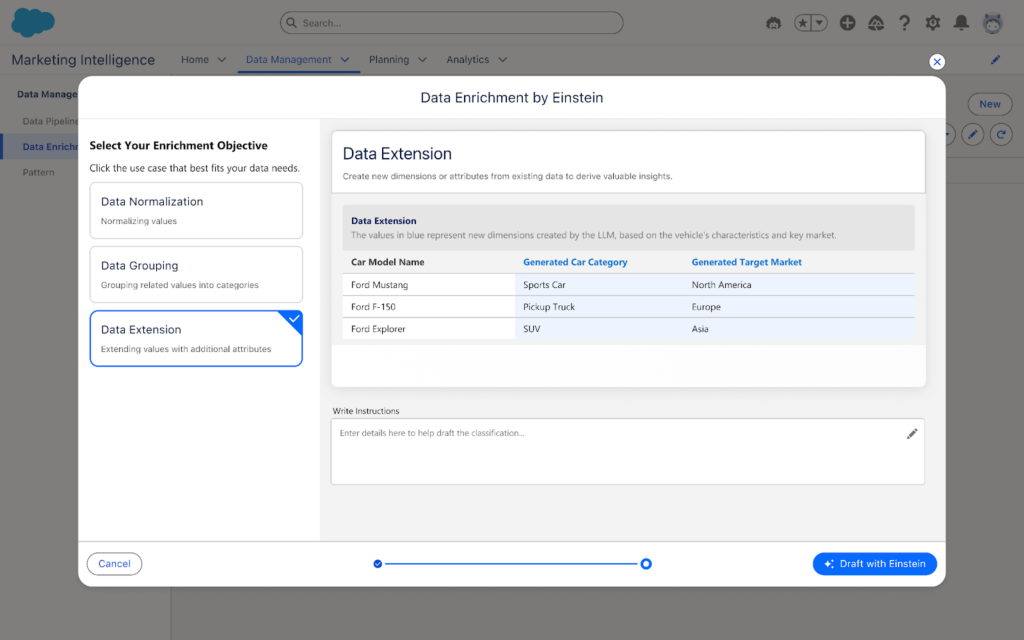
In MI, this is no longer necessary. One of my favorite surprises is seen below: you can classify and normalize data with Einstein AI, so instead of working to modify and standardize all of your data either in the platform of origin or in Intelligence, you can instead have Einstein help you set standardization of your data. This is a fantastic path forward in joining datasets together for synchronized cross-channel reporting.

Two Words: Semantic Modeling 

Though users will have an out-of-the-box paid media data model ready to go, users will have free range beyond the world of pre-defined data models in MCI. In MI, you can set up a semantic model that joins datasets together across multiple objects. While you may miss some of the standardization of having ads, conversion, and web analytics data models, among countless others in MCI, you will get seamless back-end loading of data together, along with seamless joins to standard Salesforce object data. This also means that you can add fields and relationships with full customization as your datasets evolve, or as you update back-end nomenclature to more cleanly join fields from one connection to another.

 Three Words: Return on Investment 

Speaking of Salesforce data, what elevates a good MCI implementation to a great one, in my books, is the joining of cost/engagement data to tangible ROI and meaningful dollar results. With the new integration to the semantic model and the ease of connecting standard objects from Sales Cloud, users can handily create and easily visualize ROI metrics in MI wherever data cleanly intersects, which is now made much easier with Einstein normalization and semantic modeling.

Additionally, attribution is a more straightforward possibility with MI than in current MCI, with the framework to capture website events within Data Cloud data model objects, providing marketers end-to-end visibility into touchpoints where ads have been seen by end users. This will include attribution models for first and last touch for users, and can further be a method to validate ROI and pinpoint specific interactions with customers.

I’ve Never Used MCI or Datorama-Why Should I Explore Marketing Intelligence? 

The Tool for Data Harmonization 

MCI has long been the gold standard for harmonizing marketing data. When clients come to me looking for data solutions, if the core users (front and back-end) are marketers, MCI is always what I recommend. Now with MI, you have the power of what current MCI can do to enable marketers to aggregate and act on data in the same platform as your CRM and marketing data, with the added benefits of generative and agentic AI, 3 click data setup, Data Cloud, and embedded Tableau Next visualizations.

The Tool for Visualization 

Current Marketing Cloud Intelligence has some great visualization options, but the two big enhancements I’ve always wanted and have tried to build guardrails for on my own are: 

1. Faster load optimization for dashboards 

2. Plain language recommendations for end users 

With MI, you get both of those with minimal lifting. Data is smoothly joined together using Data Cloud and back-end semantic modeling, with minimal loading for calculated fields and other computing intensive processes in current MCI. Additionally, with generative AI suggestions and an agent to help you pause underperforming ads, end-users are no longer limited to looking at charts and figuring out what it means,—because actions are ready and available to springboard from on the page.

The Tool for Marketing Customization 

Have you ever wanted to redefine your campaign names in reporting by extracting certain parts of your campaign names from across systems? Have you wanted to group different Google Analytics traffic sources and merge them against ad spending from the respective paid media platforms on an automated basis? What about renaming and grouping a set of campaigns based on criteria only you and your team know and then dynamically filtering for a handful of those campaigns? 

That’s the sort of fun I love to explore with clients, and it’s back in full force in MI with processes like patterns to extract data points from various fields, calculated fields in the semantic layer, and the normalization processes Einstein brings to the table.

A New Era 

Marketing Intelligence launched on March 18th (with Data Cloud and MI licenses required). Talk to your account executive to explore this new product. Marketing Intelligence is going to be the gateway into a new world of dashboarding intelligently (no pun intended) and is sure to streamline data for marketers in ways that have only been hinted at by Marketing Cloud Intelligence previously. I know I’m excited to take this ride, and I hope you’ll join me!

Product Note: Marketing Cloud Growth and Advanced are editions of Marketing Cloud Next and have also been referred to as Agentforce Marketing.

Marketing Cloud on Core (also known as Marketing Cloud Growth or Advanced Edition) can now track how marketing efforts contribute to revenue! With the Spring ‘25 release, Salesforce introduced Opportunity Influence, helping businesses connect marketing engagement to pipeline and revenue. But how does it work, and what’s the difference between Opportunity Influence and Campaign Influence? Let’s dive in!

Opportunity Influence vs. Campaign Influence: What’s the Real Deal?

Before we break down how to customize and report on Opportunity Influence, let’s clarify how it differs from Marketing Cloud Account Engagement’s Customizable Campaign Influence. While both models aim to connect marketing efforts to revenue, they function in distinct ways and serve different use cases. 

FeatureOpportunity InfluenceCampaign Influence
Data SourceMarketing Cloud Engagement (emails, ads, automation, etc.)Salesforce Campaign Membership
Influence ScopeTracks engagement across multiple touchpointsTracks Leads/Contacts who are Salesforce Campaign Members
IntegrationSyncs Marketing Cloud engagement data to Salesforce OpportunitiesWorks within Salesforce CRM using Campaigns and Opportunities
Attribution ModelsMulti-touch attribution (first-touch, last-touch)Campaign Influence and Customized Models
Reporting & InsightsMeasures marketing-driven revenue impactMeasure campaign-driven revenue impact

🚨 Important Note for Account Engagement Users 🚨

You cannot use Opportunity Influence alongside Customizable Campaign Influence. If your team already relies on Account Engagement’s Campaign Influence Models, keep this in mind when deciding which model to use.

Additionally, Account Engagement users cannot activate Opportunity Influence as it does not currently integrate with Account Engagement’s Campaign Influence model. If your organization currently tracks marketing-driven revenue using Campaign Influence reports, you’ll need to continue using that model. However, if you’re considering a shift to Marketing Cloud on Core, Opportunity Influence could offer enhanced multi-touch attribution and engagement tracking.

Battle of Influences: Campaign vs. Opportunity – Which One Wins?

Let’s say you’re running a B2B software company and you’ve executed multiple marketing campaigns using a variety of platforms, including ads, email, an e-book, and a webinar, to engage your prospects.

  • Campaign Influence: A prospect attends the webinar, clicks on an email, and downloads the e-book before being transitioned to sales as a marketing-qualified lead. These interactions are recorded under a Salesforce Campaign and can be manually associated with the Opportunity when created based on the Opportunity Contact Role and Campaign Member. You can assign influence weight based on your customized rules.
  • Opportunity Influence: Marketing Cloud on Core automatically tracks all marketing engagement, including the ad view and click, webinar attendance, and e-book download. These touchpoints are automatically associated to attribute influence based on the predefined model and associated to the Opportunity upon creation.

If Campaign Influence were a fine-dining experience, it would be a chef-curated meal—meticulously crafted with manual customization to fit your exact taste. You decide which interactions get the most credit, but it requires hands-on effort. On the other hand, Opportunity Influence is like an all-you-can-eat buffet with an expert chef behind the scenes. It automatically dishes out credit across touchpoints, giving you a full spread of marketing influence with minimal effort. If you love precision and control, Campaign Influence is for you. But if you want a seamless, automated view of your entire marketing impact, Opportunity Influence takes the crown.

How to Set Up Opportunity Influence

Setting up Opportunity Influence requires configuration in Sales Cloud to ensure marketing engagement is properly attributed to revenue-generating activities. To fully connect marketing efforts with sales outcomes, ensure that contacts engaging with marketing campaigns are linked to Opportunities. This allows for accurate tracking of marketing interactions that influence deals.

Enabling Opportunity Influence

  1. Navigate to Salesforce Setup > Opportunity Influence
  2. Enable Opportunity Influence
  3. Select an Attribution Model
    • First-Touch: Gives full credit to the first marketing engagement that led to the opportunity. It’s ideal for understanding which top-of-funnel efforts drive initial interest.
    • Last-Touch: Assigns full credit to the last marketing interaction before the opportunity was created. It helps measure the final push that converted a lead into an opportunity.

Going Beyond Activation

Customization is key to maximizing Opportunity Influence. Marketers should align influence models with their sales cycle, ensuring critical marketing touchpoints, such as email engagements, paid ads, and automation journeys, are correctly captured. Because Opportunity Influence consumes Data Credits, it’s essential to be strategic when enabling multiple models to avoid unnecessary credit usage.

Making Sense of Your Data: Reporting on Opportunity Influence

Once Opportunity Influence is enabled and tracking data, you can start reporting on marketing’s impact. The key to unlocking valuable insights is leveraging Salesforce’s Reports & Dashboards to tell a clear story about how marketing drives revenue.

Your Treasure Map to Salesforce Reports & Dashboards

  • Head over to Salesforce Reports and search for Opportunity Influence Reports. This is your go-to hub for seeing which marketing touchpoints are helping close deals.
  • Get specific with your insights! Use filters to refine reports by timeframe, campaign, or opportunity. Want to know which emails led to the most revenue? Adjust your filters to see the impact.
  • Create Salesforce Dashboards to visualize Opportunity Influence. Need a quick snapshot for your leadership team? Build an easy-to-read chart that shows exactly how marketing is fueling revenue.

The Ultimate Guide to Opportunity Influence Report Types

Salesforce provides several built-in report types to help you analyze how marketing efforts contribute to revenue. Here are the key report types you can use:

  • Opportunity Influence Summary Report – This high-level report shows how marketing engagements are influencing revenue across all opportunities. Use it to track overall marketing impact.
  • Opportunity Influence Detail Report – A more granular report that breaks down individual touchpoints per opportunity, allowing you to analyze which specific marketing interactions played a role in closing deals.
  • Influence Attribution Model Comparison Chart – Compare first-touch and last-touch models side by side to see which one provides the best insights for your marketing strategy.
  • Marketing Touchpoint Analysis Report – Identifies which marketing channels (email, ads, website visits, etc.) are contributing the most to opportunity creation and pipeline growth.

By setting up and analyzing Opportunity Influence reports, marketing teams can gain deeper insights into which touchpoints matter most, optimize their strategies accordingly, and confidently demonstrate their return on investment.

Why Opportunity Influence is a Game-Changer

Opportunity Influence is a must-have tool for any marketing team looking to measure true revenue impact. No more guessing which emails, ads, or landing pages are driving pipeline – Opportunity Influence connects the dots, giving you a clear picture of how marketing fuels business growth. With built-in attribution models, you can customize insights based on what matters most to your strategy.

Whether you’re aiming to prove marketing ROI, optimize your campaigns, or align better with sales, Opportunity Influence provides automated, data-driven attribution that simplifies reporting and enhances decision-making. If you want better visibility into marketing’s role in revenue generation, this feature is your new best friend!

💡Next Steps:

  1. Check your org to see if the new update is available.
  2. Test Opportunity Influence tracking before rolling it out company-wide.
  3. Monitor data service credit usage if you’re using multiple attribution models.

📣 Want to learn more? Check out the full Spring ‘25 release highlights or dive into the official release notes.

🚀 What are your thoughts on Opportunity Influence? Drop a comment below, and let’s discuss!

I  must confess that I have built my fair share of boring unremarkable dashboards.  It haunts me to think of all those past reports that are now collecting dust like a Betamax tape in a world of streaming services.  If you are reading this, I bet I am not alone. We can put so much effort into a dashboard and have the reports hold so much potential but they so often get left on the cutting room floor. But why? Why do our dashboards seem to fall flat when there is clearly a need?

Because effective dashboards require more than just data. They need a clear purpose, a targeted audience, and a design that compels engagement. There are four key questions you can ask yourself to align and truly transform your next dashboard from a snoozefest to a success story.

Target Audience | “Who is this dashboard for”

Imagine building a cockpit for a pilot instead of a dashboard for a car. A pilot wouldn’t be helped by a speedometer and radio – they need critical flight information displayed clearly and concisely. The same goes for dashboards. The first question to ask is: who’s the key decision-maker this is designed for? Are they executives seeking a high-level financial health pulse, or analysts needing to dive deep into specific metrics?  Understanding your audience gives you the lens to curate the right information. Too often we want to cram all the information into one dashboard and end up overwhelming viewers with a data buffet, thus a dashboard becomes unused. By pinpointing who will use the dashboard, you can tailor the data to speak directly to their needs and drive actionable insights. 

Goal Setting | “What are the top 3 goals of this dashboard”

Okay, we’ve identified the audience, but what exactly do we want them to achieve with this dashboard? Just throwing data at viewers isn’t enough. We need to set clear goals for what this dashboard should help them accomplish.  Is it to monitor key performance indicators (KPIs) for a quick health check for the marketing manager? Or maybe it’s a unified dashboard for sales and marketing on lead generation ? Defining the top goals keeps the focus tight and ensures the data presented directly addresses those objectives. This also doesn’t have to be overly complicated either. Start with 3 main goals and then you can build upon them!

Actioning  | “Where will this dashboard be used”

Here’s the thing: dashboards need a clear path to “aha moments” and real-world application or they are going to be forgotten like the bagged salad in the back of your fridge. We can break down the lack of action into two key areas.

First, is the information on the dashboard actually driving insights? Are users gleaning valuable trends, identifying potential issues, or getting the data they need to make informed decisions?  The second area is the “where” question.  Will this dashboard be a daily touchpoint for a specific team, a strategic tool for presentations, or something else entirely?  Building a dashboard “just because” is a recipe for neglect.  By understanding how the dashboard will be used and what kind of action it should inspire, you can transform it from a static report into a dynamic driver of results. This is your sign to build in a retrospective process with reporting if you haven’t done so already! 

Goal Setting | “What do you love and hate abour your current process”

Before diving headfirst into building your new masterpiece, take a moment to reflect on your organization’s current dashboards or reporting tools. What reports are being used religiously? Conduct a post-mortem on these existing dashboards – both the good, the bad, and the downright ugly.  

By understanding what resonates with your audience and what falls flat, you can identify successful elements to carry over and steer clear of pitfalls that led to neglected reports.  We don’t always have to reinvent the wheel! Is a specific visualization particularly clear and engaging? Note that down! Conversely, are there any charts or metrics that consistently go unnoticed? Those might be prime candidates for removal.  

Remember, your current dashboards are a treasure trove of insights waiting to be unearthed. Utilize this intel to make informed decisions about the data, design, and functionality of your new dashboard, ensuring it becomes a go-to resource.

Honorable Mentions

Truthfully I can go on and on about questions you should ask before preparing your dashboard, but I did want to also throw a few honorable mention questions that help focus the data quality. Which let’s behonest, is always a hurdle!

  1. “Is the data reliable and up-to-date? “  Ensure the data feeding your dashboard is accurate and reflects the current state of affairs.  Inaccurate data will lead to misleading conclusions. How often will the data be updated to ensure it reflects the current state of affairs?  Stale data is like watching yesterday’s news – interesting, perhaps, but ultimately not very actionable.”
  2. “How can I use the data to tell a compelling story?” Effective dashboards don’t just present facts and figures; they weave a narrative that resonates with the audience. This question encourages the creator to consider the flow of information, highlight trends and patterns, and use visuals to make the data come alive. By crafting a data story, the dashboard becomes more engaging and memorable, ultimately driving a deeper understanding and fostering action.

Design with Purpose, Deliver with Impact

By asking the right questions upfront, you can design dashboards that are anything but boring. Remember to target the right audience, set clear goals, and prioritize actionable insights.  By following these steps, you can create dashboards that become central hubs for informed decision-making and drive real results. So, what are you waiting for? Grab your data and get started crafting your next dashboard masterpiece!

Autonomous AI is transforming the way organizations operate, and Salesforce’s Agentforce is at the forefront of this revolution. The product was made generally available by Salesforce in October 2024. Whether you want to streamline case management, enhance lead nurturing, or delight customers, Agentforce empowers businesses to accomplish more with fewer resources. In this post, we’ll share five practical tips to help you successfully implement and use Agentforce. 

Feeling anxious about diving all in with Agentforce? Contact the Sercante team for an Agentforce readiness assessment. That way, you can be sure you’re getting set up for success before you implement Agentforce in your org.

Understanding Agentforce

Before diving into the tips, let’s take a closer look at what Agentforce is.

Agentforce enables autonomous AI agents to perform tasks without human intervention, acting as digital workers within Salesforce or external customer channels. These agents enhance productivity by automating routine tasks and assisting with complex ones. With tools like Agent Builder, you can customize agents using pre-built topics and actions or create entirely new ones tailored to your organization’s needs.

Agentforce integrates seamlessly across the Salesforce platform, leveraging Data Cloud for reasoning and learning. Out-of-the-box agents include Service Agents for case deflection, with more capabilities to be released in December 2024, such as SDR and sales coaching agents.

Unleashing the Power of Agentforce: Five Steps to Get Started

Follow these five steps to get started on the right foot when you dive into Agentforce.

Tip 1: Identify Use Cases

Start by identifying where Agentforce can deliver the most value in your organization. Ask yourself:

  • How are you using your CRM today?
  • What are the current pain points in your processes?
  • Are there routine tasks that could be automated to free up team capacity?
  • Are there new processes you’ve avoided due to resource constraints?

Examples of use cases include automating FAQ responses for service teams, generating campaign briefs for marketing, or assisting sales reps with lead prioritization and moving deals faster.

Then for each use case, think about what would be needed to transition to an agent:

  • What job should they do?
  • What actions will they need to take?
  • What actions should they NOT take?  (This is just as if not more important to make sure you have defined the lane where an agent should operate within that use case)

Your responses to those questions are going to help you to understand the level of effort involved in use case. This in turn is going to help you to prioritize based on the level of effort and potential value

Tip 2: Define Success Metrics

To gauge the success of your Agentforce implementation, establish clear goals and KPIs. 

Questions you can ask:

  • What does success mean? How will we know we have addressed our problem? 
  • What metrics are we tracking today that we want to see improvement on?
  • Are there additional metrics that will let us know we are seeing success?

For example:

  • Reducing average case handling time by 20%
  • Improving lead response times
  • Increasing campaign ROI by automating content creation

Ensure you have baseline data for comparison and that the necessary measurement tools are in place to help you track success.

Tip 3: Assess Your Data

Your AI agents are only as good as the data they access. For the use cases identified, evaluate your data readiness:

  • What data do need? 
  • Where is it located? Is it in your CRM, Data Cloud, or other external systems?
  • Is it accessible from your CRM? If it’s stored in an external system, do you have APIs in place to get that information?
  • Is the data clean, accurate, and up-to-date?
    • Follow this blog post for tips on how to keep your imported Pardot prospect data clean.
  • Do you have a single view of the customer across systems?
  • Lastly, are knowledge bases and metadata structured for easy access? 
    • Agents need knowledge to inform how they will operate and answer questions. This is all of the background configurations your agents actions will rely on — flows, prompts, and Apex for example — they need to also be clearly identifiable and accessible. 
    • When you add actions to your topics, it uses the descriptions to help fuel the instructions. The naming conventions of your resources will also make it easier to determine what the inputs and outputs need to be.

Data and metadata are the backbone of AI performance, so this is an important area to pay attention to.

Tip 4: Start Small

After completing the previous steps, you may have more than one great use case to start with. Here’s where you ask yourself: What are the quick wins that we can get started on that can move the needle and that we can expand on as we mature?

It’s really easy to get caught up on how this can solve ALL the things. There are many challenges to starting a complex process all at once. If a lot of effort is required to get the data in place or to get the actions set up, it will be more difficult to roll out, not to mention making it potentially disruptive and prone to issues 

Avoid the temptation to tackle complex processes right away. Instead, focus on a simple, high-impact use case to pilot Agentforce. There are many out-of-the-box topics and actions that make getting started easier. For example, automating a single FAQ response or generating summaries for sales reps.

Starting small helps build confidence, momentum, and organizational buy-in, and it also reduces the risk of missteps.

Tip 5: Nail Down Clear Instructions

When designing agents, clarity is key. Use the Agent Builder to create and test well-defined topics and actions:

  • Topics – Include precise instructions for classifying user requests, setting guardrails, and outlining scope.
  • Actions – Clearly define what the agent should do, including required inputs and expected outputs.

Salesforce Agentforce Topic Instruction Best Practices

Instructions are the foundation for grounding how agents perform. They set the guardrails for how the agent should behave and give the agent the context it needs to do its job. 

Here are a few best practices for writing Agentforce topic instructions:

  • Start simple
    • Start with the main use case first to ensure the agent is performing as expected. Then, add in more detail to address edge cases. Be sure to test existing instructions for any conflict. You don’t want to confuse the agent! 
  • Use plain language
    • Use concise natural language to describe what your action does. Keep it to 1-3 sentences, and it can include the goal of the action, any use cases, and the objects or records it uses or modifies. 
    • In general, the more relevant detail you include in your instructions, the easier it is for the agent to differentiate between actions. Also, be sure to vary the words you use. For example, use a mix of “Get,” “Find,” “Retrieve,” or “Identify” for actions that will query records.
  • Avoid industry or company jargon
    • Write like you are instructing someone who doesn’t know your business. Even terms like ‘qualified lead’ could mean something different from one organization to another. Give context where necessary, and reference clear criteria using the data it will have access to. 
    • For example, instead of vague terms like “qualify lead,” specify conditions such as “lead status equals MQL.” 
    • The agent isn’t not going to know your business processes either, so be explicit about the sequence of instructions or any conditions a conversation must meet for an agent to apply an action.
  • Think of all the paths
    • You want to go through every possible permutation to determine the actions required. For example: a customer reaches out because they didn’t receive their order. 
    • First think about the order status ( Order Shipped, Delayed, Not Found, Processing). If the status is Shipped then there could be different tracking statuses (In Transit or Delivered for example). If the order is showing as Delivered, was it delivered to the customer’s correct address? Was it stolen? …and so on.
  • Remember the Guardrails
    • Keep the Agent in its lane by providing clear instructions on what the agent should not do to prevent unwanted responses. In cases where the agent is customer-facing, be sure to also give clear direction on when an interaction should be routed to a human.

Test these instructions thoroughly in the Agent Builder’s testing environment to ensure your agents behave as expected.

Ready to Explore Agentforce?

Agentforce offers an exciting opportunity to enhance productivity and streamline operations. By identifying the right use cases, preparing your data, and starting with manageable projects, you can set your organization up for success.

Want to learn more? Check out Salesforce’s Agentforce Trailhead and virtual workshops to get hands-on experience. Need expert guidance? Contact the Sercante team for an Agentforce readiness assessment.

Student expectations today are vastly different than they were a decade ago. It’s causing technology leaders at the most successful educational institutions to rethink their data infrastructure and student journeys through real-time interaction management strategies.

Today’s students want a personalized, seamless, engaging journey that keeps pace with their brand experiences outside of higher education. At the same time, more and more individuals are bypassing the traditional college education routes altogether. That means higher education institutions (HEIs) need to exceed student expectations to reach enrollment and retention goals and ultimately deliver successful student outcomes.

Combating Headwinds in Higher Ed: A three-part series

Throughout this three-part blog series, you will learn about using your institutional data to create personalized student experiences at scale and in real-time within your college or university. 

  1. Part one: Real-time interaction management and real-time interaction for student success  
  2. Part two: Overview of Salesforce Data Cloud for higher education professionals, potential use cases, and best practices for successfully using Data Cloud
  3. Part three: Building a unified data vision and then activating your data to build a CRM + AI + data strategy for your institution

This series was co-authored by Kirsten Schlau, VP of Technology at Sercante, and Dr. Bradley Beecher (email), Director, Student Experience at Salesforce.

Harnessing data to navigate and overcome challenges in higher education

To help combat higher ed headwinds, there’s a tremendous untapped opportunity for HEIs to use their data by improving organization-wide data infrastructure.

Yes, you’re probably reading this and thinking things like:

We do use data — we analyze our data to maximize the value of resources and stay ahead of constituent needs.

Or even…

We use our data to create strategic plans, execute them efficiently, and analyze their results to differentiate our institution, proactively improve student outcomes, and report outcomes to government agencies and ranking organizations. 

Oftentimes though, that data is trapped inside campus systems that don’t easily integrate with each other. It’s time-consuming to piece together a cohesive and accurate story when the data is trapped, but there’s a better way. It involves creating a fully integrated single source of truth to manage student data.

Unifying student data can help your institution to:

  • Generate real-time institutional reporting
  • Create a unified student record
  • Take action from the data
  • Personalize the student experience to reinforce a sense of belonging 

Taking cues from non-HEIs to use data for growth and retention

What if we told you there’s an opportunity more specifically to use that data on an individual basis, at a 1:1 scale to personalize the student experience in real-time?

This is happening in other industries. In fact, you might have experienced personalization like this as an online shopper. Here are a few examples.

What is real-time interaction management (RTIM)?

Real-time interaction management, also known as RTIM, uses customer interactions, predictive modeling, and machine learning to deliver consistent, personalized customer experiences across channels in real-time.  

“Forrester Research analyst Rob Brosman originated the term Real-Time Interaction Management in 2012, and three years later Rusty Warner, another Forrester analyst, offered the formal definition of, “Enterprise marketing technology that delivers contextually relevant experiences, value, and utility at the appropriate moment in the customer life cycle via preferred customer touchpoints.” – Source

RTIM equips marketers to gain immediate visibility into critical moments within the shopping or user experience, which can deliver better consumer experiences and outcomes. This includes generating relevant offers and product suggestions on the right devices at the right time to drive customer engagement, satisfaction, and, in turn, revenue growth. 

Impact of real-time interaction management in the real world

As an everyday consumer, you’ve likely already experienced the effects of RTIM (or you’ve experienced a scenario where you wish RTIM was in place).

Example scenario illustrating RTIM in e-commerce:

Let’s say a customer, Maria, visits an online fashion retailer’s website:

  1. Browsing Products: Maria lands on the retailer’s homepage and starts browsing through summer dresses.
  2. Real-Time Data Capture: As Maria navigates through the website, her behavior is captured in real-time. This includes the pages she visits, the products she clicks on, her past purchase history, demographic information, and any other relevant data.
  3. Real-Time Analysis: The e-commerce platform analyzes Maria’s behavior and data in real-time. It identifies her preferences based on her browsing history, past purchases, items in her shopping cart, and any other available data points.
  4. Personalized Recommendations: Using RTIM, the e-commerce platform dynamically generates personalized recommendations for Maria. It might suggest summer dresses similar to the ones she’s viewing based on her style preferences and past purchases. These recommendations are displayed prominently on the website in real-time.
  5. Real-Time Engagement: While Maria is still browsing, a pop-up notification appears offering her a limited-time discount on a dress she had previously shown interest in. This real-time engagement aims to incentivize Maria to make a purchase.
  6. Adaptive Pricing: As Maria continues to browse, she adds a couple of dresses to her cart but hesitates to complete the purchase. In response, the e-commerce platform dynamically adjusts the prices of the items in her cart, offering her personalized discounts or free shipping to encourage her to proceed to checkout.
  7. Abandoned Cart Recovery: If Maria leaves the website without completing her purchase, the e-commerce platform sends her a personalized email reminder within minutes to remind her about the items in her cart. These reminders offer her an additional discount or incentive to complete the purchase.
  8. Cross-Channel Consistency: Whether Maria interacts with the retailer’s website or mobile app, or when she receives an email, the messaging and recommendations remain consistent across all channels for a seamless and personalized shopping experience.

In this example, RTIM enables the e-commerce retailer to engage with Mary in real time, providing her with personalized recommendations, discounts, and reminders tailored to her preferences and behavior. This ultimately increases the likelihood of conversion and enhances customer satisfaction.

Additionally, some online retailers are now using RTIM not only in their marketing efforts but also as a way to offer seamless customer experiences. 

Harnessing RTIM at colleges, universities, and other post-secondary education institutions

In the e-commerce example above, the experiences were grounded in segmentation and, of course, made up of various data points. 

It’s no different for HEIs. The ability to segment and provide greater personalized content and experiences leads to a great student experience.

We’ll share a few examples of how other professionals in higher education are doing this today.

Real-time interaction for student success

Imagine a world where student advisors can gain a full 360° picture of their students in a single view. This could include:

  • Past class enrollment records and performance indicators
  • Required courses that support their designated degree path
  • Intelligence to recommend courses based on individual interests and passions outside of their degree path
  • Automatic insights into things such as on target to graduate, at risk, potential for drop-out, and any other insights unique to your institution.

Oh! And one more thing to add: this is all done at scale with minimal manual effort put on the advisor.

Step 1 to building an RTIM strategy: Unify data to create a single source of truth

This vision can become a reality when your data is not trapped in siloed campus systems. 

You might say, “How is that possible?”

Here’s how you can start building a student-centric RTIM strategy.

All of this data aggregation and related insights are powered by Salesforce Data Cloud and Einstein 1 Platform. They are the building blocks to creating personalized student experiences with real-time capabilities. And they can also help advisors to gain more time to focus on making meaningful connections with their advisees and ensuring their long-term success. 

How does the Einstein 1 Platform support RTIM strategy for HEIs?

The Salesforce Einstein 1 Platform (A.K.A. “Salesforce core”) unifies your data, AI, CRM, development, and security into a single platform. It’s an extensible AI platform (meaning, it easily connects with other Salesforce platform products and third-party integrations), and it can facilitate the fast development of generative apps and automations.

Through Einstein 1, your institution can appropriately address students’ most common, basic, or foundational questions through alerts and automated workflows. Then your advisors’ interactions with students can center on deeper and more meaningful advising conversations.

Creating unified student profiles with connected data

A unified student profile, aggregating student data into a single student record allows advisors to meet with more students and encourage those meaningful conversations. For example, instead of talking through the required courses advisees need for their program, they get automated alerts listing which courses to take next. Then, the advisee’s open office hours can become career exploration sessions or deep dives to help students better understand complex concepts.

At institutions with siloed data, creating alerts like those in the example requires a ton of manual effort and time. And let’s face it — advisors don’t have time to spare. 

How Data Cloud solves the RTIM puzzle

With Salesforce Data Cloud, advisors can provide more proactive and holistic support for students. That’s because campus data for each student is unified in a single record — something that benefits both students and the institution.

In turn, students make more informed and thoughtful decisions with this proper support from academic advisors. Getting automated alerts supports students as they navigate the university/academic program policies and procedures, and, more importantly, offers an exceptional college experience.

Ultimately, Data Cloud will help build better staff experiences with a unified student record and a seamless student experience that meets their modern expectations.

In the next post in this series, we will provide an overview of Data Cloud for Higher Education, examples of potential use cases, and best practices for using Data Cloud.  

Ready to transform your student experience through real-time interaction management?

Discover how real-time interaction management can elevate the way you engage with students, and enhance their experiences with personalized, timely interactions that make a real difference.

Learn more about Salesforce Education Cloud here to understand the platform and how it compares and relates to your current technology stack.

Then, send a message to Sercante to learn about our Salesforce consulting services for higher education institutions, including Salesforce implementations & migrations, design & architecture services, reporting & analytics, custom integrations, and everything in between.


No more posts to show