Category

Release Notes

Product Note: Marketing Cloud Growth and Advanced are editions of Marketing Cloud Next and have also been referred to as Agentforce Marketing.

Since Marketing Cloud Growth was introduced at the beginning of last year, more and more innovations with the platform have been coming out at a rapid pace by the team at Salesforce. The upcoming Winter 26’ release is no exception to this momentum. Note, the Winter ’26 updates will be available starting September 19th.

TL;DR – What’s the point, what do we love the most?

While the Winter 26’ release brings a ton of new features and enhancements, there are definitely some that stand out to us. Here’s a list of our favorites.

  1. Form fields can be set to “hidden” using a simple checkbox on the configuration screen. 
  2. Form fields can be given a default value, and in addition, you can automatically set that value with a URL parameter. No need for JavaScript!
  3. Form handlers for external website forms.
  4. Reusable content blocks available when creating emails. This release brings some solid enhancements to the Email Builder!
  5. Enhanced reports and dashboards.

The Email Builder, Content & Messaging

Reusable Content Blocks

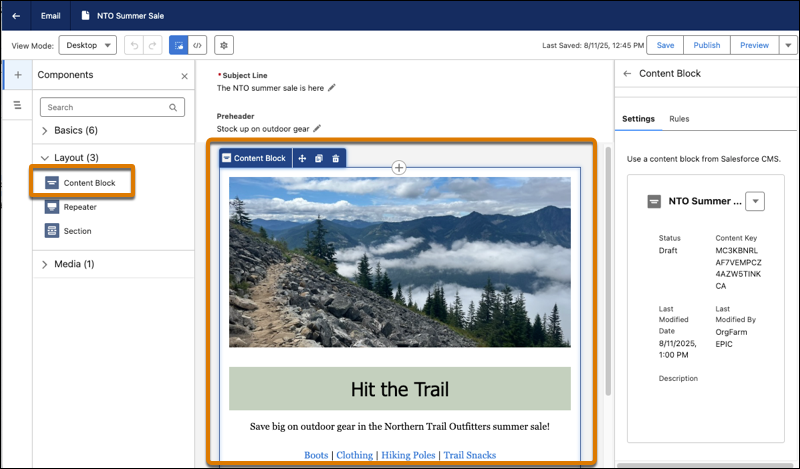
No more reinventing the wheel each time you create a new email layout! Content Blocks are exactly what the name suggests, bits of content you’ll want to use on multiple email assets. For example, banners, specially formatted footers, terms & conditions text, buttons or any other regular content you use often. Or, any combination of this content. For example, a content block can be an image, accompanying text and a CTA button below it. You’ll find the “content block” option under Layout and can easily drag blocks onto the email canvas.  Content Blocks are stored in your Marketing Workspace along with your other content. 

In addition, you can ramp up your personalization by creating Content Blocks for different audiences and apply variation rules that serve personalized content to the right recipients.

A screenshot of Content Blocks being used in the Email Builder.

Email Templates

Marketing Cloud Account Engagement users will appreciate the addition of email templates! Email Template Campaigns allow your admins or campaign managers to create standardized, branded email campaigns that your marketers can simply use for their own marketing emails. No more cloning old assets. 

Content Builder Agent

With the new Content Builder Agent, users can draft, revise, or optimize content in Marketing Cloud. The new agent helps marketers create assets, like email body copy, subject lines, or SMS messages. Just like other Agents, you help guide the output by providing brand/company information. To get started, from Agent Builder, find and select the new Content Builder Agent template.

Data Sources for Personalization

Within emails, marketers can now use other data sources that feed merge fields, repeaters, and dynamic content. Instead of using a data graph, which is currently how emails are personalized, users can change the data source within the Data Source panel to select different sources for the personalization. 

UI Updates

Users will notice other small UI enhancements to the Email Builder. A few small changes to the names of buttons making the aforementioned personalization experience easier. Furthermore, you can update the Title, API Name, and Description of the email within the Builder instead of needing to click the Settings cog to access those fields. 

Salesforce has cited additional UX enhancements regarding email setup and configuration, including branded link management, DNS entry support, and display names, in addition to bug fixes, but details are limited right now.

Updated Deliverability Dashboard

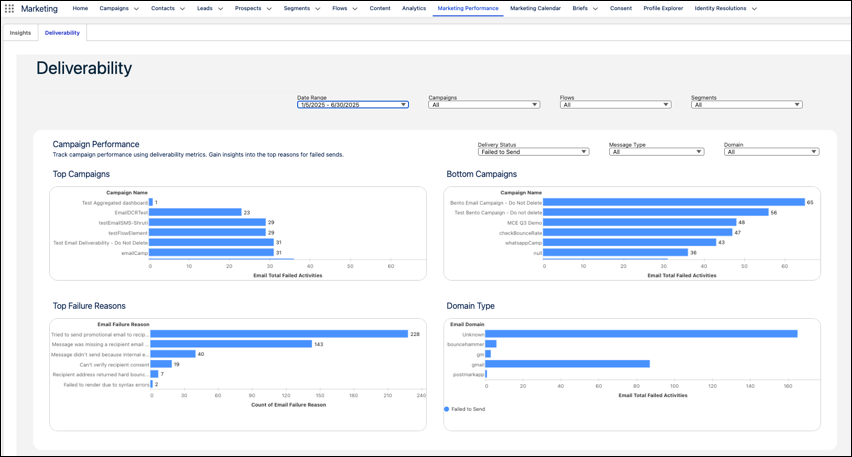
The Deliverability Dashboard has been enhanced to provide deeper insights for your email campaigns. There are new filters available for “domain” so you can review results by recipient domain, useful when reviewing failure reasons.

A screenshot of a deliverability dashboard.

SMS & WhatsApp Enhancements

Additional countries are available for SMS marketing, but remember each of these countries has their own sender codes, compliance regulations, and multipliers. New regions include Hong Kong, Peru, and Singapore.  WhatsApp reports metrics got a boost and now include click rate and open rate on the Insights dashboard. You can also filter by Sender Display Name. WhatsApp also includes more interactive messaging options in flows, including location sharing, CTA buttons, carousel messages which can integrate with your real-time product catalog. These new features also enable you to trigger flows based on customer responses!

Campaign Creation and Analysis with Agentforce

You’re now able to customize the flow for drafting and creating campaigns and briefs. The underlying flow can be customized by an admin to accommodate business needs. For example, the flow can assign a campaign owner, send notifications to other users, or add business logic like approval steps. Now, your marketing team can simply ask Agentforce to draft a brief or a campaign and adjust as needed. For those marketers who have leaned into the AI capabilities, this is a nice enhancement. 

Marketers can also use Agentforce to see improved campaign performance insights. The Agentforce Action, “Generate Campaign Insights” retrieves performance metrics such as message opens, clicks, or unsubscribes, and generates a summary of key insights. Furthermore, your admin can customize this action in Flow Builder to focus on metrics that are most relevant to your users. These insights turn into action when you use the results to make campaign adjustments, like updating the subject line or changing the time between email sends.

Forms & Landing Pages

Form Field Enhancements

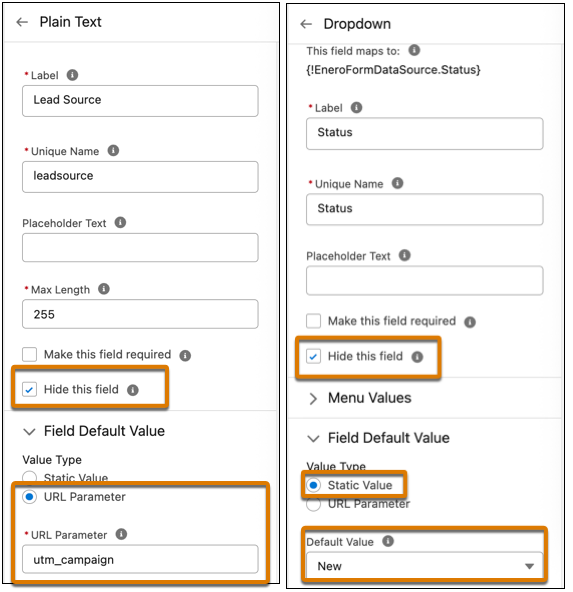
Hidden fields – (yay) are now available! Add fields that you want hidden, such as UTMs or Lead Source, and hide them simply by checking a box. Set a default value (another – yay) with two options: a static value (whatever text you want), or pull from a URL parameter! Can you tell, we’re super excited about these form enhancements?

A screenshot highlighting using the checkboxes to mark hidden fields on a form.

Did somebody say Form Handlers?

Yes, Marketing Cloud Growth and Advanced now has form handlers, similar to Marketing Cloud Account Engagement, and they are used to capture data from external website forms. You can use them to capture leads, cases, and other records, so they’re more flexible than the form handler that Account Engagement users are used to because the flow can be configured to create different record types, not just Prospects. The form handlers also include a built-in honeypot field for spam protection, custom redirect URLs for successful or failed submissions, and web tracking to monitor user engagement and form performance.

Personalize Landing Pages

You can now personalize your landing pages using merge fields to include a prospect’s name, company, or other data. In addition, you can set up a real-time data graph in Data Cloud. Similar to enhanced personalization in emails, users can select it from the Data Sources panel while editing the landing page.

Landing Page Templates

In addition to Email templates, you can now add landing page templates as well. The Landing Page Builder also includes additional support for HTML tags and elements. 

Other cool stuff

Push Notifications for your Mobile Apps

Engage with your customers using interactive push notifications on their mobile devices. The push types available are one media attachment, customized content, tap actions, Android-specific icons, and interactive buttons. The Carousel push type supports up to 6 swipeable cards, each with media, text, and individual tap actions.

When you add mobile app messaging channels to your campaigns, you’ll see aggregated metrics across all your different messages and campaigns. You can view metrics related to sends, deliveries, views, and interactions related to individual messages or entire campaigns.

Marketing Cloud Next in Sandboxes

You can now set up Marketing Cloud Next in your Sandbox. Create more complex flows and campaigns, test things out, and easily deploy them in production. This feature is available to both Growth and Advanced editions.

Smarter Identity Resolution Rulesets

Enhanced Identity Resolution Rulesets (IRR) help prevent duplicate records. In IRR setup, you’ll notice two additional match rules:

  • Lead to Contact—Prevents duplication when leads become contacts.
  • Device to Known—Matches web visitors to known profiles.

The original ruleset includes Normalized Email only, so if you already have this generated, you can manually edit the ruleset and add these new rules.

Multiple Scoring Models & Frequency Enhancements 

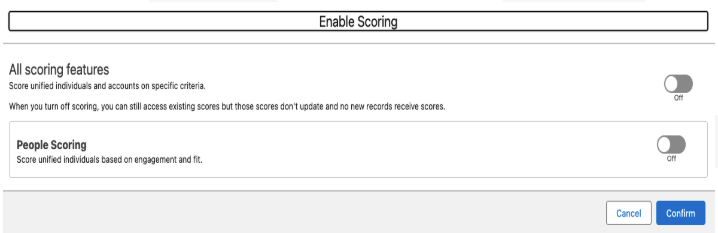
You can now create multiple scoring models (think Scoring Categories in MCAE), which allows you to further customize your scoring model for both People and Accounts. Additionally, you can adjust the frequency that the scoring rules run, saving you data credits on unnecessary processing.

A screenshot showing multiple scoring models.

Reporting and Insights

As reporting and insights are a must in every marketer’s day-to-day, the Salesforce team is focused on creating easier reporting and enhanced filters, and visualizations. We’re happy to see some nice enhancements in this release.

A screenshot of an Engagement Insights report.

Automated Winner Selection for Path Experiment

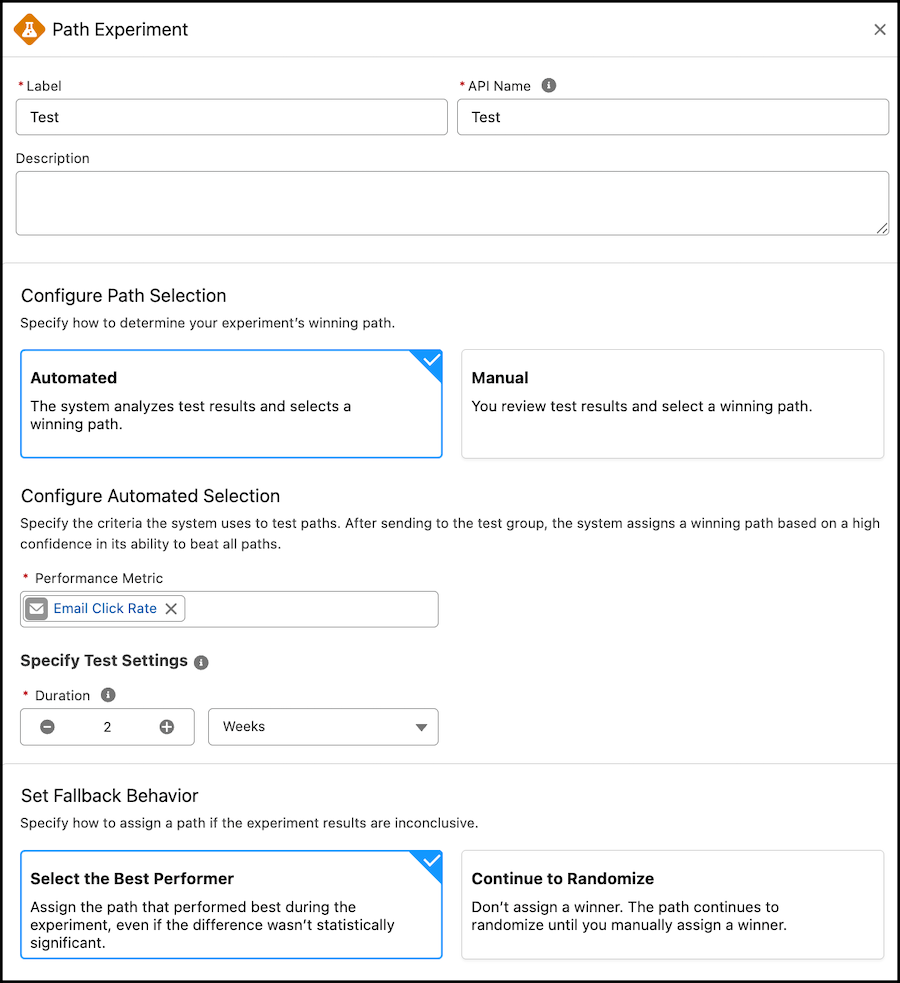
Path Experiment, available with Marketing Cloud Advanced Edition, allows Marketers to maximize engagement with their audience through testing. This feature allows marketers to test variations within marketing content, in channels, and even in cadence. With the Winter ‘26 release, Marketers can now  configure automated Path Selection directly within the Path Experiment element. This allows the path to pick a winner based on your selected performance metric, such as email clicks, registrations, or purchases. 

A screenshot of the Automated feature being selected for the Configure Path Selection in Path Experiment.

Business Units

Business Units are officially on their way to Marketing Cloud Growth and Advanced. This feature is going to have a limited GA during the Winter ‘26 release, but the Product team is making strides to ensure Business Units work out of the box for Marketers. In this initial release, Marketers can associate data spaces to their automations and flows to ensure data is kept secure and separate.

Final Thoughts

Overall, the Winter 26’ release brings some really nice enhancements to Marketing Cloud Next, with a majority of these terrific features being for Growth and Advanced Edition. Marketers using Account Engagement and Engagement should continue to learn more about these new features, so that they can understand how they can consider applying them to their own campaigns and experiences. 

If you’re looking for guidance on how to navigate what’s next for your org with Marketing Cloud Growth/Advanced or Marketing Cloud Next, reach out to the Sercante team. Our experts can help you build a strategy and guide you through the next phase of your journey.

Understanding the Marketing Cloud Convergence Path

Product Note: Marketing Cloud Growth and Advanced are editions of Marketing Cloud Next and have also been referred to as Agentforce Marketing.

The Summer ‘25 release for Marketing Cloud Growth and Advanced Editions is here, and it’s packed with updates designed to turbocharge your team’s efforts. Think of it as a toolbox upgrade: we’re talking AI-powered reporting, slick campaign automation, revamped content tools, and stronger consent tracking. Let’s dive into what’s new and how these features can make your work smoother and your customer experiences much more impactful.

Work Smarter with Einstein

With Summer ‘25 Einstein in Marketing Cloud takes a big leap forward, offering marketers real-time insights and more innovative automation options. If you ever wished you had more time to analyze engagement or fine-tune your campaigns, this update is for you!

New Einstein Predictive Features

New Data Cloud reports enable you to dive into Einstein Engagement Frequency (EEF) and Einstein Engagement Scoring (EES) without needing to export or manually assemble data. Marketers can now create reports directly in Data Cloud using the Email Engagement Frequency and Email Engagement Score objects. Whether you’re trying to reduce fatigue by adjusting send frequency or prioritize highly engaged audiences for your next campaign, these reports help you make data-backed decisions faster and with more confidence.

Automate Flows with Einstein

You can now automate journey paths based on predicted engagement using the new Einstein Decision element in Flow. By leveraging scores from Einstein Engagement Scoring and Engagement Frequency, marketers can direct contacts down the most effective path. For example, you can send fewer messages to at-risk audiences or prioritize highly engaged contacts for conversion. Once you create a supporting data graph, just drop the Einstein Decision element into your flow and configure conditions using your data graph’s engagement fields. It’s a powerful way to build smarter, more responsive campaigns that respect your customers’ engagement signals.

Build Data Graphs for Einstein Send Time Optimization

Einstein Send Time Optimization (STO) is now more customizable thanks to updates to the underlying data model. After disabling and re-enabling STO in Einstein for Marketing Setup, you can build a custom data graph to personalize send time predictions based on your unique business data. This added flexibility lets you capture the signals that matter most to your audience, helping Einstein determine not just the best time to send, but the best time for your customers.

Use Agentforce to Get Scores for Record IDs

Agentforce users can now tap into deeper insights with the new “Get Score for Record ID” action. This feature retrieves engagement and fit scores for individual leads, contacts, and prospects, enabling marketers and sales representatives to prioritize follow-ups and personalize outreach based on real-time data. You’ll also get account-level scores, including overall and intent scores, for a more complete view of customer readiness. To get started, enable the action in the Agent Actions section of Agentforce within Salesforce Setup.

Campaign Creation Made Easy

This release introduces significant enhancements to how marketers create and manage campaigns in Marketing Cloud, providing greater flexibility and control with fewer clicks.

Explore Campaign Designer (Beta)

Marketing Cloud Advanced Edition is launching new Campaign Designer (beta) functionality, enabling you to generate multi-touch marketing briefs more quickly. All of which is powered by AI and your trusted customer data. This new functionality helps you plan campaigns that span multiple channels and moments, all grounded in the context of your existing data. When reviewing a draft brief, you can select an existing campaign to build from, and use AI to refine messaging and channel selection, making it easier to align teams, drive consistency, and launch with confidence.

Build Your Own Campaign

Looking to start from scratch? With the new “Build Your Own Campaign” option, marketers are no longer tied to quick-start templates. You can now select “Build Your Own: when creating a campaign, choose your flow type, and build as you go. Add message elements directly from the campaign record or dive into Flow Builder to design a more curated customer experience that is tailored to your goals, audiences, and data.

Edit Your Flow from the Campaign

Managing and updating your campaign flow is now easier and more seamless. If your flow includes five or fewer elements, you can add messages and wait steps directly from the campaign record without switching to Flow Builder. You can also configure key message details, like Einstein Send Time Optimization and tracking options, all within the same view, making it easier to keep everything aligned as your campaign evolves.

Streamlined Content Personalization

If content is the heart of your marketing strategy, this release gives you the tools to keep it beating stronger. From fine-tuned control over HTML and data sources to more innovative personalization powered by recommendations and dynamic elements, Summer ’25 is all about helping you create more meaningful, relevant content, without adding complexity to your workflow.

Gain Control of Your Email HTML

Gain complete control over your email design with the new HTML code view. You can now convert existing emails to HTML, make detailed structural or styling edits, and build fully customized, responsive emails all within the editor. Whether you’re troubleshooting, refining layouts, or adding advanced formatting, this feature gives marketers and developers the flexibility to go beyond drag-and-drop.

Review Your Updated Data Sources Tab

Working with dynamic content just got more intuitive. The updated Data Sources tab gives you better visibility and control over the data powering your emails. Now, instead of jumping between tools, you can add, update, and view all available data sources, including your default data graph or unified individual, directly within the email editor. This makes it easier to ensure your personalization is accurate and aligned before hitting publish.

Check Out Repeater for Email

Advanced Edition users can now take email relevance to the next level with Personalization Recommendations and the new Repeater for Email component. This feature lets you dynamically showcase recent purchases, popular products, or personalized content in a consistent card, list, or custom layout. Simply connect the repeater to a data source and utilize merge fields to display product names, images, descriptions, etc. This ensures that every message reflects what matters most to each recipient.

Personalize Links and Images in Every Email

You can now dynamically personalize images and buttons in your emails by using merge fields or dynamic URLs. This allows you to tailor visuals and calls-to-action for each audience segment, creating more relevant and engaging experiences across your campaigns.

Explore New Field Types for Forms

New form field types provide greater precision and flexibility when capturing data. You can now use Date, Date/Time, Time, Number, and Text Area (Long) fields to support more detailed, structured inputs—perfect for scheduling, time-sensitive actions, numerical data, and open-ended responses. The updated Long Text Area also features a larger input box with a draggable corner, providing users with a more seamless experience when submitting longer responses. Whether you’re collecting preferences, running surveys, or managing gated content, these enhancements make your forms smarter and more user-friendly.

Expand Your Brand Identity

The expanded Brand Identity field in Content Builder now gives you up to 1,000 characters to describe your brand’s voice, values, and unique positioning. This added detail helps Agentforce generate AI-powered content that’s more aligned with your brand’s style, whether you’re drafting emails, landing pages, or SMS messages. The result? More consistent, on-brand messaging with less manual editing.

Delete CMS Workspaces

Need to declutter your content library? Content admins can now delete outdated or unused CMS Workspaces to keep things organized. First, remove any sharing relationships and unpublish existing content. This cleanup option makes it easier to manage your content at scale and maintain a more streamlined workspace. (Note: the default Marketing Cloud workspace can’t be deleted.)

Simplify Consent Tracking and Compliance

Consent isn’t just a compliance checkbox, it’s a critical part of building trust with your audience. The Summer ’25 release introduces several updates that enable marketers to collect, manage, and format consent data more effectively across campaigns and systems.

Automate Consent Updates with Flow Actions

Consent management is now more flexible and automated. You can collect and update consent using the new Create Consent flow action in both event-triggered and Data Cloud–triggered flows. For example, when someone clicks a custom link, including a double opt-in email, you can automatically update their consent status to Opted Out or Subscribed, with no manual steps required. This update makes it easier to keep consent data current and automate compliance across your marketing programs.

Improved Consent Imports

Consent imports just got more accurate and easier to manage, especially for mobile messaging. You can now include a country code column when importing SMS or WhatsApp consent data, helping ensure that records are correctly classified by region. This is especially valuable for supporting country-specific compliance requirements. Additionally, updated phone consent formatting guidelines make it easier to standardize values during import, reducing errors and helping you maintain clean, reliable consent records across your messaging channels.

Move Faster with Smarter Marketing Automations

The Summer ’25 release introduces a set of powerful automation enhancements designed to streamline how marketers engage leads and manage campaign activity. These updates bring core actions, such as sending emails, tracking link clicks, and managing prospect lifecycles, closer to your day-to-day workflows, making it easier to move fast, stay organized, and respond to customer behavior in real-time.

Send Emails Directly from Lead and Contact List Views

You can now send marketing emails directly from any list view of Leads or Contacts. Simply click ‘Send Email’, select the ‘Marketing Email’ option, and follow the guided steps to build and send your message. Behind the scenes, Salesforce automatically creates the campaign, flow, and audience segment for you, making it easier than ever to launch quick follow-ups or targeted nurtures with minimal setup.

Attribute Clicks Beyond the Inbox

Looking to understand what happens after someone clicks through your email or ad? With Summer ’25, you can now track links to your external website and attribute that activity back to the source, whether it’s an ad, email, or other campaign asset. This provides you with deeper visibility into off-platform engagement, helping you connect the dots across the customer journey. If you set up external tracking before this release, you’ll need to update your Behavioral Events data stream to start using the enhanced tracking features.

Convert Prospects to Contacts

You can now convert qualified Prospects to Contacts in Marketing Cloud, either manually or by using automated Flows. This enhancement provides you with more control over how and when individuals progress through the sales cycle. Whether you’re ready to hand off a lead to Sales or building an automated nurture, this feature helps streamline the sales process, personalize communication, and drive higher conversion rates by associating each new contact with the correct account at the right time.

Move Faster with Smarter Marketing Automations

Every successful marketing campaign starts with a strong foundation, and that begins with how your platform is set up. In the Summer ’25 release, Marketing Cloud focuses on making setup and configuration simpler, faster, and more intuitive, so teams can spend less time managing infrastructure and more time launching impactful campaigns. Whether you’re provisioning channels, organizing data spaces, or fine-tuning identity resolution, these updates are designed to help you hit the ground running with confidence.

Unified Messaging Data Kit

Setting up messaging channels is now easier than ever. The Unified Messaging data kit installation and update process has been improved, making it faster and more intuitive to get started. Whether you’re enabling new channels or updating existing ones, the streamlined setup reduces manual steps, allowing you to focus on activating your messaging strategy, not troubleshooting the installation.

Improved SMS Provisioning Process

SMS setup is now more guided and error-proof. In Unified Messaging Setup, you’ll find clear, country-specific instructions for requesting SMS codes, registering brands, and provisioning campaigns. These updates help reduce confusion, minimize errors, and speed up approvals. If a request is rejected, you will receive a detailed explanation, allowing you to resolve issues and resubmit with confidence quickly.

Custom Data Spaces Support

New Marketing Cloud customers now have the option to set up a custom data space during initial configuration, bringing more structure and clarity to how marketing data is managed in Data Cloud. This update is beneficial for organizations managing multiple brands, teams, or product lines, as it offers enhanced data security, faster retrieval and processing, and improved overall data quality. Previously, all marketing data defaulted to a single space; however, with Summer ’25, segmentation and governance can begin on your terms, right from day one.

Identity Licenses Now Available

Marketing Cloud now supports Identity Licenses, giving you a more flexible way to add users to your marketing team without assigning full Salesforce licenses. Users with the Identity License can log in via SSO and access most Marketing Cloud features, including campaigns, segments, flows, and shared analytics reports, when granted the Marketing Cloud Manager permission set. This update makes it easier to scale access securely, while keeping centralized control over who can work in your instance. Note: Identity users will not have access to Marketing Cloud setup or Opportunity Influence features.

New Identity Resolution Rules

Salesforce now recommends adding two new custom rules to your Identity Resolution ruleset to enhance the matching and unification of customer records. These rules are designed to improve accuracy during the conversion process and help identify visitors to your tracked external websites. By refining how identities are resolved across systems, you strengthen your data foundation, supporting more personalized marketing and building greater trust with your audience.

The Summer ’25 release for Marketing Cloud Growth and Advanced Editions delivers exactly what modern marketing teams need: more speed, smarter automation, and greater personalization, all built on a stronger, more scalable foundation. From Einstein-powered insights and flexible campaign design to enhanced consent tracking and setup improvements, these updates are designed to help you move faster and create more meaningful experiences at every touchpoint.

Ready to see how these features can drive real results for your team? Reach out to the Sercante experts for a Marketing Cloud audit or consultation to assess your current setup and identify opportunities to leverage the latest capabilities. Whether you’re just getting started or looking to optimize what you already have, we’re here to help you make the most of Summer ’25.

Product Note: Marketing Cloud Growth and Advanced are editions of Marketing Cloud Next and have also been referred to as Agentforce Marketing.

Welcome to your Masterclass in Account Scoring – where we take your Salesforce skills from good to guru-level! With the Spring ‘25 release, Salesforce introduces Account Scoring, a smart, customizable, and easy-to-manage scoring solution within Marketing Cloud Growth and Advanced Editions (aka “Marketing Cloud on Core” or just “Marketing Cloud”). So, grab your virtual whiteboard, and let’s dive in!

Account Scoring 101: The Fundamentals

Account Scoring is a brand-new feature in Marketing Cloud on Core, designed to give businesses deeper insights into which accounts are most likely to convert. Unlike People Scoring, which evaluates individual leads and contacts based on engagement and fit, Account Scoring takes a broader approach, analyzing entire organizations. This is especially valuable for Account-Based Marketing (ABM) strategies, where sales and marketing teams focus on targeting high-value accounts rather than individual leads.

How Does Account Scoring Differ from People Scoring?

  • People Scoring is focused on individual engagement and fit. Individuals are scored based on how well they fit your ideal persona and how often they engage with your Marketing initiatives.
  • Account Scoring aggregates data from all contacts within an organization, providing a more holistic view of an account’s likelihood to convert.
  • Intent Scoring (optional in Account Scoring) identifies buying signals, making it easier to target accounts actively considering a purchase.

Account Scoring is a game-changer for ABM-focused campaigns, where teams need to evaluate an entire company rather than just a single decision-maker. With this new feature, marketing and sales teams can prioritize high-value accounts, personalize outreach at the account level, and drive stronger conversion rates.

Let’s break down the core curriculum of Account Scoring in Marketing Cloud on Core:

  1. Engagement Scoring – Think of this like a participation grade. The more someone interacts (emails, website visits, messages), the higher the score.
  2. Fit Scoring: This is your compatibility test. Does the account match your ideal customer profile? If so, your points will increase.
  3. Intent Scoring – This one’s all about purchase signals. If an account drops hints they are ready to buy, the score reflects that.

Now let’s discuss how to elevate your Account Scoring skills to an expert level.

Take Control of Calculated Insights

Previously, once you published scoring rules, the system would auto-refresh Calculated Insights every six hours – whether you wanted it or not. With Spring ‘25, Salesforce has introduced the power to unschedule or reschedule Calculated Insights. Now, you control when and how often your scores refresh, ensuring you’re optimizing Data Cloud service credits and keeping your system running efficiently.

Customize Your Scoring Model Like a Pro

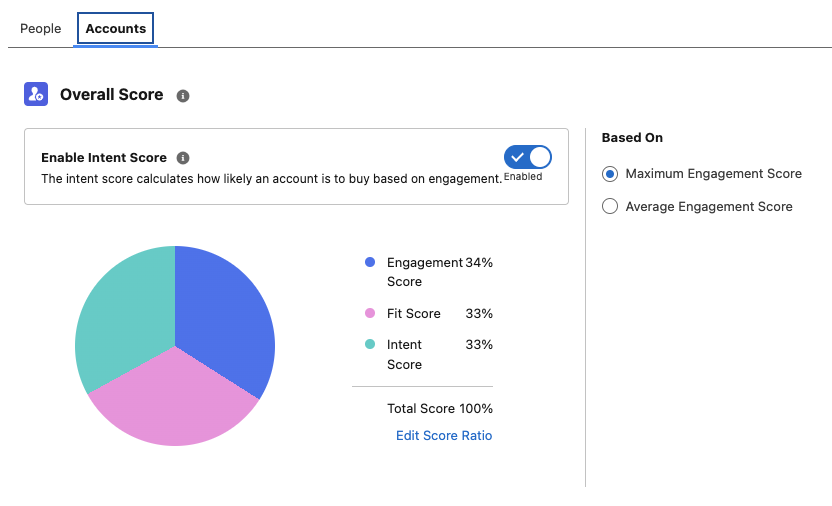
Say goodbye to one-size-fits-all scoring. Account Scoring allows you to adjust the weighting of Engagement, Fit, and Intent Scores to align with your business strategy and ensure the scoring model fits your unique needs. 

  • Need Engagement to weigh 70% instead of 50%? You got it.
  • Want Intent to be the biggest factor? Done.
  • Would you prefer Fit to lead the charge? No problem.

Activating Account Scoring

To start using Account Scoring:

  1. Create a Unified Account Identity ruleset
    1. Account Identity rulesets allow you to target contacts related to accounts as well as segments based on Account attributes.
  2. Enable Account Scoring
    • You can also enable Intent Scoring at this stage if you wish to use this feature.

3. Customize your scoring rules and your score ratio. Don’t forget to republish your rules once your changes are saved.

Smarter Rule Management and Publishing

No more accidental rule mishaps! Now, when you tweak your scoring rules, you’ll need to publish them again for the changes to take effect. Here’s your checklist for success:

  • uncheckedCustomize Fit and Engagement Scoring under Setup > Scoring Rules.
  • uncheckedFine-tune Account Scoring under the Account tab.
  • uncheckedRepublish once all your changes are set.
  • uncheckedRemember, once published, rules cannot be unpublished – only modified.
  • uncheckedKeep case sensitivity in mind (“Example” ≄ “example”)

Time to Put Your Skills to the Test

Congratulations, you’ve just completed your Spring ‘25 Account Scoring Masterclass! Now, it’s time to put your knowledge to work. Whether refining your scoring model or just getting started, these updates give you everything you need to optimize and win more deals. 

Want expert guidance? The Sercante team is here to help. Contact us, and let’s make your scoring strategy a success!

Product Note: Marketing Cloud Growth and Advanced are editions of Marketing Cloud Next and have also been referred to as Agentforce Marketing.

Marketing Cloud on Core (also known as Marketing Cloud Growth or Advanced Edition) can now track how marketing efforts contribute to revenue! With the Spring ‘25 release, Salesforce introduced Opportunity Influence, helping businesses connect marketing engagement to pipeline and revenue. But how does it work, and what’s the difference between Opportunity Influence and Campaign Influence? Let’s dive in!

Opportunity Influence vs. Campaign Influence: What’s the Real Deal?

Before we break down how to customize and report on Opportunity Influence, let’s clarify how it differs from Marketing Cloud Account Engagement’s Customizable Campaign Influence. While both models aim to connect marketing efforts to revenue, they function in distinct ways and serve different use cases. 

FeatureOpportunity InfluenceCampaign Influence
Data SourceMarketing Cloud Engagement (emails, ads, automation, etc.)Salesforce Campaign Membership
Influence ScopeTracks engagement across multiple touchpointsTracks Leads/Contacts who are Salesforce Campaign Members
IntegrationSyncs Marketing Cloud engagement data to Salesforce OpportunitiesWorks within Salesforce CRM using Campaigns and Opportunities
Attribution ModelsMulti-touch attribution (first-touch, last-touch)Campaign Influence and Customized Models
Reporting & InsightsMeasures marketing-driven revenue impactMeasure campaign-driven revenue impact

🚨 Important Note for Account Engagement Users 🚨

You cannot use Opportunity Influence alongside Customizable Campaign Influence. If your team already relies on Account Engagement’s Campaign Influence Models, keep this in mind when deciding which model to use.

Additionally, Account Engagement users cannot activate Opportunity Influence as it does not currently integrate with Account Engagement’s Campaign Influence model. If your organization currently tracks marketing-driven revenue using Campaign Influence reports, you’ll need to continue using that model. However, if you’re considering a shift to Marketing Cloud on Core, Opportunity Influence could offer enhanced multi-touch attribution and engagement tracking.

Battle of Influences: Campaign vs. Opportunity – Which One Wins?

Let’s say you’re running a B2B software company and you’ve executed multiple marketing campaigns using a variety of platforms, including ads, email, an e-book, and a webinar, to engage your prospects.

  • Campaign Influence: A prospect attends the webinar, clicks on an email, and downloads the e-book before being transitioned to sales as a marketing-qualified lead. These interactions are recorded under a Salesforce Campaign and can be manually associated with the Opportunity when created based on the Opportunity Contact Role and Campaign Member. You can assign influence weight based on your customized rules.
  • Opportunity Influence: Marketing Cloud on Core automatically tracks all marketing engagement, including the ad view and click, webinar attendance, and e-book download. These touchpoints are automatically associated to attribute influence based on the predefined model and associated to the Opportunity upon creation.

If Campaign Influence were a fine-dining experience, it would be a chef-curated meal—meticulously crafted with manual customization to fit your exact taste. You decide which interactions get the most credit, but it requires hands-on effort. On the other hand, Opportunity Influence is like an all-you-can-eat buffet with an expert chef behind the scenes. It automatically dishes out credit across touchpoints, giving you a full spread of marketing influence with minimal effort. If you love precision and control, Campaign Influence is for you. But if you want a seamless, automated view of your entire marketing impact, Opportunity Influence takes the crown.

How to Set Up Opportunity Influence

Setting up Opportunity Influence requires configuration in Sales Cloud to ensure marketing engagement is properly attributed to revenue-generating activities. To fully connect marketing efforts with sales outcomes, ensure that contacts engaging with marketing campaigns are linked to Opportunities. This allows for accurate tracking of marketing interactions that influence deals.

Enabling Opportunity Influence

  1. Navigate to Salesforce Setup > Opportunity Influence
  2. Enable Opportunity Influence
  3. Select an Attribution Model
    • First-Touch: Gives full credit to the first marketing engagement that led to the opportunity. It’s ideal for understanding which top-of-funnel efforts drive initial interest.
    • Last-Touch: Assigns full credit to the last marketing interaction before the opportunity was created. It helps measure the final push that converted a lead into an opportunity.

Going Beyond Activation

Customization is key to maximizing Opportunity Influence. Marketers should align influence models with their sales cycle, ensuring critical marketing touchpoints, such as email engagements, paid ads, and automation journeys, are correctly captured. Because Opportunity Influence consumes Data Credits, it’s essential to be strategic when enabling multiple models to avoid unnecessary credit usage.

Making Sense of Your Data: Reporting on Opportunity Influence

Once Opportunity Influence is enabled and tracking data, you can start reporting on marketing’s impact. The key to unlocking valuable insights is leveraging Salesforce’s Reports & Dashboards to tell a clear story about how marketing drives revenue.

Your Treasure Map to Salesforce Reports & Dashboards

  • Head over to Salesforce Reports and search for Opportunity Influence Reports. This is your go-to hub for seeing which marketing touchpoints are helping close deals.
  • Get specific with your insights! Use filters to refine reports by timeframe, campaign, or opportunity. Want to know which emails led to the most revenue? Adjust your filters to see the impact.
  • Create Salesforce Dashboards to visualize Opportunity Influence. Need a quick snapshot for your leadership team? Build an easy-to-read chart that shows exactly how marketing is fueling revenue.

The Ultimate Guide to Opportunity Influence Report Types

Salesforce provides several built-in report types to help you analyze how marketing efforts contribute to revenue. Here are the key report types you can use:

  • Opportunity Influence Summary Report – This high-level report shows how marketing engagements are influencing revenue across all opportunities. Use it to track overall marketing impact.
  • Opportunity Influence Detail Report – A more granular report that breaks down individual touchpoints per opportunity, allowing you to analyze which specific marketing interactions played a role in closing deals.
  • Influence Attribution Model Comparison Chart – Compare first-touch and last-touch models side by side to see which one provides the best insights for your marketing strategy.
  • Marketing Touchpoint Analysis Report – Identifies which marketing channels (email, ads, website visits, etc.) are contributing the most to opportunity creation and pipeline growth.

By setting up and analyzing Opportunity Influence reports, marketing teams can gain deeper insights into which touchpoints matter most, optimize their strategies accordingly, and confidently demonstrate their return on investment.

Why Opportunity Influence is a Game-Changer

Opportunity Influence is a must-have tool for any marketing team looking to measure true revenue impact. No more guessing which emails, ads, or landing pages are driving pipeline – Opportunity Influence connects the dots, giving you a clear picture of how marketing fuels business growth. With built-in attribution models, you can customize insights based on what matters most to your strategy.

Whether you’re aiming to prove marketing ROI, optimize your campaigns, or align better with sales, Opportunity Influence provides automated, data-driven attribution that simplifies reporting and enhances decision-making. If you want better visibility into marketing’s role in revenue generation, this feature is your new best friend!

💡Next Steps:

  1. Check your org to see if the new update is available.
  2. Test Opportunity Influence tracking before rolling it out company-wide.
  3. Monitor data service credit usage if you’re using multiple attribution models.

📣 Want to learn more? Check out the full Spring ‘25 release highlights or dive into the official release notes.

🚀 What are your thoughts on Opportunity Influence? Drop a comment below, and let’s discuss!

While we were all preparing for the New Year, Salesforce was busy getting the Spring ‘25 release notes posted! Let’s dive into what this release has in store for Marketing Cloud Account Engagement (f.k.a Pardot) users. 

Support for the Enhanced Email Builder is Being Phased Out

Support for the Enhanced Email Experience, aka the Account Engagement Lightning Email Builder or the Drag-and-drop builder, is being phased out—meaning that Salesforce is only committed to fixing significant issues going forward, the builder will still be available for use. 

If you saw the release notes right after they were published, they did say that the Enhanced Email Builder was going to be fully retired, but this retirement has since been put on hold.

Again, users of the Enhanced Email Experience can continue to use this builder, but users also have the option to use the New Email Experience (aka the Marketing Cloud Builder). Salesforce has provided a comparison of the three builders here. Keep in mind that the New Email Experience will continue to get updates every release. 

Once this new release is available I will do a deeper dive into using the New Email Experience as an Account Engagement User, so keep an eye out for more info!

Einstein Generative AI supports additional languages

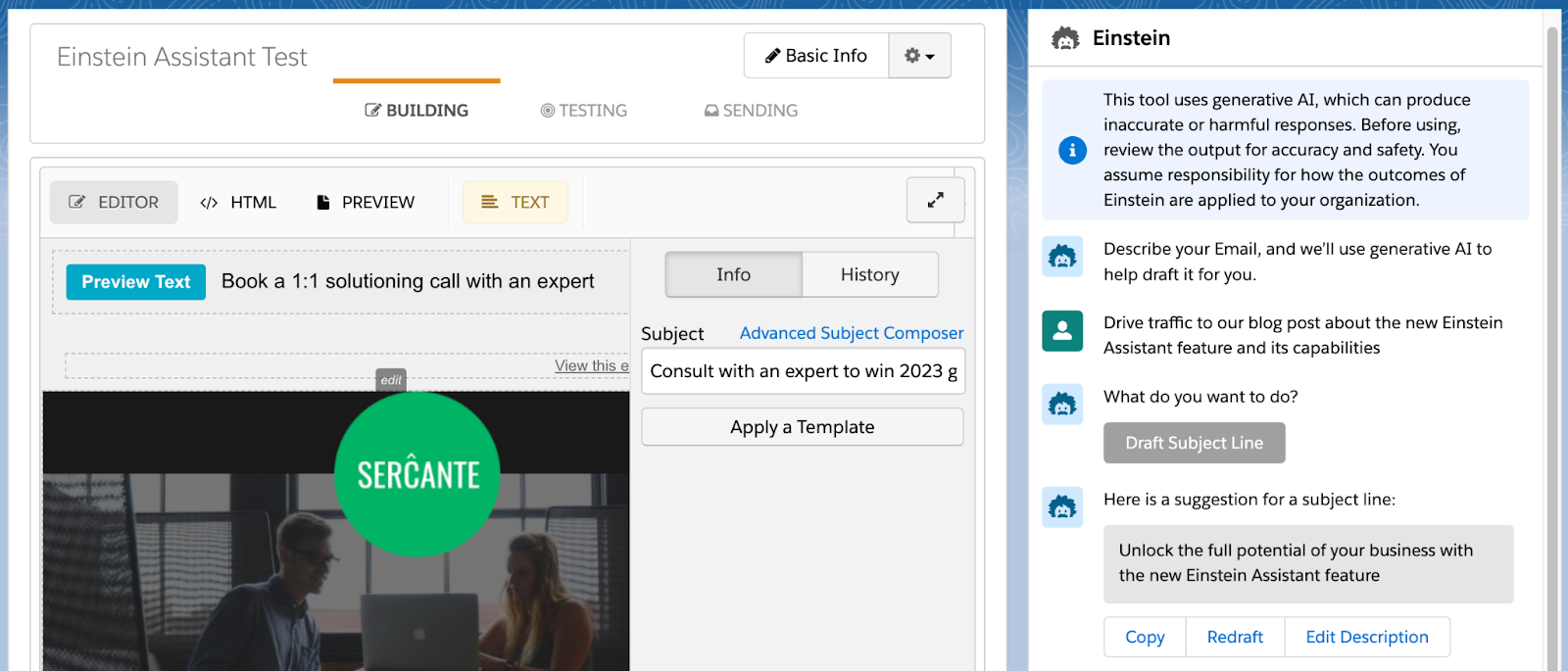
Einstein Gen AI, aka Einstein Assistant, has been expanded to support five new languages: French, German, Japanese, Portuguese (Brazil), and Spanish. Einstein Assistant helps users create landing pages, forms, and email copy and is available to users with Advanced or Premium Editions of Account Engagement.

A screenshot of the Einstein Generative AI assistant.

Easily Enable Marketing Cloud from within the Account Engagement Optimizer

During Dreamforce ‘24, Salesforce announced that all Account Engagement orgs with a current edition (Growth, Plus, Advanced, or Premium) can get access to Marketing Cloud Growth or Advanced Edition at no additional cost. This new platform runs on Data Cloud and can be used alongside Account Engagement to bring more features and functionalities to the Marketing tech stack. The Spring ‘25 release introduces a streamlined setup process for Account Engagement orgs, enabling them to deploy Marketing Cloud Growth or Advanced Edition via the Account Engagement Optimizer

Additional Visibility into Email Send Issues

It’s always frustrating when an Account Engagement email fails to send to a prospect and the error message is vague at best. With the Spring release, List Email will provide more reasons on why a send fails and will help point you to configuration issues that can help prevent additional failures. The new Failed Email Sends table will be available in the Account Engagement Optimizer and will display the Prospect’s name, company, failure reason, and other details. 

Additional Updates

Which Spring’ 25 Account Engagement features are you most excited about? Which features do you want to know more about? Let us know in the comments!

Product Note: Marketing Cloud Growth and Advanced are editions of Marketing Cloud Next and have also been referred to as Agentforce Marketing.

Spring has sprung at Salesforce, and it comes in the form of the Salesforce Spring ‘25 Release Notes! Whether you’re a seasoned pro or a budding marketer, this release is packed with goodies that will make your campaigns bloom brighter than ever. Let’s dive into the highlights for Marketing Cloud Growth and Advanced Edition!

Take Your Marketing Global 

WhatsApp Logo

Marketing Cloud is getting a boost with a WhatsApp integration, making it easier to incorporate this channel into your marketing strategy. Whether you share updates, promotions, or ongoing support, WhatsApp helps you connect with your customers worldwide. The integration includes a campaign template, communication subscription support, and a default Email Preference Center. In addition, it supports 2-way conversations, and the message builder supports audio, video, and file sharing.

WhatsApp is not the only feature going global this Spring; SMS is joining the fun! With sending capabilities expanding to more than 50 countries, your messages can reach more customers. The new update includes identity validation to enhance trust and effectiveness and ensure reliable delivery. Additionally, blackout windows for SMS and WhatsApp allow you to respect your audience’s downtime, ensuring your messages land at the right time.


AI: Your Marketing Superpower

Salesforce is supercharging your marketing strategy with expanded AI capabilities, bringing unparalleled efficiency and creativity to your campaigns. With Agentforce, you can generate landing pages and email content in seconds, freeing time for more strategic tasks. Need to plan a campaign? Agentforce also crafts detailed campaign briefs, ensuring you start with a strong foundation. For Marketing Cloud Advanced Edition users, the Agentforce Campaign Designer (Beta) takes it even further, providing a single interface to edit and refine your campaign strategies, multi-channel flows, and content. These tools empower you to create more innovative, impactful campaigns.

A screenshot of a prompt in Salesforce Agentforce to create an email campaign.

Spring into Smarter Campaigns and Content

Marketing Cloud’s Spring ‘25 Release is focused on making campaigns smarter and your content work harder. From reusable personalization tools to seamless flows, Salesforce has designed the release to help marketers craft successful campaigns from start to finish.

Personalization That Packs a Punch

Stop spinning your wheels! Simplify your workflow and create tailored campaigns effortlessly with reusable content and personalization points. These features save you time and help you connect more deeply with your audience. Reusing merge fields with Expressions across campaigns will keep your messaging sharp, consistent, and right on target—making every interaction count.

Smarter Segmentation for Better Results

Segmentation is getting a makeover! The Spring ‘25 release features new tools that filter attributes—like new leads—right from the Campaign record, saving you time and speeding up your campaign’s delivery. Plus, you can preview up to 1,000 segment members before activating your campaign flow, giving you confidence in your targeting strategy.

Meet the CRM Prospect Object

Say hello to your new best friend: the CRM Prospect Object. It’s here to help you manage prospects like a pro. Create prospects with forms, nurture them automatically, and convert them into loyal customers. With account scoring based on engagement, fit, and intent, you can prioritize the leads most likely to convert.

Forms That Go Where Your Customers Are

Why make your customers come to you when you can bring the form to them? With the new ability to embed forms on external sites, you can deliver them to your hosted web page. After a quick setup in Salesforce and your external site, grab the form’s code block from its detail page and drop it into your site’s HTML. It’s as simple as copy-paste! (Just make sure your site supports iframes, is secure, and uses HTTPS.)

Flow Like a Pro

Managing Flows is easier and more intuitive than ever. You can handle more of the process directly from the Campaign record, track flow statuses in the new Marketing Calendar (fully integrated with the Sales Calendar), and view flow versions and failures to provide quicker, seamless resolutions. The new Campaign Stage field offers insight into the current campaign and keeps your team updated. Need a little extra customization? Add custom fields to your campaign briefs to make them truly yours.

Content Updates That Shine

Marketing Cloud is releasing new content creation features. With a new “Processing” content status, you’ll always know when landing pages, forms, and branding updates are pending publication. While changes can’t be made during this time, you can relax knowing your updates are locked in. Need to duplicate content? Cloned content is easier to manage by saving it in a shared workspace, keeping your team aligned. Consistent branding has never been more straightforward—assign default branding to your workspace to ensure emails, landing pages, and forms all have the same polished look. Ensure brand consistency across all your forms by assigning a brand, with forms automatically adapting to reflect your workspace, landing page, or external site branding.

And More!

  • Connect External Web Tracking to a Campaign allows existing customers to install new data kits and deploy new data streams.
  • Tracking and Source Information for Consent helps you comply with global laws and regulations to review the source and consent status change via the Consent Audit Trail in Data Explorer.
  • Setup Enhancements aim to save users time. They include tracking setup progress, installing or updating the Sales Data Kit, a guided experience for authenticating domains, and the ability to autogenerate an Identity Resolution Ruleset.
No more posts to show