Category

Emails & Forms

Poor deliverability and spam folder nightmares are every email marketer’s worst fear. One week, your open rates look great, and the next, half your audience vanishes into the spam abyss. The truth is, once deliverability issues start, fixing them can take time because your sender reputation is shaped by every aspect of your email strategy.

But don’t panic. This guide walks you through a proven deliverability recovery plan, complete with a real-world success story of how one company lifted its open rate from 3% to 55% in just six months after  dealing with spam issues. 

Metrics for Identifying Deliverability

Deliverability issues can sneak up on even the most experienced marketers. So how do you identify deliverability issues? The first clue is often in your engagement metrics.

Real-world example: After a large quarterly campaign, we noticed a sharp drop in performance. A send that normally had open rates around 45% suddenly dropped to 20%. We drilled into the data by email address domain and noticed that Gmail (which made up half the audience) was the culprit. A test send confirmed the problem – the emails were wrongfully going to spam.

Side note, we all know open rates are not an accurate representation of how many people are opening the email, but they still have a place in email reporting for benchmarking sends. They were critical for helping us catch this deliverability issue!  

And so, our deliverability journey had begun. We started deliverability remediation in October 2024, and over the course of the next seven months, we closely monitored metrics like: 

  • Open rates
  • Click rates
  • Unsubscribe rates
  • Spam complaint rate (from within Marketing Cloud Engagement and Google Postmaster – more on this later)

By comparing performance for all sends, then drilling down by domain, it was clear our issue was Gmail-specific. If you notice a similar pattern, start there.

A Brief Clarification

  • Email delivery is the technical look at whether your email was received by your recipient’s email server. This is best tracked by monitoring bounces.
  • Email deliverability is what happens once the email is delivered, whether it’s going to the inbox, spam, or promotions folder. This is best tracked by monitoring engagement metrics and sending your own test emails.

Real-world example: Despite the changes in open rate, the bounce rate remained above 99%. Just because you have great delivery doesn’t mean you have great deliverability.

Deliverability Remediation 

Deliverability is determined by your sending domain’s setup, email authentication, and your email reputation. There is no size-fits-all approach to fixing your deliverability, so it’s important to build these things into your overall email marketing strategy. And if you find yourself with deliverability issues, here are some actionable steps you can take. 

Authentication & Bulk Sending Requirements

In February 2024, Gmail released bulk sender guidelines for senders that send more than 5,000 messages per day to Gmail accounts. Around the same time, Yahoo made a similar announcement, and Microsoft followed suit in May of this year. The most important part of these changes includes:

  • Implementing SPF & DKIM
  • Publishing a DMARC policy
  • Keep your spam complaints below 0.1% and never go above 0.3%
  • Implement a list-unsubscribe header which supports one-click unsubscribe

The first step in your deliverability journey should be to check that these technical requirements are in place and working. A Google Postmaster account will confirm your authentication and show your spam complaint rate by day over the last 120 days. Email tools like Salesforce Marketing Cloud Engagement will automatically add the one-click list unsubscribe to your header. To confirm this, send a test email to your Gmail address, view the header code, and search for “list-unsubscribe.”

An important note about Gmail spam complaints: Gmail does not share individual complaint data or use traditional feedback loops that send data back to email service providers. This means complaint rates in your email tool don’t include Gmail, which is why setting up a free Postmaster account is important!

IP Addresses & Blocklists

The other technical thing to check is your sending IP address. When it comes to emails, you are using one of the following:

  • Shared IP – Used by multiple senders from your email service provider for low-volume sending. The reputation of others using the IP address impacts your sends.
  • Dedicated IP address – Exclusively used by one sender that maintains and controls the sending reputation. This requires a consistent sending strategy at higher send volumes.

If you have deliverability issues, contact your email service provider support team, as they may be able to provide backend information. This is especially true if you are using a shared IP address, because it could mean another sender is hurting the IP reputation.

If you’re on a dedicated IP, you are responsible for maintaining the reputation. The first thing to check is whether your IP is on any blocklists. A tool like MX Toolbox can help with this. The other thing to check is your monthly send volume from that IP address. Salesforce recommends a minimum of 100,000 emails per month for a dedicated IP address up to a maximum of two million emails per day. It’s important to consistently meet this minimum threshold to keep your IP warm, otherwise you may start having reputation issues which can cause emails to go to spam.

Submit a Bulk Sender Form (for Gmail)

If you’ve made it through all these checks and are seeing issues in Gmail specifically, it’s time to submit a bulk sender form request for mitigation. Submitting this form allows you to outline your issue. Google will then temporarily disable some of their signals responsible for spam classification with the goal that once they put the signals back in place, you should be able to send without issues.

You can submit this form every two weeks through the duration of your deliverability issues, but it will only help if you meet all the bulk sender requirements already. 

Review Your Campaigns

Deliverability isn’t just technical—it’s strategic. Poor content or data practices can hurt your reputation, too.

Content

While there is no exact list of words that will cause your email to go to spam, the words you choose matter. Words like “free,” “urgent,” and other time-sensitive or promotional words are common spammy words that may raise a red flag in providers like Gmail. If you’re using these words, can you reduce or remove them from your campaigns? You should also try to limit the amount of links in your email that go to a domain other than your own. And finally, make sure that your emails have an easy way to unsubscribe (and that your unsubscribe process is actually working!). Don’t try to hide your unsubscribe link – it’s much better for someone to unsubscribe than to mark you as spam! 

Test tip:

  1. Take one of your emails and copy it two times. 
  2. Remove content from your emails as follows:
    1. In email 1, leave only text.
    2. In email 2, leave only images. 
    3. In email 3, leave only links and buttons.
  3. Send a test of each email, and see where the emails get delivered. For example, if the image version goes to your inbox, but the text version goes to spam, try changing your content and test again.

Data

Now it’s time to look at your data. Ask questions like:

  • Where are you getting your data from?
  • Are your recipients opting in to receive emails from you?
  • Are you sending the content that they signed up for? 
  • When was the last time you cleaned your list? Think things like removing bad email addresses, unengaged contacts, duplicates, etc.
  • How many emails are you sending per month?
  • Is your sending quantity consistent? 

Back to our example, this is where we started to see some issues. When looking at the send quantity by month, we noticed that there was a huge variation in send quantity month over month. In 2024, one month’s send volume was as low as 200,000, and in another month, it was over 2.1 million. Spam algorithms want you to be predictable and reliable as a sender, and this much variance was a red flag. We spent some time with our email send strategy and determined that we could spread out our largest campaign evenly over three months rather than doing the sending all in one week.

IP and Domain Re-warming

Once content and data is cleaned up, it might be helpful to “start fresh.” 

Start with an Internal Send

The first goal is to show email service providers that people want to receive your emails. The next time you kick off a campaign, consider starting internally. Gather personal email addresses of colleagues and friends, and send the email to this list. Ask them to mark the email as “Not Spam” if the email shows up in their spam or junk folder, then have them open and click a link in the email. Start with 30-60 email addresses and repeat this process if needed. 

Warming Process

Depending on the severity of the issue, another option to consider would be to act like you are warming a brand new IP address. This process involves sending to a small subset of the most engaged subscribers first, then gradually increasing the number of sends each day. This process can be slow and tedious, but that’s why it helps build credibility – spammers aren’t willing to do it!

Get Rid of Unengaged Contacts

It’s tempting to hang on to everyone in your list because of the fear that smaller lists = fewer conversions, but that’s not usually the case. If people aren’t engaging with the emails, they probably aren’t interested anymore, and continuing to send to them can hurt your send reputation. 

In our example, we noticed a high percentage of contacts that hadn’t engaged in the last six months. We introduced a tiered engagement structure in our sends. 

  • Start by sending to subscribers that were active in the last 90 days
  • If spam complaints stayed under 0.1% for three weeks, extend to engaged subscribers in the last 120 days. 
  • Repeat the same monitoring, then extend to 150 days, and so on. 
  • Don’t send to anyone who has received at least 3 emails and not engaged in the last 9 months.

The right engagement limits will vary by business, but we believe that this was one of the most important changes to fixing the deliverability issues in our example. We started this process of excluding unengaged contacts in March 2025, and by June, our open metrics were comparable to the same time the previous year. 

Make Deliverability Part of Your Ongoing Strategy

Deliverability isn’t a one-time fix—it’s a long-term habit. As you’re thinking about your overall email marketing strategy, consider these things:

  • Instead of completely removing unengaged contacts, give them one more chance to engage. Create a re-engagement journey for people who haven’t been engaging with emails. Permanently unsubscribe or remove contacts that don’t respond.
  • Make sure your contacts are opted in to receive emails. Consider adding a double opt-in strategy if you don’t already have one, to ensure you’re only sending to people who want to hear from you. This is a legal requirement in some countries anyway.
  • Remove or suppress people who haven’t engaged in X months or years (whatever makes sense for your business).
  • Review your content to make sure it’s engaging AND what the subscriber signed up to receive.
  • Prompt subscribers to add your sending address to their contacts/address book.

The bottom line:

Deliverability recovery takes time, patience, and consistency—but it’s absolutely achievable. By focusing on technical setup, content quality, engagement, and data hygiene, you can rebuild trust with inbox providers and regain strong performance.

If you find yourself in a similar situation, take a deep breath, grab a coffee, and start working through these steps. And if you ever need an expert eye on your setup, reach out! We’re happy to help you get your emails back where they belong: in the inbox.

Product Note: Marketing Cloud on Core is now known as Marketing Cloud Next. Marketing Cloud Growth and Advanced are editions of Marketing Cloud Next and have also been referred to as Agentforce Marketing.

Your messages are doing their job, but are they working it?

If your campaigns are feeling a little too copy-paste, a little too “blah,” it might be time for a serious glow-up. You’ve got the data. You’ve got the content. Now it’s time to use the tools inside Marketing Cloud on Core (aka Growth and Advanced Edition) to turn that good-enough messaging into something that shines!

This blog will teach you how Dynamic Content and Expressions can transform your messages from basic to brilliant. You’ll learn what these new features are, how they work, and how to use them to make every send feel personal, polished, and powerful!

Let’s Start with the Basics

Before we dig into the tools, let’s talk about transformation. A glow-up for your marketing means:

  • Less copy-paste, more customization
  • Making use of the data you already have
  • Messages that speak directly to the recipient, not the crowd

Marketing Cloud on Core gives you two powerful tools to make it happen. Ready to transform your messages? Let’s learn how to master Dynamic Content and Expressions.

Introducing Your Email’s Style Squad

Give your emails a fresh look without starting from scratch. Think of Dynamic Content like your email’s glam squad; each part makes your email stand out. Consider giving your email different “outfits” based on who’s opening it.

  • Personalization Point: This is the part of your email where you give a mini makeover. It could be a subject line, preheat, hero image, or CTA – any element that could use extra sparkle.
  • Personalization Decision: This is the brains behind the beauty. It figures out who should see what based on the rules you set.
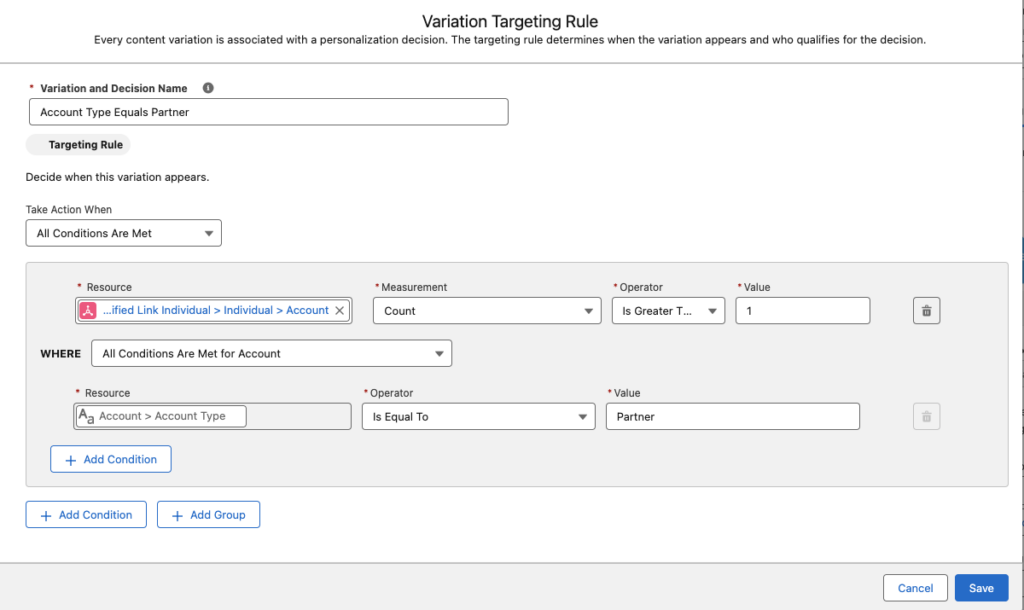
  • Targeting Rule: Your custom-fit formula. It defines “if this, then show that” logic. For example, “if account type = VIP, show gold banner.”

Pro Tip: Already built a variation you love? You can reuse it in other emails using recent Personalization Points.

How to Apply the Glow-Up: Creating Dynamic Content

Let’s walk through giving your content a dynamic makeover:

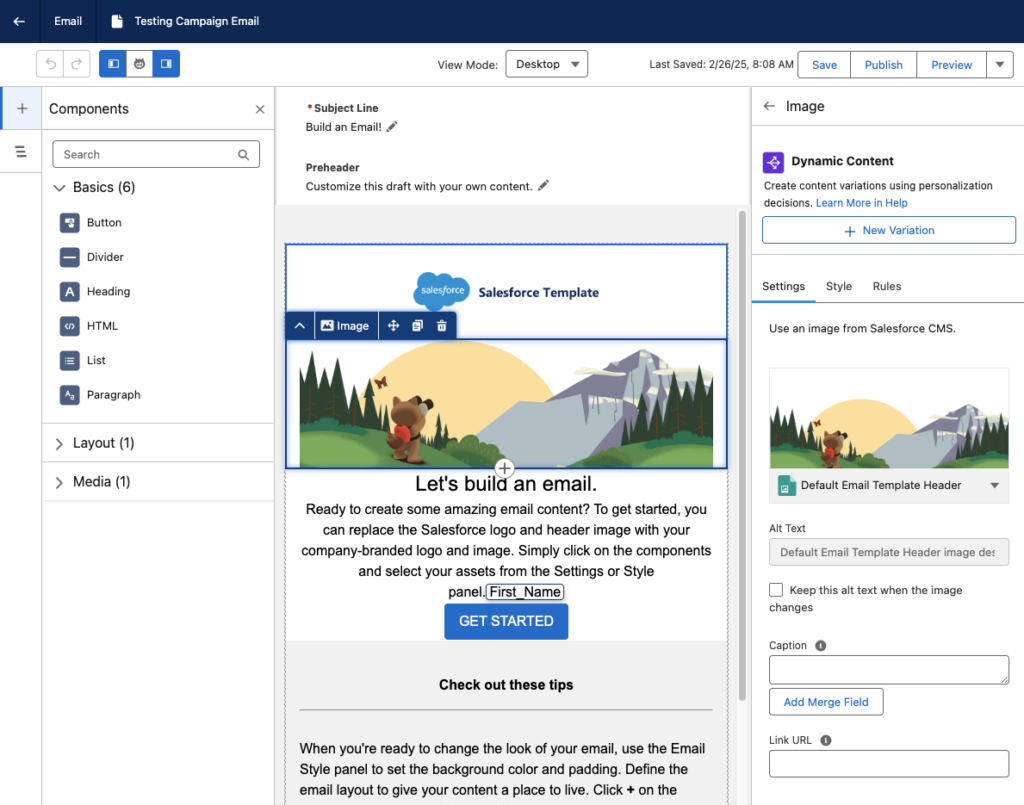
  • Open your email in the editor and select the content block you want to glam up.
  • Head to the Dynamic Content section and click Add Variation.
    • You can use the Variation dropdown to access NewVariations if you’ve already got some variations.
  • When the Create or Reuse Personalization Settings window pops up, select New Variation.
    Heads up: Your message has to save first, so give it 10-20 seconds.
  • Name your variation and create your Targeting Rule.
  • Click Save, then customize your content within that variation, like updating a header image or swapping out messaging for a specific audience.
  • Use the Variation dropdown to preview how your message looks for each version.

Pro Tip: Use dynamic blocks sparingly at first. Target high-impact spots like hero images or CTAs, and test frequently to ensure each variation shines.

The Finishing Touch for Personalized Flair

Once your content’s dressed to impress, it’s time to fine-tune the details, and that’s where Expressions come in. They’re like your behind-the-scenes styling tool that ensures every message feels personal, even when the data isn’t perfect. Here’s how Expressions keeps your messages looking polished:

  • Saved Expression: Think of this as your go-to styling shortcut. It’s a reusable logic block you create once and drop into multiple campaigns; it’s less work with the same wow factor.
  • Attribute Selection: This is where you tell the Expression what data to look at, such as PreferredName, LoyaltyStatus, or FavoriteProduct.
  • Fallback Value: No data? No problem. Expressions let you set a backup so your message stays smooth. Instead of “Hi,” you get “Hi there!”

Expressions ensure every message feels intentional and on-brand like you planned that way (because you did). 

Adding the Ultimate Accessory: Creating Expressions

Here’s how to build your first Expression and set your messages up for consistent, reusable personalization:

  1. Head to Content > Content Workspace in Marketing Cloud.
  2. Click Add, then choose Content.
  3. Select Expression, then click Create. (Yes, you’re about to create something fabulous.)
  4. Give your Expression a name that clearly describes what it does (like “PreferredName Fallback” or “GoldMemberStatus”).
  5. Use the Attribute field to choose the customer data you want to reference.
  6. (Optional) Add a filter if you need to narrow down conditions, like only using this Expression when someone’s location is “US.”
  7. Click Save.
  8. Don’t forget to hit Publish to start using your Expression in your messages.

Pro tip: Once created, Expressions can be used repeatedly across campaigns, saving you time while keeping your personalization game strong.

Using Your Expression in a Message

Now that you’ve created your personalized shortcut, it’s time to drop it into your message for that final glow-up touch.

  1. Open the email, SMS, or WhatsApp message where you want to use your Expression.
  2. Select the content block where you want your personalization to appear.
  3. Click the [] Add a merge field symbol.
  4. Choose Saved Expressions from the dropdown menu.
  5. Pick the Expression you created earlier.
  6. Add a default value (like “there” or “friend”) in case your data field is empty.
  7. Click Done and admire your work.

Pro Tip: This ensures your message always reads naturally, even if a customer’s name or info is missing the data.

Use Them Together for a Full-On Email Glow-Up

You’ve got the tools! Now it’s time to layer them like a pro stylist would. Dynamic Content and Expressions are great on their own, but when used together? That’s when the real transformation happens!

Think of Dynamic Content as your email’s wardrobe, changing outfits based on who’s reading. Then think of Expressions as the accessories, adding that personalized sparkle like someone’s name, product interest, or membership level.

Real-World Example

Let’s say you’re sending a promotional email:

  • You use Dynamic Content to show one banner for loyalty members and another for new subscribers.
  • Inside each banner block, you drop in an Expression to greet the user by name (with a fallback like “their” in case their name isn’t available).
  • You also use Expression to highlight their preferred product category, so the CTA feels totally tailored.

The result? An email that looks like you custom-designed it for every person without cloning templates or managing a million logic paths.

Why This Combo Works

  • You reduce manual work by creating fewer, smarter assets.
  • You create hyper-relevant emails without sacrificing time or scalability.
  • You build a customer experience that feels seamless, polished, and personal, even if you’re sending to thousands at once.

Using Dynamic Content and Expressions is the email marketing equivalent of putting on a fresh outfit, doing your hair, and finishing with the perfect accessory.

Ready to Give Your Emails a Glow-Up?

You don’t need a whole new wardrobe of emails, just the right tools to style them smarter. With Dynamic Content and Expressions in Marketing Cloud on Core, you can transform basic batch-and-blast messages into personalized, polished experiences that connect with your audience.

From targeting rules to fallback names, you have everything you need to bring out the best in your campaigns without doubling your workload. Whether you’re just dipping your toes into personalization or looking to scale with style, this glow-up is just the beginning.

Want help applying what you learned?

Book a consultation with Sercante’s Marketing Cloud experts to review your personalization strategy or sign up for one of our hands-on workshops. Let’s glow up your next campaign together!

Product Note: Marketing Cloud Growth and Advanced are editions of Marketing Cloud Next and have also been referred to as Agentforce Marketing.

I’m not going to be the guy who says “I told you so,” but Flow Builder has officially expanded from being an automation tool used exclusively by Salesforce Admins into the realm of marketing. Flow Builder is the engine used by Marketing Cloud Growth Edition to send emails and SMS messages and perform other automated tasks. If you’re not familiar with Flow, that’s OK. In this post, we’ll walk you through the process of building a message series with Flow in Marketing Cloud Growth Edition.

Getting Started

If you are new to flow, I would encourage you to take a moment to read Heather Rinke’s post An Introductory Guide to Salesforce Flow for Marketers before going any further. This is a great overview of flows and will provide context to the topics that we’ll be discussing.

If you have questions about Marketing Cloud Growth Edition, I’ve got you covered there too. Check out Erin Duncan’s post All the FAQs on Marketing Cloud Growth Edition for all your answers.

Building a Message Series

Confirm User Access

Marketing Cloud Growth (aka MCG) includes two permission sets out of the box. It also requires that users be added as a contributors to the CMS workspace and the Marketing Landing Pages site (see the Implementation Guide: Marketing Cloud Growth for more details).

NameDescription
Marketing Cloud AdminAccess to Salesforce Setup, Data Cloud Setup, and full control on campaigns, segments, and flows. Access to MCG’s setup assistant is also being added as part of the Winter ‘25 release.
Marketing Cloud ManagerFull control to manage campaigns, segments, and campaign (non-admin) flows.

User Permissions in Marketing Cloud Growth

It All Starts With A Campaign

One of the things that I really like about Marketing Cloud Growth is the campaign-centric approach. This is very logical and easy to use.

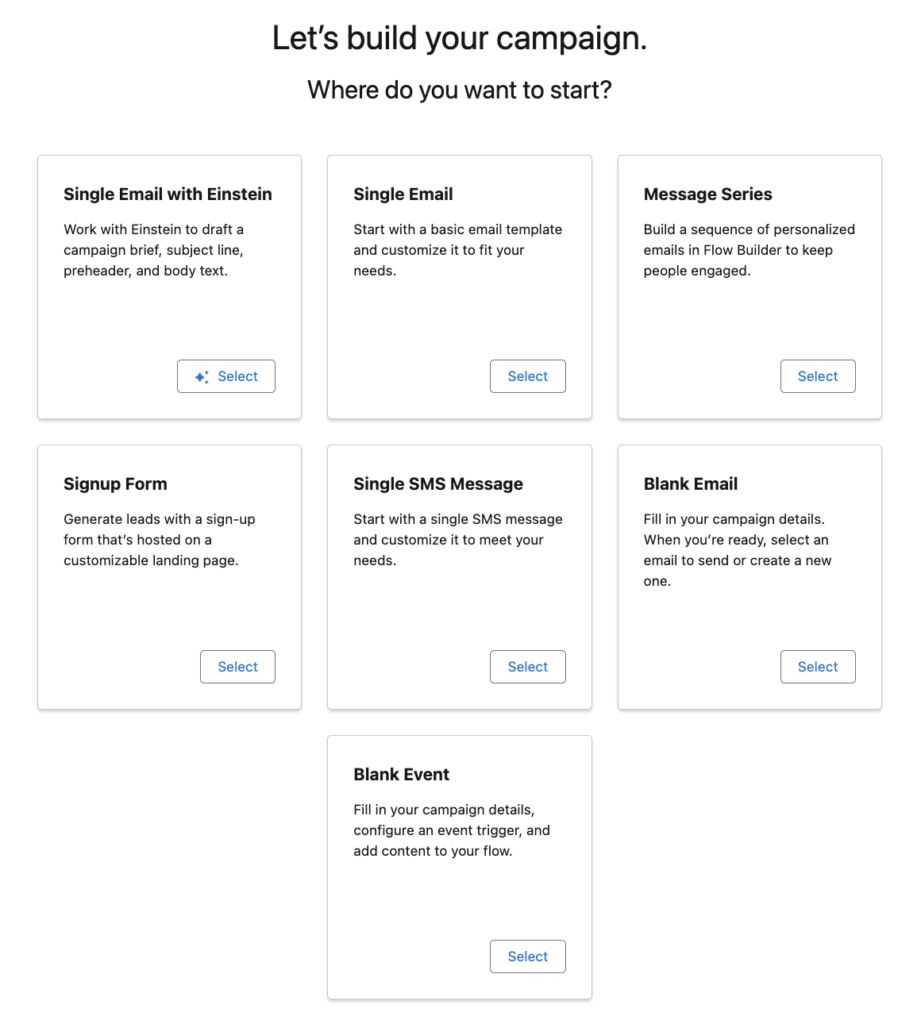
To get started navigate to the Campaigns tab in the Marketing App and click the New button. After completing the fields on the campaign page layout, you’ll be presented with the screen below. This is where the fun begins!

We’re going to select the Message Series option as that’s our goal for today.

Pro Tip: If you see this message when clicking one of the “Where do you want to start?” options, go back up and confirm your user access. Chances are you have not been added to the CMS as a contributor.

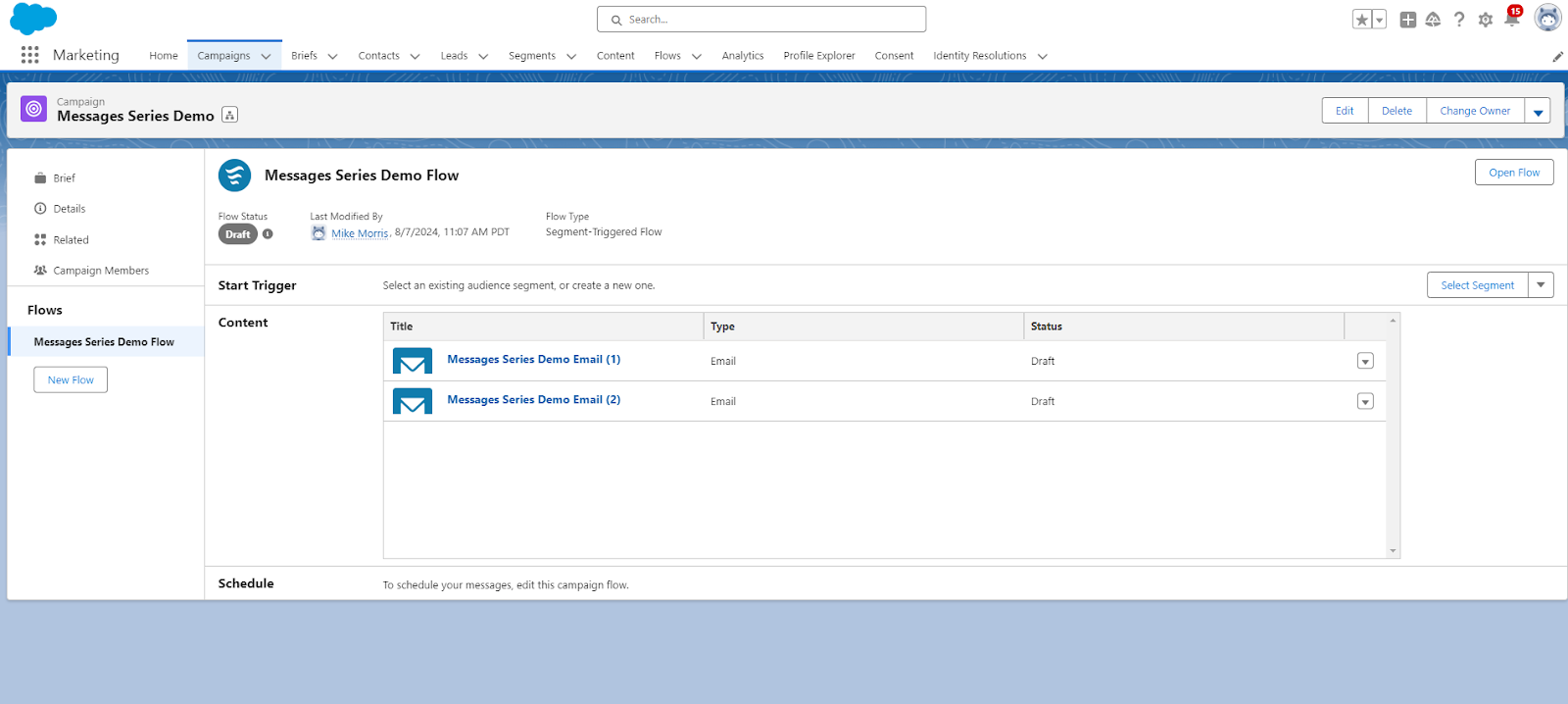
After selecting the Message Series option, you’ll notice that Marketing Cloud Growth has created your campaign, email templates, and a basic flow. This automation is a real time-saver and provides a great starting point for marketers.
  

Flow Access

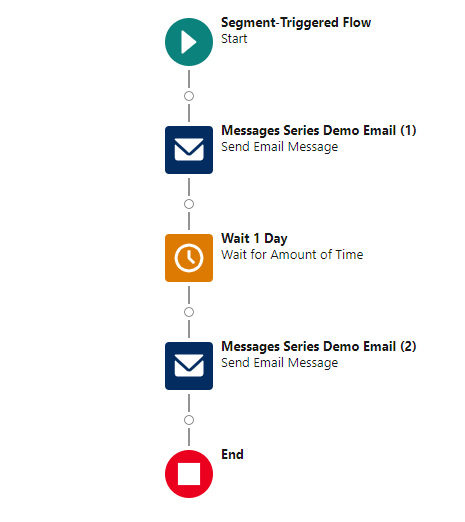
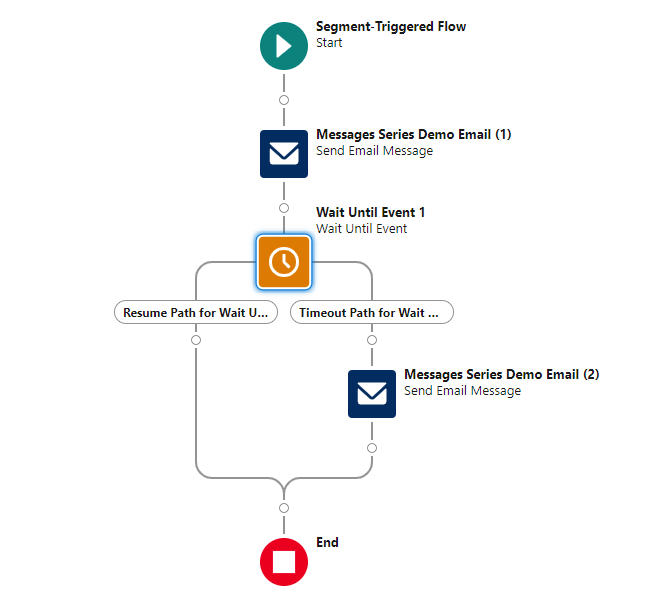
You can access the pre-built flow by clicking the “Open Flow” button within the campaign or by searching for “flow” in the App Launcher. This is a basic Segment-Triggered flow that sends an initial email, waits a specified period, and then sends a follow-up message. It’s a good starting point, but you’ll likely need to customize it to meet your specific requirements.

Customizing Your Flow

Flow Capabilities

If you are a Salesforce Admin who has experience with flows, you’ll immediately notice that this is not the same version of flow that you are accustomed to. Marketing Cloud Growth uses a streamlined version of Flow Builder and different trigger methods (Segment-Triggered and Form-Triggered). Most elements are available, but there are some limitations. See Marketing Cloud Growth Campaign Flows vs. Salesforce Flows by Lucy Mazalon for a great overview. Some limitations that stood out to me were the inability to access the Toolbox or create formulas, but don’t stress too much as this is a new product and capabilities will be expanded in future releases.

Pro Tip: Marketing Cloud Managers can access and edit flows, but their permissions are limited compared to Marketing Cloud Admins. Key missing elements include assignment, get records, and loop functions.

Current Capabilities

Set Schedule 

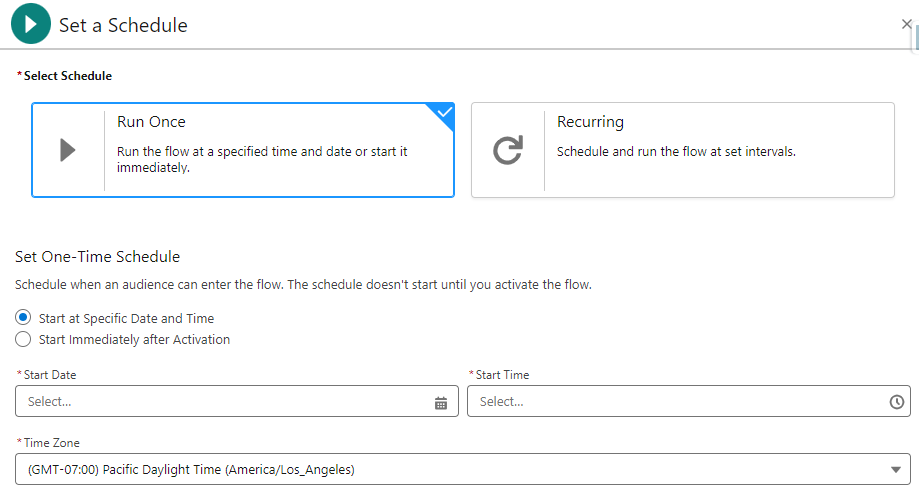
Unlike Record-Triggered flows, Segment-Triggered flows run on set schedules. This is due to the linkage with Data Cloud and its consumption-based pricing model. Credits are used when segments are processed so it’s recommended that segments only be refreshed prior to sending a communication or at intervals relevant to data updates (if data is added weekly, don’t refresh daily).

The schedule can be set by clicking + Set Schedule in the Start element. From there you’ll have the option to run once or set a recurring schedule.

Select Segment 

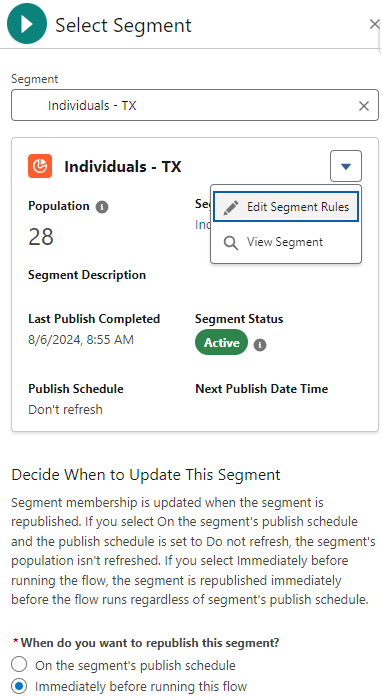
Speaking of segments, they can be added to the flow from the Start element by clicking + Select Element or directly from the campaign page by clicking Select Segment. I prefer adding the segment from the flow start element as it provides some additional features that I find very handy. 

After selecting a segment from the Segment dropdown, a summary of the segment is provided. The population, description, last publish date, and publish schedule are also displayed. If the segment population seems too large or too small, you can access and edit the segment rules. Keep in mind, any edits to the segment will be applied wherever the segment is used.

The final consideration is the republishing schedule. You can immediately publish the segment before running the flow (to make sure the most recently added individuals are included) or default to the publishing schedule defined in the segment. The interface design helps make the decision very easy by clearly displaying the segment publish schedule so you can make an informed decision.

Pro Tip: If you see that your segment is not set to refresh, it’s important that you select the “immediately before running the flow” option. If this option is not selected, you risk missing newly added individuals.

Update Wait Elements 

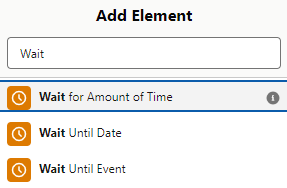
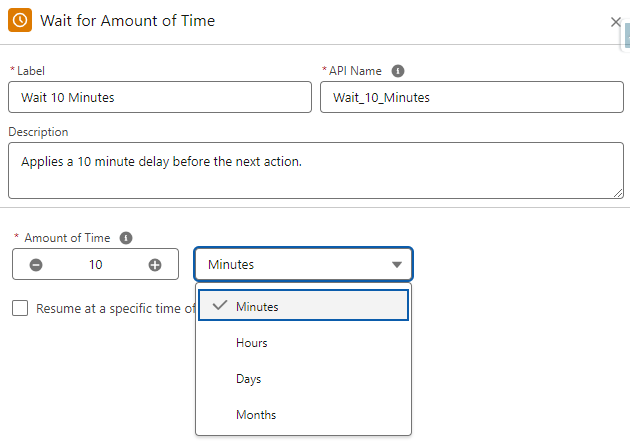
Flow includes three wait elements that provide a lot of flexibility. These elements can easily be added to your flow by hovering over the circle between elements, clicking the + sign, and then entering “Wait” as the search criteria.

One big advantage over Account Engagement’s Engagement Studio is the ability to have wait times down to the minute in the Wait for Amount of Time and Wait Until Event elements.

Apply Branch Logic

Branch logic can be added using the Wait Until Event or a Decision element. Let’s look at both.

Wait Until Event

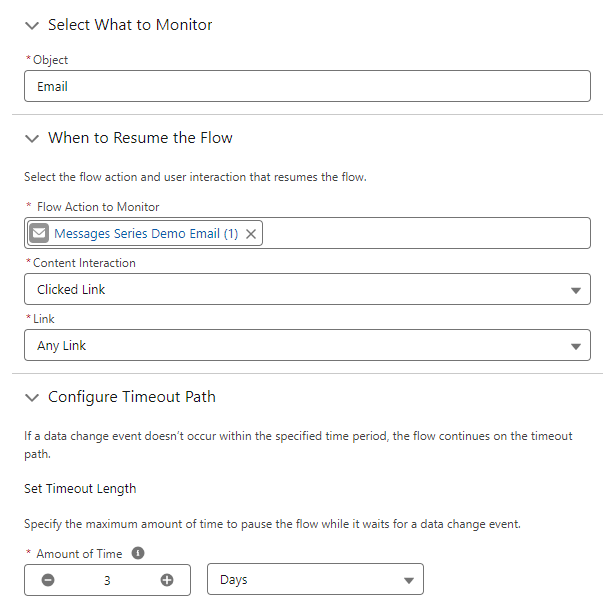
This element allows you to monitor for an action in the flow and then branch based on the engagement. As an example, you could monitor for individuals who clicked a link (and link or a specific link) in the first email in your series and then branch based on the interaction (or lack thereof). This can also be applied to SMS messages.

Decision Element

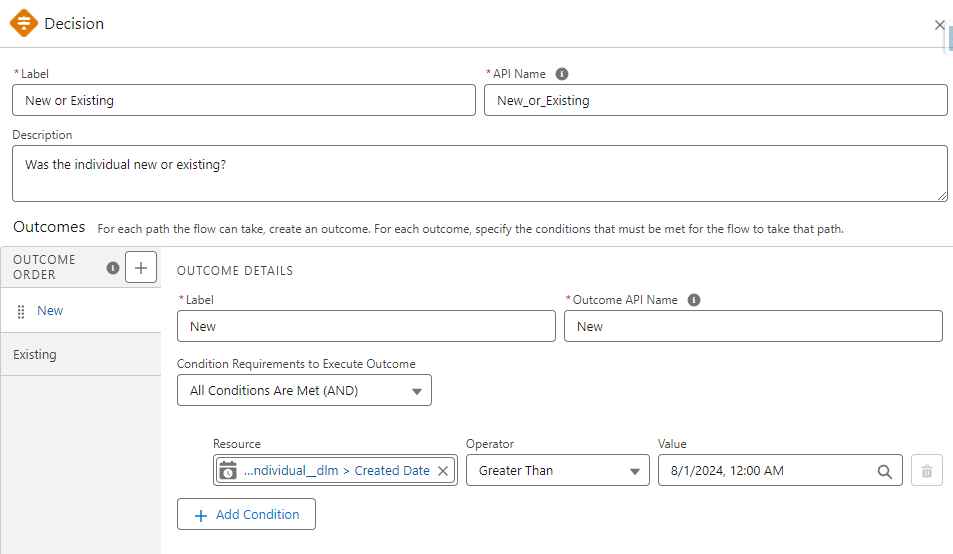
This decision element is another way to apply branch logic by specifying criteria for outcomes. The cool thing here is that you are not limited to two branches, additional outcomes can be added as needed creating multiple branches.

The actual resource fields accessible in decision elements are somewhat limited right now. This is certainly an area to keep an eye on as it will become even more valuable in future releases.

Vary Communication Methods

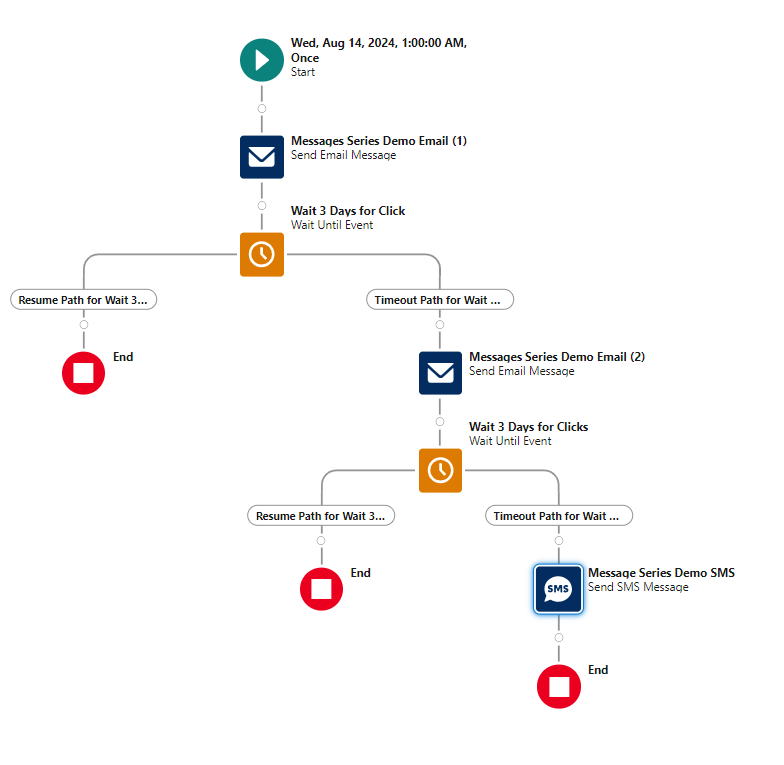
Another great thing about Marketing Cloud Growth is the ability to easily integrate SMS messages into flow. This is a great way to try a different outreach method if individuals don’t respond or to customize nurtures based on individual preferences.

In the example below, the intent is to get individuals to engage (click). After sending two emails and not getting a response, an SMS message is sent to see if a different communication method gets the desired interaction.

Learn More About Marketing Cloud Growth Edition & Flow

Marketing Cloud Growth is an exciting new offering from Salesforce and it’s only going to get better with each release. If you would like to learn more about this product, be sure to check out our Marketing Cloud Growth Edition Bootcamp.

Getting hands-on with flow is something that I highly recommend. Fortunately, Trailhead has a wealth of flow-related training available for free. Here are a couple of recommendations to help get you started.

Finally, Data Cloud is at the core of segmentation in Marketing Cloud Growth Edition. The Data Cloud Basics for Marketers trail is a great way to learn some of the benefits and key terms of Data Cloud that you will run across.

As an SMB marketer, you’re required to wear a lot of hats. From lead generation and aligning with sales and service teams, to creating content, emails, and personalized customer journeys you’re pulled in a lot of directions – and frankly that can be tough. Cue – artificial intelligence!  Gain insights and considerations for how you can use AI to help your marketing efforts

Supporting your day-to-day tasks 

One of the main benefits of AI  is in the area of efficiency. AI allows small teams to do more with less/fewer resources – which according to some marketers – they expect AI will save them 5 hours per week – that’s over ½ a day you get back!

 Examples of this include 

  • Content creation – from minutes to seconds
  • Customer segmentation – reducing the manual effort and technical skillset commonly required

AI can also lead to better experiences for customers – which in reality is what it’s all about. By giving you the ability to get content out quickly, AI can also increase your opportunity to personalize customer experiences such as send times – waiting to send until someone is most likely to engage.

How it’s done

But before we go much further – let’s level set: AI can be categorized based on its functionality and the specific tasks it performs. Two common categories are Generative AI (as described above) and Predictive AI. Here’s how they differ:

  • Generative AI focuses on creating new content, such as text, images, music, or even entire datasets. These systems generate data that mimics the patterns and structures of the input data they were trained on – leveraging user feedback such as thumbs up or down as part of their internal feedback & learning loop.
  • Predictive AI focuses on analyzing existing data to make forecasts or predictions about future events. It identifies patterns and trends in historical data to predict outcomes. Examples include:
    • Sales Forecasting: Predicting future sales based on past sales data and market trends.
    • Customer Churn Prediction: Identifying customers likely to stop using a service.

As marketers to date – much of the focus/application of AI has been focused on GenAI but its only a matter of time before predictive AI becomes more commonplace.

Tools at your disposal

When it comes to AI tools  – what you use is based on what you’re trying to achieve. And like most things, there are free and paid options.

Popular Free tools

ChatGPT, Microsoft CoPilot, and Google Gemini are three of the most popular chatbots to answer any question or generate text. Jasper is an AI copywriting assistant specializing in marketing content, and Quillbot paraphrases and improves written content, while, DALL-E 2 is great for generating images from text prompts.

While these are popular and free – marketers should keep in mind that they may many times lack control over quality and security. TDLR – don’t put personal, private, and/or confident data into these AI tools as they aren’t entirely secure.

Getting an assist from AI

As we continue to be asked to do more with less, make sure you don’t leave yourself vulnerable either. 

Considerations for using AI as a marketer

  • Be mindful of the information you input -what would happen if there was a data breach? 
  • Check for plagiarism – is the AI-generated content pulled directly from another source?
  • Consider the reliability & accuracy – did you fact-check? How good/specific was your input? What limiters did you apply if any?

How SMBs can tap AI through their marketing automation platforms

Our Guide “Selecting a Marketing Automation Vendor that Packs a Punch for SMBs” delves deeper into how top marketing automation platforms like Mailchimp, HubSpot, and Salesforce are innovating for SMBs. These platforms offer AI-driven features that can significantly enhance your marketing efforts, making them more efficient and effective.

Download the whitepaper now to explore how these vendors are revolutionizing marketing automation for SMBs and how you can leverage AI to stay ahead of the marketing trends.

Download Whitepaper:

This field is for validation purposes and should be left unchanged.
What tool(s) do you use?(Required)
This field is hidden when viewing the form

Collecting customer feedback can be a transformative tool that propels your business to new heights, and getting customer feedback through Salesforce is possible through a few methods. Armed with the right feedback, you have everything you need to address customer pain points and capitalize on your biggest strengths. 

Without sending surveys and gathering quality feedback, your product or service is navigating success in the dark. 

In this post, we’ll outline the ways Salesforce customers can collect feedback while working with the platform including limitations with getting customer feedback with Salesforce forms and solutions for more advanced initiatives.

The Evolution of Customer Feedback Collection on Salesforce

Gone are the days of manually sending out feedback forms. Today, there are countless digital tools to help you out. Of course, we all know there is a lot more to efficiency and automation than simply getting off paper and into the digital space. 

Here’s where Salesforce feedback forms become your best friend. The benefit of Salesforce form integration for collecting feedback is that you can automate every step of the survey process while accessing personalized data and reports on every customer. No CRM is more robust or comprehensive. 

Once you experience the power of customer feedback with Salesforce forms, your customer success strategy will never be the same. Read on to find out all the ways you can collect customer feedback with Salesforce forms.

The Role of Salesforce Feedback Management

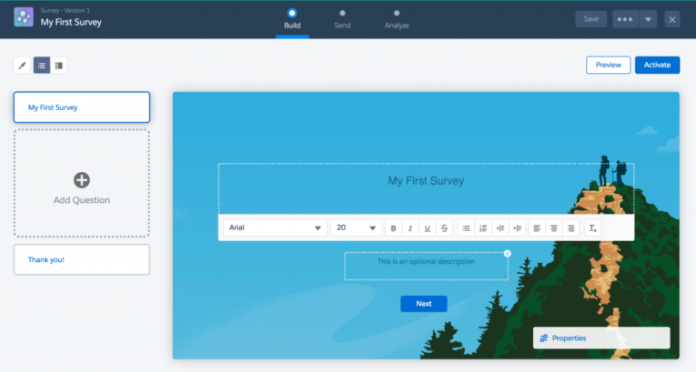
First up, you are probably wondering what tools Salesforce offers for collecting customer feedback with Salesforce forms. Well, Salesforce actually does have a free survey solution that comes with every Salesforce org, which is called Salesforce Surveys. 

Check out how to create surveys using Salesforce Surveys here for more on that.

Limitations of the Out-of-the-Box Salesforce Survey Solution

On the downside, this basic survey feature is limited. For example, you get 300 responses, and you can only relate a survey invitation to limited record types. To get more flexibility with the basic survey tool from Salesforce, you would need to implement custom development or Apex of some kind.

Purchasing Feedback Management by Salesforce

Alternatively, you can purchase Feedback Management by Salesforce, which comes in three editions: 

  1. Survey Response Pack
  2. Feedback Management – Starter
  3. Feedback Management – Growth

Of these, it’s Feedback Management – Starter and Feedback Management – Growth that provides the most comprehensive features, including 100,000 responses and unlimited responses respectively. 

These native tools offer some exciting capabilities such as Customer Lifecycle Analytics and Data Mapper, which allow you to sync survey responses to standard or custom objects. Investing in feedback management tools is one viable strategy for collecting customer feedback with Salesforce forms. 

Considerations of Feedback Management by Salesforce

There are some considerations to make when looking at Feedback Management by Salesforce. These include considerable investment, $13,500 a month per org for the Starter Edition and $46,000 a month per org for the Growth Edition

Aside from the price, these tools may still require coding and development to cater to custom use cases. This means you have to allocate time and money toward developing these solutions and ongoing maintenance.

Exploring Other Survey Options for Salesforce Feedback Forms

So, what are your other options for implementing customer feedback with Salesforce forms? And what is the best way to collect feedback for your workflows while integrating with Salesforce? 

Read on, we have you covered!

Techniques to Collect Feedback Using Salesforce Form Builder

When building forms to collect user feedback via Salesforce, you can choose to implement development work. This will give you great flexibility and customization. However, it will slow down time to market, and you need to be really sure that you are in it for the long haul. Projects like this require ongoing upkeep. 

Alternatively, you can purchase a trusted third-party tool for surveys on the AppExchange. This will help you go to market faster and mitigate some of your development work. The biggest con of most products on the market is that they offer limited flexibility. You often won’t get customization without code, and this lands you with some of the problems and obstacles you face when building a custom solution or using Salesforce native tools.

The good news is you don’t have to be stuck in this build versus buy quandary. Not all products are created equal! You can collect customer feedback with Salesforce forms using a robust and flexible form builder with zero code. 

Learn more about building complex Salesforce forms without coding here. 

Titan Survey: A Powerful Salesforce Survey Tool

One of the best options on the market is Titan Survey, part of an all-in-one super platform for Salesforce. Check out some of the amazing things you can accomplish with Titan Survey below, or read more about building complex Salesforce forms without coding here.

Salesforce Surveys as a Tool for Engagement

One of the strongest features of Titan’s Salesforce survey tools is that you can easily map them to any custom or standard object. The Titan Survey package also offers a range of custom Salesforce Survey Objects included with the platform. 

You can draw on multi-patented bi-directional Salesforce integration to craft personalized user journeys. By implementing conditional logic in your surveys, you can ensure that customers taking your surveys remain engaged throughout the process. 

Customers can skip irrelevant questions and only get asked questions relevant to them. With the power of conditional logic, watch drop-off rates sink, and market segmentation becomes a whole lot easier.

Automating Salesforce Customer Feedback Forms

The good news is that with a tool like Titan Survey, you can automate every step of the customer feedback form process. Set up ready-to-go customer feedback form templates and have them sent out automatically through Salesforce. You can also trigger follow-up actions and have customer issues routed to the correct support or sales representative with ease! 

With Titan Survey, you can send feedback via WhatsApp, SMS, Salesforce Flow, List View, or Reports. 

You also have the freedom to send web or email surveys. With web surveys, you get to distribute surveys via a link that can be embedded in your website or anywhere you like. Web surveys are typically more interactive and work better for more complex questions. You can also embed Titan surveys in an email, which is ideal for shorter and simpler surveys!

Using Marketing Cloud Account Engagement (Pardot)? Check out this blog post that outlines how to use Pardot form handlers for data submission, which is the solution you can use to connect Titan surveys to your Account Engagement instance.

Titan Forms: A Salesforce Forms Builder Alternative for Feedback Collection

The bottom line is that Salesforce surveys are here to revolutionize the way you interact with customers. They’re a key component to creating the experiences your customers want. Even so, finding an easy-to-use Salesforce feedback form can be challenging! 

Custom development has a lot of perks but comes with many obstacles. Similarly, Salesforce’s native solutions carry a price tag and may take longer to implement when handling niche use cases. 

A no-code Salesforce feedback form is a winner! And here, Titan Survey offers all the usual survey perks — like any question type and a range of templates. This tool also offers special features like dynamic data sync with any Salesforce record. 

Ultimately, it’s up to you to make the right decision for you and your business and customers. Good luck!

Your boss has told you to ‘do ABM.’ Great. Instead of ripping out your current marketing and sales campaigns, here are three quick ways to apply ABM strategies to your email campaigns.

What is account-based marketing (ABM)?

Let’s go over what ABM is and what it isn’t at a high level first.

ABM stands for Account-Based Marketing, which is a “B2B marketing strategy for high-value customer accounts. In ABM, you focus on each account as a “market of one,” offering highly personalized 1-to-1 experiences and tailored content.

Through a focus on building stronger relationships with high-value accounts, ABM can help B2B marketers who need to increase pipeline quality, retain top accounts for longer, and boost the revenue those accounts bring in.” — Source: Salesforce

You might also hear something called ABX or Account-Based Experience. This is a “go-to-market strategy that uses data and insights to orchestrate relevant, trusted marketing and sales actions throughout the B2B customer journey. It’s a customer-centric rethinking of an account-based go-to-market — one that combines the engageability of inbound marketing with the precision and targeting of account-based marketing.” Definition from Demandbase

So as you can see, we can’t just start doing ABM and see results the next week. ABM is not a little change to increase MQLs (marketing qualified leads) or newsletter subscriptions. 

To fully embrace this new go-to-market strategy and campaign structure across our marketing, sales, and service teams requires a lot of planning, work, and time to see impactful and positive results. 

Some ABM/ABX Best Practice Reminders

Before we get into it, here are some ABM best practice recommendations to guide you through the integration of ABM strategy with your email marketing campaigns.

ABM Reminder 1. You don’t have to do it all at once!

  •  Consider a phased approach to ABM/ABX by focusing on low-hanging fruit.

ABM Reminder 2. Even a little personalization is better than none.

  • The more targeted and personalized you can make your ABM program, the better. But remember our first point that it is ok to start slow and small.

ABM Reminder 3. Think of making your targeted ABM audience’s content consumption similar to how Netflix does — ungated and unlimited.

  • If you still need forms for conversions, you can reduce the form fields on your landing pages by referencing known data in your CRM (customer relationship management) or sourcing it through a data-enrichment platform like Zoominfo.

Ready? Let’s jump in and focus on how to apply ABM strategies to your email campaigns and newsletters.

ABM Quick Win 1: Segment Your Email Audience

Segmenting the audience ahead of time helps you understand the level of effort ahead of you for more one-to-many ABM-focused journeys.

Check marketing opt-in status

Make sure they are opted in! We can’t properly enroll an audience in any type of marketing campaign or nurture program if they have not agreed.

Need a refresher? Read Forms Are Great, But Confirmed Opt-In Is Better for more on what’s involved with marketing opt-in.

Know your marketing personas

Review the job titles or persons of your target ABM buyer groups, and see what content and CTAs (calls to action) resonate most with them. Bonus: look at click-through rates for past email campaigns to identify click trends from buyer personas in your target ABM buyer groups. 

We don’t need to write anything from scratch — let’s repurpose what we have that has worked for other audiences. 

Find the right segmentation groups

Consider geographical audience segmentations to optimize engagement. Then, run A/B tests of your send times and days to find the best fit for each target group. You can also test out AI functionality like Pardot Einstein Send Time Optimization to see if that improves your engagement metrics.

ABM Quick Win 2: Add Some Personalization

When it comes to introducing personalization, remember to start small to understand the impacts (or lack of) on our audience engagement.

Email subject lines & preview text

  • Make email subject lines & preview text personal with variable fields like name, title or role, industry, and product. 
  • Use what makes sense for your company and the value prop for your ABM targeted audience – don’t overdo it and make it weird. 
  • Remember to make your subject line actionable and timely!
  • Here are some best practices and a cool way to use AI to make your subject line stronger – Playing with the AI-Powered Stensul Email Subject Line Tool.

Email sender name

  • Try to be consistent and personable so your audience starts to recognize your emails.
  • For example, try ‘Kelly at Sercante’ ([email protected]) instead of ‘Marketing’ ([email protected]).

Email body copy headers & CTAs

  • Test content and keywords to see what works best for your audience. Refer to your audience segmentation from the first step to stay on-message.

Landing page headlines & body sections

  • Make it personal with variable fields like name, title or role, industry, and product. 
  • Use what makes sense for your company and the value prop for your ABM targeted audience – don’t make it creepy.

Landing page body & CTAs

ABM Quick Win 3: Reporting, Reporting, Reporting

If you can’t report now, starting an ABM approach won’t help you. You need to visualize your current campaign efforts before you can prove that your phased approach to ABM/ABX is impacting your audience.

Get your CRM ready by organizing account segments

In your CRM, organize your targeted accounts for ABM and the buyer groups you defined in step one.

  • This can be a custom dropdown field or checkbox only marketing manages to indicate their enrollment or ABM tier.
  • Make sure your chosen organization method syncs down to the related leads and contacts from your target ABM account and across to your MAP (marketing automation platform).

Get your website tracking in order

Ensure all website properties and domains are being tracked consistently. Then, make sure you are using specific UTMs or click tracking for each channel and campaign. Wherever your audience is going, we want to follow.

Not sure how to get started? Check out our blog on Capturing UTM Parameters: 4 Scripting Paths for Account Engagement Landing Pages.

Get your reports set up before launching

Set up your reports prior to an ABM pilot campaign launch or before you start testing these ABM strategies on your email campaigns. This helps measure the marketing and sales baseline for your general audience so you can compare it to your targeted ABM audience.

Check these reports frequently and continually optimize your channels, messaging, and targeting.

Start small with ABM and learn along the way

These quick wins are a great way to dip your toes into ABM without going all in right away. Starting small lets you experiment and see what clicks with your audience. You’ll pick up insights along the way so you know the best places to focus your efforts and resources. As you learn, you’ll be ready to scale up your ABM game for stronger connections and better results. 

So, take these small steps, learn from them, and soon you’ll have an ABM strategy that translates into big wins with your top accounts.

No more posts to show