Congratulations! Your email campaigns are rocking — engagement and revenue are up. Your boss has also noticed your handiwork and, in the spirit of “no good deed goes unpunished,” has asked you to increase the number of email being sent.
Here are 4 tips that will help you honor her request while smartly protecting against email fatigue.
1. Proper audience segmentation
Making sure that you are sending the right email to the right prospects is the first step in ensuring a happy database. Proper segmentation is not just a good idea — it’s critical.
One of the easiest ways to segment your data in Pardot is through completion actions. Available on forms, form handlers, files, custom redirects, emails and page actions, completion actions allow you to directly add prospects to lists, apply tags and update field values (among many other capabilities) based on their actions.
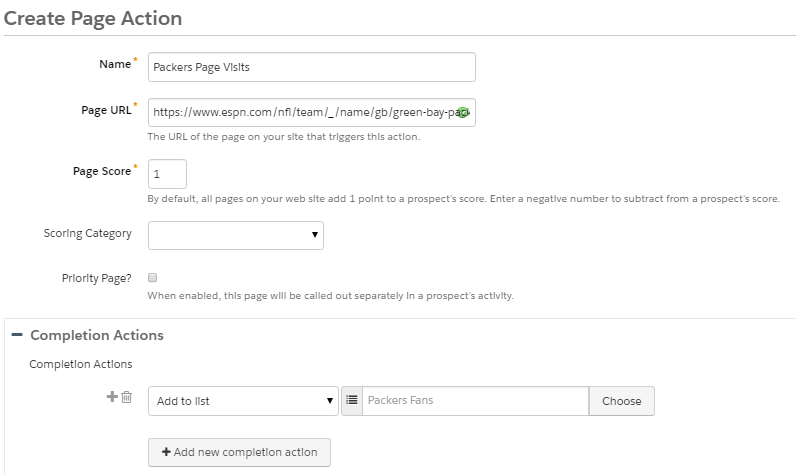
My personal favorite is using the Add to list action in conjunction with page actions to turn identified website visitors into actionable segments. Here’s an example:
In this example, a page action was created on the Green Bay team page. The completion action adds prospects to a targeted list named Packers Fans. This list can now be used for promoting merchandise, tickets or anything related to the Packers. The same methodology can also be applied to your products, services or any page on your website.
2. Give ‘em a break!
Managing how many emails a prospect gets over a set period of time can be a real challenge. Actually, it’s quite easy if you build out frequency based suppression lists.
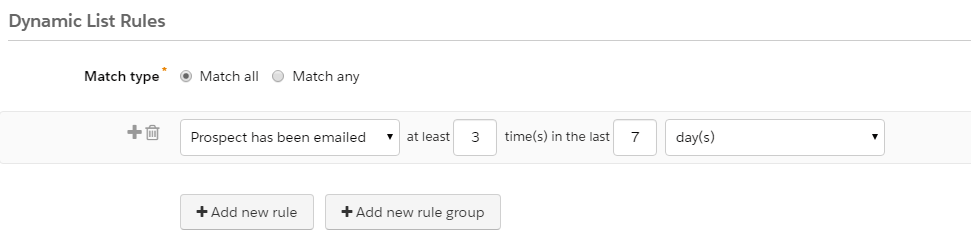
Simply determine the max number of emails that you would a prospect to be sent over a designated time period, build a dynamic list using the criteria and then apply to all your email sends.
In this example, a dynamic list that selects prospects emailed at least 3 times in the last 7 days was created. When applied as a suppression list to email sends, it will allow you to manage the number of communications being sent and ensure that you are not bombarding your prospects. Since the list is dynamic, prospects will be continually added and removed from the list as they meet (or don’t meet) the criteria.
3. Keep it relevant
Nothing bores prospects more than irrelevant content. Keep your subscribers engaged by incorporating content and images that are related to them and their interests with dynamic content.
The more data you have the better, but you can get started with something as simple as state or country. Remember that segmentation data that we spoke about earlier? That information can also be used to power your dynamic content.
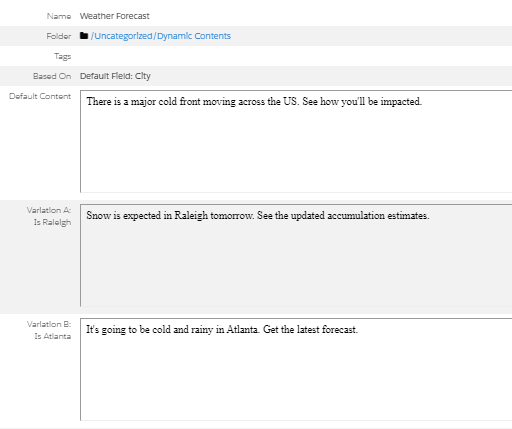
In this example, dynamic content has been used to customize the text related to local weather forecasts based on city name. Remember, dynamic content can also be used to customize images and entire blocks of HTML based on Pardot default fields, custom fields, scores and grades. Don’t overlook this powerful feature.
4. Make it personal
Personalization has really become an expectation as the amount of data available to marketers has continued to increase. However, you don’t need a ton of data to get started.
Simply inserting a first name into the body of your message or subject line using a variable tag is a start. If your data is sparse, using progressive profiling is an excellent way to build more complete profiles – without creating obnoxiously long forms.
When using variable tags, don’t forget to set default mail merge values in the field properties – nothing is more embarrassing than a failed attempt at personalization.
Handlebars Merge Language (HML) is a simple upgrade to your Pardot account and provides even more flexibility when it comes to personalization. HML gives you the ability to check whether a field is populated (using #if statement) and allows you to provide the best content based on the result. Learn more about HML in this post from Skyler Nakashima – How Pardot’s New Handlebars Merge Language Improves Personalization.
Share your tips & learn more
These are just a few of the ways that Pardot can help you combat email fatigue. Share your favorites in the comments section. Learn more about the topics addressed in this post in our Pardot Admin Bootcamp Course. This interactive online course will teach you everything needed to become a Pardot Pro.
I’ll admit it. As a marketing professional, I was a bit nervous the first time that I heard the term “marketing automation.” My first thought was that somebody was trying to automate my role and that I would soon be looking for a job.
This fear was not unique to me — many in my department had the same thoughts. However, these fears were completely unfounded.
Turns out that marketing automation, specifically Pardot, actually saved my bacon — twice.
What is marketing automation?
According to Salesforce:
“Marketing automation is technology that manages marketing processes and multifunctional campaigns, across multiple channels, automatically.”
Marketing automation is basically a tool that streamlines and simplifies many tasks within marketing and sales organizations leading to greater efficiency. It frees teams from performing many processes that have traditionally been done manually (if they are even getting done) and allows them to be more strategic. It is NOT the equivalent of replacing workers with robots.
Score one for marketing automation
I worked in a leadership role in the marketing department of a mid-sized organization for over 20 years. Along the way, the concept of marketing automation was introduced. After some initial skepticism and limited success with with other platforms, we adopted Pardot and I became a huge fan. Working in Pardot quickly became the favorite part of my job and we were able to do some amazing things with lead scoring, grading and nurturing.
Our organization had a great run, but eventually ran into some challenges. After several rounds of layoffs, my number came up. While this was a business decision, an abrupt change in employment is never a fun thing. This was the first time that my Pardot knowledge came to my aid.
Since I was the Pardot expert within the organization and we had an extended contract, we were able to agree to a transition plan that was mutually beneficial for both parties. I was afforded more time to find my next career and the extended transition ensured that marketing operations continued uninterrupted. Score one for Pardot!
Second act
When I first started using Pardot, I saw all the stickers and t-shirts emblazoned with:
“I ♡ Pardot”
I thought it was a bit funny, but soon I found myself echoing the same sentiment. I decided very quickly that I wanted to transition from a marketing leadership role and that Pardot would be the focus of my new career.
I began reaching out to friends, colleagues and organizations that I knew used Pardot. This and the skills that I had developed led me to Sercante and my current role.
I now get to utilize Pardot every day, work with a team of awesome Pardot pros, and help my clients succeed on the Salesforce platform. How cool is that? Score one more for Pardot!
Ready to write your story?
Marketing automation is nothing to fear. In fact, you should embrace it and take advantage of every opportunity to build and enhance your skills. At the end of the day, tangible technical skills are what employers need and they will also keep you relevant.
The team at Sercante is now offering two Pardot training courses to help you build your skills. Our Pardot Admin Bootcamp and Code School for Pardot Admins courses are taught by Pardot pros who work and innovate in the platform on a daily basis.
If you are looking to take control of your career and write a success story of your own, I highly encourage you to take a look. You’ll be glad that you did.