Category

New Features

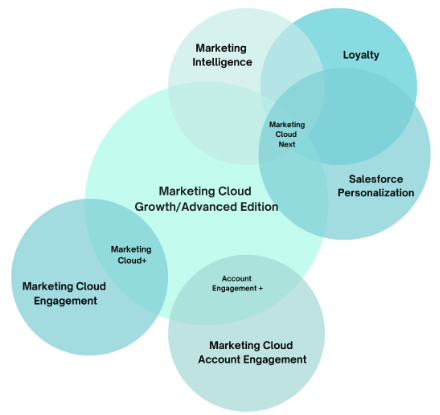
Product Note: Marketing Cloud on Core is now known as Marketing Cloud Next. Marketing Cloud Growth and Advanced are editions of Marketing Cloud Next and have also been referred to as Agentforce Marketing.

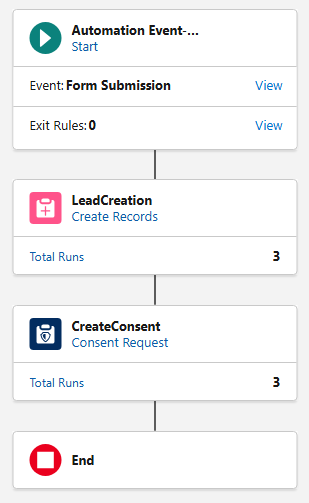
Marketing Cloud on Core (aka Growth and Advanced Edition) offers simple out-of-the-box form-triggered flows that are great for lead generation and straightforward scenarios, but today we’re going to dive into something more complex! In this post, I’ll walk you through the process of building a flow that checks for existing contacts and leads before creating a new lead, creates consent records, and sends an autoresponder email. Let’s get started.

Setup Notes

All testing was conducted after the Spring ‘25 release in a demo org. The standard lead duplicate rule was active and configured to allow the creation of duplicate records with alerts.

OOTB Form-Triggered Flows

Before we begin customizing the out-of-the-box flow, it’s important to understand the capabilities and limitations of Form-Triggered Flows. This helps guide decisions concerning when customization is necessary.

OOTB Form-Triggered Flow without Lead Matching

This is the most basic flow and is what’s automatically generated when the Signup Form template is selected during the campaign creation process. No modifications were made to the flow, outside of configuring the “CreateConsent” element.

Test Results 

ScenarioResult
Submitted by new personNew Lead Created
Submitted by existing leadNew Lead Created
Submitted by existing contactNew Lead Created

Summary 

In all three test scenarios, a new lead record was created leading to duplicates in Salesforce. 

OOTB Form-Triggered Flow with Lead Matching

In this test, a very slight, but important, modification was made to the flow—the “Check for Matching Records” option was enabled in the “LeadCreation” element.

Test Results 

ScenarioResult
Submitted by new personNew Lead Created
Submitted by existing leadExisting Lead Updated
Submitted by existing contactNew Lead Created


Summary 

This small update made a significant improvement. The flow now prevents the creation of duplicate leads when an existing lead submits the form. However, a new lead record is still being created when an existing contact submits the form.

This occurs because flows are object-specific, and the OOTB flow only references the lead object. It lacks visibility into the contact object, so it creates a new lead if an existing lead is not found. In short, the flow is performing exactly as it’s designed to.

OOTB Form-Triggered Flows Summary

The OOTB Form-Triggered flows support simple use cases, but it’s important to be aware of the potential for duplicate record creation. These flows are intended as a starting point for marketers and should be customized to meet more specific requirements.

Form-Triggered Flows with Autoresponder Emails

Use Case

Your company just released its latest white paper, which is expected to have great appeal to potential and existing customers alike. The marketing team is posting the white paper on the website as a gated asset. In addition to redirecting users to a “Thank You” page, marketing also wants to send an autoresponder email. The autoresponder not only provides the recipient with easy access to the white paper should they want to view it again later but also serves as a way to validate the email address that was provided.

Why do we need to customize the OOTB flow?

Since the white paper will “appeal to potential and existing customers,” we know that the form will be submitted by new visitors, existing leads, and existing contacts. If we simply added a “Send Email Message” element to the OOTB flow, we could send the autoresponder email, but we would create new leads in Salesforce if an existing contact submitted the form.

The flow needs to be customized to check for existing contacts, in addition to existing leads, before creating a new lead and sending the autoresponder email.

The Finished Product

Before we walk through the build of the flow, let’s first take a look at the finished product. Then, we’ll review each element, discuss its function, and why it’s needed.

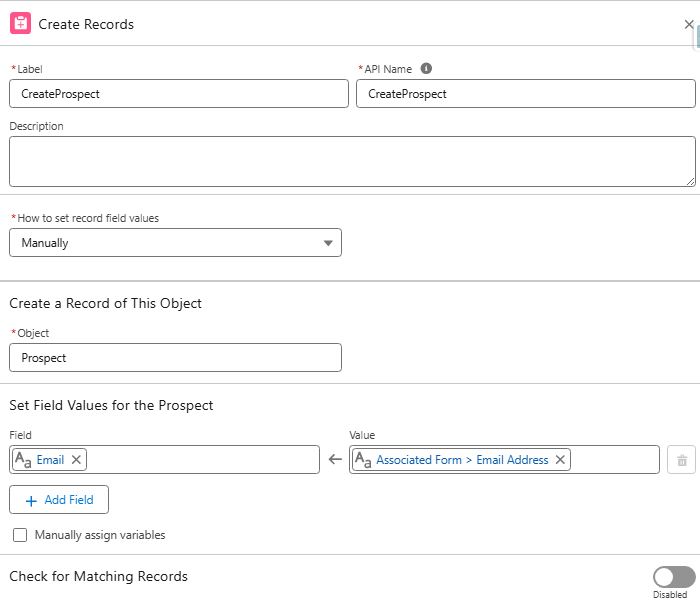
CreateProspect 

Function: Creates a new record on the prospect object for each form submission.
Reason: Flows using the “Send Email Message” element are required to have a “Create Records” element directly after the Start element. The “Create Records” element must create a record on the Contact, Lead, or Prospect object.

If we created records on the Lead object, we would be in the exact same situation as the OOTB flow: we would create duplicate leads when contacts submitted the form. If we created records on the Contact object, we would bypass the Lead object, and submissions from new visitors would be created as contacts.

The Prospect object was introduced as part of the Spring ‘25 release and is designed to keep unqualified prospects unassigned until they meet your organization’s agreed-upon lead requirements. We can satisfy the flow requirement by creating a record on this object without involving the sales team or triggering automations.

GetContacts 

Function: Retrieves all contacts who match the form submission based on the provided email address and last name.
Reason: Before we can check if a form submission is an existing contact, we must first give the flow visibility into contact records so that we have something to compare against in the “Decision” element.

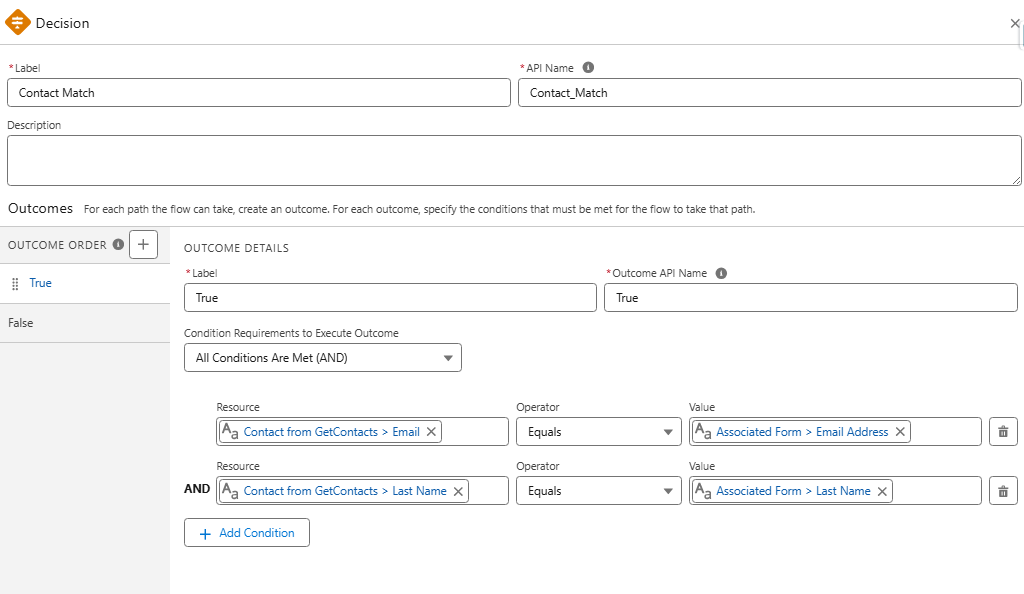
Contact Match 

Function: This “Decision” element is used to check if the form submission is an existing contact. If a match is found, the existing contact record is updated. If a match is not found, the existing lead record is updated (if one is found), or a new lead record will be created.
Reason: Prevent the creation of duplicate leads when existing contacts submit the form.

UpdateContact 

Function: Update existing contact records based on data included in the form submission.

Reason: Update the contact record with the most current data.

LeadCreation 

Function: Create new lead records or update existing lead records based on data included in the form.

  • Important: Make sure “Check for Matching Records” is enabled. 

Reason: Create/update lead record with the most current data.

CreateConsent 

Function: Creates a consent record based on the contact point for the selected channel and subscription.
Reason: Consent records are required for sending promotional emails from Marketing Cloud on Core.

TransactionalEmail 

Function: Transactional emails are non-promotional, immediate, and automated communications sent in response to a user’s action or interaction.
Reason: In this use case, the transactional email is used to send the ungated link to the white paper for future reference. Transactional emails can be used as long as they contain no promotional elements.

DeleteProspect 

Function: Deletes the prospect record created by the first element.
Reason: This step is optional but recommended. Since a prospect record was created solely to satisfy the requirement of having a “Create Records” element first, deleting the record helps keep the org clean. If you are using the prospect record for purposes beyond fulfilling this requirement, you can skip this step.

Other Use Cases & Next Steps

This structure can be applied and adapted to other use cases where there is a need to send autoresponder emails to leads and contacts without creating duplicate records. Examples include flows that create tasks or campaign member records in addition to sending autoresponders. 

Flows might seem challenging at first, but marketers will love them once they gain more experience. The key takeaway is to get hands-on, test, and don’t hesitate to ask for help if needed. Personally, I can say that I received a lot of support from my friends at Sercante when I was starting out, and I still do today!

Product Note: Marketing Cloud Growth and Advanced are editions of Marketing Cloud Next and have also been referred to as Agentforce Marketing.

Welcome to your Masterclass in Account Scoring – where we take your Salesforce skills from good to guru-level! With the Spring ‘25 release, Salesforce introduces Account Scoring, a smart, customizable, and easy-to-manage scoring solution within Marketing Cloud Growth and Advanced Editions (aka “Marketing Cloud on Core” or just “Marketing Cloud”). So, grab your virtual whiteboard, and let’s dive in!

Account Scoring 101: The Fundamentals

Account Scoring is a brand-new feature in Marketing Cloud on Core, designed to give businesses deeper insights into which accounts are most likely to convert. Unlike People Scoring, which evaluates individual leads and contacts based on engagement and fit, Account Scoring takes a broader approach, analyzing entire organizations. This is especially valuable for Account-Based Marketing (ABM) strategies, where sales and marketing teams focus on targeting high-value accounts rather than individual leads.

How Does Account Scoring Differ from People Scoring?

  • People Scoring is focused on individual engagement and fit. Individuals are scored based on how well they fit your ideal persona and how often they engage with your Marketing initiatives.
  • Account Scoring aggregates data from all contacts within an organization, providing a more holistic view of an account’s likelihood to convert.
  • Intent Scoring (optional in Account Scoring) identifies buying signals, making it easier to target accounts actively considering a purchase.

Account Scoring is a game-changer for ABM-focused campaigns, where teams need to evaluate an entire company rather than just a single decision-maker. With this new feature, marketing and sales teams can prioritize high-value accounts, personalize outreach at the account level, and drive stronger conversion rates.

Let’s break down the core curriculum of Account Scoring in Marketing Cloud on Core:

  1. Engagement Scoring – Think of this like a participation grade. The more someone interacts (emails, website visits, messages), the higher the score.
  2. Fit Scoring: This is your compatibility test. Does the account match your ideal customer profile? If so, your points will increase.
  3. Intent Scoring – This one’s all about purchase signals. If an account drops hints they are ready to buy, the score reflects that.

Now let’s discuss how to elevate your Account Scoring skills to an expert level.

Take Control of Calculated Insights

Previously, once you published scoring rules, the system would auto-refresh Calculated Insights every six hours – whether you wanted it or not. With Spring ‘25, Salesforce has introduced the power to unschedule or reschedule Calculated Insights. Now, you control when and how often your scores refresh, ensuring you’re optimizing Data Cloud service credits and keeping your system running efficiently.

Customize Your Scoring Model Like a Pro

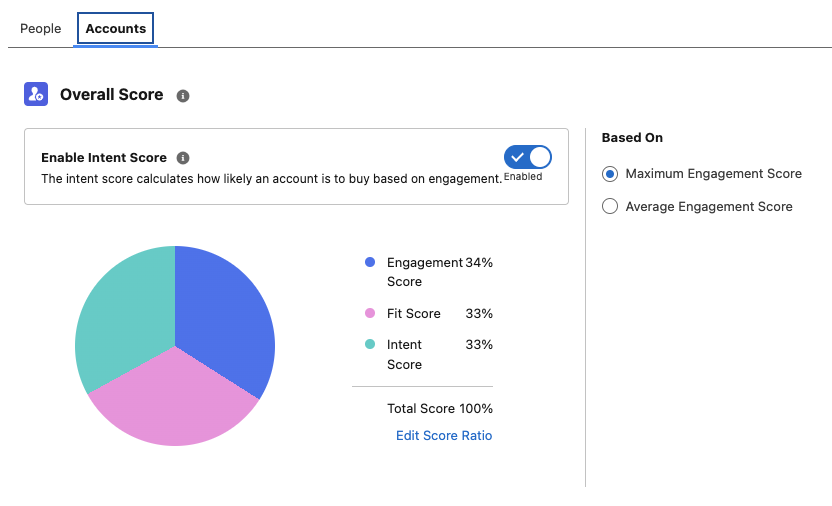
Say goodbye to one-size-fits-all scoring. Account Scoring allows you to adjust the weighting of Engagement, Fit, and Intent Scores to align with your business strategy and ensure the scoring model fits your unique needs. 

  • Need Engagement to weigh 70% instead of 50%? You got it.
  • Want Intent to be the biggest factor? Done.
  • Would you prefer Fit to lead the charge? No problem.

Activating Account Scoring

To start using Account Scoring:

  1. Create a Unified Account Identity ruleset
    1. Account Identity rulesets allow you to target contacts related to accounts as well as segments based on Account attributes.
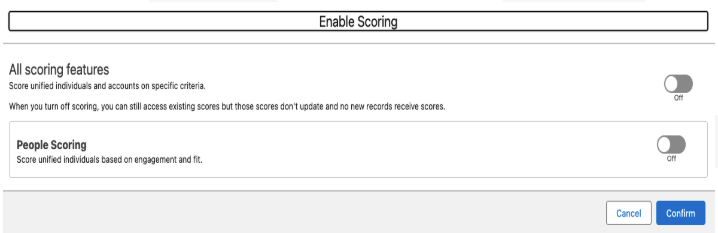
  2. Enable Account Scoring
    • You can also enable Intent Scoring at this stage if you wish to use this feature.

3. Customize your scoring rules and your score ratio. Don’t forget to republish your rules once your changes are saved.

Smarter Rule Management and Publishing

No more accidental rule mishaps! Now, when you tweak your scoring rules, you’ll need to publish them again for the changes to take effect. Here’s your checklist for success:

  • uncheckedCustomize Fit and Engagement Scoring under Setup > Scoring Rules.
  • uncheckedFine-tune Account Scoring under the Account tab.
  • uncheckedRepublish once all your changes are set.
  • uncheckedRemember, once published, rules cannot be unpublished – only modified.
  • uncheckedKeep case sensitivity in mind (“Example” ≄ “example”)

Time to Put Your Skills to the Test

Congratulations, you’ve just completed your Spring ‘25 Account Scoring Masterclass! Now, it’s time to put your knowledge to work. Whether refining your scoring model or just getting started, these updates give you everything you need to optimize and win more deals. 

Want expert guidance? The Sercante team is here to help. Contact us, and let’s make your scoring strategy a success!

For the last seven years, I’ve been enamored by a marketing analytics tool (who among us hasn’t, I’m sure), Datorama, or Salesforce Marketing Cloud Intelligence. MCI, as we’ve come to call it, is the most seamless way my customers have found to join their data across multiple sources, built by marketers and for marketers. MCI allows users to join data together and easily create reports and dashboards using plain language from the pre-built data models. This allows for easy-to-populate smart lens dashboards, or deeply complex automated reporting triggered by specific events. 

To my delight, and to the happiness of marketers, Salesforce just announced on March 18, 2025, a new version of the tool, Marketing Intelligence (MI),  built on the Salesforce Platform. This new version takes the best features of existing MCI and layers them into the functionality of Data Cloud’s unified platform, while taking users to the future with agentic features that will provide down-to-earth insights with conversational agents. So without any further ado, let’s dive into this new tool, Marketing Intelligence! 

What is Marketing Intelligence? 

Marketing Intelligence (or MI) is a new application on the Salesforce platform designed to simplify marketing data management, deliver trustworthy, out-of-the-box insights that marketers can instantly act on, and deliver better return on investment for marketing spend. Being built on Data Cloud and connected to the Salesforce platform allows it to be fully extensible, with a toolbox for marketers at the ready- it’s everything you need to build robust, effective, and meaningful dashboards with minimal lift. 

Data Cloud for Marketers Made Easy 

One of the processes I have been spoiled by in Marketing Cloud Intelligence is data mapping that auto-populates based on past usage and logical guesses by the platform’s artificial intelligence. Additionally, certain APIs come with prebuilt models and mapping to build off of rather than user-defined settings. These features have helped get marketers streamlined into the world of data models and dashboarding with less lift than throwing them into a database or asking them to join various tables. 

All of that, to my delight, is back in full form with Marketing Intelligence. You have the option to upload a TotalConnect file (a non-standard API, flat file of your choosing), or to use an existing API connection, with some rolled out at launch and more coming in the year ahead. Choosing a connection like Google Ads allows you to seamlessly grab that data, formatted and ready for quick mapping, and load the data you need into a dashboard in just 3 clicks. 

Clean and Easy Dashboards 

The dashboards look sharp and load with ease. These dashboards come prebuilt, with options to customize, and also have a key new feature compared to the existing Marketing Cloud Intelligence: generative AI summaries of your campaigns, including what’s working and what might not be. This elevates, to me, the future of dashboarding—being able not only to look at quick and easy data points and trends but also being told in plain language for what to take away or dig into. This can help marketers ask questions and dive in further, and even ask their agent to take action on what recommendations surface.

The idea of clear and plain insights especially comes up in implementations of the current dashboard tools I work in. Users looking at a dashboard want to know different information, and for dozens of users looking at a single page, the questions they’re asking are going to be different depending on needs. The option to ask your agent to recommend optimizations, and then act on it will save marketers a lot of time and headache. With Marketing Intelligence,  you just need the data ready for an agent to help your end users get what they need from the data you’ve put in place. 

Tidied Data Across Channels 

Of course, the core goal of any marketer looking for a tool like Data Cloud, Marketing Cloud Intelligence, or this new version of Marketing Intelligence, is to tie data together across channels to tell meaningful stories they can act on. In addition to the standardized API mapping, MI creates value by uniformly harmonizing these fields across datasets and allows for a semantic model to be used on the backend to tie data together in ways that are common sense (campaign name ties across all of your channels, for instance), such as tying your campaign from paid media to your campaigns from your CRM or other tools, even when names are not exactly aligned (more on this in a moment). 

I’m an existing Datorama/MCI User: What’s Worthwhile Here? 

If you have been reading up to this point, you know what was probably on my mind when I first saw this tool: can I love a changed version of my favorite software of all time? (And yes, I have a favorite software of all time.) Put simply, I’m ready to love. Let’s dissect the butterflies in my stomach. (And if your heart skips a beat when you hear about normalization, semantic modeling, and ROI, there’s enough of this platform for us to share). 

One Word: Normalization 

When I lead implementations with clients on MCI, we talk about the ways in which their data joins. Sometimes it’s super straightforward, sometimes it’s messy. More often than not, we can devise ways to join the messy and the clean together, such as by breaking out parts of campaigns to equal full campaign names in other channels, or by using the numerous formulas Marketing Cloud Intelligence offers out of the box.

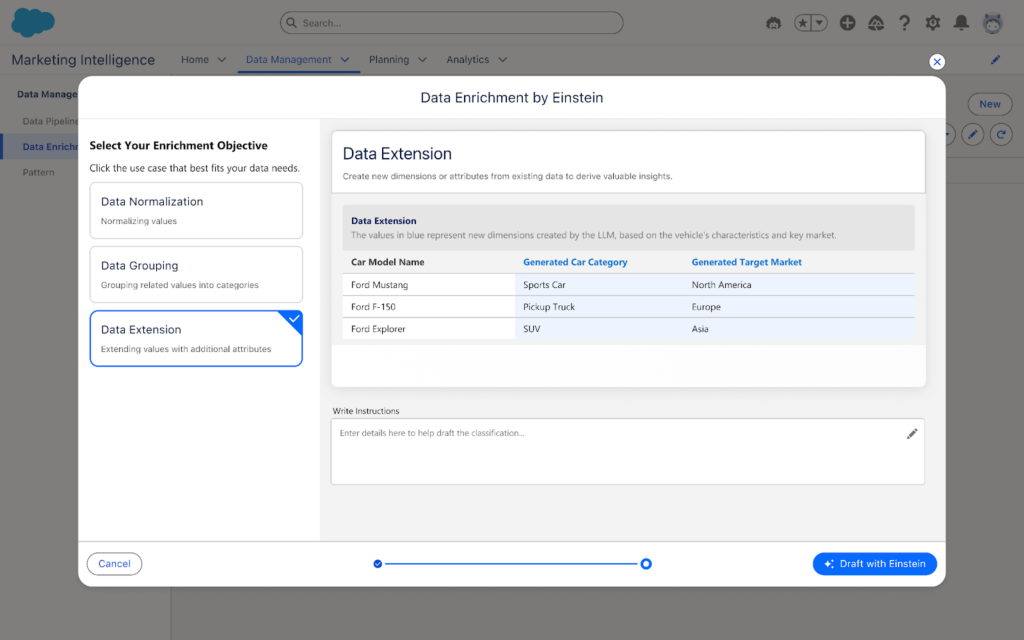
In MI, this is no longer necessary. One of my favorite surprises is seen below: you can classify and normalize data with Einstein AI, so instead of working to modify and standardize all of your data either in the platform of origin or in Intelligence, you can instead have Einstein help you set standardization of your data. This is a fantastic path forward in joining datasets together for synchronized cross-channel reporting.

Two Words: Semantic Modeling 

Though users will have an out-of-the-box paid media data model ready to go, users will have free range beyond the world of pre-defined data models in MCI. In MI, you can set up a semantic model that joins datasets together across multiple objects. While you may miss some of the standardization of having ads, conversion, and web analytics data models, among countless others in MCI, you will get seamless back-end loading of data together, along with seamless joins to standard Salesforce object data. This also means that you can add fields and relationships with full customization as your datasets evolve, or as you update back-end nomenclature to more cleanly join fields from one connection to another.

 Three Words: Return on Investment 

Speaking of Salesforce data, what elevates a good MCI implementation to a great one, in my books, is the joining of cost/engagement data to tangible ROI and meaningful dollar results. With the new integration to the semantic model and the ease of connecting standard objects from Sales Cloud, users can handily create and easily visualize ROI metrics in MI wherever data cleanly intersects, which is now made much easier with Einstein normalization and semantic modeling.

Additionally, attribution is a more straightforward possibility with MI than in current MCI, with the framework to capture website events within Data Cloud data model objects, providing marketers end-to-end visibility into touchpoints where ads have been seen by end users. This will include attribution models for first and last touch for users, and can further be a method to validate ROI and pinpoint specific interactions with customers.

I’ve Never Used MCI or Datorama-Why Should I Explore Marketing Intelligence? 

The Tool for Data Harmonization 

MCI has long been the gold standard for harmonizing marketing data. When clients come to me looking for data solutions, if the core users (front and back-end) are marketers, MCI is always what I recommend. Now with MI, you have the power of what current MCI can do to enable marketers to aggregate and act on data in the same platform as your CRM and marketing data, with the added benefits of generative and agentic AI, 3 click data setup, Data Cloud, and embedded Tableau Next visualizations.

The Tool for Visualization 

Current Marketing Cloud Intelligence has some great visualization options, but the two big enhancements I’ve always wanted and have tried to build guardrails for on my own are: 

1. Faster load optimization for dashboards 

2. Plain language recommendations for end users 

With MI, you get both of those with minimal lifting. Data is smoothly joined together using Data Cloud and back-end semantic modeling, with minimal loading for calculated fields and other computing intensive processes in current MCI. Additionally, with generative AI suggestions and an agent to help you pause underperforming ads, end-users are no longer limited to looking at charts and figuring out what it means,—because actions are ready and available to springboard from on the page.

The Tool for Marketing Customization 

Have you ever wanted to redefine your campaign names in reporting by extracting certain parts of your campaign names from across systems? Have you wanted to group different Google Analytics traffic sources and merge them against ad spending from the respective paid media platforms on an automated basis? What about renaming and grouping a set of campaigns based on criteria only you and your team know and then dynamically filtering for a handful of those campaigns? 

That’s the sort of fun I love to explore with clients, and it’s back in full force in MI with processes like patterns to extract data points from various fields, calculated fields in the semantic layer, and the normalization processes Einstein brings to the table.

A New Era 

Marketing Intelligence launched on March 18th (with Data Cloud and MI licenses required). Talk to your account executive to explore this new product. Marketing Intelligence is going to be the gateway into a new world of dashboarding intelligently (no pun intended) and is sure to streamline data for marketers in ways that have only been hinted at by Marketing Cloud Intelligence previously. I know I’m excited to take this ride, and I hope you’ll join me!

Product Note: Marketing Cloud Growth and Advanced are editions of Marketing Cloud Next and have also been referred to as Agentforce Marketing.

Marketing Cloud on Core (also known as Marketing Cloud Growth or Advanced Edition) can now track how marketing efforts contribute to revenue! With the Spring ‘25 release, Salesforce introduced Opportunity Influence, helping businesses connect marketing engagement to pipeline and revenue. But how does it work, and what’s the difference between Opportunity Influence and Campaign Influence? Let’s dive in!

Opportunity Influence vs. Campaign Influence: What’s the Real Deal?

Before we break down how to customize and report on Opportunity Influence, let’s clarify how it differs from Marketing Cloud Account Engagement’s Customizable Campaign Influence. While both models aim to connect marketing efforts to revenue, they function in distinct ways and serve different use cases. 

FeatureOpportunity InfluenceCampaign Influence
Data SourceMarketing Cloud Engagement (emails, ads, automation, etc.)Salesforce Campaign Membership
Influence ScopeTracks engagement across multiple touchpointsTracks Leads/Contacts who are Salesforce Campaign Members
IntegrationSyncs Marketing Cloud engagement data to Salesforce OpportunitiesWorks within Salesforce CRM using Campaigns and Opportunities
Attribution ModelsMulti-touch attribution (first-touch, last-touch)Campaign Influence and Customized Models
Reporting & InsightsMeasures marketing-driven revenue impactMeasure campaign-driven revenue impact

🚨 Important Note for Account Engagement Users 🚨

You cannot use Opportunity Influence alongside Customizable Campaign Influence. If your team already relies on Account Engagement’s Campaign Influence Models, keep this in mind when deciding which model to use.

Additionally, Account Engagement users cannot activate Opportunity Influence as it does not currently integrate with Account Engagement’s Campaign Influence model. If your organization currently tracks marketing-driven revenue using Campaign Influence reports, you’ll need to continue using that model. However, if you’re considering a shift to Marketing Cloud on Core, Opportunity Influence could offer enhanced multi-touch attribution and engagement tracking.

Battle of Influences: Campaign vs. Opportunity – Which One Wins?

Let’s say you’re running a B2B software company and you’ve executed multiple marketing campaigns using a variety of platforms, including ads, email, an e-book, and a webinar, to engage your prospects.

  • Campaign Influence: A prospect attends the webinar, clicks on an email, and downloads the e-book before being transitioned to sales as a marketing-qualified lead. These interactions are recorded under a Salesforce Campaign and can be manually associated with the Opportunity when created based on the Opportunity Contact Role and Campaign Member. You can assign influence weight based on your customized rules.
  • Opportunity Influence: Marketing Cloud on Core automatically tracks all marketing engagement, including the ad view and click, webinar attendance, and e-book download. These touchpoints are automatically associated to attribute influence based on the predefined model and associated to the Opportunity upon creation.

If Campaign Influence were a fine-dining experience, it would be a chef-curated meal—meticulously crafted with manual customization to fit your exact taste. You decide which interactions get the most credit, but it requires hands-on effort. On the other hand, Opportunity Influence is like an all-you-can-eat buffet with an expert chef behind the scenes. It automatically dishes out credit across touchpoints, giving you a full spread of marketing influence with minimal effort. If you love precision and control, Campaign Influence is for you. But if you want a seamless, automated view of your entire marketing impact, Opportunity Influence takes the crown.

How to Set Up Opportunity Influence

Setting up Opportunity Influence requires configuration in Sales Cloud to ensure marketing engagement is properly attributed to revenue-generating activities. To fully connect marketing efforts with sales outcomes, ensure that contacts engaging with marketing campaigns are linked to Opportunities. This allows for accurate tracking of marketing interactions that influence deals.

Enabling Opportunity Influence

  1. Navigate to Salesforce Setup > Opportunity Influence
  2. Enable Opportunity Influence
  3. Select an Attribution Model
    • First-Touch: Gives full credit to the first marketing engagement that led to the opportunity. It’s ideal for understanding which top-of-funnel efforts drive initial interest.
    • Last-Touch: Assigns full credit to the last marketing interaction before the opportunity was created. It helps measure the final push that converted a lead into an opportunity.

Going Beyond Activation

Customization is key to maximizing Opportunity Influence. Marketers should align influence models with their sales cycle, ensuring critical marketing touchpoints, such as email engagements, paid ads, and automation journeys, are correctly captured. Because Opportunity Influence consumes Data Credits, it’s essential to be strategic when enabling multiple models to avoid unnecessary credit usage.

Making Sense of Your Data: Reporting on Opportunity Influence

Once Opportunity Influence is enabled and tracking data, you can start reporting on marketing’s impact. The key to unlocking valuable insights is leveraging Salesforce’s Reports & Dashboards to tell a clear story about how marketing drives revenue.

Your Treasure Map to Salesforce Reports & Dashboards

  • Head over to Salesforce Reports and search for Opportunity Influence Reports. This is your go-to hub for seeing which marketing touchpoints are helping close deals.
  • Get specific with your insights! Use filters to refine reports by timeframe, campaign, or opportunity. Want to know which emails led to the most revenue? Adjust your filters to see the impact.
  • Create Salesforce Dashboards to visualize Opportunity Influence. Need a quick snapshot for your leadership team? Build an easy-to-read chart that shows exactly how marketing is fueling revenue.

The Ultimate Guide to Opportunity Influence Report Types

Salesforce provides several built-in report types to help you analyze how marketing efforts contribute to revenue. Here are the key report types you can use:

  • Opportunity Influence Summary Report – This high-level report shows how marketing engagements are influencing revenue across all opportunities. Use it to track overall marketing impact.
  • Opportunity Influence Detail Report – A more granular report that breaks down individual touchpoints per opportunity, allowing you to analyze which specific marketing interactions played a role in closing deals.
  • Influence Attribution Model Comparison Chart – Compare first-touch and last-touch models side by side to see which one provides the best insights for your marketing strategy.
  • Marketing Touchpoint Analysis Report – Identifies which marketing channels (email, ads, website visits, etc.) are contributing the most to opportunity creation and pipeline growth.

By setting up and analyzing Opportunity Influence reports, marketing teams can gain deeper insights into which touchpoints matter most, optimize their strategies accordingly, and confidently demonstrate their return on investment.

Why Opportunity Influence is a Game-Changer

Opportunity Influence is a must-have tool for any marketing team looking to measure true revenue impact. No more guessing which emails, ads, or landing pages are driving pipeline – Opportunity Influence connects the dots, giving you a clear picture of how marketing fuels business growth. With built-in attribution models, you can customize insights based on what matters most to your strategy.

Whether you’re aiming to prove marketing ROI, optimize your campaigns, or align better with sales, Opportunity Influence provides automated, data-driven attribution that simplifies reporting and enhances decision-making. If you want better visibility into marketing’s role in revenue generation, this feature is your new best friend!

💡Next Steps:

  1. Check your org to see if the new update is available.
  2. Test Opportunity Influence tracking before rolling it out company-wide.
  3. Monitor data service credit usage if you’re using multiple attribution models.

📣 Want to learn more? Check out the full Spring ‘25 release highlights or dive into the official release notes.

🚀 What are your thoughts on Opportunity Influence? Drop a comment below, and let’s discuss!

While we were all preparing for the New Year, Salesforce was busy getting the Spring ‘25 release notes posted! Let’s dive into what this release has in store for Marketing Cloud Account Engagement (f.k.a Pardot) users. 

Support for the Enhanced Email Builder is Being Phased Out

Support for the Enhanced Email Experience, aka the Account Engagement Lightning Email Builder or the Drag-and-drop builder, is being phased out—meaning that Salesforce is only committed to fixing significant issues going forward, the builder will still be available for use. 

If you saw the release notes right after they were published, they did say that the Enhanced Email Builder was going to be fully retired, but this retirement has since been put on hold.

Again, users of the Enhanced Email Experience can continue to use this builder, but users also have the option to use the New Email Experience (aka the Marketing Cloud Builder). Salesforce has provided a comparison of the three builders here. Keep in mind that the New Email Experience will continue to get updates every release. 

Once this new release is available I will do a deeper dive into using the New Email Experience as an Account Engagement User, so keep an eye out for more info!

Einstein Generative AI supports additional languages

Einstein Gen AI, aka Einstein Assistant, has been expanded to support five new languages: French, German, Japanese, Portuguese (Brazil), and Spanish. Einstein Assistant helps users create landing pages, forms, and email copy and is available to users with Advanced or Premium Editions of Account Engagement.

A screenshot of the Einstein Generative AI assistant.

Easily Enable Marketing Cloud from within the Account Engagement Optimizer

During Dreamforce ‘24, Salesforce announced that all Account Engagement orgs with a current edition (Growth, Plus, Advanced, or Premium) can get access to Marketing Cloud Growth or Advanced Edition at no additional cost. This new platform runs on Data Cloud and can be used alongside Account Engagement to bring more features and functionalities to the Marketing tech stack. The Spring ‘25 release introduces a streamlined setup process for Account Engagement orgs, enabling them to deploy Marketing Cloud Growth or Advanced Edition via the Account Engagement Optimizer

Additional Visibility into Email Send Issues

It’s always frustrating when an Account Engagement email fails to send to a prospect and the error message is vague at best. With the Spring release, List Email will provide more reasons on why a send fails and will help point you to configuration issues that can help prevent additional failures. The new Failed Email Sends table will be available in the Account Engagement Optimizer and will display the Prospect’s name, company, failure reason, and other details. 

Additional Updates

Which Spring’ 25 Account Engagement features are you most excited about? Which features do you want to know more about? Let us know in the comments!

Product Note: Marketing Cloud Growth and Advanced are editions of Marketing Cloud Next and have also been referred to as Agentforce Marketing.

Spring has sprung at Salesforce, and it comes in the form of the Salesforce Spring ‘25 Release Notes! Whether you’re a seasoned pro or a budding marketer, this release is packed with goodies that will make your campaigns bloom brighter than ever. Let’s dive into the highlights for Marketing Cloud Growth and Advanced Edition!

Take Your Marketing Global 

WhatsApp Logo

Marketing Cloud is getting a boost with a WhatsApp integration, making it easier to incorporate this channel into your marketing strategy. Whether you share updates, promotions, or ongoing support, WhatsApp helps you connect with your customers worldwide. The integration includes a campaign template, communication subscription support, and a default Email Preference Center. In addition, it supports 2-way conversations, and the message builder supports audio, video, and file sharing.

WhatsApp is not the only feature going global this Spring; SMS is joining the fun! With sending capabilities expanding to more than 50 countries, your messages can reach more customers. The new update includes identity validation to enhance trust and effectiveness and ensure reliable delivery. Additionally, blackout windows for SMS and WhatsApp allow you to respect your audience’s downtime, ensuring your messages land at the right time.


AI: Your Marketing Superpower

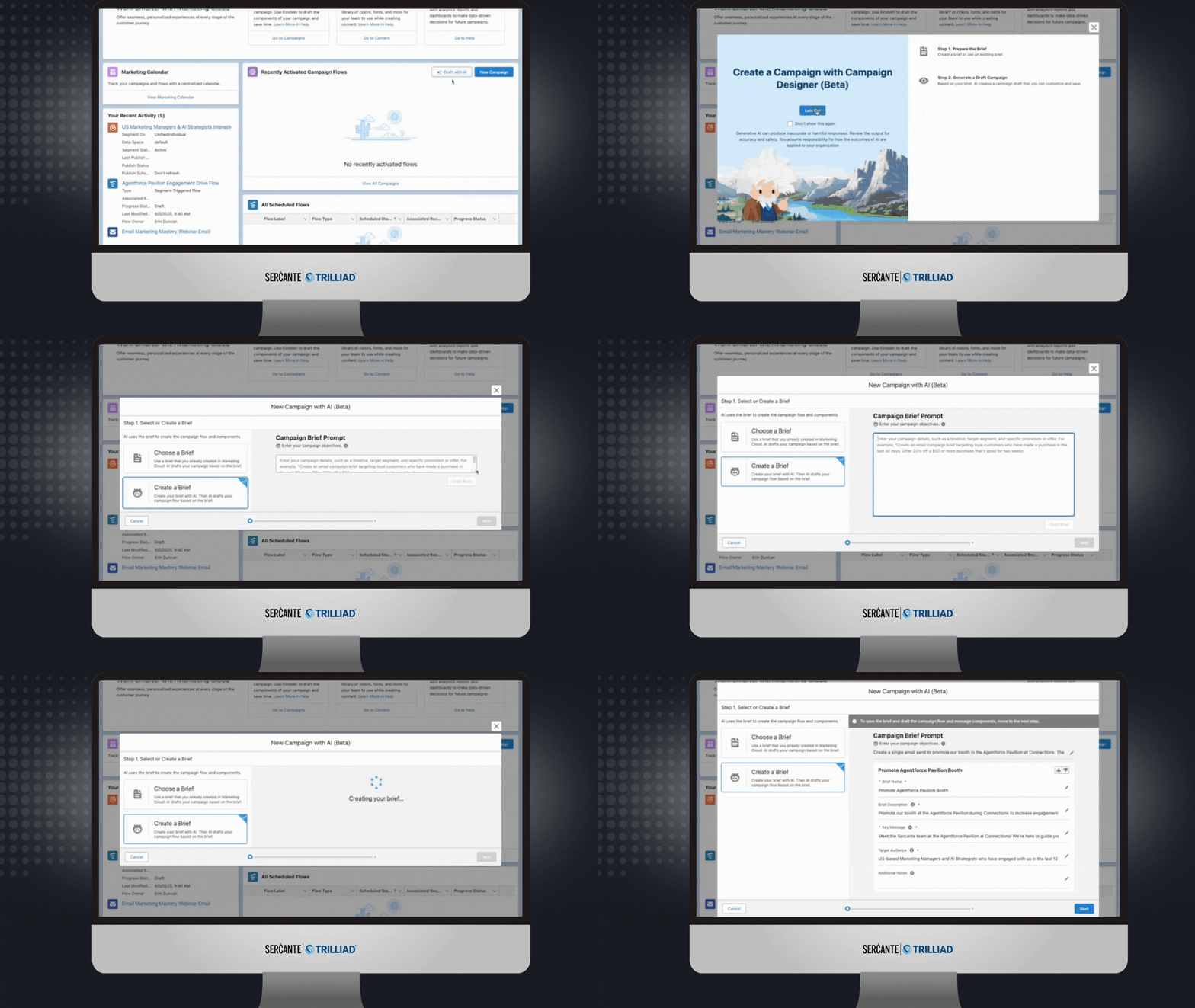
Salesforce is supercharging your marketing strategy with expanded AI capabilities, bringing unparalleled efficiency and creativity to your campaigns. With Agentforce, you can generate landing pages and email content in seconds, freeing time for more strategic tasks. Need to plan a campaign? Agentforce also crafts detailed campaign briefs, ensuring you start with a strong foundation. For Marketing Cloud Advanced Edition users, the Agentforce Campaign Designer (Beta) takes it even further, providing a single interface to edit and refine your campaign strategies, multi-channel flows, and content. These tools empower you to create more innovative, impactful campaigns.

A screenshot of a prompt in Salesforce Agentforce to create an email campaign.

Spring into Smarter Campaigns and Content

Marketing Cloud’s Spring ‘25 Release is focused on making campaigns smarter and your content work harder. From reusable personalization tools to seamless flows, Salesforce has designed the release to help marketers craft successful campaigns from start to finish.

Personalization That Packs a Punch

Stop spinning your wheels! Simplify your workflow and create tailored campaigns effortlessly with reusable content and personalization points. These features save you time and help you connect more deeply with your audience. Reusing merge fields with Expressions across campaigns will keep your messaging sharp, consistent, and right on target—making every interaction count.

Smarter Segmentation for Better Results

Segmentation is getting a makeover! The Spring ‘25 release features new tools that filter attributes—like new leads—right from the Campaign record, saving you time and speeding up your campaign’s delivery. Plus, you can preview up to 1,000 segment members before activating your campaign flow, giving you confidence in your targeting strategy.

Meet the CRM Prospect Object

Say hello to your new best friend: the CRM Prospect Object. It’s here to help you manage prospects like a pro. Create prospects with forms, nurture them automatically, and convert them into loyal customers. With account scoring based on engagement, fit, and intent, you can prioritize the leads most likely to convert.

Forms That Go Where Your Customers Are

Why make your customers come to you when you can bring the form to them? With the new ability to embed forms on external sites, you can deliver them to your hosted web page. After a quick setup in Salesforce and your external site, grab the form’s code block from its detail page and drop it into your site’s HTML. It’s as simple as copy-paste! (Just make sure your site supports iframes, is secure, and uses HTTPS.)

Flow Like a Pro

Managing Flows is easier and more intuitive than ever. You can handle more of the process directly from the Campaign record, track flow statuses in the new Marketing Calendar (fully integrated with the Sales Calendar), and view flow versions and failures to provide quicker, seamless resolutions. The new Campaign Stage field offers insight into the current campaign and keeps your team updated. Need a little extra customization? Add custom fields to your campaign briefs to make them truly yours.

Content Updates That Shine

Marketing Cloud is releasing new content creation features. With a new “Processing” content status, you’ll always know when landing pages, forms, and branding updates are pending publication. While changes can’t be made during this time, you can relax knowing your updates are locked in. Need to duplicate content? Cloned content is easier to manage by saving it in a shared workspace, keeping your team aligned. Consistent branding has never been more straightforward—assign default branding to your workspace to ensure emails, landing pages, and forms all have the same polished look. Ensure brand consistency across all your forms by assigning a brand, with forms automatically adapting to reflect your workspace, landing page, or external site branding.

And More!

  • Connect External Web Tracking to a Campaign allows existing customers to install new data kits and deploy new data streams.
  • Tracking and Source Information for Consent helps you comply with global laws and regulations to review the source and consent status change via the Consent Audit Trail in Data Explorer.
  • Setup Enhancements aim to save users time. They include tracking setup progress, installing or updating the Sales Data Kit, a guided experience for authenticating domains, and the ability to autogenerate an Identity Resolution Ruleset.
No more posts to show