Category

Pro Tips

Product Note: Marketing Cloud on Core is now known as Marketing Cloud Next. Marketing Cloud Growth and Advanced are editions of Marketing Cloud Next and have also been referred to as Agentforce Marketing.

Your messages are doing their job, but are they working it?

If your campaigns are feeling a little too copy-paste, a little too “blah,” it might be time for a serious glow-up. You’ve got the data. You’ve got the content. Now it’s time to use the tools inside Marketing Cloud on Core (aka Growth and Advanced Edition) to turn that good-enough messaging into something that shines!

This blog will teach you how Dynamic Content and Expressions can transform your messages from basic to brilliant. You’ll learn what these new features are, how they work, and how to use them to make every send feel personal, polished, and powerful!

Let’s Start with the Basics

Before we dig into the tools, let’s talk about transformation. A glow-up for your marketing means:

  • Less copy-paste, more customization
  • Making use of the data you already have
  • Messages that speak directly to the recipient, not the crowd

Marketing Cloud on Core gives you two powerful tools to make it happen. Ready to transform your messages? Let’s learn how to master Dynamic Content and Expressions.

Introducing Your Email’s Style Squad

Give your emails a fresh look without starting from scratch. Think of Dynamic Content like your email’s glam squad; each part makes your email stand out. Consider giving your email different “outfits” based on who’s opening it.

  • Personalization Point: This is the part of your email where you give a mini makeover. It could be a subject line, preheat, hero image, or CTA – any element that could use extra sparkle.
  • Personalization Decision: This is the brains behind the beauty. It figures out who should see what based on the rules you set.
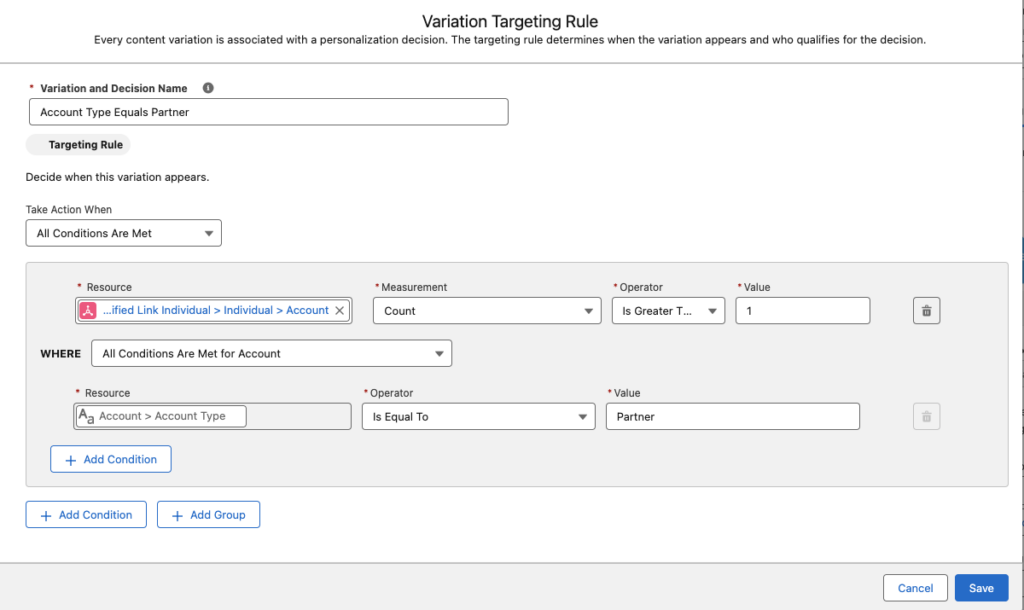
  • Targeting Rule: Your custom-fit formula. It defines “if this, then show that” logic. For example, “if account type = VIP, show gold banner.”

Pro Tip: Already built a variation you love? You can reuse it in other emails using recent Personalization Points.

How to Apply the Glow-Up: Creating Dynamic Content

Let’s walk through giving your content a dynamic makeover:

  • Open your email in the editor and select the content block you want to glam up.
  • Head to the Dynamic Content section and click Add Variation.
    • You can use the Variation dropdown to access NewVariations if you’ve already got some variations.
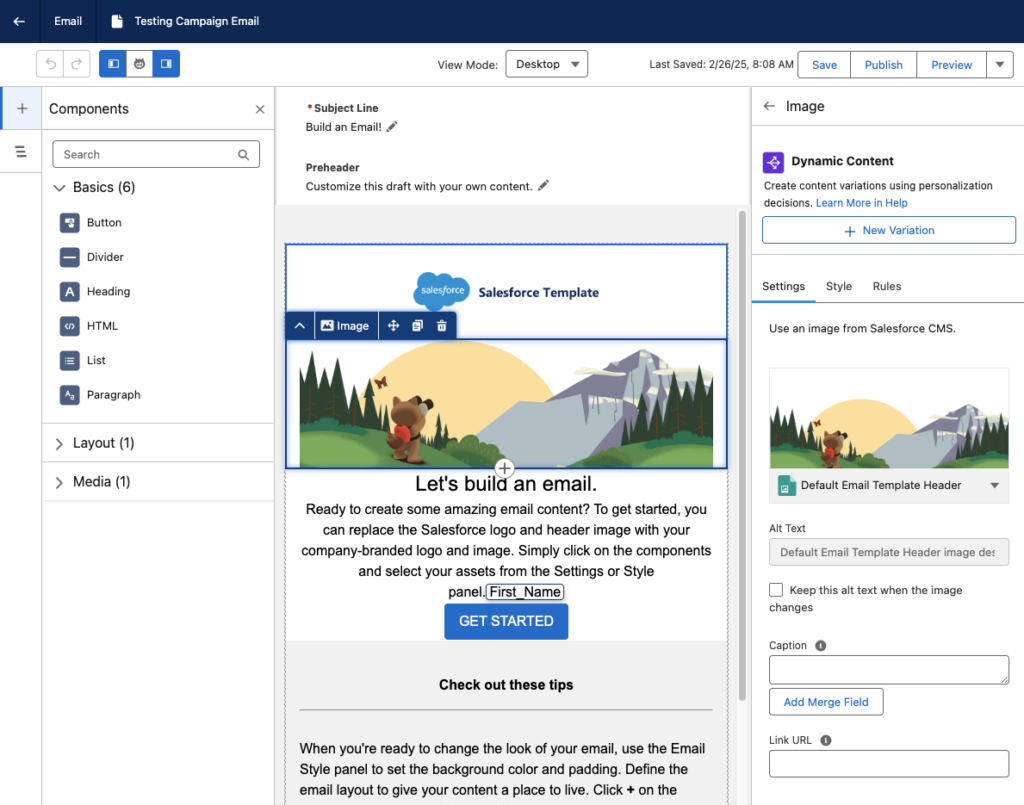
  • When the Create or Reuse Personalization Settings window pops up, select New Variation.
    Heads up: Your message has to save first, so give it 10-20 seconds.
  • Name your variation and create your Targeting Rule.
  • Click Save, then customize your content within that variation, like updating a header image or swapping out messaging for a specific audience.
  • Use the Variation dropdown to preview how your message looks for each version.

Pro Tip: Use dynamic blocks sparingly at first. Target high-impact spots like hero images or CTAs, and test frequently to ensure each variation shines.

The Finishing Touch for Personalized Flair

Once your content’s dressed to impress, it’s time to fine-tune the details, and that’s where Expressions come in. They’re like your behind-the-scenes styling tool that ensures every message feels personal, even when the data isn’t perfect. Here’s how Expressions keeps your messages looking polished:

  • Saved Expression: Think of this as your go-to styling shortcut. It’s a reusable logic block you create once and drop into multiple campaigns; it’s less work with the same wow factor.
  • Attribute Selection: This is where you tell the Expression what data to look at, such as PreferredName, LoyaltyStatus, or FavoriteProduct.
  • Fallback Value: No data? No problem. Expressions let you set a backup so your message stays smooth. Instead of “Hi,” you get “Hi there!”

Expressions ensure every message feels intentional and on-brand like you planned that way (because you did). 

Adding the Ultimate Accessory: Creating Expressions

Here’s how to build your first Expression and set your messages up for consistent, reusable personalization:

  1. Head to Content > Content Workspace in Marketing Cloud.
  2. Click Add, then choose Content.
  3. Select Expression, then click Create. (Yes, you’re about to create something fabulous.)
  4. Give your Expression a name that clearly describes what it does (like “PreferredName Fallback” or “GoldMemberStatus”).
  5. Use the Attribute field to choose the customer data you want to reference.
  6. (Optional) Add a filter if you need to narrow down conditions, like only using this Expression when someone’s location is “US.”
  7. Click Save.
  8. Don’t forget to hit Publish to start using your Expression in your messages.

Pro tip: Once created, Expressions can be used repeatedly across campaigns, saving you time while keeping your personalization game strong.

Using Your Expression in a Message

Now that you’ve created your personalized shortcut, it’s time to drop it into your message for that final glow-up touch.

  1. Open the email, SMS, or WhatsApp message where you want to use your Expression.
  2. Select the content block where you want your personalization to appear.
  3. Click the [] Add a merge field symbol.
  4. Choose Saved Expressions from the dropdown menu.
  5. Pick the Expression you created earlier.
  6. Add a default value (like “there” or “friend”) in case your data field is empty.
  7. Click Done and admire your work.

Pro Tip: This ensures your message always reads naturally, even if a customer’s name or info is missing the data.

Use Them Together for a Full-On Email Glow-Up

You’ve got the tools! Now it’s time to layer them like a pro stylist would. Dynamic Content and Expressions are great on their own, but when used together? That’s when the real transformation happens!

Think of Dynamic Content as your email’s wardrobe, changing outfits based on who’s reading. Then think of Expressions as the accessories, adding that personalized sparkle like someone’s name, product interest, or membership level.

Real-World Example

Let’s say you’re sending a promotional email:

  • You use Dynamic Content to show one banner for loyalty members and another for new subscribers.
  • Inside each banner block, you drop in an Expression to greet the user by name (with a fallback like “their” in case their name isn’t available).
  • You also use Expression to highlight their preferred product category, so the CTA feels totally tailored.

The result? An email that looks like you custom-designed it for every person without cloning templates or managing a million logic paths.

Why This Combo Works

  • You reduce manual work by creating fewer, smarter assets.
  • You create hyper-relevant emails without sacrificing time or scalability.
  • You build a customer experience that feels seamless, polished, and personal, even if you’re sending to thousands at once.

Using Dynamic Content and Expressions is the email marketing equivalent of putting on a fresh outfit, doing your hair, and finishing with the perfect accessory.

Ready to Give Your Emails a Glow-Up?

You don’t need a whole new wardrobe of emails, just the right tools to style them smarter. With Dynamic Content and Expressions in Marketing Cloud on Core, you can transform basic batch-and-blast messages into personalized, polished experiences that connect with your audience.

From targeting rules to fallback names, you have everything you need to bring out the best in your campaigns without doubling your workload. Whether you’re just dipping your toes into personalization or looking to scale with style, this glow-up is just the beginning.

Want help applying what you learned?

Book a consultation with Sercante’s Marketing Cloud experts to review your personalization strategy or sign up for one of our hands-on workshops. Let’s glow up your next campaign together!

For the last seven years, I’ve been enamored by a marketing analytics tool (who among us hasn’t, I’m sure), Datorama, or Salesforce Marketing Cloud Intelligence. MCI, as we’ve come to call it, is the most seamless way my customers have found to join their data across multiple sources, built by marketers and for marketers. MCI allows users to join data together and easily create reports and dashboards using plain language from the pre-built data models. This allows for easy-to-populate smart lens dashboards, or deeply complex automated reporting triggered by specific events. 

To my delight, and to the happiness of marketers, Salesforce just announced on March 18, 2025, a new version of the tool, Marketing Intelligence (MI),  built on the Salesforce Platform. This new version takes the best features of existing MCI and layers them into the functionality of Data Cloud’s unified platform, while taking users to the future with agentic features that will provide down-to-earth insights with conversational agents. So without any further ado, let’s dive into this new tool, Marketing Intelligence! 

What is Marketing Intelligence? 

Marketing Intelligence (or MI) is a new application on the Salesforce platform designed to simplify marketing data management, deliver trustworthy, out-of-the-box insights that marketers can instantly act on, and deliver better return on investment for marketing spend. Being built on Data Cloud and connected to the Salesforce platform allows it to be fully extensible, with a toolbox for marketers at the ready- it’s everything you need to build robust, effective, and meaningful dashboards with minimal lift. 

Data Cloud for Marketers Made Easy 

One of the processes I have been spoiled by in Marketing Cloud Intelligence is data mapping that auto-populates based on past usage and logical guesses by the platform’s artificial intelligence. Additionally, certain APIs come with prebuilt models and mapping to build off of rather than user-defined settings. These features have helped get marketers streamlined into the world of data models and dashboarding with less lift than throwing them into a database or asking them to join various tables. 

All of that, to my delight, is back in full form with Marketing Intelligence. You have the option to upload a TotalConnect file (a non-standard API, flat file of your choosing), or to use an existing API connection, with some rolled out at launch and more coming in the year ahead. Choosing a connection like Google Ads allows you to seamlessly grab that data, formatted and ready for quick mapping, and load the data you need into a dashboard in just 3 clicks. 

Clean and Easy Dashboards 

The dashboards look sharp and load with ease. These dashboards come prebuilt, with options to customize, and also have a key new feature compared to the existing Marketing Cloud Intelligence: generative AI summaries of your campaigns, including what’s working and what might not be. This elevates, to me, the future of dashboarding—being able not only to look at quick and easy data points and trends but also being told in plain language for what to take away or dig into. This can help marketers ask questions and dive in further, and even ask their agent to take action on what recommendations surface.

The idea of clear and plain insights especially comes up in implementations of the current dashboard tools I work in. Users looking at a dashboard want to know different information, and for dozens of users looking at a single page, the questions they’re asking are going to be different depending on needs. The option to ask your agent to recommend optimizations, and then act on it will save marketers a lot of time and headache. With Marketing Intelligence,  you just need the data ready for an agent to help your end users get what they need from the data you’ve put in place. 

Tidied Data Across Channels 

Of course, the core goal of any marketer looking for a tool like Data Cloud, Marketing Cloud Intelligence, or this new version of Marketing Intelligence, is to tie data together across channels to tell meaningful stories they can act on. In addition to the standardized API mapping, MI creates value by uniformly harmonizing these fields across datasets and allows for a semantic model to be used on the backend to tie data together in ways that are common sense (campaign name ties across all of your channels, for instance), such as tying your campaign from paid media to your campaigns from your CRM or other tools, even when names are not exactly aligned (more on this in a moment). 

I’m an existing Datorama/MCI User: What’s Worthwhile Here? 

If you have been reading up to this point, you know what was probably on my mind when I first saw this tool: can I love a changed version of my favorite software of all time? (And yes, I have a favorite software of all time.) Put simply, I’m ready to love. Let’s dissect the butterflies in my stomach. (And if your heart skips a beat when you hear about normalization, semantic modeling, and ROI, there’s enough of this platform for us to share). 

One Word: Normalization 

When I lead implementations with clients on MCI, we talk about the ways in which their data joins. Sometimes it’s super straightforward, sometimes it’s messy. More often than not, we can devise ways to join the messy and the clean together, such as by breaking out parts of campaigns to equal full campaign names in other channels, or by using the numerous formulas Marketing Cloud Intelligence offers out of the box.

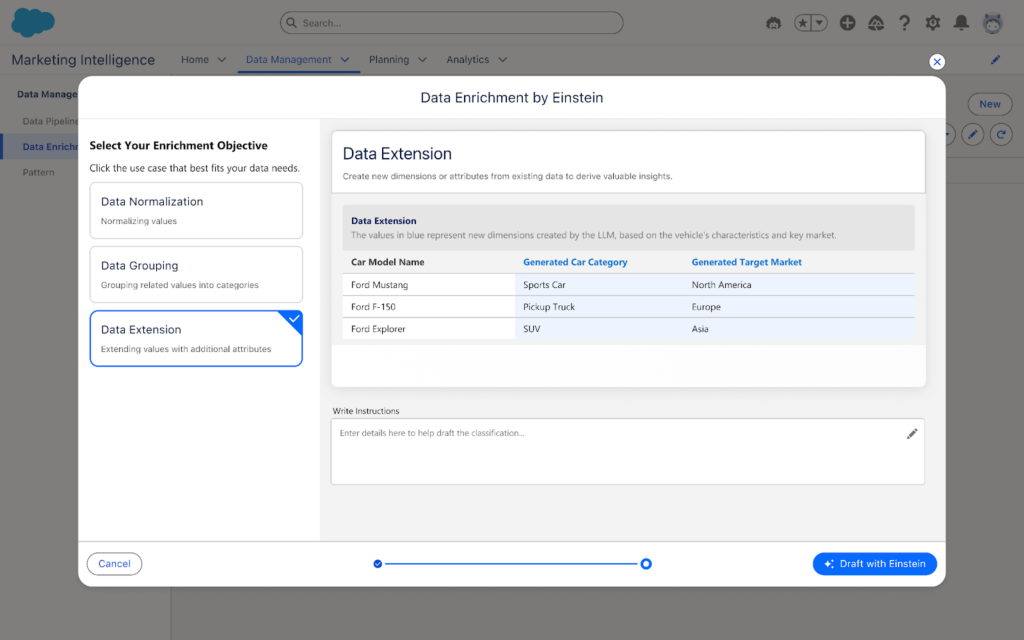
In MI, this is no longer necessary. One of my favorite surprises is seen below: you can classify and normalize data with Einstein AI, so instead of working to modify and standardize all of your data either in the platform of origin or in Intelligence, you can instead have Einstein help you set standardization of your data. This is a fantastic path forward in joining datasets together for synchronized cross-channel reporting.

Two Words: Semantic Modeling 

Though users will have an out-of-the-box paid media data model ready to go, users will have free range beyond the world of pre-defined data models in MCI. In MI, you can set up a semantic model that joins datasets together across multiple objects. While you may miss some of the standardization of having ads, conversion, and web analytics data models, among countless others in MCI, you will get seamless back-end loading of data together, along with seamless joins to standard Salesforce object data. This also means that you can add fields and relationships with full customization as your datasets evolve, or as you update back-end nomenclature to more cleanly join fields from one connection to another.

 Three Words: Return on Investment 

Speaking of Salesforce data, what elevates a good MCI implementation to a great one, in my books, is the joining of cost/engagement data to tangible ROI and meaningful dollar results. With the new integration to the semantic model and the ease of connecting standard objects from Sales Cloud, users can handily create and easily visualize ROI metrics in MI wherever data cleanly intersects, which is now made much easier with Einstein normalization and semantic modeling.

Additionally, attribution is a more straightforward possibility with MI than in current MCI, with the framework to capture website events within Data Cloud data model objects, providing marketers end-to-end visibility into touchpoints where ads have been seen by end users. This will include attribution models for first and last touch for users, and can further be a method to validate ROI and pinpoint specific interactions with customers.

I’ve Never Used MCI or Datorama-Why Should I Explore Marketing Intelligence? 

The Tool for Data Harmonization 

MCI has long been the gold standard for harmonizing marketing data. When clients come to me looking for data solutions, if the core users (front and back-end) are marketers, MCI is always what I recommend. Now with MI, you have the power of what current MCI can do to enable marketers to aggregate and act on data in the same platform as your CRM and marketing data, with the added benefits of generative and agentic AI, 3 click data setup, Data Cloud, and embedded Tableau Next visualizations.

The Tool for Visualization 

Current Marketing Cloud Intelligence has some great visualization options, but the two big enhancements I’ve always wanted and have tried to build guardrails for on my own are: 

1. Faster load optimization for dashboards 

2. Plain language recommendations for end users 

With MI, you get both of those with minimal lifting. Data is smoothly joined together using Data Cloud and back-end semantic modeling, with minimal loading for calculated fields and other computing intensive processes in current MCI. Additionally, with generative AI suggestions and an agent to help you pause underperforming ads, end-users are no longer limited to looking at charts and figuring out what it means,—because actions are ready and available to springboard from on the page.

The Tool for Marketing Customization 

Have you ever wanted to redefine your campaign names in reporting by extracting certain parts of your campaign names from across systems? Have you wanted to group different Google Analytics traffic sources and merge them against ad spending from the respective paid media platforms on an automated basis? What about renaming and grouping a set of campaigns based on criteria only you and your team know and then dynamically filtering for a handful of those campaigns? 

That’s the sort of fun I love to explore with clients, and it’s back in full force in MI with processes like patterns to extract data points from various fields, calculated fields in the semantic layer, and the normalization processes Einstein brings to the table.

A New Era 

Marketing Intelligence launched on March 18th (with Data Cloud and MI licenses required). Talk to your account executive to explore this new product. Marketing Intelligence is going to be the gateway into a new world of dashboarding intelligently (no pun intended) and is sure to streamline data for marketers in ways that have only been hinted at by Marketing Cloud Intelligence previously. I know I’m excited to take this ride, and I hope you’ll join me!

Product Note: Marketing Cloud Growth and Advanced are editions of Marketing Cloud Next and have also been referred to as Agentforce Marketing.

Marketing Cloud on Core (also known as Marketing Cloud Growth or Advanced Edition) can now track how marketing efforts contribute to revenue! With the Spring ‘25 release, Salesforce introduced Opportunity Influence, helping businesses connect marketing engagement to pipeline and revenue. But how does it work, and what’s the difference between Opportunity Influence and Campaign Influence? Let’s dive in!

Opportunity Influence vs. Campaign Influence: What’s the Real Deal?

Before we break down how to customize and report on Opportunity Influence, let’s clarify how it differs from Marketing Cloud Account Engagement’s Customizable Campaign Influence. While both models aim to connect marketing efforts to revenue, they function in distinct ways and serve different use cases. 

FeatureOpportunity InfluenceCampaign Influence
Data SourceMarketing Cloud Engagement (emails, ads, automation, etc.)Salesforce Campaign Membership
Influence ScopeTracks engagement across multiple touchpointsTracks Leads/Contacts who are Salesforce Campaign Members
IntegrationSyncs Marketing Cloud engagement data to Salesforce OpportunitiesWorks within Salesforce CRM using Campaigns and Opportunities
Attribution ModelsMulti-touch attribution (first-touch, last-touch)Campaign Influence and Customized Models
Reporting & InsightsMeasures marketing-driven revenue impactMeasure campaign-driven revenue impact

🚨 Important Note for Account Engagement Users 🚨

You cannot use Opportunity Influence alongside Customizable Campaign Influence. If your team already relies on Account Engagement’s Campaign Influence Models, keep this in mind when deciding which model to use.

Additionally, Account Engagement users cannot activate Opportunity Influence as it does not currently integrate with Account Engagement’s Campaign Influence model. If your organization currently tracks marketing-driven revenue using Campaign Influence reports, you’ll need to continue using that model. However, if you’re considering a shift to Marketing Cloud on Core, Opportunity Influence could offer enhanced multi-touch attribution and engagement tracking.

Battle of Influences: Campaign vs. Opportunity – Which One Wins?

Let’s say you’re running a B2B software company and you’ve executed multiple marketing campaigns using a variety of platforms, including ads, email, an e-book, and a webinar, to engage your prospects.

  • Campaign Influence: A prospect attends the webinar, clicks on an email, and downloads the e-book before being transitioned to sales as a marketing-qualified lead. These interactions are recorded under a Salesforce Campaign and can be manually associated with the Opportunity when created based on the Opportunity Contact Role and Campaign Member. You can assign influence weight based on your customized rules.
  • Opportunity Influence: Marketing Cloud on Core automatically tracks all marketing engagement, including the ad view and click, webinar attendance, and e-book download. These touchpoints are automatically associated to attribute influence based on the predefined model and associated to the Opportunity upon creation.

If Campaign Influence were a fine-dining experience, it would be a chef-curated meal—meticulously crafted with manual customization to fit your exact taste. You decide which interactions get the most credit, but it requires hands-on effort. On the other hand, Opportunity Influence is like an all-you-can-eat buffet with an expert chef behind the scenes. It automatically dishes out credit across touchpoints, giving you a full spread of marketing influence with minimal effort. If you love precision and control, Campaign Influence is for you. But if you want a seamless, automated view of your entire marketing impact, Opportunity Influence takes the crown.

How to Set Up Opportunity Influence

Setting up Opportunity Influence requires configuration in Sales Cloud to ensure marketing engagement is properly attributed to revenue-generating activities. To fully connect marketing efforts with sales outcomes, ensure that contacts engaging with marketing campaigns are linked to Opportunities. This allows for accurate tracking of marketing interactions that influence deals.

Enabling Opportunity Influence

  1. Navigate to Salesforce Setup > Opportunity Influence
  2. Enable Opportunity Influence
  3. Select an Attribution Model
    • First-Touch: Gives full credit to the first marketing engagement that led to the opportunity. It’s ideal for understanding which top-of-funnel efforts drive initial interest.
    • Last-Touch: Assigns full credit to the last marketing interaction before the opportunity was created. It helps measure the final push that converted a lead into an opportunity.

Going Beyond Activation

Customization is key to maximizing Opportunity Influence. Marketers should align influence models with their sales cycle, ensuring critical marketing touchpoints, such as email engagements, paid ads, and automation journeys, are correctly captured. Because Opportunity Influence consumes Data Credits, it’s essential to be strategic when enabling multiple models to avoid unnecessary credit usage.

Making Sense of Your Data: Reporting on Opportunity Influence

Once Opportunity Influence is enabled and tracking data, you can start reporting on marketing’s impact. The key to unlocking valuable insights is leveraging Salesforce’s Reports & Dashboards to tell a clear story about how marketing drives revenue.

Your Treasure Map to Salesforce Reports & Dashboards

  • Head over to Salesforce Reports and search for Opportunity Influence Reports. This is your go-to hub for seeing which marketing touchpoints are helping close deals.
  • Get specific with your insights! Use filters to refine reports by timeframe, campaign, or opportunity. Want to know which emails led to the most revenue? Adjust your filters to see the impact.
  • Create Salesforce Dashboards to visualize Opportunity Influence. Need a quick snapshot for your leadership team? Build an easy-to-read chart that shows exactly how marketing is fueling revenue.

The Ultimate Guide to Opportunity Influence Report Types

Salesforce provides several built-in report types to help you analyze how marketing efforts contribute to revenue. Here are the key report types you can use:

  • Opportunity Influence Summary Report – This high-level report shows how marketing engagements are influencing revenue across all opportunities. Use it to track overall marketing impact.
  • Opportunity Influence Detail Report – A more granular report that breaks down individual touchpoints per opportunity, allowing you to analyze which specific marketing interactions played a role in closing deals.
  • Influence Attribution Model Comparison Chart – Compare first-touch and last-touch models side by side to see which one provides the best insights for your marketing strategy.
  • Marketing Touchpoint Analysis Report – Identifies which marketing channels (email, ads, website visits, etc.) are contributing the most to opportunity creation and pipeline growth.

By setting up and analyzing Opportunity Influence reports, marketing teams can gain deeper insights into which touchpoints matter most, optimize their strategies accordingly, and confidently demonstrate their return on investment.

Why Opportunity Influence is a Game-Changer

Opportunity Influence is a must-have tool for any marketing team looking to measure true revenue impact. No more guessing which emails, ads, or landing pages are driving pipeline – Opportunity Influence connects the dots, giving you a clear picture of how marketing fuels business growth. With built-in attribution models, you can customize insights based on what matters most to your strategy.

Whether you’re aiming to prove marketing ROI, optimize your campaigns, or align better with sales, Opportunity Influence provides automated, data-driven attribution that simplifies reporting and enhances decision-making. If you want better visibility into marketing’s role in revenue generation, this feature is your new best friend!

💡Next Steps:

  1. Check your org to see if the new update is available.
  2. Test Opportunity Influence tracking before rolling it out company-wide.
  3. Monitor data service credit usage if you’re using multiple attribution models.

📣 Want to learn more? Check out the full Spring ‘25 release highlights or dive into the official release notes.

🚀 What are your thoughts on Opportunity Influence? Drop a comment below, and let’s discuss!

I  must confess that I have built my fair share of boring unremarkable dashboards.  It haunts me to think of all those past reports that are now collecting dust like a Betamax tape in a world of streaming services.  If you are reading this, I bet I am not alone. We can put so much effort into a dashboard and have the reports hold so much potential but they so often get left on the cutting room floor. But why? Why do our dashboards seem to fall flat when there is clearly a need?

Because effective dashboards require more than just data. They need a clear purpose, a targeted audience, and a design that compels engagement. There are four key questions you can ask yourself to align and truly transform your next dashboard from a snoozefest to a success story.

Target Audience | “Who is this dashboard for”

Imagine building a cockpit for a pilot instead of a dashboard for a car. A pilot wouldn’t be helped by a speedometer and radio – they need critical flight information displayed clearly and concisely. The same goes for dashboards. The first question to ask is: who’s the key decision-maker this is designed for? Are they executives seeking a high-level financial health pulse, or analysts needing to dive deep into specific metrics?  Understanding your audience gives you the lens to curate the right information. Too often we want to cram all the information into one dashboard and end up overwhelming viewers with a data buffet, thus a dashboard becomes unused. By pinpointing who will use the dashboard, you can tailor the data to speak directly to their needs and drive actionable insights. 

Goal Setting | “What are the top 3 goals of this dashboard”

Okay, we’ve identified the audience, but what exactly do we want them to achieve with this dashboard? Just throwing data at viewers isn’t enough. We need to set clear goals for what this dashboard should help them accomplish.  Is it to monitor key performance indicators (KPIs) for a quick health check for the marketing manager? Or maybe it’s a unified dashboard for sales and marketing on lead generation ? Defining the top goals keeps the focus tight and ensures the data presented directly addresses those objectives. This also doesn’t have to be overly complicated either. Start with 3 main goals and then you can build upon them!

Actioning  | “Where will this dashboard be used”

Here’s the thing: dashboards need a clear path to “aha moments” and real-world application or they are going to be forgotten like the bagged salad in the back of your fridge. We can break down the lack of action into two key areas.

First, is the information on the dashboard actually driving insights? Are users gleaning valuable trends, identifying potential issues, or getting the data they need to make informed decisions?  The second area is the “where” question.  Will this dashboard be a daily touchpoint for a specific team, a strategic tool for presentations, or something else entirely?  Building a dashboard “just because” is a recipe for neglect.  By understanding how the dashboard will be used and what kind of action it should inspire, you can transform it from a static report into a dynamic driver of results. This is your sign to build in a retrospective process with reporting if you haven’t done so already! 

Goal Setting | “What do you love and hate abour your current process”

Before diving headfirst into building your new masterpiece, take a moment to reflect on your organization’s current dashboards or reporting tools. What reports are being used religiously? Conduct a post-mortem on these existing dashboards – both the good, the bad, and the downright ugly.  

By understanding what resonates with your audience and what falls flat, you can identify successful elements to carry over and steer clear of pitfalls that led to neglected reports.  We don’t always have to reinvent the wheel! Is a specific visualization particularly clear and engaging? Note that down! Conversely, are there any charts or metrics that consistently go unnoticed? Those might be prime candidates for removal.  

Remember, your current dashboards are a treasure trove of insights waiting to be unearthed. Utilize this intel to make informed decisions about the data, design, and functionality of your new dashboard, ensuring it becomes a go-to resource.

Honorable Mentions

Truthfully I can go on and on about questions you should ask before preparing your dashboard, but I did want to also throw a few honorable mention questions that help focus the data quality. Which let’s behonest, is always a hurdle!

  1. “Is the data reliable and up-to-date? “  Ensure the data feeding your dashboard is accurate and reflects the current state of affairs.  Inaccurate data will lead to misleading conclusions. How often will the data be updated to ensure it reflects the current state of affairs?  Stale data is like watching yesterday’s news – interesting, perhaps, but ultimately not very actionable.”
  2. “How can I use the data to tell a compelling story?” Effective dashboards don’t just present facts and figures; they weave a narrative that resonates with the audience. This question encourages the creator to consider the flow of information, highlight trends and patterns, and use visuals to make the data come alive. By crafting a data story, the dashboard becomes more engaging and memorable, ultimately driving a deeper understanding and fostering action.

Design with Purpose, Deliver with Impact

By asking the right questions upfront, you can design dashboards that are anything but boring. Remember to target the right audience, set clear goals, and prioritize actionable insights.  By following these steps, you can create dashboards that become central hubs for informed decision-making and drive real results. So, what are you waiting for? Grab your data and get started crafting your next dashboard masterpiece!

A common segmentation need with Marketing Cloud Growth or Advanced Edition and Data Cloud is creating a segment based on a Contact’s Record Type within the CRM. While this is possible by adding the Record Type field to the Contact Data Stream and mapping the field to the individual Data Lake Object (DLO), this is not very user-friendly or intuitive. Record types are stored as IDs, and who wants to build a segment based on a Salesforce ID? No worries, I’ve got a better solution!

So What’s the Problem?

Before we get into the solution, let’s first define the problem we’re addressing.

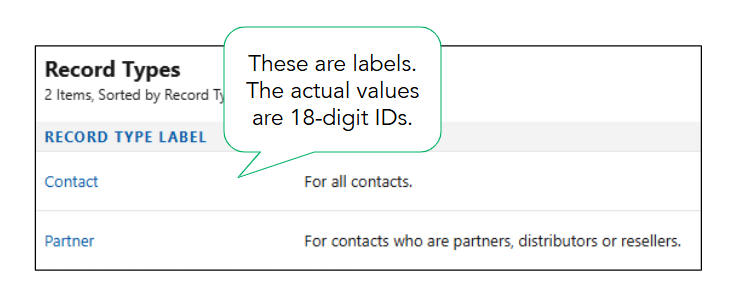
When working with record types in Salesforce, you’ll see labels displayed. These familiar values, such as “Contact,” are easy to understand. However, behind the scenes, Salesforce stores these values as IDs.

The actual values for these record types are 18-digit IDs that can be found in each record type’s URL.

Record Type LabelField Value
Contact012Hs000001p5dvIAA
Partner012Hs000001p5duIAA


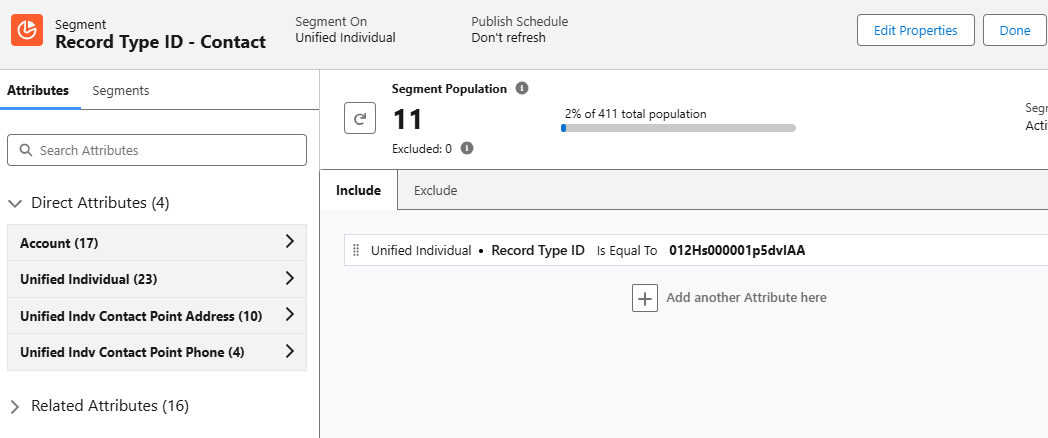
Segments can be created using the field values (18-digit IDs), but this method is just asking for trouble. The IDs are very similar and could be easily confused. It takes a keen eye to spot the differences between the field values when compared side-by-side. Imagine trying to segment or personalize based on these values!

Now that we know the problem, let’s fix it!

Solution Summary

To simplify segmentation and personalization, we will create a formula field on the contact data stream to convert the 18-digit ID into text values. We will then map the formula field to a custom field on the individual DMO and add to the data graph. Lastly, we’ll verify that all data has been successfully updated.

Step 1: Create the Formula Field

Formula fields in Data Cloud are a powerful way to transform data into formats that are easier to understand and utilize. In this case, we’ll create a transformation formula in the contact data stream to generate text values for the record type IDs.

You might be wondering if it’s possible to create a formula field on the contact object in Salesforce and ingest it directly into the data stream. While this sounds like a viable option, it can’t be done due to the fact that formula fields in Salesforce are dynamically calculated and don’t have a corresponding value stored in the database.

Creating the Transformation Formula

  • Navigate to the Contact data stream in Data Cloud.
    • Data Cloud > Data Streams > Contact_Home
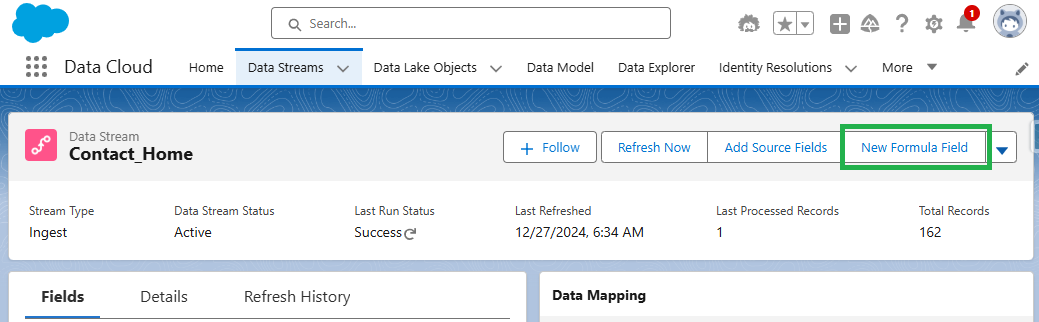
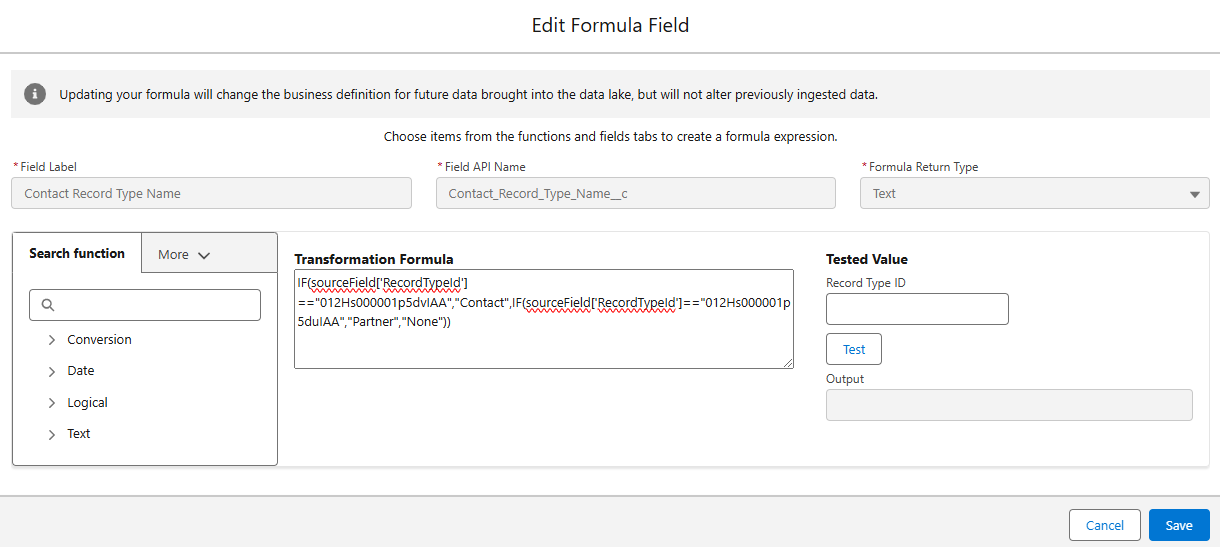
  • Select the data stream and then click the “New Formula Field Button”.
  • Enter the requested values and formula text.
    • The formula for this example is below.
      • IF(sourceField[‘RecordTypeId’] ==”012Hs000001p5dvIAA”,”Contact”,IF(sourceField[‘RecordTypeId’]==”012Hs000001p5duIAA”,
        “Partner”,”None”))
      • Remember: Your record type IDs can be found in the URL of the record type page.
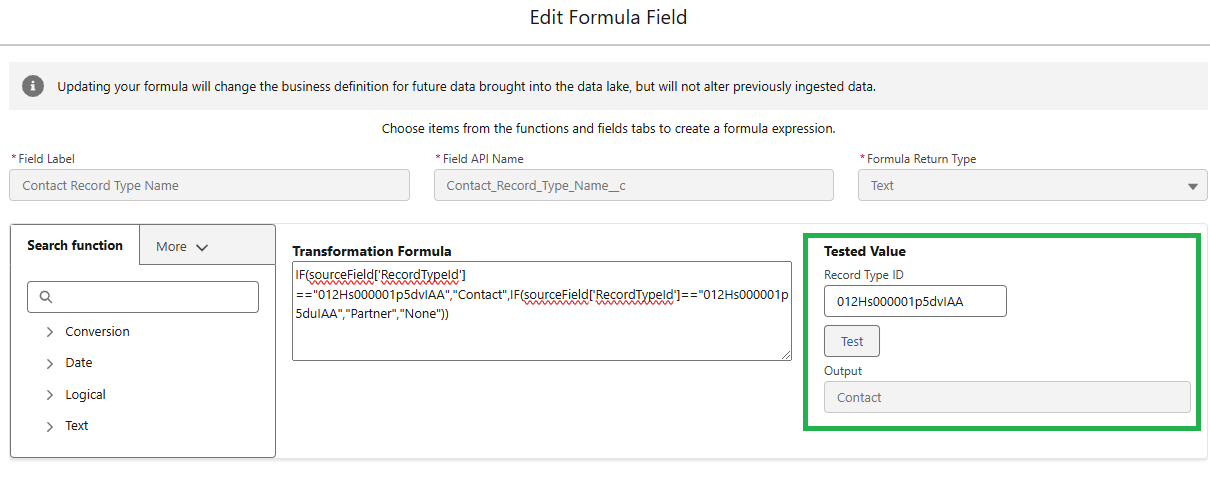
  • Test the formula for each Record Type ID.
    • Confirm the formula is returning the correct output for each Record Type ID and save.


Step 2: Map to the Individual DMO

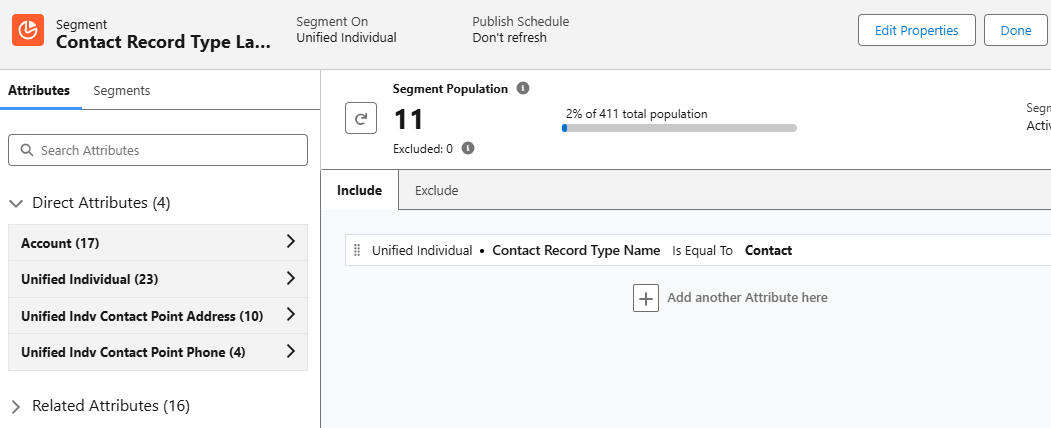
Next, we need to map the new formula field to the unified individual DMO. This mapping creates a direct attribute for each unified individual, allowing us to use the text value in Data Cloud segments. For example, this will allow us to create a segment of all unified individuals where Contract Record Type Name is equal to “Contact”.

Mapping Contact Fields

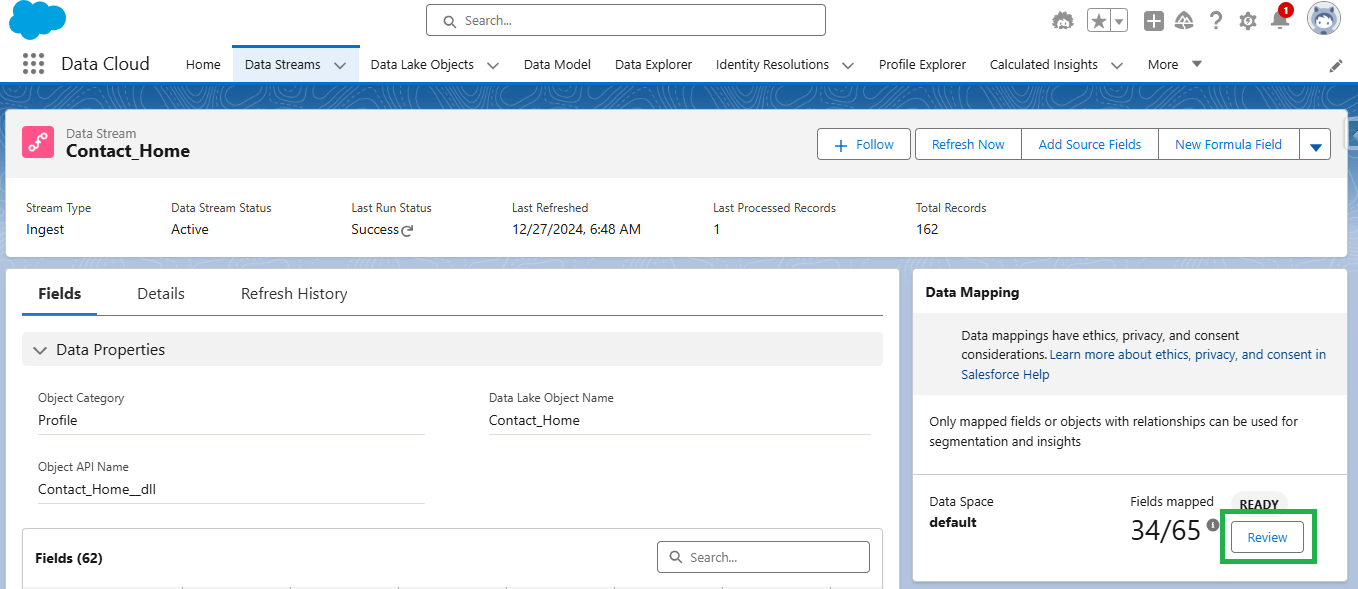
  1. Select the “Review” button in the Data Mapping section of the contact data stream.
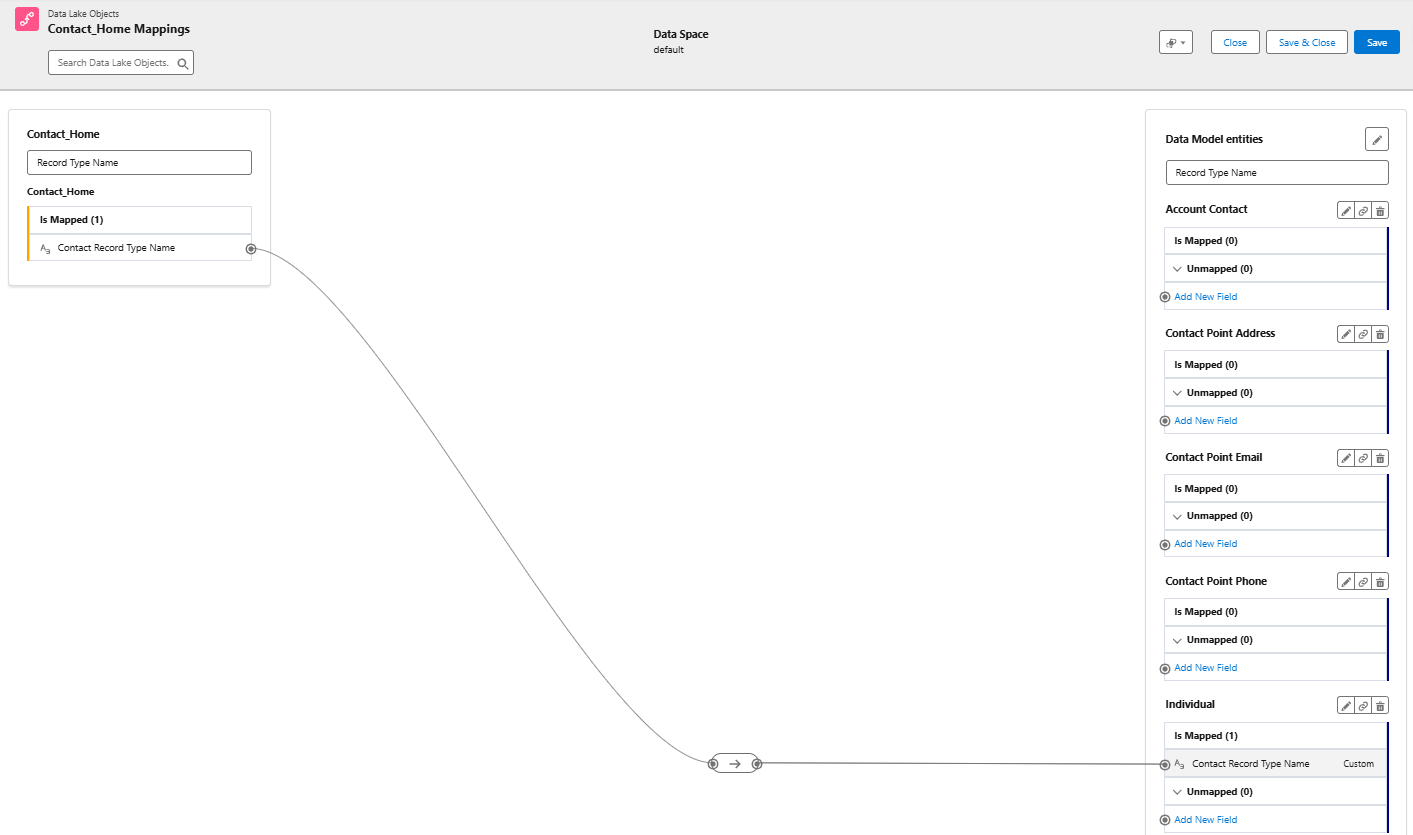
  1. Create a new field in the Individual DMO using the “Add New Field” option.
  2. Map the Contact Record Type Name field from the contact DLO to the custom field created in the individual DMO. Save & Close.

 
Step 3: Edit the Data Graph

Data Graphs are required for personalization and dynamic content in Marketing Cloud Growth and Advanced editions. To effectively personalize your emails, ensure your data graph includes all fields required by marketing (including the new formula field that we created). When updating your data graph, it’s also a good idea to review it to confirm it meets all requirements for sending emails as detailed in the second resource below.

Data Graph Resources

Step 4: Refresh the Data

Adding and mapping the new formula field will not trigger a full refresh of the data stream. You must trigger a Total Replace of the data stream and also run the identity resolution ruleset to fully refresh the data and populate the values of the formula field in the unified individual record.

Replacing Data Stream & Running Identity Resolution Ruleset

  1. Add any existing field from the contact object to the data stream.
    • You can do this by clicking “Add Source Fields” within the data stream settings and selecting any available field. This action forces a complete refresh of the data stream, ensuring all data is updated correctly.
  2. Run the identity resolution ruleset.
    • After the data stream refresh completes, manually run the identity resolution ruleset. This ensures that your unified individual records are also updated with the new information. You can find this in Data Cloud by going to Identity Resolutions > Run Ruleset. 

Step 5: Verify the Data

Once your data stream has refreshed and the identity resolution ruleset has run, it’s important to check that your formula field has populated correctly. You can do this by running a Salesforce report using the Unified Individual report type.

Confirm all unified individuals with a value in the “Record Type ID” field also have a value in the “Contract Record Type Name” field by comparing the number of records with values in each field. If the numbers don’t match,  some of your data may not have been updated yet.

Keep in mind that data streams and identity resolution rulesets run on schedules. You might occasionally see differences in the numbers due to these refresh cycles. If you encounter a mismatch, wait for the next refresh cycle and check the report again.

Segmentation Simplified

While both segments below produce the same result, there’s a clear winner in terms of usability. Enabling users to create segments using easily understood, text-based values will improve accuracy and speed of creation. Additionally, these same text values can be used to enhance personalization through merge fields and dynamic content.

Personalization & Dynamic Content

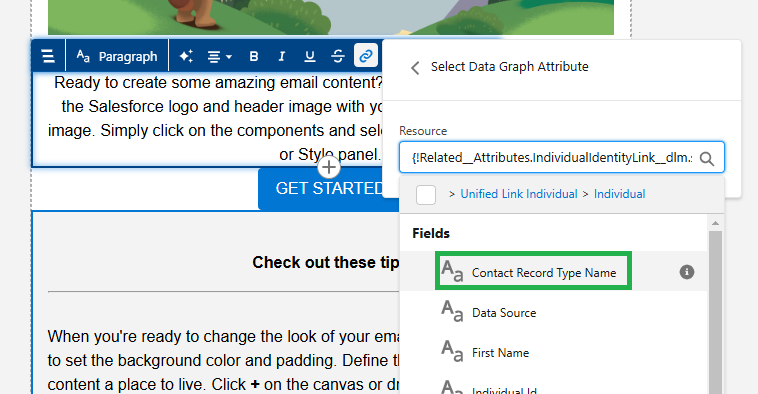
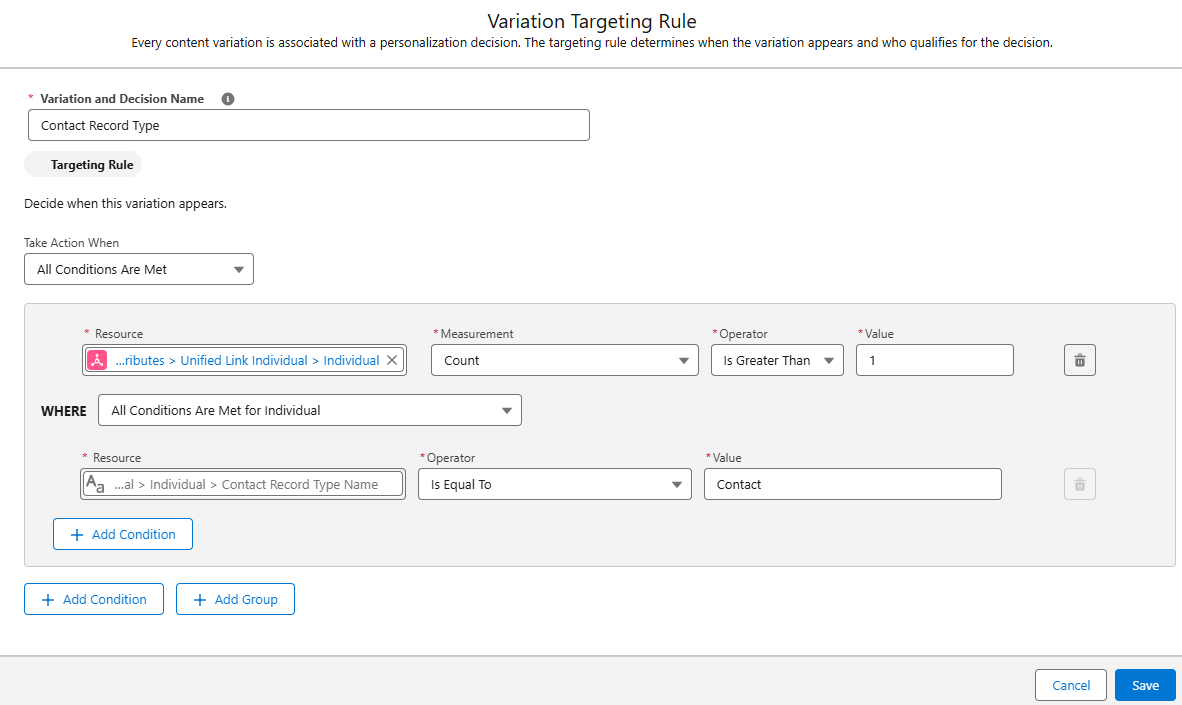
Since our newly created Contact Record Type Name field is related to the individual object, it can be used as a merge field and dynamic content.

Merge Field

Adding the “Contact Record Type Name” field as a merge field in your email will dynamically insert the contact’s record type (Customer or Partner) into the email copy. To prevent blank spaces if a contact doesn’t have a record type assigned, fallback text can be defined. This ensures a smooth and personalized experience for all recipients, even if some data is missing.

Dynamic Content

This is a great way to vary content within an email. For example, a single newsletter could be sent to customers and partners, but display different information based on the Contact Record Type Name field. Customers might see upcoming events, while partners receive a list of partner training resources.


Summary

Segmentation and personalization based on ID fields doesn’t need to be complicated. By investing time upfront in creating and mapping formula fields, marketers can significantly enhance their efficiency and accuracy. This solution minimizes the risk of errors, saves time on backend processes, and enables marketers to confidently create targeted segments and deliver personalized communications.

Big thanks to my friend and colleague Adam Babcock for his collaboration in developing this solution.

Autonomous AI is transforming the way organizations operate, and Salesforce’s Agentforce is at the forefront of this revolution. The product was made generally available by Salesforce in October 2024. Whether you want to streamline case management, enhance lead nurturing, or delight customers, Agentforce empowers businesses to accomplish more with fewer resources. In this post, we’ll share five practical tips to help you successfully implement and use Agentforce. 

Feeling anxious about diving all in with Agentforce? Contact the Sercante team for an Agentforce readiness assessment. That way, you can be sure you’re getting set up for success before you implement Agentforce in your org.

Understanding Agentforce

Before diving into the tips, let’s take a closer look at what Agentforce is.

Agentforce enables autonomous AI agents to perform tasks without human intervention, acting as digital workers within Salesforce or external customer channels. These agents enhance productivity by automating routine tasks and assisting with complex ones. With tools like Agent Builder, you can customize agents using pre-built topics and actions or create entirely new ones tailored to your organization’s needs.

Agentforce integrates seamlessly across the Salesforce platform, leveraging Data Cloud for reasoning and learning. Out-of-the-box agents include Service Agents for case deflection, with more capabilities to be released in December 2024, such as SDR and sales coaching agents.

Unleashing the Power of Agentforce: Five Steps to Get Started

Follow these five steps to get started on the right foot when you dive into Agentforce.

Tip 1: Identify Use Cases

Start by identifying where Agentforce can deliver the most value in your organization. Ask yourself:

  • How are you using your CRM today?
  • What are the current pain points in your processes?
  • Are there routine tasks that could be automated to free up team capacity?
  • Are there new processes you’ve avoided due to resource constraints?

Examples of use cases include automating FAQ responses for service teams, generating campaign briefs for marketing, or assisting sales reps with lead prioritization and moving deals faster.

Then for each use case, think about what would be needed to transition to an agent:

  • What job should they do?
  • What actions will they need to take?
  • What actions should they NOT take?  (This is just as if not more important to make sure you have defined the lane where an agent should operate within that use case)

Your responses to those questions are going to help you to understand the level of effort involved in use case. This in turn is going to help you to prioritize based on the level of effort and potential value

Tip 2: Define Success Metrics

To gauge the success of your Agentforce implementation, establish clear goals and KPIs. 

Questions you can ask:

  • What does success mean? How will we know we have addressed our problem? 
  • What metrics are we tracking today that we want to see improvement on?
  • Are there additional metrics that will let us know we are seeing success?

For example:

  • Reducing average case handling time by 20%
  • Improving lead response times
  • Increasing campaign ROI by automating content creation

Ensure you have baseline data for comparison and that the necessary measurement tools are in place to help you track success.

Tip 3: Assess Your Data

Your AI agents are only as good as the data they access. For the use cases identified, evaluate your data readiness:

  • What data do need? 
  • Where is it located? Is it in your CRM, Data Cloud, or other external systems?
  • Is it accessible from your CRM? If it’s stored in an external system, do you have APIs in place to get that information?
  • Is the data clean, accurate, and up-to-date?
    • Follow this blog post for tips on how to keep your imported Pardot prospect data clean.
  • Do you have a single view of the customer across systems?
  • Lastly, are knowledge bases and metadata structured for easy access? 
    • Agents need knowledge to inform how they will operate and answer questions. This is all of the background configurations your agents actions will rely on — flows, prompts, and Apex for example — they need to also be clearly identifiable and accessible. 
    • When you add actions to your topics, it uses the descriptions to help fuel the instructions. The naming conventions of your resources will also make it easier to determine what the inputs and outputs need to be.

Data and metadata are the backbone of AI performance, so this is an important area to pay attention to.

Tip 4: Start Small

After completing the previous steps, you may have more than one great use case to start with. Here’s where you ask yourself: What are the quick wins that we can get started on that can move the needle and that we can expand on as we mature?

It’s really easy to get caught up on how this can solve ALL the things. There are many challenges to starting a complex process all at once. If a lot of effort is required to get the data in place or to get the actions set up, it will be more difficult to roll out, not to mention making it potentially disruptive and prone to issues 

Avoid the temptation to tackle complex processes right away. Instead, focus on a simple, high-impact use case to pilot Agentforce. There are many out-of-the-box topics and actions that make getting started easier. For example, automating a single FAQ response or generating summaries for sales reps.

Starting small helps build confidence, momentum, and organizational buy-in, and it also reduces the risk of missteps.

Tip 5: Nail Down Clear Instructions

When designing agents, clarity is key. Use the Agent Builder to create and test well-defined topics and actions:

  • Topics – Include precise instructions for classifying user requests, setting guardrails, and outlining scope.
  • Actions – Clearly define what the agent should do, including required inputs and expected outputs.

Salesforce Agentforce Topic Instruction Best Practices

Instructions are the foundation for grounding how agents perform. They set the guardrails for how the agent should behave and give the agent the context it needs to do its job. 

Here are a few best practices for writing Agentforce topic instructions:

  • Start simple
    • Start with the main use case first to ensure the agent is performing as expected. Then, add in more detail to address edge cases. Be sure to test existing instructions for any conflict. You don’t want to confuse the agent! 
  • Use plain language
    • Use concise natural language to describe what your action does. Keep it to 1-3 sentences, and it can include the goal of the action, any use cases, and the objects or records it uses or modifies. 
    • In general, the more relevant detail you include in your instructions, the easier it is for the agent to differentiate between actions. Also, be sure to vary the words you use. For example, use a mix of “Get,” “Find,” “Retrieve,” or “Identify” for actions that will query records.
  • Avoid industry or company jargon
    • Write like you are instructing someone who doesn’t know your business. Even terms like ‘qualified lead’ could mean something different from one organization to another. Give context where necessary, and reference clear criteria using the data it will have access to. 
    • For example, instead of vague terms like “qualify lead,” specify conditions such as “lead status equals MQL.” 
    • The agent isn’t not going to know your business processes either, so be explicit about the sequence of instructions or any conditions a conversation must meet for an agent to apply an action.
  • Think of all the paths
    • You want to go through every possible permutation to determine the actions required. For example: a customer reaches out because they didn’t receive their order. 
    • First think about the order status ( Order Shipped, Delayed, Not Found, Processing). If the status is Shipped then there could be different tracking statuses (In Transit or Delivered for example). If the order is showing as Delivered, was it delivered to the customer’s correct address? Was it stolen? …and so on.
  • Remember the Guardrails
    • Keep the Agent in its lane by providing clear instructions on what the agent should not do to prevent unwanted responses. In cases where the agent is customer-facing, be sure to also give clear direction on when an interaction should be routed to a human.

Test these instructions thoroughly in the Agent Builder’s testing environment to ensure your agents behave as expected.

Ready to Explore Agentforce?

Agentforce offers an exciting opportunity to enhance productivity and streamline operations. By identifying the right use cases, preparing your data, and starting with manageable projects, you can set your organization up for success.

Want to learn more? Check out Salesforce’s Agentforce Trailhead and virtual workshops to get hands-on experience. Need expert guidance? Contact the Sercante team for an Agentforce readiness assessment.

No more posts to show