Product Note:Marketing Cloud on Core is now known as Marketing Cloud Next. Marketing Cloud Growth and Advanced are editions of Marketing Cloud Next and have also been referred to as Agentforce Marketing.
Salesforce marketers have been navigating a whirlwind of changes over the past year, and with every announcement one question looms large: What does the future hold for Marketing Cloud Account Engagement? If you’ve been worried about Marketing Cloud Account Engagement (formerly Pardot), you can breathe easy knowing it is evolving in powerful new ways, especially in conjunction with Marketing Cloud on Core (aka Marketing Cloud Growth and Advanced Edition).
Let’s explore why the future of Salesforce marketing is brighter than ever and how Account Engagement and Marketing Cloud on Core can work together to create a competitive edge for businesses looking to scale their marketing impact.
Marketing Cloud Account Engagement is Evolving
Account Engagement remains a key part of Salesforce’s marketing ecosystem. As the recent Salesforce Marketing Tech Roadmap highlights, Account Engagement is evolving with deeper AI capabilities, enhanced automation, and better connectivity with Data Cloud. Instead of being phased out, Account Engagement is fine-tuned to work seamlessly with the latest Salesforce innovations.
Marketing Cloud on Core is Changing the Game for Marketers
Account Engagement and Marketing Cloud on Core are essential components of Salesforce’s marketing ecosystem, each serving a unique yet complementary purpose. Account Engagement continues to be the trusted tool for B2B marketers, while Marketing Cloud on Core brings an expanded, AI-powered, data-driven marketing approach. Built on the Einstein 1 Platform, these solutions create a seamless, unified experience across Sales, Service, and Marketing, leveraging AI and Data Cloud to enhance customer interactions. Rather than replacing one another, these tools are evolving side by side to offer marketers a more connected and intelligent way to engage with their audiences.
What’s Exciting About Marketing Cloud on Core?
Generative AI helps marketers create AI-driven campaigns, emails, and segments in minutes.
Einstein AI provides predictive insights with Einstein Send-Time Optimization and Einstein Engagement Frequency, and Einstein Engagement Scoring.
Data Cloud ensures every customer touchpoint is informed by a single source of truth, say goodbye to disconnected marketing efforts.
Omnichannel marketing is effortless with native email, SMS, and WhatsApp channels.
The Dream Team: Marketing Cloud Account Engagement Paired with Marketing Cloud on Core
The real magic happens when Account Engagement and Marketing Cloud on Core work together. Here’s how they complement each other:
Lead Nurturing & Cross-Channel Engagement: Imagine a B2B marketing manager running a nurture campaign for high-value prospects. Account Engagement ensures these leads receive timely, relevant emails based on engagement, while Marketing Cloud on Core supplements this with SMS reminders and AI-driven segmentation, creating a truly engaging experience for each customer.
Segmentation + Personalization: A marketing operations specialist wants to create highly personalized experiences for prospects. Automate lead nurturing based on behavioral triggers with Account Engagement’s Engagement Studio. At the same time, Marketing Cloud on Core dynamically adjusts messaging using Dynamic Content built within the Data Cloud Data Graph, ensuring every touchpoint is tailored to the recipient’s journey.
Sales Alignment + AI-Powered Insights: Picture a sales team receiving AI-powered lead insights. Account Engagement scores Leads based on interactions, ensuring sales reps prioritize the most engaged prospects. Meanwhile, Marketing Cloud on Core uses AI to predict customer needs, alerting sales when a lead is likely to convert.
What This Means for Marketers
With Account Engagement advancing and Marketing Cloud on Core opening new possibilities, Salesforce marketers have more tools than ever to drive impactful engagement. The key takeaway? Marketing Cloud Account Engagement is evolving, and when combined with Marketing Cloud on Core, it unlocks even more significant marketing potential. The shift to a unified Salesforce marketing ecosystem means:
More automation and AI-driven insights to improve efficiency.
A seamless user experience across Salesforce products.
Greater flexibility to adapt marketing strategies to changing customer behaviors.
The ability to scale effortlessly with Data Cloud.
If you’re ready to explore how Account Engagement and Marketing Cloud on Core can work together for your organization, reach out to Sercante so we can help you start experimenting with the latest AI-driven features. The future of marketing is here! Are you ready to make the most of it?
Update: As of September 2026, SMS Short Code provisioning for Marketing Cloud Next is now self service. Orgs with an existing Short of Long Code may also port existing codes into their accounts (more info). This blog has been updated to reflect these changes.
As someone who primarily focuses on B2B and Account Engagement, I’ll admit I was a little lost the first time I approached the topic of SMS and Marketing Cloud Growth Edition. SMS was just not regularly part of my Marketing world, so trying to figure out the difference between Long Code and Short Code, go through the provisioning process, and advise others on which code is right for them felt overwhelming. However, thanks in large part to my B2C and Marketing Cloud Engagement focused co-workers, I now have a good handle on this topic and want to make sure others in the community can too!
Long Code versus Short Code
The first thing to make sense of is the two types of SMS codes within Marketing Cloud on Core, their provisioning process, and which type is right for you.
Note: For some countries only one type of SMS code is currently supported (for example, only Short Code is available for Canada). If you are outside of the US, ensure you check the SMS Rate Card to see which SMS Codes are currently supported for your country.
Long Code
Long codes are a good choice for businesses that want to send messages to a smaller number of customers or create a more personal touch. Long Code SMS is also
More cost-effective and take less time to set up
Needed for International SMS
Has a longer send time (roughly 1 sec per message per recipient)
In summary, if you are sending delivery updates, appointment or event reminders, customer service communications etc. Long Code is likely the better choice.
Long Code Provisioning
Long Code Provisioning takes between 1-2 weeks and is a multi-step self-service process.
You’ll need to compile some basic info about your company for this form and then wait roughly 5 business days for the Brand to be approved (aka verified).
After your Brand is “verified” you can then request a Campaign. This step is a little more complex and you’ll need to provide some sample SMS messages for the form. Campaigns take roughly 10 business days to be approved (aka registered).
Once your Campaign is “Registered” you can complete the final step of requesting your Long Code. This step should only take 2 business days to complete.
Short Code
Short codes are the preferred method for organizations sending high volumes of SMS and expect very fast delivery times.
Short codes are also country-specific. A short code is only able to send messages to and receive messages from the same-country phone numbers. US short codes can only send to US phone numbers on US carrier networks that have approved that short code.
Short codes are the better choice if you intend on sending promotional messages to a large audience, such as sending limited-time offers and discount codes to all your current customers.
Short Code Provisioning
Short Code Provisioning takes an average of 8-12 weeks, but can now be procured using the self-service procurement process.
You’ll need to compile info about your company, a sample SMS message, and opt out information for this form and then wait for the Brand to be approved (aka verified). The Sample SMS Message and Brand Requirements help articles can assist with this process.
Once your Brand is “Verified” you can complete the final step of requesting your Short Code. Processing can take 10-12 weeks to complete.
That was a lot of information, could you put it in a chart?
You got it!
Scenario
Long Code
Short Code
Provisioning Timeline
1-2 Weeks
10-12 Weeks
Cost
Monthly registry fees (Low)
Monthly registry leasing fees ($500-$1000 per month)
Purpose
Small sends, personal touches
Large sends, promotions
Supports International Recipients
Yes
No
Supports Conversational SMS
Yes
Yes
Send Speed
Slow – est 1 second per message
Fast – est 100-500 messages per second
SMS Credits
Both Short and Long Code SMS require Salesforce Messaging Credits to send SMS. Credits are consumed differently based on their multipliers (which can change so ensure you check the multipliers page for the most up to date info).
SMS and Consent
Consent for SMS channels can’t be imported until after the SMS Code has been provisioned. Once provisioned you can proceed with importing existing consent records to tie opt-ins and opt-outs to your unified individuals. Ensure your phone numbers use the E164 format in your consent files!
What’s next?
After your SMS code has been provisioned and you’ve imported your Consent Records there are a few additional setup steps you’ll want to tackle before you start sending:
Create a Branded Domain – This allows you to shorten URLs sent via SMS into personalized links.
Vet your SMS Brand – Improve your sending reputation by validating your identity.
Set up Analytics – Ensure you’ve installed the SMS Analytics packages
For the last seven years, I’ve been enamored by a marketing analytics tool (who among us hasn’t, I’m sure), Datorama, or Salesforce Marketing Cloud Intelligence. MCI, as we’ve come to call it, is the most seamless way my customers have found to join their data across multiple sources, built by marketers and for marketers. MCI allows users to join data together and easily create reports and dashboards using plain language from the pre-built data models. This allows for easy-to-populate smart lens dashboards, or deeply complex automated reporting triggered by specific events.
To my delight, and to the happiness of marketers, Salesforce just announced on March 18, 2025, a new version of the tool, Marketing Intelligence (MI), built on the Salesforce Platform. This new version takes the best features of existing MCI and layers them into the functionality of Data Cloud’s unified platform, while taking users to the future with agentic features that will provide down-to-earth insights with conversational agents. So without any further ado, let’s dive into this new tool, Marketing Intelligence!
What is Marketing Intelligence?
Marketing Intelligence (or MI) is a new application on the Salesforce platform designed to simplify marketing data management, deliver trustworthy, out-of-the-box insights that marketers can instantly act on, and deliver better return on investment for marketing spend. Being built on Data Cloud and connected to the Salesforce platform allows it to be fully extensible, with a toolbox for marketers at the ready- it’s everything you need to build robust, effective, and meaningful dashboards with minimal lift.
Data Cloud for Marketers Made Easy
One of the processes I have been spoiled by in Marketing Cloud Intelligence is data mapping that auto-populates based on past usage and logical guesses by the platform’s artificial intelligence. Additionally, certain APIs come with prebuilt models and mapping to build off of rather than user-defined settings. These features have helped get marketers streamlined into the world of data models and dashboarding with less lift than throwing them into a database or asking them to join various tables.
All of that, to my delight, is back in full form with Marketing Intelligence. You have the option to upload a TotalConnect file (a non-standard API, flat file of your choosing), or to use an existing API connection, with some rolled out at launch and more coming in the year ahead. Choosing a connection like Google Ads allows you to seamlessly grab that data, formatted and ready for quick mapping, and load the data you need into a dashboard in just 3 clicks.
Clean and Easy Dashboards
The dashboards look sharp and load with ease. These dashboards come prebuilt, with options to customize, and also have a key new feature compared to the existing Marketing Cloud Intelligence: generative AI summaries of your campaigns, including what’s working and what might not be. This elevates, to me, the future of dashboarding—being able not only to look at quick and easy data points and trends but also being told in plain language for what to take away or dig into. This can help marketers ask questions and dive in further, and even ask their agent to take action on what recommendations surface.
The idea of clear and plain insights especially comes up in implementations of the current dashboard tools I work in. Users looking at a dashboard want to know different information, and for dozens of users looking at a single page, the questions they’re asking are going to be different depending on needs. The option to ask your agent to recommend optimizations, and then act on it will save marketers a lot of time and headache. With Marketing Intelligence, you just need the data ready for an agent to help your end users get what they need from the data you’ve put in place.
Tidied Data Across Channels
Of course, the core goal of any marketer looking for a tool like Data Cloud, Marketing Cloud Intelligence, or this new version of Marketing Intelligence, is to tie data together across channels to tell meaningful stories they can act on. In addition to the standardized API mapping, MI creates value by uniformly harmonizing these fields across datasets and allows for a semantic model to be used on the backend to tie data together in ways that are common sense (campaign name ties across all of your channels, for instance), such as tying your campaign from paid media to your campaigns from your CRM or other tools, even when names are not exactly aligned (more on this in a moment).
I’m an existing Datorama/MCI User: What’s Worthwhile Here?
If you have been reading up to this point, you know what was probably on my mind when I first saw this tool: can I love a changed version of my favorite software of all time? (And yes, I have a favorite software of all time.) Put simply, I’m ready to love. Let’s dissect the butterflies in my stomach. (And if your heart skips a beat when you hear about normalization, semantic modeling, and ROI, there’s enough of this platform for us to share).
One Word: Normalization
When I lead implementations with clients on MCI, we talk about the ways in which their data joins. Sometimes it’s super straightforward, sometimes it’s messy. More often than not, we can devise ways to join the messy and the clean together, such as by breaking out parts of campaigns to equal full campaign names in other channels, or by using the numerous formulas Marketing Cloud Intelligence offers out of the box.
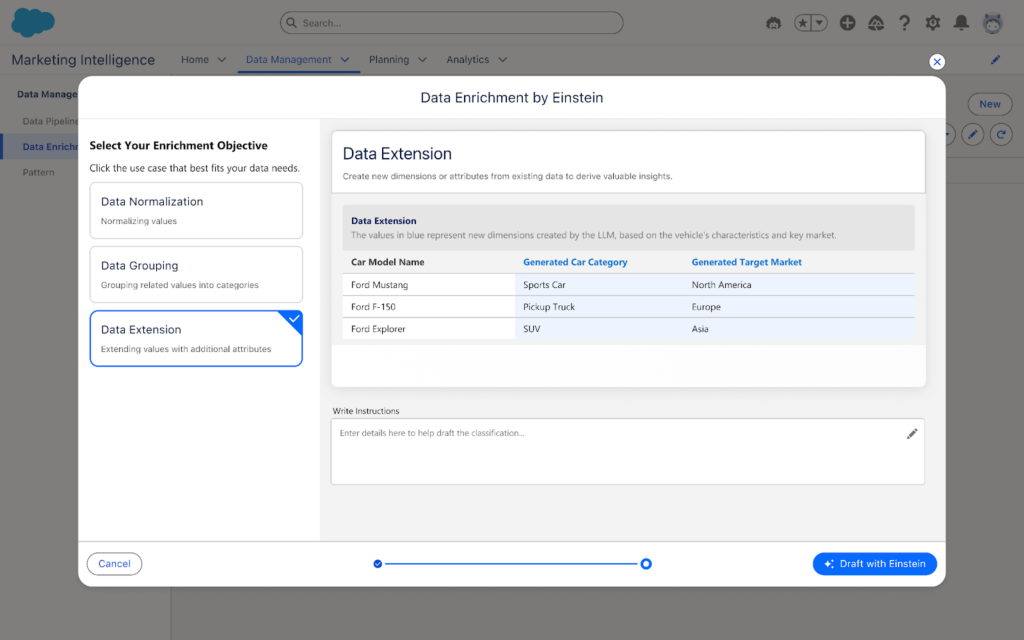
In MI, this is no longer necessary. One of my favorite surprises is seen below: you can classify and normalize data with Einstein AI, so instead of working to modify and standardize all of your data either in the platform of origin or in Intelligence, you can instead have Einstein help you set standardization of your data. This is a fantastic path forward in joining datasets together for synchronized cross-channel reporting.
Two Words: Semantic Modeling
Though users will have an out-of-the-box paid media data model ready to go, users will have free range beyond the world of pre-defined data models in MCI. In MI, you can set up a semantic model that joins datasets together across multiple objects. While you may miss some of the standardization of having ads, conversion, and web analytics data models, among countless others in MCI, you will get seamless back-end loading of data together, along with seamless joins to standard Salesforce object data. This also means that you can add fields and relationships with full customization as your datasets evolve, or as you update back-end nomenclature to more cleanly join fields from one connection to another.
Three Words: Return on Investment
Speaking of Salesforce data, what elevates a good MCI implementation to a great one, in my books, is the joining of cost/engagement data to tangible ROI and meaningful dollar results. With the new integration to the semantic model and the ease of connecting standard objects from Sales Cloud, users can handily create and easily visualize ROI metrics in MI wherever data cleanly intersects, which is now made much easier with Einstein normalization and semantic modeling.
Additionally, attribution is a more straightforward possibility with MI than in current MCI, with the framework to capture website events within Data Cloud data model objects, providing marketers end-to-end visibility into touchpoints where ads have been seen by end users. This will include attribution models for first and last touch for users, and can further be a method to validate ROI and pinpoint specific interactions with customers.
I’ve Never Used MCI or Datorama-Why Should I Explore Marketing Intelligence?
The Tool for Data Harmonization
MCI has long been the gold standard for harmonizing marketing data. When clients come to me looking for data solutions, if the core users (front and back-end) are marketers, MCI is always what I recommend. Now with MI, you have the power of what current MCI can do to enable marketers to aggregate and act on data in the same platform as your CRM and marketing data, with the added benefits of generative and agentic AI, 3 click data setup, Data Cloud, and embedded Tableau Next visualizations.
The Tool for Visualization
Current Marketing Cloud Intelligence has some great visualization options, but the two big enhancements I’ve always wanted and have tried to build guardrails for on my own are:
1. Faster load optimization for dashboards
2. Plain language recommendations for end users
With MI, you get both of those with minimal lifting. Data is smoothly joined together using Data Cloud and back-end semantic modeling, with minimal loading for calculated fields and other computing intensive processes in current MCI. Additionally, with generative AI suggestions and an agent to help you pause underperforming ads, end-users are no longer limited to looking at charts and figuring out what it means,—because actions are ready and available to springboard from on the page.
The Tool for Marketing Customization
Have you ever wanted to redefine your campaign names in reporting by extracting certain parts of your campaign names from across systems? Have you wanted to group different Google Analytics traffic sources and merge them against ad spending from the respective paid media platforms on an automated basis? What about renaming and grouping a set of campaigns based on criteria only you and your team know and then dynamically filtering for a handful of those campaigns?
That’s the sort of fun I love to explore with clients, and it’s back in full force in MI with processes like patterns to extract data points from various fields, calculated fields in the semantic layer, and the normalization processes Einstein brings to the table.
A New Era
Marketing Intelligence launched on March 18th (with Data Cloud and MI licenses required). Talk to your account executive to explore this new product. Marketing Intelligence is going to be the gateway into a new world of dashboarding intelligently (no pun intended) and is sure to streamline data for marketers in ways that have only been hinted at by Marketing Cloud Intelligence previously. I know I’m excited to take this ride, and I hope you’ll join me!
Product Note:Marketing Cloud Growth and Advanced are editions of Marketing Cloud Next and have also been referred to as Agentforce Marketing.
Marketing Cloud on Core (also known as Marketing Cloud Growth or Advanced Edition) can now track how marketing efforts contribute to revenue! With the Spring ‘25 release, Salesforce introduced Opportunity Influence, helping businesses connect marketing engagement to pipeline and revenue. But how does it work, and what’s the difference between Opportunity Influence and Campaign Influence? Let’s dive in!
Opportunity Influence vs. Campaign Influence: What’s the Real Deal?
Before we break down how to customize and report on Opportunity Influence, let’s clarify how it differs from Marketing Cloud Account Engagement’s Customizable Campaign Influence. While both models aim to connect marketing efforts to revenue, they function in distinct ways and serve different use cases.
Tracks Leads/Contacts who are Salesforce Campaign Members
Integration
Syncs Marketing Cloud engagement data to Salesforce Opportunities
Works within Salesforce CRM using Campaigns and Opportunities
Attribution Models
Multi-touch attribution (first-touch, last-touch)
Campaign Influence and Customized Models
Reporting & Insights
Measures marketing-driven revenue impact
Measure campaign-driven revenue impact
🚨 Important Note for Account Engagement Users 🚨
You cannot use Opportunity Influence alongside Customizable Campaign Influence. If your team already relies on Account Engagement’s Campaign Influence Models, keep this in mind when deciding which model to use.
Additionally, Account Engagement users cannot activate Opportunity Influence as it does not currently integrate with Account Engagement’s Campaign Influence model. If your organization currently tracks marketing-driven revenue using Campaign Influence reports, you’ll need to continue using that model. However, if you’re considering a shift to Marketing Cloud on Core, Opportunity Influence could offer enhanced multi-touch attribution and engagement tracking.
Battle of Influences: Campaign vs. Opportunity – Which One Wins?
Let’s say you’re running a B2B software company and you’ve executed multiple marketing campaigns using a variety of platforms, including ads, email, an e-book, and a webinar, to engage your prospects.
Campaign Influence: A prospect attends the webinar, clicks on an email, and downloads the e-book before being transitioned to sales as a marketing-qualified lead. These interactions are recorded under a Salesforce Campaign and can be manually associated with the Opportunity when created based on the Opportunity Contact Role and Campaign Member. You can assign influence weight based on your customized rules.
Opportunity Influence: Marketing Cloud on Core automatically tracks all marketing engagement, including the ad view and click, webinar attendance, and e-book download. These touchpoints are automatically associated to attribute influence based on the predefined model and associated to the Opportunity upon creation.
If Campaign Influence were a fine-dining experience, it would be a chef-curated meal—meticulously crafted with manual customization to fit your exact taste. You decide which interactions get the most credit, but it requires hands-on effort. On the other hand, Opportunity Influence is like an all-you-can-eat buffet with an expert chef behind the scenes. It automatically dishes out credit across touchpoints, giving you a full spread of marketing influence with minimal effort. If you love precision and control, Campaign Influence is for you. But if you want a seamless, automated view of your entire marketing impact, Opportunity Influence takes the crown.
How to Set Up Opportunity Influence
Setting up Opportunity Influence requires configuration in Sales Cloud to ensure marketing engagement is properly attributed to revenue-generating activities. To fully connect marketing efforts with sales outcomes, ensure that contacts engaging with marketing campaigns are linked to Opportunities. This allows for accurate tracking of marketing interactions that influence deals.
Enabling Opportunity Influence
Navigate to Salesforce Setup > Opportunity Influence
Enable Opportunity Influence
Select an Attribution Model
First-Touch: Gives full credit to the first marketing engagement that led to the opportunity. It’s ideal for understanding which top-of-funnel efforts drive initial interest.
Last-Touch: Assigns full credit to the last marketing interaction before the opportunity was created. It helps measure the final push that converted a lead into an opportunity.
Going Beyond Activation
Customization is key to maximizing Opportunity Influence. Marketers should align influence models with their sales cycle, ensuring critical marketing touchpoints, such as email engagements, paid ads, and automation journeys, are correctly captured. Because Opportunity Influence consumes Data Credits, it’s essential to be strategic when enabling multiple models to avoid unnecessary credit usage.
Making Sense of Your Data: Reporting on Opportunity Influence
Once Opportunity Influence is enabled and tracking data, you can start reporting on marketing’s impact. The key to unlocking valuable insights is leveraging Salesforce’s Reports & Dashboards to tell a clear story about how marketing drives revenue.
Your Treasure Map to Salesforce Reports & Dashboards
Head over to Salesforce Reports and search for Opportunity Influence Reports. This is your go-to hub for seeing which marketing touchpoints are helping close deals.
Get specific with your insights! Use filters to refine reports by timeframe, campaign, or opportunity. Want to know which emails led to the most revenue? Adjust your filters to see the impact.
Create Salesforce Dashboards to visualize Opportunity Influence. Need a quick snapshot for your leadership team? Build an easy-to-read chart that shows exactly how marketing is fueling revenue.
The Ultimate Guide to Opportunity Influence Report Types
Salesforce provides several built-in report types to help you analyze how marketing efforts contribute to revenue. Here are the key report types you can use:
Opportunity Influence Summary Report – This high-level report shows how marketing engagements are influencing revenue across all opportunities. Use it to track overall marketing impact.
Opportunity Influence Detail Report – A more granular report that breaks down individual touchpoints per opportunity, allowing you to analyze which specific marketing interactions played a role in closing deals.
Influence Attribution Model Comparison Chart – Compare first-touch and last-touch models side by side to see which one provides the best insights for your marketing strategy.
Marketing Touchpoint Analysis Report – Identifies which marketing channels (email, ads, website visits, etc.) are contributing the most to opportunity creation and pipeline growth.
By setting up and analyzing Opportunity Influence reports, marketing teams can gain deeper insights into which touchpoints matter most, optimize their strategies accordingly, and confidently demonstrate their return on investment.
Why Opportunity Influence is a Game-Changer
Opportunity Influence is a must-have tool for any marketing team looking to measure true revenue impact. No more guessing which emails, ads, or landing pages are driving pipeline – Opportunity Influence connects the dots, giving you a clear picture of how marketing fuels business growth. With built-in attribution models, you can customize insights based on what matters most to your strategy.
Whether you’re aiming to prove marketing ROI, optimize your campaigns, or align better with sales, Opportunity Influence provides automated, data-driven attribution that simplifies reporting and enhances decision-making. If you want better visibility into marketing’s role in revenue generation, this feature is your new best friend!
💡Next Steps:
Check your org to see if the new update is available.
Test Opportunity Influence tracking before rolling it out company-wide.
Monitor data service credit usage if you’re using multiple attribution models.
📣 Want to learn more? Check out the full Spring ‘25 release highlights or dive into the official release notes.
🚀 What are your thoughts on Opportunity Influence? Drop a comment below, and let’s discuss!
Product Note:Marketing Cloud Growth and Advanced are editions of Marketing Cloud Next and have also been referred to as Agentforce Marketing.
Spring has sprung at Salesforce, and it comes in the form of the Salesforce Spring ‘25 Release Notes! Whether you’re a seasoned pro or a budding marketer, this release is packed with goodies that will make your campaigns bloom brighter than ever. Let’s dive into the highlights for Marketing Cloud Growth and Advanced Edition!
Take Your Marketing Global
Marketing Cloud is getting a boost with a WhatsApp integration, making it easier to incorporate this channel into your marketing strategy. Whether you share updates, promotions, or ongoing support, WhatsApp helps you connect with your customers worldwide. The integration includes a campaign template, communication subscription support, and a default Email Preference Center. In addition, it supports 2-way conversations, and the message builder supports audio, video, and file sharing.
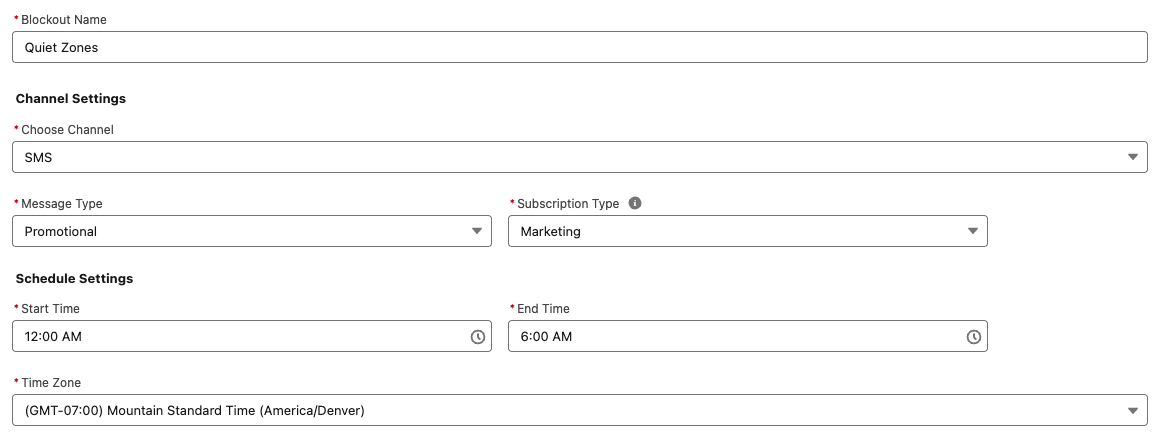
WhatsApp is not the only feature going global this Spring; SMS is joining the fun! With sending capabilities expanding to more than 50 countries, your messages can reach more customers. The new update includes identity validation to enhance trust and effectiveness and ensure reliable delivery. Additionally, blackout windows for SMS and WhatsApp allow you to respect your audience’s downtime, ensuring your messages land at the right time.
AI: Your Marketing Superpower
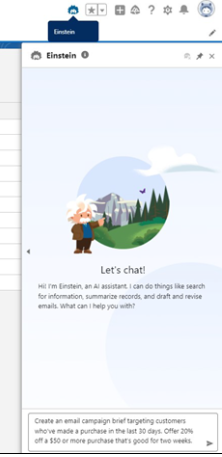
Salesforce is supercharging your marketing strategy with expanded AI capabilities, bringing unparalleled efficiency and creativity to your campaigns. With Agentforce, you can generate landing pages and email content in seconds, freeing time for more strategic tasks. Need to plan a campaign? Agentforce also crafts detailed campaign briefs, ensuring you start with a strong foundation. For Marketing Cloud Advanced Edition users, the Agentforce Campaign Designer (Beta) takes it even further, providing a single interface to edit and refine your campaign strategies, multi-channel flows, and content. These tools empower you to create more innovative, impactful campaigns.
Spring into Smarter Campaigns and Content
Marketing Cloud’s Spring ‘25 Release is focused on making campaigns smarter and your content work harder. From reusable personalization tools to seamless flows, Salesforce has designed the release to help marketers craft successful campaigns from start to finish.
Personalization That Packs a Punch
Stop spinning your wheels! Simplify your workflow and create tailored campaigns effortlessly with reusable content and personalization points. These features save you time and help you connect more deeply with your audience. Reusing merge fields withExpressions across campaigns will keep your messaging sharp, consistent, and right on target—making every interaction count.
Smarter Segmentation for Better Results
Segmentation is getting a makeover! The Spring ‘25 release features new tools that filter attributes—like new leads—right from the Campaign record, saving you time and speeding up your campaign’s delivery. Plus, you can preview up to 1,000 segment members before activating your campaign flow, giving you confidence in your targeting strategy.
Meet the CRM Prospect Object
Say hello to your new best friend: the CRM Prospect Object. It’s here to help you manage prospects like a pro. Create prospects with forms, nurture them automatically, and convert them into loyal customers. With account scoring based on engagement, fit, and intent, you can prioritize the leads most likely to convert.
Forms That Go Where Your Customers Are
Why make your customers come to you when you can bring the form to them? With the new ability to embed forms on external sites, you can deliver them to your hosted web page. After a quick setup in Salesforce and your external site, grab the form’s code block from its detail page and drop it into your site’s HTML. It’s as simple as copy-paste! (Just make sure your site supports iframes, is secure, and uses HTTPS.)
Flow Like a Pro
Managing Flows is easier and more intuitive than ever. You can handle more of the process directly from the Campaign record, track flow statuses in the new Marketing Calendar (fully integrated with the Sales Calendar), and view flow versions and failures to provide quicker, seamless resolutions. The new Campaign Stage field offers insight into the current campaign and keeps your team updated. Need a little extra customization? Add custom fields to your campaign briefs to make them truly yours.
Content Updates That Shine
Marketing Cloud is releasing new content creation features. With a new “Processing” content status, you’ll always know when landing pages, forms, and branding updates are pending publication. While changes can’t be made during this time, you can relax knowing your updates are locked in. Need to duplicate content? Cloned content is easier to manage by saving it in a shared workspace, keeping your team aligned. Consistent branding has never been more straightforward—assign default branding to your workspace to ensure emails, landing pages, and forms all have the same polished look. Ensure brand consistency across all your forms by assigning a brand, with forms automatically adapting to reflect your workspace, landing page, or external site branding.
Tracking and Source Information for Consent helps you comply with global laws and regulations to review the source and consent status change via the Consent Audit Trail in Data Explorer.
Setup Enhancements aim to save users time. They include tracking setup progress, installing or updating the Sales Data Kit, a guided experience for authenticating domains, and the ability to autogenerate an Identity Resolution Ruleset.
A common segmentation need with Marketing Cloud Growth or Advanced Edition and Data Cloud is creating a segment based on a Contact’s Record Type within the CRM. While this is possible by adding the Record Type field to the Contact Data Stream and mapping the field to the individual Data Lake Object (DLO), this is not very user-friendly or intuitive. Record types are stored as IDs, and who wants to build a segment based on a Salesforce ID? No worries, I’ve got a better solution!
So What’s the Problem?
Before we get into the solution, let’s first define the problem we’re addressing.
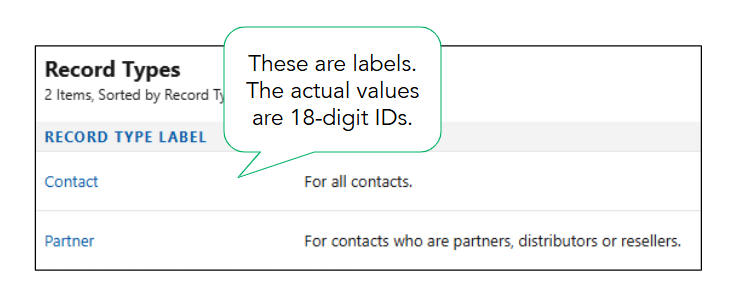
When working with record types in Salesforce, you’ll see labels displayed. These familiar values, such as “Contact,” are easy to understand. However, behind the scenes, Salesforce stores these values as IDs.
The actual values for these record types are 18-digit IDs that can be found in each record type’s URL.
Record Type Label
Field Value
Contact
012Hs000001p5dvIAA
Partner
012Hs000001p5duIAA
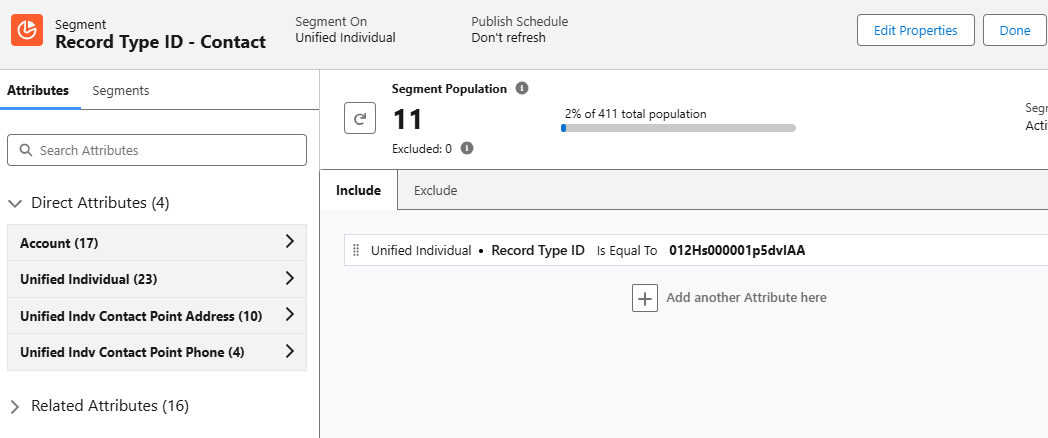
Segments can be created using the field values (18-digit IDs), but this method is just asking for trouble. The IDs are very similar and could be easily confused. It takes a keen eye to spot the differences between the field values when compared side-by-side. Imagine trying to segment or personalize based on these values!
Now that we know the problem, let’s fix it!
Solution Summary
To simplify segmentation and personalization, we will create a formula field on the contact data stream to convert the 18-digit ID into text values. We will then map the formula field to a custom field on the individual DMO and add to the data graph. Lastly, we’ll verify that all data has been successfully updated.
Step 1: Create the Formula Field
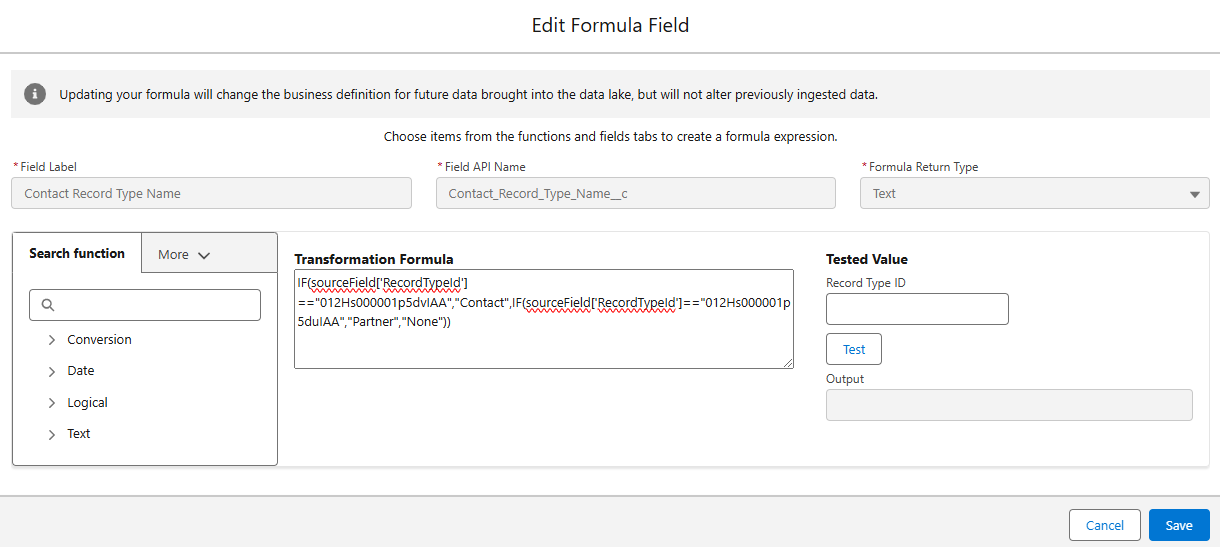
Formula fields in Data Cloud are a powerful way to transform data into formats that are easier to understand and utilize. In this case, we’ll create a transformation formula in the contact data stream to generate text values for the record type IDs.
You might be wondering if it’s possible to create a formula field on the contact object in Salesforce and ingest it directly into the data stream. While this sounds like a viable option, it can’t be done due to the fact that formula fields in Salesforce are dynamically calculated and don’t have a corresponding value stored in the database.
Creating the Transformation Formula
Navigate to the Contact data stream in Data Cloud.
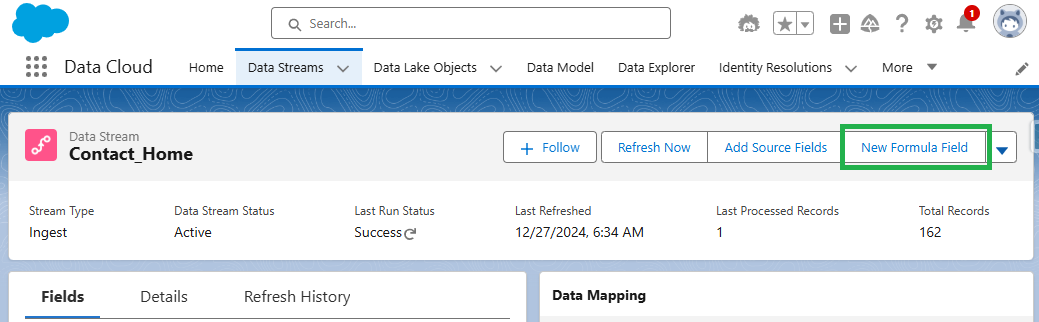
Data Cloud > Data Streams > Contact_Home
Select the data stream and then click the “New Formula Field Button”.
Remember: Your record type IDs can be found in the URL of the record type page.
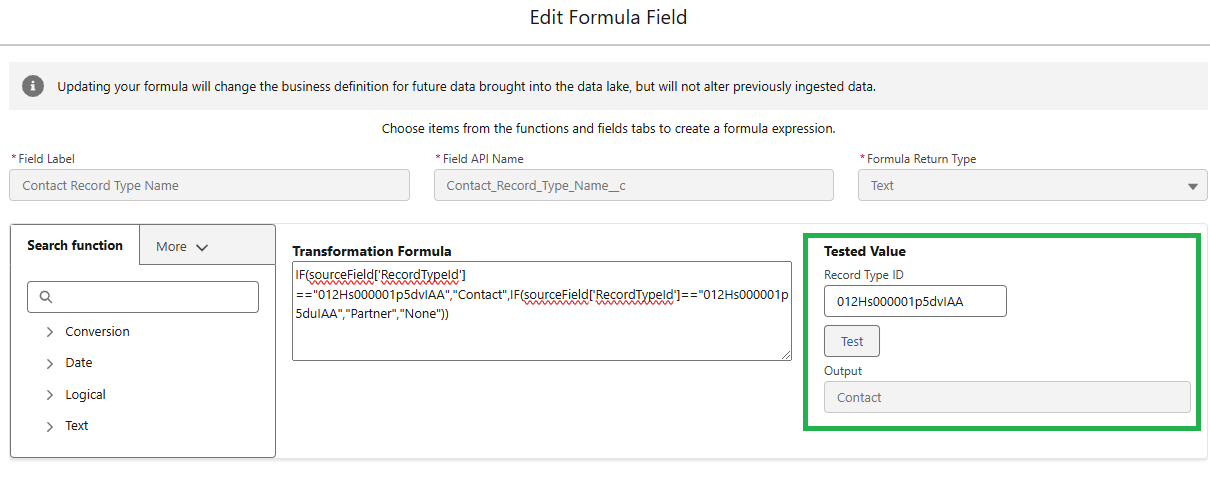
Test the formula for each Record Type ID.
Confirm the formula is returning the correct output for each Record Type ID and save.
Step 2: Map to the Individual DMO
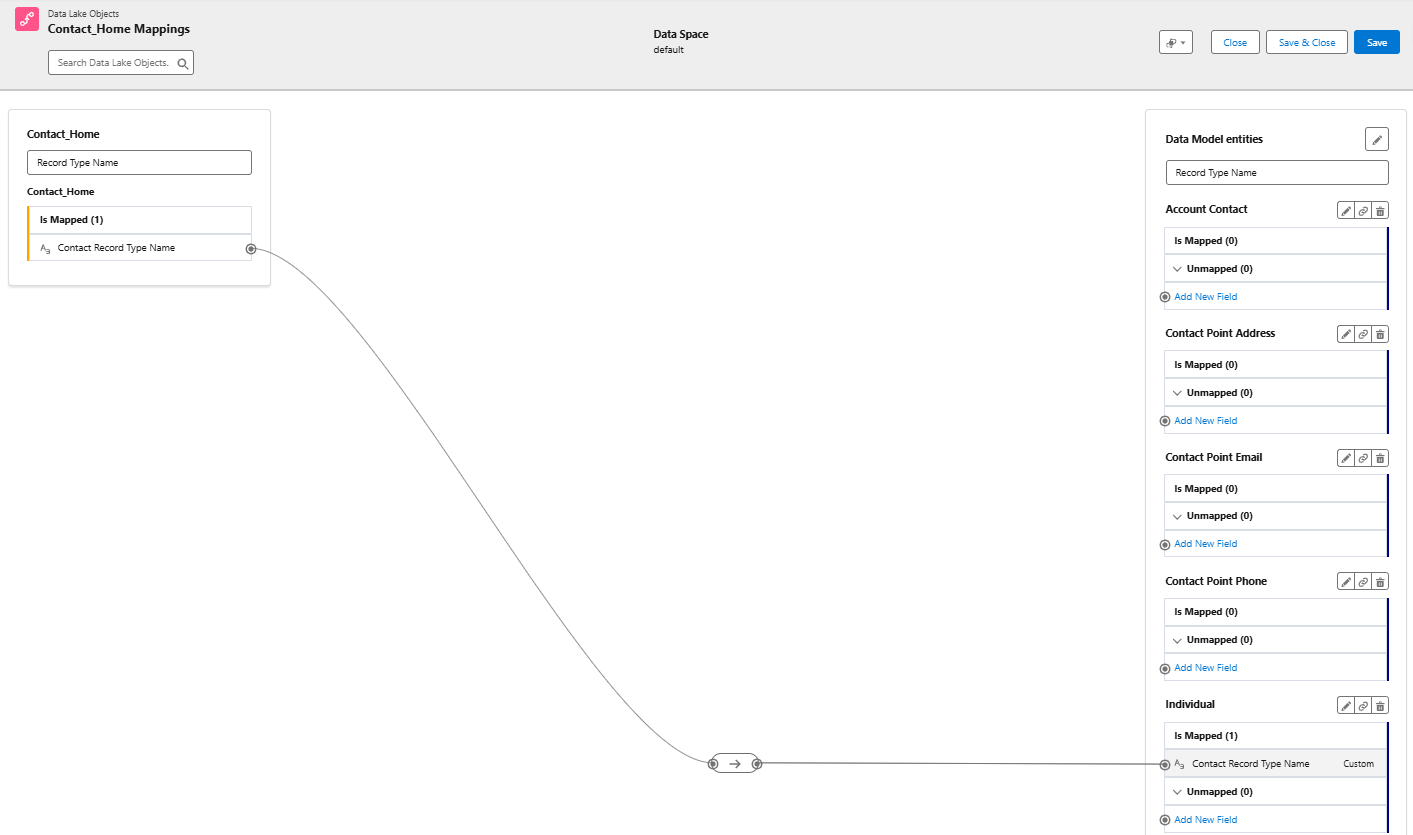
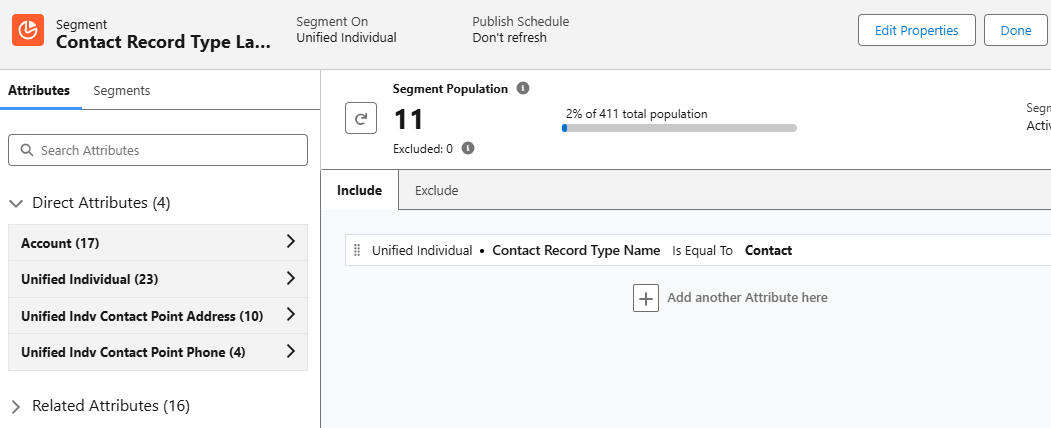
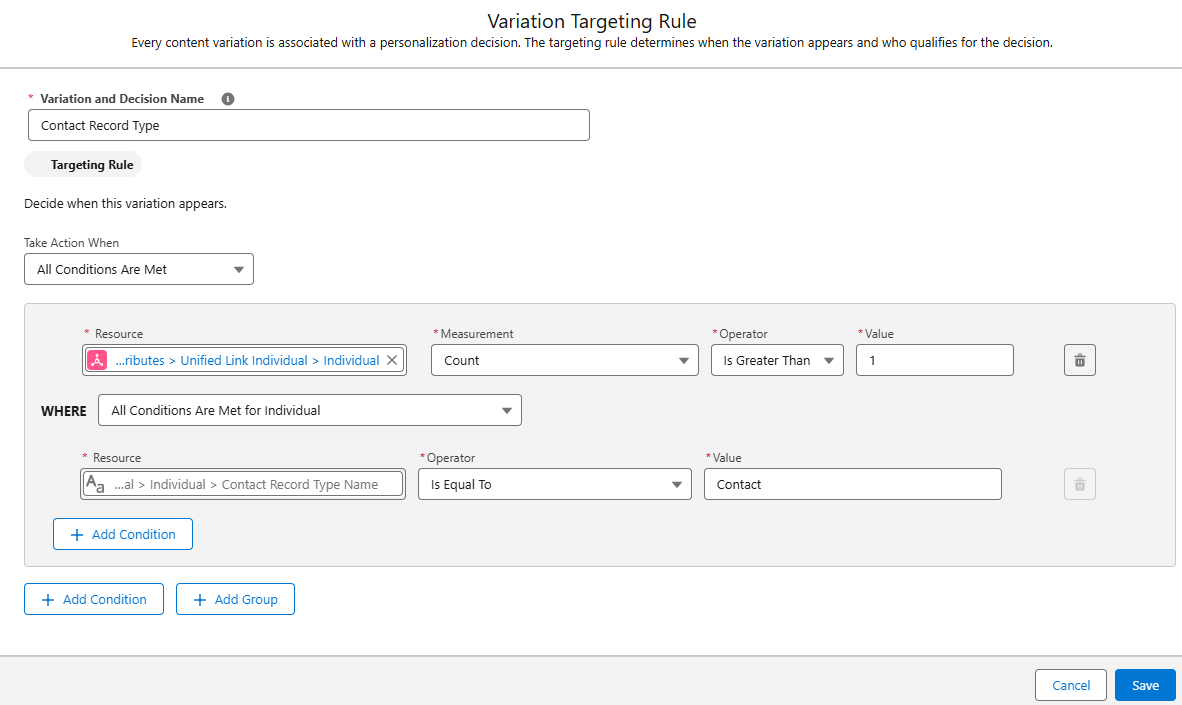
Next, we need to map the new formula field to the unified individual DMO. This mapping creates a direct attribute for each unified individual, allowing us to use the text value in Data Cloud segments. For example, this will allow us to create a segment of all unified individuals where Contract Record Type Name is equal to “Contact”.
Mapping Contact Fields
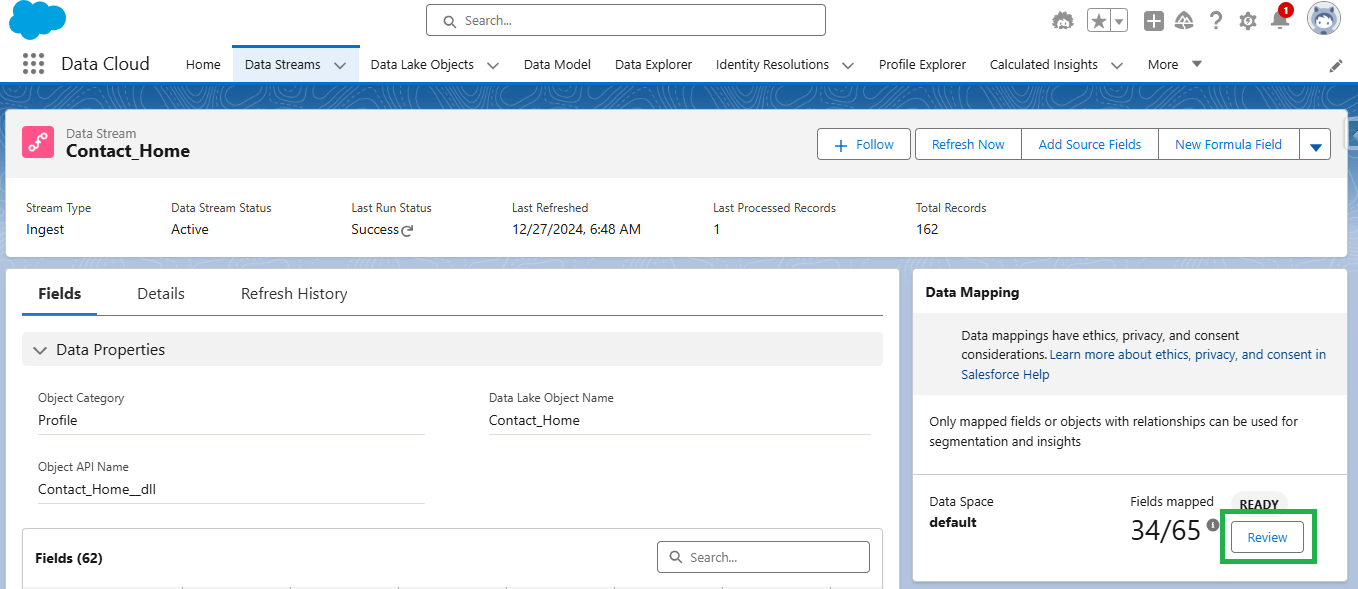
Select the “Review” button in the Data Mapping section of the contact data stream.
Create a new field in the Individual DMO using the “Add New Field” option.
Map the Contact Record Type Name field from the contact DLO to the custom field created in the individual DMO. Save & Close.
Step 3: Edit the Data Graph
Data Graphs are required for personalization and dynamic content in Marketing Cloud Growth and Advanced editions. To effectively personalize your emails, ensure your data graph includes all fields required by marketing (including the new formula field that we created). When updating your data graph, it’s also a good idea to review it to confirm it meets all requirements for sending emails as detailed in the second resource below.
Adding and mapping the new formula field will not trigger a full refresh of the data stream. You must trigger a Total Replace of the data stream and also run the identity resolution ruleset to fully refresh the data and populate the values of the formula field in the unified individual record.
Replacing Data Stream & Running Identity Resolution Ruleset
Add any existing field from the contact object to the data stream.
You can do this by clicking “Add Source Fields” within the data stream settings and selecting any available field. This action forces a complete refresh of the data stream, ensuring all data is updated correctly.
Run the identity resolution ruleset.
After the data stream refresh completes, manually run the identity resolution ruleset. This ensures that your unified individual records are also updated with the new information. You can find this in Data Cloud by going to Identity Resolutions > Run Ruleset.
Step 5: Verify the Data
Once your data stream has refreshed and the identity resolution ruleset has run, it’s important to check that your formula field has populated correctly. You can do this by running a Salesforce report using the Unified Individual report type.
Confirm all unified individuals with a value in the “Record Type ID” field also have a value in the “Contract Record Type Name” field by comparing the number of records with values in each field. If the numbers don’t match, some of your data may not have been updated yet.
Keep in mind that data streams and identity resolution rulesets run on schedules. You might occasionally see differences in the numbers due to these refresh cycles. If you encounter a mismatch, wait for the next refresh cycle and check the report again.
Segmentation Simplified
While both segments below produce the same result, there’s a clear winner in terms of usability. Enabling users to create segments using easily understood, text-based values will improve accuracy and speed of creation. Additionally, these same text values can be used to enhance personalization through merge fields and dynamic content.
Personalization & Dynamic Content
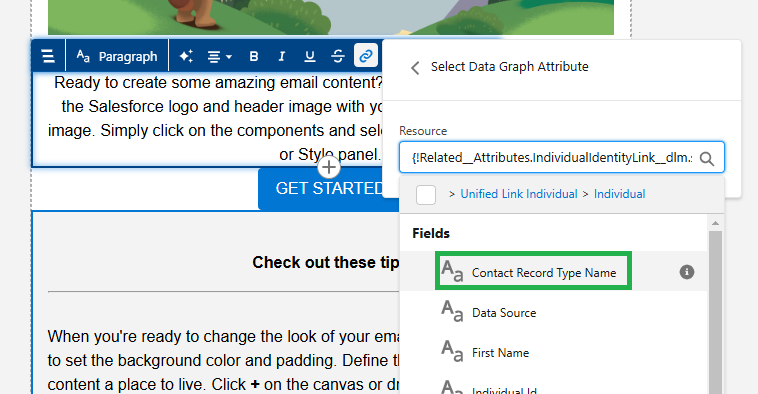
Since our newly created Contact Record Type Name field is related to the individual object, it can be used as a merge field and dynamic content.
Merge Field
Adding the “Contact Record Type Name” field as a merge field in your email will dynamically insert the contact’s record type (Customer or Partner) into the email copy. To prevent blank spaces if a contact doesn’t have a record type assigned, fallback text can be defined. This ensures a smooth and personalized experience for all recipients, even if some data is missing.
Dynamic Content
This is a great way to vary content within an email. For example, a single newsletter could be sent to customers and partners, but display different information based on the Contact Record Type Name field. Customers might see upcoming events, while partners receive a list of partner training resources.
Summary
Segmentation and personalization based on ID fields doesn’t need to be complicated. By investing time upfront in creating and mapping formula fields, marketers can significantly enhance their efficiency and accuracy. This solution minimizes the risk of errors, saves time on backend processes, and enables marketers to confidently create targeted segments and deliver personalized communications.
Big thanks to my friend and colleague Adam Babcock for his collaboration in developing this solution.