
A lot of teams assume an HTML email builder is just a drag-and-drop editor with reusable modules and some brand colors layered on top. In reality, building a production-safe email builder — especially for Salesforce Account Engagement (formerly Pardot) — is far more complicated than most people realize.
Modern page builders are designed for websites. HTML email is an entirely different environment.
One of the biggest challenges is that Outlook still relies on the Microsoft Word rendering engine. That means many of the layout techniques developers use every day on websites simply do not work in email. Flexbox and CSS Grid are unreliable, modern responsiveness is inconsistent, and something as simple as a background image often requires completely different code for Outlook than it does for Gmail or Apple Mail.
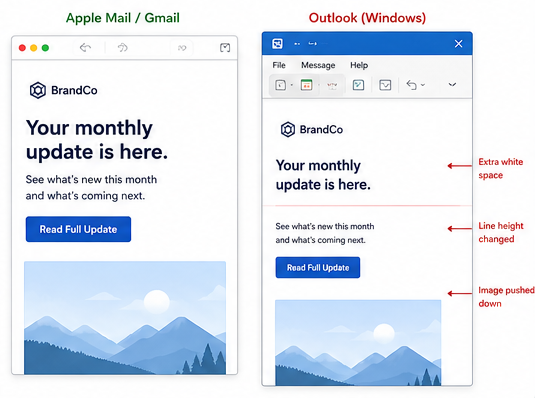
That disconnect creates problems marketers usually do not discover until campaigns are already in production. A layout that looks perfect in a visual editor can suddenly break when someone duplicates a module, changes copy length, swaps a image, or adjusts spacing.
We ran into this repeatedly while building custom email builders for MCAE teams. The more flexibility marketers wanted, the more important structural guardrails became.
Dynamic modules were one of the biggest hurdles. Unlike websites, email layouts cannot intelligently adapt to changing content. If a section was not coded carefully, adding one extra line of copy could shift alignment in Outlook or create unexpected gaps between sections. Even repeatable modules became complicated because table-based email structures are extremely fragile compared to modern web layouts.
Show repeatable modules, spacing controls, or inline editing tools. This helps demonstrate that these were real usability problems you solved internally.
We also found that many drag-and-drop builders export bloated HTML filled with unnecessary wrappers, duplicated styles, unused classes, and editor-specific attributes. The email may still render, but the output becomes difficult to troubleshoot, maintain, and QA over time. In some cases, excessive markup can even contribute to Gmail clipping or rendering inconsistencies across clients.
Instead of treating the visual editor and the exported email as the same thing, we separated them entirely. Inside the builder, marketers could still use visual controls and editing tools, but during export we stripped out unnecessary editor markup so the final output stayed cleaner and more production-safe.
A cropped code comparison showing “typical repeatable removable sections in Pardot” versus your cleaner exported HTML. Even non-developers visually understand the difference when one side looks dramatically more bloated.
Background images became another major challenge. Supporting them properly in Outlook still requires VML, which means the visible HTML version and the Outlook fallback version both have to stay synchronized. We found that even small adjustments — like changing the height of a content area or replacing a hero image — could create rendering issues if those values drifted apart.
Eventually we built custom controls that updated both the HTML and VML automatically so marketers never had to touch the underlying code.
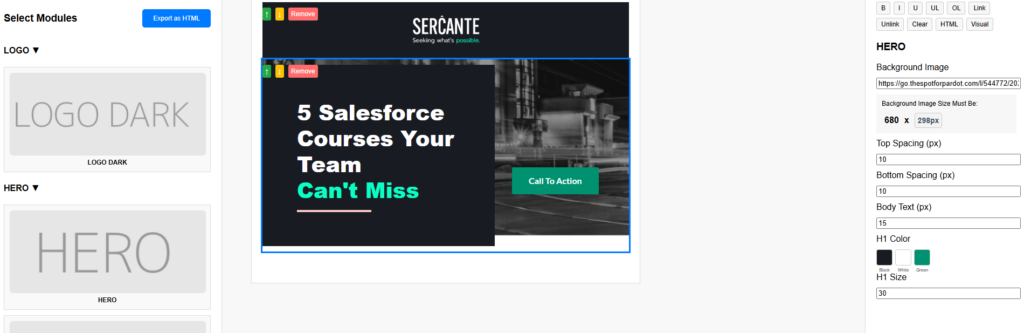
Accessibility was another area we wanted to improve because many visual email builders unintentionally generate inaccessible markup. It is easy for editors to produce emails with poor color contrast, image-heavy content, missing structure, or mobile text that becomes difficult to read. We started building more controlled editing systems that preserved brand consistency while still allowing enough flexibility for marketers to make updates safely.
Mobile responsiveness introduced its own set of problems. Websites can rely on modern responsive frameworks, but email clients support media queries inconsistently. That forces developers to use hybrid table structures, controlled stacking patterns, and Outlook-specific fallbacks just to achieve reliable mobile behavior.
Even something as simple as centering content conditionally can become surprisingly difficult in email.
A mobile before-and-after showing a broken stacked layout compared to the corrected responsive version. (Outlook)
Over time, our approach shifted away from trying to replicate website builders and toward building tools specifically for the realities of HTML email. That included custom inline color pickers for branded text, repeatable content sections, controlled spacing tools, background image swapping, automatic Outlook height syncing, and cleaner export handling that removed unnecessary builder code before deployment.
The goal was never unlimited flexibility. In email, too much freedom usually creates instability.
The real goal was giving marketers enough control to work efficiently without accidentally breaking rendering, accessibility, responsiveness, or brand consistency in the process.
A streamlined email builder for marketers
For teams using Salesforce MCAE, custom email builders can dramatically improve scalability while reducing QA issues and production risk. The right builder does not just make emails easier to edit — it helps protect deliverability, maintain consistency across campaigns, and reduce the amount of development cleanup required after every send.
Custom email builders can give marketers flexibility without sacrificing deliverability or brand consistency.
If you’re looking for a more flexible and scalable email builder solution that works with your marketing automation platform, reach out to the Sercante l Trilliad team. We’ll help you streamline your email workflows and accelerate time-to-launch for your campaigns.