Part of being a great marketer is to always evolve with your audience. Doing this intentionally is the key to an organization’s success. Luckily, Marketing Cloud Account Engagement (Pardot) offers its customers Multivariate Testing, which measures the landing page performance over a period of time to determine the best variation.
What is Multivariate Testing?
The answer to this question is in the name. Multivariate Testing looks at multiple variables applied to several variations of Pardot Landing Pages to determine which version performs best. Once you have created your variations, they are randomly assigned to visitors to assess and track performance.
How does Multivariate Testing Work?
To begin, you will want to determine which variables are most important to you and the team to measure. We recommend no more than three variables change per landing page. For example, some of the more popular variables may include the page layout, headline, call to action, form fields, colors, and logos.
Build Your Pages to Test
Once you determine the variations, you will want to build a minimum of two landing pages. Remember to name your Landing Pages in a way that will differ them from one another for reporting at a later date.
You will want to make your landing pages using the differing variations prior to enabling the Multivariate Test. Once you have created your Landing Pages, take the steps below to complete the Multivariate Testing process.
Navigate to Marketing > Landing Pages > Multivariate Testing
Name your test, including the purpose or end goal
Select your Salesforce Campaign
Provide a unique vanity URL
Select the Landing Pages you wish to use and their weight percent (50/50 for two, or 33/33/33 for three)
Click “Create Multivariate Test”
Use the link generated to direct users to the landing page
Check the Reporting
For reporting, you want to ensure that the multivariate test runs long enough to receive a measurable sample size. Once you have reached an optimal size, you can go to Reports > Landing Pages to see the multivariate statistics, including page views, conversions, conversion rate, and the winning page.
Don’t be surprised if you go through multiple variations and manipulations of the landing pages or specific elements on those landing pages in order to pinpoint the most ideal version.
Multivariate Testing is a highly effective tool at the disposal of all Pardot users, and should be used routinely to measure performance and improve your audience targeting. This will likely result in a higher conversion rate and will show that you can grow with your audience.
Marketing A/B Testing is far from being anything new. In fact, it’s been around for quite some time.
A/B Testing as we know it today first came about in the 1990s and has been evolving ever since, while still staying true to the same core concepts — comparing two versions of something to figure out which has the best performance.
In this post, we’ll cover the basics of marketing A/B testing and how you can use it in your Marketing Cloud Account Engagement (Pardot) instance to optimize your marketing assets.
What is Marketing A/B Testing?
As previously stated, A/B Testing compares one email to another and via algorithms, decides which version performed best. More specifically, you want to change a single variable between the two emails, keeping everything else the same.
For example, does “Learn More” or “Download Now” drive more traffic via your call-to-action? Or, perhaps you want to determine whether a subject line that reads “Urgent: Read Now” is more appealing to your audience or “Time is running out” is the better way to go.
How does A/B Testing Work in Pardot?
By testing your audience’s responses, you are able to customize your content based upon email performance as well as user preferences to personalize their experience.
Within Pardot, you can easily apply marketing A/B testing to your emails to configure a variety of variations based upon:
Imagery
Subject lines
Call-to-actions
Image placement
Image content
Email send time
The thing about A/B Testing is that you can always be using it because your audience is always evolving, and as a marketer, it is your responsibility to remain responsive to that customer base. Luckily, Pardot’s A/B Testing functionality is fully automated and easy to use.
Within the automation platform, you need to start by determining which variable you wish to test — headline, banner image, subject line, etc. From there, you need to choose your metric — opens or clicks. Finally, you decide what percent of your audience you want to test these emails on (up to 50% of the segmentation). Once these factors are decided, it is time to run the test.
For example, let’s go with subject line as our variable and opens as our metrics. Based upon which version had the most opens, Pardot will automatically deploy the “winning” email to the remaining audience — the email with the most opens.
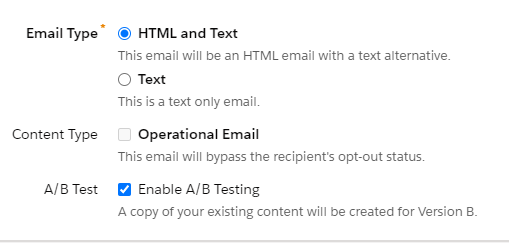
You’ll find the checkbox to enable A/B testing in the Basic Info menu within your email draft.
How can your company use A/B Testing?
This simple automation innate to Pardot can help businesses of all sizes to better target their audience and increase actionability on their part. As our world becomes more and more digital, A/B Testing easily lends itself to marketing teams worldwide to evaluate marketing’s effort and effectiveness.
The important thing to note is that one test is never enough. Always keep testing and changing with your audience so you are not left behind.
A/B testing is one of the most powerful tools Pardot offers its users, and it should be taking full advantage of. With that said, be mindful that you are choosing only one criteria and one metric for each A/B test that you run to see the most effective results.
Let us know your thoughts on using marketing A/B testing in the comments section.
As Marketing Cloud continues to grow and integrate more and more with Salesforce, the good old days of marketers working in silos within Marketing Cloud Account Engagement (Pardot) are long past due. Today, modern marketers are being asked to manage both the marketing operations and Salesforce, requiring a multifaceted skill set.
It can be difficult for marketers working in the trenches day in and day out to capture customer data, grow their audience, and prove a return on investment. With a full integration to Salesforce, those days are in the past, as we can now harness the power of Salesforce and combine that with Marketing Cloud, analytics tools, and third-party systems to create a full picture of all of your marketing efforts.
In this blog, we will highlight all things Salesforce Sales Cloud from a marketer’s perspective, including data architecture, security, sales processes, reports, dashboards, and the integration between Salesforce and Pardot.
Let’s Get to Know Salesforce
Salesforce is one of the leading Client Relationship Management systems (CRM) worldwide. At its core, a CRM helps companies grow and manage their customer base, streamline day-to-day operations, and increase profitability organization-wide. Specifically, Salesforce serves as a glorified rolodex — providing a vast array of departments, including sales and marketing, a centralized view of your customer.
Note: We often refer to Salesforce Sales Cloud as simply “Salesforce.”
Data and Relationships
Salesforce is built upon data models. Think of data models as a spreadsheet. Everything built within Salesforce is built within a spreadsheet.
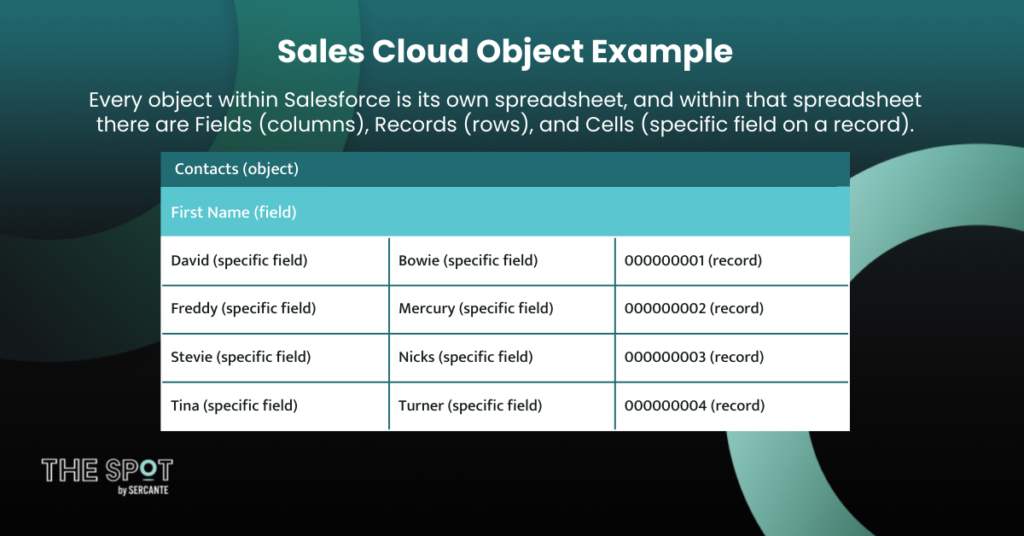
When you think of it in that way, it’s so much simpler when you first login and start navigating the CRM. Every object within Salesforce is its own spreadsheet, and within that spreadsheet there are Fields (columns), Records (rows), and Cells (specific field on a record).
Contacts (object)
First Name (field)
Last Name (field)
CRM ID (field)
David (specific field)
Bowie (specific field)
000000001 (record)
Freddy (specific field)
Mercury (specific field)
000000002 (record)
Stevie (specific field)
Nicks (specific field)
000000003 (record)
Tina (specific field)
Turner (specific field)
000000004 (record)
Standard and Custom Objects
There are two types of objects in Salesforce — Standard and Custom objects. Standard objects are the items provided out-of-the-box when you initially purchase Sales or Service Cloud. They contain standard fields as well, though custom fields can be created. Custom objects are created by a Salesforce Administrator to store data that is specific for your organization. These objects can include the standard fields as well as custom fields.
The out-of-the-box objects included in Salesforce are:
Campaigns: A marketing initiative (the way to create a MQL)
Leads: Potential customers (generated MQL)
Contacts: People sales are negotiating with (SQL)
Accounts: Companies you do business with (customer)
Opportunities: In-progress deals (SOW)
Connecting Salesforce and Marketing Cloud Account Engagement (Pardot)
While marketers prioritize their time within Pardot, the sales team is operating within Salesforce. By connecting the systems together, it allows the two teams to collaborate, by leveraging shared knowledge and resources via segmentation for marketing and messaging for Sales.
So, how does it all work?
Website visitors are cookied by tracking code in Marketing Cloud Account Engagement (learn more about web tracking cookies in this blog post).
Visitors complete Forms or Form Handlers and are converted into Prospects
Prospects are nurtured by the marketing team and once they reach MQL status are assigned to Sales
Prospects assigned to Sales convert into a Lead record that feeds information back to Marketing
Once the Lead reaches the SQL status they are converted into a Contact and Account and an Opportunity is created
When opportunities are closed, revenue is attributed back to marketing and sales, and ROI is calculated
Let’s Build a Campaign
When marketers say “Campaign,” what they are really saying is the key initiative they are running to generate leads, create an upsell opportunity, or promote a company event.
A marketing campaign is made up of a multitude of efforts that include:
Digital Ads
Social media
Emails
Search Engine Optimization (SEO)
Print Media
Radio/TV
Several of these efforts can be created within Pardot or connected through integrations, and they can be tracked both by marketing and sales by syncing the data back to Salesforce.
Salesforce Campaign vs. Pardot Campaign
We all know what a “Campaign” is, but there are other uses of this term within Pardot and Salesforce. Also, they have very different uses and properties. Let’s learn the differences!
Pardot Campaigns populate sources within the platform and serve as thematic touchpoints that track first touch for Prospects.
Salesforce Campaigns are used to track, manage, and report on all marketing collateral.
Together, a Pardot Campaign captures first touch, and Salesforce Campaigns can capture ongoing touch points, showing a multi-touch attribution.
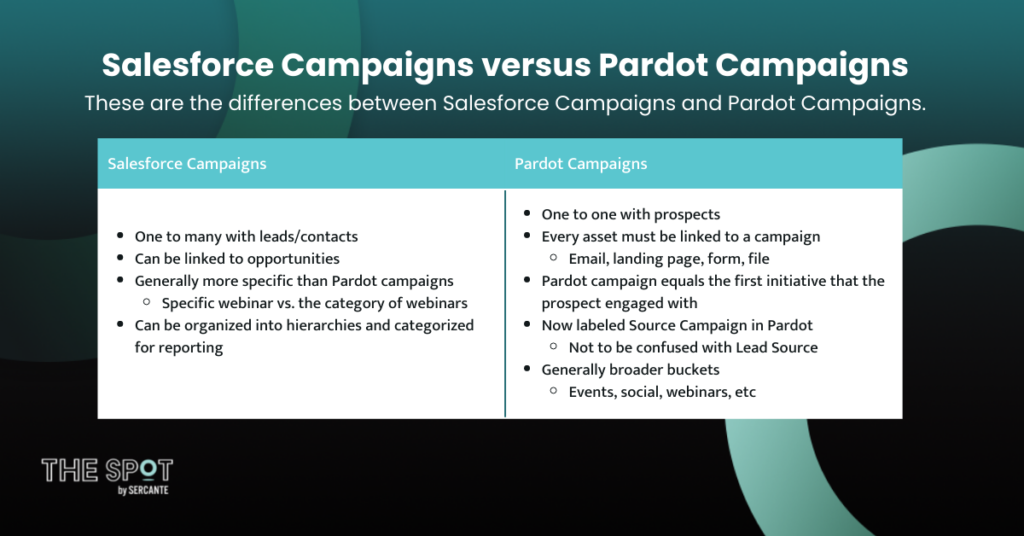
Salesforce Campaigns
One to many with leads/contacts
Can be linked to opportunities
Generally more specific than Pardot campaigns
Specific webinar vs. the category of webinars
Can be organized into hierarchies and categorized for reporting
Pardot Campaigns
One to one with prospects
Every asset must be linked to a campaign
Email, landing page, form, file
Pardot campaign equals the first initiative that the prospect engaged with
Now labeled Source Campaign in Pardot
Not to be confused with Lead Source
Generally broader buckets
Events, social, webinars, etc.
Here’s a chart that compares the differences between Salesforce and Pardot campaigns:
Data Sync and Segmentation
It is important to note that Pardot syncs on an individual level, not a company level. Records sync directly to Leads, Contacts, and Person Accounts within Salesforce. They can read Accounts and Opportunities, but they must be related to a person object with an email address. However, any object that you sync to Pardot can be used for segmentation, as long as it is tied to a Lead, Contact, or Person Account record.
You can learn more about Pardot sync behavior in this blog post.
This sync behavior becomes key in building a marketing campaign to know what you can and cannot segment your lists by, thus determining your target audience. Furthermore, the sync works both ways, allowing you to target a specific subset of Prospects based on specific data and then syncing those Prospects back to the Salesforce Campaign to track engagement.
Let’s Update the Sales Team
As marketers, we rely on the sales team to help us drive performance, segment data, and prove ROI as well as confirming marketing qualified leads. In turn, sales relies on us to see how our marketing engagements are impacting their Leads and Contacts so as not to overlap efforts.
When working with each other, you will see improved growth across the organization. This is much easier to accomplish by connecting Pardot and Salesforce.
Learn more about building strong relationships with the people who manage your Sales Cloud instance in this blog post.
Lead Assignment
Pardot was built with the primary goal of warming Prospects in order to advance them to sales as a marketing qualified lead. This is done most often through Pardot’s Scoring and Grading features, which allows marketers to know when a Prospect is ready to be handed to Sales.
Learn more about Pardot Scoring and Grading in this blog post.
Once Prospects are ready, Pardot has ways to automate lead assignment, such as Automation Rules or Completion Actions, to get that Prospect to the next level of the funnel.
Marketing Data in Salesforce
As marketers, we use data day in and day out to drive our decision making. Sales does the same, and we can arm them with additional data just as they do for us.
With the Salesforce sync, there are now a series of available fields and buttons that can empower your sales team to make more strategic decisions and to help you run even more successful campaigns. The data points provided below can be easily referenced by working with your Salesforce Administrator to add them to the Page Layouts for Contacts, Leads, and Person Accounts.
Pardot Data in available in Salesforce:
Pardot Campaigns
Pardot Comments
Pardot Conversion Date
Pardot Conversion Object Name
Pardot Conversion Object Type
Pardot Created Date
Pardot First Activity
Pardot First Referrer
Pardot First Referrer Query
Pardot First Referrer Type
Pardot Grade
Pardot Hard Bounced
Pardot Last Activity
Pardot Last Scored At
Pardot Score
Pardot URL
In addition to sharing fields between Salesforce and Marketing Cloud Account Engagement, you will also have the capability to enable the sales team to be able to add Prospects to campaigns or lists within Pardot via “Add to Pardot List,” “Add to Campaign,” or “Add to Engagement Studio.”
Let’s Prove Your Marketing ROI
By enabling Connected Campaigns, you will also be able to view Engagement History metrics within Salesforce. All of your reporting data will be easily accessible and measurable through Salesforce reporting. Through Engagement History and Campaign Influence, we are empowering the marketing team with the full force of Sales Cloud to report on their end-to-end marketing efforts.
Through Engagement History, you will gain five custom report types:
Engagement Metrics on Campaigns: Provides data on all campaigns and all associated assets, including emails, links, forms, and landing pages produced within Pardot.
Engagement Metrics on Landing Pages: Provides data points pertaining to Landing Pages produced and operated from within Pardot.
Engagement Metrics on List Emails: Provides metrics specific to emails deployed out of Pardot, including Engagement Studio, list emails, autoresponders, and email templates.
Engagement Metrics on Marketing Forms: Measures the performance of Pardot Forms and Form Handlers that exist outside of the platform, such as on the company website.
Engagement on Marketing Links: Measures clicks and activity directly related to Custom Redirect links or files housed within Pardot.
These reports enable you to report on Leads and Contacts who are also Campaign Members to measure their marketing engagement, performance, and the overall success of marketing’s efforts.
You can learn more about how Salesforce handles Pardot marketing reporting in this blog post.
Salesforce Campaign Influence
Next, Salesforce offers Campaign Influence, which measures end-to-end performance and proof of ROI on all marketing efforts. Ultimately, it allows marketers to see the impact of your campaign on the closed/won opportunities.
Within Salesforce, there are influence models set up that scan all active campaigns to identify campaign members who are also assigned a contact role on an opportunity. They also verify eligibility based on additional rule criteria that can be configured. There are currently two types of Campaign Influence – Campaign Influence 1.0 and Customizable Campaign Influence.
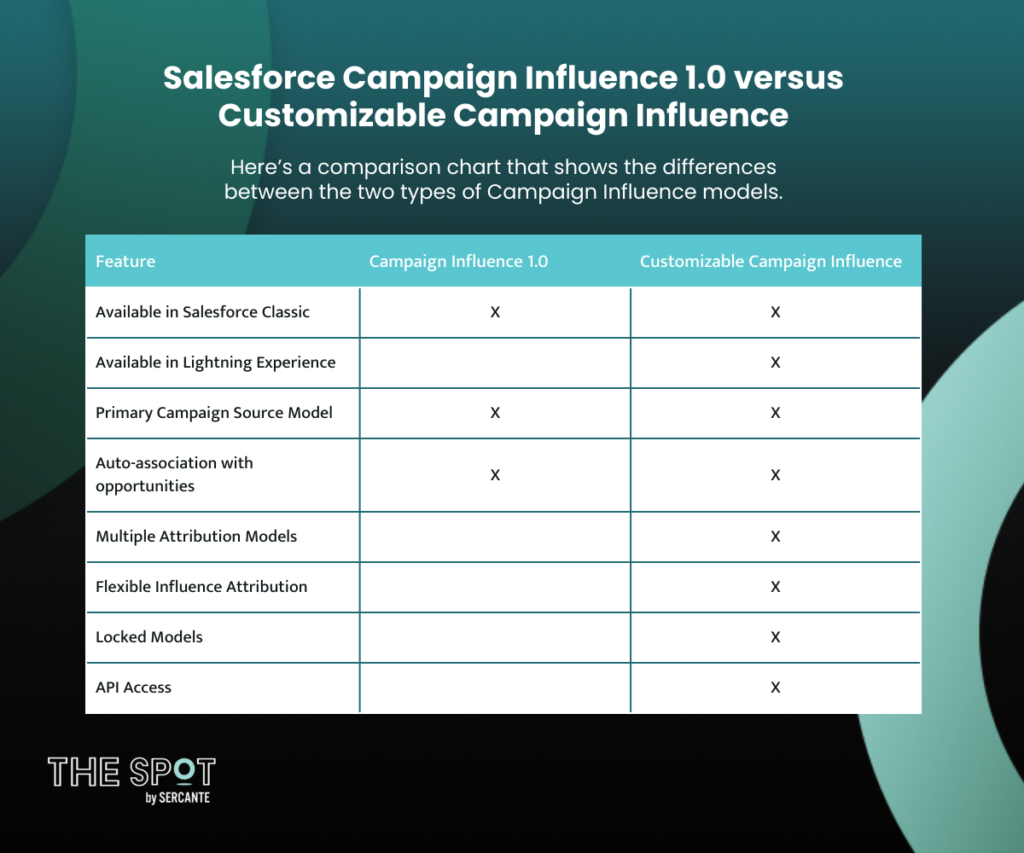
Here’s a comparison chart that shows the differences between the two types of Salesforce Campaign Influence models.
Feature
Campaign Influence 1.0
Customizable Campaign Influence
Available in Salesforce Classic
X
X
Available in Lightning Experience
X
Primary Campaign Source Model
X
X
Auto-association with opportunities
X
X
Multiple Attribution Models
X
Flexible Influence Attribution
X
Locked Models
X
API Access
X
Through these data-driven models, Salesforce uses artificial intelligence to look at engagement patterns that led to conversion and tailors attribution credit based upon Campaign Influence Eligibility Limits and Auto-Association Rules. By setting eligibility limits, you are controlling how long a campaign is considered influential. This is determined by comparing the date that a contact was first associated with the campaign and the date that the opportunity was created.
In general, you want to double your average sales cycle. For the Auto-Association Rules, you are applying specific criteria to limit the types of campaigns that are considered influential.
When combined together, Campaign Influence and Engagement History give marketers worldwide insights into their campaign performance and allows for adjustments to be made or campaigns to be built upon to improve marketing effectiveness and to improve revenue company-wide.
Check out this blog post to watch a video that explains Campaign Influence in further detail.
Sales and Marketing Teams Work Better Together
By embracing these tips and tricks, the goal is for you to learn how to use Salesforce to drive alignment between your marketing efforts and the sales team to grow your business and prove your marketing ROI.
The integration between Salesforce and Marketing Cloud Account Engagement (Pardot) plays a key role in growing your brand. It is our goal at Sercante to help you in this effort. To learn more about Salesforce and receive more in-depth training, we encourage you to register for one of our upcoming Salesforce Basics for Marketers online courses.
Accessibility has always been top of mind for me in everything I do. As someone with a disability, I am conscious of others who may be having similar struggles.
So, when I found a professional career in digital marketing, specifically email marketing, the idea of accessibility transitioned with me.
This idea was further driven home for me when I encountered a client who was working on a massive project to update their entire digital platform, email marketing, website, social, etc. to be compliant with the Americans with Disabilities Act (ADA). I learned a lot from that project and now I want to share it with you.
In this article, I will share with you the top resources and items to check off your to-do list when enacting the ADA guidelines into your digital marketing to achieve email accessibility. Hopefully, this will save you a lot of time googling!
Screen Readers: software that allows users to read text with a speech synthesizer or braille display
Magnifiers: tools that increase the text size for the reader
Navigation Assistants: systems that guide users via sound commands
As a marketer, it is important for us to take these into consideration when creating our digital marketing content, such as your website, landing pages, emails, social posts, and any other digital content. Overall, companies who practice digital marketing accessibility experience fewer lawsuits, an increased customer base, and an improved sense of brand loyalty.
At the end of the day, this isn’t about accommodating someone’s preferences or unique quirks. It’s about meeting the needs of your customers. The likelihood of one of your customers falling into the 15% of disabled users is very high and meeting their needs should be a top goal for every marketing initiative. Luckily, the best practices for ensuring accessibility in your digital marketing efforts is also the best practice for improved usability and SEO performance across the board.
What can I do to create accessible digital marketing assets?
There are a handful of basic tips and tricks that you can enact today to make your marketing content more effective and accessible to all of your audience members.
Let’s get started!
Color Contrast
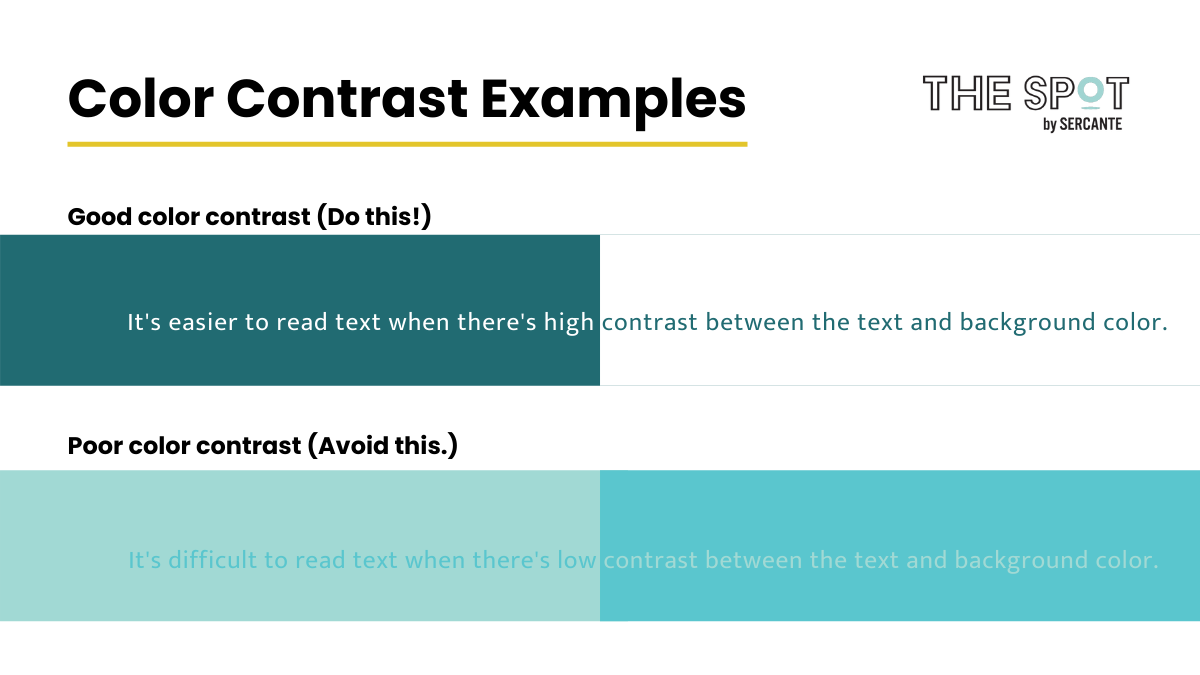
Use clear color contrast between text color and your background. Users with color blindness will be especially thankful to you. So let’s experience less of this and more of that.
We recommend WebAim to measure your color contrast ratio. It is a great tool that will give you an easy to decipher pass/fail grade for all things accessibility.
Large Font Sizes
While people can use their magnifiers or zoom in on your content, why should they have to? This is especially true if it ruins the look and feel of what you are providing them.
Instead, create your content using larger font sizes, and build the design around it.
The ADA recommends a font size of at least 16 pt on any form of digital media. This is also the preferred size for most of the population.
Text & Imagery
Avoid using text on your images and graphics. Individuals who use screen readers can’t read text on an image. That’s because screen readers simply see that as a picture file and will overlook it.
Using text in your graphics means some of your readers may not be getting the full message you are trying to present. Ensure that the key content and messaging you are providing is in your text, and use images as a supporting player.
Alternative Text
Alt text can be your best friend!
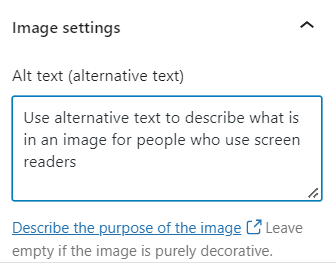
If you are using images or have web links that you are sharing, insert your alt text so that screen readers don’t overlook the additional information.
Screen readers know to look for alt text and will provide this content to the reader allowing them to get a fuller picture and better user experience.
Visual Hierarchy
Use headers and subheadings appropriately to provide the reader with an overview of the content and establish the key points. Also, use breaks and keep content left aligned when possible. This helps visually-impaired readers define the critical information that is being provided and allows for an easier experience when they don’t have to jump around due to justification changes.
Plain Text
This is an easy win for our Marketing Cloud Account Engagement (Pardot) users!
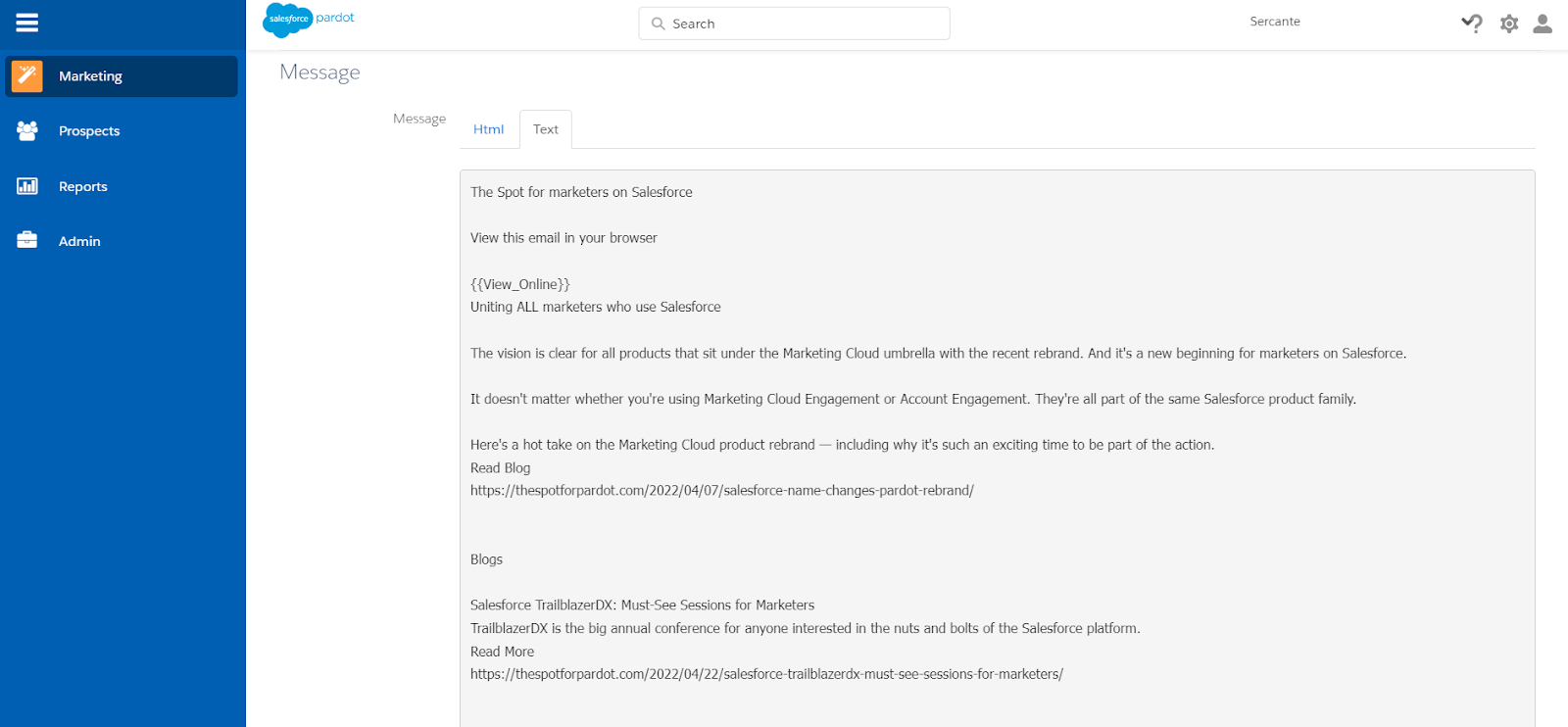
When building an email in Pardot, you are required to create a text version of every email you deploy. This ensures accessibility for all recipients and allows for you to include the pertinent information in a text email that assistive devices can easily access.
Accessible Links
Do not group links together. Instead, space them apart and consider using bullets. This helps readers who are using navigation assistants to click on the correct URL. This is also helpful for users who are on mobile devices.
Additionally, you should always write descriptive link text:
Bad example: I think you should read this article.
Are there legal ramifications for not following digital marketing accessibility guidelines?
As I previously referenced, there are potential legal ramifications and fallout for not following ADA guidelines.
Web Accessibility Initiative (WAI) is an international organization that sets standards around accessibility. Their latest publication, WCAG 2.1, references three levels of accessibility with 61 checkpoints. However, they are not all equal. I have grouped the levels of accessibility below by importance here:
The “must” list: Without these changes, at least one group of potential customers will not have access to your information.
The “should” list: Meeting these t=recommendations ensures significant barriers are removed for those with disabilities, increasing your brand visibility.
The “may want to” list: Individuals with disabilities may struggle to fully access your content, but it won’t be impossible.
Based on your company’s headquarters, laws may differ. So, I encourage you to take the time to look into your local laws and regulations pertaining to disabilities.
For the United States, Title III of the Americans with Disabilities Act states that “discrimination against individuals with disabilities persists in such critical areas as employment, housing, public accommodations, education, transportation, communication, recreation, institutionalization, health services, voting, and access to public services.” With communication being covered, arguably, within digital marketing. As a result, regardless of industry or sector, it may be time to assess your accessibility guidelines.
Email accessibility benefits everyone
Building emails that everyone can access is not only the right thing to do. It’s something that’s going to ensure you’re not just delivering messaging, but instead delivering messaging everyone can process and understand.
Tell us about your experiences with email accessibility in the comments section!