Category

Jenna Molby

Do you know you can turn any email template into a Pardot email template? With a couple of modifications to the HTML, you can have a fully functional Pardot email template which allows you to remove, edit and duplicate sections. In this tutorial, I will show you how to take any free, responsive email template and turn it into a Pardot email template.

The template

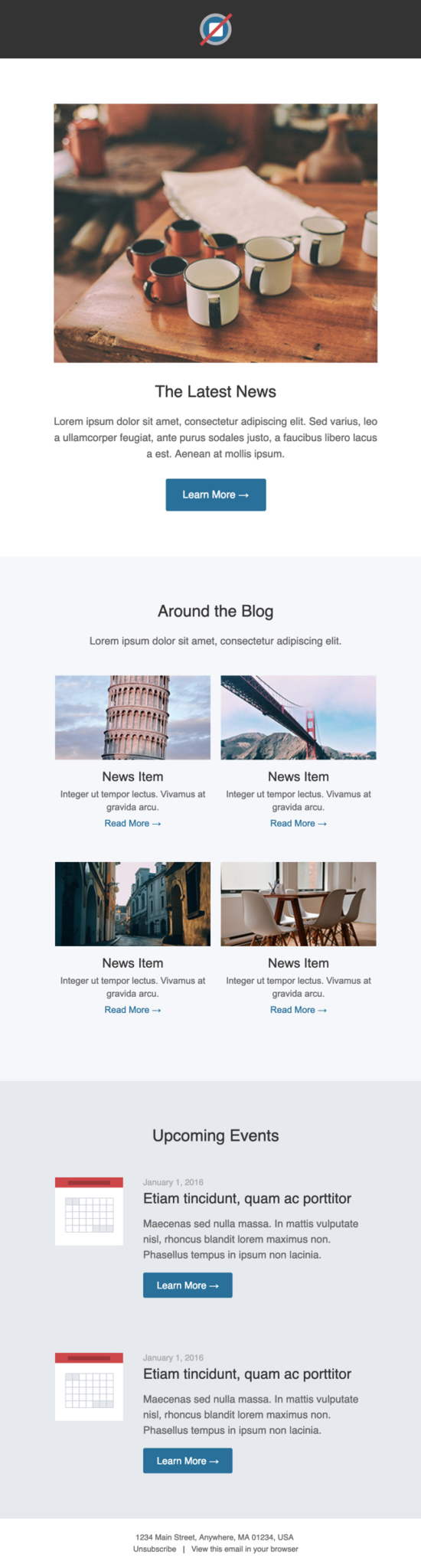
For this tutorial, I decided to go with this free, responsive email template from the folks at Litmus. Here’s what the template looks like:
Create your email template in Pardot

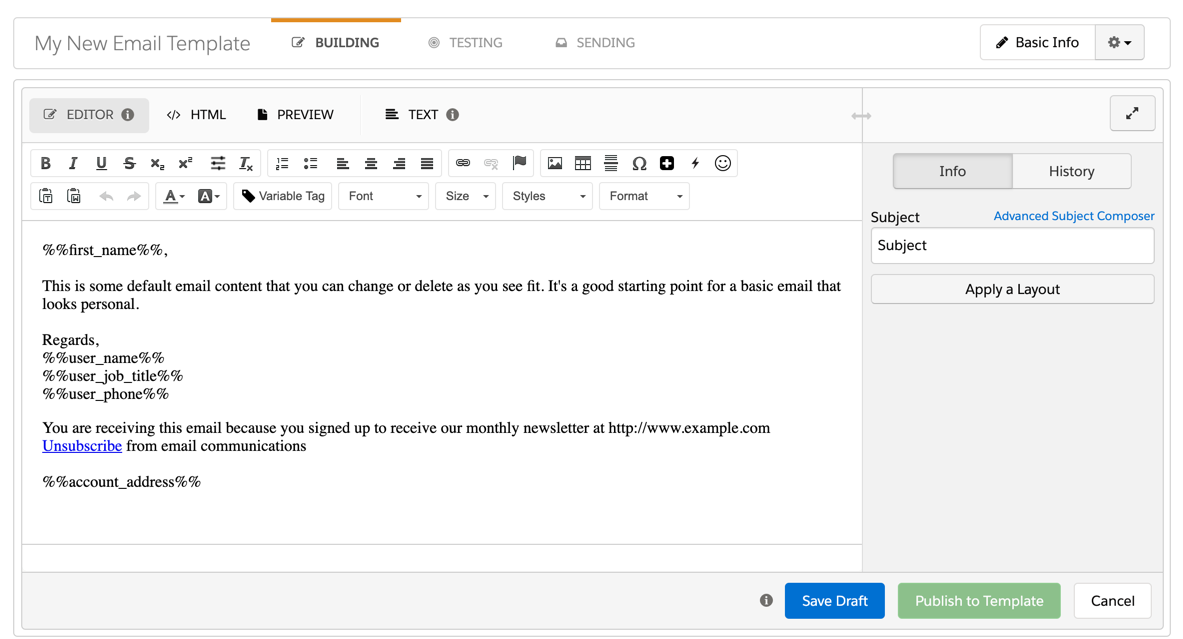
Create a new email template in Pardot by navigating to Marketing > Emails > New Email Template. Enter the required information and click next. When asked to select a layout click skip. Now you should have a brand new email template populated with the default Pardot content.
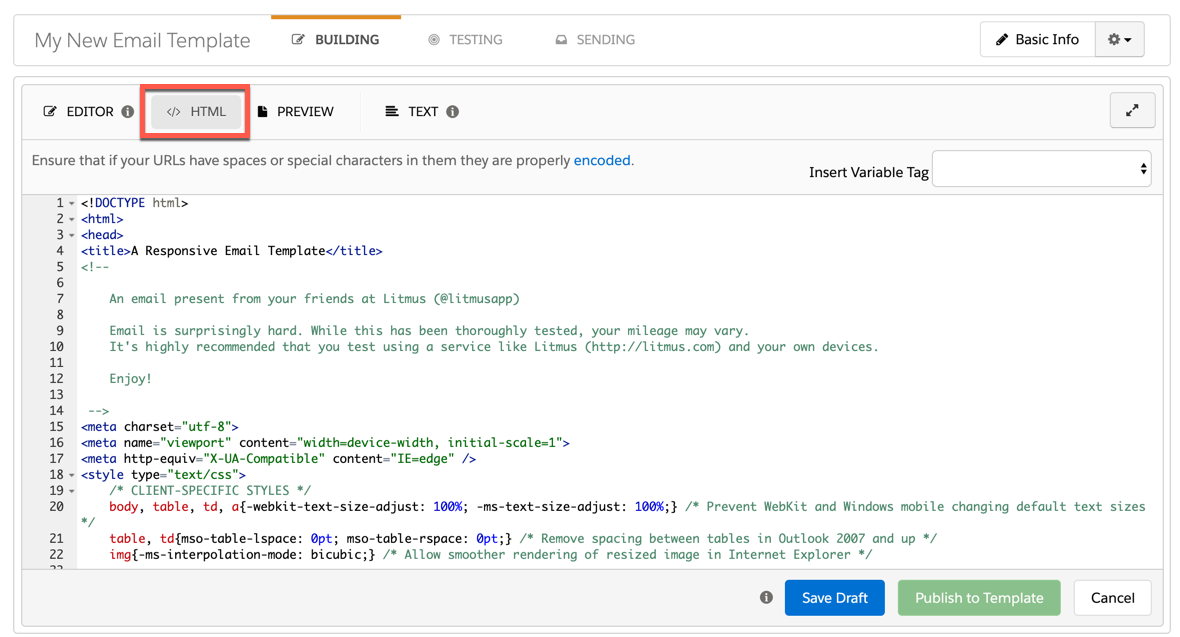
Open the email template you want to use in a text or HTML editor (Notepad works fine too). Copy the HTML and paste it into the HTML tab in the Pardot email editor.
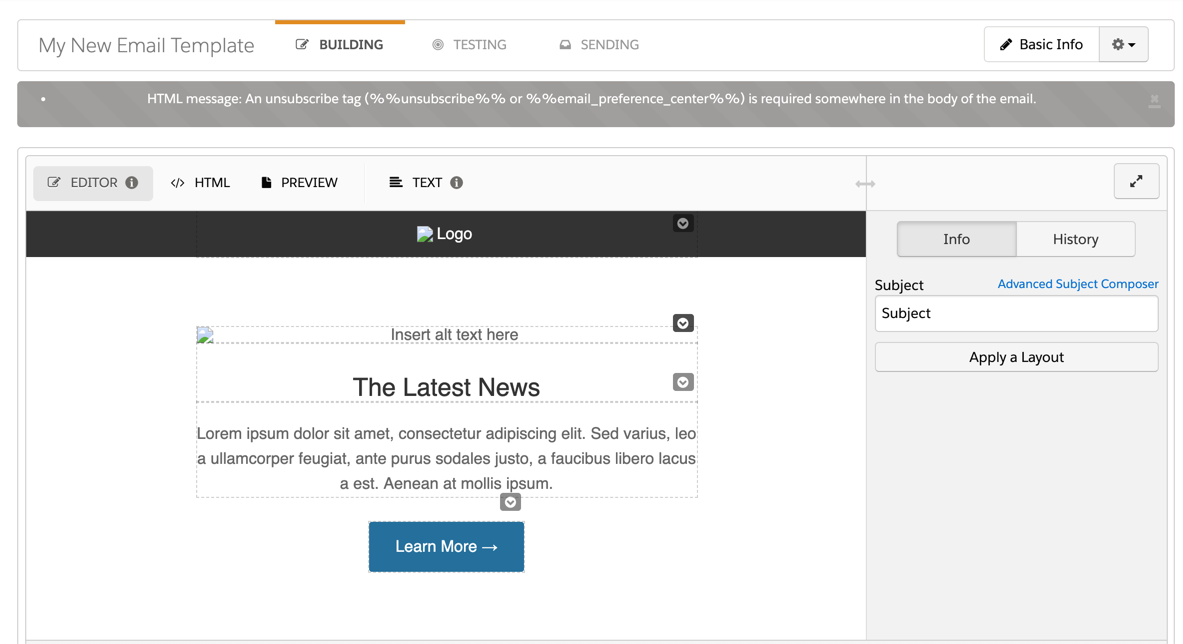
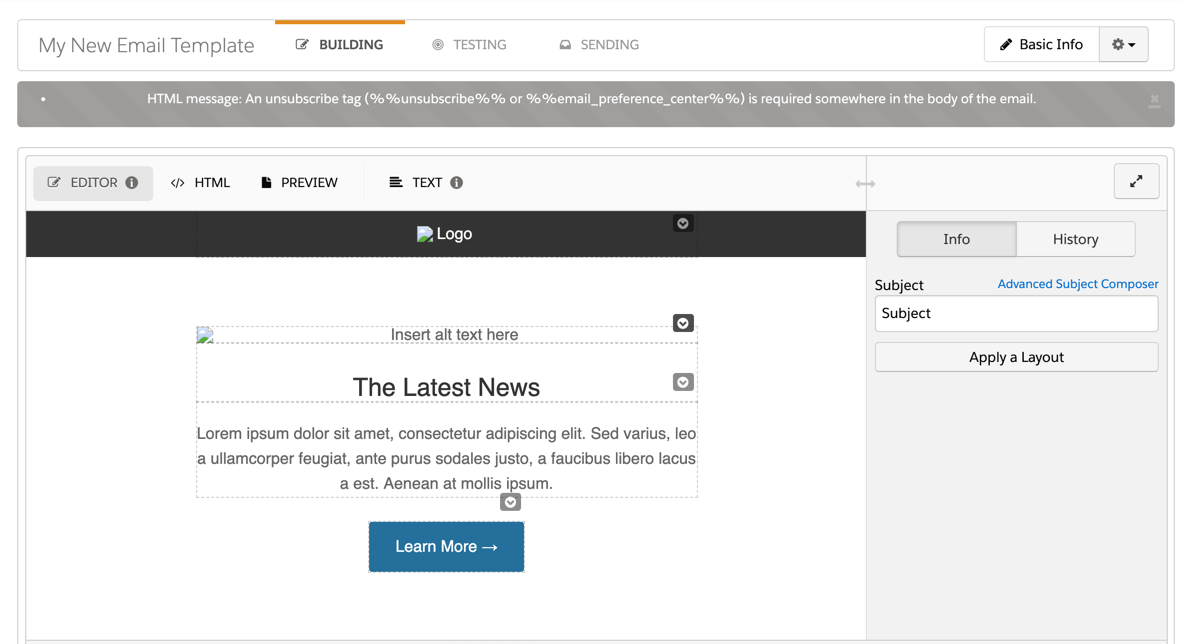
Now if you navigate back to the editor tab to preview your new template, you will probably notice some error messages, broken images, etc. Let’s dive into how to fix those.
Replace the image paths

In order for your images to work within the Pardot editor you will need to upload the images to the Pardot content library and replace their paths within the template.
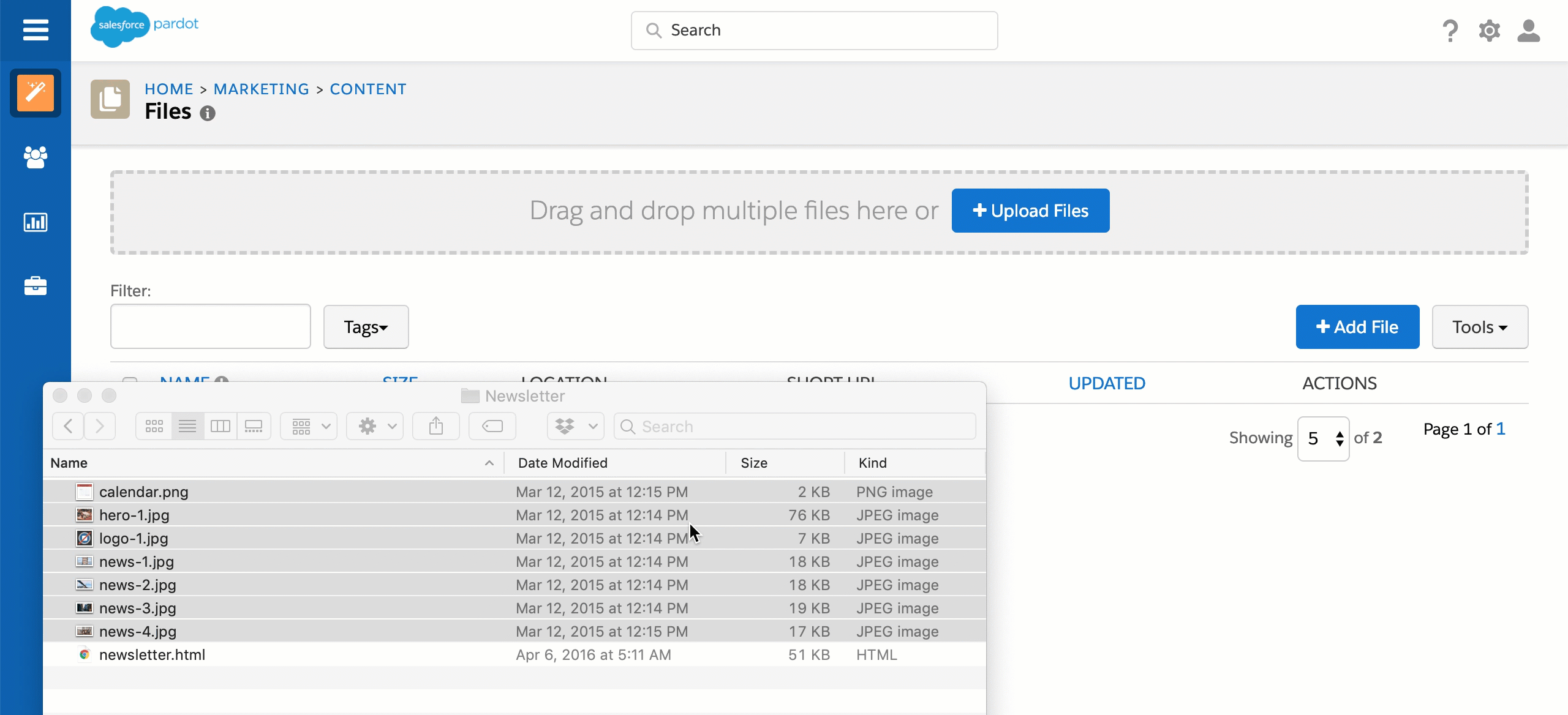
You can replace the image paths in the email editor by selecting on the broken image, clicking on the photo icon and searching for the new image within the Pardot content library.
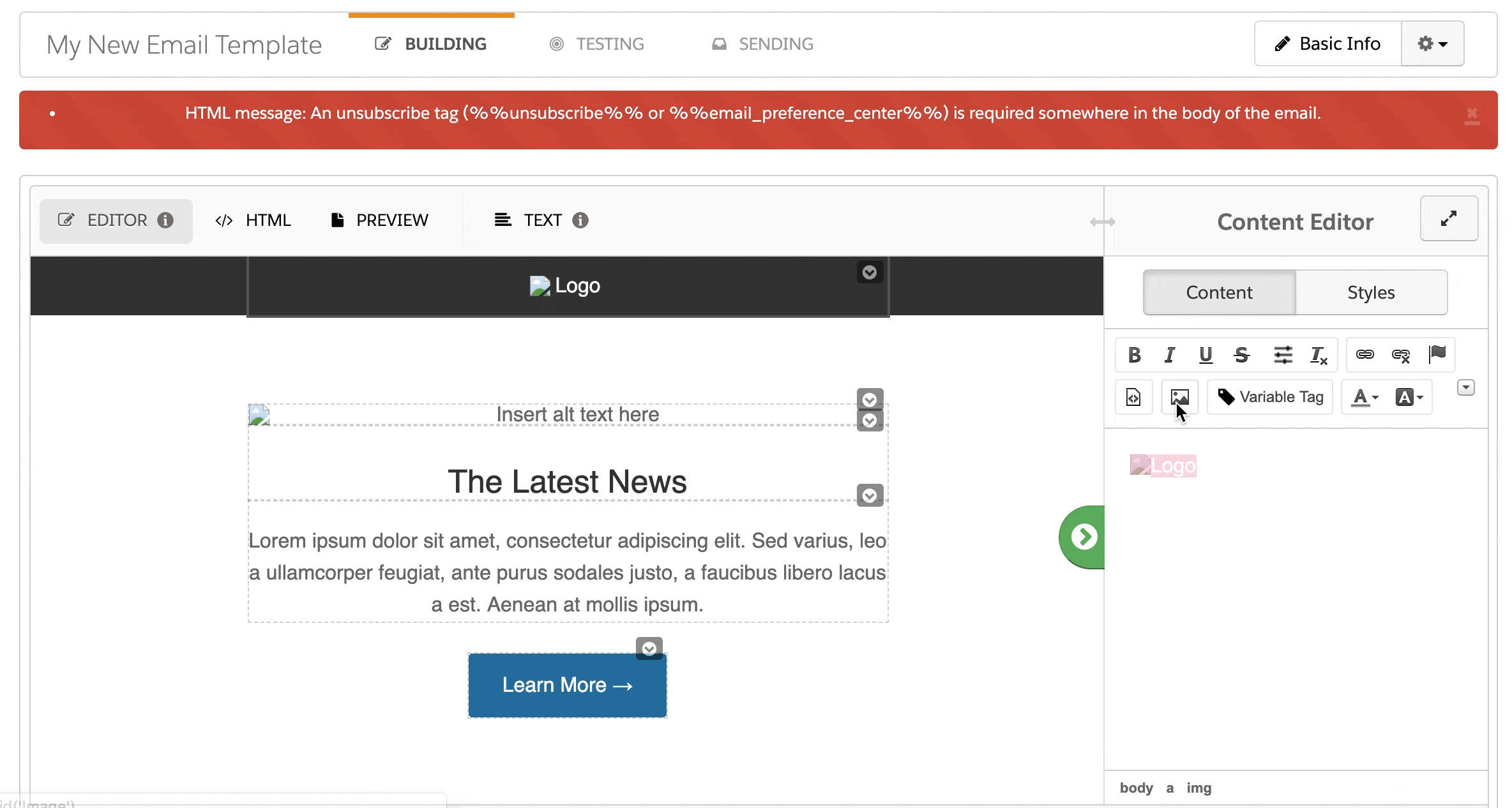
Note: You can also edit the image paths directly in the HTML.

Add the unsubscribe tag

If your template already has a link in the footer for the unsubscribe you will need to modify it to use the Pardot unsubscribe tag. Otherwise, add a link to the footer for the unsubscribe.
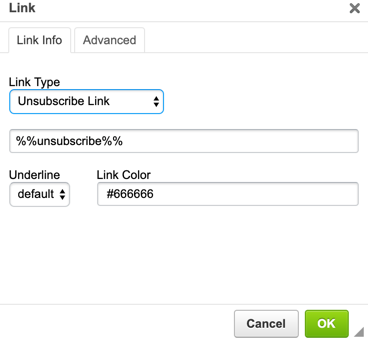
Here’s what my template looks like in the editor now.
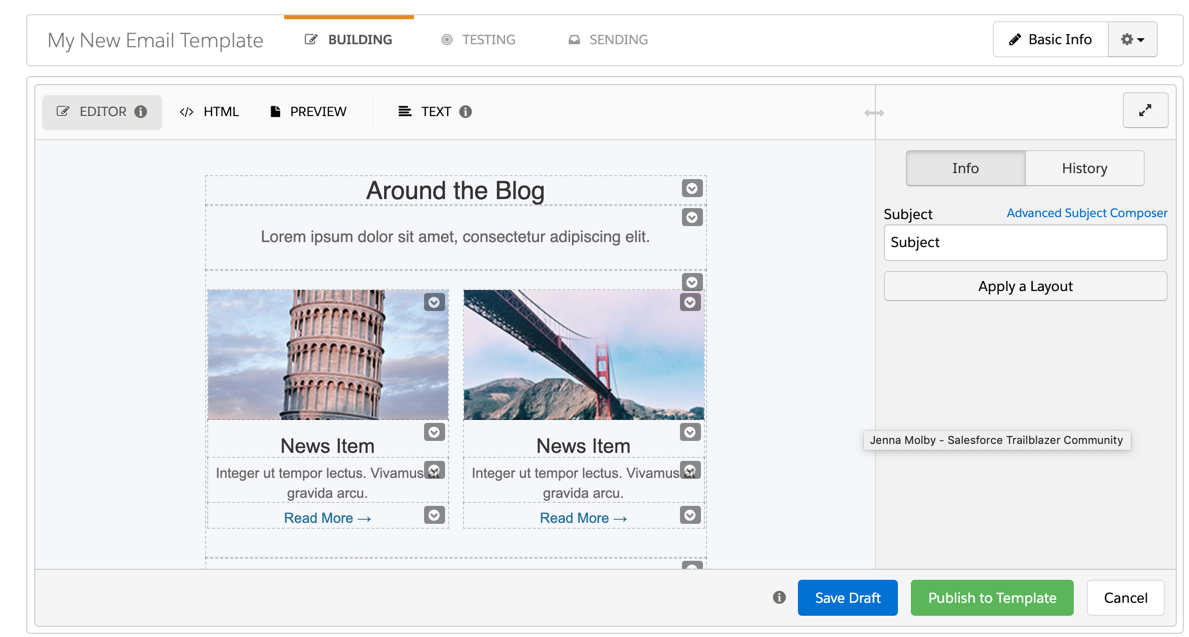
Notice all the dotted lines and arrow icons in the editor?

The arrows and the dotted lines within the editor indicate that a section can be edited, duplicated, removed and moved up or down. By default, all table cells within your email have this applied to them. You can choose to leave it that way, but I always recommend “locking down” the template.

“Locking down” email template sections

There are a couple reasons why I recommend “locking down” your email templates:

  1. Brand consistency: certain elements such as footer, header, etc should not be altered by someone who is using the template.
  2. Formatting: Sometimes the email editor can strip out some HTML within a template. One way to prevent this from happening is to restrict what can be edited.

Pardot regions

To add section that can be duplicated, removed or reordered can be created by adding this tag to your DIV, TD, TR, or TABLE elements.

pardot-region="my-section"

Alternatively, you can use this syntax for creating a section that is only repeatable

pardot-repeatable="my-section"

Here’s what my template looks like with an editable section. Notice how the rest of the dotted lines and arrows no longer appear? That’s because once you add at least one pardot-region to your email template, it “locks down” the rest of the template.
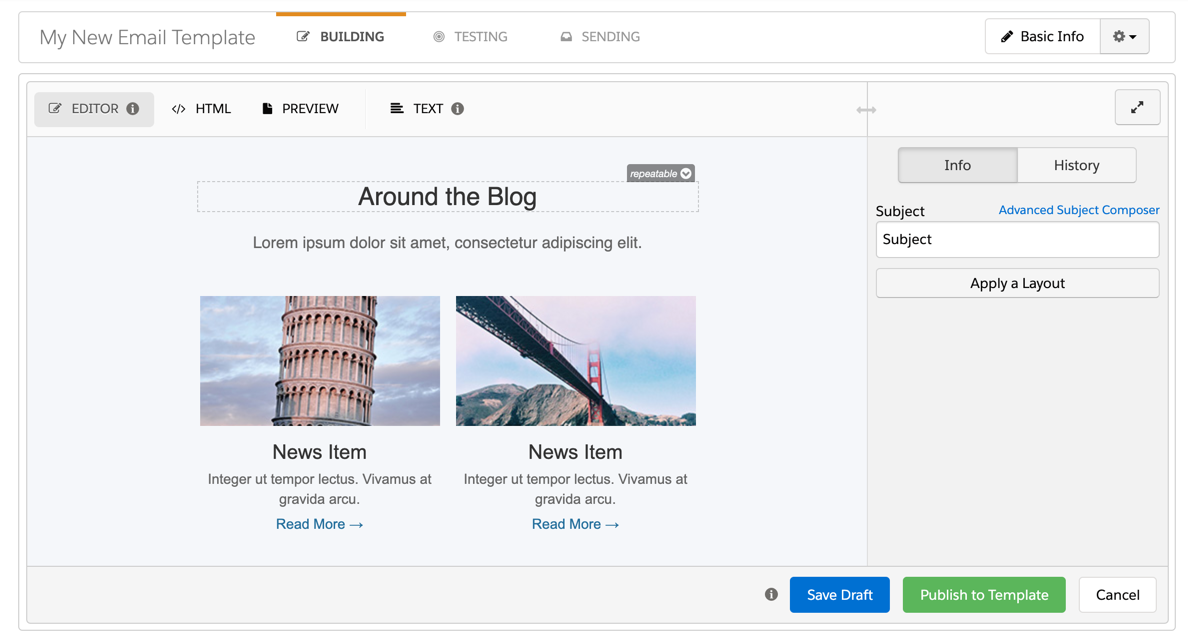
After adding the rest of the editable and repeatable regions to my template, here’s what the blog section looks like.
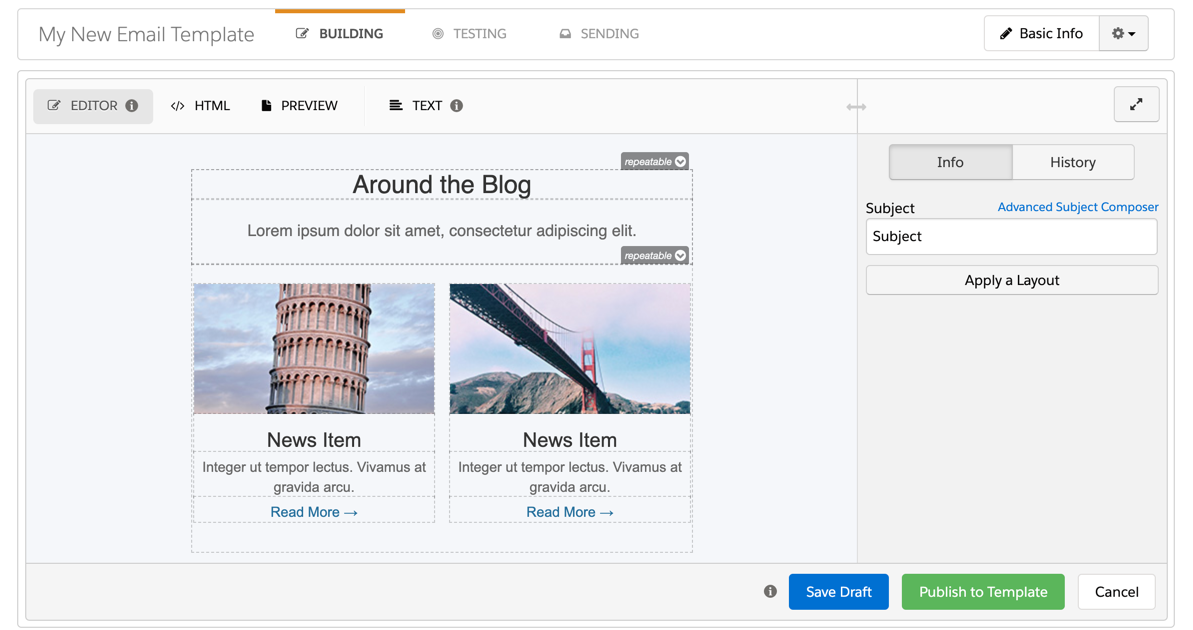
Here’s what the HTML for the template looks like now with the added regions.


<!DOCTYPE html>
<html>
<head>
<title>A Responsive Email Template</title>
<!--
 
    An email present from your friends at Litmus (@litmusapp)
 
    Email is surprisingly hard. While this has been thoroughly tested, your mileage may vary.
    It's highly recommended that you test using a service like Litmus (http://litmus.com) and your own devices.
 
    Enjoy!
 
-->
<meta charset="utf-8">
<meta name="viewport" content="width=device-width, initial-scale=1">
<meta http-equiv="X-UA-Compatible" content="IE=edge" />
<style type="text/css">
    /* CLIENT-SPECIFIC STYLES */
    body, table, td, a{-webkit-text-size-adjust: 100%; -ms-text-size-adjust: 100%;} /* Prevent WebKit and Windows mobile changing default text sizes */
    table, td{mso-table-lspace: 0pt; mso-table-rspace: 0pt;} /* Remove spacing between tables in Outlook 2007 and up */
    img{-ms-interpolation-mode: bicubic;} /* Allow smoother rendering of resized image in Internet Explorer */
 
    /* RESET STYLES */
    img{border: 0; height: auto; line-height: 100%; outline: none; text-decoration: none;}
    table{border-collapse: collapse !important;}
    body{height: 100% !important; margin: 0 !important; padding: 0 !important; width: 100% !important;}
 
    /* iOS BLUE LINKS */
    a[x-apple-data-detectors] {
        color: inherit !important;
        text-decoration: none !important;
        font-size: inherit !important;
        font-family: inherit !important;
        font-weight: inherit !important;
        line-height: inherit !important;
    }
 
    /* MOBILE STYLES */
    @media screen and (max-width: 525px) {
 
        /* ALLOWS FOR FLUID TABLES */
        .wrapper {
          width: 100% !important;
         max-width: 100% !important;
        }
 
        /* ADJUSTS LAYOUT OF LOGO IMAGE */
        .logo img {
          margin: 0 auto !important;
        }
 
        /* USE THESE CLASSES TO HIDE CONTENT ON MOBILE */
        .mobile-hide {
          display: none !important;
        }
 
        .img-max {
          max-width: 100% !important;
          width: 100% !important;
          height: auto !important;
        }
 
        /* FULL-WIDTH TABLES */
        .responsive-table {
          width: 100% !important;
        }
 
        /* UTILITY CLASSES FOR ADJUSTING PADDING ON MOBILE */
        .padding {
          padding: 10px 5% 15px 5% !important;
        }
 
        .padding-meta {
          padding: 30px 5% 0px 5% !important;
          text-align: center;
        }
 
        .no-padding {
          padding: 0 !important;
        }
 
        .section-padding {
          padding: 50px 15px 50px 15px !important;
        }
 
        /* ADJUST BUTTONS ON MOBILE */
        .mobile-button-container {
            margin: 0 auto;
            width: 100% !important;
        }
 
        .mobile-button {
            padding: 15px !important;
            border: 0 !important;
            font-size: 16px !important;
            display: block !important;
        }
 
    }
 
    /* ANDROID CENTER FIX */
    div[style*="margin: 16px 0;"] { margin: 0 !important; }
</style>
</head>
<body style="margin: 0 !important; padding: 0 !important;">
<!-- HIDDEN PREHEADER TEXT -->
<div style="display: none; font-size: 1px; color: #fefefe; line-height: 1px; font-family: Helvetica, Arial, sans-serif; max-height: 0px; max-width: 0px; opacity: 0; overflow: hidden;">Entice the open with some amazing preheader text. Use a little mystery and get those subscribers to read through...</div>
<!-- HEADER -->
 
<table border="0" cellpadding="0" cellspacing="0" width="100%">
<tbody>
<tr>
<td align="center" bgcolor="#333333"><!--[if (gte mso 9)|(IE)]>
            <table align="center" border="0" cellspacing="0" cellpadding="0" width="500">
            <tr>
            <td align="center" valign="top" width="500">
            <![endif]-->
<table border="0" cellpadding="0" cellspacing="0" class="wrapper" style="max-width: 500px;" width="100%">
<tbody>
<tr>
<td align="center" class="logo" style="padding: 15px 0;" valign="top"><a href="http://litmus.com" target="_blank" rel="noopener noreferrer"><img alt="Logo" border="0" height="60" src="http://go.pardot.com/l/xxxxx/xxx-xxx-xxxx/5tznsw/93172/127374/logo_1.jpg" style="display: block; font-family: Helvetica, Arial, sans-serif; color: rgb(255, 255, 255); font-size: 16px; width: 60px; height: 60px; border-width: 0px; border-style: solid;" width="60"> </a></td>
</tr>
</tbody>
</table>
<!--[if (gte mso 9)|(IE)]>
            </td>
            </tr>
            </table>
            <![endif]--></td>
</tr>
<tr>
<td align="center" bgcolor="#ffffff" class="section-padding" style="padding: 70px 15px 70px 15px;"><!--[if (gte mso 9)|(IE)]>
            <table align="center" border="0" cellspacing="0" cellpadding="0" width="500">
            <tr>
            <td align="center" valign="top" width="500">
            <![endif]-->
<table border="0" cellpadding="0" cellspacing="0" class="responsive-table" style="max-width: 500px;" width="100%">
<tbody>
<tr>
<td><!-- HERO IMAGE -->
<table border="0" cellpadding="0" cellspacing="0" width="100%">
<tbody>
<tr>
<td align="center" class="padding" pardot-region="hero-image"><a href="http://litmus.com" target="_blank" rel="noopener noreferrer"><img alt="Insert alt text here" border="0" class="img-max" height="400" src="http://go.pardot.com/l/xxxxx/xxx-xxx-xxxx/5tznt1/93172/127376/hero_1.jpg" style="display: block; color: rgb(102, 102, 102); font-family: Helvetica, arial, sans-serif; font-size: 16px; width: 500px; height: 400px; border-width: 0px; border-style: solid;" width="500"> </a></td>
</tr>
<tr>
<td><!-- COPY -->
<table border="0" cellpadding="0" cellspacing="0" width="100%">
<tbody>
<tr>
<td align="center" class="padding" style="font-size: 25px; font-family: Helvetica, Arial, sans-serif; color: #333333; padding-top: 30px;" pardot-region="hero-title">The Latest News</td>
</tr>
<tr>
<td align="center" class="padding" style="padding: 20px 0 0 0; font-size: 16px; line-height: 25px; font-family: Helvetica, Arial, sans-serif; color: #666666;" pardot-region="hero-text">Lorem ipsum dolor sit amet, consectetur adipiscing elit. Sed varius, leo a ullamcorper feugiat, ante purus sodales justo, a faucibus libero lacus a est. Aenean at mollis ipsum.</td>
</tr>
</tbody>
</table>
</td>
</tr>
<tr>
<td align="center"><!-- BULLETPROOF BUTTON -->
<table border="0" cellpadding="0" cellspacing="0" width="100%">
<tbody>
<tr>
<td align="center" class="padding" style="padding-top: 25px;">
<table border="0" cellpadding="0" cellspacing="0" class="mobile-button-container">
<tbody>
<tr>
<td align="center" bgcolor="#256F9C" style="border-radius: 3px;" class="" pardot-region="">
                                                            <a class="mobile-button" href="https://litmus.com" style="font-size: 16px; font-family: Helvetica, Arial, sans-serif; color: #ffffff; text-decoration: none; color: #ffffff; text-decoration: none; border-radius: 3px; padding: 15px 25px; border: 1px solid #256F9C; display: inline-block;" target="_blank" rel="noopener noreferrer">Learn More →</a></td>
</tr>
</tbody>
</table>
</td>
</tr>
</tbody>
</table>
</td>
</tr>
</tbody>
</table>
</td>
</tr>
</tbody>
</table>
<!--[if (gte mso 9)|(IE)]>
            </td>
            </tr>
            </table>
            <![endif]--></td>
</tr>
<tr>
<td align="center" bgcolor="#F5F7FA" class="section-padding" style="padding: 70px 15px 70px 15px;"><!--[if (gte mso 9)|(IE)]>
            <table align="center" border="0" cellspacing="0" cellpadding="0" width="500">
            <tr>
            <td align="center" valign="top" width="500">
            <![endif]-->
<table border="0" cellpadding="0" cellspacing="0" class="responsive-table" style="max-width: 500px;" width="100%">
<tbody>
<tr  pardot-repeatable="section-header">
<td><!-- TITLE SECTION AND COPY -->
<table border="0" cellpadding="0" cellspacing="0" width="100%">
<tbody>
<tr>
<td align="center" class="padding" style="font-size: 25px; font-family: Helvetica, Arial, sans-serif; color: #333333;" pardot-region="section-header-blog">Around the Blog</td>
</tr>
<tr>
<td align="center" class="padding" style="padding: 20px 0 20px 0; font-size: 16px; line-height: 25px; font-family: Helvetica, Arial, sans-serif; color: #666666;" pardot-region="section-blog-sub-header">Lorem ipsum dolor sit amet, consectetur adipiscing elit.</td>
</tr>
</tbody>
</table>
</td>
</tr>
<tr  pardot-repeatable="blog-section">
<td align="center" height="100%" valign="top" width="100%"><!--[if (gte mso 9)|(IE)]>
                        <table align="center" border="0" cellspacing="0" cellpadding="0" width="500">
                        <tr>
                        <td align="center" valign="top" width="500">
                        <![endif]-->
<table align="center" border="0" cellpadding="0" cellspacing="0" style="max-width:500px;" width="100%">
<tbody>
<tr>
<td align="center" class="padding" style="font-size:0;" valign="top"><!--[if (gte mso 9)|(IE)]>
                                    <table align="center" border="0" cellspacing="0" cellpadding="0" width="500">
                                    <tr>
                                    <td align="left" valign="top" width="240">
                                    <![endif]-->
<div class="wrapper" style="display:inline-block; margin: 0 -2px; max-width:50%; min-width:240px; vertical-align:top; width:100%;">
<table align="left" border="0" cellpadding="0" cellspacing="0" class="wrapper" style="max-width:240px;" width="100%">
<tbody>
<tr>
<td align="center" valign="top">
<table border="0" cellpadding="0" cellspacing="0" width="100%">
<tbody>
<tr>
<td style="padding: 20px 0 30px 0;">
<table border="0" cellpadding="0" cellspacing="0" width="100%">
<tbody>
<tr>
<td align="center" bgcolor="#F5F7FA" pardot-data="" style="background: rgb(245, 247, 250);" valign="middle" class="" pardot-region="blog-section-image-1"><a href="http://litmus.com" target="_blank" rel="noopener noreferrer"><img alt="Fluid images" border="0" class="img-max" height="130" src="http://go.pardot.com/l/xxxxx/xxx-xxx-xxxx/5tznt5/93172/127380/news_1.jpg" style="display: block; color: rgb(102, 102, 102); font-family: Helvetica, arial, sans-serif; font-size: 13px; width: 240px; height: 130px; border-width: 0px; border-style: solid;" width="240"></a></td>
</tr>
<tr>
<td align="center" bgcolor="#F5F7FA" style="padding: 15px 0 0 0; font-family: Arial, sans-serif; color: #333333; font-size: 20px;" class=""  pardot-region="blog-section-headline-1">News Item</td>
</tr>
<tr>
<td align="center" bgcolor="#F5F7FA" style="padding: 5px 0 0 0; font-family: Arial, sans-serif; color: #666666; font-size: 14px; line-height: 20px;" class=""  pardot-region="blog-section-body-1">Integer ut tempor lectus. Vivamus at gravida arcu.</td>
</tr>
<tr>
<td align="center" bgcolor="#F5F7FA" style="padding: 5px 0 0 0; font-family: Arial, sans-serif; color: #666666; font-size: 14px; line-height: 20px;" class=""  pardot-region="blog-section-cta-1"><a href="http://litmus.com" style="color: #256F9C; text-decoration: none;">Read More →</a></td>
</tr>
</tbody>
</table>
</td>
</tr>
</tbody>
</table>
</td>
</tr>
</tbody>
</table>
</div>
<!--[if (gte mso 9)|(IE)]>
                                    </td>
<td width="20" style="font-size: 1px;">&nbsp;</td>
                                    <td align="right" valign="top" width="240">
                                    <![endif]-->
 
<div class="wrapper" style="display:inline-block; margin: 0 -2px; max-width:50%; min-width:240px; vertical-align:top; width:100%;">
<table border="0" cellpadding="0" cellspacing="0" width="100%">
<tbody>
<tr>
<td>
<table align="left" border="0" cellpadding="0" cellspacing="0" class="wrapper" style="max-width:240px; float: right;" width="100%">
<tbody>
<tr>
<td align="center" valign="top">
<table border="0" cellpadding="0" cellspacing="0" width="100%">
<tbody>
<tr>
<td style="padding: 20px 0 30px 0;">
<table border="0" cellpadding="0" cellspacing="0" width="100%">
<tbody>
<tr>
<td align="center" bgcolor="#F5F7FA" valign="middle" class="" pardot-region="blog-section-image-2"><a href="http://litmus.com" target="_blank" rel="noopener noreferrer"><img alt="alt text here" border="0" class="img-max" height="130" src="http://go.pardot.com/l/xxxxx/xxx-xxx-xxxx/5tznt3/93172/127378/news_2.jpg" style="display: block; color: rgb(102, 102, 102); font-family: Helvetica, arial, sans-serif; font-size: 13px; width: 240px; height: 130px; border-width: 0px; border-style: solid;" width="240"></a></td>
</tr>
<tr>
<td align="center" bgcolor="#F5F7FA" style="padding: 15px 0 0 0; font-family: Arial, sans-serif; color: #333333; font-size: 20px;" class="" pardot-region="blog-section-headline-2">News Item</td>
</tr>
<tr>
<td align="center" bgcolor="#F5F7FA" style="padding: 5px 0 0 0; font-family: Arial, sans-serif; color: #666666; font-size: 14px; line-height: 20px;" class="" pardot-region="blog-section-body-2">Integer ut tempor lectus. Vivamus at gravida arcu.</td>
</tr>
<tr>
<td align="center" bgcolor="#F5F7FA" style="padding: 5px 0 0 0; font-family: Arial, sans-serif; color: #666666; font-size: 14px; line-height: 20px;" class="" pardot-region="blog-section-cta-2"><a href="http://litmus.com" style="color: #256F9C; text-decoration: none;">Read More →</a></td>
</tr>
</tbody>
</table>
</td>
</tr>
</tbody>
</table>
</td>
</tr>
</tbody>
</table>
</td>
</tr>
</tbody>
</table>
</div>
<!--[if (gte mso 9)|(IE)]>
                                    </td>
                                    </tr>
                                    </table>
                                    <![endif]--></td>
</tr>
</tbody>
</table>
<!--[if (gte mso 9)|(IE)]>
                        </td>
                        </tr>
                        </table>
                        <![endif]--></td>
</tr>
 
</tbody>
</table>
<!--[if (gte mso 9)|(IE)]>
            </td>
            </tr>
            </table>
            <![endif]--></td>
</tr>
<tr>
<td align="center" bgcolor="#E6E9ED" class="section-padding" style="padding: 70px 15px 70px 15px;"><!--[if (gte mso 9)|(IE)]>
            <table align="center" border="0" cellspacing="0" cellpadding="0" width="500">
            <tr>
            <td align="center" valign="top" width="500">
            <![endif]-->
<table border="0" cellpadding="0" cellspacing="0" class="responsive-table" style="padding-bottom: 20px; max-width: 500px;" width="100%"><!-- TITLE -->
<tbody>
<tr>
<td align="center" class="padding" colspan="2" style="padding: 0 0 10px 0; font-size: 25px; font-family: Helvetica, Arial, sans-serif; font-weight: normal; color: #333333;" pardot-region="events-header">Upcoming Events</td>
</tr>
<tr pardot-repeatable="calendar-section">
<td align="center" colspan="2" height="100%" valign="top" width="100%"><!--[if (gte mso 9)|(IE)]>
                        <table align="center" border="0" cellspacing="0" cellpadding="0" width="500">
                        <tr>
                        <td align="center" valign="top" width="500">
                        <![endif]-->
<table align="center" border="0" cellpadding="0" cellspacing="0" style="max-width:500;" width="100%">
<tbody>
<tr>
<td align="center" style="font-size:0;" valign="top" class=""><!--[if (gte mso 9)|(IE)]>
                                    <table align="center" border="0" cellspacing="0" cellpadding="0" width="500">
                                    <tr>
                                    <td align="left" valign="top" width="115">
                                    <![endif]-->
<div style="display:inline-block; margin: 0 -2px; max-width:115px; vertical-align:top; width:100%;">
<table align="left" border="0" cellpadding="0" cellspacing="0" width="115">
<tbody>
<tr>
<td class="mobile-hide" style="padding: 40px 0 0 0;" valign="top" pardot-region="events-image-1"><a href="http://litmus.com" target="_blank" rel="noopener noreferrer"><img alt="alt text here" border="0" height="105" src="http://go.pardot.com/l/xxxxx/xxx-xxx-xxxx/5tznsy/93172/127372/calendar.png" style="display: block; font-family: Arial; color: rgb(102, 102, 102); font-size: 14px; width: 105px; height: 105px; border-width: 0px; border-style: solid;" width="105"></a></td>
</tr>
</tbody>
</table>
</div>
<!--[if (gte mso 9)|(IE)]>
                                    </td>
                                    <td align="left" valign="top" width="385">
                                    <![endif]-->
 
<div style="display:inline-block; margin: 0 -2px; max-width:385px; vertical-align:top; width:100%;">
<table align="left" border="0" cellpadding="0" cellspacing="0" width="100%">
<tbody>
<tr>
<td class="no-padding" style="padding: 40px 0 0 0;"><!-- ARTICLE -->
<table border="0" cellpadding="0" cellspacing="0" width="100%">
<tbody>
<tr>
<td align="left" class="padding-meta" style="padding: 0 0 5px 25px; font-size: 13px; font-family: Helvetica, Arial, sans-serif; font-weight: normal; color: #aaaaaa;" pardot-region="events-date-1">January 1, 2016</td>
</tr>
<tr>
<td align="left" class="padding" style="padding: 0 0 5px 25px; font-size: 22px; font-family: Helvetica, Arial, sans-serif; font-weight: normal; color: #333333;" pardot-region="events-title-1">Etiam tincidunt, quam ac porttitor</td>
</tr>
<tr>
<td align="left" class="padding" style="padding: 10px 0 15px 25px; font-size: 16px; line-height: 24px; font-family: Helvetica, Arial, sans-serif; color: #666666;" pardot-region="events-description-1">Maecenas sed nulla massa. In mattis vulputate nisl, rhoncus blandit lorem maximus non. Phasellus tempus in ipsum non lacinia.</td>
</tr>
<tr>
<td align="left" class="padding" style="padding:0 0 45px 25px;">
<table border="0" cellpadding="0" cellspacing="0" class="mobile-button-container">
<tbody>
<tr>
<td align="center"><!-- BULLETPROOF BUTTON -->
<table border="0" cellpadding="0" cellspacing="0" width="100%">
<tbody>
<tr>
<td align="left">
<table border="0" cellpadding="0" cellspacing="0" class="mobile-button-container">
<tbody>
<tr>
<td align="center" bgcolor="#256F9C" style="border-radius: 3px;" class="" pardot-region="events-cta-1"><a class="mobile-button" href="https://litmus.com" style="font-size: 15px; font-family: Helvetica, Arial, sans-serif; color: #ffffff; text-decoration: none; color: #ffffff; text-decoration: none; border-radius: 3px; padding: 10px 20px; border: 1px solid #256F9C; display: inline-block;" target="_blank" rel="noopener noreferrer">Learn More →</a></td>
</tr>
</tbody>
</table>
</td>
</tr>
</tbody>
</table>
</td>
</tr>
</tbody>
</table>
</td>
</tr>
</tbody>
</table>
</td>
</tr>
</tbody>
</table>
</div>
<!--[if (gte mso 9)|(IE)]>
                                    </td>
                                    </tr>
                                    </table>
                                    <![endif]--></td>
</tr>
</tbody>
</table>
<!--[if (gte mso 9)|(IE)]>
                        </td>
                        </tr>
                        </table>
                        <![endif]--></td>
</tr>
 
</tbody>
</table>
<!--[if (gte mso 9)|(IE)]>
            </td>
            </tr>
            </table>
            <![endif]--></td>
</tr>
<tr>
<td align="center" bgcolor="#ffffff" style="padding: 20px 0px;"><!--[if (gte mso 9)|(IE)]>
            <table align="center" border="0" cellspacing="0" cellpadding="0" width="500">
            <tr>
            <td align="center" valign="top" width="500">
            <![endif]--><!-- UNSUBSCRIBE COPY -->
<table align="center" border="0" cellpadding="0" cellspacing="0" class="responsive-table" style="max-width: 500px;" width="100%">
<tbody>
<tr>
<td align="center" style="font-size: 12px; line-height: 18px; font-family: Helvetica, Arial, sans-serif; color:#666666;" class="">1234 Main Street, Anywhere, MA 01234, USA<br>
<a href="%%unsubscribe%%" style=" color: #666666;" target="_blank" rel="noopener noreferrer">Unsubscribe</a>&nbsp;</td>
</tr>
</tbody>
</table>
<!--[if (gte mso 9)|(IE)]>
            </td>
            </tr>
            </table>
            <![endif]--></td>
</tr>
</tbody>
</table>
</body>
</html>

Try it out

That wasn’t too complicated, was it? Now you can turn any email template into an editable Pardot email template. Here are some good free email templates to get you started.

Questions?

Send me a tweet @jennamolby, or contact the Sercante team for help.

Looking for some creative ways to spice up your Pardot forms? In this post, I will show you how to implement the popular floating label technique in three easy steps. I will also show you how to turn your long drop down menus into user-friendly, searchable dropdowns.

This is part 1 of the 3 part series. Check out part 2 here.

1. Floating labels

You have probably seen this technique before. The label appears as placeholder text and when you click on the field the text moves out of the way and allows you to type. This technique can be applied to your Pardot forms in three steps.

Here’s an example of what it looks like. Click on the field to see the effect.

Adding this effect to your Pardot forms

Step 1: Edit your layout template

In order for this to work the labels within your forms must be placed below the fields. By default, the labels are above the form fields. To modify this, you will need to edit the layout template, click on the form tab and replace everything within the editor with the code below.

<form accept-charset="UTF-8" method="post" action="%%form-action-url%%" class="form" id="pardot-form">
%%form-opening-general-content%%

%%form-if-thank-you%%
	%%form-javascript-focus%%
	%%form-thank-you-content%%
	%%form-thank-you-code%%
%%form-end-if-thank-you%%

%%form-if-display-form%%

	%%form-before-form-content%%
		%%form-if-error%%
			<p class="errors">Please correct the errors below:</p>
		%%form-end-if-error%%
		
		%%form-start-loop-fields%%
			<div class="form-field %%form-field-css-classes%% %%form-field-class-type%% %%form-field-class-required%% %%form-field-class-hidden%% %%form-field-class-no-label%% %%form-field-class-error%% %%form-field-dependency-css%%">
				
				%%form-field-input%%
				
					%%form-if-field-label%%
				<label for="%%form-field-id%%">%%form-field-label%%</label>
				%%form-end-if-field-label%%
				%%form-if-field-description%%
					<span class="description">%%form-field-description%%</span>
				%%form-end-if-field-description%%
	
				<div id="error_for_%%form-field-id%%" style="display:none"></div>
			%%form-field-if-error%%
				<p class="error no-label">%%form-field-error-message%%</p>
			%%form-field-end-if-error%%
			</div>
		
		%%form-end-loop-fields%%
		
		%%form-spam-trap-field%%
		
		<!-- forces IE5-8 to correctly submit UTF8 content  -->
		<input name="_utf8" type="hidden" value="&#9731;" />
		
		<p class="submit">
			<input type="submit" accesskey="s" value="%%form-submit-button-text%%" %%form-submit-disabled%%/>
		</p>
	%%form-after-form-content%%
	
%%form-end-if-display-form%%

%%form-javascript-link-target-top%%
</form>

Step 2: Add the CSS

Add the CSS below to your layout template. This will create the effect of the floating labels for all form field other than radio buttons and checkboxes.

<style type="text/css">
 /* The below styles are required for the floating labels */
.form-field {
  text-align: left;
  position: relative;
  margin-bottom:15px;
}
.form-field input[type="text"],
.form-field input[type="email"],
.form-field input[type="tel"],
.form-field textarea,
.form-field button,
.form-field select {
  padding: 12px;
  font-size: 14px;
  border: 1px solid #c6c6c6;
  width: 100% !important;
  color: #888;
  font-size: 16px;
  font-weight: 300;
  background-color: #fff;
  -moz-border-radius: 2px;
  -webkit-border-radius: 2px;
  border-radius: 2px;
  -moz-transition: all 0.3s;
  -o-transition: all 0.3s;
  -webkit-transition: all 0.3s;
  transition: all 0.3s;
  box-sizing:border-box;
}
.form-field input[type="text"]:focus, 
.form-field input[type="text"]:hover,
.form-field input[type="email"]:focus,
.form-field input[type="email"]:hover,
.form-field input[type="tel"]:focus,
.form-field input[type="tel"]:hover,
.form-field textarea:focus,
.form-field textarea:hover,
.form-field button:focus,
.form-field button:hover,
.form-field select:focus,
.form-field select:hover {
  outline: none;
  border-color: #9FB1C1;
}
.form-field input[type="text"]:focus + label, 
.form-field input[type="text"]:hover + label,
.form-field input[type="email"]:focus + label,
.form-field input[type="email"]:hover + label,
.form-field input[type="tel"]:focus + label,
.form-field input[type="tel"]:hover + label,
.form-field textarea:focus + label,
.form-field textarea:hover + label,
.form-field button:focus + label,
.form-field button:hover + label,
.form-field select:focus + label,
.form-field select:hover + label {
  color: #077ABC;
  cursor: text;
}
.pd-text label, .pd-select label, .pd-textarea label {
  position: absolute;
  left: 8px;
  top: 12px;
  color: #999;
  font-size: 16px;
  display: inline-block;
  padding: 4px 10px;
  font-weight: 400;
  background-color: rgba(255, 255, 255, 0);
  pointer-events: none;
  -moz-transition: color 0.3s, top 0.3s, background-color 0.8s;
  -o-transition: color 0.3s, top 0.3s, background-color 0.8s;
  -webkit-transition: color 0.3s, top 0.3s, background-color 0.8s;
  transition: color 0.3s, top 0.3s, background-color 0.8s;
}
.pd-text label.active, 
.pd-select label.active, 
.pd-textarea label.active {
  top: -11px;
  color: #555;
  background-color: white;
}
.form-field textarea {
  resize: none;
  height: 200px;
}
form.form select {
    height:50px;
    -webkit-appearance: none; 
   -moz-appearance: none;
   appearance: none; 
}
/* Style the Pardot error messages */
form.form div.error {
    padding:0 !important;
}
form.form p.no-label, form.form p.email-pref {
    margin:0 !important;
}
#pardot-form {
  width:350px;
  margin:0 auto;
  box-sizing:border-box;
}
</style>

Step 3: Add the Javascript

In addition to the CSS, this method uses some Javascript. Place the code below within your layout template as well.

<script src="https://cdnjs.cloudflare.com/ajax/libs/jquery/2.1.3/jquery.min.js"></script>
<script>
$('input[type=text], select, textarea').addClass('floatLabel');
(function($){
	function floatLabel(inputType){
		$(inputType).each(function(){
			var $this = $(this);
			// on focus add classs active to label
			$this.focus(function(){
				$this.next().addClass("active");
			});
			//on blur check field and remove class if needed
			$this.blur(function(){
				if($this.val() === '' || $this.val() === 'blank'){
					$this.next().removeClass();
				}
			});
			//manage the pre-populated values
			if($this.val() != '' ){
				$this.closest('.form-field').find('label').addClass('active');
			}
		});
	}
	floatLabel(".floatLabel");
})(jQuery);
</script>

The result

Here’s what the floating labels look like after implementing all the code within the layout template.

2. Searchable dropdowns

I came across this technique when I was registering for a webinar recently. When I went to select my Country from the drop-down, I was greeted with a search feature for the drop-down. I immediately started Googling what JavaScript plugin they were using to see if I could use it on Pardot forms. It turns out, you can and not only is it super easy to implement, but it also makes long drop-down in your Pardot forms more user-friendly.

Demo

Here is what a searchable drop down looks like in action.

Before

After

Adding this effect to your Pardot forms

Navigate to your form and click edit form. Go to step 3: Look and Feel, click on the below form tab, click on the HTML icon and paste this code:

<!-- load the chosen.js stylesheet -->
<link href="https://cdnjs.cloudflare.com/ajax/libs/chosen/1.7.0/chosen.min.css" rel="stylesheet" />
<!-- load the jquery library -->
<script src="https://ajax.googleapis.com/ajax/libs/jquery/1.12.4/jquery.min.js"></script>
<!-- load the chosen.js library -->
<script src="https://cdnjs.cloudflare.com/ajax/libs/chosen/1.7.0/chosen.jquery.min.js">
</script>
<!-- apply the chosen.js library to the country drop down -->
<script>
  $(".country select").chosen({no_results_text: "Oops, nothing found!"}); 
</script>

Update country with the name of your drop down field. Optionally, you can update the no_results_text to what ever you want to display when the no results are found for the searched term.

Questions?

Send me a tweet @jennamolby, or contact the Sercante team for help.

In this tutorial, I will show you how to turn the default Pardot email preference page into a preference page that matches your brand. You will learn how to customize everything including the header, footer, form, and text.

Step 1: Create a layout template

By default, the preference page uses the “Standard” layout template. You can edit the “Standard” template or create a brand new layout template. I recommend creating a brand new layout template that’s only used for the email preferences page.

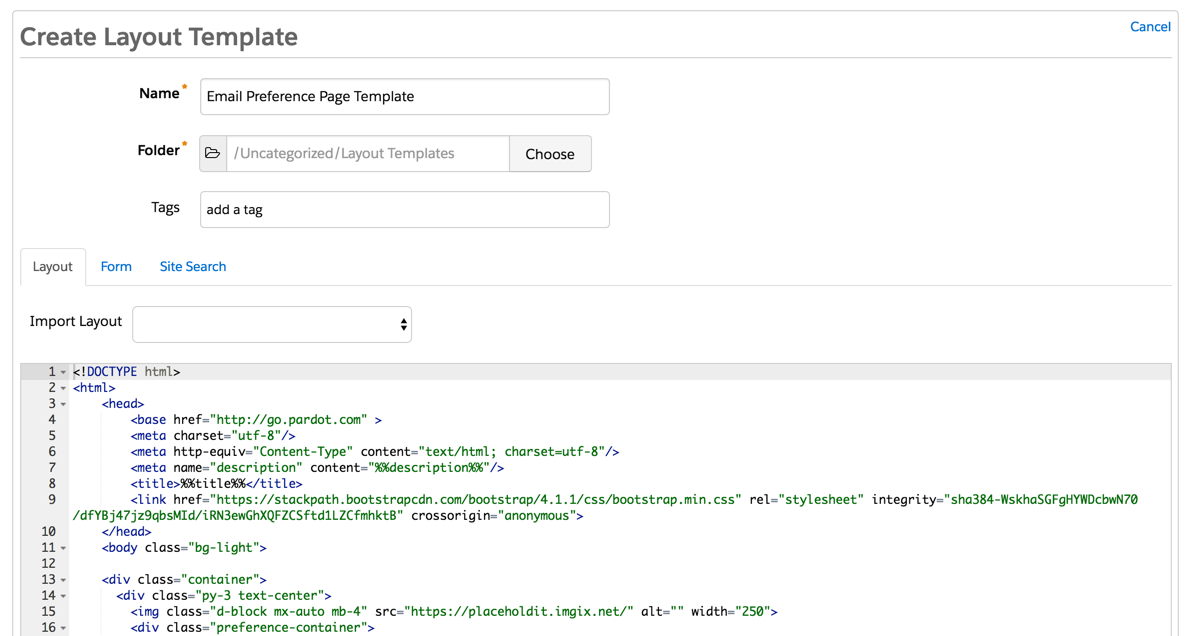
Create a new layout template (Marketing > Landing Page > Layout Templates > New Layout Template) and paste your HTML into the template. Add the tag %%content%% where you want the preference center form to appear.

Here’s what my HTML looks like:

<!DOCTYPE html>
<html>
<head>
<base href="http://go.pardot.com" >
<meta charset="utf-8"/>
<meta http-equiv="Content-Type" content="text/html; charset=utf-8"/>
<meta name="description" content="%%description%%"/>
<title>%%title%%</title>
<link href="https://stackpath.bootstrapcdn.com/bootstrap/4.1.1/css/bootstrap.min.css" rel="stylesheet" integrity="sha384-WskhaSGFgHYWDcbwN70/dfYBj47jz9qbsMId/iRN3ewGhXQFZCSftd1LZCfmhktB" crossorigin="anonymous">
</head>
<body class="bg-light">
    <div class="container">
      <div class="py-3">
        <div class="text-center">
        <img class="d-block mx-auto mb-4" src="https://placeholdit.imgix.net/~text?txtsize=38&txt=lOGO&w=220&h=65" alt="" width="250">
<div>
        <div class="preference-container">
         %%Content%%
        </div>
      </div>
      <footer class="my-5 pt-5 text-muted text-center text-small">
        <p class="mb-1">&copy; 2017-2019 Company Name</p>
        <ul class="list-inline">
          <li class="list-inline-item"><a href="#">Privacy</a></li>
          <li class="list-inline-item"><a href="#">Terms</a></li>
          <li class="list-inline-item"><a href="#">Support</a></li>
        </ul>
      </footer>
    </div>
  </body>
</html>

Step 2: Style the form

The preference page form can be styled as well to match your brand. To style your form, you will need to add some CSS to your layout template.

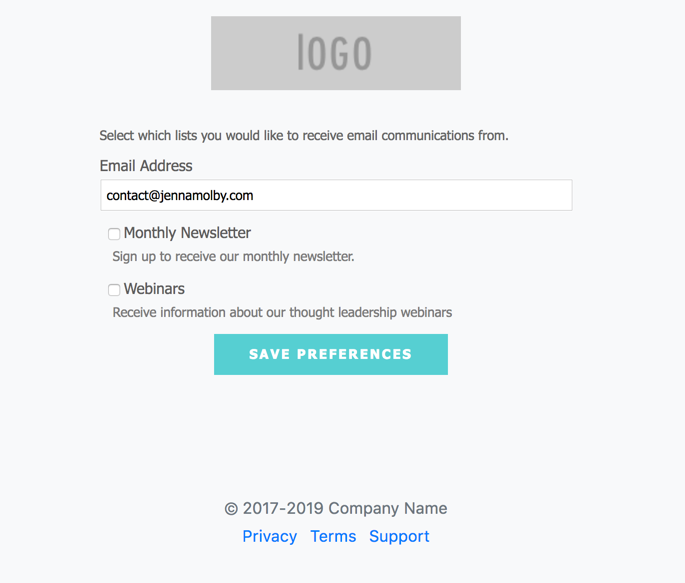
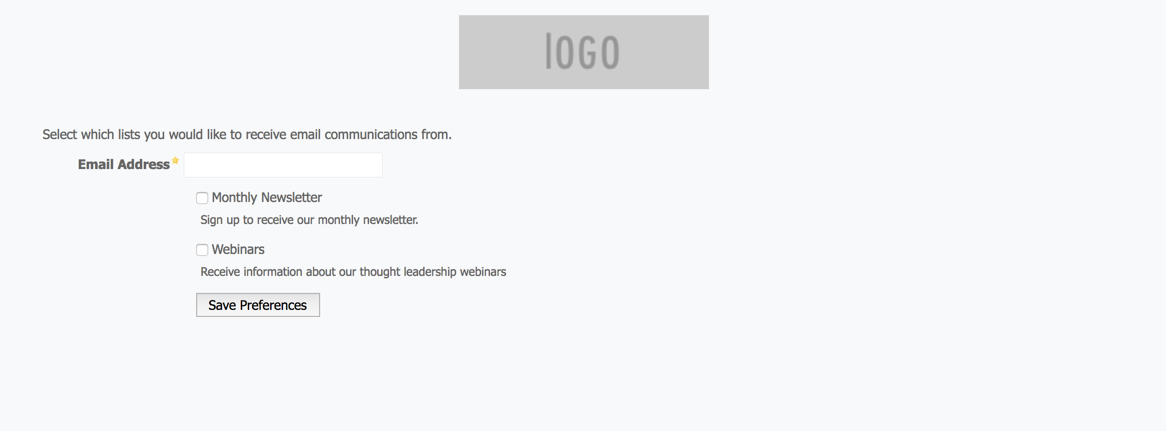
This is what my page looks like without adding any CSS to the form.

You can add whatever styles you want. Here are some elements you might want to style, along with the CSS classes.

Center the form and give it a width

body form.form {
    width:100%;
    max-width:500px;
    margin:0 auto;
}

Remove the left margin from the checkboxes

body form.form p.no-label,
body form.form p.email-pref {
    margin-left:0;
}

Change the font color, size, etc of the list name

body form.form p label.inline {
    font-size:15px;
    color:#5d5c5c;
}

Change the font color, size, etc of the list description

body form.form p.email-pref span.description {
    font-size:13px;
    color:#7b7a7a;
}

Change the label for “Email address”

body form.form p label {
    /* stack the label on top of the form field */
    float:none;
    text-align:left;
    /* label font styling */
    font-weight:normal;
    font-size:15px;
    padding-bottom:5px;
    color:#5d5c5c;
}
/* hide the required star */
body form.form p.required label,
body form.form span.required label {
    background:none;
}

Add some styling to the “Email address” field

body form.form input.text {

    width:100%; /* give it a width to be responsive */

    padding:5px;

}

Customize the submit button

/* Submit button properties */
body form.form p.submit input {
    background:#56CFD2;
    color:#FFF;
    border:0;
    padding:10px 35px;
    font-style: normal;
    font-weight: 800;
    text-transform: uppercase;
    line-height: 1.6923em;
    letter-spacing: 2px;
    cursor:pointer;
}
/* Submit button hover */
body form.form p.submit input:hover {
    background: #4ebfc2;
}
/* the submit button wrapper */
body form.form p.submit {
    margin-left:0; /* get rid of the default left margin */
    width:100%;  /* give it a width in order to center the button */
    text-align:center; /* center the button */
}

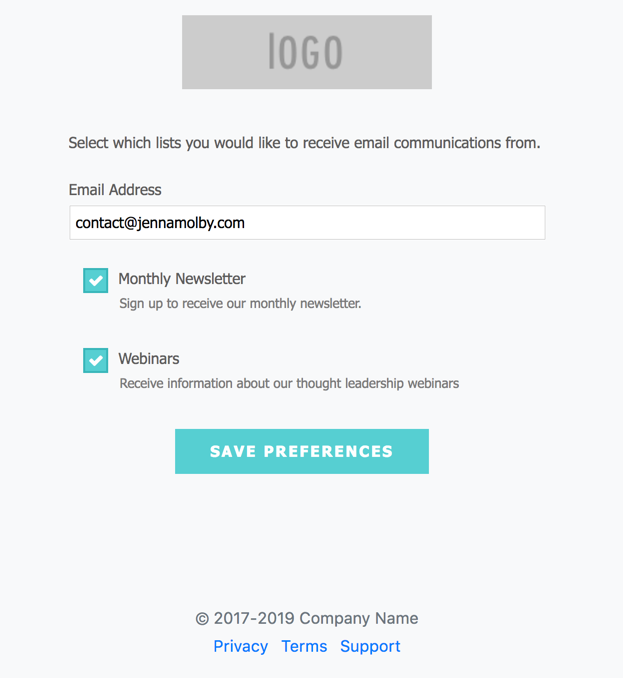
Applying all the styles left me with this result. Much better, right?

You can also give the checkboxes within your form some flair. Check out my tutorial for creating beautiful checkboxes within Pardot forms.

Here is my finished preference page with the styled checkboxes.

Questions?

Send me a tweet @jennamolby, or contact the Sercante team for help.
Learn how to build a net promoter score (NPS) survey directly in Pardot. I will show you how to create an NPS survey that asks the recipient to give you a score from 1 – 10 using an in-email rating that directs them to a Pardot landing page to collect more information.

What is a net promoter score (NPS)?

A net promoter score is a rating from 0-10 that answers the question ‘how likely are you to recommend us to a friend or colleague?’. This question is followed by ‘Why would you give us this score?’

  • Anyone who answers 10-9 is considered a ‘promoter’. This means they are satisfied with your product or service enough that they would gladly be willing to promote your company given you provide an easy platform for such promotion.
  • A rating of 8-7 is considered ‘passive’. These users are likely not to go out of their way to promote you but will still use your product.
  • Users who choose 6-0 are considered ‘detractors’. This subset has not had a great experience with your product or service.

Though a rating of 0-6 is never ideal, it can help identify problems with your product or service, promoting positive evolution, and providing an incentive for changing detractors and passives to promoters.

The concept

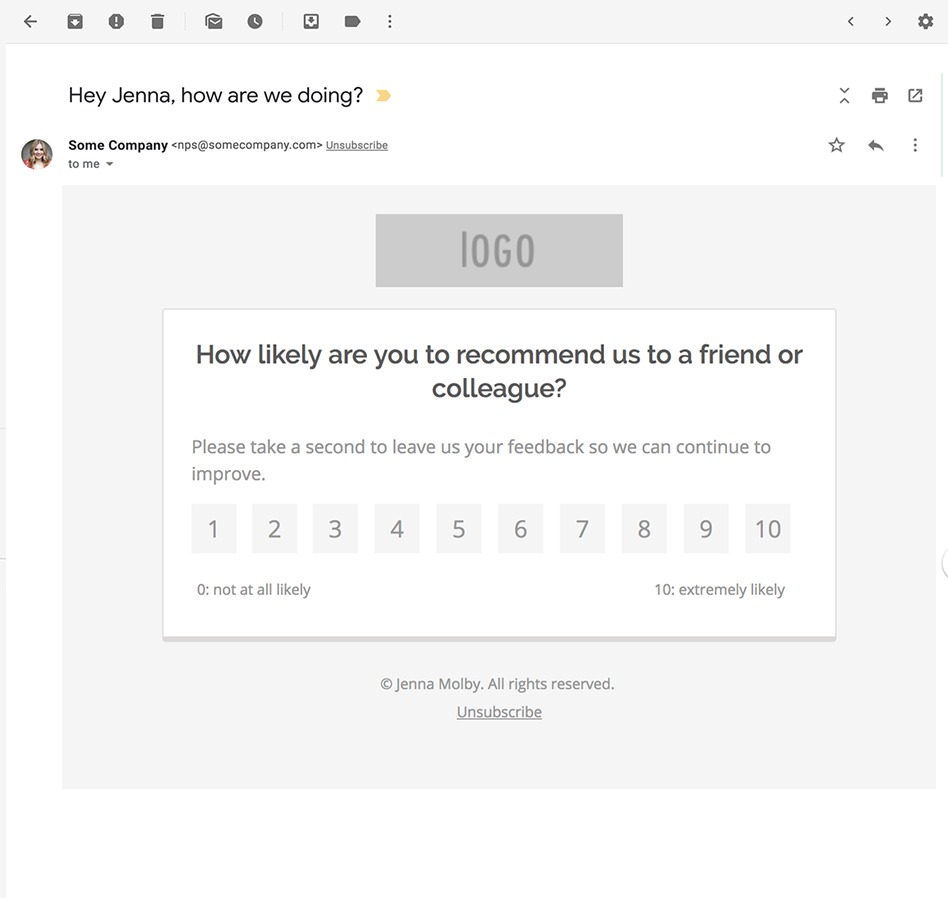
An NPS survey email will be sent out from Pardot that asks the recipient to rate you on a scale from 1 to 10.

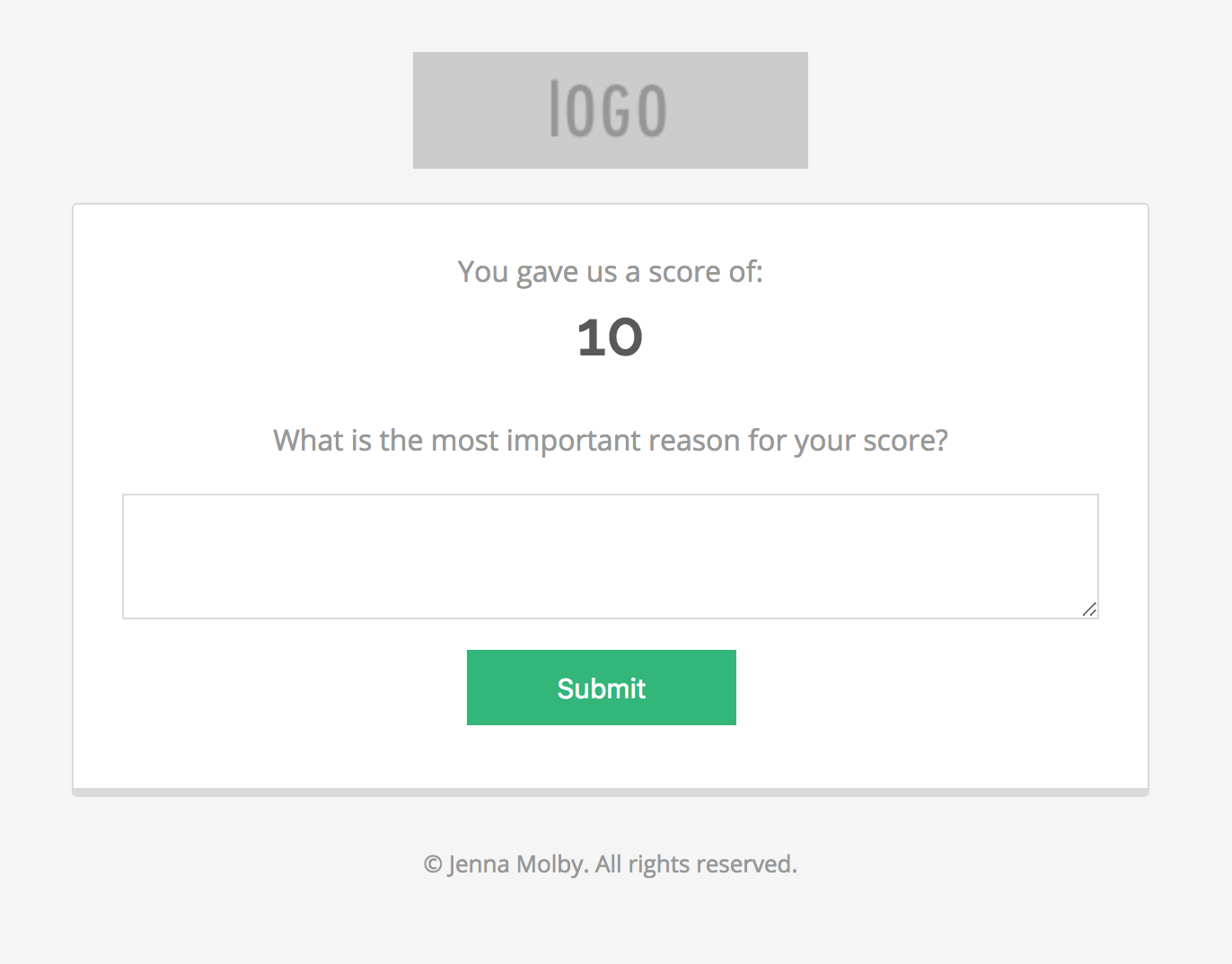
The recipient clicks on a rating and is directed to a landing page where they can fill out more information on why they gave you that rating.

The rating the recipient selected from the email is automatically displayed on the landing page and passed to a hidden field in the form to capture in the Pardot database.

View Example

1. Create new fields

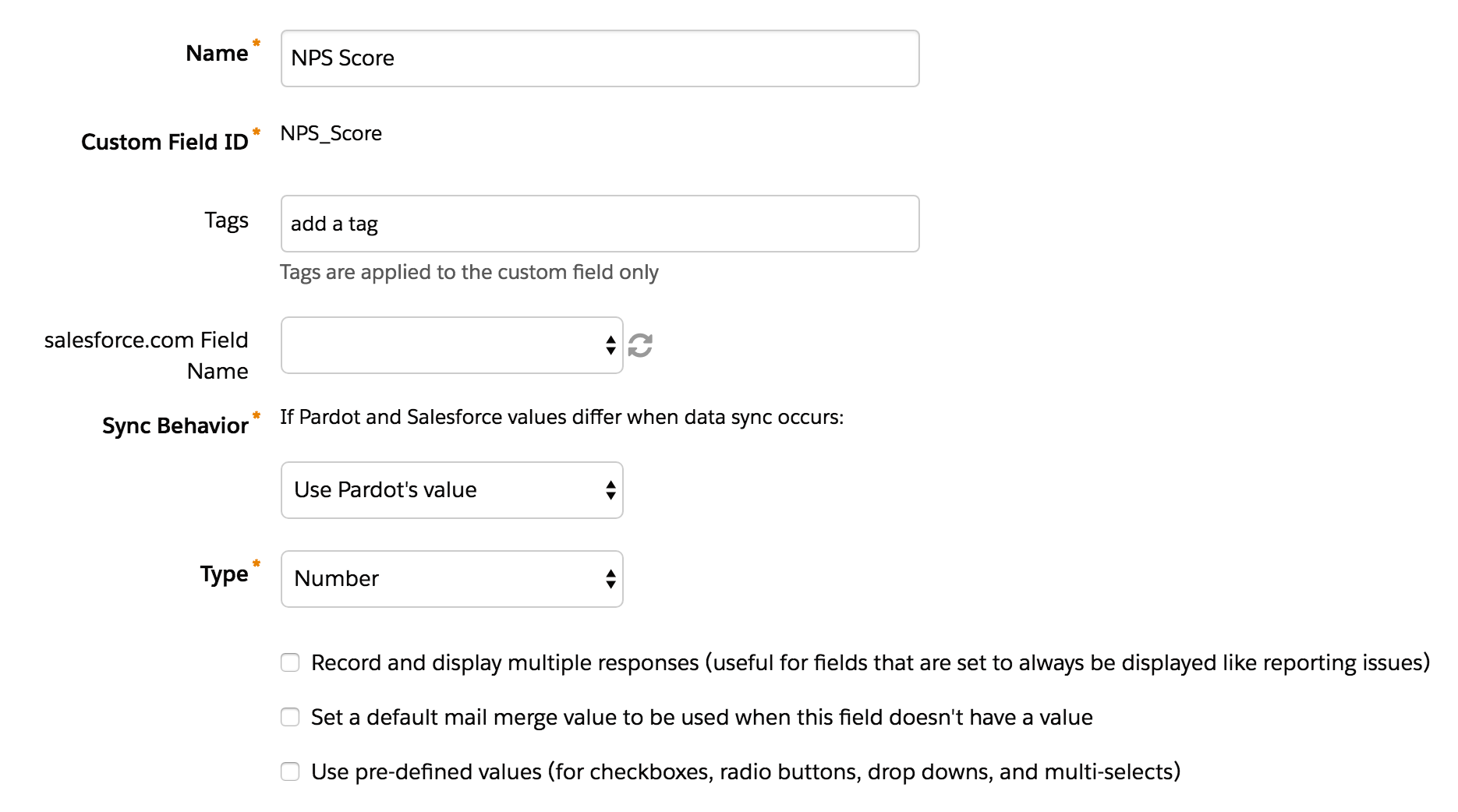
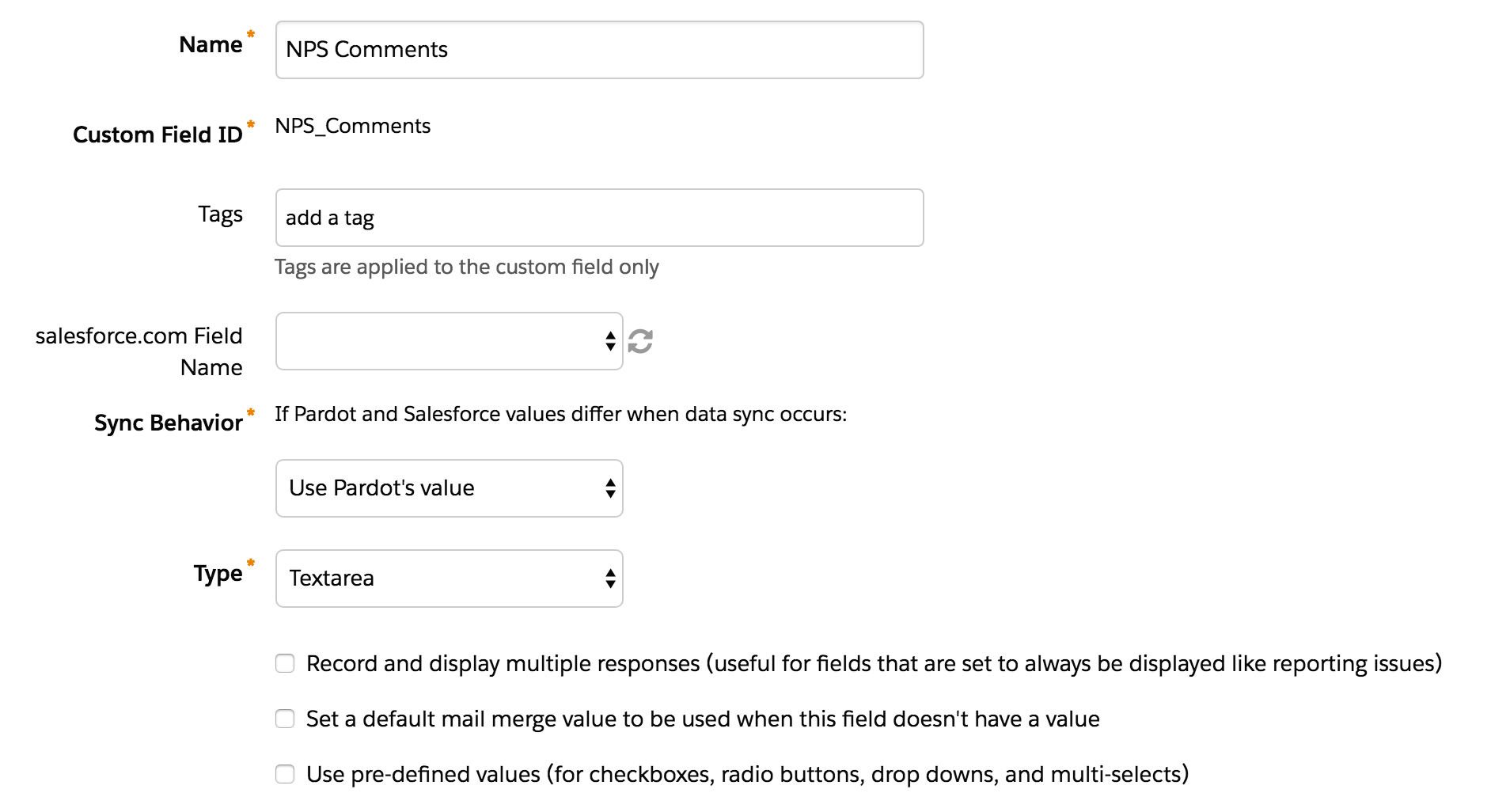
Create new fields in Salesforce and Pardot to capture the NPS results. In this example, I will be using a field named NPS Score and NPS Comments.

2. Create a form

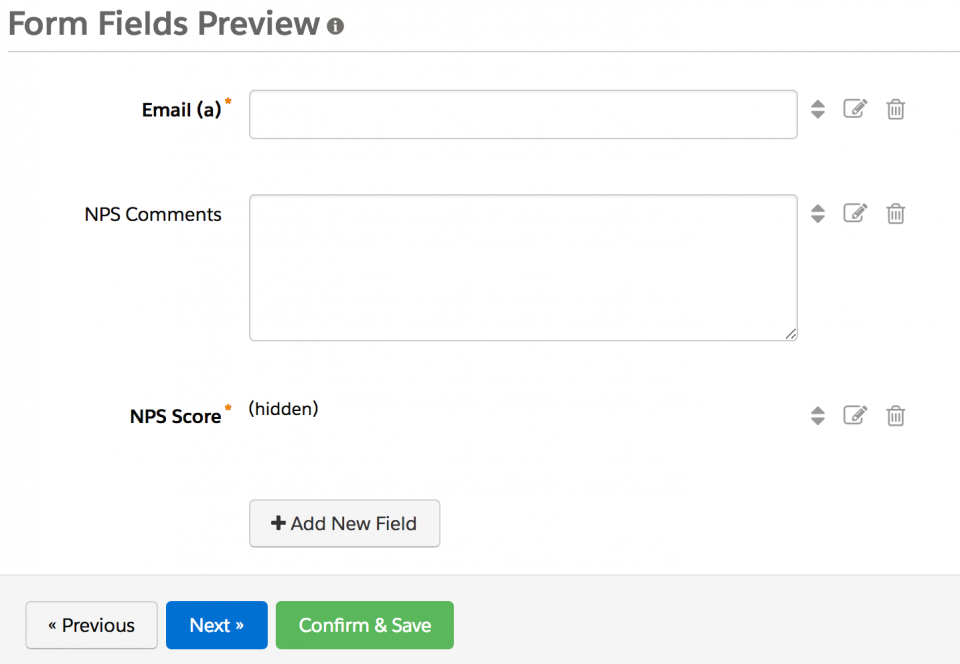
Create a new form named NPS Form in Pardot. Add these three fields to the form:

  1. Email
  2. NPS Comments – select textarea as the type and leave it optional.
  3. NPS Score – select hidden as the type and mark it has required.

3. Create a layout template

A new layout template will need to be created in order to create the landing page. Here’s the code I used for my layout template.

<!DOCTYPE html>
<html>
<head>
<meta charset="utf-8">
<meta name="x-apple-disable-message-reformatting">
<style type="text/css">
   @import url(https://fonts.googleapis.com/css?family=Open+Sans:400,600|Raleway:400,400italic,500,600,800,700,300,200);
   @media only screen and (max-width: 480px) {
   .device-width {
   width: 90% !important;
   height: auto !important;
   min-width: 380px !important;
   margin: 0 auto !important;
   }
   .device-width-inner {
   width: 85% !important;
   height: auto !important;
   margin: 0 auto !important;
   }
   }
   p.email {
   display: none !important;
   }
   form.form label {
   display: none !important;
   }
   form.form p {
   margin: 0 !important;
   }
   form.form {
   margin: 0 !important;
   padding: 0 !important;
   width: 100% !important;
   }
   form.form textarea {
   border: solid 1px #dcd9d9 !important;
   font-size: 14px !important;
   padding: 15px !important;
   box-sizing: border-box;
   color: #989898;
   width: 100% !important;
   margin: 0 !important;
   }
   form.form p.submit {
   text-align: center;
   padding-top: 10px !important;
   padding-bottom: 20px !important;
   }
   form.form p.submit input {
   background: #32B67A;
   color: #FFF;
   border: 0;
   padding: 12px 50px !important;
   font-size: 15px;
   }
</style>
<title>%%title%%</title>
</head>
<body style="background-color:#f5f5f5;margin:0;padding:0;">
<table bgcolor="#F5F5F5" border="0" cellpadding="0" cellspacing="0" width="100%">
<tr>
<td>
<table border="0" cellpadding="0" cellspacing="0" width="100%">
<tr>
<td>
<table align="center" border="0" cellpadding="0" cellspacing="0" class="device-width" style="margin:0 auto !important;" width="600">
<tr>
<td height="30"></td>
</tr>
<tr>
<td style="text-align:center;">
<div id="logo" pardot-region="logo">
<a href="#"><img src="https://placeholdit.imgix.net/~text?txtsize=38&amp;txt=lOGO&amp;w=220&amp;h=65"></a>
</div>
</td>
</tr>
<tr>
<td height="15"></td>
</tr>
</table>
</td>
</tr>
</table>
</td>
</tr>
<tr>
<td>
<table align="center" border="0" cellpadding="0" cellspacing="0" class="device-width-inner" style="margin:0 auto !important;" width="600">
<tr>
<td>
<table bgcolor="#FFFFFF" border="0" cellpadding="0" cellspacing="0" style="border-right:solid 1px #dcd9d9;border-left:solid 1px #dcd9d9;border-top:solid 1px #dcd9d9;border-bottom:solid 5px #dcd9d9;border-radius:3px;" width="100%">
<tr>
<td style="padding:25px 25px 15px 25px;">
<table border="0" cellpadding="0" cellspacing="0" width="100%">
<tr>
<td style="text-align:center;font-size:16px;font-family:'Open Sans',Arial,Sans-serif;color:#989898;line-height:24px;">
<div id="score-intro" pardot-region="score-intro">
You gave us a score of:
</div>
</td>
</tr>
<tr>
<td class="smaller-header-text" style="font-size:35px;font-family:'Raleway',Arial,Sans-serif;color:#595959;font-weight:600;line-height:45px;text-align:center;"><span class="nps-score"></span></td>
</tr>
<tr>
<td height="25"></td>
</tr>
<tr>
<td style="text-align:center;font-size:16px;font-family:'Open Sans',Arial,Sans-serif;color:#989898;line-height:24px;">
<div id="comment-label" pardot-region="comment-label">
What is the most important reason for your score?
</div>
</td>
</tr>
<tr>
<td height="15"></td>
</tr>
<tr>
<td>
<table border="0" cellpadding="0" cellspacing="0" width="100%">
<tr>
<td>%%content%%</td>
</tr>
</table>
</td>
</tr>
</table>
</td>
</tr>
</table>
</td>
</tr>
<tr>
<td style="font-size:16px;font-family:'Open Sans',Arial,Sans-serif;color:#989898;line-height:24px;text-align:center;">
<br>
<div id="footer" pardot-region="footer-text">
<span style="font-size:13px;">&copy; Jenna Molby. All rights reserved.<br></span>
</div>
</td>
</tr>
</table>
</td>
</tr>
</table>
<script crossorigin="anonymous" integrity="sha256-FgpCb/KJQlLNfOu91ta32o/NMZxltwRo8QtmkMRdAu8=" src="https://code.jquery.com/jquery-3.3.1.min.js">
</script>
<script type="text/javascript">
   // Parse the URL
   function getParameterByName(name) {
       name = name.replace(/[\[]/, "\\[").replace(/[\]]/, "\\]");
       var regex = new RegExp("[\\?&]" + name + "=([^&#]*)"),
       results = regex.exec(location.search);
       return results === null ? "" : decodeURIComponent(results[1].replace(/\+/g, " "));
   }
   // Give the URL parameters variable names
   var nps = getParameterByName('nps');
   var email = getParameterByName('email');
    
   // Put the variable names into the hidden fields in the form. selector should be "p.YOURFIELDNAME input"
   $('p.NPS_Score input').val(nps);
   $('.nps-score').text(nps);
   $('p.email input').val(email);
</script>
</body>
</html>

You can use my code to create your own layout template, or you can create your own. If you create your own you will need to add some CSS and JavaScript to make the form work correctly.

The JavaScript

JavaScript is used to take the nps score the recipient selects from the email and pass it to the hidden field within the form. It also is used to grab the recipient’s email address from the URL and pass it into the email field within the form. Here’s what the script looks like

<script type="text/javascript">
   // Parse the URL
   function getParameterByName(name) {
       name = name.replace(/[\[]/, "\\[").replace(/[\]]/, "\\]");
       var regex = new RegExp("[\\?&]" + name + "=([^&#]*)"),
       results = regex.exec(location.search);
       return results === null ? "" : decodeURIComponent(results[1].replace(/\+/g, " "));
   }
   // Give the URL parameters variable names
   var nps = getParameterByName('nps');
   var email = getParameterByName('email');
    
   // Put the variable names into the hidden fields in the form. selector should be "p.YOURFIELDNAME input"
   $('p.NPS_Score input').val(nps);
   $('.nps-score').text(nps);
   $('p.email input').val(email);
</script>

Note: The jQuery library will need to be loaded in order for this to work.

The CSS

The only piece of required CSS is to hide the email field since we will be auto-populating it through the URL.

 p.email {
   display: none !important;
   }

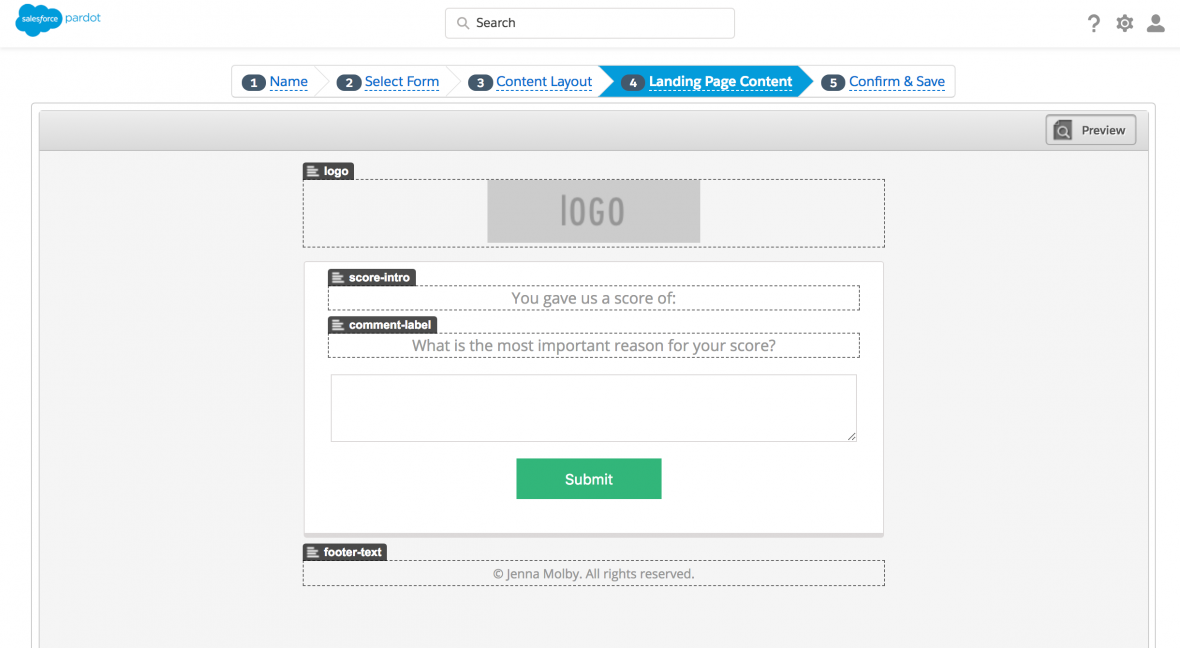
4. Create the landing page

Once your layout template is set up, use it to create a new landing page.

5. Set up the email

Lastly, create an email that includes the option to select a rating, which directs the recipient to the landing page you just created. Here’s what my email HTML looks like:

<!doctype html>
<html>
<head>
<meta charset="utf-8">
<meta name="x-apple-disable-message-reformatting" />
    <style type="text/css">
    @import url(https://fonts.googleapis.com/css?family=Open+Sans:400,600|Raleway:400,400italic,500,600,800,700,300,200);
    span.preheader {display:none;height:0px;margin:0px;}
    @media only screen and (max-width: 480px){
     .device-width {width:90% !important;height:auto !important;min-width:380px !important;margin:0 auto !important;}
     .device-width-inner {width:85% !important; height: auto !important;margin:0 auto !important;}
     .mobile-hide {display:none !important;}
     .mobile-nav {padding:10px 20px !important; height:auto !important;display:table-row !important;width:100% !important;}
     .mobile-center {text-align:center !important;}
     .mobile-small-text {font-size:18px !important;}
     .mobile-center-table {float:none !important;margin:0 auto !important;}
     .text-center {text-align:center !important;}
     .padding-top {padding-top:20px !important;}
     .center-image {margin:0 auto !important;}
     .logo-small {width:200px !important; height:auto !important;}
     .smaller-header-text {font-size:22px !important;}
     .image-full-width {width:100% !important; height:auto !important;}
.rating table {width:25px !important;}
.rating table td {font-size:15px !important;line-height:25px !important;}
    
    }
    </style>
    <!--[if mso]>
        <style>
            span, td, table, div {
              font-family: Arial, serif !important;
            }
        </style>
    <![endif]-->
</head>
 
<body style="background-color:#f5f5f5;margin:0;padding:0;">
    <table cellpadding="0" cellspacing="0" border="0" width="100%" bgcolor="#f5f5f5">
        <tr>
            <td>
                <table cellpadding="0" cellspacing="0" border="0" width="100%">
                  <tr>
                      <td>
                          <table cellpadding="0" cellspacing="0" border="0" width="600" align="center" style="margin:0 auto !important;" class="device-width">
                              <tr>
                                  <td height="30"></td>
                                </tr>
                                <tr>
                                    <td style="text-align:center;">
                                     <a href="#"><img src="https://placeholdit.imgix.net/~text?txtsize=38&amp;txt=lOGO&amp;w=220&amp;h=65"></a>
                                    </td>
                                </tr>
                                <tr>
                                  <td height="15"></td>
                                </tr>
                           </table>
                        </td>
                    </tr>
                </table>
            </td>
        </tr>
      <tr>
          <td>
              <table cellpadding="0" cellspacing="0" border="0" width="600" align="center" style="margin:0 auto !important;" class="device-width-inner">
                     <tr>
                      <td>
                          <table cellpadding="0" cellspacing="0" border="0" width="100%" bgcolor="#FFFFFF" style="border-right:solid 1px #dcd9d9;border-left:solid 1px #dcd9d9;border-top:solid 1px #dcd9d9;border-bottom:solid 5px #dcd9d9;border-radius:3px;">
                              <tr>
                                  <td style="padding:25px 25px 15px 25px;">
                                      <table cellpadding="0" cellspacing="0" border="0" width="100%">
                                                                    
                                        
                                          <tr>
                                              <td style="font-size:23px;font-family:'Raleway',Arial,Sans-serif;color:#595959;font-weight:600;line-height:30px;text-align:center;" class="smaller-header-text">
                                                 How likely are you to recommend us to a friend or colleague?</td>
                                            </tr>
                                            <tr>
                                              <td height="25"></td>
                                            </tr>
                                            <tr>
                                              <td style="font-size:16px;font-family:'Open Sans',Arial,Sans-serif;color:#989898;line-height:24px;">
                                      Please take a second to leave us your feedback so we can continue to improve. </td>
                                            </tr>
                                            <tr>
                                              <td height="15"></td>
                                            </tr>
<tr>
                                              <td>
                                               <table cellpadding="0" cellspacing="0" border="0" width="100%" class="rating">
                                                     <tr>
                                                         <td>
                                                             <table cellpadding="0" border="0" width="40" bgcolor="#f5f5f5">
                                                                 <tr>
                                                                     <td style="font-family:'Open Sans',Arial,Sans-serif;font-size:21px;line-height:40px;text-align:center;">
                                                                         <a href="https://jennamolby.com?nps=1&email=%%email%%" style="color:#989898;text-decoration:none;">1</a>
                                                                        </td>
                                                                    </tr>
                                                                </table>
                                                            </td>
                                                            <td>
                                                             <table cellpadding="0" border="0" width="40" bgcolor="#f5f5f5">
                                                                 <tr>
                                                                     <td style="font-family:'Open Sans',Arial,Sans-serif;font-size:21px;line-height:40px;text-align:center;">
                                                                         <a href="https://jennamolby.com?nps=2&email=%%email%%" style="color:#989898;text-decoration:none;">2</a>
                                                                        </td>
                                                                    </tr>
                                                                </table>
                                                            </td>
                                                            <td>
                                                             <table cellpadding="0" border="0" width="40" bgcolor="#f5f5f5">
                                                                 <tr>
                                                                     <td style="font-family:'Open Sans',Arial,Sans-serif;font-size:21px;line-height:40px;text-align:center;">
                                                                         <a href="https://jennamolby.com?nps=3&email=%%email%%" style="color:#989898;text-decoration:none;">3</a>
                                                                        </td>
                                                                    </tr>
                                                                </table>
                                                            </td>
                                                            <td>
                                                             <table cellpadding="0" border="0" width="40" bgcolor="#f5f5f5">
                                                                 <tr>
                                                                     <td style="font-family:'Open Sans',Arial,Sans-serif;font-size:21px;line-height:40px;text-align:center;">
                                                                         <a href="https://jennamolby.com?nps=4&email=%%email%%" style="color:#989898;text-decoration:none;">4</a>
                                                                        </td>
                                                                    </tr>
                                                                </table>
                                                            </td>
                                                            <td>
                                                             <table cellpadding="0" border="0" width="40" bgcolor="#f5f5f5">
                                                                 <tr>
                                                                     <td style="font-family:'Open Sans',Arial,Sans-serif;font-size:21px;line-height:40px;text-align:center;">
                                                                         <a href="https://jennamolby.com?nps=5&email=%%email%%" style="color:#989898;text-decoration:none;">5</a>
                                                                        </td>
                                                                    </tr>
                                                                </table>
                                                            </td>
                                                            <td>
                                                             <table cellpadding="0" border="0" width="40" bgcolor="#f5f5f5">
                                                                 <tr>
                                                                     <td style="font-family:'Open Sans',Arial,Sans-serif;font-size:21px;line-height:40px;text-align:center;">
                                                                         <a href="https://jennamolby.com?nps=6&email=%%email%%" style="color:#989898;text-decoration:none;">6</a>
                                                                        </td>
                                                                    </tr>
                                                                </table>
                                                            </td>
                                                            <td>
                                                             <table cellpadding="0" border="0" width="40" bgcolor="#f5f5f5">
                                                                 <tr>
                                                                     <td style="font-family:'Open Sans',Arial,Sans-serif;font-size:21px;line-height:40px;text-align:center;">
                                                                         <a href="https://jennamolby.com?nps=7&email=%%email%%" style="color:#989898;text-decoration:none;">7</a>
                                                                        </td>
                                                                    </tr>
                                                                </table>
                                                            </td>
                                                            <td>
                                                             <table cellpadding="0" border="0" width="40" bgcolor="#f5f5f5">
                                                                 <tr>
                                                                     <td style="font-family:'Open Sans',Arial,Sans-serif;font-size:21px;line-height:40px;text-align:center;">
                                                                         <a href="https://jennamolby.com?nps=8&email=%%email%%" style="color:#989898;text-decoration:none;">8</a>
                                                                        </td>
                                                                    </tr>
                                                                </table>
                                                            </td>
                                                            <td>
                                                             <table cellpadding="0" border="0" width="40" bgcolor="#f5f5f5">
                                                                 <tr>
                                                                     <td style="font-family:'Open Sans',Arial,Sans-serif;font-size:21px;line-height:40px;text-align:center;">
                                                                         <a href="https://jennamolby.com?nps=9&email=%%email%%" style="color:#989898;text-decoration:none;">9</a>
                                                                        </td>
                                                                    </tr>
                                                                </table>
                                                            </td>
                                                            <td>
                                                             <table cellpadding="0" border="0" width="40" bgcolor="#f5f5f5">
                                                                 <tr>
                                                                     <td style="font-family:'Open Sans',Arial,Sans-serif;font-size:21px;line-height:40px;text-align:center;">
                                                                         <a href="https://jennamolby.com?nps=10&email=%%email%%" style="color:#989898;text-decoration:none;">10</a>
                                                                        </td>
                                                                    </tr>
                                                                </table>
                                                            </td>
                                                        </tr>
                                                        
                                                    </table>
                                                </td>
                                          </tr>
                                          
                                          
                                        </table>
                                    </td>
                                </tr>
                                <tr>
                                           <td style="padding:5px 25px 30px 25px;">
                                             <table cellpadding="0" cellspacing="0" border="0" width="100%">
                                                 <tr>
                                                     <td style="padding-left:5px;font-size:13px;font-family:'Open Sans',Arial,Sans-serif;color:#989898;line-height:24px;">
                                                         0: not at all likely
                                                        </td>
                                                        <td style="padding-right:20px;text-align:right;font-size:13px;font-family:'Open Sans',Arial,Sans-serif;color:#989898;line-height:24px;">
                                                         10: extremely likely
                                                        </td>
                                                    </tr>
                                                </table>
                                            </td>
                                          </tr>
                                
                            </table>
                        </td>
                    </tr>
    
                   <tr>
                   <td style="font-size:16px;font-family:'Open Sans',Arial,Sans-serif;color:#989898;line-height:24px;text-align:center;"><br><span style="font-size:13px;">
                            &copy; Jenna Molby. All rights reserved. <br />
                            
                                    
                                      <a href="%%unsubscribe%%" style="color: #989898">Unsubscribe</a>
                            </span>
                        </td>
                   </tr>
                </table>
            </td>
        </tr>
    </table>
</body>
</html>

I used tables within the email to create the rating buttons. Here’s what the HTML for that section looks like:

<table cellpadding="0" cellspacing="0" border="0" width="100%" class="rating">
                                                     <tr>
                                                         <td>
                                                             <table cellpadding="0" border="0" width="40" bgcolor="#f5f5f5">
                                                                 <tr>
                                                                     <td style="font-family:'Open Sans',Arial,Sans-serif;font-size:21px;line-height:40px;text-align:center;">
                                                                         <a href="https://jennamolby.com?nps=1&email=%%email%%" style="color:#989898;text-decoration:none;">1</a>
                                                                        </td>
                                                                    </tr>
                                                                </table>
                                                            </td>
                                                            <td>
                                                             <table cellpadding="0" border="0" width="40" bgcolor="#f5f5f5">
                                                                 <tr>
                                                                     <td style="font-family:'Open Sans',Arial,Sans-serif;font-size:21px;line-height:40px;text-align:center;">
                                                                         <a href="https://jennamolby.com?nps=2&email=%%email%%" style="color:#989898;text-decoration:none;">2</a>
                                                                        </td>
                                                                    </tr>
                                                                </table>
                                                            </td>
                                                            <td>
                                                             <table cellpadding="0" border="0" width="40" bgcolor="#f5f5f5">
                                                                 <tr>
                                                                     <td style="font-family:'Open Sans',Arial,Sans-serif;font-size:21px;line-height:40px;text-align:center;">
                                                                         <a href="https://jennamolby.com?nps=3&email=%%email%%" style="color:#989898;text-decoration:none;">3</a>
                                                                        </td>
                                                                    </tr>
                                                                </table>
                                                            </td>
                                                            <td>
                                                             <table cellpadding="0" border="0" width="40" bgcolor="#f5f5f5">
                                                                 <tr>
                                                                     <td style="font-family:'Open Sans',Arial,Sans-serif;font-size:21px;line-height:40px;text-align:center;">
                                                                         <a href="https://jennamolby.com?nps=4&email=%%email%%" style="color:#989898;text-decoration:none;">4</a>
                                                                        </td>
                                                                    </tr>
                                                                </table>
                                                            </td>
                                                            <td>
                                                             <table cellpadding="0" border="0" width="40" bgcolor="#f5f5f5">
                                                                 <tr>
                                                                     <td style="font-family:'Open Sans',Arial,Sans-serif;font-size:21px;line-height:40px;text-align:center;">
                                                                         <a href="https://jennamolby.com?nps=5&email=%%email%%" style="color:#989898;text-decoration:none;">5</a>
                                                                        </td>
                                                                    </tr>
                                                                </table>
                                                            </td>
                                                            <td>
                                                             <table cellpadding="0" border="0" width="40" bgcolor="#f5f5f5">
                                                                 <tr>
                                                                     <td style="font-family:'Open Sans',Arial,Sans-serif;font-size:21px;line-height:40px;text-align:center;">
                                                                         <a href="https://jennamolby.com?nps=6&email=%%email%%" style="color:#989898;text-decoration:none;">6</a>
                                                                        </td>
                                                                    </tr>
                                                                </table>
                                                            </td>
                                                            <td>
                                                             <table cellpadding="0" border="0" width="40" bgcolor="#f5f5f5">
                                                                 <tr>
                                                                     <td style="font-family:'Open Sans',Arial,Sans-serif;font-size:21px;line-height:40px;text-align:center;">
                                                                         <a href="https://jennamolby.com?nps=7&email=%%email%%" style="color:#989898;text-decoration:none;">7</a>
                                                                        </td>
                                                                    </tr>
                                                                </table>
                                                            </td>
                                                            <td>
                                                             <table cellpadding="0" border="0" width="40" bgcolor="#f5f5f5">
                                                                 <tr>
                                                                     <td style="font-family:'Open Sans',Arial,Sans-serif;font-size:21px;line-height:40px;text-align:center;">
                                                                         <a href="https://jennamolby.com?nps=8&email=%%email%%" style="color:#989898;text-decoration:none;">8</a>
                                                                        </td>
                                                                    </tr>
                                                                </table>
                                                            </td>
                                                            <td>
                                                             <table cellpadding="0" border="0" width="40" bgcolor="#f5f5f5">
                                                                 <tr>
                                                                     <td style="font-family:'Open Sans',Arial,Sans-serif;font-size:21px;line-height:40px;text-align:center;">
                                                                         <a href="https://jennamolby.com?nps=9&email=%%email%%" style="color:#989898;text-decoration:none;">9</a>
                                                                        </td>
                                                                    </tr>
                                                                </table>
                                                            </td>
                                                            <td>
                                                             <table cellpadding="0" border="0" width="40" bgcolor="#f5f5f5">
                                                                 <tr>
                                                                     <td style="font-family:'Open Sans',Arial,Sans-serif;font-size:21px;line-height:40px;text-align:center;">
                                                                         <a href="https://jennamolby.com?nps=10&email=%%email%%" style="color:#989898;text-decoration:none;">10</a>
                                                                        </td>
                                                                    </tr>
                                                                </table>
                                                            </td>
                                                        </tr>
                                                        
                                                    </table>
                                                </td>
                                          </tr>
                                          
                                          
                                        </table>

Each link to the landing page should pass two paramters through the URL:

  1. NPS – The score of the of the clicked link
  2. Email – The email of the receipent, using a varaible tag.

Here’s an example of what one of the links looks like:

https://pi.pardot.com/my-landing-page.html?nps=10&email=%%email%%

Send me a tweet @jennamolby, or contact the Sercante team for help.

You might already be tracking MQLs in Salesforce or in Pardot, but are you tracking all the information you need for enhanced reporting? I’ll walk you through the 3 steps you need to take for complete MQL tracking that can be used within reports and dashboard in Salesforce.

MQL (marketing qualified lead) tracking basics

The first step to MQL tracking is identifying what your organization considers to be an MQL. There are two common paths:

  1. A lead is considered an MQL when it reaches a defined lead scoring threshold. For example, if a lead has a score greater than 50, the lead is considered as an MQL. Some organizations use a lead rating or lead grade instead. In that case, if a lead has a rating or grade that is equal to A, B, or C, the lead is considered as an MQL.
  2. A lead is considered an MQL if they do some form of “hand raise” that says “talk to me now!”. For example, if a lead fills out a contact us form or a pricing request form, the lead is considered an MQL.

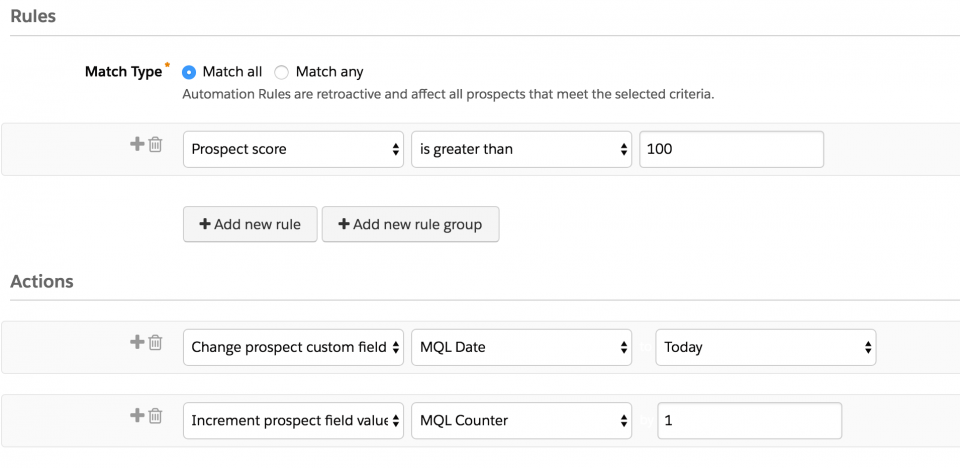
In this example, I will be using the lead score as my indication that the lead is an MQL. If the lead score is greater than 100, then assign the lead to a Sales Rep using a Pardot automation rule.

Enhanced MQL tracking

The key to enhanced MQL tracking is date stamping important milestones within your lead lifecycle. Date stamping will allow you to pull reports to answer questions, such as:

  • How many MQLs did we get this quarter?
  • How many of our opportunties were generated for MQLs this month?
  • How many times has a lead been a MQL?
  • What channels generate the most MQLs?

If you are a Pardot and Salesforce user, MQL tracking is fairly simple to set up. It requires creating two custom fields and leveraging Pardot automation rules. Let’s dive in how to set this up…

Step 1: Create the tracking fields

The first step is to create all the fields needed for tracking. Two fields will need to be created in Salesforce.

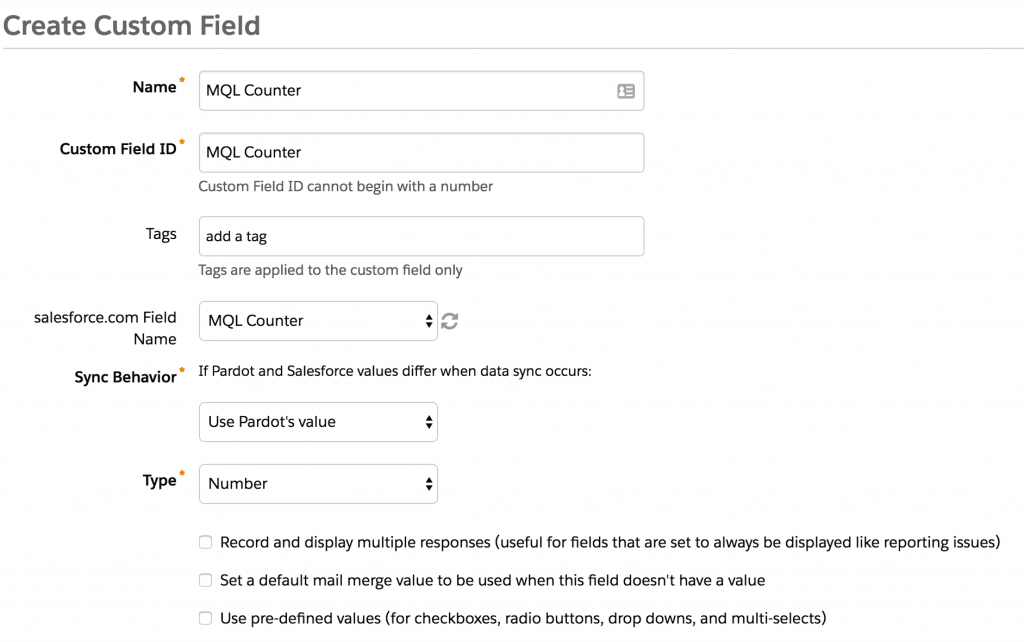
  1. MQL Counter: Counts how many times the lead has become an MQL
  2. MQL Date: Tracks the last date the lead became an MQL

Create the MQL Date Field in Salesforce: Step-by-step

Under Setup > Customize > Lead > Fields, create a new date field called MQL Date.

Create the MQL Counter Field in Salesforce: Step-by-step

Under Setup > Customize > Lead > Fields, create a new number field called MQL Counter.

Repeat this process for Contacts as well and don’t forget to map the lead fields to the contact fields.

Step 2: Create and map the fields in Pardot

Repeat the same process within Pardot and map the fields to the newly-created Salesforce fields. Don’t forget to select the correct data type for the fields.

Step 3: Create (or edit) automation rules

This step is dependent on what your organization considers to be an MQL. As mentioned at the beginning of this post, in this example, if a lead score is greater than 100, the lead is considered an MQL.

If you already have an automation rule created to manage MQLs, you can edit it and add some actions. If you don’t have something in place to manage MQLs, you will need to create a new automation rule.

Here’s what my automation rule looks like:In the rules section I entered the scoring threshold for my marketing qualified leads. The actions are going to update the MQL Date with today’s date and increment the MQL Counter field by 1.

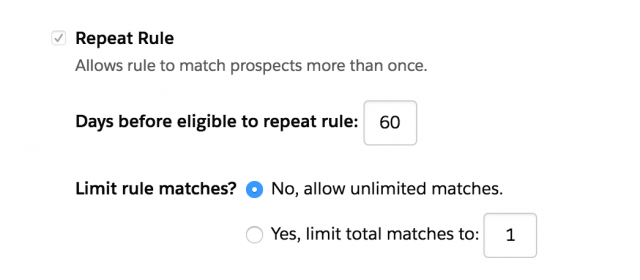
Another piece of business logic you will need to determine is how many times a lead can become an MQL within a time period. Some common time frames are every 30, 60, or 90 days. Whatever time period you chose you will need to add a repeat rule to your Pardot automation rule. In this example, I want a lead to be considered an MQL only once in the period of 60 days, so my repeat rule looks like this:

Since automation rules are retroactive, you might want to modify your some of your prospect’s lead scores so old leads don’t run through the automation rule. You could also add some custom filters within your automation rule to ensure other leads don’t run through and get date stamped.

Finally, activate your automation rule.

Take it a step further

Now that you have the basic MQL tracking rules implemented, you can take it a step further by implementing these ideas:

  • Date stamp the first time a lead is an MQL: Create another date stamp field and another automation rule that doesn’t have a repeat rule.
  • Remove leads from lead scoring if their MQL counter is greater than 10: if there’s a lead that has been an MQL more than 10 times, for example, you can remove these from scoring since they might be a browser and not a buyer.
  • This same process can also be implemented for other stages within your lead lifecycle (SAL, SQL, etc).

Date stamping can also be done in Salesforce using flows. You can read more about date stamping using flows in Salesforce in the follow up post here.

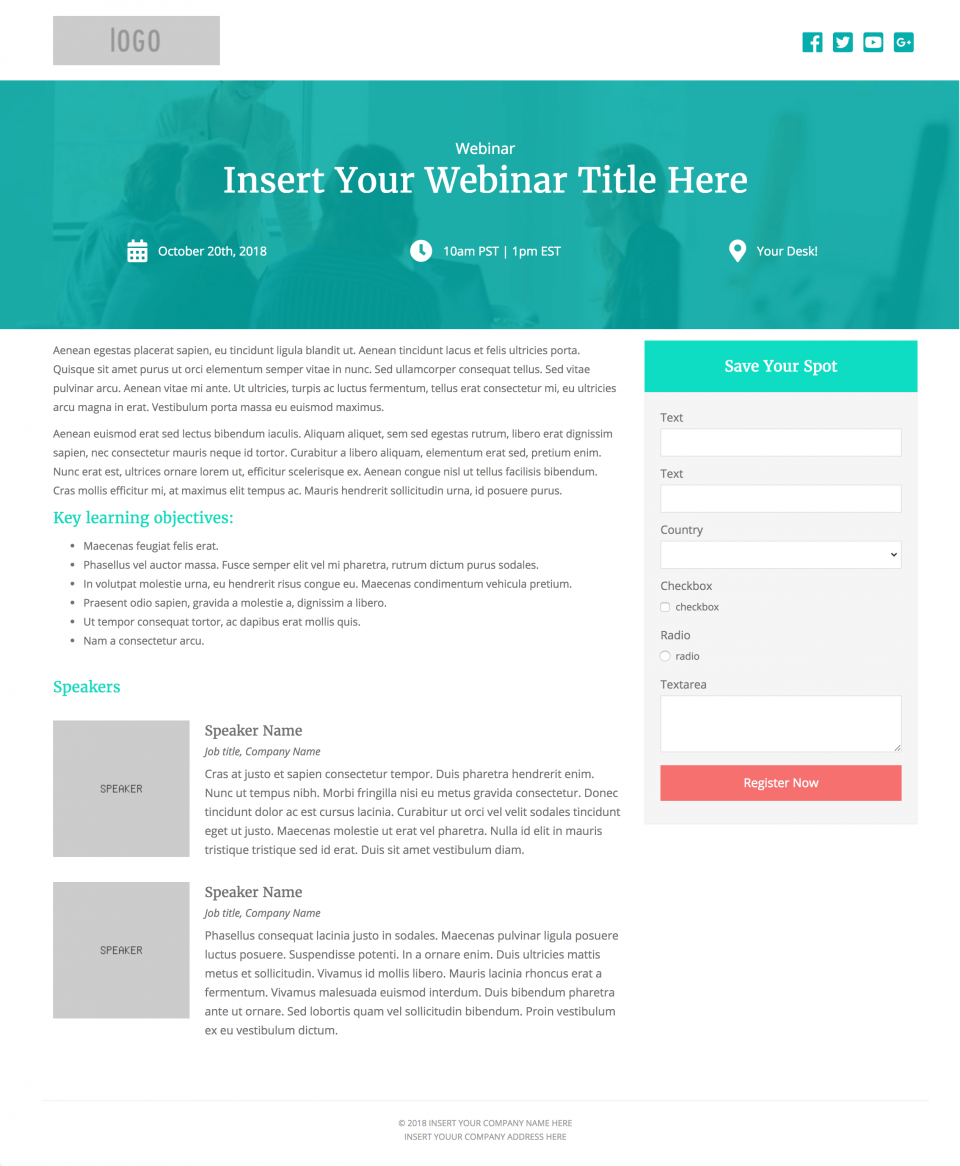
Create beautiful, responsive landing pages in Pardot by using one of these 2 free Pardot layout templates. These landing page templates are designed specifically for events such as webinars or trade shows, but they will work well with any landing page that contains a form.

Terms

These templates are free for both commercial and personal projects. No attribution is required, however, if you use them I would love to see how you customize them. Share your templates with me through Twitter, email, or in the comments below.

Preview the Templates

Template 1

View Demo

Template 2

View Demo

How to Use the Templates

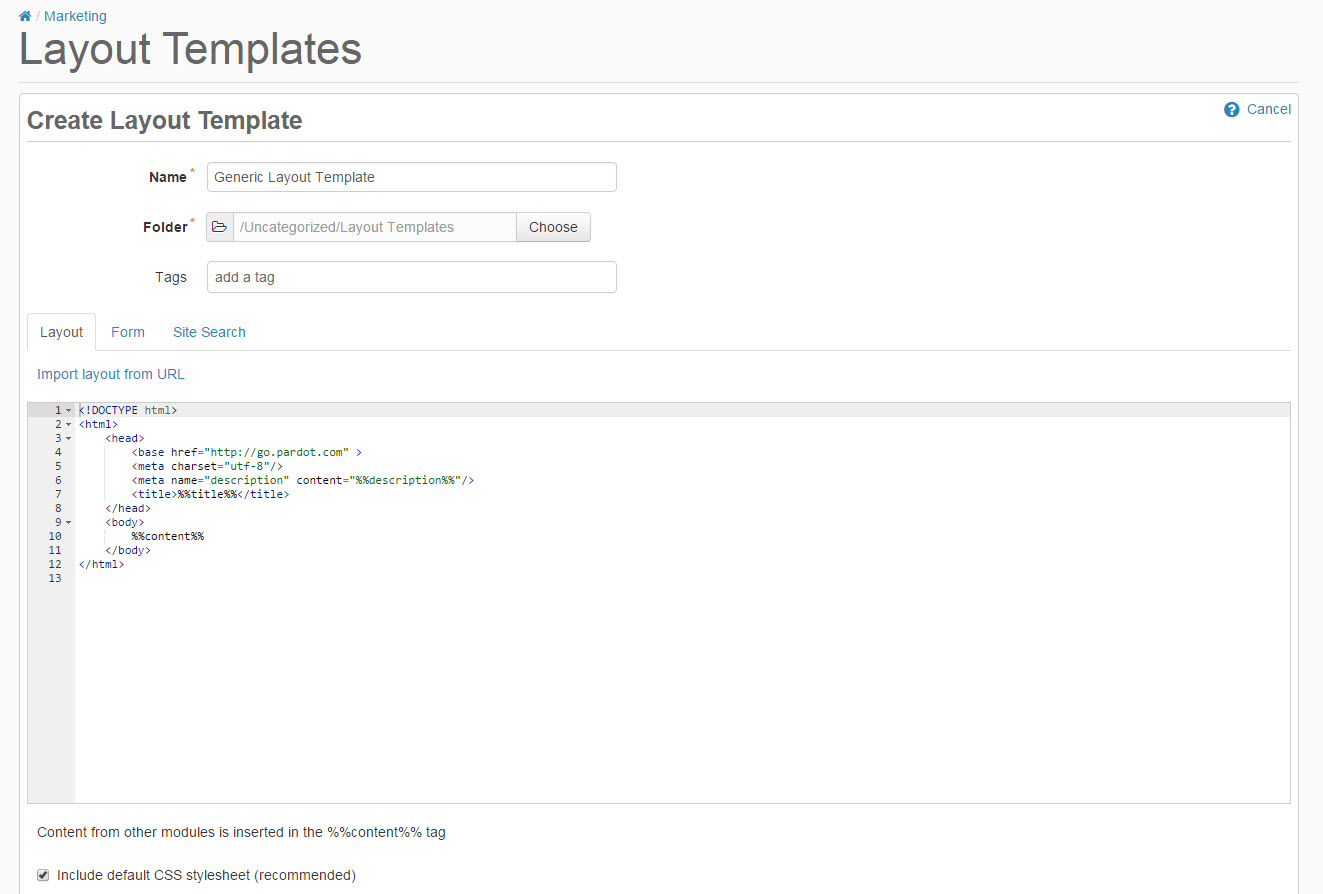
1. Create a new layout template in Pardot (Marketing > Landing Pages > Layout Template > Add Layout Template). Give your layout template a descriptive name and add your desired tags.

2. Copy the link to the template by clicking on one of the ‘copy link’ buttons below. This will copy the URL to your clipboard.

Template 1

Template 2

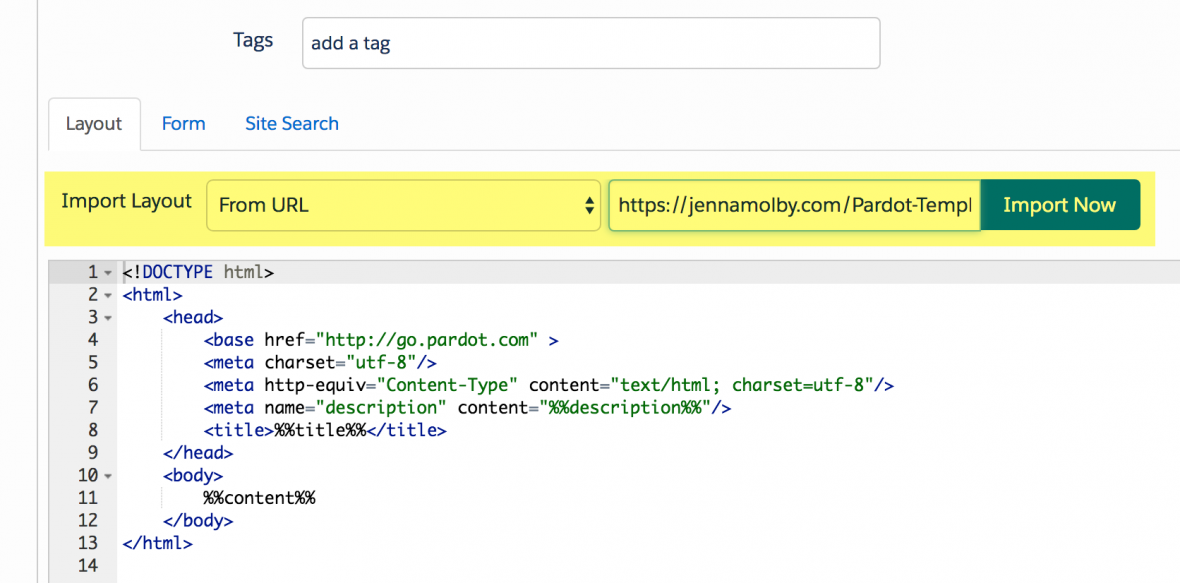
3. Navigate to the import layout drop down and select from URL. Paste the URL to the template into the text field and click import now.

Customizing Basics

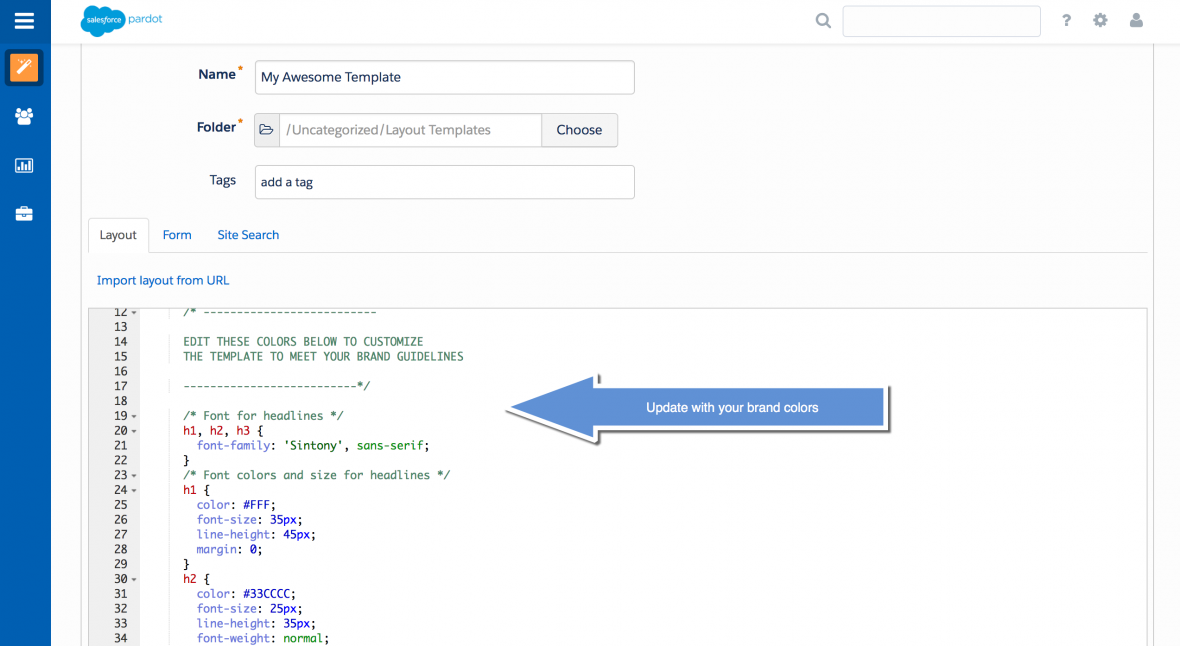
All templates use the Bootstrap Framework and use Font Awesome for the social media icons. The CSS is directly in the template (no external CSS files are referenced other than the Bootstrap and FontAwesome library). You can easily modify the template to meet your branding requirements by modifying the hex codes directly in the template which are commented clearly within the template file.

Questions?

Send me a tweet @jennamolby, or contact the Sercante team for help.
No more posts to show