
Category

Industry News

We all feel it. As humans engage with technology, innovation is moving at a breakneck pace. But as I’ve spent time researching the current landscape of the state of AI in enterprise, “breakneck” doesn’t even do it justice.

To put the acceleration in perspective: it took the telephone 75 years to reach 50 million people, and the internet seven years to reach that same milestone. Generative AI? It reached 100 million people in just two months (Forbes, UBS/World of Statistics).

This isn’t just a tech stat. It has a profound human impact. As innovation accelerates, so does the World Uncertainty Index. We are working with human beings who are feeling this exponential increase in uncertainty—the IMF reported that this index essentially doubled in 2025 alone. As growth services providers, we have a strategic opportunity to help them navigate this chaos.
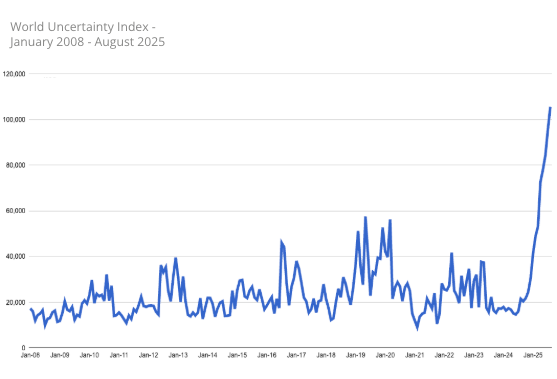
World Uncertainty Index - January 2008 - August 2025

(Source: World Uncertainty Index)

To get the highlights on how we approach creating a clear path for AI success amidst the chaos, continue reading below. To get the full playbook, download the report, The State of AI in Enterprise: Closing the Gap Between Investment and Impact.

The State of AI in Enterprise
Closing the Gap Between Investment and Impact
Why 95% of AI pilots fail to deliver results
The 4-pillar playbook to fix it
Download Report

The State of AI in Enterprise: A $30 Billion Problem

In 2025, aka the “year of the AI pilot”, companies spent over $30 billion on enterprise AI initiatives. Yet, 95% of those pilots failed to deliver measurable returns (Forbes, MIT’s Media Lab).

Why? Because the “silver bullet” mentality is still alive and well. Too many organizations are fluttering from one shiny object to the next without a focus on optimized workflows or incremental lift. As we move through 2026, our goal is to help go-to-market (GTM) teams stop the “SaaS sprawl” and get real value out of what they already have, while continuing to evolve with the latest data and AI capabilities.

Our Four Pillars for Success

1. Anchor on the Vision (Stop Building Stairways to Nowhere)

You wouldn’t build a spiral staircase in a luxury mansion without knowing where it’s supposed to connect. If you just start building, you risk creating a “beautiful stairway to nowhere.”

We avoid this by starting with a Vision Map. This isn’t just another document that collects digital dust, it’s a collaborative body of work that forces every stakeholder to define exactly how technology supports their specific success metrics. By “backcasting” from the end goal, we create a sequential roadmap that prioritizes business impact over guesswork.

Discover what's possible with a vision map for AI Learn More

2. Optimize the Existing Tech Stack (The Stable Foundation)

The average enterprise is sitting on over 600 platforms (Zylo, 2026 SaaS Management Index), and frankly, about 30% of that budget is being lit on fire due to redundant tools and “sloppy” automation (Gartner).

Before we layer AI on top, we have to fix the foundation. We use Maturity Mapping and Friction Analysis to find exactly where your tech is making work harder for your team instead of easier. AI needs clean data and efficient processes to thrive. If your data architecture is a mess, a bot isn’t going to save you.

3. Own the Success Story (Defending Your Budget)

In an era of high tech spend, leadership is going to ask the “million-dollar question”: Did this actually improve our business? If you can’t answer that with data, winning budget for the next cycle is a losing battle.

We ensure our clients are “data-ready” from day one. This means establishing hard baselines and benchmarks before a pilot even starts. We build the dashboards and reports that allow you to walk into the boardroom and prove the ROI of your efforts, moving technology and AI initiatives from a cost center to a revenue driver.

4. Don’t Forget the People (The Heart and Soul)

Technology doesn’t fail; people do. If your users find a tool frustrating or it feels like “noise,” they won’t adopt it.

Our Change Enablement methodology acknowledges the very real “change fatigue” your employees are feeling, addressing the human factor in AI adoption. We don’t do “one-size-fits-all” training. We identify your internal influencers and detractors and create curated, role-based communications. We provide the user guides and “real-world” scenario training that ensures the technology actually sticks, even as your team evolves.

Looking Ahead

The future of navigating tech and AI in enterprise to deliver real value isn’t about chasing the next buzzword. It’s about rolling up our sleeves and doing the hard work of strategy and execution. Let’s stop looking for the “one weird trick” and start building a foundation where AI and your people can actually move the needle.

If you’d like support with gaining real momentum with your AI and technology that delivers measurable results, reach out to the Sercante team. We partner with GTM teams daily to ground their initiatives in business outcomes and design and architect scalable AI and data solutions that achieve their goals.

In today’s modern era, where customer expectations are rising, new technology is coming out every day, and data is living among disparate systems, the key to achieving sustainable growth is proving to be about how your teams, data, and technology are connected and coordinated across the customer lifecycle. 

Why? Internal misalignment among people, processes, and technology creates leaky funnels, slows down pipeline, erodes customer trust, leads to churn, and decreases customer lifetime value. And when 80% of customers say that their experience is as important as the product itself (cropink.com, 2025), it’s clear that a negative customer journey will stunt your growth.

However, the challenge isn’t merely a “culture fix”. It takes strategic planning and coordinated execution to align your marketing, sales, and customer success teams across their processes, data, technology, and analytics through a customer-first lens.

To capture the state of this challenge, the 2025 Trilliad Sustainable Growth Study surveyed 350+ senior growth professionals and provides a playbook for how top performers structure teams, connect workflows, and measure what matters. Below are the 12 most critical statistics that should inform how you consider shaping your strategy for sustainable growth in today’s market.

The 2025 Trilliad Sustainable Growth Study

Growth is challenging, but it’s easier for integrated teams

Let’s level set, growth isn’t easy. When asked to assess the current sentiment around growth, go-to-market (GTM) leaders expressed that it’s becoming more challenging, but the ones who did find it to be easier were the ones who had integrated or joint leadership among their GTM teams.

  • 62% of leaders say growth is getting harder.
    • This feeling is widespread, but the study shows the problem isn’t just external. The single greatest internal roadblock is the lack of coordination between Marketing, Sales, and Customer Success, cited by 44% of respondents. Confirming that alignment is a key determining factor of your growth.
  • Organizations with “Integrated Leadership” are 3x more likely to find growth easier.
    • Integrated leadership means your Marketing, Sales, and CS functions are managed jointly around a single set of KPIs. Only 22% of organizations have adopted this high-performing model. If your leaders are held accountable to siloed metrics, rather than a shared goal, your teams will be driven toward optimizing in service of their own function, rather than in service of their customer, or to each other.

This is a mindset shift that needs to happen internally. Aligning around a shared vision of what the ideal customer experience should look like, around your revenue goals, and around the key metrics to be tracking to get there, becomes the north star that all three teams are marching toward to drive growth easier.

Each department may have its own alignment blind spots

Having cross-team alignment is critical to your growth, but a part of what might be standing in the way of getting aligned in the first place is that some teams may be feeling the disconnects more than others and therefore may not be seeing it as a priority.

  • 54% of Sales teams reported that they feel coordination pain, while only 33% of Customer Success (CS) teams feel the same.
    • This “pain gap” points directly to a process problem. The broken customer handoff occurs within your systems, and Sales, as the team closest to customer revenue expansion, is on the front line of that failure.
  • CS teams rate their organizational coordination significantly higher than other functions (8.33 vs. 7.36 for Sales).
    • This finding suggests a potential cross-team collaboration blind spot. CS teams may be achieving high internal cohesion, but this often happens in isolation from broader GTM processes. 

Marketing, sales, and customer success may all have their own internal thoughts on how well aligned they are cross-functionally, but this can lead to pain for the other departments, and worse, for your customer. Therefore, it’s critical when approaching alignment conversations to get all three teams in a room to think holistically about the customer experience and the shared metrics to track performance.

The customer isn’t thinking to themselves: Am I in a marketing experience, a sales, or a customer success experience? They just know that they’re having an experience with the brand as a whole. Therefore, if customers aren’t thinking about your organization in terms of siloed departments throughout their journey, you shouldn’t be either.

The alignment differentiator: going beyond planning

When it comes to aligning marketing, sales, and customer success, these teams may be strategically aligned, but the question is, are they actually executing it? The data shows that talking about alignment isn’t the same as doing it.

  • Only 27% of organizations say their teams are “fully integrated” across strategy, KPIs, planning, and execution, and 1 in 3 admit that their alignment stops at the planning phase.
    • Meaning the other 70%+ have gaps in how they are making alignment happen in their organization. Getting all your growth teams in a room to talk holistically about the customer journey and align on shared metrics is critical, but then there needs to be the next step of actually acting on the alignment strategy. Bringing this alignment into the technology that your GTM teams use daily is critical to going beyond the planning phase and achieving sustained collaboration.
  • Twice as many high-performing organizations as opposed to struggling ones (48% vs. 23%) are actually acting on their alignment strategy.
    • The key differentiator is action. High-performing organizations prioritize going beyond the planning phase and actively executing it. True integration is a unified process and a single source of truth built into your technology, not a recurring meeting.

Full customer journey data visibility is a must for seamless experiences

One of the ways to gauge your level of alignment is to approach the buying process through the eyes of your customer. If your customer is having to repeat themselves, waiting to be responded to, sharing their frustrations, or not being guided toward the best purchase, or their next best purchase, chances are there’s misalignment in your organization. A big piece of this is your data. Disconnected data prevents seamless experiences.

  • Only 12% of organizations rate their Customer Experience (CX) maturity as “Advanced.”
    • When your data is living in different systems and no one has a complete view of the customer journey, it can seem impossible to have an advanced CX—and with customers now rating the experience to be just as important as the product itself, teams can’t afford anything less than an advanced experience.
  • High-growth organizations are 50% more likely to use data across the “full customer journey.”
    • While 40% only use data for acquisition. The best teams are building their strategy around retention and expansion, not just new logos. To do this, marketing, sales, and customer success need visibility into the critical touchpoints happening throughout the entire customer journey.
      • How else is marketing supposed to know when to tee up a cross-sell campaign that triggers the customer to raise their hand and expand their relationship?
      • How else is sales and customer success supposed to know when an account is at risk and act proactively to ensure retention and reduce churn?

Sustainable growth requires moving past a “first-half” strategy to a truly “full journey” approach and this includes with your data how your technology is integrated to support this.

The path forward: aligning for sustainable growth

The data from the 2025 Trilliad Sustainable Growth Study confirms that alignment across marketing, sales, and customer success is critical to driving sustainable growth. However, this cannot stop at the planning phase, but needs to be executed in your technology and data strategy throughout the whole customer journey, not just at the acquisition stage. 

Prioritizing aligning your people, processes, and technology will deliver a smoother customer experience, leading to stronger brand loyalty, increased retention, and ultimately growth for your business.

If you’d like support with aligning your marketing, sales, and customer success teams across your customer lifecycle, reach out to the Sercante team. Our experts will listen to understand your goals, discover your friction points, and help develop a strategy as well as set up scalable processes for successful execution inside your data, technology, and analytics.

Several data breaches affecting a wide range of companies that use Salesforce have been reported in recent weeks. These incidents have impacted organizations across various sectors, including technology, retail, and insurance. The exposed data has varied by victim but has commonly included customer contact information, internal business records, and even sensitive data like API tokens and credentials.

Sercante clients can be assured that our systems have not been impacted by these recent attacks, however we want to make sure that Salesforce customers are aware of these incidents and are equipped to safeguard their instances.

How the Breaches Occurred

The recent breaches are not due to a vulnerability within the Salesforce Core platform itself. Instead, threat actors have used sophisticated social engineering and supply chain attacks to gain unauthorized access. 

One common method has been targeted voice phishing (vishing) campaigns. In these attacks, bad actors impersonated legitimate employees or IT support staff to trick victims into downloading a malicious replica of Data Loader and granting access to their Salesforce environments.

In a recent and widespread campaign, attackers leveraged compromised OAuth tokens for a third-party application, Salesloft Drift. By exploiting the integration between the app and Salesforce, the threat actors were able to export large volumes of data and credentials from numerous corporate Salesforce instances in what is called a “supply-chain attack”. . The attackers were able to steal “digital keys,” or authentication tokens, from the Drift app. They then used these stolen keys to access and steal data and credentials like passwords, API keys, and access tokens for other services that could be used to compromise other systems integrated with Salesforce.  

This highlights a critical risk: while the core platform may be secure, its connections to third-party apps can introduce vulnerabilities.

Risk to Salesforce Customers

The primary risk to Salesforce customers lies in the potential for stolen data to be used for further attacks. Customer contact information and other details can be weaponized in targeted and highly convincing phishing and social engineering campaigns to gain access to other corporate systems. The exposure of sensitive information like API tokens and credentials poses a significant threat, as it can be used to compromise connected systems, such as other cloud platforms or internal networks.

UPDATE: If you are a Drift customer – Salesloft has announced plans to shut down its Drift chatbot following their recent security breaches. This no doubt presents a challenge to your website engagement strategy.  The Sercante team is well-versed in the various conversational platforms that integrate seamlessly with Salesforce and can help you navigate this transition.

Recommended Actions for Protection

While Salesforce has taken steps to restrict the use of “uninstalled connected apps”, customers should take steps to protect themselves from similar threats:

  • Reauthenticate Drift Connections: Salesloft Drift customers will need to reauthenticate their Salesforce integration with Drift. It’s also advised that any and all authentication tokens stored in or connected to the Drift platform should be considered potentially compromised and update them immediately. 
  • Rotate all credentials and keys: Immediately change any passwords, API keys, and other access tokens that were stored in your Salesforce instance
  • Investigate your Salesforce account: Look for any unusual activity in your Salesforce login history, audit trails, and API access logs from early to mid-August 2025. Look for suspicious logins or data access patterns, particularly from the user account associated with the Drift integration.
  • Audit Third-Party Apps: Audit your connected apps to make sure they are secure, and make sure that all third-party apps connected to your Salesforce account have only the minimum permissions they need to do their job and revoke access for any app that is no longer in use.
  • Secure APIs and Integrations: When configuring new integrations, restrict API access by defining trusted IP ranges and ensuring that connected apps have the most restrictive scope possible.
  • Apply the Principle of Least Privilege: Limit user permissions to only what is necessary for their job role. Restrict administrative access and minimize the use of permissions like “Modify All Data.”
  • Be on high alert for phishing: Warn your employees to be extra cautious about any unexpected or unusual emails, phone calls, or messages. The attackers may use the stolen contact information to try and trick people into giving up more sensitive data.
  • Rinse & Repeat: Security isn’t a set it and forget it function. It takes constant and consistent vigilance to protect your systems and data. 

While the core Salesforce platform is secure, recent data breaches are a reminder that a company’s security is only as strong as its weakest link, which is often a third-party app or a human being. To stay safe, you have to be proactive. By using strong security practices, enforcing strict access rules, and training your team, you can drastically improve your defenses. Ultimately, keeping your data safe is a team effort—you, Salesforce, and all of your employees have a role to play.

If you’d like a guide to help you navigate how to optimize data protection in your organization with Salesforce, reach out to the Sercante team. Our experts can be your guide for impactful next steps.

It’s not a secret, so many growth teams, marketing, sales, and customer success, want to be using AI to streamline processes and elevate customer experiences, but when it comes to adoption, they’re a little stuck on how to get started with AI. 

After hearing a few of the experts at Sercante share their insights and having conversations with marketing leaders who have taken the plunge on applying AI to their initiatives, plus some first-hand experience with our own marketing, I was able to create this collection of tips for how to get started with AI. 

For those thinking, TLDR, let’s cut to the chase, I recommend downloading Sercante’s AI Starter Kit.

Tip 1: Pinpoint the pain

After attending a Connections 2025 Recap Webinar, Sercante’s Salesforce Product Director, Heather Rinke, advised the audience to get started with AI by writing down the biggest pain points they have today.

What is a manual, repetitive, and mundane task, sucking up your bandwidth?

Then consider, of those pain points, which is the lowest barrier to entry? What might have dependencies that might need a little more technology configuration, data setup, or the involvement of multiple departments?

Focus on the low lift, but quick-win initiatives first. Often, this would be an internal process that you could see how it performs, measure impact, and then scale from there.

[Watch On-Demand 2025 Connections Recap]

Tip 2: Do your research

As Laura Curtis, Senior CRM & Marketing Automation Strategist at Sercante said on the Connections Recap, “You don’t know what you don’t know.” 

In fact, 71.7% of non-adopters say “lack of understanding” is their biggest barrier to AI adoption (Influencer Marketing Hub AI in Marketing Benchmark Report). So if you’re feeling overwhelmed, you’re not alone. But it’s also fixable.

One way to start doing your research: Download the Sercante AI Starter Kit. It’s full of:

  • Real use case examples
  • Tips you can steal
  • Customer stories
  • Common pitfalls to avoid

Also, check out Rinke’s article, Five Tips for Getting Started with Agentforce.

Tip 3: Try out-of-the-box tools first

Don’t build the Death Star on day one.

There’s zero need to spin up a complex custom solution to get started. Many platforms—especially Salesforce Agentforce—already have out-of-the-box agents and AI functionality you can activate right now.

Use them.

Start small. Test how it works. See how it helps. Then decide if you want to scale or customize.

Tip 4: Get your data house in order (but don’t wait for perfect)

As Sercante VP of Growth & Alliances, Lauren Noonan,  shared on the Connections Recap, “Very few people buy a home and it’s perfect.”

You can start with AI even if your data isn’t a 10/10. But the better your data hygiene, the better your AI output.

Start by asking:

  • What data is critical for our first use case?
  • Where does it live?
  • What’s messy that could block us?

Then clean it as you go. Consider what other data optimizations you can make along the way to support the future AI initiatives on your roadmap. Like updating the kitchen before you renovate the whole house, and then mapping out what renovations make sense to do next.

Tip 5: Measure what matters

But what metrics are worth tracking to measure the impact of AI?

It depends on your use case, but as an example, Noonan shared the idea of using AI to generate a campaign brief instead doing it manually.

How long does it take you to do it manually versus using AI? 

Before getting started with using AI internally, get benchmarks for how long it typically takes your team do the processes you’ll be using AI for and then measure how long it takes after.

Now, the bigger question that Noonan posed is “What are you going to do with the time you get back and how will it impact the organization?”

If you’re trying to champion AI in your organization and get your leaders on board to support the initiative, answering questions like these can be a huge part of the business case—other than the increased efficiency, maximized output, and better customer experiences that’ll lead to growth.

Tip 6: Taking a crawl, walk, run approach to AI

As the CMO of Mogli, Christina Scarmeas, shared on my recent conversation with her on the Innovator Series about her team’s approach to using AI and Agentforce: 

“One of the biggest things we learned was, it’s okay to slow down and take a crawl, walk, run, approach to AI. Take a step back, look at the infrastructure that we need to deploy, and what we’re trying to do with these agents. Be okay with having a phased approach with expectations of how it’s going to be implemented, and if you put that infrastructure together and have a team that is dedicated to the strategy behind it, the results come fast.”

[Watch the Innovator Series]

This aligns with Rinke’s advice of starting with an initiative that is low-barrier-to-entry, perhaps something internal where you can point to productivity gains. 

A customer in the healthcare industry’s story of getting started with AI

For example, one of Sercante’s customers in the healthcare industry serving multiple practices implemented Service Agents with Salesforce Agentforce.

The Service Agents were set up to help the human agents query knowledge faster to support them in their calls to better serve patients and providers.

The solution has been rolled out to one practice area first, so the team can continue to learn and adapt the solution as needed before scaling to their other practice areas.

This is a great instance of a team starting small, with rolling out an AI-powered solution in one area of their business to then evaluate and see how it can be applied to the other areas of their business..

Tip 7: Build your AI roadmap

Once you’ve dipped your toe in, it’s time to zoom out.

As the Director of Marketing at Mogli, Evan Thomas shared on the Innovator Series:

“AI is the next evolution of technology and like all the tools that came before it, you have to have a plan. Just getting AI into your org isn’t going to fix it. You have to have a plan for that AI. What is it going to do for you? What is the process it is going to supplement or help your team focus on? What is the reason you’re doing it?”

Creating your AI Roadmap for quick wins and long-term success

Therefore, the next step is creating your plan or your AI roadmap. Identifying your pain points and use cases is the first step of this. The other piece of this is evaluating the customer lifecycle through the lens of the customer and identifying points of friction that could benefit from a solution to help your team scale and make the engagement seamless. However, as this can be overwhelming for teams to do, experts have started collaborating to put together resources for this.

Sercante’s session, AI Roadmap: The Strategy for Driving Growth with AI, is a great resource that includes insights from experts on how to approach creating a plan that:

  • identifies high-impact use cases
  • considers dependencies and how to address roadblocks
  • outlines key metrics to track for measuring success
  • clearly defines your path for quick wins and long-term success

Take advantage of training opportunities for creating your AI plan

Another option for getting started with creating your AI Roadmap is to get training. According to SurveyMonkey, 70% of employers don’t provide training on AI, even though 70% of marketers say it’s essential. Therefore, any time you can get training and advance your skills on how to approach AI or how to use it, take advantage!

One training offered is Sercante’s AI Workshop: Building your roadmap for real impact. This is the deep dive where the experts will guide you through creating your 30-60-90 day plan to help your organization get started with AI and scale for the future.

One last thing: Pick yourself in this era

CEO of Sercante, Andrea Tarrell, shared this sentiment during her opening keynote at MarDreamin’ Summit, encouraging the community to take action asking, “If not you, then who?”

This technology is at our fingertips, and it’s up to us to decide how we’re going to use it to streamline processes, meet customers where they are at scale, and create a truly seamless experience.

It’s time to get started with AI.

Product Note: Marketing Cloud Growth and Advanced are editions of Marketing Cloud Next and have also been referred to as Agentforce Marketing.

Marketing Cloud on Core (also known as Marketing Cloud Growth or Advanced Edition) can now track how marketing efforts contribute to revenue! With the Spring ‘25 release, Salesforce introduced Opportunity Influence, helping businesses connect marketing engagement to pipeline and revenue. But how does it work, and what’s the difference between Opportunity Influence and Campaign Influence? Let’s dive in!

Opportunity Influence vs. Campaign Influence: What’s the Real Deal?

Before we break down how to customize and report on Opportunity Influence, let’s clarify how it differs from Marketing Cloud Account Engagement’s Customizable Campaign Influence. While both models aim to connect marketing efforts to revenue, they function in distinct ways and serve different use cases. 

FeatureOpportunity InfluenceCampaign Influence
Data SourceMarketing Cloud Engagement (emails, ads, automation, etc.)Salesforce Campaign Membership
Influence ScopeTracks engagement across multiple touchpointsTracks Leads/Contacts who are Salesforce Campaign Members
IntegrationSyncs Marketing Cloud engagement data to Salesforce OpportunitiesWorks within Salesforce CRM using Campaigns and Opportunities
Attribution ModelsMulti-touch attribution (first-touch, last-touch)Campaign Influence and Customized Models
Reporting & InsightsMeasures marketing-driven revenue impactMeasure campaign-driven revenue impact

🚨 Important Note for Account Engagement Users 🚨

You cannot use Opportunity Influence alongside Customizable Campaign Influence. If your team already relies on Account Engagement’s Campaign Influence Models, keep this in mind when deciding which model to use.

Additionally, Account Engagement users cannot activate Opportunity Influence as it does not currently integrate with Account Engagement’s Campaign Influence model. If your organization currently tracks marketing-driven revenue using Campaign Influence reports, you’ll need to continue using that model. However, if you’re considering a shift to Marketing Cloud on Core, Opportunity Influence could offer enhanced multi-touch attribution and engagement tracking.

Battle of Influences: Campaign vs. Opportunity – Which One Wins?

Let’s say you’re running a B2B software company and you’ve executed multiple marketing campaigns using a variety of platforms, including ads, email, an e-book, and a webinar, to engage your prospects.

  • Campaign Influence: A prospect attends the webinar, clicks on an email, and downloads the e-book before being transitioned to sales as a marketing-qualified lead. These interactions are recorded under a Salesforce Campaign and can be manually associated with the Opportunity when created based on the Opportunity Contact Role and Campaign Member. You can assign influence weight based on your customized rules.
  • Opportunity Influence: Marketing Cloud on Core automatically tracks all marketing engagement, including the ad view and click, webinar attendance, and e-book download. These touchpoints are automatically associated to attribute influence based on the predefined model and associated to the Opportunity upon creation.

If Campaign Influence were a fine-dining experience, it would be a chef-curated meal—meticulously crafted with manual customization to fit your exact taste. You decide which interactions get the most credit, but it requires hands-on effort. On the other hand, Opportunity Influence is like an all-you-can-eat buffet with an expert chef behind the scenes. It automatically dishes out credit across touchpoints, giving you a full spread of marketing influence with minimal effort. If you love precision and control, Campaign Influence is for you. But if you want a seamless, automated view of your entire marketing impact, Opportunity Influence takes the crown.

How to Set Up Opportunity Influence

Setting up Opportunity Influence requires configuration in Sales Cloud to ensure marketing engagement is properly attributed to revenue-generating activities. To fully connect marketing efforts with sales outcomes, ensure that contacts engaging with marketing campaigns are linked to Opportunities. This allows for accurate tracking of marketing interactions that influence deals.

Enabling Opportunity Influence

  1. Navigate to Salesforce Setup > Opportunity Influence
  2. Enable Opportunity Influence
  3. Select an Attribution Model
    • First-Touch: Gives full credit to the first marketing engagement that led to the opportunity. It’s ideal for understanding which top-of-funnel efforts drive initial interest.
    • Last-Touch: Assigns full credit to the last marketing interaction before the opportunity was created. It helps measure the final push that converted a lead into an opportunity.

Going Beyond Activation

Customization is key to maximizing Opportunity Influence. Marketers should align influence models with their sales cycle, ensuring critical marketing touchpoints, such as email engagements, paid ads, and automation journeys, are correctly captured. Because Opportunity Influence consumes Data Credits, it’s essential to be strategic when enabling multiple models to avoid unnecessary credit usage.

Making Sense of Your Data: Reporting on Opportunity Influence

Once Opportunity Influence is enabled and tracking data, you can start reporting on marketing’s impact. The key to unlocking valuable insights is leveraging Salesforce’s Reports & Dashboards to tell a clear story about how marketing drives revenue.

Your Treasure Map to Salesforce Reports & Dashboards

  • Head over to Salesforce Reports and search for Opportunity Influence Reports. This is your go-to hub for seeing which marketing touchpoints are helping close deals.
  • Get specific with your insights! Use filters to refine reports by timeframe, campaign, or opportunity. Want to know which emails led to the most revenue? Adjust your filters to see the impact.
  • Create Salesforce Dashboards to visualize Opportunity Influence. Need a quick snapshot for your leadership team? Build an easy-to-read chart that shows exactly how marketing is fueling revenue.

The Ultimate Guide to Opportunity Influence Report Types

Salesforce provides several built-in report types to help you analyze how marketing efforts contribute to revenue. Here are the key report types you can use:

  • Opportunity Influence Summary Report – This high-level report shows how marketing engagements are influencing revenue across all opportunities. Use it to track overall marketing impact.
  • Opportunity Influence Detail Report – A more granular report that breaks down individual touchpoints per opportunity, allowing you to analyze which specific marketing interactions played a role in closing deals.
  • Influence Attribution Model Comparison Chart – Compare first-touch and last-touch models side by side to see which one provides the best insights for your marketing strategy.
  • Marketing Touchpoint Analysis Report – Identifies which marketing channels (email, ads, website visits, etc.) are contributing the most to opportunity creation and pipeline growth.

By setting up and analyzing Opportunity Influence reports, marketing teams can gain deeper insights into which touchpoints matter most, optimize their strategies accordingly, and confidently demonstrate their return on investment.

Why Opportunity Influence is a Game-Changer

Opportunity Influence is a must-have tool for any marketing team looking to measure true revenue impact. No more guessing which emails, ads, or landing pages are driving pipeline – Opportunity Influence connects the dots, giving you a clear picture of how marketing fuels business growth. With built-in attribution models, you can customize insights based on what matters most to your strategy.

Whether you’re aiming to prove marketing ROI, optimize your campaigns, or align better with sales, Opportunity Influence provides automated, data-driven attribution that simplifies reporting and enhances decision-making. If you want better visibility into marketing’s role in revenue generation, this feature is your new best friend!

💡Next Steps:

  1. Check your org to see if the new update is available.
  2. Test Opportunity Influence tracking before rolling it out company-wide.
  3. Monitor data service credit usage if you’re using multiple attribution models.

📣 Want to learn more? Check out the full Spring ‘25 release highlights or dive into the official release notes.

🚀 What are your thoughts on Opportunity Influence? Drop a comment below, and let’s discuss!

Product Note: Marketing Cloud Growth and Advanced are editions of Marketing Cloud Next and have also been referred to as Agentforce Marketing.

Since the announcement of Marketing Cloud Growth Edition on February 20th, we’ve been digging into the features of this new product as well as listening closely to the community’s questions about Marketing Cloud (Growth and Advanced Edition). We’ve compiled the most common questions from Salesforce webinars, Slack communities, our internal team, and our clients to get all your Marketing Cloud questions answered in one place. 

NOTE: This blog post was updated in May 2025 to reflect new release features and product updates.

Answers to all of your Marketing Cloud questions

Here’s a list of the most common questions we’ve seen.

Wait, what is the “official” name

So, this product was originally launched as “Marketing Cloud Growth Edition”. A few months later Advanced Edition was released and the product evolved to “Marketing Cloud Growth or Advanced Edition”. However, this was later shortened to just “Marketing Cloud”.  Now I know “Marketing Cloud” means “Marketing Cloud Engagement” to a large portion of the community so I also refer to this tool as “Marketing Cloud on Core” so no one assumes I mean “Engagement”. 

What is Marketing Cloud (on Core)?

Marketing Cloud is a new marketing automation platform from Salesforce. Marketing Cloud is built on the Salesforce Platform (aka “on Core”) and allows you to build multi-channel campaigns with Data Cloud, personalize marketing assets with Experience Cloud, and automate journeys with Flow. Marketing Cloud also includes Einstein and Agentforce capabilities throughout the platform as well as out-of-the-box content approval processes. 

Is Marketing Cloud Account Engagement and/or Engagement being retired?

This is the most common question we’ve heard so far and the resounding answer is No, Engagement and Account Engagement are not being retired. Marketing Cloud is another option for organizations that want to bring their marketing operations into Salesforce. Engagement and Account Engagement will continue to have their own robust product roadmaps. 

Which Salesforce Editions does Marketing Cloud work with?

Currently, Marketing Cloud works with Salesforce Enterprise Edition (EE) and Unlimited Edition (UE).

Is this the direction the Marketing Cloud Platform is going? All bundled within Core?

Yes, building Marketing Cloud’s foundation on core allows Marketers to get full access to customer data across the CRM and other clouds connected to the Salesforce platform. Breaking down data silos and uniting your data on one platform also allows Marketers to better leverage Einstein’s AI functionality as well as personalize every step of the customer journey. 

Can Marketing Cloud be purchased without Data Cloud?

Marketing Cloud requires Data Cloud. If you do not yet have Data Cloud, check if you’re eligible for the Free Data Cloud SKU or Salesforce Foundations

What is included out of the box with Marketing Cloud?

This is subject to change as the platform changes and grows but, as of May 2025 Growth Edition includes: 

See our previous blog post for more information on the credit consumption model of Marketing Cloud. 

Does Marketing Cloud consume super messages for email and SMS?

Marketing Cloud has different entitlements, emails and SMS do not consume super messages.

Do users need Salesforce licenses to access Marketing Cloud?

Currently users do need Salesforce licenses to access Marketing Cloud, but support for Identity Licenses is expected in the Summer ‘25 release (June).

Can clients with their own Data Warehouses use Marketing Cloud? 

Yes, Marketing Cloud is built on top of Data Cloud, which means they can connect to your data wherever it lives.

What is the setup of Marketing Cloud like? 

Setup for Marketing Cloud is being streamlined with each new release. Users with the Marketing Cloud Admin permission set can access the setup assistant for easier implementation of Marketing Cloud. Use the setup assistant to install or update all the required data marketing kits.

Is the intention to have customers self implement Marketing Cloud and do everything themselves?

The intention is to reduce the amount of energy spent on behalf of the customer to get to where they need consultants. Simply put, Marketing Cloud has very good defaults and a streamlined setup process, but there is still value to be added by consultants. If you’d like support setting up or optimizing Marketing Cloud, send us a message.

Can you configure marketing asset branding/brand standards within Marketing Cloud?

Yes! Users can create Brand Guidelines within Marketing Cloud that allow you to specify brand colors, typography, button styling, margins, and borders that can be applied to your marketing assets. If your brand standards are later updated, any marketing assets using that brand will also be updated. You can have multiple brand guidelines and also set a default Brand for your CMS Workspace so any new assets that are created for Marketing Cloud will be automatically branded. 

Does Marketing Cloud use a different Flow than the Salesforce Admin Flow?

Marketing Cloud uses the same Flow that users would have access to when building a backend, or admin, Flow. However, the elements and processes that the Marketing Cloud Flow has access to are limited by permission sets. Out of the box, the Marketing Cloud Flow is tailored elements and actions that focus on automating Marketing Campaigns and Marketing processes. Additional Permissions can be added or removed to custom tailor what users can do within the Marketing Cloud Flow. In short, Salesforce Admins are not giving Marketers full Flow functionality by granting them access to the Marketing Cloud Flow Builder.

What scoring features are included with Marketing Cloud?

Marketing Cloud has both People and Account Scoring. 

  • People Scoring
    • Engagement Score: Adds or removes points based on how engaged a person is with your Marketing initiatives.
    • Fit Score:  Similar to Account Engagement Grading, Fit Scoring tells Marketing and Sales how closely the prospect and their company aligns with the ideal client persona.
  • Account Scoring
    • Engagement Score: Aggregates how engaged Contacts associated with the Account are with your Marketing initiatives.
    • Fit Scoring: How closely the Account matches your ideal customer.
    • Intent Score: Optional AI driven scoring that measure how likely an Account is to make a purchase.  

What Einstein features are included with Marketing Cloud?

This is another area that is growing and changing with each release, but at of May 2025, Marketing Cloud includes:

  • Agentforce: Assists in building campaign briefs and campaign assets as well as generates copy for subject lines, preheaders, and body copy.
  • Einstein Metrics Guard: Uses predictive AI to filter bot activity from your org’s engagement metrics
  • Einstein Send Time Optimization: Send messages to your customers when they’re most likely to engage.
  • Einstein Segment Creation: Assists in building Data Cloud segments from natural language prompts.

Three additional Einstein features are available in Advanced Edition:

  • Campaign Designer (currently Beta): Assists in crafting campaign flows based on campaign objectives.
  • Einstein Engagement Frequency: Uses Predictive AI to determine how frequently to contact customers and improve the likelihood of engagement. 
  • Einstein Engagement Scoring: Uses predictive AI to assign individual contact-level scores and determine the most efficient way to message recipients to increase customer engagement.

Does Marketing Cloud include Campaign Influence models?

Marketing Cloud has Opportunity Influence rather than Campaign Influence.  Opportunity Influence assists marketers in identifying which campaigns were impactful for opportunities but relies on engagement rather than Campaign membership. 

Can Marketing Cloud personalize messages based upon the individual record? 

Yes, any fields connected to the Unified Individual can be used for personalization, this allows Marketers to even pull in data from other objects for cross object personalization. Dynamic Content is also available for use in email subject lines, email preheaders, and email components. 

Variation Targeting Rule screenshot

Does Data Cloud segment creation mean that SQL Queries will become a thing of the past?

Eventually, Salesforce is moving in the direction of clicks-not-code. Marketing Cloud includes prompts to help marketers build the appropriate filters in the segmentation builder, but you can also start from scratch within the builder. 

Will SMS have the same process around provisioning and approvals as MC Engagement?

There are two SMS code options available in Marketing Cloud, Short Code and Long Code. The short code option follows the same provisioning process that exists today for Marketing Cloud Engagement today. Check out our blog post for more information on the Short vs Long code and the provisioning processes.

Does Marketing Cloud include A/B Testing capabilities?

Yes! Except it is called Path Experiment and it does even more than simple A/B Testing. Take a look at our blog post on Marketing Cloud Advanced Edition for more info on this feature. 

How does Marketing Cloud handle pre-lead, unassigned records?

Salesforce introduced a new CRM Object for Prospects as part of the Spring ‘26 release. This new object can be used to store pre-lead records in CRM, similar to how Account Engagement keeps Prospects within its system and only sends Prospects to Salesforce when they are Sales/Lead ready. 

How can Account Engagement and Engagement Customers start using Marketing Cloud?

Account Engagement Customers get access to Marketing Cloud as part of their current contract. Check out our blog post for more details

Marketing Cloud Engagement customers will get a similar provisioning path soon (Safe Harbor!)

How has Sercante been involved in the launch of Marketing Cloud? 

Members of the Sercante team have been involved with Marketing Cloud since the pilot in 2023. We were also members of the Pioneer Program at launch in 2024 and have over 30 customers using Marketing Cloud today. We were also the first partner to be provisioned a Marketing Cloud Growth Edition Partner Org so we could provide feedback, documentation help, and FAQs to the development team. 

Learn more about Marketing Cloud Growth Edition

Want to learn more about Marketing Cloud Growth Edition? Check out some of our previous blog posts and subscribe to The Spot so you stay in the loop as we dive deeper into this new product.

Send Sercante a message if you still have questions that aren’t on the Marketing Cloud Growth Edition FAQ list.

No more posts to show