Category

Getting Started

If you’re exploring Agentforce or Data Cloud, but feel unsure where to start—or how to ensure real outcomes—you’re not alone. In our recent webinar, “A No-Nonsense Guide to Launching Agentforce & Data Cloud,” we heard from marketing, RevOps pros, admins, and IT professionals across industries who are in the same boat.

The good news? You don’t need to launch a massive initiative to get started. But you do need a strategy. To help guide yours, I’ve shared the key concepts from the webinar where I spoke alongside Sercante’s VP of Growth & Alliances, Lauren Noonan, and Data Cloud Practice Director, Austin Frink, for our proven approach to creating a strategy for Agentforce & Data Cloud that sets you up for success.

A No-Nonsense Guide to Launching Agentforce and Data Cloud
Watch On Demand

Why having a strategy for Agentforce and Data Cloud is imperative

Implementing Agentforce or Data Cloud without a clearly defined strategy is like building a house without blueprints. According to RAND, over 80% of AI initiatives fail—not because the technology doesn’t work, but because teams skip over the foundational work of aligning their tools to real problems, realistic goals, and existing infrastructure.

What we’ve often experienced is that implementing these tools without a clear strategy often exposes existing challenges:

  • Data silos become more obvious.
  • Misaligned processes are harder to ignore.
  • Adoption falters because people don’t see the value.

When we’ve asked organizations about their vision or what they want to accomplish, we’ve heard many who say, “I want an agent” or “I want a unified profile.” While those are great aspirations, they are just starting points. A successful implementation requires more than a desire for automation or consolidated data. It requires a full vision of the why, the what, and the who.

Setting an impactful vision

Instead of focusing on the tool, focus on the challenge, the opportunity, and the people involved.

Ask yourself:

  • Why do we want an agent or a unified profile?
  • What business challenge are we solving?
  • What do we want the agent to actually do? / What will the data be used for?
  • How will the data or AI support better decisions?
  • Who will benefit, and how?

When considering these questions, be specific. If your starting point is, we want to have better segmentation or to deliver more personalized experiences, dig deeper. What would you like to segment by? Are there specific segments you’re focusing on for a business need? What part of the customer experience would you like to personalize more? Uncovering the more specific needs that lie within will help shape a more actionable vision.

Other questions you can consider for getting started to identify your use cases are:

  • Where are the friction points in your customer journey?
  • What repetitive tasks are your teams spending time on?
  • What segmentation or personalization capabilities are limited by your current data?

Use this framework to build your vision statement. Your vision should capture:

  • WHAT: The capabilities you’re adding
  • WHY: The impact those capabilities will have
  • WHO: The people in your organization who will benefit

This vision becomes your team’s north star. As you outline the use cases for Agentforce and Data Cloud, you will also need to define how they will impact the business.

Anchoring your Agentforce & Data Cloud use cases to business value

Lauren Noonan emphasized during the webinar, that this step is often missed, but it’s key to alignment. The use cases that drive meaningful business value are the ones that sustain momentum and stakeholder support.

To help frame your use cases in terms of the level of impact, consider impact levels such as the following:

  • High: Critical to strategic goals or revenue
  • Medium: Important contributor to organizational priorities
  • Low: Helpful improvements, but not game-changing

For example, one Agentforce use case that would be considered higher impact would be streamlining lead qualification and routing.

Use Case: AI-Powered Lead Qualification & Routing Agent
Scenario: Deploy an Agentforce assistant that engages with inbound demo requests, asks qualifying questions (budget, timeline, decision-maker status), and routes hot leads to the correct rep in real-time based on region, product, or account type.
Why It’s High Value:

  • Directly impacts pipeline acceleration and conversion rates
  • Reduces lead response time, which is closely tied to revenue performance
  • Supports strategic goals around improving sales velocity and rep productivity
  • Teams Impacted: Marketing Ops, Sales Development, Revenue Leadership, Prospects, Customers

Notice how the above framing points to impacts such as increased pipeline velocity and speed to lead which leads to higher conversion rates, all tied to revenue.

Medium to low-impact Agentforce use cases might include ones that result in internal efficiency gains, such as streamlining campaign brief creation or surfacing answers to FAQs faster using articles from your knowledge base. However, these lower-impact use cases are often a low-risk and lower level of effort to deploy, so they can be a great starting point as small efficiency gains do add up and free up your team’s time to focus on higher-impact initiatives. Continue to weigh this as you frame your roadmap of priorities.

The other detail to call out from the lead qualification and routing Agentforce example is that it outlined the people who would be impacted. Which is often overlooked, but absolutely necessary when creating your strategy.

Considering the level of impact on your people

Agentforce and Data Cloud aren’t just technical implementations—they’re changes to how people work. According to CIO Dive, 42% of businesses have scrapped most of their AI initiatives in the last year, where studies have shown that the teams that see success are ones that are customizing their use cases and prioritizing them according to their needs and impact. As Lauren shared in her previous article on how to create your AI roadmap, “your unique AI path is the only one that matters.”

You have a unique set of people at your organization with different skill levels, needs, and talents. Not considering a change management plan for how your Agentforce and Data Cloud rollout will be applied will often lead to low adoption rates, causing a low level of success and your initiative to fizzle out.

That’s why it’s so important to assess:

  • How will workflows shift?
  • What training or enablement will be needed?
  • How disruptive will this be to current roles?

Then classify the level of impact on your people:

  • High: Many roles and processes change significantly
  • Medium: Moderate impact with some changes to roles or responsibilities
  • Low: Minimal disruption to current workflows

Evaluating the level of business value alongside the level of impact on your people will help determine which use cases you might want to prioritize first based on the level of effort to deploy.

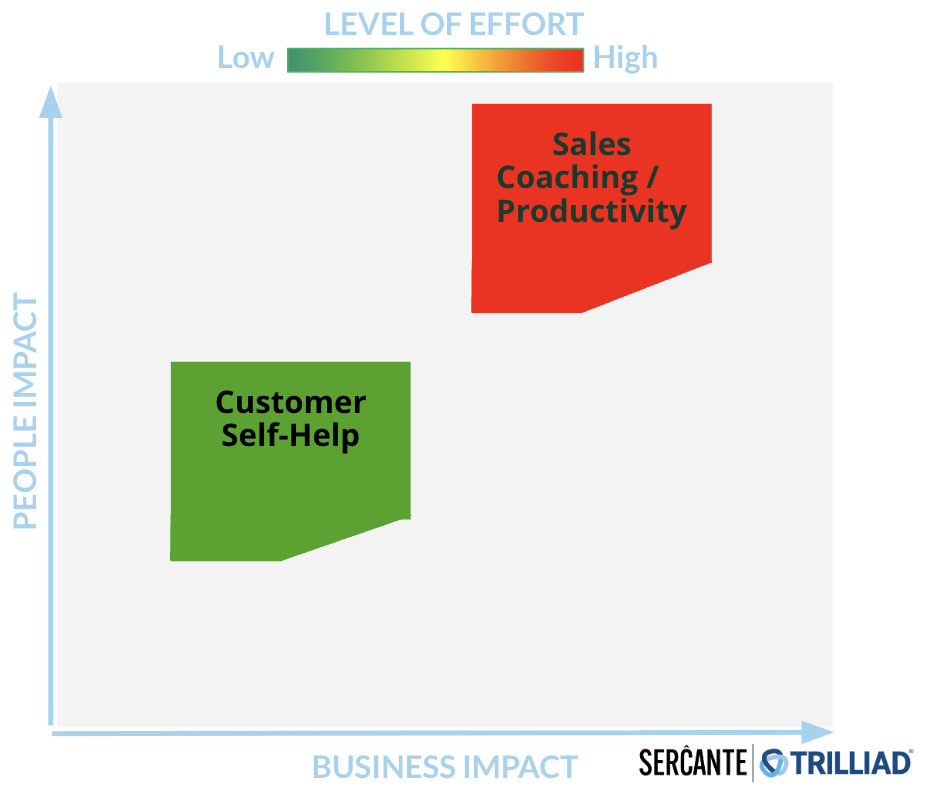
During the webinar, we showed the chart below as a visualization of the ideal intersection point, which is medium-to-high business impact and low-to-medium people impact, with a lower level of effort to deploy.

A chart that shows the business impact on the x-axis and the people impact on the y-axis with the level of of effort ranging from low to high above. On the chart, Customer Self-Help is plotted on the low to medium business impact level and medium people impact with a lower level of effort. Sales coaching/productivity is mapped at higher level of effort, business impact and people impact.

Take your considerations of the people impact a step further with this on-demand MarDreamin’ Session: Empowering Your People: Nailing Change Enablement for AI Rollouts by Director of Change Enablement at Sercante, Debra Engles. 

The other aspect of your strategy that needs to be considered is the dependencies involved with deploying your use case for Agentforce and Data Cloud.

Understanding your dependencies

As Austin Frink and I emphasized in the webinar: implementation depends on more than just ideas. You need to understand the full picture of what it’ll take to make your use case a reality. That full picture includes the infrastructure that you have, including:

  • Technology: What do you already have? Where are the gaps?
  • Data: Do you have the right data sources? Are they integrated? Is the quality strong enough?
  • People & process: Who owns what? Where will the lift be felt most?

Dependencies aren’t necessarily roadblocks, but more factors that will help you to decide where you might want to start when it comes to implementing technology like Agentforce and Data Cloud.

The last piece to consider when defining your strategy is the metrics you’ll use to measure the impact of your Agentforce and Data Cloud initiative.

Defining your metrics for measurement

Your metrics will be used to help prove the business values that you defined earlier. For every use case, identify one or two key success metrics. Before you start your Agentforce and Data Cloud project, measure where you are right now to get a baseline, so that you can benchmark later on and compare your level of improvement.

Some ideas:

  • Customer satisfaction
  • Campaign performance
  • Churn rate

Ideas of metrics that could be associated with our Agentforce use case example of lead qualification and routing, would be speed to lead, conversion rate, and sales cycle time. If your use case will focus more on efficiency gains, consider the amount of time it takes your team to perform the task without the agent implemented, and then measure the hours of time that are saved as a result.

Pro tip: When bringing your strategy to stakeholders, share what your team will accomplish with the time gained back. This goes beyond just thinking through the metrics, and it will be key when articulating the full picture of the impact that implementing Agentforce and Data Cloud can have on your business.

Identifying a success metric is one part of it, you also want to make sure you have defined how that metric will be tracked and validated. For example, will it come from Salesforce, Data Cloud or an external system? Consider, are you capturing the fields that are needed for that metric today?

Also, don’t forget to capture a pre-project snapshot of your metric. Without a clean, documented baseline gathered before any implementation, you lose the ability to accurately show ROI.

Common misconception: you don’t need to start with a massive rollout

One of the most common misconceptions when teams are thinking about implementing Agentforce and Data Cloud is that it requires a massive rollout and overhaul. However, this is not the case.

You don’t have to ingest all your data to use Data Cloud. You don’t need to first implement Agentforce into every aspect of your business.

Start with:

  • 1–2 use cases
  • Lower people impact
  • Medium-to-high business value

Clearly defining your use cases will inform you of the data that you’ll need, which will then point to the data sources required. The use case will then point to the agent that you’ll need and the teams or subsect of a department that will be impacted. 

As the CMO of Mogli, Christina Scarmeas, shared during her conversation with us about how her team approached implementing Agentforce, “It’s okay to take a crawl, walk, run approach.”

Using AI and Agentforce to Make it Easier to Text on Salesforce
Watch On Demand

Which is why Sercante service offerings such as an Agentforce Quickstart or Data Cloud In-A-Box are so helpful for teams. They enable you to start small, accelerate time-to-value, and showcase the impact, to then scale the initiative to other areas of the business.

Let’s get started with your approach to Agentforce and Data Cloud

To recap, a successful approach to Agentforce and Data Cloud includes:

  • A clear, problem-driven vision
  • Use cases tied to real business value
  • Understanding the people impact
  • Mapping your technology and data dependencies
  • Identifying the metrics that will be used to measure impact

Having this all defined will help to serve as your team’s north star to guide a successful approach to Agentforce and Data Cloud.

Now I know how it can be overwhelming to think through all of this, especially with multiple department goals and initiatives, so if you’d like support with creating your Agentforce and Data Cloud strategy, reach out to the Sercante team. We’ll listen to understand your goals, challenges, and help bridge the gap between your vision and reality, for an impactful Agentforce and Data Cloud rollout.
Create Your Roadmap with the Experts
Contact Us

Product Note: Marketing Cloud Growth and Advanced are editions of Marketing Cloud Next and have also been referred to as Agentforce Marketing.

Marketing Cloud Next offers an intuitive, drag-and-drop email builder packed with smart features that streamline the email creation process. In this blog post, we’ll walk through the key features and functionality of the Email Builder—everything from layout and design features to personalization and testing options—so you can confidently build, preview, and send your first email.

Before we dive into using the builder, let’s have a quick overview of the builder and its different sections:

A screenshot of the Marketing Cloud Next Email Builder with the components labeled 1 - 5. 1: View Mode, 2: Components Panel, 3: Row, 4: Canvas, and 5: Property Panel.
  1. View Mode – Use this to switch between Desktop and Mobile view. You can also show or hide the HTML code in this section.
  2. Components Panel – This section displays the available components for the email. This section will include standard components as well as layout components and, after the Winter ‘26 release, any reusable content blocks created in your org.
  3. Row – All Components are placed in rows. These are the editable sections of your email.
  4. Canvas – Add components by dragging and dropping them onto the canvas. 
  5. Property Panel – Displays what can be changed and customized for the currently selected row. When no row is selected, this panel allows you to select a brand, specify your email details, and set your preheader and subject line. You can also specify styling for the email as a whole or configure your email’s data source.

Customizing a Component

Let’s dive into the features and options when building a component. We’ll drag-and-drop a Paragraph component into our email for this section. 

A screenshot of the Paragraph component in the Marketing Cloud Next Email Builder.

The editing options vary depending on which component you have selected, but the Paragraph component shows a good variety of the options. Let’s talk about these from Left to Right

  1. Container Component – this helps you toggle between the component and the container the component resides in. For example, if you wanted to change the background for the container entirely, select the Container Component to switch from the Paragraph component to its container. The Property panel on the right will change as you toggle between these two items. 
  2. Component Type – the next section will just display which type of component you are currently working with (button, divider, heading, etc.)
  3. Draft with Agentforce (aka Agentforce Sparkles [insert jazz hands here]) – this option allows you to use Agentforce to write or revise your email content. If a Brand is associated with your email, Agentforce will even use the Brand Identity and Tone specified in the brand when generating content. Agentforce also gives you the option to revise the content by your key message or target audience (which is defined in the Campaign Brief), change the tone of the content, or increase/decrease the content length, all within the Agentforce window.
A screenshot of all the actions available when drafting with Agentforce.
  1. Formatting Components – The next couple of components are pretty universal to WYSIWYG editors, so we’ll cover these quickly. We have:
    1. Indent
    2. Bold
    3. Italize
    4. Underline
    5. Strikethrough
    6. Link
  2. Merge Fields – Here you can populate required information, like your organization’s address or email preference center link, or insert fields from your Data Graph to personalize the email to the recipient. If your team has merge fields they want to use again and again, create and save a Reusable Expression in your CMS for quick access here. 
  3. The final three icons all deal with things you can DO with the component, from left to right, we have
    1. Drag
    2. Duplicate
    3. Delete

Styling your Email

If you’ve set a default Brand for your CMS workspace, your email will be autobranded before you even start building. However, if you need to apply or switch your brand, you can do so at any time from the Property Panel. 

A screenshot of the Brand Settings in the Property Panel of the Marketing Cloud Next Email Builder.

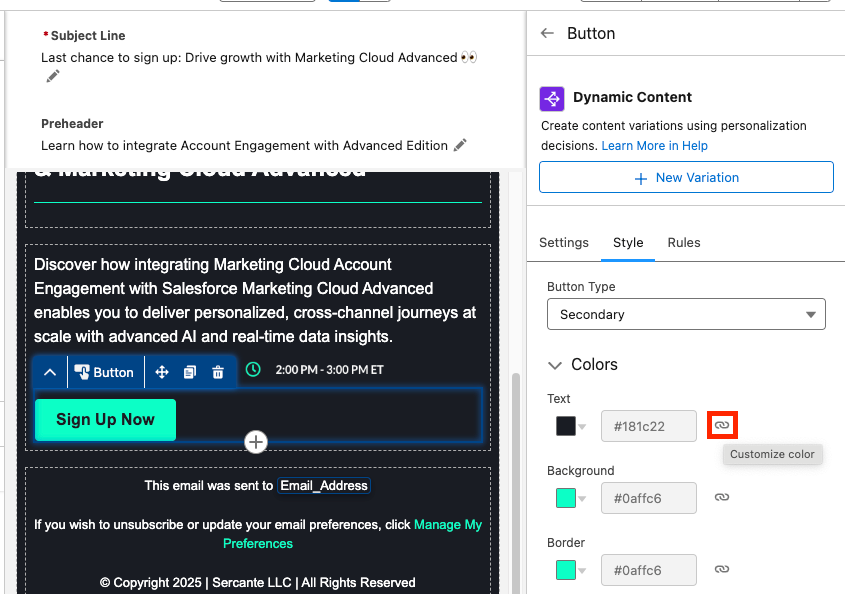
When building your email components, you can access the Style of said component in the right side Property Panel. This will display what is auto-styled from the Brand as well as what can be edited without straying from the Brand specifications. You can override the branding by changing the style options to “custom”,  just keep in mind that if the Brand itself later changes, those changes will not automatically update any components where the styling has been overridden. 

A screenshot of overriding the branding by changing the styling options to custom.

Personalizing your Email

Beyond Merge Field, you also have two great personalization options in the builder: Dynamic Content and Email Repeaters. 

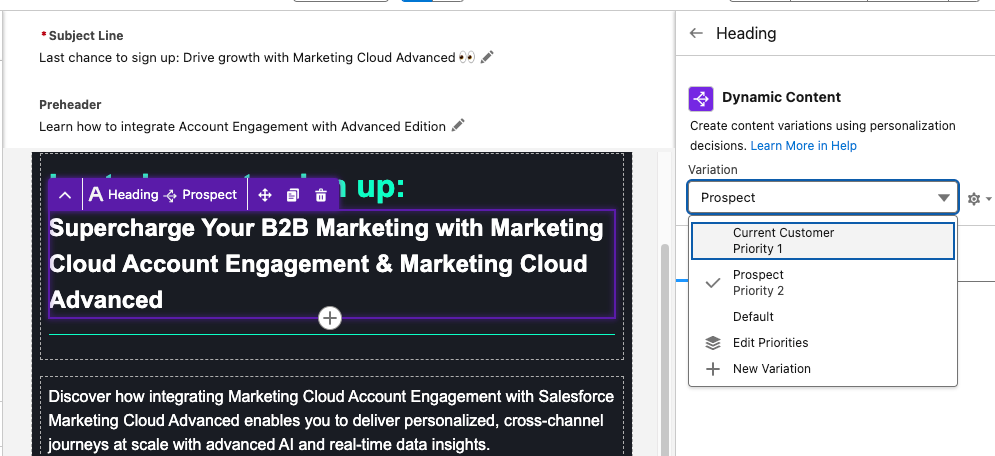
Dynamic Content allows you to create variations in your email and specify when those variations appear. For example, you can change your email heading text depending on if the recipient is a prospect or a customer. When you have a component selected, the Dynamic Content option will appear in the Property Panel. Learn how to set up Dynamic Content variations from our previous blog post.

A screenshot of the Dynamic Content option appearing in the Property Panel.

Email Repeaters allow you to show a series of items customized to the recipient. For example, we could display upcoming events that the reader may be interested in attending and tailor which events we display based on the Marketing Tech the reader is interested in. 

A screenshot using Email Repeaters in the Marketing Cloud Next Email Builder.

Email Repeaters require a Data Source, but you can learn how to set those up here

Testing Your Email

To test your email first, toggle between the Desktop and Mobile views within the View Mode to make sure your email looks great on both. Then ensure you’ve customized your Subject Line and Preheader text. You can edit your Subject Line and Preheader both above your email or in the Property Panel on the right. You can also insert Merge Fields or Dynamic Content into both. 

A screenshot showing where you can edit your Subject Line and Preheader, both above the email or in the Property Panel on the right.

Then select Preview from the top right corner. You’ll need to select a published Segment with at least one recipient in order to preview the email.

A screenshot showing how to select a published Segment with at least one recipient to preview the email.

Next select the Test tab and enter the test email recipient and the From Name and Address. Your From Address needs to match the authenticated DKIM domain in Marketing Cloud.  

The final step will be sending your email, which can be done in a couple of different ways, but all revolve around using Flow. See some of the resources below for help building and activating a Marketing Cloud Flow:

Email Builder FAQ

Can we create reusable Email Templates for Marketing Cloud? Yes, this feature is coming as part of the Winter ‘26 release

Can we view or edit the HTML of Marketing Cloud Emails?  Yes, in the View Mode, you can toggle between the drag-and-drop builder and the HTML of the email. Here you can view the HTML, if you want to edit your email via HTML you can select Convert to HTML. However, once an email is converted to HTML, it cannot be converted back, so be careful! My guess is that this will change with future releases.

Can we use Custom Fonts with Marketing Cloud Emails? Only if you build your emails via HTML, or you could build an email with the drag-and-drop builder, convert it to HTML, then add the custom font code. However, this isn’t ideal. I believe Custom Fonts will be supported in a future release though.

Should Account Engagement users start using this builder? I’ll have to give you the annoying consultant answer of “it depends”. Account Engagement orgs can use the Marketing Cloud builder but, without Marketing Cloud also installed, it has some limitations that I don’t love. However, Account Engagement users can also get free access to Marketing Cloud Growth/Advanced as part of their Account Engagement license, so my recommendation would be to install Marketing Cloud Growth/Advanced and give the new builder a shot.

Can I build an email in the Marketing Cloud Drag-and-drop builder and copy the email HTML to Account Engagement? I was asked this recently, and you know what, that could work! However, proceed with caution and test often. I briefly gave this a shot, and the email in Account Engagement turned out pretty OK. I had to do some tweaking and had to replace the merge tags, but it looks like a viable solution in a pinch. Marketing Cloud specific features, like Dynamic Content based on personalization points, Cross Object Personalization, Repeaters etc. will not translate, but the structure and styling of the email should be pretty good. 

Do Keyboard Shortcuts work with this builder? Yes!

Final thoughts 

Marketing Cloud Next’s Email Builder delivers a streamlined, drag-and-drop experience that helps marketers craft personalized communication at scale with the help of AI, Agentforce, Dynamic Content, and Cross Object Personalization. The more familiar you are with its features, the more you’ll see what’s possible for creating even better communication experiences for your audience.

When you’re ready to start building, refer back to this guide—and if you’d like help with navigating your next steps in the meantime, reach out to the Sercante team, we’ll help you map out your next steps for success.

Product Note: Marketing Cloud Growth and Advanced are editions of Marketing Cloud Next and have also been referred to as Agentforce Marketing.

If you’ve ever built a marketing campaign, you know the drill: after agreeing on your brief, you still need to draft emails, nail the design, run approvals, and put it all into motion. That process often takes weeks, or even longer. And while you and your team have your heads down in the mechanics, there’s less bandwidth for the personalization and creative thinking that truly builds connection with your audience and drives growth. Which is why leaning into your tech stack and using the latest solutions, such as Marketing Cloud Growth and Advanced, to streamline the campaign creation process, so your team can be freed up to focus more on the human element, is critical to continue to scale and grow in this modern age.

Product experts and Marketing Champions, Erin Duncan and Heather Rinke led a webinar, Elevating Your Campaigns with Next Gen Marketing Cloud, to walk you through how to use Marketing Cloud Growth and Advanced to streamline your campaign creation process. In their session, they dive into the platform and take you through step by step from prompt to flow to email creation and Path Experiment configuration. Watch the full webinar on-demand and get the highlights to start exploring how you can lean into the latest tech to scale your marketing efforts and create personalized, seamless cross-channel experiences that build deeper relationships with your audience.

Elevating Your Campaigns with Next Gen Marketing Cloud
Watch On Demand

What is Next Gen Marketing Cloud?

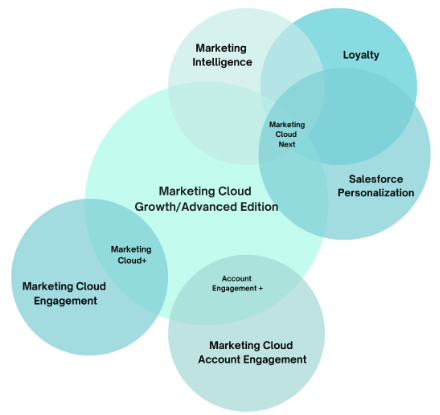
Let’s take a step back and level set on what we mean by Next Gen Marketing Cloud. “Next Gen Marketing Cloud” refers to the latest Marketing Cloud platform, Marketing Cloud Growth and Advanced. However, at Connections 2025, you may have also heard the term “Marketing Cloud Next”, this is an umbrella term for all of the latest Marketing Cloud offerings and refers to the combined functionality of features from Marketing Cloud Growth and Advanced, Marketing Intelligence, Loyalty, and Salesforce Personalization.

Other terms that have been used are Marketing Cloud+ and Account Engagement+. This refers to using the combined features of Marketing Cloud Engagement and Marketing Cloud Growth and Advanced (Marketing Cloud+) and Marketing Cloud Account Engagement and Marketing Cloud Growth and Advanced (Account Engagement+). 

Marketing Cloud Next is “a strategic reframe of marketing itself”. Its vision is to end “no-reply marketing” and help companies provide a better overall experience for their audience. The Venn diagram below illustrates how these product features work in conjunction with each other and the different product names that may be used when these products are used together.

A Venn Diagram of all the Marketing Cloud product names and how they relate to each other

Using AI to streamline campaign creation in Next Gen Marketing Cloud

Campaigns can take weeks for a marketing team to plan and launch. According to Email Vendor Selection, 35% of marketing teams take up to two weeks just for their email production process and 5% take over a month. Meaning the more that marketers can find ways to help streamline and fast-track the process, the better, which is where the AI features of Next Gen Marketing Cloud can help.

By folding AI into the campaign workflow—from brief to email draft to segmentation—it dramatically shortens campaign turnaround time. That means your team can spend more of that precious time dialing in personalization, tweaking messaging, and creating marketing that feels human—not just efficient.

Starting with a strong campaign prompt

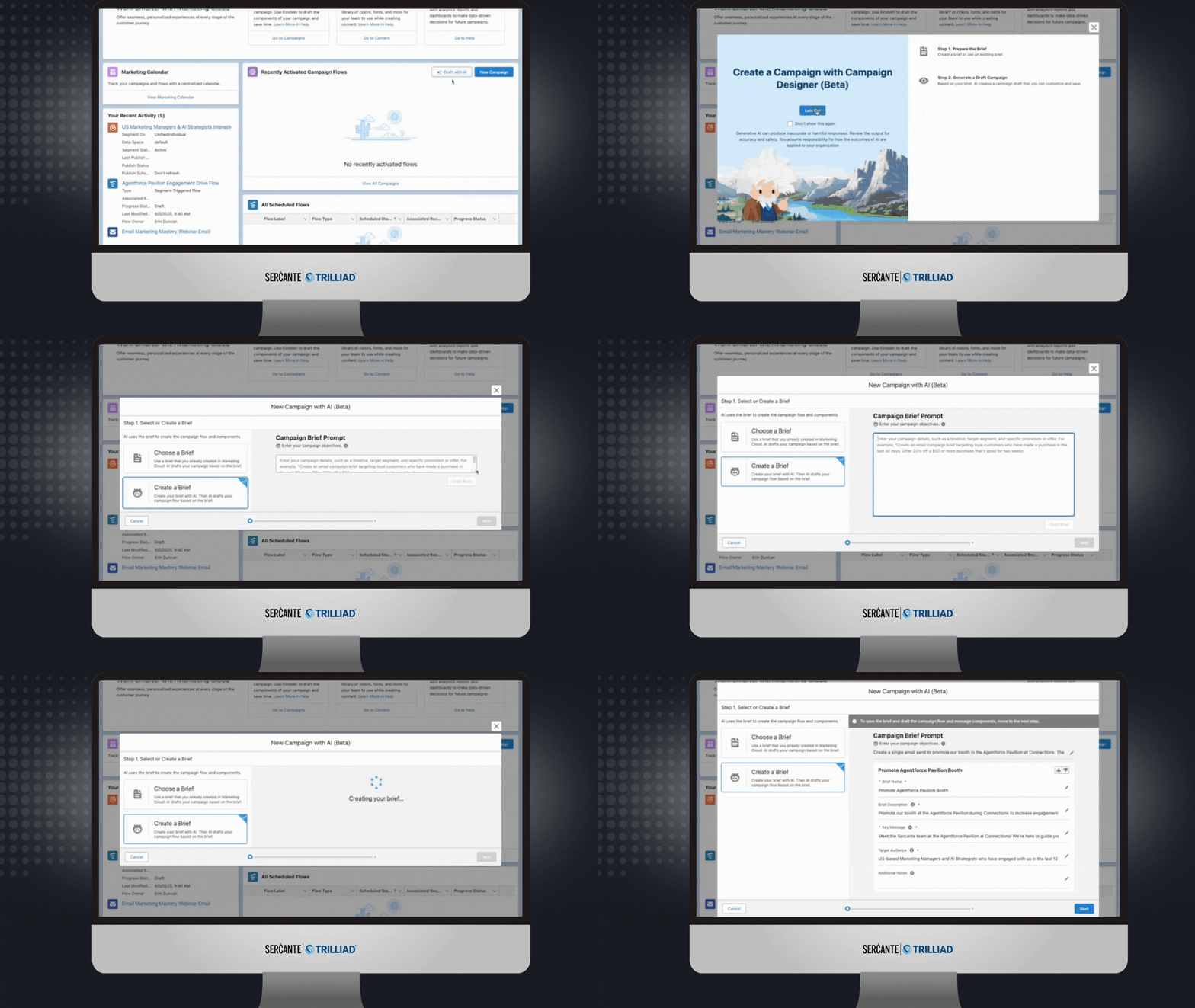
To use the AI features in Marketing Cloud Growth and Advanced, start by drafting your campaign. First select Draft with AI, then Create a Brief and provide your prompt, AI will draft your campaign brief in seconds. 

The campaign brief will include your campaign title, description, key messaging, and the target audience. Your campaign brief will only be as good as your prompt, which is why it’s important to make sure you include all the right details.

Best practices for prompts:

  • Be specific about audience, channel, timing, and tone.
  • Use clear, conversational language without unnecessary jargon.
  • Include parameters such as word count, required inclusions/exclusions, and target personas.

Example prompt:

“Create an email campaign inviting marketers who have engaged in the last 12 months to our ‘Elevate Your Campaigns with Next Gen Marketing Cloud’ webinar on July 10th at 1 PM ET. Highlight how attendees will learn to apply AI at each stage of campaign creation.”

Therefore, before you create your prompt, make sure you and your team are aligned on the overall strategy for the campaign so that you can provide a clear detailed prompt.

A GIF of a user walking through how to use the Draft with AI feature to use AI to create your campaign in Marketing Cloud Growth and Advanced.

Watch the full Agentforce for Marketing demo

Editing your campaign emails in Next Gen Marketing Cloud

After you review and edit your campaign brief, click Next to view the emails and SMS messages that have been created based on your prompt and campaign brief. 

You can click into each message and edit the subject line, pre-header text, and the body paragraphs to ensure the messaging is exactly the way you want it. You can also provide feedback with a thumbs-up or thumbs down so the system can learn and grow each time it generates content. Again, depending on how well you specified your audience, tone, and channels in the prompt will determine how much editing and tweaking you’ll have to do.

Using Einstein Engagement Frequency to manage audience saturation

After fine-tuning your messages, configure your audience segment. An important piece of creating experiences that build meaningful connections with your audience is not over saturating them, which is where Einstein Engagement Frequency can help. 

Einstein Engagement Frequency helps ensure contacts receive the right amount of communication by analyzing their engagement to generate a personalized engagement frequency score and then classifying their engagement. The classifications are as follows

  • Saturated
  • Almost Saturated
  • On Target
  • Under Saturated

Excluding Saturated contacts helps to ensure that you’re not emailing or messaging your audience too much, and this Einstein feature makes sure the evaluation is done automatically, so you don’t have to spend time tracking this manually.

Testing with Path Experiment

Another way to elevate the campaign experience for your audience is to test different journey options and lean into what is resonating and driving the most engagement.

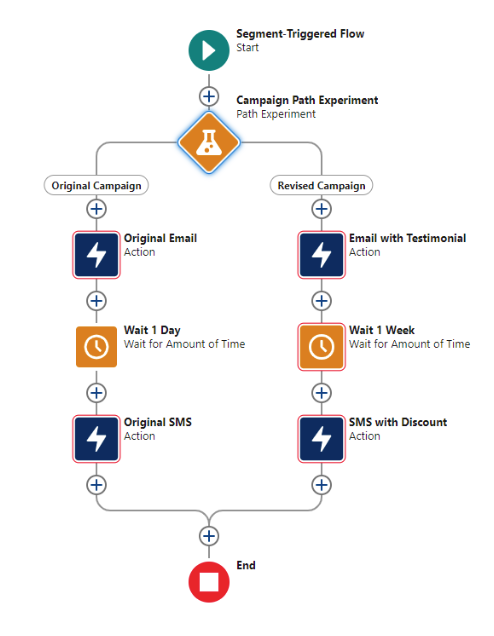
Path Experiment is available for Marketing Cloud Advanced and expands on traditional A/B testing by allowing up to 10 different paths within a single experiment. You can test variations in content, channels, or cadence to see what produces the strongest engagement.

For example, you could create two paths consisting of an email followed by a wait period and then an SMS message. In the second path, you can add as many variations as you would like, such as adding a testimonial quote to the email, making the wait period longer, or adding a discount code to the SMS message, and then see which path performs the best.

A screenshot of a path experiment in Next Gen Marketing Cloud showing two paths with an original email, 1-day wait period, and an SMS message on the left path with a revised email, a wait period of 1 week, and an SMS message with a discount on the right path.

Engaging your audience with SMS

Next Gen Marketing Cloud supports multiple SMS approaches:

  • Long Code SMS – cost-effective, supports international, suited for smaller sends.
  • Short Code SMS – faster sends for large audiences, higher provisioning cost, and longer provisioning time.
  • Conversational SMS – enables two-way communication using Flow automation or chatbots. Conversational SMS is available for Advanced Edition with the Digital Engagement add on.

This flexibility allows you to select the right SMS format for your organization depending on your needs and strategy. For further guidance on setup, read Erin Duncan’s article on SMS provisioning and Marketing Cloud Growth and Advanced, it takes you through all the steps and considerations for success.

The path to start using Marketing Cloud Growth and Advanced features

The platform you have now will determine what your next steps might look like to start diving into Marketing Cloud Growth and Advanced.

Announced at Connections 2025, Marketing Cloud Engagement customers will get access to Marketing Cloud Growth/Advanced around Dreamforce (October 2025), more details around how and when customers can start diving in further with the platform is coming. Here are the requirements:

The best action to take now is to learn and build your strategy for how your team will start taking advantage of Next Gen Marketing Cloud features once you get access.

The announcement for Marketing Cloud Account Engagement customers getting access to Marketing Cloud Growth and Advanced features came back in October 2024. Our experts led a session, Unlocking Next-Gen Marketing: How to Activate New Features Available for Account Engagement Customers, on all the capabilities that marketing teams can start tapping into with Marketing Cloud Growth and Advanced. Watch On Demand

Here are the requirements to keep in mind:

Elevate your campaigns with Next Gen Marketing Cloud

The AI capabilities in Next Gen Marketing Cloud offer significant efficiency gains for campaign creation. By starting with a clear prompt, using audience saturation data to manage send frequency, testing multiple engagement paths, and incorporating multi-channel outreach, marketers can deliver more relevant, timely, and effective campaigns. Giving your audience personalized, seamless experiences that build deeper connections and ultimately drive growth for your business.

This technology is at our fingertips. It’s up to us to educate ourselves, know what it can do, and start exploring and using it to help us all do what we do best more efficiently and give our customers the engagements they’re expecting. But the path to navigating all of this can be challenging, so if you would like an expert guide to achieve success, reach out to the Sercante team.
AI has the potential to fundamentally change the way we work—not just in theory, but in the day-to-day rhythms of marketing, sales ops, RevOps, and customer experience teams. At its best, AI can help us scale what works, automate what drains us, and create seamless customer journeys that feel personal, not robotic.

Every organization wants to implement AI, because they know the value, but teams are navigating real challenges: unclear use cases, disconnected data, limited internal expertise, and a natural hesitation that comes with change.

A recent Gartner survey found that 77% of executives believe AI will give them a competitive edge—but only 44%, meaning less than half,  feel confident in their roadmap to get there. 

To help teams navigate AI adoption, the experts at Sercante put together an AI Starter Kit filled with demos, real-life examples, expert recommendations, and insightful how-tos for overcoming the most common AI adoption obstacles, which is what inspired this article.

Here are the six most common AI adoption roadblocks the team has seen firsthand—and some practical, no-nonsense ways to work through them.

Obstacle #1 Data silos are stalling progress

You might be feeling this if…

Your team is using multiple tools that don’t talk to each other, reporting feels unreliable and takes forever, and you’re not quite sure where all your customer data even lives.

How to move forward:

AI can’t do its job if it doesn’t have access to clean, connected data. Start with a simple audit: where is your data, and who owns each piece? From there, focus on one high-impact use case and use integration tools (like a customer data platform or middleware) to bring data together. Keep it focused—you don’t have to solve the whole thing in one go.

Obstacle #2 Lack of trust in accurate results

You might be feeling this if…

There’s skepticism around AI recommendations, hesitation to take action on outputs, or concerns about compliance, bias, or lack of transparency.

How to move forward:

This isn’t just about proving that AI “works”—it’s about making people feel safe using it. Prioritize tools that show their work (think explainable outputs). Run small pilots to validate results and let the data do the convincing. Also appoint internal champions who can model responsible, thoughtful AI use.

If you’re just getting started, this article offers helpful grounding: 7 tips for how to get started with AI.

Obstacle #3 Skill gaps

You might be feeling this if…
AI feels too technical or intimidating for the team, and you’re relying on one or two people to drive all the innovation.

How to move forward:
You don’t need a team of data scientists to start using AI. Launch basic AI literacy training by role—what should a CX leader know about AI vs. someone in RevOps? Create safe spaces for learning and experimentation. And if there are areas where you need deeper expertise, don’t be afraid to lean on partners while your team ramps up.

Obstacle #4 No clear use cases

You might be feeling this if…

Your team has a shiny new AI tool, but no one knows what it’s for—or conversations are stuck at the “someday” level. Or conversations around AI remain at the hypothetical level, but no one is actually taking the plunge to use it daily and point to how it is helping them scale and be more efficient.

How to move forward:

Bring AI down to earth. Host simple workshops by function and explore high-impact, low-effort use cases: AI-generated email copy or campaign briefs, summarization, agentic lead qualification and routing, FAQ case deflection through knowledge article references. Document small wins and share them internally—that success story from the marketing team might inspire the sales org to try something next.

Obstacle #5 Resistance to change

You might be feeling this if…

There’s pushback from users or leaders who feel uneasy, or concerns that AI might replace jobs or change the nature of their work. Or you’re hearing team members say “But we’ve always done it this way.”

How to move forward:

There’s no way around it, change will always evoke emotions—discomfort, worry, anger, excitement—you get it. However, how we choose to respond is what is in our control, and we can either choose to keep our shields up with AI or we can see it as an opportunity to innovate, scale what we do best, and create even better experiences for customers.

For conversations with your team, consider reframing AI as a co-pilot that takes on the repetitive tasks, not a replacement for human expertise. Involve employees early and let them help shape how AI gets used. Highlight wins that make daily work easier and more efficient.

Obstacle #6 ROI concerns

You might be feeling this if…

Budget holders want to see results before approving spend, or it’s unclear how success will even be measured.

How to move forward:

In the beginning, when you’re identifying use cases, consider the metrics that will be used for each one to evaluate success and tie these to clear business outcomes. 

Lauren Noonan, VP of Growth and Alliances at Sercante, quote: "What are you doing to do with the time you get back from using AI, and how will it impact the organization?"

In the beginning, it may be as small as time saved during campaign building, but when you multiply that time saved over the course of the year, and the amount of team members it affects, that will add up to big results. Then, as Sercante VP of Growth & Alliances, Lauren Noonan, shared on the Connections Recap session, answer the bigger question, “What are you going to do with the time you get back and how will it impact the organization?”  When you answer that question, it will show leadership the existing gap between where you are now and the level of growth that could be reached if your team was using AI.

When you’re building your AI roadmap, include the expected short-term wins that will come with your initial low-level of effort use cases and the long-term goals the team is after to give your team a big picture that everyone can align on.

Overcoming to get started with AI

The road to AI adoption isn’t about flipping a switch. It’s about taking deliberate, doable steps—ones that meet your team where they are and build toward where you want to go.

Start by acknowledging what obstacles you and your organization align with the most and then work through the steps above to start to overcome. And if you’d like a third-party expert’s insight, the Sercante team can help. We’ve partnered with dozens of teams to move past the blockers and build AI strategies that actually work in the real world, and have guided them on the path toward driving growth with AI at their organization.

It’s not a secret, so many growth teams, marketing, sales, and customer success, want to be using AI to streamline processes and elevate customer experiences, but when it comes to adoption, they’re a little stuck on how to get started with AI. 

After hearing a few of the experts at Sercante share their insights and having conversations with marketing leaders who have taken the plunge on applying AI to their initiatives, plus some first-hand experience with our own marketing, I was able to create this collection of tips for how to get started with AI. 

For those thinking, TLDR, let’s cut to the chase, I recommend downloading Sercante’s AI Starter Kit.

Tip 1: Pinpoint the pain

After attending a Connections 2025 Recap Webinar, Sercante’s Salesforce Product Director, Heather Rinke, advised the audience to get started with AI by writing down the biggest pain points they have today.

What is a manual, repetitive, and mundane task, sucking up your bandwidth?

Then consider, of those pain points, which is the lowest barrier to entry? What might have dependencies that might need a little more technology configuration, data setup, or the involvement of multiple departments?

Focus on the low lift, but quick-win initiatives first. Often, this would be an internal process that you could see how it performs, measure impact, and then scale from there.

[Watch On-Demand 2025 Connections Recap]

Tip 2: Do your research

As Laura Curtis, Senior CRM & Marketing Automation Strategist at Sercante said on the Connections Recap, “You don’t know what you don’t know.” 

In fact, 71.7% of non-adopters say “lack of understanding” is their biggest barrier to AI adoption (Influencer Marketing Hub AI in Marketing Benchmark Report). So if you’re feeling overwhelmed, you’re not alone. But it’s also fixable.

One way to start doing your research: Download the Sercante AI Starter Kit. It’s full of:

  • Real use case examples
  • Tips you can steal
  • Customer stories
  • Common pitfalls to avoid

Also, check out Rinke’s article, Five Tips for Getting Started with Agentforce.

Tip 3: Try out-of-the-box tools first

Don’t build the Death Star on day one.

There’s zero need to spin up a complex custom solution to get started. Many platforms—especially Salesforce Agentforce—already have out-of-the-box agents and AI functionality you can activate right now.

Use them.

Start small. Test how it works. See how it helps. Then decide if you want to scale or customize.

Tip 4: Get your data house in order (but don’t wait for perfect)

As Sercante VP of Growth & Alliances, Lauren Noonan,  shared on the Connections Recap, “Very few people buy a home and it’s perfect.”

You can start with AI even if your data isn’t a 10/10. But the better your data hygiene, the better your AI output.

Start by asking:

  • What data is critical for our first use case?
  • Where does it live?
  • What’s messy that could block us?

Then clean it as you go. Consider what other data optimizations you can make along the way to support the future AI initiatives on your roadmap. Like updating the kitchen before you renovate the whole house, and then mapping out what renovations make sense to do next.

Tip 5: Measure what matters

But what metrics are worth tracking to measure the impact of AI?

It depends on your use case, but as an example, Noonan shared the idea of using AI to generate a campaign brief instead doing it manually.

How long does it take you to do it manually versus using AI? 

Before getting started with using AI internally, get benchmarks for how long it typically takes your team do the processes you’ll be using AI for and then measure how long it takes after.

Now, the bigger question that Noonan posed is “What are you going to do with the time you get back and how will it impact the organization?”

If you’re trying to champion AI in your organization and get your leaders on board to support the initiative, answering questions like these can be a huge part of the business case—other than the increased efficiency, maximized output, and better customer experiences that’ll lead to growth.

Tip 6: Taking a crawl, walk, run approach to AI

As the CMO of Mogli, Christina Scarmeas, shared on my recent conversation with her on the Innovator Series about her team’s approach to using AI and Agentforce: 

“One of the biggest things we learned was, it’s okay to slow down and take a crawl, walk, run, approach to AI. Take a step back, look at the infrastructure that we need to deploy, and what we’re trying to do with these agents. Be okay with having a phased approach with expectations of how it’s going to be implemented, and if you put that infrastructure together and have a team that is dedicated to the strategy behind it, the results come fast.”

[Watch the Innovator Series]

This aligns with Rinke’s advice of starting with an initiative that is low-barrier-to-entry, perhaps something internal where you can point to productivity gains. 

A customer in the healthcare industry’s story of getting started with AI

For example, one of Sercante’s customers in the healthcare industry serving multiple practices implemented Service Agents with Salesforce Agentforce.

The Service Agents were set up to help the human agents query knowledge faster to support them in their calls to better serve patients and providers.

The solution has been rolled out to one practice area first, so the team can continue to learn and adapt the solution as needed before scaling to their other practice areas.

This is a great instance of a team starting small, with rolling out an AI-powered solution in one area of their business to then evaluate and see how it can be applied to the other areas of their business..

Tip 7: Build your AI roadmap

Once you’ve dipped your toe in, it’s time to zoom out.

As the Director of Marketing at Mogli, Evan Thomas shared on the Innovator Series:

“AI is the next evolution of technology and like all the tools that came before it, you have to have a plan. Just getting AI into your org isn’t going to fix it. You have to have a plan for that AI. What is it going to do for you? What is the process it is going to supplement or help your team focus on? What is the reason you’re doing it?”

Creating your AI Roadmap for quick wins and long-term success

Therefore, the next step is creating your plan or your AI roadmap. Identifying your pain points and use cases is the first step of this. The other piece of this is evaluating the customer lifecycle through the lens of the customer and identifying points of friction that could benefit from a solution to help your team scale and make the engagement seamless. However, as this can be overwhelming for teams to do, experts have started collaborating to put together resources for this.

Sercante’s session, AI Roadmap: The Strategy for Driving Growth with AI, is a great resource that includes insights from experts on how to approach creating a plan that:

  • identifies high-impact use cases
  • considers dependencies and how to address roadblocks
  • outlines key metrics to track for measuring success
  • clearly defines your path for quick wins and long-term success

Take advantage of training opportunities for creating your AI plan

Another option for getting started with creating your AI Roadmap is to get training. According to SurveyMonkey, 70% of employers don’t provide training on AI, even though 70% of marketers say it’s essential. Therefore, any time you can get training and advance your skills on how to approach AI or how to use it, take advantage!

One training offered is Sercante’s AI Workshop: Building your roadmap for real impact. This is the deep dive where the experts will guide you through creating your 30-60-90 day plan to help your organization get started with AI and scale for the future.

One last thing: Pick yourself in this era

CEO of Sercante, Andrea Tarrell, shared this sentiment during her opening keynote at MarDreamin’ Summit, encouraging the community to take action asking, “If not you, then who?”

This technology is at our fingertips, and it’s up to us to decide how we’re going to use it to streamline processes, meet customers where they are at scale, and create a truly seamless experience.

It’s time to get started with AI.

I don’t usually use the word transformational when discussing content blocks for an email, but this one deserves it. Recently, our team at Sercante had the opportunity to partner with one of our long-term automotive clients to find a solution to a big problem—overstocked inventory. 

This project began like many others. An innovative, creative brand trying to bridge the gap between what customers want and what they can have. Buyers were spending time configuring their perfect vehicles, carefully choosing every option and detail, and then either abandoning their cart or waiting months for the car to be built.

What they didn’t realize was that their dream car, or something close to it, was already built. Already available for them. Already on the lot. It just wasn’t being shown to them.

The Problem: They Had the Cars, But No One Knew

The brand had a recommendation engine on their website, which enabled customers to browse their available inventory. However, this only happened if a customer actively sought it out. Meanwhile, their emails weren’t showing in-stock options, but rather driving them to the configurator to design their vehicle. The inbox experience focused on brand, features, and specs, but not on availability.

There was a disconnect between digital engagement and physical inventory. And it was costing time, resources, and ultimately, conversions. Through several brainstorming sessions and collaborative work, we had to ask ourselves what would happen if we started surfacing what customers could get today?

The Approach: Make the Data Work in Email and Web

Working with the brand’s Salesforce team, we built a dynamic content block that connects their existing vehicle recommendation API with Salesforce Marketing Cloud. At send time, the block pulls in the top two vehicles available near each subscriber’s zip code.

That means:

  • Real-time pricing and availability
  • Personalized images and trim-level specs
  • A “View Details” CTA that drives them to the inventory page
  • And dynamic scripting to auto-generate it all without a manual lift

The block works anywhere—in journeys, newsletters, promotions, event invitations, and more. We added fallback logic, Einstein Send Time Optimization, and throttling to ensure performance even for high-volume sends. We evaluated alternative approaches, such as daily lookup tables, but for this use case, true real-time was worth it. It wasn’t just about showing inventory, it was about giving the customer a path forward. 

What Happened Next

This shift didn’t just make the email more useful. It changed how the brand saw its role in the customer journey and the results showed the impact:

  • Click-through rates on the monthly newsletter more than doubled from 1.02% to 2.26%.
  • Journey emails with the content block saw a 119% higher click-through rate in A/B testing.
  • Build time dropped from over 40 hours for their monthly newsletter campaign to 10 hours.
  • The time to purchase fell from 107 days to 5 days, and their inventory began to decline.

And, perhaps most importantly, the marketing team began thinking differently. The inbox became a place of momentum. Of relevance. Of action. As their marketing director put it, “This helped us rethink how we use email. Not just to inform, but to move customers forward in their journey.”

Check out the full case study related to this customer story here

Going Beyond Automotive

This isn’t just a car story. If you’re in an industry with inventory, long buying cycles, or complex consideration paths, this kind of approach has ripple effects:

  • Are you surfacing what’s ready now or just what’s aspirational?
  • Are your marketing channels connected to real-time availability?
  • Are your emails helping customers act, not just learn?

We’re all sitting on data that can do more. It’s not about overwhelming customers. It’s about removing friction, aligning on timing, and making it easier to say yes.

This project reminded me that sometimes the most effective marketing move isn’t adding more. It’s making what you already have more visible. Your customers don’t need a better configurator. They need a clearly defined next step. Let’s give them one.
If you’d like an expert’s insights on how to maximize the data you have to build more personalized experiences for your audience, that result in clear next steps and impact on the funnel, reach out to Sercante. The team is all about helping you create seamless experiences for your team and your customers.

No more posts to show