The Pardot Lightning App has been available since the Winter ‘19 release, but many Pardot users still prefer the comfort of Pardot Classic.
Maybe it’s the cute marketing wand in the left-hand menu bar keeping them in Pardot Classic. Or it could be the thought that getting used to a new Pardot experience is gonna be time consuming.
Pardot Lightning plays well with Salesforce Lightning
Pardot Lightning offers a more seamless transition between Salesforce and Pardot.
Once Salesforce retires the Pardot Classic app, users will only have one way to access Pardot Classic. They will have to log in with their Salesforce credentials at pi.pardot.com.
The Pardot Lightning app includes an app launcher within Salesforce Lightning. That means there are no additional sign-in tasks to complete if the user is logged into Salesforce.
Wanna know another cool reason to shout about this? If you have connected campaigns enabled and you’re creating Salesforce campaigns for your marketing efforts, you can have the Salesforce Campaigns tab visible in your Pardot Lightning App Navigation Bar. You won’t have to toggle back and forth between Pardot Classic and Salesforce for any campaign creation tasks.
Build Pardot marketing assets faster
Drag-and-drop email and landing page builders
Were you ever designing a Pardot email and wished there was a quick undo button? Sure, you can restore a snapshot, but that takes a few clicks.
With the Winter ‘21 release, we got the drag-and-drop email builder for Pardot Lightning. Although the jury is still out on this builder, it does provide Pardot users with the opportunity to design emails without using code. And, that’s right. There’s an “undo” button, too.
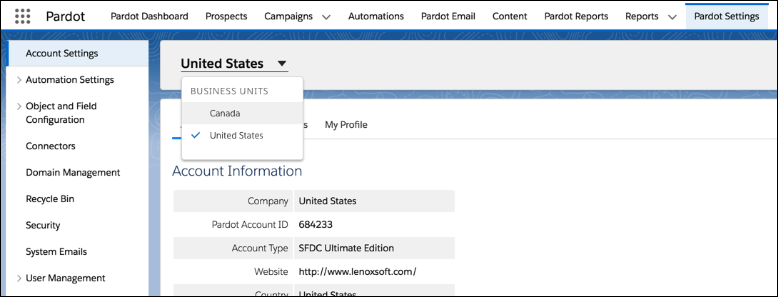
Pardot Business Units provide a way for you to partition your Pardot database. You can have Pardot Business Units for different regions, products, brands, etc. It’s essentially a method for you to have discreet marketing databases (read: Pardot Business Units) synced to a single Salesforce instance.
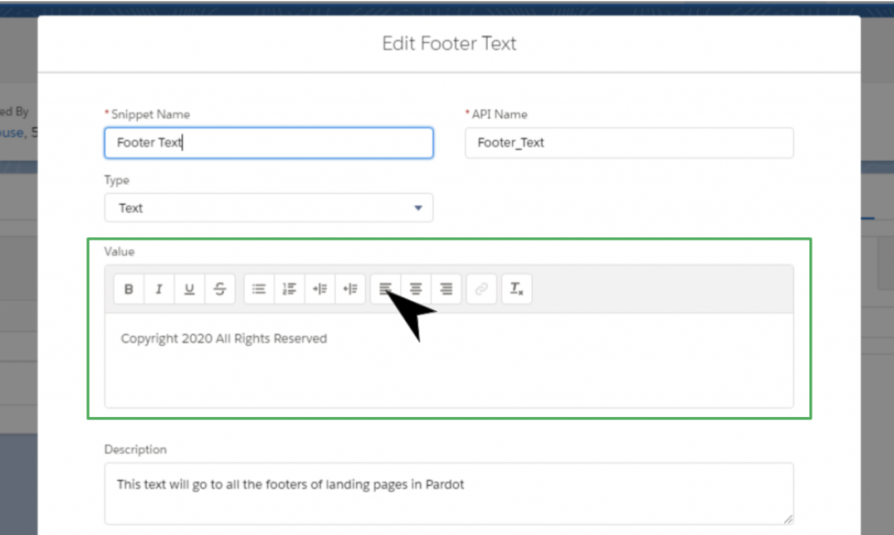
Pardot Snippets give marketers the ability to maintain reusable content blocks for marketing assets like emails, forms, and landing pages. And, they can also be used across Pardot Business Units!
But, you guessed it. Setting up Snippets requires Pardot Lightning.
Take the Pardot Lightning plunge
Are you ready to take the jump to Pardot Lightning?
With each new release, Salesforce is giving Pardot users even more functionality. But, you may have noticed that many of these cool new features are for Pardot Lightning only.
While Pardot Classic is not going away in the immediate future, it’s clear that Pardot Classic users will continue to miss out. And, while getting used to the slick, new navigation of Pardot Lightning can be trippy at first, it’ll feel like home after using the interface for a few days. I promise.
It’s time to prepare for the Salesforce Winter ‘22 Release and how it will affect your Pardot instance.
We get three major releases from Salesforce each year — Spring, Summer and Winter. Each Salesforce release includes upgrades and enhancements that affect Salesforce orgs in different ways.
So, if you’re using and managing Pardot for your company or organization, then you’re in the right place. We’re going to cover everything you need to know about the Salesforce Winter ‘22 Release for Pardot admins and users.
August 27, 2021: Sandbox preview starts, release site available, and release Trailhead module launches
August 30, 2021: Release overview deck and feature matrix available
September 10, 2021: Release weekend
October 1, 2021: Release weekend
October 8, 2021: Release weekend
September 10-17, 2021: Release Readiness Live
Salesforce Winter ’22 Release: Four highlights for Pardot users and admins
Pardot users and admins are getting lots of attention from the Salesforce Winter ‘22 Release. Some updates are changing the way we work to meet evolving technology demands. Others are saving us time by connecting the dots in a logical way. All we know is, this release includes big updates for people in the sales and marketing world.
Highlight 1: Salesforce My Domain requirement
A Winter ‘22 release update has the potential to create chaos for companies that want to use branded domain names.
The Salesforce Winter ‘22 release will require all orgs to have a My Domain.
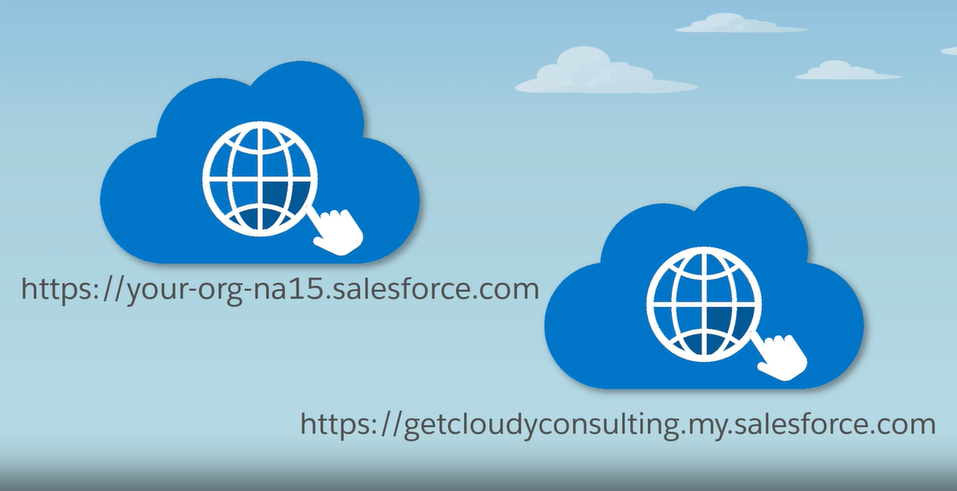
That means Pardot orgs that aren’t already configured for My Domain will get a random Salesforce-picked domain name. My Domain names have to be unique, so you’re outta luck if some other Salesforce customer has yours already.
If you don’t have a My Domain yet — then register your brand name now! You don’t have to deploy My Domain right away, but you can claim your preferred domain name now and deploy later (preferably in a Sandbox).
There’s likely to be a gold rush for domains from now until the first few weeks of the Winter ‘22 release, peaking at release, as folks register My Domains before enforcement or pick new ones after being force-registered.
What you should do: Implement a My Domain if you don’t have one
Here are resources to use when implementing a Salesforce My Domain.
(Thanks to Sercante Salesforce Solution Engineer Hayley Tuller for this one!)
Highlight 2: Pardot Classic App Retirement
Pardot Classic isn’t going away completely. But, the Winter ‘22 release includes a step toward moving in that direction. Salesforce has given soft nudges to customers encouraging them to adopt Lightning for quite some time. With that in mind, the Winter ‘22 release brings the news that Salesforce is retiring the Pardot Classic App after October 17, 2021.
Current Pardot Classic users can refrain from panicking for now because they still have time. The Pardot Classic App is a Salesforce page with Pardot on top via iFrame. The Pardot Classic App experience is going away, but you can still access Pardot Classic for now. Salesforce will disable the Pardot Classic App for ALL users on October 17, 2022. After that date, Pardot Classic users will only be able to access Pardot using the standalone Pardot app (available at pi.pardot.com).
Marketers love drag-and-drop tools like fish love water. Salesforce is opening the doors for more drag-and-drop design functionality in Pardot through a few different enhancements.
Pardot Lightning users now have the ability to build landing pages faster in Pardot with a user-friendly landing page editor. After you enable the feature, the Pardot drag-and-drop landing page editor allows you to create landing pages from templates or scratch.
You currently use standard components when you create emails in Pardot. These are the blocks you use to add elements, like graphics or text boxes, to your email drafts.
What you should do: Evaluate how your team creates Pardot marketing assets
All of these enhancements to the way marketers build assets in Pardot are meant to make the tool easier to use. It may make sense for your team to adopt them or look toward other options. You can figure that out by evaluating your team’s current process for building marketing assets like landing pages and emails.
Document your team’s current processes and talk to them about what works and doesn’t work well for them. Also, pay attention to how much time they are spending on these tasks so you can determine if it makes sense to invest in upgrades or external resources.
Highlight 4: Extending Pardot through integrations
Salesforce is highly customizable thanks to integrations. And new ways to extend Pardot through integrations are going live all the time.
Here are a few Salesforce Winter ‘22 Release enhancements that use integrations to extend Pardot functionality.
Interacting with prospects at the right time and in the right way is key to earning their trust. And now you can enable your sales team to capture those moments even more.
A Winter ‘22 enhancement allows you to set a completion action that notifies Pardot users in Slack when prospects interact with marketing assets. Because the Slack acquisition is still unfolding, this new feature also gives us a glimpse of what’s to come now that Slack is officially under the Salesforce umbrella.
Salesforce developers who work with Pardot will have access to the Pardot API v5 with the Winter ‘22 release. This update also includes super helpful enablement resources for Salesforce developers who are new to working with the Pardot API.
Enhancement #3: Pardot extensibility enhancements
You probably use third-party apps all the time for things like webinars and virtual events. But using the data from those third-party apps in Pardot can be difficult without heavy lifting.
What you should do: Integration brainstorming session
Have a brainstorming session to discover ways you can use integrations more effectively in your Pardot instance. You can kickstart the session by completing the sentence “wouldn’t it be nice if Pardot…” as many times as you can. Then, rank those sentences you created and focus on the ones that will have the greatest impact on your marketing efforts.
Implementing those integrations you identified through your brainstorming may go beyond your team’s capabilities. If that’s the case, you can reach out to Sercante Labs to find out how you can make it happen.
Pardot is getting bigger and better all the time
B2B marketers who come to Pardot are usually looking to scale their efforts and grow in a way that makes sense. These latest enhancements from the Salesforce Winter ‘22 Release get Pardot marketers closer to those goals by saving them time and resources.
Adding more user-friendly design capabilities addresses a major pain point for many Pardot customers. And extending Pardot through integrations and feature upgrades is preparing Pardot orgs of all sizes for the future.
Contact the team at Sercante to get help implementing these enhancements in your Salesforce org and Pardot instance. And leave us a comment below to let us know what you think about the Winter ‘22 Release.
Salesforce just gifted us with their Summer 2021 Release Notes, and our team is— to say the least, ecstatic. With so many new Pardot updates, users and administrators can now optimize their workflow, prevent tedious nuances in dynamic content, and make better data-driven decisions.
If you’ve been itching for better ways to organize your data, get the most out of your email sends, and have more control over your instance, we’re excited to show you how you can do just that with our top choices for exciting features to boost your marketing capabilities through Pardot and the Salesforce platform.
Pardot Release Highlights
#1: Einstein’s Key Account Identification
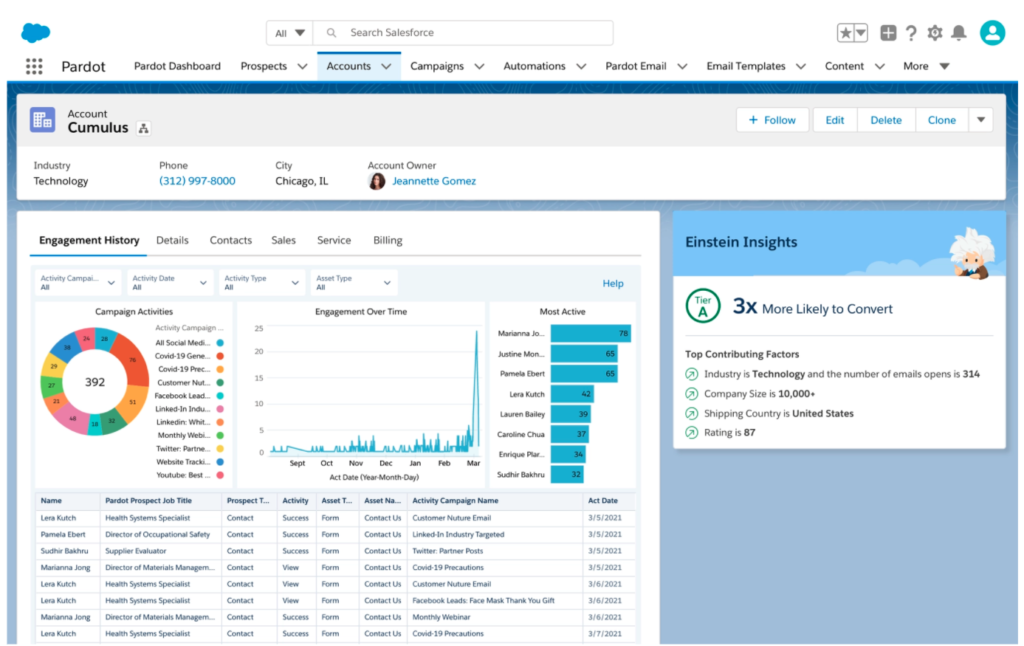
If you’ve been looking for a more accurate way of identifying who your best possible customers are, look no further. The ultimate visibility is within Einstein’s Key Account Identification— Salesforce handles all the dirty work of scrubbing data and spending hours making sense of attributions to show you which prospects are more likely to generate the most revenue.
Similar to Pardot grading, Einstein’s Account Tier uses letters to rank your accounts. And unlike Pardot grading, this ranking adjusts itself automatically. No longer will you rely on the decisions of individuals to set the rules, but rather you can make more informed decisions on how to convert the prospects this grading system presents to you.
With accounts generating so much data, it can be tedious to identify the most impactful trends in each account. In this game-changing release, Einstein will show you how certain accounts stack up against others using their industry and historical engagement.
#2: Send List Email Your Way (Pilot)
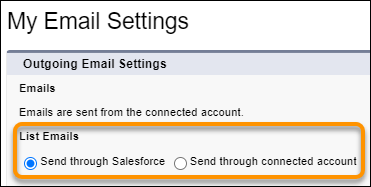
There’s (probably) nothing worse than getting a disingenuous email that looks like all the other sales pitches your prospects receive. If your sales reps expressed frustration in their limited capability of sending list emails exclusively through Salesforce, this release is for them. Now, they have the ability to send from Outlook or Gmail, giving them more control over their workflow.
Emails sent to qualified leads will look more authentic, like they came directly from a sales rep instead of a system.
Due to the more authentic look, we expect to see higher delivery, open, and click-through rates
One thing we encourage teams to keep an eye on is how it will impact reporting and governance controls at an early stage, so if you participate, advocate for what you would like to see on these grounds.
#3: Score Lead Segments Separately for More Accurate Results
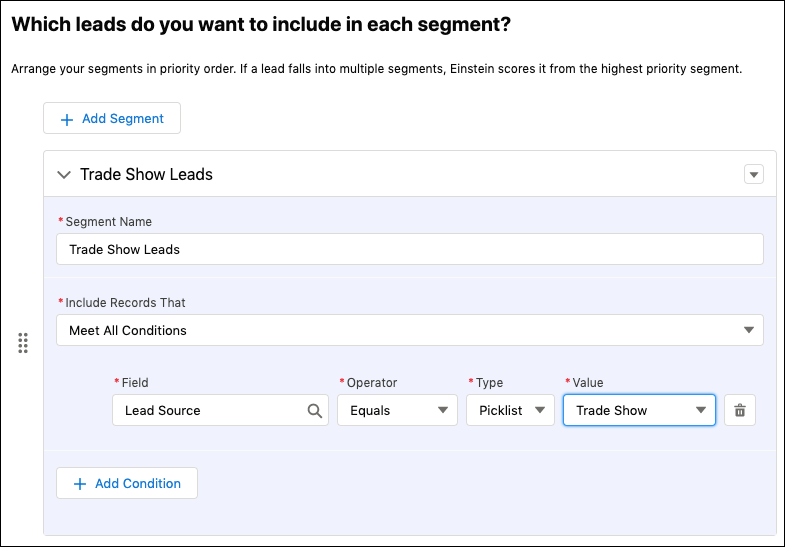
If the leads your business works with are vastly different from each other, this new way of tracking conversion patterns could greatly improve your scoring. With enough data, Einstein can calculate accurate scores to better define your segments and provide more clarity into each lead’s conversion patterns.
Create fields of criteria that best describe your lead segments. After you’ve prioritized the criteria, Einstein will score it as part of the higher priority segment, essentially categorizing your leads for you.
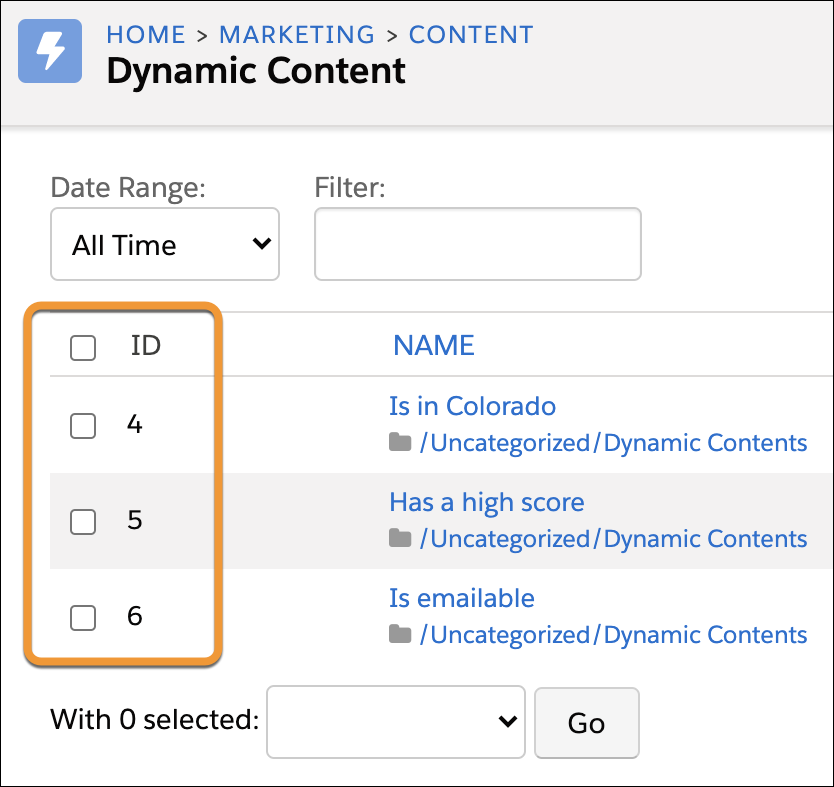
#4: Make Sure Emails Have the Right Dynamic Content
If you’re someone who somehow always has an excessive amount of tabs open at one time, this new feature will allow you to cut that down by a few and give you more confidence in your sends containing dynamic content.
“This one is a killer for me. I typically end up breaking naming conventions by adding (ID) to the end so I can quickly find the dynamic content. This will be great to still easily find without have to disrupt the naming.” – Mike Creuzer
Benefits:
Avoid the back-and-forth of your QA process.
View ID numbers on the Dynamic Content list view so you can make sure you have the right merge field in each of your emails.
#5: Boost Email Engagement with Einstein Send Time Optimization
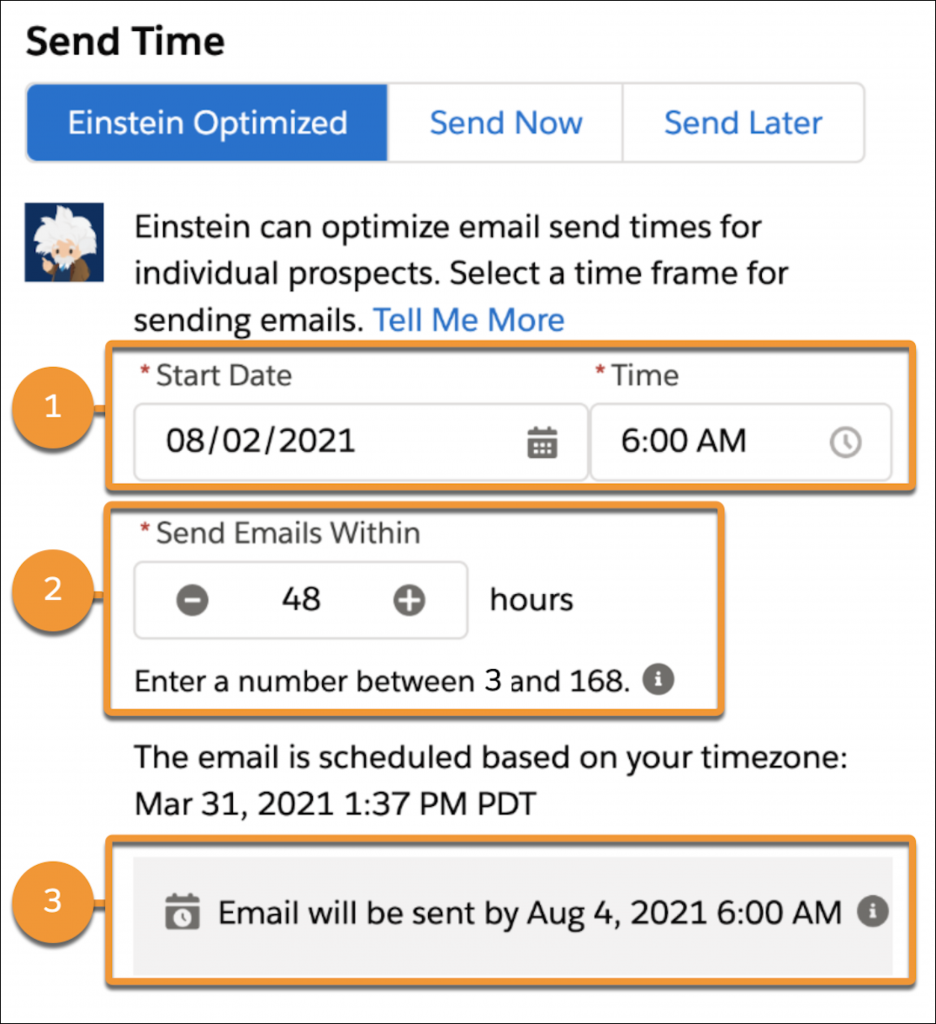
Send list emails to individual prospects at their preferred times. Take out the guesswork and elaborate segmentation with Einstein Send Time Optimization. Using Einstein’s machine learning skills, you can be sure your message gets to the right person at the right time.
#6: Designate a Marketing Admin to Handle Pardot Setup Tasks
Never worry about giving a user too many permissions. If you’ve been worried about losing control over Pardot administration, this feature of the release was made for you. Stop losing sleep over security concerns and give users access only to what you want them to have access to.
A new user permission makes it easy to designate a marketing admin to handle Pardot setup and management tasks. Assign the new Manage marketing setup tasks permission and the View setup and configuration permission to grant access to all the Pardot configuration options in Salesforce Marketing Setup.
Old Permissions
New Permissions
Required a Pardot Admin & a Salesforce Admin to fully configure Pardot
A single individual (Most likely the Pardot Admin) can be given permissions to configure Pardot from Salesforce without the need to give them full Admin Access in Salesforce
#7: Get More Clarity and Control on Email Marketing Settings
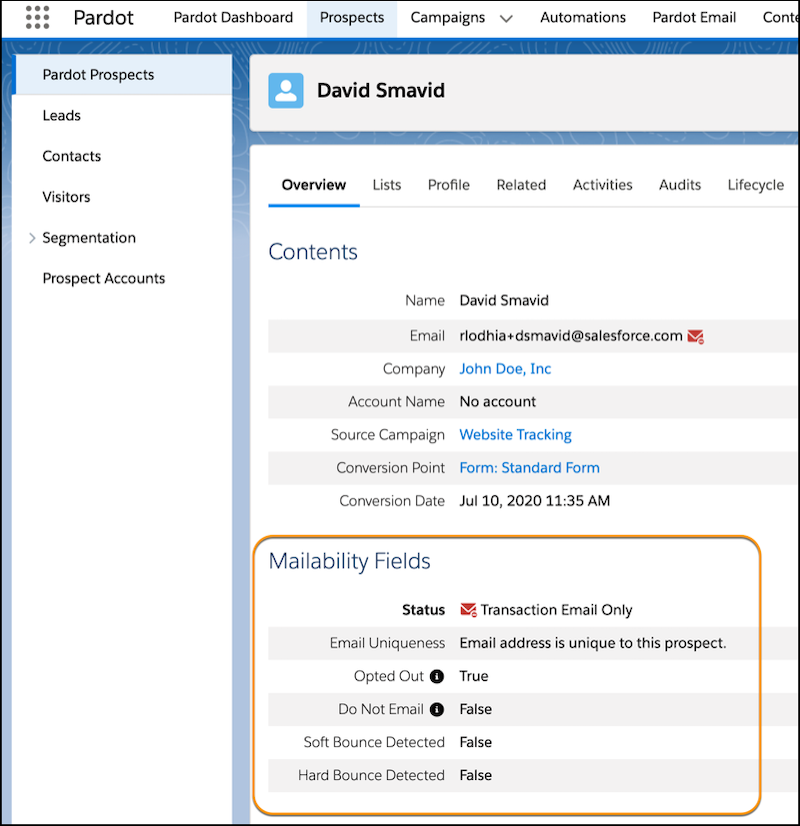
To call this part of the release an upgrade and say that we are “excited about it” would be a huge understatement. Before this was available, it was difficult and time-consuming to see the status of your prospects’ mailability. These settings can be edited in Automation Rules, Engagement Studio, and Prospect Import.
Activate this feature by clicking the “Get Started” button at the top of your dashboard. Just remember that activating it would be permanent, and you should read Salesforce’s considerations when accessing the upgrade.
Doing so will give you a view of your prospects’:
Overall mailable status
Do Not Email
Opted Out settings
Bounce information
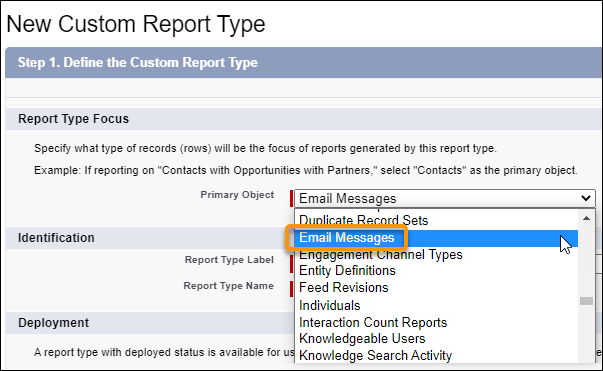
#8: Reporting on Email Messages
Spend less time requesting a useless email log and get more visibility into custom reporting. Previously, you only had access to the email’s delivery status— which is nothing compared to what’s available with this new feature. Now you can see if the customer opened it, when they opened it, bounces, engagement, and more.
Bonus Platform Features Worth Noting
Inclusive terms are replacing legacy language
As part of Salesforce’s efforts to refine language in their products to more accurately reflect inclusivity, Salesforce is replacing terms deemed non inclusive. Though APIs and older API documentation aren’t included because changing terms in the code can break current implementations, this will allow your messaging to be more inclusive than ever, enabling you to reach a wider audience.
Inline editing of reports
If you have to make changes to records and reports, the previous capabilities might have made that a little tedious to deal with. In recent releases, you have been able to edit records directly in list view. Now, you can do the same thing with reports, saving you unnecessary clicks that bottleneck your workflow.
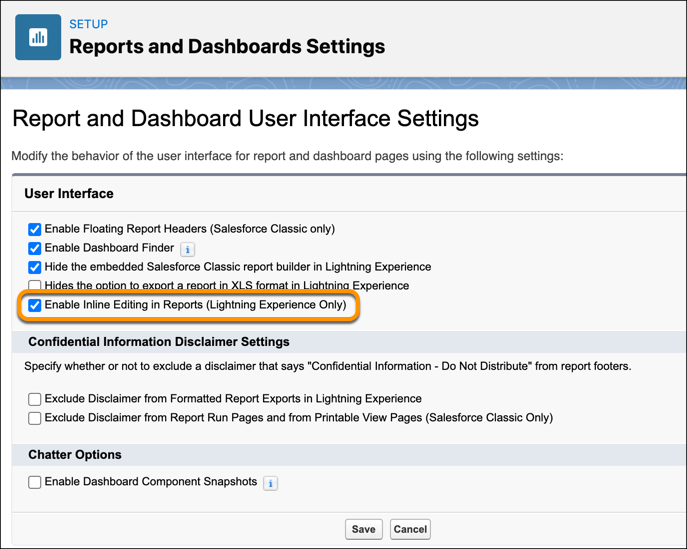
Enabling this feature is simple. Just go to your Reports and Dashboards Settings and modify the behavior of your interface by checking, “Enable Inline Editing In Reports.”
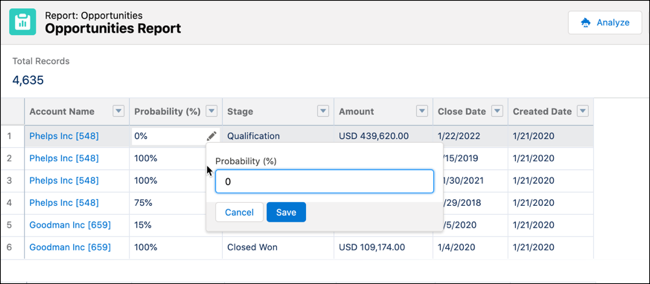
Once you’ve done that, look for the pencil icon, can click it, modify the value, and save. The field value will update on the report and in the source record, and the report reruns automatically.
On the Salesforce Radar
It seems that as soon as we’re comfortable with the new features, even more updates are on the calendar. Here’s a couple that any user can be excited about (and will really allow you to take advantage of new Salesforce features).
Sandbox Release
Preview orgs are live now, so if you don’t have one, that should be the first thing you do after reading this! Remember, Sandbox previews are coming, so now is a good time to look at what instance your sandboxes are on and make your plan.
Don’t’ forget to join the Release Readiness Trailblazers group. That’s right, there’s a place for all your questions to get answers and share what you’ve found while testing out new features.
Release Readiness Live (Week of May 21st)
This is a must-attend event. This series of webinars is run by project managers to talk about and demo new features so you can see these new items in action. Ask live questions and get live answers for all the things you’re stuck on.
Now that you’ve seen all the ways you can customize your interface based on your needs as an administrator or consultant, check out the full Release Notes from Salesforce and let us know in the comments what your team is excited to implement! Be sure to stay on top of more updates and to add these up-and-coming deadlines to your calendar:
May 6 Cut off to refresh sandboxes for preview instance
May 7 Summer Preview Window begins
(must have an active sandbox on a preview instance by May 6)
Need help with implementation or want to get training courses to gain a better understanding of Salesforce release features? Head over to our Pardot & Salesforce training page where you can sign up for mini-courses, become more familiar with Pardot basics, or attend bootcamps.
Pardot users were greeted this morning with a new announcement banner on their home screen when logged into Pardot:
This banner linked them to a help & training article outlining the details of Pardot-Only Login Retirement. The knee jerk reaction for some was fear — does this mean license costs are going up? What do I need to update right now?
Let’s break this down and talk about what these changes really mean. (more…)
Today I joined a webinar on the Pardot Product Roadmap, and I was FLOORED by some of the amazing features that are coming down the pipeline.
The Pardot team showed off some massive improvements to the integration with Salesforce (including unified campaigns!), account based analytics, Einstein predictive scoring incorporating Pardot data, among other advanced functionality — cue the happy dance.
Because this is still in development and will be tested through the Edge Pilot, the specifics of these changes are still hush hush. The recording and slides from the webinar will not be shared, and they requested that people refrain from screenshotting content (not going to lie, I did on a few slides — but will keep the secrets safe!)
While we wait for this tantalizing new functionality to be unveiled, there’s something else we can all do — #VoteAndPromote posts on the IdeaExchange for features we want to see. I rounded up a few favorites below.
For the most part, these are less sexy than what was shown on the webinar, but many of them are changes that would admins lives MUCH easier on a day-to-day basis.
Prospect resubscribe button that updates Pardot AND Salesforce Opt Out Field
There isn’t a smooth way for prospects to opt themselves back into communication. Would love to see a way to do this so that a Pardot admin doesn’t have to get involved every time this situation comes up.
This is a biggie. One pet peeve I have is that any custom field a prospect has completed displays in notifications for form submits, automation rules matches, etc. It can confuse users if they don’t quite get what they’re looking at. Being able to specify what fields show up, edit subjects, or add intro text would boost adoption and minimize user questions.
It’s great that we can segment on custom object data in Pardot — but the next level of awesomeness would be the ability to pull this data into emails as variable tags.
Actually, I’d rather see this on Automation Rules, but I’ll take it on Completion Actions too. The ability to specify multiple IF/THEN scenarios and take action accordingly would be useful in so many ways.
Remove prospect from Engagement Studio Program if they reply to an email
A common use case for Engagement Studio programs is nurturing “top of the funnel” prospects that aren’t quite ready to hand off to sales. But if they reply… well then it would be great to route that to a rep ASAP.
Record the number of direct replies from a Pardot sent email
No matter how beautiful of a CTA button you create, there always seem to be prospects who just hit “reply” on an email — and sometimes these responses are missed when reporting on campaign outcomes. It would be great to have a mechanism to quantify the volume of this to incorporate in our analytics.
We need more data! And an easier way to get at it! The functionality included in Engagement Studio is wonderful, and we need to be able to extract and share that.
Every Salesforce and Pardot geek knows that Dreamforce is when the biggest, baddest product announcements come to light. With just 6 weeks until the big event, I feel like a kid impatiently waiting for Christmas.
There was a tantalizing tidbit posted in the Success Community last week with a few hints:
“For the Salesforce Winter ’18 release, we are going to pilot some very cutting edge development work. We are calling this the “Edge Pilot” internally for that reason. We want to ask you all to be a part of it. There will be a lot of goodies for you to try out. With each Salesforce release, we hope to graduate some of the work out to be generally available and add new features to the pilot to get your feedback.”
The post goes on to outline some of the features that we may be seeing as part of this Winter ’18 pilot. Here are some of the teasers they shared, with some thoughts on what that might mean for admins day-to-day:
1. A new Lightning app with all Pardot functionality
Would love to see this. Preferably with navigation that mirrors the current Sales Cloud experience. While I’ve gotten used to the side bar navigation, the layout and icons are confusing to many new users.
There’s also room to improve the overall UX and terminology used to make it more intuitive. The recent addition of the ability to adjust columns on some report tables (i.e. the List Email Statistics Table) has been great – can we get that on all tables, por favor?
Here’s the preview screenshot shared along with the Success Community post:
2. Alignment of campaigns between Salesforce and Pardot. This is similar to how we sync Accounts or Opportunities today.
Hell to the yeah. Cue happy dances for Pardot admins worldwide.
How nice would it be to create a Campaign in Pardot, and have that automatically created in Salesforce? Or vice versa?
And if they can make the campaign terminology consistent across Pardot and Sales Cloud, even better.
3. Native Engagement History (think Prospect Activity) summarized on Campaign records and available in custom reports. The pilot will not have all data, but enough to get an idea of how this will work.
I’m literally salivating over this. Native Engagement History would likely mean a new Salesforce object similar to Activities — and if that’s the case, we are going to see the ability to report on our email and Engagement Studio campaigns EXPLODE.
Think the power of native Salesforce reports and dashboards, but for Pardot.
4. The ability to build new Engagement Programs and List Emails from native Sales Cloud objects.
Hmm. Natural follow up question: which native objects? Campaigns? Products?
No, wait… ACCOUNTS? Are we talking about account-based campaigns and Engagement Studio programs?!