Category

Emails & Forms

I’ve had an opportunity to speak at several user groups and regional community events about GDPR, and the one question that always comes up is:

“When is this coming to the dear old US of A?”

Honestly, the U.S. has been pretty lax compared to the rest of the world when it comes to online privacy regulations.

Heck, CAN-SPAM doesn’t even require opt-in consent (although most ESPs require it of their customers.)  My response to the above question has usually been something to the tune of:

“Yeah someday… but don’t hold your breath.”

Color me surprised, though.  Last week, a bill quickly made it through the California state legislature that suggests this tide might be changing. (Quickly meaning in less than a week — this thing was fast tracked, big time.)

Why California adopted a “mini GDPR” & what Pardot admins should do next

The California Consumer Privacy Act of 2018 (CCPA) has been touted as a “mini GDPR.” It doesn’t go into effect until 2020, and you can count on all kinds of stakeholders in the business community to push back… so it may evolve in the process of being implemented.

At a high level, the law states that consumers have rights to know and control how their personal data is used. Specifically, it lays out rights of individual consumers to:

  • know whether their personal information is sold or disclosed
  • require companies not to sell their personal data
  • request that a business delete their personal information (with some exceptions)
  • be treated equally and without discrimination if they choose to exercise their CCPA-protected rights (i.e. they can’t charge you more or deny service if you assert your right to privacy)

What info is covered under CCPA

GDPR’s definition of “personal data” is sweepingly broad.  The fact that my favorite color is green is protected under that legislation.

California’s definition of personal data is also pretty darn broad.  Of course, the basics like name, email, SSN, address, etc. are covered.  Additionally, things like:

  • Browsing history
  • Sales data
  • Property ownership
  • Buying preferences
  • Advertising engagement metrics
  • …and a lot more is covered.

Any information that is de-identified or publicly accessible is NOT covered under CCPA.  The definition of info falling in this category is that which is:

“Lawfully made available from federal, state or local government records or that is available to the general public.”

An interesting twist is that the Act explicitly allows companies to:

“offer financial incentives, including payments to consumers as compensation”

…in exchange for the ability to sell their information.  Curious to see how that one plays out.

Who needs to comply with the CCPA

The CCPA covers a much smaller subset of businesses than GDPR.  First, it only applies to companies who do business in California.  Additionally, business must meet ONE of these three criteria:

  • Grosses $25M in annual revenue
  • Holds the data of 50K or more people/households/devices
  • Makes at least half of its revenue by selling personal data

There are a series of exemptions to this as well:

  • Healthcare data governed by HIPAA
  • Consumer data covered by the Fair Credit Reporting Act
  • Info collected under the Gramm-Leach-Bliley Act (yeah, I had to Google that one. It’s a federal regulation that applies to banks and insurance companies.)
  • Anything needed to complete transactions, detect security incidents, comply with state and federal laws, conduct research, etc.

There are also exceptions for “internal” uses of data that are:

“Reasonably aligned with the expectations of the consumer based on the consumer’s relationship with the business.”

Wait, why do I care about California?

California tends to lead the nation in consumer protection.  The fact that they’re taking this kind of action means other states are likely to follow suit at some point.

And for course, practically speaking, 36 million people (12% of the US population) reside in California, so many businesses nationwide will be impacted.

What happens if I just ignore CCPA?

Well… it’s up to the California AG to enforce the law for the most part, but there’s a private right of action clause for certain types of breaches.  This is reminiscent of the piece of CASL that was suspended last year that allowed individual citizens to press charges against companies violating the law.

For privacy breaches, only the AG can initiate enforcement, and fines are up to $7,500 per violation.  The business has 30 days as a “right to cure” to address the issue before fines set in.

For security breaches, the AG or private citizens can press charges, and the fines stipulated are:

“In an amount not less than one hundred dollars ($100) and not greater than seven hundred and fifty ($750) per consumer per incident or actual damages, whichever is greater.”

Okay, what do I have to do next?

There are 18 months before this goes into effect.  So no need to make any rash, sudden movements.  But if you’ve been on the fence about actually complying with GDPR… well, there are 36 million more people on U.S. soil that will soon be asserting similar rights.

My near-term recommendations would be to:

  • Document your practices for capturing subscribers and managing lists
  • Set up an email preference center to ensure you’re sending people things they want
  • Evaluate a double opt-in process to ensure your subscriber list is truly engaged and interested in heaving from you
  • Implement an archiving strategy to “sunset” people that aren’t engaging with you
  • Clearly communicate privacy policies (in actual English, not legalese)
  • Consider getting an attorney involved to help you understand your risk/exposure in the geographic areas where you’re doing business

A lot of the CCPA is open to interpretation and will certainly be challenged in court.  But the trend here is clear — people want to have a better understanding of how their data is used and why, and have the ability to reclaim control of how it is used.

It’s an interesting time to be in the wonderful world of marketing automation, that’s for sure.

What’s your stance on these new and somewhat vaguely defined compliance requirements?  Any reactions or opinions on the new legislation in California?

Let me and your fellow readers know in the comments!

Okay.  I’m taking deep cleansing breaths right now over a really unfortunate discovery.

I’m talking about when suppression lists meet AMPSEA.

Wait, what’s AMPSEA?

Some people love it.  Most OG Pardot peeps loathe it.  Or at least harbor vague resentment while recognizing its utility.

AMPSEA stands for “allowing multiple prospects with the same email address.”  It represents switching from email address as the unique identifier to using Prospect IDs, which was an important milestone in Pardot’s growing up as a platform.

If you got your Pardot org before June 14, 2016, you have the option to opt into AMPSEA.  If you got your org after this date, AMPSEA is enabled by default.  And either way, once it’s enabled, you can’t disable it.

AMPSEA Warning.PNG

Good reasons for AMPSEA (yes, there are some)

There are some legitimate use cases for having duplicate contact and lead records with the same email address, like:

  • Two people who share an email address
  • Different business units who maintain separate contact records in Salesforce
  • A consultant that works with two companies and should get emails targeted at both (small aside: Salesforce now lets you relate the same contact record to multiple accounts… but Pardot doesn’t recognize that, at least not yet.)

How does an AMPSEA org handle 2 people with the same email address on an email send?

Two prospects with the same email address included as recipients for your list email?  No problem — Pardot is smart enough to only send it to them once.

Two prospects with the same email address included as recipients in your Engagement Studio program?  No problem — Pardot is smart enough to only send it to them once.  Per this help article:

“Pardot’s drip and engagement programs allow only one prospect per email address per program. This deduplication ensures that an email address associated with multiple prospects doesn’t receive more than one copy of the same email.”

All good so far.

One prospect on the recipient list, and another prospect with a matching email on the suppression list?  This is where it gets sloppy.

AMPSEA + Suppression Lists = A recipe for disaster

If you have one prospect on the recipient list, and another prospect with a matching email on the suppression list… the first prospect receives the email.  Even though that email address is the list that you’re telling Pardot “DUDE DON’T EMAIL.”

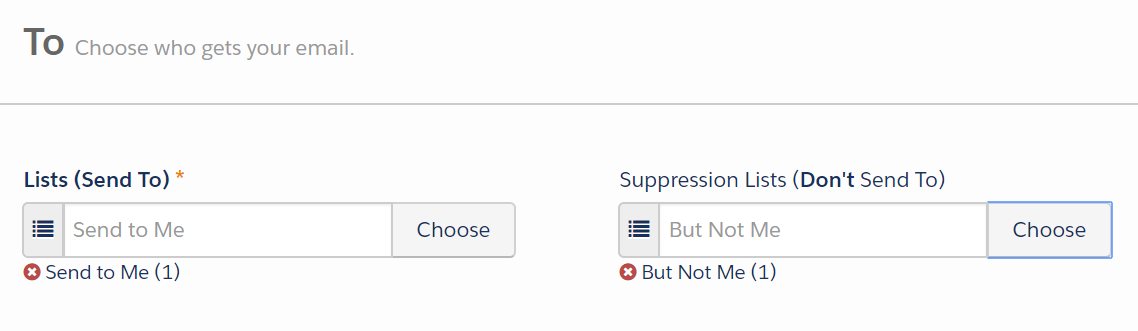
I ran some tests on list emails to see what happens if the same email is on “send to” and “don’t send to”:

Moment of truth...

…and my test record got the email.

I tried it twice.

How can this be.

Cue the existential crisis.

Why this is a gaping flaw in the process

I actually can’t believe I haven’t run into this before. This is a HUGE issue that effectively means if you have duplicates, you can’t use suppression lists reliably.

Here are some pretty logical and common scenarios where this will wreak havoc:

Example #1: Suppressing customers

We’re running a “last call” type of promo for a customer.  Anyone who hasn’t already purchased is getting a 10% off call-to-action.  Anyone who HAS purchased should not get this offer — we’re not trying to give out refunds or make people feel like they missed a deal.

So we suppress anyone who has purchased… but if there’s a prospect with a duplicate email out there, that email address is getting sent the offer.

Example #2: Suppressing people with active opportunities

One of my customers has like 5 dupes for every contact in their system because they use Salesforce web-to-lead forms for partner referrals. They need a better process, and they know it.

But in the meantime, they still want to send emails out to help drum up new demand for sales.  They suppress anyone who has an open opportunity… but again, if there’s a record with a duplicate email out there, that record and that email address is receiving the offer.

NO MEANS NO: Suppression lists should trump recipient lists

The flaw here is that suppression is looking at the unique identifier on the records (which is not email when you have AMPSEA).

I want to suppress that email address from receiving the mailing.

Before anyone screams “GDPR,” chill — opt outs and bounces are handled differently. When someone is unmailable, that status is applied globally across all records sharing that email address.

Why, how, & what now? [yelled into the sky while shaking my fist at the Par-gods]

What do you do with this workflow if you have duplicate contacts or leads in your system (as every single customer does)? How do you send emails with confidence, with the knowledge that you can reliably suppress the people that shouldn’t get certain types of emails?

I don’t have a workaround for this yet.  My team put in a support ticket or three to see if we can get recommendations and ideas.

The most frustrating thing about this to me is that it is documented NOWHERE.  Nowhere.  Trust me, I’ve looked.

Anyway.  If/when I have a solution, I’ll report back.  In the meantime, I’d love to hear your thoughts in the comments.

Is this the behavior you would expect in an AMPSEA org?  Does this mess with your campaign workflow? How would you…. or have you… solved for this?

It was the best of email marketing, it was the worst of email marketing.

If your inbox is anything like mine, it’s been absolutely crushed by all this GDPR hoopla.

It’s May 30th.  The compliance deadline was the 25th.  Will the opt in emails ever stop?  I’ve gotten at least 5 today.

I thought this was supposed to mean less spam, not more.

Anyway.

One can dream.

Nobody’s gone to jail yet, but still there have been some lessons learned.

The sheer volume of missives gracing my inbox has provided ample opportunity to reflect on what good and bad email marketing looks like.  A few key insights:

1. Fun wins, all day errday.

Does being jokey about GDPR make you a bad marketer?  I vote no.

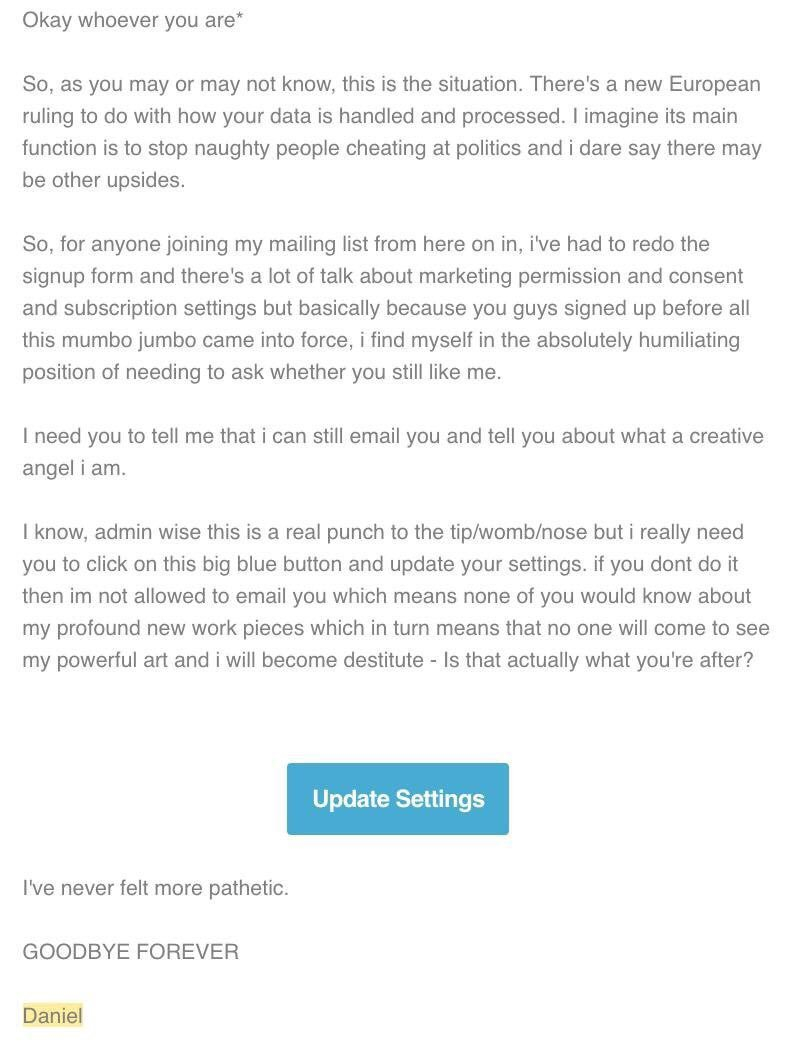
The ones that were interesting are the ones that got read.  Like this gem:

IMG_8641-1.jpg

My favorite part is of this entire email is:

“Okay so %%whoever you are%%,”

That’s one heck of a default value for no first name.

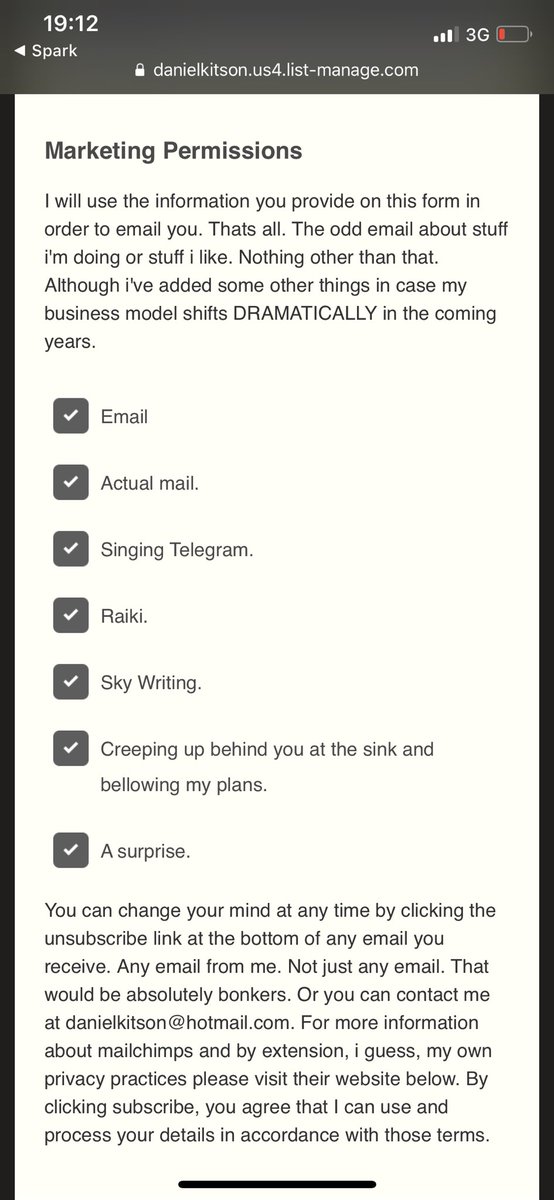
And then, the lists when you click through….

IMG_8642 (1)

Bahaha.

Takeaway: Be different or be gone.

2. We don’t BCC people on emails.

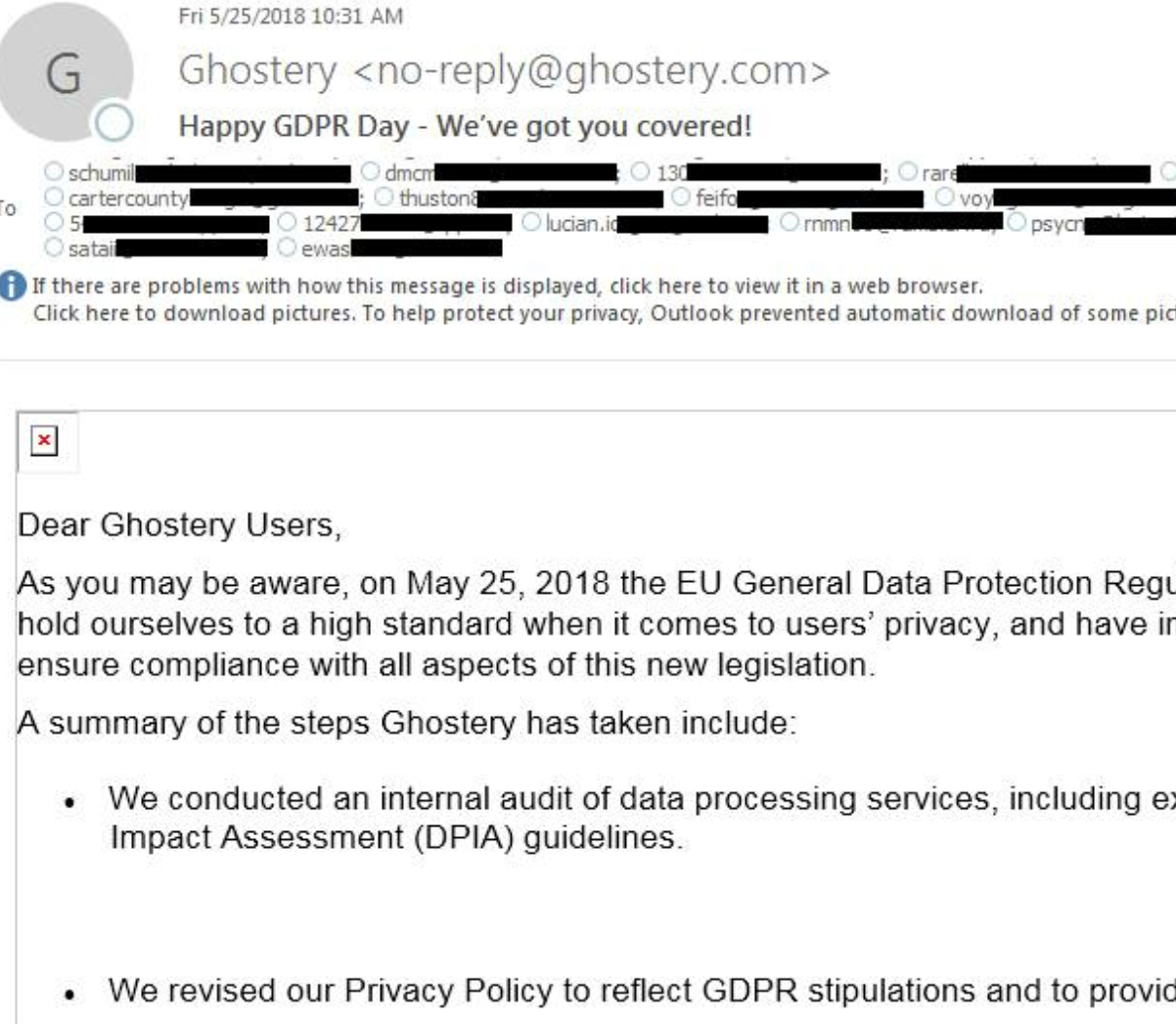
Bless the hearts of the people at Ghostery who accidentally exposed their customers’ email addresses in the CC line of their email about how much they care about our privacy.

IMG_8696.jpg

Seriously though, some underfunded marketer had the worst day ever, and my heart really does go out to them.

Get that guy or gal a Pardot license, dammit.

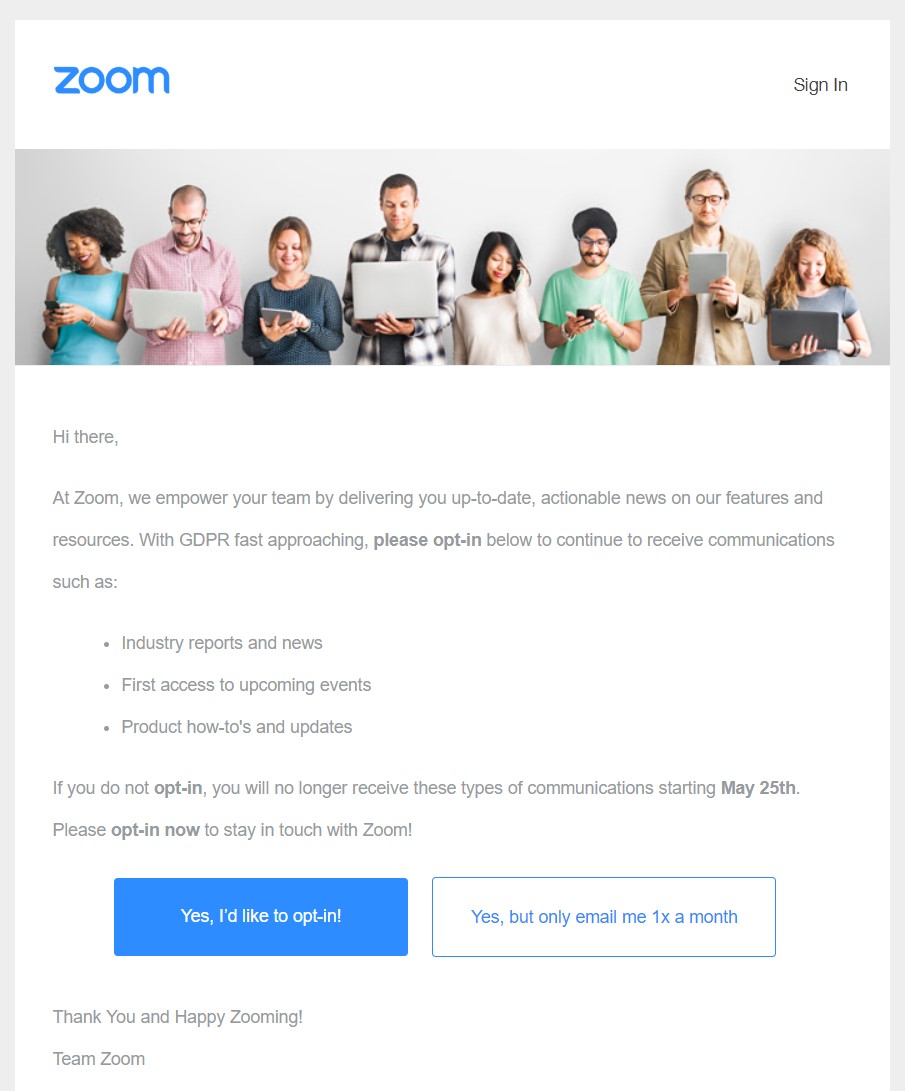
3. Yes means yes.

It’s really easy for people to say no to you.  There are a million other things competing for their time and attention.

So make it easy for them to say yes.

Zoom GDPR.jpg

People have kind of mocked this example, but honestly, I think it’s brilliant.

People already have a way to say no – by doing nothing.  It’s quite accessible.  In fact, it’s built into everything – our subscribers and site visitors have that opportunity for inaction everyday.

So when possible, how might we guide them to take action and raise their hand to indicate interest?

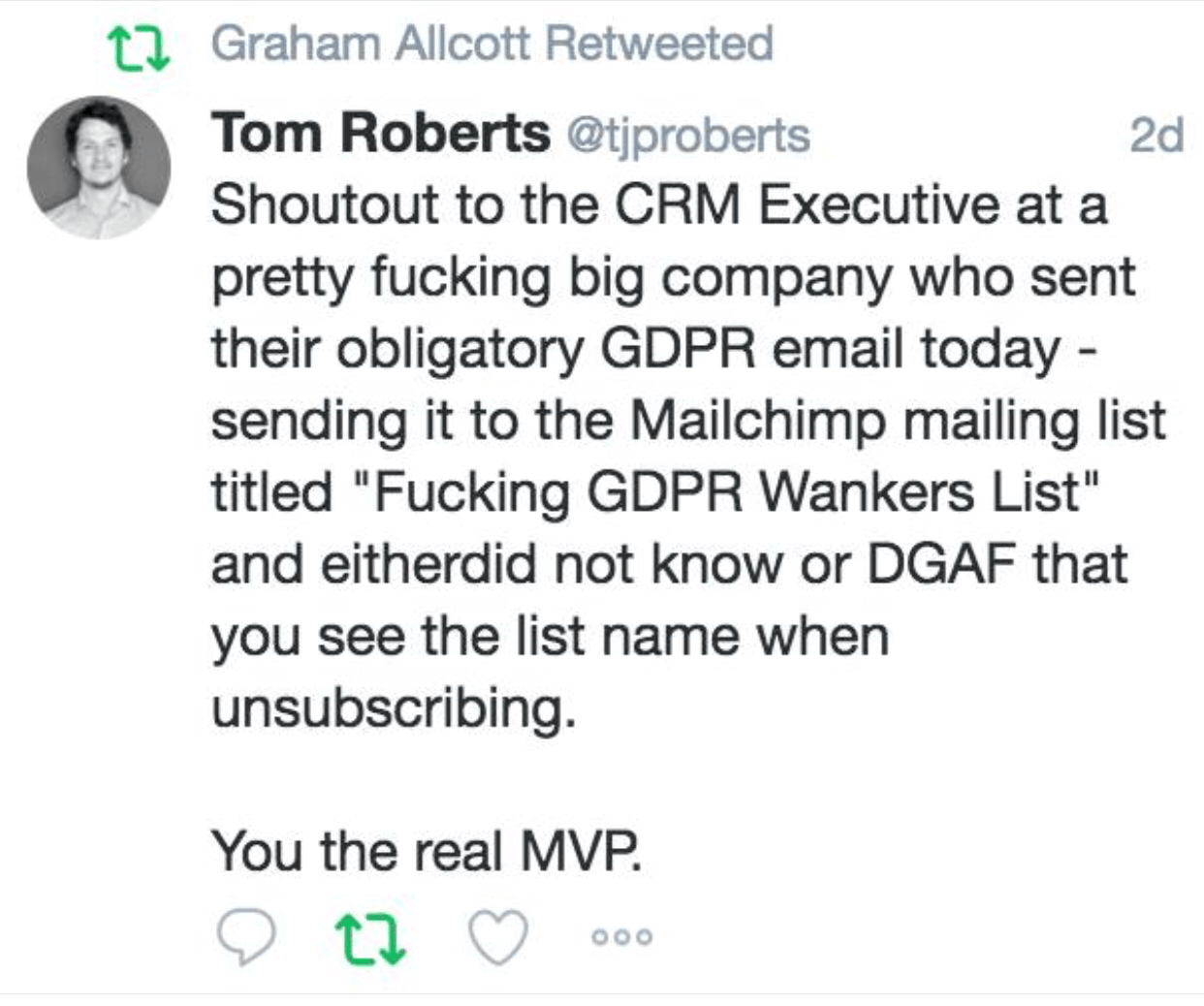
4. List names matter if they’re exposed in an email preference center.

Ev-er-y-thing-client-fac-ing-needs-Q-A.

Or things like this happen, ya’ll:

IMG_8750.png

Seriously, people forget that MailChimp list names are exposed to users.  At least in Pardot you can specifiy internal and external names.

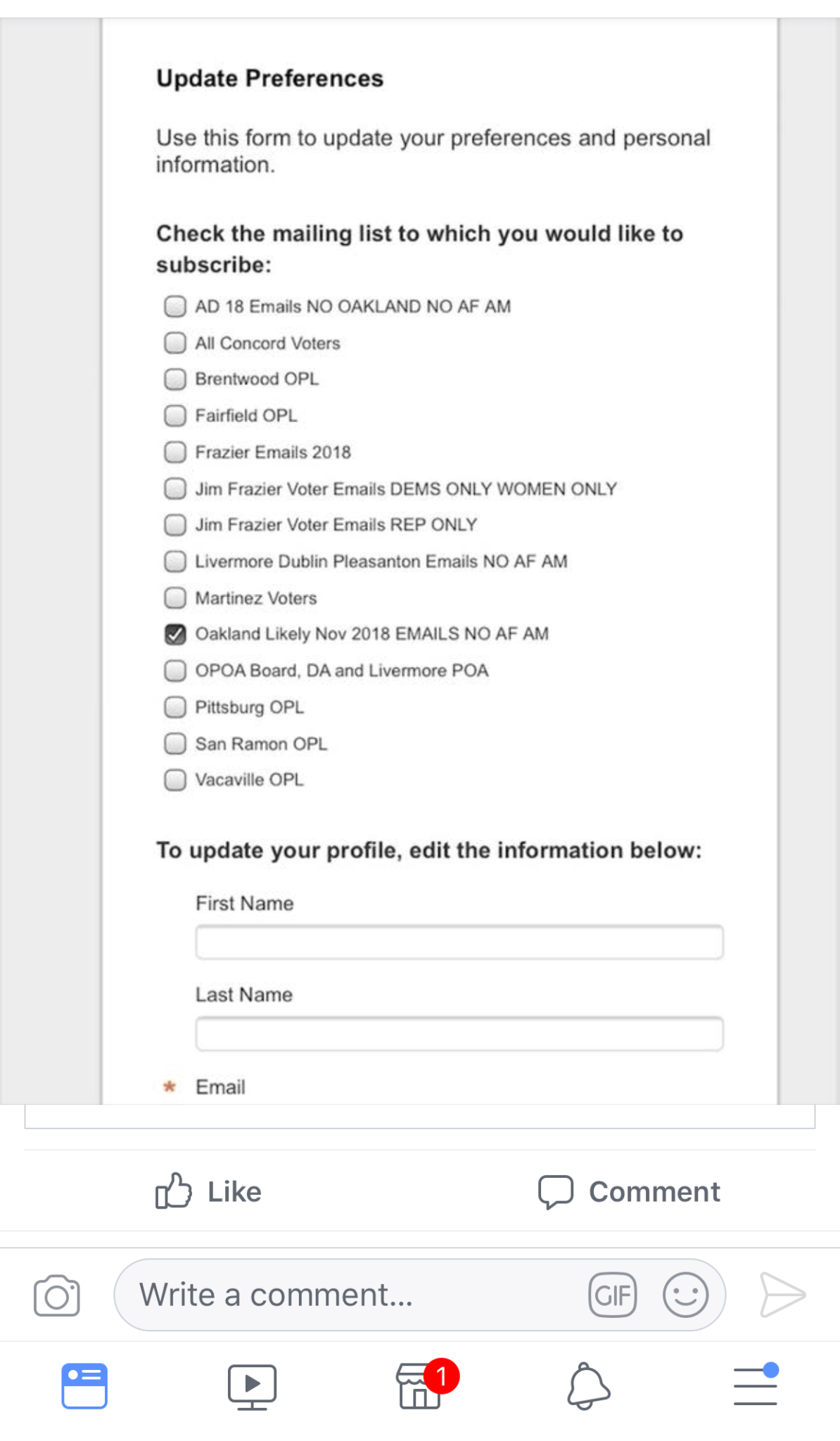
Here’s a MUCH LESS funny example from the Oakland Police Department:

IMG_8749

Yes, they have a list that includes “NO AF AM.”  I’ll let you draw your own conclusions on what those abbrevs mean.

Also “DEMS ONLY WOMEN ONLY”?

Mmmmmkay.

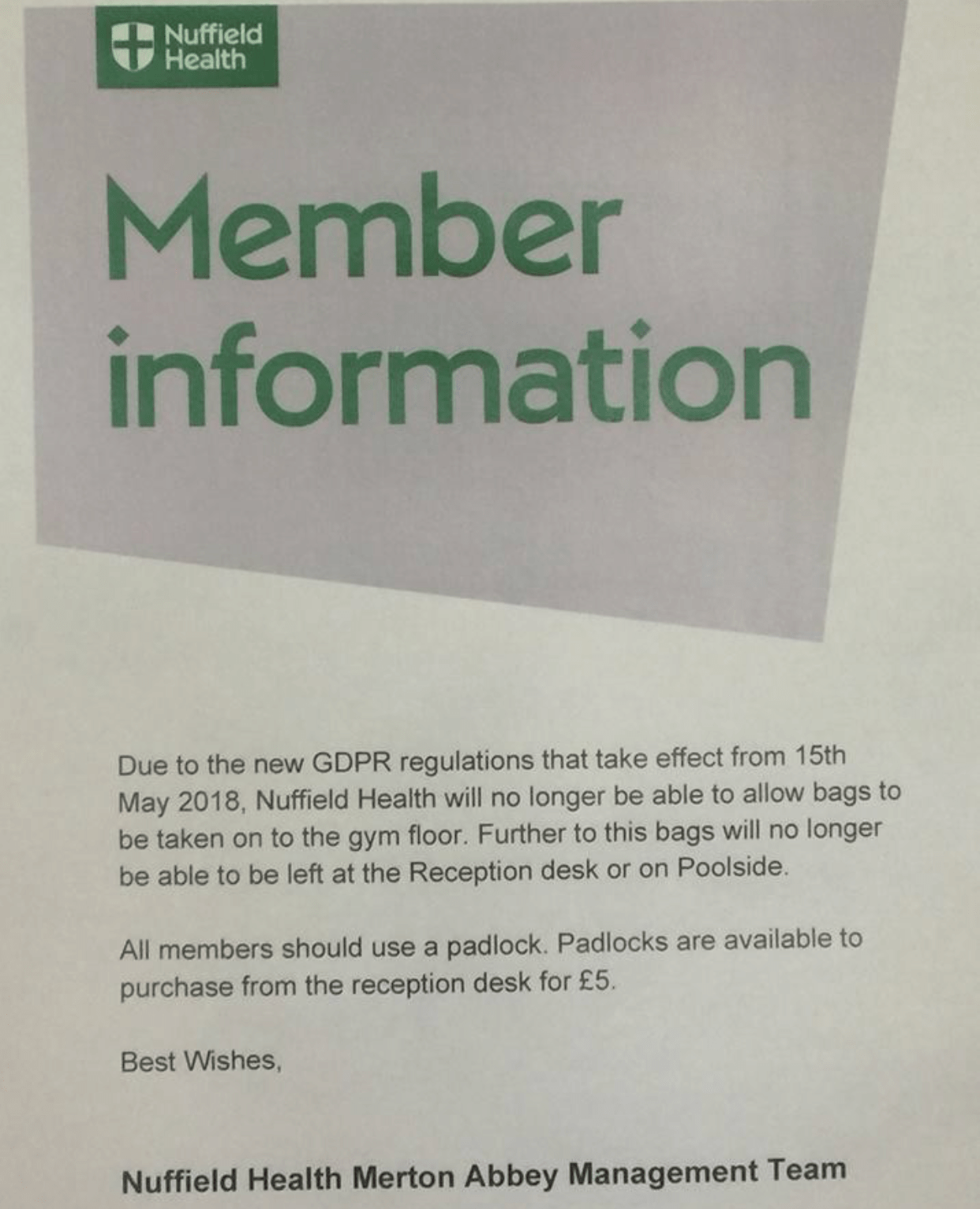
5. Print media matters.

I’m kind of digging print lately.  Mail is fun.  More blogs on that later.

In the meatime, shoutout to the analog marketers sending out notices like these:

IMG_8632.png

I’m going to use “CUZ GDPR” as the excuse for why I can’t do things from now on.

Can’t do the dishes? GDPR.

Not making dinner? GDPR.

6. Privacy concerns aren’t limited to just one channel. 

Regardless of whether GDPR functions as intended (it won’t), it’s virtually impossible to make yourself a digital ghost.

So whenever, wherever you are, be sure to proclaim your consent or lack thereof…

IMG_8606.PNG

7. Fines are the worst.

GDPR theoretically can fine companies up to 4% of their annual revenue for violating this legislation.

The optimist in me says:

“Yay privacy!”

The pessimist in me says that this is an impossible burden for small to mid-sized companies to comply with, and it unfairly hampers competiton.

It will be fascinating how this legislation fares in front of a judge and jury and how this evolves as cases are tried and as legal precent is established.

The Bottom Line

GDPR is going to usher in some important changes in the way we think about digital marketing, but there’s a lot that is still open to interpretation and that will continue to develop as people get dragged into a courtroom.

IMG_8640.JPG

In all seriousness though… if you have a question or a “what if” scenario you need help with, let’s hear it in the comments!  What have you observed from companies scrambling to comply with the law? Examples to share?

Marketing automation was designed to support sales and achieve efficiency in reaching prospects at scale.

But the benefits don’t stop there. Nurturing can be used for many other types of business relationships — including customers, partners, suppliers, and even your employees.

Why would my employees need nurturing?

This is one of my favorite soapboxes.  I firmly believe that internal communications deserve as much, if not, more attention than our customer-facing communications.

It’s not just to get that warm, fuzzy kumbaya feeling — it’s just good business. In today’s war for talent, your employees have options about where to invest their blood sweat and tears.

An ancillary benefit: if you’re just getting started with marketing automation, automating internal communications can be a great “low risk” experiment — and your HR team will likely be hugely appreciative of the extra comms help.

Opportunity #1: New employee onboarding program

The first 90 days at any organization are going to feel like drinking out of a firehose — but a little empathy can go a long way toward making this less painful.

Can you leverage lead nurturing principles to help new employees on their “buyer’s journey” — aka their path from deer-in-the-headlights newbie to fully functioning team member? What are the key questions every new hire has on day 1, day 7, day 30?

Explore using Engagement Studio to schedule communications like:

  • Paperwork requests
  • A welcome letter from the CEO
  • Company background & history
  • Automated tasks at set intervals to remind their manager or HR to check in
  • New kid logistics questions like dress code, where to eat in the area
  • Information on employee perks

Opportunity #2: Employee benefits communication

Another fabulous use case for drip nurturing is during open enrollment season for employee benefits. At most companies, the main communication tools for annual benefits renewals are:

a) the dreaded enrollment meeting where everything’s thrown at you all at once

b) a bunch of stock brochures from the insurance company that mean little to nothing to most of your employees

How might you break this complex message into bite size pieces, and leverage Engagement Studio to “nurture” employees as they build their understanding of their benefits options?  Could you break out key messages into weekly or bi-weekly communications leading up to the enrollment deadline?  Can you apply marketing best practices to cut through the corporate-speak and technical benefits jargon?

Fair warning: your HR may smother you in bear hugs if you offer to take this off their plate.

Opportunity #3: Analyzing success of training & internal messages

Pardot has great analytics on prospect engagement – who’s opening and clicking emails, time spent visiting a page, how long people are watching videos (if you’ve got the Wistia integration in place.)

This can give you some great intel on how employees are reacting to different kinds of content. Leveraging Pardot, you can start to understand:

  • What training materials people actually use
  • Who’s reading monthly reports
  • Link click activity on an employee intranet
  • Engagement rates with leadership communications (CEO updates, “state of the union” type comms, etc.)

What other non-traditional ways can you leverage Pardot?

Have you found success leveraging Pardot for something other than prospect engagement? What ideas do you have for expanding the impact of marketing automation in your organization?

Let your fellow readers know in the comments!

I love a good challenge.  Especially one about how to leverage Pardot functionality to its fullest potential to level up your marketing.

So when the wonderful Kevin Baldacci from the Pardot Product Marketing team tagged me in a LinkedIn post yesterday, my reaction was “GAME ON!”

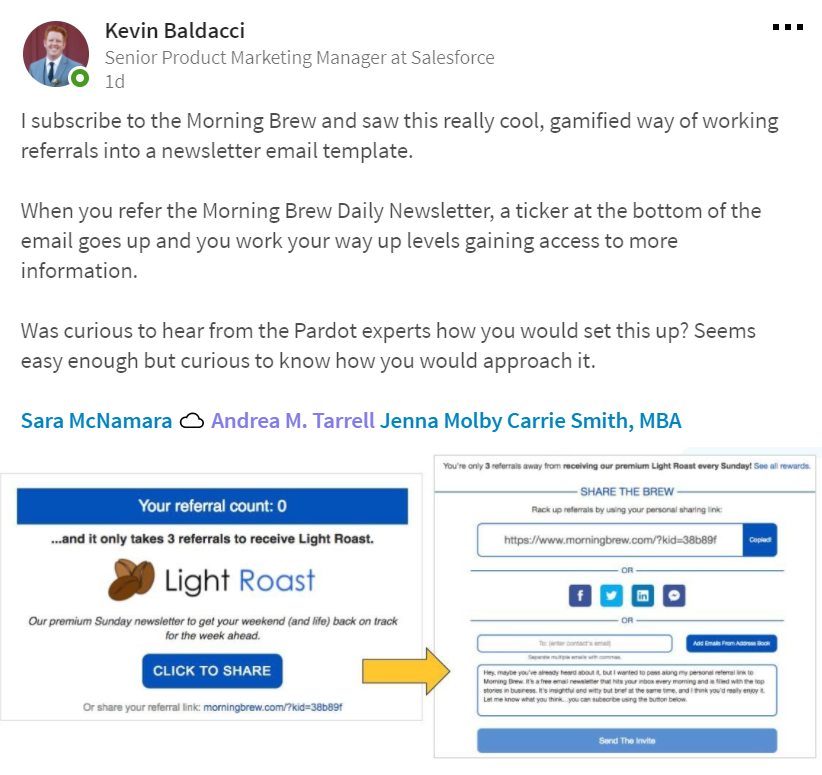
Here’s the doozy he came up with:

Pardot Asking for Referrals.PNG

More about this gamified subscription technique

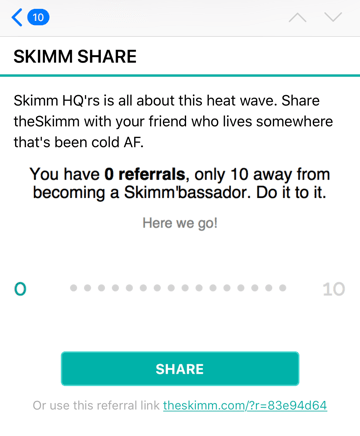
I think this is a pretty awesomesauce tactic.  One of my top email marketing crushes, The Skimm does something similar in their newsletter that I admire in my inbox on the daily:

Skimm

But does it work though?  The Skimm has grown its subscription audience to 1 million in less than 3 years, and has over 2K people who have completed 10 shares to earn “Skimmbassador” status.

So I’m going to go out on a limb and say yep, it’s working.

A word of caution: this is kind of a compliance grey area, because you’re technically sending emails to people who haven’t explicitly opted in.  I’d say definitely talk to your resident legal guru, and use your referred contacts wisely — invite them to subscribe, don’t start blowing up their inboxes.

How do you do it in Pardot? A little experiment…

I was dying to give this a try, so started messing around with some ideas and got something pretty similar rigged up in Pardot.  

Please note, the proof of concept outlined here just counts the number of referrals — not whether someone actually signed up. The Skimm and the Morning Brew have a system to verify whether people actually register (as Sara McNamara mentioned), and if you wanted to take it to that level, you’d probably need custom code or an AppExchange product. 

On to the how-to!  A detailed step-by-step would be excruciatingly long, so I’m going to give you the highlights reel of how to make this happen in your Pardot org:

Step 1: Create a bunch of custom fields

  • Number of Referrals (number)
  • Email of the Buddy You Want to Share This With (text)
  • Quick Note to Your Buddy on Why You’re Sharing (text)
  • Person Who Referred You (text)
  • Why Person Referred You (text)

Create these in Pardot, and in Salesforce on both Contacts & Leads.

Step 2: Create your referral form

Mine looked a little like this:

Give it a try!  And feel free to enter a real person’s email who would enjoy The Spot for Pardot so I can invite them to check it out.

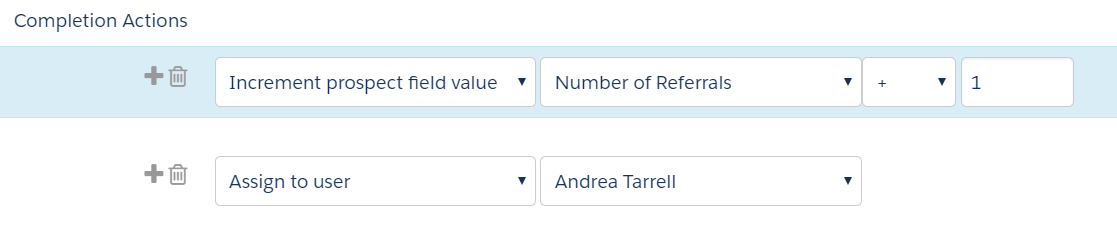
Your form’s completion actions should be set to include an assign to user step (to ensure it syncs over to Salesforce) and to increment the Number of Referrals field by +1:

Completion Actions.PNG

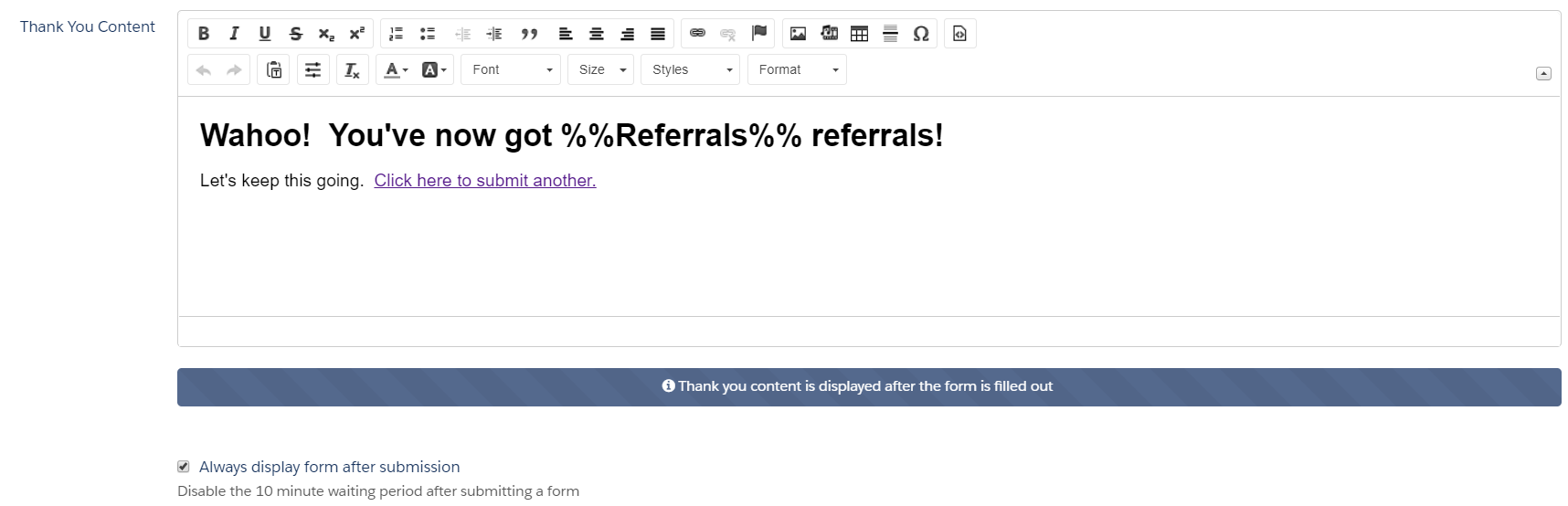
If you tested my form… note that when you submit it, there’s a variable tag that’s displaying the recently incremented field value.

Here’s what that looks like in the set up of the thank you content for the form:

Thank you content.PNG

Step 3: Get your process builder on

Steps 1 and 2 will get you the data you need in Pardot.  But what good is an email address to you hanging out in a custom field?  Especially one that can be overwritten by zealous referrers?

Nope, we need a new lead record created.  And that means… Process Builder, ladies and gentlemen.  You might want to grab a Salesforce admin for this or earn some shiny new Trailhead badges to get ready for this part.

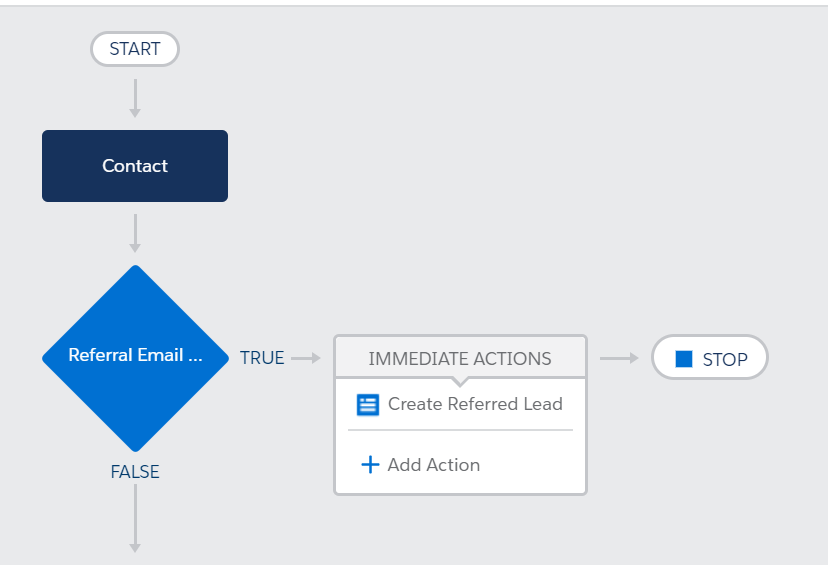
The first step of the Process Builder flow should check if the “Email of the Buddy You Want to Share This With” has been changed.  If so, then the “Immediate Action” should be to create a lead record:

Process Builder.PNG

Now, we get fancy.  We want to move data from fields on the Referrer Contact to DIFFERENT fields on the Referee Lead.

  • Email of the Buddy You Want to Share This With goes to the new Lead’s Email field
  • Email goes to the new Lead’s Person Who Referred You field
  • Quick Note to Your Buddy on Why You’re Sharing goes to the new Lead’s Why Person Referred You field

These Contact fields will be pointed to the Lead using field references, so that the value is basically copied between the fields.  It should look something like this:

Completion Actions

Activate the process, test, and voila!  You got yourself a referred lead.

Step 4: Configure dynamic content blocks to show referrer their progress

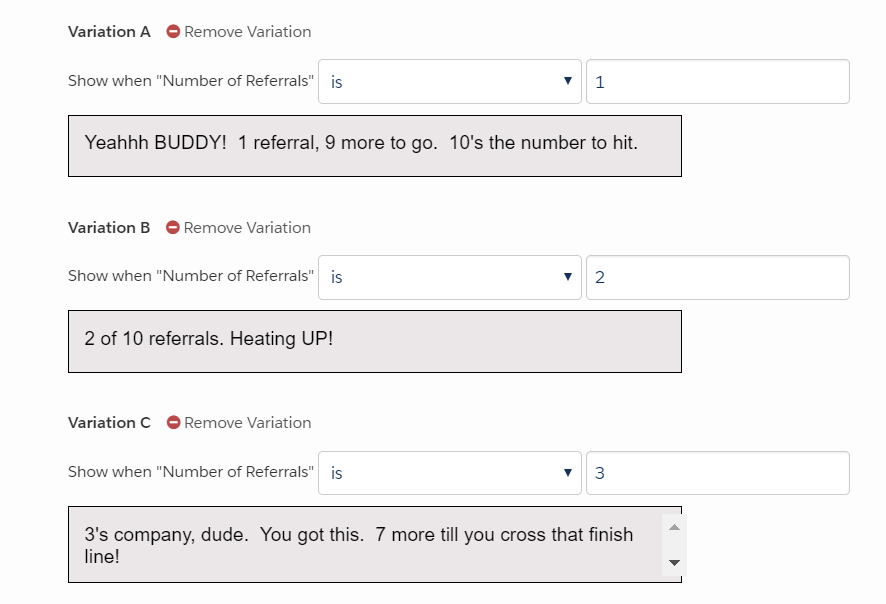
Write custom content that you can add to your email footer showing your Referrer what kind of progress they’re making.  Maybe something like…

Dynamic Content Example.PNG

Steps 5+: More things you’d need to make this a viable solution

That’s as far as I took this.  It was intended to be a proof of concept and not a full blown solution.

But if you WERE really going to put this into practice. I would say you should also:

  • Create a version of this process that kicks off when a Lead submits a referral (mine handles the scenario when a Contact submits a referral, but you probably need both depending on how your Pardot/Salesforce connector is configured.)
  • Make sure to map the lead fields to the correct contact fields in Salesforce so you don’t lose data when the lead is converted
  • Put duplicate matching rules in place to prevent referred leads from being created with the same email addresses
  • Add the referrer and referree to campaigns so that you can track marketing/sales results and tie back to this event
  • Create an Engagement Studio that kicks off a welcome email to the referee explaining why they got on this list and how to opt in or out
  • Add a dynamic content module somewhere on your website with some witty copy asking for more referrals. You could set this to show only if # of referrals > 0 or with some other custom logic.
  • Consult your resident compliance guru on whether this fits with your existing opt in policy (it definitely would not fly in Canada or Europe)

Other considerations if you want to do your own experiment

If you’re going to play with this, DEFINITELY do this in a Sandbox.

And test extensively before your subscribers ever set eyes on it.  What happens if you submit the form rapidly in quick succession?  What happens if you fill out the referral form as a non-subscriber? What if you enter a value that’s wacky or too long?  What happens if there’s a record sync error, and the prospect is delayed from syncing with Salesforce?

Basically try as hard as you can to break it before you bring it to prime time.

Then have other people try to test and break it.  Then maybe try with a small group of subscribers.

What’s your off-the-wall challenge?

I love to whiteboard solutions to complex problems.

Got a thinker on your hands?  Lay it on me!  Put it in the comments.

Is anyone considering trying the above?  Would love to hear how you do it and what your results are.

Okay, before people start clutching their pearls, let me clarify…

A/B tests are not a waste of time. But bad ones are. And there are a lot of bad ones.

Pardot makes it easy to run A/B tests on things like subject lines, body copy, color, images and more (in Pro edition or higher).  But the ease of configuring these tests in the system does not make them easy to do right.

Your time is precious. If you’re running A/B tests and  collecting very little and/or slightly pointless data, you’re expending valuable energy that could be leveraged elsewhere.

Like doing fun Pardot things that actually do have an impact. Or napping.

What good email marketing A/B tests look like

Well run A/B tests have a few things in common:

  • They test a meaningful hypothesis
  • They collect enough data to make a decision on
  • They isolate one variable
  • They’re executed successfully
  • They’re interpreted successfully

Simple in theory.  For digital marketers with a budget and a gazillion things on their plates though, there are a lot of small ways to get tripped up.

Here are times when you should skip the A/B test — and not feel bad about.

1. If the audience isn’t big enough

Let’s say you run an A/B test, and twice as many people click through on Version B.  We have a clear winner, right?

It seems like a simple yes, but there’s some nuance here. The real answer is something more like “um, maybe.”

The size of the overall send and the difference in the two response rates determine whether your results are statistically significant – aka your threshold for “sure enough that you should take action on it.”

Kissmetrics has a free tool that is my go-to for determining the actionability™ of A/B test data and determining next steps.

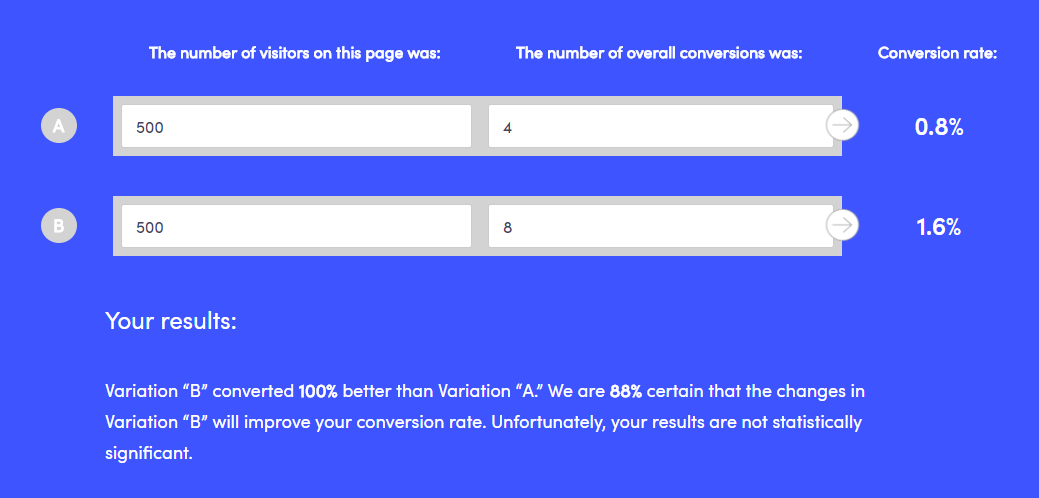
For example, if we take the 2X improvement mentioned above for a sample size of 1,000, we see that it doesn’t pass the smell test:

AB Test 1.png

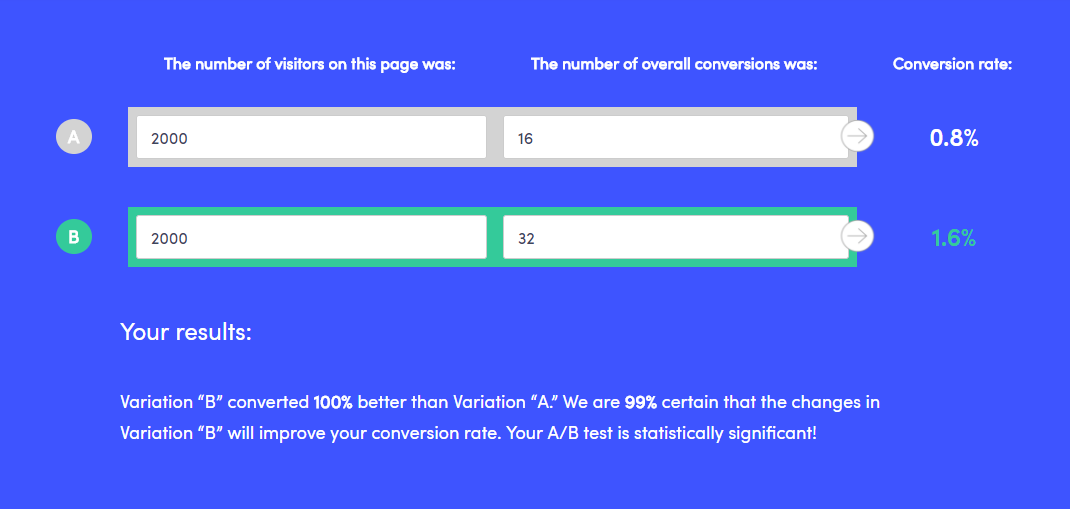
With a larger sample and the same conversion rates, though, we get a different result:

AB Test 2.png

The bottom line: before you commit to a pivot in strategy based on an A/B “winner,” make your numbers are truly meaningful.

2. If it compares apples to oranges

If Email A is radically different from Email B, and you do have a statistically significant result – then what?

What was it that caused your audience to respond better to Email A? If you have too many variables, it’s impossible to say. Try changing ONE thing in each test, and iterating as you go on .

Examples of things to vary could include:

  • Call to action verbiage (like “RSVP” vs. “Save Your Seat”)
  • Email layout (one column vs. two column, image placement, etc.)
  • Personalization options – (i.e. “Hi Jon” vs. “Dear Mr. Snow”)
  • Headline
  • Subject line
  • Pre-header text
  • Different offers / discount terms (i.e. 20% off vs. get 2 months free)

3. If the clock is ticking

Is your email time sensitive, or do you have other messages planned to that same list segment?  If so, it might not be a great candidate for A/B testing.

Pardot lets us pick what percentage of the list we want to test and how long we want to test before declaring a “winner” and sending to the remainder of our contacts.  I’ve worked with several clients who A/B test all of their emails, but then when you go back and look at the results, a different “winner” would have been selected if they would have given their test a bit more time.

If you can, give your test a full 24 hours. Data from MailerMailer indicates that it takes people longer to open messages that one might expect.  Here’s their breakdown of when emails were actually opened:

  • 13.7% within the first hour of sending
  • 54% within the first 5 hours of sending
  • 83% within the first 24 hours of sending
  • 90% within 2 days
  • 100% within about 2 weeks

Apparently, not all of us are checking our phone with Pavolvian compulsion during meetings.  Maybe your audience is, though – so consider analyzing your Pardot data to try to understand how long your audience tends to open/click through on your emails following a send.

You can see this info under list email reports:

Image 3.png

If you can’t give your email test 24 hours (because you’re promoting a super special secret flash sale that ends at midnight or something like that) then give it as long as you can.

How late can you declare a “winner” and send the remainder without your email being untimely or overlapping with other planned sends?

4. If you don’t plan to do anything with the data

“Oh B won?  Cool.”

Don’t A/B test for the sake of A/B testing.  It’s a completely useless exercise if you don’t do anything with the information you’re gathering.

If you don’t have a hypothesis or a plan to act on the results of your A/B test… then don’t do it.

The net impact is that you’re adding a lot of time to your process and not learning that much.

We each have limited number of hours in our day, so give yourself permission to do something other than fussing over A/B variations whose outcome you’re apathetic about.

How do you do A/B testing in Pardot?

Over to you — how are you leveraging A/B testing in your digital marketing, particularly with Pardot?  What’s worked, and what’s tripped you up?

Share in the comments!
No more posts to show