Category

Pro Tips

Student expectations today are vastly different than they were a decade ago. It’s causing technology leaders at the most successful educational institutions to rethink their data infrastructure and student journeys through real-time interaction management strategies.

Today’s students want a personalized, seamless, engaging journey that keeps pace with their brand experiences outside of higher education. At the same time, more and more individuals are bypassing the traditional college education routes altogether. That means higher education institutions (HEIs) need to exceed student expectations to reach enrollment and retention goals and ultimately deliver successful student outcomes.

Combating Headwinds in Higher Ed: A three-part series

Throughout this three-part blog series, you will learn about using your institutional data to create personalized student experiences at scale and in real-time within your college or university. 

  1. Part one: Real-time interaction management and real-time interaction for student success  
  2. Part two: Overview of Salesforce Data Cloud for higher education professionals, potential use cases, and best practices for successfully using Data Cloud
  3. Part three: Building a unified data vision and then activating your data to build a CRM + AI + data strategy for your institution
This series was co-authored by Kirsten Schlau, VP of Technology at Sercante, and Dr. Bradley Beecher (email), Director, Student Experience at Salesforce.

Harnessing data to navigate and overcome challenges in higher education

To help combat higher ed headwinds, there’s a tremendous untapped opportunity for HEIs to use their data by improving organization-wide data infrastructure.

Yes, you’re probably reading this and thinking things like:

We do use data — we analyze our data to maximize the value of resources and stay ahead of constituent needs.

Or even…

We use our data to create strategic plans, execute them efficiently, and analyze their results to differentiate our institution, proactively improve student outcomes, and report outcomes to government agencies and ranking organizations. 

Oftentimes though, that data is trapped inside campus systems that don’t easily integrate with each other. It’s time-consuming to piece together a cohesive and accurate story when the data is trapped, but there’s a better way. It involves creating a fully integrated single source of truth to manage student data.

Unifying student data can help your institution to:

  • Generate real-time institutional reporting
  • Create a unified student record
  • Take action from the data
  • Personalize the student experience to reinforce a sense of belonging 

Taking cues from non-HEIs to use data for growth and retention

What if we told you there’s an opportunity more specifically to use that data on an individual basis, at a 1:1 scale to personalize the student experience in real-time?

This is happening in other industries. In fact, you might have experienced personalization like this as an online shopper. Here are a few examples.

What is real-time interaction management (RTIM)?

Real-time interaction management, also known as RTIM, uses customer interactions, predictive modeling, and machine learning to deliver consistent, personalized customer experiences across channels in real-time.  

“Forrester Research analyst Rob Brosman originated the term Real-Time Interaction Management in 2012, and three years later Rusty Warner, another Forrester analyst, offered the formal definition of, “Enterprise marketing technology that delivers contextually relevant experiences, value, and utility at the appropriate moment in the customer life cycle via preferred customer touchpoints.” – Source

RTIM equips marketers to gain immediate visibility into critical moments within the shopping or user experience, which can deliver better consumer experiences and outcomes. This includes generating relevant offers and product suggestions on the right devices at the right time to drive customer engagement, satisfaction, and, in turn, revenue growth. 

Impact of real-time interaction management in the real world

As an everyday consumer, you’ve likely already experienced the effects of RTIM (or you’ve experienced a scenario where you wish RTIM was in place).

Example scenario illustrating RTIM in e-commerce:

Let’s say a customer, Maria, visits an online fashion retailer’s website:

  1. Browsing Products: Maria lands on the retailer’s homepage and starts browsing through summer dresses.
  2. Real-Time Data Capture: As Maria navigates through the website, her behavior is captured in real-time. This includes the pages she visits, the products she clicks on, her past purchase history, demographic information, and any other relevant data.
  3. Real-Time Analysis: The e-commerce platform analyzes Maria’s behavior and data in real-time. It identifies her preferences based on her browsing history, past purchases, items in her shopping cart, and any other available data points.
  4. Personalized Recommendations: Using RTIM, the e-commerce platform dynamically generates personalized recommendations for Maria. It might suggest summer dresses similar to the ones she’s viewing based on her style preferences and past purchases. These recommendations are displayed prominently on the website in real-time.
  5. Real-Time Engagement: While Maria is still browsing, a pop-up notification appears offering her a limited-time discount on a dress she had previously shown interest in. This real-time engagement aims to incentivize Maria to make a purchase.
  6. Adaptive Pricing: As Maria continues to browse, she adds a couple of dresses to her cart but hesitates to complete the purchase. In response, the e-commerce platform dynamically adjusts the prices of the items in her cart, offering her personalized discounts or free shipping to encourage her to proceed to checkout.
  7. Abandoned Cart Recovery: If Maria leaves the website without completing her purchase, the e-commerce platform sends her a personalized email reminder within minutes to remind her about the items in her cart. These reminders offer her an additional discount or incentive to complete the purchase.
  8. Cross-Channel Consistency: Whether Maria interacts with the retailer’s website or mobile app, or when she receives an email, the messaging and recommendations remain consistent across all channels for a seamless and personalized shopping experience.

In this example, RTIM enables the e-commerce retailer to engage with Mary in real time, providing her with personalized recommendations, discounts, and reminders tailored to her preferences and behavior. This ultimately increases the likelihood of conversion and enhances customer satisfaction.

Additionally, some online retailers are now using RTIM not only in their marketing efforts but also as a way to offer seamless customer experiences. 

Harnessing RTIM at colleges, universities, and other post-secondary education institutions

In the e-commerce example above, the experiences were grounded in segmentation and, of course, made up of various data points. 

It’s no different for HEIs. The ability to segment and provide greater personalized content and experiences leads to a great student experience.

We’ll share a few examples of how other professionals in higher education are doing this today.

Real-time interaction for student success

Imagine a world where student advisors can gain a full 360° picture of their students in a single view. This could include:

  • Past class enrollment records and performance indicators
  • Required courses that support their designated degree path
  • Intelligence to recommend courses based on individual interests and passions outside of their degree path
  • Automatic insights into things such as on target to graduate, at risk, potential for drop-out, and any other insights unique to your institution.

Oh! And one more thing to add: this is all done at scale with minimal manual effort put on the advisor.

Step 1 to building an RTIM strategy: Unify data to create a single source of truth

This vision can become a reality when your data is not trapped in siloed campus systems. 

You might say, “How is that possible?”

Here’s how you can start building a student-centric RTIM strategy.

All of this data aggregation and related insights are powered by Salesforce Data Cloud and Einstein 1 Platform. They are the building blocks to creating personalized student experiences with real-time capabilities. And they can also help advisors to gain more time to focus on making meaningful connections with their advisees and ensuring their long-term success. 

How does the Einstein 1 Platform support RTIM strategy for HEIs?

The Salesforce Einstein 1 Platform (A.K.A. “Salesforce core”) unifies your data, AI, CRM, development, and security into a single platform. It’s an extensible AI platform (meaning, it easily connects with other Salesforce platform products and third-party integrations), and it can facilitate the fast development of generative apps and automations.

Through Einstein 1, your institution can appropriately address students’ most common, basic, or foundational questions through alerts and automated workflows. Then your advisors’ interactions with students can center on deeper and more meaningful advising conversations.

Creating unified student profiles with connected data

A unified student profile, aggregating student data into a single student record allows advisors to meet with more students and encourage those meaningful conversations. For example, instead of talking through the required courses advisees need for their program, they get automated alerts listing which courses to take next. Then, the advisee’s open office hours can become career exploration sessions or deep dives to help students better understand complex concepts.

At institutions with siloed data, creating alerts like those in the example requires a ton of manual effort and time. And let’s face it — advisors don’t have time to spare. 

How Data Cloud solves the RTIM puzzle

With Salesforce Data Cloud, advisors can provide more proactive and holistic support for students. That’s because campus data for each student is unified in a single record — something that benefits both students and the institution.

In turn, students make more informed and thoughtful decisions with this proper support from academic advisors. Getting automated alerts supports students as they navigate the university/academic program policies and procedures, and, more importantly, offers an exceptional college experience.

Ultimately, Data Cloud will help build better staff experiences with a unified student record and a seamless student experience that meets their modern expectations.

In the next post in this series, we will provide an overview of Data Cloud for Higher Education, examples of potential use cases, and best practices for using Data Cloud.  

Ready to transform your student experience through real-time interaction management?

Discover how real-time interaction management can elevate the way you engage with students, and enhance their experiences with personalized, timely interactions that make a real difference.

Learn more about Salesforce Education Cloud here to understand the platform and how it compares and relates to your current technology stack.

Then, send a message to Sercante to learn about our Salesforce consulting services for higher education institutions, including Salesforce implementations & migrations, design & architecture services, reporting & analytics, custom integrations, and everything in between.


As an SMB marketer, you’re required to wear a lot of hats. From lead generation and aligning with sales and service teams, to creating content, emails, and personalized customer journeys you’re pulled in a lot of directions – and frankly that can be tough. Cue – artificial intelligence!  Gain insights and considerations for how you can use AI to help your marketing efforts

Supporting your day-to-day tasks 

One of the main benefits of AI  is in the area of efficiency. AI allows small teams to do more with less/fewer resources – which according to some marketers – they expect AI will save them 5 hours per week – that’s over ½ a day you get back!

 Examples of this include 

  • Content creation – from minutes to seconds
  • Customer segmentation – reducing the manual effort and technical skillset commonly required

AI can also lead to better experiences for customers – which in reality is what it’s all about. By giving you the ability to get content out quickly, AI can also increase your opportunity to personalize customer experiences such as send times – waiting to send until someone is most likely to engage.

How it’s done

But before we go much further – let’s level set: AI can be categorized based on its functionality and the specific tasks it performs. Two common categories are Generative AI (as described above) and Predictive AI. Here’s how they differ:

  • Generative AI focuses on creating new content, such as text, images, music, or even entire datasets. These systems generate data that mimics the patterns and structures of the input data they were trained on – leveraging user feedback such as thumbs up or down as part of their internal feedback & learning loop.
  • Predictive AI focuses on analyzing existing data to make forecasts or predictions about future events. It identifies patterns and trends in historical data to predict outcomes. Examples include:
    • Sales Forecasting: Predicting future sales based on past sales data and market trends.
    • Customer Churn Prediction: Identifying customers likely to stop using a service.

As marketers to date – much of the focus/application of AI has been focused on GenAI but its only a matter of time before predictive AI becomes more commonplace.

Tools at your disposal

When it comes to AI tools  – what you use is based on what you’re trying to achieve. And like most things, there are free and paid options.

Popular Free tools

ChatGPT, Microsoft CoPilot, and Google Gemini are three of the most popular chatbots to answer any question or generate text. Jasper is an AI copywriting assistant specializing in marketing content, and Quillbot paraphrases and improves written content, while, DALL-E 2 is great for generating images from text prompts.

While these are popular and free – marketers should keep in mind that they may many times lack control over quality and security. TDLR – don’t put personal, private, and/or confident data into these AI tools as they aren’t entirely secure.

Getting an assist from AI

As we continue to be asked to do more with less, make sure you don’t leave yourself vulnerable either. 

Considerations for using AI as a marketer

  • Be mindful of the information you input -what would happen if there was a data breach? 
  • Check for plagiarism – is the AI-generated content pulled directly from another source?
  • Consider the reliability & accuracy – did you fact-check? How good/specific was your input? What limiters did you apply if any?

How SMBs can tap AI through their marketing automation platforms

Our Guide “Selecting a Marketing Automation Vendor that Packs a Punch for SMBs” delves deeper into how top marketing automation platforms like Mailchimp, HubSpot, and Salesforce are innovating for SMBs. These platforms offer AI-driven features that can significantly enhance your marketing efforts, making them more efficient and effective.

Download the whitepaper now to explore how these vendors are revolutionizing marketing automation for SMBs and how you can leverage AI to stay ahead of the marketing trends.

Download Whitepaper:

This field is for validation purposes and should be left unchanged.
What tool(s) do you use?(Required)

I recently ran into a situation where a client needed to exclude select campaign types from being populated as the Primary Campaign Source field on opportunities. While this might sound unusual on the surface, the use case was very logical and likely impacts other organizations too. Read on to learn how we solved it to customize primary sources on opportunities using Salesforce flow.

Use Case

Before getting too deep into the solution, let’s first review the use case for relevancy in your organization. In this particular situation, the sales teams were leveraging Salesforce campaigns as a way to group records for outreach. Some of the outreach campaigns became quite large over time and began skewing data in the Primary Campaign Source field on opportunities.

Many reports in the organization were based on the Primary Campaign Source field and the outreach campaigns were undermining the impact of true marketing campaigns. It was determined that reporting would be more accurate if outreach campaigns were excluded and the Primary Campaign Source field was populated using the last “responded” campaign (based on the responded checkbox).

Primary Campaign Source Field Review

Before we get into the solution, let’s do a quick recap of the Primary Campaign Source field on opportunities. Campaign attribution can be a confusing topic, so it never hurts to review.

How is the Primary Campaign Source Populated?

  • Lead Conversion (with Opportunity) – The Primary Campaign Source field will be populated with the campaign that was most recently associated with the lead.
  • Opportunity Creation (from Contact) – The campaign that the contact was most recently associated with will populate the Primary Campaign Source field when a new opportunity is being created from a contact record. Users have the ability to change the value before saving the record. 
  • Manually – Users can manually update the Primary Campaign Source field on the opportunity using the picklist of active campaigns.
  • Automation – The Primary Campaign Source field can also be updated based on an automated process in Salesforce (generally a Flow).

Do Auto-Association Rules Apply?

Great question! Auto-association rules are part of campaign influence in Salesforce and are used to create campaign influence records. They are not factored into the population of the Primary Campaign Source field on opportunities.

Primary Campaign Source Field (on Opportunities) vs. Primary Source Campaign Influence Model

  • Primary Campaign Source Field (on Opportunities) – Lookup field on the opportunity that links it to a single campaign.
  • Primary Source Campaign Influence Model – Campaign influence model that attributes 100% of the influence to the campaign noted in the Primary Campaign Source field on an opportunity.  

Solution Review

Now that we’ve laid the foundation, let’s address the solution.

Step 1 – Determine Exclusions & Actions

The first question to answer is “What campaigns should be excluded from the Primary Campaign Source field?”. Depending on your organization, this could be a campaign type, a campaign record type, or a combination of both. 

Step 2 – Determine Actions

Now that we know what campaigns we would like to exclude, what should we do when we run across an opportunity with an excluded value? The default Salesforce behavior is to use the last associated campaign. We could go that route and use the last “valid” campaign that a lead or contact was associated with or we could go a step further and use the last campaign that has the “responded” box checked.

I prefer prioritizing my “valid” campaigns based on the “responded” checkbox. Similar to how I configure auto-association rules, I just don’t like giving credit to a campaign if the lead/contact has not actually engaged with it.

We also need to consider how the Primary Campaign Source will be populated if no valid campaigns are found. You can choose to keep the excluded value (as a reference point), clear the value, or populate with a default value. I elected to retain the excluded value (prefer data to no data), but you have options!

Step 3 – Build it in Flow (Sandbox)

For illustrative purposes, I created a flow in my dev org to show you how this solution could work for you. Here are the assumptions that were used.

  • Campaigns with the type of “Sales Prospecting” should be excluded.
  • When updating the Primary Campaign Source field, the most recent responded campaign (checkbox checked) should be used.
  • If a valid campaign is not found (or the only campaign has a non-responded member status), the Primary Campaign Source field should be populated with the most recent campaign (basically defer to the default Salesforce behavior).
  • Since this data is used for reporting purposes, real-time updates are not needed. 

Flow Summary 

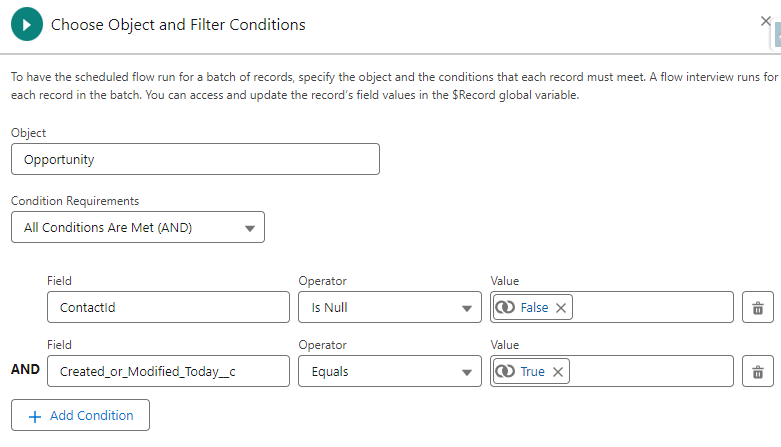
  • This solution uses a scheduled flow based on the opportunity object. The flow runs nightly and processes all opportunities that were created or updated that day.
    • Note: Relative dates can’t be used in the filter conditions of scheduled flows. To address this, create a custom checkbox field on the opportunity object that will evaluate TRUE if the opportunity was created or updated today and use it in your criteria.
    • Below is my filter. It’s selecting opportunities that have contact roles and were created or updated today.
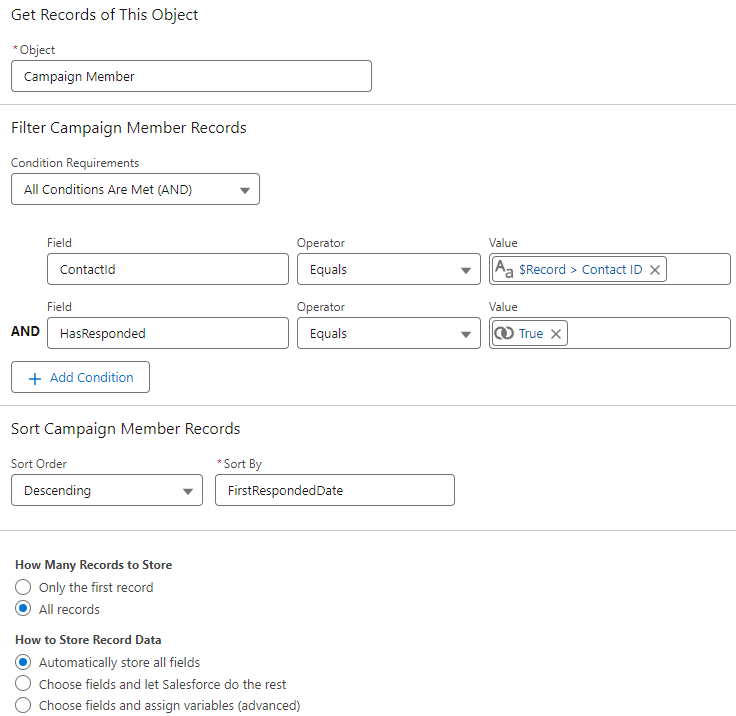
  • Get campaign members for contact roles
    • In this step, we get all the responded campaign member records (for the contact role) and sort them so the most recent is first.
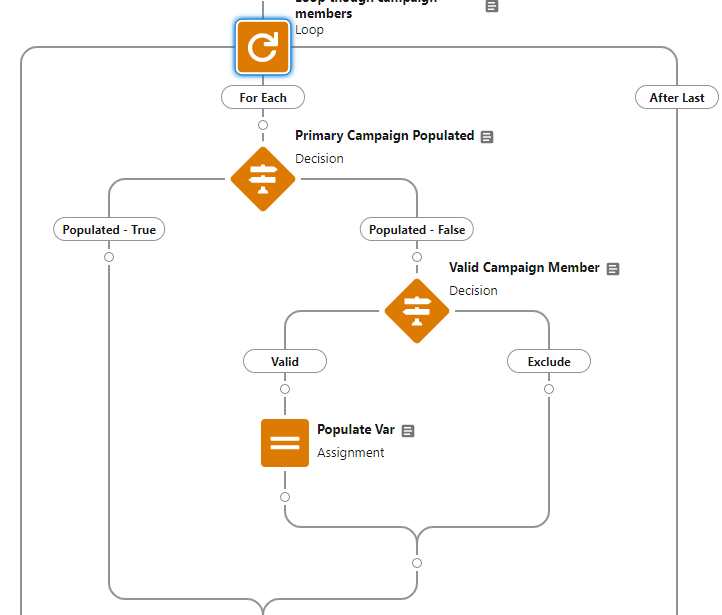
  • Loop through campaign members
    • Next, we loop through each of the campaign member records related to the contact role, find the first valid campaign (responded), and save it to the assignment variable.
  • Update the opportunity record
    • Finally, we update the Primary Campaign Source field on the opportunity with the campaign ID stored in the assignment variable.
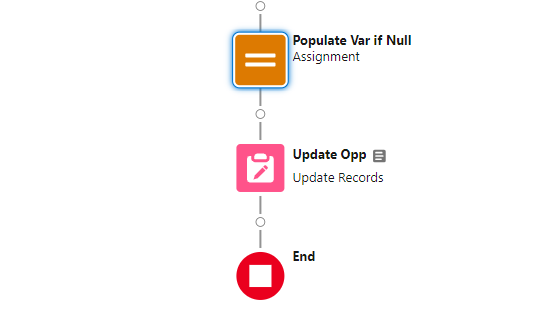
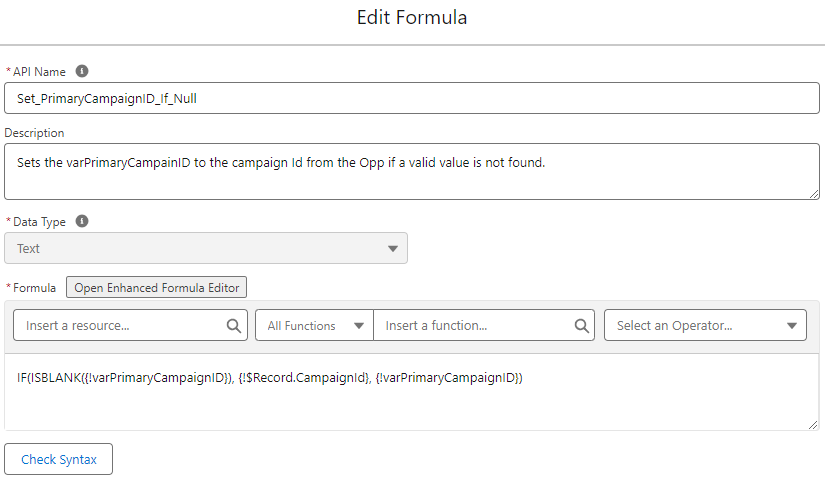
    • Note: If you decide to keep the most recent campaign as the Primary Campaign Source (if a valid campaign is not found), you will need to add a final assignment element prior to updating the record. The element uses a formula to ensure that the variable has been populated with a valid value and updates to the original campaign ID (even if it’s an excluded value) if blank. This prevents the Primary Campaign Source from being updated to a null value by the flow.

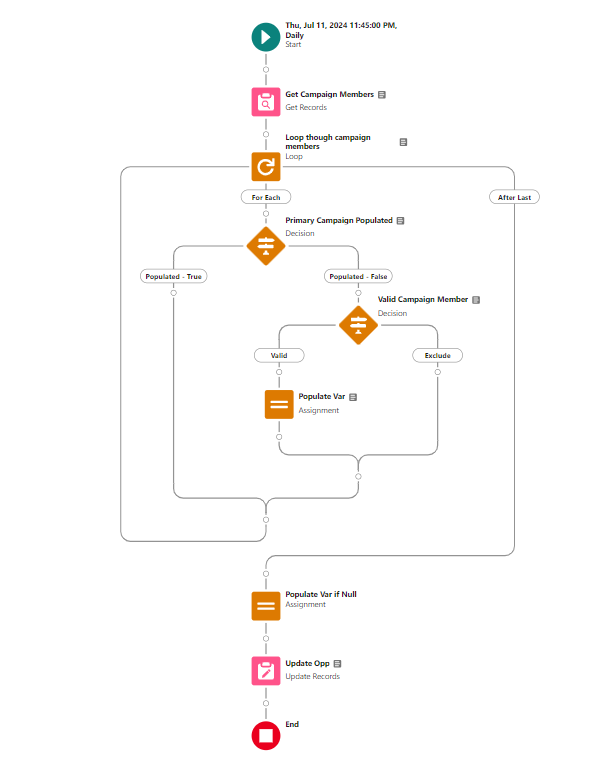
Complete Flow 

Here’s a look at my final flow.

Step 4 – Test & Validate

As with any flow, test, test, and test again before deploying to production. Below are some test scenarios to use for validation.

Create a new opportunity at lead conversion 

  • Lead with a single valid campaign
  • Lead with multiple valid campaigns 
  • Lead with an excluded campaign (most recent) and a valid campaign 
  • Lead with a single excluded campaign 
  • Lead with a single non-responded campaign membership

Create a new opportunity from a contact 

  • Contact with a single valid campaign 
  • Contact with multiple valid campaigns 
  • Contact with an excluded campaign (most recent) and a valid campaign 
  • Contact with a single excluded campaign
  • Contact with a single non-responded campaign membership

Update Primary Campaign Source on an existing opportunity

  • Update to an excluded value (make sure that there’s a contact role who has a valid campaign) 

Test Table

When testing and validating flows, I like creating tables to record results for review. This helps me organize my thoughts and ensure that everything is working as intended.

ScenarioOriginal ValueExpected ValuePass/Fail
Lead – Single Valid2023-09 TSW Dreamforce2023-09 TSW DreamforcePASS
Lead – Multiple Valid2024-06 SLS Sales Prospecting2023-06 WBR Product Update WebinarPASS
Lead – Excluded + Valid2024-06 SLS Sales Prospecting2023-09 TSW DreamforcePASS
Lead – Single Excluded2024-06 SLS Sales Prospecting2024-06 SLS Sales ProspectingPASS
Lead – Single Non-Responded2023-09 TSW Dreamforce2023-09 TSW DreamforcePASS
Contact – Single Valid2024-05 TSW Events2024-05 TSW EventsPASS
Contact – Multiple Valid2023-06 WBR Product Update Webinar2023-06 WBR Product Update WebinarPASS
Contact – Excluded + Valid2024-06 SLS Sales Prospecting2023-09 TSW DreamforcePASS
Contact – Single Excluded2024-06 SLS Sales Prospecting2024-06 SLS Sales ProspectingPASS
Contact – Single Non-Responded2023-09 TSW Dreamforce2023-09 TSW DreamforcePASS
Updated  – Existing Updated to Excluded2024-06 SLS Sales Prospecting2023-09 TSW DreamforcePASS

Is the Primary Campaign Source field meeting your needs?

If you are using the Primary Campaign Source field in your reporting I encourage you to take a closer look at your campaigns to see if your data is being skewed. If so, this solution is a great way to prioritize valid campaigns and put more emphasis on engagement. You can even completely filter out specific types of campaigns if you choose. Don’t sell your marketing efforts short!

More Salesforce Flow resources

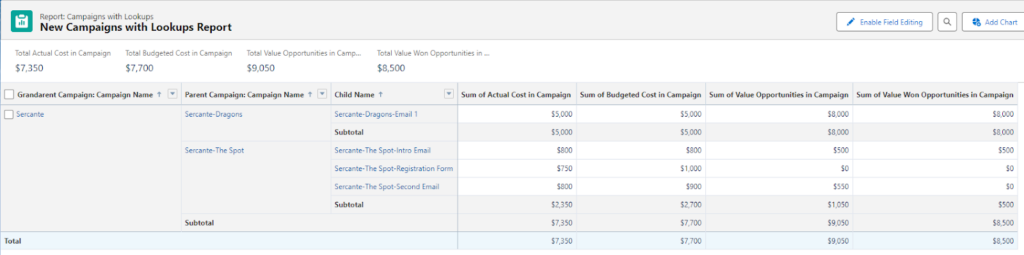
Today, I’m excited to share how you can create a comprehensive Salesforce campaign hierarchy report that groups by grandparent, parent, and child levels (hierarchy) on the Campaign Object in Salesforce.

This type of report can show various metrics, including different campaign amounts and opportunity values along with displaying subtotals and totals. The greatest advantage this report gives you is that it shows the impact of campaigns that are related to one another.

There are many variations that you can do off of this report, but it should get you started in the right direction. Let’s dive into the steps for creating our report!

Step 1: Create Custom Report Types

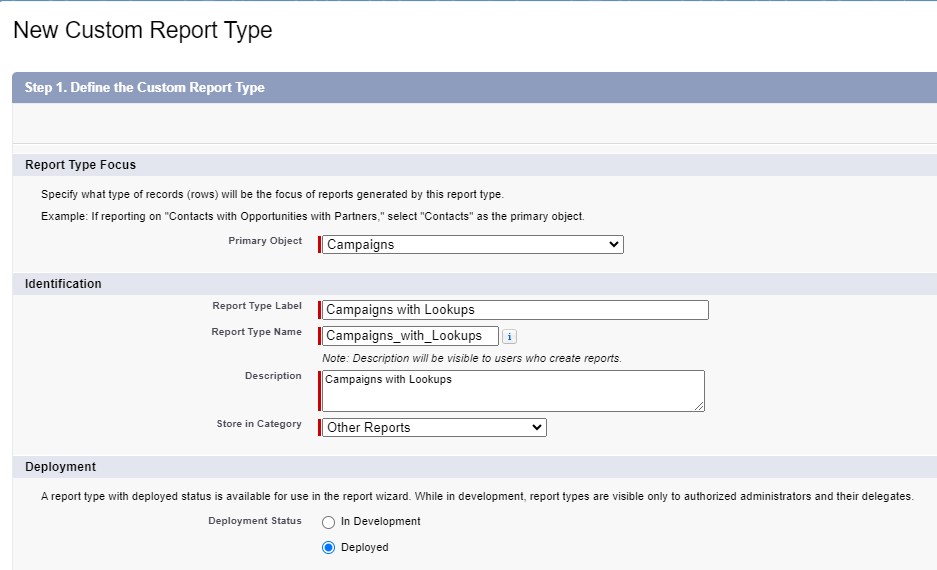
The first step is to create a new custom report type that includes sections for both the Grandparent and Parent Campaigns. 

Report Types > New Custom Report Type

Report type menu

Setting Up the Custom Report

Since this report will only relate to the Campaign object, you will need to:

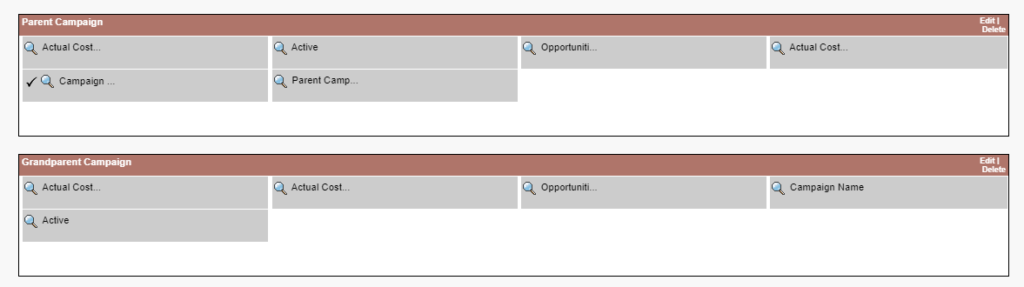
  1. Add two sections to the report: one for the Parent Campaign and one for the Grandparent Campaign.

Edit Layout > Create New Section

Salesforce Campaign Hierarchy Report: Parent and grandparent sections to added layout
  1. Populate the report with relevant fields. I included the following fields in my report:
    • Actual Cost
    • Active
    • Opportunities in Campaigns
    • Actual Cost in Hierarchy
    • Campaign Name
    • Parent Campaign

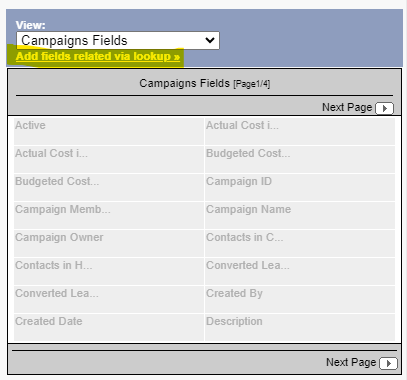
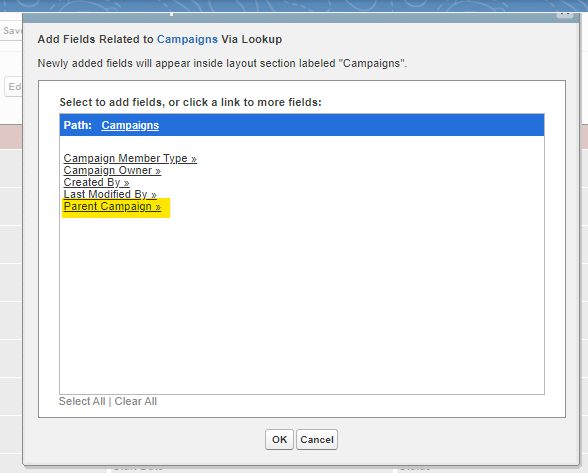
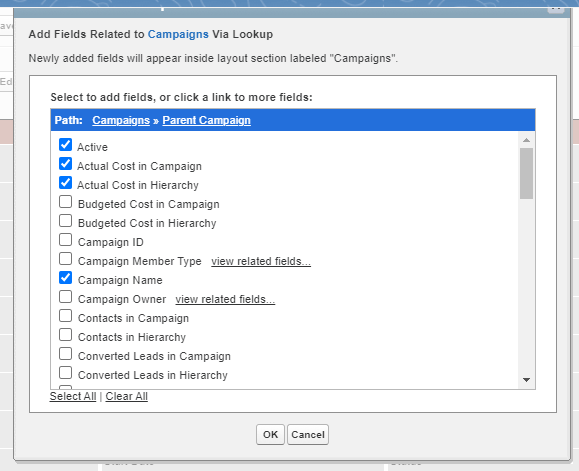
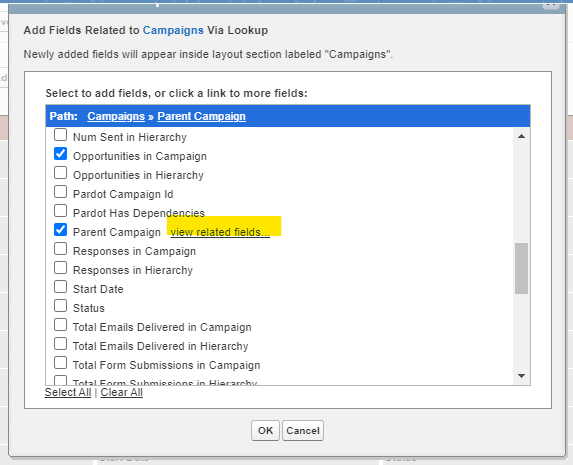
To add these fields, click on the “Add fields related via lookup” link and look for the one associated with “Parent Campaign.” This allows you to select fields from the Parent Campaign.

Add fields via lookup
Lookup selection for Parent Campaign
Selected fields on the Parent Campaign

Including Grandparent Campaign Fields

Similarly, to include fields from the Grandparent Campaign, navigate to:

  1. “Parent Campaign”
  2. Then “Parent Campaign view related fields”

Here, I selected the same fields as for the Parent Campaign.

Lookup for the Grandparent campaign

To make the report clearer, I renamed the Campaign Name fields to “Parent Campaign” and “Grandparent Campaign” respectively. This helps in easily identifying them in the report.

Once these steps are completed, save the report type. It will now be available for use when creating your report.

Step 2: Using the Report Builder

Now that your custom report type is ready, let’s create the report:

  1. Select the report type you just created.
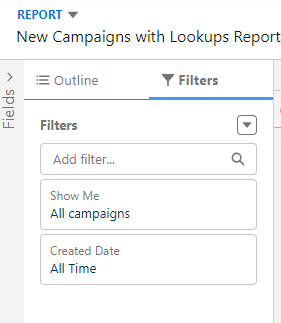
  2. Apply the following filters:
    • Show Me: All campaigns
    • Created Date: All Time.
Filters changed to All Campaigns and All Time

Configuring the Report Layout

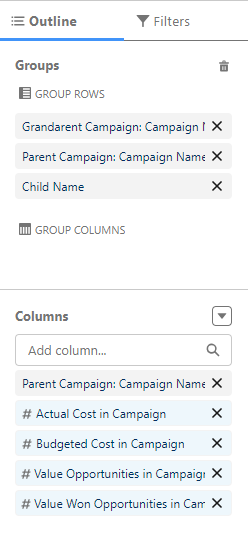
In the Outline tab:

  1. Add “Grandparent Campaign,” “Parent Campaign,” and “Child Campaign” to the Group Rows section.
  2. In the Columns section, select any additional fields you want to display in the report.
Groups and columns

And there you have it! With these steps, you can create a detailed Salesforce Campaign hierarchy report that provides valuable insights through different metrics and structured grouping.

The family tree of reporting

I hope you find this guide helpful in creating detailed and insightful reports using the grandparent, parent, and child hierarchies in Salesforce. With these steps, you can better organize your campaign data, track important metrics, and gain deeper insights into your marketing efforts.

If you have any questions or need further assistance, feel free to reach out.

Happy reporting, and may your campaigns be ever successful!

Salesforce Campaign Hierarchy Reports: Dive deeper & keep it going

Interested in learning more about choosing the right Salesforce reporting tool? Or perhaps you’d like to sign up for a workshop to dive deeper into Salesforce Reports or B2B Marketing Analytics?

Shout out to Brian Roff for helping with the solution to this report!

Collecting customer feedback can be a transformative tool that propels your business to new heights, and getting customer feedback through Salesforce is possible through a few methods. Armed with the right feedback, you have everything you need to address customer pain points and capitalize on your biggest strengths. 

Without sending surveys and gathering quality feedback, your product or service is navigating success in the dark. 

In this post, we’ll outline the ways Salesforce customers can collect feedback while working with the platform including limitations with getting customer feedback with Salesforce forms and solutions for more advanced initiatives.

The Evolution of Customer Feedback Collection on Salesforce

Gone are the days of manually sending out feedback forms. Today, there are countless digital tools to help you out. Of course, we all know there is a lot more to efficiency and automation than simply getting off paper and into the digital space. 

Here’s where Salesforce feedback forms become your best friend. The benefit of Salesforce form integration for collecting feedback is that you can automate every step of the survey process while accessing personalized data and reports on every customer. No CRM is more robust or comprehensive. 

Once you experience the power of customer feedback with Salesforce forms, your customer success strategy will never be the same. Read on to find out all the ways you can collect customer feedback with Salesforce forms.

The Role of Salesforce Feedback Management

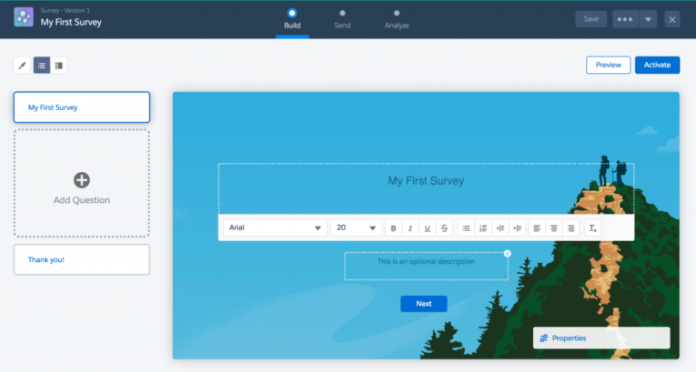
First up, you are probably wondering what tools Salesforce offers for collecting customer feedback with Salesforce forms. Well, Salesforce actually does have a free survey solution that comes with every Salesforce org, which is called Salesforce Surveys. 

Check out how to create surveys using Salesforce Surveys here for more on that.

Limitations of the Out-of-the-Box Salesforce Survey Solution

On the downside, this basic survey feature is limited. For example, you get 300 responses, and you can only relate a survey invitation to limited record types. To get more flexibility with the basic survey tool from Salesforce, you would need to implement custom development or Apex of some kind.

Purchasing Feedback Management by Salesforce

Alternatively, you can purchase Feedback Management by Salesforce, which comes in three editions: 

  1. Survey Response Pack
  2. Feedback Management – Starter
  3. Feedback Management – Growth

Of these, it’s Feedback Management – Starter and Feedback Management – Growth that provides the most comprehensive features, including 100,000 responses and unlimited responses respectively. 

These native tools offer some exciting capabilities such as Customer Lifecycle Analytics and Data Mapper, which allow you to sync survey responses to standard or custom objects. Investing in feedback management tools is one viable strategy for collecting customer feedback with Salesforce forms. 

Considerations of Feedback Management by Salesforce

There are some considerations to make when looking at Feedback Management by Salesforce. These include considerable investment, $13,500 a month per org for the Starter Edition and $46,000 a month per org for the Growth Edition. 

Aside from the price, these tools may still require coding and development to cater to custom use cases. This means you have to allocate time and money toward developing these solutions and ongoing maintenance.

Exploring Other Survey Options for Salesforce Feedback Forms

So, what are your other options for implementing customer feedback with Salesforce forms? And what is the best way to collect feedback for your workflows while integrating with Salesforce? 

Read on, we have you covered!

Techniques to Collect Feedback Using Salesforce Form Builder

When building forms to collect user feedback via Salesforce, you can choose to implement development work. This will give you great flexibility and customization. However, it will slow down time to market, and you need to be really sure that you are in it for the long haul. Projects like this require ongoing upkeep. 

Alternatively, you can purchase a trusted third-party tool for surveys on the AppExchange. This will help you go to market faster and mitigate some of your development work. The biggest con of most products on the market is that they offer limited flexibility. You often won’t get customization without code, and this lands you with some of the problems and obstacles you face when building a custom solution or using Salesforce native tools.

The good news is you don’t have to be stuck in this build versus buy quandary. Not all products are created equal! You can collect customer feedback with Salesforce forms using a robust and flexible form builder with zero code. 

Learn more about building complex Salesforce forms without coding here. 

Titan Survey: A Powerful Salesforce Survey Tool

One of the best options on the market is Titan Survey, part of an all-in-one super platform for Salesforce. Check out some of the amazing things you can accomplish with Titan Survey below, or read more about building complex Salesforce forms without coding here.

Salesforce Surveys as a Tool for Engagement

One of the strongest features of Titan’s Salesforce survey tools is that you can easily map them to any custom or standard object. The Titan Survey package also offers a range of custom Salesforce Survey Objects included with the platform. 

You can draw on multi-patented bi-directional Salesforce integration to craft personalized user journeys. By implementing conditional logic in your surveys, you can ensure that customers taking your surveys remain engaged throughout the process. 

Customers can skip irrelevant questions and only get asked questions relevant to them. With the power of conditional logic, watch drop-off rates sink, and market segmentation becomes a whole lot easier.

Automating Salesforce Customer Feedback Forms

The good news is that with a tool like Titan Survey, you can automate every step of the customer feedback form process. Set up ready-to-go customer feedback form templates and have them sent out automatically through Salesforce. You can also trigger follow-up actions and have customer issues routed to the correct support or sales representative with ease! 

With Titan Survey, you can send feedback via WhatsApp, SMS, Salesforce Flow, List View, or Reports. 

You also have the freedom to send web or email surveys. With web surveys, you get to distribute surveys via a link that can be embedded in your website or anywhere you like. Web surveys are typically more interactive and work better for more complex questions. You can also embed Titan surveys in an email, which is ideal for shorter and simpler surveys!

Using Marketing Cloud Account Engagement (Pardot)? Check out this blog post that outlines how to use Pardot form handlers for data submission, which is the solution you can use to connect Titan surveys to your Account Engagement instance.

Titan Forms: A Salesforce Forms Builder Alternative for Feedback Collection

The bottom line is that Salesforce surveys are here to revolutionize the way you interact with customers. They’re a key component to creating the experiences your customers want. Even so, finding an easy-to-use Salesforce feedback form can be challenging! 

Custom development has a lot of perks but comes with many obstacles. Similarly, Salesforce’s native solutions carry a price tag and may take longer to implement when handling niche use cases. 

A no-code Salesforce feedback form is a winner! And here, Titan Survey offers all the usual survey perks — like any question type and a range of templates. This tool also offers special features like dynamic data sync with any Salesforce record. 

Ultimately, it’s up to you to make the right decision for you and your business and customers. Good luck!

It’s time for part two of our three-part series on getting the most out of your Salesforce Marketing Cloud Intelligence, or Datorama, instance. Part 1 of the series touched on little tricks and shortcuts to success with data ingestion and transformation. Today, I’ll be going through how you can speed up the platform for yourself and your team and boost efficiency in reviewing your data. Read on for Marketing Cloud Intelligence tips that will help you maximize its performance.

Marketing Cloud Intelligence Performance Boosts

Marketers are competitive by nature. You’re fighting for bids, placements, and user attention. So why wouldn’t you want the best performance out of the tool you’re using to measure your data and give you insights? 

We’re going to walk you through how to ensure you get the speediest and most efficient version of Marketing Cloud Intelligence you can!

Less widgets, more pages – why?

You may be inclined to make a gigantic page of widgets for one humongous dashboard that you use — this is a fine starting point! It’s especially useful for the sake of exporting data in a PDF or PowerPoint in an advanced manner, using the platform’s advanced export feature.

But when it comes to using the actual dashboards in Intelligence, you should try to break your pages out as much as possible. This could be done by channel, campaign, or any other kind of unifying but specific factors you might be thinking about. 

We’ll touch on this more below, but the more compact your view and the fewer widgets you have, the less you’ll wait for pages to load. 

A load by any other name

You may have sat in front of numerous online analytics tools and seen long loading times. You probably used the old answer as to why: slow internet speeds.

Source: https://i.imgur.com/us5fOfG.jpeg

The true answer to why your analytics tool is slow to load though is… it depends:

JavaScript ifs VS. spreadsheet IF formulas

I’ll cite a specific example below, but any calculated fields may slow your load down. I noted some of this in my first blog in this series, but using JavaScript ifs can help a bit by setting quick end criteria (ie. if it’s this thing, this is the output), as opposed to large loops in Excel style IF formulas.

An additional point of clarity: when I note calculated fields, I mean calculated measurements, filtered measurements, calculated dimensions, and patterns.

Data fusions & transitive fusions

Data fusions similarly happen live and can significantly slow down your instance, either with heavy data sets or more than 5-10 fusions existing back end. Transitive fusions (a is fused to b, b is fused to c) can also cause problems in heavy use.

Page reloads

Accessing a page in a way that makes data load anew can cause slow load times.

  • I’ll hit some rules of this later, but scrolling down will cause data to load anew 
  • Any updates to the data back-end will cause reloads of the data when you open a page with that data
  • Clearing your cache either in the platform or in your browser will cause data to recalculate and populate the dashboard page
  • Changing filters will also reset the loading of the page

Identifying load problems & getting help

There is not currently a public-facing timer for loading data in Intelligence, but you know a long load when you see it. 

What can help in identifying the root causes of slow loads is that Salesforce support can help diagnose timing issues down to certain widgets. I recommend this (or the next method) to validate that your internet/instance is not the issue. You could also have a colleague access the same dashboard and compare load times with you using a timer to ensure you are capturing the issue correctly.  

Come Together (but also maybe don’t)

One of my favorite functions of the Intelligence platform is using Coalesces and other calculated dimensions whenever I can’t cleanly join data. There are other ways to do this — like using if statements with ISEMPTY formulas, using data fusions, or doing Vlookups to tie entities together, among others (we’ll touch on some of these below, too). 

Coalesce is often one of the cleanest and quickest ways to join data points where you need a data point from one stream or another, depending on what’s available. A good example is something like lead source, where you may have leads and cost data to join across Salesforce data and paid media APIs. In that case, you would check the lead source field or the channel name of the data stream feeding cost data). 

Technical tip sidenote: Coalesces can be incredibly confounding, so here’s a brief walkthrough of this function. In this platform, as documented in Intelligence’s Help Center, they let you return the first non-empty value of a set of data formatted like COALESCE([value1, value2,…]). The really confusing part is that you have to have brackets around those dimensions, so correct syntax would be like COALESCE([[day],[campaign start date]]).

Scroll first, ask questions in a minute

One thing that can be really frustrating, even when things load okay as a page opens, is that as you scroll the content may not be there when you move down. A way to avoid this is to scroll all the way through a page before walking through it. 

Why is this? Two big reasons:

  1. Intelligence loads about 15 widgets at a time. Anything more than that queues up, so multiple widgets loading piece by piece can be difficult on the system.
  2. The system only loads what you see. There is no secret back-end loading happening wherein data is populating that you don’t see. You’ll still have to reload widgets when you filter, but by scrolling down, any initial data sets will populate and make you appear to be the marketing superstar we know you are.

Filter secrets-greater than 0

  • Have you ever gone into a page and waited for a filter to load? 
  • Or, have you opened a filter widget’s dropdown to find hundreds of irrelevant campaigns when you know your workspace should only have a handful of campaigns? 

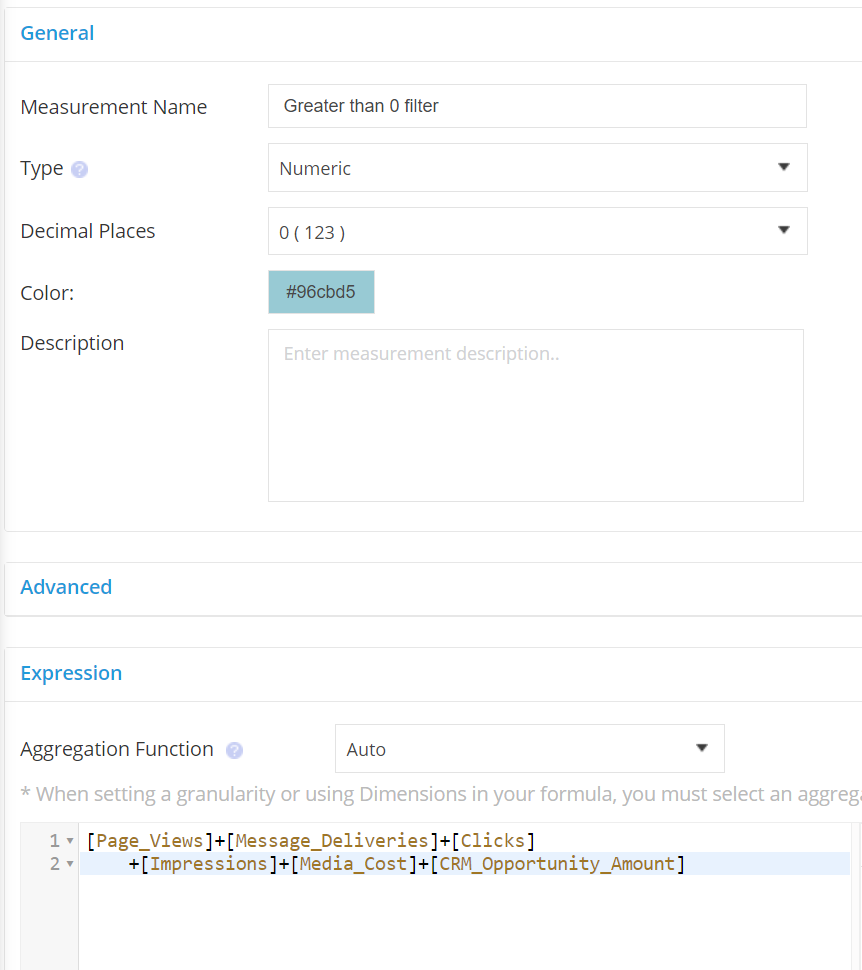
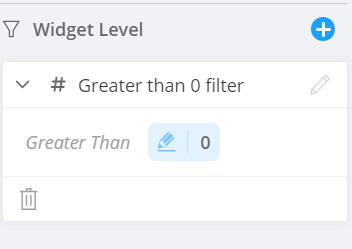
I use a trick that I call “Greater than 0,” which is a calculated measurement that adds all of my measurements in use for a page and filters that on greater than 0 for any relevant filters. My filters load faster and my dropdowns are minimized to just data points I need, not junk data. 

You’ve successfully loaded the end of this article

Thanks for scrolling down here successfully and ingesting our content! Now you have quick wins that can help you maximize Marketing Cloud Intelligence performance.

Check out part one of this Marketing Cloud Intelligence series to get a reasonable foundation on some other data topics. And keep an eye out for part three of this series, which will go in-depth on some data stream tricks to get your best data pulls/updates possible. 

We hope you get some added productivity out of this piece, and if you’re looking for a tailored conversation to your needs, drop us a line.

No more posts to show