A broken CRM seller experience acts like a tax on your pipeline, dragging down deal velocity and rendering new AI investments practically useless. Identifying the friction is easy, but executing the cure is where most teams get stuck. So, how do you transition from diagnostic firefighting to actual, scalable optimization? The answer isn’t a full rebuild, it’s a Seller Experience Audit. It pinpoints exactly where your system is broken, and then applies a practical CRM optimization framework that targets high-friction areas first, proves fast ROI, and builds momentum.
To help you map this out, we’ve broken down the core architecture from our full 2026 CRM Optimization Playbook. Here is the exact 6-step roadmap to transform your CRM from a roadblock into a high-velocity revenue engine.
Groundwork: Uncovering Where the Friction Lives
Before you change a single validation rule or field setting, you have to gather your boots-on-the-ground intelligence. A successful CRM optimization framework relies on two distinct discovery exercises:
Walk your funnel like a customer: Take a handful of recent closed-won accounts and map every single technical and human touchpoint. Did the buyer experience a massive lag between marketing handoff and sales outreach? Did they have to repeat their pain points? Funnel walkthroughs surface your biggest gaps faster than any dashboard.
Shadow your sellers: Sit down with your sellers and watch them navigate a typical day. Ask the direct questions: Where are you clicking too much? What fields feel completely pointless? What context are you keeping in a shadow spreadsheet because the CRM is too slow? When you design the process for the front line, you have to hear it from the front line.
The 6-Step CRM Optimization Framework
Once you know where the drag lives, work through these six execution steps in order.
1. Define Stages and Strict Ownership
Alignment is the bedrock of any CRM optimization framework. Get your Sales, Marketing, and Customer Success leaders in one room to establish absolute clarity around buyer journey milestones.
Define exactly what qualifies a lead at each stage, and more importantly, who owns the record at every handoff. Clear operational boundaries stop lead leakage before it starts.
Another key team to align with is IT. For alignment to actually be actioned, data must be able to flow seamlessly from one department to the next to provide the right context. That data can sometimes be owned in systems where IT needs to collaborate for access. Therefore, ensuring that all teams are aligned ahead of time will help to make the execution easier.
“Bringing IT into the conversation and creating a collaborative relationship across departments when defining stages and strict ownership is critical. Friction when unlocking your data can often be due to department silos rather than just technology silos.”
– Austin Frink, Director, Data Technologies, Sercante l Trilliad
2. Cleanse and Trim the Fields
Audit your current fields and page layouts with one brutal question: Does this field help a rep move a deal forward right now? If a seller is in early discovery, they shouldn’t be forced to look at 40 blank legal or billing fields. Use conditional visibility to show the right fields at the right deal stage. The answer to “can we track that?” is always yes, but the smarter question is “should we?”
3. Automate the Administrative Burden
Identify the repetitive, manual tasks that drain your team’s energy. Logging basic activity, routing leads, progressing stages, and triggering standard follow-ups. Let your system handle these based on real-time buyer engagement. This is what the technology was built to do. Don’t pay premium seller salaries for manual data entry.
4. Close the Handoff Gap
Map out the exact second a lead passes from marketing to sales. Ensure all marketing context, intent signals, and engagement history travel with the record. Fixing this single point of friction rebuilds cross-functional trust between Marketing and Sales faster than almost anything else.
5. Layer in AI and Advanced Automation
Now that the foundation holds, your data is clean, and your workflows are automated, AI becomes an incredible asset rather than a liability. This is where you can confidently execute an Agentforce or agentic roadmap. Start with a single high-friction use case, like auto-captured activity, next-best-action prompts, or signal-based prioritization—prove the time savings, and expand. For additional insight on the strategic approach to creating an effective AI roadmap, check out Jenna Packard’s blog, The AI Roadmap for Enterprise: A Framework for Identifying Value-Driven AI Use Cases.
6. Build Continuous Feedback Loops
CRM optimization is a continuous rhythm, not a one-time project. Establish a monthly cadence where your RevOps, Sales Ops, or Marketing Ops teams shadow an account executive to look for new layout errors, system speed bumps, or shadow spreadsheets.
Framework Step
Core Focus
Outcome
Define Ownership
SLA & Handoff Alignment
Eliminates lead leakage
Cleanse & Trim
UI/UX Minimalization
High CRM adoption & clean data
Automate Admin
Workflow Automation
Reclaims hours of selling time
Close the Gap
Data Context Syncing
Bridges the Marketing Visibility Gap
Layer AI
Agentic & Generative Tools
Massive operational leverage
Feedback Loops
Continuous Shadowing
Long-term technical scalability
Getting Started with Your CRM Optimization
Every technical change in this framework directly drives a business outcome. That is how you justify the work to leadership, and it’s how you ensure the changes actually stick. The ultimate goal is simple: transition your tech stack from a static tracking system to an active revenue producer.
But if the friction has been there so long that it has just become background noise, it can be hard to know which of these steps to prioritize first.
That is exactly why the Sercante l Trilliad team guides revenue teams through a structured Seller Experience Audit. We assess your systems, data quality, and cross-functional handoffs to turn guesswork into a prioritized, impact-driven roadmap tailored to this exact CRM optimization framework.Reach out to the Sercante l Trilliad team to schedule your Seller Experience Audit.
Accelerating Marketing Automation with Pre-Built Salesforce Flow Templates
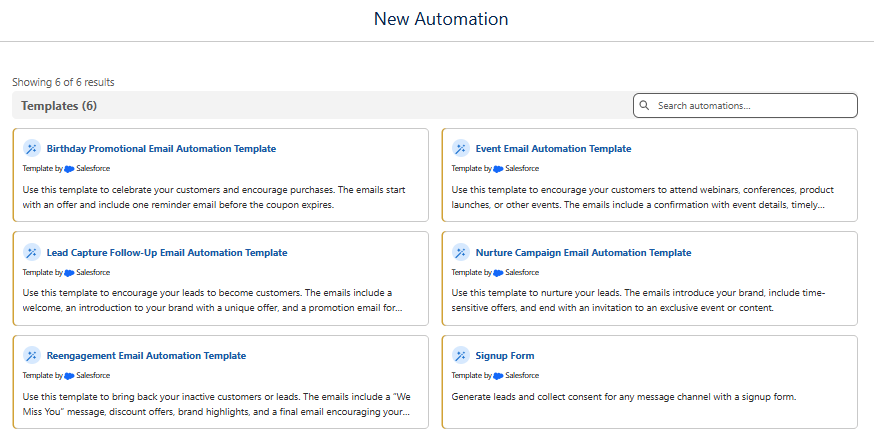
Building effective marketing automation takes time, and staring at a blank canvas can often delay your first campaign. With Agentforce Marketing (aka Marketing Cloud Next), you can bypass those early hurdles with six out-of-the-box flow templates designed to accelerate your path from idea to execution.
Instead of building common campaign patterns from scratch, you can now select a proven framework, customize it to your business needs, and launch faster. These templates don’t replace your marketing strategy—they accelerate it, providing the structure and foundational assets you need to focus on what truly differentiates your brand: messaging, personalization, and customer experience.
Why Flow Templates Matter for Marketers
Marketing automation success is not just about sending emails. It’s about creating relevant, timely experiences that guide customers through their relationship with a brand.
These flow templates help marketers:
Reduce implementation time: Launch common marketing journeys faster.
Create consistency across campaigns: Follow proven automation patterns.
Focus on what matters: Spend less time building and more time optimizing.
For organizations adopting Agentforce Marketing, these templates spark a critical shift in focus: What does this experience need to accomplish now?
Learn how to build your own Flows in Agentforce Marketing with this expert-led workshop. Register here.
How to Access the New Flow Templates
The new templates are available directly within the campaign creation experience.
To access them:
Open the Marketing app
Navigate to Campaigns
Select Add New to create a campaign
Fill out details on the campaign creation pop-up window
Enter your campaign details and check the “Active” box
Once in the campaign workspace, look to the “Let’s build your campaign” section, scroll down to “Need a faster start? Browse templates.”
Selecting Browse Templates opens up the available Salesforce-created flow templates.
From here, marketers can select the template that best matches their campaign goal and use it as the foundation for their automation.
After selecting the template, you’ll be guided through the configuration process, including automation settings within the flow template itself.
Inside the Templates: Six Salesforce-Designed Marketing Journeys
1. Birthday Promotional Email Automation Template
What It Does:
The birthday promotional email automation template helps organizations celebrate customers while encouraging repeat purchases through a personalized promotional experience.
This template for organizations looking to create a simple but effective customer engagement moment to:
Recognize a customer’s birthday
Provide an offer
Encourage action before the promotion expires
Inside the Flow:
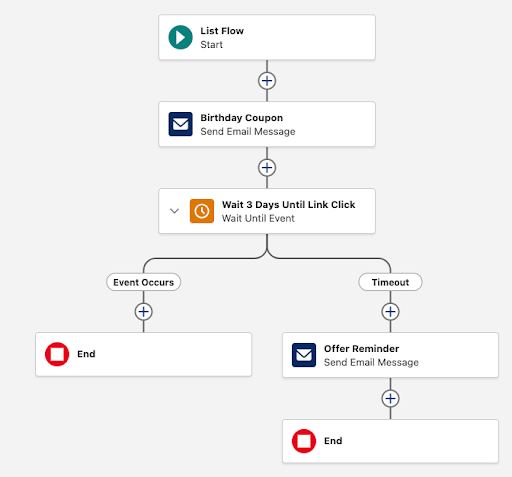
This is a segment-triggered flow. The template includes:
Birthday offer email
Birthday offer reminder email
Why It Matters:
Birthday campaigns are great examples of personalized lifecycle marketing. They create a meaningful customer touchpoint while encouraging engagement. This template removes the need to build the basic journey structure manually, allowing marketers to focus on the offer, branding, and customer experience.
Pro-Tip: Before activating a birthday automation, validate that your customer birthday data is accurate and consistently maintained. Personalization is only effective when the underlying data is reliable.
2. Lead Capture Follow-Up Email Automation Template
What It Does:
The lead capture follow-up email automation template helps organizations convert new leads into engaged prospects through an automated welcome and nurture experience. This is one of the templates I expect many B2B organizations will recognize the value of because lead follow-up is one of the most common marketing automation use cases.
Inside the Flow:
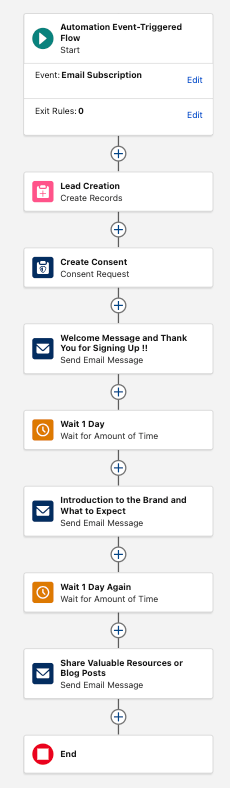
This is an event-triggered flow. The template includes:
Lead capture welcome email
Lead capture product email
Lead capture brand value proposition email
Why It Matters:
Many organizations invest heavily in generating leads but struggle with what happens next. This template creates an immediate, consistent follow-up experience by helping organizations welcome new prospects, introduce their brand, highlight products or services, and provide valuable resources.
Pro-Tip: This is one of the templates I would recommend reviewing early during an Agentforce Marketing implementation. It provides a strong foundation for lead nurturing while allowing marketers to focus on content strategy and personalization.
3. Reengagement Email Automation Template
What It Does:
The reengagement email automation template helps organizations reconnect with inactive customers or leads. Instead of continuing to send the same messaging to disengaged audiences, this template creates an intentional journey designed to win customers back.
Inside the Flow:
This is a segment-triggered flow. The template includes:
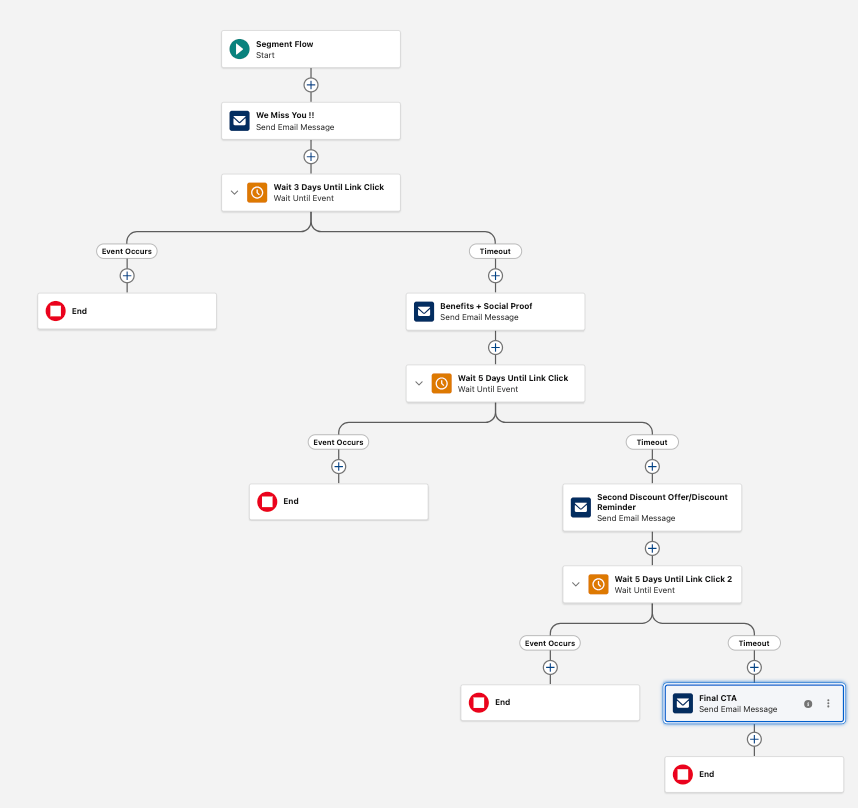
“We miss you” email
Benefits and social proof email
Second discount offer/reminder email
Final call to action email
Why It Matters:
A mature marketing strategy is not only about acquiring new customers. It’s also about understanding and improving engagement with existing audiences. This template helps marketers reconnect with inactive contacts using incentives strategically, reduce unnecessary communication, and create clear exit paths.
Pro-Tip: Define what “inactive” means before activating the flow. A customer inactive for 30 days may require a different approach than someone who has not been engaged in over a year.
4. Event Email Automation Template
What It Does:
The event email automation template helps marketers manage communications before and after webinars, conferences, product launches, and other events. Successful events require more than registration emails. Customers need reminders, confirmations, and meaningful follow-up.
Inside the Flow:
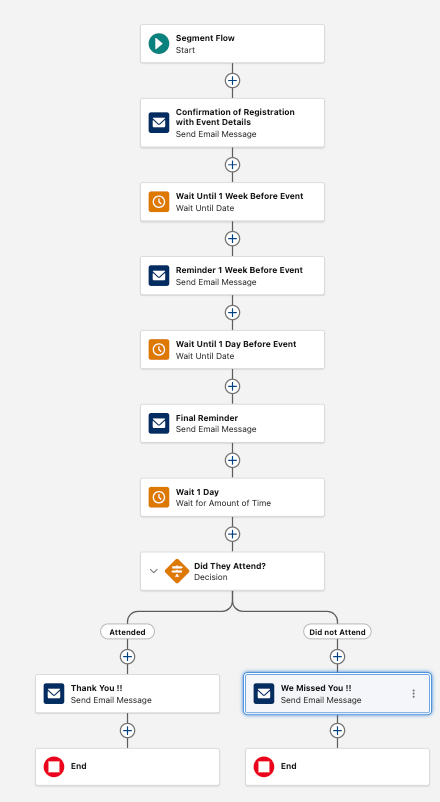
This is a segment-triggered flow. The template includes:
Event registration confirmation
Event one-week reminder
Event one-day reminder
Event attended follow-up
Event did not attend follow-up
Why It Matters:
This template extends the customer experience beyond attendance. We also recommend using Campaign Member and Campaign Member Status to track attendance, creating strong alignment between marketing engagement and CRM reporting.
Pro-Tip: Many teams focus heavily on driving registrations, but underestimate the value of post-event communication. The follow-up experience is often where the strongest conversion opportunities happen.
5. Nurture Campaign Email Automation Template
What It Does:
The nurture campaign email automation template helps organizations build ongoing relationships with leads through a structured engagement journey. This is especially valuable for B2B organizations with longer buying cycles, where prospects need education and trust-building before making a decision.
Inside the Flow:
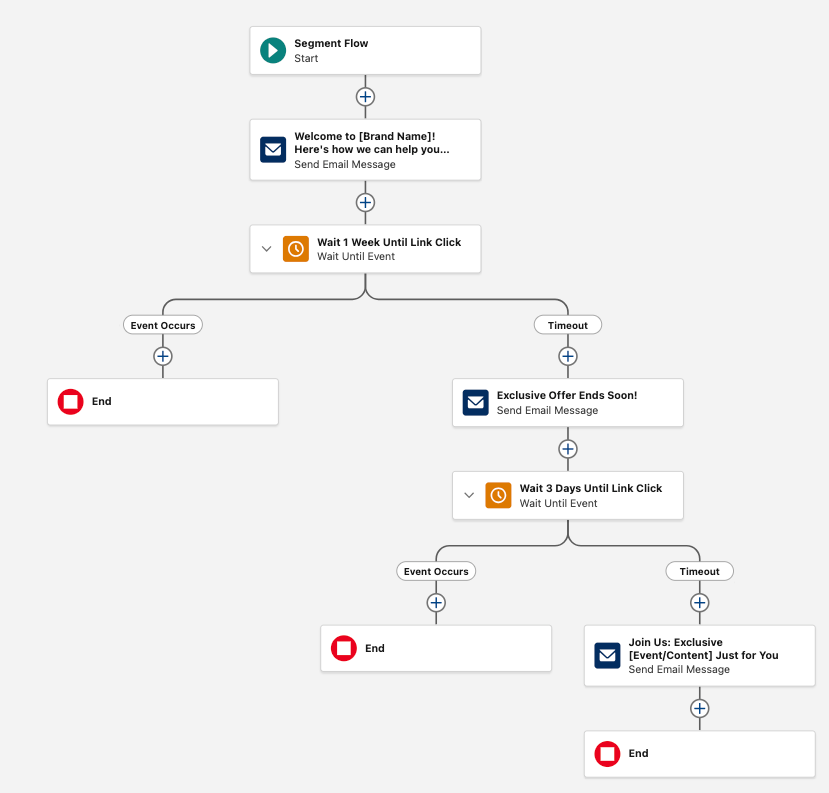
This is a segment-triggered flow. The template includes:
Welcome to our brand
Exclusive event or content invitation
Exclusive offer ends soon
Why It Matters:
Effective nurturing is about responding to customer behavior, not just following a schedule. The built-in decision paths help ensure that engaged prospects do not continue receiving irrelevant communications.
Pro-Tip: Define your entry criteria, engagement signals, and exit strategy before launching a nurture journey. The technology enables automation, but your strategic rules drive its success.
6. Signup Form Automation Template
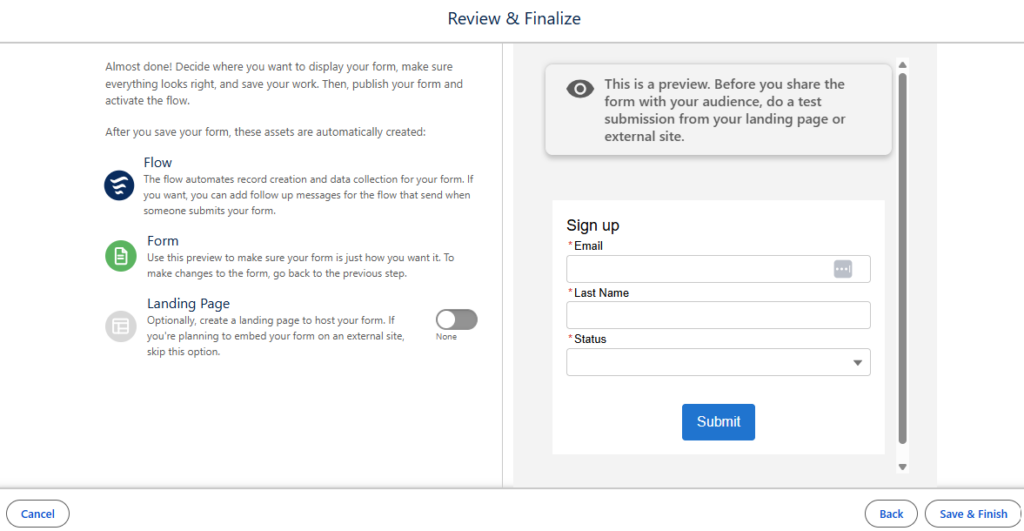
What It Does: The signup form template walks the user through what is needed to build a new form, such as Data Source, Fields, Form Content, and an optional Landing Page. This template also captures consent for communications immediately upon form submission.
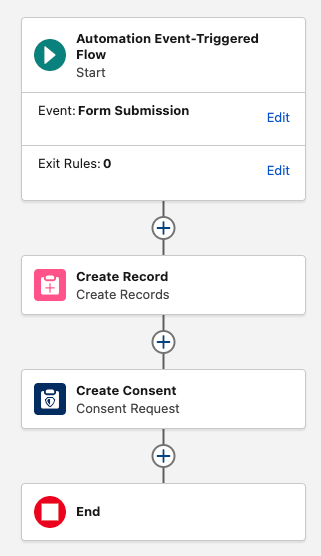
Inside the Flow: This is an event-triggered flow. The journey follows this sequence:
Customer submits form
Create record
Create consent request
End flow
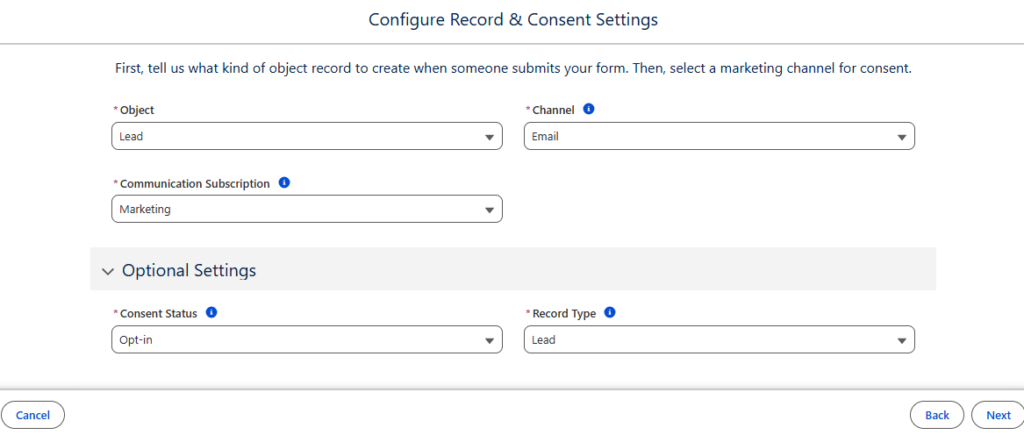
During configuration, marketers define the record type created (options include Lead, Contact, or Account), the marketing channel, the communication channel (Email or SMS), the consent status, and specific record type settings.
Why It Matters: Strong marketing automation starts with strong data practices. This template connects lead generation, data creation, and consent management into one unified, automated process.
Pro-Tip: Before activating this flow, confirm your organization’s data model and consent strategy. Decide what records should be created, what information sales needs, and how communication preferences should be managed.
Celebrates customers and encourages repeat purchases with personalized offers.
Lead Capture Follow-Up Email Automation
Event
Converts new leads into engaged prospects via automated welcome and nurture journeys.
Reengagement Email Automation
Segment
Reconnects with inactive customers or leads through strategic, incentivized re-engagement.
Event Email Automation
Segment
Manages end-to-end communications for webinars, conferences, and product launches.
Nurture Campaign Email Automation
Segment
Builds long-term relationships through structured, behavior-based engagement journeys.
Signup Form Automation
Event
Captures consent and automates record creation immediately upon form submission.
Moving from Building Automation to Optimizing Experience
The six flow templates in Agentforce Marketing represent an important shift in how organizations approach marketing automation. Instead of spending hours recreating common journeys, marketers now have pre-designed frameworks that provide a strong starting point. Whether you are launching a lead nurture program, reconnecting with inactive customers, managing an event experience, or capturing new subscribers, these templates help reduce implementation effort and accelerate time to value.
The future of marketing automation is not about removing the marketer from the process. It’s about removing repetitive work so marketers can spend more time where they provide the most value: understanding customers, creating meaningful experiences, and driving business growth. Open the Agentforce Marketing app today, explore the new templates, and see how much faster you can get your next campaign live.
Need Assistance?
If you need any assistance with your Agentforce Marketing platform, please reach out to the Sercante l Trilliad team! We would be happy to help you navigate your next steps in starting to use the platform alongside your existing technology to drive better results.
The painful reality of a clunky CRM configuration is low adoption, messy data, and an estimated 14% drop in closed deals. When your CRM is built for management oversight instead of seller enablement, everyone suffers, especially your buyers. But knowing you have a problem is only half the battle. The real questions for Marketers, RevOps, and Sales Operations leaders are: What does an ideal CRM seller experience actually look like in 2026, and how do we get there? Why does this matter now more than ever?
As we outline in our 2026 CRM Optimization Playbook, three major industry forces are shifting CRM optimization from a “nice-to-have project” to an absolute revenue priority. If you want your tech stack to act as a force multiplier for sellers rather than a budget drain, you need to understand the modern blueprint for a frictionless CRM.
Why Are the Stakes Higher in 2026?
We aren’t operating in the same B2B landscape we were a few years ago. If you are still running a CRM configured for 2018 reporting needs, you are actively fighting three major headwinds:
ROI is Under a Microscope: CFOs are holding the tech budget to a much higher standard. It’s no longer about whether a platform is successfully deployed. It’s about whether it’s actually being adopted by the front lines.
Buyers Are Further Ahead: Prospects are over halfway through their buying journey before they ever talk to sales. Sellers need instant, unified context the second a lead routes to them to add value in the few moments they have left.
AI Raises the Stakes on Clean Data: Everyone is eager to layer in AI assistants or platforms like Agentforce. But here is a sobering reality: at least 50% of generative AI projects were abandoned after proof of concept because of factors including poor data quality, inadequate risk controls, escalating costs, or unclear business value (Gartner).
The Modern Blueprint: An Ideal CRM Seller Experience
When you optimize the seller experience, the wins ripple across the entire lead-to-revenue lifecycle. It stops being a “Sales Ops project” and becomes a multi-department win.
Here is what happens when you design a CRM for your front lines:
Focus Area
The Frictionless Workflow
The Impact
Smarter Prospecting
Intent and signal-based outreach take the guesswork out of who to call and what to say.
~47% higher conversion rate over traditional scoring models (Landbase).
Frictionless Activity Management
The system automatically captures email, meeting, and call data, giving sellers next-best-action coaching without manual data entry.
Data-driven whitespace identification points account for teams exactly where cross-sell and upsell potential is highest.
~Sales teams using AI are 30% more likely to report year-over-year revenue growth (Salesforce).
Seamless Sales Processes
Headless CRM systems, like Salesforce, allow data and actions to be used inside additional tools sellers are already using, such as Slack, Microsoft Teams, email inboxes, or AI agents. Allowing them to access clean data in their flow of work, across all channels.
~49% increase in seller productivity and 28% shorter sales cycles from process automation(Rox).
How AI Acts as the Ultimate Friction-Reducer (If You Let It)
Once you lay a solid data foundation, AI can step in to eliminate the heavy administrative burden that has plagued sellers for decades. Instead of forcing sellers to be data-entry clerks, optimized platforms allow AI to do what it does best:
Capture the Busywork: Auto-logging meeting notes, participants, and next steps directly from calls without the salesperson typing a single line.
Read the Room at Scale: Surfacing real-time deal health alerts and coaching prompts to catch stalling deals before it’s too late.
Draft the Follow-Up: Triggering timely, personalized outreach based on real-time buyer engagement signals so hot leads never go cold.
By removing the digital drag, you free up your sellers’ brainpower to focus on what they actually do best: building relationships with buyers.
The 2026 Mandate: Trade the Junk Drawer for a Seamless Seller Experience
At this stage in the B2B landscape, a CRM configured merely for management oversight is an active drain on your pipeline, your budget, and your team’s performance. The modern blueprint for growth requires shifting away from the digital drag of manual data entry and embracing a frictionless, optimized CRM seller experience. By laying a clean data foundation and allowing AI to automate the busywork, capture real-time deal health, and surface actionable intent signals, you transform your system from a static reporting tool into a high-powered revenue engine.
Tackling this all on your own can be overwhelming, and you may not have the bandwidth or the resources to evaluate your CRM and the friction it’s causing on your sellers and your pipeline. Tap into the expertise of the Sercante l Trilliad team with our Seller Experience Audit to fast-track your path to an optimized CRM and get a customized blueprint for quick wins and major revenue impact.
Artificial intelligence and real-time data are shifting the landscape under our feet. For a long time, Salesforce Flow was considered “admin territory.” Marketers stuck to traditional journey builders and engagement programs. But things have changed. Flow is no longer just a backend automation tool for admins. It can now be directly harnessed by marketers in the Agentforce Marketing platform (also known as Marketing Cloud Next, or Marketing Cloud Growth or Advanced Edition) to streamline workflows and deliver personalized, multi-channel journeys at scale. And for marketers with Marketing Cloud Engagement or Account Engagement, they can already access these features. To start taking advantage, it’s critical to start learning Agentforce Marketing Flow fundamentals.
See how fellow marketers at Denver Public Schools are already using Flow and Agentforce Marketing features to streamline campaign workflows, deliver multi-channel campaigns, and track attribution. Register Here
The Foundation: Diving into Flow Basics
Historically, Flow Builder was seen as a tool reserved only for Salesforce Admins because of its ability to perform deep backend activities like creating records, automating heavy backend logic, or running APEX.
With the arrival of Agentforce Marketing, we now have Marketing Flows—sometimes referred to as “citizen flow”. It uses the exact same interface and requires a similar foundational skillset, but it gives marketers unprecedented control over their campaigns. Don’t worry, admins: access to Marketing Flow does not equal full admin rights. Granular control remains secure through specific user permissions.
What is Flow Builder?
Flow Builder is a drag-and-drop visual interface used to automate complex business processes, workflows, and user interactions. Think of it as the core automation engine of Agentforce Marketing. It seamlessly orchestrates your three most vital assets:
Segment: Your targeted audience.
Content: Your dynamic messaging.
Actions: Your delivery mechanisms.
What can you do with Flow?
Marketing Flows provide a massive playground of strategic options:
Send: Deploy emails, SMS, and WhatsApp messages directly through the canvas.
Wait: Pause an individual’s progress for a specific amount of time (from minutes to months) or until a specific event occurs.
Update: Dynamically push data to multiple objects or auto-create tasks for your internal team members.
Customize: Branch engagement paths using real-time data or user interactions.
Optimize: Utilize built-in Path Experiments to split-test channels, content variations, and delivery cadences.
What are the types of Flow?
There are several core marketing flow types tailored to your specific orchestration needs. Below are the most common flow types you’ll need in Agentforce Marketing:
Automation Event-Triggered: Runs quietly in the background and fires immediately when an action occurs—such as a form fill, an email click, or a new subscriber signup. These are frequently used as completion actions or to instantly route leads.
Segment Triggered (recently renamed to “Audience Flow”): Targets a specific group of people (segments, lists, campaign members, etc.) when the flow runs. It is ideal for nurturing new leads or managing ongoing communications, allowing users to exit via rules or end steps.
Data 360 Flows: Powered by Data Cloud permissions, these flows can auto-convert records or trigger automation based on calculated insights and real-time score changes.
CRM Record-Triggered Flow: This type fires the moment CRM record data changes or updates.
Autolaunched Flow: Background automation kicked off by subflows, Apex code, or REST APIs.
Elements: The Building Blocks of Flow
Every flow you build is constructed using three basic types of canvas elements:
Logic Elements: Includes options like Decisions to branch your paths, Wait Time based on a date, time, or event, and Path Experiments to test different paths.
Data Elements: Elements that let you directly Create, Get, Update, or Delete records across the platform.
Interaction Elements: The execution steps, where you can Send Email, Send SMS, Send WhatsApp, create Consent, or trigger a Subflow.
Agentforce Marketing Flow: Three Ways to Build
Building out your vision doesn’t mean staring at a blank whiteboard. Agentforce Marketing gives you three flexible onboarding paths depending on your technical comfort level and campaign complexity.
Start learning how to build your own flows with this hands-on training, Agentforce Marketing Flow Fundamentals Workshop. Learn more and sign up here.
Building Flows with Agentforce
If you are a new Flow user or simply want to quickly stand up a simple nurture, you can use the conversational Agentforce Campaign Creation interface. By providing a prompt grounded in a campaign brief, Agentforce will automatically generate a campaign preview and lay out the flow steps for you. From there, you can ask the agent to refine text tones, add messages, or alter paths using natural language.
Building Flows with Campaign Canvas
The Campaign Canvas is perfect for simple nurtures and straightforward customer journeys that do not require complex decision splits. It offers a streamlined “Quick Start” interface where you can rapidly add linear steps for your triggers, target segments, message content, and wait periods.
Using Flow Builder
When your campaign demands advanced nurtures, exit rules, behavioral decisions, or experiments, it’s time to open up the full Flow Builder. Here, you get full access to the toolbox, manager tabs, canvas layout, and the ability to cleanly cut, copy, paste, and configure every element.
You can also combine these approaches to building flow. Using Agentforce or the Campaign Canvas is a great way to start your flow structure. You can then use the Flow Builder to fine-tune the flow details and add more advanced flow logic.
Lean on Flow Templates to Save Time
You don’t have to reinvent the wheel every time you launch a new campaign. Salesforce provides over 300 out-of-the-box templates, including multiple marketing-focused options.
Furthermore, once you build a custom flow architecture that works perfectly for your brand, you can save your own flows as templates for your wider marketing team to replicate safely. Flow templates are a great way to avoid starting from scratch. Learn more about Flow Templates from Mike Morris’ blog, Saving Time with Flow Templates in Agentforce Marketing.
Getting Started with Flow & Agentforce Marketing
It’s critical for marketers to start learning Flow to take advantage of the latest automation, AI, and real-time data features in Agentforce Marketing. However, the path to not only learn Flow but also figure out the best deployment approach for your organization to start using these features alongside your current platform can feel overwhelming.
You don’t have to continue on this journey alone. Tap into the expertise of the Sercante | Trilliad team. We’ve developed a proven Marketing Cloud Convergence Path that we tailor to each marketing team’s business outcomes, ensuring you can continue maximizing your existing platform while fast-tracking your overall time to value.
For years, email marketers have relied on email opens to measure campaign success. However, privacy features such as Apple Mail Privacy Protection, inbox security tools and email client behaviour have made email opens an increasingly unreliable measure of engagement.
Now, European regulators are moving the conversation one step further by questioning whether tracking pixels should be used at all without prior consent.
Fortunately, Salesforce has recently introduced new controls in Marketing Cloud Account Engagement (formerly Pardot) that give organisations much greater flexibility over how email tracking is managed.
This shift isn’t just about the reliability of email opens – it’s about whether organisations should be collecting that data in the first place.
What Has Changed?
In 2026, both the French CNIL and Italian Garante published guidance on the use of tracking pixels in marketing emails.
The guidance explains that, for many marketing use cases, tracking pixels should only be used with the recipient’s prior consent under the existing ePrivacy Directive and the GDPR. This isn’t a new law. Rather, it explains how existing privacy requirements should be interpreted and applied to email tracking technologies. CNIL recommendation on tracking pixels in emails
Both regulators have also provided transition periods to allow organisations time to review their email marketing practices. In France, the CNIL’s transition period for existing marketing databases runs until 14 July 2026, while the Italian Garante’s guidance provides a six-month transition period ending on 28 October 2026.
Although the guidance currently applies specifically to France and Italy, many organisations operating across Europe are reviewing their wider email tracking strategy rather than implementing different approaches for individual countries.
Why This Matters for Account Engagement Customers
Many Marketing Cloud Account Engagement features have traditionally relied on email open data, including:
Engagement Studio programmes
Dynamic Lists
Automation Rules
Lead scoring
Campaign reporting
If collecting email open data requires additional consent, organisations need to consider whether email opens should continue to drive marketing automation, segmentation, lead scoring and reporting – or whether stronger engagement signals should take their place.
Salesforce Has Introduced a Better Option
Historically, Account Engagement customers had limited choices. If you wanted to stop collecting email open data, you generally had to either:
Send text-only emails, or
Disable email tracking across the entire Business Unit, which also disabled click tracking.
Salesforce has now introduced new account-level Email Tracking settings that allow administrators to independently manage:
Email Open Tracking
Advanced Email Analytics
Email Click Tracking
This is a significant improvement for Account Engagement customers.
Rather than choosing between tracking everything or nothing, organisations can now disable email open tracking while continuing to send HTML emails and retain click tracking.
For many organisations, this provides a much simpler alternative to maintaining separate consent programmes or separate HTML and text-only marketing journeys.
Configuring the New Email Tracking Settings
The new tracking controls can be found under:
Account Engagement Settings → Email Tracking
From here, administrators can independently configure:
Email Open Tracking
Advanced Email Analytics
Email Click Tracking
These settings apply at the Business Unit level, so any changes should be agreed with your Legal, Compliance and Marketing teams before being implemented.
Review Your Automations Before Making Changes
Before disabling email open tracking, it’s worth identifying where email opens are currently used within your Account Engagement instance.
Common areas include:
Engagement Studio programmes
Automation Rules
Dynamic Lists
Completion Actions
Lead scoring models
Fortunately, Account Engagement already provides an Open Rules Audit report to help identify these dependencies.
Navigate to:
Reports → Marketing Assets → Automations → Open Rules Audit
This report provides a quick overview of any automation currently relying on email open criteria, making it much easier to understand what may need updating.
Best Practice: Don’t simply replace every Email Open condition with Email Click. Use this opportunity to review whether a stronger engagement signal – such as a landing page visit, form submission or consultation request – would provide a more meaningful measure of buying intent.
Focus on Meaningful Engagement
Even before these privacy changes, email opens had become an increasingly unreliable indicator of genuine engagement.
Rather than asking “Did they open my email?“, marketers should increasingly ask “Did they do something meaningful?“
Consider measuring outcomes such as:
Email click-through rates
Landing page visits
Form submissions
Content downloads
Webinar registrations
Consultation or demo requests
Campaign influence
Pipeline generated
Revenue won
These metrics provide a much stronger indication of customer intent and marketing performance than whether a tracking pixel happened to load.
Final Thoughts
The conversation around email open tracking isn’t really about losing a metric – it’s about improving the way we measure marketing success.
Privacy expectations will continue to evolve, but the most successful marketing teams won’t be the ones collecting the most data. They’ll be the ones measuring the data that genuinely reflects customer intent.
With Salesforce’s new tracking controls, Marketing Cloud Account Engagement customers now have the flexibility to align with evolving privacy requirements while continuing to deliver engaging HTML email experiences and shifting their focus from increasingly unreliable open rates to the engagement metrics that truly drive business results.
If you’ve spent years building Dynamic Lists and Engagement Studio programs, opening Data 360 for the first time can feel overwhelming. Unified Individuals, Segments, Calculated Insights, Data Spaces; it looks like a whole new world. But here’s the thing: it’s not.
At its core, segmentation hasn’t changed. You’re still trying to get the right message to the right person at the right time. What has changed is how much data you have to work with. Instead of building audiences from Prospect records and email engagement alone, Data 360 lets you layer in website activity, CRM data, opportunity history, subscription preferences, and more.
Here’s how to bridge what you already know with what you’ll find in Data 360.
The Biggest Mindset Shift: From Lists to Audiences
In Account Engagement, everything starts with a list.
Need a webinar audience? Build a list.
Need a re-engagement campaign? Build a list.
Need a nurture track? Build a list.
In Data 360, you build reusable audience definitions instead. One segment can power multiple campaigns, journeys, and channels. You’re not creating a new list for every initiative. Think of it this way:
Account Engagement: Campaign → Build List → Send Message
Data 360: Define Audience → Activate Anywhere
The shift from campaign-specific lists to reusable audiences is the most important concept to internalize before you start building.
Terminology Translation
Before you build anything, here’s the cheat sheet:
Account Engagement
Data 360
What It Means
Prospect
Unified Individual
The person you’re marketing to
Dynamic List
Segment
A reusable audience built from defined criteria
Dynamic List Rules
Segment Criteria
The logic used to determine audience membership
List Member
Segment Member
Someone who qualifies for the audience
Prospect Activity
Engagement Data
Behavioral data used for targeting
Marketing List
Published Segment
A ready-to-use audience for activation
Score & Grade
Attributes
Signals used to identify high-intent audiences
Once that mapping clicks, the platform becomes a lot less intimidating.
Before You Build: Know Your Data
One thing that surprises most Account Engagement users is how much data is available in Data 360. Depending on your setup, you may have access to:
Prospect data
CRM data
Email engagement
Forms
Landing Pages
Website activity
Preference center subscriptions
Opportunity data
External data sources
This is where Data 360 starts to shine.
In Account Engagement, we ask: “Who opened my email in the last 30 days?”
In Data 360, we ask: “Who opened my email in the last 30 days, visited my pricing page, and doesn’t currently have an open opportunity?”
That’s a fundamentally more sophisticated audience, and it’s exactly why organizations are investing in Data 360.
One important caveat: Not every org has the same data sources connected. Before building complex segments, take time to understand what’s actually flowing into Data 360 and how frequently it refreshes. Knowing your data inventory upfront will save you a lot of troubleshooting later.
Building Your First Segment
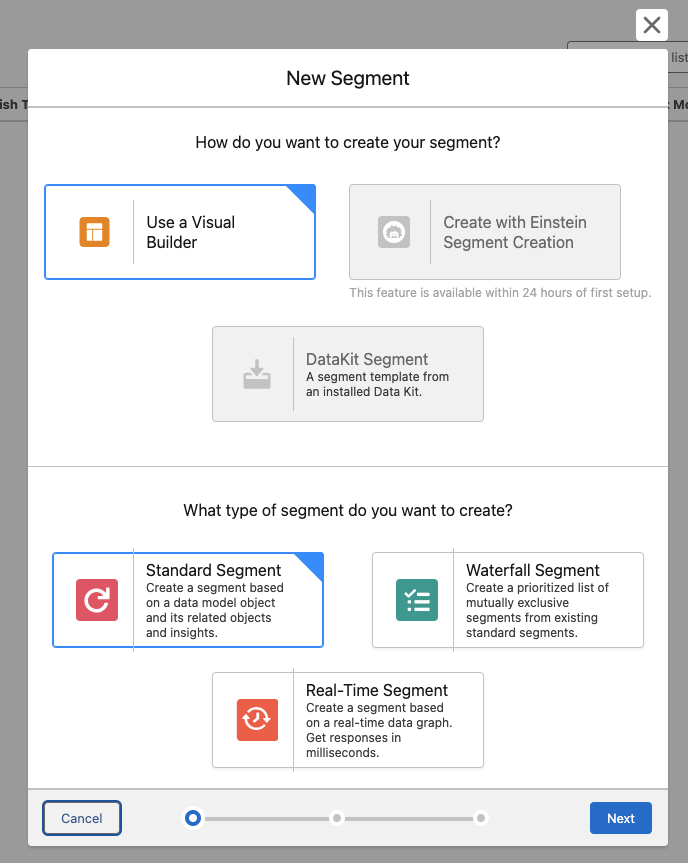
Navigate to Data Cloud > Segments and select New. You’ll see four segment types:
Standard Segments are your go-to. These are the closest equivalents to Account Engagement Dynamic Lists and support the vast majority of marketing use cases. Start here.
Waterfall Segments let you prioritize audiences and prevent contacts from qualifying for multiple competing campaigns simultaneously — useful when running multiple offers at once.
Real-Time Segments evaluate audiences on demand for use cases requiring immediate qualification. Powerful, but they come with limitations.
Once you’ve selected Standard Segment, there are four ways to build your audience.
Option 1: Use the Visual Builder
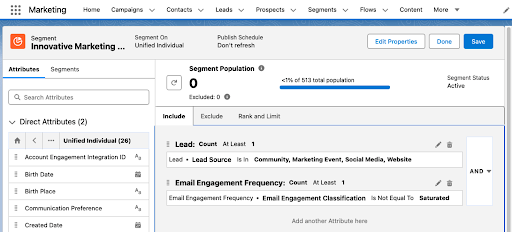
The Visual Builder offers the most flexibility and is where most marketers spend the majority of their time. The process is straightforward:
Create a New Segment
Select your Data Space (most often your Default Data Space)
Choose the object you want to segment on (most often Unified Individual)
Name your Segment
Configure your publishing settings
Drag attributes onto the canvas and define your criteria
Save and publish
Understanding Direct Attributes vs. Related Attributes
This is one of the biggest mindset shifts for Account Engagement users.
When building criteria in the Visual Builder, you’ll typically see two types of attributes:
Direct Attributes
Direct Attributes live directly on the object you’re segmenting against.
For example, if you’re building a segment on the Unified Individual object, direct attributes might include:
First Name
Last Name
Country
State
Preferred Language
Think of these as fields that belong directly to the person.
Example: Country = United States
This is a simple, direct attribute filter.
Related Attributes
Related Attributes come from connected objects that are related to the object you’re segmenting on.
Examples include:
Email engagement activity
Opportunities
Campaign Membership
Website activity
Orders
Cases
Think of these as records associated with the person rather than fields that live directly on the person.
Example: Opened an email in the last 30 days
The email open isn’t stored directly on the Unified Individual record. It’s stored on a related engagement object.
When Should You Use Each?
A simple rule:
Use Direct Attributes when filtering on profile or demographic information.
Use Related Attributes when filtering on behavior, engagement, transactions, or relationships.
If you’re asking “Who is this person?” you’re usually looking at Direct Attributes.
If you’re asking “What has this person done?” you’re usually looking at Related Attributes.
Understanding that distinction makes segment building much easier and helps explain why some criteria appear in different areas of the builder.
Option 2: Use Quick Filters
Need a common audience fast? Quick Filters offer predefined criteria for standard scenarios like:
New Contacts created today
New Leads created today
Recent Campaign Members
Contacts related to a won Opportunity
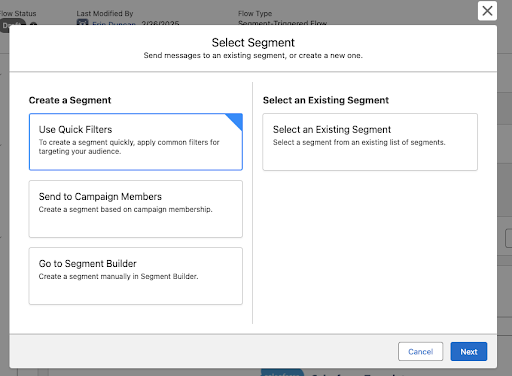
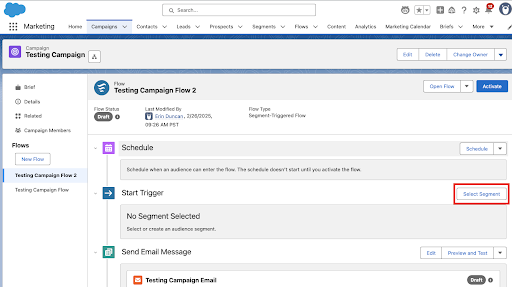
Access Quick Filters by navigating to Campaign while in the Marketing Cloud Next app. Open a campaign and select Select Segment. It’s a great starting point if you’re brand new to the platform.
Option 3: Use Einstein to Build a Draft
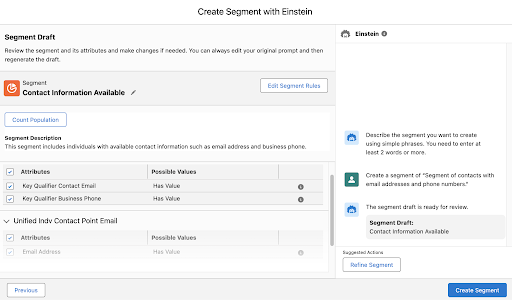
Not sure where to begin? Einstein Segment Creation lets you describe the audience you want in plain language:
Show me subscribers who opened an email in the last 30 days, visited our pricing page, and are subscribed to product updates.
Einstein generates a draft segment you can review, refine, and publish. Think of it as a shortcut to a first draft and always validate the output before going live.
Option 4: Use a Dynamic Segment
If you find yourself creating the same types of audiences repeatedly, Dynamic Builders can help streamline the process. Instead of starting from scratch each time, Dynamic Builders let you create reusable audience templates with configurable criteria. Marketers can then generate new segments from those templates by simply selecting or updating a few values, helping ensure consistency across campaigns while reducing manual effort. They’re especially useful for organizations with standardized audience definitions or recurring segmentation needs, allowing teams to scale segmentation without rebuilding the same logic over and over.
Which option should you choose? If you’re just getting started, use Quick Filters for common audiences or the Visual Builder for custom logic. Einstein Segment Creation is a great way to generate a first draft from natural language, while Dynamic Builders are best when your organization wants to standardize and reuse the same audience patterns across multiple campaigns.
Tips, Gotchas, and Things I Tell Every Client
Use the IN Operator Instead of Stacking OR Conditions
If your CRM has multiple versions of the same value, the IN operator saves you a lot of time. Instead of building three separate OR conditions, write:
Country IN (USA, US, United States)
It supports up to 100 values. Clean, readable, and much easier to maintain.
Understand Measurements, Operators, and Values
When working with behavioral data, Data 360 often asks you to combine three pieces:
Measurement
Operator
Value
For example: Email Opens → Count → At Least → 1
This translates to: “The person has opened at least one email.”
Another example: Email Clicks → Count → Greater Than → 5
This translates to: “The person has clicked more than five emails.”
Think of it like a sentence: Measurement + Operator + Value = Audience Rule
Examples:
Count At Least 1
Count Equals 0
Sum Greater Than 1000
Count Between 5 and 10
If a segment returns unexpected results, this combination is often the first place I investigate. The measurement may be correct, but the operator or value may not align with the business requirement.
Use Include and Exclude Intentionally
One of the most common mistakes I see is placing all data requirements into the “Include” section. Instead, think of Include as those who belong and Exclude as those who don’t belong. Separating those concepts creates cleaner segments and makes troubleshooting much easier.
Include Criteria: Country IN (USA, US, United States)
Exclude Criteria: Emailed in the last 3 days
Use EQUALS When Your Data Is Clean
When a field is standardized, and you only need one exact match, EQUALS is the right call. Country EQUALS USA will only return records where the value is exactly “USA.” No flexibility, but that’s the point.
Build Frequency and Recency Into Your Logic
This is where Data 360 starts to feel genuinely different from Account Engagement. You can filter by:
Has been emailed X times in the last Y days is great for suppression. If someone has received 3 emails in the last 7 days, you probably don’t want to send them a fourth.
Has not engaged in X days is your re-engagement and deliverability workhorse. Use it to identify lapsed subscribers before they become a problem.
Subscribed to [Preference] will build audiences based on what contacts have explicitly opted into. Increasingly important for compliance and deliverability.
Always Preview Before You Publish
Segment Preview lets you check audience size, sample records, and whether your include/exclude logic is working as intended. A few minutes here can save hours of troubleshooting later.
Account for Processing Time
Data 360 isn’t always instantaneous. Initial data ingestion can take days, depending on volume. Segment calculations take time and Dynamic Lists connected to a Data 360 Segment can take up to three hours to populate the first time. If nothing shows up immediately, give it time before assuming something is broken.
Not All Account Engagement Activity Is Automatically Available
A common misconception: not every historical activity flows into Data 360 by default. What’s available depends on your connector configuration and the Filter By Date you set when connecting. Before building complex engagement-based segments, confirm what data is actually being ingested.
Data 360 Doesn’t Honor CRM Visibility Rules
This one surprises many Salesforce Admins. Users can segment records in Data 360 that they can’t see in the CRM. If access control matters for your org, address it before rolling out segmentation broadly. The most reliable controls are user permissions and Business Units.
From Segment to Activation
One of the biggest misconceptions I encounter: adopting Data 360 means abandoning Account Engagement. It doesn’t. One of my favorite use cases is building sophisticated audiences in Data 360 and activating them directly through Account Engagement via the Data 360 Connector. To connect a Data 360 Segment to Account Engagement:
Navigate to Account Engagement → Segmentation → Lists
Create a Dynamic List
Select Data Cloud Segment as the Dynamic List Type
Choose your published segment
The first sync takes up to three hours. After that, membership updates automatically whenever the segment refreshes. Once connected, the Dynamic List works anywhere in Account Engagement, including Engagement Studio, Automation Rules, List Emails, Completion Actions, and Reporting. Data 360 identifies the audience. Account Engagement engages it. That’s where the value compounds.
Three Segments to Build First
Not sure where to start? These three are worth building in almost every org.
Recently Engaged Contacts: people actively interacting with your brand. Use for webinar invitations, product launches, or newsletters.
Opened an email in the last 30 days, OR
Clicked an email in the last 30 days, OR
Visited your website in the last 30 days
Inactive Subscribers (90+ Days): Subscribers who’ve gone quiet. Use for re-engagement campaigns, deliverability cleanup, or preference center outreach. This audience frequently surfaces new pipeline.
Opted in, AND
No opens in 90 days, OR
No clicks in 90 days
Preference Center Subscribers: Contacts who’ve told you exactly what they want. Use for targeted newsletters, product announcements, or event promotions.
Opt in to Product Updates
Data 360 segmentation isn’t replacing the skills you’ve built in Account Engagement; it’s extending them. You’re still defining criteria, building audiences, and activating campaigns. The difference is you now have richer data and more ways to use it. Start simple. Build a Quick Filter segment, get comfortable with the interface, then move into the Visual Builder. Before long, you’ll stop asking how to recreate Dynamic Lists and start asking what was possible all along.