Category

Privacy & Compliance

In September 2021, Apple privacy changes will start having a big impact on Pardot email marketing reporting metrics. Are you ready to pivot your reporting strategy in response to the changes?

Apple announced some big, new privacy changes in June, and that’s what sparked the changes in email marketing reporting metrics. These changes are included with the Apple software update to iOS 15, iPadOS 15, macOS Monterey, and iCloud.com. 

One of these changes, Apple Mail Privacy Protection, is getting lots of attention in the marketing operations community. That’s because of the expected impact to the email open rate metric — a key performance indicator for most marketers. However, there are multiple new changes coming with the iOS update every Pardot professional should be aware of. 

In this article, we’ll cover all three: 

  • Apple Mail Privacy Protection
  • iCloud Private Relay
  • Hide My Email

For each of these changes, we’ll share key features to be aware of plus how to get your org, team, and stakeholders ready. We know how hard these changes can be for your already-swamped team, so we’re here to help you through this. 

Respecting Apple user privacy 

Before we get started, I want to point something out. These changes are a huge win from the perspective of Apple and their users. By using this new software version, users can decrease the amount of data companies are collecting about their behavior and interests. This gives them more control over what information they share and when. 

Our job as ethical marketing professionals is to do three things:

  1. Respect our users.
  2. Treat their data with integrity.
  3. Adapt to the ever-changing technology and regulatory landscape.

So, we’ll do our best to focus on the positive aspects of the changes by providing solutions to the challenges they present.

Apple Mail Privacy Protection

Marketers using Pardot set automations based on email opens because, typically, opening an email indicates that a prospect is interested in a product or service. But, the new Apple privacy changes will skew email open rates and make it more difficult to know when Apple users actually open an email.

Apple Mail Privacy Protection (MPP) has two key features: 

  1. Open tracking prevention
  2. IP protection

Essentially, Apple iOS 15 opens the email and downloads the content when an email hits a prospect’s inbox. This prevents accurate open tracking because all emails going to Apple devices will appear to be opened in reporting metrics. 

Apple also downloads the content through a series of proxy servers. This feature is obscuring the IP address of the email subscriber. As a result, Pardot can’t report on the user’s device and behavior accurately. 

How to adjust your marketing strategy

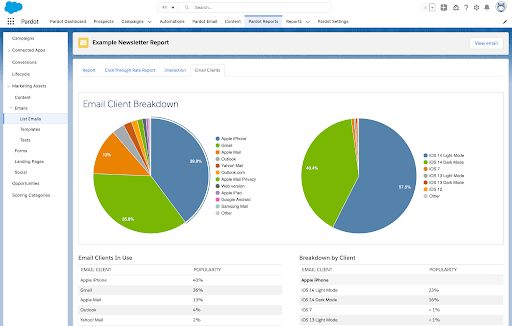
The first thing you need to do is answer the question, “What proportion of your database uses an Apple email client?” 

Here’s how to do that:

  • Review some of your recent email sends. 
    1. Go to Pardot Reports > List Emails > Email Clients (in Pardot Lightning)
  • Add up the percentages in the “Popularity” column. This will give you a ballpark estimate of the potential impact.

Is it 10%, 25%, or 50%+ of your audience? The greater the proportion of your audience using an Apple email client, the less reliable your email open rate metrics will be after the iOS 15 update.

Conversely, the non-Apple portion of your audience provides a reliable segment for email open stats and future testing (personalization, A/B, etc.)

Questions to ask

Now that you understand the severity with which your data could be impacted, consider the following questions: 

  • Do you have any reports that include email open rate? 
  • Who views these reports? 
  • How can you proactively adjust these reports to decrease the importance of this metric? 
  • How can you communicate with your stakeholders so that they know that the open rate is no longer reliable?

Next, do a thorough review of your Pardot automations. This includes automation rules, engagement studio programs, completion actions, dynamic lists, scoring, etc. Do any of these run based on open rate? If so, develop a plan to leverage an alternative trigger like email click* or form submission.  

*I put a big asterisk next to “email click,” as this metric has been endangered for a while. Email clicks can be caused by spam filters, so be cautious when using email click as a trigger on your automations or as a key metric in your reporting. 

Ultimately, this change is a step in the right direction for marketing teams. There’s never been a better time to shift your focus from vanity metrics like open rate and click through rate to more meaningful campaign performance metrics like conversions and return on investment (ROI).

Apple iCloud Private Relay

The new iCloud Private Relay feature will be baked into iCloud. Launching as a “public beta,” this feature functions similar to a VPN, encrypting all traffic leaving a user’s device when browsing with Safari. Private Relay leverages data encryption and anonymous IP addresses that hide a user’s location and web browsing activity. 

By hiding your specific IP address, Private Relay inhibits websites from building a profile based on your activity across multiple websites and selling your data to advertisers and data brokers. 

This feature is limited to paid iCloud account users who browse with Safari and turn on the Private Relay feature. (All paid iCloud accounts will be automatically upgraded to iCloud+ as part of the update.)

iCloud Private Relay disconnects your IP address from your DNS request (website that you’re visiting), which is great news to those seeking ultimate privacy and not wanting their activity information to be sold to advertisers. Unfortunately, it also disconnects website tracking that Pardot users have in place. With temporary IP addresses assigned, website activity will be difficult to associate to a known prospect. 

This capability does not hide the prospect’s geography. That means you can still track prospect regions, and IP addresses can be identified as proxy servers.

Apple Hide My Email

Hide my email

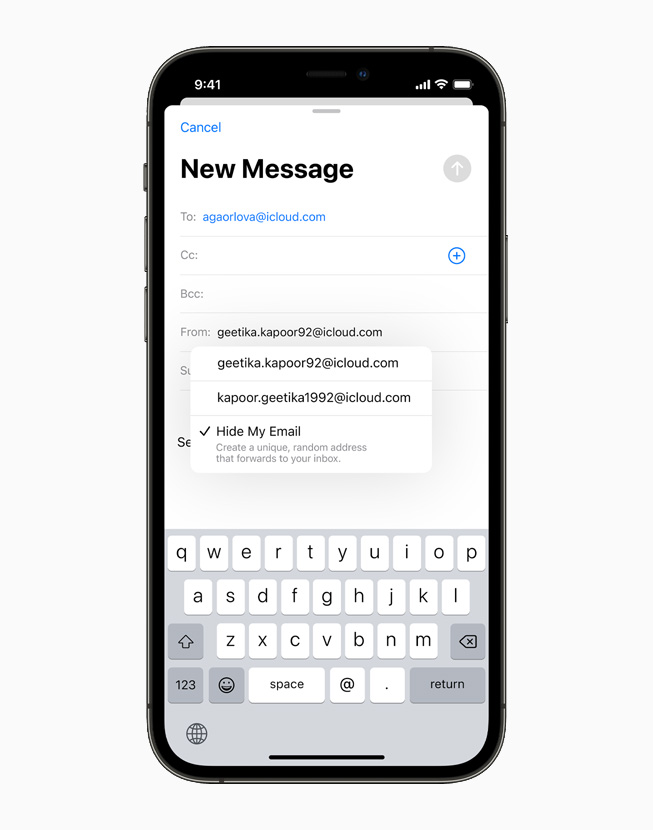
The last change to know about is Hide My Email. This update allows iCloud subscribers to log into a website using a randomized email address that ties back to their iCloud account. 

If your company allows public users to generate accounts or offers free trials, you could encounter a scenario in which a user takes advantage of Hide My Email to acquire multiple free trials.  

Hide My Email is also another challenging feature for Pardot users. That’s because it is once again disconnecting essential data (a prospect’s real email address) from website activity tracking. 

This functionality will impact open rate statistics. That means you will have to shift to other metrics such as click-through rate. It will also affect marketers who use email open rates for retargeting, and those who use email open rate as a varying factor for dynamic content. So you’ll have to pivot those strategies if you’re currently using email open rates for retargeting or dynamic content variations.

Focus on reporting metrics that matter most 

It’s normal to fear what we don’t understand. And these new privacy changes may seem scary without knowing why they’re actually good news. 

All of these privacy changes will impact marketing as a whole, making it harder and harder to track email activity and then associate it with activity in other channels. It is also an opportunity for marketers to take a fresh look at current strategies and craft new ways to put prospects in control.

Here are suggestions to address the changes and adjust your marketing strategy:

  • Update your Email Preference Center to offer subscribers greater insight into the topics they already interact with and other topics that are available.
  • Seek ways to connect email clicks with omnichannel metrics that demonstrate customer engagement. This includes:
    1. Offline purchases
    2. Account activity
    3. Website visits
    4. Mobile app activity
    5. SMS engagement
  • Explore using link clicks, external activity such as webinar registrations, and other engagement signals instead of email opens as more accurate interest indicators.
  • Find ways to understand the sentiment of an email message, perhaps with a thumbs up/down action or NPS-type of question within an email.
  • Look for opportunities to link your marketing channels (email, website, social, etc.), and get the cross-connection data flowing.

iCloud Private Relay and Hide My Email — on top of third-party/first-party tracking cookie changes already afoot — necessitate creative thinking to make prospect activity connections that were once seamless.

Prospect privacy is paramount

These three Apple privacy changes are going to affect the way you currently work in Pardot. But that’s a good thing. Your prospects have more autonomy when interacting with your company through email and your website. All you have to do is adjust your strategy so you can focus on metrics that matter most rather than vanity ones.

Now that you’re better equipped to prepare for the Apple iOS 15 updates, it’s time to  formulate your game plan and switch up your marketing strategy to evolve with the changes.

You can always reach out to the team at Sercante for support while navigating it all. 

Thank you to Pam Carey and Joy Alphanso for contributing to this post.

Are you trying to send something to opted out prospects in Pardot and wondering if operational emails could be a fit? This article breaks down everything you need to know.

1. What are Pardot operational emails?

Operational emails allow you to send critical information to a prospect even if they have previously unsubscribed.

This feature is great if you send legal notices, invoices, shipping confirmations, or internal company emails out of Pardot, but can greatly impact your sending reputation if it used for Marketing emails.

2. What is considered operational email?

Operational emails fall into two categories:

Transactional, meaning the prospect has initiated the transaction.

A few examples would be things like:

  • Shipping notices
  • Event registration confirmations
  • Order confirmations
  • Invoices

Relational, meaning the email contains critical information on how you do business with the prospect.

Examples of relational emails include:

  • Critical system changes that require prospect action
  • Terms of Service notices
  • Legally required notices
  • System outage notifications

3. All of our information is mission critical, can we send everything as operational?

With great power comes great responsibility. Use operational emails in Pardot wisely.

Remember, sending Marketing emails to unsubscribed prospects violates most SPAM laws and goes against the Marketing Cloud Account Engagement Permission Based Marketing Policy.

If you’re going to send something out as an operational email, it should contain no — as in ZERO — marketing content.

4. What is NOT allowed in operational emails?

Any email containing promotional, non-critical, or non-transactional information is considered “Marketing” and should not be included in an operational email.

Examples of marketing content include:

  • Product announcements
  • Event and webinar invites
  • Permission Passes
  • Surveys
  • Company newsletters and announcements

5. Got it. How do I enable operational emails?

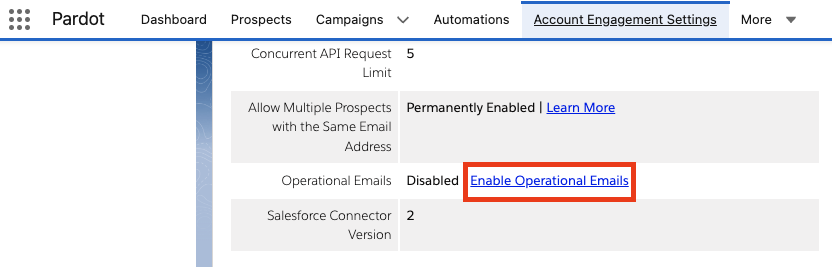
This feature has to be enabled by a Pardot Admin. Once it is, it will be available for use in list emails. To enable this feature:

Step 1: Within the Account Engagement Lightning app, select the “Account Engagement Settings” tab.

Step 2: Scroll to the bottom of the screen and select “Enable Operational Emails.”

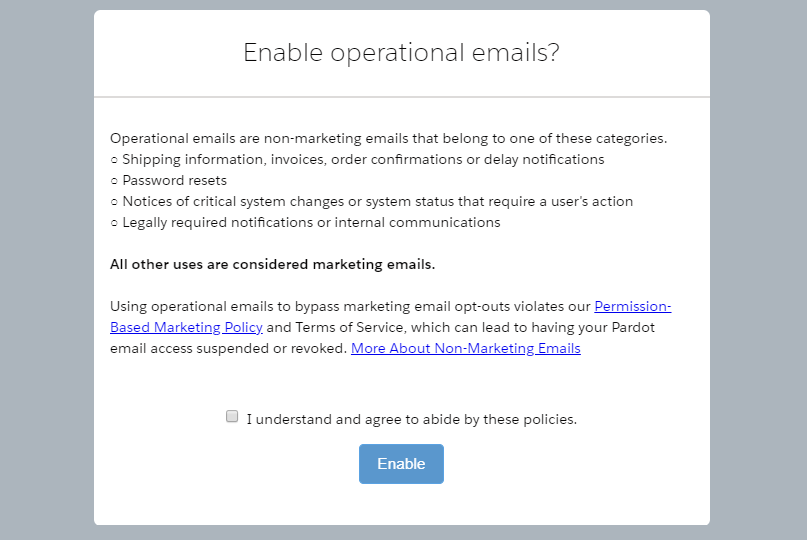
Step 3: Review the Operational email restrictions notice and click Enable. It will look something like this:

6. Who can send operational emails?

Only Pardot Admins and custom user roles can send Operational emails.

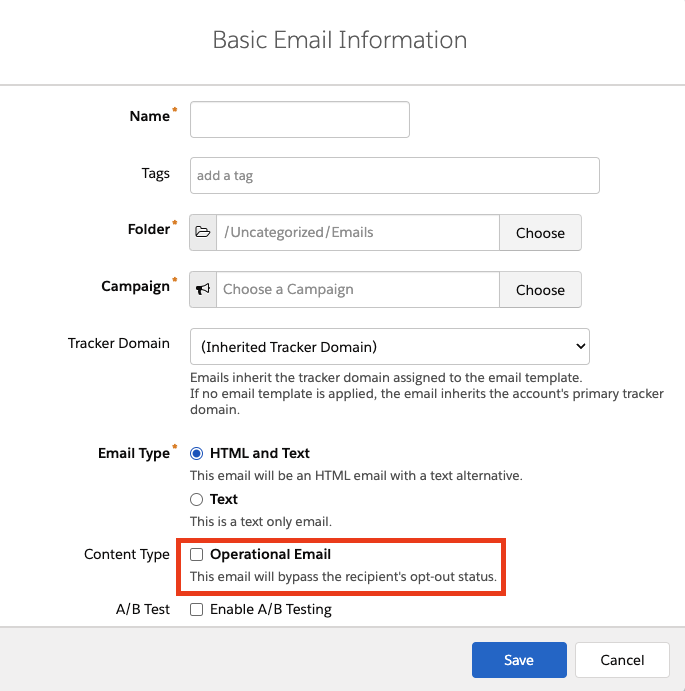
If you have access to send Operational emails, you will see this option under Basic Info when setting up a List Email.

7. What if I’m not sending as a list email — Can it still be operational?

There are a few quirks to keep in mind about how this can be used in other areas of Pardot:

  • Autoresponders sent from a Form or Form Handler will send to unsubscribed prospects.
  • Autoresponders sent from an Automation Rule will not send to unsubscribed prospects.
  • Emails from Engagement Programs cannot be sent as Operational… but you can vote for this feature to be added in the Trailblazer Community.

How are you using operational emails?

What other questions do you have about operational emails in Pardot? Are you trying to evaluate whether a specific use case is operational?

Let’s hear it in the comments!

Note: This post was updated on March 24, 2023.

A lot has gone down the weekend — and I’m not just talking about Game of Thrones. (more…)

I’ve had an opportunity to speak at several user groups and regional community events about GDPR, and the one question that always comes up is:

“When is this coming to the dear old US of A?”

Honestly, the U.S. has been pretty lax compared to the rest of the world when it comes to online privacy regulations.

Heck, CAN-SPAM doesn’t even require opt-in consent (although most ESPs require it of their customers.)  My response to the above question has usually been something to the tune of:

“Yeah someday… but don’t hold your breath.”

Color me surprised, though.  Last week, a bill quickly made it through the California state legislature that suggests this tide might be changing. (Quickly meaning in less than a week — this thing was fast tracked, big time.)

Why California adopted a “mini GDPR” & what Pardot admins should do next

The California Consumer Privacy Act of 2018 (CCPA) has been touted as a “mini GDPR.” It doesn’t go into effect until 2020, and you can count on all kinds of stakeholders in the business community to push back… so it may evolve in the process of being implemented.

At a high level, the law states that consumers have rights to know and control how their personal data is used. Specifically, it lays out rights of individual consumers to:

  • know whether their personal information is sold or disclosed
  • require companies not to sell their personal data
  • request that a business delete their personal information (with some exceptions)
  • be treated equally and without discrimination if they choose to exercise their CCPA-protected rights (i.e. they can’t charge you more or deny service if you assert your right to privacy)

What info is covered under CCPA

GDPR’s definition of “personal data” is sweepingly broad.  The fact that my favorite color is green is protected under that legislation.

California’s definition of personal data is also pretty darn broad.  Of course, the basics like name, email, SSN, address, etc. are covered.  Additionally, things like:

  • Browsing history
  • Sales data
  • Property ownership
  • Buying preferences
  • Advertising engagement metrics
  • …and a lot more is covered.

Any information that is de-identified or publicly accessible is NOT covered under CCPA.  The definition of info falling in this category is that which is:

“Lawfully made available from federal, state or local government records or that is available to the general public.”

An interesting twist is that the Act explicitly allows companies to:

“offer financial incentives, including payments to consumers as compensation”

…in exchange for the ability to sell their information.  Curious to see how that one plays out.

Who needs to comply with the CCPA

The CCPA covers a much smaller subset of businesses than GDPR.  First, it only applies to companies who do business in California.  Additionally, business must meet ONE of these three criteria:

  • Grosses $25M in annual revenue
  • Holds the data of 50K or more people/households/devices
  • Makes at least half of its revenue by selling personal data

There are a series of exemptions to this as well:

  • Healthcare data governed by HIPAA
  • Consumer data covered by the Fair Credit Reporting Act
  • Info collected under the Gramm-Leach-Bliley Act (yeah, I had to Google that one. It’s a federal regulation that applies to banks and insurance companies.)
  • Anything needed to complete transactions, detect security incidents, comply with state and federal laws, conduct research, etc.

There are also exceptions for “internal” uses of data that are:

“Reasonably aligned with the expectations of the consumer based on the consumer’s relationship with the business.”

Wait, why do I care about California?

California tends to lead the nation in consumer protection.  The fact that they’re taking this kind of action means other states are likely to follow suit at some point.

And for course, practically speaking, 36 million people (12% of the US population) reside in California, so many businesses nationwide will be impacted.

What happens if I just ignore CCPA?

Well… it’s up to the California AG to enforce the law for the most part, but there’s a private right of action clause for certain types of breaches.  This is reminiscent of the piece of CASL that was suspended last year that allowed individual citizens to press charges against companies violating the law.

For privacy breaches, only the AG can initiate enforcement, and fines are up to $7,500 per violation.  The business has 30 days as a “right to cure” to address the issue before fines set in.

For security breaches, the AG or private citizens can press charges, and the fines stipulated are:

“In an amount not less than one hundred dollars ($100) and not greater than seven hundred and fifty ($750) per consumer per incident or actual damages, whichever is greater.”

Okay, what do I have to do next?

There are 18 months before this goes into effect.  So no need to make any rash, sudden movements.  But if you’ve been on the fence about actually complying with GDPR… well, there are 36 million more people on U.S. soil that will soon be asserting similar rights.

My near-term recommendations would be to:

  • Document your practices for capturing subscribers and managing lists
  • Set up an email preference center to ensure you’re sending people things they want
  • Evaluate a double opt-in process to ensure your subscriber list is truly engaged and interested in heaving from you
  • Implement an archiving strategy to “sunset” people that aren’t engaging with you
  • Clearly communicate privacy policies (in actual English, not legalese)
  • Consider getting an attorney involved to help you understand your risk/exposure in the geographic areas where you’re doing business

A lot of the CCPA is open to interpretation and will certainly be challenged in court.  But the trend here is clear — people want to have a better understanding of how their data is used and why, and have the ability to reclaim control of how it is used.

It’s an interesting time to be in the wonderful world of marketing automation, that’s for sure.

What’s your stance on these new and somewhat vaguely defined compliance requirements?  Any reactions or opinions on the new legislation in California?

Let me and your fellow readers know in the comments!

It was the best of email marketing, it was the worst of email marketing.

If your inbox is anything like mine, it’s been absolutely crushed by all this GDPR hoopla.

It’s May 30th.  The compliance deadline was the 25th.  Will the opt in emails ever stop?  I’ve gotten at least 5 today.

I thought this was supposed to mean less spam, not more.

Anyway.

One can dream.

Nobody’s gone to jail yet, but still there have been some lessons learned.

The sheer volume of missives gracing my inbox has provided ample opportunity to reflect on what good and bad email marketing looks like.  A few key insights:

1. Fun wins, all day errday.

Does being jokey about GDPR make you a bad marketer?  I vote no.

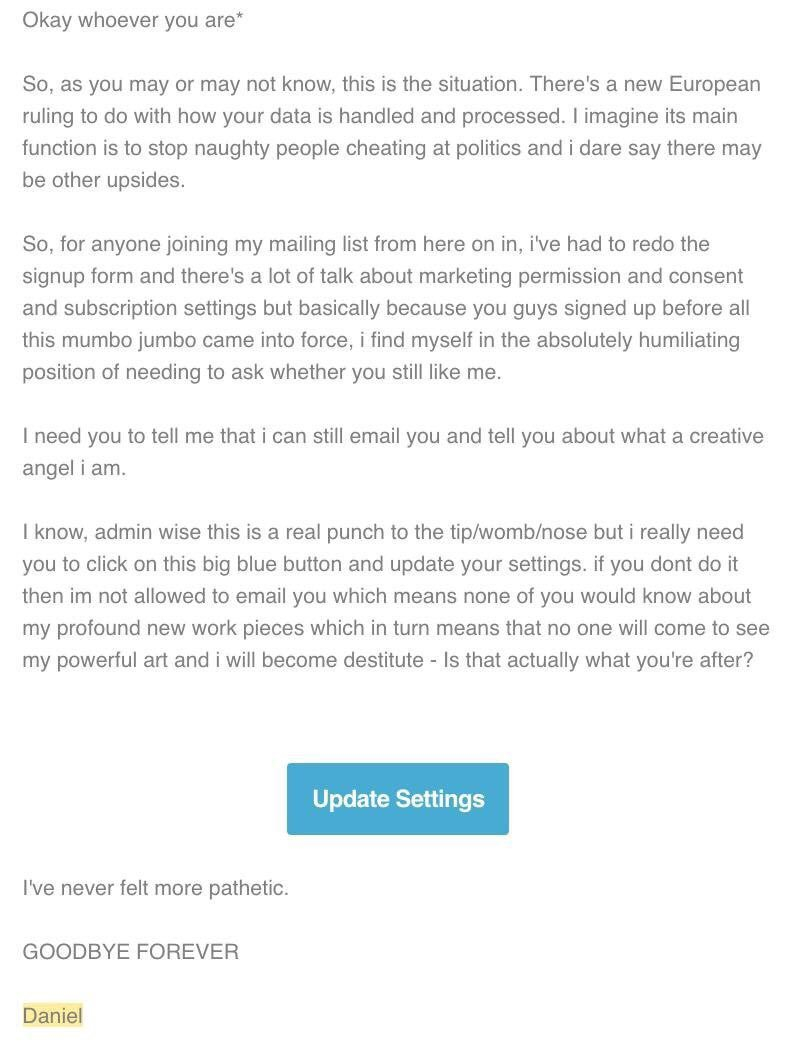
The ones that were interesting are the ones that got read.  Like this gem:

IMG_8641-1.jpg

My favorite part is of this entire email is:

“Okay so %%whoever you are%%,”

That’s one heck of a default value for no first name.

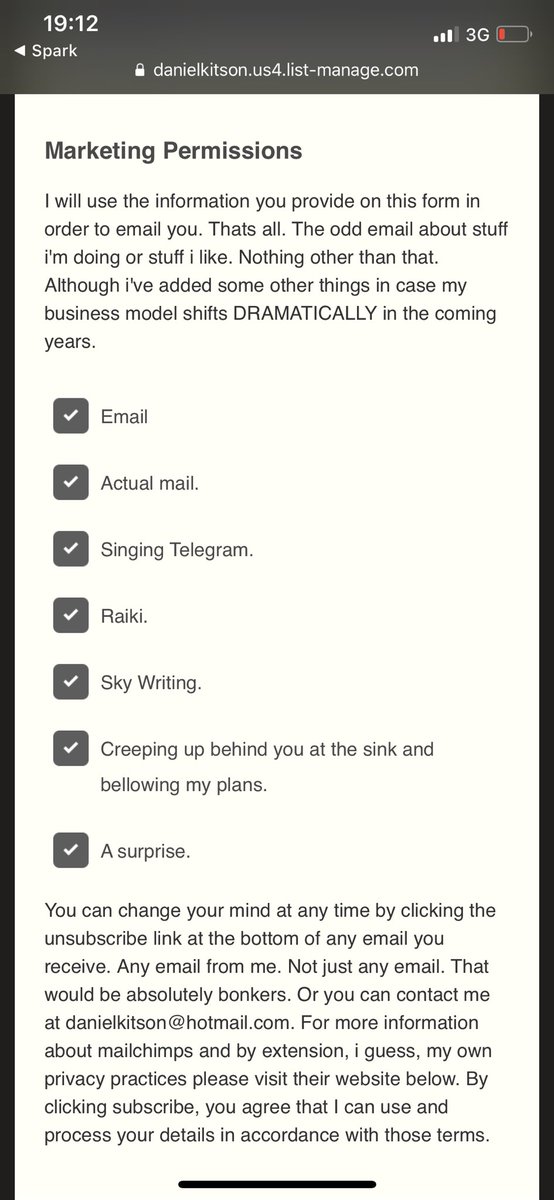
And then, the lists when you click through….

IMG_8642 (1)

Bahaha.

Takeaway: Be different or be gone.

2. We don’t BCC people on emails.

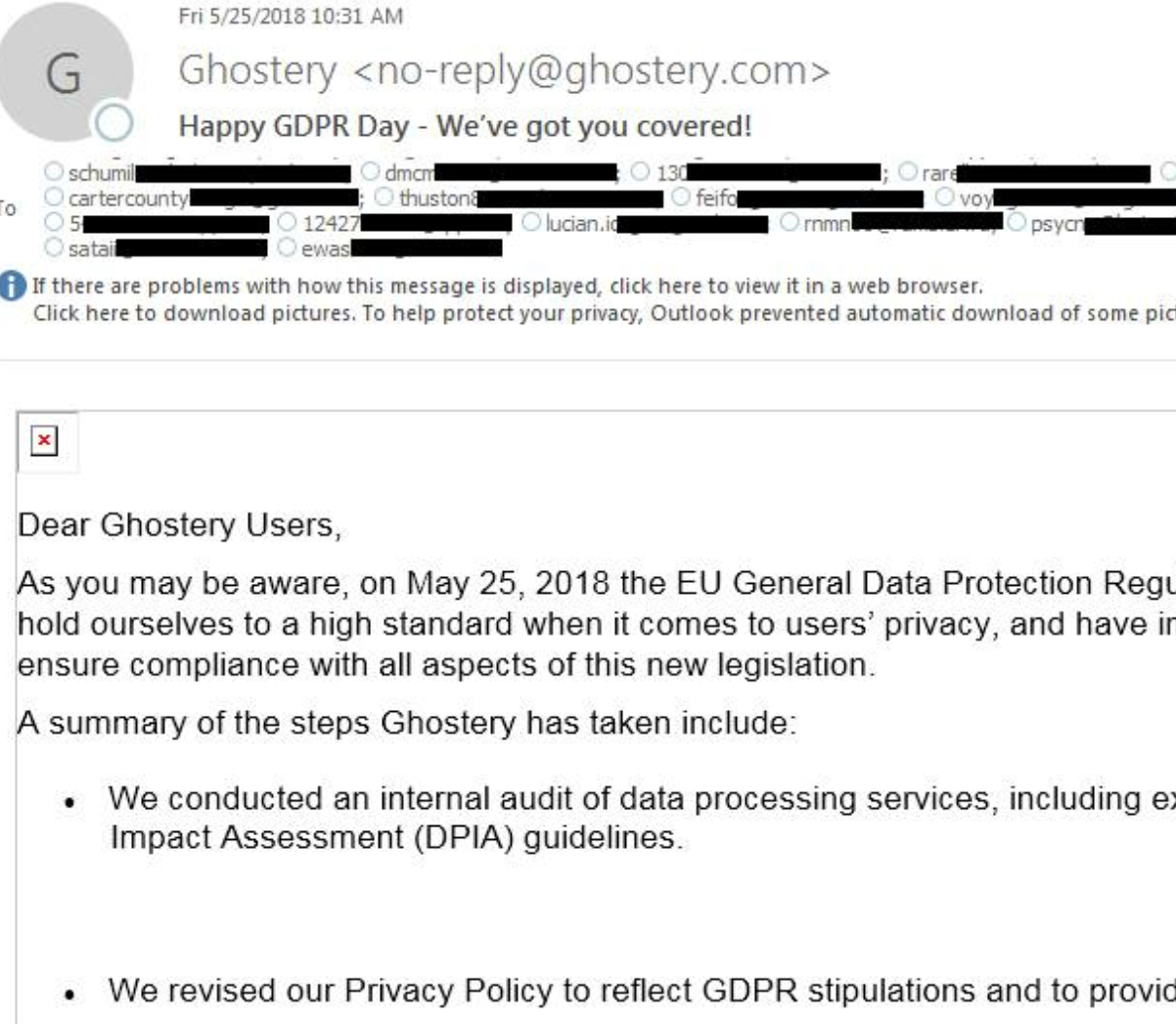
Bless the hearts of the people at Ghostery who accidentally exposed their customers’ email addresses in the CC line of their email about how much they care about our privacy.

IMG_8696.jpg

Seriously though, some underfunded marketer had the worst day ever, and my heart really does go out to them.

Get that guy or gal a Pardot license, dammit.

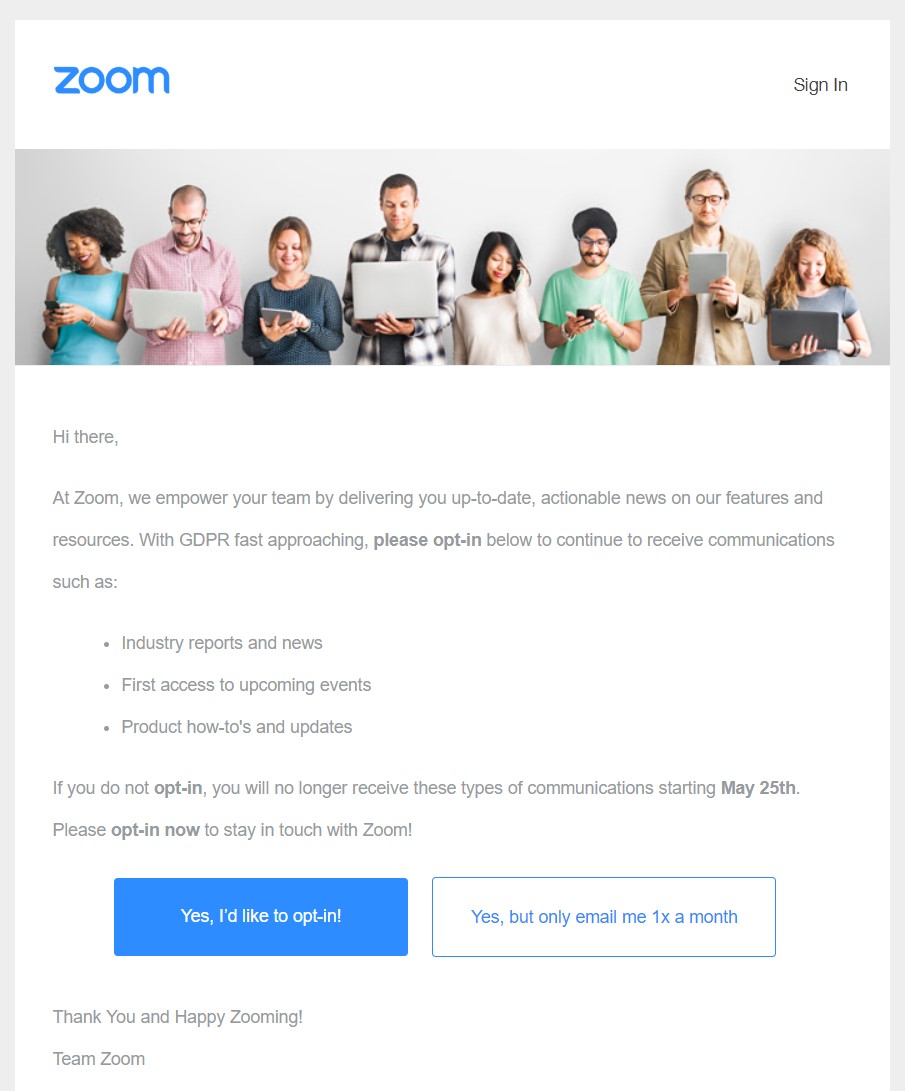
3. Yes means yes.

It’s really easy for people to say no to you.  There are a million other things competing for their time and attention.

So make it easy for them to say yes.

Zoom GDPR.jpg

People have kind of mocked this example, but honestly, I think it’s brilliant.

People already have a way to say no – by doing nothing.  It’s quite accessible.  In fact, it’s built into everything – our subscribers and site visitors have that opportunity for inaction everyday.

So when possible, how might we guide them to take action and raise their hand to indicate interest?

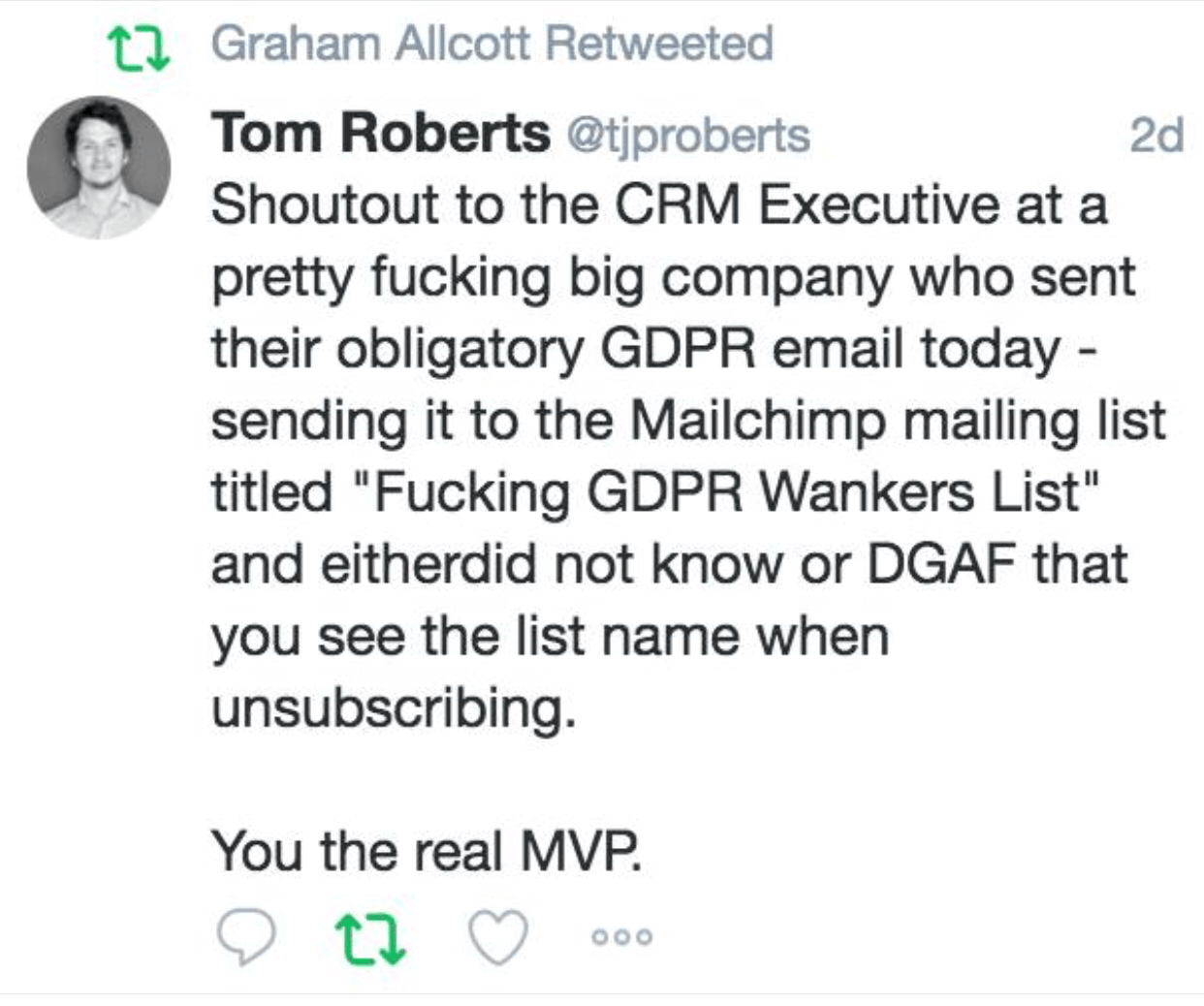
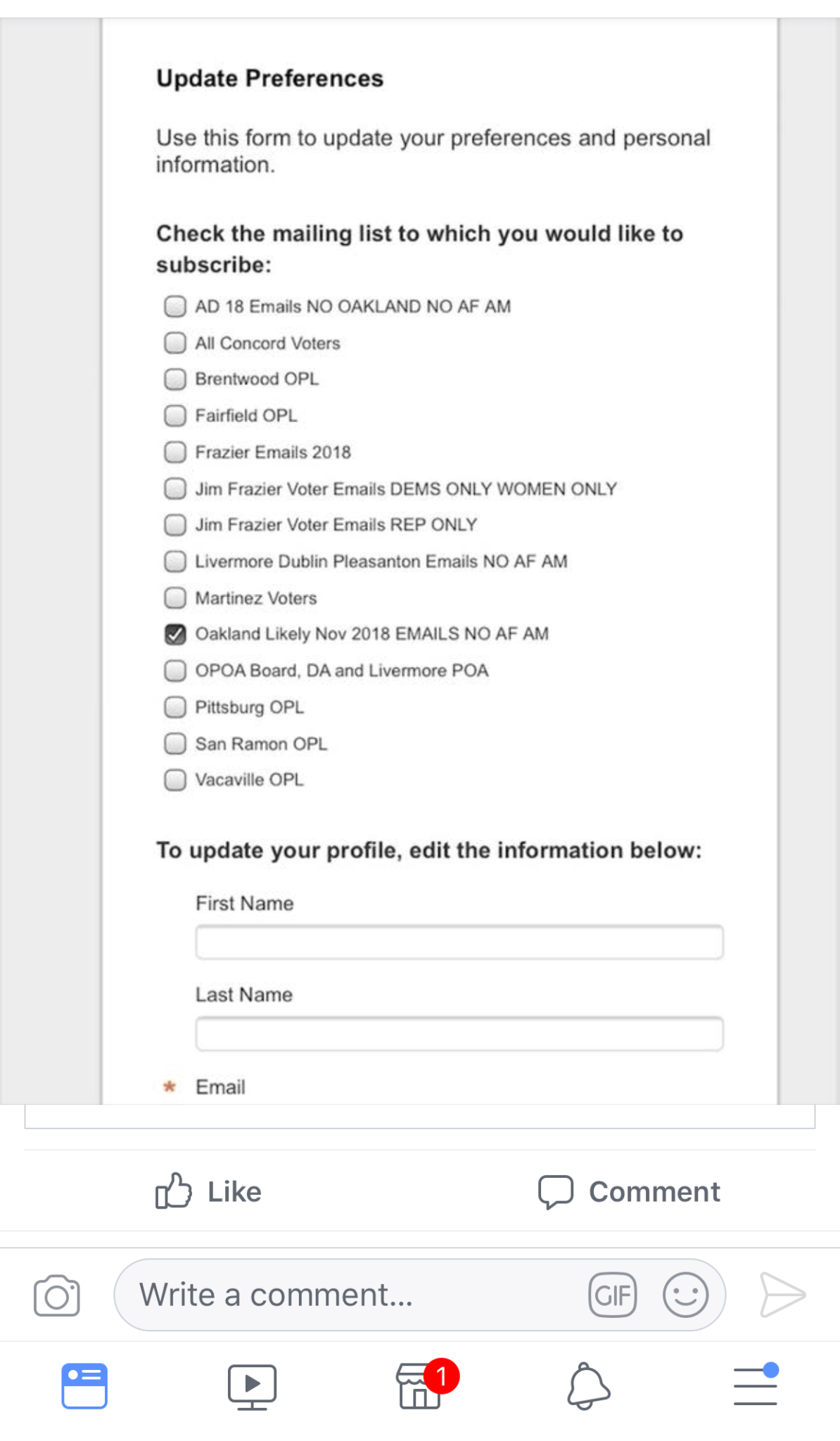
4. List names matter if they’re exposed in an email preference center.

Ev-er-y-thing-client-fac-ing-needs-Q-A.

Or things like this happen, ya’ll:

IMG_8750.png

Seriously, people forget that MailChimp list names are exposed to users.  At least in Pardot you can specifiy internal and external names.

Here’s a MUCH LESS funny example from the Oakland Police Department:

IMG_8749

Yes, they have a list that includes “NO AF AM.”  I’ll let you draw your own conclusions on what those abbrevs mean.

Also “DEMS ONLY WOMEN ONLY”?

Mmmmmkay.

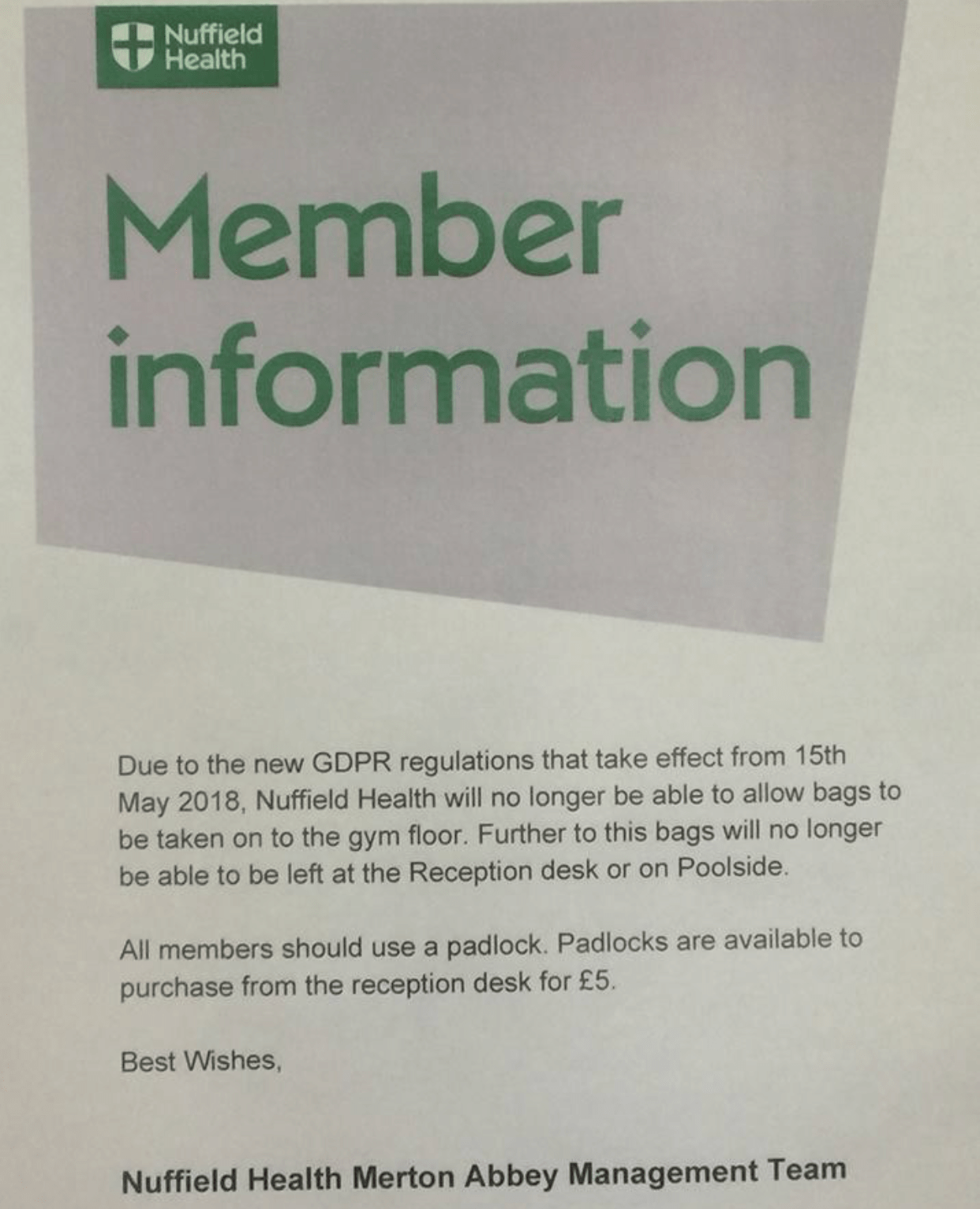
5. Print media matters.

I’m kind of digging print lately.  Mail is fun.  More blogs on that later.

In the meatime, shoutout to the analog marketers sending out notices like these:

IMG_8632.png

I’m going to use “CUZ GDPR” as the excuse for why I can’t do things from now on.

Can’t do the dishes? GDPR.

Not making dinner? GDPR.

6. Privacy concerns aren’t limited to just one channel. 

Regardless of whether GDPR functions as intended (it won’t), it’s virtually impossible to make yourself a digital ghost.

So whenever, wherever you are, be sure to proclaim your consent or lack thereof…

IMG_8606.PNG

7. Fines are the worst.

GDPR theoretically can fine companies up to 4% of their annual revenue for violating this legislation.

The optimist in me says:

“Yay privacy!”

The pessimist in me says that this is an impossible burden for small to mid-sized companies to comply with, and it unfairly hampers competiton.

It will be fascinating how this legislation fares in front of a judge and jury and how this evolves as cases are tried and as legal precent is established.

The Bottom Line

GDPR is going to usher in some important changes in the way we think about digital marketing, but there’s a lot that is still open to interpretation and that will continue to develop as people get dragged into a courtroom.

IMG_8640.JPG

In all seriousness though… if you have a question or a “what if” scenario you need help with, let’s hear it in the comments!  What have you observed from companies scrambling to comply with the law? Examples to share?

Accessibility of digital content is something that hasn’t really been on my radar before.

Like, at all. Didn’t even know it was a thing.

I first heard about it when a client mentioned some corporate requirements related to accessibility for a new website they were building. Cue the lightbulb with the blinding flash of the obvious.

I had the opportunity to contribute a guest blog post to the Pardot corporate blog.  Check out my post for more on the need-to-knows of accessibility!

Read it on the Pardot blog→

No more posts to show