Category

Andrea Tarrell

It’s spring cleaning season, ladies and gentlemen. So roll your sleeves up, throw on some Cardi B, and let’s freshen up that Pardot org of yours.

A Pardot org is just like the back corner of your closet.  It’s easy for “stuff” to accumulate — and it is well worth it to periodically evaluate what still fits and what’s no longer flattering.

As a best practice, I’d suggest reviewing this quarterly.  (That’s also how often I intend to clean my actual real life closet though, and it’s definitely been a while – so no judgement here if it’s been longer than that for your Pardot instance.)

But wait, what if I need it later?

If you’re like my husband who refuses to part with any material possession “just in case” or because of “sentimental value,” good news: Pardot never really lets you delete anything.

All your data just chills in the Recycle Bin until that day when you decide you want to resurrect it.  If you delete prospect records and restore them later, all of their visitor activity in the meantime will be restored.

So if you’re ready to roll, here are 8 ways to get started with your spring cleaning:

1. Delete old forms

Are there any landing pages or forms related to past events or campaigns that you could purge?  Move any submitters to a static list, then get rid of legacy items you don’t need to keep around.

Not sure if a landing page or form is still in use?  Click into it, and you can view the last submitted dates of the most recent prospects to fill it out.

2. De-clutter automation rules

What automations are cluttering up your org that no longer serve a purpose?

In case you missed it — automation rules now have a handy dandy Description field where you can add more context on why the rule was created and when it can be put to rest.  SO USEFUL:
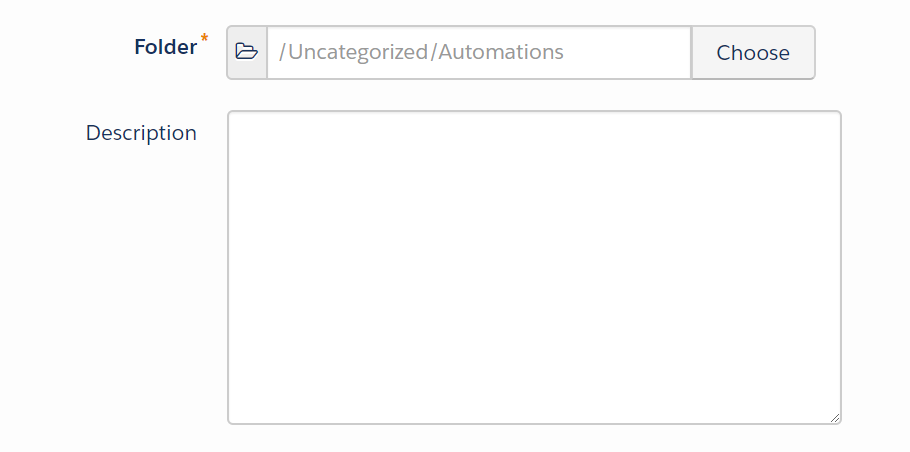
Pardot Automation Rules Description.png

3. Check on your Salesforce connector

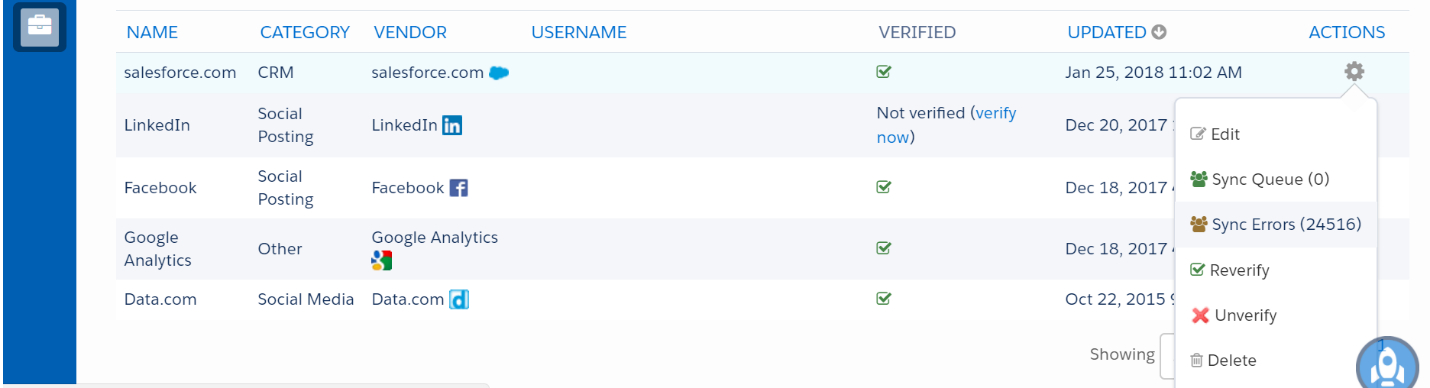
Next, pop over to Admin > Connectors and see if there are any sync errors that need some TLC:
Pardot Sync Errors.png

If you click into Sync Errors, you’ll see a list of errors Salesforce is returning when Pardot tries to sync a prospect record.  The most common errors tend to be:

  • Missing info in required fields
  • Mismatched picklist values
  • Rogue triggers or processes on the Salesforce side

4. Tidy up the users list

Next, head over to Admin > User Management > Users and review your active user list.

Any employee departures, former agencies/partners, or other folks that should no longer have access?  Are your Pardot users matched up to Salesforce users, and do you have single sign on enabled?

The little green checkbox and blue wrench are your signs that they’re all set:

Pardot Users SSO

You can also view Last Login Date from this table.  If you’re seeing blanks for your Marketing Users and Administrators, this can be a sign that some further training is needed.

5. Review unassigned prospects and prospects not in Salesforce

From Prospects > Prospect List, filter your view to show any Unassigned Prospects and/or Prospects Not in Salesforce.

If there are lots – or at least more than expected – look at how these folks are getting added to your list.  Is there a missing “Assign to User” step on any of your forms / form handlers / lead conversion points?  Are there any Salesforce users that need to be set up with Pardot access?

6. Make sure the “live ones” are staying engaged

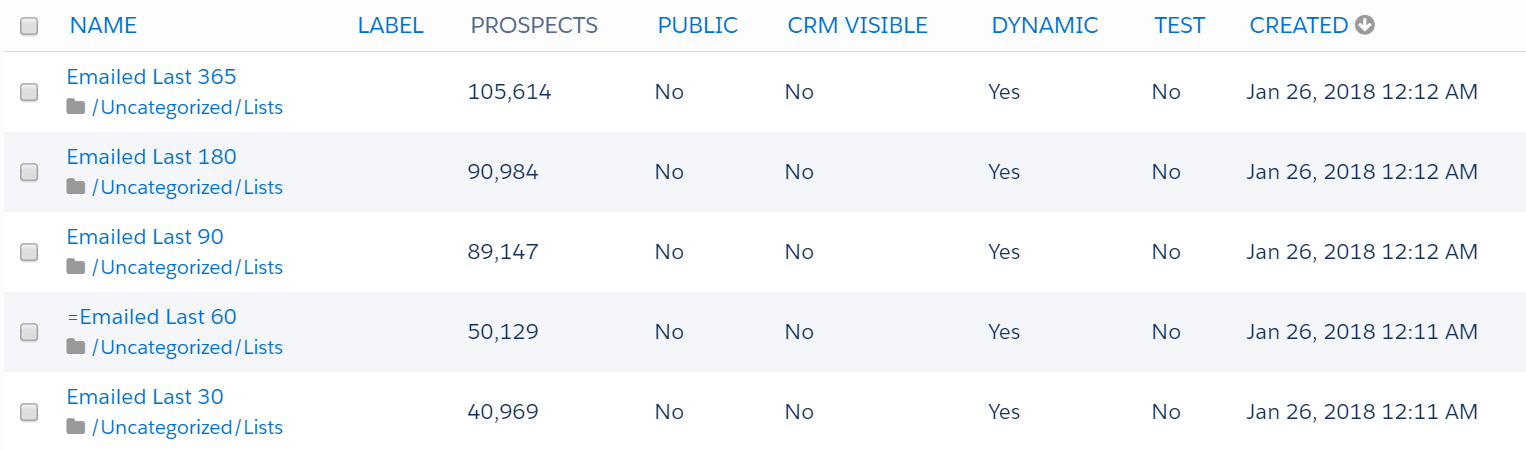
Use dynamic lists to show who’s been emailed in the last 30, 60, 90, 180, and 365 days:
Pardot Recency Lists.png

What percentage of your list has heard from you this quarter?  Is there a subset of your list that might need some more proactive communication?

7. Enforce naming conventions

Do you have standardized naming conventions?  If not… read this post next.

If so, great — take a look around and see if users are actually following them.

[PS – One Awesome Admin shared this naming convention generator that he rigged up for his company to help with consistency.]

8. Say uh-uh to uncategorized

“Uncategorized” is a catch-all default folder in all Pardot orgs.  Take a gander and see how many new assets have been saved under this parent folder.

Do you need to expand your existing folder structure? Do any of your users need a gentle (or maybe not-so-gentle) reminder about putting their belongings in their proper place?

9. Eliminate extra emails

Are there email templates, draft template, or list email drafts that can be discarded?  Are there multiple versions or iterations that could be eliminated (i.e. the ‘final-v2s’ of the world)?

10. Inventory engagement studio programs

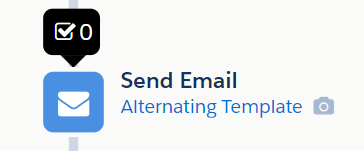
Review active Engagement Studio programs and make sure they’re still relevant and in use. If you click into a program, and then click into the little black number in the first step (see below), the report table will show you the last time someone was processed by the program.
Pardot Engagement Studio Reporting.png

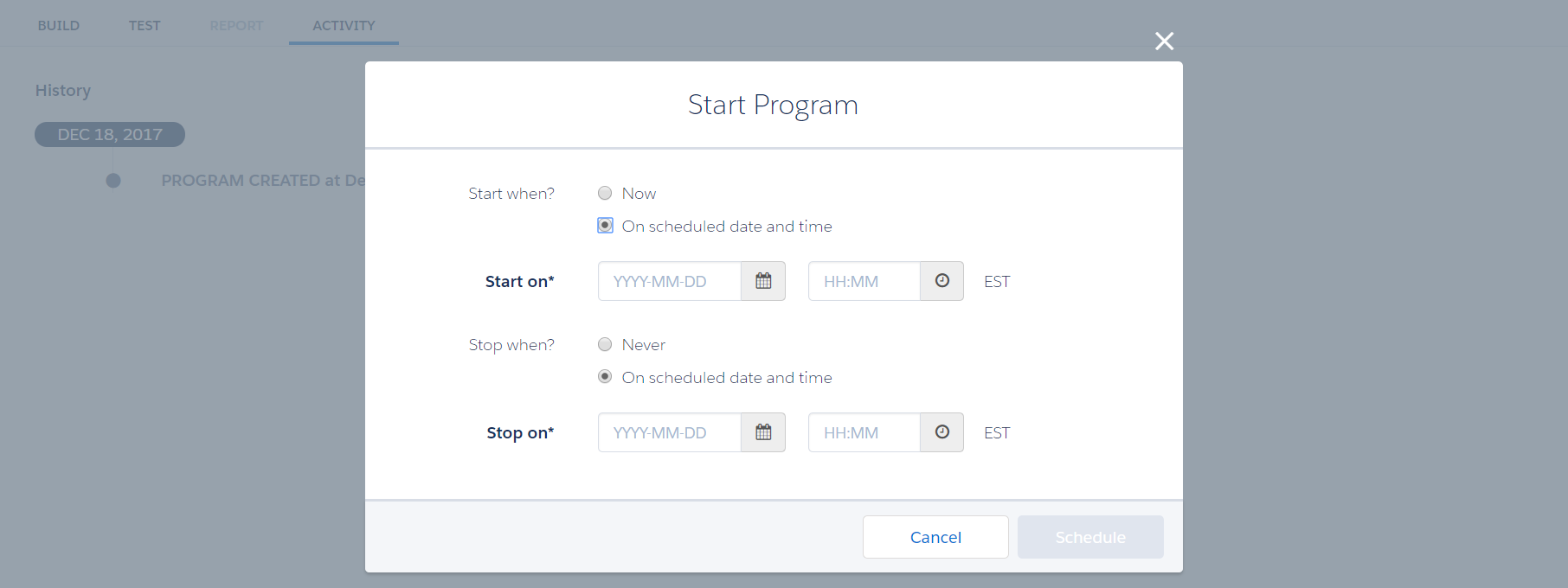
Another feature I love – you can now specify an end date when starting your Engagement Studio program:
Pardot Engagement Studio End Dates.png

…makes life even easier the next time you have to do some clean up!

11. Drop those drips

Still have Drip Programs?  Get with the times and migrate them to Engagement Studio.  Pardot hasn’t declared an official date when these will be deprecated, but it’s coming at some point, and new orgs don’t let you create these at all.

12. Clean house on custom fields

Are all of your custom fields necessary, or have some become redundant or obsolete? Do the field names make intuitive sense? Sort by Last Updated date, and give these a quick skim.

13. Decommission with care

Cleaning out the closet become trickier as your org gets more complex, as you add more users, and as programs become more interdependent.

Once you’ve made your spring cleaning list, I’d suggest you:

  • Review usage tables on the assets (when available) to understand where they’re active and what dependencies exist
  • Tell your team what’s on the chopping block and why
  • Give people time to let you know if there’s anything they want to keep
  • Document what you got rid of

What else do you recommend for spring cleaning in Pardot? 

How old is your Pardot org, and when’s the last time you did a review of what you’re actually “wearing”?  Get ready to revamp that wardrobe, Awesome Admins!

What tips do you have for your fellow Pardot admins looking to “clean house”?  Is there a particular area that seems to attract clutter in your org?

Let readers know in the comments!

Marketing automation was designed to support sales and achieve efficiency in reaching prospects at scale.

But the benefits don’t stop there. Nurturing can be used for many other types of business relationships — including customers, partners, suppliers, and even your employees.

Why would my employees need nurturing?

This is one of my favorite soapboxes.  I firmly believe that internal communications deserve as much, if not, more attention than our customer-facing communications.

It’s not just to get that warm, fuzzy kumbaya feeling — it’s just good business. In today’s war for talent, your employees have options about where to invest their blood sweat and tears.

An ancillary benefit: if you’re just getting started with marketing automation, automating internal communications can be a great “low risk” experiment — and your HR team will likely be hugely appreciative of the extra comms help.

Opportunity #1: New employee onboarding program

The first 90 days at any organization are going to feel like drinking out of a firehose — but a little empathy can go a long way toward making this less painful.

Can you leverage lead nurturing principles to help new employees on their “buyer’s journey” — aka their path from deer-in-the-headlights newbie to fully functioning team member? What are the key questions every new hire has on day 1, day 7, day 30?

Explore using Engagement Studio to schedule communications like:

  • Paperwork requests
  • A welcome letter from the CEO
  • Company background & history
  • Automated tasks at set intervals to remind their manager or HR to check in
  • New kid logistics questions like dress code, where to eat in the area
  • Information on employee perks

Opportunity #2: Employee benefits communication

Another fabulous use case for drip nurturing is during open enrollment season for employee benefits. At most companies, the main communication tools for annual benefits renewals are:

a) the dreaded enrollment meeting where everything’s thrown at you all at once

b) a bunch of stock brochures from the insurance company that mean little to nothing to most of your employees

How might you break this complex message into bite size pieces, and leverage Engagement Studio to “nurture” employees as they build their understanding of their benefits options?  Could you break out key messages into weekly or bi-weekly communications leading up to the enrollment deadline?  Can you apply marketing best practices to cut through the corporate-speak and technical benefits jargon?

Fair warning: your HR may smother you in bear hugs if you offer to take this off their plate.

Opportunity #3: Analyzing success of training & internal messages

Pardot has great analytics on prospect engagement – who’s opening and clicking emails, time spent visiting a page, how long people are watching videos (if you’ve got the Wistia integration in place.)

This can give you some great intel on how employees are reacting to different kinds of content. Leveraging Pardot, you can start to understand:

  • What training materials people actually use
  • Who’s reading monthly reports
  • Link click activity on an employee intranet
  • Engagement rates with leadership communications (CEO updates, “state of the union” type comms, etc.)

What other non-traditional ways can you leverage Pardot?

Have you found success leveraging Pardot for something other than prospect engagement? What ideas do you have for expanding the impact of marketing automation in your organization?

Let your fellow readers know in the comments!

Accessibility of digital content is something that hasn’t really been on my radar before.

Like, at all. Didn’t even know it was a thing.

I first heard about it when a client mentioned some corporate requirements related to accessibility for a new website they were building. Cue the lightbulb with the blinding flash of the obvious.

I had the opportunity to contribute a guest blog post to the Pardot corporate blog.  Check out my post for more on the need-to-knows of accessibility!

Read it on the Pardot blog→

One question I frequently get asked is:

“What does a typical Pardot admin (or consultant, feeelancer, et. al) make?”

Now THERE’S a loaded question.

The myth of the “typical” admin

Before we talk about dollars and cents, let’s disillusion ourselves of the concept of a typical admin. One of the crazy cool things about the Salesforce ecosystem is that people found their way to this community in a huge variety of ways.

We have developers. Stay-at-home moms. Creative and analytical marketers. People who just saw a need in their organizations and know how to GSD.

There isn’t really a “standard” background for an admin that I’ve seen.  So, it’s hard to draw a bullseye around a typical salary target.

Where I’ve gone wrong in the past [probably an overshare, but whatever]

I spent much of my early career worrying that I was excessively overpaid. This is ridiculous in retrospect. But I constantly thought to myself:

“You are so lucky to be here. Your boss is inflating your salary beyond what you’re worth so you can never leave. If you tried to ask for that much at your next company, you’d get laughed out of the room.“

But I did ask for that at my next company… and you know what, no one laughed.

Then I asked for more at the next company.

Then more.

No one has batted a frickin eyelash.  I wish I could holler at 22 year old Andrea at clue her into that fact.

I talked to the CEO of a much more established Pardot consultancy than mine the other day and asked him how he went about benchmarking rates. His answer?

“Ask for more each time until people start looking at you funny.”

Now that’s a rule of thumb I can live by.

The takeaway here is not trying to inflate rates or salaries — but to push yourself out of your comfort zone to advocate for compensation that reflects the value you’re bringing to the table.

Controversial opinion: Pardot & marketing automation salaries are not scientific

It’s comforting to think that if we put in the time, do great work, and are loyal to a company that our paychecks will reflect that via some magic secret formula. But that is rarely the case.

Most organizations aren’t all that strategic about how they compensate employees. They’re businesses run by human beings who are trying to move the needle on results and get from Point A to Point B while turning a modest profit.

If your organization is the exception, I’d love to hear about it in the comments.  But more often than not, I’ve found that salaries are largely determined by:

a)  how much the person in the job before you was making

b)  how much you made at your last job

c)  how hard you’re willing to advocate for yourself in salary negotiations.

Okay, but what about salary benchmarking data?

The closest things that we have to “science” in the realm of salary comparison are benchmarking sites like Glassdoor, Payscale, and Salary.com.

These don’t have great information on some of the newer marketing roles/titles like marketing operations, demand generation, or marketing automation.  A few niche resources – albeit with a smaller dataset — include Mondo, Mason Frank, and the Creative Group.

Fair warning: these will show you wildly different results. My takeaway, after looking through these sites, is that most Pardot and email marketing experts make between $35K and $152K. No seriously, that’s the range in numbers I found.

Fair warning #2: if you bring these up to your HR person, they will probably roll their eyes.

If you can’t tell, my opinion of these data sources isn’t super high.

Should you ask for more money?

If you’re reading this post because you’re wondering if you should ask for a raise, my answer to 85%+ of you would be yes. Again — one thing I wish someone would have told me earlier in my career is that for many companies, salaries are a little arbitrary.

Exceptions: the government, with pay bands and all sorts of bureaucratic controls. Circus performers. Lemonade stand operators. There might be some true rate standardization there.

Maybe.

How do you get a higher rate or salary as a Pardot pro?

I have 5 suggestions if you’re looking to grow your income and are seeking some practical advice:

1) Advocate for yourself

No one is going to go to bat for your wallet if you’re not willing to. The first step to getting what you want is asking for it.  Don’t hint at it.  Don’t imply it.

Open your mouth and ask for what you want.  You’re going to feel awkward. Acknowledge it — say to yourselfL

“Yep, I‘m the most awkward person who has ever lived.“

And let it ride.

It’s scary, it sucks… but it’s worth it.

2) Don’t talk yourself out of it before they can

Once you’ve made your ask, zip your lips and let the tension sit.

It’s so tempting to want to break the silence, to find a way to soften your request or justify what you want.

“Well I know that I’ve only been here for X years, so…”

“I realize your budget is tight.”

“But that’s negotiable.”

“I’m really doing this for the experience.“

If your boss or whoever you’re negotiating with wants to find a compromise, let them start that conversation — don’t start it for them!

3) Own your experience

If you’re good at your job, OWN IT.  Look at the data points around you.

What projects are you proud of?  What skills do you bring to the table?  What have you learned in the past year?

Give yourself some credit, and lose that impostor syndrome.

4) Believe in abundance

The best negotiation tool is walkaway power.

If you’ve got Salesforce and Pardot chops, go into salary discussions knowing that you have a very in-demand skillset and that hundreds of companies would consider themselves lucky to have you.  It’s hard to feel confident in that sometimes, but it’s true.

If you can adopt an abundance mindset and treat financial negotiations like they’re a game, the odds of you winning that game skyrocket.

5) Pay it forward

This last suggestion is more of a long term play.  But building on the theme of abundance – one of the best ways to grow your own career is to help other people grow theirs.

Take time to get coffee with that student that reaches out to you on Linkedin.  Share a cool solution you built at your local Pardot User Group or community event.  Hug your competitiors, because this isn’t a zero sum game and there are so many cool problems for us all to solve.

The Bottom Line: It’s not super consistent. So, it is what you make it

The TL;DR of it all: be brave, be real, be generous.

If you work hard, you’ve earned some awesome skills, and you get stuff done — you deserve to be compensated fairly for that.  There may not be clean averages or datasets to “prove“ what you should make with mathematical certainty, so it’s up to you to ask for what you what.

If you’re an employer… we know you’re trying to stick to a budget and grow a team to make a difference for your clients.  Keep in mind how in-demand your Pardot resources are and show them some love (both in monetary and non-monetary ways.)

This is one of my longest posts yet, so thank you if you’ve hung in here with me.  I’d love to know what you think – what are your suggestions for setting salaries or approaching negotiations?  What insights or surprises have you come across in your career?

Please share with your fellow readers in the comments!

Last week, I had the opportunity to join the Industrial Sage Podcast to riff on marketing automation and lead gen.

When I hear “podcast” I usually think audio only… so I will confess my heart skipped a beat or 3 when I walked in and saw video cameras for days.

About Industrial Sage

Industrial Sage focuses on digital marketing ideas and best practices for industrial companies, particularly manufacturing and logistics businesses.  It’s the brainchild of Danny Gonzales and the folks at Optimum Productions.

There’s an amazing body of work on their website including blogs, videos, audio content, and more.

When marketing automation goes overboard

Here’s the final cut of EP 24: WHEN MARKETING AUTOMATION GOES OVERBOARD:

I’d love to know what you think!  Sound off in the comments, or let’s chat on Twitter.

I met someone at a Pardot event a few weeks ago who told me about a fascinating start-up.

It’s called SalesTing (Sales + Marketing, get it?) and their mission is to generate more “growth moments” in your pipeline.

The familiar question SalesTing seeks to answer

All of the effort marketers put into analytics, reporting, and attribution are aimed at understanding one thing:

What’s working?

This may seem like a simple question, but answering it is made incredibly difficult by sales reps who refuse to enter their calls and meetings into Salesforce, or who balk at the idea of the couple of extra clicks needed to add contact roles to opportunities.

I’m sure some of you can relate.

When you’re trying to ramp up lead generation and track conversions, this is extremely frustrating.

How do you strategically invest your marketing time and dollars without perspective on what’s actually leading to sales?

How do you fight for more budget if you can’t prove contribution to revenue?

Addressing the gaps in sales & marketing data

So what’s a marketer to do?

Many of us have patiently walked the path of training and re-training sales reps, trying to get leadership buy-in, working out service level agreements, and using all of the persuasion tools at our disposal to get sales reps to change their behavior.

But SalesTing takes a different tack.

How SalesTing solves for this… without manual data input

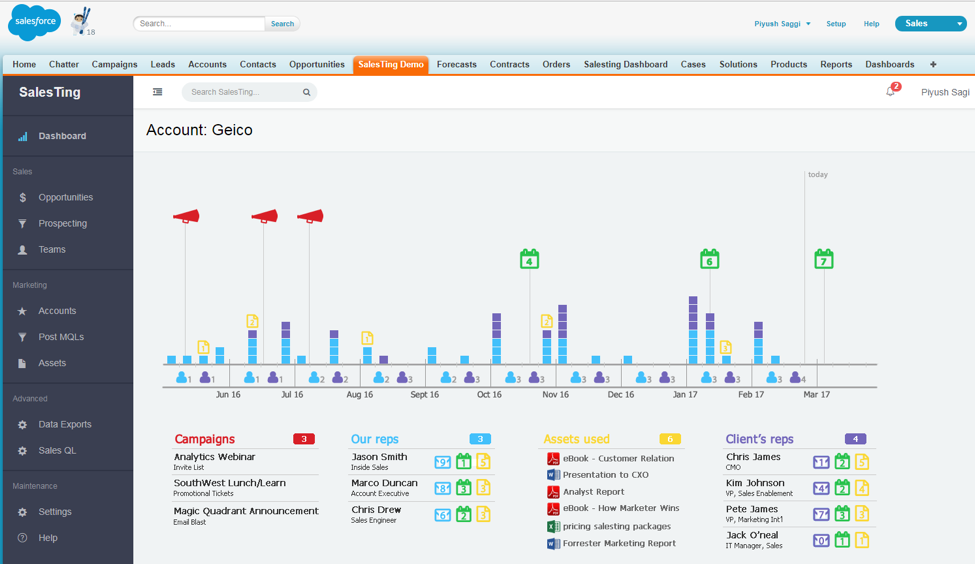
SalesTing is a 100% native Salesforce app that connects to the tools your reps use most — GoToMeeting, their email, and their calendars.  With no manual effort required from your sales reps, it fills in the missing gaps needed to construct a clearer picture of what activities led to deal closure:

pardot.png

This show a true journey of a how an opportunity progressed to a win or loss, and overlays all marketing and sales touchpoints on a single picture. This visualization has the power to highlight major “growth moments” or turning points in a deal — which you can then use to improve your marketing campaigns or inform sales coaching.

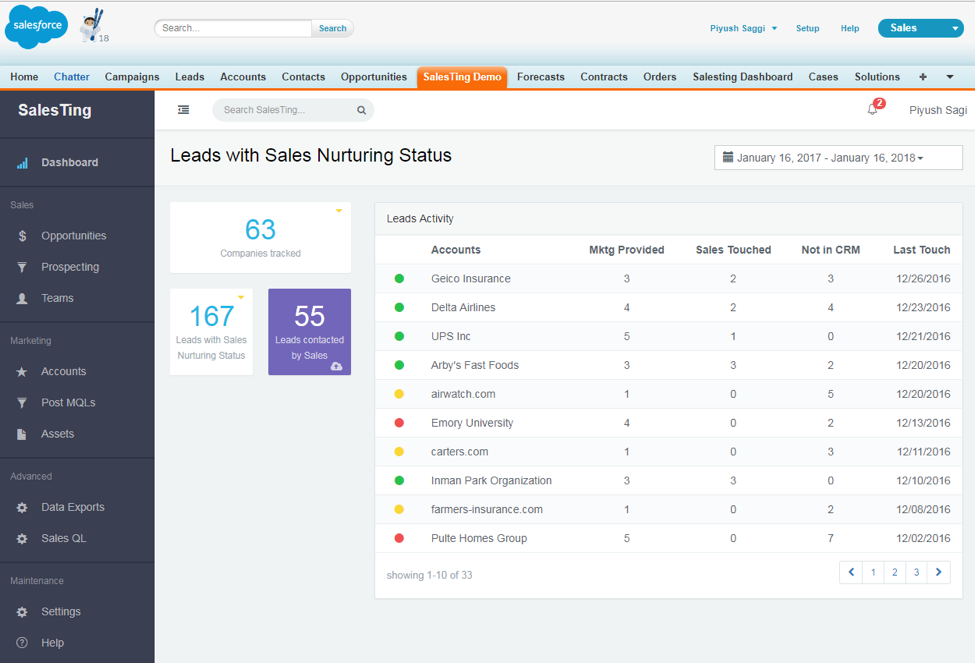
Salesting shows you what personas are being engaged in the buying process across the entire account, by both sales and marketing:

pardot2

What I love about this as a marketer is that it illuminates some of the “behind the scenes” nurturing that we do that often is overlooked.

For example, if your rep sells to one contact, but you’ve been engaging 10 others in the company for a year… that’s a valuable data point to consider, and SalesTing helps bring that to light.

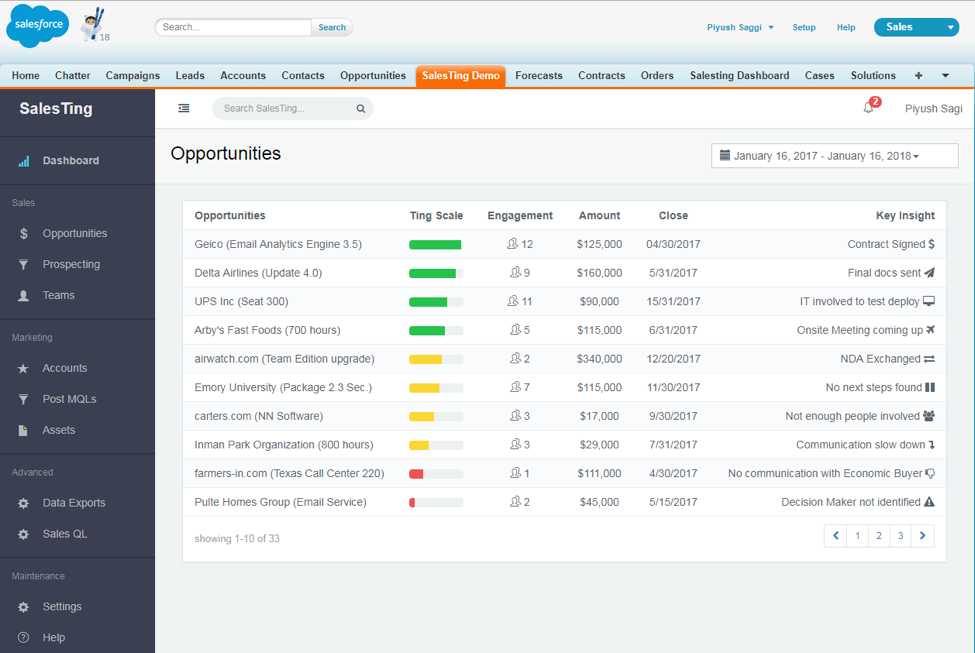
And last but not least, the app takes all this data and uses it to predict likelihood of future opportunities to close.  Marketers can then use this data to improve things like how they target campaigns, when they assign leads, how they score and grade prospects, and more.

pardot3

Products & tools to improve your lead-to-revenue processes

This is not a paid promo, for the record.  I just think the product is cool.

If SalesTing sounds like a fit for you, you can request a demo on their website.  Let me know what you think if you do check it out!

What cool products have you found to elevate your sales and marketing results?  Any AppExchange tools you couldn’t live without?

Let readers know in the comments!
No more posts to show