Listicles. I hate them. Truly despise them. But then also kind of love them.
If you’re not familiar with this buzzword, a listicle is an article that — you guessed it — is written in the form of a list. There are pros and cons to this approach. Let’s explore.
1. PRO: They work
They’re just so… damn… clickable.
In a world where 80% of your “readers” never make it past the headline, the promise of a concrete number has some serious allure.
If your goal is to get clicks — then get your listicle on, my friend, and mission accomplished.
If your goal is to get these nameless clickers to change behavior and DO something (like buy from you), you may need to up your game.
3. CON: The explanations (i.e. the non-list copy) are always so lame
A listicle is a list. The “article” part of it is usually a crammed-in-afterthought that just makes you want to cringe.
Except this listicle, in which every word was lovingly curated and will enthrall you.
4. CON: It’s lazy writing
Can we all admit this… a listicle is a long form grocery list, alright? You can literally write this stuff on the back of a napkin.
5. PRO: You’re meeting us where we’re at
As digital marketers, our goal is to tailor our messaging to the buyer’s journey and their frame of mind.
And we, as a society, have collective ADD. So give the people what they want, dammit, because the best content might just be the content that gets read.
Again “read,” if you consider skimming titles to be reading.
7. CON: They make us forget how to count
Half of the time authors seem to forget how to count mid-listicle. Maybe it’s some stat they heard about odd numbered lists performing 20% better than even ones?
See also: #4 re: lazy writing (and/or copyediting.)
8. CON: Absurdly large numbers
I don’t want to know 100 or 101 things about anything.
It’s too much.
TOO MUCH, I tell you!
9. PRO: ’90s nostalgia & pop culture
I’m a sucker for anything featuring N*Sync, Spice Girls, Furbies, memes. If you can find a way to work some pop culture that into your B2B marketing, then you do you.
One unique quirk about Salesforce is that their fiscal year ends January 31. According to Benioff’s Behind the Cloud, this move was to better align with customer buying patterns and the old budget / new budget purchasing frenzy.
But what does that mean to you, you might be wondering?
The approaching end of the FY means your Salesforce reps are able to cut deals to make year-end numbers — so it’s a great time to explore add-ons and products to enhance your marketing technology stack. And maybe score a decent deal if you go about it in the right way.
So what’s a Pardot Admin to do if they want some shiny new toys to help level up their 2018 marketing?
1. First, catch up on the latest & greatest
Major updates have been rolled out across all Salesforce clouds with the Winter ‘18 release – including some fantastic things in beta for Pardot.
If it’s been a while since you’ve reviewed new features and functionality across the Salesforce platform, take a gander! My running wishlist includes:
Are there other parts of your sales and marketing process that you could move to Salesforce and streamline? How might you simplify processes and maximize your overall investment?
2. Ask for demos
If your research turns up anything that catches your eye, reach out to your Salesforce AE to tee up a demo.
Keep in mind that your Salesforce AEs are probably hair-on-fire busy right now – so be cool and only reach out if you have real purchasing interest. If you’re window shopping, consider being a nice human and waiting until Feb 1 for that.
3. Plan ahead & negotiate on the “staples”
Are you flirting with your database limits? Need more contact blocks? Want to add a new feature from a higher edition? Be proactive and let your rep know that to see what they can do on price.
Oh, and if you’re on Pardot basic? Go Pro already. Like right now.
4. Ask for services
If you’re adding product and you rep can’t budge any further on price, ask if there’s anything they can do to help you out with implementation or support.
They may have internal resources they can deploy or partners they can arm twist to give you a discount in the interest of winning your business.
5. Shop the AppExchange, too
Many other companies in the “ecosystem” try to align their fiscal year with Salesforce as well.
These partners are eager to make their year-end numbers too — so if there are any specific challenges you’re looking to solve, see if there are any 3rd party tools that could help address this. A few of my favorite Salesforce native or integrated products include:
SalesTing (for sales reps who just won’t log their dang activities)
You can definitely do better than list price, and you can probably do better than your rep’s first offer.
If you’re not super used to negotiating, it feels weird. But just try it. Make a counteroffer with a reasonable and fair number, and you may be pleasantly surprised.
Number of seats and total price aren’t the only bargaining chips you have at your disposal. Could you commit to a longer contract term? Provide references or serve as a success story? Bring it all to the table!
7. Be ready to make decisions
Of course, Salesforce will sell you product year-round. But come February 1st, your rep may be less inclined to bend over backward to give you a screaming deal. Or territories might be reassigned, and you’ll have to start over with a new rep.
If you’re really excited about moving forward with a new product, it can help to proactively prep your internal stakeholders and lay the groundwork early for a speedy sign off. Get all decision makers in on demos, prepare your business case, and let folks internally know that the clock is ticking.
What’s your playbook for negotiation?
Your Salesforce reps likely have more pricing flexibility now than they’ve had all year — so happy negotiating!
What are your tips and tricks for cutting deals with vendors? How do you stretch your precious marketing budget and get the biggest bang for your buck?
My favorite thing about working with Salesforce and Pardot is that it’s not just about a product — it’s about being a part of a community.
Pardot admins, we’re part of this #ohana too. If you haven’t been to one of the many user-led conferences and events, you’ve got to check them out. Many of them feature solid marketing content, and it is incredibly valuable to be up to speed on what’s happening across all Salesforce clouds and products.
It would be awesome to see more Pardot peeps sharing knowledge and showcasing the amazing work they’re doing on the platform. And hey, it never hurts to have a work-related excuse to go somewhere fun.
Here are some opportunities in Q1 to get involved:
Tahoe Dreamin’ is the first big Salesforce event of the year, held January 19-20 in South Lake Tahoe, Nevada. Props to whoever came up with their tagline:
“Up to Snow Good with the Ohana”
…just brrrrilliant.
There actually isn’t any Pardot content at this event. So let’s get some session proposals together for 2019, guys!
London’s Calling is Europe’s largest community led Salesforce event, and this year it will be held on February 16th.
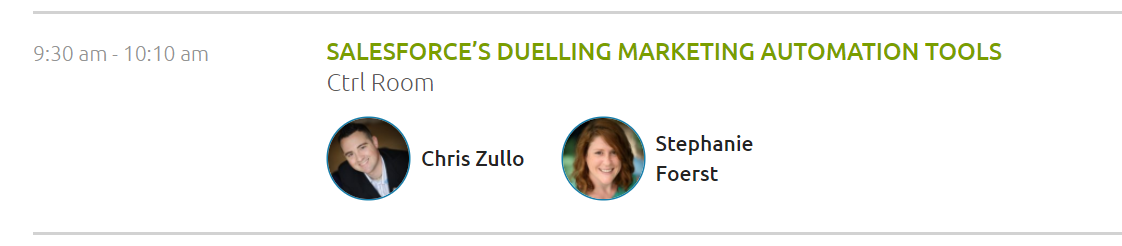
Pardot content includes a hands-on, interactive Pardot Crash Course by Jess Pyne. There will also be a Marketing Cloud vs. Pardot duel hosted by Stephanie Foerst and Chris Zullo.
Yes, you read that right — a DUEL! How very British. Really excited to see what they put together for this…
This one is in Atlanta, my home sweet home! This year’s SED is March 15-16 — and they’re still looking for speakers and sponsors if you want to get involved.Last year I presented a Pardot-focused session called “How Empathy Can Drastically Improve the Success of Your Marketing Campaigns.” Still thinking about topics to suggest for this year’s event.
Salesforce has an MVP program to recognize people who contribute to the community and help others succeed on the platform. The deadline for Winter ’18 nominations is February 5th.
Maybe I have too much time on my hands, but I googled every new member of the last MVP class — and no Pardot representation. Let’s change this! I already have a few submissions in the works for some of the many Pardot peeps that inspire me…
Networking with other marketing and Pardot folks in similar roles is invaluable. It’s great to have someone to whiteboard with when you have an outside-the-box challenge or problem to solve.
Most major cities have a Pardot User Group. You can check for one in your area on the Trailblazer Community. (The easiest way to search this is by selecting “User Groups by Region” in the left rail and then picking your state from the list.)
What else are you doing to grow your skills & knowledge in Q1?
Any other events or opportunities on your radar that I missed? How do you keep your Pardot and Salesforce skills sharp?
I love a good challenge. Especially one about how to leverage Pardot functionality to its fullest potential to level up your marketing.
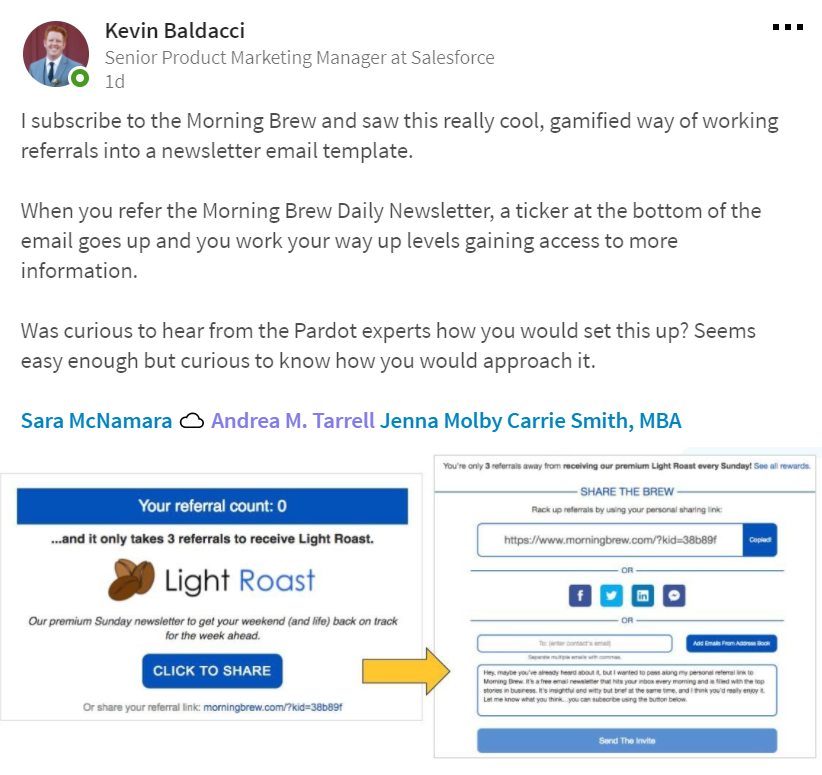
So when the wonderful Kevin Baldacci from the Pardot Product Marketing team tagged me in a LinkedIn post yesterday, my reaction was “GAME ON!”
Here’s the doozy he came up with:
More about this gamified subscription technique
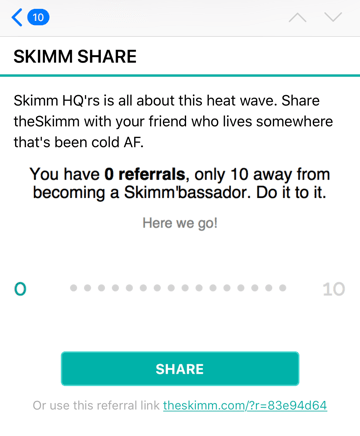
I think this is a pretty awesomesauce tactic. One of my top email marketing crushes, The Skimm does something similar in their newsletter that I admire in my inbox on the daily:
But does it work though? The Skimm has grown its subscription audience to 1 million in less than 3 years, and has over 2K people who have completed 10 shares to earn “Skimmbassador” status.
So I’m going to go out on a limb and say yep, it’s working.
A word of caution: this is kind of a compliance grey area, because you’re technically sending emails to people who haven’t explicitly opted in. I’d say definitely talk to your resident legal guru, and use your referred contacts wisely — invite them to subscribe, don’t start blowing up their inboxes.
How do you do it in Pardot? A little experiment…
I was dying to give this a try, so started messing around with some ideas and got something pretty similar rigged up in Pardot.
Please note, the proof of concept outlined here just counts the number of referrals — not whether someone actually signed up. The Skimm and the Morning Brew have a system to verify whether people actually register (as Sara McNamara mentioned), and if you wanted to take it to that level, you’d probably need custom code or an AppExchange product.
On to the how-to! A detailed step-by-step would be excruciatingly long, so I’m going to give you the highlights reel of how to make this happen in your Pardot org:
Step 1: Create a bunch of custom fields
Number of Referrals (number)
Email of the Buddy You Want to Share This With (text)
Quick Note to Your Buddy on Why You’re Sharing (text)
Person Who Referred You (text)
Why Person Referred You (text)
Create these in Pardot, and in Salesforce on both Contacts & Leads.
Step 2: Create your referral form
Mine looked a little like this:
Give it a try! And feel free to enter a real person’s email who would enjoy The Spot for Pardot so I can invite them to check it out.
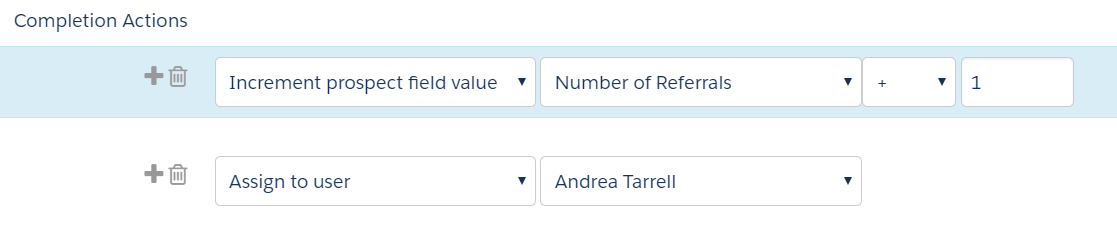
Your form’s completion actions should be set to include an assign to user step (to ensure it syncs over to Salesforce) and to increment the Number of Referrals field by +1:
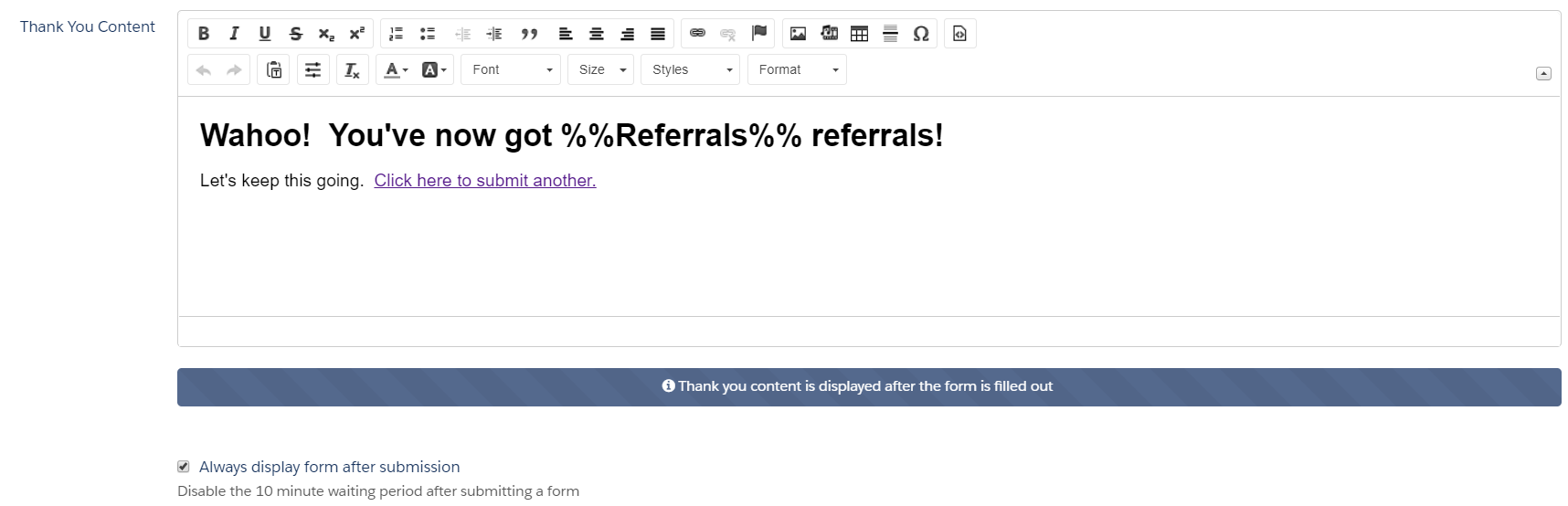
If you tested my form… note that when you submit it, there’s a variable tag that’s displaying the recently incremented field value.
Here’s what that looks like in the set up of the thank you content for the form:
Step 3: Get your process builder on
Steps 1 and 2 will get you the data you need in Pardot. But what good is an email address to you hanging out in a custom field? Especially one that can be overwritten by zealous referrers?
Nope, we need a new lead record created. And that means… Process Builder, ladies and gentlemen. You might want to grab a Salesforce admin for this or earn some shiny new Trailhead badges to get ready for this part.
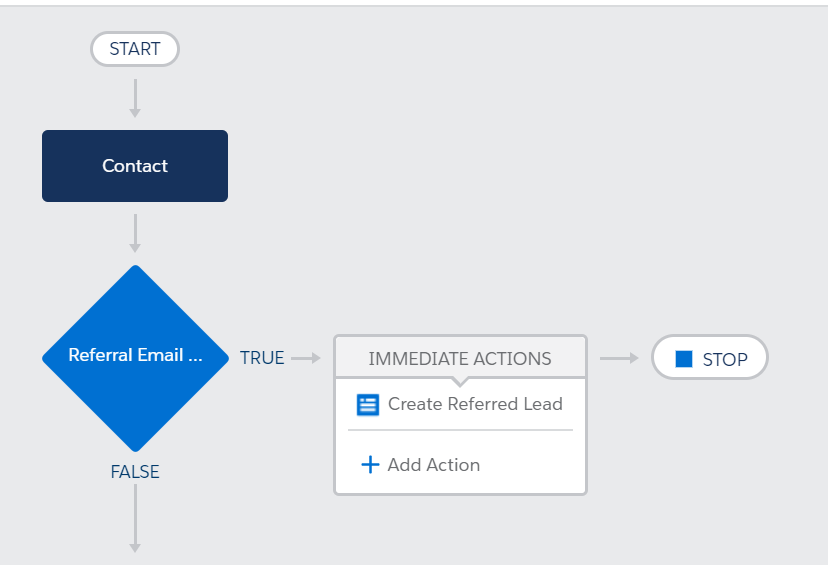
The first step of the Process Builder flow should check if the “Email of the Buddy You Want to Share This With” has been changed. If so, then the “Immediate Action” should be to create a lead record:
Now, we get fancy. We want to move data from fields on the Referrer Contact to DIFFERENT fields on the Referee Lead.
Email of the Buddy You Want to Share This With goes to the new Lead’s Email field
Email goes to the new Lead’s Person Who Referred You field
Quick Note to Your Buddy on Why You’re Sharing goes to the new Lead’s Why Person Referred You field
These Contact fields will be pointed to the Lead using field references, so that the value is basically copied between the fields. It should look something like this:
Activate the process, test, and voila! You got yourself a referred lead.
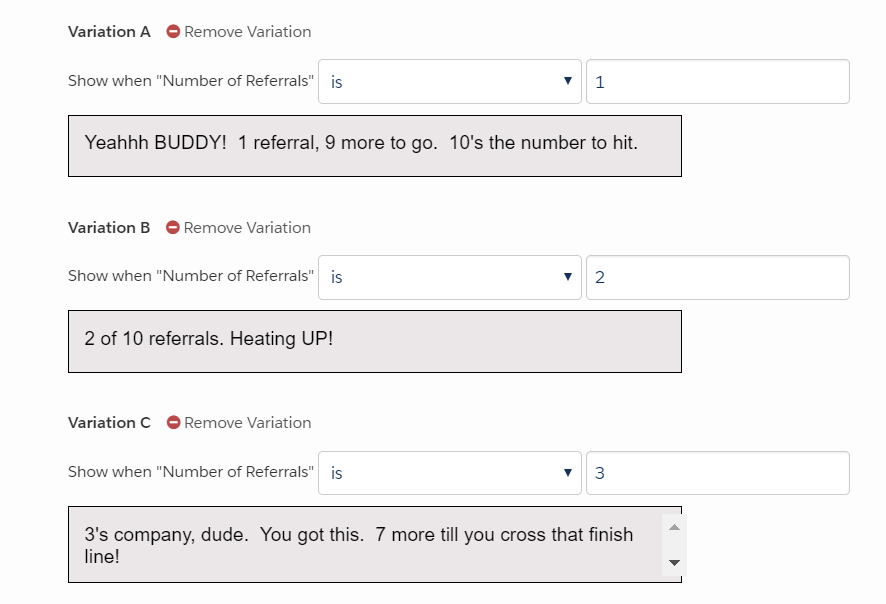
Step 4: Configure dynamic content blocks to show referrer their progress
Write custom content that you can add to your email footer showing your Referrer what kind of progress they’re making. Maybe something like…
Steps 5+: More things you’d need to make this a viable solution
That’s as far as I took this. It was intended to be a proof of concept and not a full blown solution.
But if you WERE really going to put this into practice. I would say you should also:
Create a version of this process that kicks off when a Lead submits a referral (mine handles the scenario when a Contact submits a referral, but you probably need both depending on how your Pardot/Salesforce connector is configured.)
Make sure to map the lead fields to the correct contact fields in Salesforce so you don’t lose data when the lead is converted
Put duplicate matching rules in place to prevent referred leads from being created with the same email addresses
Add the referrer and referree to campaigns so that you can track marketing/sales results and tie back to this event
Create an Engagement Studio that kicks off a welcome email to the referee explaining why they got on this list and how to opt in or out
Add a dynamic content module somewhere on your website with some witty copy asking for more referrals. You could set this to show only if # of referrals > 0 or with some other custom logic.
Consult your resident compliance guru on whether this fits with your existing opt in policy (it definitely would not fly in Canada or Europe)
Other considerations if you want to do your own experiment
If you’re going to play with this, DEFINITELY do this in a Sandbox.
And test extensively before your subscribers ever set eyes on it. What happens if you submit the form rapidly in quick succession? What happens if you fill out the referral form as a non-subscriber? What if you enter a value that’s wacky or too long? What happens if there’s a record sync error, and the prospect is delayed from syncing with Salesforce?
Basically try as hard as you can to break it before you bring it to prime time.
Then have other people try to test and break it. Then maybe try with a small group of subscribers.
What’s your off-the-wall challenge?
I love to whiteboard solutions to complex problems.
Got a thinker on your hands? Lay it on me! Put it in the comments.
Is anyone considering trying the above? Would love to hear how you do it and what your results are.
The last two weeks I have been sick as a dog. Like sit on conference calls in a pile of blankets on your bed and hug your actual dog for dear life sick.
Murphy was not impressed with my inability to close the laptop…
The worst part? I have completely lost my voice for 3 straight days, and can’t string together 4 words without dissolving into a coughing fit.
</complaining> <point>
What do you miss when it’s gone?
This is a run of the mill flu thing, and I’ll be totally fine. But the point… which I’m slowly getting to… is that losing something really makes you appreciate the things you take for granted.
Like the ability to speak on the phone with a client.
And like some of the features of Pardot Pro. I forget how awesome they are until I’m working in a client’s Pardot org and realize it’s so…. Basic.
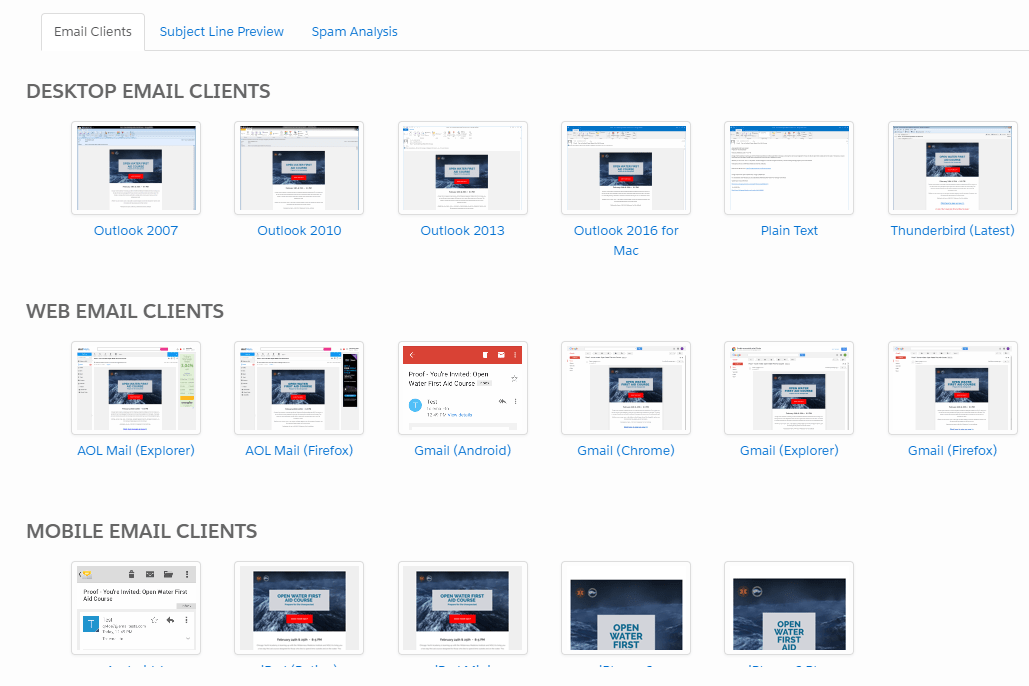
Must-Have Pardot Pro Feature #1: Email rendering preview
The ability to proof your emails across multiple devices, browsers, and operating systems with one click? Invaluable.
Here’s a gander at how this looks inside Pardot:
…note the Subject Line Preview and Spam Analysis tabs at the top. These are two other wonderful additions that come with this feature that I use literally daily.
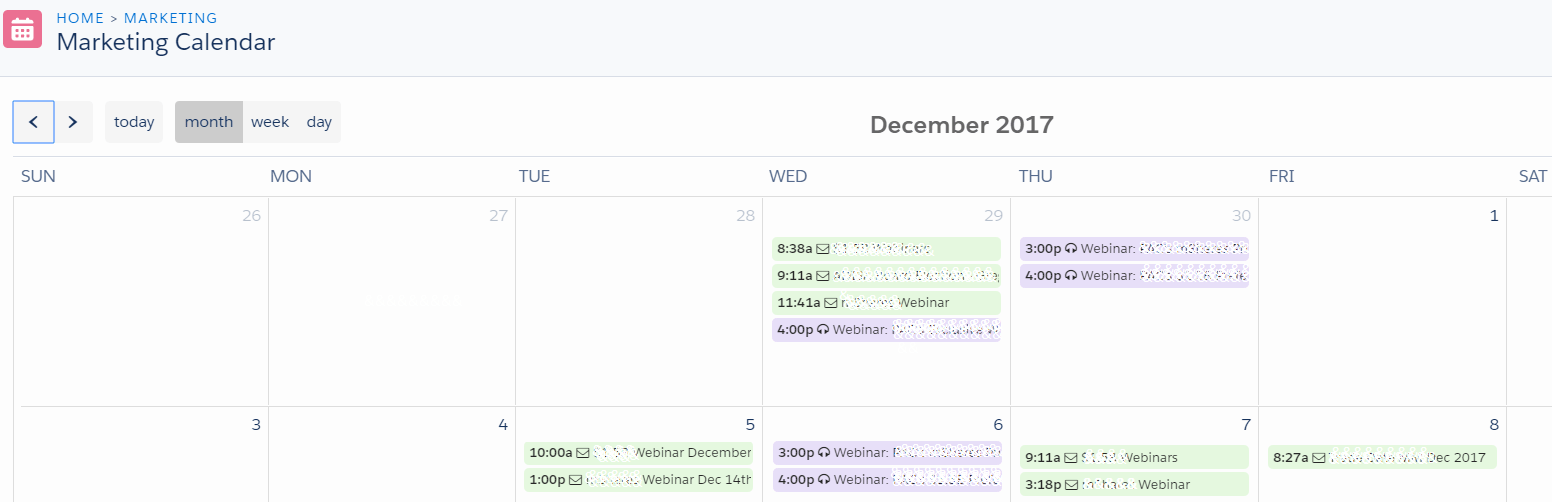
Must-Have Pardot Pro Feature #2: The marketing calendar
Visually seeing when your emails and social posts are scheduled to go out is CLUTCH. This is particularly useful if you have multiple business units or entities sharing a Pardot org and you want to be mindful of over-communicating to your shared audience.
If you have the Eventbrite and GoToWebinar connectors configured, events show up in this calendar automatically. And you can manually add offline events or relevant team dates.
And, it’s COLOR CODED:
When the Pardot powers-that-be update this calendar to include Salesforce campaign start and end dates, this girl’s going to break out in a happy dance.
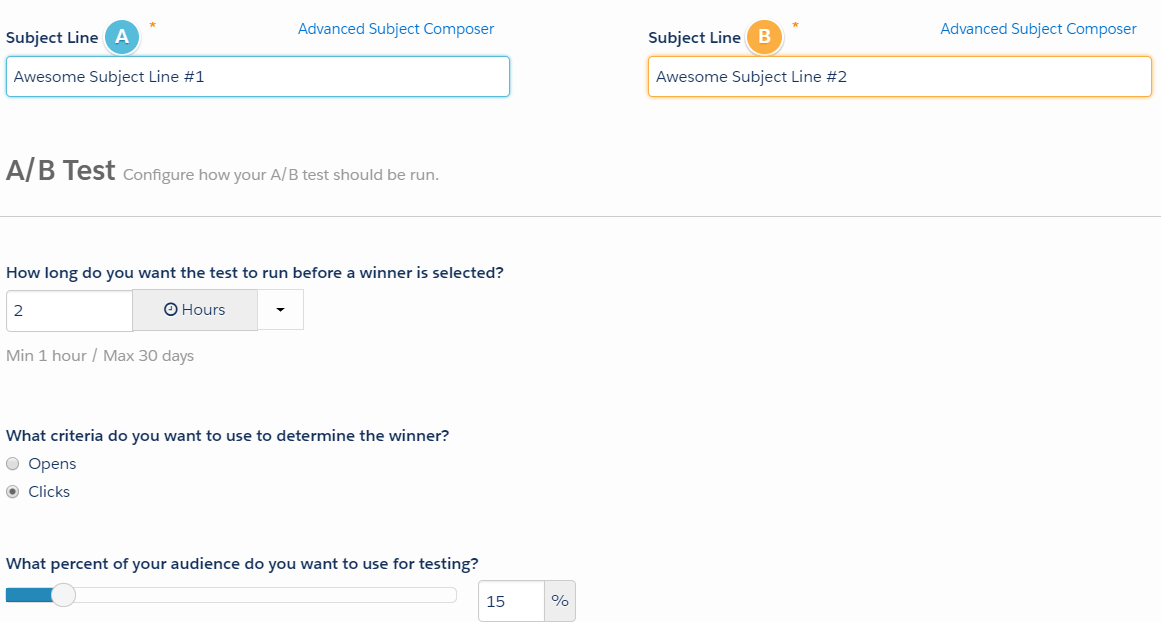
Must-Have* Pardot Pro Feature #3: A/B testing
Notice the asterisk here. A/B testing in Pardot Pro is amazing… but only if you use it for good and not evil time-wasting rabbit holes. (More on some strong feelings about that here.)
With a quick toggle, you can update subject lines, body copy, imagery, etc to create two versions of your emails to test. You can pick what percentage of the list you want to test and for how long before declaring a “winner” — and when the time is up, *poof* Pardot automagically sends to the remainder of our contacts.
Must-Have Pardot Pro Feature #4: Scoring categories
A single lead score can come up short for complex B2B organizations. The first company I ever implemented Pardot for, as an example, provided business insurance, employee benefits, and a diverse range of business advisory services.
A score to show level of activity was great — but we needed to know WHAT the prospect was active with to get it into the hands of the best-fit sales rep. That’s where scoring categories come in. You can set separate scores by product, industry, company division, or whatever other category makes sense for assigning and triggering automation of your prospects.
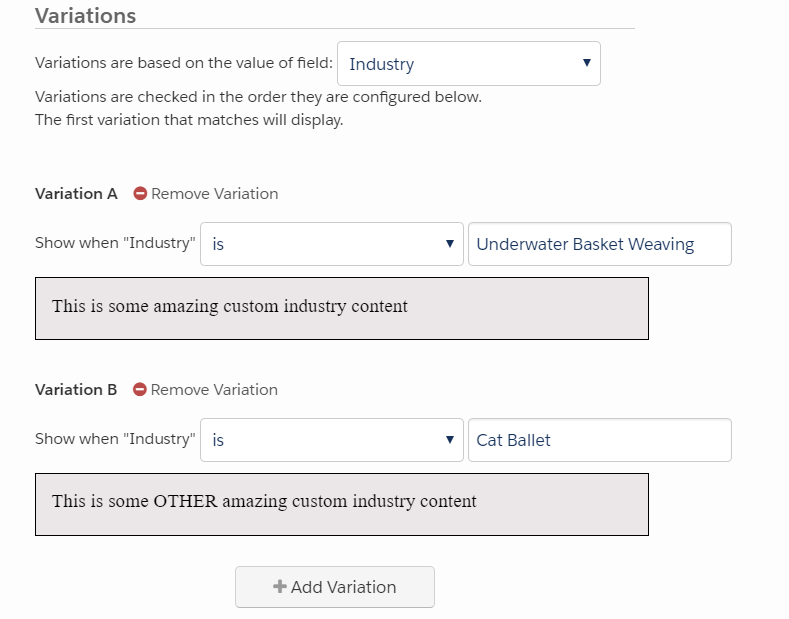
Must-Have Pardot Pro Feature #5: Dynamic content
Last, but absolutely not least — dynamic content is only available in Pardot Pro and higher. You can still use basic variable tags (for “mail merge” functionality”) in your emails in all editions.
But dynamic content blocks are the real powerhouse of customization. With this feature, you can configure HTML or plain text blocks that will display different content depending on a a prospect’s field value. Industry, for example, or other user-indicated preferences.
Here’s a look:
Some other really nice-to-have Pardot Pro features
The Google AdWords Connector
I couldn’t get awesome screenshots, but here a quick look at the data points that you can bring over with the AdWords Connector (again, available in Pro or higher):
…and:
Social Profiles
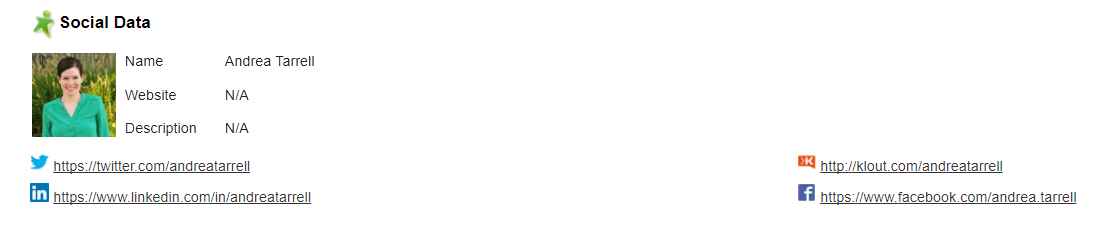
I honestly haven’t seen many clients using this extensively, but I think it’s pretty cool! If you set up the FullContact connector (included in Pro, literally takes seconds to set up) Pardot will pull in links to your prospects’ social profiles and display them on their Pardot record:
And, you can add this to the page layout in Salesforce for your reps to view:
What did I miss on this list of things you miss out on?
That’s my short list of the oh-so-valuable features in Pro that I really miss when working in Pardot Basic. What did I leave out? Are there any features you rely on that you couldn’t live without?
I think I’ve had that conversation approximately a gajillion times. My New Year’s resolution is to STOP already, and I’d like to invite you… no, challenge you… to do the same.
What would it look like if we stopped answering “how are you?” with banalities and small talk?
What if we replaced “good” or “fine” with a story of something we’re excited about working on?
How much more vibrant could we make this community? How many more opportunities could we uncover to support and challenge one another?