Category

Setup & Admin

Product Note: Marketing Cloud Growth and Advanced are editions of Marketing Cloud Next and have also been referred to as Agentforce Marketing.

Since the announcement of Marketing Cloud Growth Edition on February 20th, we’ve been digging into the features of this new product as well as listening closely to the community’s questions about Marketing Cloud (Growth and Advanced Edition). We’ve compiled the most common questions from Salesforce webinars, Slack communities, our internal team, and our clients to get all your Marketing Cloud questions answered in one place. 

NOTE: This blog post was updated in May 2025 to reflect new release features and product updates.

Answers to all of your Marketing Cloud questions

Here’s a list of the most common questions we’ve seen.

Wait, what is the “official” name

So, this product was originally launched as “Marketing Cloud Growth Edition”. A few months later Advanced Edition was released and the product evolved to “Marketing Cloud Growth or Advanced Edition”. However, this was later shortened to just “Marketing Cloud”.  Now I know “Marketing Cloud” means “Marketing Cloud Engagement” to a large portion of the community so I also refer to this tool as “Marketing Cloud on Core” so no one assumes I mean “Engagement”. 

What is Marketing Cloud (on Core)?

Marketing Cloud is a new marketing automation platform from Salesforce. Marketing Cloud is built on the Salesforce Platform (aka “on Core”) and allows you to build multi-channel campaigns with Data Cloud, personalize marketing assets with Experience Cloud, and automate journeys with Flow. Marketing Cloud also includes Einstein and Agentforce capabilities throughout the platform as well as out-of-the-box content approval processes. 

Is Marketing Cloud Account Engagement and/or Engagement being retired?

This is the most common question we’ve heard so far and the resounding answer is No, Engagement and Account Engagement are not being retired. Marketing Cloud is another option for organizations that want to bring their marketing operations into Salesforce. Engagement and Account Engagement will continue to have their own robust product roadmaps. 

Which Salesforce Editions does Marketing Cloud work with?

Currently, Marketing Cloud works with Salesforce Enterprise Edition (EE) and Unlimited Edition (UE).

Is this the direction the Marketing Cloud Platform is going? All bundled within Core?

Yes, building Marketing Cloud’s foundation on core allows Marketers to get full access to customer data across the CRM and other clouds connected to the Salesforce platform. Breaking down data silos and uniting your data on one platform also allows Marketers to better leverage Einstein’s AI functionality as well as personalize every step of the customer journey. 

Can Marketing Cloud be purchased without Data Cloud?

Marketing Cloud requires Data Cloud. If you do not yet have Data Cloud, check if you’re eligible for the Free Data Cloud SKU or Salesforce Foundations

What is included out of the box with Marketing Cloud?

This is subject to change as the platform changes and grows but, as of May 2025 Growth Edition includes: 

See our previous blog post for more information on the credit consumption model of Marketing Cloud. 

Does Marketing Cloud consume super messages for email and SMS?

Marketing Cloud has different entitlements, emails and SMS do not consume super messages.

Do users need Salesforce licenses to access Marketing Cloud?

Currently users do need Salesforce licenses to access Marketing Cloud, but support for Identity Licenses is expected in the Summer ‘25 release (June).

Can clients with their own Data Warehouses use Marketing Cloud? 

Yes, Marketing Cloud is built on top of Data Cloud, which means they can connect to your data wherever it lives.

What is the setup of Marketing Cloud like? 

Setup for Marketing Cloud is being streamlined with each new release. Users with the Marketing Cloud Admin permission set can access the setup assistant for easier implementation of Marketing Cloud. Use the setup assistant to install or update all the required data marketing kits.

Is the intention to have customers self implement Marketing Cloud and do everything themselves?

The intention is to reduce the amount of energy spent on behalf of the customer to get to where they need consultants. Simply put, Marketing Cloud has very good defaults and a streamlined setup process, but there is still value to be added by consultants. If you’d like support setting up or optimizing Marketing Cloud, send us a message.

Can you configure marketing asset branding/brand standards within Marketing Cloud?

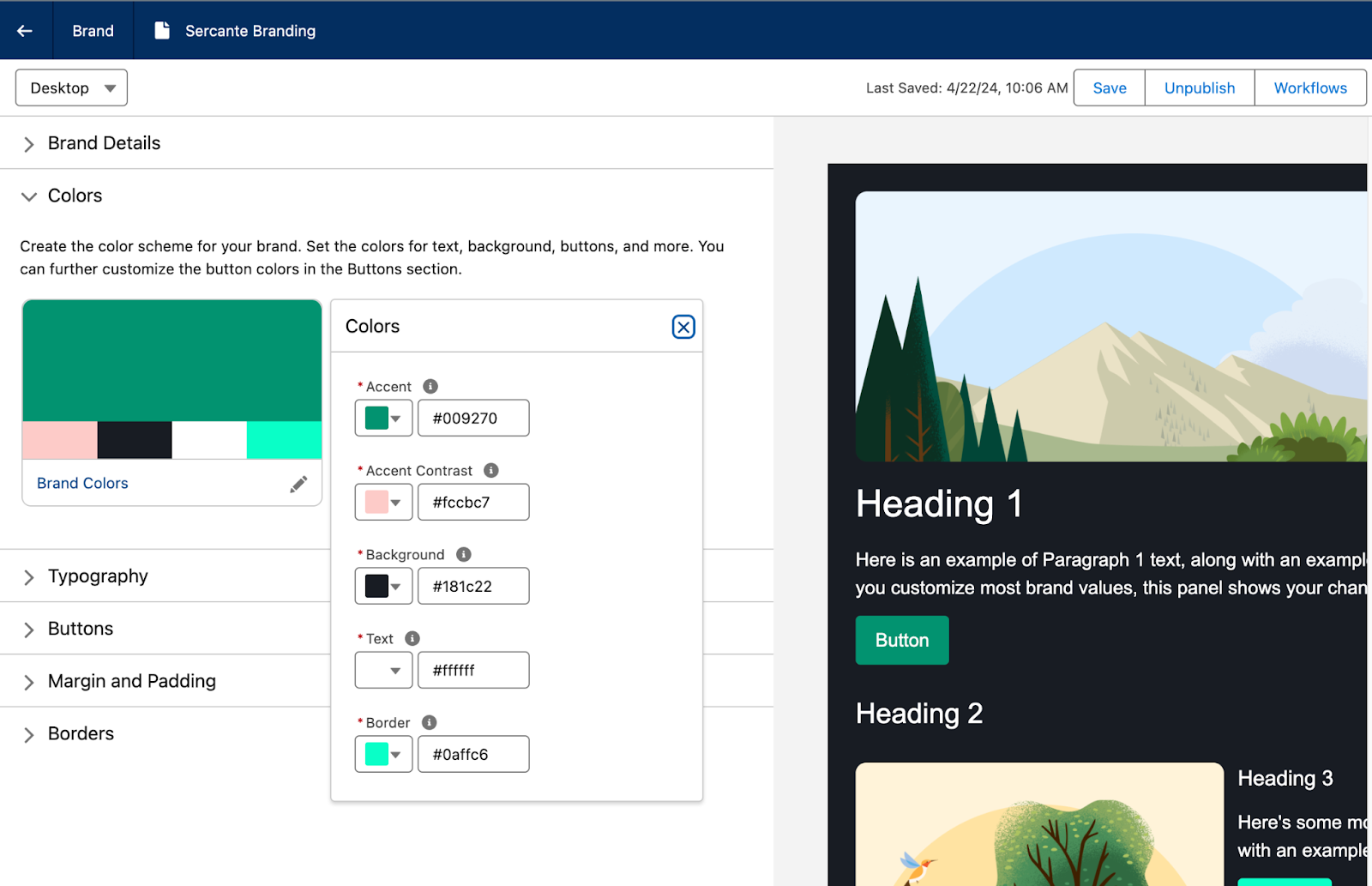
Yes! Users can create Brand Guidelines within Marketing Cloud that allow you to specify brand colors, typography, button styling, margins, and borders that can be applied to your marketing assets. If your brand standards are later updated, any marketing assets using that brand will also be updated. You can have multiple brand guidelines and also set a default Brand for your CMS Workspace so any new assets that are created for Marketing Cloud will be automatically branded. 

Does Marketing Cloud use a different Flow than the Salesforce Admin Flow?

Marketing Cloud uses the same Flow that users would have access to when building a backend, or admin, Flow. However, the elements and processes that the Marketing Cloud Flow has access to are limited by permission sets. Out of the box, the Marketing Cloud Flow is tailored elements and actions that focus on automating Marketing Campaigns and Marketing processes. Additional Permissions can be added or removed to custom tailor what users can do within the Marketing Cloud Flow. In short, Salesforce Admins are not giving Marketers full Flow functionality by granting them access to the Marketing Cloud Flow Builder.

What scoring features are included with Marketing Cloud?

Marketing Cloud has both People and Account Scoring. 

  • People Scoring
    • Engagement Score: Adds or removes points based on how engaged a person is with your Marketing initiatives.
    • Fit Score:  Similar to Account Engagement Grading, Fit Scoring tells Marketing and Sales how closely the prospect and their company aligns with the ideal client persona.
  • Account Scoring
    • Engagement Score: Aggregates how engaged Contacts associated with the Account are with your Marketing initiatives.
    • Fit Scoring: How closely the Account matches your ideal customer.
    • Intent Score: Optional AI driven scoring that measure how likely an Account is to make a purchase.  

What Einstein features are included with Marketing Cloud?

This is another area that is growing and changing with each release, but at of May 2025, Marketing Cloud includes:

  • Agentforce: Assists in building campaign briefs and campaign assets as well as generates copy for subject lines, preheaders, and body copy.
  • Einstein Metrics Guard: Uses predictive AI to filter bot activity from your org’s engagement metrics
  • Einstein Send Time Optimization: Send messages to your customers when they’re most likely to engage.
  • Einstein Segment Creation: Assists in building Data Cloud segments from natural language prompts.

Three additional Einstein features are available in Advanced Edition:

  • Campaign Designer (currently Beta): Assists in crafting campaign flows based on campaign objectives.
  • Einstein Engagement Frequency: Uses Predictive AI to determine how frequently to contact customers and improve the likelihood of engagement. 
  • Einstein Engagement Scoring: Uses predictive AI to assign individual contact-level scores and determine the most efficient way to message recipients to increase customer engagement.

Does Marketing Cloud include Campaign Influence models?

Marketing Cloud has Opportunity Influence rather than Campaign Influence.  Opportunity Influence assists marketers in identifying which campaigns were impactful for opportunities but relies on engagement rather than Campaign membership. 

Can Marketing Cloud personalize messages based upon the individual record? 

Yes, any fields connected to the Unified Individual can be used for personalization, this allows Marketers to even pull in data from other objects for cross object personalization. Dynamic Content is also available for use in email subject lines, email preheaders, and email components. 

Variation Targeting Rule screenshot

Does Data Cloud segment creation mean that SQL Queries will become a thing of the past?

Eventually, Salesforce is moving in the direction of clicks-not-code. Marketing Cloud includes prompts to help marketers build the appropriate filters in the segmentation builder, but you can also start from scratch within the builder. 

Will SMS have the same process around provisioning and approvals as MC Engagement?

There are two SMS code options available in Marketing Cloud, Short Code and Long Code. The short code option follows the same provisioning process that exists today for Marketing Cloud Engagement today. Check out our blog post for more information on the Short vs Long code and the provisioning processes.

Does Marketing Cloud include A/B Testing capabilities?

Yes! Except it is called Path Experiment and it does even more than simple A/B Testing. Take a look at our blog post on Marketing Cloud Advanced Edition for more info on this feature. 

How does Marketing Cloud handle pre-lead, unassigned records?

Salesforce introduced a new CRM Object for Prospects as part of the Spring ‘26 release. This new object can be used to store pre-lead records in CRM, similar to how Account Engagement keeps Prospects within its system and only sends Prospects to Salesforce when they are Sales/Lead ready. 

How can Account Engagement and Engagement Customers start using Marketing Cloud?

Account Engagement Customers get access to Marketing Cloud as part of their current contract. Check out our blog post for more details

Marketing Cloud Engagement customers will get a similar provisioning path soon (Safe Harbor!)

How has Sercante been involved in the launch of Marketing Cloud? 

Members of the Sercante team have been involved with Marketing Cloud since the pilot in 2023. We were also members of the Pioneer Program at launch in 2024 and have over 30 customers using Marketing Cloud today. We were also the first partner to be provisioned a Marketing Cloud Growth Edition Partner Org so we could provide feedback, documentation help, and FAQs to the development team. 

Learn more about Marketing Cloud Growth Edition

Want to learn more about Marketing Cloud Growth Edition? Check out some of our previous blog posts and subscribe to The Spot so you stay in the loop as we dive deeper into this new product.

Send Sercante a message if you still have questions that aren’t on the Marketing Cloud Growth Edition FAQ list.

Product Note: Marketing Cloud Growth and Advanced are editions of Marketing Cloud Next and have also been referred to as Agentforce Marketing.

In February 2024, Salesforce announced a new marketing automation platform called Marketing Cloud Growth Edition. It’s built natively on the Einstein 1 platform and allows you to build multi-channel campaigns with Data Cloud. The core audience for the initial launch is marketers at SMBs, but we think this new platform will evolve and give us a taste of what on-platform marketing automation will look like in years to come. That being said, let’s take a look at how Marketing Cloud Growth Edition allows users to create brand guidelines and why it’s something marketers will cheer about.

Why you should add branding guidelines in Marketing Cloud Growth Edition

Marketing Cloud Growth Edition uses the Experience Cloud builder, which has drag-and-drop functionality so users can build responsive assets without digging into the HTML. It also has generative AI that users can tap to build marketing assets through natural language prompts. 

Setting up branding guidelines in Marketing Cloud Growth Edition is pretty important when it comes to getting more traction out of the platform, saving time for your team, and creating consistency among your marketing assets. 

You can add guidelines for multiple brands in one org so you can tailor each email and landing page to the brand it represents. Also, if you update any part of your branding guidelines, Marketing Cloud Growth Edition will automatically carry that change across any marketing assets where you’ve applied those brand guidelines.

How to set brand guidelines in Marketing Cloud Growth Edition

Here’s how setup works for the brand center in Marketing Cloud Growth Edition.

  1. Navigate to Marketing > Content > Select Content Workspace for Marketing Cloud.
  2. Select Add > Content.
  3. Select Brand.
  4. Select Create.
  5. Add a title and description for your brand.

Set up your brand colors

Select Set Your Brand Colors under the Colors subheading. The Preview panel on the right will update as you make changes to your Brand Guidelines.

Typography Settings

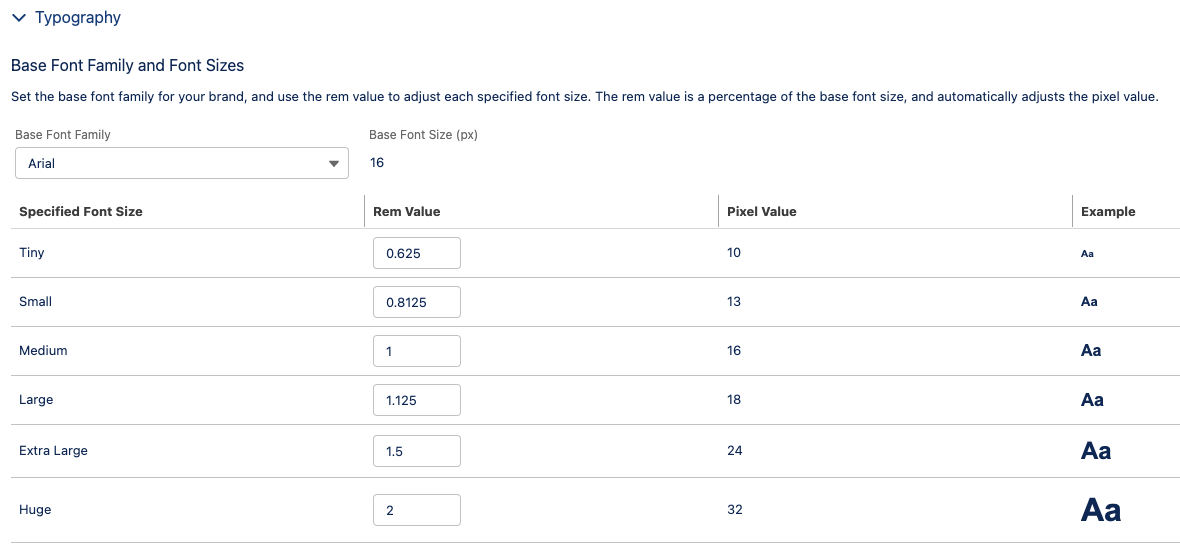
Under the Typography heading, set your Base Font Family and Font Sizes and Text Styles.

Text Styles

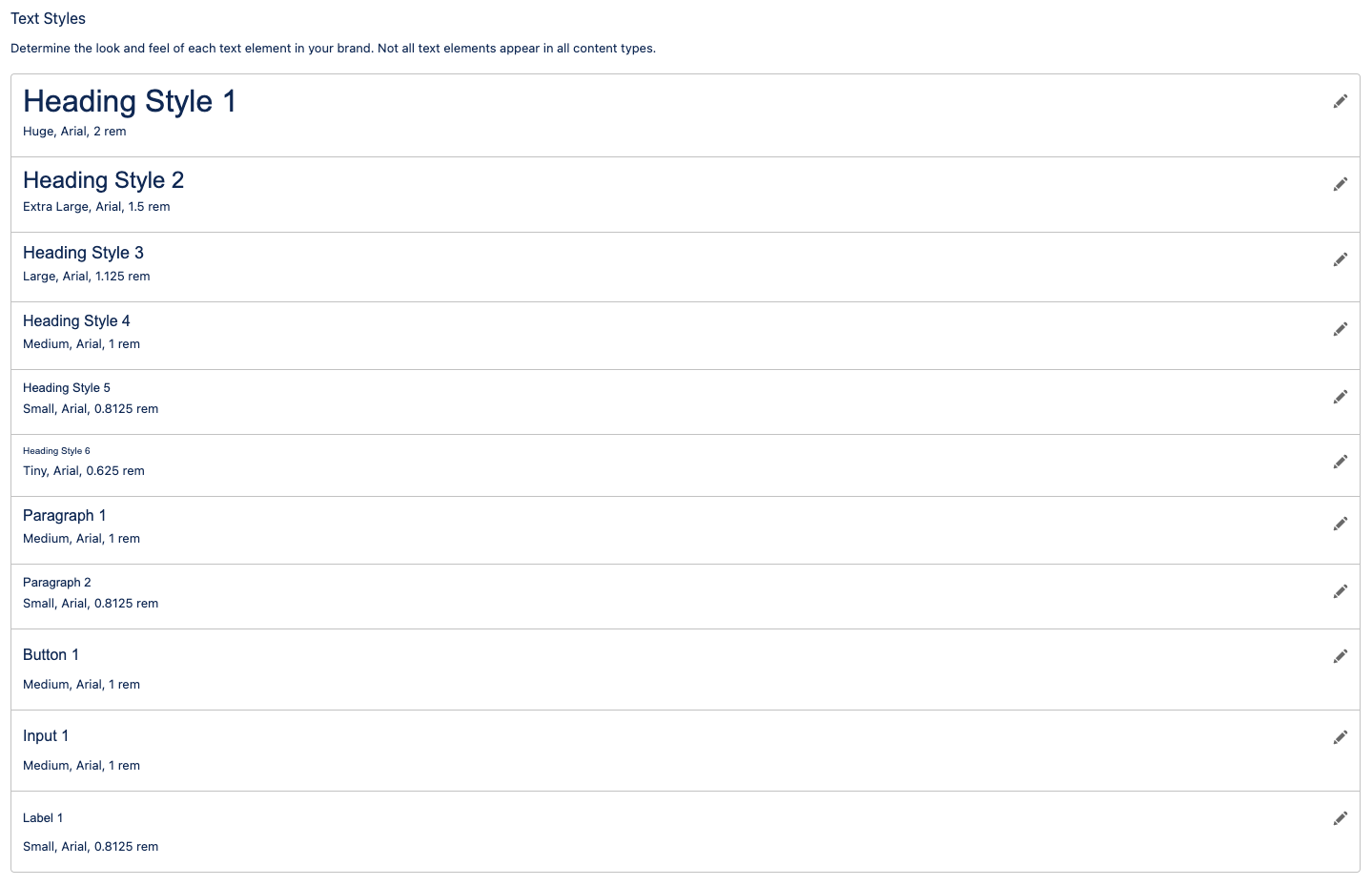
Set up your text styling for headings, paragraphs, buttons, inputs, and labels.

Style your CTA buttons

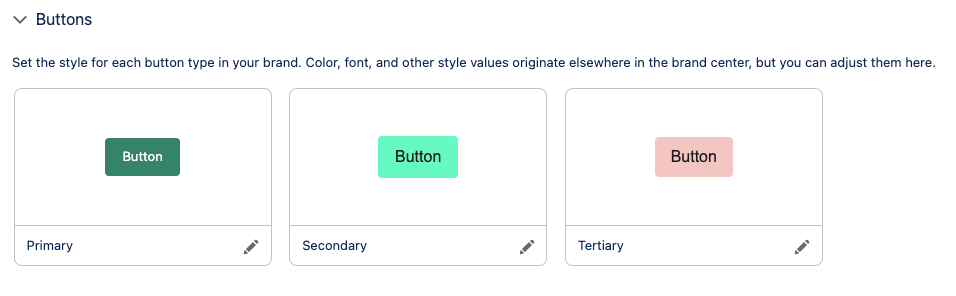
Next, create variations of buttons under the Buttons subheading. You can specify the color, border, and text styles for three variations.

Set Margins and Padding

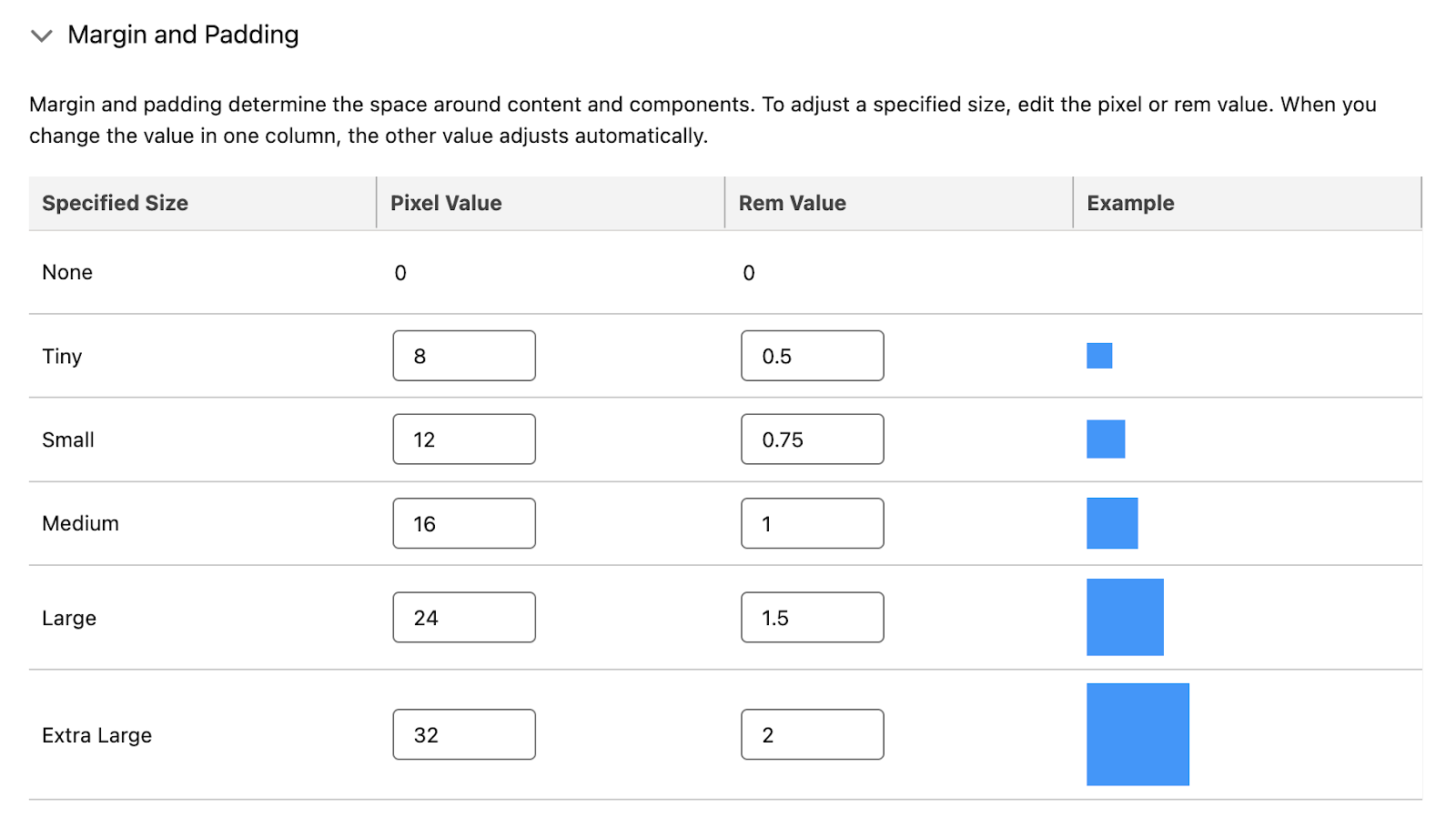
Next, determine the space around content and components in the Margin and Padding section.

Configure Borders

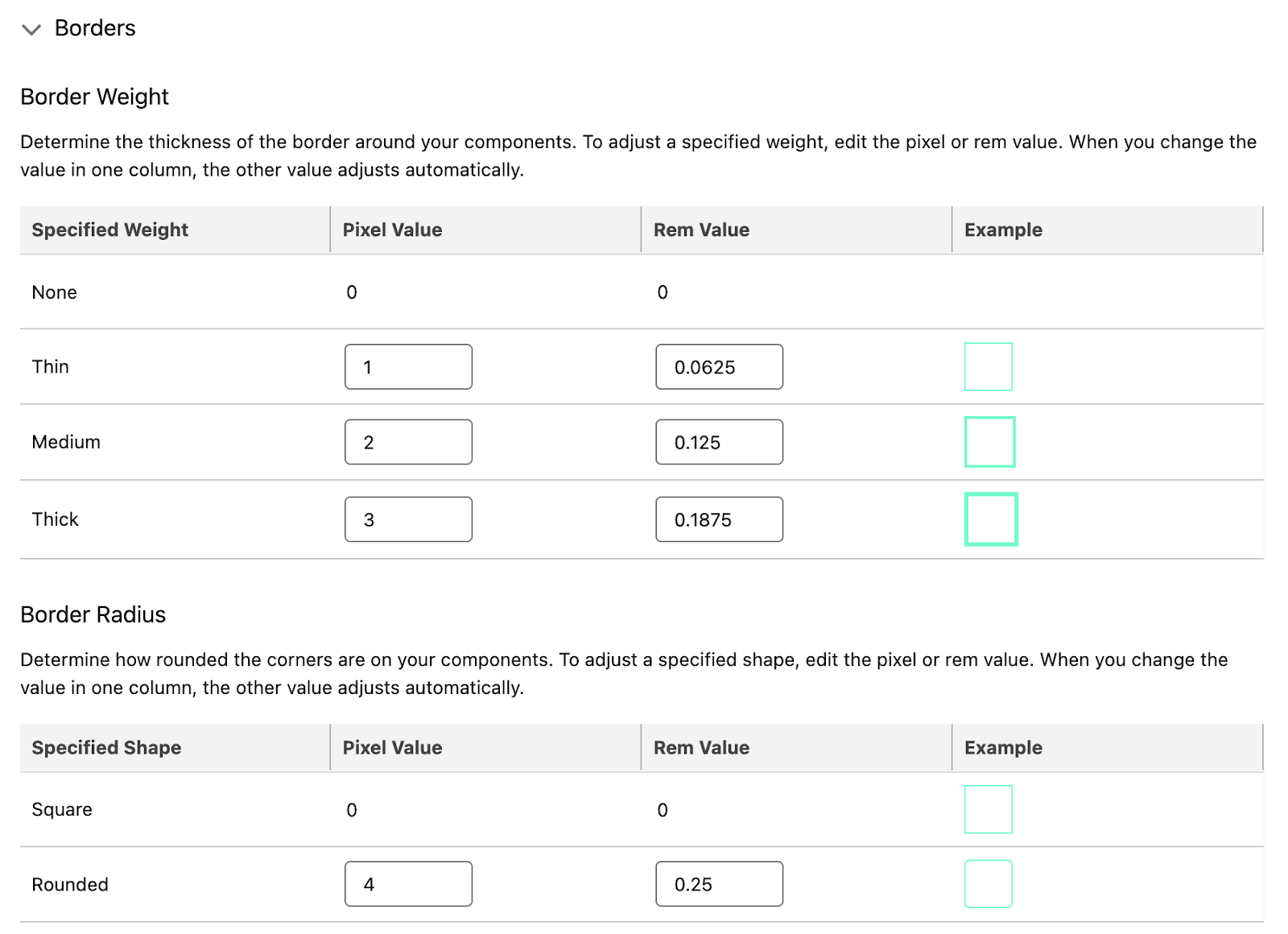
Finally, set the border weight and radius. The example will use the Border color you set in the Brand Colors section. 

Finalize your brand guideline settings

Use the Preview panel to view your Brand Guidelines in both Desktop and Mobile. You can alter the mobile-specific brand styles, but note this will only apply to Landing Pages and not emails. Once you are satisfied with your Brand Guidelines:

  1. Select Save.
  2. You can send an approval workflow for this new brand, or select Publish if it’s ready to use.

See the full Salesforce help guide for the Marketing Cloud Growth Edition Brand Center here.

Applying brand guidelines to marketing assets

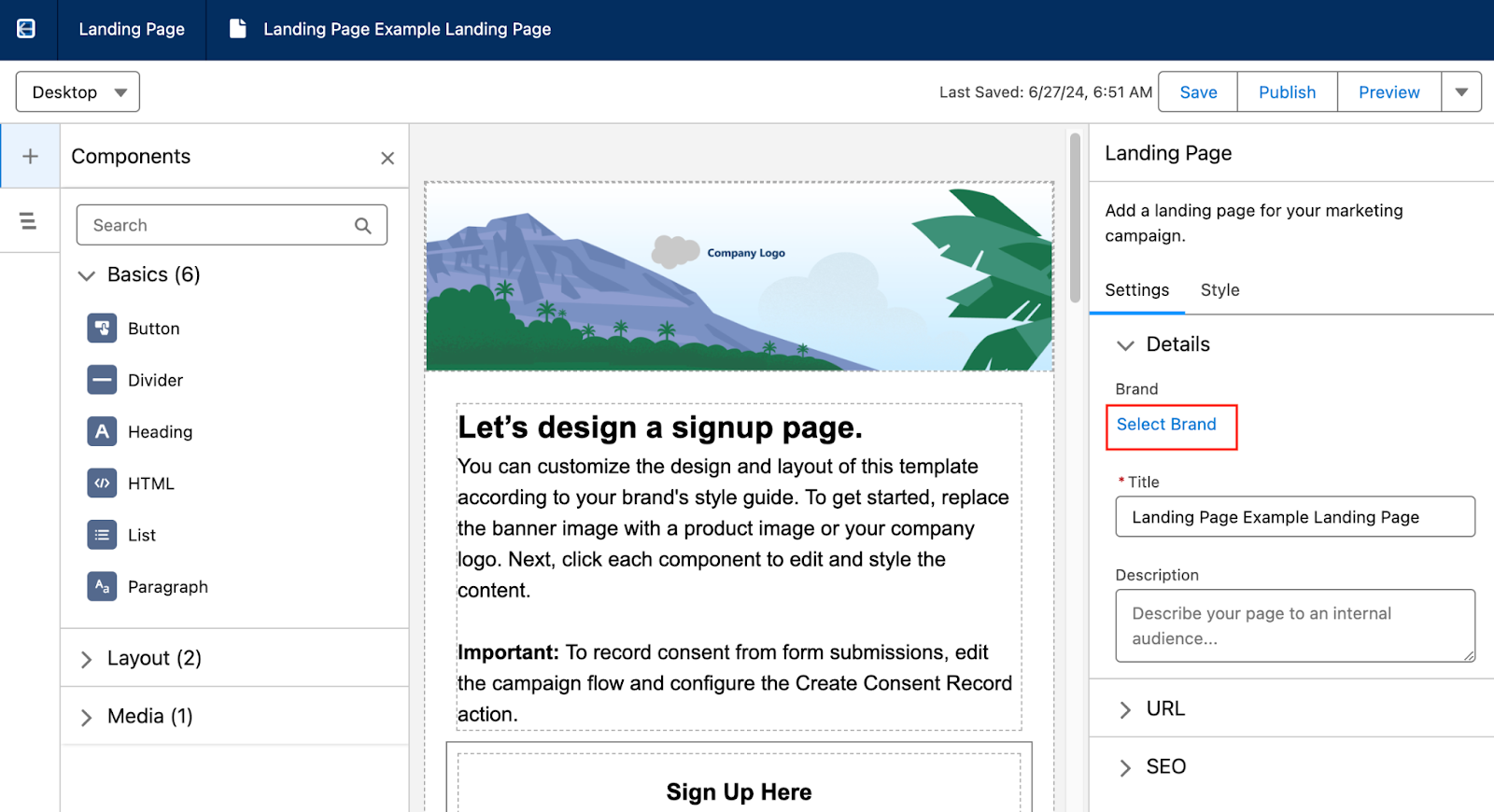
When editing an email or landing page, use Select Brand in the Details section to select the desired guidelines and automatically update your marketing asset.

Reminder: Changing the Brand Guidelines will automatically update any marketing assets that use the guidelines. 

See the full Salesforce help guide for the Marketing Cloud Growth Edition Brand Center here.

Start building on-brand marketing assets with ease

Building branded marketing assets in Marketing Cloud Growth Edition is so easy thanks to the brand center. You can rest easy knowing that anyone on your team can build emails and landing pages through natural language prompts inside the platform and the outcome is always going to accurately and consistently reflect your brand standards.

As always, you can reach out to the team at Sercante to learn more about marketing automation on the Salesforce platform or find more information about Marketing Cloud Growth Edition and how the brand center works. Send us a message to start a conversation.

Post updated 8/2/2024

Product Note: Marketing Cloud Growth and Advanced are editions of Marketing Cloud Next and have also been referred to as Agentforce Marketing.

ICYMI: Salesforce dropped a hot product announcement yesterday. And she’s called Marketing Cloud Growth Edition

There was a flurry of blogs and social postings following the official drop of the Salesforce press release, notably: 

To hear some talk, MC Growth Edition is going to instantly change everything and be the best thing in the world. 

On the flip side of the spectrum, I’ve seen some hyper-skeptical commentary around MC Growth Edition. “It’s SMB only”, “It’s going to take years to catch up”, and “You don’t have to worry about this now,” (I’m sensing a twinge of fear/self-doubt intermingled in these statements, though).

Like most things involving extreme opposites, the current reality and answer to “What is Marketing Cloud Growth Edition?” is somewhere in the middle of these two takes.

Let’s dig into some of the nuances here and read the tea leaves. If I could boil this down to a top 5 highlights, they would be: 

1) Marketing Cloud Growth Edition is built on “Core,” and that’s a fundamental advantage for innovation 

Marketing Cloud Growth Edition is built on the Einstein 1 platform — aka the same underlying infrastructure as Sales Cloud, Service Cloud, Experience Cloud, Data Cloud, and recently, Commerce Cloud. 

Marketing Cloud Engagement is NOT on core today (but it’s integrated).

Pardot / Marketing Cloud Account Engagement IS on core… kind of. It’s a blend of on and off-core. Call it “near core” if you need another buzzword for your collection.

Many long-time Pardot customers have been rallying around the vision for “Pardot on Platform” for the last several years. And if you’ve been watching closely, you may have noticed that many of the product enhancements delivered in recent years have been either built-in core, rely heavily on components from core, or had prerequisites of things like enabling SSO with core. 

Why does this “on core” distinction matter, though? The simplified answer is that as new things are released, you can take advantage of those within other “on-core” tools. Examples would include things like Flow for automation, UI enhancements like Path, improvements to Salesforce reporting functionality, etc. These product innovations can be leveraged for the most part across objects and clouds that are built on core. 

So TL;DR — MC Growth Edition being on the Einstein 1 platform means that when enhancements are added to Salesforce and Data Cloud, we don’t have to wait for an integration to come out to use them in the marketing department. We will be able to take advantage of these enhancements immediately, in many cases.

2) The significance isn’t what’s available now — it’s about the vision 

In subsequent posts on The Spot, we’re going to be getting way in the weeds of how MC Growth Edition works and outlining functions and constraints of the current builders. 

There will be edition comparison guides.

Screenshots.

Pros & cons lists.

But amidst all of this, I would emphasize that what’s generally available now isn’t the important thing to look at unless you are actively evaluating a platform to purchase in the next 30 days. The exciting thing about MC Growth Edition is about where the product is headed.

Salesforce has an aggressive vision for this, and looking at the speed with which Data Cloud has grown, I’m betting on them to move FAST.

3) Expect to see a focus on unifying builders & tooling 

A friction point for existing customers is there are usually several ways to do things in different clouds. We have two email builders in Pardot. Another email builder in Salesforce. And an entirely different content builder in Marketing Cloud Engagement. 

Expect to see these tools start to converge, with Marketing Cloud Growth Edition as the first mover for shared functionality. 

One email builder. 

One landing page builder. 

One segmentation engine (built on Data Cloud).

(P.S. The buzzword for this concept is “composable services” — as a new tool is built, expect to see it designed in a way that it can be used and leveraged in multiple parts of Salesforce. We’re already seeing examples of today for more behind-the-scenes things of Pardot/Marketing Cloud, like the backend email sending engine.)

4) This makes AI real 

I’ve been listening quietly to all of the headlines about generative AI for the last year. 

Listening, because as Thumper says, “if you can’t say something nice, don’t say nothing at all.” 

The picture has been painted like this: 

  • You’re working with smart marketing automation tooling
  • You log in and the system can suggest a target audience for you 
  • It can suggest a product offer for you 
  • Heck, it can write your content from a campaign brief 
  • AI tells you when to send your email
  • AI makes it omnichannel 
  • Campaign results come flooding in… and yes, AI analyzes that for you too 
  • We cheers with our Mad Men era old fashioneds because the computers do all of the heavy lifting for us

That sounds nice, but also super unattainable with today’s tooling.

The elephant in the room: No one’s data is that organized. Systems remain super siloed. And the systems most customers are on today don’t solve for that. 

Until now. 

Marketing Cloud Growth Edition is the vision for how we move past that. It’s the beginnings of the shared infrastructure and unified data that get us to the AI-shaped pot of gold at the end of the rainbow.

Bring on the robots.

5) Existing customers are going to see the benefits too… without switching

Customers new to marketing automation, or new to marketing with Salesforce should absolutely evaluate MC Growth Edition.

Pardot and Marketing Cloud Engagement customers should wait a bit before asking themselves “Should I switch?” Largely because they may find they get some of the “good stuff” without having to switch.

We had two team members (one from a Pardot background, and one who’s an OG ExactTarget pro) participate in the pilot of MC Growth. What we saw is that Salesforce is thinking very carefully about how to share the value of the development work being done in MC Growth with its existing customer base. 

Over the next few months, customers will start to see new features you can opt into or just turn on in your org. It’s not going to be a “migration” or a requirement to move anything — just a gradual transformation and growth in the tools that are available to you as more of these composable services are built and shared.

The future looks bright 

One thing is for sure — the next chapter is going to be anything but boring for marketing technologists on the Salesforce platform!  I’ve never been more excited to grow in this ecosystem <3

Product Note: Marketing Cloud Growth and Advanced are editions of Marketing Cloud Next and have also been referred to as Agentforce Marketing.

Earlier today, Salesforce announced the release of Marketing Cloud Growth Edition. This innovative new product is another option for marketing automation built natively on the Salesforce platform and comes with Einstein Generative AI and Data Cloud out of the box. 

You might be wondering: What is this new product, really? What does this mean for the future of Marketing Cloud Account Engagement and Marketing Cloud Engagement? Well, we have answers to help you understand the ins and outs of the platform, what to expect, and what to consider for the near future. Let’s get started!

What is Marketing Cloud Growth Edition?

Marketing Cloud Growth Edition is the culmination of years of Salesforce working to bring marketing automation into the Salesforce platform (also known as “Einstein 1”). This new marketing automation platform allows you to build multi-channel campaigns with the unified customer data of Data Cloud, build personalized marketing assets with the power of Experience Cloud, and automate customer journeys with Salesforce Flow

Marketing Cloud Growth Edition also includes Generative AI and content approval processes out of the box to help streamline your Marketing efforts. 

What does this mean for the future of Marketing Cloud Engagement and Account Engagement?

If you’re an Engagement or Account Engagement customer, you may be thinking “But what does this mean for the future of my product?”

This is what we’re most excited about. Because Marketing Cloud Growth Edition is built on Einstein 1, existing customers of Engagement and Account Engagement will eventually get access to features and functionality introduced to this new product. In addition, Marketing Cloud Engagement and Account Engagement continue to have a robust product roadmap. 

Said differently: Marketing Cloud Growth Edition is another option for organizations that want to bring their marketing operations into Salesforce. If you’re a current Engagement or Account Engagement user, you’ll eventually have the option to use Growth alongside your current platform. So, think of it more as an additional set of features that are available to you. 

Who is Marketing Cloud Growth Edition meant for?

Marketing Cloud Growth Edition is a logical option for small and medium-sized businesses that are new to the Salesforce platform but aren’t currently using marketing automation tools. 

If you’re already using Marketing Cloud Engagement and Account Engagement, then you don’t have to take any action right now. However, watch for future announcements to see when you’ll get access to Marketing Cloud Growth features to use along with your existing tools.

What marketing functionality is included?

Marketing Cloud Growth Edition is feature-rich when it comes to building assets, and the builders provide a flexible and intuitive user experience. 

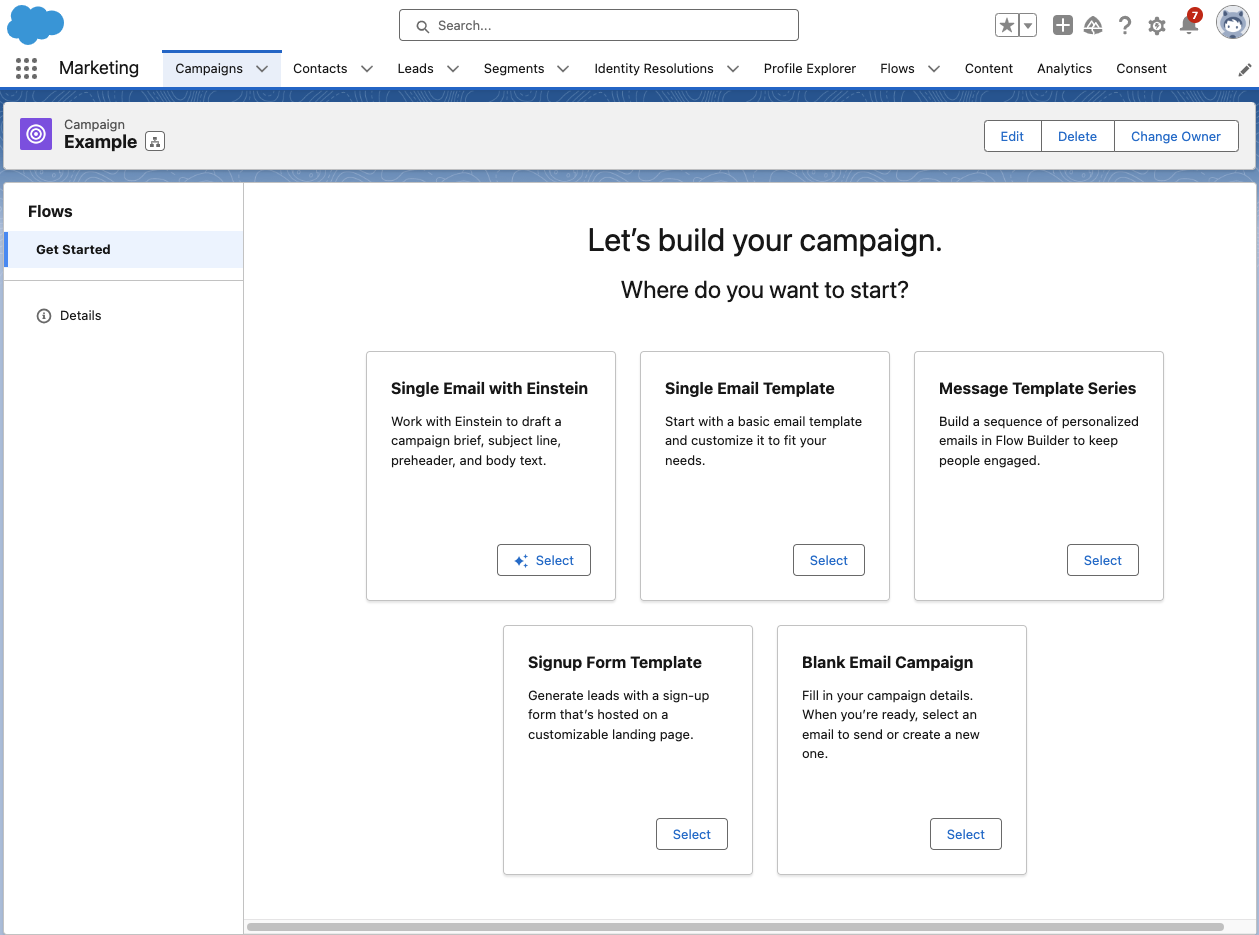
Growth has a campaign-centric workflow and guides users through the process of setting up a new campaign with five pre-set options:

Let’s go through each of these options and what they provide.

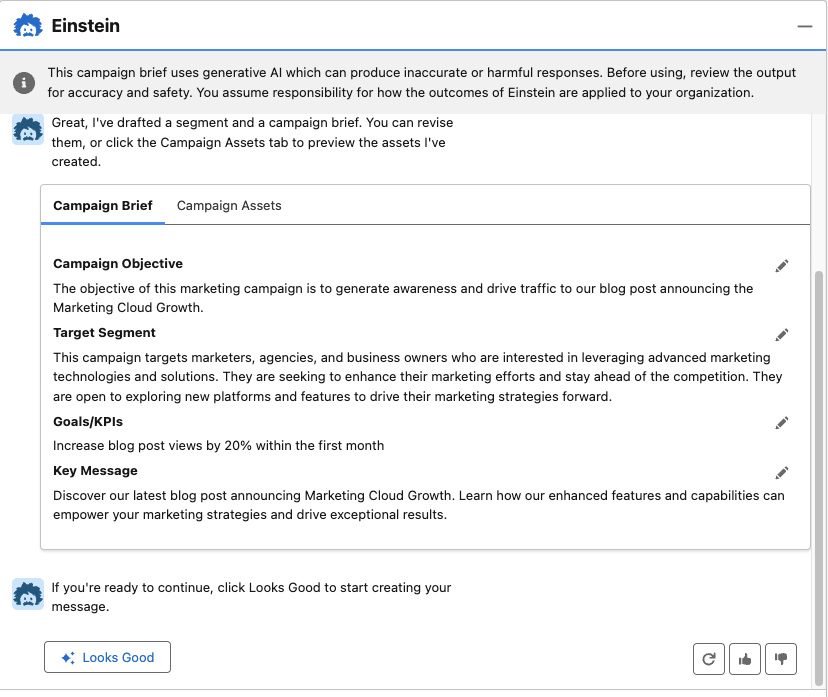
  • Single Email with Einstein: Build your email campaign using Einstein’s generative AI. With this option, you are prompted to describe your email objective (the more detail the better), and Einstein will generate a campaign brief and campaign assets. With all of the content Einstein provides, you can choose to edit, regenerate, and/or upvote and downvote to help the AI learn how to produce better results. 
  • Single Email Template: Begin with a responsive Salesforce email template that you can customize for your campaign.
  • Blank Email Campaign: Start completely from scratch. With this option, you’ll need to add/create your email and segment. A Flow with an empty send email element will also be created to help when you’re ready to send your email. 
  • Message Template Series: Begin with two responsive Salesforce email templates that you can customize for your campaign. This option also provides a flow with a 1-day wait step between emails, but you can customize the flow further to fit your email journey. 
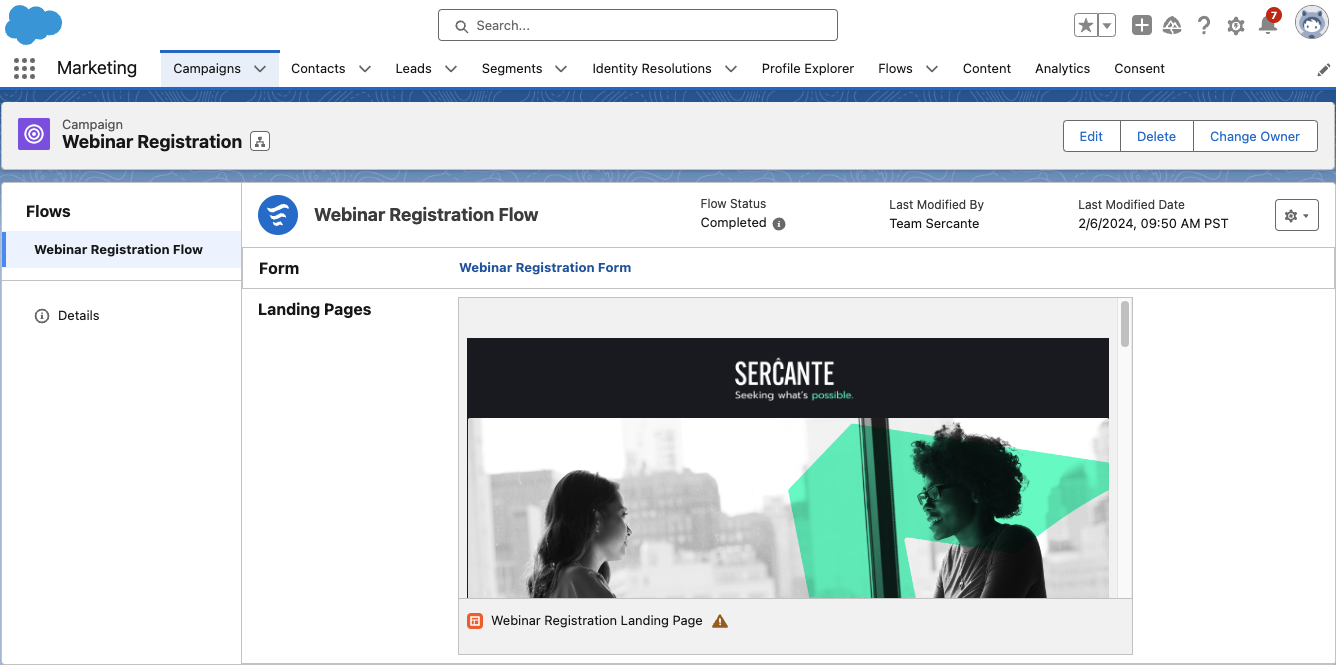
  • Single Form Template: Begin your campaign with a responsive Landing Page template, form, and a flow to create Leads when the form is filled out. 

Building marketing assets with Marketing Cloud Growth 

Marketing Cloud Growth’s assets are built with Experience Cloud, enabling users to easily build responsive assets with a drag-and-drop builder. We’ll do a deep dive into each builder in future blog posts, but, for now, here are some highlights to get excited about:

  • Landing Page SEO capabilities: Landing page public page titles, descriptions, URLs, and even favicons can be customized to improve SEO.
  • Form flexibility: The form builder is intuitive and flexible, allowing users to easily add text, new sections, dividers, placeholder text, and images to forms. 
  • View required form fields: The form builder also allows users to easily view which fields are required for new Lead/Contact creation to ensure any new records can be created successfully.
  • Salesforce Flow automation: All assets are automated with Salesforce Flow, allowing marketers to get granular and customize the next steps and follow-up activities for every asset.
  • Wait step flexibility: Users can set Salesforce Flow wait steps to wait minutes, hours, days, months, or to resume at a specific time.
  • Asset approval workflow: All marketing assets have an optional approval workflow that you can integrate into your marketing team’s existing approval process flow.

(As I mentioned above, we’ll be doing a deep dive on the builders in subsequent posts — so if you have a question on a specific feature, let me know in the comments!)

Marketing Cloud Growth AI capabilities

Marketing Cloud Growth Edition includes AI out of the box so you can take your marketing initiatives to the next level. 

Marketing Cloud Growth Edition AI features include:

  • Einstein Co-Create: Easily build campaign briefs, email assets, and Data Cloud segments with the power of Einstein generative AI.
  • Einstein Send Time Optimization: Ensure prospects receive marketing messages on the day and time they are most likely to engage. 
  • Einstein Metrics Guard: Protects your email activity data by filtering out email security scanner clicks and opens.
  • Einstein Segment Creation: Assists marketers with creating specific audience segments in Data Cloud.

Get ready for Marketing Cloud Growth

I’m excited about the announcement of Marketing Cloud Growth Edition and for the vision of “Marketing Cloud on Einstein 1.” Remember, it will not replace Marketing Cloud Engagement or Account Engagement. If you’re part of a team that’s on the Salesforce platform but not using Salesforce tools for marketing automation, then you may want to explore if this new tool is the right option for you.

Be sure to return to The Spot for more posts about Marketing Cloud Growth. We’ll share all our learnings, tips, and tricks here to help all of you to be successful.

Want to know more about Marketing Cloud Growth, like, today? Then reach out to the team at Sercante to start a conversation.

Salesforce Starter was unveiled in August 2023 as an easy way for small-medium businesses (SMBs) to get started with Salesforce CRM. Historically, SMBs have found CRM systems to be overly complex and difficult to implement, but Salesforce Starter was built with this struggle in mind, allowing customers to get up and running in a matter of minutes while making future growth of the CRM easy.

What is Salesforce Starter? 

Salesforce Starter focuses on sales, service, and marketing and provides guided onboarding to ease users into Salesforce CRM. It’s an easy-to-use platform that’s aimed at getting teams at small businesses up and running with a CRM that can grow as the company scales.

The best part is that getting up and running with Salesforce Starter brings your data into the platform. You’ll avoid some migration expenses later on if you outgrow Salesforce starter and decide to implement other Salesforce clouds to replace it.

What marketing functionality is included in Salesforce Starter?

Salesforce Starter’s marketing features focus on emails, segmentation, and, with Pro Suite, process automation. The marketing features work a bit differently than what we’re used to with Marketing Cloud Account Engagement and Marketing Cloud Engagement. But if you’re familiar with the Lightning Email Builder and Salesforce Flows, you’ll be able to pick up Salesforce Starter’s marketing functionality pretty easily. 

Campaign-Centric Workflow

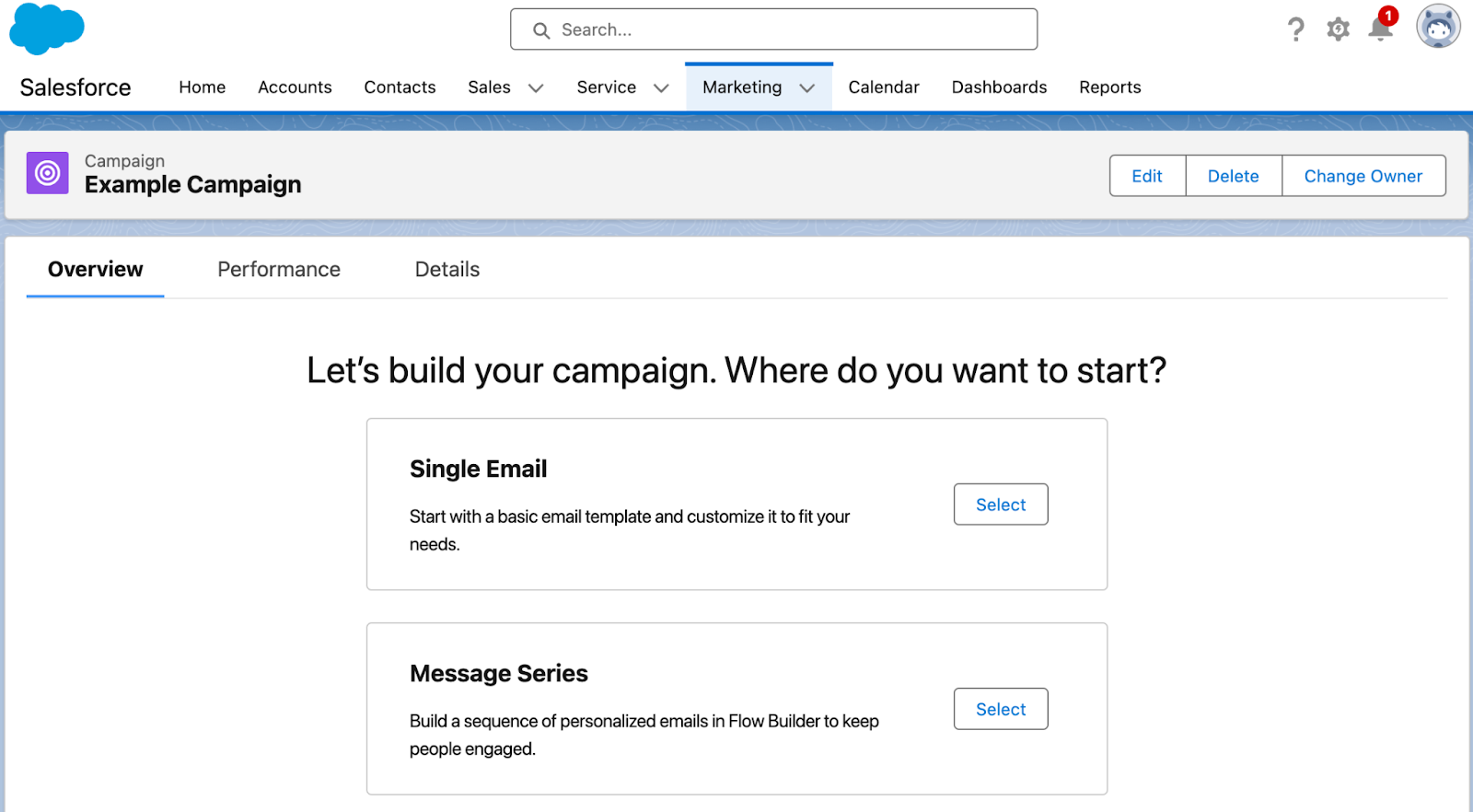
Marketing in Salesforce Starter revolves around the Campaign. Once you’ve created a campaign, you’re guided to choose between creating a single email (similar to a List Email for Account Engagement users, or a single email send for MC Engagement users) or a Message Series (similar to a “Engagement Studio Program” for Account Engagement users, or a “Email Journey” for MC Engagement users).

Segmentation

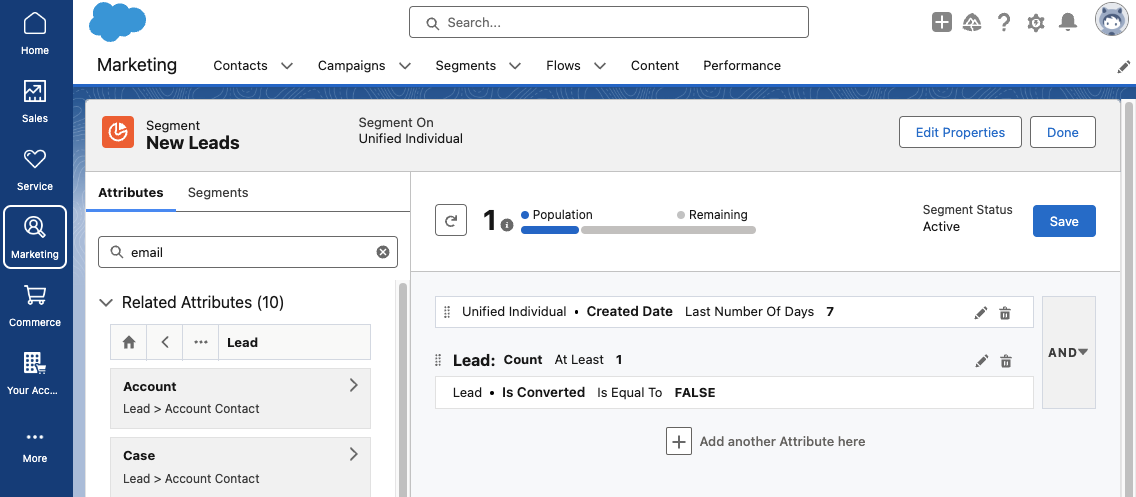
Segmentation in Salesforce Starter is handled with Data Cloud, which allows you to create a unified customer profile and harness data from all interactions your Lead/Contact has with your company. If you’re new to Data Cloud segmentation, I highly recommend working through the Segmentation and Activation Trailhead module to get a feel for creating and editing Segments in Salesforce Starter. This help article also provides several Segment examples to help you get started. 

Before we start building our first email, we’ll want to set up an Audience Segment. A Segment is required to preview and test your email, so we’ll want the Segment running while we’re building the email. Click Select Audience from your Campaign page to begin, then select New Segment

Building Emails in Salesforce Starter

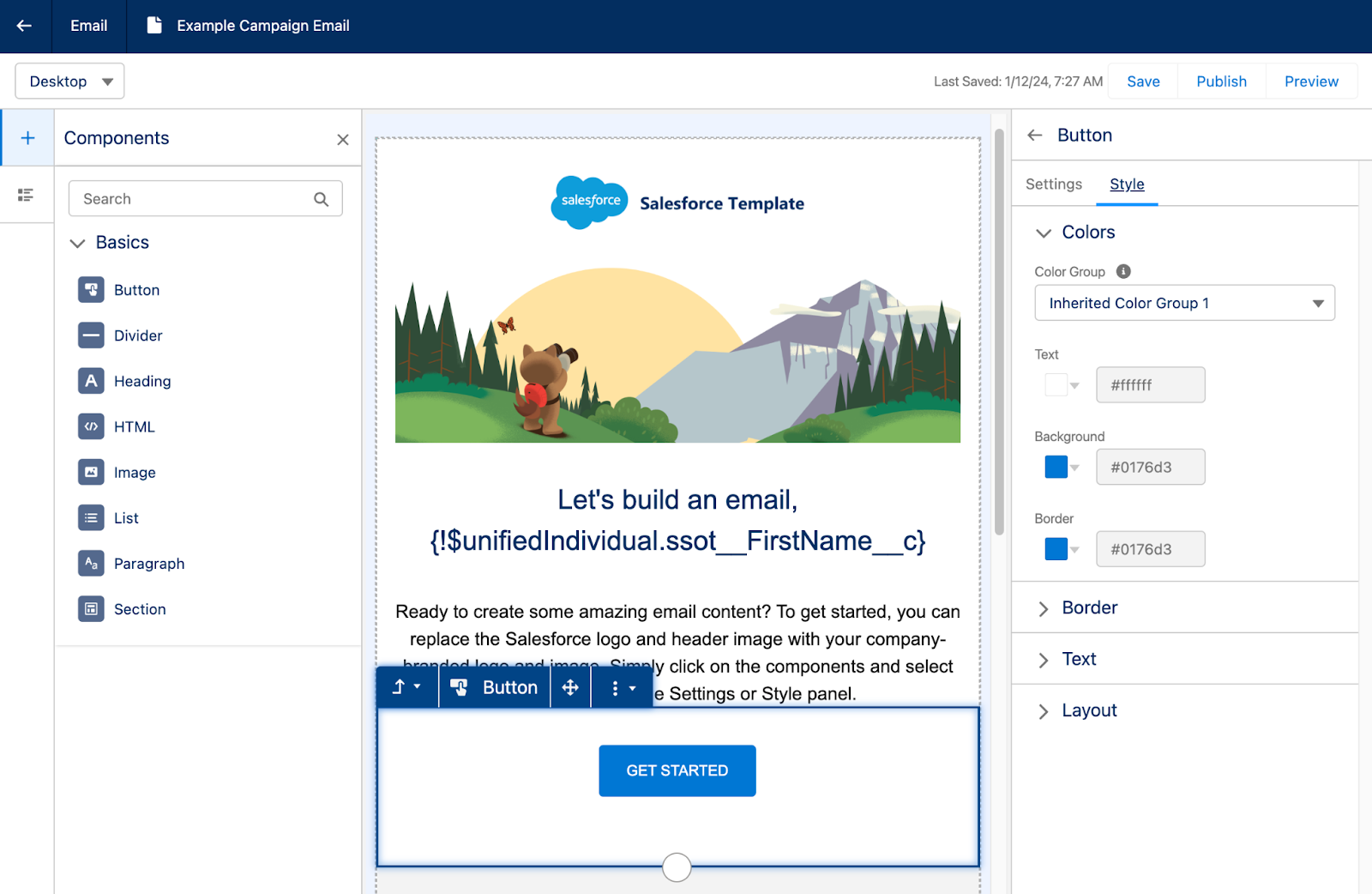
Building emails in Salesforce Starter feels familiar to the Lightning Email Builder. You’ll start off with a pre-built email template that can be edited by dragging and dropping components from the left side menu. Custom styling can be configured on the right side menu and will change depending on the component you have selected. 

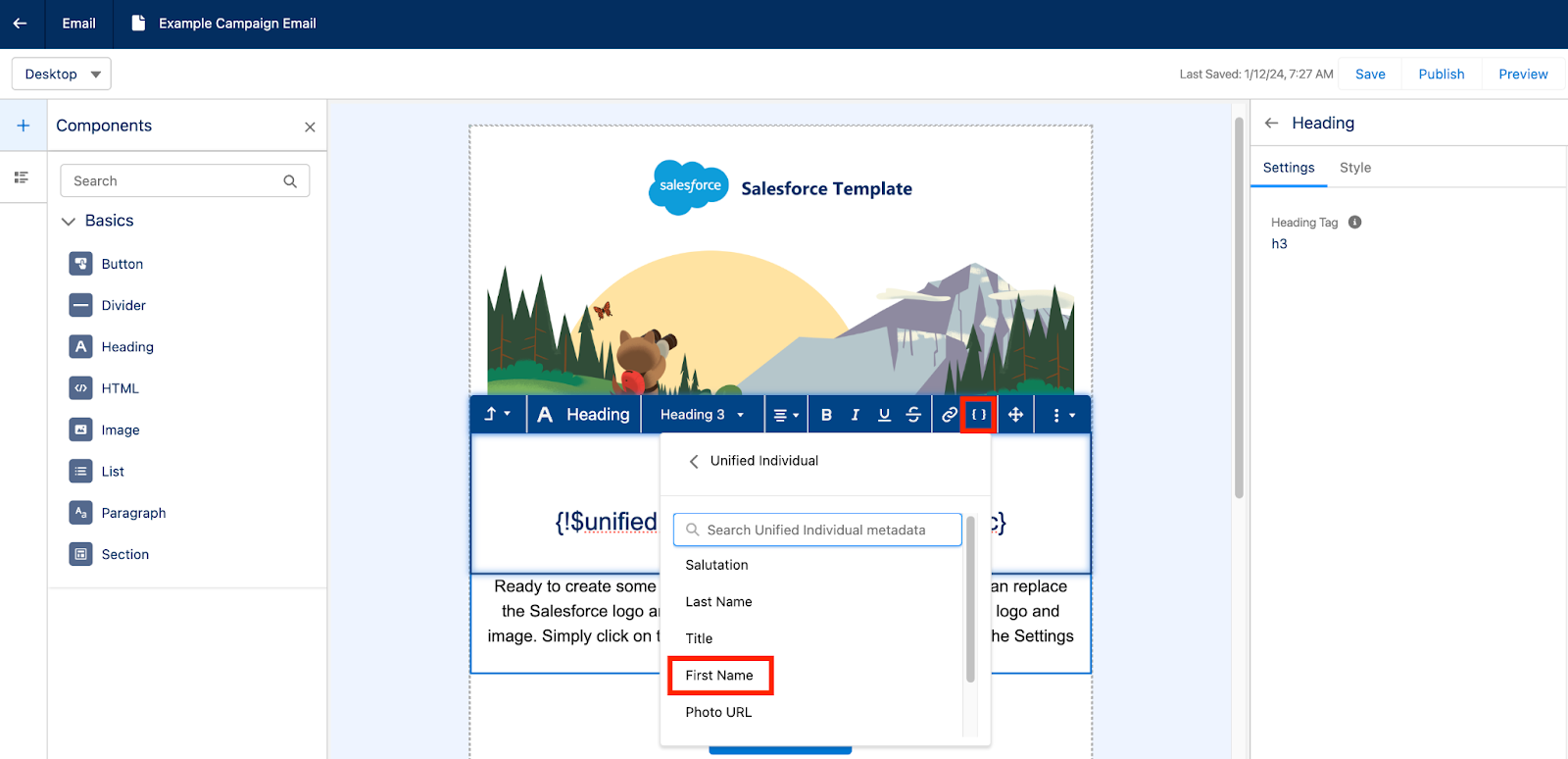
Merge tags can be inserted to personalize the email for each recipient. These merge tags rely on the Data Cloud unified individual rather than having to choose a specific Marketing Platform or Lead Object field. 

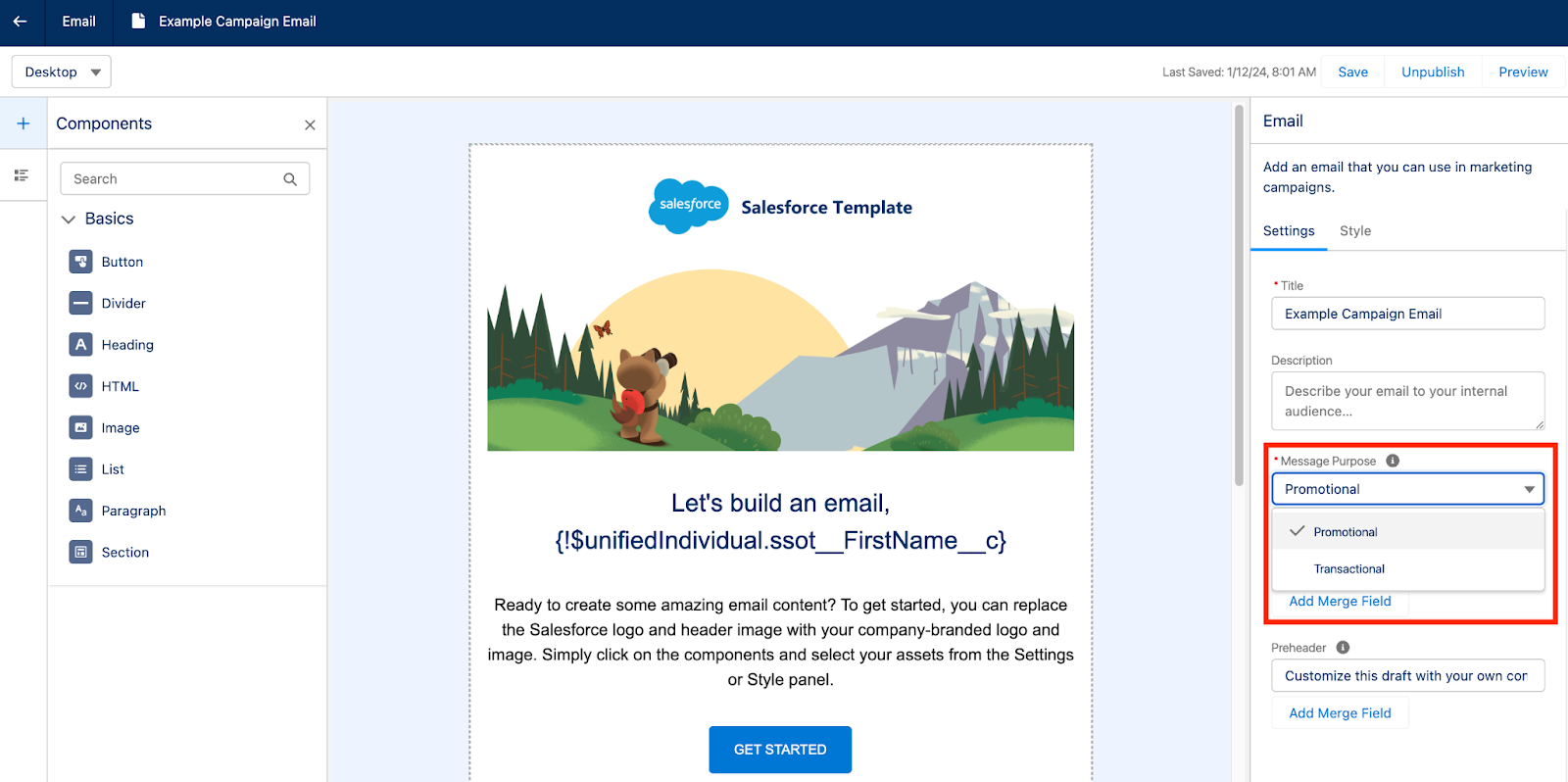
Salesforce Starter also supports sending transactional, also known as operational, emails by toggling the Message Purpose field.

Once you are done building your email, make sure you select Publish before previewing and testing your email. Publishing the email will ensure all the associated images are published and won’t be broken during testing. 

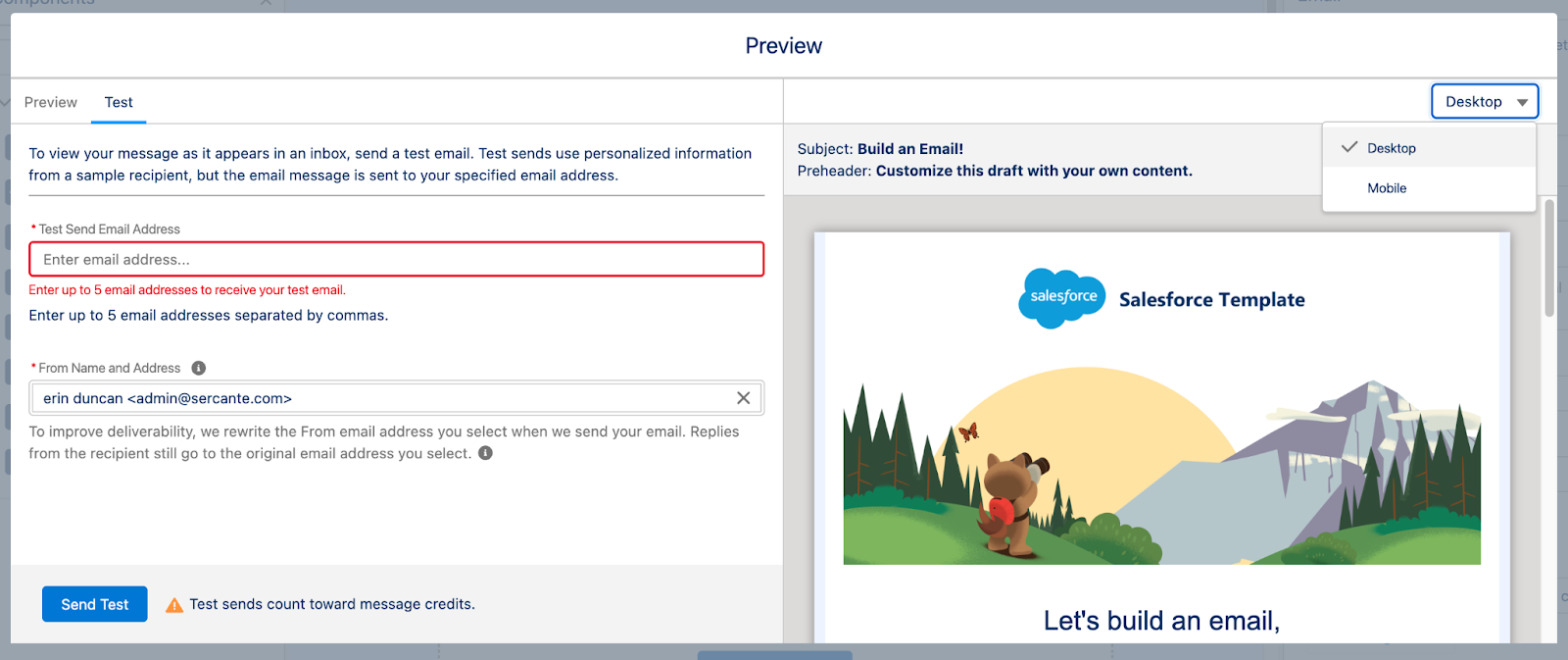
The Preview option allows you to toggle between Desktop and Mobile views to ensure your email is responsive. You can also send your team a test email for review, but note that test sends count towards Salesforce Starter’s base credits of 2,000 emails per org/month.

Sending Single Emails with Salesforce Starter

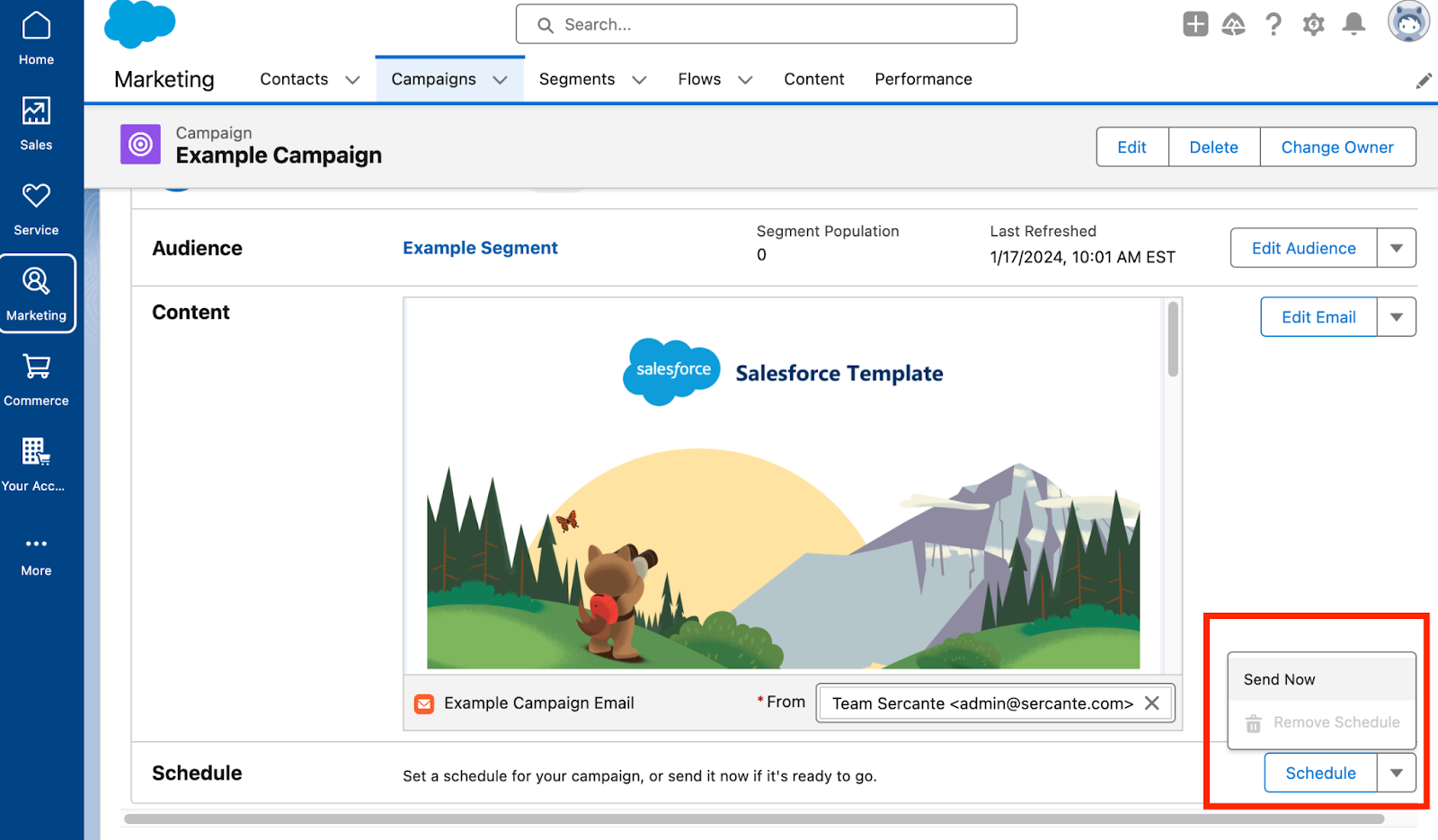
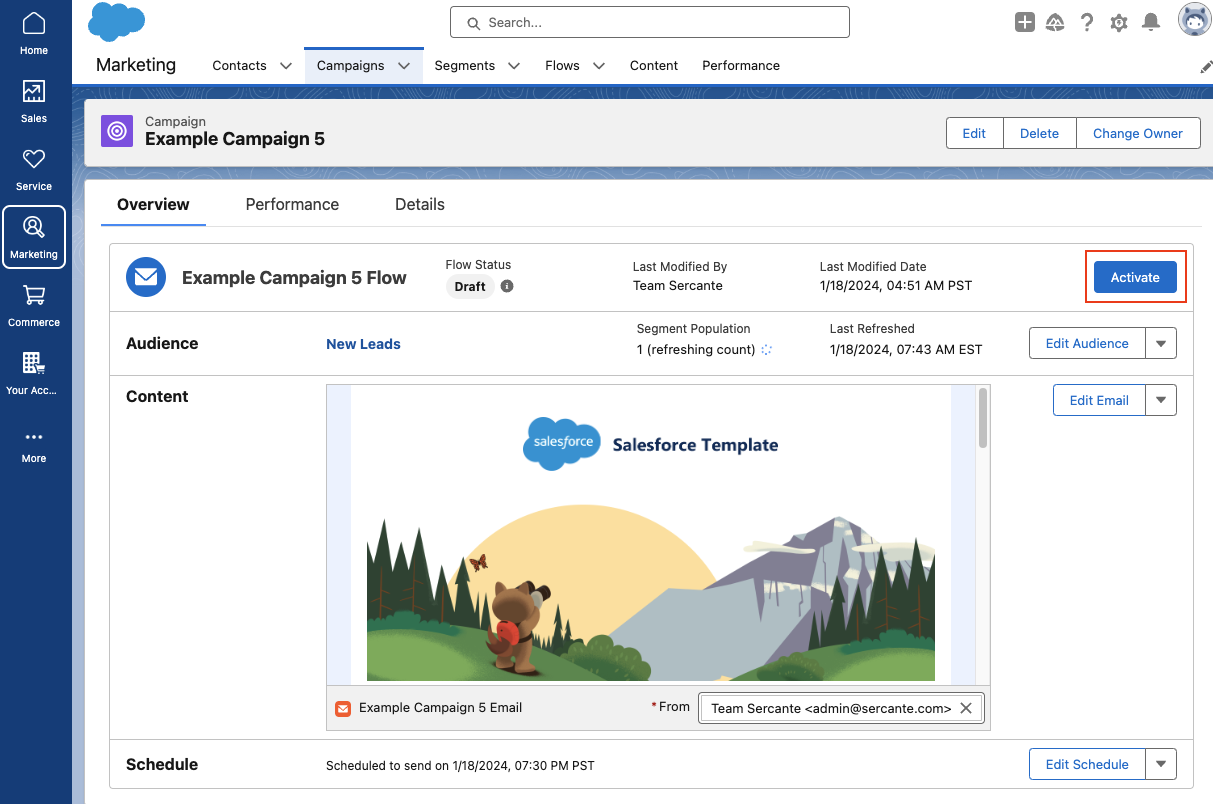
If you’re sending a single email, navigate back to the Campaign Overview page and select Schedule or Send Now.

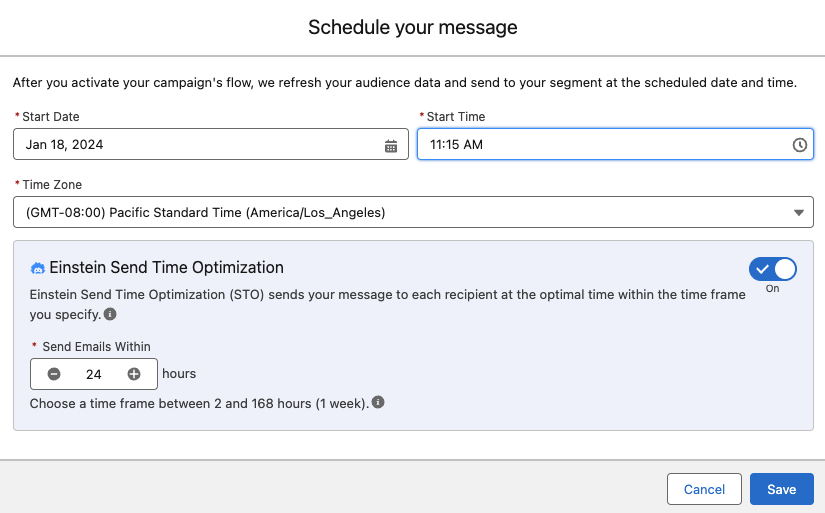
When scheduling, Einstein Send Time Optimization is available to help select the best time for each recipient on your Audience Segment. Check out our blog post, Pardot Einstein Send Time Optimization: A How-To Guide, for more information on how Einstein Send Time Optimization works.

If you’ve selected Send Now your Email Campaign Flow will automatically be activated. However, if you are scheduling the email in advance, you’ll need to manually select the Activate button to ensure the Flow is ready for this email send. 

Sending a Message Series in Salesforce Starter

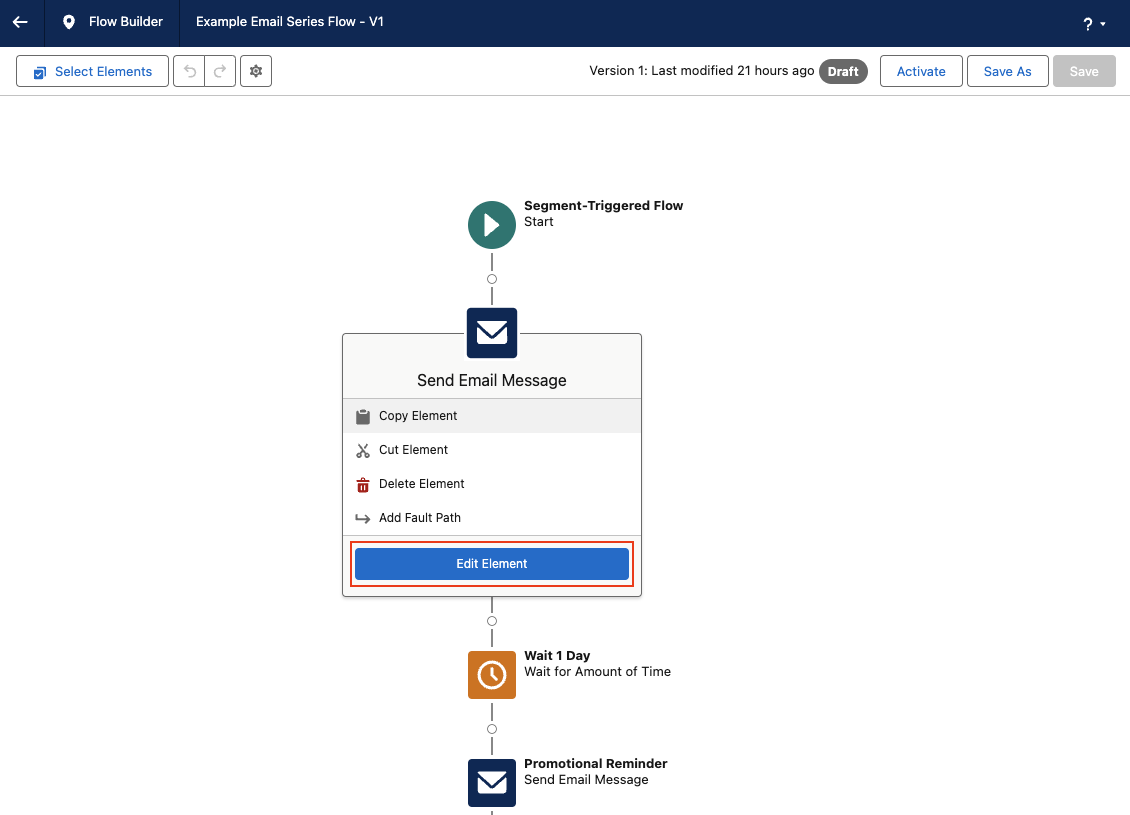
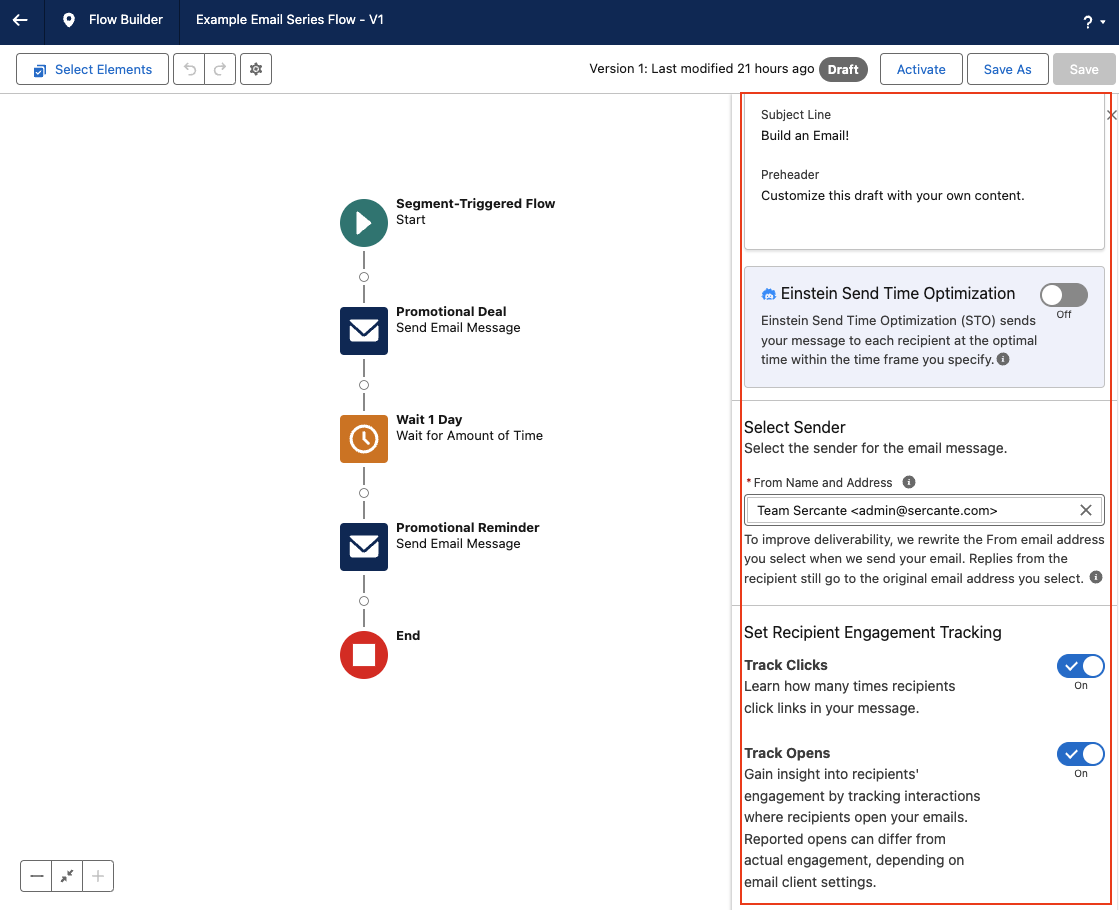
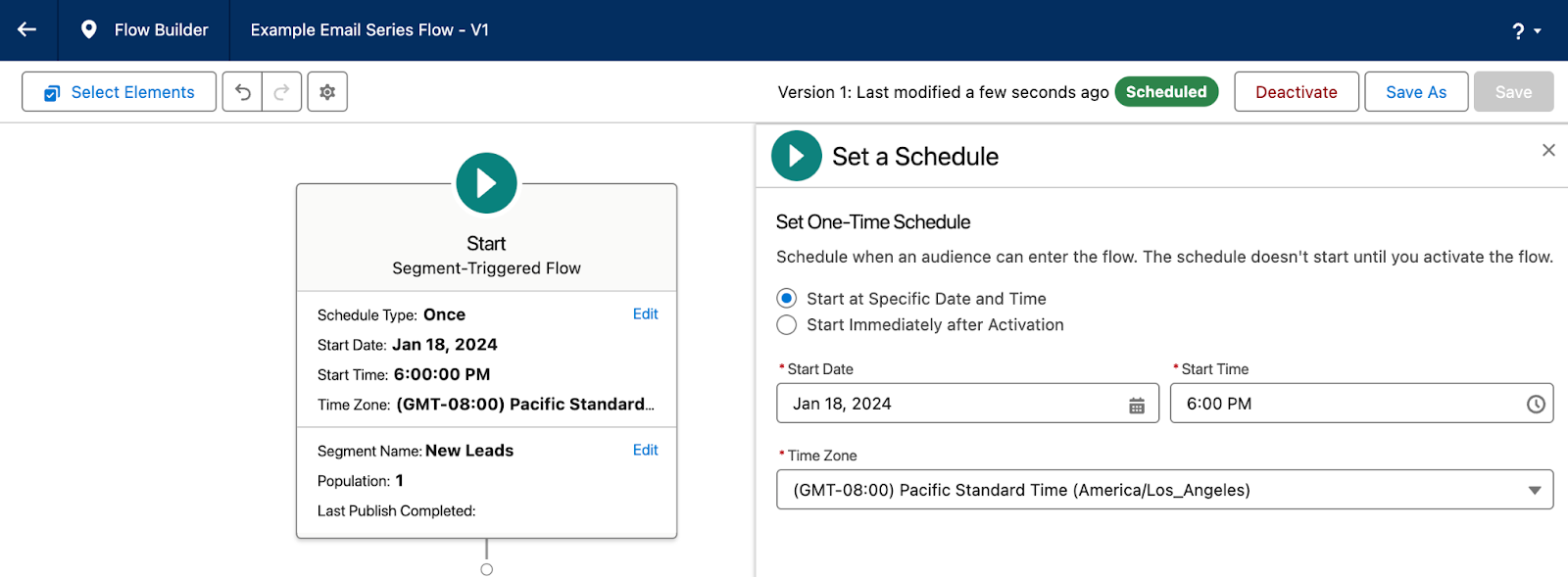
If you’re sending a message series, you will have to first edit your Flow so you can configure the schedule, segment, and wait steps between each email send. By default, the Message Series Flow will be built with a 1 day wait step between each email, Einstein Send Time Optimization is disabled, and Track Clicks and Track Opens is enabled. All of these settings can be reconfigured by clicking each element within the flow. 

Make sure you select the Start element to configure your segment and schedule. 

Once you’ve finished configuring your Message Series Flow, make sure you Save and Activate the flow before navigating back to the Campaign overview page. 

Now, if you are new to Flow and the steps above are causing a bit of existential dread, don’t worry! Flows seem a little intimidating at first, but I promise they are pretty easy to use and you can do some really neat things with them. Check out our blog post, An Introductory Guide to Salesforce Flow for Marketers, or the Flow Builder Basics Trailhead Module to get more familiar with Flows. 

Salesforce Starter Reporting and Performance

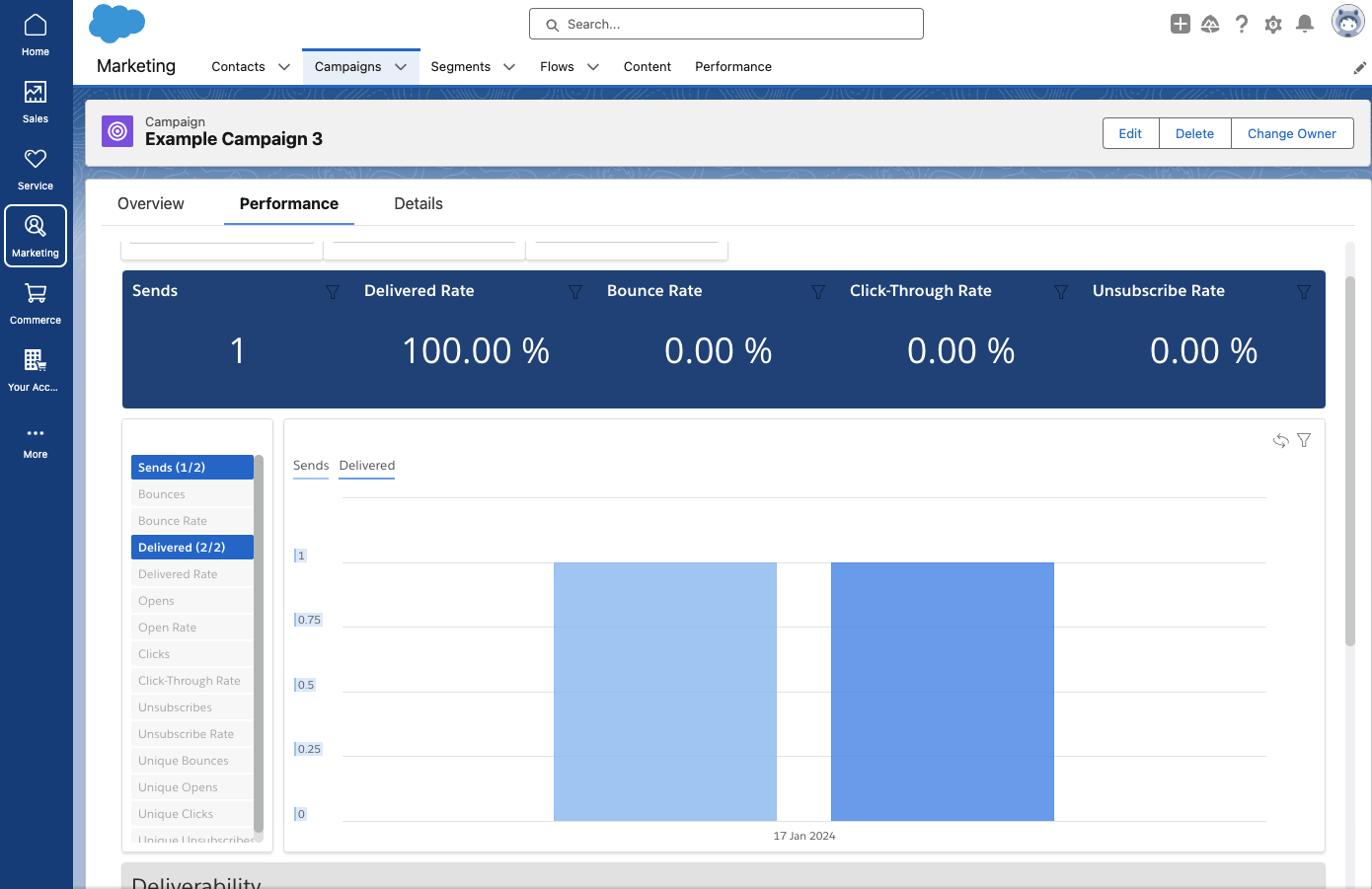
Salesforce Starter automatically collects and displays aggregate engagement data about your campaign on the Performance page. Common metrics, such as opens, clicks, unsubscribes, bounces, etc. can all be viewed in this prebuilt dashboard. 

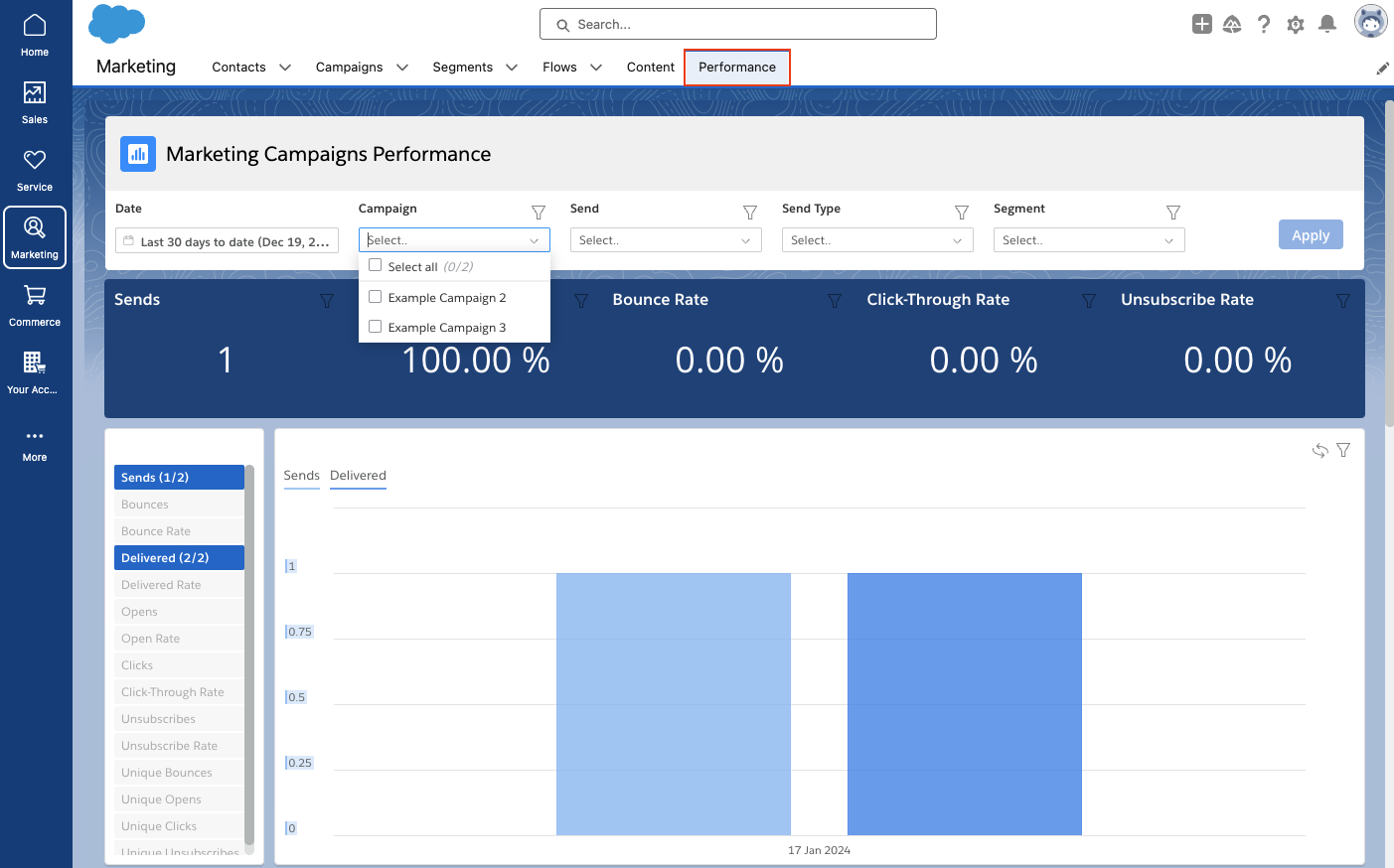
To view the Performance of multiple Campaigns, navigate to the Performance tab. In this view you can filter your dashboard by date range, campaign(s), individual sends, send type, and even segments.

Salesforce Starter — easing small business marketers into CRM life

And there you have it! In summary, Salesforce Starter is a great way for SMBs to get started with CRM and Marketing Automation. As your company and familiarity with CRMs expands, you may outgrow this edition. But the great thing about Salesforce Starter is that you can avoid migration costs because your data is already in the Salesforce platform if you outgrow the product at any point. 

Reach out to the team at Sercante if you have any questions or need help figuring out if Salesforce Starter is the right tool for your team.

Are you a small business owner who is interested in using Salesforce for your business all the way up until you saw the pricing? If so, Salesforce Starter was created just for you!

I know what you’re thinking: Salesforce is a big, expensive CRM platform. But Salesforce Starter is different. It’s a low-cost, lightweight version of Salesforce that’s designed specifically for small businesses. Coming in at $25 USD per month/per user, it’s a downright smoking deal to be honest.

There’s even a 30-day free trial to test it out and see if it’s right for you and your team! 

Salesforce Starter Capabilities

Here’s a quick rundown of some of the stuff you can do with Salesforce Starter RIGHT OUT OF THE BOX!

  • Track your leads and customers
  • Manage your sales pipeline
  • Automate your marketing campaigns
  • Manage customer cases
  • Write knowledge articles for your support reps  

Ease of Use is key to Salesforce Starter

What do I mean by that? I mean, it literally guides you through accessing objects (types of records) based on a picklist (dropdown) menu right after you log in (via your homepage)! 

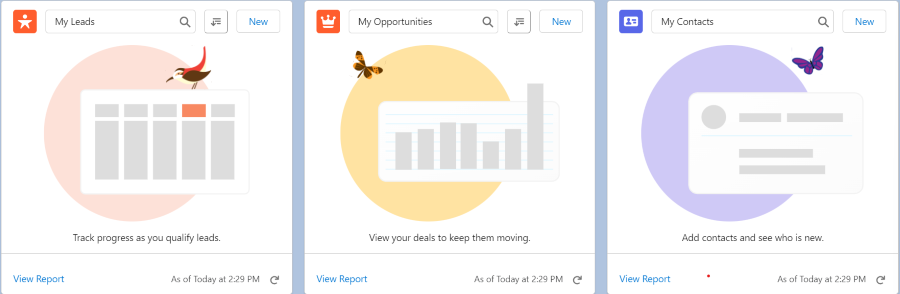
Also featured on the home page are premade dashboard components that display your leads, contacts, opportunities, tasks, and any recommended actions! You can also see any recent records.

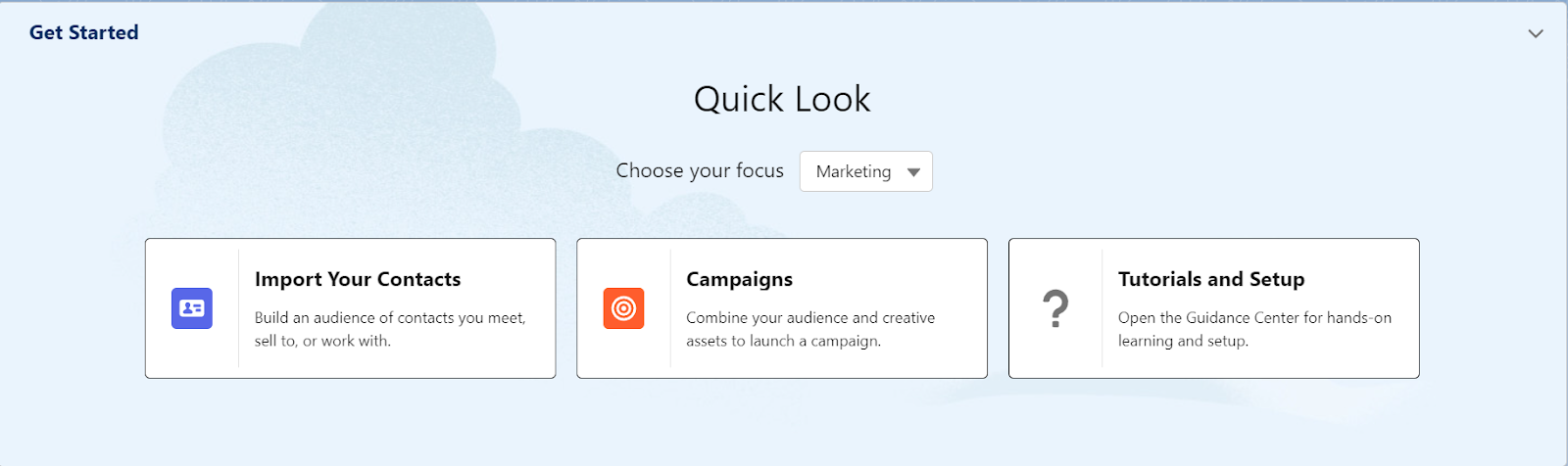
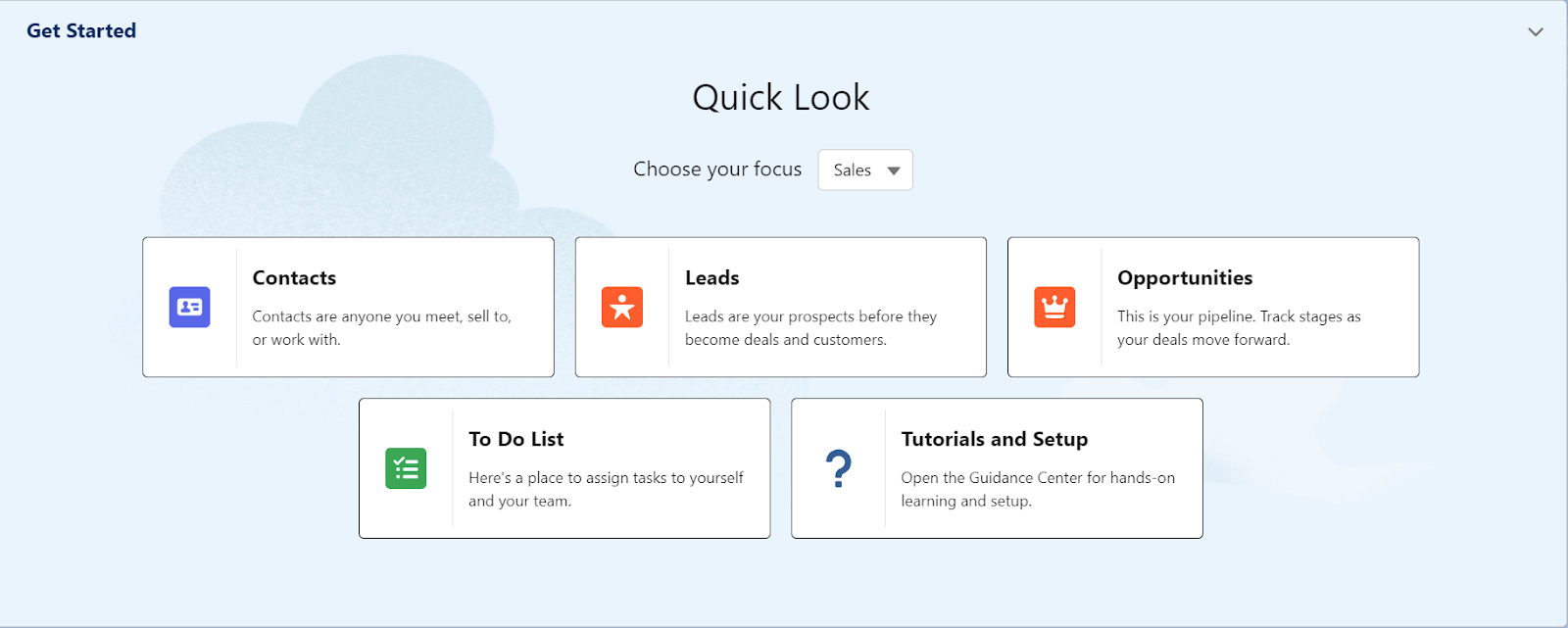
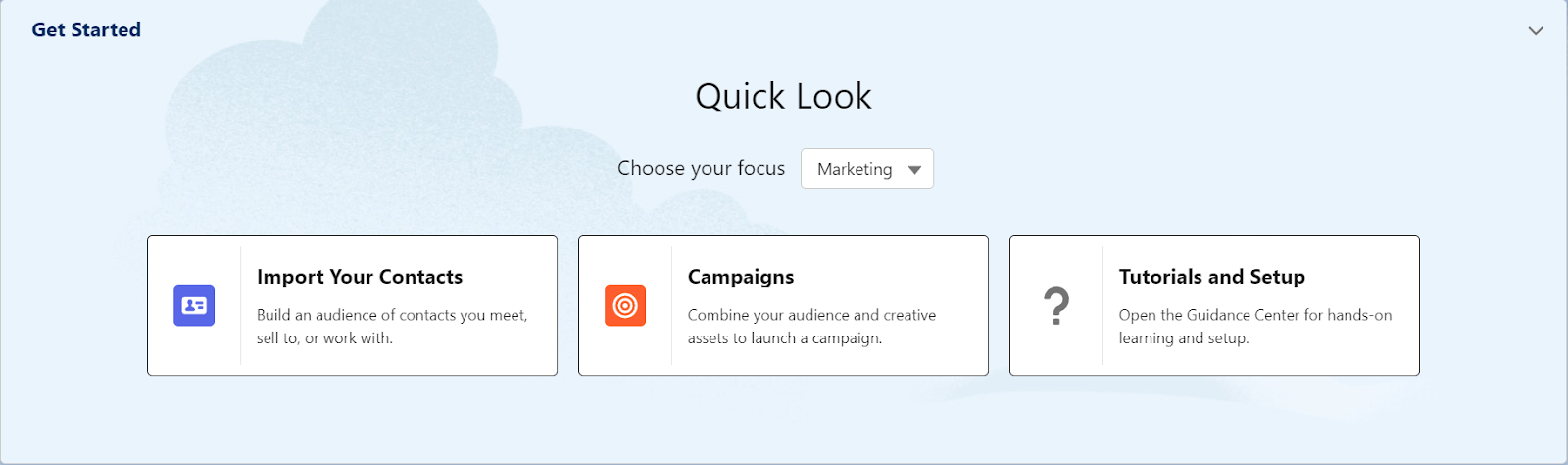
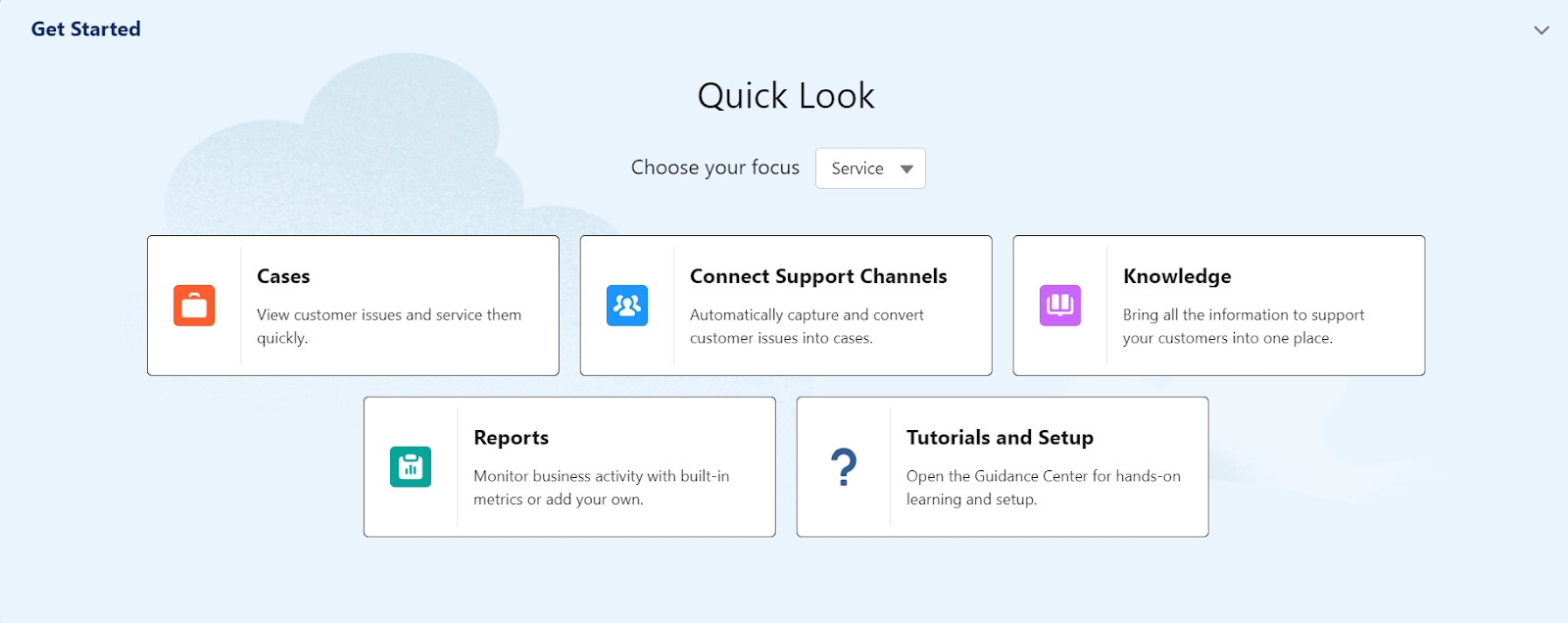
If your team’s focus is centered around Sales (Revenue), Marketing (Hello, Sercante) or Service (Support), choose those in the Quick Look picklist and your options change. 

Salesforce Starter for Sales

First up is Sales, the lifeblood of your business. If Sales is your focus, then Salesforce is built for you! Choosing Sales as your focus brings up Contacts (people), Leads (prospects), Opportunities (deals), To Do list (Tasks) along with Tutorials and Setup. 

Salesforce Starter for Marketing

Selecting Marketing as your focus gives you the option to import your Contacts (people), create Campaigns (think email or direct mail campaigns), and has links directly to tutorials and setup. 

Salesforce Starter for Service

Choosing Service opens up access to Cases (customer support requests), Connecting Support Channels (think email or web forms), Knowledge (think help articles), Reports (probably the most important part of Salesforce!), along with links to tutorials and setup.  

Clicking on any of these will take you directly to a list of records of that type (List View) that you have in your organization, and allow you to view, edit, or delete them as you desire. 

Connect Salesforce Starter to email accounts for Einstein Activity Insights

Salesforce Starter even prompts you to connect your Microsoft or Google email accounts so you can sync your calendars and get Einstein Activity Insights (AI recommendations) on your incoming emails. 

The data science and machine learning from Einstein is built to analyze external new sources and your account data to help build a data model that provides relevant updates to help you win more deals. Sounds like a win-win!

Go for all three

One last thought here, you aren’t limited to one or the other, you have access to Sales, Service, AND Marketing!

OK Jason, that’s great. But what if we grow out of Salesforce Starter? 

Salesforce Starter is built on the same foundation as Salesforce Professional, Enterprise, and Unlimited. So as your CRM needs grow, Salesforce can grow with you. All you have to do is contact your Account Executive (AE) to upgrade your edition and I’m pretty sure they just hit a magic button* and BOOM you’ve upgraded! 

(*This is unverified, but I imagine that they have a big red upgrade button they smack when a client wants to upgrade followed by a confetti explosion and 30-second dance party.)

Alright, I’m kind of convinced. Where do I start? 

Well any good SaaS (Software-as-a-Service) has a trial and that’s where you begin with the Salesforce Starter package. 

Sign up for 30-day Salesforce Starter trial

Click this link and you’ll head over to the Salesforce Starter site, where you can sign up for your own 30-day trial, check out a demo, or read some customer stories. 

Then, what’s next?

If you want to know more about how it works, I would recommend taking a look at the Salesforce Starter Quick Look Module on Trailhead. 

If you’re not familiar with Trailhead, it’s where all of us Salesforce nerds go to learn about our favorite CRM in a fun, gameified way! It’s free to sign up, and use and can lead to some awesome new skills. 

Please feel free to leave any questions in the comments below.

No more posts to show