Category

API & Integration

As one of the chief “Pardot API Geeks” at Sercante (no, it’s not a real title, but I think it should be), I’m really excited about two big changes to the Pardot API — one of which was confirmed on this Pardot Product Roadmap webinar.

Wait, you don’t know what you can do with the Pardot API? Then you must’ve missed this post. I’ll forgive you if you open it a new tab and read it later.

What’s new with the Pardot API

These two new methods open up new capabilities for large and small Pardot users alike. The great thing about them both is — GEEK TERM ALERT — they are asynchronous, which means we can start processing a job and let it work while the code goes on to do other things. This is really great because the computer doesn’t have to wait and do nothing else while large amounts of data are being processed. We can parallel process and REALLY get a lot done without wasting processing power.

The first Pardot API change is Prospect Import.

We saw the Prospect Import at the 2019 Pardot Developer Experience Dreamforce session I was proud to co-host with Mike Fazio. Documentation can be found here for v4 or v3. As for what it does…Think about how you might import thousands of Prospects into Pardot today. Then throw that out and imagine it happens in the background, automatically, with as many fields as you want mapping over. Every day. Without you having to touch it.

If you have an Enterprise Data Warehouse or some other external source where you are getting records from (HINT HINT a little operation called “Salesforce” fits that description as well) and you want to be able to have the computer send large numbers of Prospects into Pardot without needing a person to manually do the import, this is the feature for you.

So again, powerful stuff on its own, but let’s take it to the next level. Imagine these possibilities:

  • On a regular basis, you could use code to clean up junk and normalize picklist field values – turn those “United States” or “U.S.” into US – all without touching Excel.
  • You could use code to add some data from a vendor by API before sending the data into Pardot.
  • And you could used code to fix every marketer’s Achilles Heel – those ALL CAP NAMES or all lower case names that show up randomly and without reason.

So much activity, so little time to analyze

Now, the second API change will be a huge time saver as well. It involves Visitor Activity Export.

This will allow us to export ALL visitor activities a whole year at a time.

On the surface, you might wonder what you’d do with a year’s worth of data about how all your Prospects have been engaging with you. Think about…

  • Exporting it all into a BI tool to get all the bar, pie, and line charts you’d ever want
  • Export into a Analytics tool
  • Export into a Enterprise Data Warehouse which can interface with your BI/analytics tool on a regular basis to give you tasty marketing activity dashboards
  • Summarize into a spreadsheet (We do this with some of our Audits)
  • Export into your own database so you can do SQL queries for ad-hoc reporting (if that’s your sort of thing)

So yeah, COOL STUFF.

According to the docs v4 and v3, the only filtering currently available is date. So if we want to grab just a certain type of activity, such as email opens, we are going to have to pull down the entire data-set and then do our own filtering for email opens. This may mean that what we currently have available to us won’t work with your destination BI or analytics tool if it can’t filter for you.

Now, a quick pause to elucidate via true geek-speak for those who want the In the Weeds version:

The new methods don’t appear to be included in many wrapper libraries yet, but we are working on getting these added to a few. One thing to note is that they no longer use just GET/POST variables but rather a ContentType: application/json and a body with the JSON string. Thus you may need to make some adjustments to your code if you plan on using these new methods.

A bright future ahead for the Pardot API

Looking at how the documentation is structured for these changes, we are optimistic! We think we’re seeing a new pattern for Bulk API calls and can likely expect additional Pardot record types to be built to follow these two new patterns. That means we’ll be able to surface even more Pardot data in our external tools of choice, and therefore marketers can show the business how Marketing is really bringing in more leads and revenue.

What’s your Pardot data challenge?

Like I said, Sercante (heart emoji) the Pardot API. If you’re seeing data quality challenges on a regular basis that you’re spending a lot of time on manually correcting, let us know in the comments! We may be able to save you some major time through the magical API world.

If you’re a current Drift user or have been eyeing the platform, good news — Drift has an integration with Pardot.

Let’s break down the key elements of the integration.

But first — why drift integrating directly with Pardot is huge

If you’re thinking:

“Wait I already know people using Drift and Pardot together. What’s the big deal?”

You’re not wrong — but this step adds even more power to the dynamic duo.

Drift has many current Pardot customers leveraging conversational marketing to capture leads and create a more engaging, targeted experience for their website visitors.

But in the past, most Pardot customers integrated Drift directly with Salesforce, using it to create/update new leads and contacts — meaning if marketing wanted to spend more time pre-qualifying Chatty Cathy before she hits Salesforce, they were out of luck.

Selectively sync between systems using the Drift / Pardot integration

The newly minted Drift integration gives marketing more granular control over when data is passed between systems — both from Drift to Pardot, and Pardot to Salesforce.

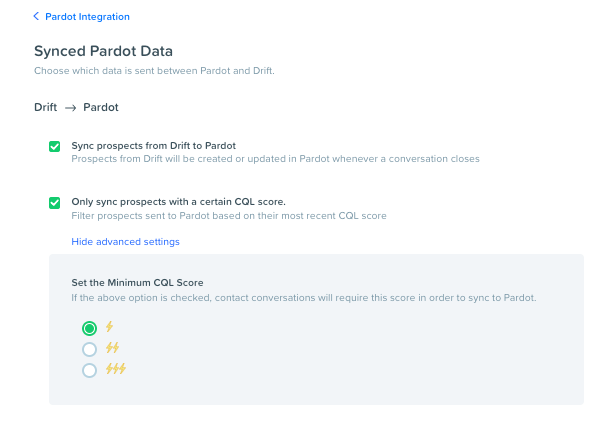
The integration is capable of syncing all leads to Pardot automatically or syncing new leads based on the Conversation Qualified Lead (CQL) score that a conversation is assigned within Drift:

image (3)

This is huge — because it lets you set a bar to ensure that only quality conversations migrate into Pardot for further nurturing. And because the first stop is Pardot, you can put that lead through any of your regular lead scoring and qualification activities before routing to sales.

Connect custom fields to continue the prospect conversation in Pardot

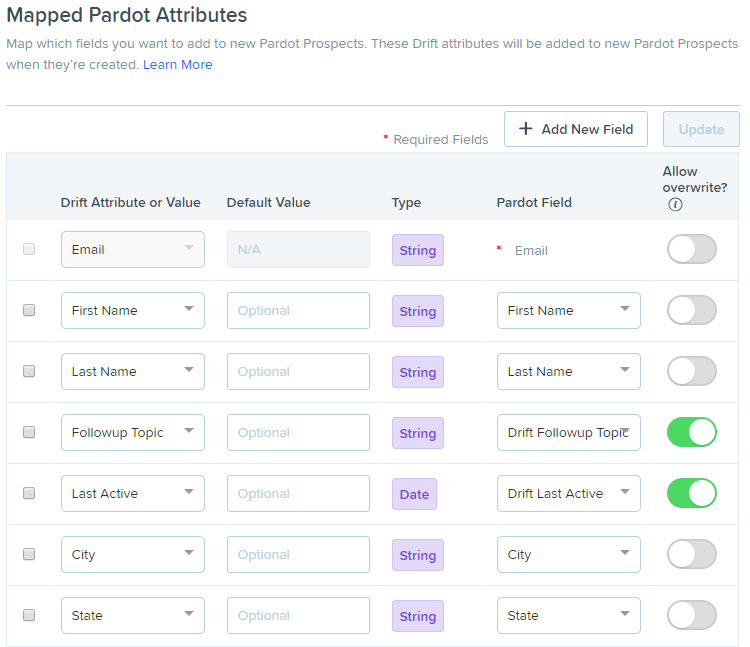
The integration can map custom fields between Drift and Pardot — opening the door to using the data you’re capturing in Drift in segmentation, personalization, and reporting:

image (2)

For example, you could create a Drift field for product interest and map that to Pardot, and then use that to drive people to an Engagement Studio nurture or route to reps in that business unit.

The basic concept is that Drift starts the conversation, and Pardot continues it after people have left the website… and Drift arms Pardot with data to target prospects based on where they’re at in the journey. Then using Pardot, marketers can send email campaign to encourage re-engagement and get people back to the website — where Drift picks up again.

An Example: Leveraging the Drift/Pardot integration to improve customer experience

To run effective campaigns, it is hugely important to bridge data gaps between systems and have one clear picture of the entire customer and their buying lifecycle. The average enterprise leverages a whopping 91 cloud services for marketing alone — and if key info is sitting in silos, it’s pretty easy to end up with a black eye.

A major silo we often see is customer service service data. The marketing department needs this info too to inform effective engagement.

Think about it — do you really want to be hard selling an account that has a stack of escalated cases? Not a good look. If a customer is using Service Cloud, we can easily create a suppression list based on open cases (using a custom object in Pardot) to hold back promotional mailing until a case is resolved.

Chatbots are another place customers may turn for an “airing of grievances” — and the Drift / Pardot integration busts one more data silo, allowing you to drive a better customer experience based on what was discussed in a Drift chat.

For example, maybe the conversation was support related. By noting that in Drift, you could suppress marketing messages to allow time for the support conversation to work itself out.

Or maybe the conversation was regarding features or capabilities, and noting this in Drift could be used to trigger a topical Engagement Studio Program focused on training and customer adoption. So many possibilities here!

What’s your take on the Drift Pardot integration?

If you’re saying “sign me up,” check out Drift’s help documentation on how to get started.

What questions do you have? Are there other items on your integration wishlist?  We also have the integration up and running in Sercante’s training environment — ping us for a demo.

Are you seeing a little Pardot authentication warning when you log into your org and are not sure why?  It looks something like this…

image

What’s changing with the Pardot API

The short story: Pardot is improving the security of our data by making improvements to how our tools need to log into the Pardot API.

This is a good thing.

Unfortunately, it can cause us some issues in the short term. The deadline was previously set for April, but has been moved out to May 6th — so there’s still time to sort things out and get ready.

If you’re thinking “But I don’t use the API…” — Not so fast

Your first thought may be that you don’t use the API.  But if you log into any third-party tool with a Pardot username, odds are that tool is using the API.

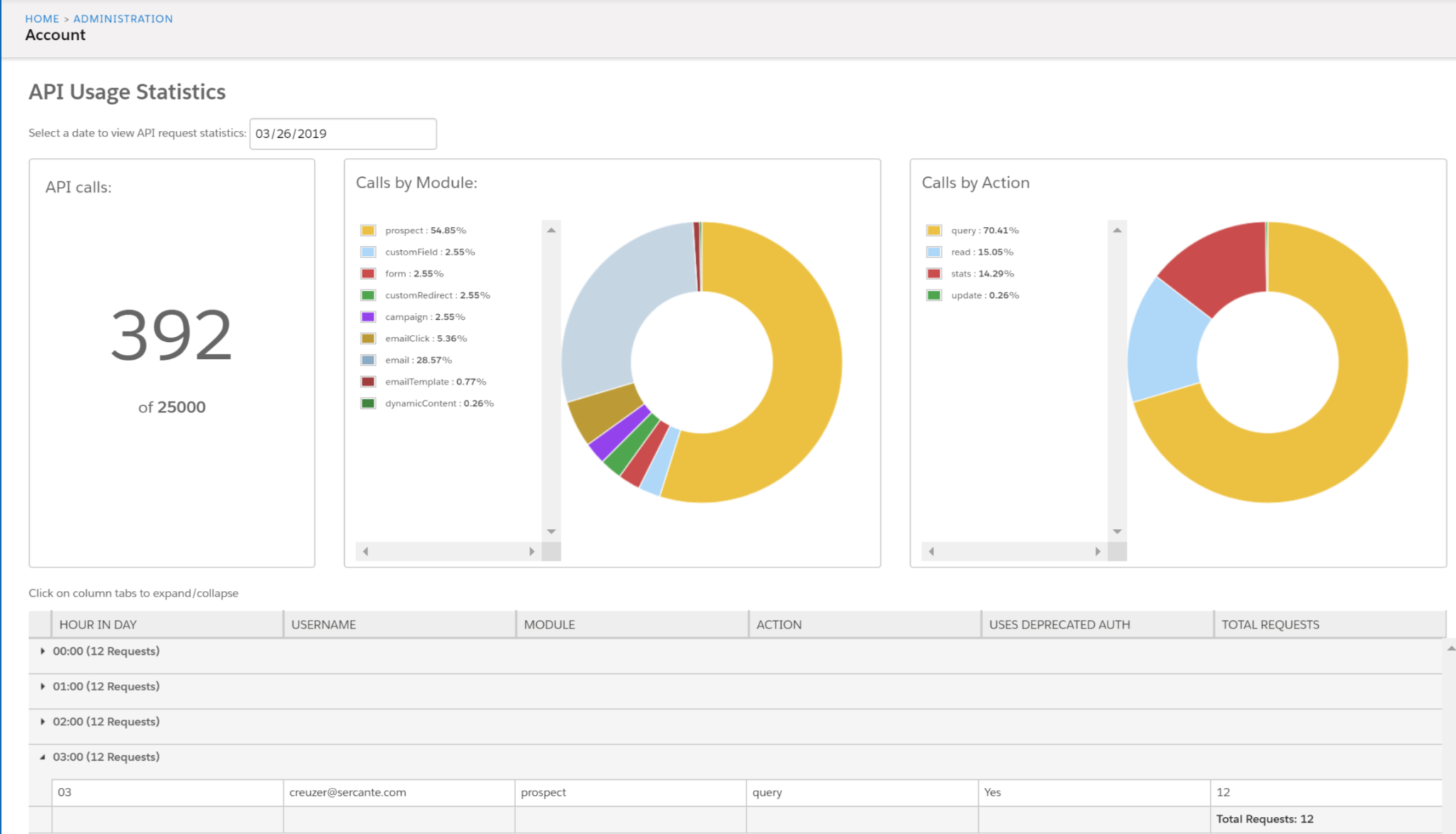
You can review your API usage from your Pardot Account Settings under the Usage and Limits section listed as “Daily API Requests page.” Or go to this link to access directly:
https://pi.pardot.com/account/apiUsage

This screen gives you an hourly breakdown of usage, daily, for the last week. In the screenshot below you can see what this report could look like for you:

image

What to review to be ready for the Pardot API update

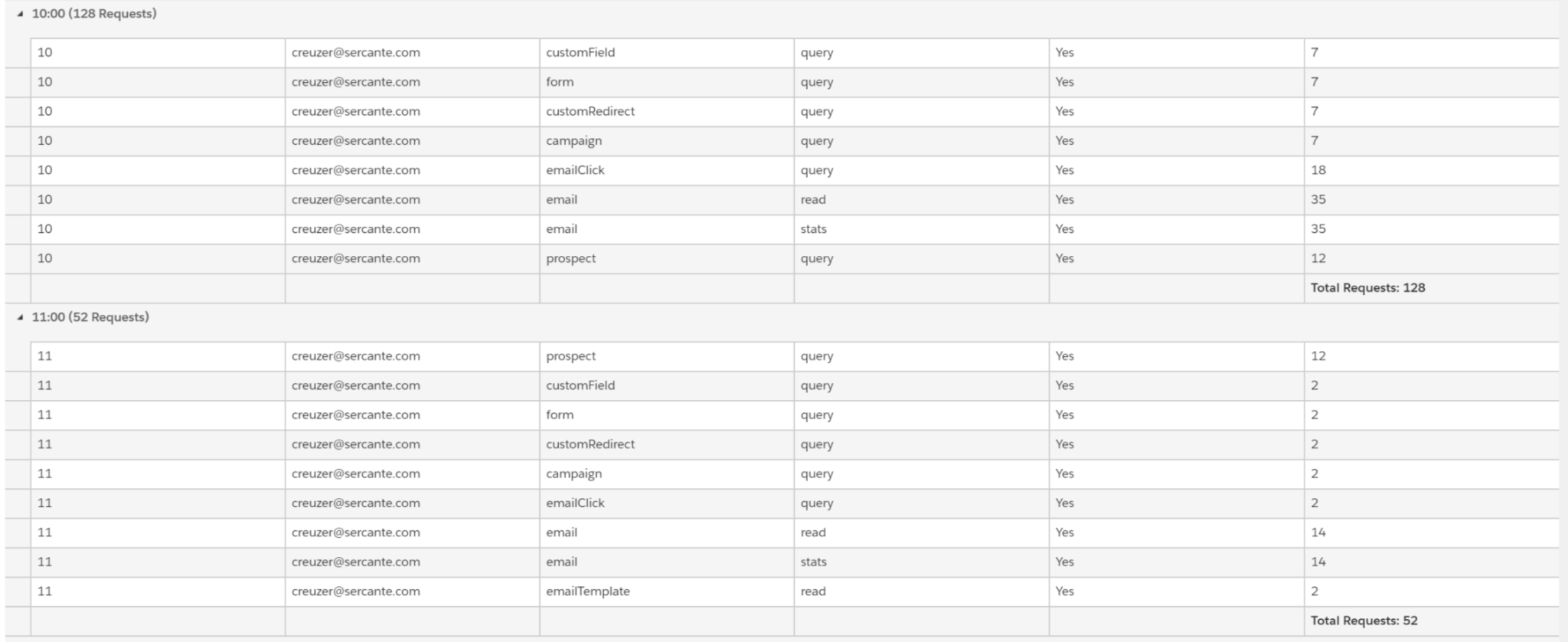
What you are interested in is the collapsed tabs at the bottom. These expand to show you what Pardot Users are using the API:

image

These are the people you need to work with to try to figure out what ‘things’ are plugged into your Pardot instance. The column labeled “USES DEPRECIATED AUTH” being “Yes” is what will be turned off on May 6th and will stop working.

So you can see here, that there is work to be done in this example.

Contact the vendors if the usage is coming from a vendor. If it’s something your web team is managing, let them know. Pass along
http://developer.pardot.com/#using-the-api so they have a starting place to sort out what they need to fix.

Best practices for working with the Pardot API

While we’re on the topic, let’s bring up a couple of best practices.

1. First of all, use it.

If you’ve been leveraging Pardot for some time, explore opportunities to take the platform even further by working with the API.

There are countless processes that can be made more efficient by using tools like Zapier and Tray.io to streamline data transfer across platforms.  Ask your team where they are doing manual data entry or doing lots of imports/exports and Excel jockeying.  That’s usually a great place to start.

You can also use the API to build custom integrations or run data clean up utilities — for example, fixing capitalization in name values, setting time zones, bucketing picklist values, standardizing state/country values to prevent sync errors between Pardot and Salesforce, creating control groups for A/B testing in Engagement Studio, and more.

2. Audit who is accessing your data via the API regularly.

Were you surprised by who you saw accessing your data when you took a look at your usage metrics?  We recommend at least quarterly reviews of this to avoid any surprises.

3. Give every different integration it’s own user.

Yes, creating unique email addresses and Pardot users for each can be a pain.  But it’s a free option under the current Pardot licensing — and it’s worth the time spent.

Having separate logins makes figuring out who and what is accessing your data much easier. The audit log and last changed by better reflect what tools are updating your data so you can easily get a feel for how well your tools are working for you.

You can also turn off a specific integration by changing the password if it starts behaving badly without also turning off things that are working correctly and help you run your business.

What questions do you have about the Pardot API?

Are you working on any interesting integrations?  Struggling with a unique problem, and wondering if the API can help you solve it?  Running up against a platform limit and looking for a workaround?

Let me know in the comments and let’s discuss.

Pardot and Sales Cloud.  They’re made for each other. Like peanut butter and jelly, cookies and cream, whiskey and Diet Coke — both function better with the other tightly integrated. (more…)

I have never NOT been asked this question during a Pardot implementation:

“Wait, I don’t get it… what’s the difference between Salesforce and Pardot campaigns?”

Short story: they have the same name, but they’re totally different.  But this is FINALLY changing with some slick new features that are now generally available in their beta form. (more…)

Using Eventbrite to manage your events, and Pardot for your emails and marketing automation?

The good news: they integrate! The bad news: only sorta.

Let’s break it down.

Setting up the Pardot-Eventbrite connector

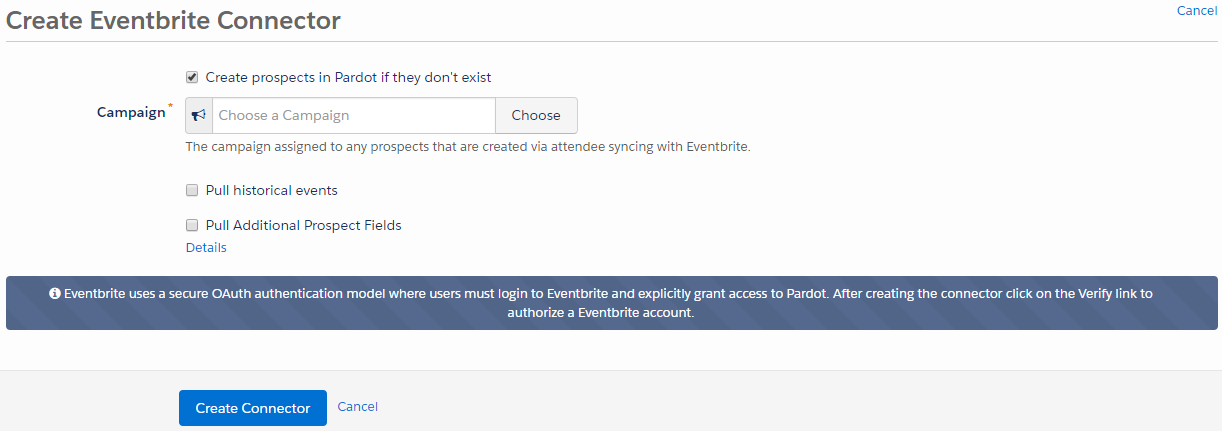
If you’ve been using Eventbrite to manage event sign ups and payment processing, it’s a piece of cake to set up Pardot’s out-of-the box connector.  Just navigate to Admin > Connectors, click the Add Connector button, and you’ll be prompted with this when you select Eventbrite:

Pardot Eventbrite Connector.png

After you save the connector, click “Verify” and it will ask you to authorize the connector to work with your Pardot account.  Then you’re off to the races!

What the Pardot-Eventbrite connector can do

The connector is one way – from Eventbrite to Pardot only.  Once configured, the connector will sync Eventbrite events into a prospect’s activity history, and create a new prospect record for any first-time attendees that aren’t yet in your system.

Easy-to-access reports from within Pardot let you monitor sign ups, and will even show whether they were checked in at the event.  You can also incorporate event attendance into your scoring model.

Key limitations of the Pardot-Eventbrite connector

You can’t use it in automation rules or completion actions

You can’t do some critically important things with the Pardot Eventbrite connector.  For example – for every major marketing initiative, I recommend clients set up a Salesforce campaign and leverage completion actions or automation rules to sync prospects to that campaign.

But Eventbrite can’t be referenced by either completion actions or automation rules.  So there’s no way to automate getting event attendees to the right campaign.

If you wanted to send prospects who register for an Eventbrite event to Salesforce campaign, you’d have to do it manually in Salesforce, or navigate to the event report in Pardot and use a table action to select attendees and send them to a Salesforce Campaign.

You can’t use it in dynamic lists for suppression

Eventbrite can’t be used in dynamic lists either.  So if you’re sending your event invites out through Pardot, but want to suppress people who have already signed up, you’d have to manually create the list to suppress using a table action.

It obscures campaign tracking

The Eventbrite connector can only be associated with one Pardot campaign.

And any net new prospects added by the Eventbrite connector will get added to that campaign, overriding any previous Pardot cookies that would have indicated an earlier “first touch.”

Alternative #1: Using Pardot-native forms

If you want to be able to access the full range of Pardot’s automation capabilities, consider using native forms to manage your event sign ups.  For really straight forward use cases, this actually works really well.  A couple of things to keep in mind:

No payment processing

There’s not a great way to do payment processing with native Pardot forms.  If this is a must have, stick with Eventbrite or another events tool.

Think about a process for adding guest RSVPs

If you’re hosting events that people are bringing guests to, design your forms accordingly.  A surefire way to wreck havoc on your Pardot cookies is to create a form that people submit, and then refresh to register another colleague.

If you expect people to bring guests, either add a field where they can key in “other guest” info, or create the form in kiosk mode so that visitor association doesn’t take place.

Adapt your campaign records in Salesforce to mirror your Eventbrite KPIs

If there are critical metrics you like to review in Eventbrite, work with your Salesforce admin to determine if/how to capture those in your Salesforce campaigns.  Could you set up a special record type with extra fields?

Alternative #2: The Eventbrite connector for Salesforce

Since the Pardot/Eventbrite interface leaves much to be desired, consider installing the Salesforce Eventbrite connector. This is free, but isn’t really supported by either party — so you’re kind of on your own when it comes to putting it into action (well, not totally on your own… feel free to reach out to me if you need help).

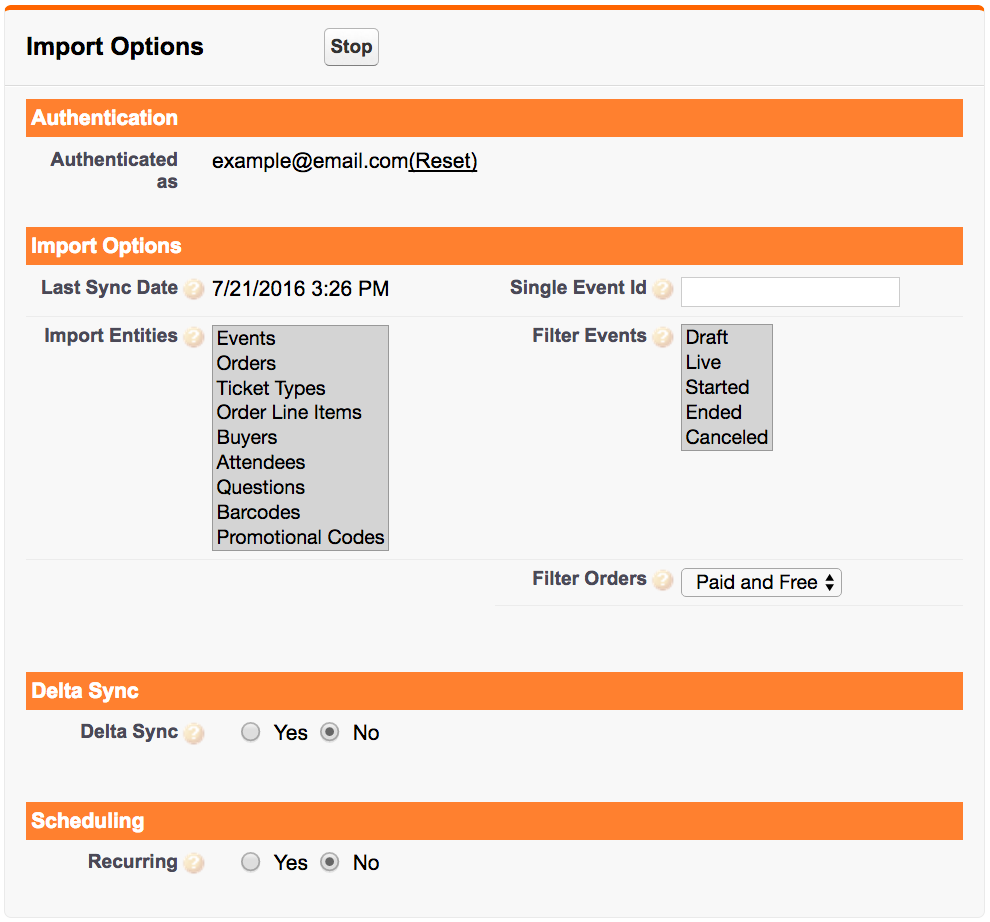
With this connector, you can sync more data from Eventbrite to Salesforce than you can from Eventbrite to Pardot:

Salesforce Eventbrite Connector.png

You can also control at the field level what information to bring over from Eventbrite.

When setting this up, you can map Events to native Salesforce Campaigns and Orders to Campaign Members.  From there, that campaign data will sync over to Pardot and you can reference it in automation rules, dynamic lists, and more.

Alternative #3: Build something yourself

When at first you don’t succeed… consider messing with the API.  Not for the faint of heart, but there is likely a custom solution you could develop if you have a unique workflow that is important enough to you to pay to automate.

Workato, Zapier, and other middleware providers offer tools that can make this easier for non-dev admins to try to take on.

How are you managing events in Pardot and Eventbrite?

What has been your experience with the Pardot Eventbrite connector? Any secret workarounds or tricks that I’ve missed? Let me (and your fellow readers) know in the comments!

No more posts to show