Category

Strategy

Person Accounts, an organizational feature of Salesforce, can be a powerful way to differentiate between a business contact (think Cate Godley who works at Sercante) and an individual you do business with that is not associated with a company (think Yuki Godley, shown below).

The reality is that Person Accounts are actually not that scary, but the fact that once they have been enabled they cannot be disabled is likely what causes a lot of that trepidation. This permanent enablement is also present when deciding to sync Marketing Cloud Account Engagement (Pardot) Prospects with Person Accounts in Salesforce, and there are definitely a few things that should be considered before enabling this option in your (or your clients’) Account Engagement organization. Read on to learn more about how to prepare for this setup.

Okay, but what’s a Person Account anyway?

Before we get into the things you’ll want to consider before enabling Person Accounts with Pardot Marketing Cloud Account Engagement (I’m a sucker for alliteration, always) let’s talk about what a Person Account in Salesforce actually is. 

Person Accounts allow for a business to accurately track and manage relationships with customers if they’re in a B2C driven space, like education, health care, or non-profits. There are several considerations for Person Accounts inside the Salesforce platform, but here’s a quick summary:

  • Store information about individuals instead of businesses
  • Combines Account fields and Contact fields into one record and page layout – the Person Account
  • Takes up twice the Salesforce storage space due to having a backend Account and Contact record

Once Person Accounts are enabled, you’ll have the option to create a Business Account or a Person Account when creating a new Account from scratch in Salesforce. If you’re converting a lead using the standard Salesforce conversion process, you can create a Person Account by ensuring that the Company field on the lead is blank. No Company? Person Account. Company? Business Account.

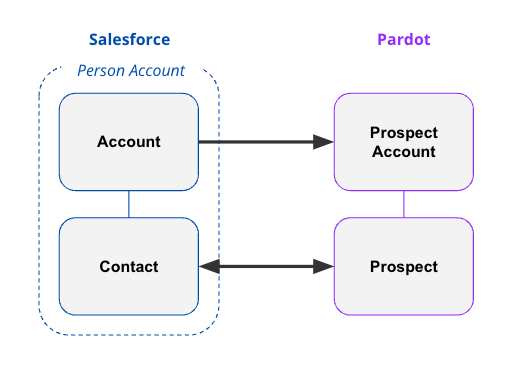
The important thing to note here is that a Person Account is like two kids in a trenchcoat, Account & Contact, wearing a sign that says Person Account. In the backend of Salesforce, there is a Contact record and an Account record that are combined to show you the single Person Account record.

Great, but what about Marketing Cloud Account Engagement?

Now that we’ve got the initial details out of the way, it’s time to talk Person Accounts with Marketing Cloud Account Engagement. Just like in Salesforce, once you enable syncing with Person Accounts in Account Engagement you are not able to disable it. Additionally, when you sync a Person Account record with Account Engagement you’ll get a Prospect record and  a Prospect Account record which will remain separate in Account Engagement (more on that later). The Prospect record will impact your mailable database number, but there are not any Prospect Account data limitations that you need to keep in mind.

Account Engagement Setup Options

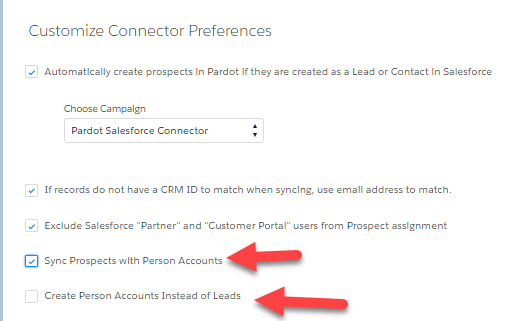
When I first started out as a consultant, syncing Person Accounts with Pardot Account Engagement required reaching out to Salesforce Support to have the feature enabled. With recent updates to the Account Engagement Settings options, Admins are now able to turn on “Sync Prospects with Person Accounts” from within the setup menu. 

Create Person Accounts on Assignment (instead of Leads)

In addition to enabling the option to sync Prospects with Person Accounts, you’re also able to tell the system to “Create Person Accounts Instead of Leads”. Turning this functionality on will tell the system to never create a lead when sending a Prospect to Salesforce and is irreversible. This is a good option if you never use leads, however if your organization does use leads or you are using both Business Accounts and Person Accounts you should leave this setting turned off.
Syncing Records Between Salesforce and Account Engagement

One of the biggest considerations with Person Accounts is how you set up your fields in Salesforce and in Account Engagement. Most of the Salesforce literature will tell you to create new custom fields on the Account record to have them added to the Person Account record and page layout. There’s nothing wrong with this setup, however if you’re going to be syncing Person Accounts with Pardot Account Engagement you should keep the Salesforce Connector sync directions in mind. 
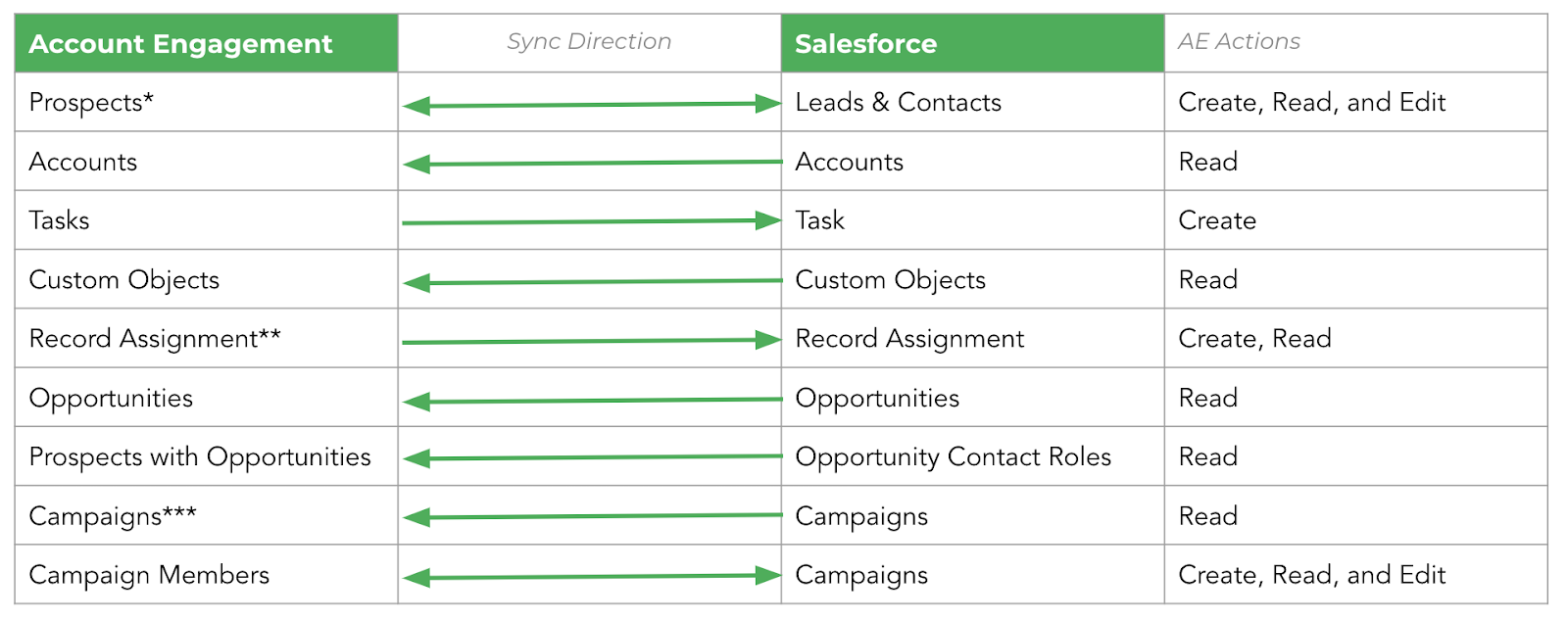
The Salesforce Connector for Account Engagement has Read & Write permissions for the Lead and Contact objects in Salesforce, and Read Only permissions for the Account object. 

If you’re just starting out with Person Accounts in Salesforce, my recommendation is that you create any custom fields that you’ll want Account Engagement to be able to change on the Contact object in Salesforce. This will mean that when creating your custom field in Account Engagement, you’ll be able to do so on the Prospect object and use the standard Salesforce Connector sync options. If you have custom fields for the Person Account already created on the Account object in Salesforce, check out the section on automations below for how to keep these fields in sync.

In the Account Engagement system, the Prospect record that is synced with a Person Account will show the Prospect Name and Prospect Account as the same name. The Prospect record will have any Contact level fields you have added to Account Engagement showing, as well as a Record Type ID of a Person Account. The Prospect Account page will show you any Account level fields you have added to Account Engagement (remember, these are Read Only fields). Both the Prospect and Prospect Account records will show the owner as the Account Owner from Salesforce.
Other Gotchas to Know About

Person Accounts do not support scoring categories in Account Engagement, so if that’s a major player in your marketing strategy, you may need to think about other ways to achieve your goals. In addition to this, the Person Account will only sync to a single record type (the Person Account record type). 

Finally, the Prospect Owner will always be the Account Owner in Salesforce. Crucially, this owner cannot be assigned from Account Engagement as we do not have write permissions to the Account record via the Salesforce connector.

Automations for Data Integrity

My earlier recommendation of creating any custom fields that you’d like to be updated by Account Engagement should be created on the Contact record in Salesforce. But what if you’ve already created custom fields on the Account level that you need to update and keep in sync in the Account Engagement system? 

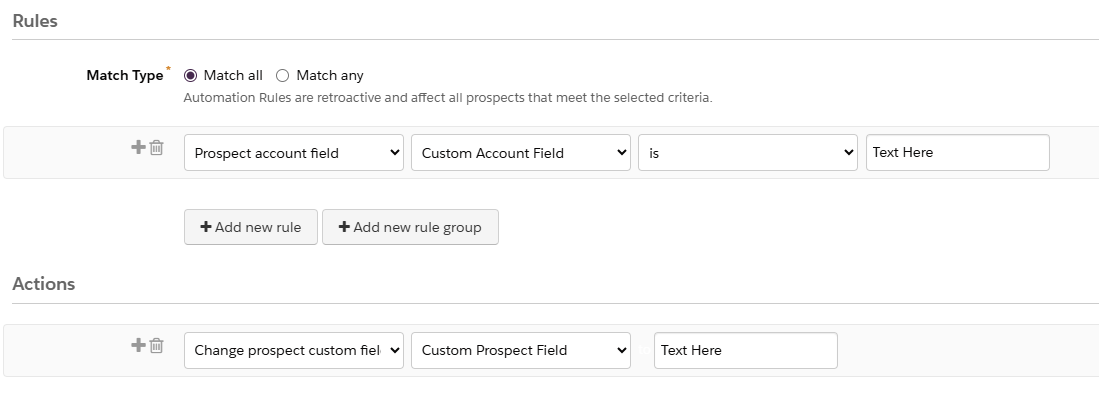
The best practice here is to create custom fields on the Prospect record in Account Engagement to hold this information, then create Automation Rules to keep it in sync with Salesforce. This will ensure that custom field information appears at the Account and Prospect levels and keeps bi-directional sync on the Prospect records active.
Enable Person Accounts without Fear

Did I write this entire blog post to get my dog’s photo online? Maybe, maybe not. But I did write this post after helping to answer questions about implementing Person Accounts in Pardot Marketing Cloud Account Engagement many, many times. I, too, used to be filled with trepidation at the idea of using Person Accounts both in Salesforce and in Account Engagement. 

Once I understood the fundamentals of how this functionality works in both systems, I felt a lot more confident about getting this set up for clients in multiple business types. I hope this blog post helps you to feel more comfortable with this setup yourself! If you’ve still got questions, comment below or reach out to the team at Sercante and we’ll see how we can help.


I don’t usually use the word transformational when discussing content blocks for an email, but this one deserves it. Recently, our team at Sercante had the opportunity to partner with one of our long-term automotive clients to find a solution to a big problem—overstocked inventory. 

This project began like many others. An innovative, creative brand trying to bridge the gap between what customers want and what they can have. Buyers were spending time configuring their perfect vehicles, carefully choosing every option and detail, and then either abandoning their cart or waiting months for the car to be built.

What they didn’t realize was that their dream car, or something close to it, was already built. Already available for them. Already on the lot. It just wasn’t being shown to them.

The Problem: They Had the Cars, But No One Knew

The brand had a recommendation engine on their website, which enabled customers to browse their available inventory. However, this only happened if a customer actively sought it out. Meanwhile, their emails weren’t showing in-stock options, but rather driving them to the configurator to design their vehicle. The inbox experience focused on brand, features, and specs, but not on availability.

There was a disconnect between digital engagement and physical inventory. And it was costing time, resources, and ultimately, conversions. Through several brainstorming sessions and collaborative work, we had to ask ourselves what would happen if we started surfacing what customers could get today?

The Approach: Make the Data Work in Email and Web

Working with the brand’s Salesforce team, we built a dynamic content block that connects their existing vehicle recommendation API with Salesforce Marketing Cloud. At send time, the block pulls in the top two vehicles available near each subscriber’s zip code.

That means:

  • Real-time pricing and availability
  • Personalized images and trim-level specs
  • A “View Details” CTA that drives them to the inventory page
  • And dynamic scripting to auto-generate it all without a manual lift

The block works anywhere—in journeys, newsletters, promotions, event invitations, and more. We added fallback logic, Einstein Send Time Optimization, and throttling to ensure performance even for high-volume sends. We evaluated alternative approaches, such as daily lookup tables, but for this use case, true real-time was worth it. It wasn’t just about showing inventory, it was about giving the customer a path forward. 

What Happened Next

This shift didn’t just make the email more useful. It changed how the brand saw its role in the customer journey and the results showed the impact:

  • Click-through rates on the monthly newsletter more than doubled from 1.02% to 2.26%.
  • Journey emails with the content block saw a 119% higher click-through rate in A/B testing.
  • Build time dropped from over 40 hours for their monthly newsletter campaign to 10 hours.
  • The time to purchase fell from 107 days to 5 days, and their inventory began to decline.

And, perhaps most importantly, the marketing team began thinking differently. The inbox became a place of momentum. Of relevance. Of action. As their marketing director put it, “This helped us rethink how we use email. Not just to inform, but to move customers forward in their journey.”

Check out the full case study related to this customer story here

Going Beyond Automotive

This isn’t just a car story. If you’re in an industry with inventory, long buying cycles, or complex consideration paths, this kind of approach has ripple effects:

  • Are you surfacing what’s ready now or just what’s aspirational?
  • Are your marketing channels connected to real-time availability?
  • Are your emails helping customers act, not just learn?

We’re all sitting on data that can do more. It’s not about overwhelming customers. It’s about removing friction, aligning on timing, and making it easier to say yes.

This project reminded me that sometimes the most effective marketing move isn’t adding more. It’s making what you already have more visible. Your customers don’t need a better configurator. They need a clearly defined next step. Let’s give them one.
If you’d like an expert’s insights on how to maximize the data you have to build more personalized experiences for your audience, that result in clear next steps and impact on the funnel, reach out to Sercante. The team is all about helping you create seamless experiences for your team and your customers.

Product Note: Marketing Cloud Growth and Advanced are editions of Marketing Cloud Next and have also been referred to as Agentforce Marketing.

Marketing Cloud on Core (also known as Marketing Cloud Growth or Advanced Edition) can now track how marketing efforts contribute to revenue! With the Spring ‘25 release, Salesforce introduced Opportunity Influence, helping businesses connect marketing engagement to pipeline and revenue. But how does it work, and what’s the difference between Opportunity Influence and Campaign Influence? Let’s dive in!

Opportunity Influence vs. Campaign Influence: What’s the Real Deal?

Before we break down how to customize and report on Opportunity Influence, let’s clarify how it differs from Marketing Cloud Account Engagement’s Customizable Campaign Influence. While both models aim to connect marketing efforts to revenue, they function in distinct ways and serve different use cases. 

FeatureOpportunity InfluenceCampaign Influence
Data SourceMarketing Cloud Engagement (emails, ads, automation, etc.)Salesforce Campaign Membership
Influence ScopeTracks engagement across multiple touchpointsTracks Leads/Contacts who are Salesforce Campaign Members
IntegrationSyncs Marketing Cloud engagement data to Salesforce OpportunitiesWorks within Salesforce CRM using Campaigns and Opportunities
Attribution ModelsMulti-touch attribution (first-touch, last-touch)Campaign Influence and Customized Models
Reporting & InsightsMeasures marketing-driven revenue impactMeasure campaign-driven revenue impact

🚨 Important Note for Account Engagement Users 🚨

You cannot use Opportunity Influence alongside Customizable Campaign Influence. If your team already relies on Account Engagement’s Campaign Influence Models, keep this in mind when deciding which model to use.

Additionally, Account Engagement users cannot activate Opportunity Influence as it does not currently integrate with Account Engagement’s Campaign Influence model. If your organization currently tracks marketing-driven revenue using Campaign Influence reports, you’ll need to continue using that model. However, if you’re considering a shift to Marketing Cloud on Core, Opportunity Influence could offer enhanced multi-touch attribution and engagement tracking.

Battle of Influences: Campaign vs. Opportunity – Which One Wins?

Let’s say you’re running a B2B software company and you’ve executed multiple marketing campaigns using a variety of platforms, including ads, email, an e-book, and a webinar, to engage your prospects.

  • Campaign Influence: A prospect attends the webinar, clicks on an email, and downloads the e-book before being transitioned to sales as a marketing-qualified lead. These interactions are recorded under a Salesforce Campaign and can be manually associated with the Opportunity when created based on the Opportunity Contact Role and Campaign Member. You can assign influence weight based on your customized rules.
  • Opportunity Influence: Marketing Cloud on Core automatically tracks all marketing engagement, including the ad view and click, webinar attendance, and e-book download. These touchpoints are automatically associated to attribute influence based on the predefined model and associated to the Opportunity upon creation.

If Campaign Influence were a fine-dining experience, it would be a chef-curated meal—meticulously crafted with manual customization to fit your exact taste. You decide which interactions get the most credit, but it requires hands-on effort. On the other hand, Opportunity Influence is like an all-you-can-eat buffet with an expert chef behind the scenes. It automatically dishes out credit across touchpoints, giving you a full spread of marketing influence with minimal effort. If you love precision and control, Campaign Influence is for you. But if you want a seamless, automated view of your entire marketing impact, Opportunity Influence takes the crown.

How to Set Up Opportunity Influence

Setting up Opportunity Influence requires configuration in Sales Cloud to ensure marketing engagement is properly attributed to revenue-generating activities. To fully connect marketing efforts with sales outcomes, ensure that contacts engaging with marketing campaigns are linked to Opportunities. This allows for accurate tracking of marketing interactions that influence deals.

Enabling Opportunity Influence

  1. Navigate to Salesforce Setup > Opportunity Influence
  2. Enable Opportunity Influence
  3. Select an Attribution Model
    • First-Touch: Gives full credit to the first marketing engagement that led to the opportunity. It’s ideal for understanding which top-of-funnel efforts drive initial interest.
    • Last-Touch: Assigns full credit to the last marketing interaction before the opportunity was created. It helps measure the final push that converted a lead into an opportunity.

Going Beyond Activation

Customization is key to maximizing Opportunity Influence. Marketers should align influence models with their sales cycle, ensuring critical marketing touchpoints, such as email engagements, paid ads, and automation journeys, are correctly captured. Because Opportunity Influence consumes Data Credits, it’s essential to be strategic when enabling multiple models to avoid unnecessary credit usage.

Making Sense of Your Data: Reporting on Opportunity Influence

Once Opportunity Influence is enabled and tracking data, you can start reporting on marketing’s impact. The key to unlocking valuable insights is leveraging Salesforce’s Reports & Dashboards to tell a clear story about how marketing drives revenue.

Your Treasure Map to Salesforce Reports & Dashboards

  • Head over to Salesforce Reports and search for Opportunity Influence Reports. This is your go-to hub for seeing which marketing touchpoints are helping close deals.
  • Get specific with your insights! Use filters to refine reports by timeframe, campaign, or opportunity. Want to know which emails led to the most revenue? Adjust your filters to see the impact.
  • Create Salesforce Dashboards to visualize Opportunity Influence. Need a quick snapshot for your leadership team? Build an easy-to-read chart that shows exactly how marketing is fueling revenue.

The Ultimate Guide to Opportunity Influence Report Types

Salesforce provides several built-in report types to help you analyze how marketing efforts contribute to revenue. Here are the key report types you can use:

  • Opportunity Influence Summary Report – This high-level report shows how marketing engagements are influencing revenue across all opportunities. Use it to track overall marketing impact.
  • Opportunity Influence Detail Report – A more granular report that breaks down individual touchpoints per opportunity, allowing you to analyze which specific marketing interactions played a role in closing deals.
  • Influence Attribution Model Comparison Chart – Compare first-touch and last-touch models side by side to see which one provides the best insights for your marketing strategy.
  • Marketing Touchpoint Analysis Report – Identifies which marketing channels (email, ads, website visits, etc.) are contributing the most to opportunity creation and pipeline growth.

By setting up and analyzing Opportunity Influence reports, marketing teams can gain deeper insights into which touchpoints matter most, optimize their strategies accordingly, and confidently demonstrate their return on investment.

Why Opportunity Influence is a Game-Changer

Opportunity Influence is a must-have tool for any marketing team looking to measure true revenue impact. No more guessing which emails, ads, or landing pages are driving pipeline – Opportunity Influence connects the dots, giving you a clear picture of how marketing fuels business growth. With built-in attribution models, you can customize insights based on what matters most to your strategy.

Whether you’re aiming to prove marketing ROI, optimize your campaigns, or align better with sales, Opportunity Influence provides automated, data-driven attribution that simplifies reporting and enhances decision-making. If you want better visibility into marketing’s role in revenue generation, this feature is your new best friend!

💡Next Steps:

  1. Check your org to see if the new update is available.
  2. Test Opportunity Influence tracking before rolling it out company-wide.
  3. Monitor data service credit usage if you’re using multiple attribution models.

📣 Want to learn more? Check out the full Spring ‘25 release highlights or dive into the official release notes.

🚀 What are your thoughts on Opportunity Influence? Drop a comment below, and let’s discuss!

For fundraising-focused nonprofits, the challenge of tracking campaigns, engaging donors, and optimizing strategy can be overwhelming. Many nonprofits don’t realize that Salesforce Campaigns—often associated with marketing — are also one of the most powerful tools for fundraising.

In this post, we’ll explore how leveraging Salesforce Campaigns and a strategic Campaign Hierarchy can streamline your fundraising, improve constituent engagement, and enable data-driven decisions to maximize impact.

What are Salesforce campaigns, and why are they valuable for nonprofits?

Salesforce Campaigns are a versatile feature within the Salesforce Data Model, allowing organizations to track fundraising initiatives with the same level of detail that many associate with marketing. Campaigns are particularly useful for nonprofits because they allow organizations to organize, monitor, and analyze fundraising efforts.

Using Account Engagement? Read about the advantages of using Salesforce and Pardot connected campaigns in this blog post from Nick Loeser.

Benefits of Using Salesforce Campaigns for Fundraising

Here’s how Salesforce campaigns can help with fundraising efforts for nonprofits.

Track Funds Raised Across Campaigns

By using Salesforce Campaigns, nonprofits can directly associate dollars raised with specific appeals, campaigns, or events.

Gain Insights into Donor Engagement

Salesforce Campaigns enable organizations to see which constituents engage with various fundraising efforts.

Make Data-Driven Decisions

With clear data on the effectiveness of each campaign, nonprofits can focus on the strategies that drive the best results.

Building a Campaign Hierarchy for Fundraising Success

A Campaign Hierarchy is like an organizational chart for your fundraising efforts. Each level represents different campaigns or appeals, structured in a way that allows you to aggregate or drill down into specific data based on need. This structure provides a “big picture” view and the flexibility to analyze campaign performance at granular levels.

Key Steps to Design Your Campaign Hierarchy

To create a Campaign Hierarchy that aligns with your fundraising goals, start by asking yourself these critical questions:

  1. What Are Your Organization’s Recurring Fundraising Efforts? Identify consistent, repeating campaigns, like quarterly appeals or specific annual events. These will form the foundational tiers in your hierarchy.
  2. What Is the Timing and Frequency of Each Effort? Consider how often each campaign or appeal occurs. For example, an annual fund may include multiple campaigns, such as end-of-year and quarterly appeals.
  3. Do Certain Periods Include Multiple Campaigns? Some fundraising periods may include various appeals, each targeting different audiences or using different methods (e.g., direct mail, online ads). Structuring these as child campaigns under a “parent” campaign (like “Year-End Giving”) allows you to track each specific effort while also reviewing total results.
  4. Who Are the Campaigns Targeting? Determine whether campaigns are reaching general audiences or specific segments, such as major donors. For general campaigns, you may skip campaign members, but for targeted campaigns, tracking engagement with specific constituent segments can provide valuable data on who responds to what.

Tips for Designing Your Campaign Hierarchy

  • Visualize your structure. Use tools like Lucidchart, a whiteboard, or even pen and paper to sketch your hierarchy before building it in Salesforce. Read Jenna Molby’s blog post on organizing Salesforce campaigns here.
  • Cross-check with stakeholders. Ensure your Campaign Hierarchy aligns with other departments’ needs for data reporting and access.

Steps to Set Up Your Campaign Hierarchy in Salesforce

Once you’ve mapped out a Campaign Hierarchy, it’s time to implement it in Salesforce. Here’s a step-by-step guide:

  1. Start with the top-level campaign. Begin with a broad, overarching campaign, such as a year-based or major donor-focused campaign, and then add more specific levels.
  2. Add sub-campaigns for specific appeals. For instance, if you’re A/B testing different mailers, create individual campaigns for each version. Include Campaign Members to track the results for each segment.
  3. Review and reassess annually. Your initial hierarchy may need adjustments as campaigns evolve. Plan to review your structure annually to ensure it still aligns with your fundraising goals and strategies.

Maintain and Optimize Your Campaign Hierarchy

To get the most out of your Campaign Hierarchy, schedule regular maintenance. After a year of active campaigns, sit down with your stakeholders to evaluate the performance and structure.

Are there campaigns to add or remove? Have certain appeals gained traction while others have not?

Use this time to update your hierarchy so it stays relevant and effective.

TIP: Check out this Salesforce Campaign Hierarchy Report blog post from Theron Troxel on how to create a Salesforce report to show the impact of related campaigns within a campaign hierarchy.

Get strategic with your fundraising campaigns

Salesforce Campaigns offer nonprofits an organized, data-driven way to approach fundraising. With a well-thought-out Campaign Hierarchy, your organization can see which campaigns resonate with donors, track funds raised, and make decisions based on real-time data.

Ready to create a streamlined, impactful fundraising strategy? Reach out to us at Sercante to discuss how we can help you set up or optimize your Salesforce Campaign Hierarchy!

Product Note: Marketing Cloud Growth and Advanced are editions of Marketing Cloud Next and have also been referred to as Agentforce Marketing.

During the Marketing & Commerce Keynote at Dreamforce 2024, Salesforce announced the latest edition of Marketing Cloud built on Data Cloud  — Marketing Cloud Advanced Edition! Expected to be released in November 2024, this new edition expands the features and functionalities of Marketing Cloud Growth Edition, released in February of this year. 

What Comes with Advanced Edition?

Let’s dive into what Marketing Cloud Advanced Edition brings to the table. 

Path Experiment

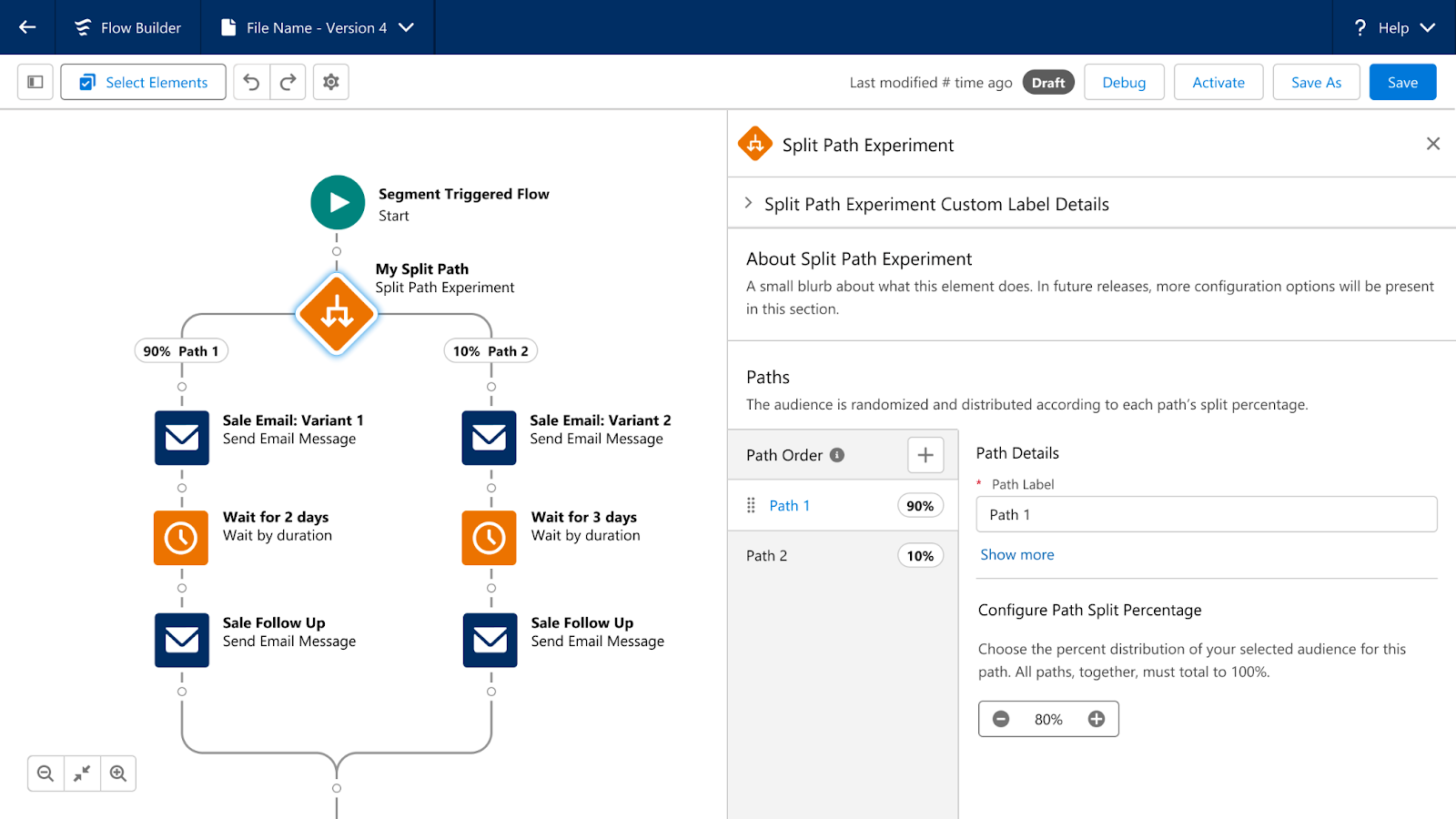
Path Experiment allows Marketers to maximize engagement with your audience through testing. This new feature allows marketers to test variations within marketing content, such as different subject lines, variations in channels, such as sending an SMS instead of an email, and even variations in cadence, such as sending an email in 3 days versus 1. Path experiment allows marketers to test up to 10 paths within a single experiment, customize the distribution percentage across the paths, and automatically randomize individuals between the paths to help ensure fair, unbiased results. There is no limit to the number of Path Experiments that can be included in one Flow. 

Marketing Cloud Advanced Edition - Path Experiment

Einstein Engagement Frequency 

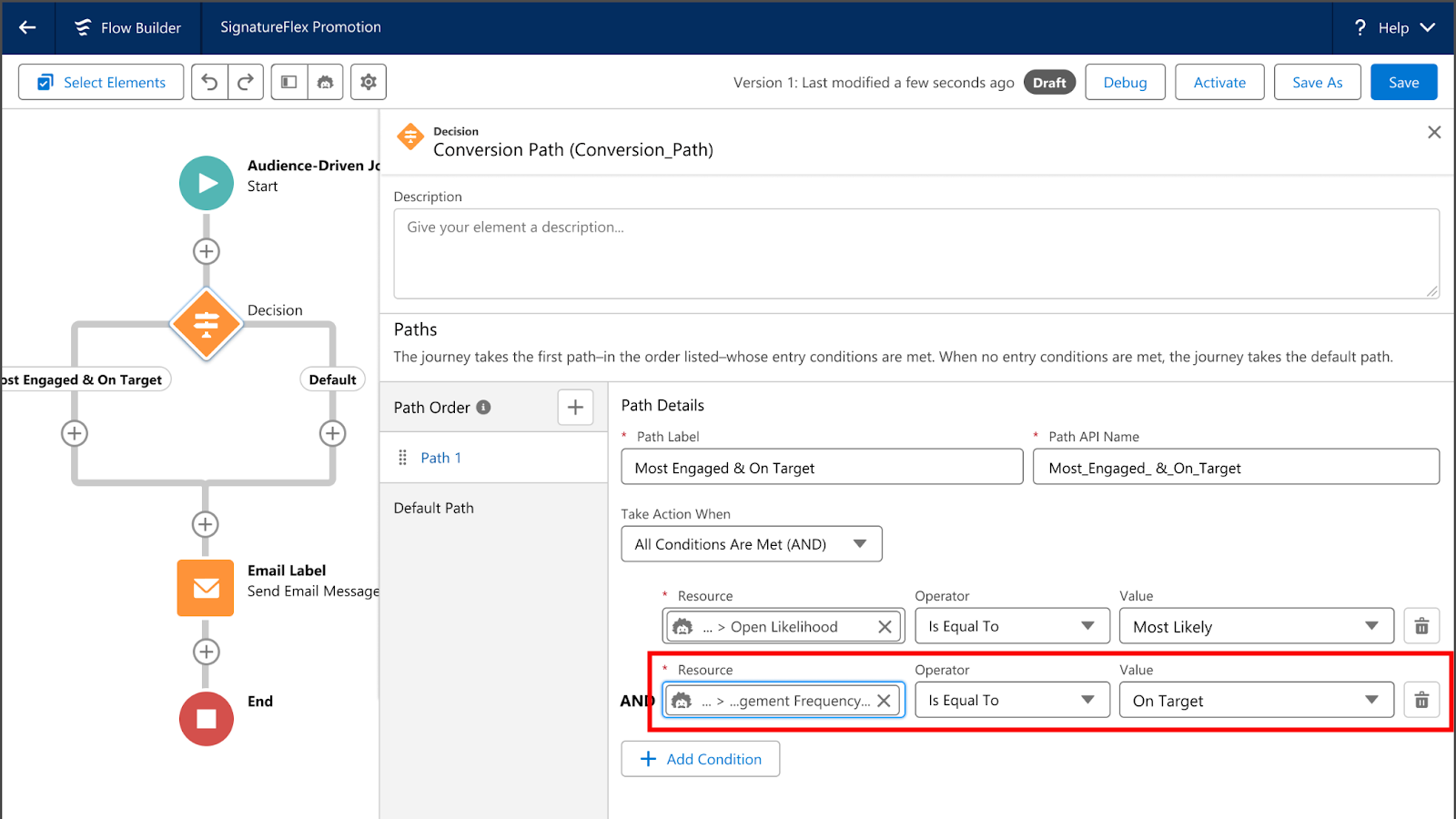
Einstein’s capabilities will also be expanded in Marketing Cloud Advanced Edition. First, we have Einstein Engagement Frequency which assists Marketers in sending the right number of messages to their audience. Einstein Engagement Frequency provides insights into the distribution of email sends and subscriber engagement, suggesting the optimal frequency to maximize engagement. This data can then be used to create segments, allowing marketers to suppress or target subscribers who are over or under-saturated. 

Marketing Cloud Advanced Edition - Einstein Engagement Frequency 

Einstein Engagement Scoring

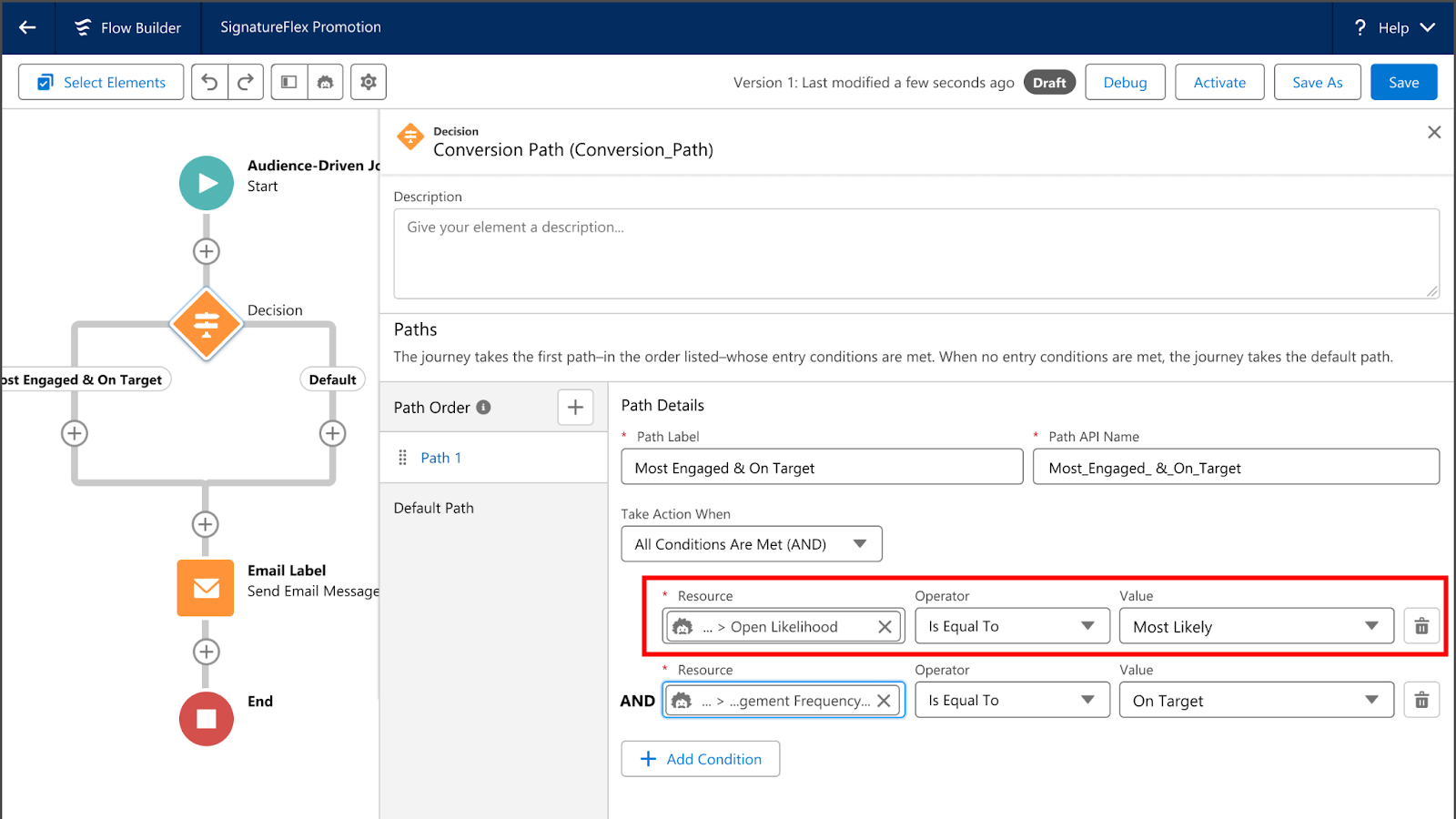
Next, we have Einstein Engagement Scoring, which helps predict how likely each subscriber is to open, click, and stay subscribed to an email communication. Einstein Engagement Scoring’s data can be used to create segments, send subscribers down different Flow paths, or even help personalize content more effectively. 

Marketing Cloud Advanced Edition - Einstein Engagement Scoring

Unified Conversations with SMS

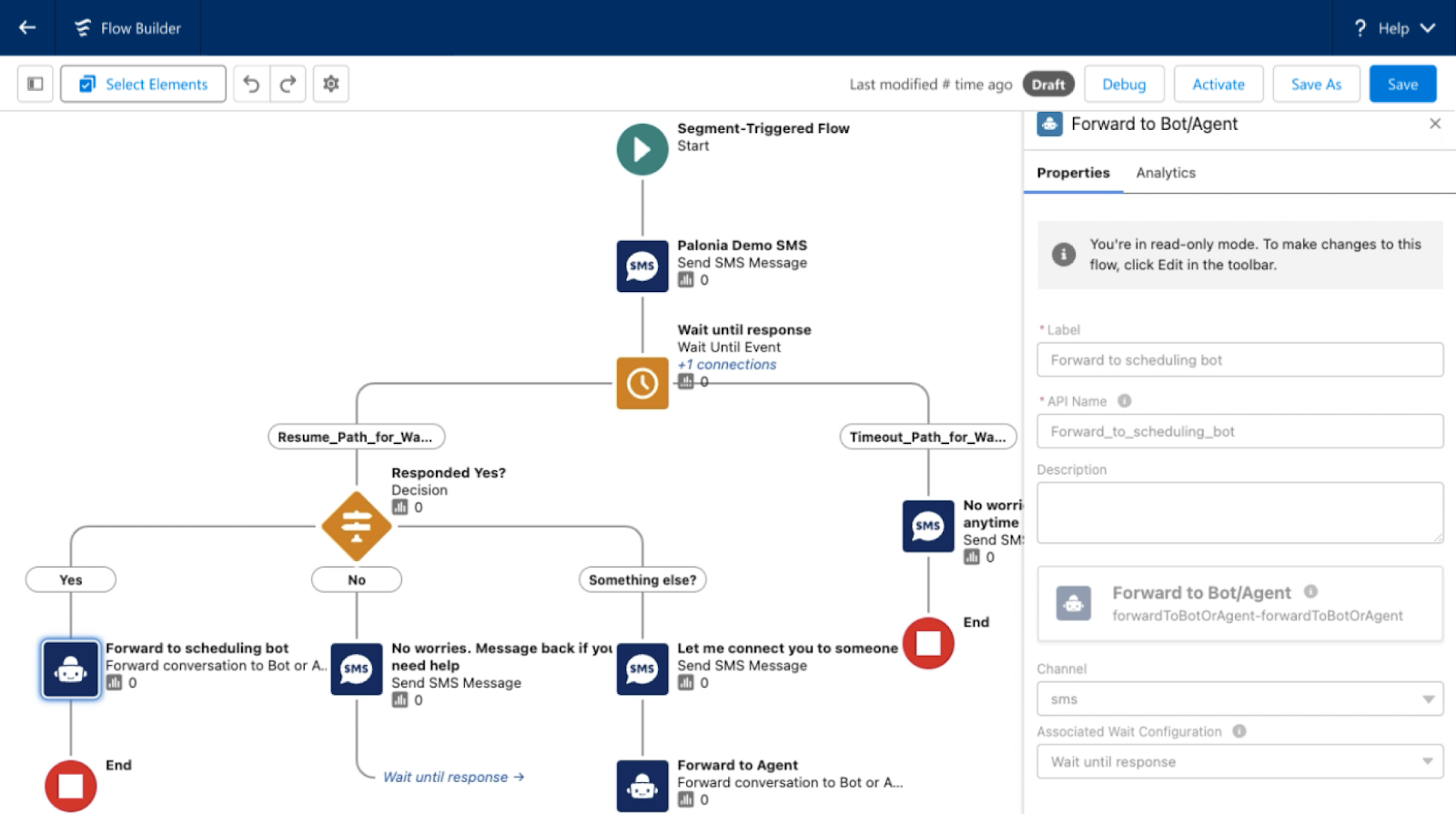
With the new Digital Engagement add-on, Marketing Cloud Advanced Edition enables marketers to transform one-way promotions into a conversation with their audience. Marketers can respond to messages in real time using the unified customer data within Data Cloud and automate interactions with connected chatbots. 

Marketing Cloud Advanced Edition - Unified Conversations with SMS

Looking Toward the Future

What other features and functionality would you like to see Salesforce bring to Marketing Cloud Growth or Advanced Edition? Let us know in the comments!

Product Note: Marketing Cloud Growth and Advanced are editions of Marketing Cloud Next and have also been referred to as Agentforce Marketing.

Like many people in the Salesforce ecosystem, you may be intrigued by the announcement of Marketing Cloud Growth Edition — especially since access to the platform is available to current Marketing Cloud Account Engagement (Pardot) users on the “Growth Edition” tier. However, a key differentiator between the platforms is that Growth Edition gives marketers access to Data Cloud credits.

In this post, we’ll explain how Account Engagement users can tap into those Data Cloud credits through Growth Edition, the differences between both platforms’ billing models, and strategies for marketers to follow while using Data Cloud credits.

Understanding the Consumption-Based Billing Model

Whether you’re a marketer, an operations manager, an admin, or something in between, there’s a lot to look forward to as functionality moves into Salesforce core. For example, consider the flexibility of segmentation with Data Cloud and leveraging Einstein AI to supercharge your campaigns. 

As you start to explore this toolset and feature set, however, there is an important mindset shift in the structure of the product to be aware of.

Like Data Cloud, Marketing Cloud Growth Edition is a consumption-based toolset. That means your team’s feature usage within the platform determines how many credits are used and what your organization will pay each billing cycle.

Back up a second — Account Engagement has usage limits, too?

Yes, Account Engagement has certain feature limits. If you’re an admin, you’re probably familiar with navigating to the usage tab and checking your mailable prospect database or how many repeating engagement studios you have in play (if you’re not, check out our blog post on monitoring your mailable database). 

How does the Account Engagement billing model differ from Growth Edition’s?

Outside of total mailable database count and feature limits based on your edition, segmentation and email sending are generally open season for users. Dynamic lists can be run and emails can be sent to your heart’s content. 

The Einstein toolsets available in the more premium editions of the platform also generally run for the whole database and have no specific consumption considerations.

In comparison, Marketing Cloud Growth Edition is structured so there are credits for many of the core actions taken. This aligns with the structure of Data Cloud, which serves as the segmentation engine for Growth campaigns. 

Marketing Cloud Growth Edition Standard Credits

For new setups of Growth Edition, these are the standard credits provisioned:

  • 10K Marketing Unified Profiles
  • 240K Data Cloud Credits
  • 10K Segment and Activation Credits
  • 1TB Data Cloud Storage
  • 180K Emails/year
  • 20K Einstein Co-Create Requests for email content generation

These numbers may depend on your edition and specific agreement with Salesforce, and all of these areas can be extended with additional credits

Other business segments may have Data Cloud

Also worth considering — Data Cloud is not solely a marketing tool, and Data Cloud may already be in use by other divisions of your organization. But don’t fret, that’s a good thing!

A key benefit of the toolset and moving to Growth is gaining the ability to align customer experience processes across all departments.

Is there an easy way to monitor my consumption-based credits?

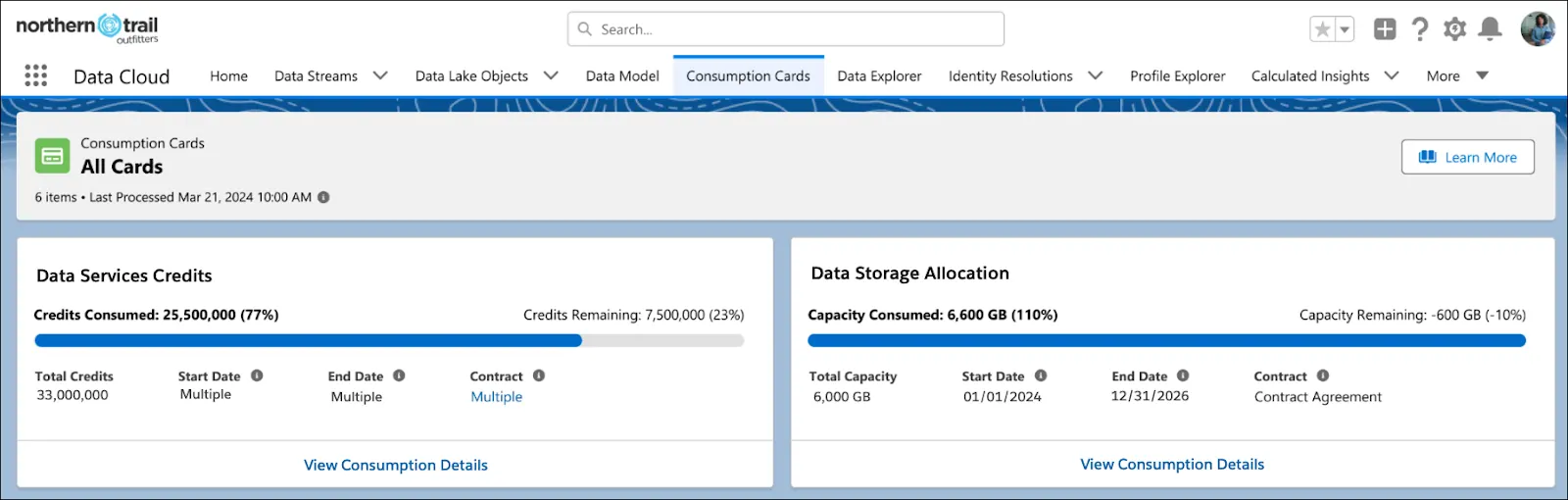
Glad you asked! Yes, Salesforce released a feature called Digital Wallet to help admins keep track of consumption-based tools.

The Consumption Card tab can be accessed by users with appropriate permissions and provides an overview page to monitor credit usage.

This page also includes access to insights that help you understand how usage is trending over time and where you might need to plan for expansion.

How do I go about strategically using these? What is a “credit” worth, anyways?

Different considerations are at play for different consumption metrics within Marketing Cloud Growth.  Email send credits and Einstein Co-Create credits are relatively straightforward — the total number of emails launched and uses of AI copy generation for the content, respectively. 

Where complexity lies is the data harmonization and segmentation process in Data Cloud and credits needed there — calculated based on rows in your database used and processed for different actions.

You can see a more detailed breakdown of the calculations here

Data Cloud Credit Usage Examples for Growth Edition Marketers 

In practice, these areas are likely where a marketer will consume Data Cloud credits.

Data Harmonization and Unified Individuals

  • Target Audience: As opposed to “prospects” within Account Engagement, users create segments in Data Cloud for Marketing Cloud Growth Edition campaigns via Unified Individual profiles.

    Instead of 1:1 syncing with a lead or contact, these unified profiles can link multiple data sources to create a 360-degree view of the customer, with data from Salesforce and external data sources. 
  • Identity Resolution: To make sure these unified profiles are accurate to your map of data, identity resolution rules are created in Data Cloud to join datasets by the relationships you define.

    The harmonization process this executes does utilize Data Cloud credits, so data complexity here can affect the requirements for this process. Learn more about the process in this Trailhead!
  • Growth Edition also includes a set of features for incorporating consent per channel into this profile, determining whether the individual can be sent communications and helping you maintain privacy and compliance for your audience.

Pulling and Refreshing Segments

  • Segment Creation: When you create a new segment or modify an existing one, Data Cloud Credits are used to execute the data queries that define the segment criteria. This process involves filtering and aggregating large volumes of data to isolate specific audiences.
  • Segment Refresh: To keep your segments up-to-date, you’ll need to refresh them regularly. Each time you perform a refresh, credits are consumed as the system reprocesses the data to ensure the segment reflects the most current information.

Using Einstein’s AI Capabilities 

Note: this refers to Einstein Features within Data Cloud, not Einstein Co-Create content generation within Marketing Cloud Growth. You can get more on the specific rate consumption for AI models with Data Cloud here.

  • Predictive Scoring: Einstein AI can analyze historical data and predict future behaviors. Utilizing predictive models or scoring capabilities consumes Data Cloud Credits based on the complexity and volume of data processed.
  • Recommendation Engines: Whether you want to personalize content or recommend products, Einstein’s recommendation engines leverage AI to analyze user behavior and preferences. This process also requires Data Cloud Credits, reflecting the computational resources needed for these advanced features.
  • Automated Insights: Einstein provides actionable insights and analytics by examining trends and patterns within your data. Accessing these insights involves credit consumption, especially when dealing with extensive datasets or detailed analyses.

How to make the most of your Data Cloud credits

To make sure you’re using Data Cloud as efficiently as possible, keep the following considerations in mind.

  • Efficient Querying: Optimize your segment queries to be as efficient as possible. Reducing the complexity of queries or breaking them into smaller, more manageable tasks can help conserve credits.
  • Scheduled Refreshes: Instead of frequent manual refreshes, schedule them during off-peak times or based on data needs. This reduces unnecessary credit usage while ensuring segments remain accurate.
  • Strategic AI Usage: Use Einstein’s AI capabilities strategically. Prioritize features that deliver the most value for your marketing goals and ensure that the credit expenditure aligns with your objectives.
  • AI Models Management: Regularly review and refine AI models to maintain their accuracy and relevance. Properly trained models can yield better insights, maximizing the return on your credit investment.

Take advantage of the consumption-based model to understand what you’ll need as you scale

Hopefully, this gave you a good introduction to the concepts needed to monitor and understand credit usage as you consider using Marketing Cloud Growth Edition and Data Cloud alongside Account Engagement.

 Don’t let this scare you off — while there are new concepts to learn, the toolset opens possibilities for marketers ready to use data to create the best possible customer experience and segmentation. 

As the “Growth” name implies, it sets your business up for cost-efficiency in the short term and scalability in the long term. As you continue to scale and incorporate new data sources and channels, there’s a more defined method to ingest this data, improve your personalization, and predict the impact to your costs over time. 

As you explore more, please check out our FAQ article on Marketing Cloud Growth or send us a message if you have any other questions.

No more posts to show