To be clear, you still need Sales or Service Enterprise Edition to take advantage of this offer. Having just Marketing Cloud does not make you eligible.
Sales and Service Enterprise Edition Customers: What to do about no-cost Data Cloud offer
Now that we’ve clarified any confusion, you might say, “Great, I have Enterprise Edition — I want to get an account provisioned today!” And I would say, “Get prepared first.”
Data Cloud is a game-changer capable of driving remarkable transformation within your organization. Hence, having a well-crafted plan, strategy, and vision in place is paramount.
It’s the basis and foundation of change management — without a plan, vision, consensus, understanding, etc., you might as well stop before you even start.
Speaking from experience, diving into Data Cloud without a clear plan often leads to:
Misconceptions: A perceived lack of product value.
Tension: Without a collaborative mindset, conflicts can arise.
Loss of Momentum: Initial interest and excitement wane over time.
However, before devising a plan, it’s crucial to assess your organization’s readiness.
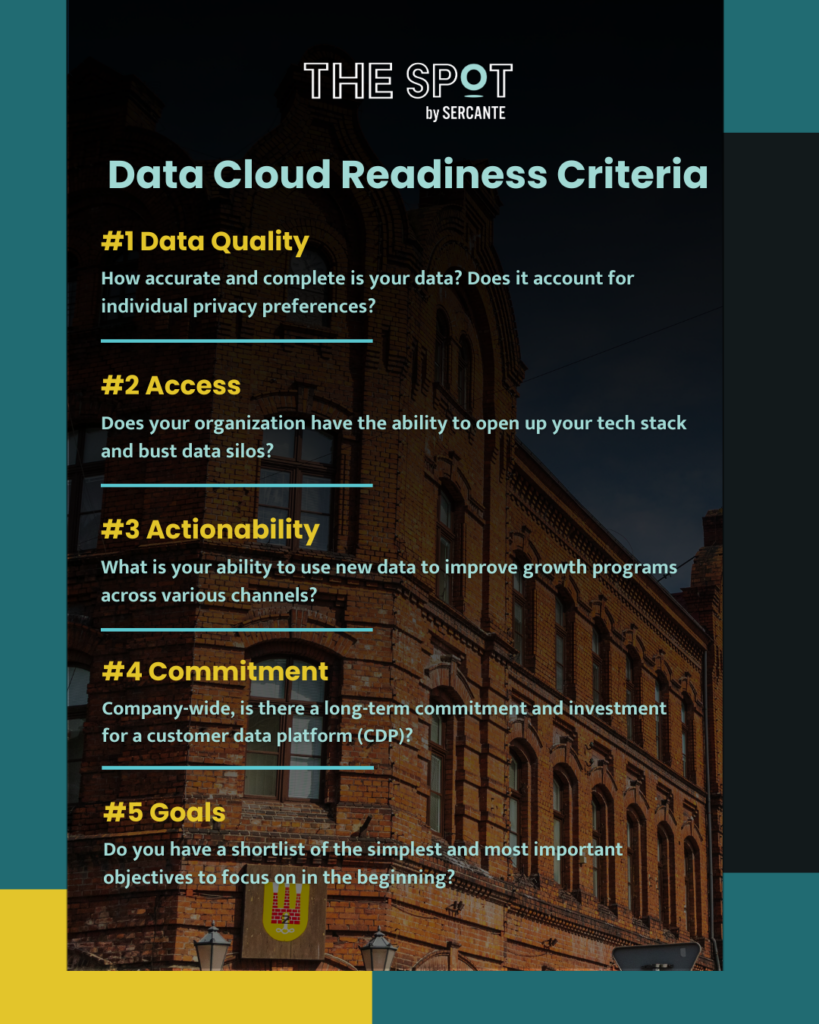
Data Cloud Readiness Criteria
Consider these five key aspects:
Data Quality: How accurate and complete is your data? Does it account for individual privacy preferences?
Access: Does your organization have the ability to open up your tech stack and bust data silos?
Actionability: What is your ability to use new data to improve growth programs across various channels?
Product Note:Marketing Cloud Growth and Advanced are editions of Marketing Cloud Next and have also been referred to as Agentforce Marketing.
Earlier today, Salesforce announced the release of Marketing Cloud Growth Edition. This innovative new product is another option for marketing automation built natively on the Salesforce platform and comes with Einstein Generative AI and Data Cloud out of the box.
You might be wondering: What is this new product, really? What does this mean for the future of Marketing Cloud Account Engagement and Marketing Cloud Engagement? Well, we have answers to help you understand the ins and outs of the platform, what to expect, and what to consider for the near future. Let’s get started!
What is Marketing Cloud Growth Edition?
Marketing Cloud Growth Edition is the culmination of years of Salesforce working to bring marketing automation into the Salesforce platform (also known as “Einstein 1”). This new marketing automation platform allows you to build multi-channel campaigns with the unified customer data of Data Cloud, build personalized marketing assets with the power of Experience Cloud, and automate customer journeys with Salesforce Flow.
Marketing Cloud Growth Edition also includes Generative AI and content approval processes out of the box to help streamline your Marketing efforts.
What does this mean for the future of Marketing Cloud Engagement and Account Engagement?
If you’re an Engagement or Account Engagement customer, you may be thinking “But what does this mean for the future of my product?”
This is what we’re most excited about. Because Marketing Cloud Growth Edition is built on Einstein 1, existing customers of Engagement and Account Engagement will eventually get access to features and functionality introduced to this new product. In addition, Marketing Cloud Engagement and Account Engagement continue to have a robust product roadmap.
Said differently: Marketing Cloud Growth Edition is another option for organizations that want to bring their marketing operations into Salesforce. If you’re a current Engagement or Account Engagement user, you’ll eventually have the option to use Growth alongside your current platform. So, think of it more as an additional set of features that are available to you.
Who is Marketing Cloud Growth Edition meant for?
Marketing Cloud Growth Edition is a logical option for small and medium-sized businesses that are new to the Salesforce platform but aren’t currently using marketing automation tools.
If you’re already using Marketing Cloud Engagement and Account Engagement, then you don’t have to take any action right now. However, watch for future announcements to see when you’ll get access to Marketing Cloud Growth features to use along with your existing tools.
What marketing functionality is included?
Marketing Cloud Growth Edition is feature-rich when it comes to building assets, and the builders provide a flexible and intuitive user experience.
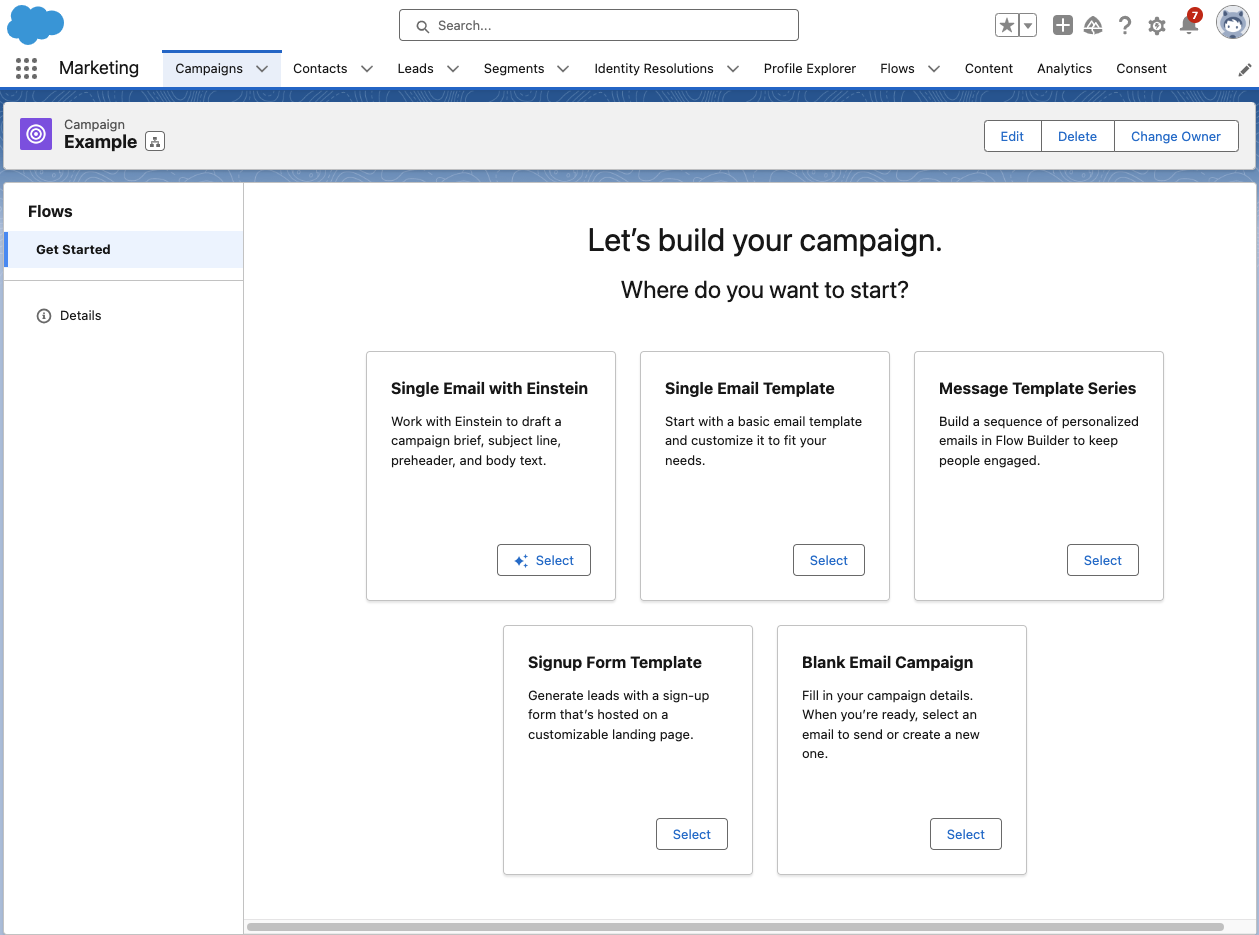
Growth has a campaign-centric workflow and guides users through the process of setting up a new campaign with five pre-set options:
Let’s go through each of these options and what they provide.
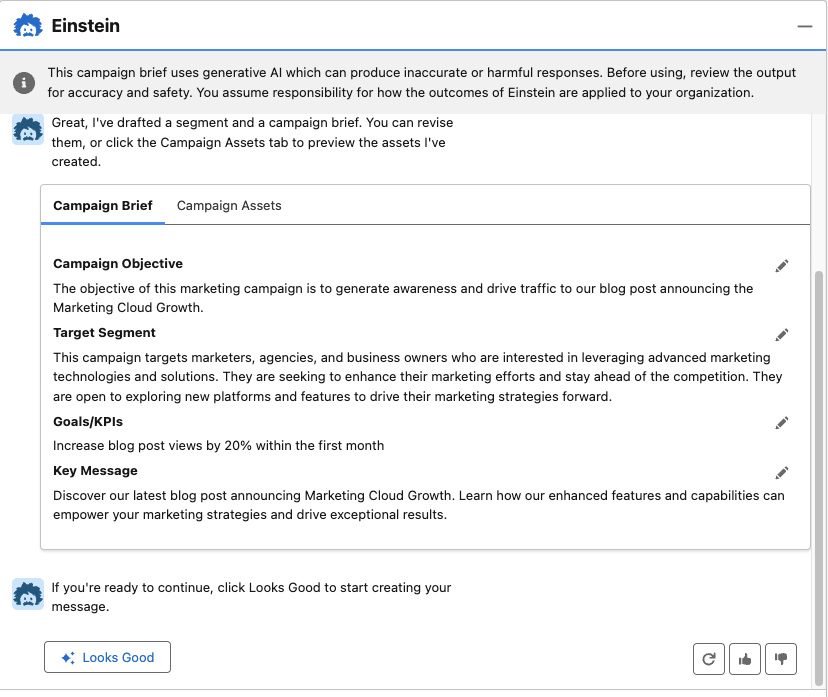
Single Email with Einstein: Build your email campaign using Einstein’s generative AI. With this option, you are prompted to describe your email objective (the more detail the better), and Einstein will generate a campaign brief and campaign assets. With all of the content Einstein provides, you can choose to edit, regenerate, and/or upvote and downvote to help the AI learn how to produce better results.
Single Email Template: Begin with a responsive Salesforce email template that you can customize for your campaign.
Blank Email Campaign: Start completely from scratch. With this option, you’ll need to add/create your email and segment. A Flow with an empty send email element will also be created to help when you’re ready to send your email.
Message Template Series: Begin with two responsive Salesforce email templates that you can customize for your campaign. This option also provides a flow with a 1-day wait step between emails, but you can customize the flow further to fit your email journey.
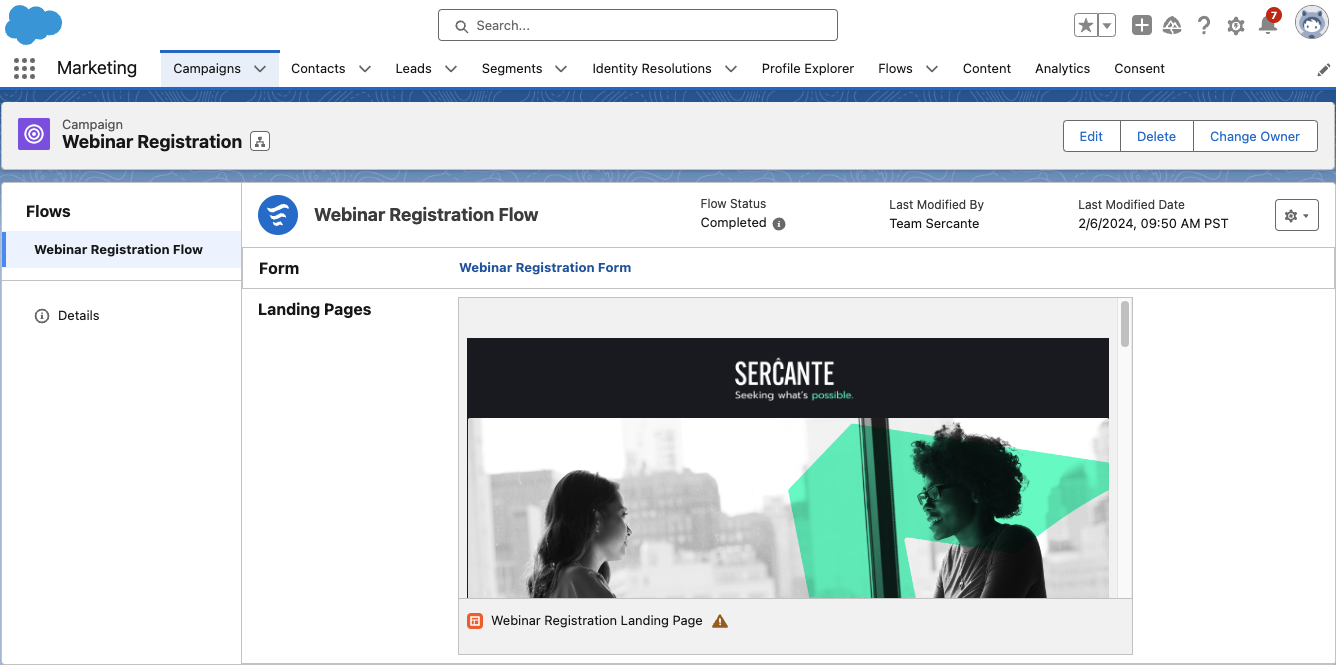
Single Form Template: Begin your campaign with a responsive Landing Page template, form, and a flow to create Leads when the form is filled out.
Building marketing assets with Marketing Cloud Growth
Marketing Cloud Growth’s assets are built with Experience Cloud, enabling users to easily build responsive assets with a drag-and-drop builder. We’ll do a deep dive into each builder in future blog posts, but, for now, here are some highlights to get excited about:
Landing Page SEO capabilities: Landing page public page titles, descriptions, URLs, and even favicons can be customized to improve SEO.
Form flexibility: The form builder is intuitive and flexible, allowing users to easily add text, new sections, dividers, placeholder text, and images to forms.
View required form fields: The form builder also allows users to easily view which fields are required for new Lead/Contact creation to ensure any new records can be created successfully.
Salesforce Flow automation: All assets are automated with Salesforce Flow, allowing marketers to get granular and customize the next steps and follow-up activities for every asset.
Wait step flexibility: Users can set Salesforce Flow wait steps to wait minutes, hours, days, months, or to resume at a specific time.
Asset approval workflow: All marketing assets have an optional approval workflow that you can integrate into your marketing team’s existing approval process flow.
(As I mentioned above, we’ll be doing a deep dive on the builders in subsequent posts — so if you have a question on a specific feature, let me know in the comments!)
Marketing Cloud Growth AI capabilities
Marketing Cloud Growth Edition includes AI out of the box so you can take your marketing initiatives to the next level.
Marketing Cloud Growth Edition AI features include:
Einstein Co-Create: Easily build campaign briefs, email assets, and Data Cloud segments with the power of Einstein generative AI.
Einstein Send Time Optimization: Ensure prospects receive marketing messages on the day and time they are most likely to engage.
Einstein Metrics Guard: Protects your email activity data by filtering out email security scanner clicks and opens.
Einstein Segment Creation: Assists marketers with creating specific audience segments in Data Cloud.
Get ready for Marketing Cloud Growth
I’m excited about the announcement of Marketing Cloud Growth Edition and for the vision of “Marketing Cloud on Einstein 1.” Remember, it will not replace Marketing Cloud Engagement or Account Engagement. If you’re part of a team that’s on the Salesforce platform but not using Salesforce tools for marketing automation, then you may want to explore if this new tool is the right option for you.
Be sure to return to The Spot for more posts about Marketing Cloud Growth. We’ll share all our learnings, tips, and tricks here to help all of you to be successful.
You don’t have to be a technical person to start thinking like a Salesforce architect. In this article, I will share 5 concepts to bring a little architect-thinking magic to your everyday work.
Salesforce architect reflections from Northeast Dreamin’
In October 2023, I attended the premier Salesforce community event in the Northeast, Northeast Dreamin’. There were plenty of informative sessions about AI, non-profit success, and others. I chose to focus my time on the sessions run by Salesforce Architects.
Architect Like a Pro: Using the Five Ws from Primary School – this session was led by Roger Mitchell from Dodge Labs. He shared a compelling approach to uncovering the real needs of clients during requirements-gathering sessions. The simple rubric of who/what/where/when/why can be an inspirational way to unlock deeper understanding. Because after all…
I was struck during these sessions, that the concepts are important to have in mind even if you are not a technical person or someone preparing to head down an architect career path. The reality is that everyone, in every position, can use the basic tenets of a Salesforce architect mindset to improve their everyday work and provide enormous value to our companies.
5 switches to activate your Salesforce architect mindset
When setting the stage for architectural thinking, it is important to zoom out and think about the big picture. Sure there are tactical details that need to be considered, but starting at a higher level will enable you to imagine beyond what is in front of you today.
An architect’s mindset is not reactive. It takes in various viewpoints and inputs that can help anticipate what your next move could or should be. No matter your role, the concepts below can help you elevate your thinking.
#1: Get curious
Think about your work in terms of the broader company and even industry trends. Think through a growth mindset lens and expand on what the questions are. With the growth mindset, the possibilities are limitless as we break away from a fixed mindset.
#2: Zoom out
Next time you are in a meeting, think about your mindset in terms of your camera. Your mind is like an aperture, when you open it you let more light in. How does this change your relationship with what is being discussed? When asked to make a change or perform a task, let more light in, zoom out, and ask broader questions to get to the heart of the why behind the ask.
#3: Get creative
Thinking like an architect is only sometimes a straight line. A heavy dose of thinking about the Art of the possible will open your mind and excite your stakeholders. Open a doc or a notebook and write out the wildest ideas you can think of. This is your chance to push the boundaries and turn some heads.
#4: Think longer term
Don’t be like Homer. Think about what the needs of your company might be in 1 year, in 3 years, in five years. What changes? What changes if you layer on a once-in-a-generation industry-shaking change? How would this inform how you build today with an eye toward a scalable and profitable future? You can go fast AND far.
#5: Analytics for the win!
Wherever possible, use data to support your thinking. This is especially important when pitching concepts to your stakeholders. If you and the teams you work with are using Salesforce, then lots of data is available to you. Moreso, if there has been an investment in more advanced analytics tools like Data Cloud and Einstein Analytics or B2BMA. With so much data at our fingertips, why not share?!
Bonus Tips!
Be nimble as the needs of your company change throughout the year. Unexpected headwinds could force a change that can be faced head-on by thinking about the work differently.
Don’t be afraid to share your work. Especially during fast-moving times, our ideas can really make a difference but we need to share them!
Whether you’re a developer, admin, or even a casual user, adopting an architect’s mindset can transform your work. So go beyond the tactical in what you do. By zooming out, getting curious, thinking longer term, and using data to guide decisions, you could lead to an architect mindset revolution in your organization.
Salesforce Starter was unveiled in August 2023 as an easy way for small-medium businesses (SMBs) to get started with Salesforce CRM. Historically, SMBs have found CRM systems to be overly complex and difficult to implement, but Salesforce Starter was built with this struggle in mind, allowing customers to get up and running in a matter of minutes while making future growth of the CRM easy.
What is Salesforce Starter?
Salesforce Starter focuses on sales, service, and marketing and provides guided onboarding to ease users into Salesforce CRM. It’s an easy-to-use platform that’s aimed at getting teams at small businesses up and running with a CRM that can grow as the company scales.
The best part is that getting up and running with Salesforce Starter brings your data into the platform. You’ll avoid some migration expenses later on if you outgrow Salesforce starter and decide to implement other Salesforce clouds to replace it.
What marketing functionality is included in Salesforce Starter?
Salesforce Starter’s marketing features focus on emails, segmentation, and, with Pro Suite, process automation. The marketing features work a bit differently than what we’re used to with Marketing Cloud Account Engagement and Marketing Cloud Engagement. But if you’re familiar with the Lightning Email Builder and Salesforce Flows, you’ll be able to pick up Salesforce Starter’s marketing functionality pretty easily.
Campaign-Centric Workflow
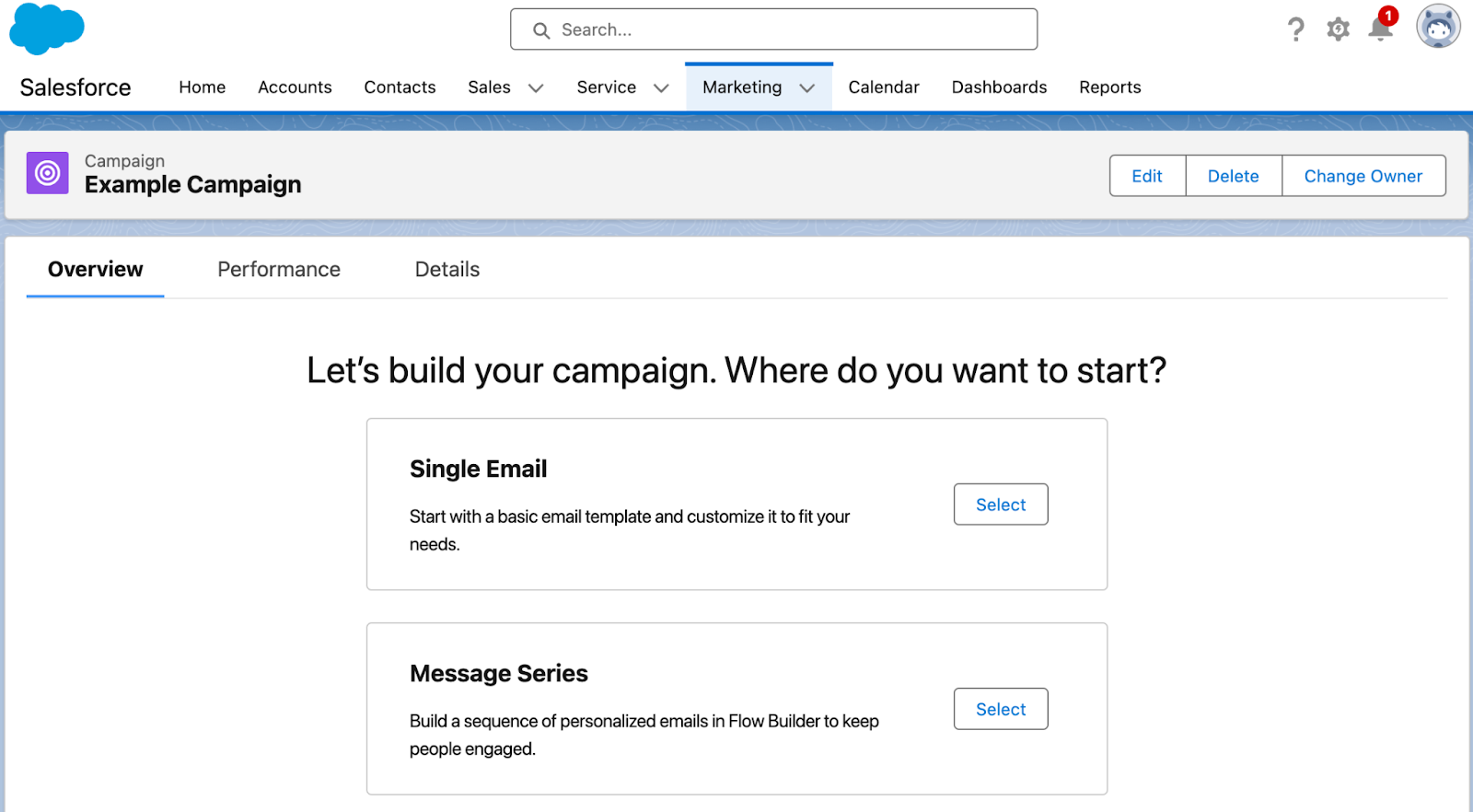
Marketing in Salesforce Starter revolves around the Campaign. Once you’ve created a campaign, you’re guided to choose between creating a single email (similar to a List Email for Account Engagement users, or a single email send for MC Engagement users) or a Message Series (similar to a “Engagement Studio Program” for Account Engagement users, or a “Email Journey” for MC Engagement users).
Segmentation
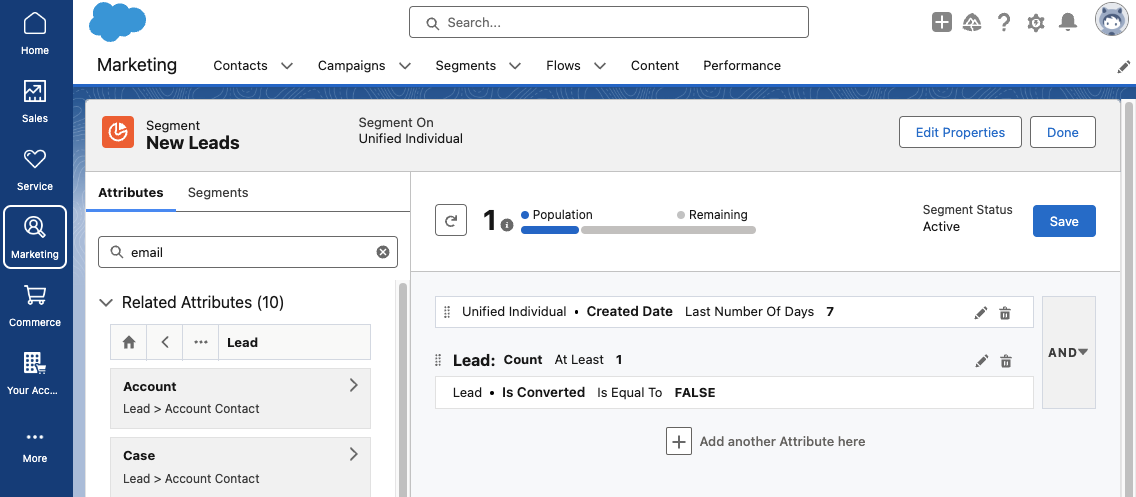
Segmentation in Salesforce Starter is handled with Data Cloud, which allows you to create a unified customer profile and harness data from all interactions your Lead/Contact has with your company. If you’re new to Data Cloud segmentation, I highly recommend working through the Segmentation and Activation Trailhead module to get a feel for creating and editing Segments in Salesforce Starter. This help article also provides several Segment examples to help you get started.
Before we start building our first email, we’ll want to set up an Audience Segment. A Segment is required to preview and test your email, so we’ll want the Segment running while we’re building the email. Click Select Audience from your Campaign page to begin, then select New Segment.
Building Emails in Salesforce Starter
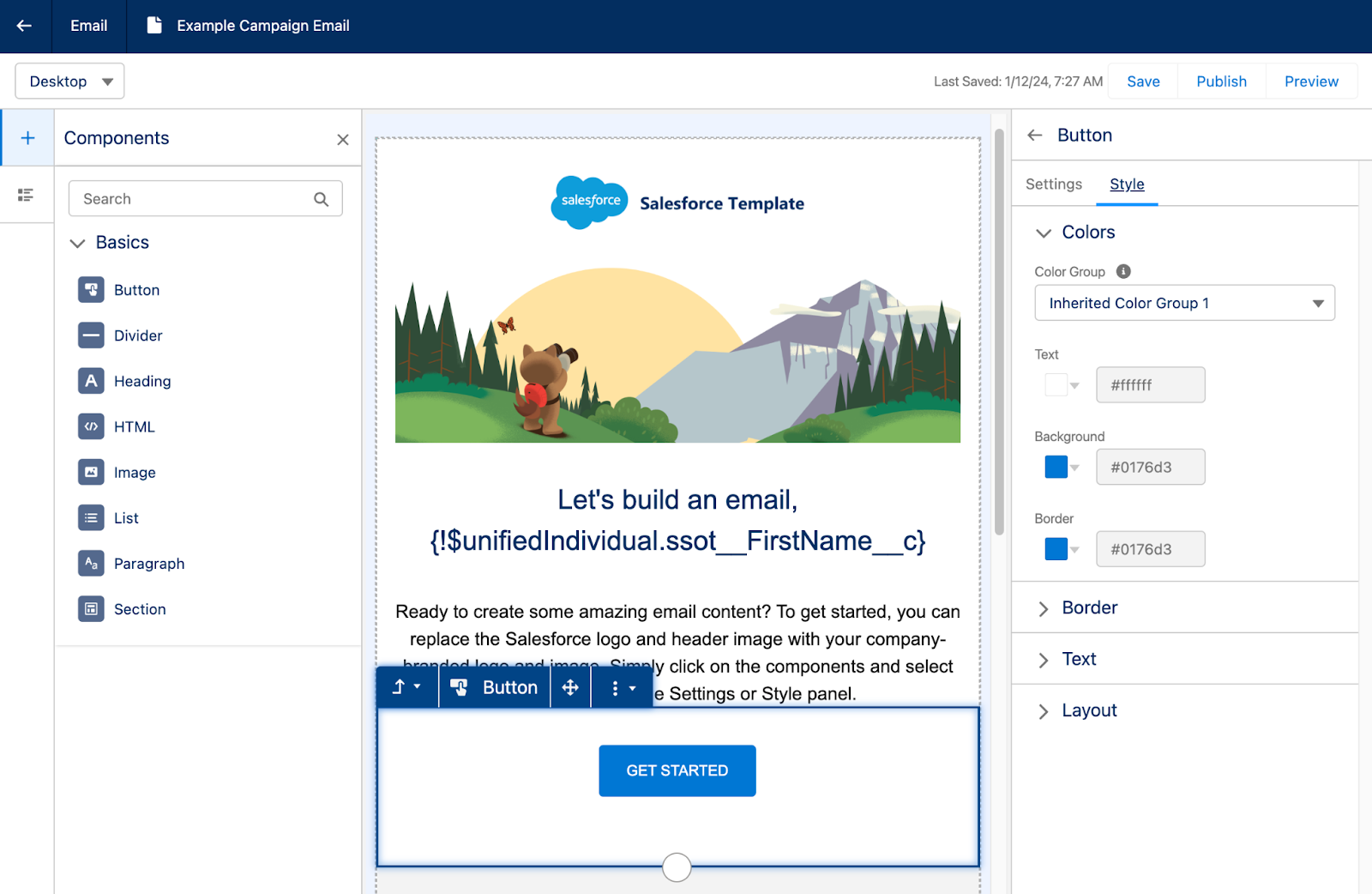
Building emails in Salesforce Starter feels familiar to the Lightning Email Builder. You’ll start off with a pre-built email template that can be edited by dragging and dropping components from the left side menu. Custom styling can be configured on the right side menu and will change depending on the component you have selected.
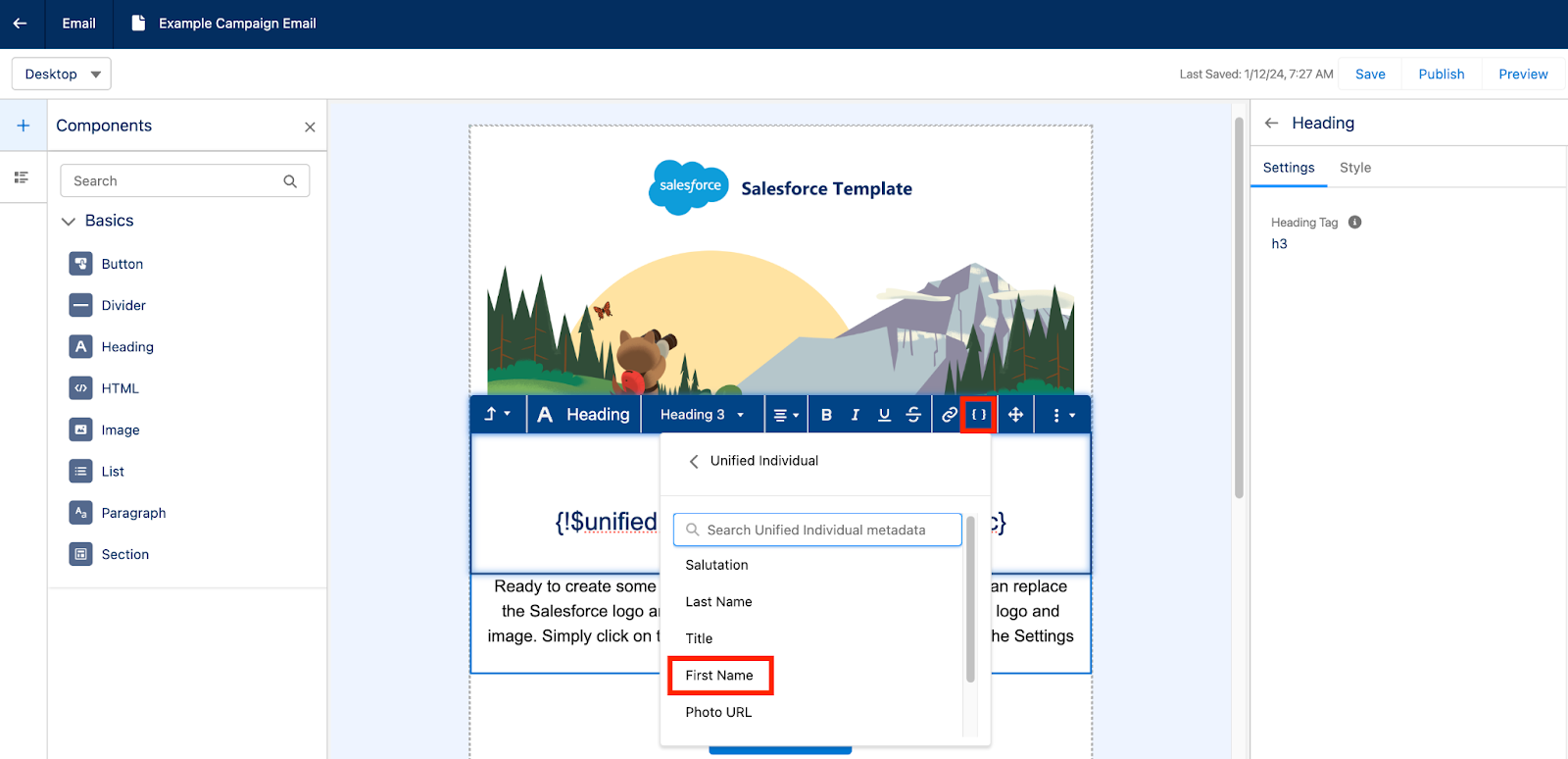
Merge tags can be inserted to personalize the email for each recipient. These merge tags rely on the Data Cloud unified individual rather than having to choose a specific Marketing Platform or Lead Object field.
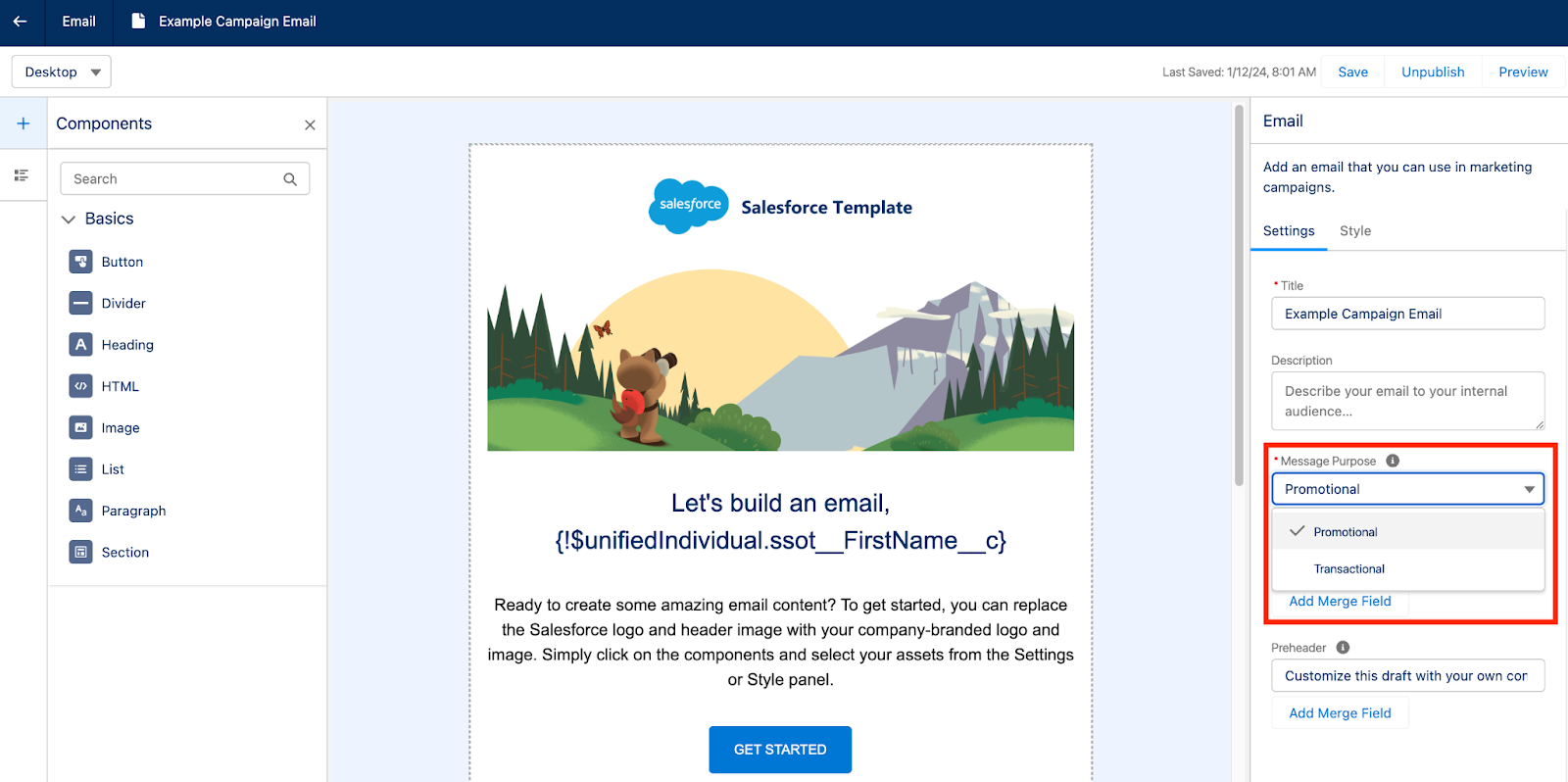
Salesforce Starter also supports sending transactional, also known as operational, emails by toggling the Message Purpose field.
Once you are done building your email, make sure you select Publish before previewing and testing your email. Publishing the email will ensure all the associated images are published and won’t be broken during testing.
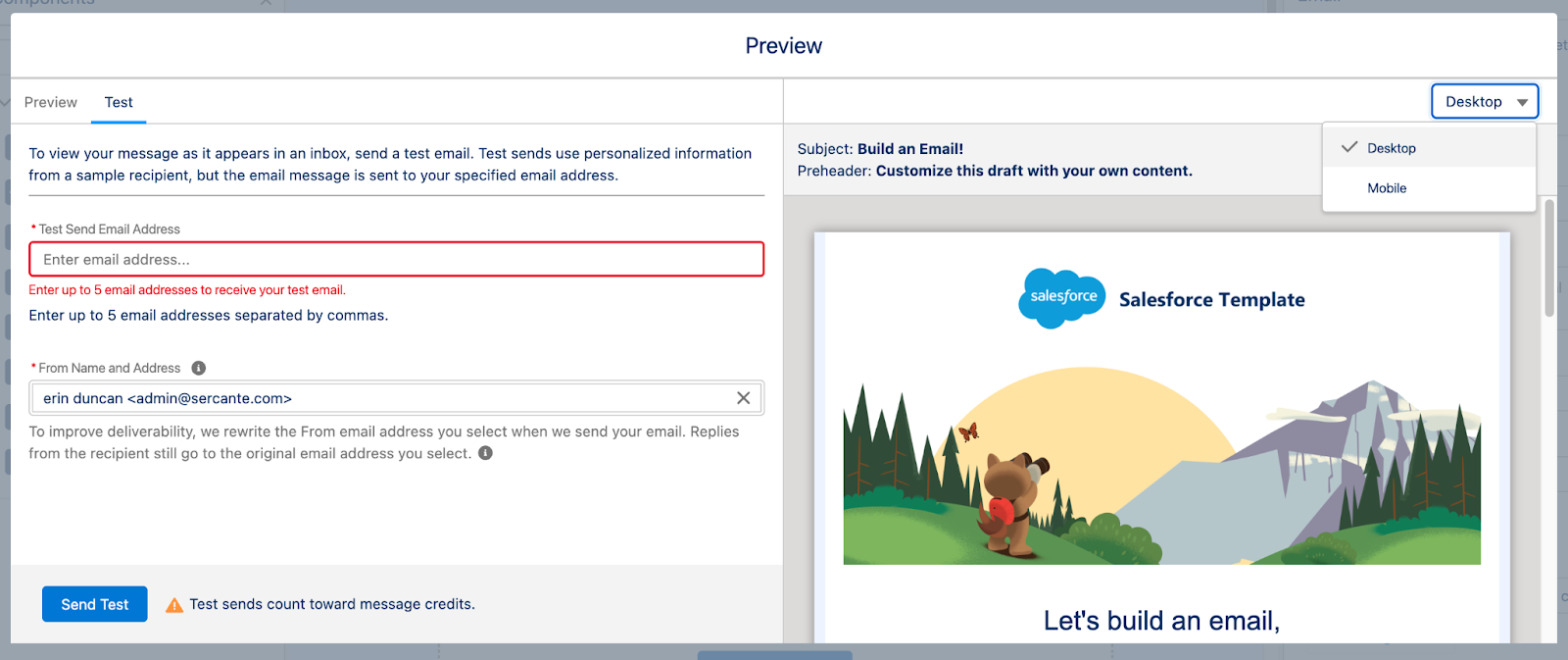
The Preview option allows you to toggle between Desktop and Mobile views to ensure your email is responsive. You can also send your team a test email for review, but note that test sends count towards Salesforce Starter’s base credits of 2,000 emails per org/month.
Sending Single Emails with Salesforce Starter
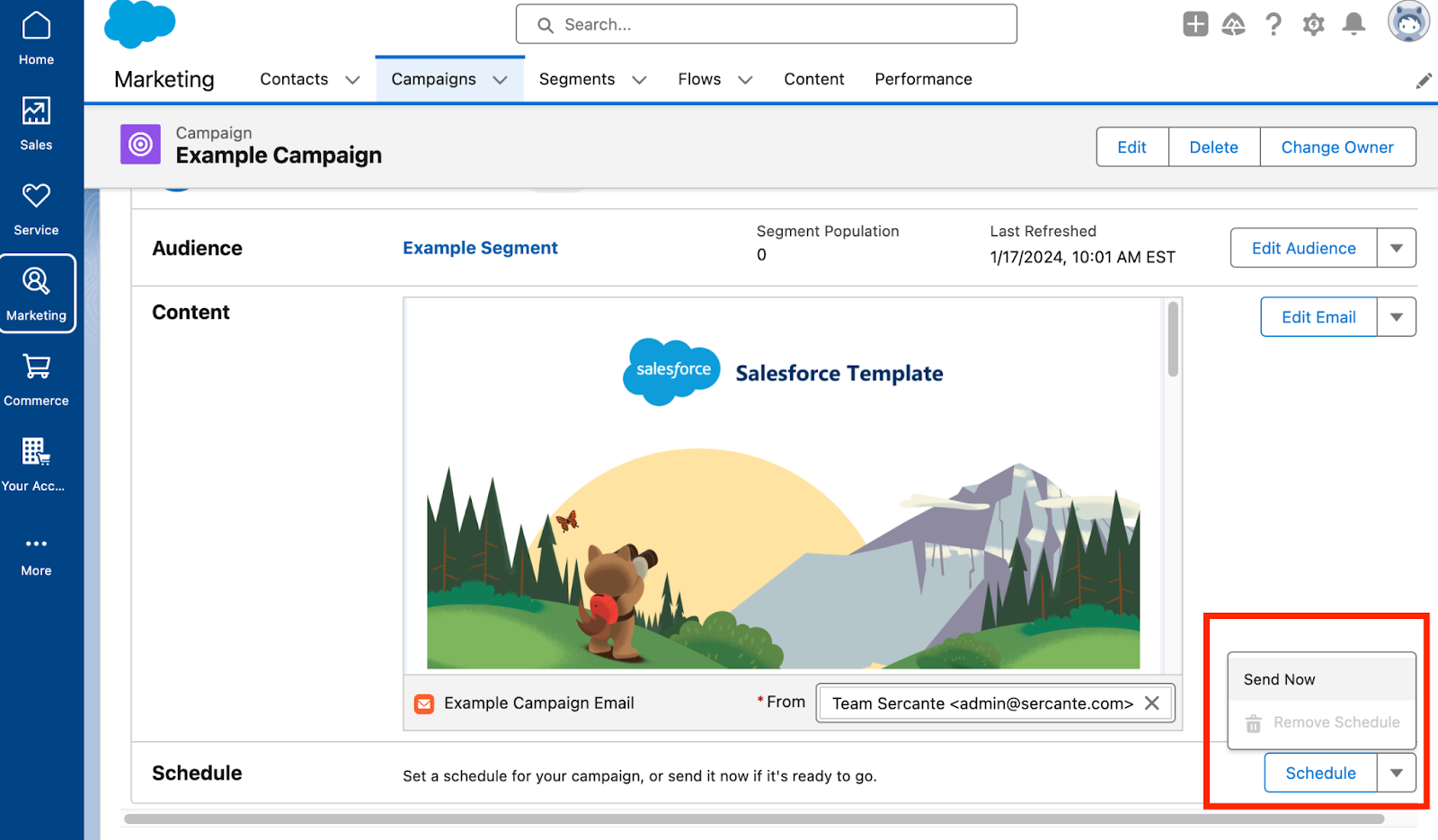
If you’re sending a single email, navigate back to the Campaign Overview page and select Schedule or Send Now.
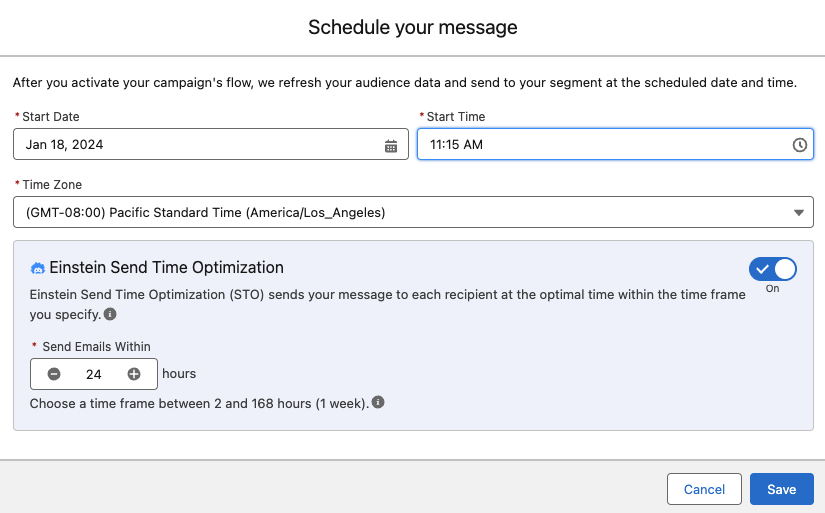
When scheduling, Einstein Send Time Optimization is available to help select the best time for each recipient on your Audience Segment. Check out our blog post, Pardot Einstein Send Time Optimization: A How-To Guide, for more information on how Einstein Send Time Optimization works.
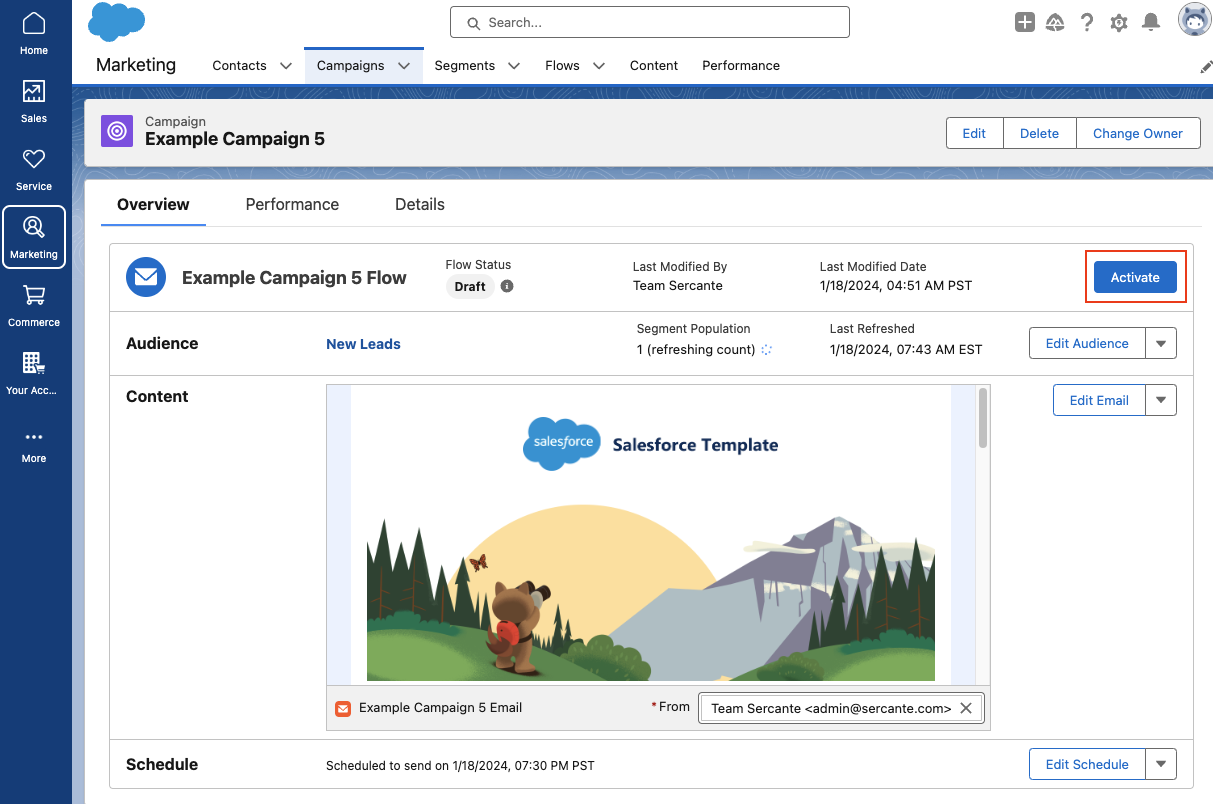
If you’ve selected Send Now your Email Campaign Flow will automatically be activated. However, if you are scheduling the email in advance, you’ll need to manually select the Activate button to ensure the Flow is ready for this email send.
Sending a Message Series in Salesforce Starter
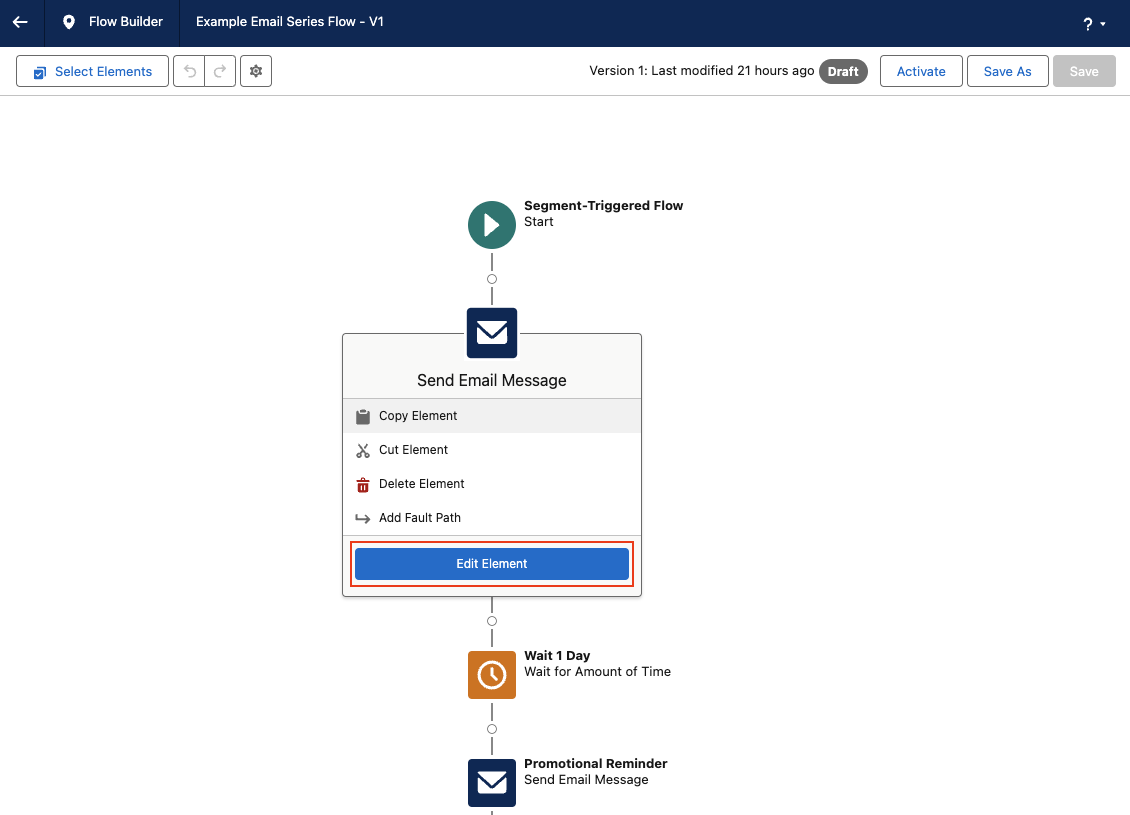
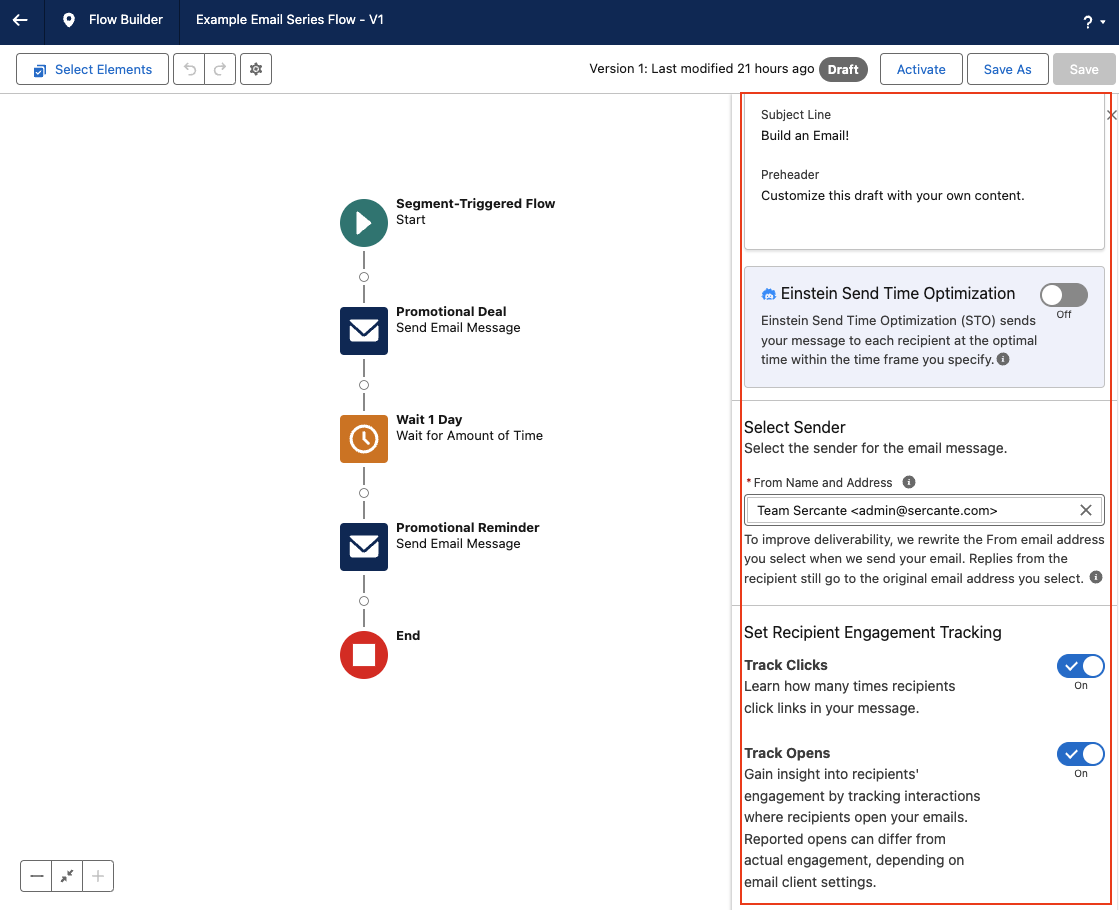
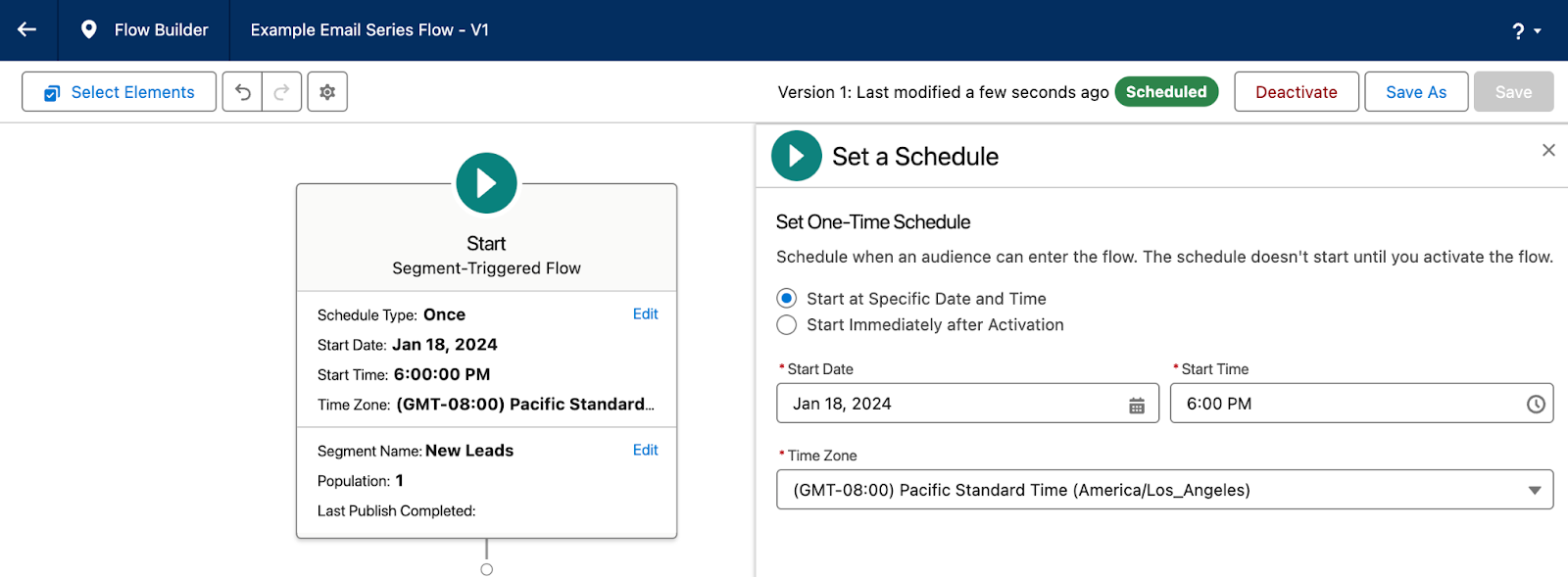
If you’re sending a message series, you will have to first edit your Flow so you can configure the schedule, segment, and wait steps between each email send. By default, the Message Series Flow will be built with a 1 day wait step between each email, Einstein Send Time Optimization is disabled, and Track Clicks and Track Opens is enabled. All of these settings can be reconfigured by clicking each element within the flow.
Make sure you select the Start element to configure your segment and schedule.
Once you’ve finished configuring your Message Series Flow, make sure you Save and Activate the flow before navigating back to the Campaign overview page.
Now, if you are new to Flow and the steps above are causing a bit of existential dread, don’t worry! Flows seem a little intimidating at first, but I promise they are pretty easy to use and you can do some really neat things with them. Check out our blog post, An Introductory Guide to Salesforce Flow for Marketers, or the Flow Builder Basics Trailhead Module to get more familiar with Flows.
Salesforce Starter Reporting and Performance
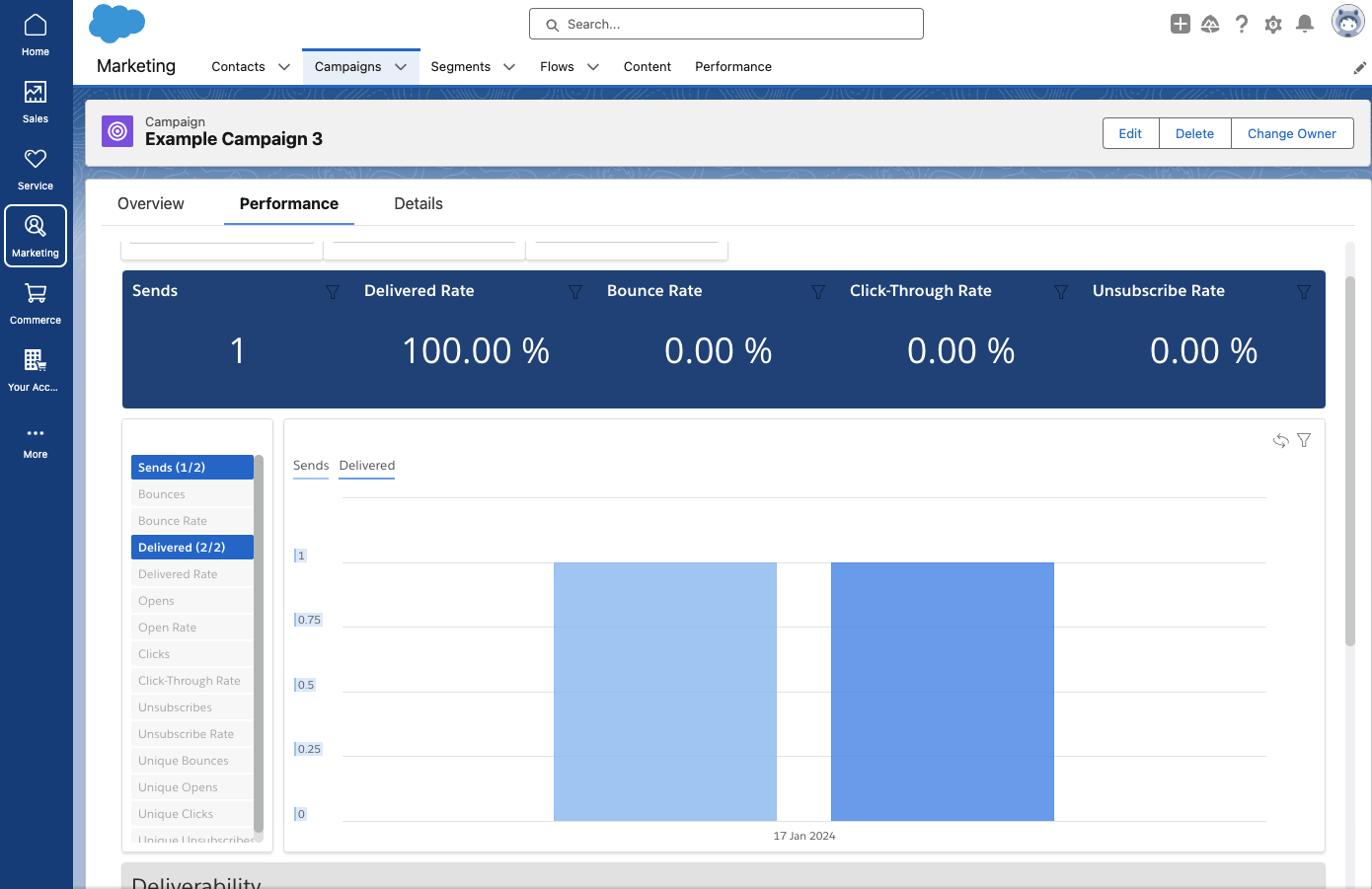
Salesforce Starter automatically collects and displays aggregate engagement data about your campaign on the Performance page. Common metrics, such as opens, clicks, unsubscribes, bounces, etc. can all be viewed in this prebuilt dashboard.
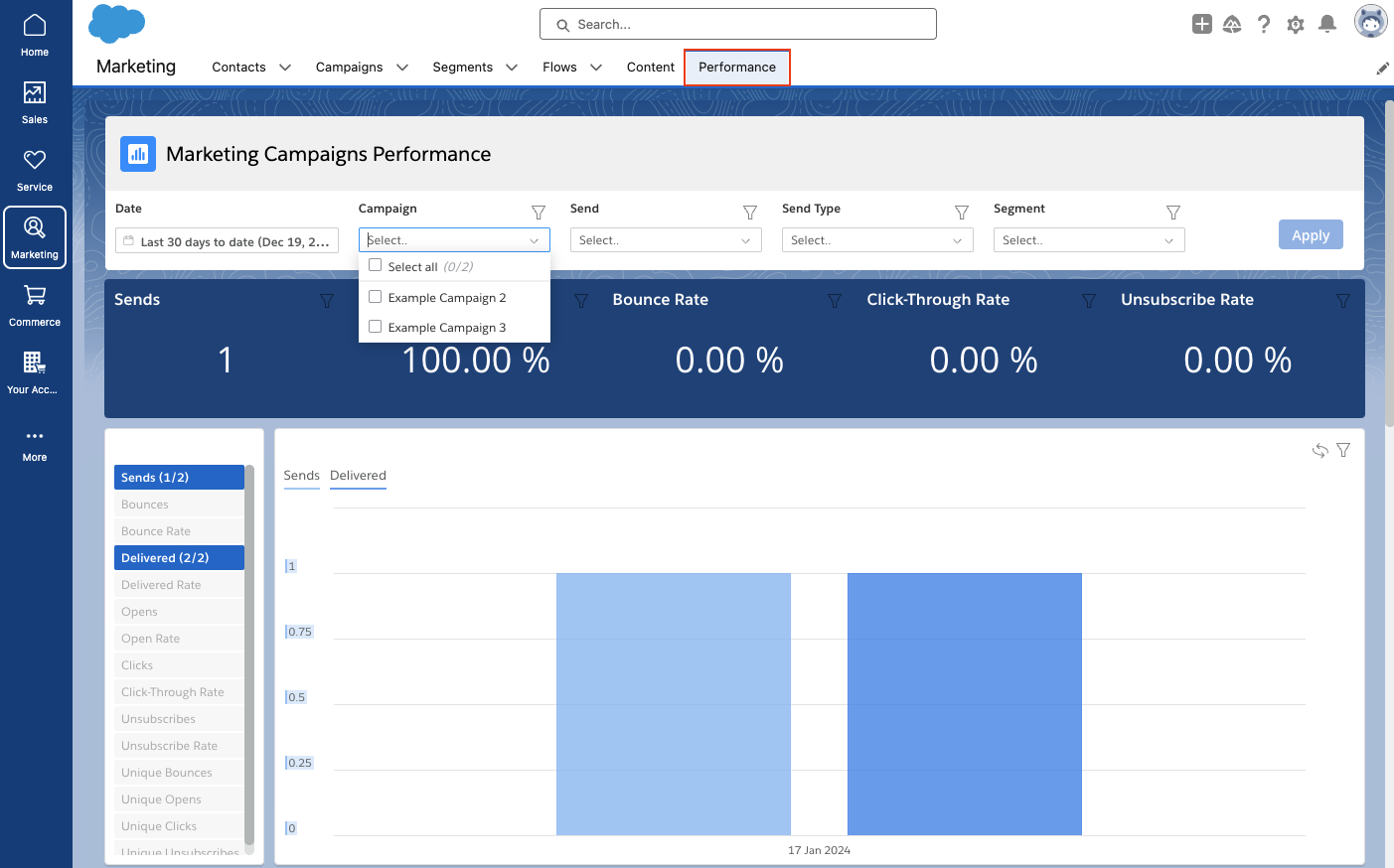
To view the Performance of multiple Campaigns, navigate to the Performance tab. In this view you can filter your dashboard by date range, campaign(s), individual sends, send type, and even segments.
Salesforce Starter — easing small business marketers into CRM life
And there you have it! In summary, Salesforce Starter is a great way for SMBs to get started with CRM and Marketing Automation. As your company and familiarity with CRMs expands, you may outgrow this edition. But the great thing about Salesforce Starter is that you can avoid migration costs because your data is already in the Salesforce platform if you outgrow the product at any point.
Reach out to the team at Sercante if you have any questions or need help figuring out if Salesforce Starter is the right tool for your team.
The beginning of the year is an ideal time to have a reset on your Marketing Cloud contact strategy. That way, you can get your Marketing Cloud contacts in order, have an org cleanup, and create a future-proof strategy that will ensure those contacts within your org are serving a purpose (and you stay within your Marketing Cloud contact limit).
So where do you begin when it comes to developing a Marketing Cloud contact strategy?
A Marketing Cloud contact is an individual added to any contact database within your Marketing Cloud instance. So, your Marketing Cloud contact strategy is the process you’ll create to make the most of your marketing efforts by focusing on promising contacts and letting go of contacts that aren’t helping your team reach its goals.
Step 1. Find out how many Marketing Cloud contacts you have purchased.
Every Marketing Cloud contract will have a contact limit. You can expect communication from your Salesforce Account Executive if you breach this limit, which can result in you needing to pay for more contacts. So it’s important to know what you’re working with.
Refer to your Marketing Cloud contract to find how many contacts your license includes, or reach out to your Salesforce Account Executive to find out.
Step 2. Find out how many contacts you currently have in Marketing Cloud.
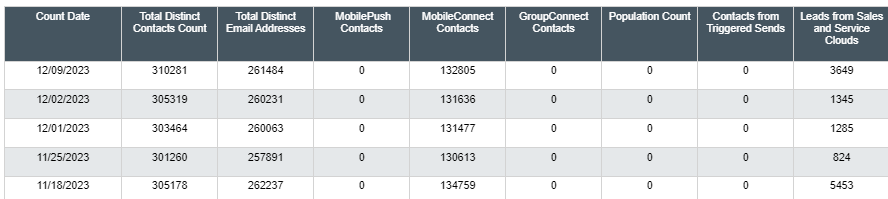
Once you know the number of contacts you have purchased, you’ll want to find out how many contacts you currently have in Marketing Cloud. This will help you identify if a review or a cleanup is needed.
Follow these steps to find out how many contacts you have in Marketing Cloud:
Go to Contact Builder > ‘All Contacts’ tab
From there, click ‘All Contacts’ for the total number to show up.
Alternatively, you can run a report that will show you how many contacts you have from each audience, such as Sales and Service Cloud leads, and contacts, per channel.
Keep your Marketing Cloud contact numbers handy
At this point you should have two numbers:
The number of contacts you are contracted to
The number of contacts currently in Marketing Cloud
Review your Marketing Cloud contacts
The next step is to review your contacts. Think about:
What they are doing
Who they are
If they should even be in Marketing Cloud (after all each contact comes at a cost)
From there, decide which ones you can remove from your org.
Ask Yourself: Do all your contacts provide value to your business?
Step 3. Review Marketing Cloud contacts and complete your cleanup tasks.
A key part of a good contact strategy is ensuring you only have the contacts that are needed in Marketing Cloud. As part of your contact strategy, it’s important to evaluate your current contacts and perhaps have a clean-out.
Check for Duplicate Records
One of the biggest reasons Marketing Cloud users go over their contacts limit is due to duplicate records.
First, identify how many duplicates you have using SQL queries in Automation Studio.
Identify how many duplicate records you have by following the instructions in this trailhead: Evaluate Your Contacts Unit
Do you import contacts directly into Marketing Cloud?
This can sometimes cause an issue, particularly if you are also syncing records from Salesforce
You’ll end up with the “Salesforce version synced down” + the Marketing Cloud version you imported!
Review your Salesforce lead-sync approach
Syncing both leads and contacts can often cause duplicates in Marketing Cloud when a lead is converted into a contact, particularly if you’re using Salesforce Record ID as the unique identifier
Your lead record will have a lead ID and this lead will sync with a Marketing Cloud contact but when you convert that lead it will have a different ID, a contact ID thus creating a duplicate record in Marketing Cloud
It is however best practice to use the Salesforce ID as the unique identifier rather than email
Review your Salesforce records
Are there duplicates here? If so then this could be causing duplicates in Marketing Cloud as well
Do you import records into Salesforce (manually or via a third party)?
This could cause duplicate records in Salesforce and therefore Marketing Cloud
Review contacts that do not have an assigned channel address
Assigned channels are things like email, mobile, ad studio, and any channel within Marketing Cloud that uses your contacts to target. If you have contacts that do not have a channel address, then these are likely to be a good candidate for removal. These types of contacts often get into Marketing Cloud because of the Marketing Cloud Connector [Keep reading to implement a solution that minimizes the “wrong” records being synced into Marketing Cloud from Salesforce!]
Identify if your contacts do not have an “assigned channel.” Why? If they don’t have an assigned channel then you haven’t “used them” in your marketing campaigns:
In Marketing Cloud, navigate to Automation Studio.
Click the Activities tab, then click Create Activity.
Select Data Extract and click Next.
Add a name, external key value, and a file naming pattern. The file naming pattern value doesn’t actually affect anything, because all results go into a Contacts Without Channels data extension in the root folder of the account.
Remove contacts that are not right for your business
If you have been letting everyone into your Marketing Cloud org, then chances are some folks just shouldn’t be there (for example, competitors or spam submissions). As part of your contact strategy, it’s important to define the purpose of Marketing Cloud for your business. If it’s only to engage with leads and customers, then you could remove staff, partner, and competitor contacts.
Use SQL and Automation Studio to identify any contacts that do not meet your criteria (for example, if they do not have a “client” or “lead status” or if they have your business email address). Add these contacts into a non-sendable data extension and then delete them.
Step 4. Implement the right processes to keep a clean Marketing Cloud contact database moving forward.
Below are some suggestions to help when creating your Marketing Cloud contact strategy so it’s an easy lift for your team and you avoid over-limit surprises.
Think about the ways Marketing Cloud fits into your overall business goals
Start with the right foundation. Evaluate the ways your marketing and business goals align with your team’s use of Marketing Cloud.
Who are your audience personas? And who are you connecting with through Marketing Cloud? Your list may include:
Leads
Customers
Partners
Putting this on paper may help you prioritize your contact usage and determine the ‘nice to haves’ versus the ‘need to haves.’
Determine how you’ll segment your Marketing Cloud contacts
From there, create segments for each group of contacts:
Those who are highly engaged and likely to purchase
Those who may need a little more encouragement
Those at the start of their journey who need a lot more nurturing
Develop a list of criteria for who should be in Marketing Cloud. For example, everyone should at least have an email address or mobile number, and everyone should be mailable and be opted into emails and/or texts.
Use a Salesforce flow to check the Sync to Marketing Cloud field
Select the field in Marketing Cloud as the sync criteria.
You can also use a single unique identifier, such as Salesforce ID, to match Marketing Cloud records to Salesforce records.
Other contact strategy tips
Create contact count reports and build a process to ensure your team is monitoring them regularly. This can be as simple as setting a monthly calendar reminder to check the contact report.
Build a process in Automation Studio via a script to remove contacts. This avoids manual deletion in the future.
Final tips from our Marketing Cloud Developers at Sercante
Zach Norman, Marketing Cloud Developer of 12 years: If you have Marketing Cloud Connect enabled and you implement a “sync to Marketing Cloud” field, any contacts that you delete that do turn out to be needed in Marketing Cloud will sync back down should they meet your criteria.Note: Engagement data will be lost for the contact once you delete it though
Chris Putnam, Marketing Cloud Developer of 6 years: Before deleting unwanted contacts, copy them to a non-sendable data extension. This will serve as an archive of your deleted contacts. Capturing the date of deletion as well as the date the contact joined Marketing Cloud would be two useful data points to include.
Future-Proof Your Marketing Cloud Contact Strategy
Remember, there’s no one-size-fits-all when it comes to creating a Contact Strategy, it needs to be specific to your business and your goals. However, there are steps you can follow to create a future-proof plan that will ensure all your contacts serve a purpose in Marketing Cloud:
Know your limits.
Keep your data clean.
Implement automation to manage your contacts.
Review and reiterate continuously — your plan needs to grow as your business does!
As your business grows, so does your Marketing Cloud Account Engagement org. And that’s a good thing. Inevitably you’ll reach a point where your org is stretched too thin.
You may start to experience issues such as:
Frequently hitting System Limits (Automation rules, ESPs, Mailable Database, etc.)
Difficulty locating the right assets and segmenting Prospects
System Processes running slower than expected
Struggling to manage the traffic flow of outgoing emails
There’s no need to panic. When your org is at maximum capacity, there are a few strategies you can follow to optimize your system. Here they are:
Establish regular maintenance and clean-up policies.
Upgrade your Account Engagement edition.
Split your org into multiple Business Units.
Let’s take a look at each of the strategies you can use to prevent org growth issues or address them so you can keep getting the most out of your Account Engagement org.
Establishing Maintenance and Clean-Up Policies
Regularly archiving old assets and prospects is the best practice for all orgs. These strategies will not only keep your system running smoothly and make assets easier to find, but they also protect your sending reputation by preventing you from emailing old, unengaged prospects.
I like to establish criteria for my regular clean-up efforts in advance. This allows me to ensure other stakeholders are on board with the archiving guidelines and makes the process easier to repeat each month or quarter.
Below are some of the criteria I use to clean up our internal Sercante org each month:
Archive Forms that have not been completed in 2+ years
Archive Landing pages with no views in 2+ years
Archive Automation Rules that have been paused for 3+ months or have not matched a prospect in 12+ months
Archive Prospects who have been inactive for 18+ months and are not associated with an open opportunity
Archive any assets with names containing “Test”, “Delete”, “Demo”, or “Example”
The Account Engagement Optimizer will also help you proactively spot potential issues or causes for system lag, so make sure you regularly review your Optimizer report as part of your regular maintenance efforts.
We have several blog posts that will help guide you through establishing your maintenance and clean-up policies.
If you’re still running into issues after cleaning your org, it may be time to consider an edition upgrade and/or Business Units.
Upgrading your Account Engagement Edition
If you’re constantly hitting system limits after archiving old processes and assets, it may be time to upgrade your Account Engagement Edition. Below is an overview of the system limitations for each edition. Keep in mind that Advanced and Premium Editions come with added features, such as Einstein and Marketing Data Sharing, that can help streamline your processes as well as extend limits.
Edition
Feature
Growth
Plus
Advanced
Premium
API Access – Calls Per Day
25,000
50,000
100,000
100,000
Automation Rules
50
100
150
150
Mailable Prospects
10,000
10,000
10,000
75,000
Custom Object Integration
–
–
4
4
Engagement Studio Programs
20
100
200
200
Repeating ESPs
10
10
10
15
External Activity Extensions
–
10
20
30
External Activity API (Daily)
–
50K
100K
100K
File Hosting
100MB
500MB
10GB
10GB
Forms
50
Unlimited
Unlimited
Unlimited
Landing Pages
50
Unlimited
Unlimited
Unlimited
Tracker Domains
3
10
20
20
Moving to Multiple Business Units
If the above options will not solve your org woes, it may be time to consider splitting your org into multiple Account Engagement Business Units.
Business Units (BUs) allow you to partition your database while still being connected to the same Salesforce instance. Partitioning your database is a great strategy whenever you have disparate marketing teams or multiple unique audiences that require distinct marketing assets.
Typical partitions are by Region, Product, Brand, or Industry Vertical. The Advanced edition includes 2 BUs, Premium includes 5 BUs, and additional BUs can be purchased as an add-on.
Benefits of Multiple Business Units
Each BU has its own limits in regard to the number of automations, the number of Engagement Studio Programs, etc.
Each BU has its own sending IP and sending reputation
Each BU can have an Email Preference Center and email opt-in process unique to its own needs.
This is especially beneficial when splitting BUs by region and complying with each region’s spam/compliance requirements
Scoring and Grading is separate and unique to each BU
User access and roles can be changed (and automated) per BU
Account Engagement Account Settings can differ between BUs (i.e. operational emails, connector settings, 1st/3rd party tracking, etc.)
Considerations for Multiple Business Units
Mailable Database limits are shared across business units. So, if you’re constantly hitting against your mailable limit, Business Units won’t solve your issues. You will need to either reduce the number of mailable prospects in your org or purchase additional Contact blocks.
Only platform assets are easily shared between BUs. Platform assets consist of Snippets as well as Emails and Landing Pages built in the new Lightning Builders. All other assets can be copied and transferred between BUs using the Bulk Asset Copy Flow.
BUs do not share Campaigns. When using multiple BUs, you need Campaign record types to manage which campaigns sync to which BUs. A campaign record type can only have a one-to-one relationship with a BU.
Campaign hierarchies can be used as a workaround to view a campaign’s metrics across BUs. In the example structure below, you could have the two BU campaigns nested under a parent campaign in order to view the metrics across both campaigns.
Webinar ABC (Parent Campaign)
Webinar ABC US (Syncs to the US BU)
Webinar ABC EU (Syncs to the EU BU)
BUs cannot share the same Tracker/Vanity Domain
If Business Units sound like the best next step for your org, check out some of Business Unit blog posts for tips on getting started: