“You automated everything so well that we’re just going to let it run and leave it alone. That’s the point of marketing automation, right?”
My team just wrapped up a project to build a series of big, bad Engagement Studio programs. This customer was particularly fun to work with because their whole business is powered by the Salesforce platform — sales, service, operations, finance, and of course, marketing.
Not only were we able to build a solid communication cadence for them, we also leveraged connected campaigns to build some stunning dashboards in Lightning showing how each marketing touchpoint influenced sales for the month.
So those words above, from the mouth of that customer, hurt my heart a little there. Okay maybe more than a little. Here’s why:
1. Successful programs never go in the “forget it” pile
Automated programs can free up time and resources in a big way. If you whip up an Engagement Studio program to manage routine, repeatable communications, you don’t have to think about it every day. How awesome is that?
But you shouldn’t not think about it for FOREVER. Monthly check-ins to monitor performance help ensure everything stays on track and is working as designed.
2. You should constantly one-up yourself
The best marketing automation strategies are those that evolve.
People change. Platforms change. Tactics change. The competition changes.
The beauty of a platform like Pardot is that you can automate repetitive tasks and free up time to ask “what’s next?” Not to settle into the slightly improved status quo.
3. The technology changes constantly
Continuing with the theme of change, can we talk about how the Pardot product team is on overdrive releasing new features lately? As this awesome new functionality is released, reviewing how it can be leveraged to support your company’s efforts is key.
Repeating Engagement Studio programs, for example, would have totally changed our thought process on how we designed the solution for this particular client if it were available 3-4 months ago.
4. Sometimes data will change your mind
When a program has run for 30, 60, or 90 days and you’ve run through a full sales cycle, you will have extremely valuable information to inform future efforts. You’ll know more on what is enticing opens, soliciting clicks, and most importantly, what’s actually converting into actual closed won opportunities.
Think “let your conscience be your guide,” Jiminy Cricket style… except strike conscience and insert data.
5. Content has a sell-by date
Comedians can’t tell the same jokes over and over.
Chrissy Teigen can’t do headband of the day for the rest of her life.
Okay I’ll stop, you get the idea. You need fresh copy and design from time to time too, yo.
6. “Forgetting it” means you’re missing valuable opportunities in the now
“Newsjacking” events and anchoring to time-sensitive things can work wonders (WONDERS!) when paired with automated programs.
One of our other clients, for example, frequently sends out emails with the call-to-action to book a meeting with sales. When we link this to an actual event — like a tradeshow, community gathering, or other milestone — the open and CTR metrics more than double.
This is a huge opportunity that is utterly squandered if you’ve filed marketing under “forget it.”
(PS SalesLoft is my newsjacking crush — their ridiculous antics at Dreamforces past are such a smart way to do big things with a not-so-big budget.)
To sum it up: Set it & don’t forget it
Ongoing maintenance — whether that’s by an in-house resource or by a consultant — is a must for any successful marketing automation programs.
Someone’s gotta make sure you’re efficiently leveraging the latest and greatest features of the platform, that your messages are hitting home, that you can pivot and seize opportunity, and that the data confirms you have a winning strategy.
Have strong feelings about this too? Random musings to share? Let’s hear it in the comments!
…is one of the frequent concerns I hear when people are ramping up email marketing and/or launching a new program.
My rule of thumb for 98% of people: take the amount that you think you should be emailing your subscribers, 5-10X that, and that number is probably about right.
Always remember… that no one cares
As marketers, we think a lot about our content, creative, strategy, yada yada — everything that fuels our email marketing. Our customers don’t think about it that way. When they’re looking at their inboxes, they’re thinking to themselves:
“How do I delete as many emails as possible so I can focus on what I really need to do?”
That’s literally how I start every day. I pick up my phone from the nightstand, squint at it with one eye, click ‘edit’ on my iPhone, and multi-select as many emails as possible to delete.
Betcha you have a similar routine. Let’s all take a moment of silence for the brilliant, stunning, strategic email campaigns that failed the one eye 5 a.m. test.
What the data tells us Re: Too Much
Anecdotally, people unsubscribe from emails because of volume.
If you offer people the opportunity to tell you why they’re unsubscribing, the biggest reason cited is “too many emails.” (69% of the time, according to Constant Contact.)
If you ask sales for their opinion on how many emails you’re sending… well, just don’t.
Does the data support the idea that “too much of a good thing” will hurt you?
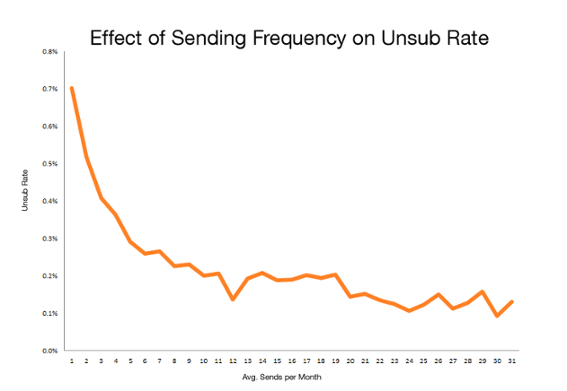
CMB Consumer Pulse did a study on MailChimp’s data to see how frequency correlates to unsubscribe rate. And actually…. it doesn’t really.
This data shows that higher volume of email sends don’t send people flocking to your unsubscribe link.
A better visualization would probably be the percentage of subscriber churn over time. But you get the idea.
An even better plan: Look at your own data
Try increasing your email frequency and see what happens. ReturnPath did a really interesting study with a few of its customers where it split subscribers into three tiers of engagement and looked at impact of frequency on each.
As a mini experiment: send 2X the amount of email you usually send for the next 30 days. Do unsubscribe rates spike?
Beyond the per email metrics and unsubscribe rate, what is the total number of clicks, opens, and unsubscribes you’re driving across all of your efforts?
If there IS an increase in subscriber churn, and opt outs “spike” from… let’s say .5% to 1.5%… is that hit to the metrics worth the tradeoff to drive more traffic?
More of the same can be a good thing [a client example]
With many of Sercante’s clients, we’ve started re-sending all emails 24 hours after the initial send to anyone who hasn’t opened it. As a rule of thumb, we expect 50% of the results of the first send for send #2.
At first, I was really resistant to doing this. I’m competitive, okay? And it’s a bummer to see a client with consistent 35%+ email open rate get 17% on a resend. It takes our overall stats down. Lame.
But if email #1 drives 20K opens, and 2K clicks… is it worth the 180 seconds it takes to queue send #2 and drive another 1K people to the client’s website?
Think about that for a second. In this client example, A THOUSAND PEOPLE cared about their message enough to click through on round two. If we didn’t send email pass #2… I think it would be fair to say that we weren’t emailing people enough.
5 quick tips if your Too-Much-O-Meter is still tingling
Still worried about emailing people too much?
Really, you’re probably not emailing people too much. And you’re missing opportunities to build awareness, generate leads, and nurture pipeline if you’re not optimizing the volume of emails you’re sending.
But if you’re still concerned, here are a few thoughts on how you can mitigate:
Gradually ramp up volume over time. If you’re sending weekly, try 2X weekly.
Use recency/frequency suppression lists, and suppress recipients in active Engagement Studio programs to stagger what people see when (more to come on this in a later post.)
The bottom line: Share good content, and do it a lot
Don’t worry about emailing people too much.
Worry about creating awesome content. Worry about emailing the right people, at the right time, with the right message. Worry about growing your list in a healthy (or at least hand wavy healthyish) way.
Honestly, the U.S. has been pretty lax compared to the rest of the world when it comes to online privacy regulations.
Heck, CAN-SPAM doesn’t even require opt-in consent (although most ESPs require it of their customers.) My response to the above question has usually been something to the tune of:
“Yeah someday… but don’t hold your breath.”
Color me surprised, though. Last week, a bill quickly made it through the California state legislature that suggests this tide might be changing. (Quickly meaning in less than a week — this thing was fast tracked, big time.)
Why California adopted a “mini GDPR” & what Pardot admins should do next
The California Consumer Privacy Act of 2018 (CCPA) has been touted as a “mini GDPR.” It doesn’t go into effect until 2020, and you can count on all kinds of stakeholders in the business community to push back… so it may evolve in the process of being implemented.
At a high level, the law states that consumers have rights to know and control how their personal data is used. Specifically, it lays out rights of individual consumers to:
know whether their personal information is sold or disclosed
require companies not to sell their personal data
request that a business delete their personal information (with some exceptions)
be treated equally and without discrimination if they choose to exercise their CCPA-protected rights (i.e. they can’t charge you more or deny service if you assert your right to privacy)
What info is covered under CCPA
GDPR’s definition of “personal data” is sweepingly broad. The fact that my favorite color is green is protected under that legislation.
California’s definition of personal data is also pretty darn broad. Of course, the basics like name, email, SSN, address, etc. are covered. Additionally, things like:
Browsing history
Sales data
Property ownership
Buying preferences
Advertising engagement metrics
…and a lot more is covered.
Any information that is de-identified or publicly accessible is NOT covered under CCPA. The definition of info falling in this category is that which is:
“Lawfully made available from federal, state or local government records or that is available to the general public.”
An interesting twist is that the Act explicitly allows companies to:
“offer financial incentives, including payments to consumers as compensation”
…in exchange for the ability to sell their information. Curious to see how that one plays out.
Who needs to comply with the CCPA
The CCPA covers a much smaller subset of businesses than GDPR. First, it only applies to companies who do business in California. Additionally, business must meet ONE of these three criteria:
Grosses $25M in annual revenue
Holds the data of 50K or more people/households/devices
Makes at least half of its revenue by selling personal data
There are a series of exemptions to this as well:
Healthcare data governed by HIPAA
Consumer data covered by the Fair Credit Reporting Act
Info collected under the Gramm-Leach-Bliley Act (yeah, I had to Google that one. It’s a federal regulation that applies to banks and insurance companies.)
Anything needed to complete transactions, detect security incidents, comply with state and federal laws, conduct research, etc.
There are also exceptions for “internal” uses of data that are:
“Reasonably aligned with the expectations of the consumer based on the consumer’s relationship with the business.”
Wait, why do I care about California?
California tends to lead the nation in consumer protection. The fact that they’re taking this kind of action means other states are likely to follow suit at some point.
And for course, practically speaking, 36 million people (12% of the US population) reside in California, so many businesses nationwide will be impacted.
What happens if I just ignore CCPA?
Well… it’s up to the California AG to enforce the law for the most part, but there’s a private right of action clause for certain types of breaches. This is reminiscent of the piece of CASL that was suspended last year that allowed individual citizens to press charges against companies violating the law.
For privacy breaches, only the AG can initiate enforcement, and fines are up to $7,500 per violation. The business has 30 days as a “right to cure” to address the issue before fines set in.
For security breaches, the AG or private citizens can press charges, and the fines stipulated are:
“In an amount not less than one hundred dollars ($100) and not greater than seven hundred and fifty ($750) per consumer per incident or actual damages, whichever is greater.”
Okay, what do I have to do next?
There are 18 months before this goes into effect. So no need to make any rash, sudden movements. But if you’ve been on the fence about actually complying with GDPR… well, there are 36 million more people on U.S. soil that will soon be asserting similar rights.
My near-term recommendations would be to:
Document your practices for capturing subscribers and managing lists
Set up an email preference center to ensure you’re sending people things they want
Evaluate a double opt-in process to ensure your subscriber list is truly engaged and interested in heaving from you
Implement an archiving strategy to “sunset” people that aren’t engaging with you
Clearly communicate privacy policies (in actual English, not legalese)
Consider getting an attorney involved to help you understand your risk/exposure in the geographic areas where you’re doing business
A lot of the CCPA is open to interpretation and will certainly be challenged in court. But the trend here is clear — people want to have a better understanding of how their data is used and why, and have the ability to reclaim control of how it is used.
It’s an interesting time to be in the wonderful world of marketing automation, that’s for sure.
What’s your stance on these new and somewhat vaguely defined compliance requirements? Any reactions or opinions on the new legislation in California?
Let me and your fellow readers know in the comments!
Do I grow the skills needed to manage marketing operations in-house, or do I partner with an agency/consultant? This is a never ending debate for marketing teams and business leaders looking to leverage marketing automation to take their business to the next level.
The answer is that… it really depends. I’m a marketing technology consultant, so you might expect that I’d stand firmly in the “outsourcing” camp. But in many cases, I don’t. Let me explain why.
The case for “insourcing” marketing operations work
Prior to becoming a marketing technology consultant, I worked “client side” for several companies with small marketing departments. Wherever possible, my approach was to either hire a new employee who had the skills we needed for major marketing initiatives, or designate someone on the existing team to run point on knowledge and execution of the new tool or channel.
Why? Well…
1. Internal politics are hard, yo.
Agencies and consultants have their place. But there is nuance and internal politics in every organization that can be difficult to explain to agency partners.
2. Marketing automation requires an internal champion.
Marketing automation requires CHANGE — in process, in philosophy, in team member behavior. (This is one of the frequent sources of burnout.)
An effective marketing automation program requires support across several different departments – marketing, sales, IT, legal, and more. You need someone who can stand up and be the change agent within your four walls.
Can an external consultant play that role? Maybe. But an in-house evangelist who has the respect of their peers has the upper hand here, in my opinion.
3. It’s an investment in the future.
Dependency on external consultants can quickly get expensive.
Training someone to manage your marketing automation is a long term investment in that person. Assuming it is the right person… that can really help hold the line on total costs.
4. It’s useful to have an internal SME who can train others.
Having an in-house subject matter expert means you can train others on your team and continue to grow your program. They can help provide continuity and leverage institutional knowledge as you scale up your efforts.
The case for outsourcing marketing operations work
All that said, external consultants exist for a reason: there are major advantages to hiring an outside expert for help.
1. Partners keep your team focused.
Giving highly-specialized work to highly-specialized consultants frees up your team to stay focused on their sweet spot skills and initiatives. (What my former boss would call “the highest and best use of your time.”)
2. Partners bring speed & agility.
If you’re trying to move quickly, turning to outside resources can augment existing resources and help you be nimble.
Consultants and agencies have team members are ready to hit the ground running and can help you staff up to support a big project. It’s much easier to ask a partner to scale up or scale down number of hours as needed than to try that with an employee.
3. Partners contribute an outside perspective.
With an outside consultant, you’ll get someone that’s “been there, done that.” The right consultant can share a perspective on best practices and how other organizations are approaching similar challenges. Visibility into this can be incredibly useful as you’re looking for different ways of addressing the challenges you face.
4. Partners have a track record of results (SOMETIMES!)
There are pros to bringing in an outside consultant. But that said…. one of my frustrations with agencies is the lack of “real world” experience that many of them have.
Sure, they’ll know the technology really well. But it’s one thing to pitch a big idea or preach about a best practice. It’s a wholly different thing to be accountable for implementing said idea, working with the team day after day to make it happen, and managing the messy stuff when the “best practice rubber” inevitably meets the actual “‘in-the-real-world road.”
If you’re going to work with an outside partner, make sure they can point to actual results and share stories of the blood, sweat, and tears they’ve invested to achieve those results. In my opinion, that’s what separates the good from the great in this space.
(This actually one of the things that makes the Sercante team unique. Our consultants have deep client-side experience, and we specifically recruit for that — it empowers them to be better and more holistic advisors!)
What do you think about insourcing vs. outsourcing marketing operations work?
What’s your philosophy on in-sourcing vs. outsourcing marketing automation and campaign management?
What parts of the marketing pie do you keep in house vs. outsourcing to agencies/consultants/partners?
Let me and your fellow readers know in the comments!
The original working title of this blog was “Why Wasn’t This Documented, Abridged Edition.”
“Scantily documented surprises” sounded like a nicer way of saying the saying the same thing.
I stumbled across a really frustrating thing about AMPSEA yesterday. This is by no means the first stumble. There are many itty bitty little things in Pardot that are really sparsely documented and actually make a huge difference.
I’m not complaining, don’t get me wrong. It’s part of why I have a job as a consultant with a pipeline that overfloweth. And sometimes these “undocumenteds” are fun little Easter eggs.
Sometimes though, undocumented surprises throw a wrench in your plans in a big bad way.
So to help you circumvent those potholes, here are the top 11 “did you know” things I’ve been surprised by (or have seen others get surprised by):
1. Adding new Salesforce fields does not automatically sync the data.
When you create a Pardot field and map it to a Salesforce field, the data does not automatically come over to Pardot for all of your records. I’ve heard many a customer say:
“I waited all night for it to refresh and nothing happened.”
Quit waiting. To populate data in a new field, you need to do a full database refresh. This can be done by either:
Downloading your full prospect list and uploading it again to Pardot
Adding all of your leads and contacts to a Salesforce campaign and pushing the “Add to Pardot List” button
Asking support to push some secret magic back end button
2. Adding new picklist values does not automatically update your picklists.
Let’s say you have a dropdown on your forms for ice cream flavors – vanilla, strawberry, and chocolate. Then your product team steps it up a notch and you decide to release Orange Mocha Frappucino flavored ice cream.
You go to Admin > Prospect Fields and then edit “flavors” to contain your new value.
Think you’re all set?
Nope.
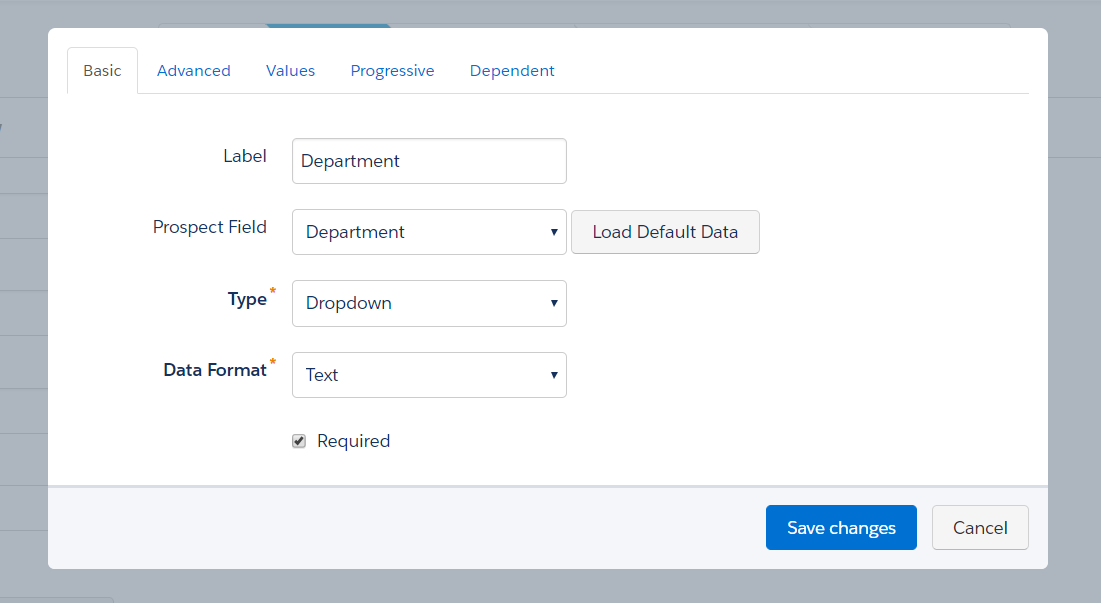
You have to go to any of the forms where that field is in use, edit the form, edit the field, and click “Load Default Data.”
NOW your customers can be shocked and awed by your wealth of selections.
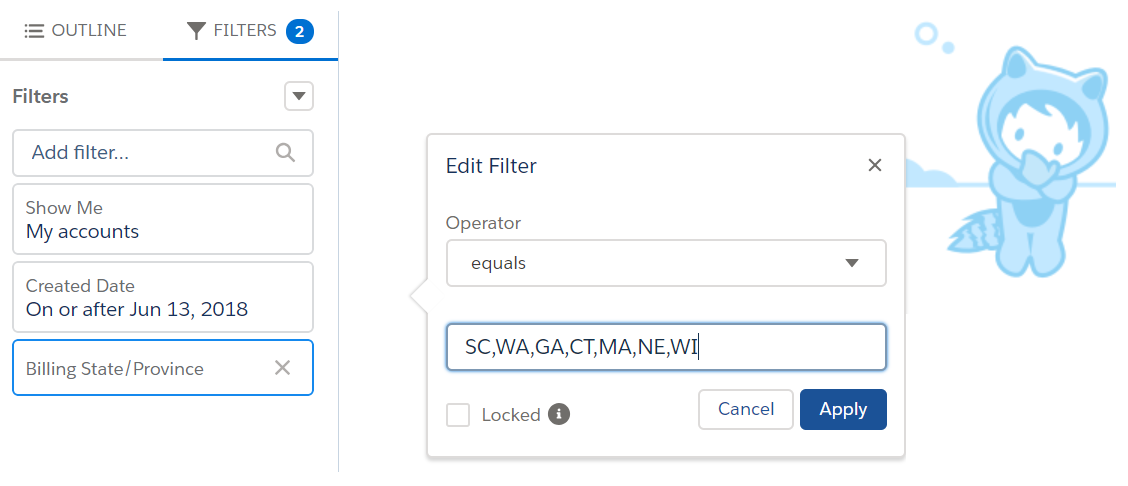
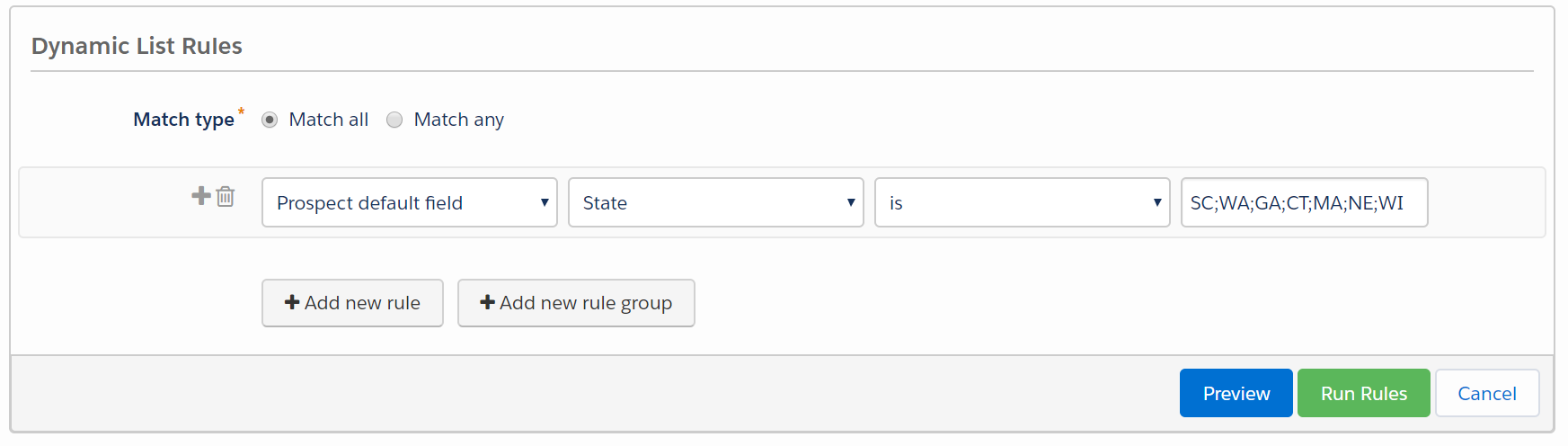
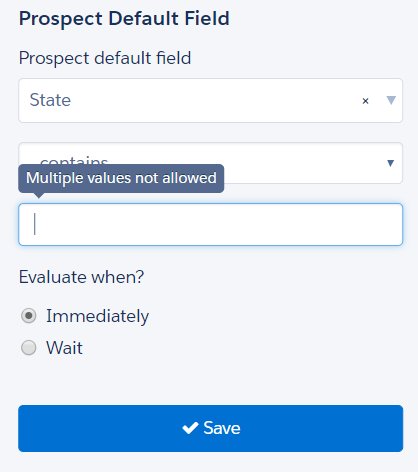
3. Semi-colons in Pardot mean OR, and in Salesforce commas mean OR.
In Salesforce world, you can use commas to separate values in report criteria and this behaves like an “or.” So for example, this would pull anyone with an address in any of these states:
To do the same thing in Pardot, you would use semi-colons:
Lara Black discovered ANOTHER twist in this punctuation plot when using semi-colons in Engagement Studio, but that has since been shut down so that you can’t use those in ESP rules:
4. Repeating automation rules based on field values are… sneaky.
When you reference forms in looping automation rules, Pardot looks to see if a new action took place. When you reference fields, there’s no concept of “is changed” when Pardot looks for a match.
It just looks to see if your prospects meet the criteria, yes or no — not if any NEW prospects met the criteria. If the field you’re evaluating doesn’t change, the rule will rematch it for all eternity.
Something like this, for example, will go haywire:
This makes much more sense with a detailed example… so check one out here.
5. If you turn on User Sync and unverify the Salesforce connector, synced users lose access to Pardot.
User sync is super wonderful and helpful! It lets you auto-create Salesforce users in Pardot with permissions that align to their Salesforce profile, and it automatically enables SSO for them.
But with SSO enabled, your users don’t actually have a method of logging into Pardot. If you take down your Salesforce connector for whatever reason, SSO users will be locked out.
Related: if the user accounts linked to 3rd party integrations (like the WordPress plugin) are converted to SSO, the connectors will break because your Pardot username and password no longer work.
6. You can expose dynamic lists in Email Preference Centers.
For the majority of my time as a Pardot admin, I operated with the belief that only static lists could be exposed in Email Preference Centers. It kind of makes sense, right? People can add and remove themselves from static lists. No can do with dynamic lists — you set the criteria and people either match or they don’t.
But, you CAN make dynamic lists “public” — they just will only show for prospects who meet the criteria for inclusion on the list.
They won’t be added or removed from the list if they update their preferences, but you can track their status in the column “opted out of list” when checking out the dynamic list in Pardot:
7. There are no published instructions for assigning Engage licenses to Platform users, but you CAN do it.
One of my customers fought really hard to get budget approval for 30 Engage licenses for their CSR team. This internal group had access to Salesforce with Platform/Force.com licenses (a partial license that can’t access leads and opportunities, among other things).
The customer sent me a list of who they wanted to have access, so I went to the Salesforce Engage License Assignment tab as usual and… these users didn’t show up on the list of people eligible to receive a license.
Cue the heart pounding.
I googled this thing half to death and came to the conclusion that Engage licenses just couldn’t be provisioned to Platform users. Just before I picked up the phone to have strong words with their Salesforce AE…
….I discovered you can manually assign the licenses by going to Setup, visiting their individual user records, going to Permission Set License Assignments, and adding this one:
Crisis averted.
8. Time in Salesforce and Pardot operates slightly differently.
The way that Pardot and Salesforce handle a request for the “last 30 days” isn’t quite the same. To Pardot “days ago less than or equal to 30” means 30 days ago starting from yesterday, but in Salesforce it means 30 days ago starting from today.
So for example: if I’m running a report on May 1st looking at the last 30 days, Pardot grabs people from April 1 to 30, and Salesforce grabs people from April 2 to May 1.
There is probably a layer of nitty gritty detail that I’m missing here involving time zones and yada yada, but the short story is:
…if your lists don’t exactly match between Salesforce and Pardot and you’re using a date filter, don’t pull your hair out.
9. You can sync some types of lookup fields from Salesforce.
In general, you can’t map Salesforce lookup fields to Pardot.
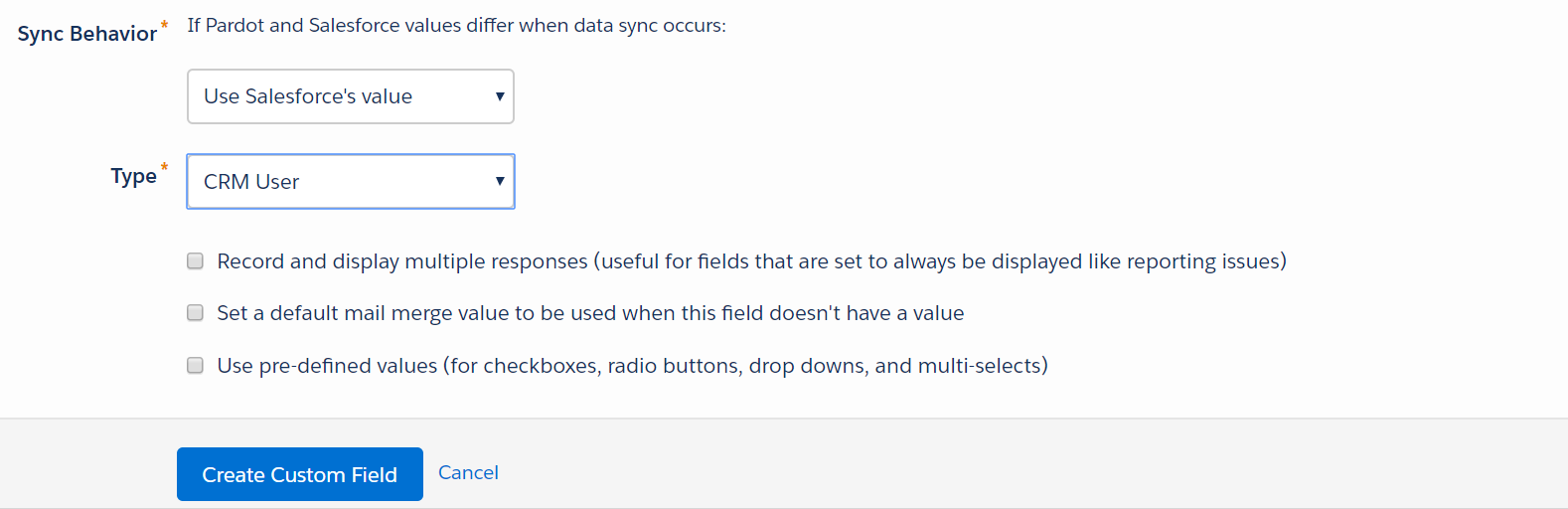
But you CAN sync this if it’s a lead or contact field doing a lookup to the User object. And then, even better still… you can then reference that field to be the sender for list emails.
10. Referencing Google fonts can screw with your CTR metrics.
One of my clients had a 100% click-to-open ratio. First reaction:
COOL!
Second reaction:
..mmmm, something’s off.
Turns out, if you’re linking to a Google font, a click is recorded when emails loaded. Here’s the detailed explanation from Pardot:
“If you use <a href=””> to import a font for a Pardot email, the font gets tracked as a click when the email is opened by the recipient. This tracking happens because Pardot tracks links that begin with http:// or https://, so links such as http://fonts.google… get rewritten and tracked. Pardot records a click when these links are loaded as part of the CSS reference.
To avoid this situation, you can use an @import reference instead of a <a href=””> to load your fonts. See Custom Fonts in Email for more details.”
11. HTTPS can make scary things happen on landing pages.
More and more browsers and providers are taking steps to strongly encourage (*cough* force *cough*) sites to use SSL.
In Chrome, for example, HTTP web pages with forms are marked as “not secure” when the user enters data:
So upgrading your Pardot tracker domain and vanity subdomain to HTTPS makes a lot of sense. It takes a few clicks and all of 15 minutes to set up. A word of caution, though:
In other words, if you’re setting the default to HTTPS, make sure your images and forms use HTTPS in the URL… not a mixture of HTTP and HTTPS. After enabling, do a quick landing page check to ensure you don’t have any missing content or broken links.
12. Taking the connector offline with Connected Campaigns on breaks pretty much everything.
There are definitely some work-in-progress things that are still being buttoned down, though. Trying to create a form or an email that is linked to a Connected Campaign while the connector is down makes crazy things like this happen:
I’m confident this will be fixed soon. Just be mindful that this is still evolving.
13. There’s tons of cool stuff you’re probably not taking advantage of.
This last one is actually several in one. Becka Miller and Lara Black gave a talk at Texas Dreamin’ last week on “5 Pardot Features You Might Be Overlooking,” which was a great reminder to regularly review tools that might be useful as your needs on the platform evolve.
Things like:
Competitor tracking
Site search integration
Keyword & paid search tools
The marketing calendar in Pardot
Dynamic content
Scoring categories
A full & growing list of connectors, add-ons & integrations (Sara McNamara has a solid list here!)
What other “surprises” have you found?
Have you uncovered any Pardot surprises of your own? What documentation do you wish existed… but haven’t been able to find? What has tripped you up, or unexpectedly delighted you?
Okay. I’m taking deep cleansing breaths right now over a really unfortunate discovery.
I’m talking about when suppression lists meet AMPSEA.
Wait, what’s AMPSEA?
Some people love it. Most OG Pardot peeps loathe it. Or at least harbor vague resentment while recognizing its utility.
AMPSEA stands for “allowing multiple prospects with the same email address.” It represents switching from email address as the unique identifier to using Prospect IDs, which was an important milestone in Pardot’s growing up as a platform.
If you got your Pardot org before June 14, 2016, you have the option to opt into AMPSEA. If you got your org after this date, AMPSEA is enabled by default. And either way, once it’s enabled, you can’t disable it.
Good reasons for AMPSEA (yes, there are some)
There are some legitimate use cases for having duplicate contact and lead records with the same email address, like:
Two people who share an email address
Different business units who maintain separate contact records in Salesforce
A consultant that works with two companies and should get emails targeted at both (small aside: Salesforce now lets you relate the same contact record to multiple accounts… but Pardot doesn’t recognize that, at least not yet.)
How does an AMPSEA org handle 2 people with the same email address on an email send?
Two prospects with the same email address included as recipients for your list email? No problem — Pardot is smart enough to only send it to them once.
Two prospects with the same email address included as recipients in your Engagement Studio program? No problem — Pardot is smart enough to only send it to them once. Per this help article:
“Pardot’s drip and engagement programs allow only one prospect per email address per program. This deduplication ensures that an email address associated with multiple prospects doesn’t receive more than one copy of the same email.”
All good so far.
One prospect on the recipient list, and another prospect with a matching email on the suppression list? This is where it gets sloppy.
AMPSEA + Suppression Lists = A recipe for disaster
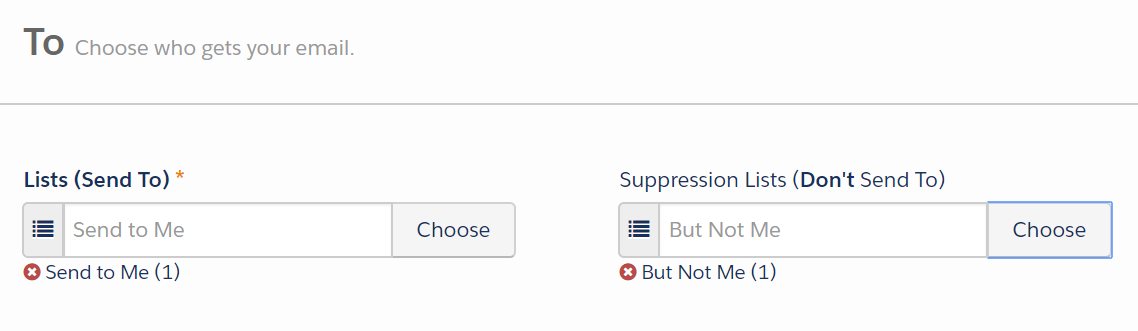
If you have one prospect on the recipient list, and another prospect with a matching email on the suppression list… the first prospect receives the email. Even though that email address is the list that you’re telling Pardot “DUDE DON’T EMAIL.”
I ran some tests on list emails to see what happens if the same email is on “send to” and “don’t send to”:
…and my test record got the email.
I tried it twice.
How can this be.
Cue the existential crisis.
Why this is a gaping flaw in the process
I actually can’t believe I haven’t run into this before. This is a HUGE issue that effectively means if you have duplicates, you can’t use suppression lists reliably.
Here are some pretty logical and common scenarios where this will wreak havoc:
Example #1: Suppressing customers
We’re running a “last call” type of promo for a customer. Anyone who hasn’t already purchased is getting a 10% off call-to-action. Anyone who HAS purchased should not get this offer — we’re not trying to give out refunds or make people feel like they missed a deal.
So we suppress anyone who has purchased… but if there’s a prospect with a duplicate email out there, that email address is getting sent the offer.
Example #2: Suppressing people with active opportunities
One of my customers has like 5 dupes for every contact in their system because they use Salesforce web-to-lead forms for partner referrals. They need a better process, and they know it.
But in the meantime, they still want to send emails out to help drum up new demand for sales. They suppress anyone who has an open opportunity… but again, if there’s a record with a duplicate email out there, that record and that email address is receiving the offer.
NO MEANS NO: Suppression lists should trump recipient lists
The flaw here is that suppression is looking at the unique identifier on the records (which is not email when you have AMPSEA).
I want to suppress that email address from receiving the mailing.
Before anyone screams “GDPR,” chill — opt outs and bounces are handled differently. When someone is unmailable, that status is applied globally across all records sharing that email address.
Why, how, & what now? [yelled into the sky while shaking my fist at the Par-gods]
What do you do with this workflow if you have duplicate contacts or leads in your system (as every single customer does)? How do you send emails with confidence, with the knowledge that you can reliably suppress the people that shouldn’t get certain types of emails?
I don’t have a workaround for this yet. My team put in a support ticket or three to see if we can get recommendations and ideas.
The most frustrating thing about this to me is that it is documented NOWHERE. Nowhere. Trust me, I’ve looked.
Anyway. If/when I have a solution, I’ll report back. In the meantime, I’d love to hear your thoughts in the comments.
Is this the behavior you would expect in an AMPSEA org? Does this mess with your campaign workflow? How would you…. or have you… solved for this?