Category

Andrea Tarrell

If you’re a current Drift user or have been eyeing the platform, good news — Drift has an integration with Pardot.

Let’s break down the key elements of the integration.

But first — why drift integrating directly with Pardot is huge

If you’re thinking:

“Wait I already know people using Drift and Pardot together. What’s the big deal?”

You’re not wrong — but this step adds even more power to the dynamic duo.

Drift has many current Pardot customers leveraging conversational marketing to capture leads and create a more engaging, targeted experience for their website visitors.

But in the past, most Pardot customers integrated Drift directly with Salesforce, using it to create/update new leads and contacts — meaning if marketing wanted to spend more time pre-qualifying Chatty Cathy before she hits Salesforce, they were out of luck.
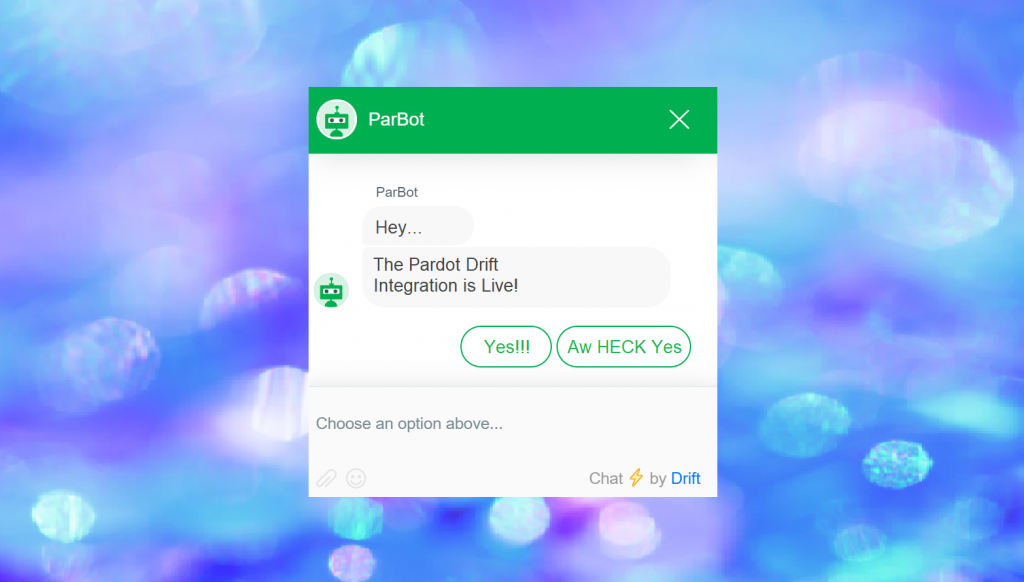
Selectively sync between systems using the Drift / Pardot integration

The newly minted Drift integration gives marketing more granular control over when data is passed between systems — both from Drift to Pardot, and Pardot to Salesforce.

The integration is capable of syncing all leads to Pardot automatically or syncing new leads based on the Conversation Qualified Lead (CQL) score that a conversation is assigned within Drift:
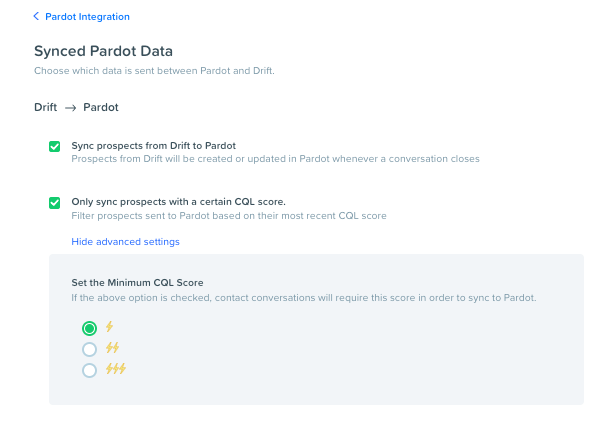
image (3)

This is huge — because it lets you set a bar to ensure that only quality conversations migrate into Pardot for further nurturing. And because the first stop is Pardot, you can put that lead through any of your regular lead scoring and qualification activities before routing to sales.

Connect custom fields to continue the prospect conversation in Pardot

The integration can map custom fields between Drift and Pardot — opening the door to using the data you’re capturing in Drift in segmentation, personalization, and reporting:
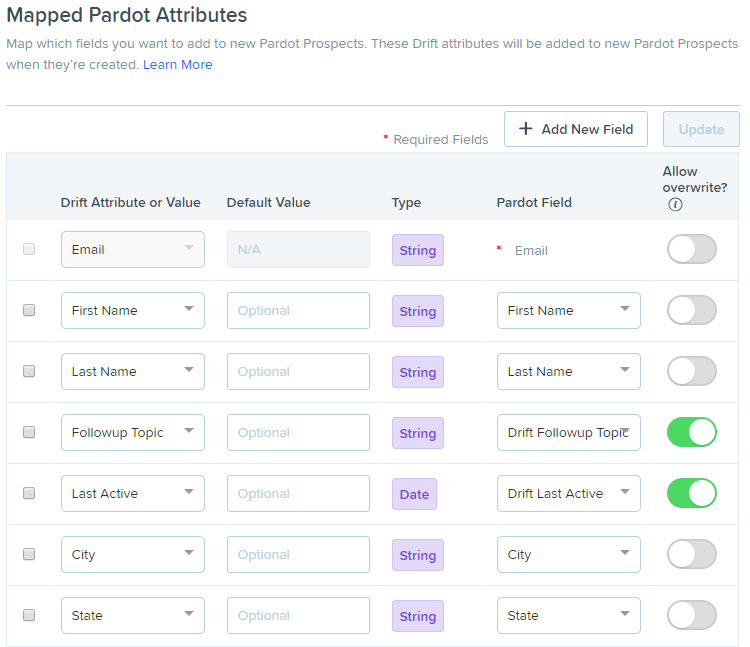
image (2)

For example, you could create a Drift field for product interest and map that to Pardot, and then use that to drive people to an Engagement Studio nurture or route to reps in that business unit.

The basic concept is that Drift starts the conversation, and Pardot continues it after people have left the website… and Drift arms Pardot with data to target prospects based on where they’re at in the journey. Then using Pardot, marketers can send email campaign to encourage re-engagement and get people back to the website — where Drift picks up again.

An Example: Leveraging the Drift/Pardot integration to improve customer experience

To run effective campaigns, it is hugely important to bridge data gaps between systems and have one clear picture of the entire customer and their buying lifecycle. The average enterprise leverages a whopping 91 cloud services for marketing alone — and if key info is sitting in silos, it’s pretty easy to end up with a black eye.

A major silo we often see is customer service service data. The marketing department needs this info too to inform effective engagement.

Think about it — do you really want to be hard selling an account that has a stack of escalated cases? Not a good look. If a customer is using Service Cloud, we can easily create a suppression list based on open cases (using a custom object in Pardot) to hold back promotional mailing until a case is resolved.

Chatbots are another place customers may turn for an “airing of grievances” — and the Drift / Pardot integration busts one more data silo, allowing you to drive a better customer experience based on what was discussed in a Drift chat.

For example, maybe the conversation was support related. By noting that in Drift, you could suppress marketing messages to allow time for the support conversation to work itself out.

Or maybe the conversation was regarding features or capabilities, and noting this in Drift could be used to trigger a topical Engagement Studio Program focused on training and customer adoption. So many possibilities here!

What’s your take on the Drift Pardot integration?

If you’re saying “sign me up,” check out Drift’s help documentation on how to get started.

What questions do you have? Are there other items on your integration wishlist?  We also have the integration up and running in Sercante’s training environment — ping us for a demo.


Dear Salesforce Admins everywhere,

I realize you may not have had to work that closely with us marketers before.

And that not all of us have taken the time to really understand what you do, or to appreciate the power of the platform you manage.

But it’s time for us to become besties and get on the same page.

Wanna know why?

Because sales and marketing departments will only achieve alignment when their platforms, processes, and KPIs are aligned.  And on a more personal, and perhaps more compelling, level – because Pardot + Salesforce skills are going to effing explode our career potential.

I know, I know.

You’re already a hot commodity.  You’re working on becoming an admineloper, that rare blend of technical and business acumen hybrid that’s almost as elusive as this creature.

jackalope_in_the_wild_large.jpg

Or this one.

pug bunny.PNG

Or this tasty crossover from Milkbar.

milk bar cookies.PNG

Okay, enough analogies.

In all seriousness, though, Pardot is one of the fastest growing products in the ecosystem.

And unlike Marketing Cloud’s family of email, social, mobile and ad products, guess what?  Pardot’s future is ON PLATFORM.  Yeah, like the same shared code base as Sales and Service Cloud. None of this “integrated” nudge, nudge, wink, wink shit.

Yes, yes I know you’ve heard B2B marketers lamenting that Pardot is the “red headed stepchild” of the platform. But that was 2013. This is now. There have been more interesting product innovations for Pardot in the last year than in the 5 years before it combined. Seriously, us Pardashians are like geeking out over here.

Pardot has grown 108% YOY.  And word on the street is that the sales team has doubled in size this year — so TL;DR in the next few years are going to be big.

Admins that can work “ambidextrously” in both Sales Cloud and Pardot are in extremely high demand.

With our powers combined, we can design some incredibly effective and impactful solutions.

Think about it?

xoxo

PS – If I’ve piqued your interest, we’re going to be holding a Pardot Bootcamp for Salesforce Admins and would love to have you join us.  Sign up below to get the deets. Purple squirrels and unicorns only, please.

PPS – We’re hiring.

Sign up for info on our Pardot Bootcamp for Salesforce Admins

The Pardot Google Analytics connector is awesomesauce.  And it’s remarkably low maintenance — but there are some nuances, and it’s still one of the things I get the most questions on during the implementation process or when people are ramping up reporting.  

So, let’s dig into what this thing can do, and start with the very basics.

Quick note: this blog is going to be focused on what we can get OUT of Google Analytics and into Pardot.  If you’re interested in pushing Pardot information IN to Google Analytics… that’s a topic for a different day.

1. How is Google Analytics reporting different than what I get from Pardot?  

Google Analytics is the gold standard for reporting on website traffic and engagement.  It tells you things like:

  • traffic volume
  • number of unique visitors
  • time on site
  • average number of pages per visit
  • bounce rate
  • user demographics
  • …and lots, lots more.

If you’re thinking to yourself, “wait, doesn’t Pardot track that?” you’re not wrong… but the two systems do this a little differently.  

Google Analytics is primarily capturing data that answers the questions “what happened?” and “how much?”  In other words, it is grabbing aggregate level activity info on what’s happening with your site.

Pardot adds another layer on top of this reporting — the “who did it?” layer. Pardot focused on identifying which specific prospects are taking action, and what specific actions they’re taking.  

This is the intel that helps us as marketers in our quest to get the right communications, to the right people at the right time — because once it is in Pardot, then we can transmit that data to sales or use it to kick off automated programs.

2. Why should I connect Pardot with Google Analytics?

By turning on the Google Analytics connector, you can capture some additional nuggets of data about how people are first finding you and coming to your website.  

This is particularly useful if you’re running AdWords campaigns or other digital marketing initiatives to bring net new people in through your site.

3. How do I get the Pardot-Google Analytics connector setup?

It’s super simple!  And it’s available in all Pardot editions.

  1. In Pardot, navigate to Admin | Connectors.
  2. Click + Add Connector.
  3. Click Google Analytics.
  4. Click Create Connector.

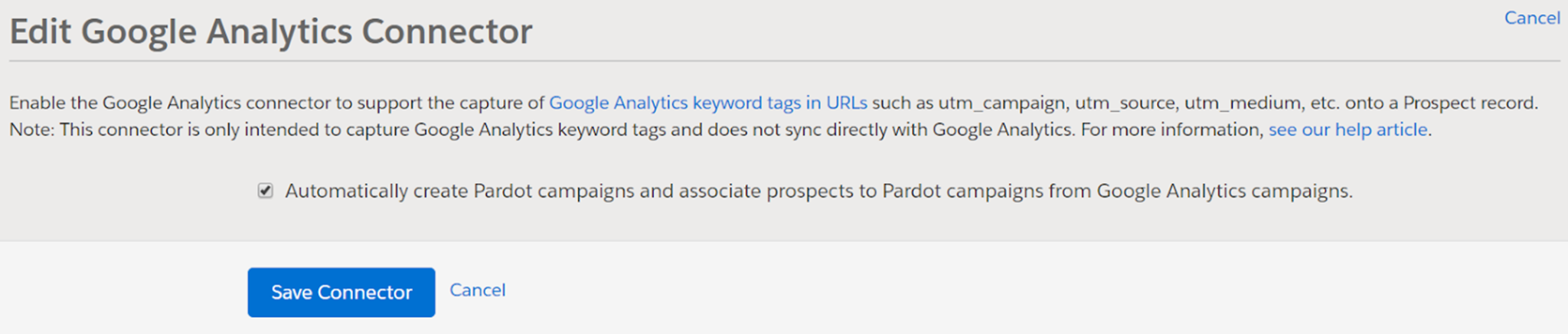
It will give you the option to automatically create Pardot campaigns and associate prospects to Pardot campaigns from Google Analytics campaigns.  (Note: If you have connected campaigns enabled, LEAVE THIS OFF. Muy importante.)

Google Analytics 1.png

Then make sure your Google Analytics tracking code is included in all of your Pardot assets (like forms and landing pages).

4. What Google Analytics data is captured and sent to Pardot?

You’ll notice that once you have the connector set up, a new section appears on prospect records in Salesforce:

Google Analytics 2.png

The Google Analytics connector pulls UTM parameters into these new fields (and they can then sync over to Salesforce).  These fields are only captured on the first touch for people not yet in Pardot.

5. Whoa, hold on. What’s a UTM parameter?

Glad you asked! I mean, you didn’t. But I’ll tell you anyway.

UTM stands for Urchin Tracking Module. It’s a little bit of code appended to the end of a URL that lets you track where people are coming from.

The 5 UTM parameters that Pardot collects Google Analytics data from include:

  • Medium – How you sent your message to the user.  [examples: email, cpc, social]
  • Source – Where the user came from. [examples: bing, google, yahoo]
  • Campaign – The name of your marketing initiative. [example: world-domination-2020]  
  • Content – Can be used to differentiate between different content variations in a campaign. [example: world-domination-georgia and world-domination-mexico]
  • Term – The keyword used in paid search campaigns.

6. How do I set up UTM parameters?

You can enable auto-tagging for AdWords, and Google Analytics has a handy dandy URL builder for manual tagging.  You can use this to generate specific URLs where you want to capture the 5 data points mentioned.

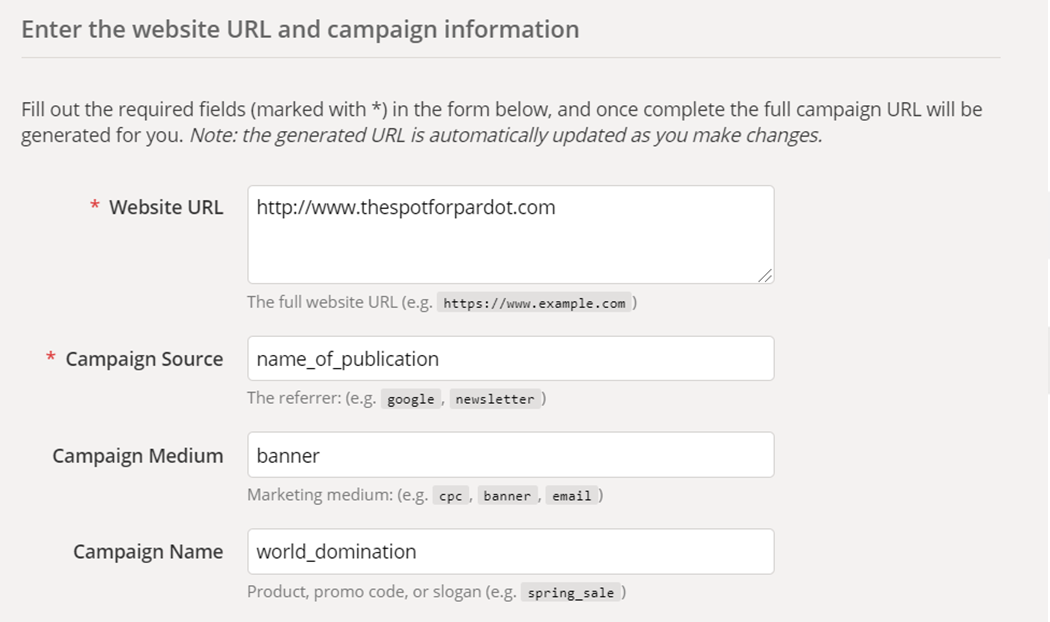
For example, if you wanted to run an ad on the site of a trade publication, you could use the URL builder to create a campaign link:

Google Analytics 3.png

Then, it spits out the following URL to use:

https://thespotforpardot.com/?utm_source=name_of_publication&utm_medium=banner&utm_campaign=world_domination

Does this look familiar?  

Maybe reminiscent of Custom Redirects?  

This is a really similar concept, and if you build a tracking link in Pardot, it will actually give you the same opportunity to enter those parameters:

7. So is this first touch, last touch? What are we dealing with here?

Short answer: first touch.

Google Analytics data will be populated on new prospect records that originate from Google Analytics-tagged links.

UTM is updated for the first touchpoint only. If a prospect is already in your system, these fields will never auto populate.

8. But I want last touch, multi touch, and ALL THE TOUCHES. What are my options?

There’s hope.  

But not with the Google Analytics connector.

It’s super in the weeds, so it’s going to be its own post. Spoiler alert: it involves Campaign Influence and Connected Campaign.

More to come.

9. Are there any weird gotchas with the Pardot-Google Analytics connector?

Customers will frequently reach out thinking their connector isn’t working because the Google Analytics fields aren’t populated on all prospects.  But this doesn’t mean it’s non-functional — remember that it’s only grabbing these values for the first prospect interaction.  Existing prospects will NOT have these values retroactively populated.

There are a few nuances involved with the optional setting to allow the connector to automatically create Pardot campaigns for the values being grabbed by the utm_campaign field.  

If you turn this optional setting on, the GA campaign will trump the Pardot campaign that would have otherwise been captured for a prospect. The utm_source field also overrides the default Pardot source.  In many cases this is a desired behavior — just calling it out as something to be aware of.

Also, I said this before, but it bears repeating: DO NOT TURN THIS OPTIONAL SETTING ON IF YOU’RE USING CONNECTED CAMPAIGNS.  It results in tons of extra campaigns getting created that don’t play by the same rules as the rest of your campaigns.

10. How do I use this data?

Medium, source, and campaign are extremely valuable data points when doing reporting and analyzing what lead generations are paying off. 

Using automation rules, you could take the values in these fields and direct prospects to targeted nurture campaigns that send content related to their initial interest.  Or incorporate into lead routing/assignment processes.  Once you have the data in the system — the sky is the limit! 

What questions do you have?

Any other burning questions about how the Google Analytics Pardot connector works?  Tips or tricks to utilize this more effectively?

Let’s hear it in the comments!

Get a Pardot audit

Is your system aligned with best practices? Are there new features, or things you could be doing better? Whether you’re new to Pardot or a seasoned user, an audit can be extremely beneficial.
Request An Audit

We have more data than ever to gauge marketing performance.  The Don Draper era:

“I know half of my advertising is wasted, I just don’t know which half”

…just isn’t going to fly for most marketers in 2019.

But how do you get beyond reporting on the easy stuff like page views, CTR, and conversion rate and demonstrate what marketing activities are contributing to pipeline?

For all the talk about “attribution” and “ROI reporting,” most marketing teams are still struggling to connect the dots between what’s happening on the marketing side of the house and what’s influencing and closing deals.

Watch the recorded session from London’s Calling

I dug into this topic a few weeks ago at London’s Calling, a community organized Salesforce event.  We discussed how to run closed loop sales & marketing reporting by leveraging campaign influence, connected campaigns, & the new multi touch attribution models in Pardot.

I seriously can’t even tell you how much I’m geeking out about these features of the product. There’s so much potential here to leverage data to run much more effective campaigns, elevate the role of marketing, and improve sales alignment.

Here’s the recording if you’d like to check it out: 

What’s your take?

What barriers have you encountered on your quest for better marketing reporting?  Any gotchas or lessons learned as you’ve tried to measure campaign influence?

Let’s hear it in the comments!

I’m noticing a trend.

People hate their marketing automation platform implementation partners.

On at least a weekly basis, a prospective customer or a Salesforce AE with a red account will come to me with a story of a “failed implementation.”

“We implemented 6 months ago, and we’re barely even using it.”

…they say, with an implied (or sometimes direct) accusation against their implementation partner.

I nod gravely, affirming their tale of woe.

But honestly — a ”failed implementation” isn’t always to blame for the current state of affairs.

What a REAL fail looks like

Don’t get me wrong.  There are plenty of shitty implementation partners in the ecosystem.  But the basic Pardot stand up tasks are… well, pretty basic.

When I audit other consultants’ implementations, sometimes I see:

  • Incomplete configuration
  • Sloppy/rushed builds
  • Inconsistent set up

…but most often I just see a pretty normal Pardot org.  Sometimes with pretty solid content and campaigns that the customer has built out after the partner moved on.

So why does the client feel like a failure when from a systems perspective everything is good to go?

Introducing the Dip

When companies first onboard with Pardot, they’re psyched and ready to take over the marketing automation universe.

But then… reality hits.

Things aren’t as shiny and sexy as Salesforce said.

Successfully running automated campaigns is hard.

The sales team refuses to call on those gosh darn leads.

No one is contributing content.

They’ve hit what Seth Godin calls the Dip.  Or what some management consulting and Six Sigma people call the “Valley of Despair.”

The dip is that feeling that things aren’t working with the current state of affairs.  You’re frustrated, and you’re not sure if you should fight through it or throw in the towel.

Why people hit ‘the dip’ after Pardot implementation

Hitting the dip is not a failure.  If you’re nodding your head and can relate to the above, let me say this again — THIS. IS. NOT. A. FAILURE.

You’re not doing anything wrong.  It’s a natural part of the process.

The most common reasons I see customers struggling to power through the dip is one of these missing ingredients:

  • Clean data
  • Content
  • A champion driving internal support
  • Team bandwidth
  • Technical skills
  • Processes worth automating

Coming out on the other side

Once in a blue moon, when a company hits the dip, it means that Pardot may not have been the right fit.  But much more often, it means it’s time to double down, recommit, and persevere — not jump ship.

I love all my custies, but my favorite companies to work with are those that come to us at this particular moment.  They saw the vision of how their business could be transformed by marketing automation, they made an investment, they took the first steps — and they’re at the point where they’re ready to get serious and take things to the next level.

This is a turning point.  And it’s fun.

Can you avoid the dip altogether?

Honestly?  Probably not entirely.

Not trying to be a Debbie Downer here. There are just natural ups and downs when adopting any new product.

A few things can help make it better and feel less drastic:

  1. knowing it’s coming
  2. working with a partner on a managed services/retainer basis to help you rally through it.

…because the other side really is worth it.

As a Pardot consultant, I run into a lot of people who are stuck.

They’re not getting the value they wanted out of the tool.

They’re not sure what to do next.

The ocean of possibility feels daunting.

When talking to people in this space of frustration, I try to listen for 3 things.

  1. What is the outcome they’re after?
  2. Are they working toward that outcome in an effective way?
  3. If not… is it because they don’t know how to, or because they don’t want to? (That may sound like a weird question, but I’ll explain.)

Getting through “I don’t know how”

If lack of effective action stems from a missing skills or knowledge, that’s actually a great place to be.

You can learn.  You can find resources.  You can talk to people who have walked the road you’re walking.

This is the frame of mind for many of the companies my team supports with implementations.  There’s a knowledge gap, and we have a structured process to help would-be Pardashians conquer that (full of training guides, blogs, videos, and other helpful goodies.)

When there’s more to the story

Sometimes the knowledge gap is real.  But I also frequently find smart, motivated people avoiding starting a project or executing something poorly.  In those cases, there’s invariably more to the story than “I don’t know how.”

Why haven’t you created an Engagement Studio nurture?

If scoring and grading was a priority when you bought Pardot, why aren’t you using it yet?

Have you trained your sales team on how to leverage the information you’re gathering in Pardot?

The first answer to inquiries like that is often “I don’t know how.”  Or the usual time and money fallback.

But those are rarely the TRUE reasons holding talented, in-it-to-win-it marketers back. The real barrier is often something more like:

  • What if I build it and then it flops
  • What if I can’t get other people to buy in
  • What if I do it once and then it becomes my job forever
  • What if my boss hates it
  • What if I’m not good at this
  • What if I look dumb

In other words… it feels like a risk.

Identifying and naming that lurking reason for inaction is powerful.  Seeing is the first step to overcoming.

No more posts to show