If you’re a long time reader, you know that I geek out about innovative ideas for Pardot, and from time to time advocate for an enhancement or two.
This holiday season, while sipping egg nog and catching up release notes, I revisited my wish list. There have been lots of great features tucked into recent releases… and my short list of items for the next round include:
Okay, real talk: the IdeaExchange needs some work.
If you’re not familiar with the IdeaExchange, it’s a pretty amazing concept — users submit ideas, other users vote on them, the product team reviews, wishes get granted, and we all hug and high five.
But in reality, that’s not what usually happens. SteveMo shared some feedback on this that has gotten some great traction, and it sounds like Salesforce is working on making the process better.
For Pardot users to take advantage of any improvements though, we as a group need to step up and start contributing to the discussion on the IdeaExchange.
What’s broken with the IdeaExchange as it stands today
“Post it on the IdeaExchange”
…is probably the most frustrating thing you can hear from support when something really critical that you absolutely need yesterday isn’t available.
And then, you finally suck it up, head over there, and you see 500+ Pardot ideas just sitting. Many have hardly any votes, because many Pardot users are unaware that the IdeaExchange is a thing.
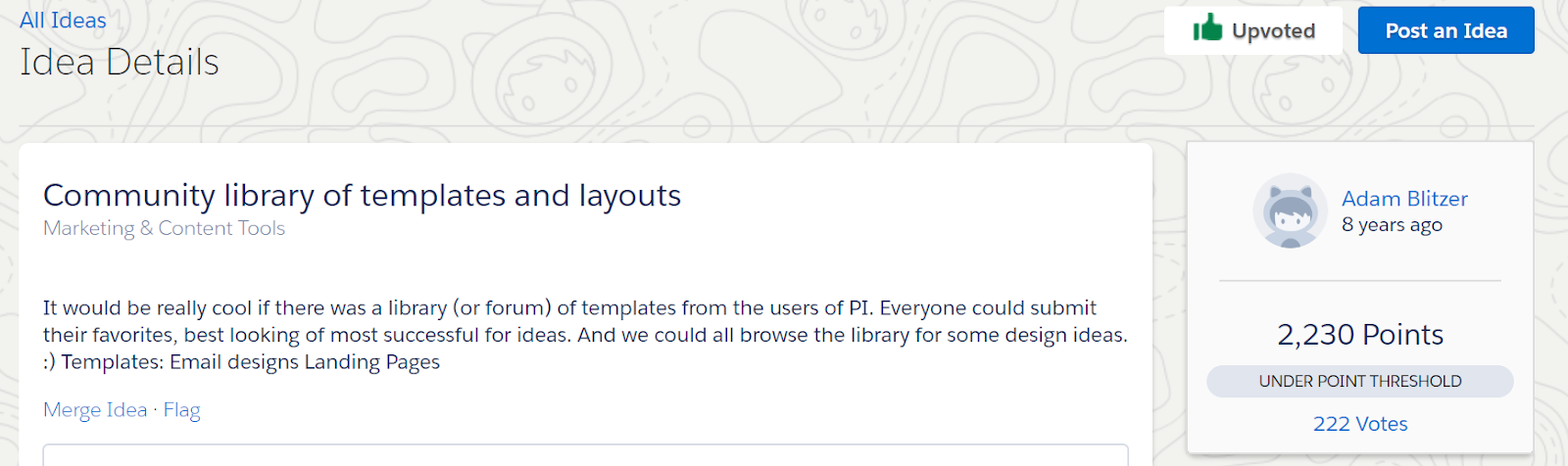
Then you see some genius ideas with hundreds of votes, and there’s no action. Case and point: this idea posted by Adam Blitzer from 8 years ago.
Pardot was brought into the Ohana via acquisition 2013. Did Adam Blitzer really post this idea in 2010? Very unlikely. But you get the point. Good ideas sit, may or may not get voted on, and don’t seem to actually influence product decisions.
How Pardot users can contribute to a solution for the IdeaExchange
In the past, I’ve occasionally upvoted ideas, but have really hesitated to post anything to the IdeaExchange. It has just felt like an exercise in futility. And really, I like talking about things that I LOVE about the product far more than trying to rally people to think about its faults.
But Salesforce recently announced it’s revamping the IdeaExchange… and I’m excited to see what comes next. They’ve created an advisory board, feedback sessions, and more — with the stated goal of:
[An] IdeaExchange that can scale with our community’s growth and our growth – and that in 5, 10 years and beyond it will still be a place for meaningful, impactful discussions where together we can prioritize our product roadmap.
Will this vision be realized? Time will tell. But this seems like an opportunity to make sure Pardot users get in on the action.
So, I’m going to start posting ideas to the IdeaExchange.
And upvoting aggressively.
And sharing features that I strongly feel should be incorporated into the product.
I’d invite you to do the same… starting with the features below.
Pardot Ideas to #VoteAndPromote
I literally went through every idea on the IdeaExchange this morning and made a top 42 list.
The best ideas and comments include detailed descriptions, use cases, and examples how the feature request will provide business value. This gives the product management team something to work with as they advocate for new features, and gives fellow users something to relate to as they consider hitting that magic ‘upvote’ button.
I won’t inundate you with ALL of my top 42… so for now, just a few:
The IdeaExchange has had its challenges — but for it to get better, we as Pardot end users, consultants, and superfans also need to support it.
This was a mini epiphany for me, but obvious to some others. Shout out to a super awesome, passionate, and patient product manager who told me this literally a gazillion times before I changed my mind on it. 🙂
Last week, I had the opportunity to join the Industrial Sage Podcast to riff on marketing automation and lead gen.
When I hear “podcast” I usually think audio only… so I will confess my heart skipped a beat or 3 when I walked in and saw video cameras for days.
About Industrial Sage
Industrial Sage focuses on digital marketing ideas and best practices for industrial companies, particularly manufacturing and logistics businesses. It’s the brainchild of Danny Gonzales and the folks at Optimum Productions.
There’s an amazing body of work on their website including blogs, videos, audio content, and more.
When marketing automation goes overboard
Here’s the final cut of EP 24: WHEN MARKETING AUTOMATION GOES OVERBOARD:
I’d love to know what you think! Sound off in the comments, or let’s chat on Twitter.
Listicles. I hate them. Truly despise them. But then also kind of love them.
If you’re not familiar with this buzzword, a listicle is an article that — you guessed it — is written in the form of a list. There are pros and cons to this approach. Let’s explore.
1. PRO: They work
They’re just so… damn… clickable.
In a world where 80% of your “readers” never make it past the headline, the promise of a concrete number has some serious allure.
If your goal is to get clicks — then get your listicle on, my friend, and mission accomplished.
If your goal is to get these nameless clickers to change behavior and DO something (like buy from you), you may need to up your game.
3. CON: The explanations (i.e. the non-list copy) are always so lame
A listicle is a list. The “article” part of it is usually a crammed-in-afterthought that just makes you want to cringe.
Except this listicle, in which every word was lovingly curated and will enthrall you.
4. CON: It’s lazy writing
Can we all admit this… a listicle is a long form grocery list, alright? You can literally write this stuff on the back of a napkin.
5. PRO: You’re meeting us where we’re at
As digital marketers, our goal is to tailor our messaging to the buyer’s journey and their frame of mind.
And we, as a society, have collective ADD. So give the people what they want, dammit, because the best content might just be the content that gets read.
Again “read,” if you consider skimming titles to be reading.
7. CON: They make us forget how to count
Half of the time authors seem to forget how to count mid-listicle. Maybe it’s some stat they heard about odd numbered lists performing 20% better than even ones?
See also: #4 re: lazy writing (and/or copyediting.)
8. CON: Absurdly large numbers
I don’t want to know 100 or 101 things about anything.
It’s too much.
TOO MUCH, I tell you!
9. PRO: ’90s nostalgia & pop culture
I’m a sucker for anything featuring N*Sync, Spice Girls, Furbies, memes. If you can find a way to work some pop culture that into your B2B marketing, then you do you.
One unique quirk about Salesforce is that their fiscal year ends January 31. According to Benioff’s Behind the Cloud, this move was to better align with customer buying patterns and the old budget / new budget purchasing frenzy.
But what does that mean to you, you might be wondering?
The approaching end of the FY means your Salesforce reps are able to cut deals to make year-end numbers — so it’s a great time to explore add-ons and products to enhance your marketing technology stack. And maybe score a decent deal if you go about it in the right way.
So what’s a Pardot Admin to do if they want some shiny new toys to help level up their 2018 marketing?
1. First, catch up on the latest & greatest
Major updates have been rolled out across all Salesforce clouds with the Winter ‘18 release – including some fantastic things in beta for Pardot.
If it’s been a while since you’ve reviewed new features and functionality across the Salesforce platform, take a gander! My running wishlist includes:
Are there other parts of your sales and marketing process that you could move to Salesforce and streamline? How might you simplify processes and maximize your overall investment?
2. Ask for demos
If your research turns up anything that catches your eye, reach out to your Salesforce AE to tee up a demo.
Keep in mind that your Salesforce AEs are probably hair-on-fire busy right now – so be cool and only reach out if you have real purchasing interest. If you’re window shopping, consider being a nice human and waiting until Feb 1 for that.
3. Plan ahead & negotiate on the “staples”
Are you flirting with your database limits? Need more contact blocks? Want to add a new feature from a higher edition? Be proactive and let your rep know that to see what they can do on price.
Oh, and if you’re on Pardot basic? Go Pro already. Like right now.
4. Ask for services
If you’re adding product and you rep can’t budge any further on price, ask if there’s anything they can do to help you out with implementation or support.
They may have internal resources they can deploy or partners they can arm twist to give you a discount in the interest of winning your business.
5. Shop the AppExchange, too
Many other companies in the “ecosystem” try to align their fiscal year with Salesforce as well.
These partners are eager to make their year-end numbers too — so if there are any specific challenges you’re looking to solve, see if there are any 3rd party tools that could help address this. A few of my favorite Salesforce native or integrated products include:
SalesTing (for sales reps who just won’t log their dang activities)
You can definitely do better than list price, and you can probably do better than your rep’s first offer.
If you’re not super used to negotiating, it feels weird. But just try it. Make a counteroffer with a reasonable and fair number, and you may be pleasantly surprised.
Number of seats and total price aren’t the only bargaining chips you have at your disposal. Could you commit to a longer contract term? Provide references or serve as a success story? Bring it all to the table!
7. Be ready to make decisions
Of course, Salesforce will sell you product year-round. But come February 1st, your rep may be less inclined to bend over backward to give you a screaming deal. Or territories might be reassigned, and you’ll have to start over with a new rep.
If you’re really excited about moving forward with a new product, it can help to proactively prep your internal stakeholders and lay the groundwork early for a speedy sign off. Get all decision makers in on demos, prepare your business case, and let folks internally know that the clock is ticking.
What’s your playbook for negotiation?
Your Salesforce reps likely have more pricing flexibility now than they’ve had all year — so happy negotiating!
What are your tips and tricks for cutting deals with vendors? How do you stretch your precious marketing budget and get the biggest bang for your buck?
I think I’ve had that conversation approximately a gajillion times. My New Year’s resolution is to STOP already, and I’d like to invite you… no, challenge you… to do the same.
What would it look like if we stopped answering “how are you?” with banalities and small talk?
What if we replaced “good” or “fine” with a story of something we’re excited about working on?
How much more vibrant could we make this community? How many more opportunities could we uncover to support and challenge one another?