Category

Emails & Templates

GDPR, CPRA, the end of third-party cookies: data privacy is a hot topic among digital marketers, but it’s not just advertisers who should be worried. If your marketing strategy’s success is founded on clicks and email open rates, the data privacy landscape of the future could be an unpleasant awakening. 

Data privacy tools can impact your email strategy in a number of key ways:

The good news is that Marketing Cloud Account Engagement (Pardot) offers out-of-the-box tools that can support email marketers through some of these changes. Let’s take a look at the options.

View Email Clients in a Send Report

If part of reporting on your email successes relies on email open rates, the first tool Account Engagement offers that you will want to utilize is the “Email Clients” report. 

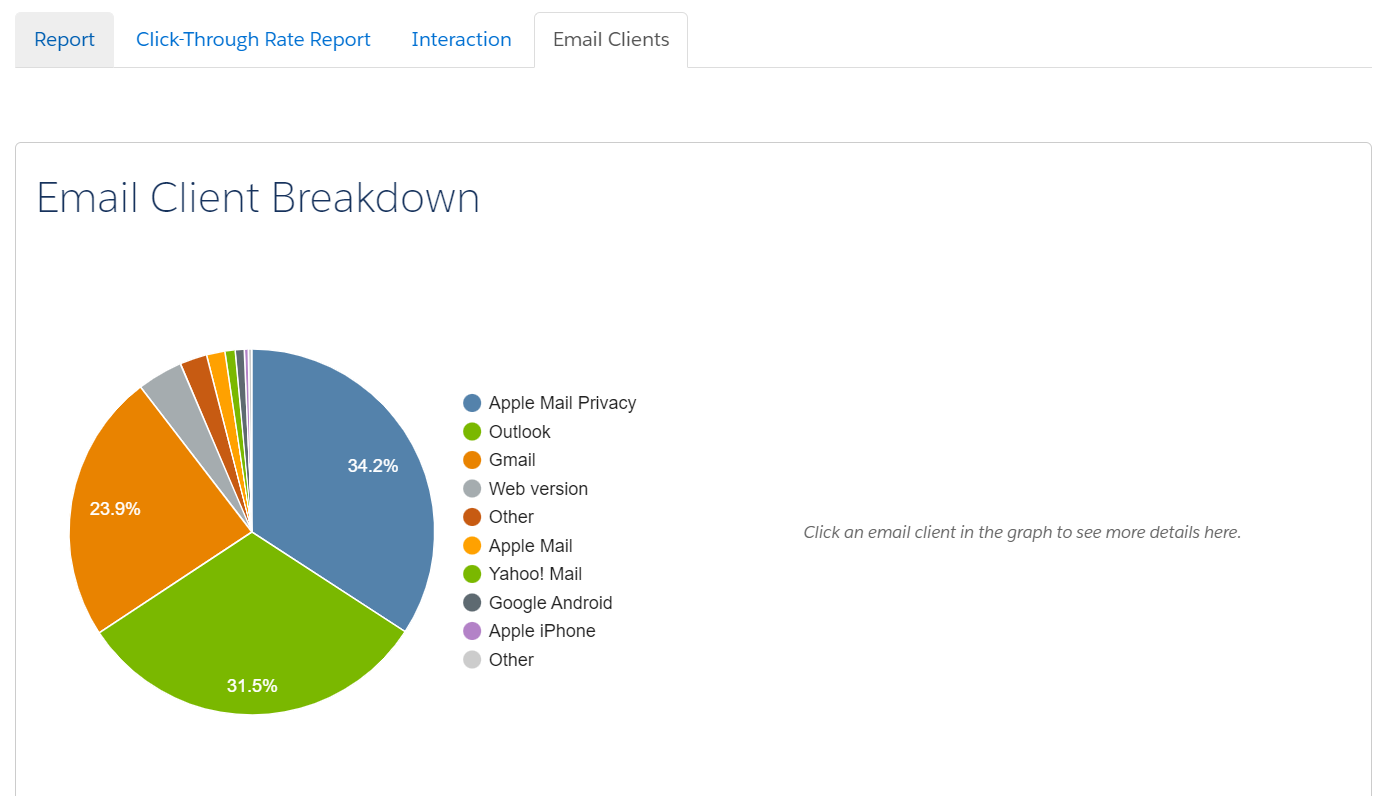
Found as a tab in a Sent Email report, this tool will give a breakdown of all email clients your recipients are using, including how many are using Apple Mail Privacy Protection and/or Outlook:

Viewing this report will give you a sense of how reliable your email open rate metrics actually are. For example, if you have a high percentage of recipients leveraging Apple Mail Privacy in your report, that is a signal that your email open rates will likely be artificially higher than they should be. That’s because Apple MPP is pre-opening every email sent and “hiding” true opens from marketing tools like Account Engagement — thus, a person could show as an open even if they have not actually opened your email.

Email Open Rate Considerations for Outlook Users

On the other side of this is Outlook. If you’re a B2B marketer, you likely have a sizable chunk of recipients opening your emails on Outlook. 

This isn’t new, but you may not have known that an email “open” is recorded when a pixel is triggered — often in the form of an image pixel. This means that if a recipient doesn’t download images and doesn’t click on a link, their open will likely not be captured. If you’re sending long-form emails with lots of relevant information and few links to click through, you could be missing the actual impact of that email if you’re only looking at open rates. 

Email Open Rate Considerations for DuckDuckGo Users

Not pictured here is the impact of something like DuckDuckGo’s inbox that, like its browser counterpart, is designed to “hide” things like email opens or link clicks from marketers. 

As consumers continue to search for ways to keep their user data private from marketers, we can expect inbox providers to allow for greater user-based controls like this. Those tools are just one more reason to consider moving away from reporting on email opens at all. 

Automations and Email Open Rates

If your email client reports are indicating a big impact in your open rate credibility, your next step needs to be an assessment of your Engagement Studios, Automation Rules, and Dynamic Lists that are using email opens. Fortunately, Account Engagement has an out-of-the-box tool for this as well!

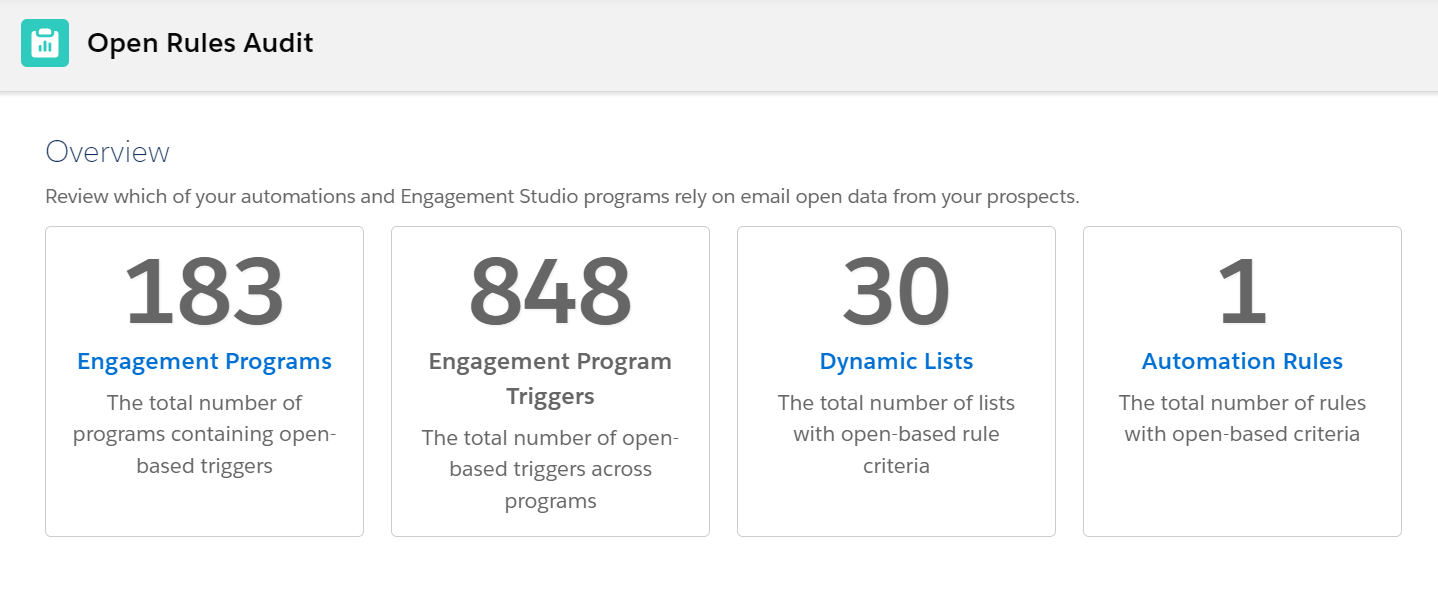
In Account Engagement, navigate to “Reports,” then “Marketing Assets,” then “Automations.” You should see “Open Rules Audit” as a selection. Opening that report will pull a quick calculation of where your account is using email opens to trigger an action, like branching in an Engagement Studio, adding a person to a Dynamic List (see examples in this post), or triggering an Automation Rule if they “open” an email:

Keep in mind that not all of these will be active, so you will still have to do a bit of discovery on what needs to be edited and what should be simply archived. However, if you have multiple people creating assets and campaigns in your Account Engagement account, this report is a great resource for determining who should be involved in updating your automations with other engagement metrics (like clicks). 

Taking Extra Steps: Evaluating Bot Clicks in Email Opens

If you’re also triggering automations off email clicks, this is a good opportunity to check your recipient lists for email security tools. These tools will pre-click every link in an email before delivering it to the recipient, who may then also click the links that are most interesting to them. 

You may have noticed this show up in your email reports or in a prospect report, where it might look like a recipient clicked every link in your email — including your social media links and privacy policies — in under a minute. Impressive, if it were true!

Custom Redirect Solution for Catching Bot Clicks

Some industries appear to be more likely than others to use these, so the impact can be tricky to determine without a little bit of work on your end. Fortunately, using Account Engagement, you can use custom redirect links to lessen the impact. 

First, be sure that you have Visitor Filters in place under Admin > Automation Settings > Visitor Filters. This is a great place to start, and it will filter out most engagement from a number of security tools. 

Second, you can use a Custom Redirect link and hide it in your email templates. That way, if it gets clicked, you know that only a bot could click and and you know which recipients are impacted. Then you can filter them out of automations that use email clicks. 

You can use something simple as your hidden link — just make sure the image is small (one pixel by one pixel is fine) and is the same color as your background.

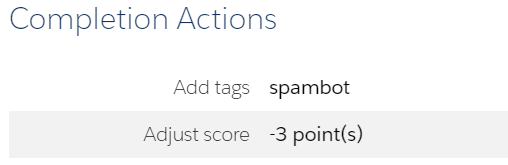
You can also use this strategy to decrease your scores for anyone who clicks on the link or add a tag that helps you understand your account-wide impact:

Adapting What You Report on Email Marketing

So if you can’t leverage email opens to determine if your recipients are interested in your email content, what can you report on? This is where Account Engagement’s integration to Salesforce is so great. 

You can report on website or landing page visits via Google Analytics, pull in interest from campaign members in Salesforce, or even look at your email report Interaction tab to see what percentage skimmed, read, or glanced at your emails. 

Importantly, the time has come to look beyond opens as a success metric — and Account Engagement can help you get there.

Marketers often overlook code literacy, outsourcing anything code related to website or email developers. But understanding some coding basics, such as HTML, benefits the everyday marketer more than they realize.

By learning the fundamentals of HTML, you can:

  • Better communicate your vision to the web developers
  • Understand how web pages are designed and where pieces of code need to go
  • Create richer, more engaging email and website content
  • Improve their search engine rankings

“But I don’t need to know how to code. It’s scary.”

That’s where we come in!

HTML coding basics for marketers

Hypertext markup language, aka HTML, is the code that tells your web browser what it should show when you go to a website. When you go to a webpage, your browser reads through the HTML tags and then presents it visually. This blog page even uses HTML to display its design and content to you in a way that is easy to read and understand.

With even the most basic knowledge of HTML code, you can better break up your page’s content in a way that will better engage your audience.

Code formatting

Each HTML tag you add must have a matching set of open and close tags. Without a close tag, any code you write will cause errors in how the info is displayed.

If we were to use the standard paragraph code, <b>, we would need to add </b> after we’re done.

<b>This tag makes text bold!</b> becomes This tag makes text bold!

HTML page structure

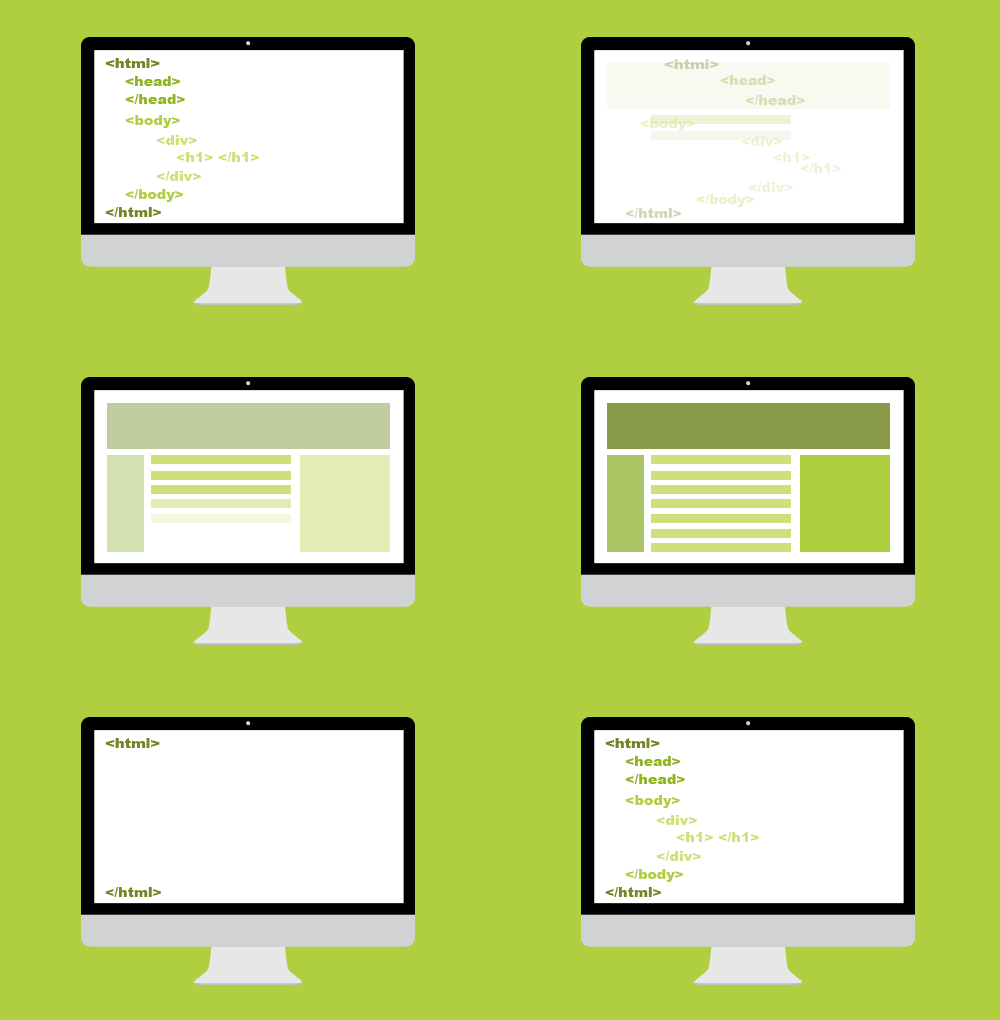
These tags will be utilized on every webpage. While you may not need to write them yourself, they are important to know and understand.

<head>

Any additional code for a page will go inside of the tag. This covers everything from general page design, additional styling, or Javascript code. Most tracking codes will go here as well.

<body>

This will be the main content for your website page.

<link>

If your page needs to link to a Cascading Stylesheet Sheet (CSS), it will do so inside of a tag.

<title>

Each page needs a title. What you place in the title tag will appear in search engine results as well as the name of the browser tab.

<div>

This is a structural element that goes inside the tag. Web pages and emails can be broken down into a series of nested tables. Div tags act as a single cell inside of this high level structure.

Building richer, more readable content

A main way marketers effectively use HTML is breaking up walls of text into something that is easier for a reader to sift through.

Content is meant to be read — not just for search engines to crawl. The more readable your landing page or email, the better your customers will understand the message you’re trying to convey. 

With HTML, you add rich text formatting to make key points stand out or build a list of reasons why your product is awesome.

Here are some important tags to spice up your copy!

TagWrite ItShow It
<a><a href=”(URL”)>Click me!</a>Click me!
<img><img src=”(image URL)” />
<p><p>A separate paragraph</p>A separate paragraph
<ul><ul>
<li>A bullet point list!</li>
<li>No numbers!</li>
</ul>
A bullet point list!
No numbers!
<ol><ol><li>A numbered list!</li>
<li>No bullet points</li>
</ol>
A numbered list
No bullet points
<b><b>Bold</b>Bold
<i><i>Italicized</i>Italicized
<u><u>Underlined</u>Underlined
<h1><h1>Fancy Title</h1>Fancy Title
<h2><h2>Secondary Title</h2>Secondary Title
<br />A line break<br />for readabilityA line break
for readability

Coding basics for stronger search engine optimization

SEO is the name of the online content game. Marketers are always on the lookout for ways to improve their search engine rankings. But HTML provides some simple ways to gain a boost – no hard thinking required.

The importance of alt tags

Google can do a lot of things except look at images. So how does it know what photos to show as relevant when I search for something online?

Alt text! Alt tags, also known as alt descriptions or alt text, describe the images you post to the search engine. They also allow customers who require certain accessibility tools to enjoy your more visual content. 

And if an image is taking a while to load (or doesn’t load at all), the alt text will display.

To add an alt tag to an image in HTML, you would use the following format:

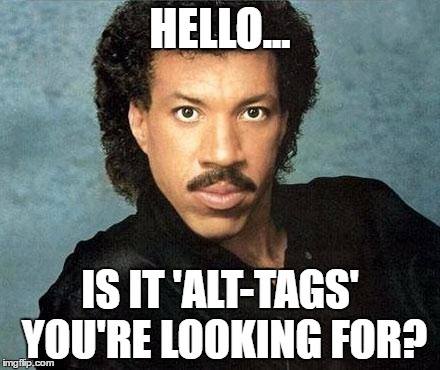
<img src=”(Image URL)” alt=”A meme with the text Hello… is it alt-tags you’re looking for? over a photo Lionel Richie’s face”>

Use HTML header hierarchies

Search engines like it when pages lay out what is most important. When you utilize H1, H2, etc. tags on your page, you are laying out a table of contents of what content is connected and how important each piece is.

By placing a keyword in an H1 tag, compared to an H4 tag, you tell Google that the keyword in the H1 tag is one of the most important pieces of context about what is on your landing page.

All header tags can be stylized to make the most important ones stand out visually, which assist with readability.

Let’s get meta with meta tags

Meta tags may not directly impact your SEO rankings, but by adding in appropriate meta descriptions, this tells search engines like Google know what to display on their search results page. The more accurate and correct the meta description on the results page, the higher the chance someone will click on your website’s link because your result looks more relevant to the searcher.

If you don’t set a meta description yourself, Google then gets to guess what content to put here based on what exists on your page. Also another reason why header hierarchy is vital.

These type of tags usually fall under the main <head> tag for a page and look like the following:

<head>

<title>Let’s Get Meta</title>

<meta name=”keywords” content=”HTML, Meta Tags, Meta Description, Metadata” />

<meta name =”description” content=”Answering all of your questions about meta tags!” />

</head>

Basic coding is not so scary, right?

Simple coding doesn’t have to be scary. Knowing the basics of HTML makes a difference when it comes to having stand out landing pages and email copy. And understanding how code works will help you communicate with your web developers.

If you want to learn more about code that helps marketers, check out Code School for Marketers, a 6-week interactive online course to give you the tools to improve your code literacy!

I saw an email pop in my inbox last week from our pals at Stensul. The subject line read “Simple and quick subject lines? The Stensul way it is.” Inside the email was a link to try out an AI-powered email subject line generator.

I had to check it out.

I spend lots of time in my role at Sercante writing and editing copy for marketing assets like emails, blog posts, landing pages, and social media posts. And I can’t tell you how many times I’ve gotten in an editing hole testing different variations of words for email subject lines until I find the perfect one.

That’s what got me so excited about the tool.

Note: Stensul has updated the tool since this post was written. It is now called the Stensul email toolkit, and it includes more features for generating email copy including CTA text, style rewrites, and preheader text assistance. This post is only about the email subject line function.

Email Subject Lines that Inspire Action and Curiosity

Each email you send through your marketing automation tool has such a small chance to get people to do the things you’re asking them to do. So, it’s especially important to write an impactful email subject line to get people curious about what your email has to offer. You also have to provide value by offering your reader clear expectations about what’s inside the email. 

I’m thinking the Stensul email subject line generator will be helpful for achieving those goals. I’m also thinking we can use it to create subject line variations for A/B testing.

Trying the Stensul Subject Line Generator on Sercante Emails

I guess the best way to see how this thing works is to dive in. First, I went to the subject line generator landing page and traded my info for access to the tool. A few seconds later, I got an email with my magic link to use it.

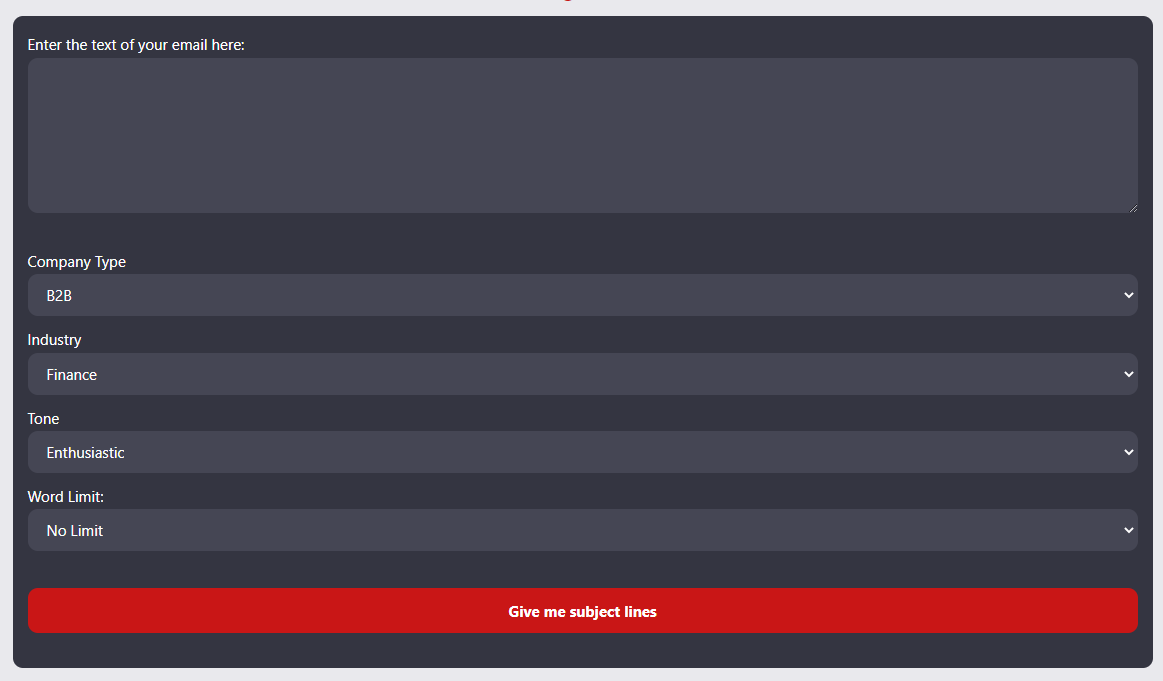
Here’s what it looks like:

You’re prompted to enter the text of your email along with details like your company type, industry, and tone of voice along with word limit for the subject line. 

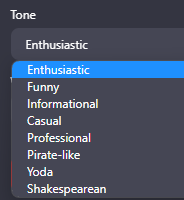
The tone of voice options range from average to entertaining. Here are the options:

Tone of voice options
  • Enthusiastic
  • Funny
  • Informational
  • Casual
  • Professional
  • Pirate-Like
  • Yoda
  • Shakespearean

I tested it out using a few older Sercante emails to see what subject lines it produces.

Here are examples from my exploration:

Sercante 2022 Year in Review Email Example

Here’s what I got when copy-pasted the content from our 2022 year in review email and asked for 10-word subject lines.

Original subject line: ➡️ Join Us In Celebrating Our Milestones ❇️

The email:

Results with Enthusiastic Tone:

  1. 🎉 Celebrating a Year of Growth & Opportunity with Sercante! 🚀
  2. 2022 Highlights: Sercante’s Unforgettable Journey 🔥
  3. 🌟 Sercante’s 2022 Milestones: Thanks for the Support!
  4. ✨ Sercante’s Incredible Growth: Join our 2023 Adventure!
  5. 🚀 Cheers to Sercante’s Success: Let’s Make 2023 Even Better!

Results with Funny Tone:

  1. Hold Our 🍾: Sercante’s Wild & Wonderful 2022 Recap!🎉
  2. 🚀Blast Off! Sercante’s Stellar 2022 Highlights Inside😄
  3. Unleashing the Fury: Sercante’s 🐉-Filled 2022 Adventures
  4. 🎂Sercante Turns 5: Our Side-Splitting, Record-Breaking Year!😂
  5. Brace Yourself: Sercante’s 2022 Rollercoaster Ride Awaits!🎢

Note: I love that it’s intuitive enough to throw a dragon emoji in there.

Results with Yoda Tone:

  1. Growth & Opportunity, 2022 We Celebrate, Yoda Says
  2. Memorable Year, Sercante’s Journey, Learn You Will
  3. Gratitude and Success, 2022 Recap, Stronger Together
  4. Salesforce Support, Sercante Achievements, Future Yoda Sees
  5. Embark 2023, Marketers’ Galactic Adventures Await Us

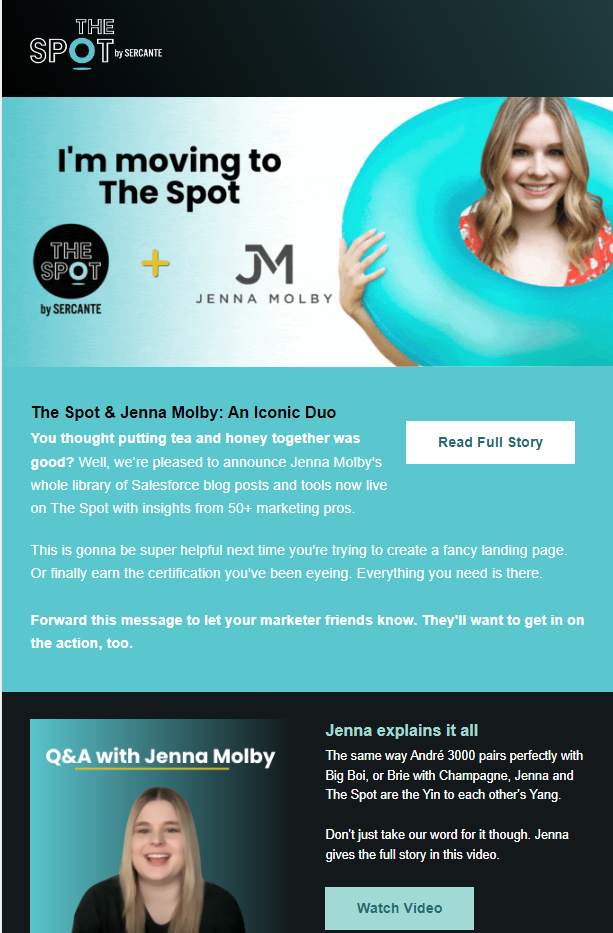
The Spot & Jenna Molby Partnership Email Example

Here’s more email subject line generator exploration using an email we sent to announce Jenna Molby’s partnership with The Spot.

Original subject line: A shining Salesforce star is joining The Spot 🤩

The email: 

Results with Informational Tone:

  1. Discover Jenna Molby’s Salesforce Insights on The Spot
  2. Elevate Your Marketing with Jenna Molby & The Spot
  3. Master Pardot: Jenna Molby’s Tools & Tips Now Live
  4. Unleash Your Salesforce Potential: Jenna Molby & The Spot
  5. Jenna Molby’s Salesforce Expertise Joins The Spot Library

Results with Informational Tone:

  1. Jenna Molby Joins The Spot: Upgrade Your Salesforce Game
  2. The Spot + Jenna Molby: A Match Made in Salesforce Heaven
  3. Jenna Molby’s Salesforce Secrets Now on The Spot!
  4. Boost Your Salesforce Skills with Jenna Molby & The Spot
  5. Unleash Your Marketing Superpowers with Jenna Molby & The Spot

Results with Pirate-Like Tone:

  1. Ahoy Mateys! The Spot & Jenna Molby’s Treasure Trove Unveiled
  2. Sail into Salesforce Success with Jenna Molby’s Insights
  3. Chart Yer Course with Jenna Molby’s Ultimate Salesforce Guides
  4. Discover the Hidden Gems of Salesforce with Jenna Molby
  5. Jenna Molby’s Swashbuckling Salesforce Secrets Unleashed

Results with Shakespearean Tone:

  1. Behold! Thee Spot & Jenna Molby: A Veritable Pairing
  2. Pray, Joineth The Spot for Molby’s Salesforce Wisdom
  3. Salesforce Mastery: Jenna & The Spot Unite in Harmony
  4. Rejoice! Jenna Molby’s Tools Now Grace The Spot
  5. Hark! Jenna Molby’s Top Guides, Now on The Spot

My thoughts overall on the email subject line generator

This tool is super handy for coming up with subject line variations for emails. I especially see it being helpful when my brain is done and I simply can’t write another word — let alone something that grabs people’s attention.

And that’s the thing about email subject lines. Writing them is often the last thing we do in the email copywriting process. But we should be paying closer attention so we have greater chances of getting clicks from our email recipients.

The more copy the better

I did learn one caveat while using the subject line generator tool. It works better on emails that have a higher volume of copy. My first example was a true newsletter with 667 words of copy, while the second example had about 415 words of copy. 

The generator results were spot on in my opinion for the first email while I was underwhelmed by the results for the second email. That may be because the second example had significantly less copy and sections. It makes sense because the tool needs enough information to pull from so it can summarize into a short subject line. I’m also loving the emoji suggestions, but I didn’t get those with all of my results.

Where AI Tools Fit in Content Marketing

You’ve probably heard lots of talk lately about OpenAI’s ChatGPT tool and other AI-powered chatbots that we’re seeing in the content marketing world. The Stensul Email Subject Line generator belongs to the wave of tools that are powered by GPT4, which is the latest iteration of OpenAI’s chatbot. 

I’ve seen blog and social posts from people who aren’t seeing the potential in these tools. But I think these tools are giving more power to individual content creators.

I was recently discussing how AI tools affect content marketers with my fellow dragon, Marcos Duran. He brought up a great point that he heard in conversations with people at a martech networking event.

Someone said something to the effect of “ChatGPT turns a content creator into an editor.” And I couldn’t agree more.

I don’t know about you, but I’d rather fix a mediocre sentence than start from scratch. And that’s what these AI tools are all about. They create a starting point, and you still need highly skilled individuals to add the human touch. 

What are your thoughts on the impact of AI chatbot tools on content marketing? Be sure to let us know your thoughts on the AI debate in the comments section. Or reach out to team Sercante if you’re looking to add a human touch to your marketing campaigns.

Part of being a great marketer is to always evolve with your audience. Doing this intentionally is the key to an organization’s success. Luckily, Marketing Cloud Account Engagement (Pardot) offers its customers Multivariate Testing, which measures the landing page performance over a period of time to determine the best variation.

What is Multivariate Testing?

The answer to this question is in the name. Multivariate Testing looks at multiple variables applied to several variations of Pardot Landing Pages to determine which version performs best. Once you have created your variations, they are randomly assigned to visitors to assess and track performance. 

How does Multivariate Testing Work?

To begin, you will want to determine which variables are most important to you and the team to measure. We recommend no more than three variables change per landing page. For example, some of the more popular variables may include the page layout, headline, call to action, form fields, colors, and logos. 

Build Your Pages to Test

Once you determine the variations, you will want to build a minimum of two landing pages. Remember to name your Landing Pages in a way that will differ them from one another for reporting at a later date. 

You will want to make your landing pages using the differing variations prior to enabling the Multivariate Test. Once you have created your Landing Pages, take the steps below to complete the Multivariate Testing process.

  1. Navigate to Marketing > Landing Pages > Multivariate Testing
  2. Name your test, including the purpose or end goal
  3. Select your Salesforce Campaign
  4. Provide a unique vanity URL
  5. Select the Landing Pages you wish to use and their weight percent (50/50 for two, or 33/33/33 for three)
  6. Click “Create Multivariate Test”
  7. Use the link generated to direct users to the landing page

Check the Reporting

For reporting, you want to ensure that the multivariate test runs long enough to receive a measurable sample size. Once you have reached an optimal size, you can go to Reports > Landing Pages to see the multivariate statistics, including page views, conversions, conversion rate, and the winning page. 

Don’t be surprised if you go through multiple variations and manipulations of the landing pages or specific elements on those landing pages in order to pinpoint the most ideal version. 

Multivariate Testing is a highly effective tool at the disposal of all Pardot users, and should be used routinely to measure performance and improve your audience targeting. This will likely result in a higher conversion rate and will show that you can grow with your audience.

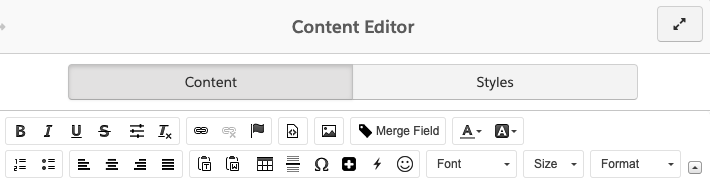
The Pardot WYSIWYG (What You See Is What You Get) Editor Icon Glossary saved me SO much time and energy when I was first learning how to build email in Pardot. Recently, I noticed this page had been archived and no good replacement could be found, so I thought I’d recreate this asset so new and experienced users can still reference it as much as needed. 

The Icon Glossary

These buttons and icons are universal across Pardot, wherever you may add content (classic email builder, forms, landing pages, etc.). These buttons and icons are available to help you style your copy.

IconFunction
Bold text.
Italicize text.
Underline text.
Strikethrough text.
Additional formatting options such as font size and line height.
Remove existing formatting.
Insert a link.
Remove a link. This icon is grayed out unless an existing link is selected. 
Insert an Anchor. This is a hyperlink that will take you to another section of the email.
View the source code. This button is helpful when manually entering or editing HTML. 
Insert an image.
Insert a merge field to personalize the content for the recipient.
Set your text color.
Set your background color. 
Insert a numbered list.
Insert a bulleted list.
Left align content.
Center align content.
Right align content.
Justify content. 
Paste as plain text. This strips all formatting from the text.
Paste from Word. This retains some formatting from Microsoft Word, but strips out superfluous code. See Copying Content from Word for more info.
Insert an HTML table.
Insert a horizontal line. 
Insert a special character.
Insert Dynamic Content to personalize the content for the recipient.
Insert emojis.
Change or set your font name.
Change or set your font size.

I hope this makes building emails go a little more smoothly for you! If I missed any icons or if you have any questions, let us know in the comments!

Marketing A/B Testing is far from being anything new. In fact, it’s been around for quite some time. 

A/B Testing as we know it today first came about in the 1990s and has been evolving ever since, while still staying true to the same core concepts — comparing two versions of something to figure out which has the best performance.

In this post, we’ll cover the basics of marketing A/B testing and how you can use it in your Marketing Cloud Account Engagement (Pardot) instance to optimize your marketing assets.

What is Marketing A/B Testing?

As previously stated, A/B Testing compares one email to another and via algorithms, decides which version performed best. More specifically, you want to change a single variable between the two emails, keeping everything else the same. 

For example, does “Learn More” or “Download Now” drive more traffic via your call-to-action? Or, perhaps you want to determine whether a subject line that reads “Urgent: Read Now” is more appealing to your audience or “Time is running out” is the better way to go. 

How does A/B Testing Work in Pardot?

By testing your audience’s responses, you are able to customize your content based upon email performance as well as user preferences to personalize their experience

Within Pardot, you can easily apply marketing A/B testing to your emails to configure a variety of variations based upon:

  • Imagery
  • Subject lines
  • Call-to-actions
  • Image placement
  • Image content
  • Email send time

The thing about A/B Testing is that you can always be using it because your audience is always evolving, and as a marketer, it is your responsibility to remain responsive to that customer base. Luckily, Pardot’s A/B Testing functionality is fully automated and easy to use.

Within the automation platform, you need to start by determining which variable you wish to test —  headline, banner image, subject line, etc. From there, you need to choose your metric — opens or clicks. Finally, you decide what percent of your audience you want to test these emails on (up to 50% of the segmentation). Once these factors are decided, it is time to run the test. 

For example, let’s go with subject line as our variable and opens as our metrics. Based upon which version had the most opens, Pardot will automatically deploy the “winning” email to the remaining audience — the email with the most opens.

You’ll find the checkbox to enable A/B testing in the Basic Info menu within your email draft.

How can your company use A/B Testing?

This simple automation innate to Pardot can help businesses of all sizes to better target their audience and increase actionability on their part. As our world becomes more and more digital, A/B Testing easily lends itself to marketing teams worldwide to evaluate marketing’s effort and effectiveness. 

The important thing to note is that one test is never enough. Always keep testing and changing with your audience so you are not left behind.

A/B testing is one of the most powerful tools Pardot offers its users, and it should be taking full advantage of. With that said, be mindful that you are choosing only one criteria and one metric for each A/B test that you run to see the most effective results.

Let us know your thoughts on using marketing A/B testing in the comments section.

No more posts to show