Category

Marcos Duran

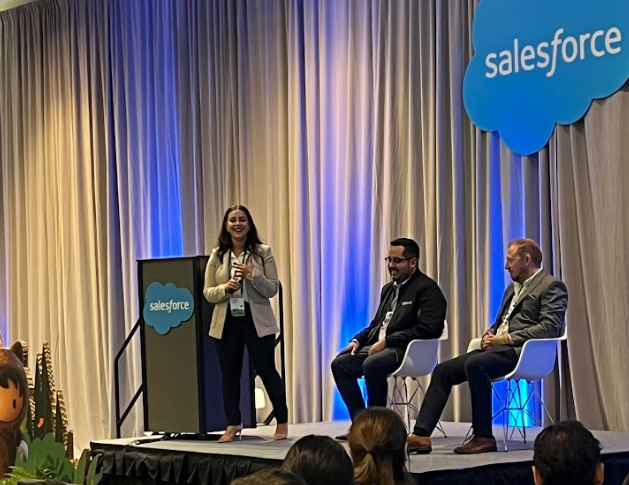
It’s that time of the year again — when marketing, sales, and service professionals from around the globe gear up to reunite in Chicago, IL for the highly anticipated Salesforce Connections 2024 conference!

What is Salesforce Connections and why you should attend?

If you’re new to the ecosystem or never heard of this conference, here’s the lowdown.

This year Salesforce Connections 2024 is happening on May 22 – 23, at the McCormick Center in Chicago, Illinois. This annual two-day conference, hosted by Salesforce, is a must-attend event for anyone who delivers exceptional customer experiences, specifically digital marketers and commerce professionals who use the Salesforce platform. The 270+ sessions at this conference cover topics trending in the general marketing and Salesforce ecosystem like AI, CRM, and data strategies.
Who should attend?

If you’re a Salesforce user or a marketers who use Sales Cloud, Marketing Cloud, and Commerce Cloud, then this event is made just for you. The real magic lies not just in the sessions, but also in the immersive networking opportunities you will find throughout the week that can transform your career.

Be sure to read up on the benefits of attending these events to help you get even more inspired. 

Our Salesforce Connections 2024 must-see agenda

This is a filtered view of our team’s top picks for the upcoming conference, be sure to add them to your agenda. 

Marketing Keynote

Marketing Keynote: Reimagine Personalization with Einstein 1

Description: The AI revolution is here to stay. Keep up by learning how Einstein 1 unlocks new ways for marketers to use trusted data and AI to fuel better personalization, business outcomes, and relationships.
Add to your agenda >


AI & Data Cloud

Prep Your Small Business for Using AI in Marketing
Description: In this roundtable, we will discuss three ways small businesses can prepare to successfully use AI in their marketing. Be sure to say hi to our VP of Technology, Kirsten Schlau, after the session.
Add to your agenda >

How to Elevate Your B2B Marketing with Data and AI (Account Engagement)

Description: Hear how Einstein functionality in account engagement helps marketers save time and scale customer engagement. Plus, learn how to prepare your data and marketing team to realize the full value of AI.
Add to your agenda >


Marketing Cloud

Create Connected Journeys for Your Small Business Customers (Growth)

Description: Learn how small businesses can leverage Salesforce flows and data from marketing, sales, and service touchpoints to create connected customer journeys.
Add to your agenda >

Unlock B2B Marketing Innovation with Data and AI (Account Engagement)
Description: Learn how Account Engagement and Data Cloud can help B2B marketers unlock data outside of the CRM for more personalized journeys. Plus, learn how data and AI are accelerating B2B marketing innovation.
Add to your agenda >

Align Sales and Marketing with Account Engagement in Slack (Account Engagement)

Description: Learn how to accelerate lead conversion, enable sales efficiently, and deepen customer relationships with stronger sales and marketing teamwork through Slack and Marketing Cloud Account Engagement.
Add to your agenda >

Unlock Data to Power Personalization and Ignite Engagement (Engagement)

Description: Join us to see how we’re helping financial services marketers to make data their competitive advantage in powering relevant engagement journeys at each stage of the customer lifecycle.
Add to your agenda >

How to Connect Customer Journeys from Doorsteps to Digital (Engagement)

Description: Learn how top communications service providers are increasing both physical and digital conversion rates with a unified data strategy that enhances their targeting and journey personalization.
Add to your agenda >

Marketing Operation Fundamentals

Learn How to Improve Your Email Sender Reputation

Description: Deliverability can seem like a puzzle, but together we’ll break it down so you can set your email program up for success. You’ll develop a strategy to manage, monitor, and understand deliverability.
Add to your agenda >

The Three P’s of Migration — Platform, People, and Process

Description: Join Women in Tech Leadership to discuss the importance of a healthy relationship between marketing and IT, associate training, an MVP mentality, building a platform foundation, and value stories.
Add to your agenda >

Beyond the sessions: What else should I expect?

Life is more than just work, after all, no Salesforce conference is complete without a little celebration. Last year, we brought you a Wildly Epic Night (check out the gallery), and we are back at it again this year. Come celebrate your achievement and forge new connections with us!

A happy hour to match digital experiences that delight

Join us this year for the Roof Rhythms & Refreshments Happy Hour hosted by Sercante, Stensul, and SalesWings at ROOF.  We’re teaming up with Stensul and SalesWings to create an evening as meaningful as the digital experiences we deliver to our clients.

Form real connections with people who get it and dance to a live band playing your favorite hits so you can feel radical impact on the first night of Connections. It’s at the iconic ROOF on theWIT and space is limited, so be sure to RSVP to secure your spot

Wednesday, May 22, 2024
Time: 7:00 – 10:00 PM
Roof Gallery at ROOF on theWIT
Register now >

Stay tuned to more celebrations popping up closer to the event.

How to connect with Sercante at Connections

Still undecided? Be sure to follow Salesforce’s social media accounts and website for updates (you may even score a discount). Below are a few opportunities to connect with our team during the conference to explore new opportunities and industry insights.

Schedule a meeting with our team
Book a meeting >

Join our session “Prep Your Small Business for Using AI in Marketing” with Kirsten Schlau (Sercante) and Charlotte King (Salesforce)
Add to agenda > 

Let’s chat about career growth – check out new roles at Sercante
Browse roles >

See you at Salesforce Connections 2024

Regardless of whether you attend in person or virtually (through Salesforce+), tag us on LinkedIn with your best moments. We’d love to be part of your conference experience.

We can’t wait to see you there!

Welcome to the marketing side of Salesforce! As a Salesforce admin, you may occasionally need to assist your marketing team in developing processes or generating reports from data in Salesforce and Marketing Cloud Account Engagement (Pardot). Understanding Account Engagement and how it affects your Salesforce org can enhance your ability to contribute to those initiatives. 

7 Account Engagement Facts Salesforce Admins Must Know

In this blog, we will review several fundamental concepts in Account Engagement and how they relate to your role as a Salesforce Administrator. This guide is designed to provide you with insights from a Salesforce perspective about Account Engagement so that you can best support marketing and other teams using the platform. While these features are available to all organizations, access to the features can vary based on your org configuration and tier.

Tip 1: We call people “prospects”

In Salesforce, you are accustomed to working with Leads and Contacts. While this does carry over, the platform labels “people-records” as Prospects. Prospects can exist solely in Account Engagement or be synced with existing Salesforce records.

Verifying Prospects are linked to Salesforce records

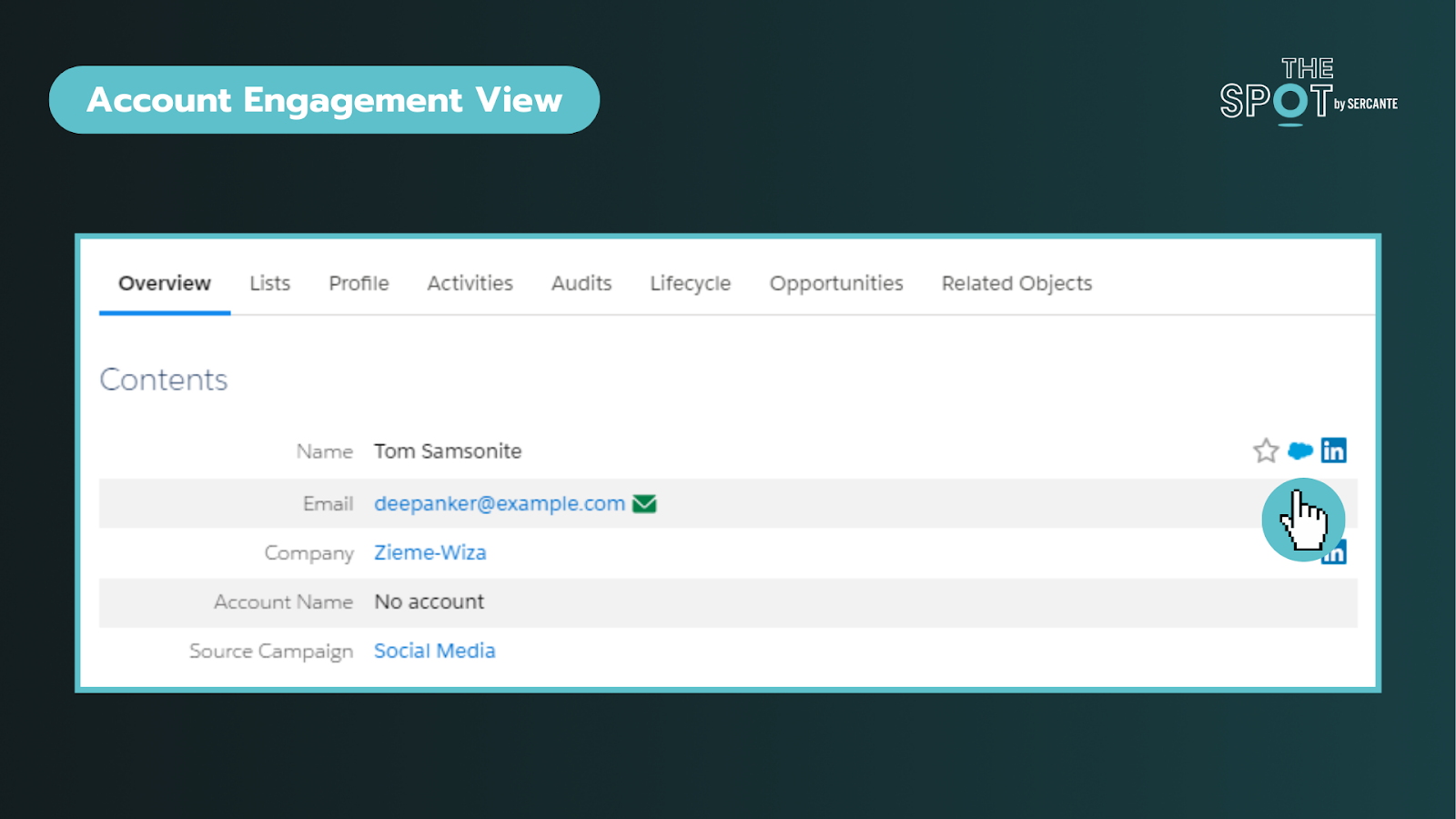
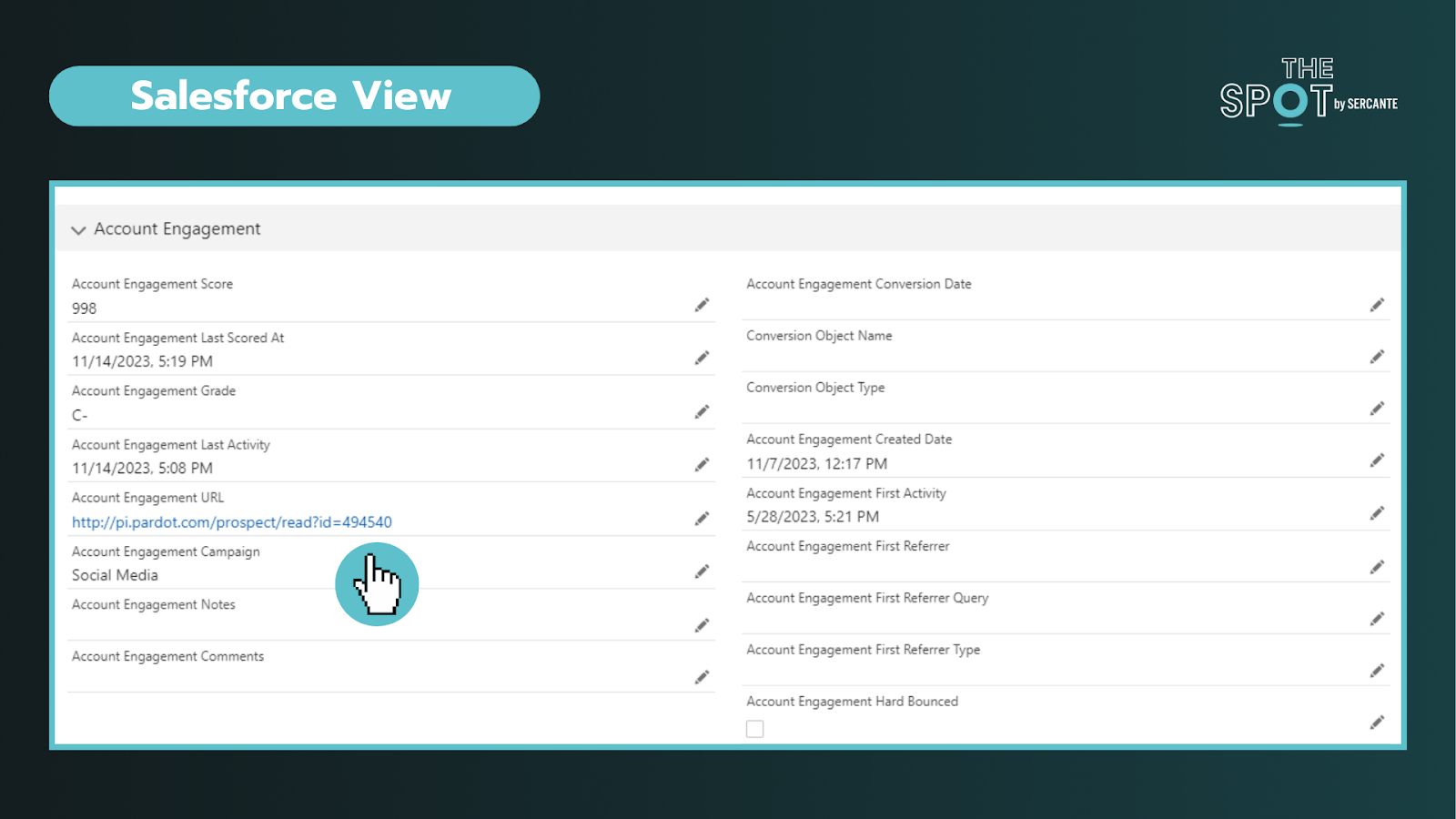
To verify that a Prospect is linked to a Salesforce record, you can click on an individual record and look for the Salesforce cloud icon listed on the right of their name (see above) or by the CRM ID listed at the bottom of the record. Clicking on this cloud icon will take you to the connected Salesforce record. In Salesforce, you can click the Account Engagement URL to bring you into the platform. This is particularly helpful when you are trying to diagnose data sync issues. 

Key reminders:

  • Records are matched using 18-digit IDs and email (if no matching record is found)
  • You can navigate from Salesforce to Account Engagement records and vice versa
  • Managing deleted records and duplicates may require additional effort across both platforms

Tip 2: Add visibility for sales and marketing teams in Salesforce

Enabling Account Engagement introduces several new fields, components, and features exclusive to the integration. You should review the implementation guide and work with your team to align on what information is valuable for sales and marketing to deliver on their respective functions.

The package includes fields like engagement score, fit (grading), what “object” they converted on, and a log of their latest activity in Account Engagement, to name a few. Additionally, depending on your tier, you may also find additional components you can take advantage of, such as B2B Marketing Analytics.

When mapping fields, not all Salesforce field types transfer seamlessly to Account Engagement. To avoid data loss, review your fields (including matching API names) and ensure they are mapped across objects in Salesforce before attempting to sync any data into Account Engagement.

Key reminders:

  • Field types may affect your ability to map fields into Account Engagement
  • Beware that Formula fields do not trigger sync updates in Account Engagement
  • Field level permissions and user profile access on the integration user can affect dataflow

Tip 3: Security matters but looks and works differently

Security is the #1 pillar of any Salesforce Admin role.

There are different levels of access you can give to Salesforce users via permission sets. Those levels include:

  • No access to Account Engagement data – on either platform: This is usually for operations teams who don’t need access
  • Access to Account Engagement data on a page layout in Salesforce: This is usually for sales/SDR teams
  • Access to the Account Engagement app: This is usually for marketing and creative teams


To enter the Account Engagement app, the user’s record must be mapped into Account Engagement. No user in Account Engagement, no access to it regardless of permissions in Salesforce.

Secondly. while you may be familiar with profiles and roles in Salesforce, well Account Engagement adds another layer of complexity to the mix. Account Engagement has its own “roles” and they do completely different things. These roles only apply within Account Engagement and allow you to see and do specific activities (build segments, forms, etc) on the platform. 

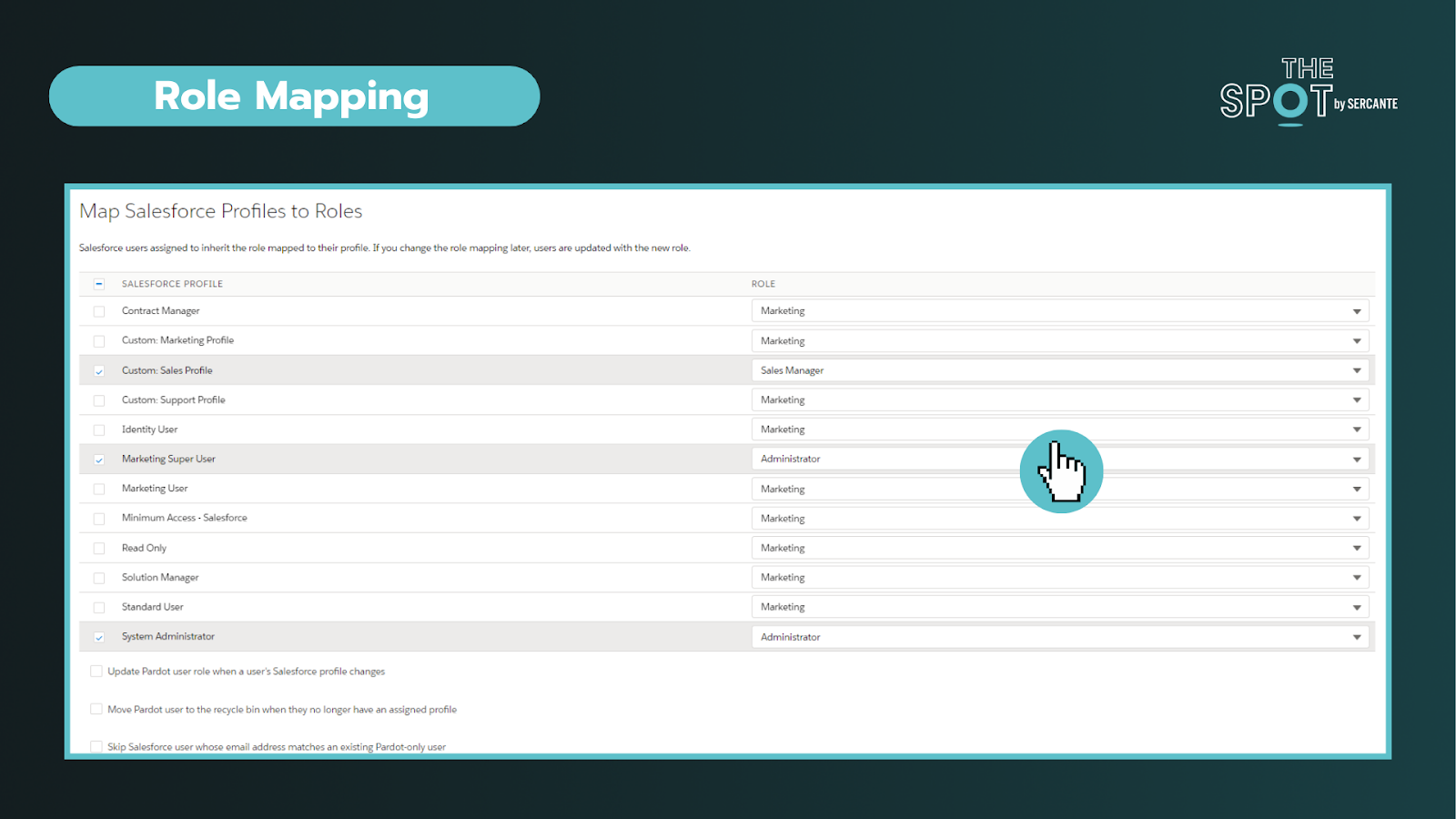
Default Account Engagement user roles include Administrators, Marketing, Sales Manager, and Sales. You can configure these roles under the account settings section and connect profiles to roles within the Salesforce connector section in Account Engagement.


To conclude, you can personalize the levels of access to different Users. You’ll ultimately need two “keys” to get into Account Engagement (a Salesforce permission set and an Account Engagement role assigned to a synced User). It is important to work with marketing to outline the level of access needed to perform daily tasks.


Key reminders:

  • You can create custom roles in Account Engagement (may require an add-on)
  • All the users with the same role, have the same access in Account Engagement, regardless of their permissions in Salesforce

Tip 4: The Salesforce Integration is flexible

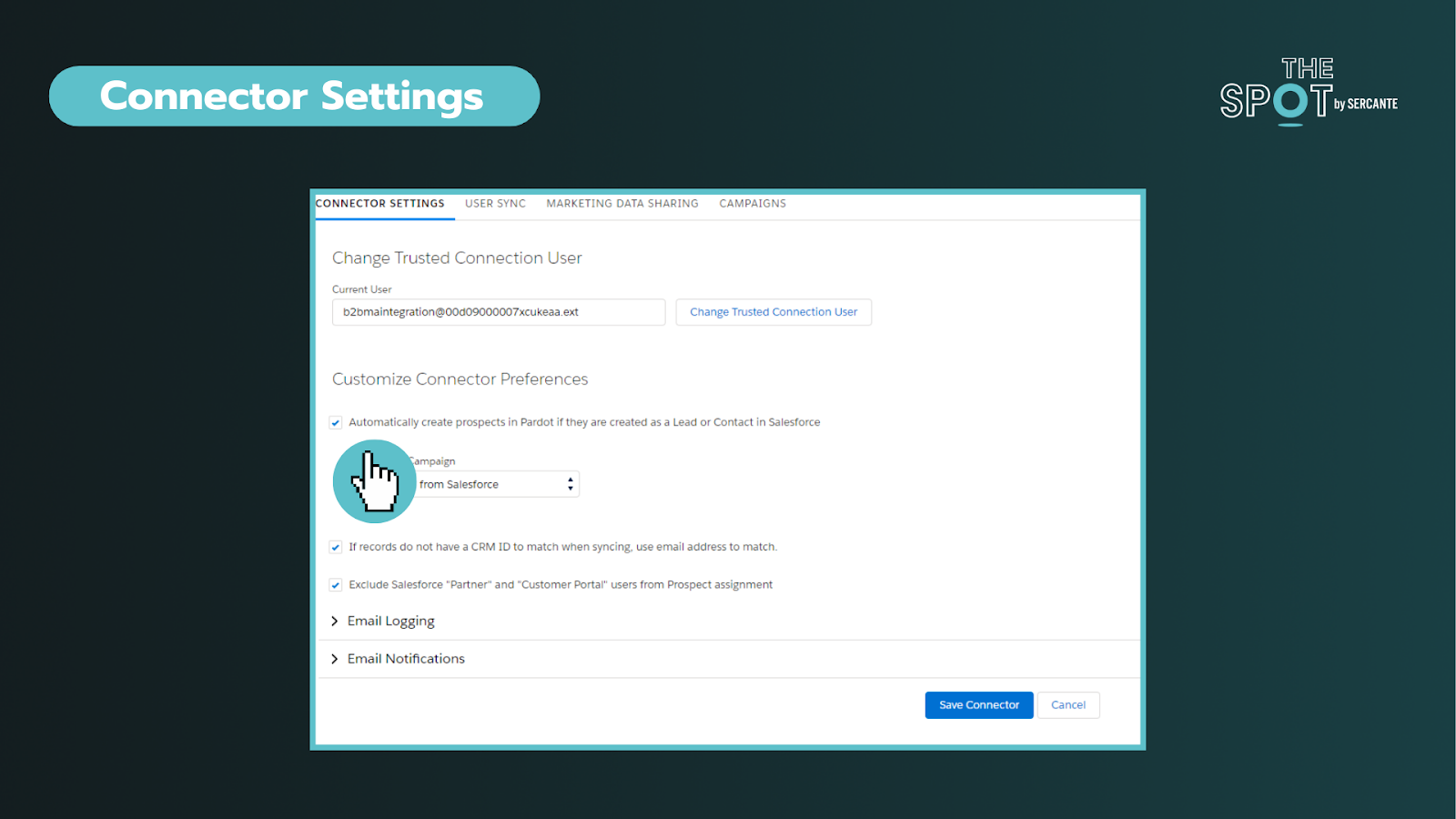
This integration (or connector) is the key to aligning your data between two systems. Through the connector, we can sync everything from Users, objects, fields, and campaigns. You can deep dive into the individual components here.


In these settings, you can choose if you want to allow a bi-directional sync or not. This is your on/off switch. Most customers want this feature enabled. 


Additionally, you can control data flow on a field-to-field level. It is important to discuss how data will be used and by what team. 

You can allow data to be managed by:

  • Salesforce only
  • Account Engagement only
  • Whichever system makes the most recent update

As data comes circulates between the platforms we can be met with conflicts between the two systems. For most teams, these conflicts can be attributed to their use of validation rules or restricted field values and dependencies. The conflicts are called sync errors in Account Engagement

These conflicts can be found under the Salesforce connector gear icon (under Connectors) and can range from:

  • Access issues – Connector user lacks access to read/write to an object
  • Data formatting issues – Issues with field types or values
  • Process alignment issues – dependencies between fields or steps in a process

As an admin, is important to support your team in resolving these issues as quickly as possible to restore data sync on those records. These sync errors offer opportunities to improve communication between teams and for process improvements. Our team at Sercante often uses ProspectUpdater to help customers fix data formatting issues at a scale.

Key reminders:

  • Enabling a bi-directional sync of data is recommended but optional
  • Large imports can cause bottlenecks – if you notice this becoming an issue you may want to check daily processes as well

Tip 5: Account settings are the key to understanding your org

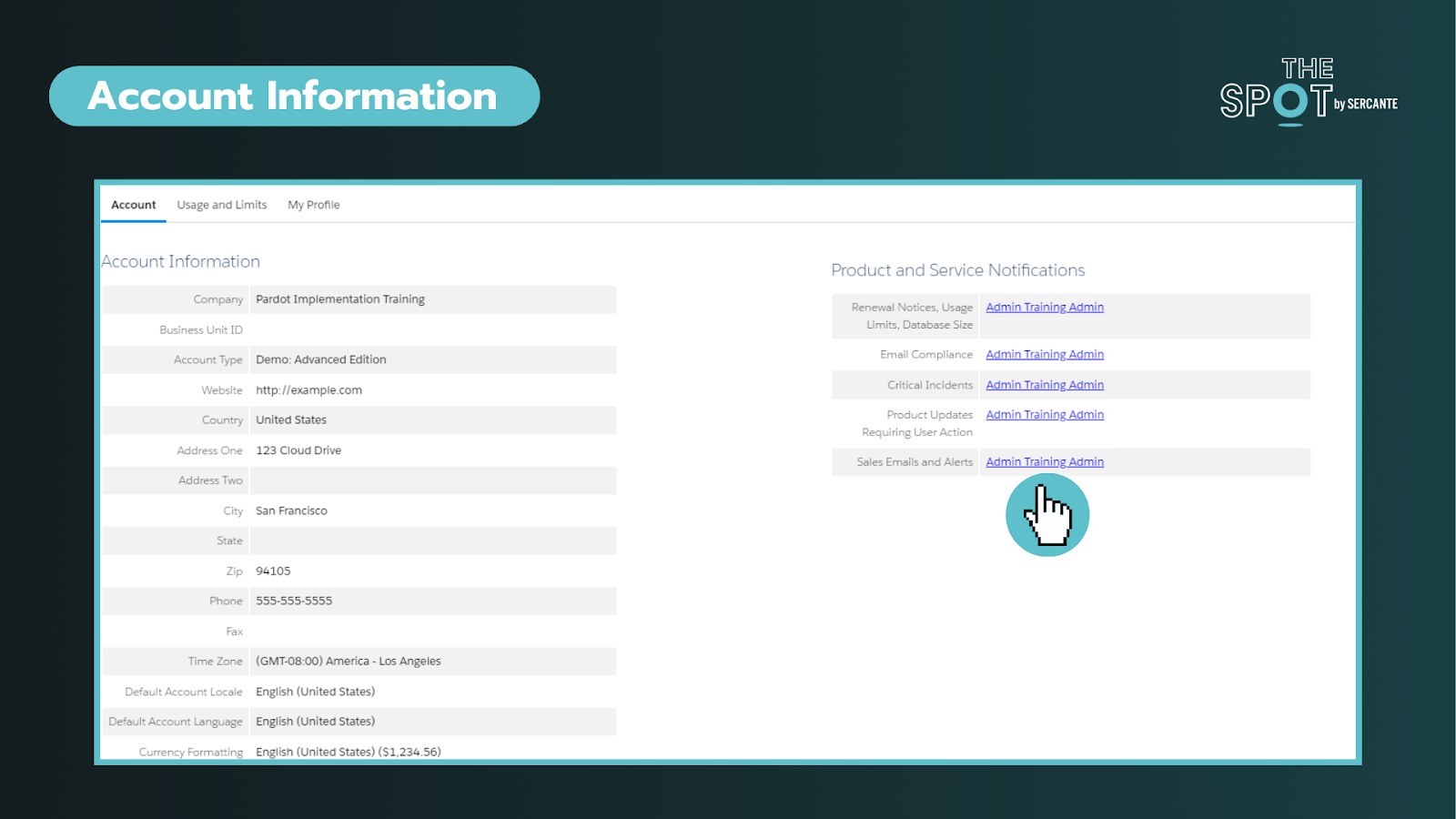
This section can help you identify important information about your account such as the Business Unit ID, when the account was enabled, admin alerts, and account limits. On the right side of the screenshot below, you will find the ability to personalize who gets alerts about these items. To ensure these alerts are taken seriously, ensure these are received by team members who are active in the org.


The most common way that admins discover this page is when they have to increase the number of prospects that can be kept in the account or run out of storage.

Key reminders:

Tip 6: Leverage Account Engagement forms

You’re probably familiar with web-to-lead forms. While these mechanisms can help do more with Salesforce they do not cookie leads or contacts upon completion. Why does that matter? Cookies help us identify prospects and avoid duplicates.

With Account Engagement you can simplify the form creation and management (say goodbye to your external tools) or form handlers (similar to webhooks) to streamline your inbound marketing and processes. The forms can be embedded as Iframes on your website, Account Engagements’ landing pages, or stand-alone.

Upon completing a form, you can set a cookie on the Prospect. You can still do notifications (email and Slack), send emails, add to segments, and so much more without complex flows or other Salesforce automation. 

Key reminders:

  • Testing forms incognito mode is strongly recommended
  • Cookie length can be adjusted under your account settings or by individual user browser settings

Tip 7: Encourage campaign collaboration

First thing is first, Account Engagement has campaigns too! However, these are exclusively used in Account Engagement for capturing the 1st touch interactions (all time). This makes it challenging to see the life of the lead across time and also makes reporting difficult.

Luckily, we can create and sync Salesforce campaigns into Account Engagement for the same purposes AND to capture the multiple touches on their journey to conversion and beyond.

By leveraging Account Engagement’s automation to add prospects to Salesforce campaigns, we avoid doing multiple imports to update the Campaign member records. This functionality also allows us to take advantage of standard Campaign reports in Salesforce that can help us see ROI and campaign influence across our initiatives. To help find the latter, we created a Campaign Influence Started Pack, go check it out. 

Key reminders:

  • When creating campaigns, leverage campaign member statuses and make sure to check the “active” checkbox to sync over into Account Engagement
  • Keep an eye on campaign members and campaign influence records, which can eat up your Salesforce storage if created in large volumes over time

Learn the essential Account Engagement concepts for Salesforce admins

While Account Engagement predominately serves marketing functions, Salesforce Admins play a crucial role in understanding and supporting its broader impact. By acting as the bridge between IT and marketing, admins can help facilitate more collaboration and more effective project rollouts on projects affecting users across the organization.

If you are struggling with any of these tasks/concepts, please reach out for assistance. Together, we can foster more seamless experiences that drive transformative outcomes!

The majority of Salesforce training you’ll find in the world is conducted in English. But things are changing as the platform grows in other parts of the world. We’ve seen a few self-guided Salesforce courses and Trailhead content in other languages, including Spanish. But the options are limited when it comes to getting hands-on and instructor-led Salesforce training in Spanish or other languages.

In this post, we’ll cover the lessons learned while delivering a Marketing Cloud Account Engagement (Pardot) bootcamp in Spanish so more organizations can offer training in languages beyond English.

How did the Spanish Account Engagement bootcamp come to fruition?

My name is Marcos Duran and I am a Marketing Manager at Sercante. In my role, I support our team with the development and delivering of Salesforce training to our customers. I have been a Salesforce user for almost a decade and Salesforce consultant for the past 7 years. 

Part of being a #MomentMarketer is that you need to not only stay ahead of the latest trends and hot topics but also bring your tribe with you. My old Spanish professor used to use the term “Compartir la riqueza” or “share the wealth” in English.

This year I decided that I wanted to challenge myself with creating and delivering an Account Engagement (Pardot) bootcamp 100% in Spanish. My goal is to support Spanish speakers in earning their Pardot Specialist certification

For a little bit of background, this platform gave me my “real” start in the ecosystem years ago. Although I am a native Spanish speaker, this is still a challenging feat since all the content has to be dubbed into Spanish and has to be tweaked to make sense technically and also culturally.

Here’s a hot take: Google Translate can get you 70% there, but that last 30% is what differentiates a speaker versus just dropping it into a translator. Before you say anyone can do that, I’ll ask why do you think more people haven’t?

This course lasted five weeks for a total of 8 one-hour classes. During three of those five weeks, we met twice.

Six big takeaways from developing a Salesforce training course in Spanish

Here’s a few lessons I learned along the way of doing this bootcamp. I hope they will help you plan better if you are interested in offering virtual webinars/programs as a user group leader or in your own organization.

1. Lean heavily on pre-promotion

A rule of thumb for webinars is that at least 50% of your signups won’t show. 

In my case, this was close to my final numbers. I ended up with a 30% signup rate between announcing the bootcamp on LinkedIn and getting people to actually sign up. 

Lesson Learned: My mistake here was that I didn’t have the form ready when I was gauging interest. As a result, I lost on that initial wave of hype. If you do this internally, get people to register once you gauge interest.

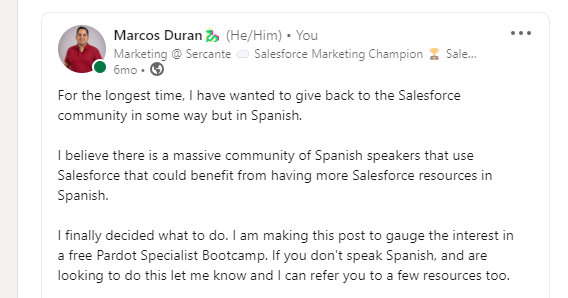
LinkedIn post I shared to see if people in my network have interest in Salesforce training in Spanish

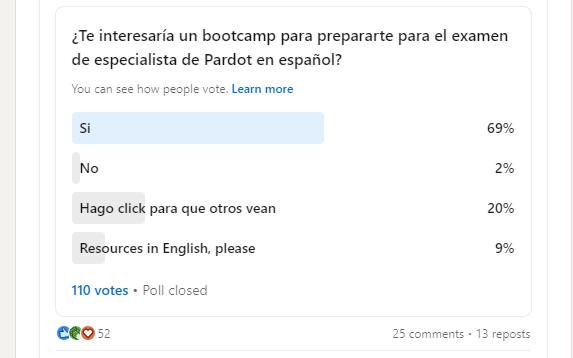
And the poll I posted…

Question Translation: Would you be interested in a bootcamp to prepare for the Pardot Specialist exam in Spanish?

2. Reach out to your community

From promotion to content creation, I reached out to people in my network who had been through this experience, looking for advice. 

I received a lot of positive advice — special shout out to Lara Black, Daniela Galmes, Victor Alberto Pantoja, and Ben LaMothe for all their support. 

Thanks to their encouragement, I was able to support 30 students from 13 countries around the world in their native language with Account Engagement content.

Marcos Duran with fellow marketing Trailblazers from the Salesforce community

Lesson Learned: Message the people you know who can offer advice, introduce you to people in their network, or help you to promote your efforts.

3. Optimize your course content

This particular bootcamp was focused on getting ready for the Pardot Specialist certification

We used the study guide material from Trailhead to guide the format of our bootcamp and essentially focus on the goal of passing the exam. In addition, I provided our students live demos of the essential parts of Account Engagement (for the visuals), presentation decks, and links to documentation from the Salesforce Help Center for additional guidance.

Lesson Learned: Build your training course using resources from Salesforce. That’s who designed the exam you’re attempting to pass and the tools you’re using. So, that’s definitely the best place to start.

4. Encourage student engagement

This was my favorite part. To get our course going, I engaged our students with questions about their own experiences. For many, this meant comparing features with Marketing Cloud Engagement to help create the bridge between their experience with that platform and this new platform material. 

We had several long conversations throughout the course that really showed the real-life business challenges they were facing. Thank you to everyone who shared with us!

Lesson Learned: Have a sense of humor when things go wrong. Having to say automations in Spanish 30 times in one hour is not fun — it is definitely a tongue twister. Thanks to everyone for putting up with me as I searched for the correct words to illustrate my point. 

5. Send plenty of reminders

This is a tip from Google Calendars: send reminders close to the webinar start time. I would send out a message a few hours before class to remind students, “Hey – class is today, make sure you show up.” 

This was the hardest for me because through this course I would see our attendance numbers fluctuate. At the end of the day, I understand we all have lives outside of work. So it’s best to be patient and as helpful as we can with others. 

Lesson Learned: Keep on sending those course reminders. Your students appreciate them!

6. On-Demand

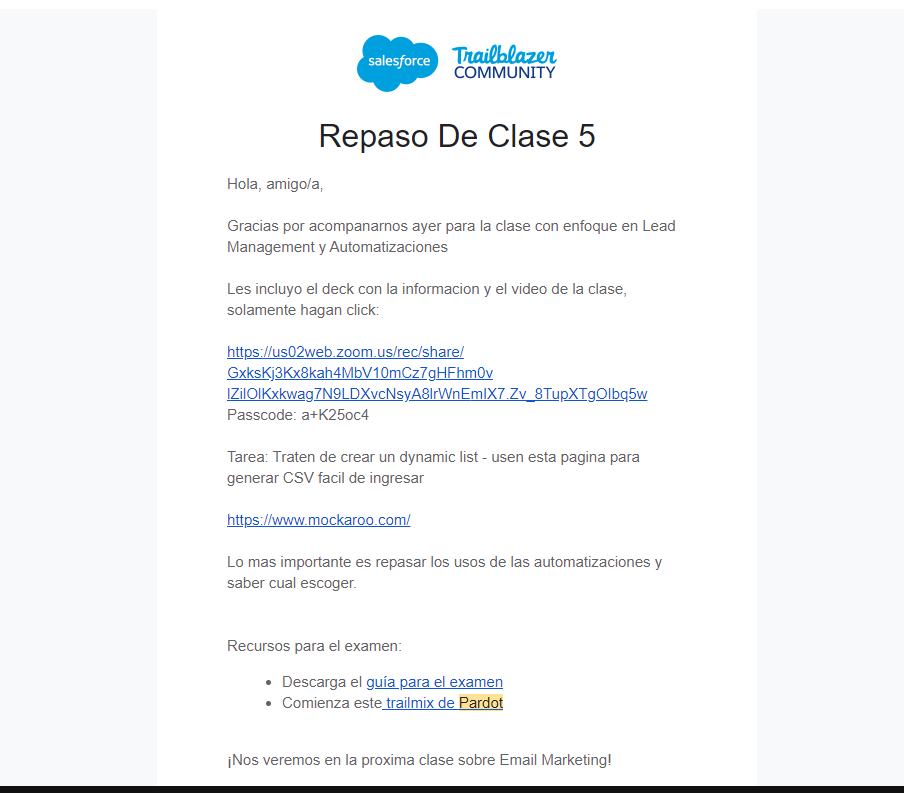
Finally, at the end of each week, I would send everyone the slides and recordings. I would suggest you do this once at the end of the course.

Lesson Learned: Offering the course recordings on demand is essential. Life happens, students may miss a session or two. This content is also a lot to take in, so giving the option to revisit is going to help your students to be more successful.

Changes I would make to future Salesforce training in Spanish

Now that you read a little about how this course went for me, you may be wondering what’s next?

Well, here’s a few things I would do differently:

  1. I would love to be able to do this in person to really give the students the most support I can.
  2. I would continue to team up with other Account Engagement rock stars and divide the work to ensure we bring in different experiences to the classroom.
  3. I would probably promote this a little longer than I did (initially we had just north of 100 people interested in Spanish Pardot training).

Other than that, I feel it always pays to help others power up. I look forward to continuing to support Spanish and English speakers on the Salesforce platform and continue to make the most out of their investment. 

If you are interested in watching the Spanish Bootcamp series please click here.

Sign up for marketing-focused Salesforce training courses

If you’re ready to take your strategy, technical, and creative skills to the next level, we have the marketing-focused Salesforce training courses you need.

You can join our regularly scheduled courses or ask us about private training options — like this one that was offered to Spanish speakers in the Salesforce community.
Check out our training options here.

Salesforce gave lots of love to marketers at Dreamforce 2022. From the unveiling of a real-life Brandy to the massive Marketing Lodge with daily events, marketers had lots to do at the conference.

There was so much going on at Dreamforce, in fact, that you may feel like you missed something important. And that’s totally okay. We’ve got you covered.

Six memorable Dreamforce 2022 moments for marketers

Here’s your snapshot of all the important marketing things that happened at Dreamforce 2022. This is what you REALLY need to know about Dreamforce as a marketer so you can put the FOMO to rest.

Moment 1. Salesforce Genie Announcement

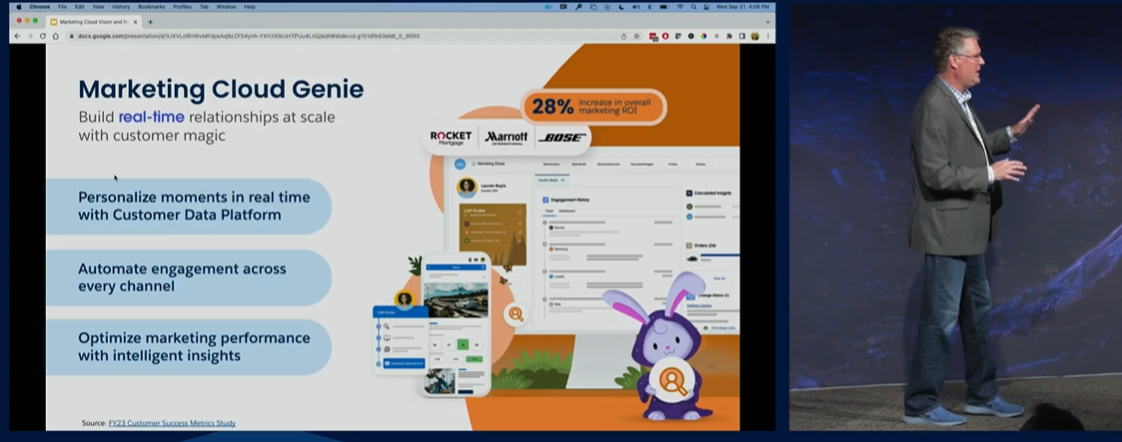
Genie is a powerful tool that takes all your data from multiple sources and allows you to organize it and leverage it real time across multiple clouds, apps, and automations in Salesforce. 

This product announcement is essentially a Salesforce Customer Data Platform (CDP) rebrand with added functionality.

Learn more about the announcement here.

Image credit: Salesforce

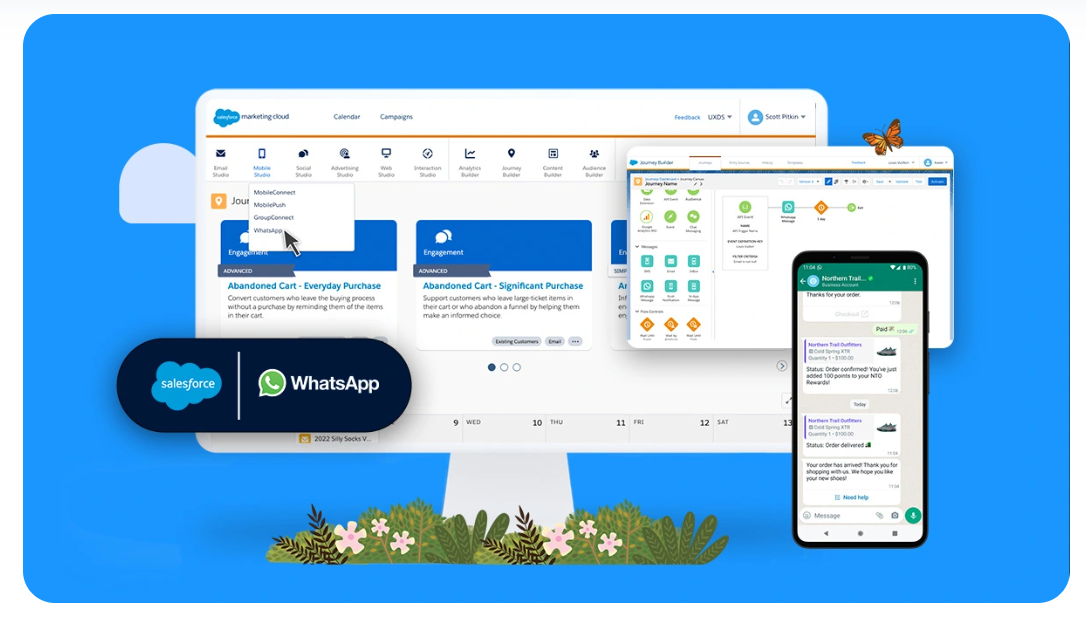
Moment 2. Salesforce and WhatsApp Integration

Marketers will be able to leverage the power of WhatsApp to create and send customized messaging and offers with their brand customers through customized experiences. 

This integration is compatible with Journey Builder within Marketing Cloud and slated to be available by the end of the year.

Get all the partnership details here.

Image Credit: Salesforce

Moment 3. Marketing Keynote: Deliver Moments That Count

This marketing keynote session took us through many of the changes that are happening on the marketing front for Salesforce users. It served as a deep-dive into the Salesforce Genie and WhatsApp partnership announcements. 

Two special moments the team at Sercante had a close eye on include:

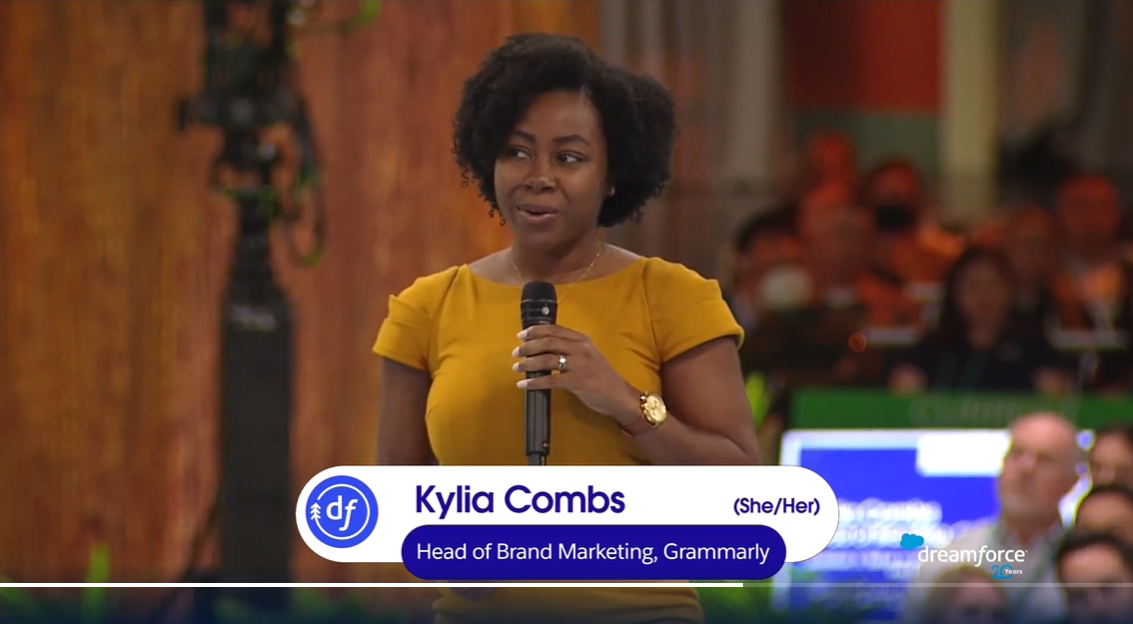
  • Our client, Grammarly, shared how they use the power of the Salesforce platform to hyper-personalize their customer journey (Start at 27 minutes).
  • Our friend, Shibu Abraham, Marketing Cloud User Group Leader in Malaysia, received the famous Salesforce Golden Hoodie during the Marketing Keynote for his contributions to the greater Salesforce community (Start at 39 minutes).

Watch the full marketing keynote replay here.

Moment 4. Slack Canvas For Marketing Announcement 

Teams across your organization can take advantage of Slack Canvas to create “canvases” where you can share assets, access important information and collaborate real time via video. From there, you can integrate with other apps found in the Slack marketplace to create automations to increase productivity and trigger additional actions. 

Your team can leverage your Salesforce data in multiple ways as you discuss your next campaign straight from Slack.

Get all the details about the Slack Canvas announcement here.

Moment 5. Marketing Cloud Innovation and Roadmap: Wow Every Customer

This keynote continues to hammer away at how Genie can supercharge your Marketing Strategy regardless of what Salesforce Marketing solution you prefer: Marketing Cloud Engagement or Account Engagement (Pardot). 

One of the key things around these workshops is the different applications of Genie and how it can collaborate with Einstein to help specific teams using the Salesforce platform get the most from their data. Additionally, several of the Einstein use cases traditionally used within Marketing Cloud Engagement have begun to make their way into Account Engagement.

Watch the full roadmap replay here.

Moment 6. Creating a Home for Marketers at Dreamforce

You probably saw us at Dreamforce (or at the Home for Marketers) and wondered what is Sercante?

Or maybe you saw pink elephant footprints on the sidewalks and wondered what that was all about.

Well, that was us! 

Elephant footprints led marketers to their home for the week

What was the Home for Marketers at Dreamforce?

Team Sercante hosted a space for marketers (and allies) to hang out, grab a drink, and escape the hecticness of Dreamforce. And our friends from DESelect, Stensul, and Appinium came along for the ride!

The Home for Marketers took place at The Pink Elephant Alibi on Minna Street. We had many repeat visitors and many one-time friends stop by, effectively connecting with over 2,000 marketers and Salesforce Users! 

View the photo gallery and look for your friends here

Night of Enchantment: A Dreamforce Party for the Ages

Thank you to everyone who partied with us at the Night of Enchantment party at Dreamforce!

You experienced limitless magical elixirs from the enchanted champagne wall pushed. And you danced with enchanted forest fairies over 15 feet tall. With Dreamforce now behind us, we hope you walked away with fond memories and new friends that evening.

While the escape transported you into a living forest only found in fairy tales, fear not. You didn’t dream all of it. The energy you brought to the dance floor was magical. And thankfully unlike Cinderella’s slippers, the magic of this party didn’t end at midnight. 

The enchanted forest included 3 dance floors across the building, and over 1,000 people tore it up throughout the night. As we all go back to our IRL tasks, we invite you to check out the party photo gallery

What else were the Sercante dragons up to at Dreamforce?

Sercante accepts two awards at DF22

Salesforce Partner Innovation Award: Retail

Sercante received a Salesforce Partner Innovation Award for our work in the retail space and for creating positive impacts in our customers organizations. We are fortunate to have tons of awesome customers and humbled to receive this award. Read about the winners here.

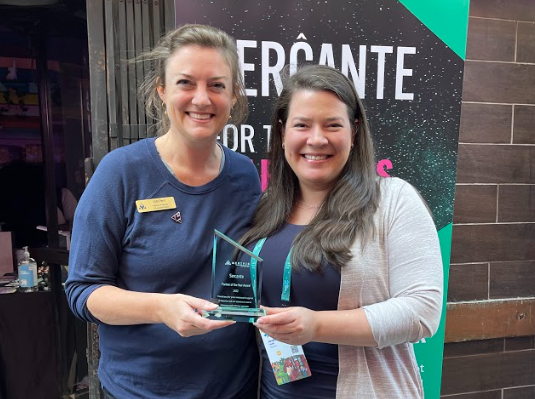
Merivis Partner of the Year Award

Merivis Executive Director Kate Perez took the IRL opportunity at Dreamforce to present Sercante Founder and CEO Andrea Tarrell with the 2022 Merivis Partner of the Year Award. The honor was given to the team for providing technical support to Merivis to help them reach their mission and goals as an organization. Merivis supports #veterans and #milspouses preparing for new careers in the Salesforce ecosystem. 

Dragons lead three Dreamforce speaker sessions

Sercante had the opportunity to run 3 sessions at Dreamforce this year. Here’s a quick recap:

  • Blog About Salesforce – Our content manager, Ambre Juryea-Amole, led a session describing how we tackle our content strategy for The Spot (for Pardot). She provided a series of helpful tips on how to make the most out of your content when targeting the Salesforce ecosystem. Get the blog version of her presentation here
  • Turn Marketing into a Recession-Proof Competitive Advantage – Three of our CRM and Marketing Automation Strategists (Angelica Cabral, Marcos Duran, and Richard Feist) provided the audience with pillar tactics and strategies to ensure that Marketers are prepared for any changes in their organizations.
Angelica, Marcos, and Rich dropping knowledge to a packed audience
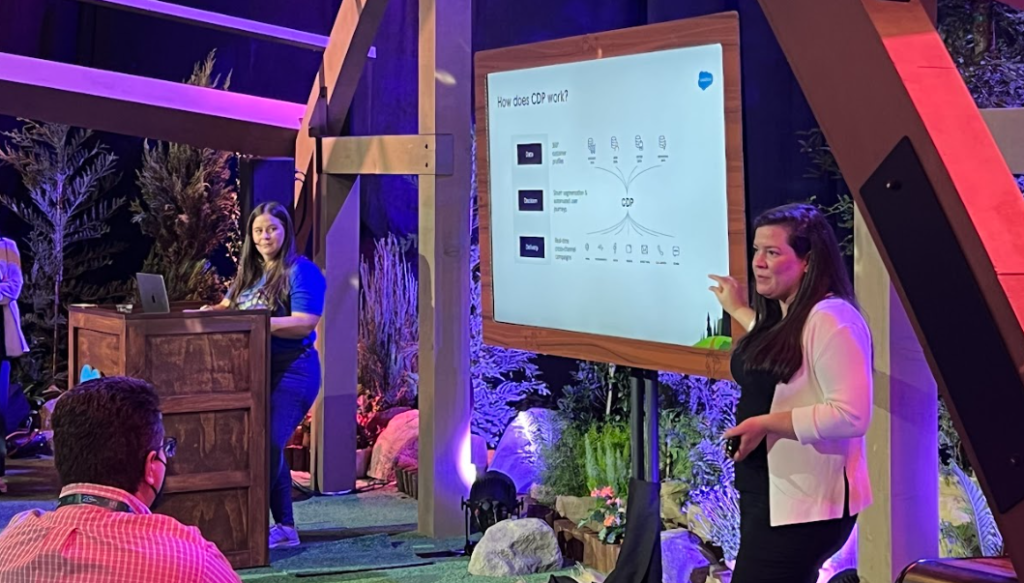
  • Discover How CDP Unifies All Customer Data in One Place – Sercante Founder and CEO Andrea Tarell, and Director, Marketing Cloud Practice, Kirsten Schlau, tackled how CDP can help you create a true profile of your customers and unify your data across multiple datasets.
Andrea Tarrell and Kirsten Schlau explaining the power of CDP

See you at the next Salesforce event

We hope you had a great time with us during Dreamforce. We’ll catch you at the next Salesforce community event.

If you are looking for support on your next Salesforce project or just want to brainstorm with one of us, feel free to reach out!

We’ve all seen email personalization mishaps. 

The power of Marketing Cloud Account Engagement (Pardot) is really in its capacity to leverage data coming in from Salesforce and Pardot to create tailored experiences of all types for the end audience. 

But what happens when this automation doesn’t work how we intend to use it? This is particularly concerning when it comes to email.

Follow along with this blog to learn a few tricks you can use to test your Pardot org for possible email mishaps and prevent them before they happen.

Solution #1: Validate your Salesforce & Pardot User Mappings

The first solution for avoiding email sending fails is to validate your user mappings. Doing so will help you avoid awkward email segmentation and user notification issues.

It is important to know that if Salesforce Users are not mapped into Pardot, then you will not be able to leverage their relationship with Leads/Contacts in Pardot. 

Mapping a User to Pardot DOES NOT give them access — you need permission sets and other configurations for that to happen. This is often the main reason why Users are not mapped.

The remainder of this blog will reference the User object. If this does not 100% line up with your process within Pardot, neither will the rest of what we will cover.

How to validate Salesforce and Pardot user mappings

Here are some ways to validate if all your users are mapped:

  1. In Salesforce, create a report of active Users.
  2. In Salesforce, compare which Users actually manage Leads/Contacts and review their profiles.
  3. In Pardot, go to the Pardot settings tab in your navigation, then head over to the Pardot Connector Settings tab and review your Salesforce profile to Pardot role mappings.
    • If you have any missing, this is the time to add them.
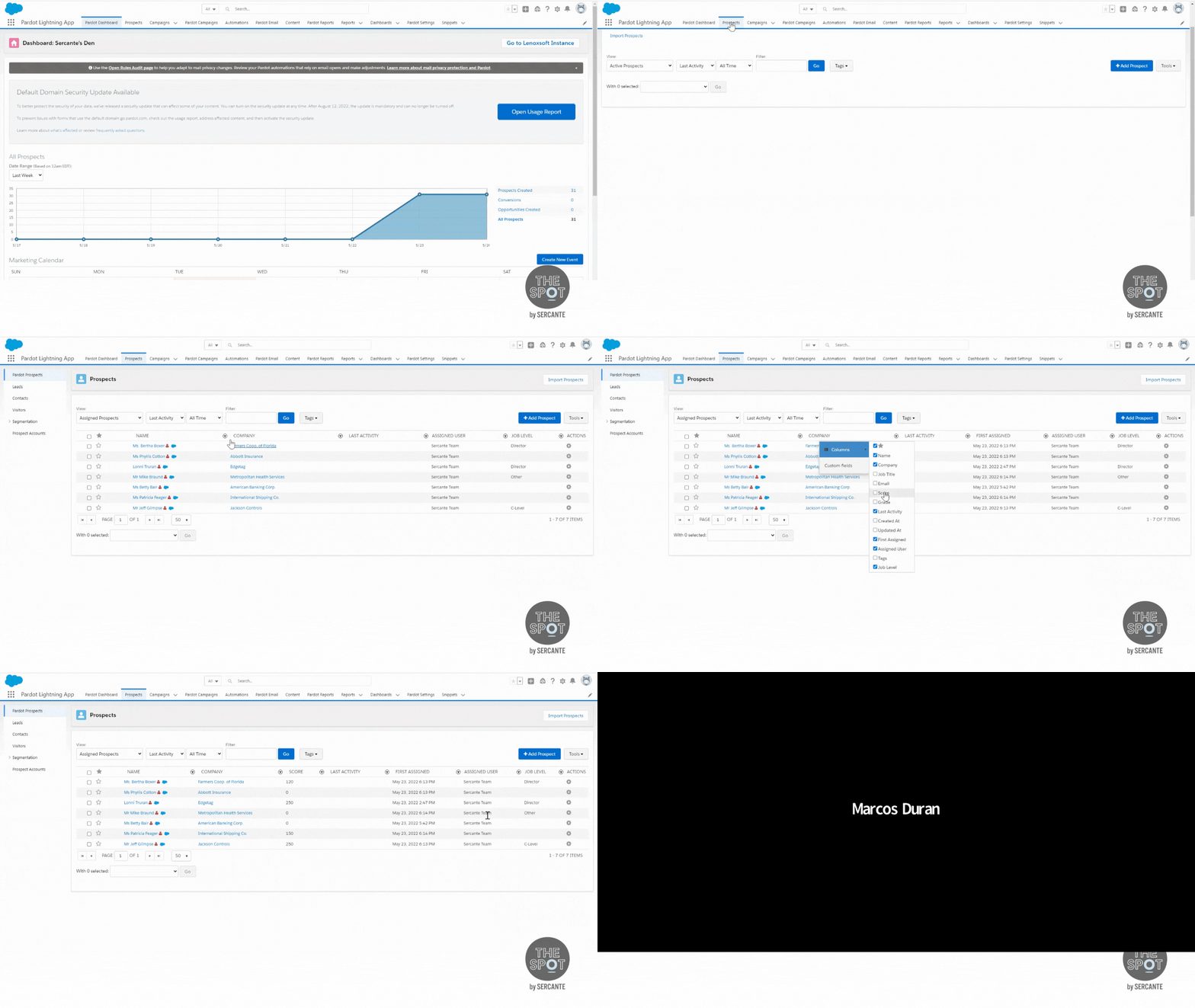
  4. In Pardot, go to the Prospects tab in your navigation, and select the Unassigned Prospects filter on the filter dropdown.
    • If you see any with blue Salesforce clouds, that means the Prospect may be assigned in Salesforce but the mapping is not clear in Pardot.
    • Click on any records you found and open the record up in Salesforce. Then, make a list of who the owner is.
    • Compare this list to the report of Active Users. If there are any missing, they may be deactivated.
  5. In Salesforce, update any records that reference deactivated Users to the appropriate User. This would trigger a sync event and update the record.
  6. In Salesforce, go to Marketing Setup and for your business unit/account, click on the Manage Users button and add any missing users to the appropriate section to sync over to Pardot.
  7. In Pardot, update the Prospect database view to include Assign User and keep the Unassigned Prospect filter to see if you are missing any.
    • You may need to click the Sync With CRM button on the Prospect page to get it to sync.

The result of mapping all your Users is having Pardot and Salesforce be in sync in addition to being able to leverage this datapoint for segmentation. It also allows you to provide the appropriate person with email or Slack notifications.

Solution #2: Create an identity user for your Pardot email sender backup

Previously we covered how to use and experiment with email sender types for emails that are sent from Pardot. If you are not familiar with email sender types, then go read that post and come back after you do. We’ll wait.

Dynamic versus static email user sender types

We would like to put these User sender options into two buckets: Dynamic and static.

Dynamic are options such as Assigned User, Account Owner, or any custom options for the sender information that changed based on the relationship the User has to the Prospect.

Static are options such as General or Specific User options for the sender information that is the same for all Prospects who get the email. No relationship needed between User and Prospect

All the options “pull” data from the User information setup in Salesforce that is then pulled into Pardot.


One of the biggest pitfalls that can happen here is when you use dynamic sender options. If a Prospect does not have an assigned user or account owner, then you have to have a backup sender. Pardot enforces this by making you add an alternative sender.


Many times you will have a default general User you manually add over and over again — such as [email protected] or [email protected]. This leaves room for error and cannot be used in automations, like completion actions, to notify this email address from form submissions, for example.

How to create a Salesforce Identity License User for your Pardot email sender backup

Did you know you can save yourself from headaches caused by human error by turning this email into an Identity User?


The result is an Identity User that can be used as a backup specific User and also for notifications in completion actions throughout the system. 

Identity Users can be used for Single Sign-On or Pardot-centric purposes. However, you cannot assign to an Identity User. For more details on identity licenses, check out this Salesforce resource.

Solution #3: Update user records and check token types for email sender signatures

When you get ready to build your emails, you may want to include sales rep signatures in the email body.

Here are the fields you have access to inject into your emails from the User object:

  • First Name
  • Last Name
  • Full Name
  • Email
  • Job Title
  • Phone
  • URL
  • ID
  • Signature

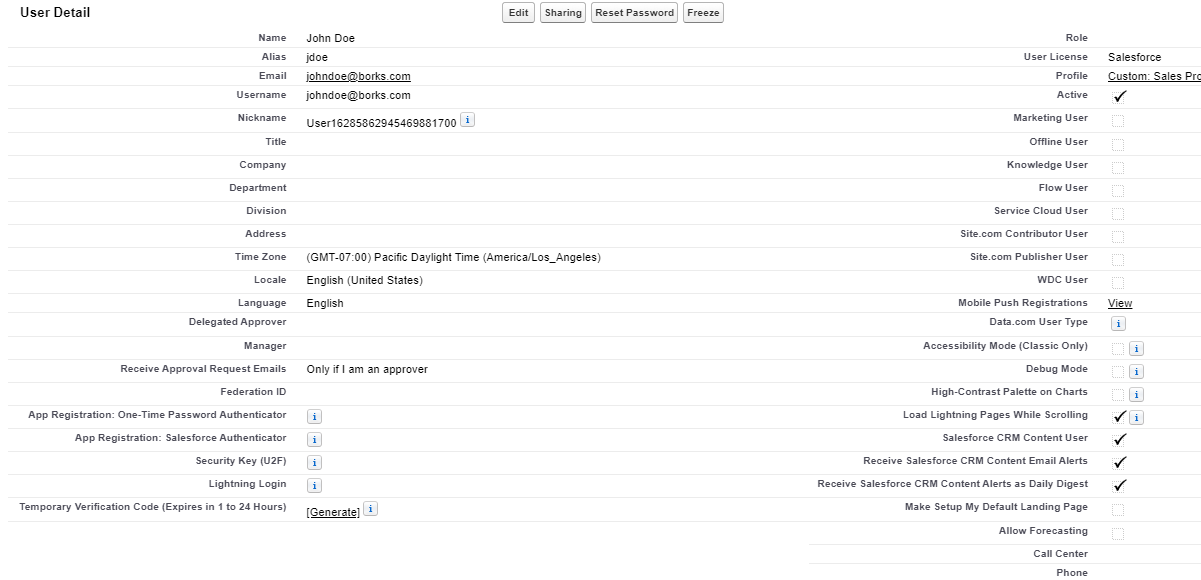
All of these details are managed in Salesforce under the User Settings (view Solution #1 above). If these are not filled out, then the row where you have the Handlebars Merge Language (HML) tag on your email will be awkwardly blank.

To resolve this, simply update the User record. Seems easy enough, right? 

You are correct!

However, let me call out a common mistake we see when using these HML tokens — there are two different sets of tokens. 

Tokens: Sender versus Owner

The owner fields pull directly from the Assigned User, which is one person for the Lead/Contact.

The sender fields pull directly from who you choose as a Sender User on the email. This can be an Account Owner, an Identity User, or a custom CRM user lookup.

Note: Depending on the scenario, you may want to use one over the other. But we use the Sender tokens to play it safe.

Lastly, we would like to note that general Users do not have titles, phones, signatures, or additional URLs. For best results, use an Identity User and make sure you fill in those fields. This will result in a more consistent experience for everyone.

As always, test your tokens!

Solution #4: Create a company-wide backup to avoid blank prospect data when you use queues

One of the main use cases for queues is to help with Lead assignments and send the Prospect to Pardot. If you are using queues for these cases, then there is one thing you have to know.

Queues do not have job titles, companies, or “people” names.

You may be thinking…

Yes, that is correct. So what’s your point?

Well, if you are sending emails on behalf of assigned users, for example, technically Prospects owned by a queue are owned — but not by a person. 

This means when you send emails out trying to use “dynamic” sender options, you may not be actually showing a signature or other details in your emails when queues are involved.

How to avoid email awkwardness caused by having Prospects owned queues

For these scenarios where you know you may have Prospects owned by queues we recommend two options:

Option 1: Ensure your backup Sender is a specific User (try an Identity User). Do not use a general User if you are adding signatures to your email copy.

OR

Option 2: Use HML to create conditional logic to create a backup to blank User fields. Be careful with the extra spacing around HML tokens.

This is what the final syntax looked like for the default in the event John Doe (User) didn’t have a phone number: we added a general corporate number.

{{#if Sender.Phone}}Contact us at {{Sender.Phone}}{{else}}Contact us at 1800 – Sercante{{/if}}

You can use this format to create syntax for other fields you need on your email signatures.

The end result is having a customizable backup for User or organization-specific details to make sure no one sees missing data or has a less than favorable experience.

Solution #5: Set global and default field values as a backup when you use HML in emails

Finally, we come to mail merge fields. We have all seen use cases of subject lines not rendering and showing as {Recipient.FirstName}} because someone forgot to add the extra “curly bracket” that you didn’t notice was missing earlier in this sentence or forgot to test altogether.

Here are some of the more common HML options used in an email:

  • First Name
  • Company Name
  • Job Title
  • City
  • View Online
  • Email Preferences Center
  • Unsubscribe Page

For a list of all the out-of-the-box mail merge fields click here.

How to set global and default field values as a backup when you use HML in emails

If a Prospect does not have data on a field and you use mail merges (HML), it will be displayed as a blank.

We have two options to solve this issue:

  1. Set a global field value.
    If you do this, anywhere where the field is used will display the same text IF there is no existing data.
  2. Set a default value on the email template using HML.
    If you do this, the default text will only work for this one email template, but you can customize it across any email template (check out solution #4). However, if you selected the global field value option, this solution isn’t going to work.

Take action now to avoid awkward marketing email fails later

If you are new to Pardot and don’t know much about how you can use Prospect fields in emails or if you want to take your email personalization game beyond mail merge fields, we recommend you review Content Personalization: Using Dynamic Content, Pardot HML, and Pardot Snippets.

In the end, you have less awkward endings in your sentences and more customized messaging you can leverage to wow your audience(s) by taking these precautionary steps. Pardot can provide many tools to improve your email marketing. But your data flow has to be working properly to take full advantage of everything it has to offer.

The key thing we would love for you to walk away with is, in the words of our colleague Mike Creuzer, to remember to “test all the things”!

Feel free to contact us if you have any questions about how to improve your useability of Pardot.

For many Salesforce Marketing Cloud Account Engagement (Pardot) customers, using Pardot provides them with the tools necessary to communicate with their distinctive audience(s) in a personalized way. 

One common way to do this is to create dynamic customer-centric journeys that send emails on behalf of individual sales reps and help to promote new products or to educate audiences on a specific topic. After all, this is one of the main reasons organizations buy Pardot — to drive the sales pipeline.

But what happens when you need to send emails from different teams in your organization?

Follow along with this blog and learn a few tricks to create new experiences for your Prospects for sales, service, and other parts of your business by leveraging the CRM user lookup feature in Pardot.

Use CRM user lookups to send Pardot emails on behalf of other departments at your company or organization

One of the advantages of Pardot automation for email is the ability to leverage relationships in Salesforce between your sales reps, account owners, and other key service players with your Pardot leads and contacts. 

Here are some examples below:

SDR (Lead Owner) to Prospect (Lead)

Account Executive (Account Owner) to Prospect (Contact)


In fact, here are the standard out-of-the-box relationships you can leverage from Salesforce in Pardot.

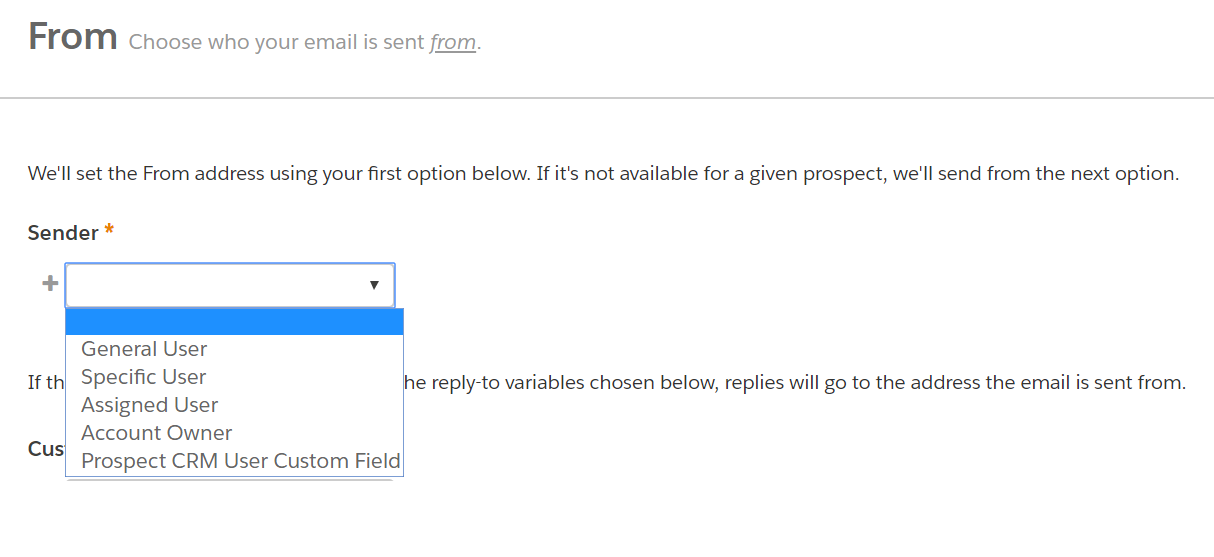
  • Account Owner – Send the email from the prospect’s account owner in Salesforce.
  • Assigned User – Send the email from the user who owns the prospect record.  If the prospect is synced to Salesforce. this is the Lead or Contact Owner.
  • Specific User – Select from a list of your Pardot users to use as the email’s sender.
  • General User – Set a general address (like [email protected]) or a non-Pardot user to be the sender of the Email.


You can usually cover 97% of all your use cases using one of these options while drafting your Pardot list emails or engagement studio programs.

While most organizations don’t have a need for custom relationships, yours may be different. And that’s okay.  

What if you need a different/custom user connection? 

In your Pardot emails, you can always edit the Sender to say General User. This sends the email on behalf of that person as long as they have the same email domain you have validated in Pardot (@company.com).


However, that’s not always the best outcome. Sometimes we need more dynamic solutions.

In that case, we may want a relationship outside of Sales/Marketing for specific customer service-centric journeys like the one below:

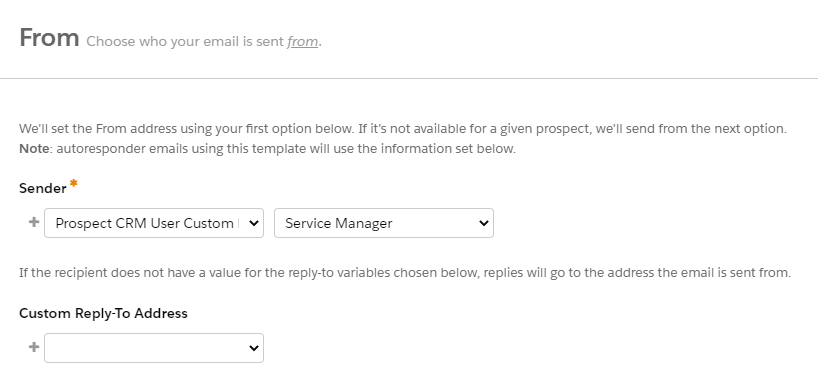
Service Manager (Custom CRM Relationship) to Prospect (Lead or Contact)

In the scenario above, the User/record relationships were built in Salesforce and shared with Pardot in order to build out a service team to prospect customer journeys — think CSAT, follow-up surveys, etc. 


Did you know you know you can create custom relationships AND send emails on their behalf?

Watch the demo below to set up your own custom CRM relationships between Users and your Prospects:

You can also follow along with these steps.

After you set this up, you can take advantage of this field right away with CRM user lookup.

This is what it looks like:

A quick note: Sometimes fields need a few minutes to sync. Be patient, go grab coffee and come back to this. In our experience, it is never more than a few minutes.

What are other examples of custom CRM user lookups?

Honestly, the possibilities are endless. Here are some options:

  • Regional sales manager
  • Customer service representative
  • Technical support specialist

Don’t forget to check out our other cool ideas like A/B testing for you to leverage these different sender options within your organization in the most effective ways.

Where can I use these relationships?

These CRM user lookups are built into Salesforce, so you can use them in both Pardot and Salesforce. Within Pardot you can leverage them in the following ways:

  • Email templates
  • List emails
  • Rules on automation rules, dynamic lists, and segmentation rules
  • Potentially on the new conditional completion action criteria rules

This field cannot be used to send email notifications to the User linked to this Prospect. 

Additionally, we did not see them in Engagement Studio Programs as rule options. But remember, you can build a list to act as your criteria instead of using the field directly. 


Can I have more than one custom relationship?

Absolutely. This is out-of-the-box functionality in Salesforce, which can now be repurposed for Pardot-specific processes. 

Most organizations we have worked with have less than (3) custom User lookups. The only caveat is to make sure you name them correctly so there is no confusion while using them. 

As you see above, you can pick from a picklist (CRM User lookup fields) under the Prospect CRM User Custom option, and choose which one you want to leverage on that particular email. 

How do you test to make sure everything is working fine? 

The best way to test this information is up to date in Pardot is to go through the following checklist:

  • Review User mappings
    • If the User is deactivated or not in Pardot, this will fail.
  • Create a list of Prospects using the new field created and make sure the values are being reflected in Pardot.
    • Watch the video earlier in the blog for a few troubleshooting steps.
  • Run a preview test in your email test tab.
    • Enter a few email addresses you know to have this field updated and see how it works out.
    • You can create fake prospects to sync for this testing or build in Sandbox if you have access to one.

CRM user lookups make life easier for Pardot admins

Thank you for following along! Check out part two of this blog where we cover how to avoid email personalization missteps.

If you have any questions about this feature or how to use it in Pardot (MCAE) please give us a shout here

No more posts to show