Category

Analytics & Reporting

Deciding if you’re ready to team up with an analytics reporting partner or consultant can be a real head-scratcher. How do you even know if you are ready? But fear not, we’ve got your back! 

In this blog, we’re going to break down key areas to review and help you figure out if it’s time to bring in a marketing analytics consulting partner or if you’re good to go solo. 

Let’s dive in and find out if you’re ready to rock the CRM and marketing analytics world.

How do I know if I need a partner for analytics reporting? 

Picture this: you’re sitting at your desk, staring at a seemingly never-ending spreadsheet filled with numbers, charts, and graphs all from different marketing sources. The mere thought of analyzing and making sense of it all makes your head spin. You know that harnessing the power of data is crucial for your business’s growth, but where do you even begin? 

That’s when the idea of hiring a Salesforce partner for analytics reporting starts to flicker in your mind. Is it worth it? Will they truly make a difference? How do you even know if you need one? 

Well here are a few questions to ask yourself to help point you in the right direction.

Limited Internal Resources: Do I have enough time to do this?

Granted this is a bit of a softball point to begin with, but don’t sleep on it. Too often I see marketers spinning their wheels on the reporting instead of being able to spend their time on the actual marketing piece of the job! 

When I worked at a startup I had the head of marketing say to me “Is the money better spent with me spinning my wheel trying to get this to work or paying someone who can do it in half the time freeing me up to work on my actual job?”

That has always resonated with me.  If the marketing team lacks the necessary time, expertise, or resources to dedicate to analytics reporting, it may be a clear signal to seek a consultant’s assistance. 

Hiring a consultant can provide additional bandwidth and expertise, allowing the team to focus on their core responsibilities while ensuring that analytics reporting receives the attention it deserves. A consultant can help fill the resource gap and ensure timely and accurate reporting.

Actionable Insight: But where do we go from here? 

Next let’s start with a pretty big question. Once you get the reports, do you know what you want to do next? And I will tell you most people aren’t ready right away and that is absolutely okay. When marketers struggle to derive actionable insights from their analytics reports, it may be an indication that a consultant’s assistance is needed. 

A consultant can help interpret the data, identify trends, and provide strategic recommendations that can drive marketing performance and decision-making. They can offer a fresh perspective and expertise to unlock valuable insights that may have been overlooked. Who doesn’t like being able to bounce ideas off an expert?

How do I know if I am ready to engage an analytics partner?

Okay you’ve crunched the numbers, and after your review, you have decided your organization would benefit from working with a consultant. 

That’s fantastic! But before you jump in headfirst, are you fully prepared? 

Believe it or not, there are actions you can take right away to give your collaboration a turbo boost and get things moving swiftly. Let’s explore these steps together and make sure you’re all set for an amazing journey ahead.

Clearly Define Objectives: KPIs and goals to lead the way! 

It is essential to have a clear understanding of what you want to achieve with your analytics reporting. It is hard to reach the finish line if you don’t know where it is! 

A simple way to make sure your analytics reporting is going to have an impact is defining your marketing goals.

It doesn’t have to be every goal or that doesn’t mean it might not pivot when new insights arise, but if you know you want to improve lead generation, you might want to focus on analytics that lead to increasing website traffic, improving conversion rates, or optimizing ad spend. This clarity will help both you and the consultant align your efforts and ensure that the analytics reporting addresses your specific goals. You can see where you need to improve and where you are hitting it out of the park! 

Got reports or CSVs you are working on currently? That is a great jumping off point to see what is working and what isn’t. 

Gather Relevant Data: Is my data ready? 

Most marketers manage a multitude of different data points. From Salesforce to omni channels used for outreach, you basically have to be a trained juggler to balance it all. 

You can perform your own audit collecting and organizing the relevant data points that are required for your analysis and see where there are gaps.  By having a uniformed view on the data you are analyzing this also has the added benefit of bringing together other teams and can unify your organization on goals.

Plan of action for access 

When B2B marketers gather insight on the departments and audiences reviewing analytics reporting, it helps them create customized reports that speak directly to the needs of each department. By aligning the reports with the goals of the different teams and end users, it helps get everyone on the same page. Plus, they can communicate in a way that makes sense to each audience, using the right language and level of detail.

Knowing who will be reviewing the reports also lets marketers address any specific concerns or areas of interest upfront. By being proactive, they can provide relevant insights and solutions during the meeting. 

Also by having a plan in place, it shows that they have a clear understanding of the data and insights available, which allows them to make the most of their meeting with the consultant and each department that might need access to the reporting.

Big timelines

Timelines and important dates seem to creep up on you, especially when you are spinning your wheel on a report that just doesn’t want to cooperate. Before you jump on with your partner to cover reporting needs, make sure you note any important dates coming up. 

Include things like:

  • Product launches
  • Marketing campaigns
  • Industry events
  • Sales milestones
  • Big executive presentations

The consultant can schedule reporting activities accordingly. 

By informing your consultant about important dates, you ensure timely and customized reporting aligned with your marketing goals. It helps them schedule reporting, tailor insights, support strategic planning, solve problems proactively, and foster collaboration.

Top 3 challenges

At the end of the day, you don’t have to have everything perfect before you engage a partner. That’s what they are there for! 

But ask yourself: what are 3 things that if you got them taken off your plate or solved right now, life would be a little easier? What keeps you up at night? 

That is your starting list! The consultant can help break those down in easy digestible chunks so you can make progress.

Let’s bring it home

In conclusion, deciding whether to team up with a partner or consultant for analytics reporting can be a daunting task. However, by considering key factors, you can determine if it’s time to engage a partner or if you’re ready to tackle analytics on your own. 

If your internal resources are limited, and you find yourself spending more time on reporting than actual marketing activities, hiring a consultant can provide the necessary expertise and bandwidth to ensure timely and accurate reporting.

Additionally, if you struggle to derive actionable insights from your analytics reports, a consultant can offer fresh perspectives and strategic recommendations that drive marketing performance.

Steps when you’ve decided to contact an analytics reporting partner

 When you’ve decided to engage a partner, it’s important to:

  • Clearly define your objectives
  • Gather relevant data
  • Create a plan of action for access and timelines

By taking these steps, you can ensure that your collaboration with a consultant is productive and aligned with your marketing goals. 

Remember, a consultant can help address your top challenges and alleviate the burdens that keep you up at night, ultimately making your journey towards impactful analytics reporting a smoother and more successful one.

So, hint hint, nudge nudge. We’re a team of marketing consultants who can guide you through marketing and CRM analytics implementation and optimization. Drop us a line to start the conversation.

If you’re getting ready for a Salesforce Data Cloud implementation, then this post will get you ready for it.

There are so many buzzwords with this particular Salesforce product that it often makes it hard to understand what Data Cloud is and what it can do for your business. If that sounds familiar, this article should help you understand the product’s core capabilities and key considerations. 

Having been lucky enough to work on a Data Cloud implementation, I’ll be drawing on both my theoretical knowledge from countless Trailheads and accreditation courses as well as my practical understanding from the challenges I faced when implementing this intricate cloud. 

What is Salesforce Data Cloud?

First things first, Data Cloud, like a lot of Salesforce marketing products, has been through a lot of rebranding and was formerly known as CDP. However, it is not to be confused with Salesforce 360, which will leverage the power of Data Cloud across the whole Salesforce Ecosystem.

So what actually is Data Cloud? 

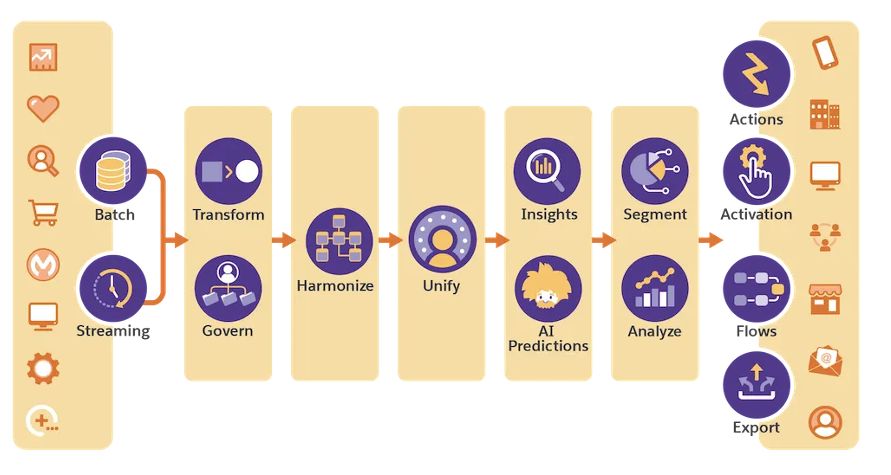
Simply put, it is Salesforce’s long-term customer data platform (CDP) solution. The platform allows users to create a unified view of their customers by integrating data from multiple sources, both internal and external. This data can include demographic and behavioral information, purchase and order history, digital and non-digital interactions, and much more. By combining these diverse datasets, users can gain a deeper understanding of their customer’s preferences, behaviors and most importantly, needs. 

Source: Salesforce

What are Data Cloud’s Capabilities?

If you’re looking at implementing Data Cloud and wondering whether or not it is right for you, let me talk you through its capabilities in a little more detail: 

Data Unification

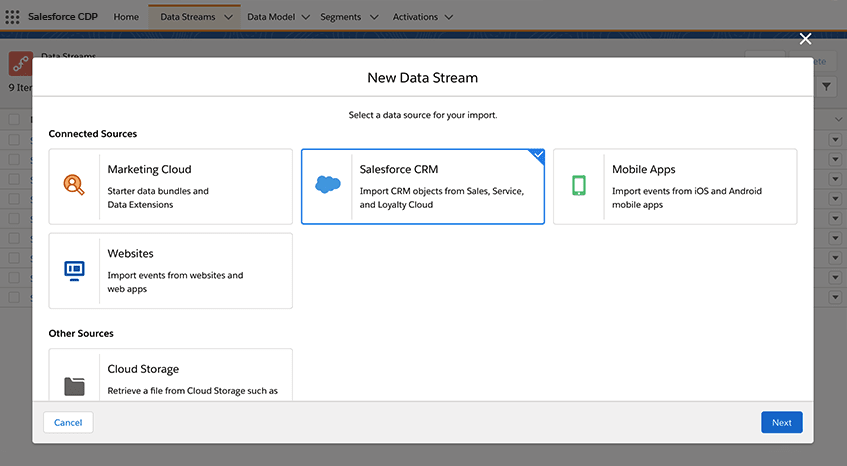
First and foremost, Data Cloud’s primary function is to unify data from multiple sources into a single, consolidated view of the customer. Data can come directly from Salesforce Core, Salesforce Marketing Cloud or it can come from an external system such as an in-house data warehouse. However, as I’ll go on to explain later on, Data Cloud works best when your data is in a healthy position. 

Data Enrichment

With a plethora of connection options ranging from out-of-the-box (OOTB) connectors to FTPs to APIs and more, Data Cloud offers its customers the ability to enrich customer profiles by appending additional information to existing datasets. In other words, imagine using both lifetime value (LTV) metrics and social engagement metrics to truly understand who your most loyal customers are. 

Segmentation

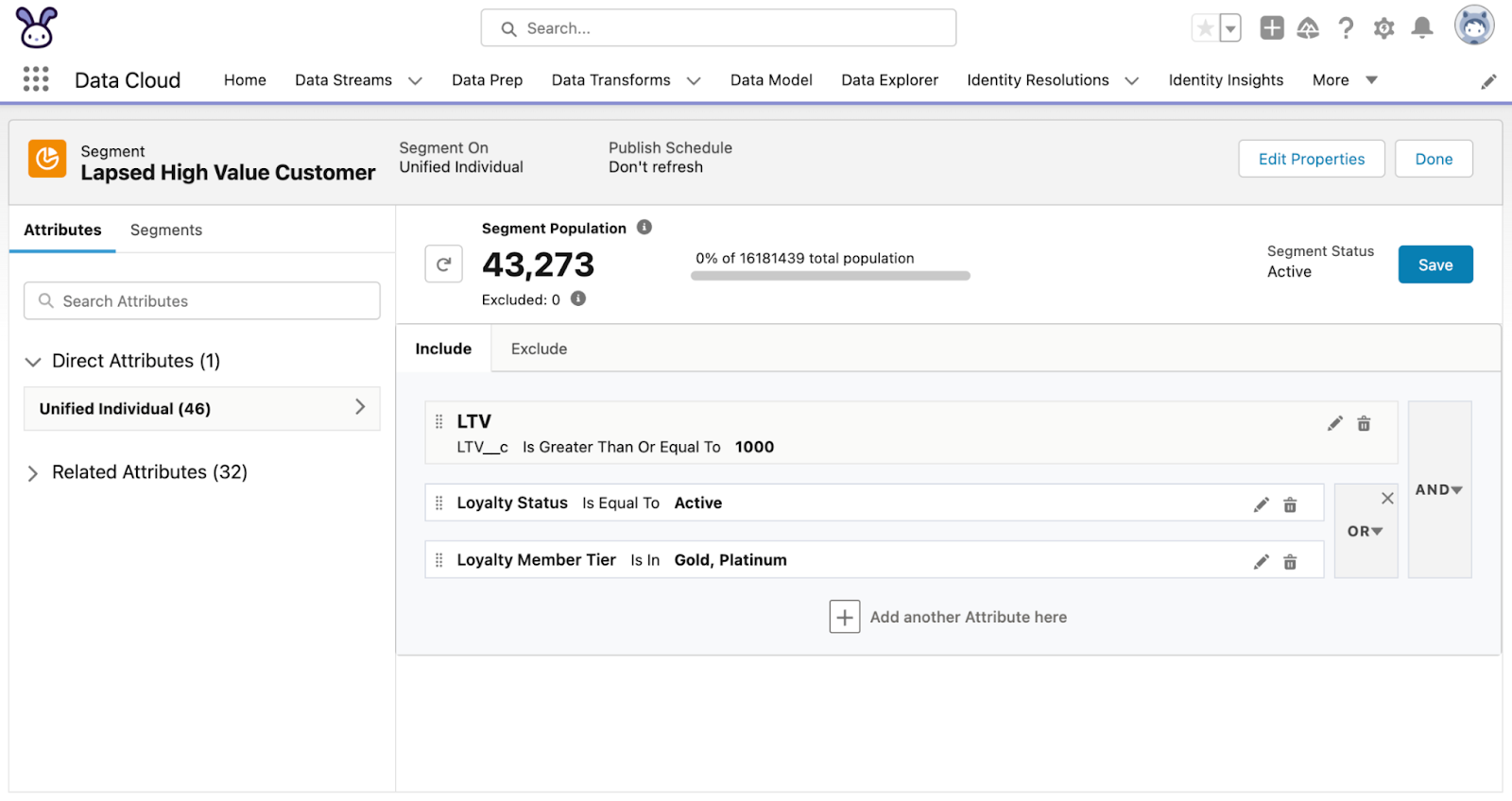
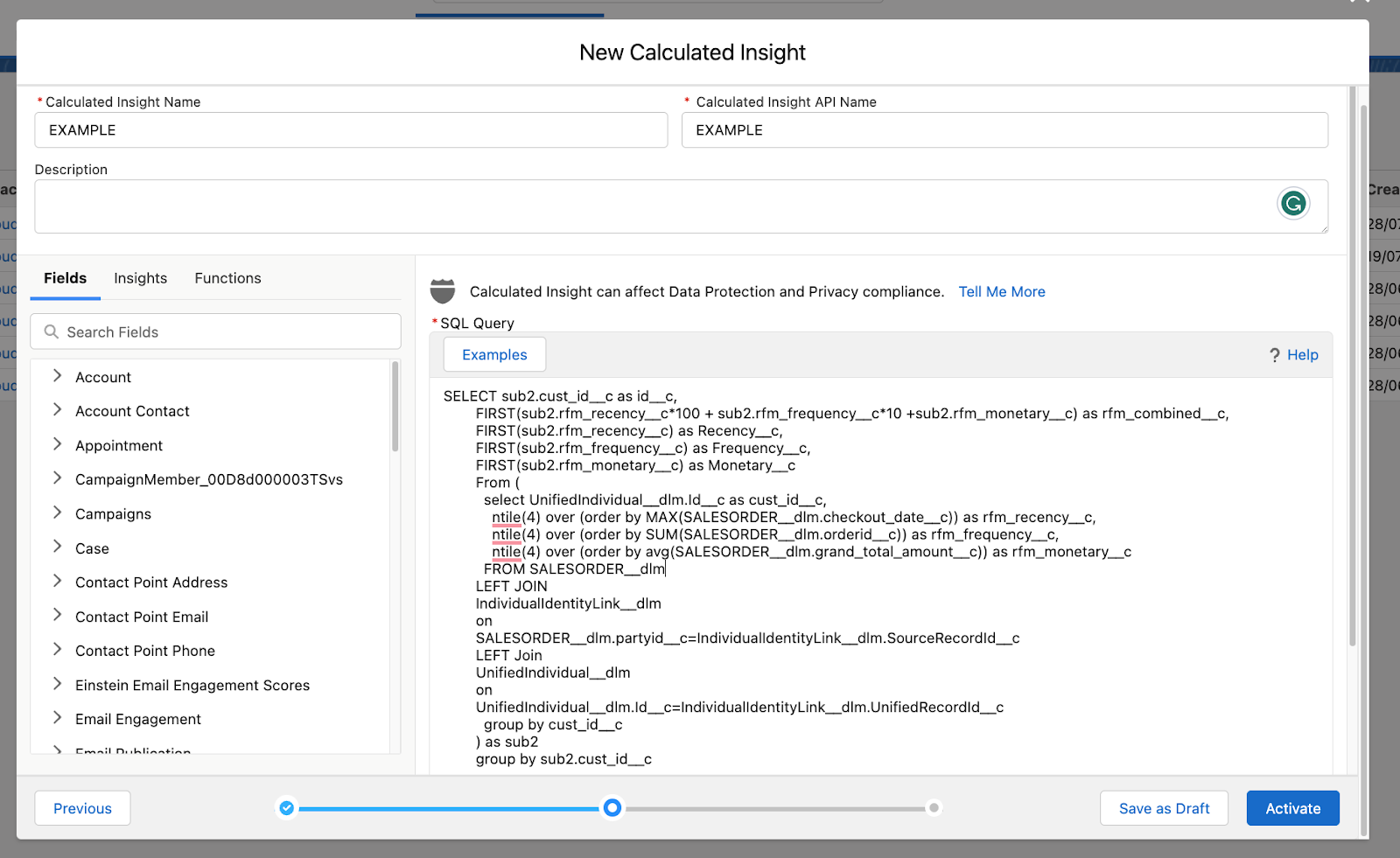
There is no point in having all this data if you’re unable to use it. Data Cloud offers users the ability to create Segments using all of the data ingested by Data Cloud. Segments and Calculated Insights — multi-dimensional metrics (i.e. calculate LTV by summing all completed orders) — can then be pushed into external systems such as Marketing Cloud for future use. 

Better yet, Segments and Calculated Insights can be created without needing knowledge of SQL, although there are limitations as I’ll go on to explain. 

Real-time Data Updates

If you’re in need of up-to-the-minute data and insights, Data Cloud might just be for you. Its streaming insights and real-time Data Streams allow users to work on the most up-to-date data instead of outdated insights and decisions. 

This list is by no means an extensive list of Data Cloud’s capabilities but a list of what I believe are Data Cloud’s most useful tools. For a full list of capabilities, it’s worth checking out the product in more detail.

What are key considerations during Data Cloud implementation?

So at this point, Data Cloud sounds pretty fantastic. And don’t get me wrong, it is! 

However, like any software out there, there are key considerations to take during Data Cloud implementation. Here they are.

Data Quality

Data Cloud is only as good as the data it is supplied. I was, and I’m sure among many, one of those Salesforce marketing enthusiasts who thought Data Cloud would solve all my data silo issues. 

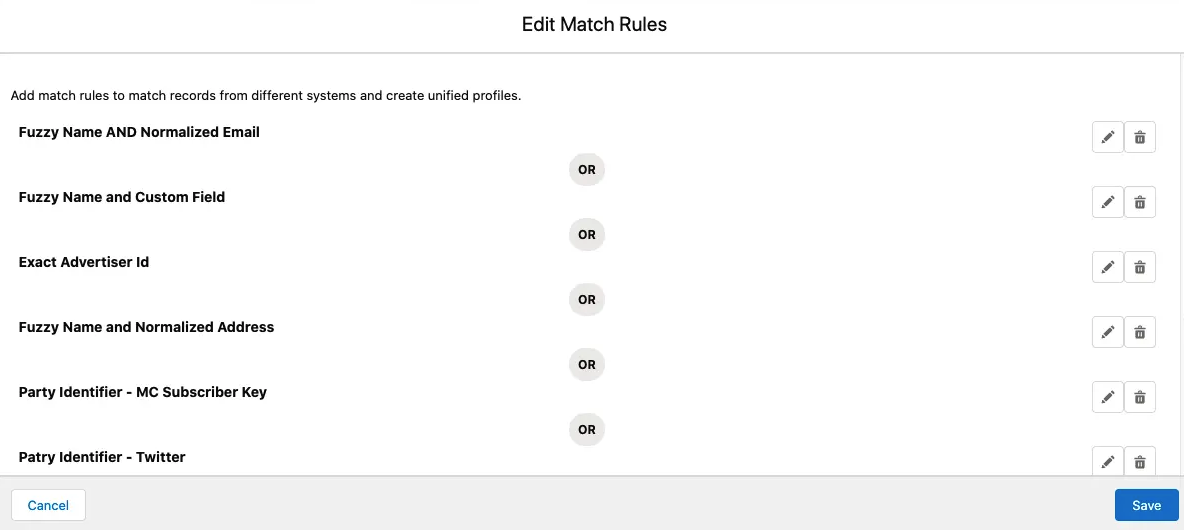
Data Cloud works on reconciliation rules, it uses these rules to unify data coming from different sources, so if your data sources don’t have commonalities between them, you’ll have a hard time creating your unified profile. Likewise, if your data sources are providing inconsistent data in each run, your Segments and Calculated Insights are only going to be so effective. 

Set-up Complexity

Data Cloud is a very flexible platform, and it allows users to consume a variety of Data Streams and utilize a wide range of Data Model Objects. However, this also brings complications as it requires users to have a broad understanding of Data Mapping, APIs and Data Transformation, as well as having a solid understanding of Salesforce. 

This is particularly important when Unified Profiles are involved. And furthermore, it requires a deep understanding of the platform’s very intricate nuances. 

To list a few of the nuances:

  • Unified Individual – The Unified Individual Object itself is non-editable. It essentially acts as a carbon copy of the Individual Object and is only created once Reconciliation Rules have been set up. 
  • Activations – Only fields that are mapped to the Individual Object are available as fields in segments pushed from Data Cloud. Related Objects and their fields are pushed as parsed fields,  which adds complexity for using tools like Marketing Cloud Engagement.
  • Profile Explorer – The OTTB Profile object is very limited and will require a lot of Salesforce expertise to build a usable page for viewing Unified Customers. 
  • Learning Curve – Data Cloud is a data-heavy tool and, at least in my experience, usually falls under the MarTech umbrella. Whilst this provides marketers with data-driven insights and segments, it also means a lot of learning is required. 

As mentioned above, there are new concepts as well as new terminology such as Data Streams, Data Bundles and Data Lake Objects, but the biggest learning curve will come from the Segmentation and Calculated Insights. 

Whilst Data Cloud does offer a ‘Builder,’ creating both insights and segments using the Unified Individual (the main reason for using Data Cloud) is achieved via SQL due to how the Unified Individual reconciles multiple profiles from multiple sources. 

Use these tips for a successful Data Cloud implementation

I don’t want to sound like I’m being negative as, in reality, Data Cloud is a fantastic tool and can help drive meaningful engagement. But I do want to stress that understanding the detailed capabilities and key considerations of Data Cloud is the only true way of ensuring your Data Cloud implementation will be successful. 

Questions to ask before Data Cloud implementation

If I was procuring Data Cloud for myself, I would consider the following; 

  • Where is my data coming from? If the majority already sits within a Salesforce product, then the chances are I can get a unified customer profile through smart architecture.  
  • What is the state of my data? As mentioned, Data Cloud won’t fix your data health issues. If your data is generally incomplete and lacks consistency, then you’re not going to be ready for Data Cloud yet — it doesn’t mean it won’t be right in the future. 
  • Who is going to own this product? It’s often marketers who will benefit from the segments and insights. But more often than not they don’t have SQL experience. If you’re hoping the segment and insights builders will make up for a lack of SQL knowledge, it might be worth reconsidering.

Need help with your Data Cloud implementation? Reach out to the Sercante team who can walk you through it and get you the results you’re trying to achieve.

The last blog post in this 3-part series may have left you wondering if you should buy or build a customer data platform (CDP). We’ll answer that question in this last installment.

In the first post, we looked at six reasons to implement a CDP. Then in the second blog post, we discussed the five major CDP components.

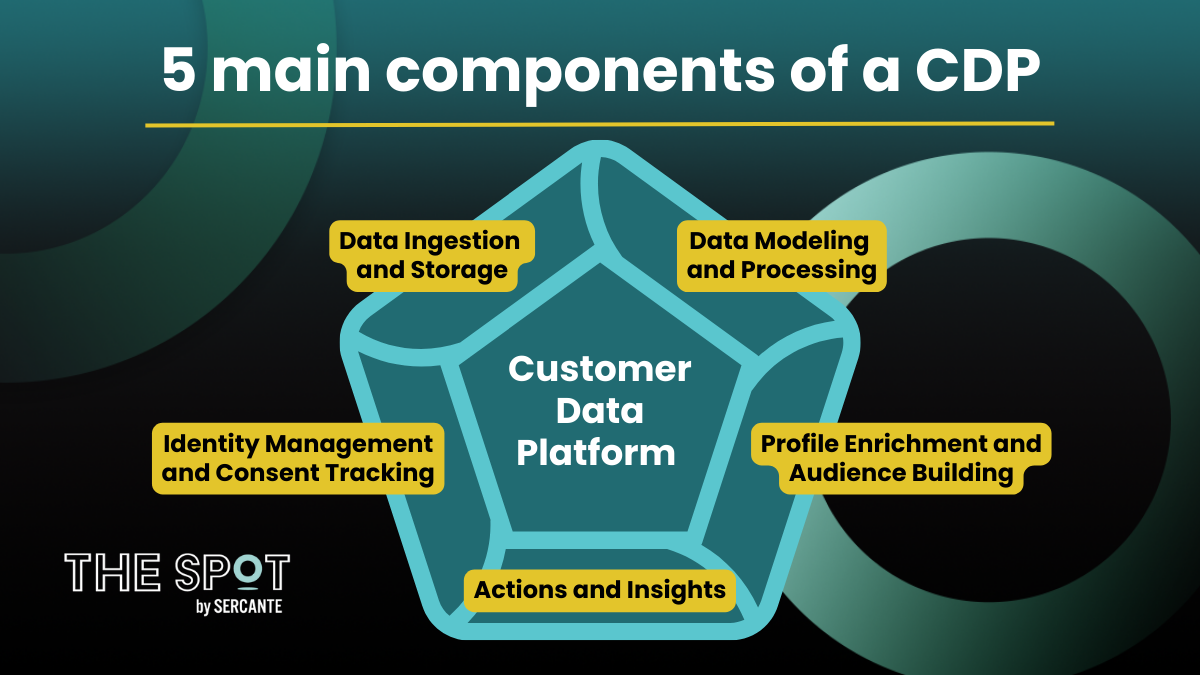
The five main CDP components are:

  1. Data Ingestion and Storage
  2. Data Modelling and Data Processing
  3. Identity Management and Consent Tracking (for Marketing)
  4. Profile Enrichment and Audience Building
  5. Actions and Insights

We briefly discussed Consent Management as an important part of any CDP marketing use case.

Obtaining a customer data platform can be achieved by purchasing a CDP suite, sometimes called an  off-the-shelf CDP solution, or by selecting the various individual component pieces and using them to build your own customer data platform.  The latter is known as a composable CDP solution.

Assembling a CDP team

In either case, CDP implementations need people with deep expertise and knowledge of data architecture, data modeling, and data engineering.  These skills are needed to achieve data ingestion of internal and external sources into a data storage repository in a well-architected way that is both scalable and cost-effective.  For composable CDP solutions, it is critical that the team construct a workable plan that incorporates how each of the pieces will be combined.

Platform Expert

Beyond that, it’s important to have tool or platform-specific knowledge to build out the capabilities of the various components of the selected customer data platform.  For example, it would be beneficial to have Salesforce Administrator skills to assist with the Salesforce Data Cloud implementation and administration of the Data Cloud afterward.  

Marketing Operations

It’s also important to have marketing domain expertise, especially for use cases that involve audience building for marketing purposes.  Not all CDP use cases involve the marketing function, but there are a significant number that do involve marketing use cases.  

Advanced Technical Experts

No matter whether you choose to buy or build a CDP, there’s a variety of skills needed to get up and running on a customer data platform, so it’s likely going to take several different people, each with varied skills.  

How to fill the skill gaps

Large enterprises that employ a big IT department experienced at building applications or SaaS companies of any size where the core business is building applications, are more likely to consider composable CDPs as an option.  And organizations with use cases that require real-time capabilities will need to carefully consider whether an off-the-shelf CDP solution will provide the needed functionality.

That said, the quickest way to get up and running on a customer data platform is usually by purchasing a CDP suite that includes all the major components ready to go out-of-the-box.  In addition to accelerating the time to value, a customer data platform suite is a great choice when your organization lacks the IT support and skills needed to evaluate, select and piece together all the various components of a CDP.  

Salesforce as a CDP suite

Choosing Salesforce as the CDP suite to buy is pretty straightforward if you already have Salesforce Sales and Service cloud, or an industry equivalent such as Salesforce Nonprofit Cloud or Health Cloud, and/or Salesforce Commerce Cloud.  

Those Salesforce platforms have a direct connection to the Salesforce Data Cloud as well as a connector to the Salesforce Marketing Cloud.  This removes the need to build pipelines between these systems as would be needed for a composable CDP solution.  As a result, security is ensured by Salesforce because all data is contained within the Salesforce system. 

Considerations for composable (build-your-own) CDP solutions 

Composable CDP solutions are an option to consider if your first-party data doesn’t live in a CRM like Salesforce and your IT team has the skills, experience, and bandwidth to build out a solution for the organization. Composable CDP solutions are a great choice if your organization already has some of the five major CDP components installed and working well.  

If your first-party data is already ingested into your data warehouse or data lakehouse, is being processed and transformed, and you have robust machine learning tools in place, then your existing system likely meets several of the CDP requirements already.  In that case, it might make sense to just add the missing pieces to your existing platform rather than purchase a CDP suite.

Steps to decide if you should buy or build a customer data platform (CDP)

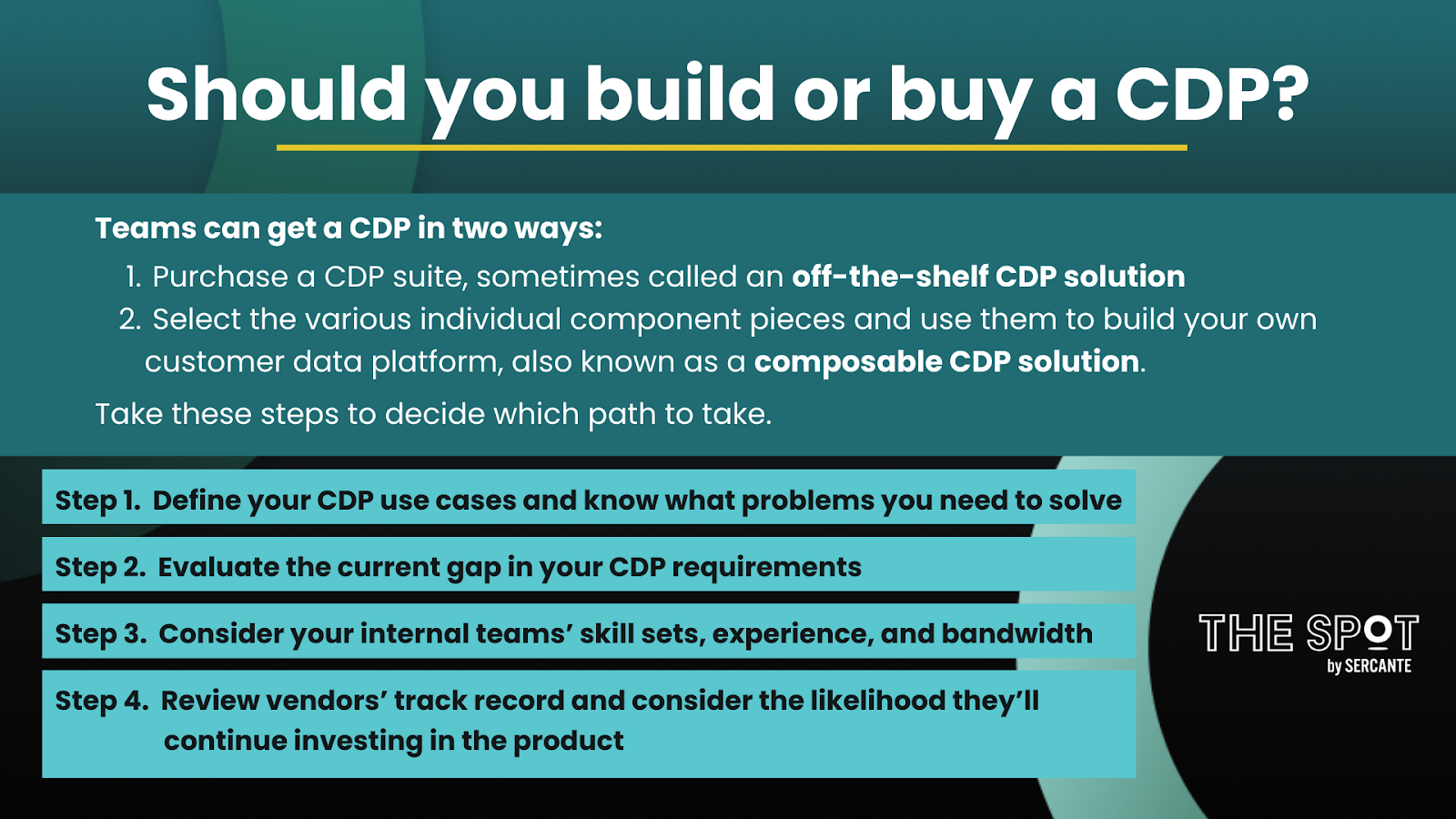
There is a lot to consider when making a CDP choice.  Both CDP suites and composable CDP solutions are viable options but to help you figure out which one might be a better choice for you and your organization, here are four things you can do.

1. Define your CDP use cases and know what problems you need to solve

For what purposes do you want to use unified customer data?  Do your use cases need to be solved for only marketing concerns or will the sales and service teams benefit from a unified customer profile?  Do any of these use cases require real-time capabilities? 

2. Evaluate the current gap in your CDP requirements

Where does your current first-party data reside today?  Of the given CDP components you need, how many does your organization already have in place?  Are there any digital transformations or architectural upgrades planned in your organization for the next 12-15 months that you are aware of and should consider?

3. Consider your internal teams’ skill sets, experience, and bandwidth

Does your IT team have the skills and experience to select the right pieces and compose a CDP from different vendors?  Will your IT team be able to prioritize building a CDP over other internal projects?

4. Review vendors’ track record and consider the likelihood they’ll continue investing in the product

What is the vendor(s) track record in the CDP space?  Are they new to the modern marketing tech stack or have they been in the CDP space for quite a while and perhaps considered to be more of a legacy product?  How likely are they to continue investing in their product(s).  

Consider your long-term plan when making a CDP build or buy decision

Customer data platforms are a long-term investment — you want to know your CDP vendor(s) will continue to improve their product.  And you’ll want to make sure you’re setting your team up for success by considering the level of effort needed to administer and support the tool and platform choices for your CDP.  

Whether you choose to acquire an off-the-shelf CDP suite or build a composable CDP, there are many reasons why your organization would want a customer data platform.

Remember to reach out to the team at Sercante for guidance when you’re ready to implement a CDP at your company or organization.

Thinking about implementing a CDP? Understanding the main components of a customer data platform (CDP) is a good way to make the decision.

A CDP is not a marketing campaign execution tool, but it does provide a solid foundation for marketing personalization. While a CDP is frequently employed to better orchestrate the customer journey, that isn’t the only reason you’d want to consider using a customer data platform. The unified customer profiles built in a CDP can be made available to sales and service teams so that they can close more and bigger deals and provide better customer support.

In the previous blog post, we discussed why your organization would want to consider implementing a customer data platform solution. 

There were six main reasons discussed

  1. Increased demand for personalized customer experiences
  2. The customer data problem of siloed data
  3. Need to track multi-touch points 
  4. Demise of third-party cookies in 2024
  5. Government regulations regarding privacy
  6. Unified profiles can be used in data clean rooms

It’s not unusual for sales and service teams to work with some of the same technology tools. For example, an organization’s customer relationship management (CRM) system is a commonly shared platform. 

CRM systems were designed to collect first-party data about an individual customer, member, patient, or donor, depending on the use case. A CRM can also be used to collect first-party data about companies or organizations. First-party CRM data will likely include name and contact information, at a minimum. 

In contrast, there are some tools and platforms used primarily by marketers. One such example is a data management platform (DMP) that can be used to segment audiences and optimize ad spend. A DMP is a cookie-based solution that temporarily stores second and third-party data about audiences and advertising campaigns. As we learned in the previous blog post article, third-party cookies are going away in 2024, which is an important reason why a CDP implementation could be worth considering sooner rather than later. 

Five main components of a customer data platform (CDP)

A customer data platform is a repository for large quantities of internal and external customer data. CDP input data sources often include data from an organization’s customer relationship management (CRM) system and data management platform (DMP). Both CDPs and CRMs are persistent, long-term storage solutions, whereas DMPs generally have shorter retention periods around 90 days or so.

Customer data platforms generally include at least five major components which are described next (see figure below). There is one caveat. Consent management is a very important item not always included in the requirements for a customer data platform. If you use a CDP for marketing use cases, however, you’ll need to consider how to manage and track consent.

1. Data Ingestion and Storage

At its core, a CDP must provide a data storage component where all the customer data is securely stored and managed. Additionally, you will need to have a way to bring all the customer data into the storage layer. Data ingestion for external data sources is usually automated by using various connectors. It’s very important to consider data governance as part of this component. Depending on the CDP selected, your organization could be responsible for all data governance requirements. 

2. Data Modeling and Processing 

Before ingesting data into your CDP, you’ll want to design and create your data models. It’s a good idea to build a data dictionary as part of the data modeling exercise, prior to data ingestion. Creating a data dictionary will help highlight any formula fields to be created and data transformations to be undertaken. 

3. Identity Management and Consent Tracking

Data matching and identity resolution are the next critical steps to achieving a unified customer profile once data is ingested and securely stored in a CDP. Identity stitching, accomplished by analyzing and resolving data across multiple touchpoints, systems, and attributes, ultimately helps us better understand a customer’s interests and needs. Identity resolution can be achieved using both deterministic matching, best used with first-party data, and probabilistic matching. 

4. Profile Enrichment and Audience Building

After reconciling identities, you’ll be able to enrich those identities with external data sources. Once the holistic unified profiles are available, you’ll be able to extract information to be used for analytical purposes. For marketing use cases, you can also use unified profiles to create segments and audiences for marketing campaigns. 

5. Actions and Insights 

This component makes data in the data layer accessible to machine learning tools or other platforms where the data can be used to achieve actionable insights. With actionable data, organizations can better orchestrate the customer journey. Targeted actions also make it possible to engage with customers in real-time. For example, a customer searching for product installation instructions on the website for a recently purchased item could automatically be sent an email with the needed information. 

Explore types of CDP solutions available

Some customer data platform solutions, such as Salesforce Data Cloud can be purchased as a full product suite with all major components included in one platform. Another approach to acquiring a CDP would be to build your own customer data platform. 

Most organizations that build a customer data platform opt for a composable CDP which allows individual best-in-breed module selection and combination to satisfy their CDP requirements. Both of these customer data platform acquisition approaches are discussed in more detail in the next blog post.

Remember to reach out to the team at Sercante for guidance when you’re ready to implement a CDP at your company or organization.

A customer data platform (CDP) is a unified customer database where many different external and internal sources are collected, cleaned, and aggregated to build rich individual customer profiles. These unified customer profiles can then be made available to marketing, sales, and support teams for achieving increased sales, enhanced customer experiences, and improved customer support. If you’re wondering if you should implement a customer data platform, then read on to get six reasons why it’s a good idea.

Building personalized customer experiences

Customers expect more personalized experiences today — they’re demanding more in return for sharing their personal information with an organization. When customers supply their information to one department, they expect the updated information to be available company wide.

However, that is frequently not possible because customer data often exists separately within many different departments. There is rarely a single source of truth. In this situation, a CDP can connect these siloed customer data sources.

CDPs create a complete view of the customer journey

It’s not just that customer data is siloed. The amount of data continues to grow exponentially for many reasons, one is that there are more touch points now in a customer journey. 

A customer may start their morning searching for an item on their home computer then continue their search on their mobile device while in transit to work. Later, they may spend their lunch hour browsing on their laptop, ultimately making their final purchasing decision on their tablet in the evening. 

A CDP can help stitch together these interactions to provide a more complete view of a customer journey.

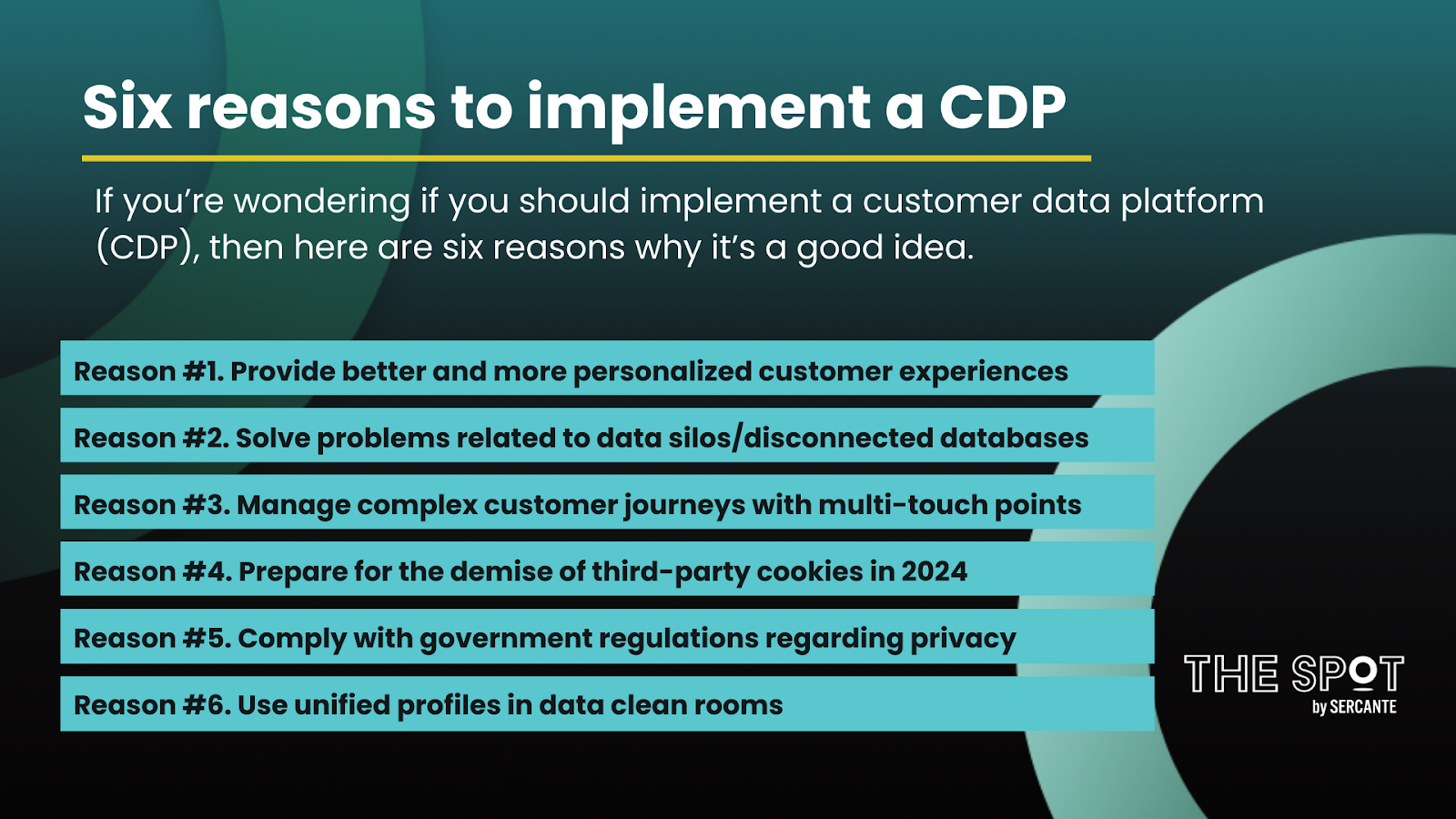
Six reasons to implement a customer data platform

  • Reason #1. Provide better and more personalized customer experiences
  • Reason #2. Solve problems related to data silos/disconnected databases
  • Reason #3. Manage more complex customer journeys with multi-touch points
  • Reason #4. Prepare for the demise of third-party cookies in 2024
  • Reason #5. Comply with government regulations regarding privacy
  • Reason #6. Use unified profiles in data clean rooms

These first three reasons why you’d want a customer data platform aren’t necessarily new. It’s a marketer’s goal to deliver the right message at the right time through the right channel by building an understanding of who the customer is and what they want. However, there is a new sense of urgency. 

Creating unified customer profiles has become much more important due to recent external driving factors. Those driving factors are the fourth and fifth reasons included in the list below.

Data privacy and the end of third-party cookies

With the availability of information from third-party cookies, it wasn’t a priority for most organizations to expend the resources developing a complete view of their customers. Indeed, it’s expensive to build a complete 360-view of the customer that would allow for more personalized experiences, and it’s been relatively inexpensive for marketers to frequently send communication blasts to a wide audience. 

Soon, however, marketers will no longer have a cheap and easy source of consumer information gathered from third-party cookies. Today, third-party cookies are already being blocked by some browsers such as Safari and Mozilla Firefox. In the latter half of 2024, Google plans to completely deprecate all third-party cookies. 

The excessive exploitation of technology, including the misuse of third-party cookies, has had the unintended consequence of governments stepping in to create regulations to better protect the privacy of consumers. Obtaining consumer consent and keeping track of this consent, now required, is an important reason marketers should consider using a customer data platform. 

Building unified customer profiles within a CDP

A CDP offers organizations a way to bring together customer data to develop a more clear and complete picture. With the unified profiles developed in a CDP, organizations can now develop a first-party data strategy that can be extended with the use of other tools and platforms like a data clean room. 

A data clean room, the ultimate in data sharing and data collaboration, provides new opportunities for organizations to process and analyze data more efficiently while still managing the data in a compliant way. 

Other departments feel benefits of implementing a CDP 

Marketers may initially have the most to gain by using a customer data platform, but unified customer profiles can also result in many benefits for sales and service teams. Importantly, the enterprise must adhere to new regulations and privacy laws. 

A customer data platform is often the best way to ensure that the customer profile is complete and accurate. That way, when a customer makes a request related to privacy, the organization can comply with the request.

So, how does a CDP actually work? In the next blog post, we’ll discuss the five major components of a customer data platform. 

Remember to reach out to the team at Sercante for guidance when you’re ready to implement a CDP at your company or organization.

Components are a hidden gem in the CRM Analytics (formerly Tableau) toolbox. You can re-use them in any dashboard and then centrally make changes that affect any dashboard where the Component is placed. But before the Salesforce Summer ‘23 release, they had to be identical on every dashboard! 

If you wanted revenue by State on one dashboard and revenue by Country on another Dashboard, you needed two different components. 

Not anymore! Here we provide a step-by-step guide (with pictures) to get you feeling confident and excited about using (and re-using) these amazing widgets. Thanks to the Salesforce Summer ‘23 release, you can now use parameters to make component widgets dynamic.

How to Make Component Widgets Dynamic in CRM Analytics

Ready to get started? Here are the steps to making your CRM Analytics component widgets display dynamically using parameters.

Step 1: Create a Component

There are a few ways to do this. I’ll outline the method that flows best with dashboard creation. But like many Salesforce tasks, there is more than one way.

  1. From a dashboard, drag the component widget to your dashboard.
  2. From the dialog box, select Create New Component.
  1. Add a widget to your new component.
    • In our example, we are using the Account Engagement (Pardot) Prospects and grouping by country.
  1. Save your component

2. Add a Parameter to your component

  1. Click on the Component Widget and choose the advanced editor from the widget menu. 

2. On the Query Tab, find the value you want to parameterize. In our case it’s “Country.”

    • Click on the pages icon (next to ID to copy the parameter to your clipboard)
    • Click Create (or update if altering an existing parameter). Note: The value MUST be in the correct case (NOT Country)
    • Click on the Parameters tab to see what you just created.
    1. Next, change the query to use the parameter. Go to the query tab and replace the group and name with your new filter. Where you see city, replace as shown below for the group and name

    Group:

          "groups": [
              "[[parameter_1]]"
            ],
            "filters": [],
            "joins": [],
            "name": "pdProspect1"
          }
        ],
    

    Name:

      {
            "name": "[[parameter_1]]",
            "ascending": true,
            "filters": []
          }
    
    1. Save your query.
    2. Save your component.

    3. Using the Component on Your Dashboard with the Parameter

    Now that you have your component with a parameter created, let’s add it to a dashboard and change the parameter. This is the fun part!

    Return to the dashboard tab (should be an open tab in your browser), and click on the component widget to select the new component we just created.

    Pro tip: To refresh component content or edit, look for the actions in the right side toolbox when the component is selected.

    Preview the Dashboard

    It looks like this: It’s displaying by Country

    Change parameter

    Now let’s change the parameter.

    1. Edit the dashboard.
    2. Click on the component, and click on Parameters (right hand side).
    3. Click on the parameter you created.
    4. Select Static for Value Type.
    1. Replace country with state. Click update.

    The component now displays State.

    You can parameterize other aspects of the component (filters, etc.), so there are lots of possibilities here.

    What else can I do when I make component widgets dynamic?

    The example in this blog is quite simple. However, it gives you the elements to be successful in creating and using CRM Analytics components. 

    These CRM Analytics enhancements give us opportunities to make dashboards more useful and allow us to finally re-use components effectively.

    Some great use cases:

    • Sales by Group or District
    • Product type filtering (for different dashboard)
    • Scenarios where you have different revenue fields (USD or CAD for example or expected vs actual)

    The Salesforce Summer ‘23 release has given us so many gems. This CRM Analytics update is a big one along with the ones we’re seeing with Account Engagement including the ability to copy marketing assets between business units, and this update to Salesforce user access management

    Need help digging into this super helpful feature? Or wondering how this can fit into your overall marketing reporting strategy? Reach out to the team at Sercante to start a conversation.

    No more posts to show