Category

Pro Tips

Uh-oh. You just received an email from Salesforce saying you have exceeded your Marketing Cloud Account Engagement (Pardot) mailable database limit. That means if you don’t reduce the amount of mailable prospects in your database quickly, it’s going to cost you. 

Or maybe you were “just checking” one day & noticed that your Mailable Database limit was getting close to that 100% mark, and you need to do something quickly to prevent it from going over.

While the default Account Engagement instance allows for 10,000 mailable contacts, some companies purchase additional contact blocks of 10K prospects each based on their anticipated marketing/subscriber audience size. If you capture more mailable prospects than you’re limited to, Salesforce will allow you to capture those additional prospects in Account Engagement, but they will also invoice you for them.

At the end of the day, we’re all trying to grow our businesses and our audience size. So, hopefully, a time will come when we need to purchase another block of contacts to increase our mailable database limit. But if today isn’t that day, here are ways we can clean up our mailable database quickly and keep it tidy for the long haul.

How to check your mailable database numbers

If you get an email notice from Salesforce, the email will tell you how many mailable prospects are in your Account Engagement database compared to your database limit. Let’s log in to verify those numbers. 

There are two ways to check your mailable database numbers if you haven’t received an email from Salesforce for exceeding your mailable database limit or aren’t sure how many mailable prospects are in your database compared to your limit. 

Check your Prospects Table with the Mailable Prospects list view

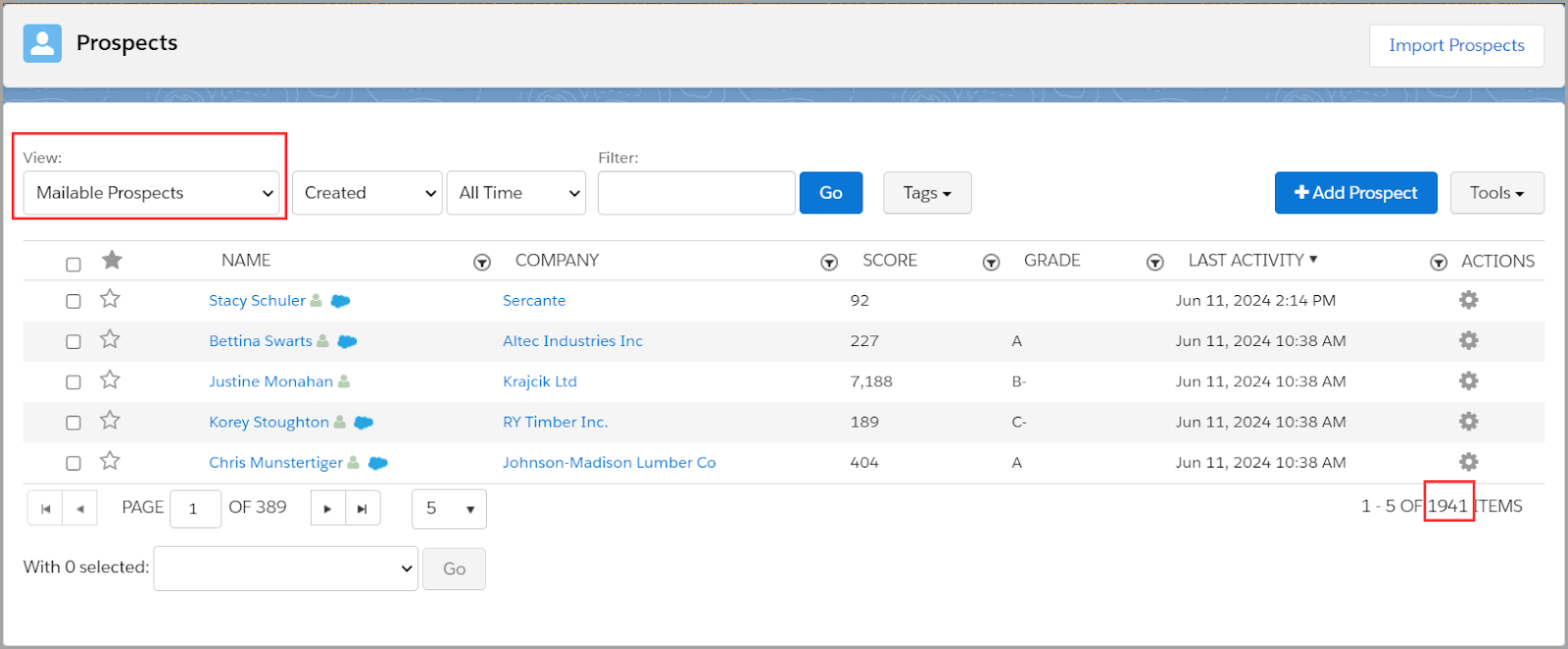
In Account Engagement (Lightning) go to your Prospects tab > List View: Mailable Prospect. This represents your total number of mailable prospects, but it doesn’t tell you what your mailable prospect limit is.
Use the Usage and Limits Tab to see your mailable prospect utilization

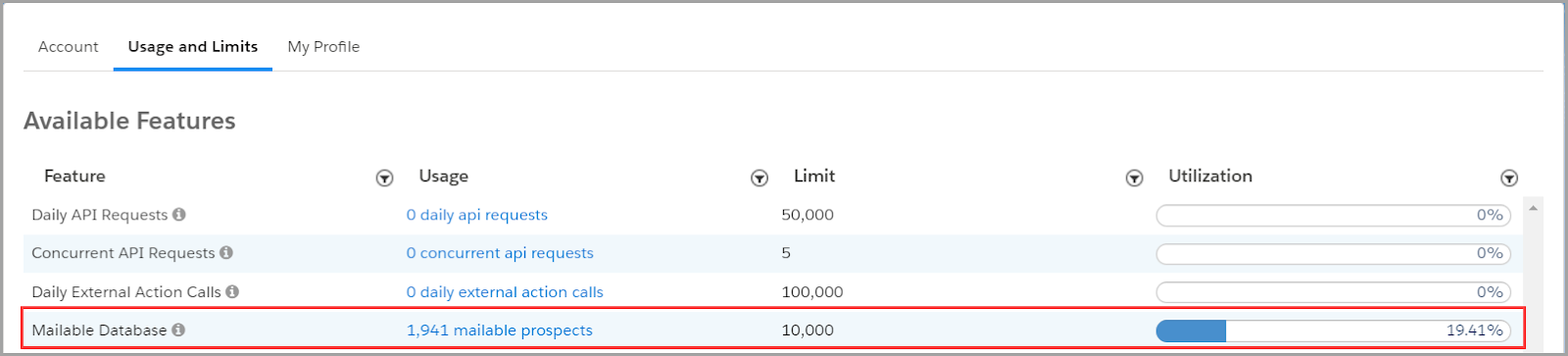
In Account Engagement (Lightning) go to your Account Settings > Usage and Limits Tab. It’s important to know that there can be up to a 24-hour delay in the total number of mailable prospects represented in this table. 

However, this table shows you your mailable prospect database limit and percent of utilization in addition to the total number of mailable prospects — just check that total number to the prospect table we just noted above.
Also – one VERY important reminder! 📣

Mailable prospect limits are shared across Account Engagement Business Units!

This means that if you have a limit of 10,000 mailable prospects, 9000 are in business unit A and 1941 are business unit B, your total database is actually at 10,941 mailable prospects! You are over your limit. This requires a little math and also an admin who is either monitoring both business units, or two Account Engagement admins who are, at the very least, communicating with one another. 

Wait, who is a mailable prospect again?

Before we can start determining who to keep in our database and who to purge, we need to understand who counts against our database limits. Mailable prospects count against your limit, but non-mailable prospects do not. 

Here are some quick bullet points to help you know which prospects are mailable and which ones aren’t.

Mailable prospects

  • Any prospect who is eligible to receive marketing and operational emails

Non-mailable prospects

  • Any prospect who has opted out
  • Any prospect who is marked as “Do Not Email”
  • Any prospect who has 1 hard bounce or 5 soft bounces
  • Any prospect who has been deleted and now lives in your Recycle Bin
  • Any prospect whose mailable status is “Operational Emails Only”

To reduce our mailable database, we need to turn our attention to mailable prospects.

Quick Wins: How to reduce your total number of mailable prospects quickly

Who should I keep in my mailable database and who is okay to purge? Here are three quick wins you can apply today.

  1. Get rid of “junk” prospects

Their mailability status may say they are mailable, but it’s probably unlikely that [email protected] is a real prospect. Run a dynamic list, or multiple dynamic lists for that matter, that look for junk prospects.

This blog post is FULL of amazing Dynamic List options to run on the four fields most often filled with spam content: First Name, Last Name, Job Title, and Email.

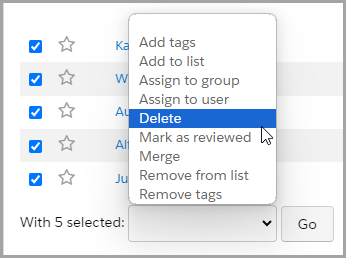
Once you have created your dynamic list(s), select the prospects to delete and use a Table Action to send these prospects off to the Recycle Bin.
  1. Delete old, unengaged prospects

Another quick win option at quickly reducing your mailable database size: delete the mailable prospects who aren’t engaging with your emails and marketing materials, and instead keep your focus on the prospects who are interested in what you are sharing with them.

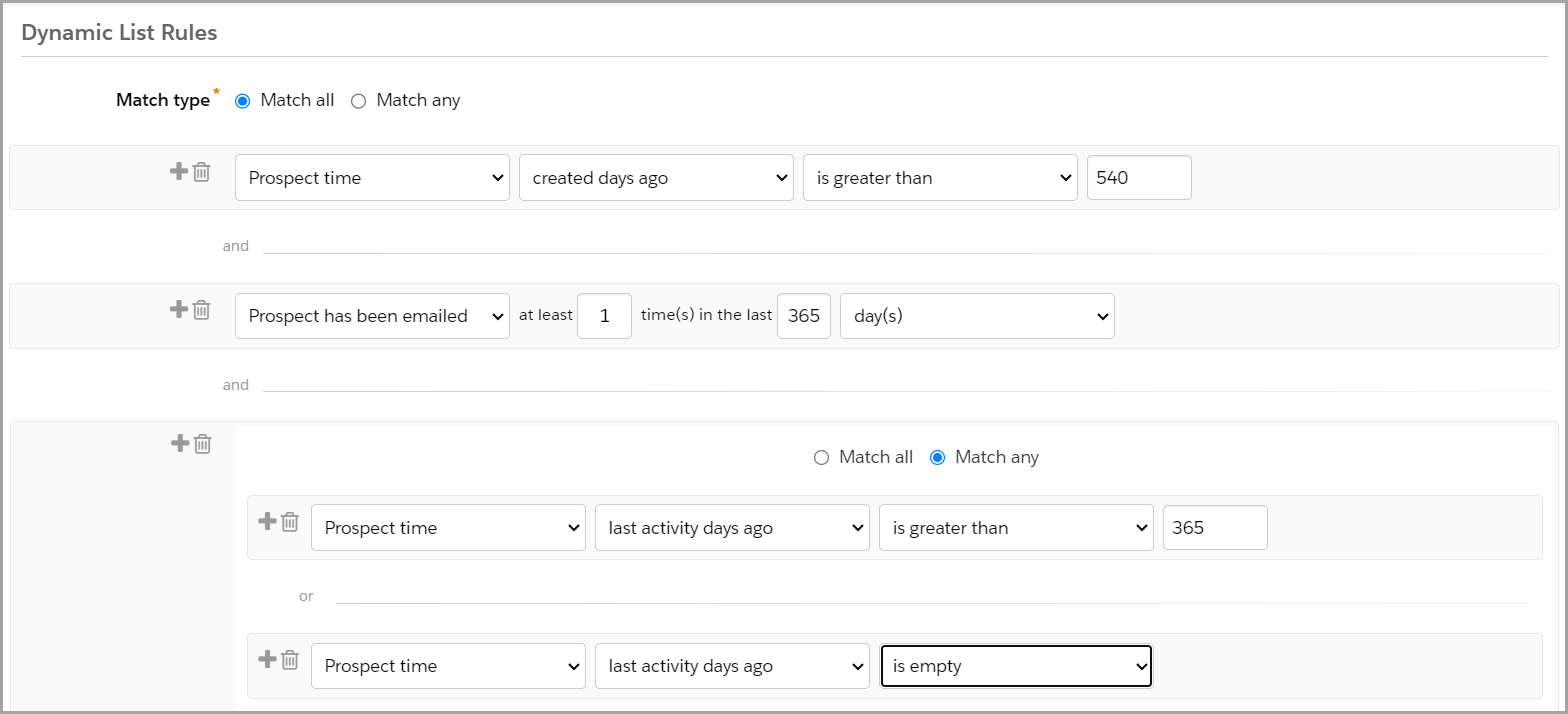
  • Create a dynamic list that looks at prospects who were created 18 months ago and haven’t engaged in the last 12 months.
  • Tweak this according to your unique business model — how you want to measure age of prospect and how you want to define engagement.
  • Run the list, select the prospects to delete, use a Table Action to delete the prospects.
  • Now, those Prospects live in the Recycle Bin — they do not count against your mailable database. However, Account Engagement will resurrect them out of the Recycle Bin, along with their historical activity information (before deletion), if they fill out a form again in the future.
  • FYI – When you delete a prospect from Account Engagement, it does not delete their Salesforce lead or contact records. 

Dynamic List Criteria Example

This type of list criteria could look something like this:
  1. Filter out your competitors

If you are prioritizing your marketing spend on prospects who are most likely to purchase at some point in the future, competitors might not be on that list. 

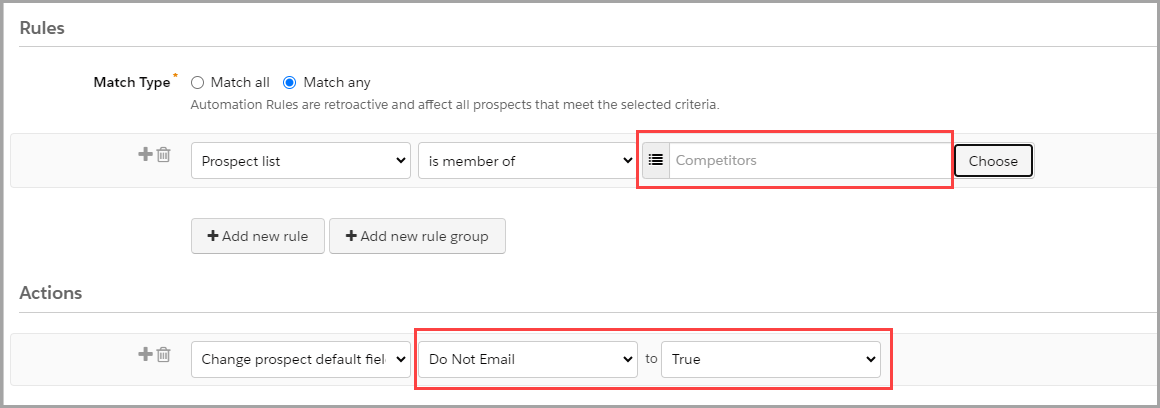
Create a dynamic list and then utilize an automation rule to mark these prospects as ‘Do Not Email.’

  • Step 1 – Write a list of all of your competitors email sending domains (or what follows the @ in their email address). 
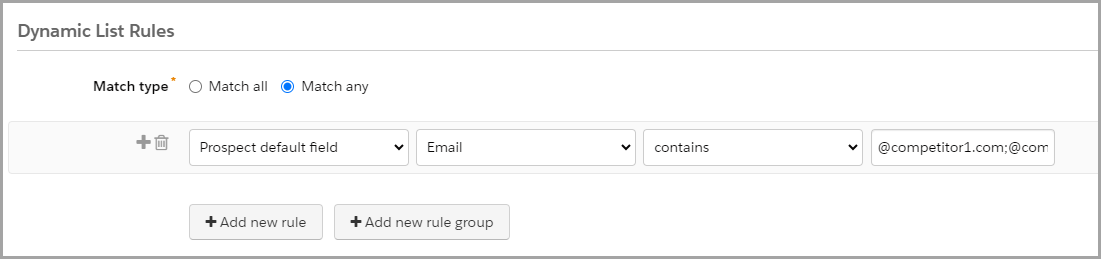
  • Step 2 – Create a dynamic list that looks at the Prospect Default Field Email Contains, and then insert your list of competitor email domains separated by a semi-colon (;). This allows you to use one line of criteria instead of each email domain requiring separate criteria entries.
    • Example: @competitor1.com;@competitor2.com;@competitor3.com
    • Note: If your list is long and you run up against character limits, utilize this sweet tool called Creuz Your Data to split your list of values into appropriate data chunk sizes with semi-colons already in place.
      • And then I recommend to bookmark that tool – you’ll thank me later 🙂
  • Step 3 – Create a repeatable automation rule to check if a prospect is a member of your Competitor List to update the prospect’s field ‘Do Not Email’ to True.
    • By setting the rule as repeatable you ensure that if the ‘Do Not Email’ field is ever cleared, it will re-update to True.
Long-Term Success: Maintain a tidy mailable database

Okay, so now you have taken quick actions to weed out clutter from your mailable database and are within your utilization limits again. Phew! Now let’s consider how we maintain this clean and tidy house. 

Use the confirmed opt-in approach

Start on the right foot when your prospects opt-in to marketing emails. Let them know what they can expect to receive from you by signing up for your mailing list and have them confirm their email address and subscription preferences from the start. This helps eliminate invalid email addresses and uninterested prospects before they fill up your mailable database. 

Want to know more about confirmed opt-in? Check out this blog post.

Set up a regular timeblock to check your lists so you can delete junk and unengaged prospects

Remember that the lists you created to weed out “junk” prospects and older, unengaged prospects are just lists. You still need to go in to delete prospects and send them to the Recycle Bin. Depending on the size of your lists, you may want to monitor this weekly, monthly, or quarterly. Create a repeating calendar event, and you’ll never have to remember not to forget about it. Easy peasy.

Create an Engagement Studio program to re-engage prospects before they make it to the unengaged list

How do you get prospects to engage with your marketing materials? Email them! 

Give prospects a chance to re-engage before they make it onto the unengaged prospect list. Create an Engagement Studio program that encourages your prospects to engage with compelling content and calls to action. Warm them up by reminding them of how great your product or service is.

Run a Permission Pass

A Permission Pass is an opportunity to reach out to your unengaged prospects and ask if they still want to give you permission to keep emailing them. Simply put, ask them if they still want to hear from you. This can be done at any time, or even better, at the end of a re-engagement program after you have tried to reconnect with them. If they do not respond to the email within the given timeframe communicated in the email, it’s time to let them go and send them to your Recycle Bin. 

It can be scary letting “real prospects” go, but remember — in the long run it is better for your bottom line and for your reputation. Spend marketing dollars and invest time and effort in prospects who are interested in your product. Also, you are less likely to have spam complaints from prospects who are just annoyed with what they perceive to be junk in their inbox.

Plan for growth

I love this part. If you are still pretty close to your mailable database limit after all these tips and tricks, start budgeting conversations now with leadership. 

Show them numbers before and after tidying up the mailable database. That way, they’ll understand the need to start planning to market to more mailable prospects and budgeting in the next 10K or 20K prospects. 

Even better, back up your numbers with reporting data on how your marketing efforts are producing great leads and increased revenue!

Bring in the experts to reach radical impact

Have you checked your Pardot mailable database usage and limits? Have you tried the suggested quick wins, but still need more help? Or do all of these tips and tricks sound good, but you need some help with the execution? Sercante is here for you! We have a great team of experts who can help audit your system and provide you with personalized recommendations.

Or… This might have just started with a need to reduce your mailable database to stay within limits, but now you’re excited about the opportunity of setting a laser focus on your mailable prospects and how you can serve them in greater ways!

Let us help you. ♥️

We have the best of the best when it comes to planning amazing nurture programs to re-engage unengaged prospects. We also have the best of the best when it comes to using analytics to support your marketing campaign ROI. 

Reach out to Sercante as you plan for growth by radically impacting your business with your mailable prospects today!


Your boss has told you to ‘do ABM.’ Great. Instead of ripping out your current marketing and sales campaigns, here are three quick ways to apply ABM strategies to your email campaigns.

What is account-based marketing (ABM)?

Let’s go over what ABM is and what it isn’t at a high level first.

ABM stands for Account-Based Marketing, which is a “B2B marketing strategy for high-value customer accounts. In ABM, you focus on each account as a “market of one,” offering highly personalized 1-to-1 experiences and tailored content.

Through a focus on building stronger relationships with high-value accounts, ABM can help B2B marketers who need to increase pipeline quality, retain top accounts for longer, and boost the revenue those accounts bring in.” — Source: Salesforce

You might also hear something called ABX or Account-Based Experience. This is a “go-to-market strategy that uses data and insights to orchestrate relevant, trusted marketing and sales actions throughout the B2B customer journey. It’s a customer-centric rethinking of an account-based go-to-market — one that combines the engageability of inbound marketing with the precision and targeting of account-based marketing.” Definition from Demandbase

So as you can see, we can’t just start doing ABM and see results the next week. ABM is not a little change to increase MQLs (marketing qualified leads) or newsletter subscriptions. 

To fully embrace this new go-to-market strategy and campaign structure across our marketing, sales, and service teams requires a lot of planning, work, and time to see impactful and positive results. 

Some ABM/ABX Best Practice Reminders

Before we get into it, here are some ABM best practice recommendations to guide you through the integration of ABM strategy with your email marketing campaigns.

ABM Reminder 1. You don’t have to do it all at once!

  •  Consider a phased approach to ABM/ABX by focusing on low-hanging fruit.

ABM Reminder 2. Even a little personalization is better than none.

  • The more targeted and personalized you can make your ABM program, the better. But remember our first point that it is ok to start slow and small.

ABM Reminder 3. Think of making your targeted ABM audience’s content consumption similar to how Netflix does — ungated and unlimited.

  • If you still need forms for conversions, you can reduce the form fields on your landing pages by referencing known data in your CRM (customer relationship management) or sourcing it through a data-enrichment platform like Zoominfo.

Ready? Let’s jump in and focus on how to apply ABM strategies to your email campaigns and newsletters.

ABM Quick Win 1: Segment Your Email Audience

Segmenting the audience ahead of time helps you understand the level of effort ahead of you for more one-to-many ABM-focused journeys.

Check marketing opt-in status

Make sure they are opted in! We can’t properly enroll an audience in any type of marketing campaign or nurture program if they have not agreed.

Need a refresher? Read Forms Are Great, But Confirmed Opt-In Is Better for more on what’s involved with marketing opt-in.

Know your marketing personas

Review the job titles or persons of your target ABM buyer groups, and see what content and CTAs (calls to action) resonate most with them. Bonus: look at click-through rates for past email campaigns to identify click trends from buyer personas in your target ABM buyer groups. 

We don’t need to write anything from scratch — let’s repurpose what we have that has worked for other audiences. 

Find the right segmentation groups

Consider geographical audience segmentations to optimize engagement. Then, run A/B tests of your send times and days to find the best fit for each target group. You can also test out AI functionality like Pardot Einstein Send Time Optimization to see if that improves your engagement metrics.

ABM Quick Win 2: Add Some Personalization

When it comes to introducing personalization, remember to start small to understand the impacts (or lack of) on our audience engagement.

Email subject lines & preview text

  • Make email subject lines & preview text personal with variable fields like name, title or role, industry, and product. 
  • Use what makes sense for your company and the value prop for your ABM targeted audience – don’t overdo it and make it weird. 
  • Remember to make your subject line actionable and timely!
  • Here are some best practices and a cool way to use AI to make your subject line stronger – Playing with the AI-Powered Stensul Email Subject Line Tool.

Email sender name

  • Try to be consistent and personable so your audience starts to recognize your emails.
  • For example, try ‘Kelly at Sercante’ ([email protected]) instead of ‘Marketing’ ([email protected]).

Email body copy headers & CTAs

  • Test content and keywords to see what works best for your audience. Refer to your audience segmentation from the first step to stay on-message.

Landing page headlines & body sections

  • Make it personal with variable fields like name, title or role, industry, and product. 
  • Use what makes sense for your company and the value prop for your ABM targeted audience – don’t make it creepy.

Landing page body & CTAs

ABM Quick Win 3: Reporting, Reporting, Reporting

If you can’t report now, starting an ABM approach won’t help you. You need to visualize your current campaign efforts before you can prove that your phased approach to ABM/ABX is impacting your audience.

Get your CRM ready by organizing account segments

In your CRM, organize your targeted accounts for ABM and the buyer groups you defined in step one.

  • This can be a custom dropdown field or checkbox only marketing manages to indicate their enrollment or ABM tier.
  • Make sure your chosen organization method syncs down to the related leads and contacts from your target ABM account and across to your MAP (marketing automation platform).

Get your website tracking in order

Ensure all website properties and domains are being tracked consistently. Then, make sure you are using specific UTMs or click tracking for each channel and campaign. Wherever your audience is going, we want to follow.

Not sure how to get started? Check out our blog on Capturing UTM Parameters: 4 Scripting Paths for Account Engagement Landing Pages.

Get your reports set up before launching

Set up your reports prior to an ABM pilot campaign launch or before you start testing these ABM strategies on your email campaigns. This helps measure the marketing and sales baseline for your general audience so you can compare it to your targeted ABM audience.

Check these reports frequently and continually optimize your channels, messaging, and targeting.

Start small with ABM and learn along the way

These quick wins are a great way to dip your toes into ABM without going all in right away. Starting small lets you experiment and see what clicks with your audience. You’ll pick up insights along the way so you know the best places to focus your efforts and resources. As you learn, you’ll be ready to scale up your ABM game for stronger connections and better results. 

So, take these small steps, learn from them, and soon you’ll have an ABM strategy that translates into big wins with your top accounts.

The Salesforce Summer ‘24 Release is on its way! Let’s dive into the top declarative features and updates for admins.

In line with messaging from Salesforce, the Summer ‘24 Release includes new and enhanced features that all center on the relationships between CRM, data, AI, and trust.

Salesforce Summer ’24 Highlights

Security & Access

Get a Summary of a User’s Permissions and Access

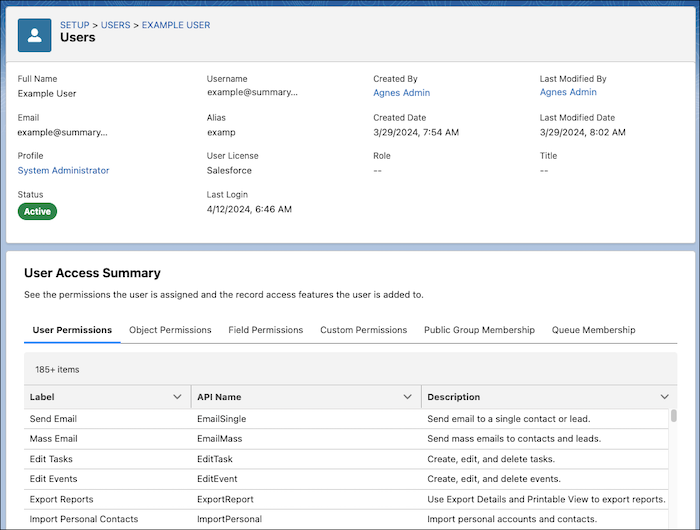
Viewing what access a user has will be easier with the User Access Summary. Accessible directly from the user details record, you can see what a user has access to without having to spend multiple clicks checking each profile, permission set, public group, or queue.

Other great Security & Access Updates:

Customization

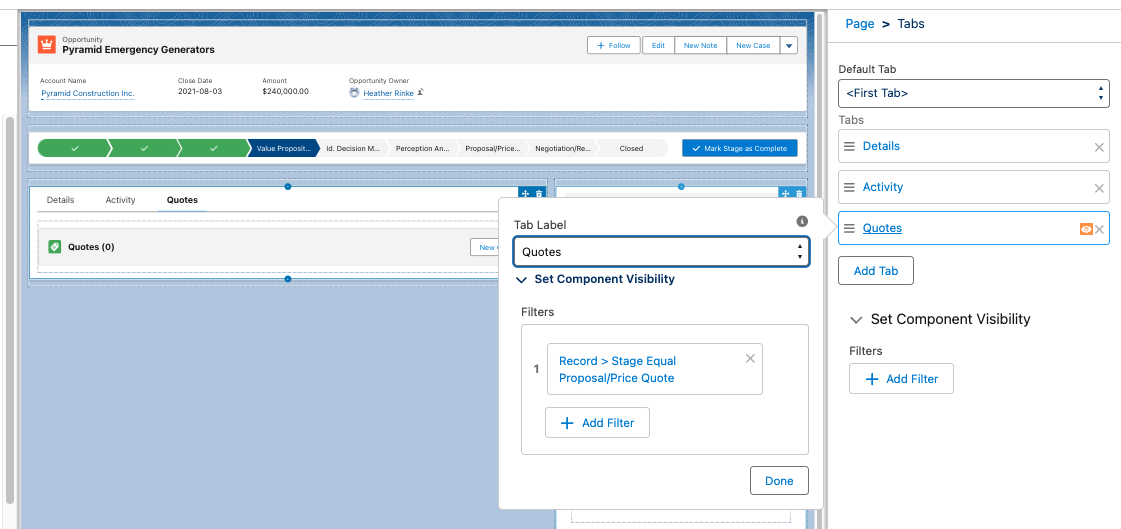
Set Conditional Visibility for Individual Tabs in Lightning App Builder

Now you can control visibility to tabs and their contents in the Lightning App Builder, based on specific criteria, giving you another tool to customize the user experience, and what users can see and when. 

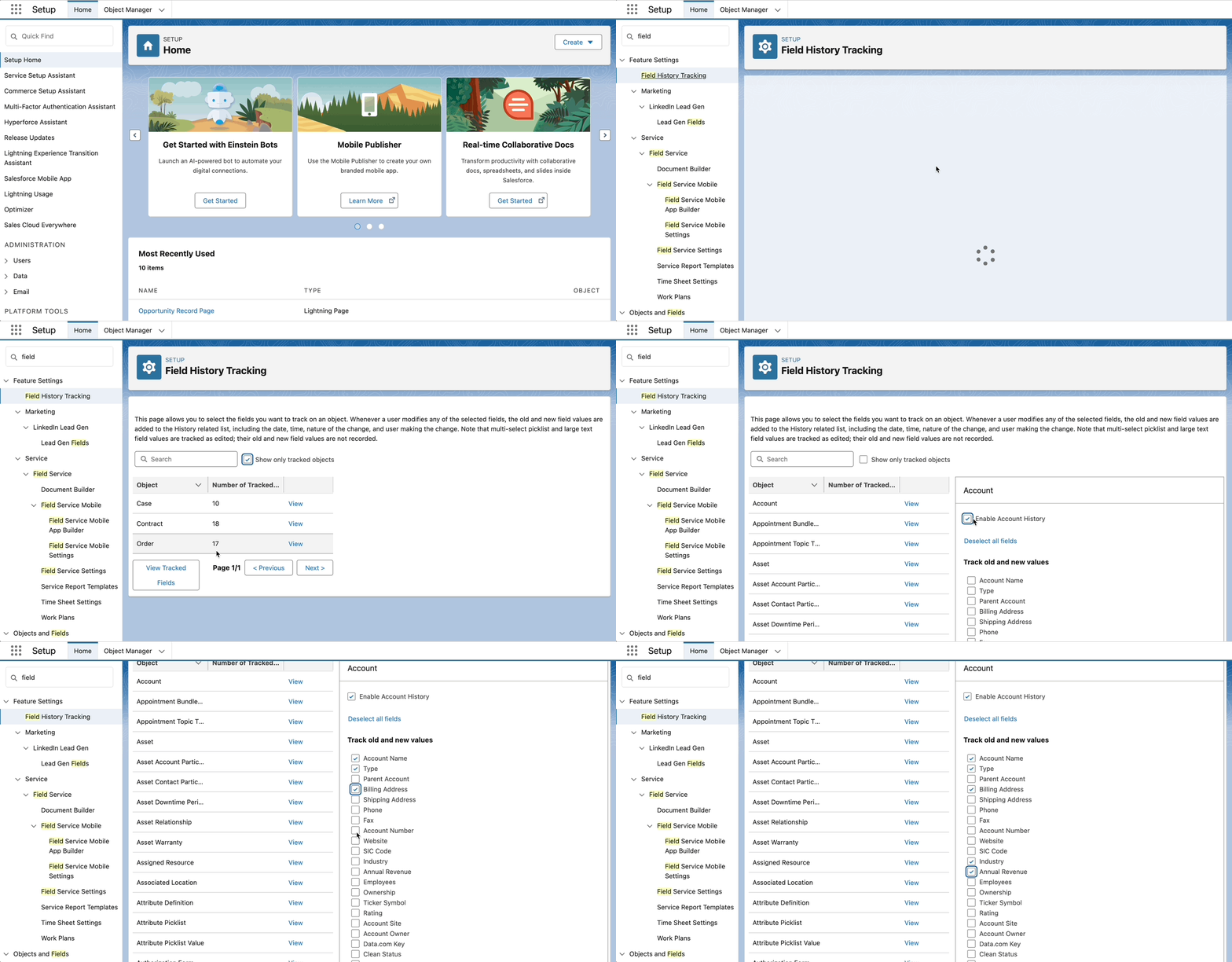
View Field History Tracking from Setup

Admins can now view and control field history tracking across objects in on place, from the Setup menu. From here you can view and control the objects that have tracking en tracked, and enable, view and update the fields. 

Other Customization updates worth mentioning:

Sales Productivity

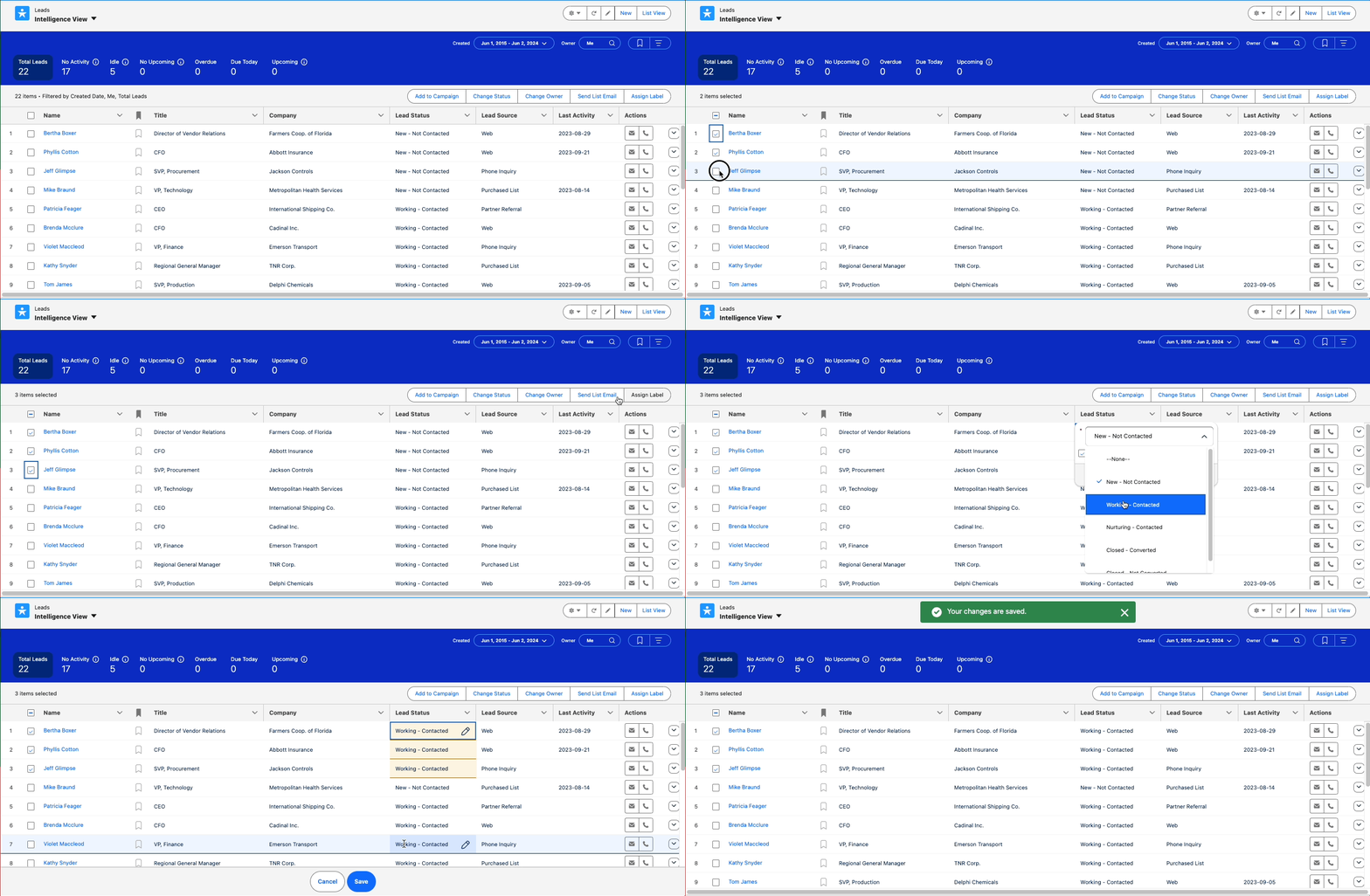
Do More in the Intelligence Views

More functionality is coming to Account, Contact, Lead and Pipeline Intelligence views to help users do more in one place. Now it’s possible to perform mass actions like Add to Campaign or Send Email, and inline editing of the same field, from these Intelligence views.

Organize and Find Records Easily with Personal Labels

Users can apply their own private labels to records to help them organize, track, and find the records they need quickly and easily. Labels work on several objects including:

  • Account
  • Campaign
  • Contact
  • Case
  • Email Template
  • Lead
  • Opportunity
  • Task
  • …and more

The once added to the page layout, a Labels related list will appear on the record page, allowing users to add their labels. Then the Labels tab provide a view to all of the records that have that Label applied.

Note: Users will need access to the Labels object. This is enabled by default in standard profiles but will need to be granted in custom profiles or permission sets.

Flows

Flow Management 

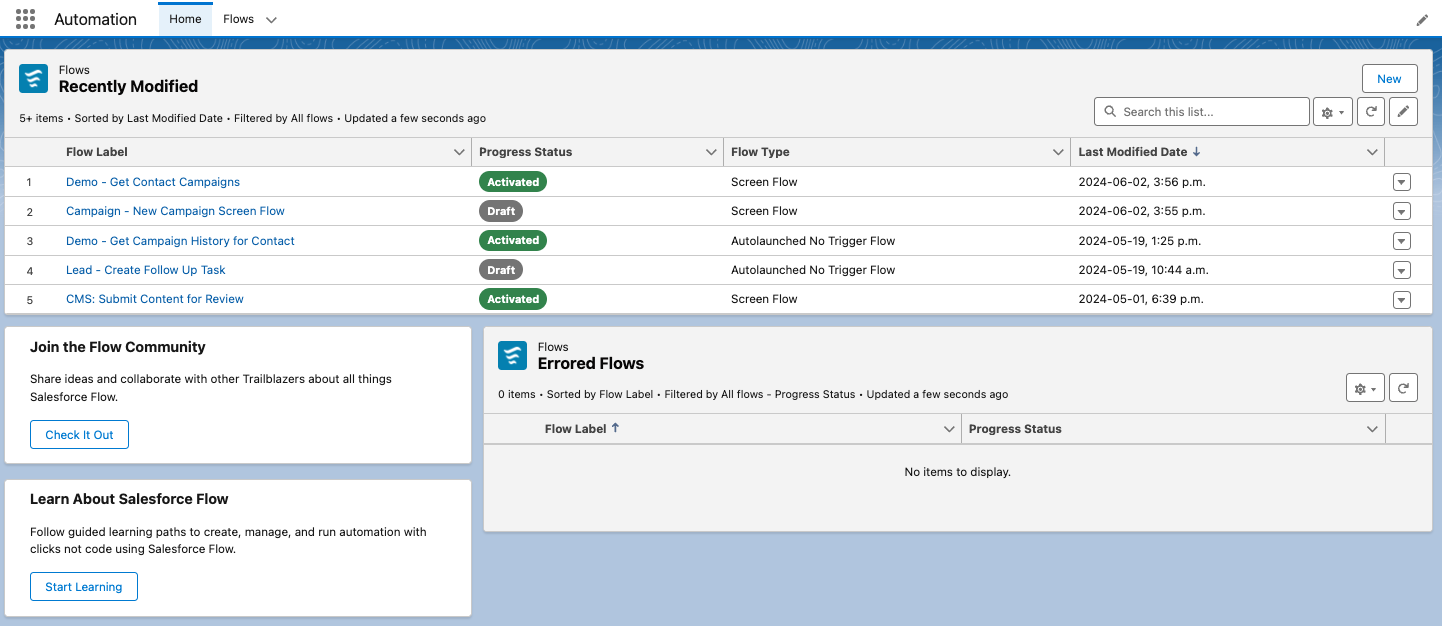
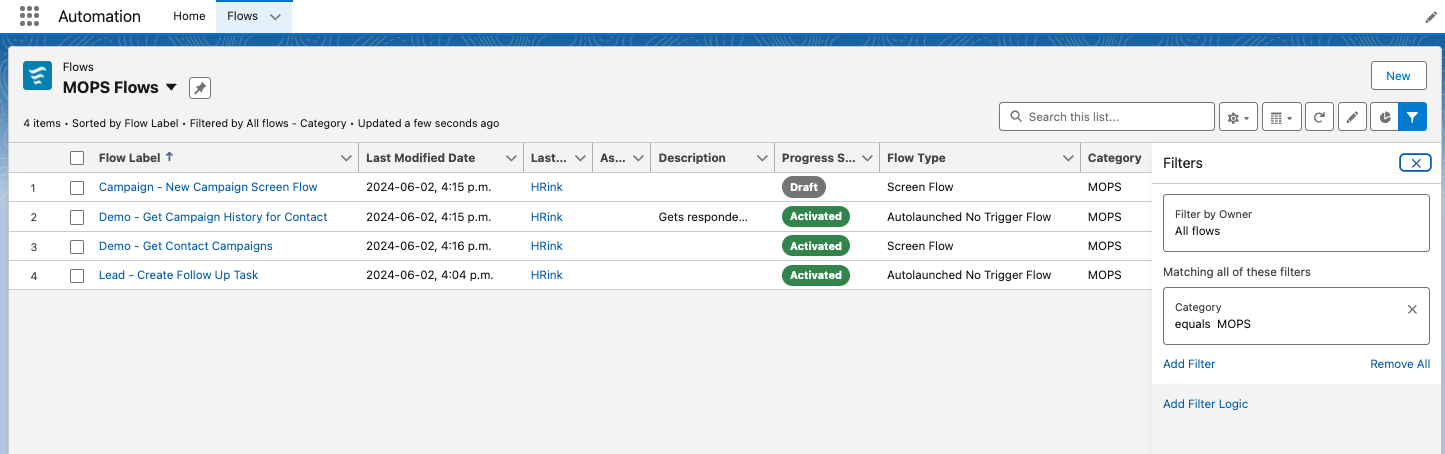
Automation Lightning App

The Automation Lighning App includes a Home page showing recently modified flows, and flow errors, as well as quick links to flow topics on Trailhead and to the Flow Community. 

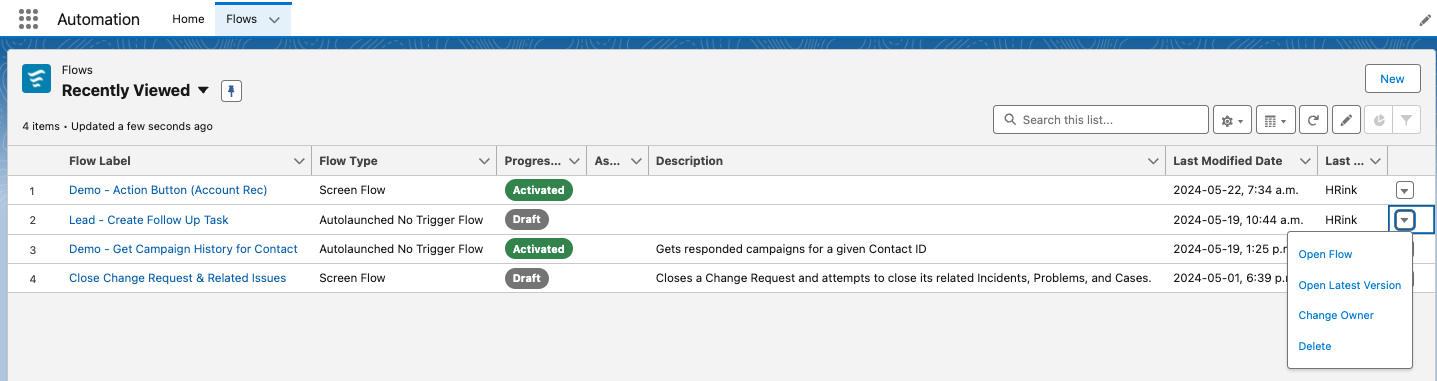
The app also includes a Flows tab where list views to access standard and custom list views of existing flows. From here you can open a flow, open the latest version, change the owner, or delete the flow.

Note you may have to enable this features from Setup > Process Automation Settings, and checking the Enable the Automation Lighting App checkbox.

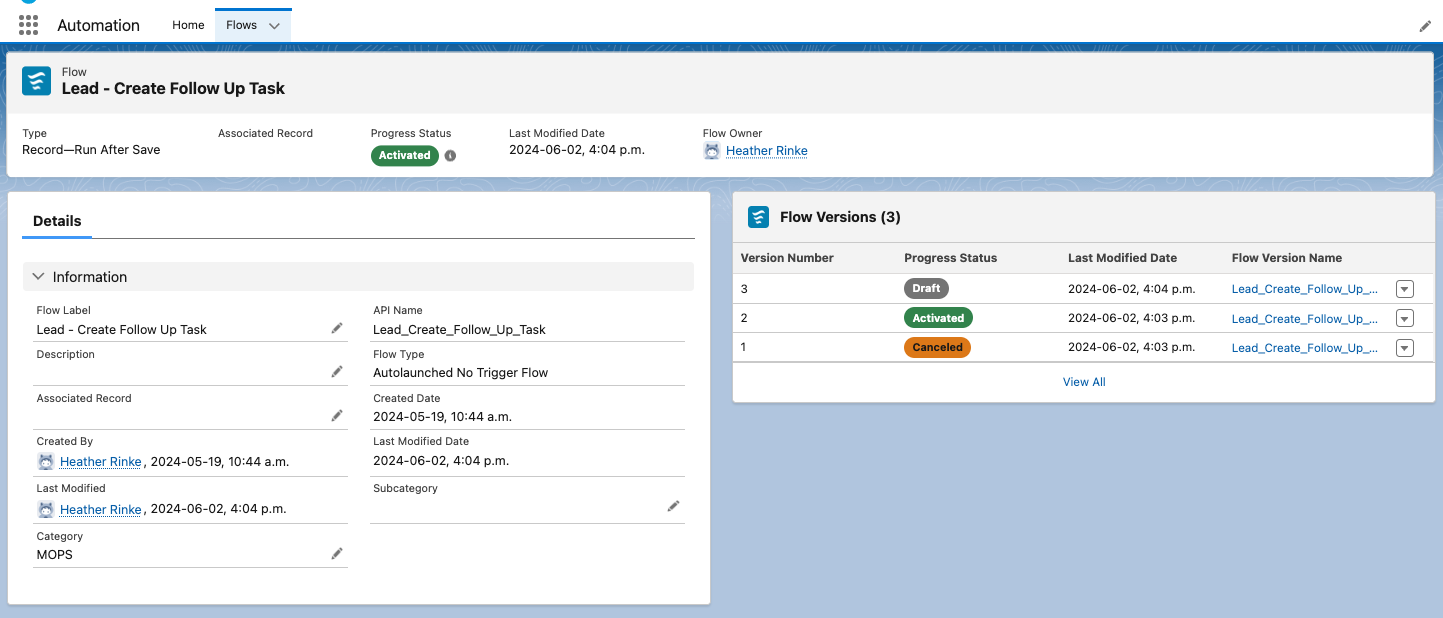
View Flow Details from a Lighting Page

When using the Automation App and list views, you’ll notice that clicking on a flow shows the details on a Lightning record page. This lets you take advantage of customizing your page layout as I’ve done in the screenshot below. 

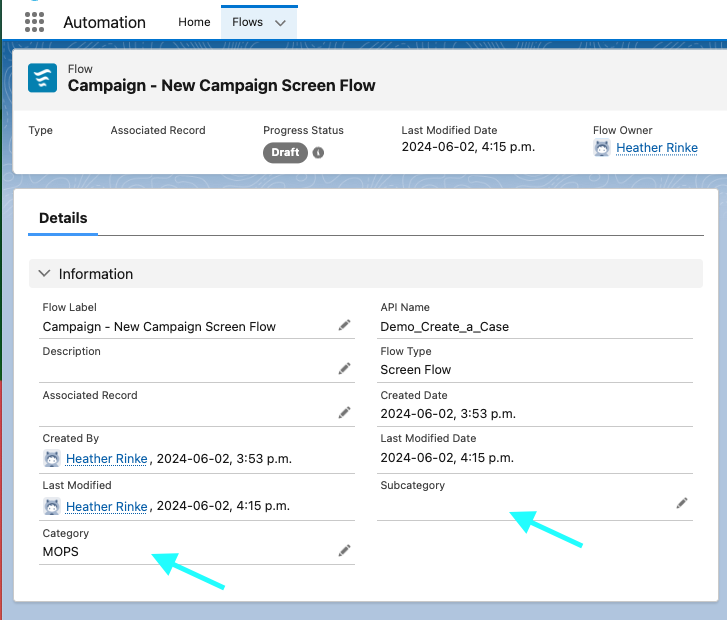
Organize Your Flows Based on Categories and Subcategories That You Define

Another new flow admin feature, new Category & Subcategory text fields are now available on the Flow object, and accessible when creating custom list views, which can be a handy tool for organizing long lists of flows. 

Control User Access to Specific Flow Elements

Use new permissions to enable users who don’t have the Manage Flows permission, to use specific flow elements when building segment-triggered and form-triggered flows. Elements supported include:  Assignment, Collection Filter, Collection Sort, Delete Records, Get Records, Loop, and Subflow. 

Keep in mind that these permissions are available for Enterprise and Unlimited Edition with Marketing Cloud Growth. 

Flow Builder

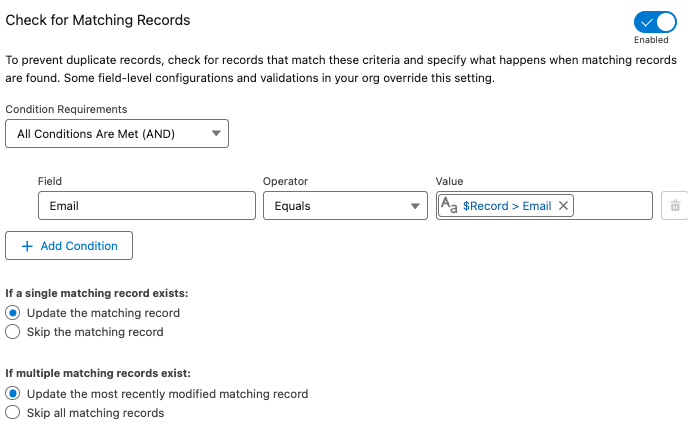
Check for Duplicates Before Creating Records in a Flow

The Create Records element in flow just got more intelligent for preventing duplicates. Now you can first check to see if another record with specific criteria exists before creating a new record.  If an existing record is found, the field values are applied to the existing record, otherwise a new record is created. 

Before you would have to use a Get element to search for an existing record and a decision to check if anything was found before creating a new record. Having this all rolled into one element makes the flow build and maintenance much simpler and more efficient.

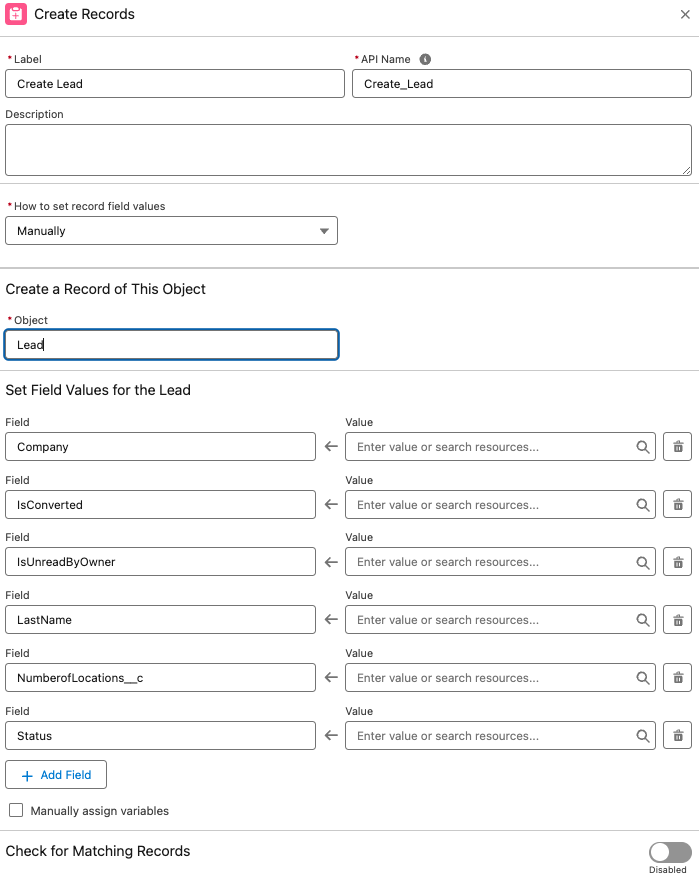
Required fields automatically added for Create elements

Another cool feature spotted in the pre-release org is that Create elements also automatically include required fields.

I didn’t see this feature mentioned in the Release Notes, but as this could be a super helpful I’m hoping it will turn up in the Release. Admins can probably relate to the headache of building a flow that creates a record, hitting error when a required fields are not included, then having to go back the flow to make sure that field is populated… maybe more than once!

A couple of notes to consider for this to be useful: 

  • Only fields that are marked required at the field level are included. Fields that are flagged as required on the page layout are not included. 
  • Also, the element may include other non-required fields. For example when creating a Lead, the IsConverted and IsReadbyOwner fields were also added to the element automatically.  This may be something only seen in the pre-release org, so it may look a bit different in the actual release.

Other cool Flow Builder Updates:

Screen flows

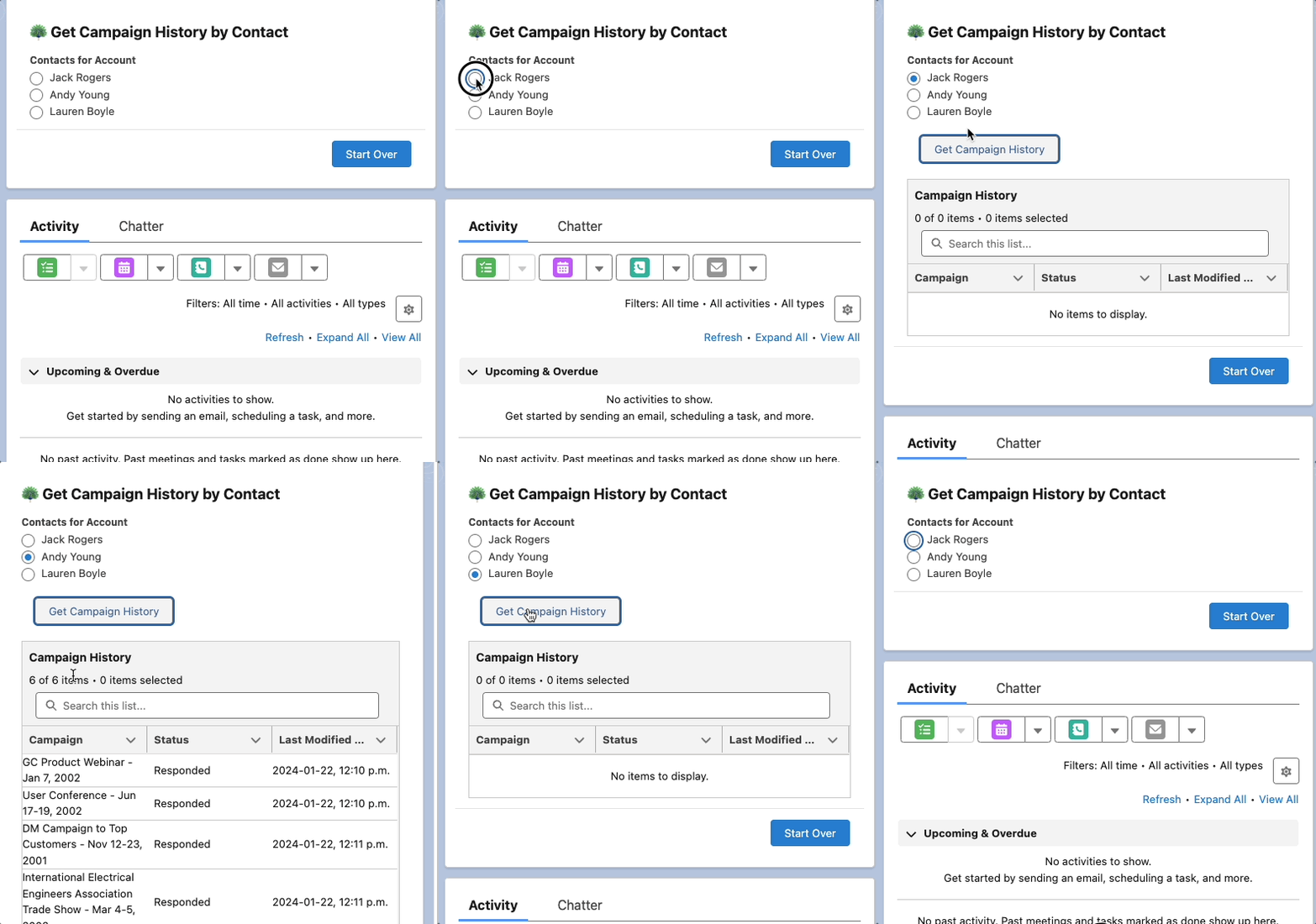
New Action Button Component (Beta)

Now you can Add an Action Button to a flow screen to run and retrieve information from an active autolaunched flow, without leaving the screen. This is a huge win for creating a better user experience. Before you’d have to use one screen to collect some information, then click next to do the necessary actions and display the output on a second screen. 

Other Updates

Other Notable Updates

A few other updates in this release that are worth noting.

Default No-Reply Email Required

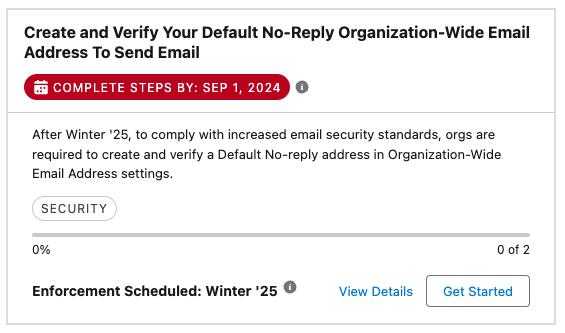
To stay in line with increased email security standards, orgs are required to create and verify a Default No-reply address in their Organization-Wide Email Address settings (replacing [email protected]). This will affect any orgs that send emails from Salesforce. Think automated emails like Lead or Case assignment, or even emails sent from a flow. This is will be enforced starting in Winter’25, meaning that some emails may not send, so its a good idea to set up a default no-reply email address sooner rather than later.

Get Ready for the Salesforce Summer ’24 Release

This is just a handful of platform features planned for the Salesforce Summer ‘24 Release. If you’re interested in diving in to learn more about the updates in this release, I highly recommend reading through the full release notes. 

You can also check out our post on the Salesforce Summer ’24 Release for Marketing Cloud Account Engagement (Pardot) here.

Which Salesforce Summer ‘24 features have you the most excited? Let us know in the comments!

Do you have an organized brain, enjoy project managing across multiple stakeholders and departments, love visualizing a process, and want to prove it with a new Salesforce certification? Well, then the Salesforce Business Analyst Certification is the right one for you!

Here is our guide to passing the Salesforce Business Analyst Certification exam. Good luck!

Step 1. Review the Salesforce Business Analyst Exam Guide & Schedule Your Test

Quick reminder that there are no longer any prerequisites for the Business Analyst exam! It is helpful to know or have experience with Salesforce and understand platform functionality and terminology though.

According to the Salesforce Business Analyst exam guide, this certification is “designed for Business Analysts with Salesforce experience. The successful candidate understands business needs, captures requirements, and collaborates with stakeholders to support the development of Salesforce solutions which drive business improvements.”

If you are interested in refreshing your Salesforce skills or earning one of the related certifications first, here are two helpful resources:

Salesforce Business Analyst Certification

Salesforce Business Analyst Exam Outline

  • Customer Discovery: 17%
  • Collaboration with Stakeholders: 23%
  • Business Process Mapping: 12%
  • Requirements: 18%
  • User Stories: 18%
  • Development Support and User Acceptance: 12%

The exam guide goes into each objective in more detail and also describes the person who is more likely to succeed with this certification (a.k.a. you!).

Schedule Your Exam

Once you have confirmed that this is the certification for you, schedule your test so we have a deadline to study for. Here is the link to make this the easiest step. 

Step 2. Organize Your Study Resources

We already established we have well-organized, to-do list, and process-visualization brains so I’ve gone ahead and done the pre-work (Googling) for you to track down our favorite resources, practice tests, and study guides. Plus we’ve included some key topics to revisit based on our experience earning the Business Analyst certification.

Trailheads & Trailmixes

Blogs

Practice Exams & Courses

This is an essential step for the Salesforce Business Analyst certification! You need to get in the head of the Salesforce test writers to best understand the use cases and user stories they are presenting because at first glance, most of the answers are going to appear correct. However, we want to choose the best process, steps, model, team structure, etc. that matches the specifics of the situation outlined.

Study Groups

Salesforce certifications are difficult. Lucky for us, there are a ton of welcoming communities that we can reach out to for support. 

One of our favorites is co-led by one of our own Sercante team members, the Boston Area Community Group with Jordyn Jaffer. This group hosts annual, virtual certification camps that are run completely by attendees. The attendees work together to present different topics each week to help each other prepare for taking the certification. Jordyn says, “ We are in our fourth year of facilitating these and are tackling the Salesforce Advanced Administrator Certification (for the second time!).” Check out their upcoming camps on their Trailblazer Community page here – Boston Women in Tech.

Topics Worthy of a Second Glance

Step 3. Ready? Pass the Salesforce Business Analyst Certification!

You might never feel ready to take the Business Analyst test – there are endless ways to think about processes and user stories and everything in between. But just like the solutions we are managing and building, there has to be an activation date. 

Test-Taking Tips from the Sercante Dragons

  • Find Keywords
    • These phrases in the questions can indicate the answer or what you can eliminate as an answer.
  • Mark Questions for Review & Read Them Carefully
    • Always refer back to the full question during or at the end of the exam when you are starting to second guess yourself, there might be something key you missed when you first read it. 
    • The correct answers for this exam are going to be very order-dependent so make sure you read them slowly.
  • Pay Attention to How Questions Answer Each Other
    • The use cases being described usually highlight a specific title or department so consider that when choosing the correct answer.
    • Think about how they phrased other questions as that might help you focus on the correct answer for a question you were unsure of.
  • Don’t Overthink Questions that Seem Easy
    • There are going to be a lot of questions that sound the same in this exam – don’t get stuck in a second-guessing loop when the answer seems too simple.
  • Using Synonyms of Words Can Help Answer a Question
    • For example, “what is the best diagram for this?” One of the correct answers is “the big picture.”
  • Have a General Understanding of the Main Salesforce Products
    • There will be questions and answers that list actual Salesforce platforms or functionality by name. For example, “your team/client/customer has this problem, which feature/product would help solve this?”

Good luck, you’ve got this!

Share any resources or problem topics in the comments section to help prepare the next group of Salesforce Business Analyst test takers.

If you’re like many, setting up an SMS program is not part of your everyday tasks. And if I were a betting woman (I’m not), I’d bet you’ve likely never done it before. If you have, then you likely need a refresh.

Moreover, if you have an existing SMS program and now find yourself in a situation where you’re switching providers, you might be even more unsure of where to even begin.

TDLR: Whether newbie or pro, there’s a lot to consider and unpack not only from a strategy perspective but the technical stuff as well. In this post, we’ll cover everything you’ll need to consider for your SMS mobile strategy — whether you’re new to SMS or rethinking your SMS program.

SMS Mobile Strategy Considerations

Many times, when organizations begin on the path of charting out their SMS communication they naturally start down the path of wanting to replicate all the communications they currently have for the email channel.

DON’T BE THAT PERSON.

Instead, consider the following. 

The purpose of your program

Why do you want to communicate with people via SMS, to begin with? Better yet, what’s the benefit to the organization, and more importantly, to your customers?

A common purpose of an SMS program is to provide direct, efficient ways to engage, which leads to improved customer satisfaction and better business outcomes. The net on this point is to ensure you’re doing it for good reason. You may be in an industry where an SMS program just doesn’t make sense, and that’s ok! 

Examples of typical SMS communications

By refining the purpose of your program, you can begin to back into what makes sense to send via SMS.

Consider your customer experience: What are the types of things that might be beneficial to receive via text? If you think about the intent of a text message in general and why we send them in our day-to-day lives, you’re usually sending a text because:

  • Your message is short, direct, and doesn’t require live dialogue.
  • It’s something timely and you’re desiring a response back quickly.
  • It’s efficient.

With that lens in mind, let’s think about the types of messages your organization sends and what fits into this criteria mentioned above.

Here are some examples of communications that make sense to send via SMS:

  1. Appointment Reminders: Remind customers or clients of upcoming appointments, reservations, or important deadlines.
  2. Order Updates: Notify customers about the status of their orders, including order confirmation, shipping updates, and delivery notifications.
  3. Account Notifications: Send account-related notifications such as payment reminders, account balance alerts, or security alerts (e.g., suspicious login attempts).
  4. Promotional Offers: Inform customers about special promotions, discounts, or exclusive deals to drive sales and increase customer engagement.
  5. Event Invitations: Send invitations or RSVP reminders for events, webinars, conferences, or workshops.
  6. Customer Support: Provide quick and efficient customer support by allowing customers to text inquiries, report issues, or request assistance.
  7. Emergency Alerts: Send timely alerts and updates during emergencies, natural disasters, or other critical situations to ensure the safety and well-being of customers or employees.
  8. Surveys and Feedback Requests: Gather feedback from customers by sending SMS surveys or requesting feedback after a transaction or interaction.
  9. Authentication Codes: Use SMS for two-factor authentication (2FA) or one-time passwords (OTPs) to verify user identities during account sign-in or transaction authorization processes.
  10. Appointment Scheduling: Allow customers to schedule appointments, consultations, or service bookings via SMS, with automated confirmation messages.
  11. Membership Renewals: Remind members or subscribers about upcoming membership renewals, subscription expirations, or important membership-related updates.
  12. Event Reminders: Send reminders about important dates, deadlines, or milestones related to events, campaigns, or initiatives.
  13. Internal Communications: Communicate important updates, announcements, or reminders to employees, contractors, or stakeholders within the organization.
  14. Educational Messages: Deliver educational content, tips, or tutorials related to products, services, or industry trends to inform and engage customers.
  15. Feedback and Reviews: Prompt customers to leave reviews, ratings, or testimonials after a purchase or interaction with the organization.

More times than not, these communications fall into the transactional bucket. But as you saw above, they don’t have to. When deciding which communications to send via SMS, it’s essential to consider the relevance, timing, and audience preferences to ensure that messages are well-received and contribute to a positive customer experience.

Real-world SMS example: Player communication for a bocce ball league

Incorporating SMS into a communication strategy doesn’t have to be all or nothing either. There are instances when sending both an email and text makes sense.

Here’s a real-life example: I play in a bocce ball league (yes, those exist), and if the courts are too wet because of rain, they’ll cancel. The challenge is since there are no makeups, they really try to avoid canceling. It really comes down to the wire for making the decision to cancel. The league used to send an email as soon as they decided, but chances are you didn’t see it until you were already there.

To improve this customer experience, they developed not only a rain hotline (via webpage), which shows the last time it was updated (e.g., “10 mins ago” with status updates like “we will make a decision by x time”). The league will now also send a text message via SMS letting you know the status of your game as soon as it’s canceled.

They also must have gotten tired of fielding emails and phone calls (who knew us bocce ballers were such a passionate group) that they now remind everyone via text message that the rain hotline exists, and they send a link that you can access via mobile as well.

End Destination

Once you’ve established ‘the why’ of your SMS messaging and what you’re sending, don’t forget about the end destination. This is where the true professionals shine. 

Ensure your end destination is mobile-optimized. For example, there’s nothing worse than sending an SMS to provide feedback via survey, and it takes you to a non-mobile-optimized web page. Not only have you wasted money, effort, and time setting up this message, but you are creating a customer experience of friction (which is likely the opposite of what you’re trying to achieve). To add more fuel to the fire, this extra stinks — especially when it comes to getting feedback, which is already hard to receive. The oversight means you’ve just blown your chance. WOMP WOMP.

Real-world SMS example: Frequent flyer

So, let’s talk about a positive SMS example. If you’re like me and fly a decent amount, you’ve got your flight app (Delta in my case) up and running the day of your flight. It works great (most of the time… I could do another blog post on that… but another day), and if you remember to open the app and look at it on occasion, you’ll see that a gate might have changed or the time of flight has been updated.

However, I’m not always able to check the app when I’m on the move. So, Delta is sending SMS notifications as soon as these changes occur. This is especially helpful — I can see these notifications pop up on my phone without having to open the app to learn more. I also see them on my watch (when the battery isn’t dead). And if I want to see more from the text, I can click the link and it delivers me to the app, which makes the end destination all that more valuable.

I’ve seen some brands come close to excellence where they will drop you off to a mobile-optimized page. However, the real pros consider app downloads too.

As new tech and consumers evolve, so should a marketer’s strategy. SMS programs are tablestakes these days, so getting your strategy right is a must for most consumers.  

Technical Considerations for SMS Messaging 

How SMS marketing works

With a solid grasp of what a mobile strategy should entail, we can pivot to the technical piece. Let’s start with how SMS works for marketers as a whole, taking Salesforce as our platform of choice in this example. 

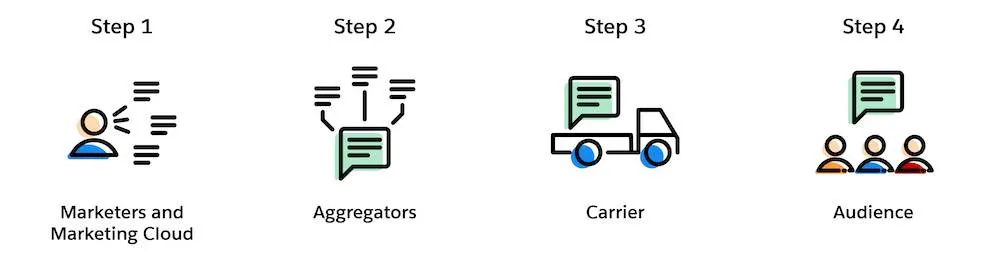
For Salesforce users, there are 4 steps to send an SMS message: 

  1. Marketing creates a personalized text message in Marketing Cloud Mobile Studio
  2. Aggregator preps message for delivery to the appropriate carrier
    (Aggregator = Salesforce partners that connect our messaging platform with carrier networks around the world) (Carrier = mobile providers across the globe)
  3. Carrier receives messages and delivers them to the final audience
  4. The customer receives a personalized text message

Preparing for SMS Sending

But for those simple steps to happen, there’s a bit of preparation involved, especially if this is your first time.

Here are the steps to prepare for SMS sending: 

  1. Determine your code needs – Short vs long code, dedicated or private. Learn more about these options here.
  2. Select an SMS platform provider and negotiate a contract – Many times as part of your contract they will acquire the code for you, but provisioning is extra.
  3. Provision your short code (this can be done with a consulting partner like Sercante or directly with the provider, which is typically more costly than going with a partner). 
  4. Once the shortcode is made available within the platform, you’ll need to set up your required keywords, and messages as well as obtain consent. (Keep on reading to learn about opt-in best practices). 

To migrate or not migrate your SMS program

If you’ve had the luxury of setting up your organization’s SMS program once and are now looking to switch providers, you might be scratching your head and thinking about what’s better: migrating our existing one or spinning up a new one?

In true consultant fashion, the answer is: IT DEPENDS 🙂.

Like with many options in life, it all goes back to what’s important — in this case — time, money, and customer experience.

Let’s look at the pros and cons of both scenarios:

ScenarioProsCons
Migrate ExistingRisk of losing people is lowThere could be up to 8-12 weeks of downtime as you move your code across platform providers, aggregators, and the like. It can get complicated — especially from a lease/ownership perspective
Acquire NewThe implementation process is relatively straightforward, sometimes quicker than the migration route. There’s no downtime in the ability to send SMSEducation of new code may be required for existing subscribers. There’s a risk of retention losses.

SMS migration route — let’s stay friends

If keeping your existing code outweighs the downtime you’ll encounter, there will be a decent amount of coordination between both old and new providers.

Below are some high-level steps of what’s involved when migrating SMS programs:

  1. Contact existing provider – Let them know your intention to retain the existing shortcode and inquire about the process for releasing the shortcode to use with the new provider, as well as any associated fees or requirements. Please note: not every provider will release their shortcode.
  2. Verify Contractual Obligations – Review your contract or agreement with the current to understand any terms or obligations related to the shortcode. Ensure that you comply with any contractual requirements before proceeding with the migration. 
  3. Coordinate with the new provider –  Let them know you desire to transfer your existing shortcode to their platform. Provide any necessary information or documentation requested by the new provider to facilitate the transfer process.
  4. Coordinate Timing– Coordinate the timing of the shortcode transfer between old and new to minimize disruption to your messaging campaigns. As mentioned in the cons, there’s normally a downtime where your code will not be operational. Ensure that there’s a smooth transition between the two providers.
  5. Update Opt-in Process – If necessary, update your opt-in/opt-out process to ensure compliance with regulatory requirements when using the shortcode via the new provider. Obtain opt-in consent from subscribers to receive messages on the new platform.

Once this is all squared away and your shortcode is available in the new platform, you can proceed to set up your ‘from’ keywords and ‘to’ message.  While migration of an existing code has its perks, the timeline is typically elongated compared to its counterpart. 

New SMS code route — Team ‘New Friends’ 

So if downtime, or getting up and running is more your concern, a new code may be the best (friend) route. 

All joking aside, when acquiring a new shortcode it’s essential to ensure compliance with regulations like the Telephone Consumer Protection Act (TCPA) and General Data Protection Regulation (GDPR) if applicable. And with that responsibility of re-opting everyone in here are some general best practices. 

New SMS code best practices

  1. Inform: Send out a clear and transparent communication informing subscribers about the change in shortcode and the reason behind it. Explain any benefits they might gain from the transition.
  2. Highlight Benefits: Emphasize any advantages or improvements associated with the new shortcode, such as better service, more relevant content, or enhanced security measures.
  3. Request Opt-In: Clearly ask subscribers to re-opt-in to continue receiving messages by sending a specific keyword or opting in through a designated method (e.g., texting a certain number, clicking a link, filling out a form).
  4. Provide Instructions: Offer simple and straightforward instructions on how to opt in. This could include step-by-step guidelines via text, email, or on your website.
  5. Assure Privacy and Security: Reassure subscribers that their privacy and security are a priority and that their information will be handled in accordance with relevant regulations.
  6. Offer Incentives (Optional): Consider offering incentives or rewards for those who re-opt-in, such as discounts, exclusive content, or entry into a giveaway.
  7. Set Deadline (if applicable): If there’s a deadline for re-opting in to ensure uninterrupted service, clearly communicate this to subscribers to create a sense of urgency.
  8. Follow-Up: Send reminders to those who haven’t opted in yet, closer to the deadline if applicable, to ensure they don’t miss out on staying connected.
  9. Respect Opt-Outs: Honor any opt-outs or preferences expressed by subscribers who choose not to re-opt-in and ensure they’re removed from the communication list associated with the old shortcode.
  10. Track and Monitor: Monitor the opt-in process closely and track the success rate. Analyze any feedback received to improve future communication strategies.

Remember to maintain transparency throughout the process and make it as easy as possible for subscribers to re-opt-in to the new shortcode.

Evolving with your customers

In conclusion, as technology and consumer behaviors evolve, marketers must adapt their mobile program strategies to remain effective. SMS marketing, as a powerful tool, provides a direct and personal way to reach customers. By incorporating SMS into your overall communication strategy, you can enhance customer engagement, drive traffic to your website or app, and ultimately achieve your marketing goals.

A successful SMS marketing program requires careful planning, compliance with regulations, and a focus on delivering valuable and relevant content to your subscribers. By following best practices and continually optimizing your campaigns, you can leverage SMS to create a strong connection with your audience and drive business growth.

In the age of big data, effective audience segmentation strategies are the key to unlocking the full potential of vast datasets available to enterprise-level companies. Join me on a journey from data overload to impactful insights as we explore how enterprise segmentation strategy drives meaningful results. 

From demographic segmentation to behavioral analysis, we’ll delve into the various segmentation approaches that empower enterprise companies like yours to understand their audiences on a deeper level.

Segmentation strategies for enterprise marketers

Businesses today face a monumental challenge: how do they effectively harness and analyze the customer information that’s at their disposal? 

One powerful solution is audience segmentation. By dividing large datasets into smaller, more manageable subsets based on common characteristics or behaviors, segmentation enables enterprises to unlock the hidden value within their data and make informed decisions that significantly impact their bottom line.

 In this blog, we’ll examine the fundamental principles of segmentation, discuss its various applications, and provide practical insights into implementing segmentation strategies that deliver measurable results for marketers at enterprise companies. 

Demystifying Segmentation

At its core, segmentation is a strategy marketers use to divide their broad customer base into smaller groups based on shared characteristics, behaviors, or preferences. The end goal is that marketing has specifically targeted lists to tailor their efforts. With their extensive reach and scale, enterprise businesses typically have large target audiences spanning across different demographics, geographies, and industries. 

These audiences can encompass millions of consumers, making effective targeting and engagement a significant challenge. However, by having the marketing team segment its audience into smaller, more manageable groups, your business can tailor their marketing efforts, products, and services to meet customer needs.

Data Distilled

Identifying segmentation criteria determines the variables that will be used to divide target audiences into distinct segments. The choice of segmentation criteria depends on the specific goals of the business, the nature of the product or service being offered, and the available data. 

Standard segmentation criteria include geographic, behavioral, product interest, or demographic factors. Businesses can create meaningful segments that enable more targeted and effective marketing strategies by carefully selecting segmentation criteria that are relevant, actionable, and aligned with business objectives.

Geography

Geographic segmentation focuses on location or region. This is most often used when there is great variation between consumers based on their locale. 

One well-known enterprise to use this strategy is McDonald’s. In a recent article written by Two Teachers, they share that “By tailoring its products, services, and marketing messages to meet the unique preferences and needs of consumers in different regions, McDonald’s has been able to create a powerful global brand that resonates with people from all walks of life.” 

McDonald’s successfully uses geographic segmentation daily by tailoring their advertising and their menu items, to fit the local preferences. For example, here in the United States, we may seek the Big Mac, whereas in Japan, their HiruMac Teriyaki McBurger. Yum!

Behavioral

Behavioral segmentation includes purchase history, loyalty, and social engagement. This strategy focuses on consumer preferences and patterns, and Netflix is one of many enterprises using this method daily. 

According to Scientific American, “users discover around 80 percent of shows through algorithmic recommendations.” For Netflix, this is highly dependent on users sharing their ratings along with watching preferences and saves. With AI at our disposal, behavioral targeting is becoming even more popular and easier.

Psychological

Pscychographic segmentation prioritizes attitudes, values, lifestyles, and interests. This method targets a customer’s motivations and preferences. This is a broader method, as it can be challenging to target someone based on feelings, but some brands do it successfully. 

Let’s take a look at Nike. According to PDF Agile, Nike has very specific personalities they are targeting – men who go to the gym and love sports, women who exercise or prefer sportswear, and children who are also athletes. 

According to that article, “Nike focuses on the people who enjoy engaging in sports. The company is passionate about sports, and it makes products suitable for sports lovers.” As a result, all of their campaigns are focused on that type of individual.

Demographic

Demographic segmentation assesses age, gender, income, education, job role/title, etc. This strategy allows business to tailor their marketing efforts to meet the needs of a specific demographic. This is the easiest of the segmentation strategies as it is the easiest data to collect, and it’s also inexpensive while effective. 

Let’s look into the financial sector, which offers “different tiers of products and services based on income levels,” according to Faster Capital. Affluent customers are targeted and sold premium credit cards with high fees and exclusive perks, while a college student would be offered a credit card with low fees and a rewards program. 

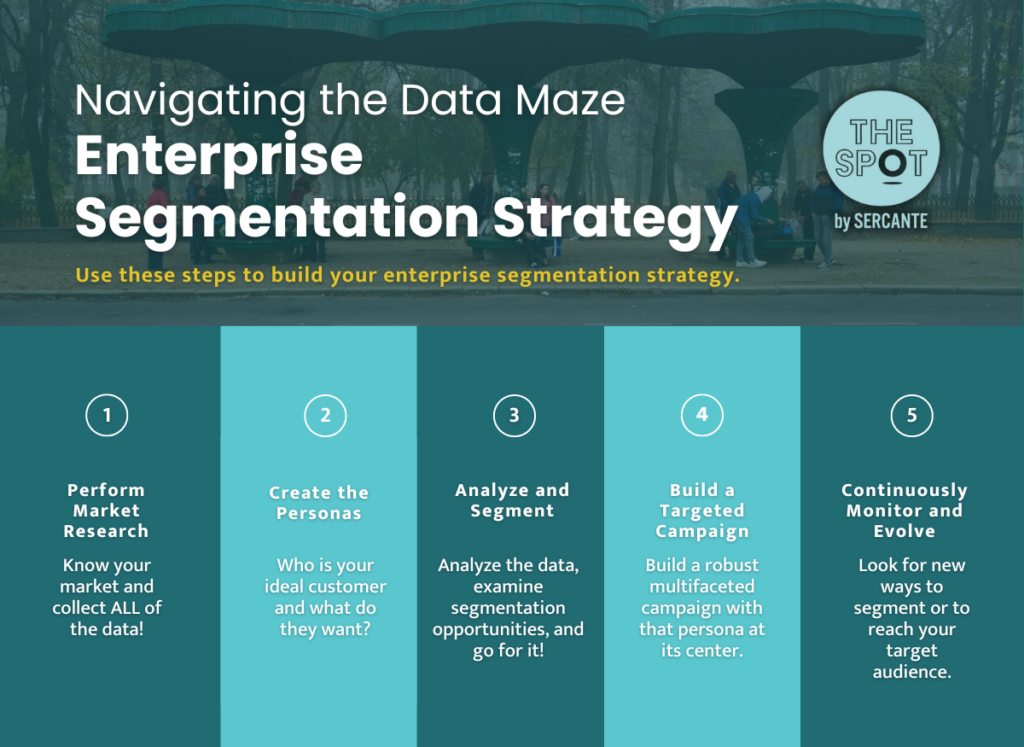
Navigating the Data Maze: Enterprise Segmentation Strategy

So, how do I get from point A to point Z? Let me walk you through it.

  1. Perform Market Research: Know your market and collect ALL of the data!
  2. Create the Personas: Who is your ideal customer and what do they want?
  3. Analyze and Segment: Analyze the data, examine segmentation opportunities, and go for it!
  4. Build a Targeted Campaign: Build a robust multifaceted campaign with that persona at its center.
  5. Continuously Monitor and Evolve: Once you’re done, keep going. Be on the lookout for new ways to segment or reach your target audience in new and creative ways.

Get help with segmentation strategies for your enterprise team

Segmentation strategies are invaluable assets for enterprises seeking to navigate the complexities of modern markets and effectively engage with diverse customer bases. 

Enterprises can gain deeper insights into customer preferences, behaviors, and needs by segmenting their audiences based on demographic, geographic, psychographic, and behavioral criteria. Moreover, the continuous refinement and optimization of segmentation strategies enable businesses to adapt to evolving market dynamics and stay ahead of competitors. 

As enterprise companies continue to embrace the power of segmentation, they will unlock new opportunities for growth, innovation, and customer satisfaction.

We’ve helped countless enterprise teams figure out the best approach to audience segmentation, and would love to solve your segmentation challenges, too. Reach out the the team at Sercante to get help with your team’s segmentation strategies.

No more posts to show