Category

Strategy

Event marketing is a fantastic way to connect with your audience, build brand awareness, and generate leads. However, managing event marketing activities can take time and effort. That’s where Account Engagement can help — in more ways than you probably thought!

Salesforce Marketing Cloud Account Engagement (f.k.a. Pardot) can streamline your event marketing efforts from initial promotions and registrations to post-event follow-up and nurturing. In this post, we’ll explore how you can use Account Engagement for event marketing to ensure a seamless and impactful experience. We’ll show you which out-of-the-box tool(s) we recommend using at what time during the event process so you can maximize your efforts.

Using Account Engagement for Event Marketing: Planning and Promotion

A marketing event is only as good as the planning that goes into it. Ensuring you have your campaigns and other assets created in advance with a clear goal and structure in mind will dramatically improve the organization of your initiatives and enable consistent reporting down the road.

Here’s how to do that.

Set Up Your Event in Account Engagement (Pardot)

If you’re using Connected Campaigns, start by creating a campaign (or hierarchy of campaigns) in Salesforce for your event. This will help you track all marketing activities and ROI related to the event. You’ll then associate all your event assets (emails, landing pages, forms) with these campaigns later.

If you’re not using Connected Campaigns, then we highly recommend you read this blog post to understand the advantages of Connected Campaigns and how to enable the feature. Then, reach out to Sercante if you’re unsure of your next steps.

Create Your Campaign Structure

These are the steps to create your campaign structure:

  1. Navigate to Campaigns and click on + Add Campaign.
    • Name your campaign using your organization’s standard naming conventions.
    • Set default and/or custom fields, like cost, start/end date, and type.
      • If it is a child campaign, select the appropriate parent to create your hierarchy
    • Ensure your campaign is marked “Active” so it can sync with Account Engagement via Connected Campaigns.

Design Event Registration Forms

Now it’s time to design your forms to collect attendee information such as name, email, job title, and company.

  1. Under Content  > Forms, click + Add Form.
    • Ensure your form includes fields that are crucial for segmenting and personalizing follow-up communications.

Develop Event-Specific Landing Pages

Create engaging landing pages to capture registrations. These pages should highlight the event’s benefits, speakers, and agenda, and include a clear call-to-action (CTA).

  1. Navigate to Content  > Landing Pages and click on + Add Landing Page.
    • Choose a layout template that fits your event’s branding.
    • Customize the page with relevant content and images.
    • When prompted, select the form you created in the previous step.

Promoting Your Event

Develop Email Marketing Campaigns

After all, Account Engagement is an email marketing platform! Let’s use that core functionality to promote our event. Next, you’ll create a series of emails to promote your event. 

Your campaign will include some form of the following emails:

  • Invitations
  • Reminders
  • Last-chance registration prompts
  • Follow-up correspondence with attendees

Some emails may be used as List Emails, while others may be automated sends using email templates.

I always recommend my clients have a comprehensive, universal email template on hand in their org. What I mean by that is a repeatable template that has lots of different sections for all types of emails. You’d clone this template, remove the sections you don’t need, and save.

On the right is an example of a Sercante Ultimate Email Template the team built for The Spot. It’s a common request our clients bring to us, so drop us a message if you don’t have a universal email template and want to get one.

Sending One-Off List Emails

If you’re sending a one-off List Email, follow these basic steps:

  1. Navigate to Account Engagement Email > List Emails and choose one of your published Email Templates.
    • Modify your sections accordingly, while keeping consistent branding.
    • Craft compelling subject lines and body content that convey the value of attending your event.
    • Include a call to action, depending on the needs of the event.
    • Make sure to always test before you schedule or send your emails. There’s a handy QA checklist in this blog post so you can hit the send button confidently.

Segmentation and Targeting

Use Account Engagement’s segmentation features to target specific audience groups with tailored messages.

  1. Go to Prospects > Segmentation Lists and create lists based on criteria such as past event attendance, industry, or engagement level.
    • Use dynamic lists for criteria-based segmentation (i.e. location, job title, CRM status).
    • Use static lists for manual segmentation (i.e. adding individual prospects to an invitation list).

Want to go a step further? Use social media connectors

Tap Account Engagement’s social posting capabilities to promote your event on LinkedIn, Twitter, and Facebook.  You’ll need to set up your social media connectors under Account Engagement Settings > Connectors and log in to connect your social media accounts with Account Engagement. 

Under Content > Social, you can create, manage, and schedule social posts. To complete the circle, you can insert CTAs in your posts that link back to your event landing page.

Managing Marketing Event Registrations with Account Engagement

Tracking Registrations

Forms

Use Forms to ensure all data flows into Account Engagement seamlessly. There’s a handy form style generator here you can use to customize your forms to match your branding.

  1. Navigate to Content > Forms and click + Add Form (or clone one you already have!)
    • Map your fields to capture all necessary registration information.
    • Ensure you customize your Completion Actions for autoresponders, assignments, campaign membership, etc.

Automation Rules for Registration Management

If Completion Actions don’t offer the functionality you’re looking for, consider creating Automation Rules to manage registrants. 

Automation Rules allow you to automate actions such as adding them to a list, sending confirmation emails, or notifying your sales team when hot prospects or accounts are actively engaging.

  1. Go to Automations > Automation Rules and click + Add Automation Rule.
    • Set criteria (i.e. form completion) and corresponding actions (ie. add to list, send email, update campaign member status).
    • Once you’re ready to run it, make sure you “unpause” the automation rule.

Confirmation and Reminder Emails

For this, we highly recommend using Account Engagement’s automated nurture engine: Engagement Studio. This powerful tool comes out of the box with all MCAE editions.

Under Automations > Engagement Studio, you can create intelligent nurture programs to automate follow-up, update records and act immediately on interactions with your prospects.

Sending Confirmation Emails

Ensure that every registrant receives an immediate confirmation email with event details. 

Reminder Emails

Schedule reminder emails leading up to the event to keep registrants engaged and reduce no-shows. Create a series of reminders — starting a week before the event, a day before, and a few hours before the start.

Event Marketing Doesn’t End There. Keep it Going!

You’ve made it to the day of your event! While your pre-event promotion is over, and your email invitations and reminders have all been sent, you can still use Account Engagement to engage with your prospects during and after the event, and throughout the sales process.

During the Event

Engaging Attendees with Personalized Content

Use Account Engagement’s dynamic content features to personalize the content displayed to attendees based on their profiles. 

  1. Navigate to Content > Dynamic Content and create content blocks that change based on prospect data (i.e. industry, job title, location).

Real-Time Data Collection

Use Account Engagement’s tracking capabilities to monitor attendee interactions during the event, such as session attendance and engagement with event content. You can also implement tracking codes on event-related pages and materials to capture real-time data.

Feedback Forms

Create and send feedback forms immediately after each session to gather attendee insights and improve future events. This is a crucial step that will help your team continuously improve and build stronger relationships with your audience.

Post-Event Follow-Up

Analyzing Event Performance

Generating Reports

Use Account Engagement’s reporting features to analyze event performance, including registration numbers, attendance rates, and engagement metrics.

  1. Navigate to Account Engagement Reports to view detailed reports on your event’s asset performance (forms, landing pages, emails, etc.).
  2. You can filter and export data, or use other tools like Salesforce Lightning Reports or B2B Marketing Analytics for more advanced reporting and data visualization.

ROI Analysis

Calculate the ROI of your event by comparing the costs associated with the event to the revenue generated from leads and opportunities. 

  1. Use Account Engagement’s ROI reporting tools under Reports > Marketing Assets.

Nurturing Leads

Follow-Up Emails

Create a series of follow-up emails to thank attendees, share event highlights, and provide additional resources. Use Engagement Studio to automate these follow-up emails for timely and relevant communication.

Lead Scoring and Grading

Update lead scoring and grading models based on attendees’ behaviors during the event.

  • Go to Account Engagement Settings > Scoring to adjust scoring rules, and use this updated data to prioritize leads for sales follow-up.

Re-Engaging Non-Attendees

Post-Event Outreach

Don’t forget about those who registered but didn’t attend. Reach out with recorded sessions, summaries, and key takeaways to keep them engaged. Use segmentation lists to identify non-attendees and create a specific follow-up campaign for them.

Surveys and Feedback

Send a survey to non-attendees to understand why they couldn’t attend and gather insights to improve future events. 

  1. Use Forms to create and distribute these surveys, and analyze responses to enhance your event strategy.

Planning Future Events

Reviewing Your Feedback

Incorporate feedback from attendees and non-attendees into your planning for future events to continuously improve the experience. 

  1. Use Account Engagement Reports > Forms to analyze the feedback forms you’ve sent after previous events, and make data-driven decisions and adjustments to your approach.

Early Bird Promotions

Start promoting your next event early with exclusive offers and early bird discounts to previous attendees. 

  1. Use Account Engagement Email to create and send promotional emails, and leverage Dynamic Content for personalized offers.

Now you’re an Account Engagement event marketing pro!

Using Account Engagement’s powerful features and capabilities, you can streamline every aspect of your event marketing activities, from initial planning and promotion to post-event follow-up and long-term nurturing. This ensures a seamless and impactful event experience and maximizes your marketing ROI and strengthens your relationships with prospects and customers.

Utilizing Account Engagement for event marketing can lead to more organized, efficient, and successful events, ultimately driving more meaningful interactions with your customers.

Wanna take a deeper dive into event marketing with Salesforce? Check out this blog post, 5 Event Marketing Best Practices To Implement For Your Next Campaign, which is a roundup of insights from seasoned event marketing professionals.

Student expectations today are vastly different than they were a decade ago. It’s causing technology leaders at the most successful educational institutions to rethink their data infrastructure and student journeys through real-time interaction management strategies.

Today’s students want a personalized, seamless, engaging journey that keeps pace with their brand experiences outside of higher education. At the same time, more and more individuals are bypassing the traditional college education routes altogether. That means higher education institutions (HEIs) need to exceed student expectations to reach enrollment and retention goals and ultimately deliver successful student outcomes.

Combating Headwinds in Higher Ed: A three-part series

Throughout this three-part blog series, you will learn about using your institutional data to create personalized student experiences at scale and in real-time within your college or university. 

  1. Part one: Real-time interaction management and real-time interaction for student success  
  2. Part two: Overview of Salesforce Data Cloud for higher education professionals, potential use cases, and best practices for successfully using Data Cloud
  3. Part three: Building a unified data vision and then activating your data to build a CRM + AI + data strategy for your institution

This series was co-authored by Kirsten Schlau, VP of Technology at Sercante, and Dr. Bradley Beecher (email), Director, Student Experience at Salesforce.

Harnessing data to navigate and overcome challenges in higher education

To help combat higher ed headwinds, there’s a tremendous untapped opportunity for HEIs to use their data by improving organization-wide data infrastructure.

Yes, you’re probably reading this and thinking things like:

We do use data — we analyze our data to maximize the value of resources and stay ahead of constituent needs.

Or even…

We use our data to create strategic plans, execute them efficiently, and analyze their results to differentiate our institution, proactively improve student outcomes, and report outcomes to government agencies and ranking organizations. 

Oftentimes though, that data is trapped inside campus systems that don’t easily integrate with each other. It’s time-consuming to piece together a cohesive and accurate story when the data is trapped, but there’s a better way. It involves creating a fully integrated single source of truth to manage student data.

Unifying student data can help your institution to:

  • Generate real-time institutional reporting
  • Create a unified student record
  • Take action from the data
  • Personalize the student experience to reinforce a sense of belonging 

Taking cues from non-HEIs to use data for growth and retention

What if we told you there’s an opportunity more specifically to use that data on an individual basis, at a 1:1 scale to personalize the student experience in real-time?

This is happening in other industries. In fact, you might have experienced personalization like this as an online shopper. Here are a few examples.

What is real-time interaction management (RTIM)?

Real-time interaction management, also known as RTIM, uses customer interactions, predictive modeling, and machine learning to deliver consistent, personalized customer experiences across channels in real-time.  

“Forrester Research analyst Rob Brosman originated the term Real-Time Interaction Management in 2012, and three years later Rusty Warner, another Forrester analyst, offered the formal definition of, “Enterprise marketing technology that delivers contextually relevant experiences, value, and utility at the appropriate moment in the customer life cycle via preferred customer touchpoints.” – Source

RTIM equips marketers to gain immediate visibility into critical moments within the shopping or user experience, which can deliver better consumer experiences and outcomes. This includes generating relevant offers and product suggestions on the right devices at the right time to drive customer engagement, satisfaction, and, in turn, revenue growth. 

Impact of real-time interaction management in the real world

As an everyday consumer, you’ve likely already experienced the effects of RTIM (or you’ve experienced a scenario where you wish RTIM was in place).

Example scenario illustrating RTIM in e-commerce:

Let’s say a customer, Maria, visits an online fashion retailer’s website:

  1. Browsing Products: Maria lands on the retailer’s homepage and starts browsing through summer dresses.
  2. Real-Time Data Capture: As Maria navigates through the website, her behavior is captured in real-time. This includes the pages she visits, the products she clicks on, her past purchase history, demographic information, and any other relevant data.
  3. Real-Time Analysis: The e-commerce platform analyzes Maria’s behavior and data in real-time. It identifies her preferences based on her browsing history, past purchases, items in her shopping cart, and any other available data points.
  4. Personalized Recommendations: Using RTIM, the e-commerce platform dynamically generates personalized recommendations for Maria. It might suggest summer dresses similar to the ones she’s viewing based on her style preferences and past purchases. These recommendations are displayed prominently on the website in real-time.
  5. Real-Time Engagement: While Maria is still browsing, a pop-up notification appears offering her a limited-time discount on a dress she had previously shown interest in. This real-time engagement aims to incentivize Maria to make a purchase.
  6. Adaptive Pricing: As Maria continues to browse, she adds a couple of dresses to her cart but hesitates to complete the purchase. In response, the e-commerce platform dynamically adjusts the prices of the items in her cart, offering her personalized discounts or free shipping to encourage her to proceed to checkout.
  7. Abandoned Cart Recovery: If Maria leaves the website without completing her purchase, the e-commerce platform sends her a personalized email reminder within minutes to remind her about the items in her cart. These reminders offer her an additional discount or incentive to complete the purchase.
  8. Cross-Channel Consistency: Whether Maria interacts with the retailer’s website or mobile app, or when she receives an email, the messaging and recommendations remain consistent across all channels for a seamless and personalized shopping experience.

In this example, RTIM enables the e-commerce retailer to engage with Mary in real time, providing her with personalized recommendations, discounts, and reminders tailored to her preferences and behavior. This ultimately increases the likelihood of conversion and enhances customer satisfaction.

Additionally, some online retailers are now using RTIM not only in their marketing efforts but also as a way to offer seamless customer experiences. 

Harnessing RTIM at colleges, universities, and other post-secondary education institutions

In the e-commerce example above, the experiences were grounded in segmentation and, of course, made up of various data points. 

It’s no different for HEIs. The ability to segment and provide greater personalized content and experiences leads to a great student experience.

We’ll share a few examples of how other professionals in higher education are doing this today.

Real-time interaction for student success

Imagine a world where student advisors can gain a full 360° picture of their students in a single view. This could include:

  • Past class enrollment records and performance indicators
  • Required courses that support their designated degree path
  • Intelligence to recommend courses based on individual interests and passions outside of their degree path
  • Automatic insights into things such as on target to graduate, at risk, potential for drop-out, and any other insights unique to your institution.

Oh! And one more thing to add: this is all done at scale with minimal manual effort put on the advisor.

Step 1 to building an RTIM strategy: Unify data to create a single source of truth

This vision can become a reality when your data is not trapped in siloed campus systems. 

You might say, “How is that possible?”

Here’s how you can start building a student-centric RTIM strategy.

All of this data aggregation and related insights are powered by Salesforce Data Cloud and Einstein 1 Platform. They are the building blocks to creating personalized student experiences with real-time capabilities. And they can also help advisors to gain more time to focus on making meaningful connections with their advisees and ensuring their long-term success. 

How does the Einstein 1 Platform support RTIM strategy for HEIs?

The Salesforce Einstein 1 Platform (A.K.A. “Salesforce core”) unifies your data, AI, CRM, development, and security into a single platform. It’s an extensible AI platform (meaning, it easily connects with other Salesforce platform products and third-party integrations), and it can facilitate the fast development of generative apps and automations.

Through Einstein 1, your institution can appropriately address students’ most common, basic, or foundational questions through alerts and automated workflows. Then your advisors’ interactions with students can center on deeper and more meaningful advising conversations.

Creating unified student profiles with connected data

A unified student profile, aggregating student data into a single student record allows advisors to meet with more students and encourage those meaningful conversations. For example, instead of talking through the required courses advisees need for their program, they get automated alerts listing which courses to take next. Then, the advisee’s open office hours can become career exploration sessions or deep dives to help students better understand complex concepts.

At institutions with siloed data, creating alerts like those in the example requires a ton of manual effort and time. And let’s face it — advisors don’t have time to spare. 

How Data Cloud solves the RTIM puzzle

With Salesforce Data Cloud, advisors can provide more proactive and holistic support for students. That’s because campus data for each student is unified in a single record — something that benefits both students and the institution.

In turn, students make more informed and thoughtful decisions with this proper support from academic advisors. Getting automated alerts supports students as they navigate the university/academic program policies and procedures, and, more importantly, offers an exceptional college experience.

Ultimately, Data Cloud will help build better staff experiences with a unified student record and a seamless student experience that meets their modern expectations.

In the next post in this series, we will provide an overview of Data Cloud for Higher Education, examples of potential use cases, and best practices for using Data Cloud.  

Ready to transform your student experience through real-time interaction management?

Discover how real-time interaction management can elevate the way you engage with students, and enhance their experiences with personalized, timely interactions that make a real difference.

Learn more about Salesforce Education Cloud here to understand the platform and how it compares and relates to your current technology stack.

Then, send a message to Sercante to learn about our Salesforce consulting services for higher education institutions, including Salesforce implementations & migrations, design & architecture services, reporting & analytics, custom integrations, and everything in between.


As an SMB marketer, you’re required to wear a lot of hats. From lead generation and aligning with sales and service teams, to creating content, emails, and personalized customer journeys you’re pulled in a lot of directions – and frankly that can be tough. Cue – artificial intelligence!  Gain insights and considerations for how you can use AI to help your marketing efforts

Supporting your day-to-day tasks 

One of the main benefits of AI  is in the area of efficiency. AI allows small teams to do more with less/fewer resources – which according to some marketers – they expect AI will save them 5 hours per week – that’s over ½ a day you get back!

 Examples of this include 

  • Content creation – from minutes to seconds
  • Customer segmentation – reducing the manual effort and technical skillset commonly required

AI can also lead to better experiences for customers – which in reality is what it’s all about. By giving you the ability to get content out quickly, AI can also increase your opportunity to personalize customer experiences such as send times – waiting to send until someone is most likely to engage.

How it’s done

But before we go much further – let’s level set: AI can be categorized based on its functionality and the specific tasks it performs. Two common categories are Generative AI (as described above) and Predictive AI. Here’s how they differ:

  • Generative AI focuses on creating new content, such as text, images, music, or even entire datasets. These systems generate data that mimics the patterns and structures of the input data they were trained on – leveraging user feedback such as thumbs up or down as part of their internal feedback & learning loop.
  • Predictive AI focuses on analyzing existing data to make forecasts or predictions about future events. It identifies patterns and trends in historical data to predict outcomes. Examples include:
    • Sales Forecasting: Predicting future sales based on past sales data and market trends.
    • Customer Churn Prediction: Identifying customers likely to stop using a service.

As marketers to date – much of the focus/application of AI has been focused on GenAI but its only a matter of time before predictive AI becomes more commonplace.

Tools at your disposal

When it comes to AI tools  – what you use is based on what you’re trying to achieve. And like most things, there are free and paid options.

Popular Free tools

ChatGPT, Microsoft CoPilot, and Google Gemini are three of the most popular chatbots to answer any question or generate text. Jasper is an AI copywriting assistant specializing in marketing content, and Quillbot paraphrases and improves written content, while, DALL-E 2 is great for generating images from text prompts.

While these are popular and free – marketers should keep in mind that they may many times lack control over quality and security. TDLR – don’t put personal, private, and/or confident data into these AI tools as they aren’t entirely secure.

Getting an assist from AI

As we continue to be asked to do more with less, make sure you don’t leave yourself vulnerable either. 

Considerations for using AI as a marketer

  • Be mindful of the information you input -what would happen if there was a data breach? 
  • Check for plagiarism – is the AI-generated content pulled directly from another source?
  • Consider the reliability & accuracy – did you fact-check? How good/specific was your input? What limiters did you apply if any?

How SMBs can tap AI through their marketing automation platforms

Our Guide “Selecting a Marketing Automation Vendor that Packs a Punch for SMBs” delves deeper into how top marketing automation platforms like Mailchimp, HubSpot, and Salesforce are innovating for SMBs. These platforms offer AI-driven features that can significantly enhance your marketing efforts, making them more efficient and effective.

Download the whitepaper now to explore how these vendors are revolutionizing marketing automation for SMBs and how you can leverage AI to stay ahead of the marketing trends.

Download Whitepaper:

This field is for validation purposes and should be left unchanged.
What tool(s) do you use?(Required)
This field is hidden when viewing the form

Uh-oh. You just received an email from Salesforce saying you have exceeded your Marketing Cloud Account Engagement (Pardot) mailable database limit. That means if you don’t reduce the amount of mailable prospects in your database quickly, it’s going to cost you. 

Or maybe you were “just checking” one day & noticed that your Mailable Database limit was getting close to that 100% mark, and you need to do something quickly to prevent it from going over.

While the default Account Engagement instance allows for 10,000 mailable contacts, some companies purchase additional contact blocks of 10K prospects each based on their anticipated marketing/subscriber audience size. If you capture more mailable prospects than you’re limited to, Salesforce will allow you to capture those additional prospects in Account Engagement, but they will also invoice you for them.

At the end of the day, we’re all trying to grow our businesses and our audience size. So, hopefully, a time will come when we need to purchase another block of contacts to increase our mailable database limit. But if today isn’t that day, here are ways we can clean up our mailable database quickly and keep it tidy for the long haul.

How to check your mailable database numbers

If you get an email notice from Salesforce, the email will tell you how many mailable prospects are in your Account Engagement database compared to your database limit. Let’s log in to verify those numbers. 

There are two ways to check your mailable database numbers if you haven’t received an email from Salesforce for exceeding your mailable database limit or aren’t sure how many mailable prospects are in your database compared to your limit. 

Check your Prospects Table with the Mailable Prospects list view

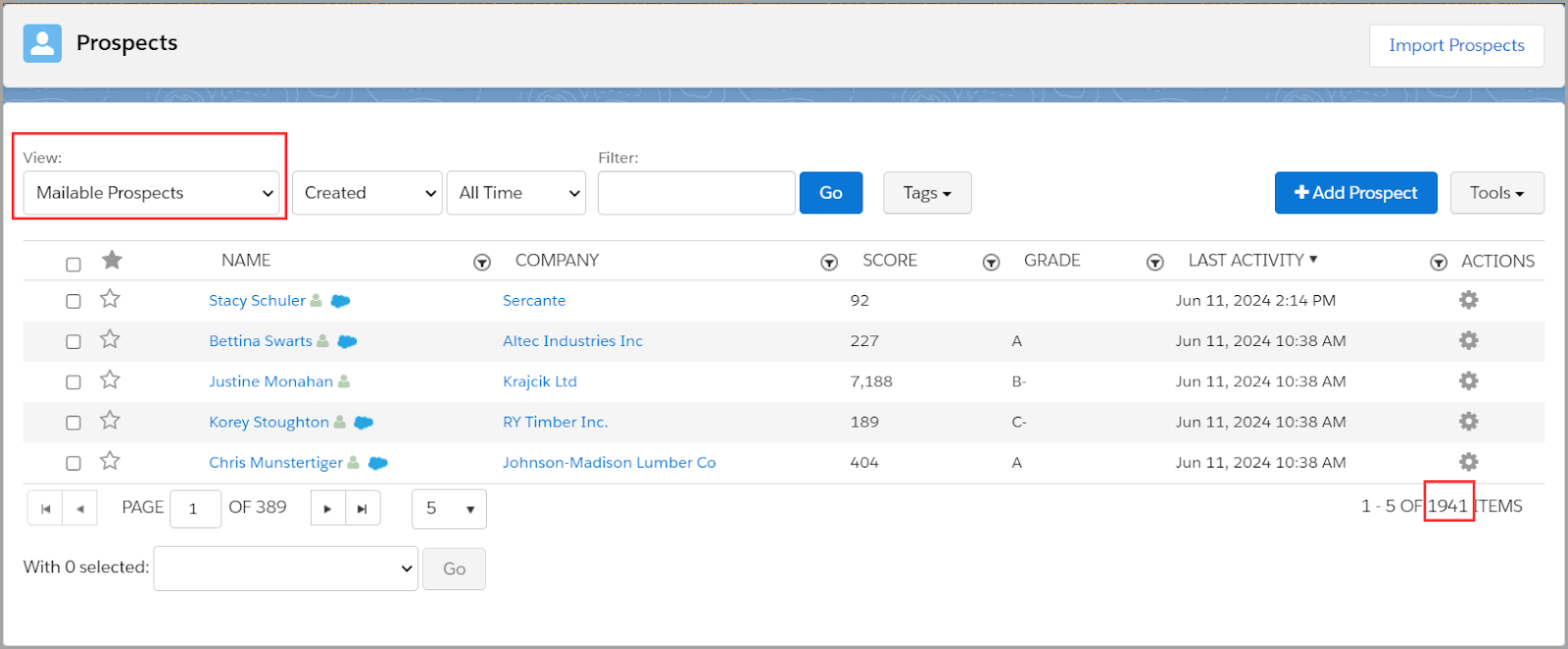
In Account Engagement (Lightning) go to your Prospects tab > List View: Mailable Prospect. This represents your total number of mailable prospects, but it doesn’t tell you what your mailable prospect limit is.

Use the Usage and Limits Tab to see your mailable prospect utilization

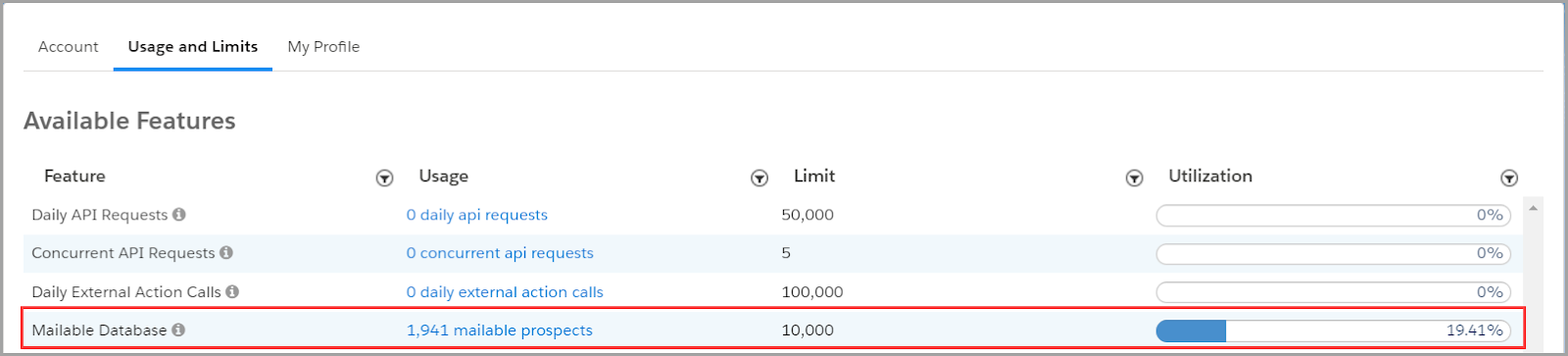
In Account Engagement (Lightning) go to your Account Settings > Usage and Limits Tab. It’s important to know that there can be up to a 24-hour delay in the total number of mailable prospects represented in this table. 

However, this table shows you your mailable prospect database limit and percent of utilization in addition to the total number of mailable prospects — just check that total number to the prospect table we just noted above.

Also – one VERY important reminder! 📣

Mailable prospect limits are shared across Account Engagement Business Units!

This means that if you have a limit of 10,000 mailable prospects, 9000 are in business unit A and 1941 are business unit B, your total database is actually at 10,941 mailable prospects! You are over your limit. This requires a little math and also an admin who is either monitoring both business units, or two Account Engagement admins who are, at the very least, communicating with one another. 

Wait, who is a mailable prospect again?

Before we can start determining who to keep in our database and who to purge, we need to understand who counts against our database limits. Mailable prospects count against your limit, but non-mailable prospects do not. 

Here are some quick bullet points to help you know which prospects are mailable and which ones aren’t.

Mailable prospects

  • Any prospect who is eligible to receive marketing and operational emails

Non-mailable prospects

  • Any prospect who has opted out
  • Any prospect who is marked as “Do Not Email”
  • Any prospect who has 1 hard bounce or 5 soft bounces
  • Any prospect who has been deleted and now lives in your Recycle Bin
  • Any prospect whose mailable status is “Operational Emails Only”

To reduce our mailable database, we need to turn our attention to mailable prospects.

Quick Wins: How to reduce your total number of mailable prospects quickly

Who should I keep in my mailable database and who is okay to purge? Here are three quick wins you can apply today.

  1. Get rid of “junk” prospects

Their mailability status may say they are mailable, but it’s probably unlikely that [email protected] is a real prospect. Run a dynamic list, or multiple dynamic lists for that matter, that look for junk prospects.

This blog post is FULL of amazing Dynamic List options to run on the four fields most often filled with spam content: First Name, Last Name, Job Title, and Email.

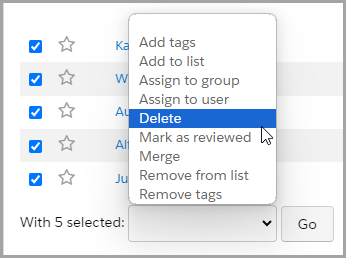
Once you have created your dynamic list(s), select the prospects to delete and use a Table Action to send these prospects off to the Recycle Bin.

  1. Delete old, unengaged prospects

Another quick win option at quickly reducing your mailable database size: delete the mailable prospects who aren’t engaging with your emails and marketing materials, and instead keep your focus on the prospects who are interested in what you are sharing with them.

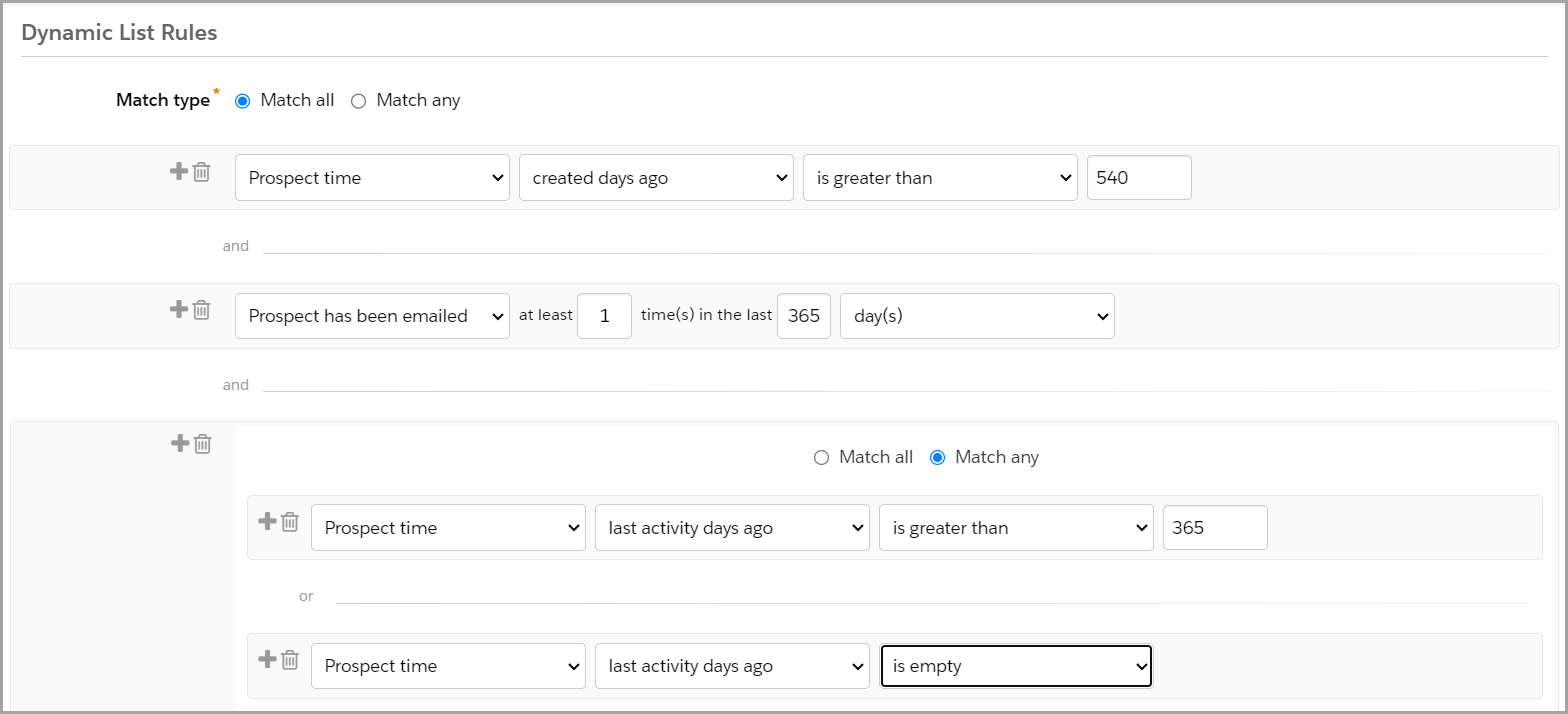
  • Create a dynamic list that looks at prospects who were created 18 months ago and haven’t engaged in the last 12 months.
  • Tweak this according to your unique business model — how you want to measure age of prospect and how you want to define engagement.
  • Run the list, select the prospects to delete, use a Table Action to delete the prospects.
  • Now, those Prospects live in the Recycle Bin — they do not count against your mailable database. However, Account Engagement will resurrect them out of the Recycle Bin, along with their historical activity information (before deletion), if they fill out a form again in the future.
  • FYI – When you delete a prospect from Account Engagement, it does not delete their Salesforce lead or contact records. 

Dynamic List Criteria Example

This type of list criteria could look something like this:

  1. Filter out your competitors

If you are prioritizing your marketing spend on prospects who are most likely to purchase at some point in the future, competitors might not be on that list. 

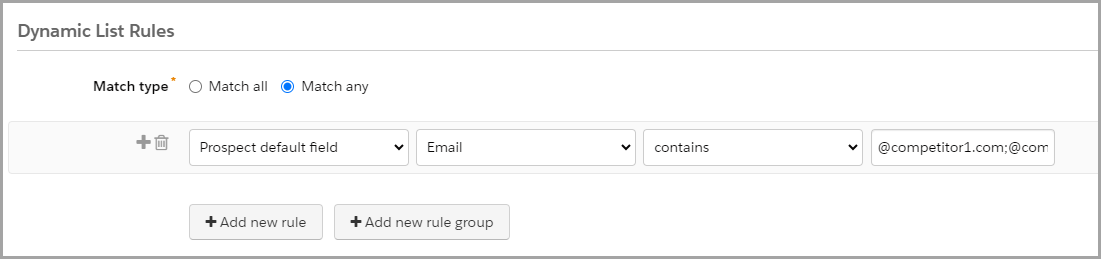
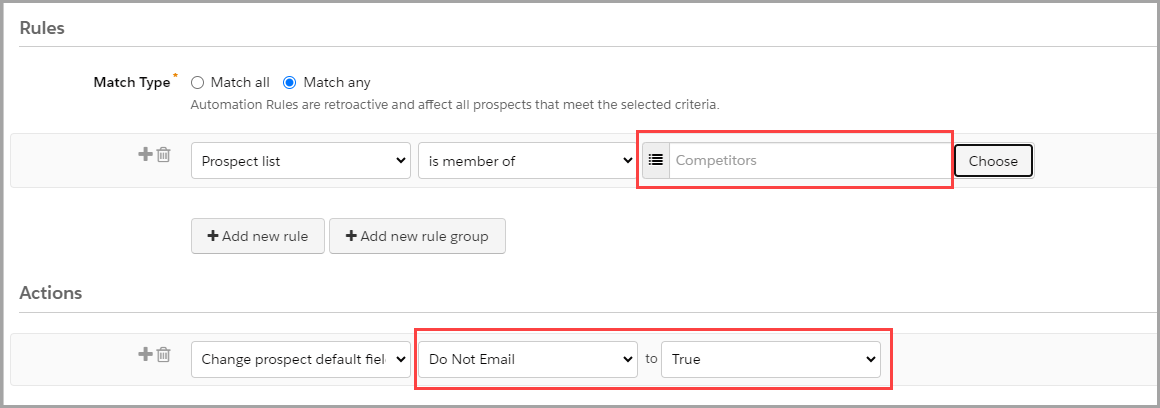
Create a dynamic list and then utilize an automation rule to mark these prospects as ‘Do Not Email.’

  • Step 1 – Write a list of all of your competitors email sending domains (or what follows the @ in their email address). 
  • Step 2 – Create a dynamic list that looks at the Prospect Default Field Email Contains, and then insert your list of competitor email domains separated by a semi-colon (;). This allows you to use one line of criteria instead of each email domain requiring separate criteria entries.
    • Example: @competitor1.com;@competitor2.com;@competitor3.com
    • Note: If your list is long and you run up against character limits, utilize this sweet tool called Creuz Your Data to split your list of values into appropriate data chunk sizes with semi-colons already in place.
      • And then I recommend to bookmark that tool – you’ll thank me later 🙂
  • Step 3 – Create a repeatable automation rule to check if a prospect is a member of your Competitor List to update the prospect’s field ‘Do Not Email’ to True.
    • By setting the rule as repeatable you ensure that if the ‘Do Not Email’ field is ever cleared, it will re-update to True.

Long-Term Success: Maintain a tidy mailable database

Okay, so now you have taken quick actions to weed out clutter from your mailable database and are within your utilization limits again. Phew! Now let’s consider how we maintain this clean and tidy house. 

Use the confirmed opt-in approach

Start on the right foot when your prospects opt-in to marketing emails. Let them know what they can expect to receive from you by signing up for your mailing list and have them confirm their email address and subscription preferences from the start. This helps eliminate invalid email addresses and uninterested prospects before they fill up your mailable database. 

Want to know more about confirmed opt-in? Check out this blog post.

Set up a regular timeblock to check your lists so you can delete junk and unengaged prospects

Remember that the lists you created to weed out “junk” prospects and older, unengaged prospects are just lists. You still need to go in to delete prospects and send them to the Recycle Bin. Depending on the size of your lists, you may want to monitor this weekly, monthly, or quarterly. Create a repeating calendar event, and you’ll never have to remember not to forget about it. Easy peasy.

Create an Engagement Studio program to re-engage prospects before they make it to the unengaged list

How do you get prospects to engage with your marketing materials? Email them! 

Give prospects a chance to re-engage before they make it onto the unengaged prospect list. Create an Engagement Studio program that encourages your prospects to engage with compelling content and calls to action. Warm them up by reminding them of how great your product or service is.

Run a Permission Pass

A Permission Pass is an opportunity to reach out to your unengaged prospects and ask if they still want to give you permission to keep emailing them. Simply put, ask them if they still want to hear from you. This can be done at any time, or even better, at the end of a re-engagement program after you have tried to reconnect with them. If they do not respond to the email within the given timeframe communicated in the email, it’s time to let them go and send them to your Recycle Bin. 

It can be scary letting “real prospects” go, but remember — in the long run it is better for your bottom line and for your reputation. Spend marketing dollars and invest time and effort in prospects who are interested in your product. Also, you are less likely to have spam complaints from prospects who are just annoyed with what they perceive to be junk in their inbox.

Plan for growth

I love this part. If you are still pretty close to your mailable database limit after all these tips and tricks, start budgeting conversations now with leadership. 

Show them numbers before and after tidying up the mailable database. That way, they’ll understand the need to start planning to market to more mailable prospects and budgeting in the next 10K or 20K prospects. 

Even better, back up your numbers with reporting data on how your marketing efforts are producing great leads and increased revenue!

Bring in the experts to reach radical impact

Have you checked your Pardot mailable database usage and limits? Have you tried the suggested quick wins, but still need more help? Or do all of these tips and tricks sound good, but you need some help with the execution? Sercante is here for you! We have a great team of experts who can help audit your system and provide you with personalized recommendations.

Or… This might have just started with a need to reduce your mailable database to stay within limits, but now you’re excited about the opportunity of setting a laser focus on your mailable prospects and how you can serve them in greater ways!

Let us help you. ♥️

We have the best of the best when it comes to planning amazing nurture programs to re-engage unengaged prospects. We also have the best of the best when it comes to using analytics to support your marketing campaign ROI

Reach out to Sercante as you plan for growth by radically impacting your business with your mailable prospects today!

Your boss has told you to ‘do ABM.’ Great. Instead of ripping out your current marketing and sales campaigns, here are three quick ways to apply ABM strategies to your email campaigns.

What is account-based marketing (ABM)?

Let’s go over what ABM is and what it isn’t at a high level first.

ABM stands for Account-Based Marketing, which is a “B2B marketing strategy for high-value customer accounts. In ABM, you focus on each account as a “market of one,” offering highly personalized 1-to-1 experiences and tailored content.

Through a focus on building stronger relationships with high-value accounts, ABM can help B2B marketers who need to increase pipeline quality, retain top accounts for longer, and boost the revenue those accounts bring in.” — Source: Salesforce

You might also hear something called ABX or Account-Based Experience. This is a “go-to-market strategy that uses data and insights to orchestrate relevant, trusted marketing and sales actions throughout the B2B customer journey. It’s a customer-centric rethinking of an account-based go-to-market — one that combines the engageability of inbound marketing with the precision and targeting of account-based marketing.” Definition from Demandbase

So as you can see, we can’t just start doing ABM and see results the next week. ABM is not a little change to increase MQLs (marketing qualified leads) or newsletter subscriptions. 

To fully embrace this new go-to-market strategy and campaign structure across our marketing, sales, and service teams requires a lot of planning, work, and time to see impactful and positive results. 

Some ABM/ABX Best Practice Reminders

Before we get into it, here are some ABM best practice recommendations to guide you through the integration of ABM strategy with your email marketing campaigns.

ABM Reminder 1. You don’t have to do it all at once!

  •  Consider a phased approach to ABM/ABX by focusing on low-hanging fruit.

ABM Reminder 2. Even a little personalization is better than none.

  • The more targeted and personalized you can make your ABM program, the better. But remember our first point that it is ok to start slow and small.

ABM Reminder 3. Think of making your targeted ABM audience’s content consumption similar to how Netflix does — ungated and unlimited.

  • If you still need forms for conversions, you can reduce the form fields on your landing pages by referencing known data in your CRM (customer relationship management) or sourcing it through a data-enrichment platform like Zoominfo.

Ready? Let’s jump in and focus on how to apply ABM strategies to your email campaigns and newsletters.

ABM Quick Win 1: Segment Your Email Audience

Segmenting the audience ahead of time helps you understand the level of effort ahead of you for more one-to-many ABM-focused journeys.

Check marketing opt-in status

Make sure they are opted in! We can’t properly enroll an audience in any type of marketing campaign or nurture program if they have not agreed.

Need a refresher? Read Forms Are Great, But Confirmed Opt-In Is Better for more on what’s involved with marketing opt-in.

Know your marketing personas

Review the job titles or persons of your target ABM buyer groups, and see what content and CTAs (calls to action) resonate most with them. Bonus: look at click-through rates for past email campaigns to identify click trends from buyer personas in your target ABM buyer groups. 

We don’t need to write anything from scratch — let’s repurpose what we have that has worked for other audiences. 

Find the right segmentation groups

Consider geographical audience segmentations to optimize engagement. Then, run A/B tests of your send times and days to find the best fit for each target group. You can also test out AI functionality like Pardot Einstein Send Time Optimization to see if that improves your engagement metrics.

ABM Quick Win 2: Add Some Personalization

When it comes to introducing personalization, remember to start small to understand the impacts (or lack of) on our audience engagement.

Email subject lines & preview text

  • Make email subject lines & preview text personal with variable fields like name, title or role, industry, and product. 
  • Use what makes sense for your company and the value prop for your ABM targeted audience – don’t overdo it and make it weird. 
  • Remember to make your subject line actionable and timely!
  • Here are some best practices and a cool way to use AI to make your subject line stronger – Playing with the AI-Powered Stensul Email Subject Line Tool.

Email sender name

  • Try to be consistent and personable so your audience starts to recognize your emails.
  • For example, try ‘Kelly at Sercante’ ([email protected]) instead of ‘Marketing’ ([email protected]).

Email body copy headers & CTAs

  • Test content and keywords to see what works best for your audience. Refer to your audience segmentation from the first step to stay on-message.

Landing page headlines & body sections

  • Make it personal with variable fields like name, title or role, industry, and product. 
  • Use what makes sense for your company and the value prop for your ABM targeted audience – don’t make it creepy.

Landing page body & CTAs

ABM Quick Win 3: Reporting, Reporting, Reporting

If you can’t report now, starting an ABM approach won’t help you. You need to visualize your current campaign efforts before you can prove that your phased approach to ABM/ABX is impacting your audience.

Get your CRM ready by organizing account segments

In your CRM, organize your targeted accounts for ABM and the buyer groups you defined in step one.

  • This can be a custom dropdown field or checkbox only marketing manages to indicate their enrollment or ABM tier.
  • Make sure your chosen organization method syncs down to the related leads and contacts from your target ABM account and across to your MAP (marketing automation platform).

Get your website tracking in order

Ensure all website properties and domains are being tracked consistently. Then, make sure you are using specific UTMs or click tracking for each channel and campaign. Wherever your audience is going, we want to follow.

Not sure how to get started? Check out our blog on Capturing UTM Parameters: 4 Scripting Paths for Account Engagement Landing Pages.

Get your reports set up before launching

Set up your reports prior to an ABM pilot campaign launch or before you start testing these ABM strategies on your email campaigns. This helps measure the marketing and sales baseline for your general audience so you can compare it to your targeted ABM audience.

Check these reports frequently and continually optimize your channels, messaging, and targeting.

Start small with ABM and learn along the way

These quick wins are a great way to dip your toes into ABM without going all in right away. Starting small lets you experiment and see what clicks with your audience. You’ll pick up insights along the way so you know the best places to focus your efforts and resources. As you learn, you’ll be ready to scale up your ABM game for stronger connections and better results. 

So, take these small steps, learn from them, and soon you’ll have an ABM strategy that translates into big wins with your top accounts.

Do you have an organized brain, enjoy project managing across multiple stakeholders and departments, love visualizing a process, and want to prove it with a new Salesforce certification? Well, then the Salesforce Business Analyst Certification is the right one for you!

Here is our guide to passing the Salesforce Business Analyst Certification exam. Good luck!

Step 1. Review the Salesforce Business Analyst Exam Guide & Schedule Your Test

Quick reminder that there are no longer any prerequisites for the Business Analyst exam! It is helpful to know or have experience with Salesforce and understand platform functionality and terminology though.

According to the Salesforce Business Analyst exam guide, this certification is “designed for Business Analysts with Salesforce experience. The successful candidate understands business needs, captures requirements, and collaborates with stakeholders to support the development of Salesforce solutions which drive business improvements.”

If you are interested in refreshing your Salesforce skills or earning one of the related certifications first, here are two helpful resources:

Salesforce Business Analyst Certification

Salesforce Business Analyst Exam Outline

  • Customer Discovery: 17%
  • Collaboration with Stakeholders: 23%
  • Business Process Mapping: 12%
  • Requirements: 18%
  • User Stories: 18%
  • Development Support and User Acceptance: 12%

The exam guide goes into each objective in more detail and also describes the person who is more likely to succeed with this certification (a.k.a. you!).

Schedule Your Exam

Once you have confirmed that this is the certification for you, schedule your test so we have a deadline to study for. Here is the link to make this the easiest step. 

Step 2. Organize Your Study Resources

We already established we have well-organized, to-do list, and process-visualization brains so I’ve gone ahead and done the pre-work (Googling) for you to track down our favorite resources, practice tests, and study guides. Plus we’ve included some key topics to revisit based on our experience earning the Business Analyst certification.

Trailheads & Trailmixes

Blogs

Practice Exams & Courses

This is an essential step for the Salesforce Business Analyst certification! You need to get in the head of the Salesforce test writers to best understand the use cases and user stories they are presenting because at first glance, most of the answers are going to appear correct. However, we want to choose the best process, steps, model, team structure, etc. that matches the specifics of the situation outlined.

Study Groups

Salesforce certifications are difficult. Lucky for us, there are a ton of welcoming communities that we can reach out to for support. 

One of our favorites is co-led by one of our own Sercante team members, the Boston Area Community Group with Jordyn Jaffer. This group hosts annual, virtual certification camps that are run completely by attendees. The attendees work together to present different topics each week to help each other prepare for taking the certification. Jordyn says, “ We are in our fourth year of facilitating these and are tackling the Salesforce Advanced Administrator Certification (for the second time!).” Check out their upcoming camps on their Trailblazer Community page here – Boston Women in Tech.

Topics Worthy of a Second Glance

Step 3. Ready? Pass the Salesforce Business Analyst Certification!

You might never feel ready to take the Business Analyst test – there are endless ways to think about processes and user stories and everything in between. But just like the solutions we are managing and building, there has to be an activation date. 

Test-Taking Tips from the Sercante Dragons

  • Find Keywords
    • These phrases in the questions can indicate the answer or what you can eliminate as an answer.
  • Mark Questions for Review & Read Them Carefully
    • Always refer back to the full question during or at the end of the exam when you are starting to second guess yourself, there might be something key you missed when you first read it. 
    • The correct answers for this exam are going to be very order-dependent so make sure you read them slowly.
  • Pay Attention to How Questions Answer Each Other
    • The use cases being described usually highlight a specific title or department so consider that when choosing the correct answer.
    • Think about how they phrased other questions as that might help you focus on the correct answer for a question you were unsure of.
  • Don’t Overthink Questions that Seem Easy
    • There are going to be a lot of questions that sound the same in this exam – don’t get stuck in a second-guessing loop when the answer seems too simple.
  • Using Synonyms of Words Can Help Answer a Question
    • For example, “what is the best diagram for this?” One of the correct answers is “the big picture.”
  • Have a General Understanding of the Main Salesforce Products
    • There will be questions and answers that list actual Salesforce platforms or functionality by name. For example, “your team/client/customer has this problem, which feature/product would help solve this?”

Good luck, you’ve got this!

Share any resources or problem topics in the comments section to help prepare the next group of Salesforce Business Analyst test takers.

No more posts to show