Category

Strategy

If you’re like many, setting up an SMS program is not part of your everyday tasks. And if I were a betting woman (I’m not), I’d bet you’ve likely never done it before. If you have, then you likely need a refresh.

Moreover, if you have an existing SMS program and now find yourself in a situation where you’re switching providers, you might be even more unsure of where to even begin.

TDLR: Whether newbie or pro, there’s a lot to consider and unpack not only from a strategy perspective but the technical stuff as well. In this post, we’ll cover everything you’ll need to consider for your SMS mobile strategy — whether you’re new to SMS or rethinking your SMS program.

SMS Mobile Strategy Considerations

Many times, when organizations begin on the path of charting out their SMS communication they naturally start down the path of wanting to replicate all the communications they currently have for the email channel.

DON’T BE THAT PERSON.

Instead, consider the following. 

The purpose of your program

Why do you want to communicate with people via SMS, to begin with? Better yet, what’s the benefit to the organization, and more importantly, to your customers?

A common purpose of an SMS program is to provide direct, efficient ways to engage, which leads to improved customer satisfaction and better business outcomes. The net on this point is to ensure you’re doing it for good reason. You may be in an industry where an SMS program just doesn’t make sense, and that’s ok! 

Examples of typical SMS communications

By refining the purpose of your program, you can begin to back into what makes sense to send via SMS.

Consider your customer experience: What are the types of things that might be beneficial to receive via text? If you think about the intent of a text message in general and why we send them in our day-to-day lives, you’re usually sending a text because:

  • Your message is short, direct, and doesn’t require live dialogue.
  • It’s something timely and you’re desiring a response back quickly.
  • It’s efficient.

With that lens in mind, let’s think about the types of messages your organization sends and what fits into this criteria mentioned above.

Here are some examples of communications that make sense to send via SMS:

  1. Appointment Reminders: Remind customers or clients of upcoming appointments, reservations, or important deadlines.
  2. Order Updates: Notify customers about the status of their orders, including order confirmation, shipping updates, and delivery notifications.
  3. Account Notifications: Send account-related notifications such as payment reminders, account balance alerts, or security alerts (e.g., suspicious login attempts).
  4. Promotional Offers: Inform customers about special promotions, discounts, or exclusive deals to drive sales and increase customer engagement.
  5. Event Invitations: Send invitations or RSVP reminders for events, webinars, conferences, or workshops.
  6. Customer Support: Provide quick and efficient customer support by allowing customers to text inquiries, report issues, or request assistance.
  7. Emergency Alerts: Send timely alerts and updates during emergencies, natural disasters, or other critical situations to ensure the safety and well-being of customers or employees.
  8. Surveys and Feedback Requests: Gather feedback from customers by sending SMS surveys or requesting feedback after a transaction or interaction.
  9. Authentication Codes: Use SMS for two-factor authentication (2FA) or one-time passwords (OTPs) to verify user identities during account sign-in or transaction authorization processes.
  10. Appointment Scheduling: Allow customers to schedule appointments, consultations, or service bookings via SMS, with automated confirmation messages.
  11. Membership Renewals: Remind members or subscribers about upcoming membership renewals, subscription expirations, or important membership-related updates.
  12. Event Reminders: Send reminders about important dates, deadlines, or milestones related to events, campaigns, or initiatives.
  13. Internal Communications: Communicate important updates, announcements, or reminders to employees, contractors, or stakeholders within the organization.
  14. Educational Messages: Deliver educational content, tips, or tutorials related to products, services, or industry trends to inform and engage customers.
  15. Feedback and Reviews: Prompt customers to leave reviews, ratings, or testimonials after a purchase or interaction with the organization.

More times than not, these communications fall into the transactional bucket. But as you saw above, they don’t have to. When deciding which communications to send via SMS, it’s essential to consider the relevance, timing, and audience preferences to ensure that messages are well-received and contribute to a positive customer experience.

Real-world SMS example: Player communication for a bocce ball league

Incorporating SMS into a communication strategy doesn’t have to be all or nothing either. There are instances when sending both an email and text makes sense.

Here’s a real-life example: I play in a bocce ball league (yes, those exist), and if the courts are too wet because of rain, they’ll cancel. The challenge is since there are no makeups, they really try to avoid canceling. It really comes down to the wire for making the decision to cancel. The league used to send an email as soon as they decided, but chances are you didn’t see it until you were already there.

To improve this customer experience, they developed not only a rain hotline (via webpage), which shows the last time it was updated (e.g., “10 mins ago” with status updates like “we will make a decision by x time”). The league will now also send a text message via SMS letting you know the status of your game as soon as it’s canceled.

They also must have gotten tired of fielding emails and phone calls (who knew us bocce ballers were such a passionate group) that they now remind everyone via text message that the rain hotline exists, and they send a link that you can access via mobile as well.

End Destination

Once you’ve established ‘the why’ of your SMS messaging and what you’re sending, don’t forget about the end destination. This is where the true professionals shine. 

Ensure your end destination is mobile-optimized. For example, there’s nothing worse than sending an SMS to provide feedback via survey, and it takes you to a non-mobile-optimized web page. Not only have you wasted money, effort, and time setting up this message, but you are creating a customer experience of friction (which is likely the opposite of what you’re trying to achieve). To add more fuel to the fire, this extra stinks — especially when it comes to getting feedback, which is already hard to receive. The oversight means you’ve just blown your chance. WOMP WOMP.

Real-world SMS example: Frequent flyer

So, let’s talk about a positive SMS example. If you’re like me and fly a decent amount, you’ve got your flight app (Delta in my case) up and running the day of your flight. It works great (most of the time… I could do another blog post on that… but another day), and if you remember to open the app and look at it on occasion, you’ll see that a gate might have changed or the time of flight has been updated.

However, I’m not always able to check the app when I’m on the move. So, Delta is sending SMS notifications as soon as these changes occur. This is especially helpful — I can see these notifications pop up on my phone without having to open the app to learn more. I also see them on my watch (when the battery isn’t dead). And if I want to see more from the text, I can click the link and it delivers me to the app, which makes the end destination all that more valuable.

I’ve seen some brands come close to excellence where they will drop you off to a mobile-optimized page. However, the real pros consider app downloads too.

As new tech and consumers evolve, so should a marketer’s strategy. SMS programs are tablestakes these days, so getting your strategy right is a must for most consumers.  

Technical Considerations for SMS Messaging 

How SMS marketing works

With a solid grasp of what a mobile strategy should entail, we can pivot to the technical piece. Let’s start with how SMS works for marketers as a whole, taking Salesforce as our platform of choice in this example. 
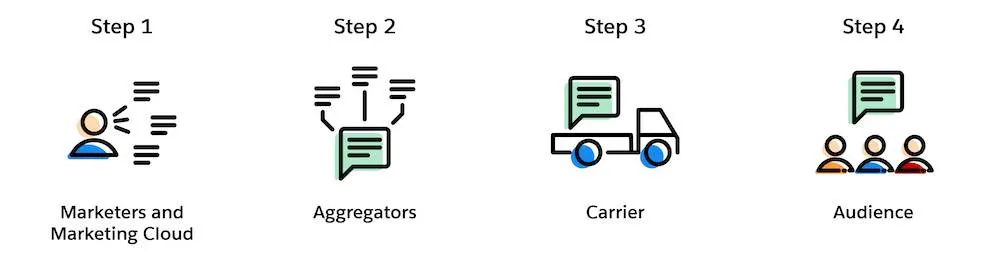
For Salesforce users, there are 4 steps to send an SMS message: 

  1. Marketing creates a personalized text message in Marketing Cloud Mobile Studio
  2. Aggregator preps message for delivery to the appropriate carrier
    (Aggregator = Salesforce partners that connect our messaging platform with carrier networks around the world) (Carrier = mobile providers across the globe)
  3. Carrier receives messages and delivers them to the final audience
  4. The customer receives a personalized text message

Preparing for SMS Sending

But for those simple steps to happen, there’s a bit of preparation involved, especially if this is your first time.

Here are the steps to prepare for SMS sending: 

  1. Determine your code needs – Short vs long code, dedicated or private. Learn more about these options here.
  2. Select an SMS platform provider and negotiate a contract – Many times as part of your contract they will acquire the code for you, but provisioning is extra.
  3. Provision your short code (this can be done with a consulting partner like Sercante or directly with the provider, which is typically more costly than going with a partner). 
  4. Once the shortcode is made available within the platform, you’ll need to set up your required keywords, and messages as well as obtain consent. (Keep on reading to learn about opt-in best practices). 

To migrate or not migrate your SMS program

If you’ve had the luxury of setting up your organization’s SMS program once and are now looking to switch providers, you might be scratching your head and thinking about what’s better: migrating our existing one or spinning up a new one?

In true consultant fashion, the answer is: IT DEPENDS 🙂.

Like with many options in life, it all goes back to what’s important — in this case — time, money, and customer experience.

Let’s look at the pros and cons of both scenarios:

ScenarioProsCons
Migrate ExistingRisk of losing people is lowThere could be up to 8-12 weeks of downtime as you move your code across platform providers, aggregators, and the like. It can get complicated — especially from a lease/ownership perspective
Acquire NewThe implementation process is relatively straightforward, sometimes quicker than the migration route. There’s no downtime in the ability to send SMSEducation of new code may be required for existing subscribers. There’s a risk of retention losses.

SMS migration route — let’s stay friends

If keeping your existing code outweighs the downtime you’ll encounter, there will be a decent amount of coordination between both old and new providers.

Below are some high-level steps of what’s involved when migrating SMS programs:

  1. Contact existing provider – Let them know your intention to retain the existing shortcode and inquire about the process for releasing the shortcode to use with the new provider, as well as any associated fees or requirements. Please note: not every provider will release their shortcode.
  2. Verify Contractual Obligations – Review your contract or agreement with the current to understand any terms or obligations related to the shortcode. Ensure that you comply with any contractual requirements before proceeding with the migration. 
  3. Coordinate with the new provider –  Let them know you desire to transfer your existing shortcode to their platform. Provide any necessary information or documentation requested by the new provider to facilitate the transfer process.
  4. Coordinate Timing– Coordinate the timing of the shortcode transfer between old and new to minimize disruption to your messaging campaigns. As mentioned in the cons, there’s normally a downtime where your code will not be operational. Ensure that there’s a smooth transition between the two providers.
  5. Update Opt-in Process – If necessary, update your opt-in/opt-out process to ensure compliance with regulatory requirements when using the shortcode via the new provider. Obtain opt-in consent from subscribers to receive messages on the new platform.

Once this is all squared away and your shortcode is available in the new platform, you can proceed to set up your ‘from’ keywords and ‘to’ message.  While migration of an existing code has its perks, the timeline is typically elongated compared to its counterpart. 

New SMS code route — Team ‘New Friends’ 

So if downtime, or getting up and running is more your concern, a new code may be the best (friend) route. 

All joking aside, when acquiring a new shortcode it’s essential to ensure compliance with regulations like the Telephone Consumer Protection Act (TCPA) and General Data Protection Regulation (GDPR) if applicable. And with that responsibility of re-opting everyone in here are some general best practices. 

New SMS code best practices

  1. Inform: Send out a clear and transparent communication informing subscribers about the change in shortcode and the reason behind it. Explain any benefits they might gain from the transition.
  2. Highlight Benefits: Emphasize any advantages or improvements associated with the new shortcode, such as better service, more relevant content, or enhanced security measures.
  3. Request Opt-In: Clearly ask subscribers to re-opt-in to continue receiving messages by sending a specific keyword or opting in through a designated method (e.g., texting a certain number, clicking a link, filling out a form).
  4. Provide Instructions: Offer simple and straightforward instructions on how to opt in. This could include step-by-step guidelines via text, email, or on your website.
  5. Assure Privacy and Security: Reassure subscribers that their privacy and security are a priority and that their information will be handled in accordance with relevant regulations.
  6. Offer Incentives (Optional): Consider offering incentives or rewards for those who re-opt-in, such as discounts, exclusive content, or entry into a giveaway.
  7. Set Deadline (if applicable): If there’s a deadline for re-opting in to ensure uninterrupted service, clearly communicate this to subscribers to create a sense of urgency.
  8. Follow-Up: Send reminders to those who haven’t opted in yet, closer to the deadline if applicable, to ensure they don’t miss out on staying connected.
  9. Respect Opt-Outs: Honor any opt-outs or preferences expressed by subscribers who choose not to re-opt-in and ensure they’re removed from the communication list associated with the old shortcode.
  10. Track and Monitor: Monitor the opt-in process closely and track the success rate. Analyze any feedback received to improve future communication strategies.

Remember to maintain transparency throughout the process and make it as easy as possible for subscribers to re-opt-in to the new shortcode.

Evolving with your customers

In conclusion, as technology and consumer behaviors evolve, marketers must adapt their mobile program strategies to remain effective. SMS marketing, as a powerful tool, provides a direct and personal way to reach customers. By incorporating SMS into your overall communication strategy, you can enhance customer engagement, drive traffic to your website or app, and ultimately achieve your marketing goals.

A successful SMS marketing program requires careful planning, compliance with regulations, and a focus on delivering valuable and relevant content to your subscribers. By following best practices and continually optimizing your campaigns, you can leverage SMS to create a strong connection with your audience and drive business growth.

In the age of big data, effective audience segmentation strategies are the key to unlocking the full potential of vast datasets available to enterprise-level companies. Join me on a journey from data overload to impactful insights as we explore how enterprise segmentation strategy drives meaningful results. 

From demographic segmentation to behavioral analysis, we’ll delve into the various segmentation approaches that empower enterprise companies like yours to understand their audiences on a deeper level.

Segmentation strategies for enterprise marketers

Businesses today face a monumental challenge: how do they effectively harness and analyze the customer information that’s at their disposal? 

One powerful solution is audience segmentation. By dividing large datasets into smaller, more manageable subsets based on common characteristics or behaviors, segmentation enables enterprises to unlock the hidden value within their data and make informed decisions that significantly impact their bottom line.

 In this blog, we’ll examine the fundamental principles of segmentation, discuss its various applications, and provide practical insights into implementing segmentation strategies that deliver measurable results for marketers at enterprise companies. 

Demystifying Segmentation

At its core, segmentation is a strategy marketers use to divide their broad customer base into smaller groups based on shared characteristics, behaviors, or preferences. The end goal is that marketing has specifically targeted lists to tailor their efforts. With their extensive reach and scale, enterprise businesses typically have large target audiences spanning across different demographics, geographies, and industries. 

These audiences can encompass millions of consumers, making effective targeting and engagement a significant challenge. However, by having the marketing team segment its audience into smaller, more manageable groups, your business can tailor their marketing efforts, products, and services to meet customer needs.

Data Distilled

Identifying segmentation criteria determines the variables that will be used to divide target audiences into distinct segments. The choice of segmentation criteria depends on the specific goals of the business, the nature of the product or service being offered, and the available data. 

Standard segmentation criteria include geographic, behavioral, product interest, or demographic factors. Businesses can create meaningful segments that enable more targeted and effective marketing strategies by carefully selecting segmentation criteria that are relevant, actionable, and aligned with business objectives.

Geography

Geographic segmentation focuses on location or region. This is most often used when there is great variation between consumers based on their locale. 

One well-known enterprise to use this strategy is McDonald’s. In a recent article written by Two Teachers, they share that “By tailoring its products, services, and marketing messages to meet the unique preferences and needs of consumers in different regions, McDonald’s has been able to create a powerful global brand that resonates with people from all walks of life.” 

McDonald’s successfully uses geographic segmentation daily by tailoring their advertising and their menu items, to fit the local preferences. For example, here in the United States, we may seek the Big Mac, whereas in Japan, their HiruMac Teriyaki McBurger. Yum!

Behavioral

Behavioral segmentation includes purchase history, loyalty, and social engagement. This strategy focuses on consumer preferences and patterns, and Netflix is one of many enterprises using this method daily. 

According to Scientific American, “users discover around 80 percent of shows through algorithmic recommendations.” For Netflix, this is highly dependent on users sharing their ratings along with watching preferences and saves. With AI at our disposal, behavioral targeting is becoming even more popular and easier.

Psychological

Pscychographic segmentation prioritizes attitudes, values, lifestyles, and interests. This method targets a customer’s motivations and preferences. This is a broader method, as it can be challenging to target someone based on feelings, but some brands do it successfully. 

Let’s take a look at Nike. According to PDF Agile, Nike has very specific personalities they are targeting – men who go to the gym and love sports, women who exercise or prefer sportswear, and children who are also athletes. 

According to that article, “Nike focuses on the people who enjoy engaging in sports. The company is passionate about sports, and it makes products suitable for sports lovers.” As a result, all of their campaigns are focused on that type of individual.

Demographic

Demographic segmentation assesses age, gender, income, education, job role/title, etc. This strategy allows business to tailor their marketing efforts to meet the needs of a specific demographic. This is the easiest of the segmentation strategies as it is the easiest data to collect, and it’s also inexpensive while effective. 

Let’s look into the financial sector, which offers “different tiers of products and services based on income levels,” according to Faster Capital. Affluent customers are targeted and sold premium credit cards with high fees and exclusive perks, while a college student would be offered a credit card with low fees and a rewards program. 

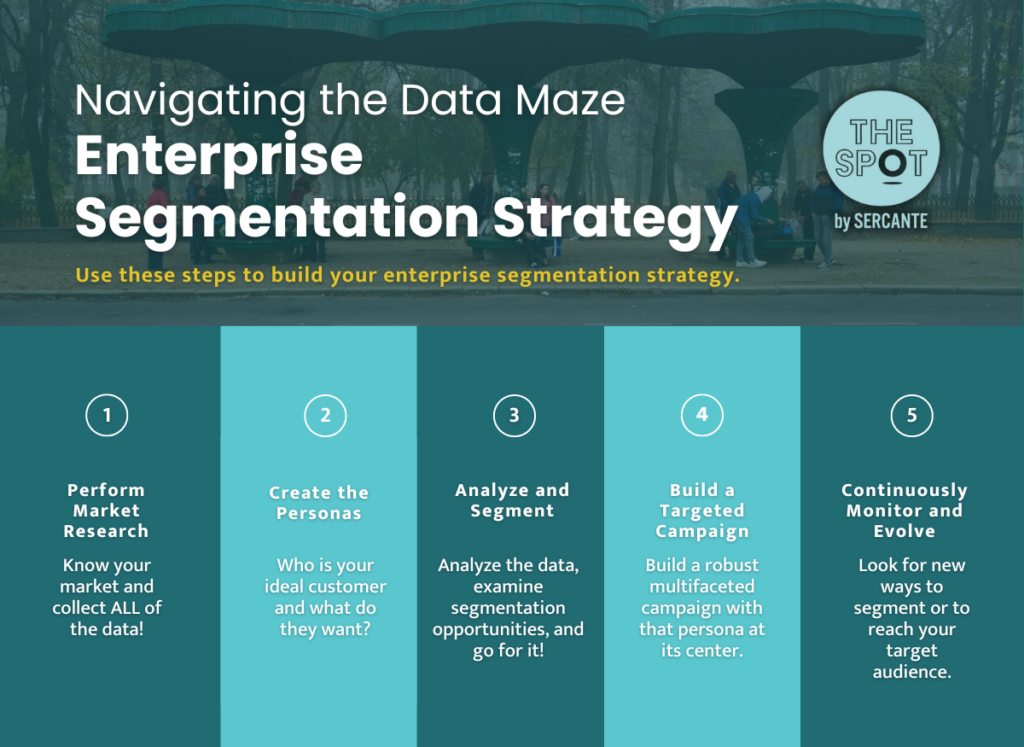
Navigating the Data Maze: Enterprise Segmentation Strategy

So, how do I get from point A to point Z? Let me walk you through it.

  1. Perform Market Research: Know your market and collect ALL of the data!
  2. Create the Personas: Who is your ideal customer and what do they want?
  3. Analyze and Segment: Analyze the data, examine segmentation opportunities, and go for it!
  4. Build a Targeted Campaign: Build a robust multifaceted campaign with that persona at its center.
  5. Continuously Monitor and Evolve: Once you’re done, keep going. Be on the lookout for new ways to segment or reach your target audience in new and creative ways.

Get help with segmentation strategies for your enterprise team

Segmentation strategies are invaluable assets for enterprises seeking to navigate the complexities of modern markets and effectively engage with diverse customer bases. 

Enterprises can gain deeper insights into customer preferences, behaviors, and needs by segmenting their audiences based on demographic, geographic, psychographic, and behavioral criteria. Moreover, the continuous refinement and optimization of segmentation strategies enable businesses to adapt to evolving market dynamics and stay ahead of competitors. 

As enterprise companies continue to embrace the power of segmentation, they will unlock new opportunities for growth, innovation, and customer satisfaction.

We’ve helped countless enterprise teams figure out the best approach to audience segmentation, and would love to solve your segmentation challenges, too. Reach out the the team at Sercante to get help with your team’s segmentation strategies.

Before we dive into the details of finding success with your Salesforce Data Cloud implementation, let’s set the stage. Whether you’re a seasoned Salesforce admin or just stepping into the realm of cloud-powered data solutions, Data Cloud is a game-changer, and here’s why you should care.

Navigating the Data Cloud Landscape

Salesforce Data Cloud is a platform that takes all of your data and turns it into actionable insights. It’s for anyone eager to supercharge their Salesforce experience. Whether you’re a department manager or an admin serving sales, marketing, customer service, or any other department, Data Cloud is your ticket to streamlined processes, informed decision-making, and ultimately, success.

The key to success is covering your bases early — before and during implementation. That means asking the right questions, collaborating with the right people, and establishing processes that keep everything running smoothly. 

Why Data Cloud Matters

Imagine having a centralized hub where diverse data streams — from identity platforms and purchase history to website interactions — seamlessly come together. Data Cloud does just that, offering a unified space to make sense of the data chaos. You may also be wondering what to do with the free Data Cloud license that you got as part of another cloud package.

You might wonder, “Why should I care?” Well, the answer is simple — efficiency, effectiveness, and exponential growth.

How to Ensure a Successful Salesforce Data Cloud Implementation

Now that we’ve set the groundwork, let’s delve into five practical tips you can use to guide your Data Cloud implementation with the ultimate goal of unlocking the platform’s full potential. We’ll explore how to propel your Salesforce Data Cloud implementation to new heights. You can also check out this post for a few ‘gotchas’ you may encounter during your Data Cloud implementation.

5 Tips for a Successful Data Cloud Implementation:

  1. Reach for organizational alignment
  2. Choose impactful use cases
  3. Measure success effectively
  4. Use out-of-the-box data models
  5. Be intentional with your data

Tip#1: Reach for organizational alignment

Now, let’s talk tactics. Aligning your organization before embarking on a Data Cloud implementation is paramount. Here are a few specific tactics to ensure everyone is on the same page:

Establish a Clear Owner

Designate a dedicated owner for the Data Cloud implementation. This individual should be someone with a comprehensive understanding of your organization’s goals and processes. Having a clear owner ensures accountability and a streamlined decision-making process.

Conduct Cross-Functional Workshops

Bring together representatives from various departments for workshops. Discuss the potential impact of Data Cloud on each team and encourage open communication. These sessions not only educate team members but also foster a collaborative spirit.

Define Roles and Responsibilities

Clearly outline the roles and responsibilities of each team involved in the implementation. From data management teams to end-users, everyone should know their part in the process. This clarity prevents confusion and sets the stage for a smoother implementation.

Communicate the Benefits

Emphasize the benefits of Data Cloud to every stakeholder. Whether it’s time savings, improved insights, or enhanced customer experiences, make sure everyone understands how Data Cloud aligns with the organization’s overarching goals.

Address Concerns Proactively

Open the floor for questions and concerns. Addressing potential roadblocks early on builds confidence among team members. Proactively seeking and resolving concerns sets the tone for a collaborative and supportive implementation journey.

Tip#2: Choose impactful use cases

Now, let’s talk about choosing the right use case — the cornerstone of a successful Data Cloud implementation. We urge you to start with the end goal in mind (instead of a technology-first approach, which many of us are so tempted to do). Focus on one or two initial use cases that drive team optimization and deliver tangible results within a reasonable timeframe. Whether it’s streamlining contact behaviors or enhancing customer segmentation, these impactful use cases showcase the value of the platform and generate positive buy-in across the organization.

Start with end goals in mind

Begin by identifying the desired outcomes of your Data Cloud implementation. What specific business objectives are you aiming to achieve? Whether it’s improving sales efficiency, enhancing marketing targeting, or optimizing customer service, starting with clear end goals ensures alignment and focus.

Evaluate business processes

Conduct a thorough assessment of your organization’s existing business processes. Identify pain points, inefficiencies, and areas for improvement. Look for processes that rely heavily on data and could benefit from the insights provided by Data Cloud. Consider areas where you’ve got trapped data and manual flows/processes.

Prioritize use cases with high impact and feasibility

Once you’ve identified potential use cases, prioritize them based on their potential impact and feasibility. Focus on use cases that offer significant benefits with manageable implementation efforts. Consider factors such as resource availability, data availability, and technical complexity.

Involve stakeholders in use case selection

Engage stakeholders from relevant departments in the use case selection process. Gather input from sales, marketing, customer service, and other teams to ensure alignment with their needs and priorities. Collaborative decision-making increases buy-in and promotes cross-functional synergy.

Prototype and validate use cases

Before committing to a full-scale implementation, consider prototyping and validating selected use cases. Build prototypes to test the feasibility and effectiveness of the proposed solutions. Use feedback from stakeholders and pilot tests to refine and iterate on use case designs. This is a great use case of taking advantage of the $0 Data Cloud SKU as well.

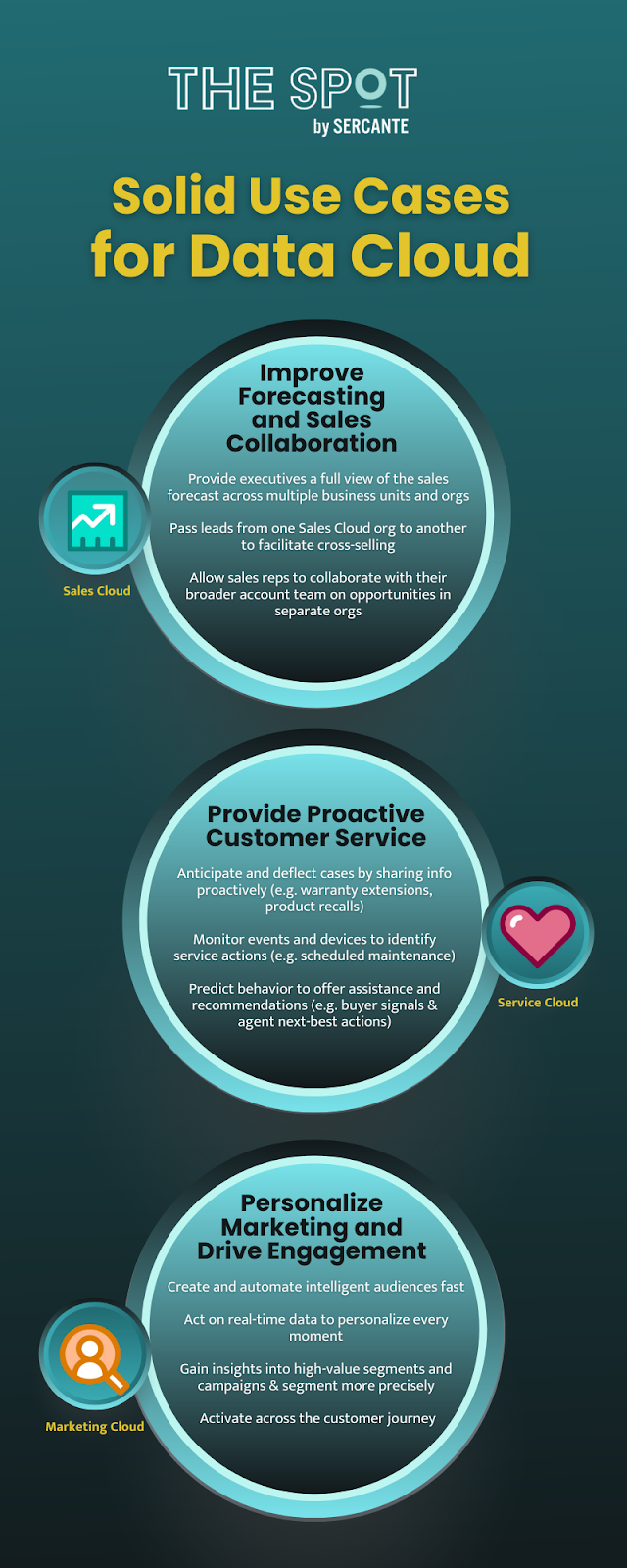
Data Cloud Use Case Examples

Examples of how customers across Salesforce Clouds are using Data Cloud

Improve Forecasting and Sales Collaboration 

Admin Type: Sales Cloud

  • Provide executives a full view of the sales forecast across multiple business units and orgs
  • Pass leads from one Sales Cloud org to another to facilitate cross-selling
  • Allow sales reps to collaborate with their broader account team on opportunities in separate orgs

Provide Proactive Customer Service

Admin Type: Service Cloud

  • Anticipate and deflect cases by sharing info proactively
    • Examples:  warranty extension notifications, product recalls 
  • Monitor events and devices to identify service actions
    • Examples: proactively avoid usage or entitlement overcharges or schedule proactive maintenance based on device data
  • Predict behavior to offer assistance and recommendations
    • Examples: provide agents with customer’s propensity to buy and next-best action

Personalize Marketing and Drive Engagement 

Admin Type: Marketing Cloud

  • Create and automate intelligent audiences fast
  • Act on real-time data to personalize every moment 
  • Gain insights into high-value segments and campaigns
  • Segment more precisely 
  •  Activate across the Customer Journey

Tip#3: Measure success effectively

Now, let’s discuss how to measure the success of your Data Cloud implementation effectively. Here are a few specific tactics to guide you.

Define key performance indicators (KPIs)

Identify measurable metrics that align with your organization’s goals. Whether it’s increased revenue, improved customer satisfaction, or enhanced operational efficiency, define KPIs that reflect the impact of Data Cloud on your business outcomes. And don’t forget to keep them SMART (specific, measurable, attainable, realistic, and timely)

Establish baseline metrics

Before implementing Data Cloud, establish baseline metrics to benchmark your current performance. This allows you to track progress over time and quantify the impact of the implementation.

Monitor data quality

Ensure that the data ingested into Data Cloud is of high quality and accuracy. Implement data quality checks and validation processes to maintain data integrity throughout the implementation. This is where taking advantage of our Data Cloud Readiness Assessment is key.

Track user adoption and engagement

Monitor user adoption and engagement with Data Cloud tools and features. Track user logins, usage patterns, and feedback to gauge the effectiveness of training and support initiatives.

Iterate and improve

Once you’ve successfully implemented, continuously review and iterate on your measurement approach. Get feedback from stakeholders, analyze performance data, and identify areas for improvement. Adjust your measurement strategy accordingly to ensure ongoing success.

Tip#4: Use out-of-the-box data models

You have to walk before you can run. Let’s delve into using the out-of-the-box data models during your Data Cloud implementation.

Explore standard data models

Familiarize yourself with the standard data models offered by Data Cloud. These pre-built models cover common data structures and relationships, saving you time and effort in designing custom solutions. Take advantage of these models wherever possible to accelerate your implementation.

Align with Salesforce Einstein 1 (Core) data model

Ensure alignment between the Data Cloud data models and the Salesforce core data model. By aligning these models, you facilitate seamless integration and interoperability between Data Cloud and other Salesforce products. This alignment simplifies data management and enhances overall system efficiency.

Customize only when necessary

While out-of-the-box data models provide a solid foundation, don’t hesitate to customize them to meet your specific requirements. However, exercise caution and prioritize customization only when absolutely necessary. Striking the right balance between standardization and customization ensures long-term scalability and maintainability.

Tip#5: Be intentional with your data

Now, let’s take a look at how you can be intentional with your data. Careful planning on how to use it within Data Cloud is crucial. Whether it’s analytics, segmentation, or real-time data actions, understanding the tools available and selecting the right ones for your use case is key. From calculated insights to data segmentation and AI capabilities with Einstein Studio, being intentional with data ensures effective utilization and actionability.

Data governance framework

Establish a robust data governance framework to govern the lifecycle of data within your organization. Define policies, procedures, and standards for data collection, usage, and management. Ensure compliance with regulatory requirements and industry best practices to maintain data integrity and security.

Data quality management

Implement data quality management processes to ensure the accuracy, completeness, and consistency of your data. Utilize data cleansing tools and techniques to identify and rectify errors, duplicates, and inconsistencies. Regularly monitor data quality metrics and address any issues promptly to maintain the reliability of your data.

Data privacy and security measures

Prioritize data privacy and security by implementing robust measures to protect sensitive information. Encrypt data in transit and at rest, restrict access to authorized users, and implement multi-factor authentication. Stay informed about data privacy regulations such as GDPR and CCPA, and ensure compliance to safeguard customer data.

It’s crucial to promote ethical data practices and mitigate bias in data analysis and decision-making. Educate stakeholders about the ethical implications of data usage and the potential impact on individuals and communities. Implement fairness, accountability, and transparency principles to ensure equitable outcomes and build trust in your data-driven initiatives.

Data lifecycle management

Develop a data lifecycle management strategy to govern the flow of data from creation to archival or deletion. Define retention policies based on regulatory requirements and business needs, and automate data archival and deletion processes where possible. Regularly review and update data lifecycle policies to adapt to evolving business and regulatory requirements.

Data-driven decision-making culture

Foster a data-driven decision-making culture within your organization by promoting data literacy and empowering employees to leverage data in their day-to-day activities. Provide training and resources to enhance data skills across departments, and encourage collaboration and knowledge sharing around data insights and best practices.

Bonus: Tap into expert guidance

Salesforce Data Cloud implementation requires strategic planning, thoughtful execution, and continuous refinement. By aligning your organization, selecting impactful use cases, leveraging out-of-the-box data models, measuring success effectively, and being intentional with data, you can unlock the full potential of Data Cloud and drive transformative outcomes for your business. 

As a bonus tip, we suggested looking toward expertise available in the Salesforce community. Seeking guidance from those who have navigated Data Cloud’s complexities can be invaluable. Whether through expert coaching sessions, community groups, or support office hours, connecting with experienced professionals can enhance your success with Data Cloud.

However, if you find yourself in need of expert guidance or support along the way, don’t hesitate to reach out to the Sercante team. Our experienced consultants are equipped with the knowledge and expertise to help you navigate every step of your Data Cloud journey and ensure success. Contact us today to learn more about our Data Cloud readiness assessment so you can embark on your Data Cloud implementation with confidence.

Related Resources:

Product Note: Marketing Cloud Growth and Advanced are editions of Marketing Cloud Next and have also been referred to as Agentforce Marketing.

Marketing Cloud Growth Edition is here and its infrastructure represents a fundamental shift compared to Account Engagement. While Account Engagement is “near core,” Marketing Cloud Growth Edition is built on the Einstein 1 platform and leverages Data Cloud, Flow, and Einstein capabilities. This signals a shift in the skills that marketers will need in the future. But don’t worry, we’ve curated some resources to help you get a head start.   

Is Marketing Cloud Account Engagement being retired? 

Absolutely not. This question has come up in just about every social post that I’ve seen and has been addressed in detail in the blogs below by Andrea Tarrell and Erin Duncan, so we’re not going to dig too deeply into it here. 

The short reason is that Marketing Cloud Growth Edition is a distinct offering geared toward small to medium-sized businesses (SMBs). However, innovations and features from this product will make their way into Marketing Cloud Account Engagement, so there will be a need for marketers to evolve their skills.

What are these new skills that you keep mentioning? 

After playing with Marketing Cloud Growth Edition a bit, three areas really stood out to me.

  • Audiences are created using Data Cloud
  • Assets are built with Experience Cloud
  • Automations (including email series) are powered by Salesforce Flow

While Data Cloud, Experience Cloud, and Flow might sound a little scary, these represent great opportunities for Account Engagement pros to develop new skills. To make things even easier, Salesforce has provided excellent learning resources for all these topics in Trailhead. Let’s get started!

Data Cloud

Data Cloud is a dream come true for marketers. Imagine having all your customer data from different applications centralized in a single location and available when creating your marketing segments. Imagine no more as that’s exactly what Data Cloud delivers.

Marketers need a general understanding of the tool and key terminology. They will also need to be able to utilize Data Cloud to build segments.

Key Data Cloud Terms

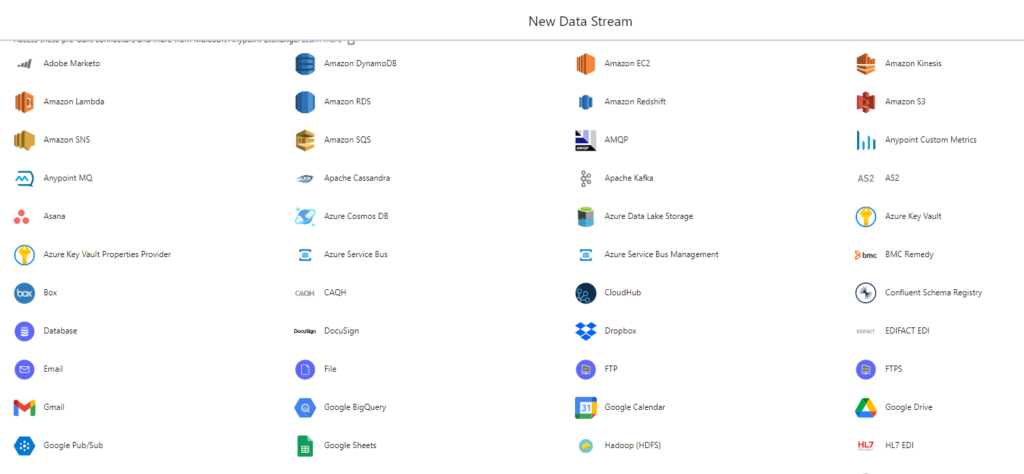
  • Data Stream: A data source ingested into Data Cloud. Examples include Salesforce CRM and Amazon S3 – and many more.
  • Data Lake Object (DLO): A storage container for the data ingested into data streams.
  • Data Model Object (DMO): A Data Cloud object created from data streams, insights, and other sources.
  • Customer 360 Data Model: Data Cloud’s standard canonical data model. Data ingested into Data Cloud is mapped to DMOs found in the Customer 360 Data Model.
  • Starter Data Bundles: A Salesforce-defined data stream that includes mapping to the Data Cloud DMO structure.

Here are some of the sources that can be used as data streams in Data Cloud

Recommended Trailhead Modules

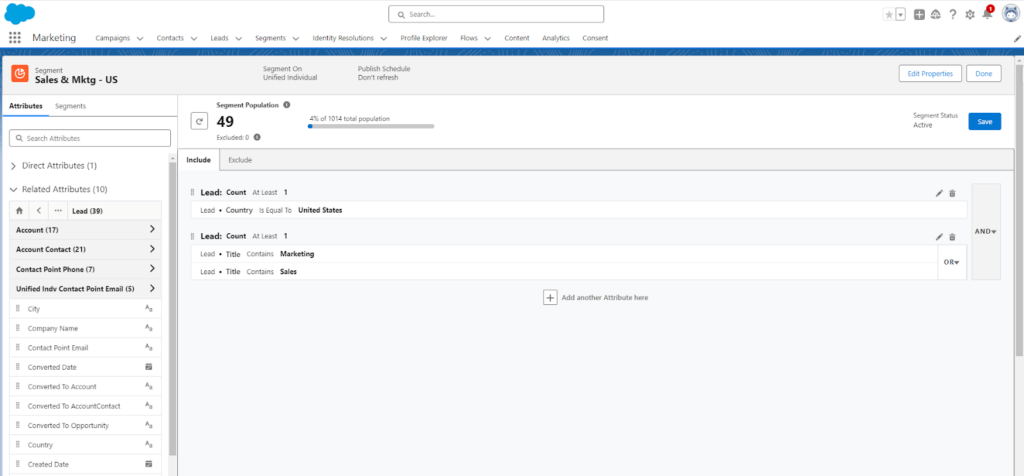
Here’s an example of how a segment focusing on Sales and Marketing titles based in the United States would look in Marketing Cloud Growth Edition.

Experience Cloud

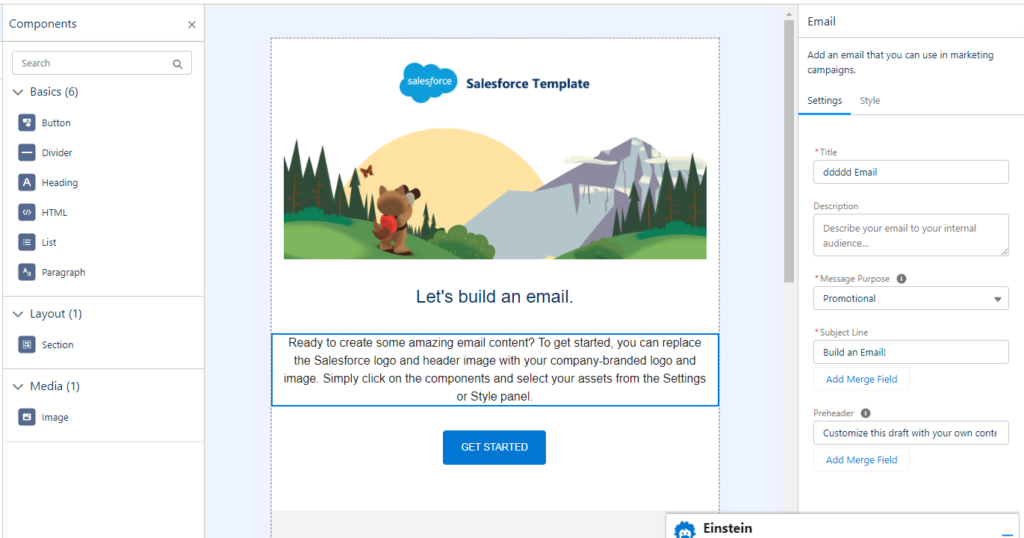
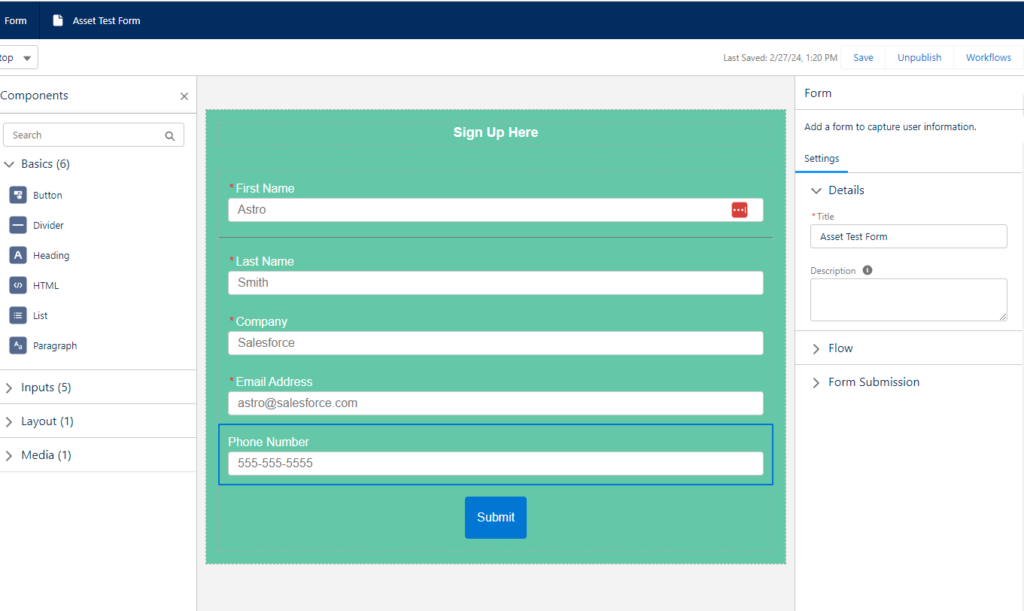
Assets in Marketing Cloud Growth are built using Experience Cloud. The experience feels similar to the Account Engagement Lighting Builders, but the foundation is different and there are some cool upgrades. I’m a big fan of the campaign-based workflow, the ability to publish/unpublish forms, and the ease with which forms can be styled — without the need for CSS.

Marketing Cloud Growth Email Builder


Marketing Cloud Growth Form Builder

At this time, the best way to prepare for the asset-building experience in Marketing Cloud Growth is to get hands-on with the lightning builders in Account Engagement. If you have not yet enabled them in your org, take a moment to do so using this blog as a guide. You can still access and use the classic builder after the lighting builder is activated, so you are not locked into a single builder.

Recommended Trailhead Modules

Salesforce Flow

Salesforce Flow is at the heart of Marketing Cloud Growth and represents a great learning opportunity for account engagement pros. Flow has historically been the solution of choice for Salesforce admins when creating declarative automations within Salesforce, but it’s now a marketing tool as well (and you’re going to love it).

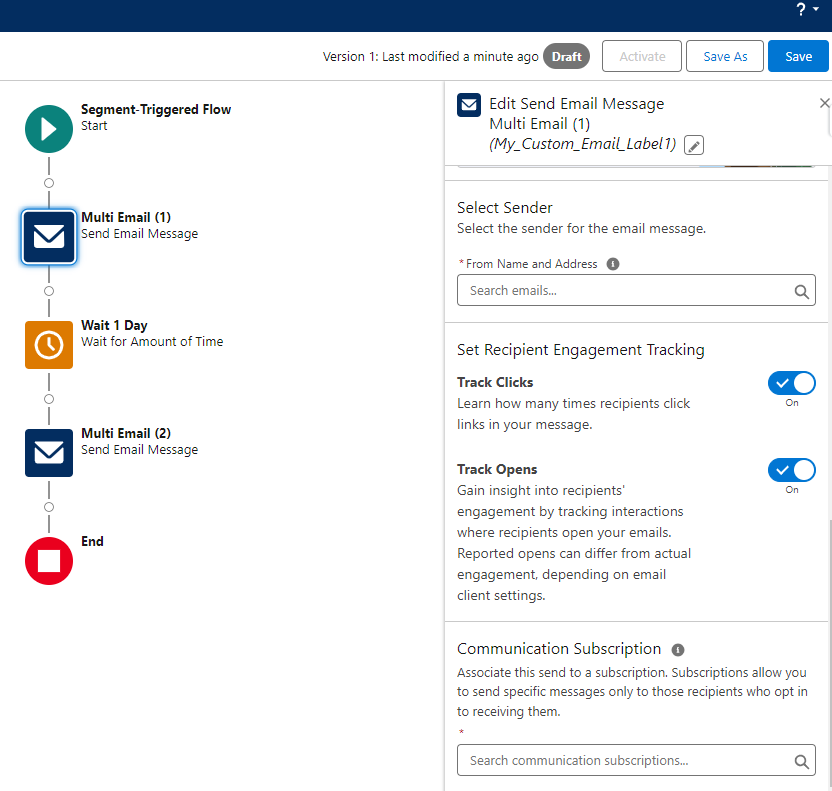
Marketing Cloud Growth generates a pre-built flow when assets are created. These are an excellent starting point and can be customized to specify tracking (for emails), subscriptions, and wait step times (in minutes, hours, days, months, or a specific time of day).  Branch logic can also be added to further customize the recipient journey and more features are on the roadmap for future releases.

Flow is one of the tools that is best learned by doing. Fortunately, there are plenty of great Trailhead modules, projects, and superbadges on this topic. If you learn better with the help of an instructor, our Salesforce Flow Basics For Marketers Workshop is for you!

Recommend Trailhead Modules

There are also a few posts on the Spot that will guide you, step-by-step, through creating flows that address common marketing needs. These are fun little projects that are highly relevant, so be sure to check them out. As always, practice in your sandbox or Trailhead org.

Start building your Marketing Cloud Account Engagement skills for the future 

The current release of Marketing Cloud Growth Edition is not a replacement for Account Engagement, but it does give us a glimpse into the future. Many innovations and features from  Marketing Cloud Growth Edition will make their way into Marketing Cloud Account Engagement, so it’s time to begin evolving your skills in preparation.

Product Note: Marketing Cloud Growth and Advanced are editions of Marketing Cloud Next and have also been referred to as Agentforce Marketing.

There’s some fear in the air.

I’m sensing major mixed emotions swirling for many with the announcement of Marketing Cloud Growth Edition and the vision of marketing automation on the Einstein 1 (a.k.a. Salesforce core) platform.

On the one hand — it’s everything we’ve all been asking for. True one platform, no-integration-needed shared infrastructure for marketing to work seamlessly with all customer data. 

But there’s a glimmer of doubt with people thinking: “What does this mean for me? Are my skills still relevant? What does this mean for my product, my team, or my consulting business?” 

Don’t bet on innovation being slow 

There is a very large population of people who benefit from the status quo as it sits today. 

Employees benefit from their skills being in demand to drive up compensation. 

Consultants benefit from their experience being rare and slow to accumulate to stay relevant.

Product companies have grown to address a specific product gap or market need in today’s toolset.

But if the technology changes, all of that gets disrupted. When I hear people asking about timelines for the expansion of Marketing Cloud Growth Edition, I feel like they’re actually hoping that the pace of innovation on this will be slow. When I tell them I don’t think that’s going to be the case, that statement is met with uneasiness, and it’s clear that‘s not what they were hoping to hear.

Big change takes time, for sure. But I really wouldn’t bet on this freight train moving slowly. This has been a long time coming, and there’s momentum behind this new product that is incredibly exciting.

Remember that the technology is only one piece of the puzzle

I think that the fear of change here is somewhat misplaced.

Yes, there is a lot of power in the technical knowledge of any platform — Marketing Cloud Engagement, Account Engagement (Pardot), Salesforce, and any number of new tools.

But even harder to come by are the soft and business skills that make you successful with those platforms. Things like: 

  • Understanding business process
  • Mapping out data relationships 
  • Wrangling colleagues from across sales, marketing, customer service, and product to get agreement on content 
  • Training and driving the adoption of a new tool or process
  • Defining project plans and dependencies with the work of other teams 
  • The logistics that go into the execution of any complex campaign 
  • Spotting a gap or a need, and the extreme ownership you bring to “I’m going to figure out how to solve it” 
  • Spreading best practices & defining standard processes
  • Breaking complex terminology into terms anyone on your team can understand

Just think about your job today: How much of it is actually hands-on configuration in a tech platform, and how much of it is “tech-adjacent” planning, organizing, collaborating, and communicating? 

I bet it’s a blend of both, and as you move up the ladder in your career the “tech adjacent” becomes more critical.

Time to go back to school 

So, if we could flip a switch and change all customers to the new platform overnight — the skills and experience we’ve all gained from many years on Pardot and Marketing Cloud are still super useful, even if we’re logging in at a different URL. 

We’re not being sent back to the starting line. But we do probably have some relearning to do to keep our edge and stay relevant. But I choose to view that as exciting and not daunting. (Well maybe a little daunting. But I’m going to crack open a Red Bull and push through.) 

The way I think of it is this: Someone has to emerge as leaders, thinkers, and builders on any new platform. Who better than you and I? Let’s leverage the hard-won experience in this ecosystem as a springboard in this next chapter. 

Let’s lean into the next-gen set of tools that are going to bring marketing strategies to life on the Salesforce platform, and let’s go build some cool stuff.

Some quick shameless plugs

I can’t resist sharing two more things on this topic…

#1: Check out our Salesforce Flow for Marketers course

Flow is a big piece of how Marketing Cloud Growth Edition users can automate customer journeys. Need to brush up on your skills? Sercante has a Salesforce Flow Basics for Marketers Workshop that will kickstart your learning.

#2 Come join a team of growth-minded learners

When change is in the air, it’s a great time to be among like-minded learners. If this article resonated with you, I would invite you to come check out roles on the Sercante team. We’re committed to always learning, always chasing that edge, and we are eagerly seizing opportunities to get our team’s hands on the “next gen” ASAP. It’s a great spot to try on new skills and figure out the role you want to play in the next chapter of your career. Drop us a note at [email protected] if you’d like to chat!

Salesforce tasks are one of the unsung heroes of Account Engagement. You can use Salesforce tasks to let the sales team know there’s work to be done, and using tasks can eliminate one of the common arguments for creating duplicate leads.

Yet, many are unhappy with the rigid options for creating tasks through Account Engagement. That leads us to our solution. We can make tasks even better, perfectly better in fact! We can make Salesforce tasks that are set up exactly how we want through Account Engagement using an External Action.

External Actions are a way to make things happen outside Account Engagement via Salesforce CRM Flow and APEX code.  We can create an External Action that creates a task with what we want in it and our merge fields in the body of the task comment so we can capture exactly what was on a form fill.

Process Overview: Creating custom Salesforce tasks with Account Engagement External Actions

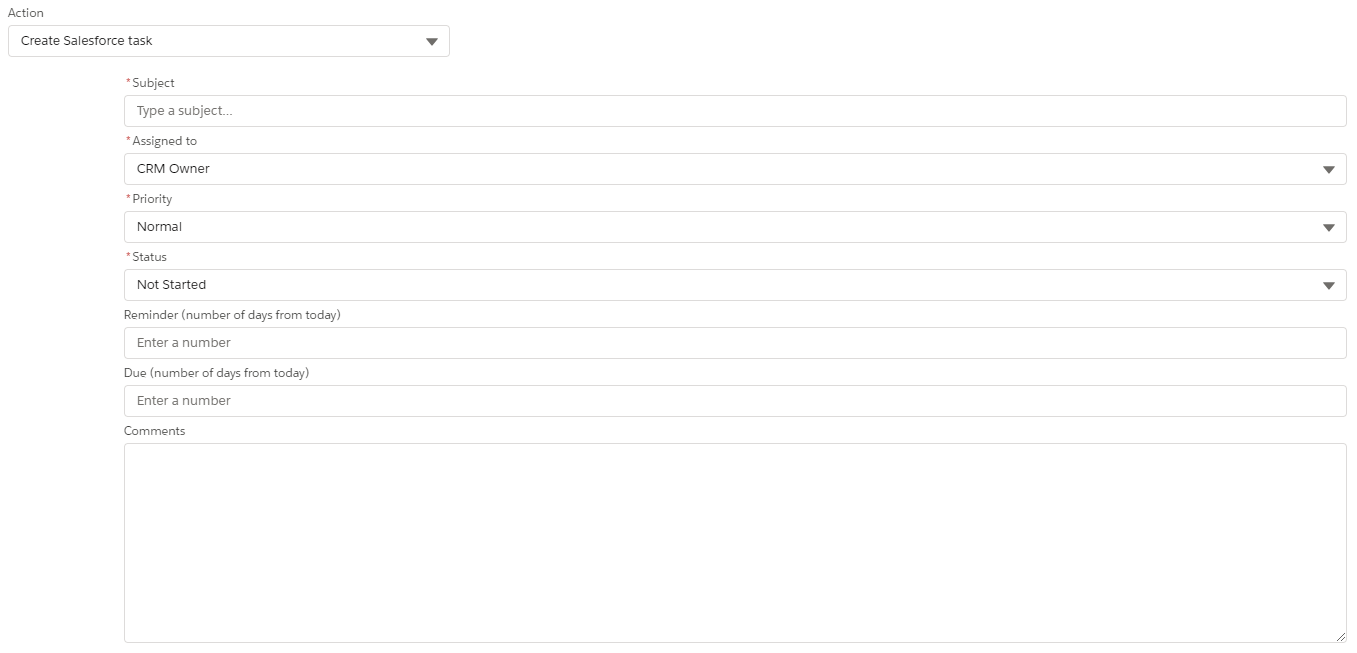
Normally we would add a completion action to a form called “Create Salesforce Task,” which prompts us for a few rigid text fields that don’t support merge fields. 


Now we can add an ‘External Action’ for creating a task that has as few or as many fields as we want and allows us to add merge fields. 

Building this new Create Salesforce Task external action

There are a few steps we need to follow to build this. We start in the CRM and work backwards, toward Account Engagement.

Here’s the order you’ll complete the steps:

  1. Create a flow.
  2. Create an External Activity.
  3. Create the completion action.

Creating the Flow

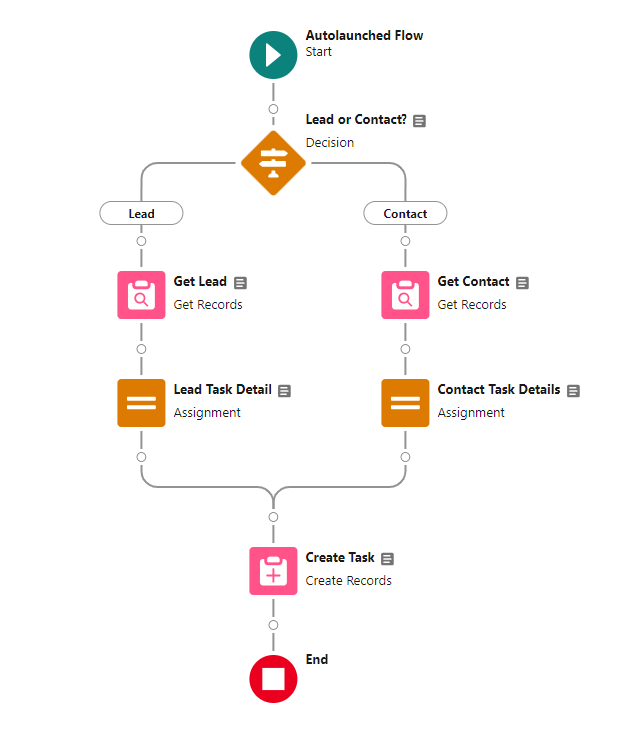
First, we want to create an Autolaunched Flow.

Create variables

Next, let’s create some variables. The RecordID is the only required variable. (We need to attach the task to something). The rest of the variables are optional, but having them will give us more flexibility when we create the completion action.  All variables should have the ‘Available for Input’ checkbox checked. 

VariableData TypeRequired
RecordIDTextYES
Product_InterestTextNO
Task_InstructionsTextNO
Form_CommentsTextNO
Task_SubjectTextNO

Build the Flow

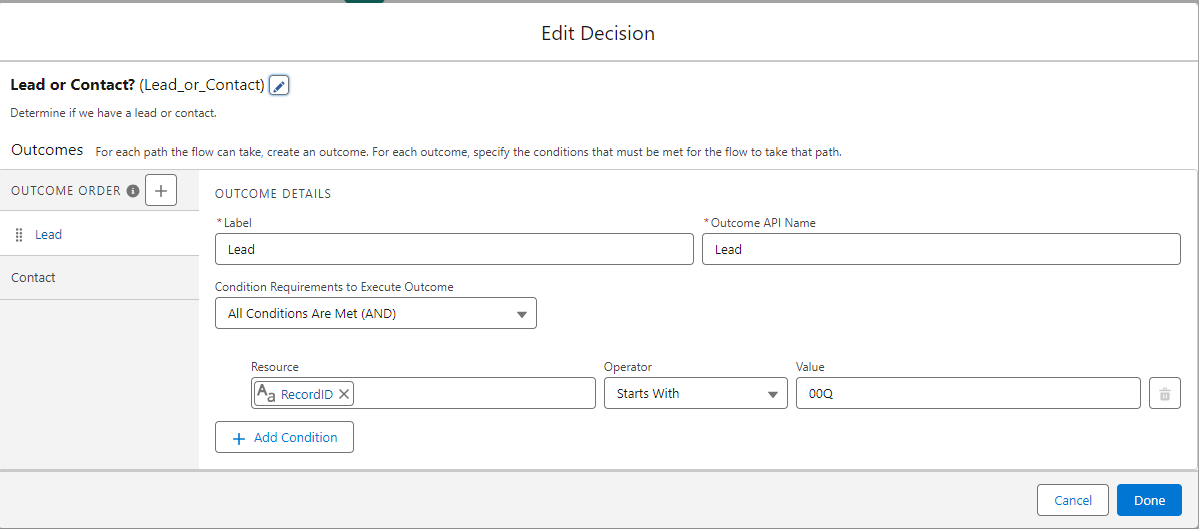
After creating the variables, we can get build the Flow. Start with the Decision Element to create a different path for Leads vs. Contacts. We’ll need to look up the record owner in the CRM, as Account Engagement doesn’t give us access to that as a merge field. To do this, we need to know whether to look up a Lead or Contact record. Use the table below to set up your lead path filter.

FieldOperatorValue
RecordIDStarts withOOQ

Update the label for the default path to “Contact”.

Add a ‘Get Records’ element

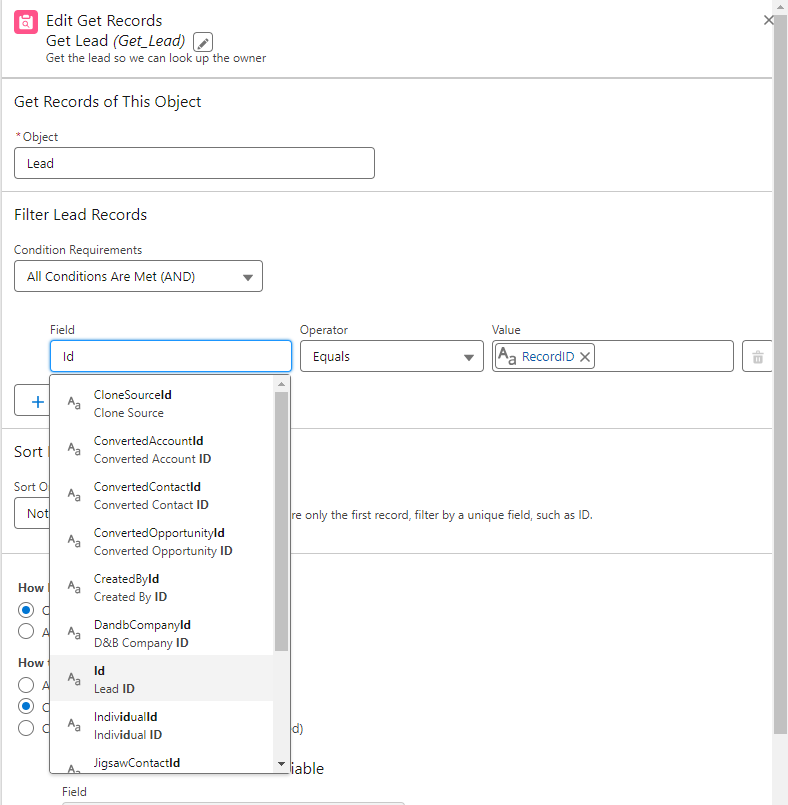
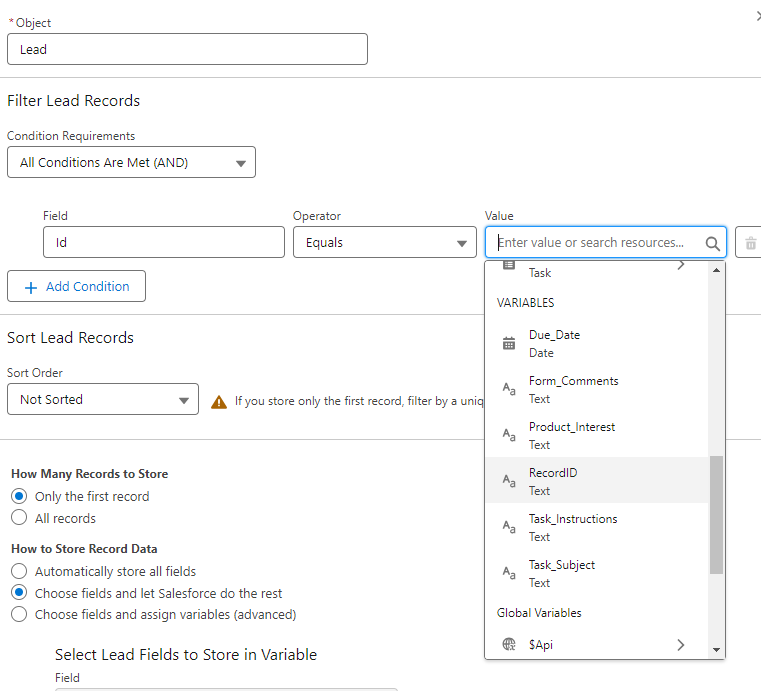
For each path, we will need to add a ‘Get Records’ element.  Select the correct object and then set the following filter:

FieldOperatorValue
IDEQUALSRecord ID

Create task details

Next, let’s create the task details. Start by creating another variable using the details below. Do not check the “available for input” box for this variable. 

Variable NameData TypeObject
NewTaskRecordRecordTask

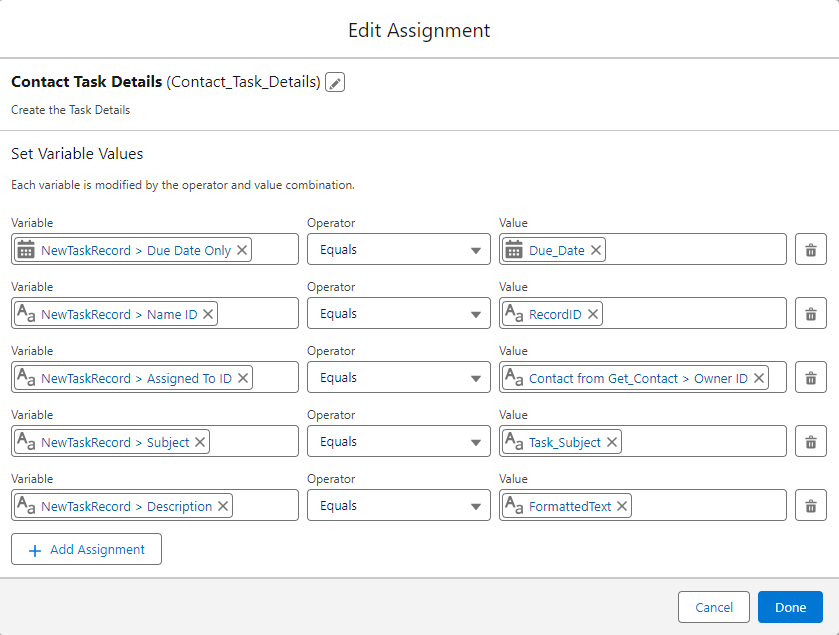
Add an Assignment element

Then, add an Assignment element for each path to fill in the details. The Assigned To ID for the new task is the record owner from the object we looked up. Lead owner ID if it was a lead, Contact OwnerID if it was a contact.

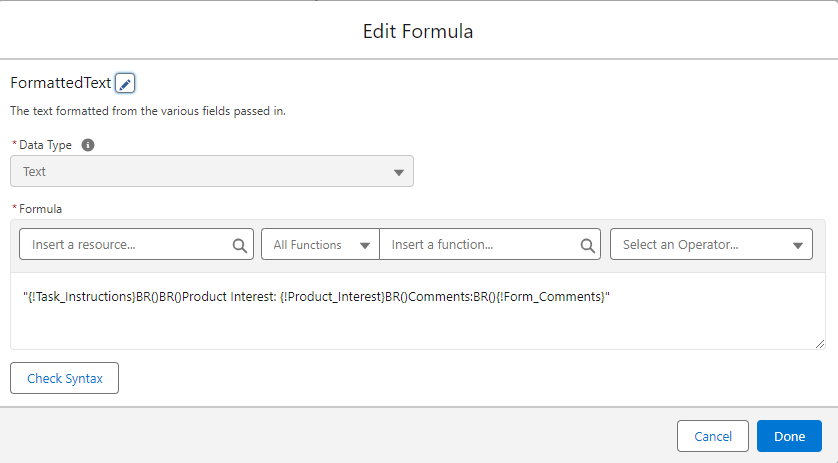
Optional Step: Description formula

For the description, we can use a formula to put together the description that we want using a combination of our other variables.  To do this, create another variable with the type “formula”. Name it “FormattedText” and input this as the formula: “{!Task_Instructions}BR(){!Form_Comments}”

This will update the description field on the task to display the information inputted from Task Instructions and Form Comments. You can input a formula to include the variable values that are important to you. See another example in the screenshot below.

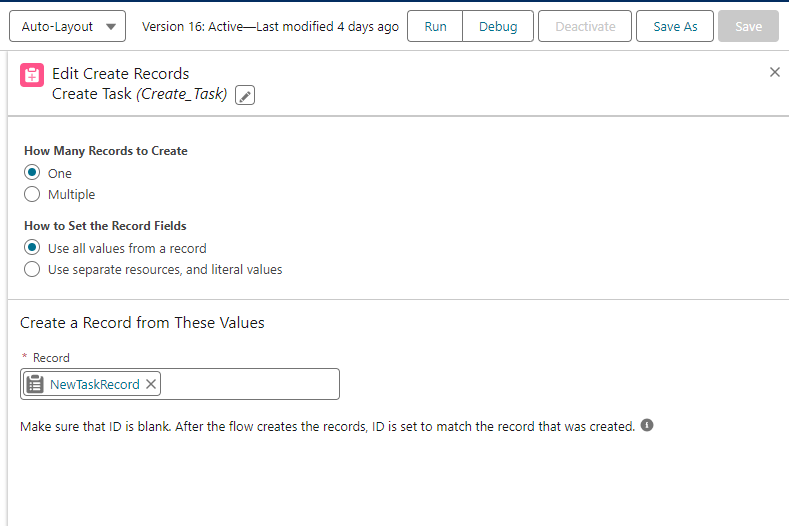
Create task record

Our last step in the flow will be to create the task record. Use the “Create record” element and add the variable “NewTaskRecord” under the “record” drop-down. Leave the other settings as is.

Flow is complete

When you are complete, your flow should look like this:

Your flow is complete. You can debug using an existing record. You will need to activate the flow before moving on to the next step.  

Marketing Extensions External Action

Next we want to create the External Action. Be careful with these,  we can’t currently delete any we make by mistake. If you have access to an Account Engagement Sandbox, this could be a good time to use it when building your first External Action.

Create a new Extension

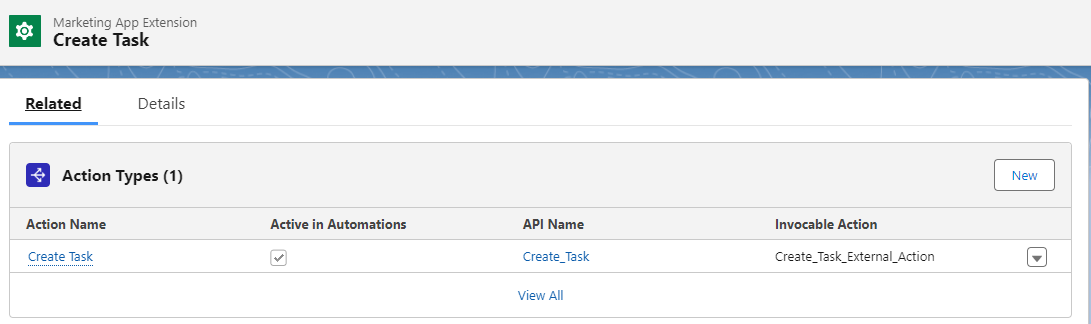
In Marketing Setup> Marketing App Extensions, we will want to create a new Extension.  Name it “Create Task” and select the box “Active in Automation”.  

Create a new Action Type

Once it’s created, go to the Related Tab, and create a new “Action Type”.

Name it “Create Task” and Search for the flow we just created under “Invocable Action”. The flow must be activated.  Check the box for “active in automations” . 

The Action Type will write an Action Schema for us. We can simply click save, and we are done.

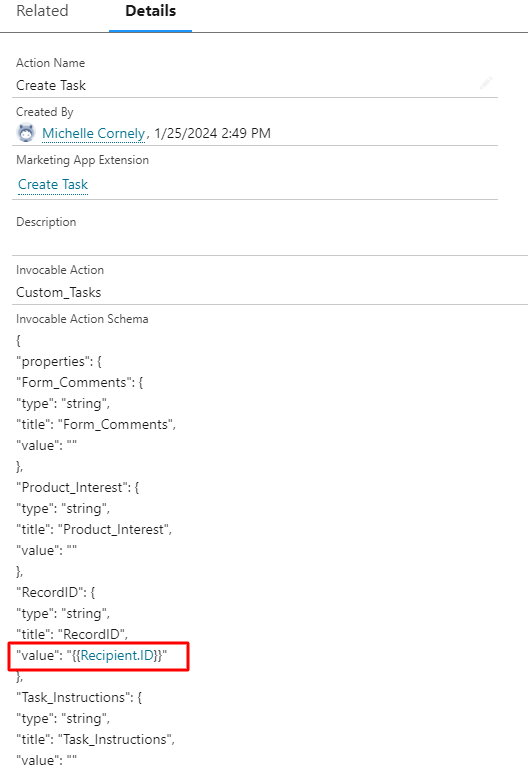
Optional Step: Adjust default details

We can also adjust the default details, providing Account Engagement default merge fields, and reordering the fields in the ‘view’ section, and even making fields required, such as our RecordID field. These adjustments can make our new tool easier to use! In the screenshot below, we’ve added in the merge field for RecordID so that we do not have to have our end users do this in Account Engagement.

Select business unit

Under the related tab, select “New” under Business Unit Assignments. Search for your business unit name and select it.  If you are unsure of your business unit name, go to Marketing Setup > Business UnitSetup.

Completion Action

Now we can use our shiny new Task!

Finalize with completion action option

When our Marketing App Extensions have all the bits ‘Active’ and we have assigned our business unit, we will get a new Completion Action option on forms and Engagement Studio Programs.

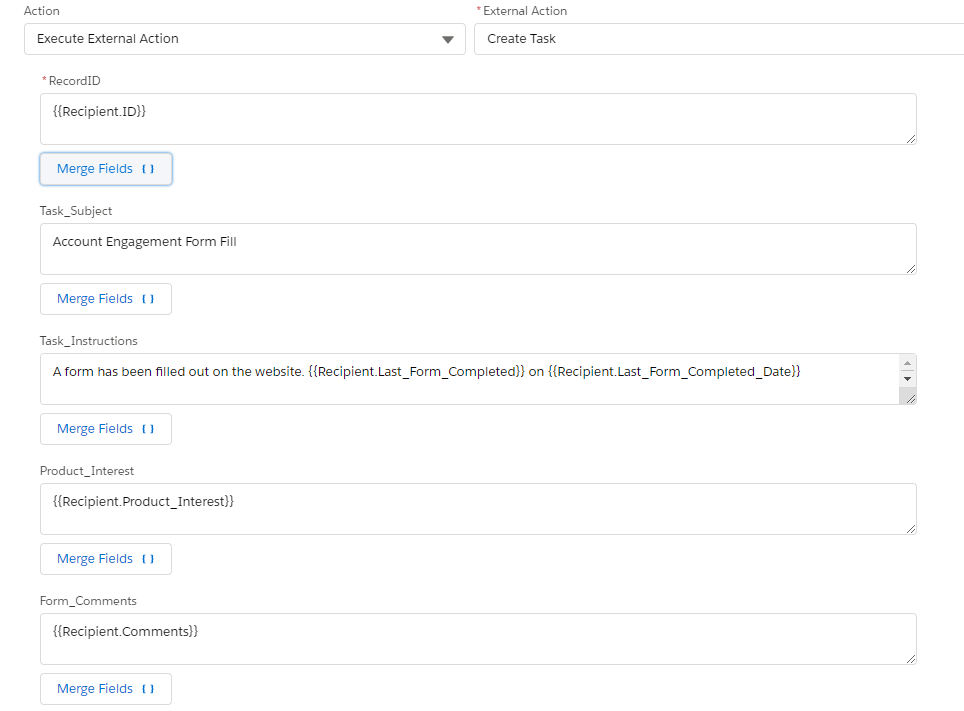
Fill in all the fields

This is where we can fill in all the fields we created as flow variables. We can use Account Engagement merge fields to fill them in, or just start typing text. Or a bit of both!

If you look at the ‘Task_Instructions’ in this example, you can see we can fill in text with a bunch of merge fields. Those merge fields are other completion actions on a form.

Start Creating Custom Tasks!

We used to be able to create a task and only have a generic “Follow up with this Contact” in the description. With custom tasks, the descriptions can now be populated dynamically with the exact information that prospects input on a form.  

Tasks can hold custom information like support questions or product interests, which can help streamline the next steps for the users receiving the task. So if your sales team is getting the tasks sent to them, then they can check the task to understand the best route to take.

Need help understanding how external actions and Salesforce tasks fit into your overall business strategy? Reach out to the team at Sercante to start a conversation.

Thank you to Mike Creuzer for contributing his expertise to write this post!

No more posts to show