Category

Andrea Tarrell

Last year, I wrote a blog about why Pardot users should care about #INBOUND17.  This year, I had the opportunity to attend the Hubspot’s annual conference in person.  I even brought a buddy…
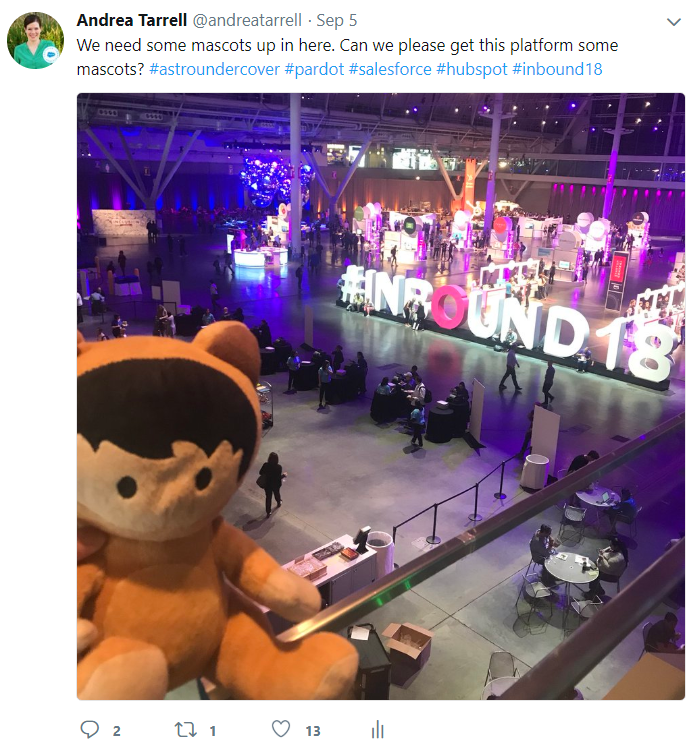
Astro Undercover

So why would a Pardot blogger pay attention to Hubspot?

First, I’d like to clarify that while this blog is the “Spot for Pardot,” my company is marketing automation platform agnostic.  Our mission is to help marketers be successful on the Salesforce platform – whether that’s all-in Ohana or Salesforce + another marketing automation platform.

But regardless of business focus, I think it’s hugely valuable for martech pros to be in the know about what’s going on with other platforms.

Our space is evolving so rapidly and in such interesting ways. If you blink, you’re behind.

So if you’re interested in knowing what Hubspot is up to — read on.

Coming out of INBOUND 2018, a few themes really stuck with me:

1. Ding dong, the funnels are dead

Normally, any time a martech vendor declares something “dead,” I roll my eyes.

But when Brian Halligan took on funnels in his keynote, I couldn’t have agreed more.

If there’s a marketing idea that’s ready to die, it’s the concept of a funnel.

Funnels look great on paper.  They’re easy to organize and color code.  But they do not reflect how most humans make decisions or buy things.

The buyer’s journey is largely non-linear.  A potential buyer is aware of your brand, then they forget.  They’re in consideration stage, then they get distracted.  They ask for a proposal, then go dark, then come back 6 months later.  They buy… and then they come back and buy again later.

Knowing that this is the behavior we’re working with, marketers jobs’ are tougher than ever.  Buyers are on a journey each their own, on their own terms.  And they may have no desire at all to engage in traditional sales and marketing channels.

So the goal becomes how to meet prospects where they’re at, address their need in that particular moment, and build a consistent brand experience no matter how the buyer chooses to connect.

2. A new day is dawning… for the flywheel

So if we all go and burn our funnels, what rises from the ashes?

Between doses of insight and dad jokes (A+ paternal humor, truly), Halligan unveiled a new frame for the challenges marketers face.  He calls it the Flywheel:
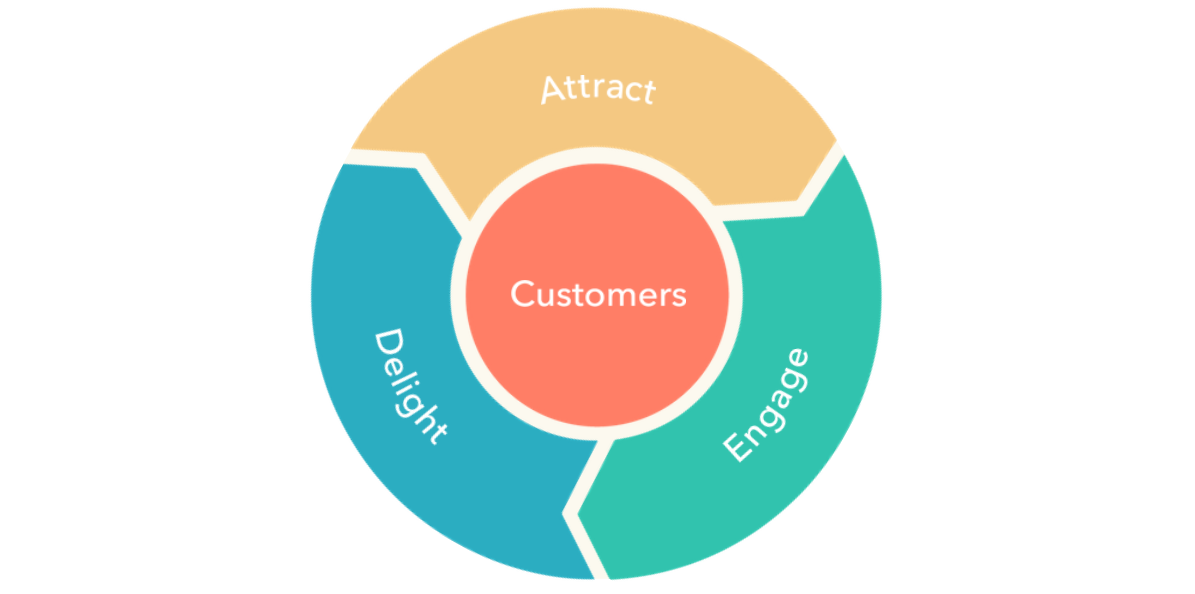
Flywheel.PNG

The middle seater next to me flying out of BOS read this over my shoulder, slammed her drink down, and yell-whispered:

“I’m not building a f*cking flywheel.”

Sorry random lady, I totally am.

The flywheel concept totally clicked with me.  When buyers are on a non-linear journey, the key to marketing success is also non-linear.

When you’re first getting started with a new marketing initiative, it feels impossible and endless.  You feel like you’re rolling a boulder up a hill — or to stick with this analogy, trying to move a massively heavy flywheel.

But each marketing and sales win builds momentum.  A sale isn’t the end of the road — it’s one of many pushes that accumulate and makes things spin faster.  Each success feeds into a virtuous cycle that begets further success.

3. Burn your marketing job descriptions

You might notice that many of the things on the flywheel don’t fit tidily in the “marketing” box.

The definition of what is considered marketing is rapidly expanding.  And I think the marketing leaders of tomorrow will be the ones that embrace that.

Who better to own the end-to-end customer experience than marketing?  Who else sits at the intersection of sales, service, and big picture brand strategy?

The flywheel is such a solid visual because it illustrates:

a) the role that customers can play in driving growth

b) how marketers are uniquely poised to touch the entire organization.

In the last 6 months, I’ve seen easily 10X requests for Pardot + Service Cloud than I’ve seen in my entire career as a consultant – and I think this is an offshoot of this phenomenon.

4. Campaign Influence Reporting is where it’s at

If ya’ll have been here for a hot minute, you know that I’m head-over-heels obsessed with Campaign Influence Reporting.  I didn’t hear this as a theme mentioned at the conference (it’s not a HS core competency), but it was something I couldn’t stop thinking about nonetheless.

In the age of the flywheel — where every customer interaction is “marketing” – how do you actually measure what’s working?  How do you track which marketing, sales, and service initiatives move the needle?  How do you get visibility into what online and offline efforts touch a prospect on its way to becoming a closed won opportunity?

I pose a lot of rhetorical questions in my blogs, but these are not among them. There’s an answer – and it is campaign influence reporting.

Every single marketer with access to a Salesforce org should be tuned into this.  Whether you’re using Pardot, Hubspot, or carrier pigeons to disperse your marketing message, this will have an impact on your ability to credibly demonstrate contribution to revenue.

[Want to chat “art of the possible” for your organization? Hit me up at [email protected]. I love talking about this.]

5. Friction is the enemy of growth

So you invest all of this energy in getting your flywheel humming.  The biggest barrier to sustaining momentum is customer friction.

This quote from Dharmesh Shah struck a chord with me:

“You don’t need to make your product 10X better, you need to make your experience 10X lighter.”

Reducing customer friction isn’t a new or novel concept.  But it’s still hyper relevant, because friction is all around us — even with some of the biggest and best loved brands.

A no-friction pre and post sales experience has the power to differentiate your business in a big way.  And small businesses actually have an advantage here over the big dogs to mobilize and make a change.

Some food for thought on pre-sales friction: How can you simplify the choices your buyers face and accelerate the path to a “yes”?   What parts of your sales process introduce hassle, tension, or uncertainty for the buyer?  In what situations can technology (i.e. CPQ or electronic signature apps) help accelerate deal closure?

Post-sale, how do you continue to captivate your buyers, be easy to do business with, and create an experience that inspires loyalty/love?

6. Build your mini-empire with scalable materials

Another theme that emerged was that of “scalable materials” in the context of what we do.

Building a martech stack sometimes feels a little Game of Thrones.  Each of our companies has limited resources.  And you try to deploy them in a way that makes sense.

There’s a near term mission (e.g. escape the House of the Undying) — but you’re playing the long game too (e.g. vying for the Iron Throne) and you can’t lose sight of that.

When choosing a platform, of course make sure your needs are met today.  And then picture what you might need when your business doubles, and doubles again.  Find a platform that is accessible/usable/empowering for your team now, and ensure it leaves the door open to other functionality and tools that you will grow into.

For when you’re the Mother of Dragons, and all.

What do you think?

What vendors are you keeping an eye on?  Who is contributing interesting insight on where our industry is headed?  Did you pick up on anything from INBOUND 2018 that I missed?

Let me know in the comments, yo!

So picture this scenario: Pardot says you can’t email someone.  But you want to. So how do you override what the system says so you can send your gosh darn email?

Here’s a standard consultant-y answer for you:

It depends.  

It depends on WHY you can’t email people, the age of your Pardot org, and if you’ve done anything to mess with the default behavior of the subscription management fields.

This blog is going to outline currently available default options in new, AMPSEA enabled orgs.  I’ve seen plenty of client orgs that do NOT play by these same rules. My best guidance if you’re seeing something in your org that doesn’t match up is play this song, and TEST, TEST, TEST before doing anything crazy.

With that disclaimer out of the way, let’s break this down.

The fields that control mailable status in Pardot & Salesforce

There are three little checkboxes in Salesforce and Pardot that are key here: Email Opt Out, Do Not Email, and Pardot Hard Bounced.

Email Opt Out

This default field is intended to show who has actually opted out of email and unsubscribed.  In Pardot, this is labeled “Opted Out.” In Salesforce it’s labeled “Email Opt Out” (API name: HasOptedOutOfEmail.) 

These Pardot and Salesforce fields are mapped to each other by default, and are mapped from the Lead to the Contact on record convert by default. 

Do Not Email

This default field in Pardot that is intended to be the master list of anyone you can’t email — unsubscribes, people who have hard bounced, and people who have soft bounced 5 or more times.  

It does NOT exist in Salesforce by default. But it can be mapped to a Salesforce field.

Pardot Hard Bounced

This is a custom field created in Salesforce by default when you install the Pardot connector.  It’s available to pull into reports, list views, and page layouts in Salesforce.

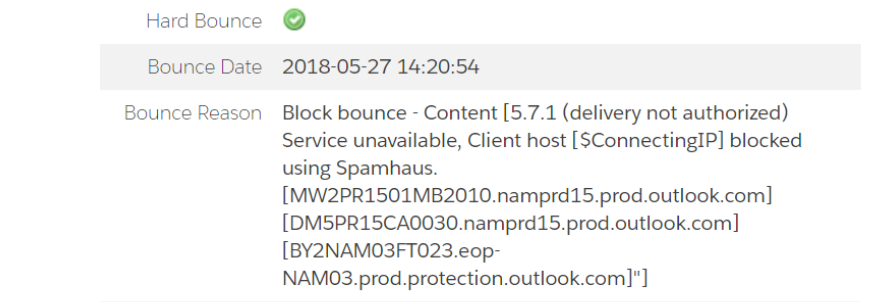
But strangely, it does not show up as a field you can edit or touch in Pardot.  When you actually have a hard bounce though, you see these pop up on the prospect record:

bounce fields.PNG

If you try to edit the prospect record to get at these, no dice — MC Hammer style, you can’t touch this.

3 ways to opt people back in who have unsubscribed

The default behavior of Pardot is to err on the side of respecting Opt Outs.  If you opt someone back in via Pardot, and Salesforce still has an opt out value, Salesforce will update Pardot to show the prospect as opted out. 

This makes sense, conceptually.  The person opted out, the system tries to honor that.  In practice, this is sometimes problematic because:

  • Sales reps love to opt people out and then complain about them not being emailed
  • You might import legacy lists with questionable mailing status as “Opted Out,” and can’t email them even if they later re-engage
  • A million other random scenarios

But, you have options to work around this.

Option #1: Individually opt people back in both places, super fast

You can opt someone in really quick in Pardot, and then race the connector sync and opt them back in via Salesforce too.  

This works okay — but it means only Pardot admins can opt people back in, provided they have access to the Salesforce record in question and can toggle between browser tabs fast.

Option #2: Mass opt people back in with the help of Pardot Support

If you need to opt people back in en masse, you can plead your case to Pardot Support and pinky swear that these people really want emails from you. 

If they’re on board, you can unverify your connector, use DataLoader to clear the Opt Outs on the Salesforce side, and get Pardot Support to clear the Opt Outs on the Pardot side.

Not a terrible process, but it does result in some downtime for the connector, which is not ideal.

Option #3: Enable connector setting to overwrite prospect opted out field

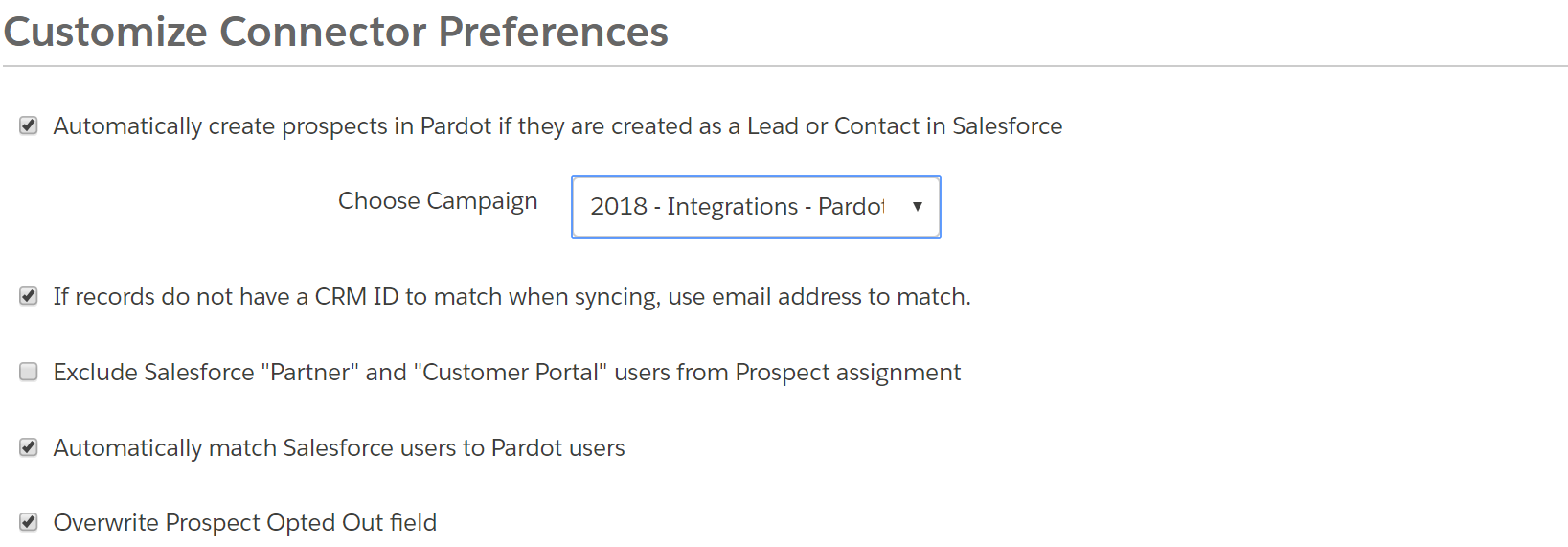
As of very recently, there’s a new option available if you edit your Salesforce connector:

Prospect Opt Out Setting Pardot.PNG

If you check the box, each user can opt in up to 100 people per day.

3 ways to update prospects who are Do Not Email, but NOT unsubscribed

Pardot is also pretty protective of the system generated bounce statuses and the “Do Not Email” field.  This makes total sense — if you had a bunch of people bounce out, there are probably bigger changes that you need to make to ensure future successful deliverability.

As mentioned above, the Do Not Email field isn’t even mapped to Salesforce by default.  But Pardot Hard Bounced is.  If you click in to edit this field, Salesforce will let you “unbounce” a prospect:

Pardot Hard Bounced in Salesforce.PNG

…but this effectively does nothing.  The field will continue to be unchecked in Salesforce, even after the records sync.  But Pardot looks at this and says:

“Nah, bro.”

…and keeps the prospect marked as Do Not Email and Hard Bounced on the Pardot side.

But again, you have options to bend the system to your will, you powerful admin, you.

Option #1: Click “Remove Do Not Email from all Records with this email” on each prospect record

If you go into each bounced or DNE prospect record, you’ll see this link:

Remover.PNG

Click it, and BOOM, they’re back in biz.

Option #2: Uncheck Do Not Email on each prospect record

Edit the individual prospect in Pardot, uncheck Do Not Email, and save.

You won’t have the ability to edit the Hard Bounced, Hard Bounce Date, or Hard Bounced Reason field — but they will disappear from the prospect record in Pardot.  The prospect’s “Pardot Hard Bounced” field in Salesforce will remain checked.  But they’re mailable.

Option #3: Change their email address, then change it back

If you edit a prospect’s email address in Pardot or Salesforce, it clears the Hard Bounce and Do Not Email fields.

If a prospect hard bounces, that means the email address was bad, right?  So, if the email address changes, then that prospect should be mailable again — which is why the system clears these fields.

You can use this to your advantage if you need to clear the Do Not Email field en masse.  Here are the steps:

a. Export the list of bounces you need to opt back in

Be sure to include email address and CRM Lead FID and CRM Contact FID.

b. Add a column called “new email” and add the formula =CONCATENATE([cell where you have email],”.test”)

You’ll end up with something that looks like this:

Rewrite Emails.PNG

c. Import a CSV to Pardot to overwrite the Prospect’s Email field

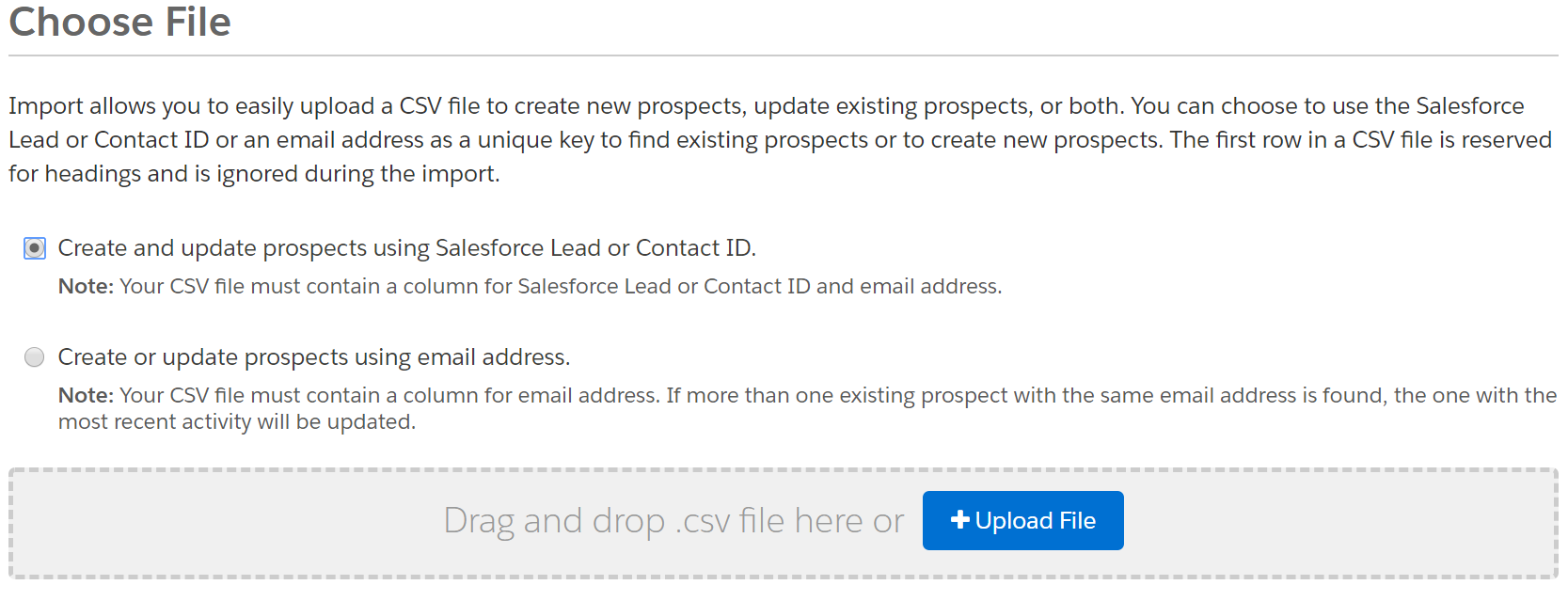
In Step 1 of the import wizard, choose to match on CRM ID:

Pardot Import with CRM ID.PNG

When you get to the field mapping step — map your “New Email” field to “Email” and check the box to overwrite existing data.

Remap.png

d. Import a CSV to Pardot to FIX the prospect’s email field

Let your import do its thing, then spot check a few records.  These should now be mailable — woo hoo!

But now you have to fix the email addresses so that they’re actually correct.  So re-import your same spreadsheet, and this time map “Email” to “Email,” and tell Pardot to overwrite existing data.

Voila!  All set.

This is a curated list of awesomeness for the Pardot diehards attending DF18.  If you’re NOT attending the Superbowl of Salesforce, I apologize in advance for the crippling FOMO you may feel if you continue reading.

After reviewing the full session list, these are my top 10, must see, camp outside the door, consider stampeding, Pardot agenda items.

1. Announcing the Pardot Lightning App

The elevator pitch:

“An in-depth look at Pardot’s new home in Lightning experience…with standardized navigation, Lightning becomes the one-stop shop for all your critical customer data. Join us for an introduction to the most deeply integrated Marketing Automation solution in the industry.”

Why I’m Pumped:

Pardot on Platform is something users and admins have DREAMED of… and this is an important step to bringing that vision into reality.  And, as icing on the cake, this session features the amazingly talented Bailey Wilson.

Check it out→

2. Enterprise-Level Marketing Automation with Pardot

The Elevator Pitch:

“Join [Amazon] for an in-depth look at how Pardot supports Enterprise growth across multiple business units with our forthcoming Workspaces feature.”

Why I’m Pumped:

Ummm what?  New feature alert.  I want to hear more about Workspaces.

They tucked this little product teaser into the description, and left it out of the title — sneaky sneak.

Check it out→

3. Use Heroku, Pardot, & Amazon Redshift to Scale your Go-To-Market Operations

The Elevator Pitch:

“The goal of this session is to help individuals understand how Heroku products (Postgres and Connect) can be paired with other Salesforce products (Salesforce.com and Pardot) and Amazon Redshift… and enable the sales, marketing, and product teams to make a greater impact.”

Why I’m Pumped:

Sounds geeky as all get out.  I’m there.

Check it out→

4. Better By Design: Using B2C Creative Strategies For Better B2B Marketing

The Elevator Pitch:

“You’ll learn how to harness the power of thoughtful B2C creative design to execute an exciting and engaging B2B campaign, and how Pardot can help you do it.”

Why I’m Pumped:

I really admire the agency that’s speaking at this session, Launch. They built the super slick interactive ROI calculators that Salesforce uses to promote the benefits of the platform. Very interested to hear their insights.

Check it out→

6. Underutilized Pardot Features

The Elevator Pitch:

“Go beyond your Pardot Quick Start and score big points with your Sales team with these underutilized features included with your Pardot org, including making the most of the seamless connection with Sales Cloud.”

Why I’m Pumped:

It’s easy get swept up in day-to-day priorities and forget to tap into some of the more… shall we say “obscure?” features of the platform.  Stacey Cogswell is a super savvy user/admin/consultant and Salesforce MVP who will bring an awesome perspective to this topic.

Check it out→

7. Hands-on Workshop: Explore your Data with B2B Marketing Analytics

The Elevator Pitch:

“Dive deeper into the capabilities of the B2B Marketing Analytics. During this hands-on, expert-led session, you’ll learn about the datasets, dashboards, and lenses. This session is ideal for customers who have some experience with B2B Marketing Analytics.”

Why I’m Pumped:

The hands-on training sessions are consistently some of my faves sessions.  They are extremely hard to get into — so bookmark it and show up early!

Check it out→

8. Data Transparency in the Age of Intelligent Marketing

The Elevator Pitch:

“Marketers have a… responsibility to create trusted relationships with customers and partners. We’ve seen several examples in the news of how not to do this… but what steps can marketers take to ensure you’re balancing personalized marketing campaigns with customer-centricity, governance, and compliance?”

Why I’m Pumped:

This is such a thorny topic, and very timely with Europe’s recent rollout of GDPR, along with California’s swift move to follow suit.  How marketers responsibly collect, use, and disclose customer data is a debate that has only just begun.

Check it out→

9. What to Expect When You’re Expecting… Pardot

The Elevator Pitch:

“Did your organization just join the Pardot family? Not sure where to start to get the most out of marketing automation? This session will teach you how to standardize, systemize and analyze digital activities throughout your org by using Pardot.”

Why I’m Pumped:

I mean, this says it all:

What to Expect When You're Expecting Pardot

Check it out→

9. One Team, One Dream: Align Sales and Marketing with Marketing Automation

The Elevator Pitch:

“Marketing thinks Sales isn’t following up on their leads, and Sales thinks Marketing’s lead gen strategy could stand improvement. Toss in widely different metrics, goals, and processes, and you have a recipe for a nearly unparalleled rivalry. But what if you could go from frenemies to… actual friends?”

Why I’m Pumped:

This is a pain I’ve felt so many times as a user/admin, and a challenge I now help my clients navigate in their organizations.  It’s a topic that people keep talking about because it continues to be relevant.

Check it out→

10. Swipe Right: 3 Lessons Marketers Can Learn from Speed Dating

The Elevator Pitch:

“To avoid a breakup, you’ve got to woo your customers and prospects with some old-school dating advice: Just listen. What else can you learn about marketing from the Tinder approach? Join us as we illustrate how a bit of understanding can reignite the spark with current customers and entice future ones.”

Why I’m Pumped:

I hope someone says:  “If you love Pardot so much, why don’t you marry it?” at least once.

In all seriousness though — B2B marketing is not all that different than building a long term relationship.  And in a world of snap judgement and limited time, a solid and differentiated strategy is everything.

Check it out→

Come hang IRL at Dreamforce!

In addition to attending these awesome sessions,  I’ll also be speaking at / supporting:

  • Unleash Your Salesforce Superpowers to Support a Cause – Thursday @ 4:30 PM
  • The Pardot Genius Bar – Throughout the week
  • Marketing Birds of a Feather Roundtable – Tuesday @ 8-10 AM
  • Marketing Birds of a Feather Roundtable for Financial Services – Thursday @ 3 PM

I’d also love to grab coffee (or a stronger beverage) with any blog readers… so if you’re going to be there, please ping me at [email protected]!

A few months ago, I posted a confession that I Have an Email Marketing Crush on CB Insights.

And now, there’s another brand that’s making my heart throb. It’s Chubbies, ladies and gentlemen.  Yes, the uber southern frattastic short shorts brand.  Their subject lines are bold and absolutely hilarious.

Another interesting tactic of Chubbies’ is creative use of the From Name and From Email.  Recent “senders” of Chubbies emails include:

  • Chubbies
  • Nana Chubs
  • Chubmiral Ackbar
  • MC Hammer
  • Oh Farts
  • You
  • Hungover You

As email marketers, we have a limited number of levers at our disposal to entice opens.  All our recipients see in their inboxes is the subject line, the preview text, and the sender info.

So why not pull a Chubbies and tap into the From Name as another opportunity to get creative?  Lets talk about what your options, what best practice says, and ideas to change things up.

What your email sender options are in Pardot

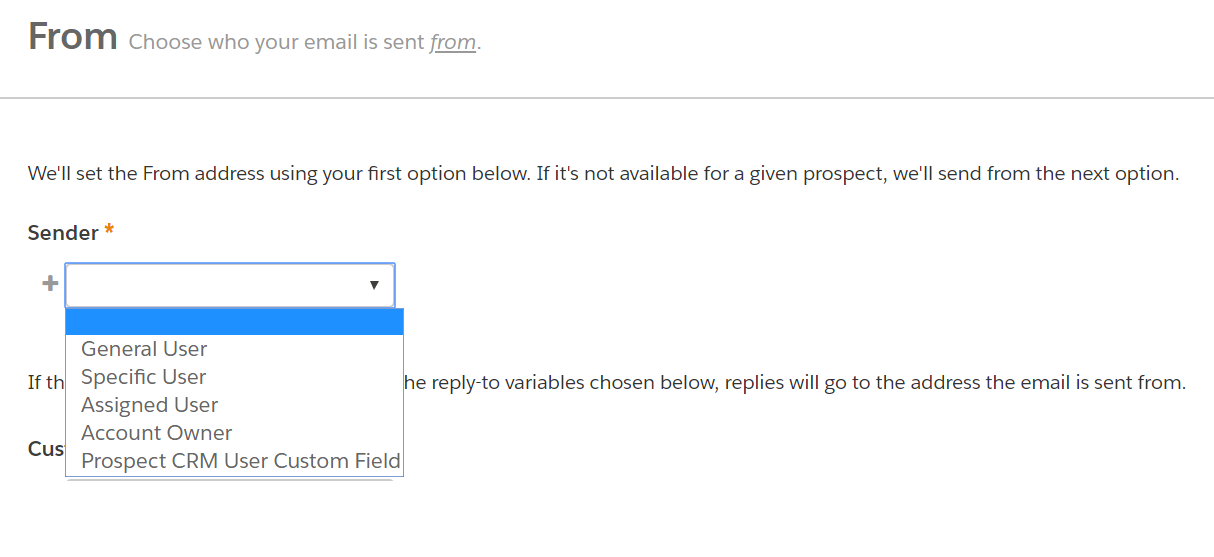
In Pardot, we have several options on who we can send emails from:

Sender Options in Pardot.png
  • Prospect CRM User Custom Field – If you have a user lookup field on the lead/contact record in Salesforce, you can create a custom field in Pardot and then use that as the sender.

  • Account Owner – Send the email from the prospect’s account owner in Salesforce.

  • Assigned User – Send the email from the user who owns the prospect record.  If the prospect is synced to Salesforce. this is the Lead or Contact Owner.

  • Specific User – Select from a list of your Pardot users to use as the email’s sender.

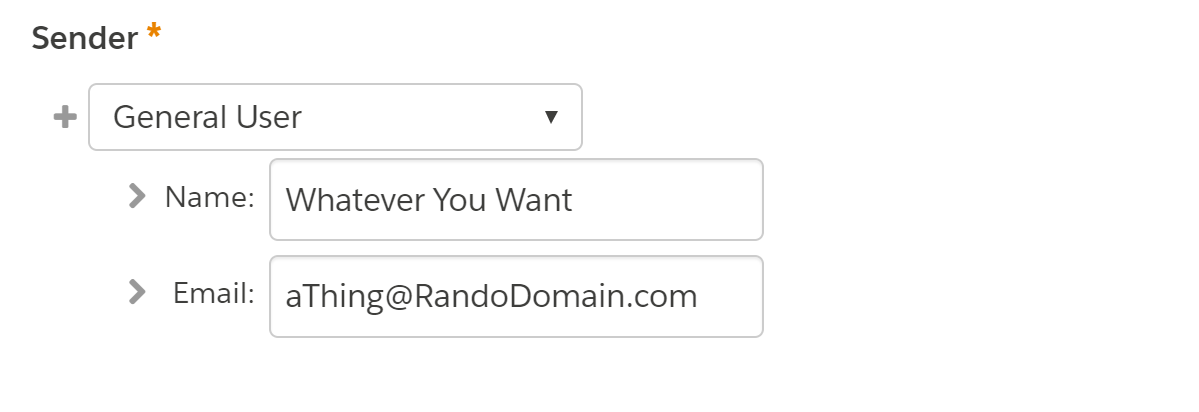
  • General User – Set a general address (like [email protected]) or a non-Pardot user to be the sender of the Email.

The first 3 options on the list may or may not apply to all prospects.  If you have an unassigned prospect for example — they’re not going to have an Assigned User or Account Owner.  If you pick one of these 3 options, Pardot will make you set a fallback scenario with a Specific or a General User.

Setting a General User in Pardot

With the General User option, you can literally put whatever you want.  You type in a name and email, and bam.

General User Sender in Pardot

In most email clients, users see the Sender Name in their inbox preview, and only see the Sender Email when they actually open the email. 

For example, if “Chubbies” is the Sender Name, then we don’t know the Sender Email address until we open it.

Guidelines on “From” name and address

General best practice guidance on Sender Name and Email is to pick something people will recognize and trust.

Many ESPs recommend NOT to use an individual’s name, and to use the company/brand name instead.

According to Campaign Monitor

In most situations it’s much better to use a company or brand name over an individual person’s name, unless that person is the brand, like Madonna or Betty Crocker. If you have a good reason to use a person’s name and it’s not a brand, follow it with a comma then the company or organization you’re from.

From Act-On:

In most situations, you want to use a brand name your recipients can instantly recognize as yours. It’s normally a bad idea to use a person’s name, unless that person is your brand, or there is a direct relationship between the person and recipients.

I don’t think this is the best call in many B2B or considered purchase sales environments.

I generally recommend using a person’s name or a person’s name + the company name.  This is a great opportunity to build name recognition for your reps who are out there prospecting and trying to get appointments.  Having a real person’s name/email as the sender has also been shown to positively impact deliverability.

My experiment with from name and email

Not all brands (mine included) can get away with sending people emails from “Hungover You.”

But I’m dying to see if a Chubbies-like strategy could positively impact open rates.

So my not-statistically-significant experiment with my modestly-sized list was to send this week’s blog digest email as an A/B test.

Version A

Sender: The Spot for Pardot

Version B

Sender: Future Dwight

Results to follow…

If You Want to Think Outside the [In]Box

So we have “best practice” guidance on one hand.

And Chubbies’ creative comedic genius on the other.

There aren’t that many examples of brands playing around in this area of email marketing.  If you’re interested in running your own experiment, I’d suggest a few basic parameters.

1. Use a real sender email

While you CAN put anything you want in the Sender Email spot, keep it as a real email address that people can reply to… because you know, CAN-SPAM.

2. Use your own domain

Use your domain so that recipients’ email servers will recognize it as legit (that’s why you went through the trouble of setting up DKIM and SPF records, remember that from your implementation?)  And definitely stay away from free email providers (i.e. don’t send from @gmail.com).

3. Stay short & sweet

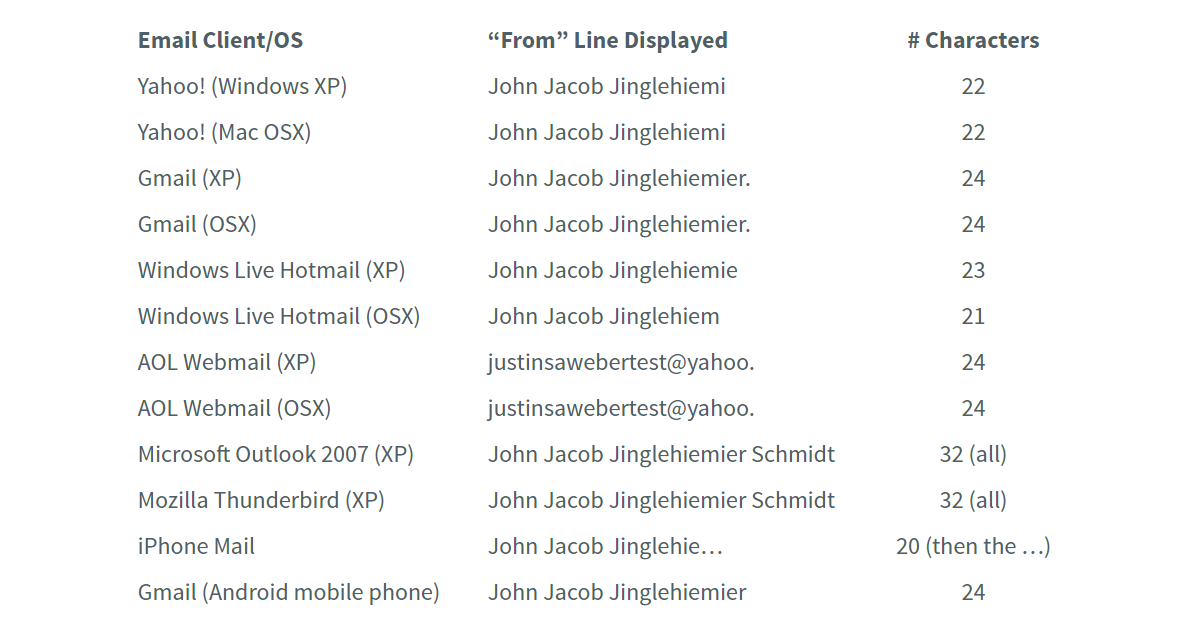
Keep in mind that some email clients cut off long “From” names. An AWeber strategist ran a test emailing himself from “John Jacob Jingleheimer Schmidt” and here’s what he found:

Sender Name Length

Apparently JJJS is not as great of a name for inboxes as it is for camp songs.  Don’t tell his mother.

4. Stay on brand

Of course, keep your experiments consistent with your brand and know your audience. Weird senders for men’s leisurewear? Totally cool. Weird senders for finserv, healthcare, and other super serious things? Maybe tread cautiously.

But other than that?

Have at it, ya mad scientists!

If you play with this, let me (and your fellow readers) know what you find in the comments.

Okay, real talk: the IdeaExchange needs some work.  

If you’re not familiar with the IdeaExchange, it’s a pretty amazing concept — users submit ideas, other users vote on them, the product team reviews, wishes get granted, and we all hug and high five.  

But in reality, that’s not what usually happens.  SteveMo shared some feedback on this that has gotten some great traction, and it sounds like Salesforce is working on making the process better.

For Pardot users to take advantage of any improvements though, we as a group need to step up and start contributing to the discussion on the IdeaExchange.

What’s broken with the IdeaExchange as it stands today

“Post it on the IdeaExchange”

…is probably the most frustrating thing you can hear from support when something really critical that you absolutely need yesterday isn’t available.

And then, you finally suck it up, head over there, and you see 500+ Pardot ideas just sitting. Many have hardly any votes, because many Pardot users are unaware that the IdeaExchange is a thing.

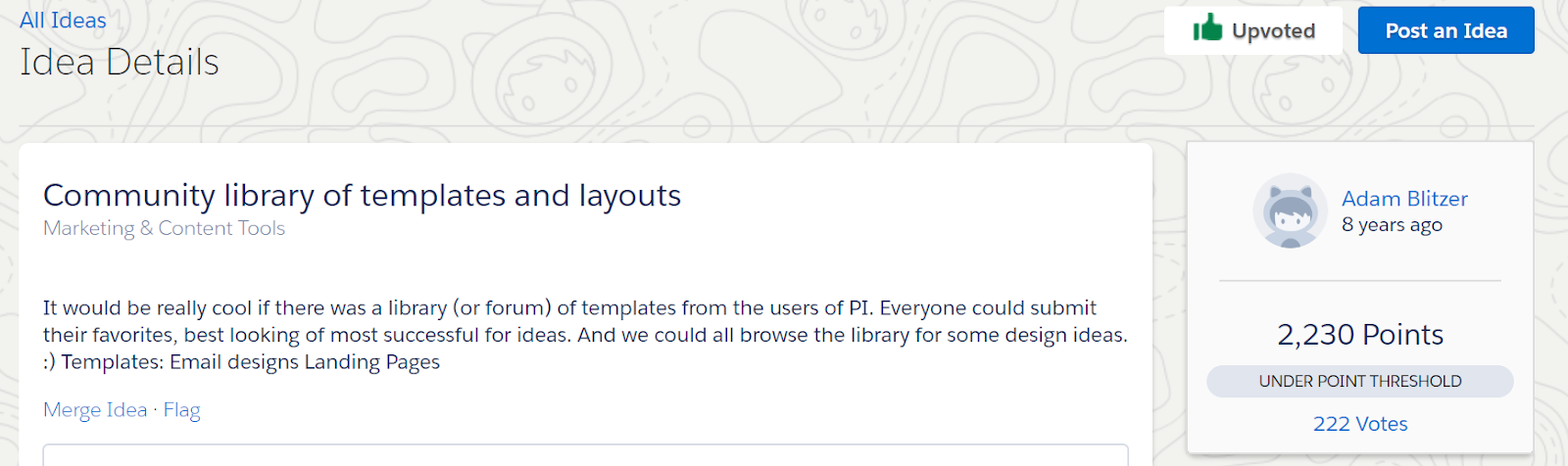
Then you see some genius ideas with hundreds of votes, and there’s no action. Case and point: this idea posted by Adam Blitzer from 8 years ago.

Pardot Idea Exchange.png

Pardot was brought into the Ohana via acquisition 2013.  Did Adam Blitzer really post this idea in 2010? Very unlikely. But you get the point.  Good ideas sit, may or may not get voted on, and don’t seem to actually influence product decisions.

How Pardot users can contribute to a solution for the IdeaExchange

In the past, I’ve occasionally upvoted ideas, but have really hesitated to post anything to the IdeaExchange.  It has just felt like an exercise in futility.  And really, I like talking about things that I LOVE about the product far more than trying to rally people to think about its faults.

But Salesforce recently announced it’s revamping the IdeaExchange… and I’m excited to see what comes next.  They’ve created an advisory board, feedback sessions, and more — with the stated goal of:

[An] IdeaExchange that can scale with our community’s growth and our growth – and that in 5, 10 years and beyond it will still be a place for meaningful, impactful discussions where together we can prioritize our product roadmap.

Will this vision be realized?  Time will tell. But this seems like an opportunity to make sure Pardot users get in on the action.  

So, I’m going to start posting ideas to the IdeaExchange.

And upvoting aggressively.

And sharing features that I strongly feel should be incorporated into the product.

I’d invite you to do the same… starting with the features below.

Pardot Ideas to #VoteAndPromote

I literally went through every idea on the IdeaExchange this morning and made a top 42 list. 

The best ideas and comments include detailed descriptions, use cases, and examples how the feature request will provide business value. This gives the product management team something to work with as they advocate for new features, and gives fellow users something to relate to as they consider hitting that magic ‘upvote’ button. 

I won’t inundate you with ALL of my top 42… so for now, just a few:

  1. Phone Number Validation on Forms
  2. Set Field Character Limit
  3. Update Account Fields
  4. Relate Prospect to Multiple Accounts [if enabled in Salesforce]
  5. Automate “Send to Recycle Bin”
  1. Variable Date Function
  2. Account Wide UTM Codes
  3. Push Prospects to CRM Campaign via Table Action
  4. Use CRM Campaign “ISN’T” in Automation Rules & Dynamic Lists
  5. Option to Sync with Salesforce on creation of a custom Pardot field

Also — if you “upvote” an idea, you’re basically subscribing to future updates.  Super useful if/when your requested features get some TLC!

A few ideas I added to the Pardot pile

I also added two ideas that I feel really strongly about.  I would greatly appreciate an upvote on them if you have a moment:

To sum it all up…

The IdeaExchange has had its challenges — but for it to get better, we as Pardot end users, consultants, and superfans also need to support it. 

This was a mini epiphany for me, but obvious to some others.  Shout out to a super awesome, passionate, and patient product manager who told me this literally a gazillion times before I changed my mind on it. 🙂

Ariana Huffington’s open letter to Elon Musk struck a chord with me.

I mean… to be fair, she wrote a book on naps, so it was a little self serving, maybe. But I think it’s a worthy reminder to be a little less intense.

I love what I do, and I’ve spent many caffeine-fueled nights making ish happen. In the moment, these client and business challenges feel 100% heart/head/soul consuming.

But at the end of the day, we are Pardot pros doing some bad ass marketing. Not curing cancer or decoding a bomb that’s about to detonate and decimate all of humanity. Marketing emergencies exist… but they are few and far between, and most don’t include the imperative to ship an email by EOB.

Can we all agree to work hard, love what we do, and take care of ourselves? I think these don’t need to be mutually exclusive. When presented with a fake deadline or artificial pressure — let’s push back.

So Elon, bro, I’m sending you cosmic hugs and all the good vibes. I believe in you and your vision.

And readers — here’s to checking our FOMO and inflated sense of urgency, embracing rule number 6, making healthy life choices, showing empathy, and cutting each other some slack.

No more posts to show