Category

Getting Started

Product Note: Marketing Cloud Growth and Advanced are editions of Marketing Cloud Next and have also been referred to as Agentforce Marketing.

Since the announcement of Marketing Cloud Growth Edition on February 20th, we’ve been digging into the features of this new product as well as listening closely to the community’s questions about Marketing Cloud (Growth and Advanced Edition). We’ve compiled the most common questions from Salesforce webinars, Slack communities, our internal team, and our clients to get all your Marketing Cloud questions answered in one place. 

NOTE: This blog post was updated in May 2025 to reflect new release features and product updates.

Answers to all of your Marketing Cloud questions

Here’s a list of the most common questions we’ve seen.

Wait, what is the “official” name

So, this product was originally launched as “Marketing Cloud Growth Edition”. A few months later Advanced Edition was released and the product evolved to “Marketing Cloud Growth or Advanced Edition”. However, this was later shortened to just “Marketing Cloud”.  Now I know “Marketing Cloud” means “Marketing Cloud Engagement” to a large portion of the community so I also refer to this tool as “Marketing Cloud on Core” so no one assumes I mean “Engagement”. 

What is Marketing Cloud (on Core)?

Marketing Cloud is a new marketing automation platform from Salesforce. Marketing Cloud is built on the Salesforce Platform (aka “on Core”) and allows you to build multi-channel campaigns with Data Cloud, personalize marketing assets with Experience Cloud, and automate journeys with Flow. Marketing Cloud also includes Einstein and Agentforce capabilities throughout the platform as well as out-of-the-box content approval processes. 

Is Marketing Cloud Account Engagement and/or Engagement being retired?

This is the most common question we’ve heard so far and the resounding answer is No, Engagement and Account Engagement are not being retired. Marketing Cloud is another option for organizations that want to bring their marketing operations into Salesforce. Engagement and Account Engagement will continue to have their own robust product roadmaps. 

Which Salesforce Editions does Marketing Cloud work with?

Currently, Marketing Cloud works with Salesforce Enterprise Edition (EE) and Unlimited Edition (UE).

Is this the direction the Marketing Cloud Platform is going? All bundled within Core?

Yes, building Marketing Cloud’s foundation on core allows Marketers to get full access to customer data across the CRM and other clouds connected to the Salesforce platform. Breaking down data silos and uniting your data on one platform also allows Marketers to better leverage Einstein’s AI functionality as well as personalize every step of the customer journey. 

Can Marketing Cloud be purchased without Data Cloud?

Marketing Cloud requires Data Cloud. If you do not yet have Data Cloud, check if you’re eligible for the Free Data Cloud SKU or Salesforce Foundations

What is included out of the box with Marketing Cloud?

This is subject to change as the platform changes and grows but, as of May 2025 Growth Edition includes: 

See our previous blog post for more information on the credit consumption model of Marketing Cloud. 

Does Marketing Cloud consume super messages for email and SMS?

Marketing Cloud has different entitlements, emails and SMS do not consume super messages.

Do users need Salesforce licenses to access Marketing Cloud?

Currently users do need Salesforce licenses to access Marketing Cloud, but support for Identity Licenses is expected in the Summer ‘25 release (June).

Can clients with their own Data Warehouses use Marketing Cloud? 

Yes, Marketing Cloud is built on top of Data Cloud, which means they can connect to your data wherever it lives.

What is the setup of Marketing Cloud like? 

Setup for Marketing Cloud is being streamlined with each new release. Users with the Marketing Cloud Admin permission set can access the setup assistant for easier implementation of Marketing Cloud. Use the setup assistant to install or update all the required data marketing kits.

Is the intention to have customers self implement Marketing Cloud and do everything themselves?

The intention is to reduce the amount of energy spent on behalf of the customer to get to where they need consultants. Simply put, Marketing Cloud has very good defaults and a streamlined setup process, but there is still value to be added by consultants. If you’d like support setting up or optimizing Marketing Cloud, send us a message.

Can you configure marketing asset branding/brand standards within Marketing Cloud?

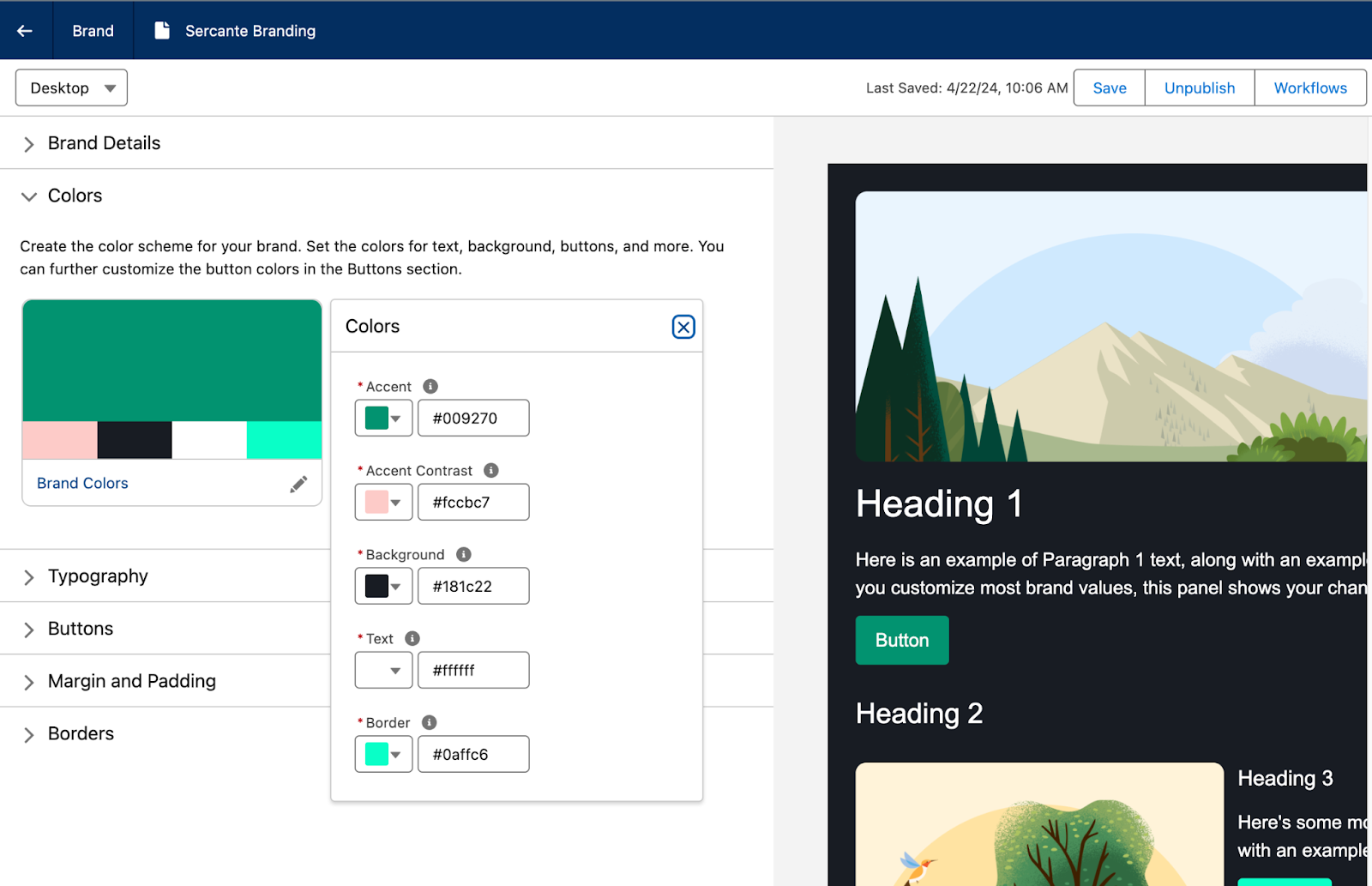
Yes! Users can create Brand Guidelines within Marketing Cloud that allow you to specify brand colors, typography, button styling, margins, and borders that can be applied to your marketing assets. If your brand standards are later updated, any marketing assets using that brand will also be updated. You can have multiple brand guidelines and also set a default Brand for your CMS Workspace so any new assets that are created for Marketing Cloud will be automatically branded. 

Does Marketing Cloud use a different Flow than the Salesforce Admin Flow?

Marketing Cloud uses the same Flow that users would have access to when building a backend, or admin, Flow. However, the elements and processes that the Marketing Cloud Flow has access to are limited by permission sets. Out of the box, the Marketing Cloud Flow is tailored elements and actions that focus on automating Marketing Campaigns and Marketing processes. Additional Permissions can be added or removed to custom tailor what users can do within the Marketing Cloud Flow. In short, Salesforce Admins are not giving Marketers full Flow functionality by granting them access to the Marketing Cloud Flow Builder.

What scoring features are included with Marketing Cloud?

Marketing Cloud has both People and Account Scoring. 

  • People Scoring
    • Engagement Score: Adds or removes points based on how engaged a person is with your Marketing initiatives.
    • Fit Score:  Similar to Account Engagement Grading, Fit Scoring tells Marketing and Sales how closely the prospect and their company aligns with the ideal client persona.
  • Account Scoring
    • Engagement Score: Aggregates how engaged Contacts associated with the Account are with your Marketing initiatives.
    • Fit Scoring: How closely the Account matches your ideal customer.
    • Intent Score: Optional AI driven scoring that measure how likely an Account is to make a purchase.  

What Einstein features are included with Marketing Cloud?

This is another area that is growing and changing with each release, but at of May 2025, Marketing Cloud includes:

  • Agentforce: Assists in building campaign briefs and campaign assets as well as generates copy for subject lines, preheaders, and body copy.
  • Einstein Metrics Guard: Uses predictive AI to filter bot activity from your org’s engagement metrics
  • Einstein Send Time Optimization: Send messages to your customers when they’re most likely to engage.
  • Einstein Segment Creation: Assists in building Data Cloud segments from natural language prompts.

Three additional Einstein features are available in Advanced Edition:

  • Campaign Designer (currently Beta): Assists in crafting campaign flows based on campaign objectives.
  • Einstein Engagement Frequency: Uses Predictive AI to determine how frequently to contact customers and improve the likelihood of engagement. 
  • Einstein Engagement Scoring: Uses predictive AI to assign individual contact-level scores and determine the most efficient way to message recipients to increase customer engagement.

Does Marketing Cloud include Campaign Influence models?

Marketing Cloud has Opportunity Influence rather than Campaign Influence.  Opportunity Influence assists marketers in identifying which campaigns were impactful for opportunities but relies on engagement rather than Campaign membership. 

Can Marketing Cloud personalize messages based upon the individual record? 

Yes, any fields connected to the Unified Individual can be used for personalization, this allows Marketers to even pull in data from other objects for cross object personalization. Dynamic Content is also available for use in email subject lines, email preheaders, and email components. 

Variation Targeting Rule screenshot

Does Data Cloud segment creation mean that SQL Queries will become a thing of the past?

Eventually, Salesforce is moving in the direction of clicks-not-code. Marketing Cloud includes prompts to help marketers build the appropriate filters in the segmentation builder, but you can also start from scratch within the builder. 

Will SMS have the same process around provisioning and approvals as MC Engagement?

There are two SMS code options available in Marketing Cloud, Short Code and Long Code. The short code option follows the same provisioning process that exists today for Marketing Cloud Engagement today. Check out our blog post for more information on the Short vs Long code and the provisioning processes.

Does Marketing Cloud include A/B Testing capabilities?

Yes! Except it is called Path Experiment and it does even more than simple A/B Testing. Take a look at our blog post on Marketing Cloud Advanced Edition for more info on this feature. 

How does Marketing Cloud handle pre-lead, unassigned records?

Salesforce introduced a new CRM Object for Prospects as part of the Spring ‘26 release. This new object can be used to store pre-lead records in CRM, similar to how Account Engagement keeps Prospects within its system and only sends Prospects to Salesforce when they are Sales/Lead ready. 

How can Account Engagement and Engagement Customers start using Marketing Cloud?

Account Engagement Customers get access to Marketing Cloud as part of their current contract. Check out our blog post for more details

Marketing Cloud Engagement customers will get a similar provisioning path soon (Safe Harbor!)

How has Sercante been involved in the launch of Marketing Cloud? 

Members of the Sercante team have been involved with Marketing Cloud since the pilot in 2023. We were also members of the Pioneer Program at launch in 2024 and have over 30 customers using Marketing Cloud today. We were also the first partner to be provisioned a Marketing Cloud Growth Edition Partner Org so we could provide feedback, documentation help, and FAQs to the development team. 

Learn more about Marketing Cloud Growth Edition

Want to learn more about Marketing Cloud Growth Edition? Check out some of our previous blog posts and subscribe to The Spot so you stay in the loop as we dive deeper into this new product.

Send Sercante a message if you still have questions that aren’t on the Marketing Cloud Growth Edition FAQ list.

Product Note: Marketing Cloud Growth and Advanced are editions of Marketing Cloud Next and have also been referred to as Agentforce Marketing.

In February 2024, Salesforce announced a new marketing automation platform called Marketing Cloud Growth Edition. It’s built natively on the Einstein 1 platform and allows you to build multi-channel campaigns with Data Cloud. The core audience for the initial launch is marketers at SMBs, but we think this new platform will evolve and give us a taste of what on-platform marketing automation will look like in years to come. That being said, let’s take a look at how Marketing Cloud Growth Edition allows users to create brand guidelines and why it’s something marketers will cheer about.

Why you should add branding guidelines in Marketing Cloud Growth Edition

Marketing Cloud Growth Edition uses the Experience Cloud builder, which has drag-and-drop functionality so users can build responsive assets without digging into the HTML. It also has generative AI that users can tap to build marketing assets through natural language prompts. 

Setting up branding guidelines in Marketing Cloud Growth Edition is pretty important when it comes to getting more traction out of the platform, saving time for your team, and creating consistency among your marketing assets. 

You can add guidelines for multiple brands in one org so you can tailor each email and landing page to the brand it represents. Also, if you update any part of your branding guidelines, Marketing Cloud Growth Edition will automatically carry that change across any marketing assets where you’ve applied those brand guidelines.

How to set brand guidelines in Marketing Cloud Growth Edition

Here’s how setup works for the brand center in Marketing Cloud Growth Edition.

  1. Navigate to Marketing > Content > Select Content Workspace for Marketing Cloud.
  2. Select Add > Content.
  3. Select Brand.
  4. Select Create.
  5. Add a title and description for your brand.

Set up your brand colors

Select Set Your Brand Colors under the Colors subheading. The Preview panel on the right will update as you make changes to your Brand Guidelines.

Typography Settings

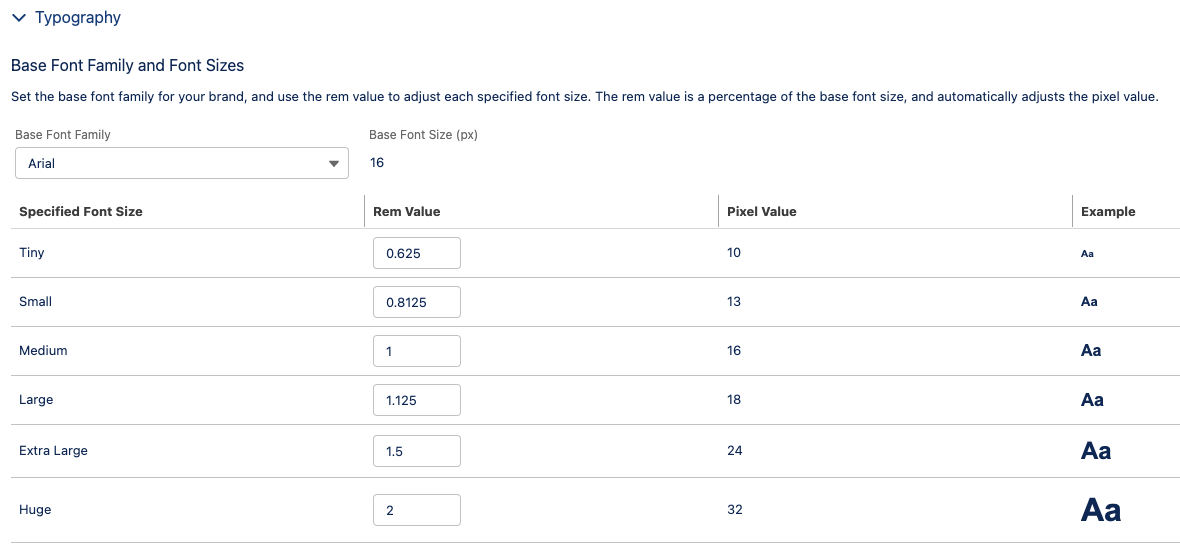
Under the Typography heading, set your Base Font Family and Font Sizes and Text Styles.

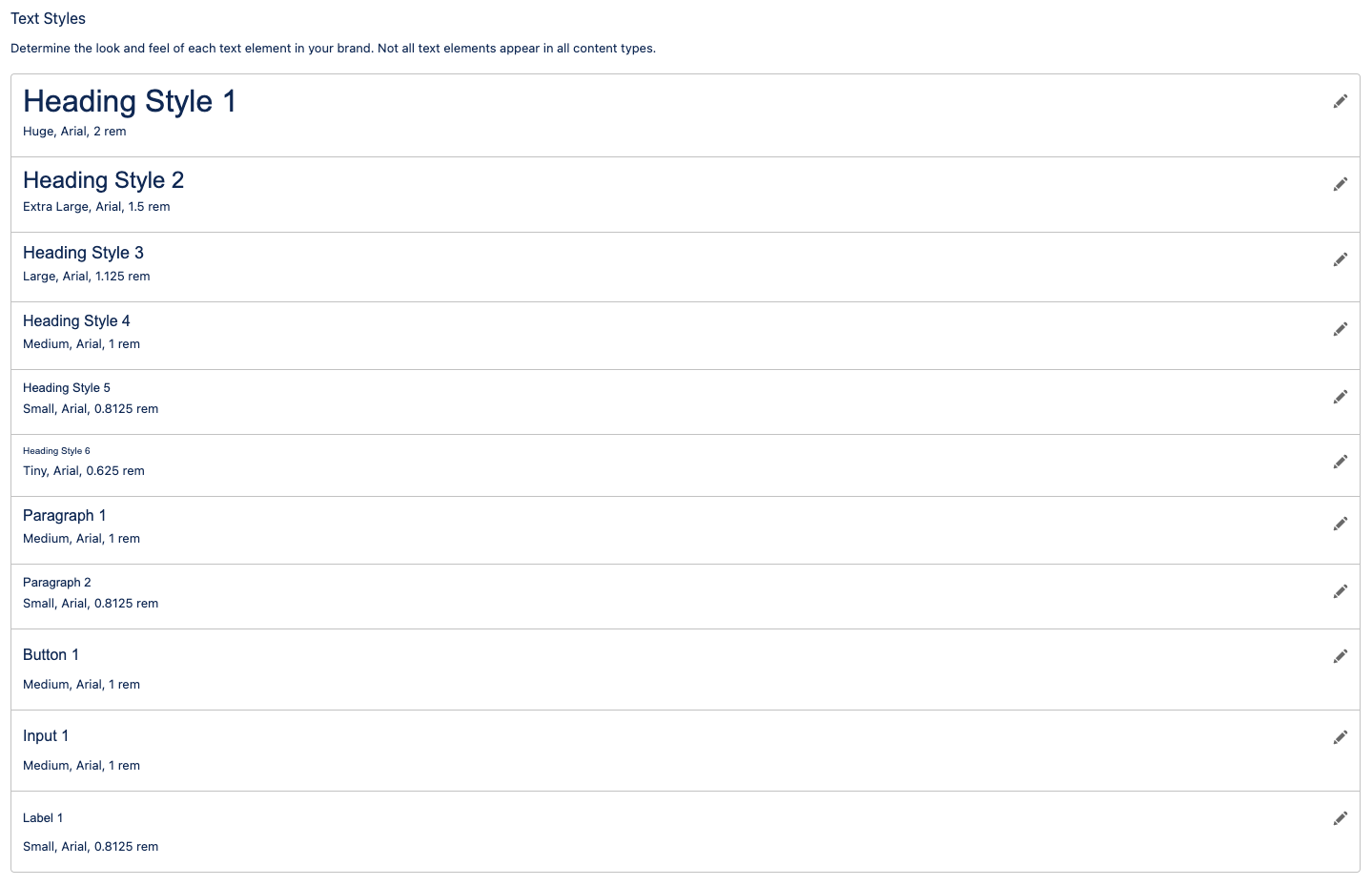
Text Styles

Set up your text styling for headings, paragraphs, buttons, inputs, and labels.

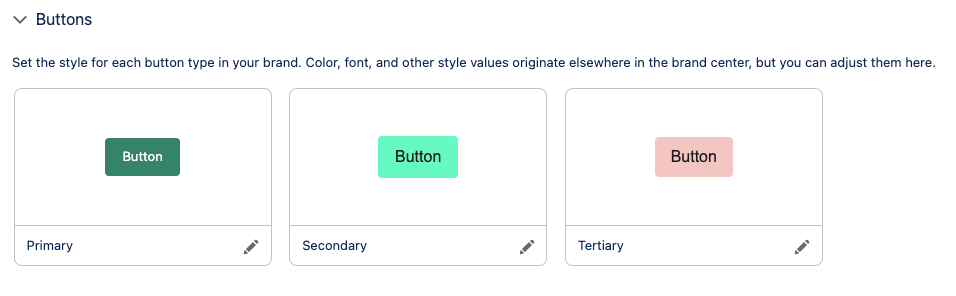
Style your CTA buttons

Next, create variations of buttons under the Buttons subheading. You can specify the color, border, and text styles for three variations.

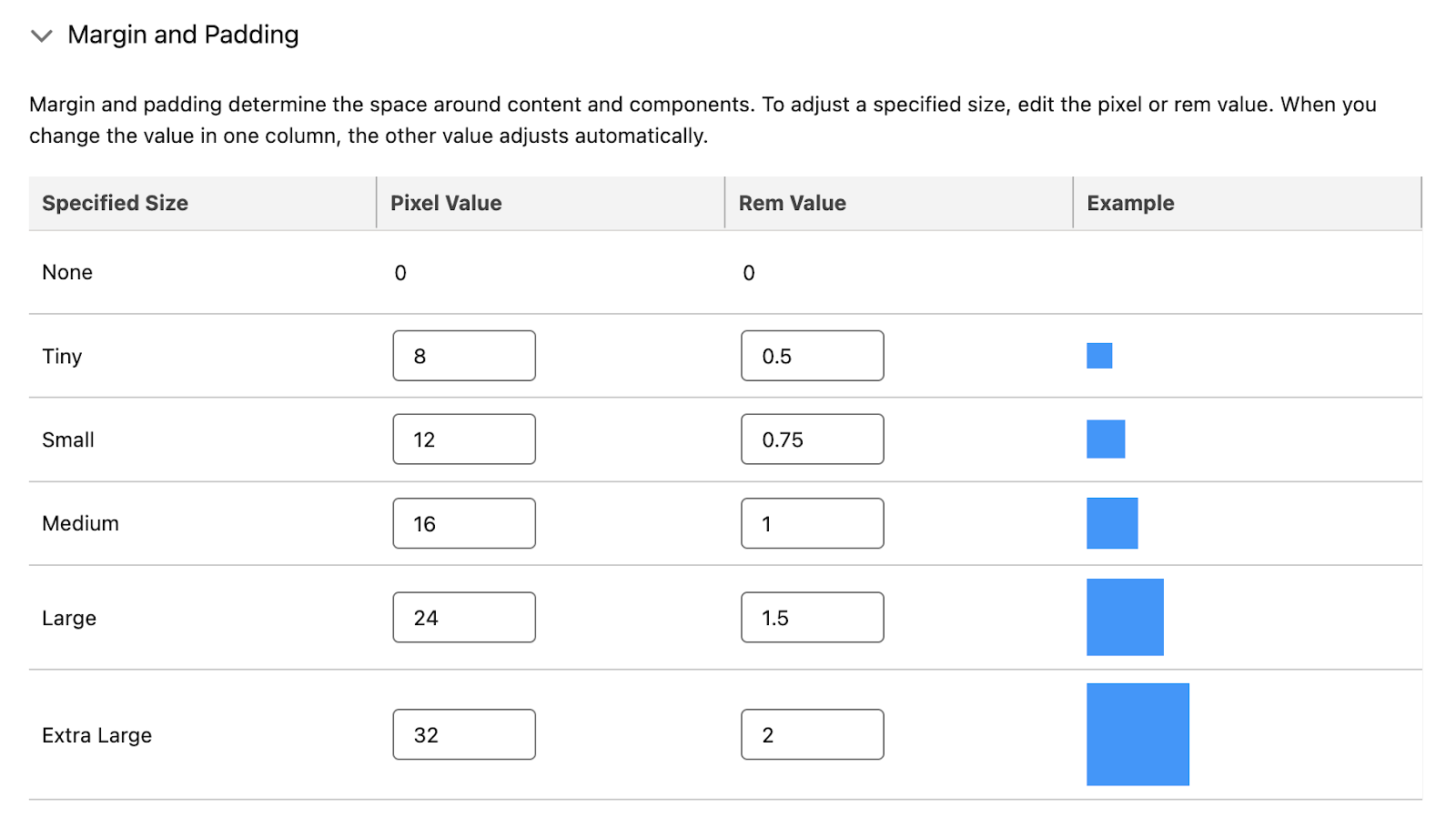
Set Margins and Padding

Next, determine the space around content and components in the Margin and Padding section.

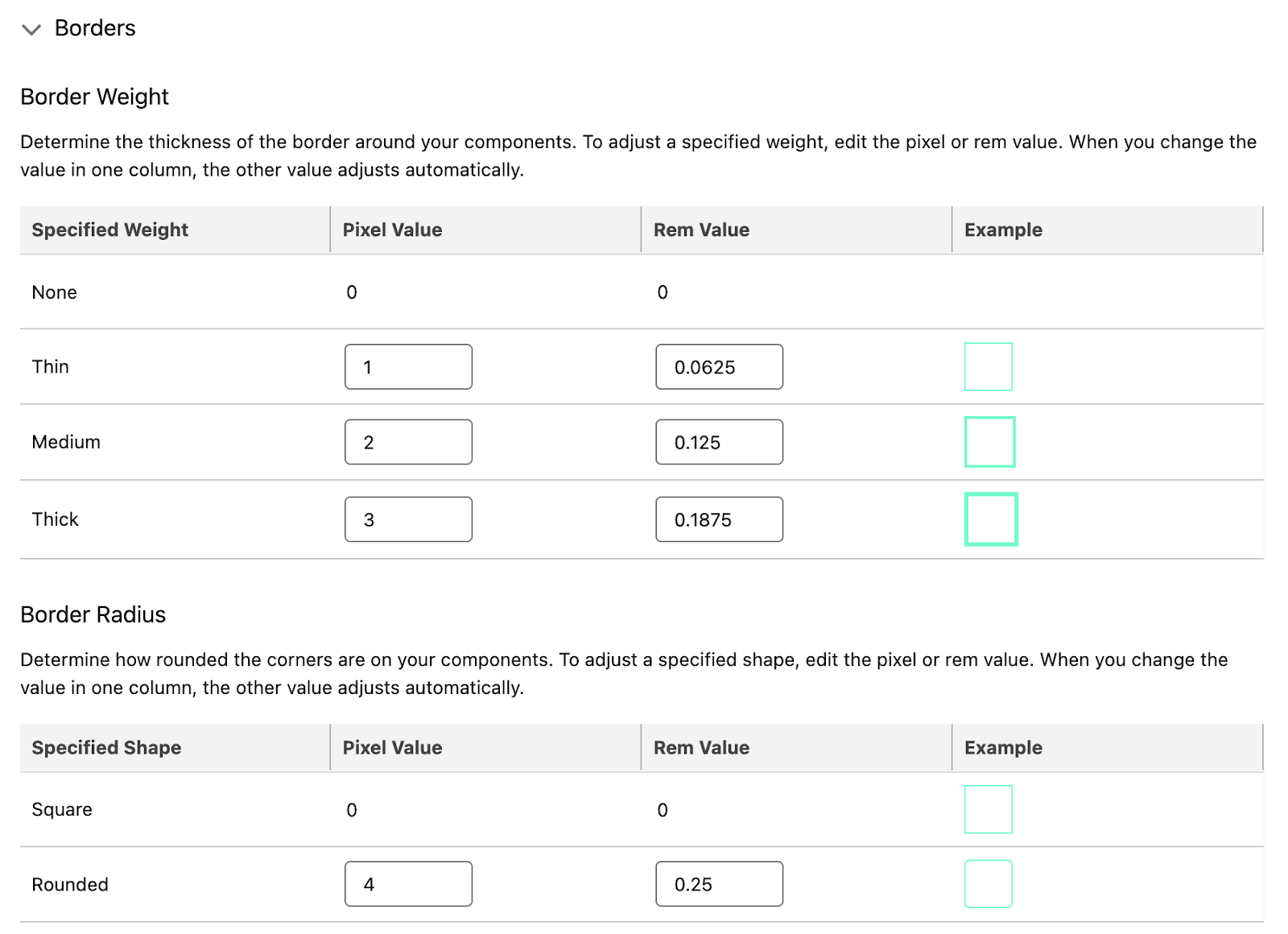
Configure Borders

Finally, set the border weight and radius. The example will use the Border color you set in the Brand Colors section. 

Finalize your brand guideline settings

Use the Preview panel to view your Brand Guidelines in both Desktop and Mobile. You can alter the mobile-specific brand styles, but note this will only apply to Landing Pages and not emails. Once you are satisfied with your Brand Guidelines:

  1. Select Save.
  2. You can send an approval workflow for this new brand, or select Publish if it’s ready to use.

See the full Salesforce help guide for the Marketing Cloud Growth Edition Brand Center here.

Applying brand guidelines to marketing assets

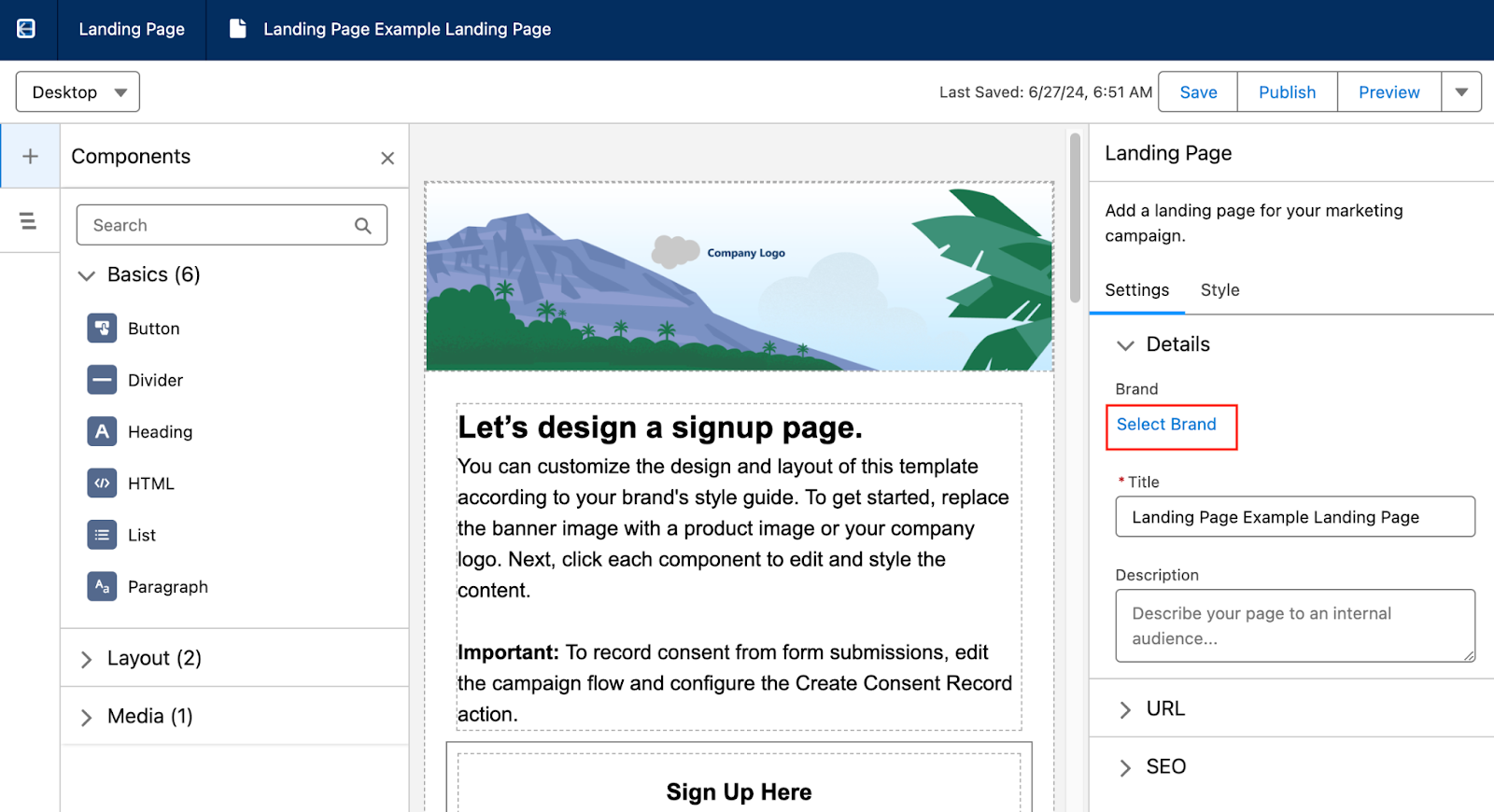
When editing an email or landing page, use Select Brand in the Details section to select the desired guidelines and automatically update your marketing asset.

Reminder: Changing the Brand Guidelines will automatically update any marketing assets that use the guidelines. 

See the full Salesforce help guide for the Marketing Cloud Growth Edition Brand Center here.

Start building on-brand marketing assets with ease

Building branded marketing assets in Marketing Cloud Growth Edition is so easy thanks to the brand center. You can rest easy knowing that anyone on your team can build emails and landing pages through natural language prompts inside the platform and the outcome is always going to accurately and consistently reflect your brand standards.

As always, you can reach out to the team at Sercante to learn more about marketing automation on the Salesforce platform or find more information about Marketing Cloud Growth Edition and how the brand center works. Send us a message to start a conversation.

Post updated 8/2/2024

Einstein Assistant is the latest AI functionality for Account Engagement. With the Spring ‘24 release, Account Engagement Advanced and Premium editions can utilize generative AI when creating marketing assets. Let’s deep dive into the features of Einstein Assistant and how to enable it for your Account Engagement Business Units!

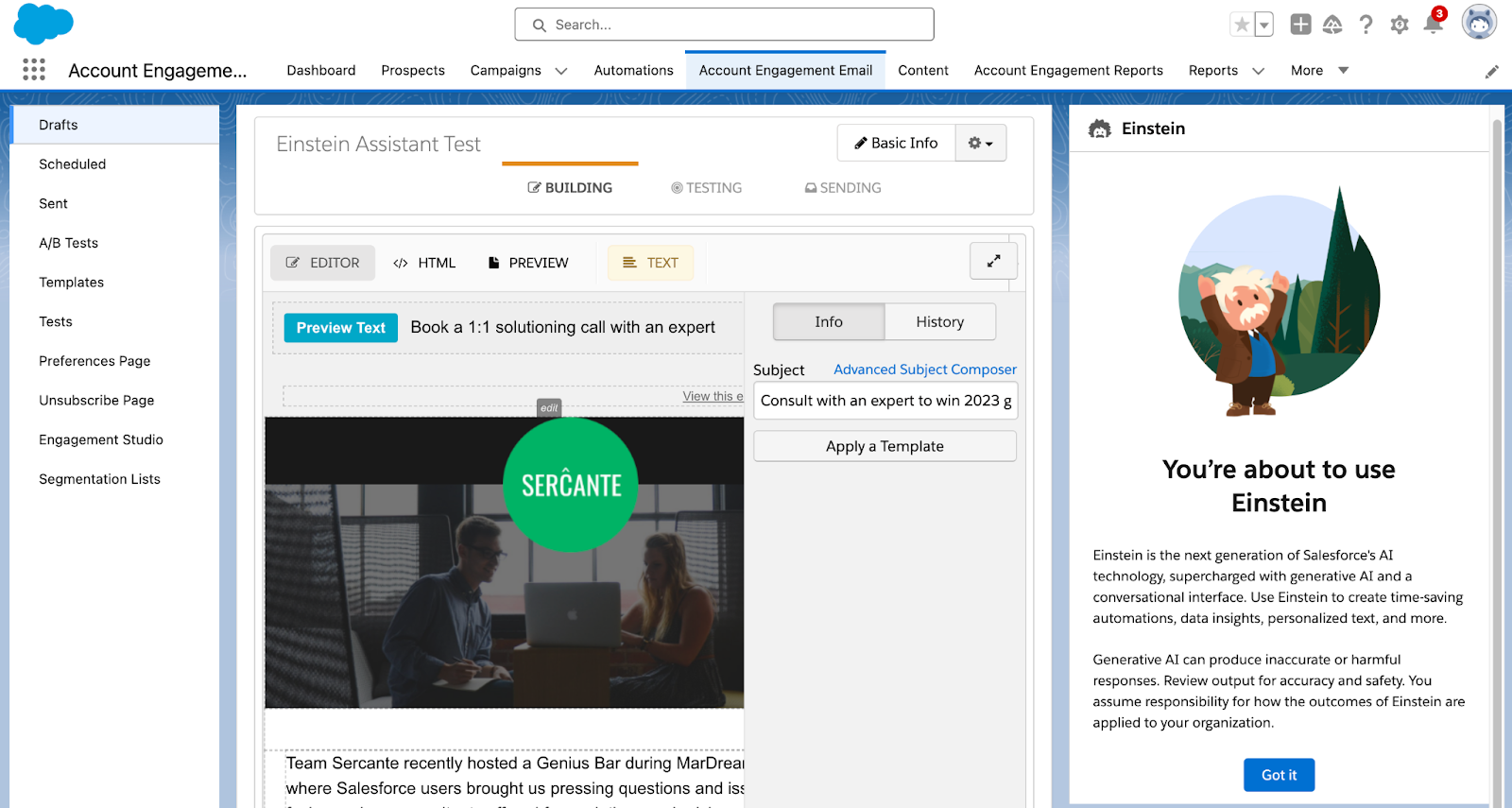
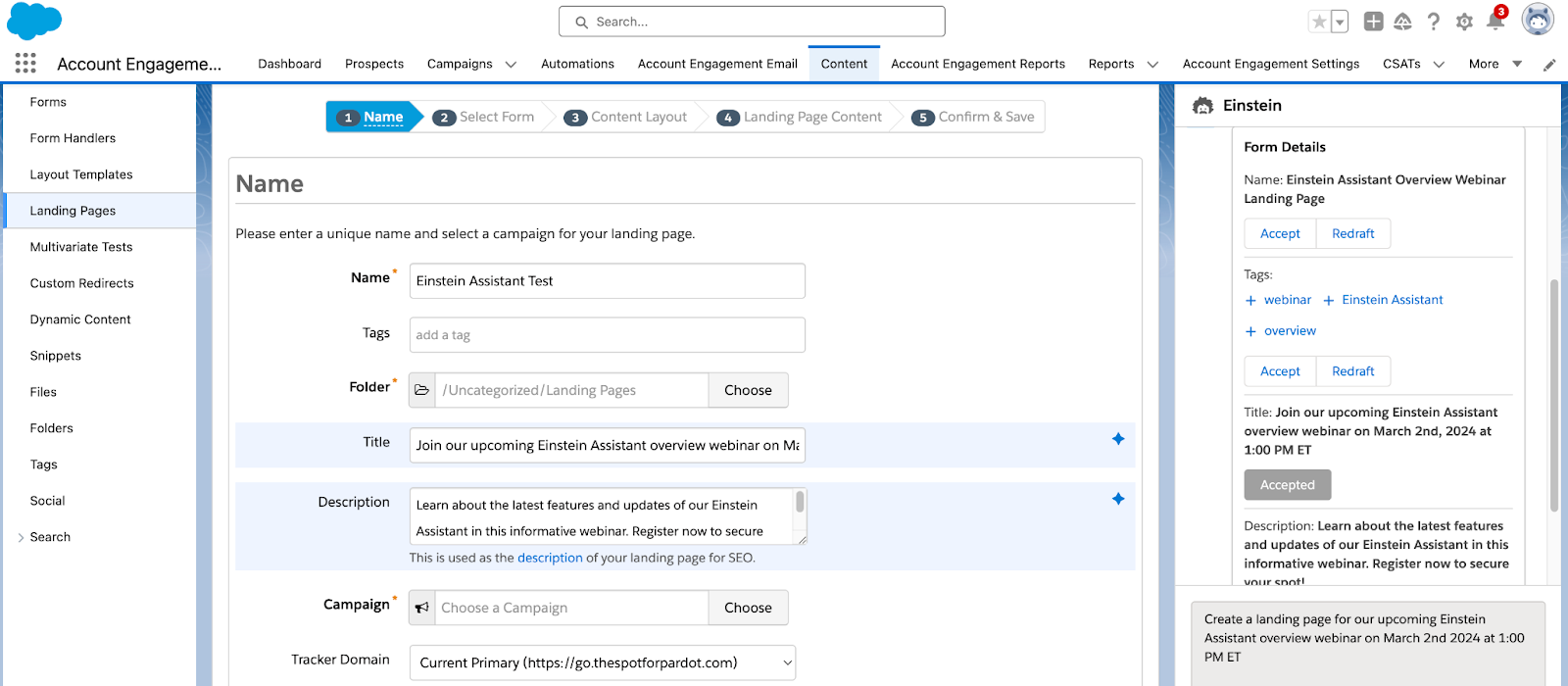
Einstein Assistant helps you create landing pages, forms, and list emails. When creating a new asset, or editing an existing one, the Einstein Assistant window appears so you can describe what you are creating. 

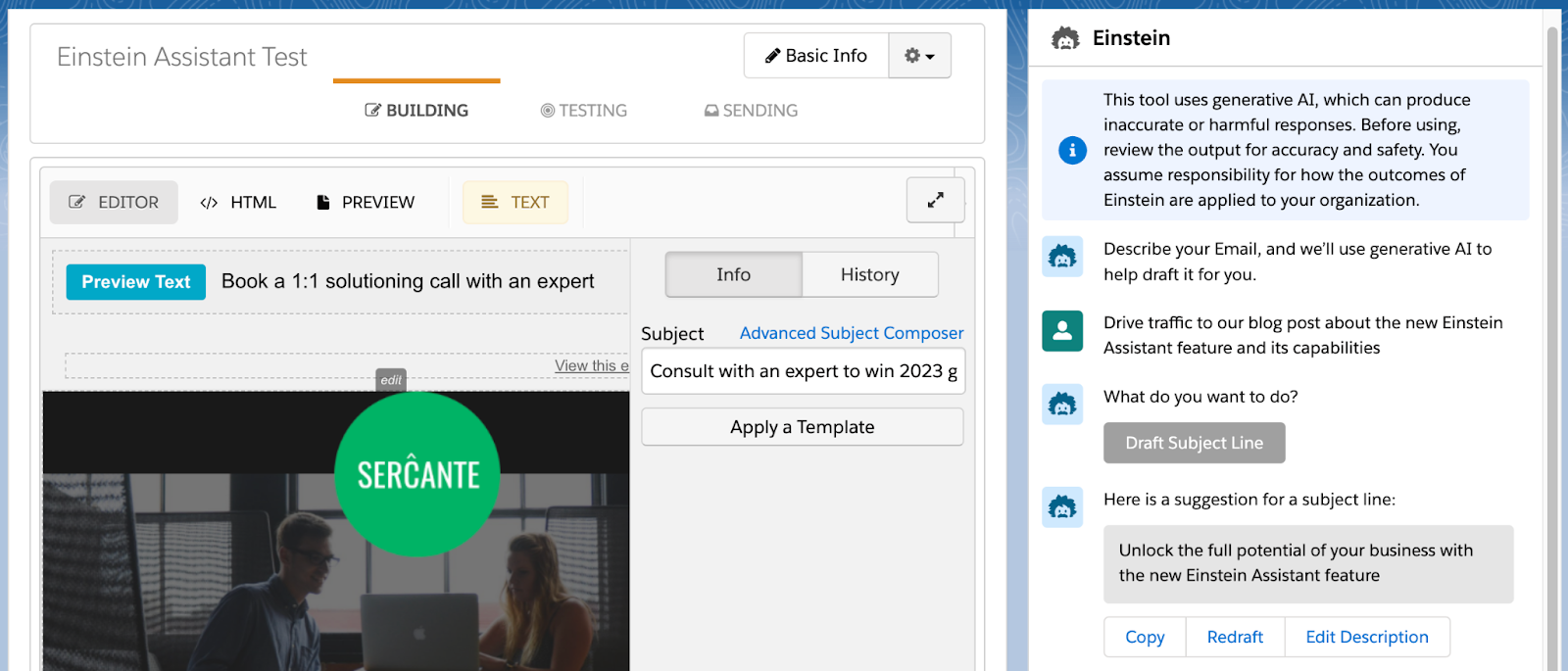
Einstein Assistant will then recommend content that you can copy or revise for each of your assets. 

Using Einstein Assistant with List Emails

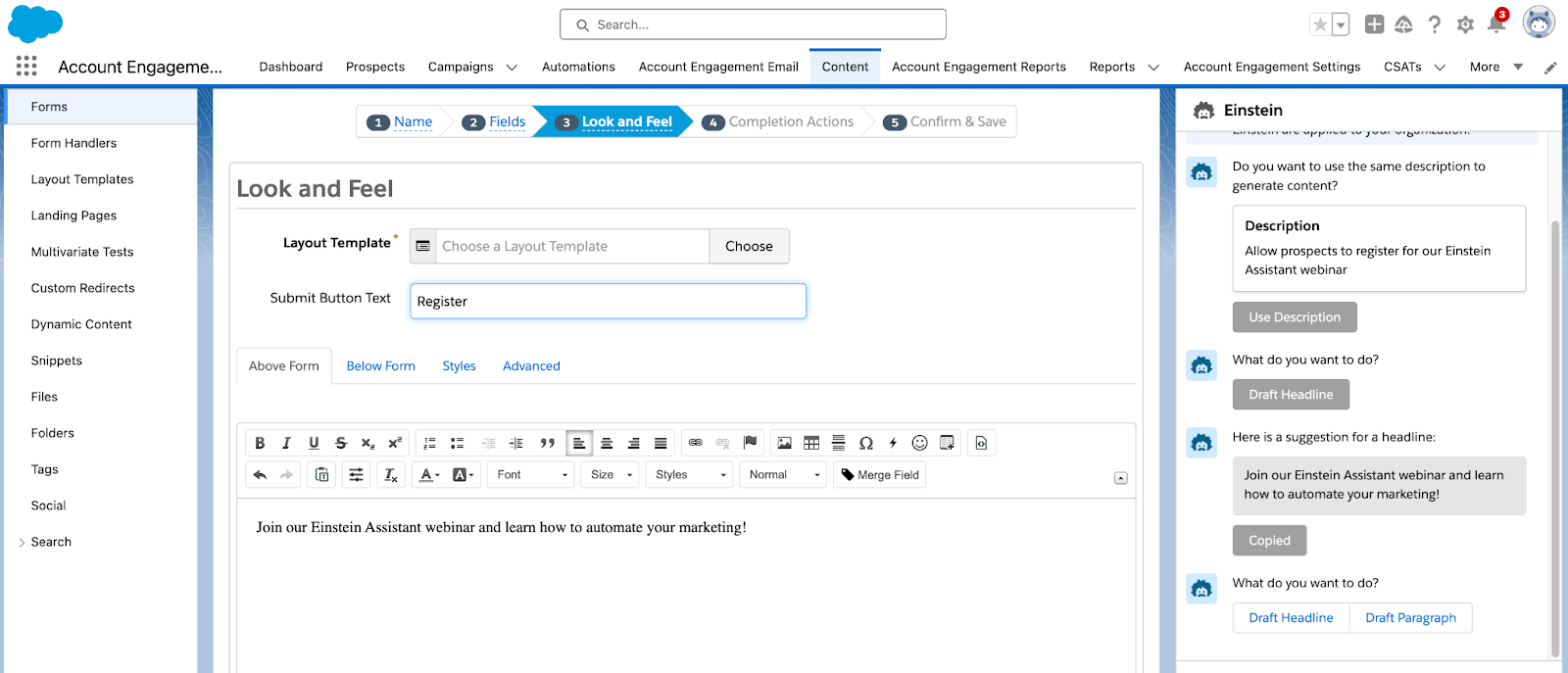
Einstein Assistant gives you the option to draft an email Headline, Paragraph, and/or Subject Line. Once drafted, you can copy or redraft the content, or edit the prompt provided to Einstein Assistant.

Using Einstein Assistant with Landing Pages

When building Landing Pages, Einstein Assistant can generate the Landing Page’s name, tags, title, and description. Here you have the option to accept, and the copy will automatically be entered into the associated Landing Page field, or redraft the content.

Once you navigate to the Landing Page Content tab, you can then generate a Landing Page Headline and/or paragraph for your page.  

Using Einstein Assistant with Forms

When building Forms, Einstein Assistant will first allow you to generate a name and tags for your new form. You can accept Einstein’s suggestions and the content will auto-fill into the name and tag fields, or select redraft. On the Look and Feel tab, Einstein can generate a Headline or Paragraph to be used above or below the form.

Finally, on the Completion Actions tab, you can again use Einstein Assistant to generate a headline or paragraph for your Thank You Content.

Ready to get started?

Here is how to enable Einstein Assistant

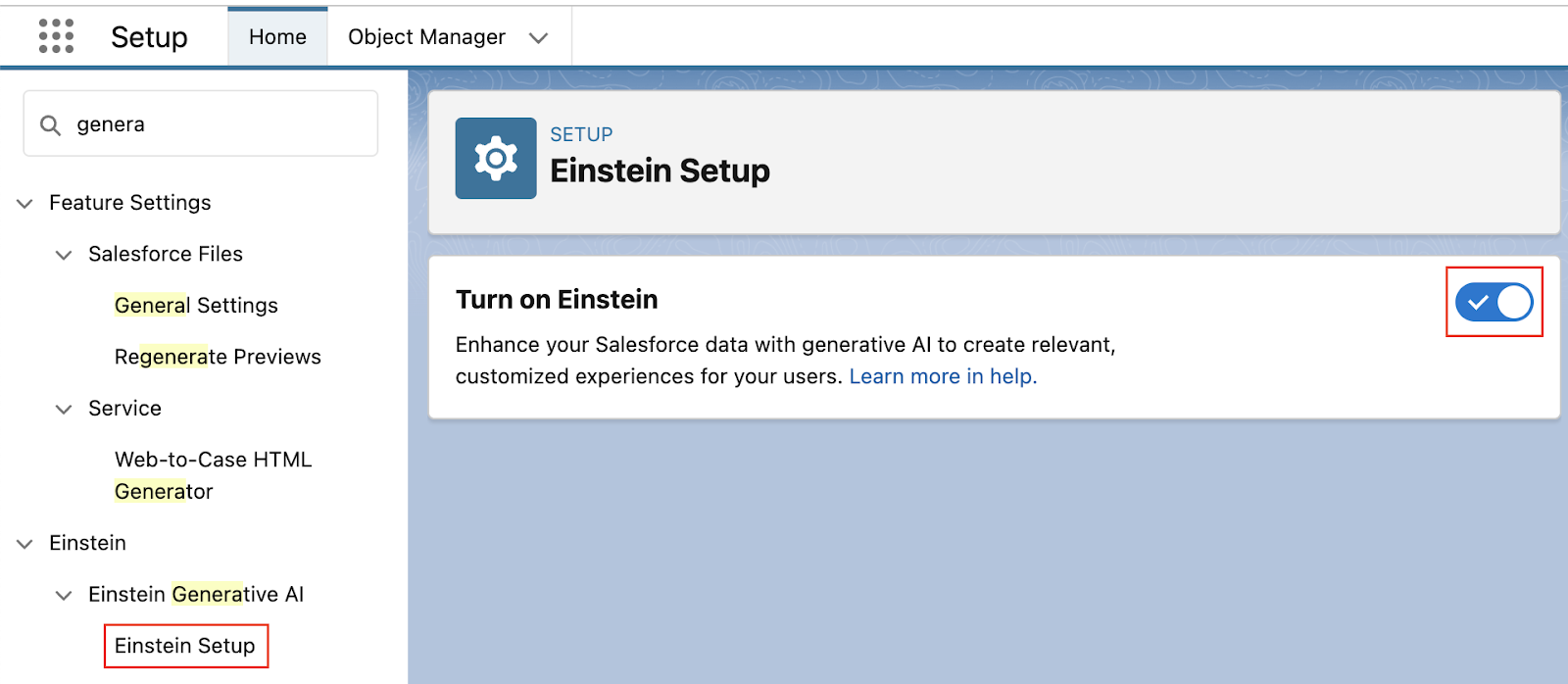
  1. In Salesforce, navigate to Setup > Einstein Generative AI
  2. Select Einstein Setup then Enable
  1. Still in Setup, navigate to Einstein Account Engagement > Einstein Assistant
  2. Select any Account Engagement Business Units that will be using Einstein Assistant
    • Note: even if you only have one Business Unit, you still need to do this step!
  3. Select Connect

If you’re interested in what else Einstein can do for Account Engagement, check out our previous blog posts:

Tap into Salesforce generative AI functionality

Salesforce is releasing new generative AI features all the time. Reach out to the team at Sercante to build strong foundations so you can tap into these features and stand apart from the pack.

Product Note: Marketing Cloud Growth and Advanced are editions of Marketing Cloud Next and have also been referred to as Agentforce Marketing.

I want to clear up a misconception that I’m hearing in the Salesforce world about the great $0 SKU Data Cloud debacle.

As you may recall, Salesforce announced at Dreamforce 2023 that a Data Cloud edition would be available at no cost to Sales and Service Cloud Enterprise Edition clients. This was also mentioned in Salesforce’s February 2024 press release around Marketing Cloud Growth Edition

To be clear, you still need Sales or Service Enterprise Edition to take advantage of this offer. Having just Marketing Cloud does not make you eligible.

Sales and Service Enterprise Edition Customers: What to do about no-cost Data Cloud offer

Now that we’ve clarified any confusion, you might say, “Great, I have Enterprise Edition — I want to get an account provisioned today!” And I would say, “Get prepared first.”

Data Cloud is a game-changer capable of driving remarkable transformation within your organization. Hence, having a well-crafted plan, strategy, and vision in place is paramount.

It’s the basis and foundation of change management — without a plan, vision, consensus, understanding, etc., you might as well stop before you even start.

Speaking from experience, diving into Data Cloud without a clear plan often leads to:

  1. Misconceptions: A perceived lack of product value.
  2. Tension: Without a collaborative mindset, conflicts can arise.
  3. Loss of Momentum: Initial interest and excitement wane over time.

However, before devising a plan, it’s crucial to assess your organization’s readiness. 

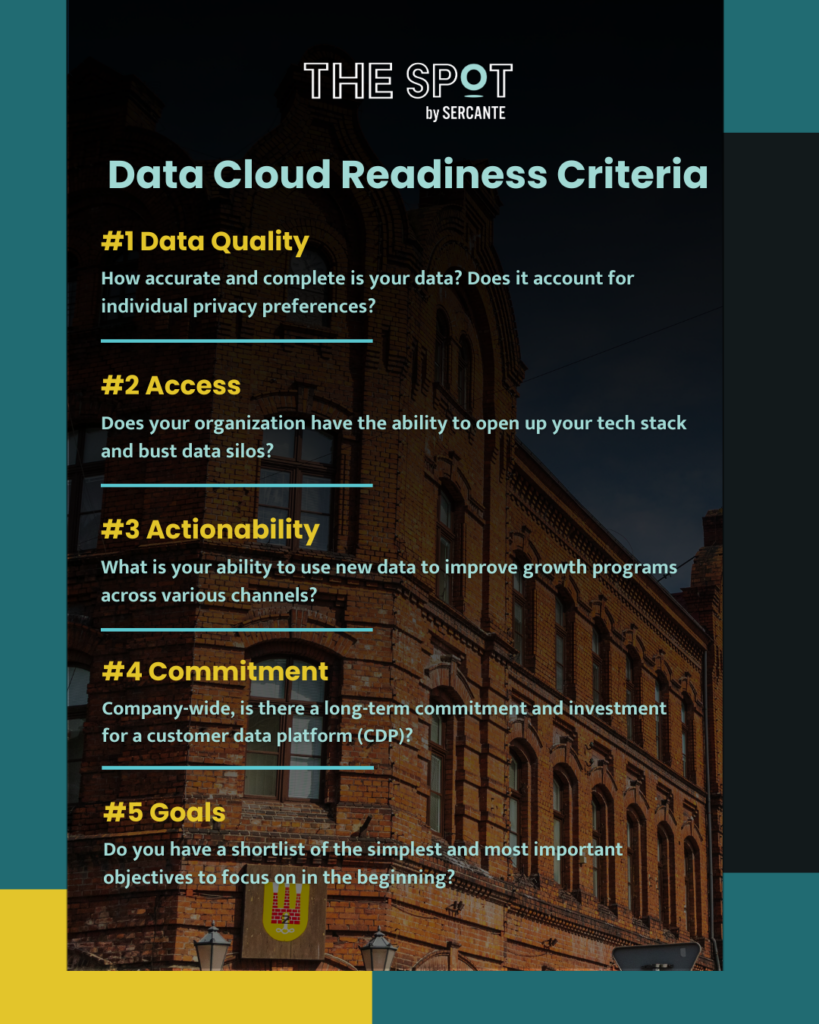
Data Cloud Readiness Criteria

Consider these five key aspects:

  1. Data Quality: How accurate and complete is your data? Does it account for individual privacy preferences? 
  2. Access: Does your organization have the ability to open up your tech stack and bust data silos?
  3. Actionability: What is your ability to use new data to improve growth programs across various channels?
  4. Commitment: Company-wide, is there a long-term commitment and investment for a customer data platform (CDP)?
  5. Goals: Do you have a shortlist of the simplest and most important objectives to begin with?
data cloud readiness criteria

Get a Data Cloud Readiness Assessment

We’re here to assist you in preparing for Data Cloud. Reach out to explore our Data Cloud Readiness Assessment offering so you can be sure your organization is primed for success.

Product Note: Marketing Cloud Growth and Advanced are editions of Marketing Cloud Next and have also been referred to as Agentforce Marketing.

ICYMI: Salesforce dropped a hot product announcement yesterday. And she’s called Marketing Cloud Growth Edition

There was a flurry of blogs and social postings following the official drop of the Salesforce press release, notably: 

To hear some talk, MC Growth Edition is going to instantly change everything and be the best thing in the world. 

On the flip side of the spectrum, I’ve seen some hyper-skeptical commentary around MC Growth Edition. “It’s SMB only”, “It’s going to take years to catch up”, and “You don’t have to worry about this now,” (I’m sensing a twinge of fear/self-doubt intermingled in these statements, though).

Like most things involving extreme opposites, the current reality and answer to “What is Marketing Cloud Growth Edition?” is somewhere in the middle of these two takes.

Let’s dig into some of the nuances here and read the tea leaves. If I could boil this down to a top 5 highlights, they would be: 

1) Marketing Cloud Growth Edition is built on “Core,” and that’s a fundamental advantage for innovation 

Marketing Cloud Growth Edition is built on the Einstein 1 platform — aka the same underlying infrastructure as Sales Cloud, Service Cloud, Experience Cloud, Data Cloud, and recently, Commerce Cloud. 

Marketing Cloud Engagement is NOT on core today (but it’s integrated).

Pardot / Marketing Cloud Account Engagement IS on core… kind of. It’s a blend of on and off-core. Call it “near core” if you need another buzzword for your collection.

Many long-time Pardot customers have been rallying around the vision for “Pardot on Platform” for the last several years. And if you’ve been watching closely, you may have noticed that many of the product enhancements delivered in recent years have been either built-in core, rely heavily on components from core, or had prerequisites of things like enabling SSO with core. 

Why does this “on core” distinction matter, though? The simplified answer is that as new things are released, you can take advantage of those within other “on-core” tools. Examples would include things like Flow for automation, UI enhancements like Path, improvements to Salesforce reporting functionality, etc. These product innovations can be leveraged for the most part across objects and clouds that are built on core. 

So TL;DR — MC Growth Edition being on the Einstein 1 platform means that when enhancements are added to Salesforce and Data Cloud, we don’t have to wait for an integration to come out to use them in the marketing department. We will be able to take advantage of these enhancements immediately, in many cases.

2) The significance isn’t what’s available now — it’s about the vision 

In subsequent posts on The Spot, we’re going to be getting way in the weeds of how MC Growth Edition works and outlining functions and constraints of the current builders. 

There will be edition comparison guides.

Screenshots.

Pros & cons lists.

But amidst all of this, I would emphasize that what’s generally available now isn’t the important thing to look at unless you are actively evaluating a platform to purchase in the next 30 days. The exciting thing about MC Growth Edition is about where the product is headed.

Salesforce has an aggressive vision for this, and looking at the speed with which Data Cloud has grown, I’m betting on them to move FAST.

3) Expect to see a focus on unifying builders & tooling 

A friction point for existing customers is there are usually several ways to do things in different clouds. We have two email builders in Pardot. Another email builder in Salesforce. And an entirely different content builder in Marketing Cloud Engagement. 

Expect to see these tools start to converge, with Marketing Cloud Growth Edition as the first mover for shared functionality. 

One email builder. 

One landing page builder. 

One segmentation engine (built on Data Cloud).

(P.S. The buzzword for this concept is “composable services” — as a new tool is built, expect to see it designed in a way that it can be used and leveraged in multiple parts of Salesforce. We’re already seeing examples of today for more behind-the-scenes things of Pardot/Marketing Cloud, like the backend email sending engine.)

4) This makes AI real 

I’ve been listening quietly to all of the headlines about generative AI for the last year. 

Listening, because as Thumper says, “if you can’t say something nice, don’t say nothing at all.” 

The picture has been painted like this: 

  • You’re working with smart marketing automation tooling
  • You log in and the system can suggest a target audience for you 
  • It can suggest a product offer for you 
  • Heck, it can write your content from a campaign brief 
  • AI tells you when to send your email
  • AI makes it omnichannel 
  • Campaign results come flooding in… and yes, AI analyzes that for you too 
  • We cheers with our Mad Men era old fashioneds because the computers do all of the heavy lifting for us

That sounds nice, but also super unattainable with today’s tooling.

The elephant in the room: No one’s data is that organized. Systems remain super siloed. And the systems most customers are on today don’t solve for that. 

Until now. 

Marketing Cloud Growth Edition is the vision for how we move past that. It’s the beginnings of the shared infrastructure and unified data that get us to the AI-shaped pot of gold at the end of the rainbow.

Bring on the robots.

5) Existing customers are going to see the benefits too… without switching

Customers new to marketing automation, or new to marketing with Salesforce should absolutely evaluate MC Growth Edition.

Pardot and Marketing Cloud Engagement customers should wait a bit before asking themselves “Should I switch?” Largely because they may find they get some of the “good stuff” without having to switch.

We had two team members (one from a Pardot background, and one who’s an OG ExactTarget pro) participate in the pilot of MC Growth. What we saw is that Salesforce is thinking very carefully about how to share the value of the development work being done in MC Growth with its existing customer base. 

Over the next few months, customers will start to see new features you can opt into or just turn on in your org. It’s not going to be a “migration” or a requirement to move anything — just a gradual transformation and growth in the tools that are available to you as more of these composable services are built and shared.

The future looks bright 

One thing is for sure — the next chapter is going to be anything but boring for marketing technologists on the Salesforce platform!  I’ve never been more excited to grow in this ecosystem <3

Product Note: Marketing Cloud Growth and Advanced are editions of Marketing Cloud Next and have also been referred to as Agentforce Marketing.

Earlier today, Salesforce announced the release of Marketing Cloud Growth Edition. This innovative new product is another option for marketing automation built natively on the Salesforce platform and comes with Einstein Generative AI and Data Cloud out of the box. 

You might be wondering: What is this new product, really? What does this mean for the future of Marketing Cloud Account Engagement and Marketing Cloud Engagement? Well, we have answers to help you understand the ins and outs of the platform, what to expect, and what to consider for the near future. Let’s get started!

What is Marketing Cloud Growth Edition?

Marketing Cloud Growth Edition is the culmination of years of Salesforce working to bring marketing automation into the Salesforce platform (also known as “Einstein 1”). This new marketing automation platform allows you to build multi-channel campaigns with the unified customer data of Data Cloud, build personalized marketing assets with the power of Experience Cloud, and automate customer journeys with Salesforce Flow

Marketing Cloud Growth Edition also includes Generative AI and content approval processes out of the box to help streamline your Marketing efforts. 

What does this mean for the future of Marketing Cloud Engagement and Account Engagement?

If you’re an Engagement or Account Engagement customer, you may be thinking “But what does this mean for the future of my product?”

This is what we’re most excited about. Because Marketing Cloud Growth Edition is built on Einstein 1, existing customers of Engagement and Account Engagement will eventually get access to features and functionality introduced to this new product. In addition, Marketing Cloud Engagement and Account Engagement continue to have a robust product roadmap. 

Said differently: Marketing Cloud Growth Edition is another option for organizations that want to bring their marketing operations into Salesforce. If you’re a current Engagement or Account Engagement user, you’ll eventually have the option to use Growth alongside your current platform. So, think of it more as an additional set of features that are available to you. 

Who is Marketing Cloud Growth Edition meant for?

Marketing Cloud Growth Edition is a logical option for small and medium-sized businesses that are new to the Salesforce platform but aren’t currently using marketing automation tools. 

If you’re already using Marketing Cloud Engagement and Account Engagement, then you don’t have to take any action right now. However, watch for future announcements to see when you’ll get access to Marketing Cloud Growth features to use along with your existing tools.

What marketing functionality is included?

Marketing Cloud Growth Edition is feature-rich when it comes to building assets, and the builders provide a flexible and intuitive user experience. 

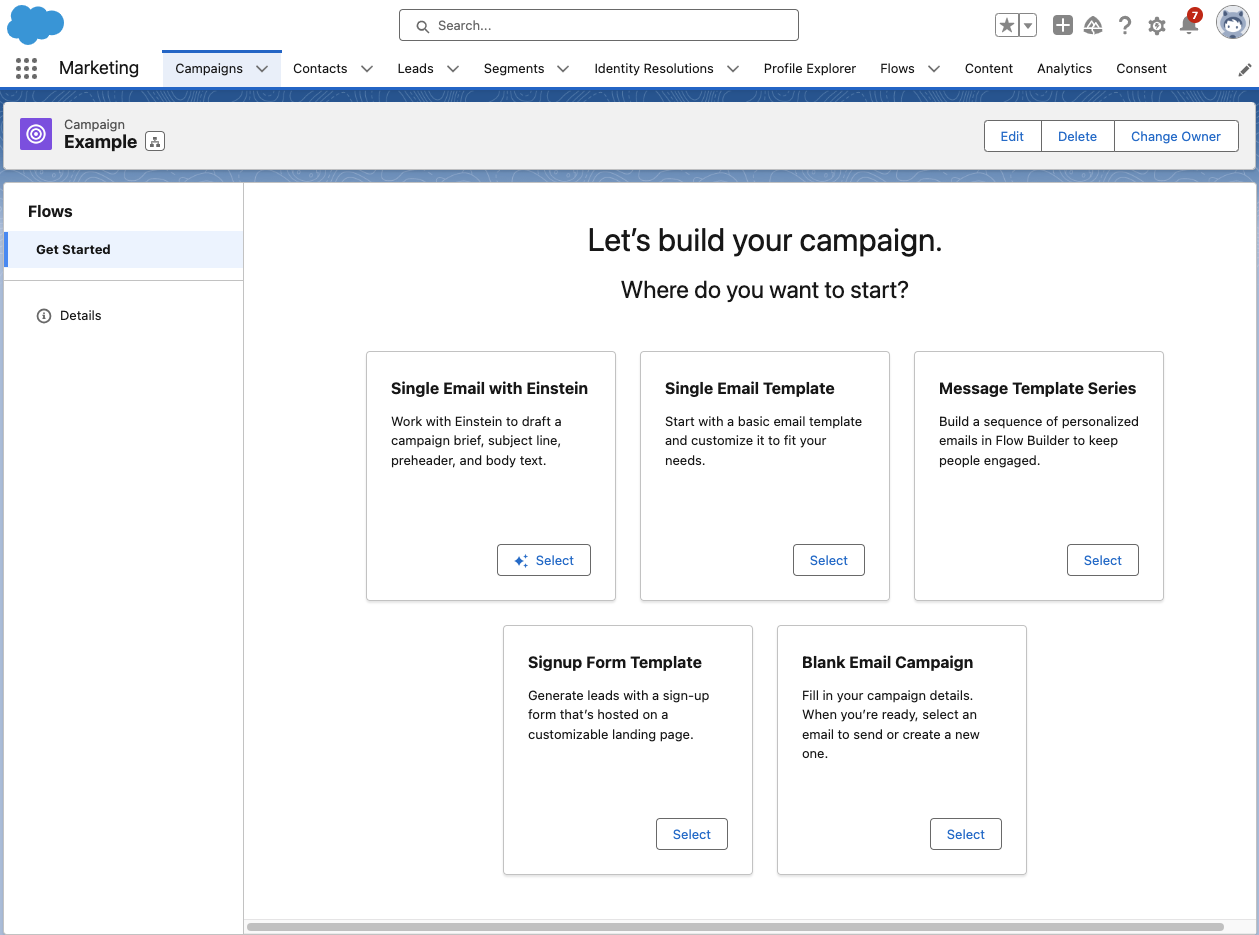
Growth has a campaign-centric workflow and guides users through the process of setting up a new campaign with five pre-set options:

Let’s go through each of these options and what they provide.

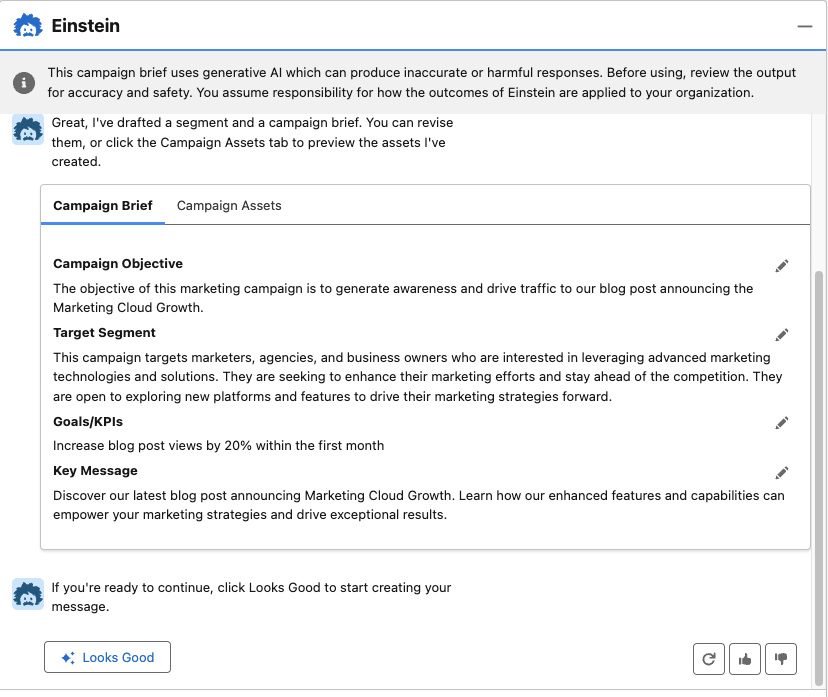
  • Single Email with Einstein: Build your email campaign using Einstein’s generative AI. With this option, you are prompted to describe your email objective (the more detail the better), and Einstein will generate a campaign brief and campaign assets. With all of the content Einstein provides, you can choose to edit, regenerate, and/or upvote and downvote to help the AI learn how to produce better results. 
  • Single Email Template: Begin with a responsive Salesforce email template that you can customize for your campaign.
  • Blank Email Campaign: Start completely from scratch. With this option, you’ll need to add/create your email and segment. A Flow with an empty send email element will also be created to help when you’re ready to send your email. 
  • Message Template Series: Begin with two responsive Salesforce email templates that you can customize for your campaign. This option also provides a flow with a 1-day wait step between emails, but you can customize the flow further to fit your email journey. 
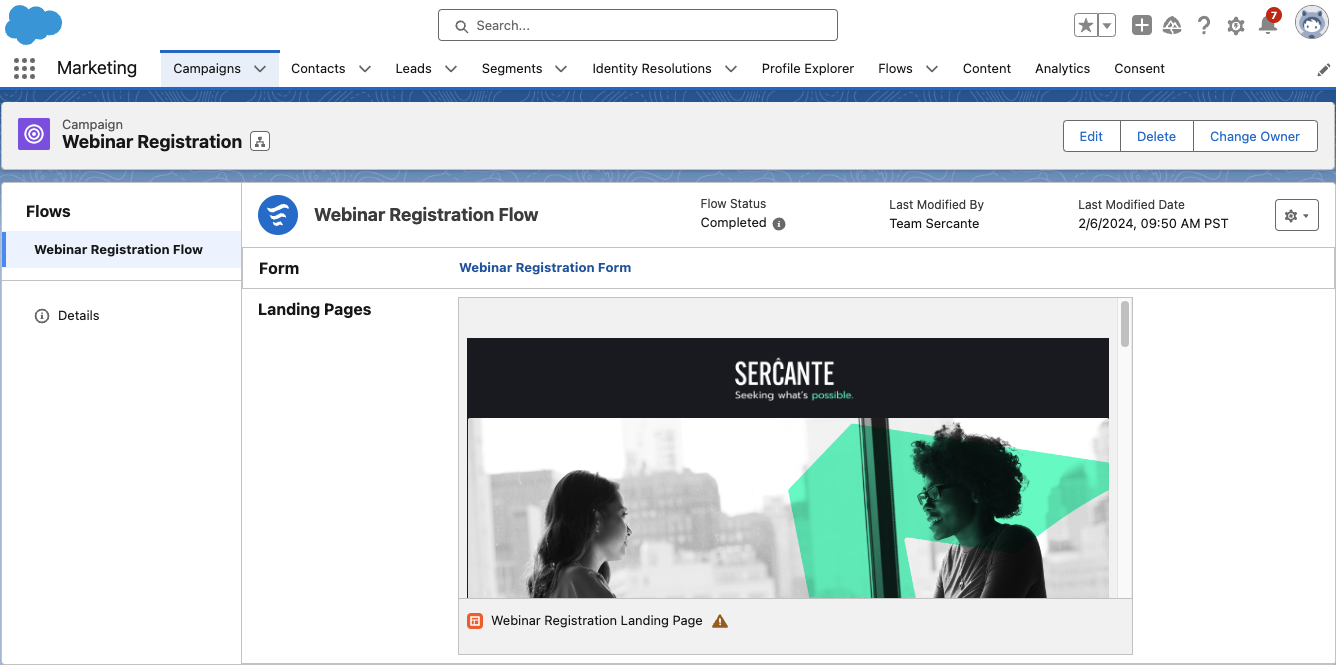
  • Single Form Template: Begin your campaign with a responsive Landing Page template, form, and a flow to create Leads when the form is filled out. 

Building marketing assets with Marketing Cloud Growth 

Marketing Cloud Growth’s assets are built with Experience Cloud, enabling users to easily build responsive assets with a drag-and-drop builder. We’ll do a deep dive into each builder in future blog posts, but, for now, here are some highlights to get excited about:

  • Landing Page SEO capabilities: Landing page public page titles, descriptions, URLs, and even favicons can be customized to improve SEO.
  • Form flexibility: The form builder is intuitive and flexible, allowing users to easily add text, new sections, dividers, placeholder text, and images to forms. 
  • View required form fields: The form builder also allows users to easily view which fields are required for new Lead/Contact creation to ensure any new records can be created successfully.
  • Salesforce Flow automation: All assets are automated with Salesforce Flow, allowing marketers to get granular and customize the next steps and follow-up activities for every asset.
  • Wait step flexibility: Users can set Salesforce Flow wait steps to wait minutes, hours, days, months, or to resume at a specific time.
  • Asset approval workflow: All marketing assets have an optional approval workflow that you can integrate into your marketing team’s existing approval process flow.

(As I mentioned above, we’ll be doing a deep dive on the builders in subsequent posts — so if you have a question on a specific feature, let me know in the comments!)

Marketing Cloud Growth AI capabilities

Marketing Cloud Growth Edition includes AI out of the box so you can take your marketing initiatives to the next level. 

Marketing Cloud Growth Edition AI features include:

  • Einstein Co-Create: Easily build campaign briefs, email assets, and Data Cloud segments with the power of Einstein generative AI.
  • Einstein Send Time Optimization: Ensure prospects receive marketing messages on the day and time they are most likely to engage. 
  • Einstein Metrics Guard: Protects your email activity data by filtering out email security scanner clicks and opens.
  • Einstein Segment Creation: Assists marketers with creating specific audience segments in Data Cloud.

Get ready for Marketing Cloud Growth

I’m excited about the announcement of Marketing Cloud Growth Edition and for the vision of “Marketing Cloud on Einstein 1.” Remember, it will not replace Marketing Cloud Engagement or Account Engagement. If you’re part of a team that’s on the Salesforce platform but not using Salesforce tools for marketing automation, then you may want to explore if this new tool is the right option for you.

Be sure to return to The Spot for more posts about Marketing Cloud Growth. We’ll share all our learnings, tips, and tricks here to help all of you to be successful.

Want to know more about Marketing Cloud Growth, like, today? Then reach out to the team at Sercante to start a conversation.

No more posts to show