Category

Setup & Admin

Product Note: Marketing Cloud Growth and Advanced are editions of Marketing Cloud Next and have also been referred to as Agentforce Marketing.

In February 2024, Salesforce released Marketing Cloud Growth Edition, its first marketing automation platform built fully on the Einstein 1 Platform (a.k.a. “On Core”). Marketing Cloud Growth Edition has been rapidly evolving and expanding the features of this new solution ever since, and Account Engagement (f.k.a. Pardot) users are about to get a taste of it.

Update! In the Dreamforce ‘24 Marketing Keynote, Salesforce announced that all Account Engagement orgs can get Marketing Cloud Growth provisioned at no additional cost. Previously, this offer was only for orgs with Growth Edition Account Engagement, but it now includes all orgs with a current edition of Account Engagement. A banner notifying all Account Engagement orgs that they can now get access to Marketing Cloud Growth Edition was published on October 15th. This blog has been updated to reflect the most recent news around this offering.
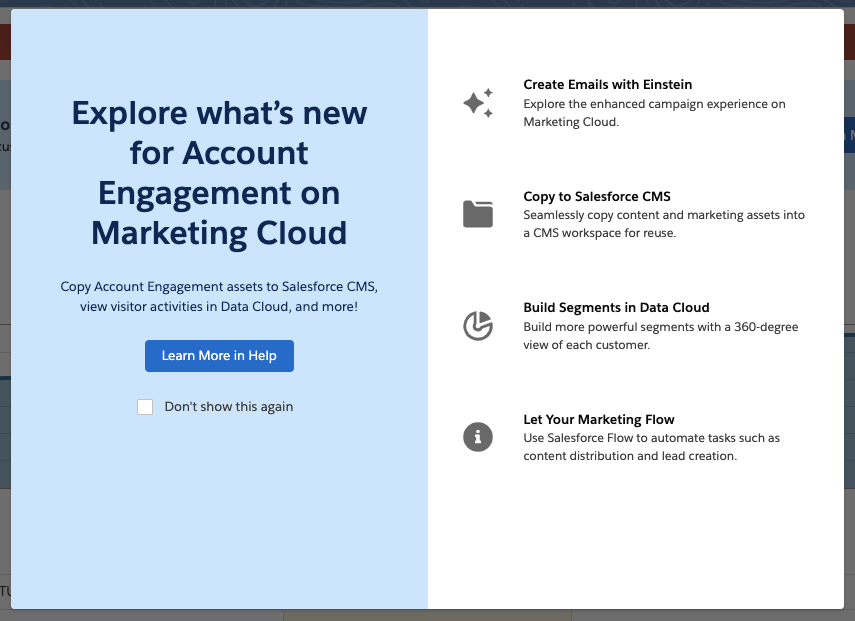
In this post, we’ll cover how to take advantage of the offer and use Marketing Cloud Growth alongside Account Engagement.

A Note on Naming

Now the naming of this new tool has caused quite a bit of confusion in the Salesforce community as it seems to change on a weekly basis. When launched, this new solution was referred to as “Marketing Cloud Growth Edition” or “Marketing Cloud on the Einstein 1 Platform”. During Dreamforce, Advanced Edition was announced, so this solution became “Marketing Cloud Growth or Advanced Edition” or “Marketing Cloud built on Data Cloud”. Finally, during the Winter ‘25 release, this tool started showing up in Salesforce documentation as just “Marketing Cloud” or the “Marketing Cloud App”, much to the chagrin of Marketing Cloud Engagement users. Now, if you are using Marketing Cloud Growth with Account Engagement, it is being referred to as “Account Engagement on Marketing Cloud” but also “Account Engagement powered by Data Cloud”.

Confused? Yes, me too. But all this is to say there is one new Salesforce Marketing tool that is built on core to bring users a truly unified marketing experience. For simplicity, we will continue to refer to this tool as “Marketing Cloud Growth” for this blog post.

What Account Engagement Users Need to Access Marketing Cloud Growth Edition

  1. A current instance of a Marketing Cloud Account Engagement
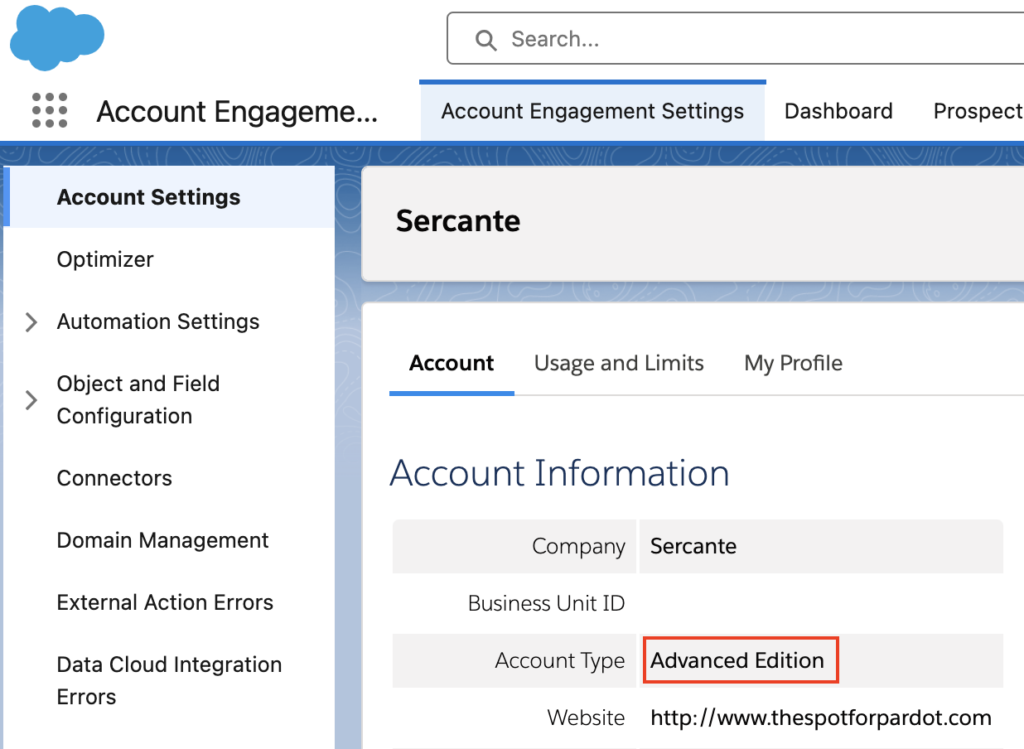
    This includes Growth, Plus, Advanced, and Premium editions of Marketing Cloud Account Engagement (MCAE). Your MCAE Admins can view your Edition by going to the Account Engagement Settings tab.
  1. Data Cloud
    Data Cloud not only unifies customer data for use within Marketing Cloud Growth, but also ensures data continuity between Account Engagement and Marketing Cloud Growth. Free Data Cloud is available for orgs with Enterprise and Unlimited Edition Salesforce customers. If you have a lower edition of Salesforce, check out more information on provisioning and access here.

    If you are brand new to Data Cloud or don’t have a Data Cloud Architect at your disposal, don’t fret! Marketing Cloud Growth comes with Data Kits that help map your Marketing and CRM Data to Data Cloud. The free Data Cloud SKU + Marketing Cloud Growth’s out of the box data kits will cover everything most orgs need to get started, but if you’d like assistance with additional Data Cloud Data Streams or want to dive into more advanced Data Cloud use cases, we’re happy to help!

Data Cloud Credits

Marketing Cloud Growth uses Data Cloud’s credits to fuel its activities. So, although MCAE users will get Marketing Cloud Growth at no additional charge, orgs still need to purchase credits to fuel Marketing Cloud Growth. Think of it like you’re being given a car, but you still have to purchase the gas to make it run.

If you’re new to Data Cloud’s consumption model, our previous blog post and this Trailhead module will help give you an idea of how this works and the different types of credits available. If you’re using the Free Data Cloud SKU to get started, note that this does include some credits to fuel data ingestion and unification. However, orgs will need to reach out to their AE to purchase the credits that fuel sending emails, sending SMS, compiling Segments, and using Einstein.

You don’t necessarily have to purchase these credits before implementing Marketing Cloud Growth for testing purposes, but you may be limited in the features you can play around with without them.

Getting Started

Here are a few things to keep in mind as you start using Account Engagement and Marketing Cloud Growth side by side.

Understanding Consent and Subscriptions

Consent works a little differently between the two systems. 

Account Engagement has a permission-based marketing policy, meaning that although there is no default “Opt-in” field, users must certify that they only contact prospects who have expressly consented to receive marketing communications. 

In Marketing Cloud Growth Edition, consent is a bit more rigid. To send marketing communications, each prospect must have a Consent Record comprising of:

  • The Contact Point (email or phone number)
  • The Marketing Channel (Email, SMS, etc.)
  • The Communication Subscription (Webinars, Events, Product updates, etc.)
  • The Date and Time the prospect opted in

More considerations for Consent and Subscriptions are available in this Salesforce Help article

Import Consent Data

Before you import consent data, make sure the contact point exists in Marketing Cloud Growth Edition. A consent import can update consent information for existing contact points, but it can’t create new leads or contacts or update other fields (at least as of the Winter ‘25 release).

First, export your list from Account Engagement:

  1. In Account Engagement, navigate to Prospects > Segmentation > Segmentation Lists
  2. Locate and open the preference list you would like to import into Growth
  3. Select Tools
  4. Select CSV Export

You’ll need to format your export before importing it into Growth, see this help article for guidance

Start Your Import

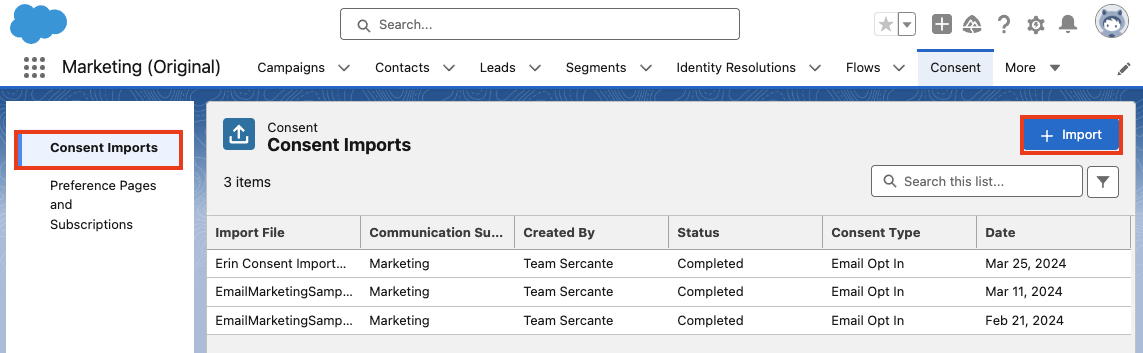
  1. Within Marketing Cloud Growth, navigate to the Consent tab
  2. Ensure you are on the Consent Imports tab, then select + Import
  1. Select your Channel, Communication Subscription, and whether this list is opted in or opted out
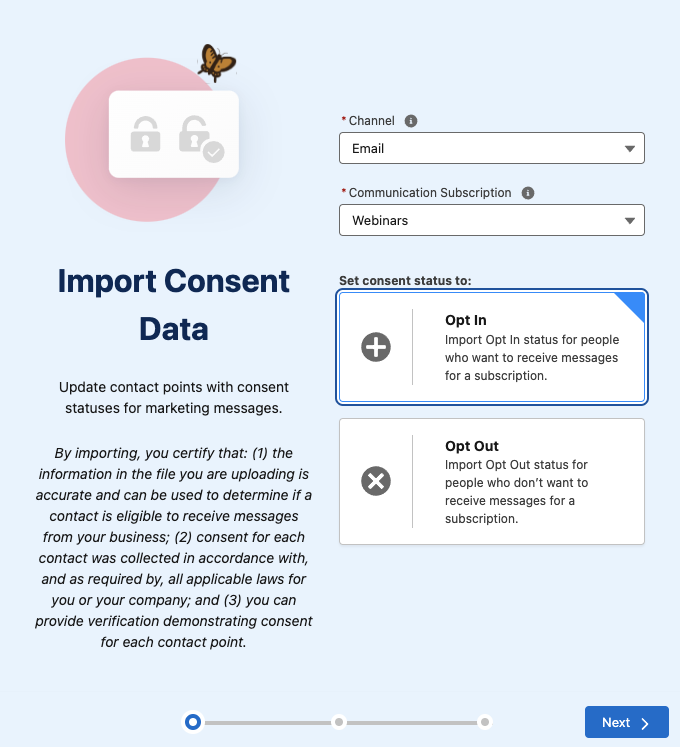
  1. Select Next
  2. Upload your CSV, select Next
  3. Review the import preview and select Import
  4. Select Done

Send Account Engagement Images to CMS

Use images in both Account Engagement and Marketing Cloud Growth by enabling “Copy to CMS”.

  1. In Salesforce, navigate to Marketing Setup > Copy to CMS
  2. Use the dropdown menu next to your Account Engagement business unit to select Enable
  3. Repeat for additional Account Engagement business units

This will create a CMS Workspace named, “Content Workspace for Marketing Cloud Account Engagement – Copied Content – [business unit name]”. To avoid issues, do not change the workspace name or remove the B2BMA Integration user as a contributor. 

Copy Images from Account Engagement to the Growth Edition CMS Workspace

Next, you’ll need to copy the images from Account Engagement to your new CMS Workspace. 

  1. In Account Engagement, navigate to Content > Files
  2. Use the checkboxes on the left-hand side to select the files you would like to move. Once selected, use the dropdown menu at the bottom of the table to select Copy to CMS 
  3. Select Go

Use the New Growth Edition Email Editing Experience

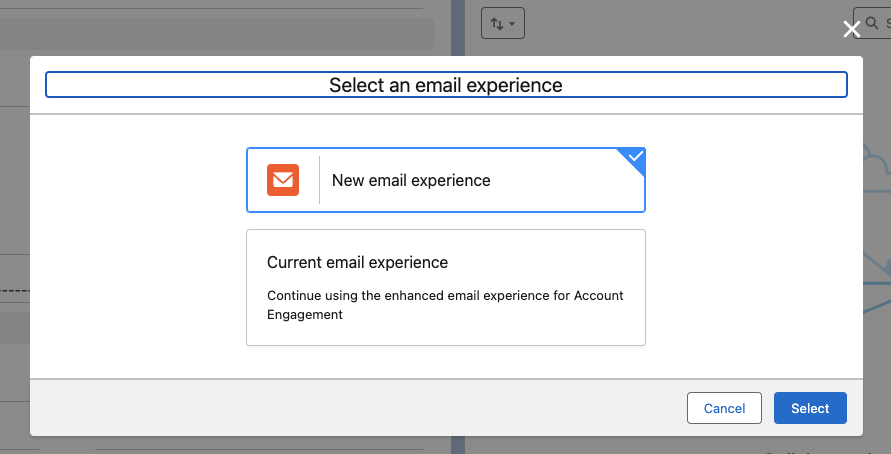
Now you can build emails that are available in both Account Engagement and Growth Edition. When creating or editing Email Content in the Lightning Email Builder, select New Email Experience to use Marketing Cloud Growth Edition’s editor.

Account Engagement Campaign Considerations 

Account Engagement and Marketing Cloud Growth Edition cannot currently share campaigns, so you’ll want to have distinct naming conventions to easily identify which campaigns belong to each platform. You can also keep Marketing Cloud Growth’s campaigns from syncing to Account Engagement by creating a new campaign record type for Growth. 

Read more about Campaigns for Marketing Cloud Growth in this help article. 

Using Account Engagement & Growth Edition Together

Current users of Account Engagement probably have long-standing engagement studio programs that are set up to run on a recurring basis. Account Engagement thrives in this situation and provides flexibility for enrolling prospects and ensuring that the marketing journey you want to happen actually happens. Let’s look at instances where you can use this existing functionality with all the bells and whistles Growth offers.

Use cases for combining the two platforms

  1. SMS functionality. In Account Engagement, You may have a pre-existing engagement studio program set up for every event your company puts on, thanking attendees for joining and sharing pertinent details. If you want to send a reminder text message to people who have registered for the event, you can now take advantage of native Marketing Cloud Growth functionality to do so.
  1. Using cross-object personalization. Say you have a recurring monthly email sent out to your customers letting them know their account status, YTD savings with your company, and other information pertinent to the customer on an ongoing basis. If this information is stored within custom objects, it’s difficult to populate an Account Engagement email with those details. With Marketing Cloud Growth Edition, users can create Data Graphs for cross-object personalization, allowing marketers to personalize emails with data from any object. 
  1. Custom processes for post-form-fill actions. Another great example of how you can use Marketing Cloud Growth Edition alongside Account Engagement is when you want to implement a custom process when someone submits a form.

Since Growth uses Flow for automation, the actions taken after a form is completed can be customized to each unique need. For instance, you can standardize field values or send data to several objects within Salesforce before the Lead/Contact record is updated. 

There you have it

You are now ready to start experiencing Marketing Cloud Growth Edition. The future of Salesforce marketing is bright and evolving every day.

Stay tuned for Growth’s next iterations. In the meantime, use these resources to get started:

If you need help implementing or learning how to use Marketing Cloud Growth Edition, send us a message!

If you’re like many, setting up an SMS program is not part of your everyday tasks. And if I were a betting woman (I’m not), I’d bet you’ve likely never done it before. If you have, then you likely need a refresh.

Moreover, if you have an existing SMS program and now find yourself in a situation where you’re switching providers, you might be even more unsure of where to even begin.

TDLR: Whether newbie or pro, there’s a lot to consider and unpack not only from a strategy perspective but the technical stuff as well. In this post, we’ll cover everything you’ll need to consider for your SMS mobile strategy — whether you’re new to SMS or rethinking your SMS program.

SMS Mobile Strategy Considerations

Many times, when organizations begin on the path of charting out their SMS communication they naturally start down the path of wanting to replicate all the communications they currently have for the email channel.

DON’T BE THAT PERSON.

Instead, consider the following. 

The purpose of your program

Why do you want to communicate with people via SMS, to begin with? Better yet, what’s the benefit to the organization, and more importantly, to your customers?

A common purpose of an SMS program is to provide direct, efficient ways to engage, which leads to improved customer satisfaction and better business outcomes. The net on this point is to ensure you’re doing it for good reason. You may be in an industry where an SMS program just doesn’t make sense, and that’s ok! 

Examples of typical SMS communications

By refining the purpose of your program, you can begin to back into what makes sense to send via SMS.

Consider your customer experience: What are the types of things that might be beneficial to receive via text? If you think about the intent of a text message in general and why we send them in our day-to-day lives, you’re usually sending a text because:

  • Your message is short, direct, and doesn’t require live dialogue.
  • It’s something timely and you’re desiring a response back quickly.
  • It’s efficient.

With that lens in mind, let’s think about the types of messages your organization sends and what fits into this criteria mentioned above.

Here are some examples of communications that make sense to send via SMS:

  1. Appointment Reminders: Remind customers or clients of upcoming appointments, reservations, or important deadlines.
  2. Order Updates: Notify customers about the status of their orders, including order confirmation, shipping updates, and delivery notifications.
  3. Account Notifications: Send account-related notifications such as payment reminders, account balance alerts, or security alerts (e.g., suspicious login attempts).
  4. Promotional Offers: Inform customers about special promotions, discounts, or exclusive deals to drive sales and increase customer engagement.
  5. Event Invitations: Send invitations or RSVP reminders for events, webinars, conferences, or workshops.
  6. Customer Support: Provide quick and efficient customer support by allowing customers to text inquiries, report issues, or request assistance.
  7. Emergency Alerts: Send timely alerts and updates during emergencies, natural disasters, or other critical situations to ensure the safety and well-being of customers or employees.
  8. Surveys and Feedback Requests: Gather feedback from customers by sending SMS surveys or requesting feedback after a transaction or interaction.
  9. Authentication Codes: Use SMS for two-factor authentication (2FA) or one-time passwords (OTPs) to verify user identities during account sign-in or transaction authorization processes.
  10. Appointment Scheduling: Allow customers to schedule appointments, consultations, or service bookings via SMS, with automated confirmation messages.
  11. Membership Renewals: Remind members or subscribers about upcoming membership renewals, subscription expirations, or important membership-related updates.
  12. Event Reminders: Send reminders about important dates, deadlines, or milestones related to events, campaigns, or initiatives.
  13. Internal Communications: Communicate important updates, announcements, or reminders to employees, contractors, or stakeholders within the organization.
  14. Educational Messages: Deliver educational content, tips, or tutorials related to products, services, or industry trends to inform and engage customers.
  15. Feedback and Reviews: Prompt customers to leave reviews, ratings, or testimonials after a purchase or interaction with the organization.

More times than not, these communications fall into the transactional bucket. But as you saw above, they don’t have to. When deciding which communications to send via SMS, it’s essential to consider the relevance, timing, and audience preferences to ensure that messages are well-received and contribute to a positive customer experience.

Real-world SMS example: Player communication for a bocce ball league

Incorporating SMS into a communication strategy doesn’t have to be all or nothing either. There are instances when sending both an email and text makes sense.

Here’s a real-life example: I play in a bocce ball league (yes, those exist), and if the courts are too wet because of rain, they’ll cancel. The challenge is since there are no makeups, they really try to avoid canceling. It really comes down to the wire for making the decision to cancel. The league used to send an email as soon as they decided, but chances are you didn’t see it until you were already there.

To improve this customer experience, they developed not only a rain hotline (via webpage), which shows the last time it was updated (e.g., “10 mins ago” with status updates like “we will make a decision by x time”). The league will now also send a text message via SMS letting you know the status of your game as soon as it’s canceled.

They also must have gotten tired of fielding emails and phone calls (who knew us bocce ballers were such a passionate group) that they now remind everyone via text message that the rain hotline exists, and they send a link that you can access via mobile as well.

End Destination

Once you’ve established ‘the why’ of your SMS messaging and what you’re sending, don’t forget about the end destination. This is where the true professionals shine. 

Ensure your end destination is mobile-optimized. For example, there’s nothing worse than sending an SMS to provide feedback via survey, and it takes you to a non-mobile-optimized web page. Not only have you wasted money, effort, and time setting up this message, but you are creating a customer experience of friction (which is likely the opposite of what you’re trying to achieve). To add more fuel to the fire, this extra stinks — especially when it comes to getting feedback, which is already hard to receive. The oversight means you’ve just blown your chance. WOMP WOMP.

Real-world SMS example: Frequent flyer

So, let’s talk about a positive SMS example. If you’re like me and fly a decent amount, you’ve got your flight app (Delta in my case) up and running the day of your flight. It works great (most of the time… I could do another blog post on that… but another day), and if you remember to open the app and look at it on occasion, you’ll see that a gate might have changed or the time of flight has been updated.

However, I’m not always able to check the app when I’m on the move. So, Delta is sending SMS notifications as soon as these changes occur. This is especially helpful — I can see these notifications pop up on my phone without having to open the app to learn more. I also see them on my watch (when the battery isn’t dead). And if I want to see more from the text, I can click the link and it delivers me to the app, which makes the end destination all that more valuable.

I’ve seen some brands come close to excellence where they will drop you off to a mobile-optimized page. However, the real pros consider app downloads too.

As new tech and consumers evolve, so should a marketer’s strategy. SMS programs are tablestakes these days, so getting your strategy right is a must for most consumers.  

Technical Considerations for SMS Messaging 

How SMS marketing works

With a solid grasp of what a mobile strategy should entail, we can pivot to the technical piece. Let’s start with how SMS works for marketers as a whole, taking Salesforce as our platform of choice in this example. 

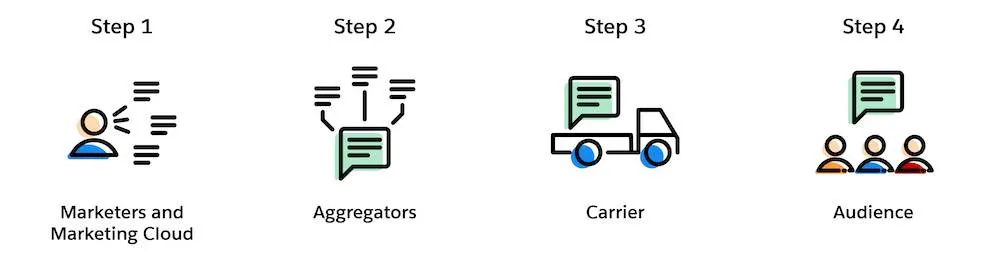
For Salesforce users, there are 4 steps to send an SMS message: 

  1. Marketing creates a personalized text message in Marketing Cloud Mobile Studio
  2. Aggregator preps message for delivery to the appropriate carrier
    (Aggregator = Salesforce partners that connect our messaging platform with carrier networks around the world) (Carrier = mobile providers across the globe)
  3. Carrier receives messages and delivers them to the final audience
  4. The customer receives a personalized text message

Preparing for SMS Sending

But for those simple steps to happen, there’s a bit of preparation involved, especially if this is your first time.

Here are the steps to prepare for SMS sending: 

  1. Determine your code needs – Short vs long code, dedicated or private. Learn more about these options here.
  2. Select an SMS platform provider and negotiate a contract – Many times as part of your contract they will acquire the code for you, but provisioning is extra.
  3. Provision your short code (this can be done with a consulting partner like Sercante or directly with the provider, which is typically more costly than going with a partner). 
  4. Once the shortcode is made available within the platform, you’ll need to set up your required keywords, and messages as well as obtain consent. (Keep on reading to learn about opt-in best practices). 

To migrate or not migrate your SMS program

If you’ve had the luxury of setting up your organization’s SMS program once and are now looking to switch providers, you might be scratching your head and thinking about what’s better: migrating our existing one or spinning up a new one?

In true consultant fashion, the answer is: IT DEPENDS 🙂.

Like with many options in life, it all goes back to what’s important — in this case — time, money, and customer experience.

Let’s look at the pros and cons of both scenarios:

ScenarioProsCons
Migrate ExistingRisk of losing people is lowThere could be up to 8-12 weeks of downtime as you move your code across platform providers, aggregators, and the like. It can get complicated — especially from a lease/ownership perspective
Acquire NewThe implementation process is relatively straightforward, sometimes quicker than the migration route. There’s no downtime in the ability to send SMSEducation of new code may be required for existing subscribers. There’s a risk of retention losses.

SMS migration route — let’s stay friends

If keeping your existing code outweighs the downtime you’ll encounter, there will be a decent amount of coordination between both old and new providers.

Below are some high-level steps of what’s involved when migrating SMS programs:

  1. Contact existing provider – Let them know your intention to retain the existing shortcode and inquire about the process for releasing the shortcode to use with the new provider, as well as any associated fees or requirements. Please note: not every provider will release their shortcode.
  2. Verify Contractual Obligations – Review your contract or agreement with the current to understand any terms or obligations related to the shortcode. Ensure that you comply with any contractual requirements before proceeding with the migration. 
  3. Coordinate with the new provider –  Let them know you desire to transfer your existing shortcode to their platform. Provide any necessary information or documentation requested by the new provider to facilitate the transfer process.
  4. Coordinate Timing– Coordinate the timing of the shortcode transfer between old and new to minimize disruption to your messaging campaigns. As mentioned in the cons, there’s normally a downtime where your code will not be operational. Ensure that there’s a smooth transition between the two providers.
  5. Update Opt-in Process – If necessary, update your opt-in/opt-out process to ensure compliance with regulatory requirements when using the shortcode via the new provider. Obtain opt-in consent from subscribers to receive messages on the new platform.

Once this is all squared away and your shortcode is available in the new platform, you can proceed to set up your ‘from’ keywords and ‘to’ message.  While migration of an existing code has its perks, the timeline is typically elongated compared to its counterpart. 

New SMS code route — Team ‘New Friends’ 

So if downtime, or getting up and running is more your concern, a new code may be the best (friend) route. 

All joking aside, when acquiring a new shortcode it’s essential to ensure compliance with regulations like the Telephone Consumer Protection Act (TCPA) and General Data Protection Regulation (GDPR) if applicable. And with that responsibility of re-opting everyone in here are some general best practices. 

New SMS code best practices

  1. Inform: Send out a clear and transparent communication informing subscribers about the change in shortcode and the reason behind it. Explain any benefits they might gain from the transition.
  2. Highlight Benefits: Emphasize any advantages or improvements associated with the new shortcode, such as better service, more relevant content, or enhanced security measures.
  3. Request Opt-In: Clearly ask subscribers to re-opt-in to continue receiving messages by sending a specific keyword or opting in through a designated method (e.g., texting a certain number, clicking a link, filling out a form).
  4. Provide Instructions: Offer simple and straightforward instructions on how to opt in. This could include step-by-step guidelines via text, email, or on your website.
  5. Assure Privacy and Security: Reassure subscribers that their privacy and security are a priority and that their information will be handled in accordance with relevant regulations.
  6. Offer Incentives (Optional): Consider offering incentives or rewards for those who re-opt-in, such as discounts, exclusive content, or entry into a giveaway.
  7. Set Deadline (if applicable): If there’s a deadline for re-opting in to ensure uninterrupted service, clearly communicate this to subscribers to create a sense of urgency.
  8. Follow-Up: Send reminders to those who haven’t opted in yet, closer to the deadline if applicable, to ensure they don’t miss out on staying connected.
  9. Respect Opt-Outs: Honor any opt-outs or preferences expressed by subscribers who choose not to re-opt-in and ensure they’re removed from the communication list associated with the old shortcode.
  10. Track and Monitor: Monitor the opt-in process closely and track the success rate. Analyze any feedback received to improve future communication strategies.

Remember to maintain transparency throughout the process and make it as easy as possible for subscribers to re-opt-in to the new shortcode.

Evolving with your customers

In conclusion, as technology and consumer behaviors evolve, marketers must adapt their mobile program strategies to remain effective. SMS marketing, as a powerful tool, provides a direct and personal way to reach customers. By incorporating SMS into your overall communication strategy, you can enhance customer engagement, drive traffic to your website or app, and ultimately achieve your marketing goals.

A successful SMS marketing program requires careful planning, compliance with regulations, and a focus on delivering valuable and relevant content to your subscribers. By following best practices and continually optimizing your campaigns, you can leverage SMS to create a strong connection with your audience and drive business growth.

Welcome to the marketing side of Salesforce! As a Salesforce admin, you may occasionally need to assist your marketing team in developing processes or generating reports from data in Salesforce and Marketing Cloud Account Engagement (Pardot). Understanding Account Engagement and how it affects your Salesforce org can enhance your ability to contribute to those initiatives. 

7 Account Engagement Facts Salesforce Admins Must Know

In this blog, we will review several fundamental concepts in Account Engagement and how they relate to your role as a Salesforce Administrator. This guide is designed to provide you with insights from a Salesforce perspective about Account Engagement so that you can best support marketing and other teams using the platform. While these features are available to all organizations, access to the features can vary based on your org configuration and tier.

Tip 1: We call people “prospects”

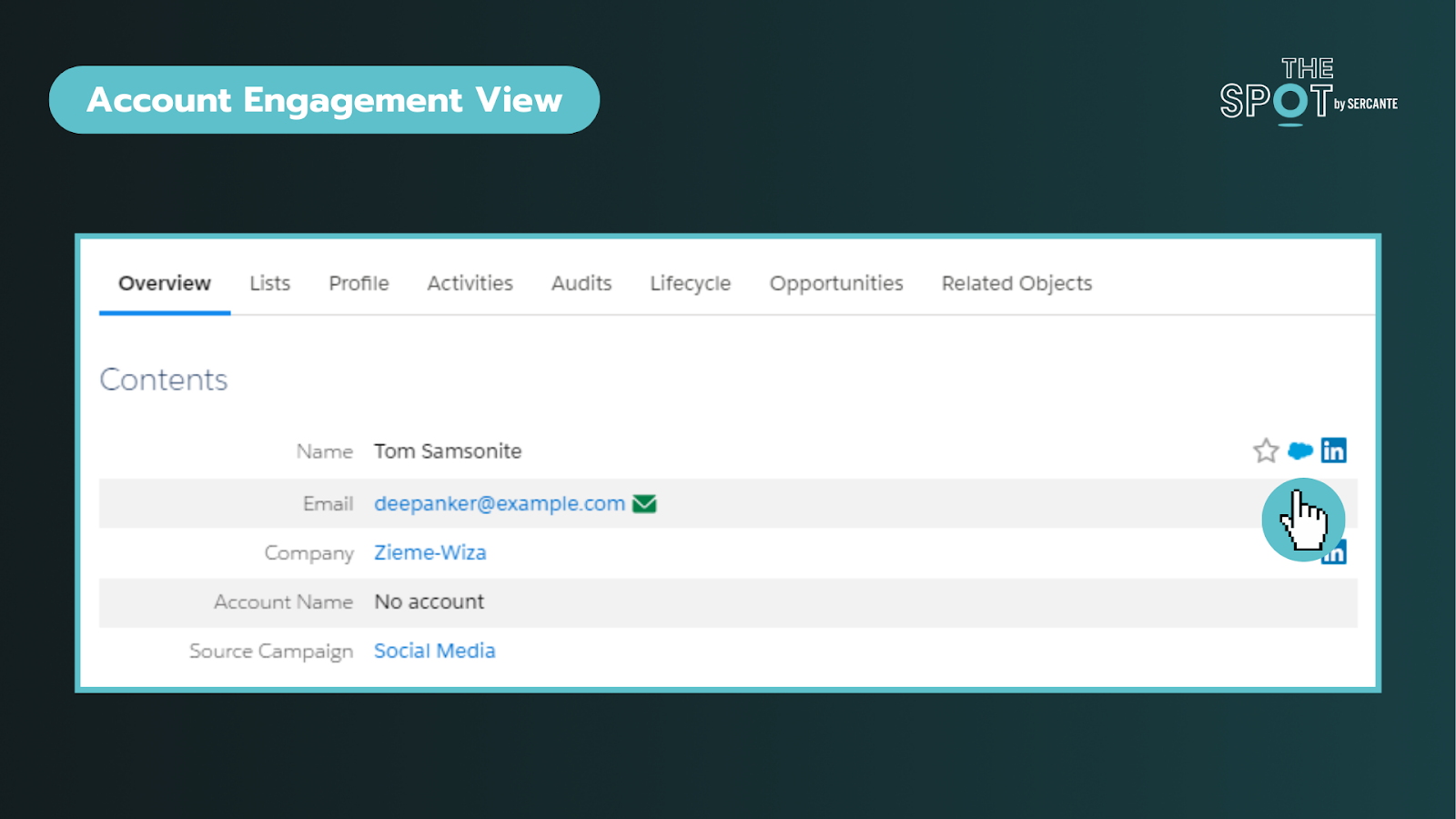
In Salesforce, you are accustomed to working with Leads and Contacts. While this does carry over, the platform labels “people-records” as Prospects. Prospects can exist solely in Account Engagement or be synced with existing Salesforce records.

Verifying Prospects are linked to Salesforce records

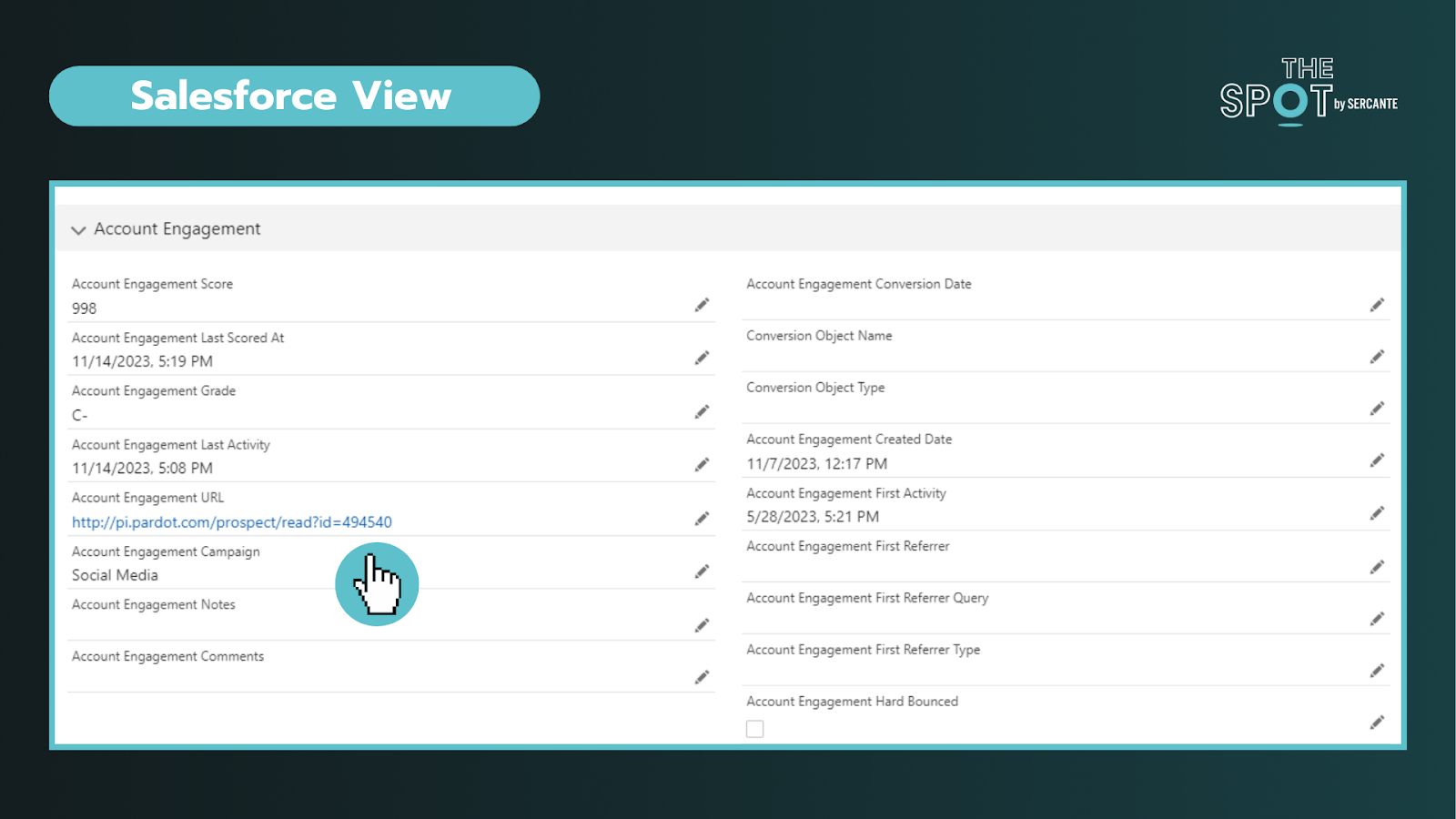
To verify that a Prospect is linked to a Salesforce record, you can click on an individual record and look for the Salesforce cloud icon listed on the right of their name (see above) or by the CRM ID listed at the bottom of the record. Clicking on this cloud icon will take you to the connected Salesforce record. In Salesforce, you can click the Account Engagement URL to bring you into the platform. This is particularly helpful when you are trying to diagnose data sync issues. 

Key reminders:

  • Records are matched using 18-digit IDs and email (if no matching record is found)
  • You can navigate from Salesforce to Account Engagement records and vice versa
  • Managing deleted records and duplicates may require additional effort across both platforms

Tip 2: Add visibility for sales and marketing teams in Salesforce

Enabling Account Engagement introduces several new fields, components, and features exclusive to the integration. You should review the implementation guide and work with your team to align on what information is valuable for sales and marketing to deliver on their respective functions.

The package includes fields like engagement score, fit (grading), what “object” they converted on, and a log of their latest activity in Account Engagement, to name a few. Additionally, depending on your tier, you may also find additional components you can take advantage of, such as B2B Marketing Analytics.

When mapping fields, not all Salesforce field types transfer seamlessly to Account Engagement. To avoid data loss, review your fields (including matching API names) and ensure they are mapped across objects in Salesforce before attempting to sync any data into Account Engagement.

Key reminders:

  • Field types may affect your ability to map fields into Account Engagement
  • Beware that Formula fields do not trigger sync updates in Account Engagement
  • Field level permissions and user profile access on the integration user can affect dataflow

Tip 3: Security matters but looks and works differently

Security is the #1 pillar of any Salesforce Admin role.

There are different levels of access you can give to Salesforce users via permission sets. Those levels include:

  • No access to Account Engagement data – on either platform: This is usually for operations teams who don’t need access
  • Access to Account Engagement data on a page layout in Salesforce: This is usually for sales/SDR teams
  • Access to the Account Engagement app: This is usually for marketing and creative teams


To enter the Account Engagement app, the user’s record must be mapped into Account Engagement. No user in Account Engagement, no access to it regardless of permissions in Salesforce.

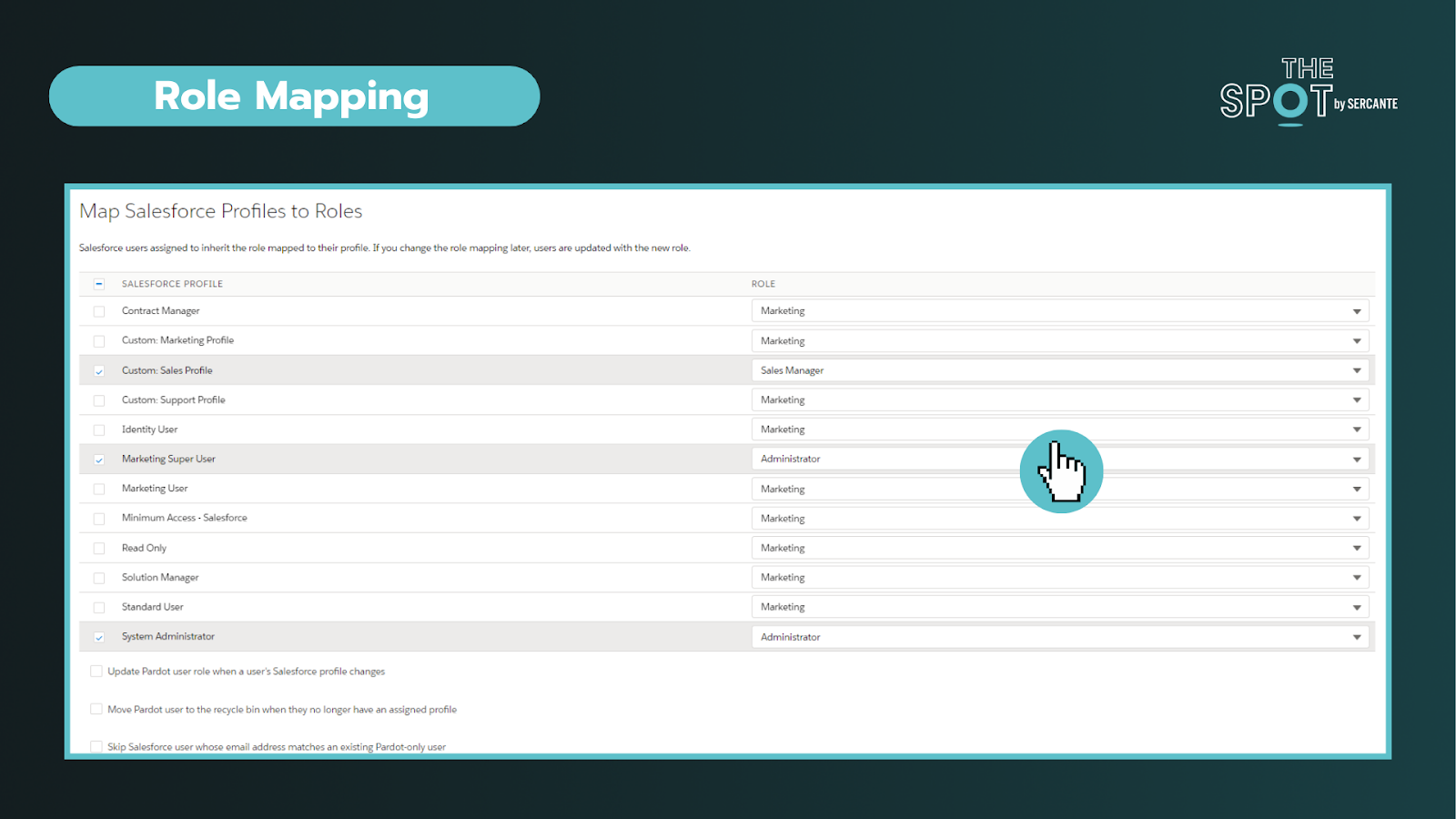
Secondly. while you may be familiar with profiles and roles in Salesforce, well Account Engagement adds another layer of complexity to the mix. Account Engagement has its own “roles” and they do completely different things. These roles only apply within Account Engagement and allow you to see and do specific activities (build segments, forms, etc) on the platform. 

Default Account Engagement user roles include Administrators, Marketing, Sales Manager, and Sales. You can configure these roles under the account settings section and connect profiles to roles within the Salesforce connector section in Account Engagement.


To conclude, you can personalize the levels of access to different Users. You’ll ultimately need two “keys” to get into Account Engagement (a Salesforce permission set and an Account Engagement role assigned to a synced User). It is important to work with marketing to outline the level of access needed to perform daily tasks.


Key reminders:

  • You can create custom roles in Account Engagement (may require an add-on)
  • All the users with the same role, have the same access in Account Engagement, regardless of their permissions in Salesforce

Tip 4: The Salesforce Integration is flexible

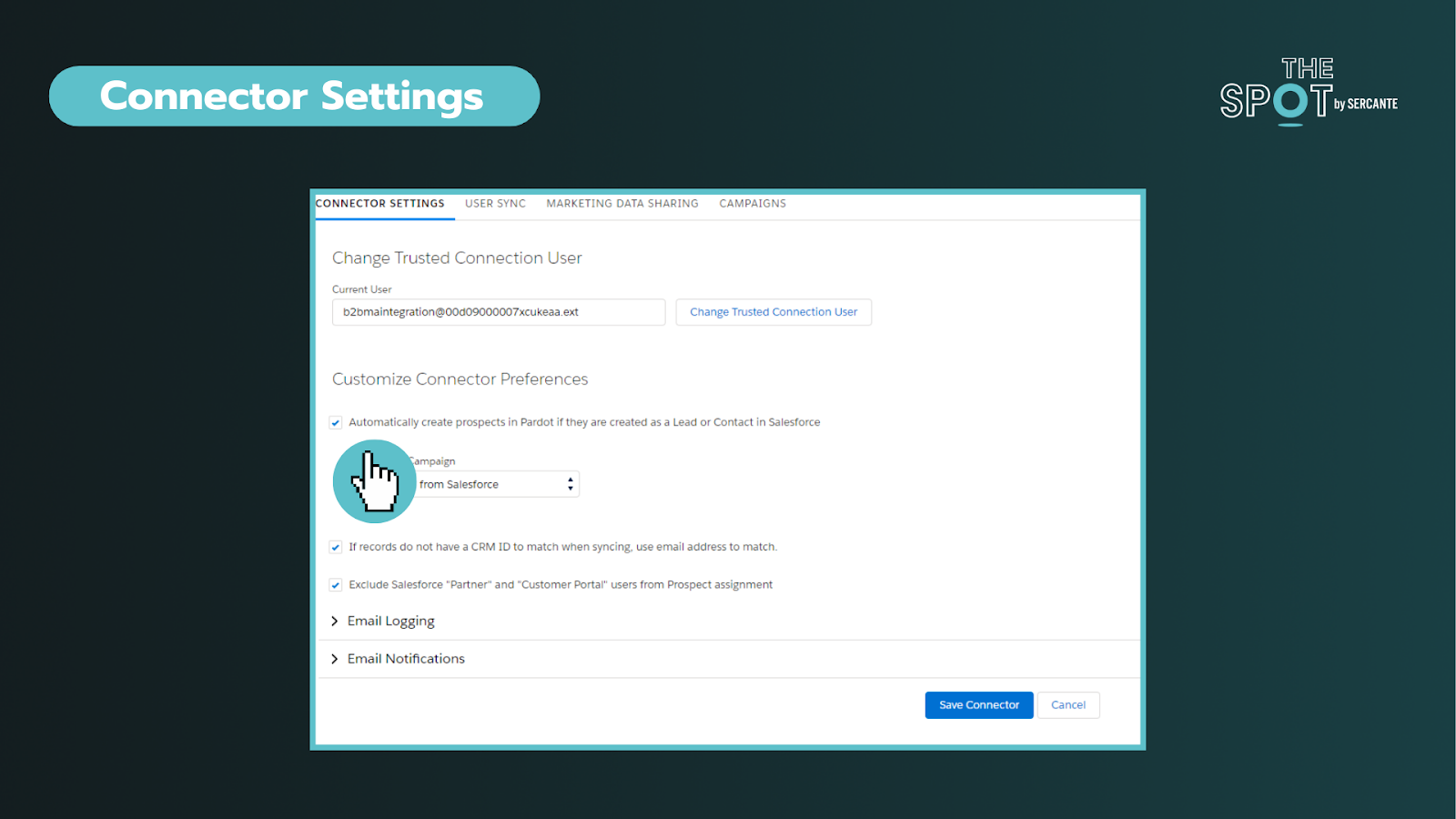
This integration (or connector) is the key to aligning your data between two systems. Through the connector, we can sync everything from Users, objects, fields, and campaigns. You can deep dive into the individual components here.


In these settings, you can choose if you want to allow a bi-directional sync or not. This is your on/off switch. Most customers want this feature enabled. 


Additionally, you can control data flow on a field-to-field level. It is important to discuss how data will be used and by what team. 

You can allow data to be managed by:

  • Salesforce only
  • Account Engagement only
  • Whichever system makes the most recent update

As data comes circulates between the platforms we can be met with conflicts between the two systems. For most teams, these conflicts can be attributed to their use of validation rules or restricted field values and dependencies. The conflicts are called sync errors in Account Engagement

These conflicts can be found under the Salesforce connector gear icon (under Connectors) and can range from:

  • Access issues – Connector user lacks access to read/write to an object
  • Data formatting issues – Issues with field types or values
  • Process alignment issues – dependencies between fields or steps in a process

As an admin, is important to support your team in resolving these issues as quickly as possible to restore data sync on those records. These sync errors offer opportunities to improve communication between teams and for process improvements. Our team at Sercante often uses ProspectUpdater to help customers fix data formatting issues at a scale.

Key reminders:

  • Enabling a bi-directional sync of data is recommended but optional
  • Large imports can cause bottlenecks – if you notice this becoming an issue you may want to check daily processes as well

Tip 5: Account settings are the key to understanding your org

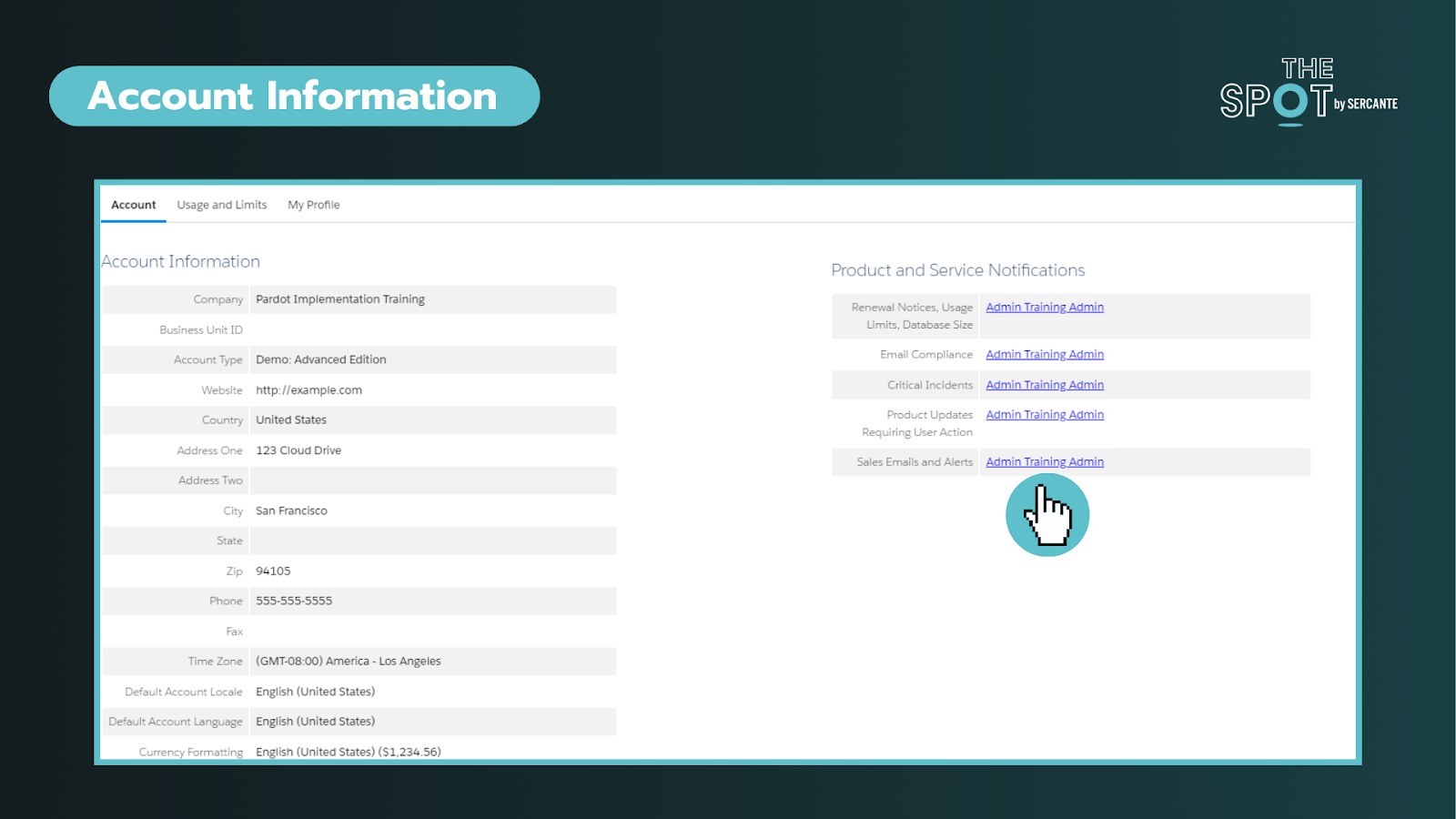
This section can help you identify important information about your account such as the Business Unit ID, when the account was enabled, admin alerts, and account limits. On the right side of the screenshot below, you will find the ability to personalize who gets alerts about these items. To ensure these alerts are taken seriously, ensure these are received by team members who are active in the org.


The most common way that admins discover this page is when they have to increase the number of prospects that can be kept in the account or run out of storage.

Key reminders:

Tip 6: Leverage Account Engagement forms

You’re probably familiar with web-to-lead forms. While these mechanisms can help do more with Salesforce they do not cookie leads or contacts upon completion. Why does that matter? Cookies help us identify prospects and avoid duplicates.

With Account Engagement you can simplify the form creation and management (say goodbye to your external tools) or form handlers (similar to webhooks) to streamline your inbound marketing and processes. The forms can be embedded as Iframes on your website, Account Engagements’ landing pages, or stand-alone.

Upon completing a form, you can set a cookie on the Prospect. You can still do notifications (email and Slack), send emails, add to segments, and so much more without complex flows or other Salesforce automation. 

Key reminders:

  • Testing forms incognito mode is strongly recommended
  • Cookie length can be adjusted under your account settings or by individual user browser settings

Tip 7: Encourage campaign collaboration

First thing is first, Account Engagement has campaigns too! However, these are exclusively used in Account Engagement for capturing the 1st touch interactions (all time). This makes it challenging to see the life of the lead across time and also makes reporting difficult.

Luckily, we can create and sync Salesforce campaigns into Account Engagement for the same purposes AND to capture the multiple touches on their journey to conversion and beyond.

By leveraging Account Engagement’s automation to add prospects to Salesforce campaigns, we avoid doing multiple imports to update the Campaign member records. This functionality also allows us to take advantage of standard Campaign reports in Salesforce that can help us see ROI and campaign influence across our initiatives. To help find the latter, we created a Campaign Influence Started Pack, go check it out. 

Key reminders:

  • When creating campaigns, leverage campaign member statuses and make sure to check the “active” checkbox to sync over into Account Engagement
  • Keep an eye on campaign members and campaign influence records, which can eat up your Salesforce storage if created in large volumes over time

Learn the essential Account Engagement concepts for Salesforce admins

While Account Engagement predominately serves marketing functions, Salesforce Admins play a crucial role in understanding and supporting its broader impact. By acting as the bridge between IT and marketing, admins can help facilitate more collaboration and more effective project rollouts on projects affecting users across the organization.

If you are struggling with any of these tasks/concepts, please reach out for assistance. Together, we can foster more seamless experiences that drive transformative outcomes!

Product Note: Marketing Cloud Growth and Advanced are editions of Marketing Cloud Next and have also been referred to as Agentforce Marketing.

You may have heard Salesforce’s announcement of Marketing Cloud Growth Edition, their new marketing automation platform built on the Einstein 1 platform (also known as “Core”), intended for SMB marketers to help them more efficiently engage their audience at scale. This thrilling new announcement came with a lot of questions, one of them being, what is the campaign asset creation process like with Marketing Cloud Growth Edition? Well, here’s how it works.

Campaign Asset Creation with Marketing Cloud Growth Edition

When it comes to building your campaign in Marketing Cloud Growth Edition, you will be presented with five options:

  • Single Email with Einstein
  • Single Email Template
  • Message Template Series
  • Signup Form Template
  • Blank Email Campaign

Single Email with Einstein

When you use Single Email with Einstein, this starts your team off with using Einstein Co-create. The type of campaign you are planning will determine which option you choose from above, but when you use Einstein Co-create it expedites the campaign brief process. 

Einstein Co-create campaign brief

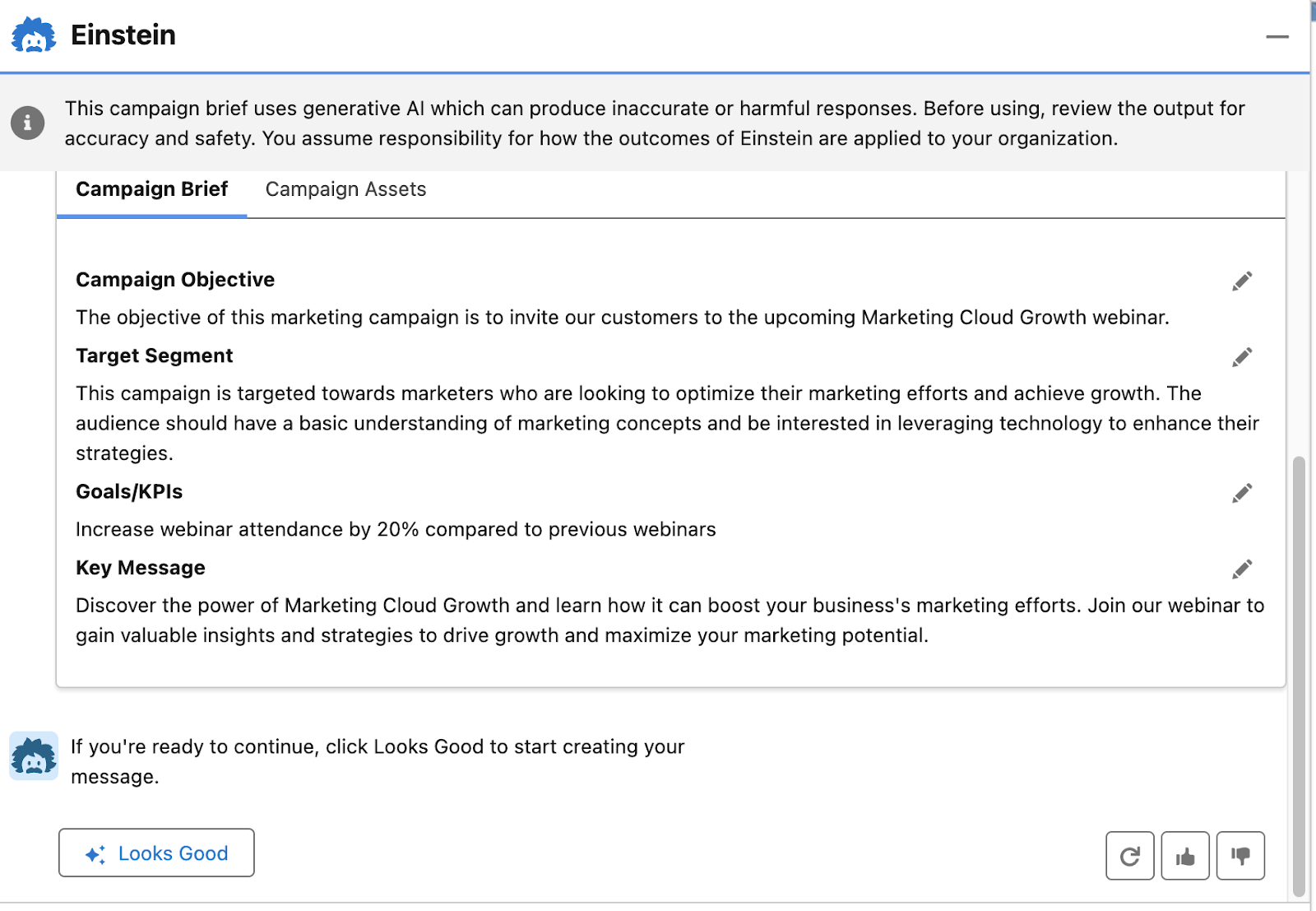
Your campaign brief is essentially the written plan for your campaign strategy. When you use Einstein Co-create, you provide the prompt to Einstein, sharing what your campaign is about the general goal you are looking to achieve, and your target segment and it will then generate a campaign brief with the below elements:

  • Campaign Objective
  • Target Segment
  • Goals/KPIs
  • Key Message

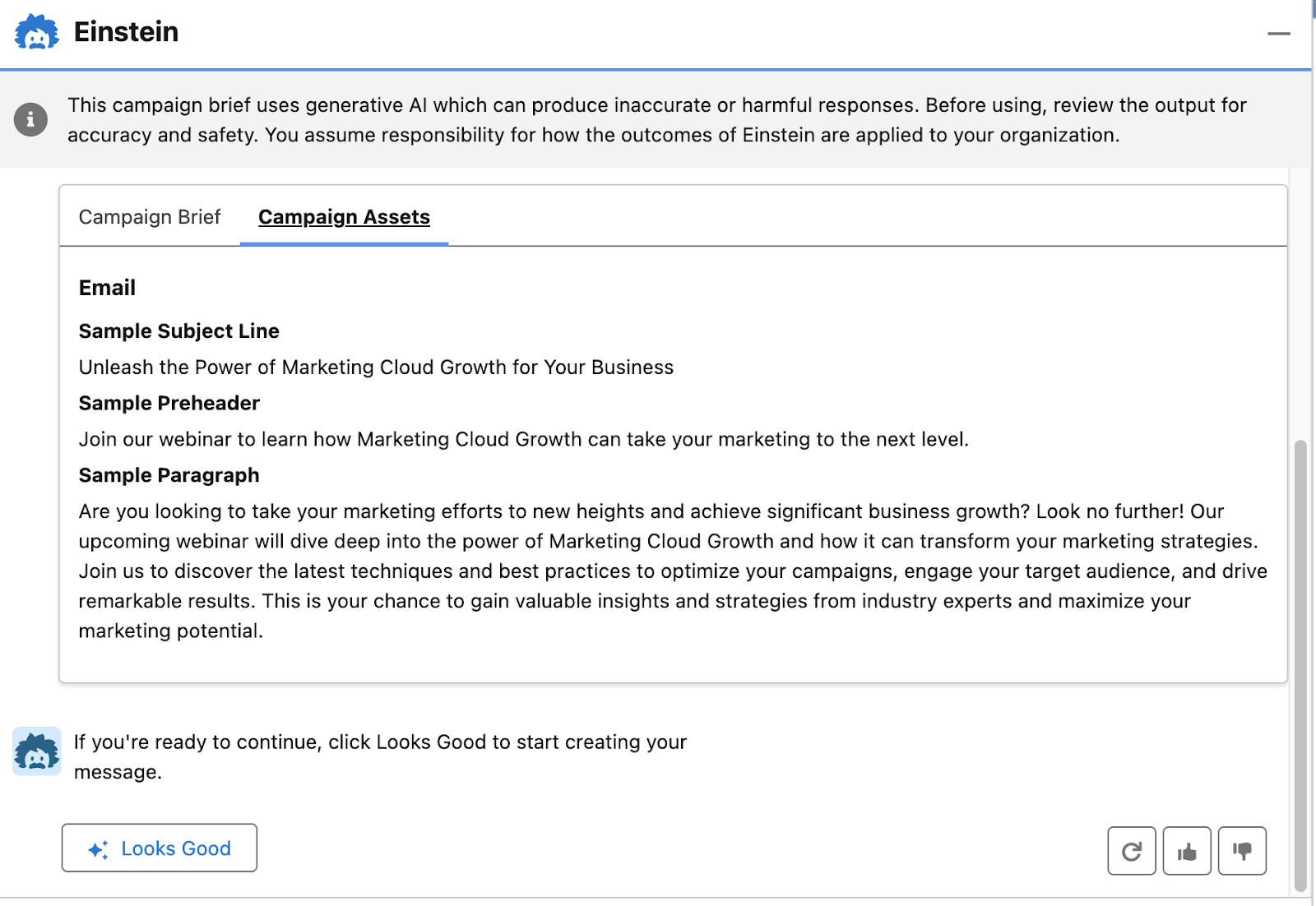
In addition, because the original selection here was Single Email with Einstein, the platform will also automatically generate a Campaign Asset with an Email Subject Line, Preheader, and Body Copy.

You can upvote, downvote, or refresh the content to help the AI improve. Select Looks Good to generate your Campaign Assets.

It’s the same campaign strategy principles, new platform, and a more efficient way to generate campaign briefs along with the email for your campaign. If you select Single Email Template from the campaign asset creation options, it is the same interface as the previous selection, just without automatic content generation.

Message Template Series

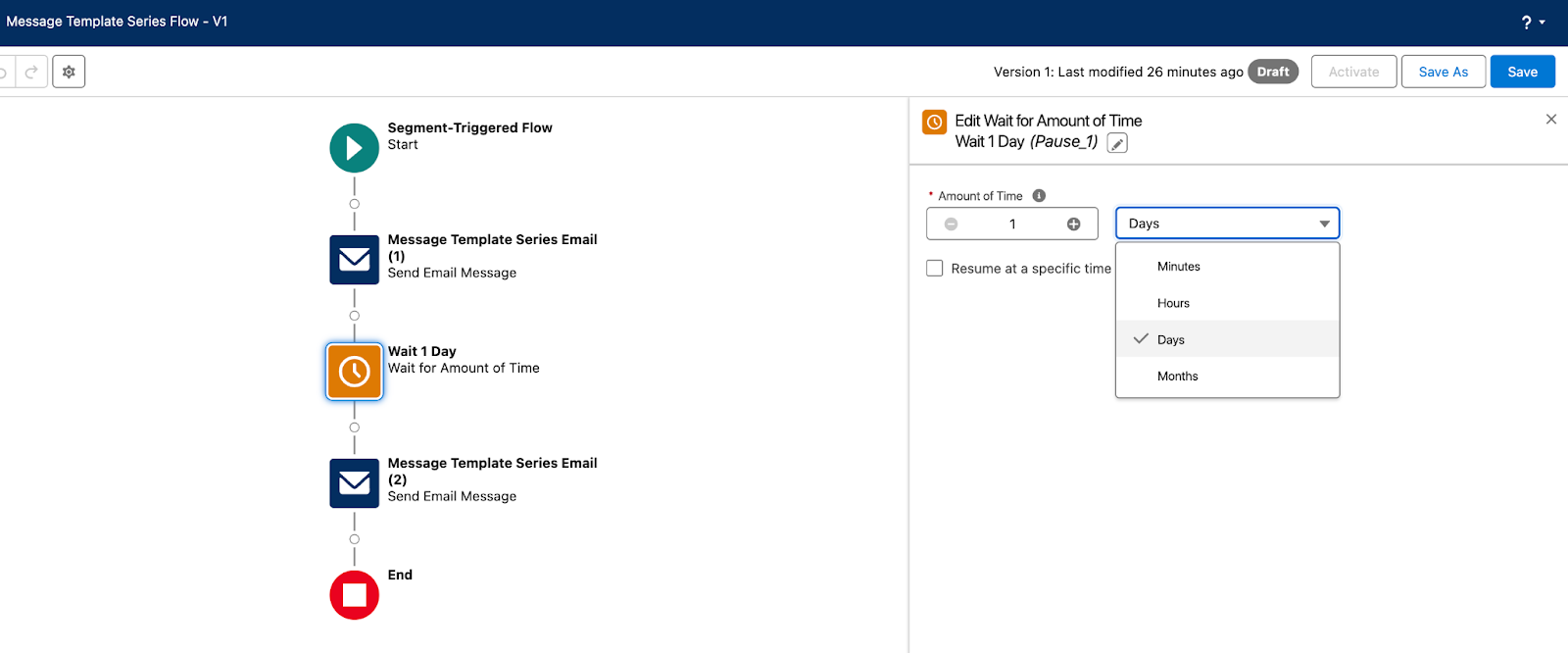
The Message Template Series selection allows you to create two emails customized to your campaign set up from a flow sequence with a Wait 1 Day step between email sends that can be edited to wait minutes, hours, days, months, or resume at a specific time of day. 

Sticking with the Marketing Cloud Growth Edition webinar example from the previous campaign brief generated with Einstein Co-create, the first email could serve as the invitation to our recipient list of marketers and the two emails in this series could serve as the reminder email and the last chance to register email, while suppressing the people who have already registered. 

We could also create a second message template series to start engaging with our prospects who have already registered for the webinar. Maybe for the first email we send them a piece of content that shares an introduction about Marketing Cloud Growth Edition providing initial tips and tricks for how they could get started with the platform and then the second email could be sent on the day of the webinar, reminding registrants it will start in an hour.

There is a lot that your team can do with this option, it just depends on what your plan is for how you will achieve your campaign goal. You already defined the goal, measurement, and audience, with your strategy, but you also need to determine the how.

  • How are you going to promote this campaign to increase registrants?
  • How will you compel your audience to attend the webinar to reach the goal of increasing attendance by XX%?
  • How do you plan on following up with registrants and attendees after the webinar to maximize the results from this webinar three months after, six months after, twelve months after? (This is also where a collaboration with sales comes in.)
  • What has worked well in the past?
  • What has not worked well that should either be nixed for the future or improved upon?

All of this should be defined after you frame your initial campaign strategy and before you and your team start creating the campaign assets, so that when the team starts going down the path of execution, everyone is aligned and focused on the campaign initiatives that will make the greatest impact.

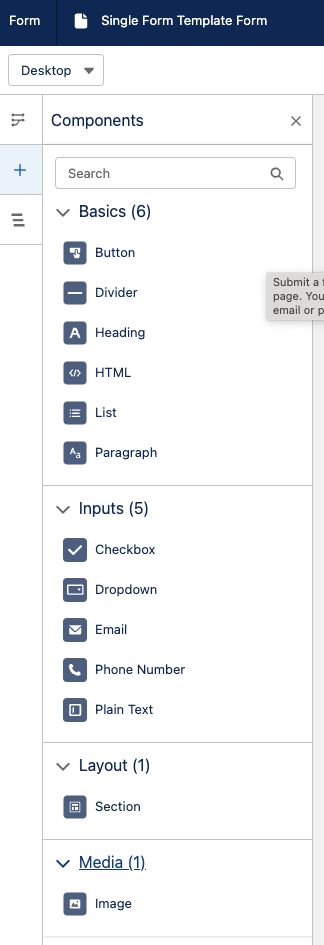
Single Form Template

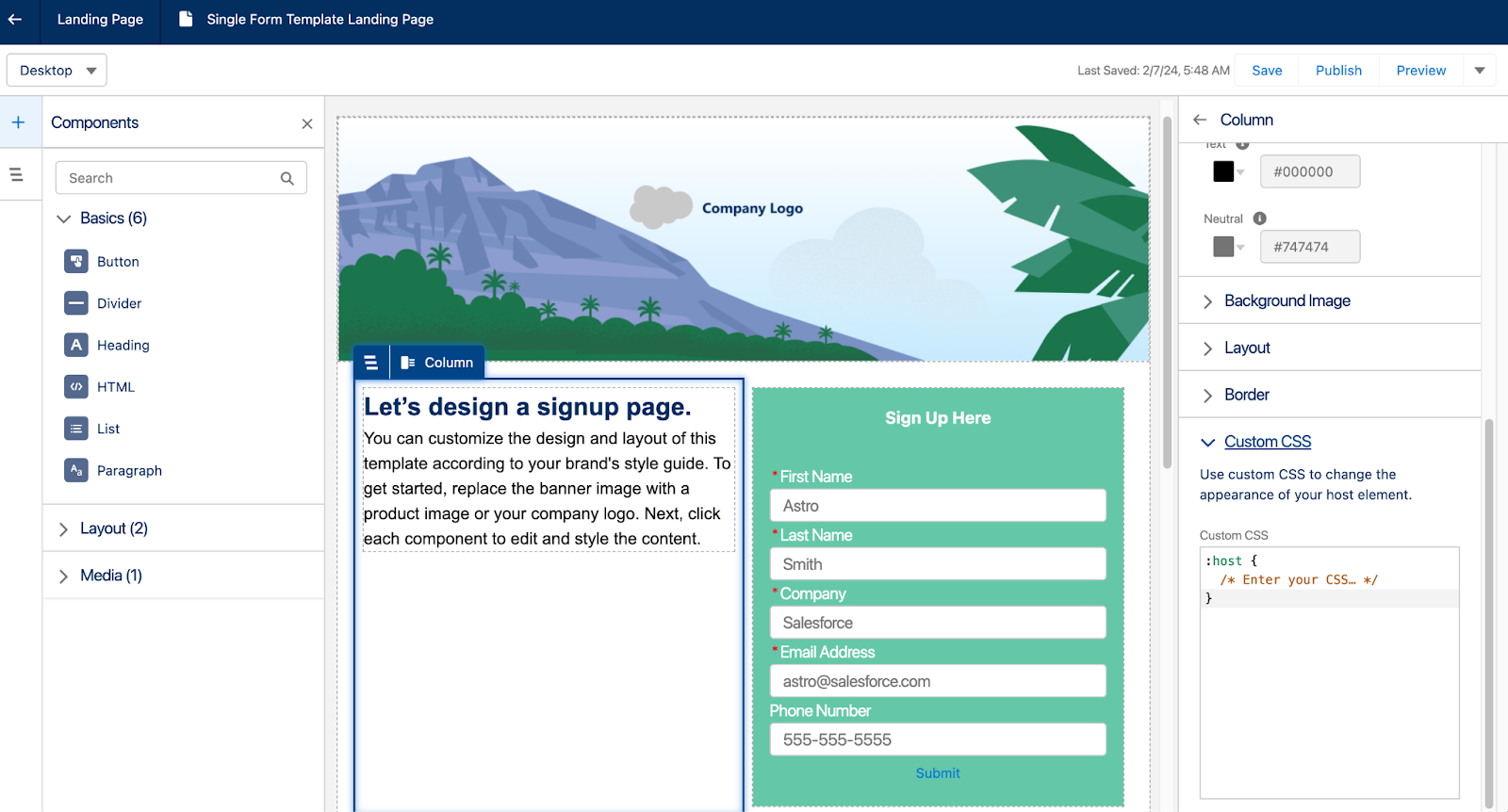
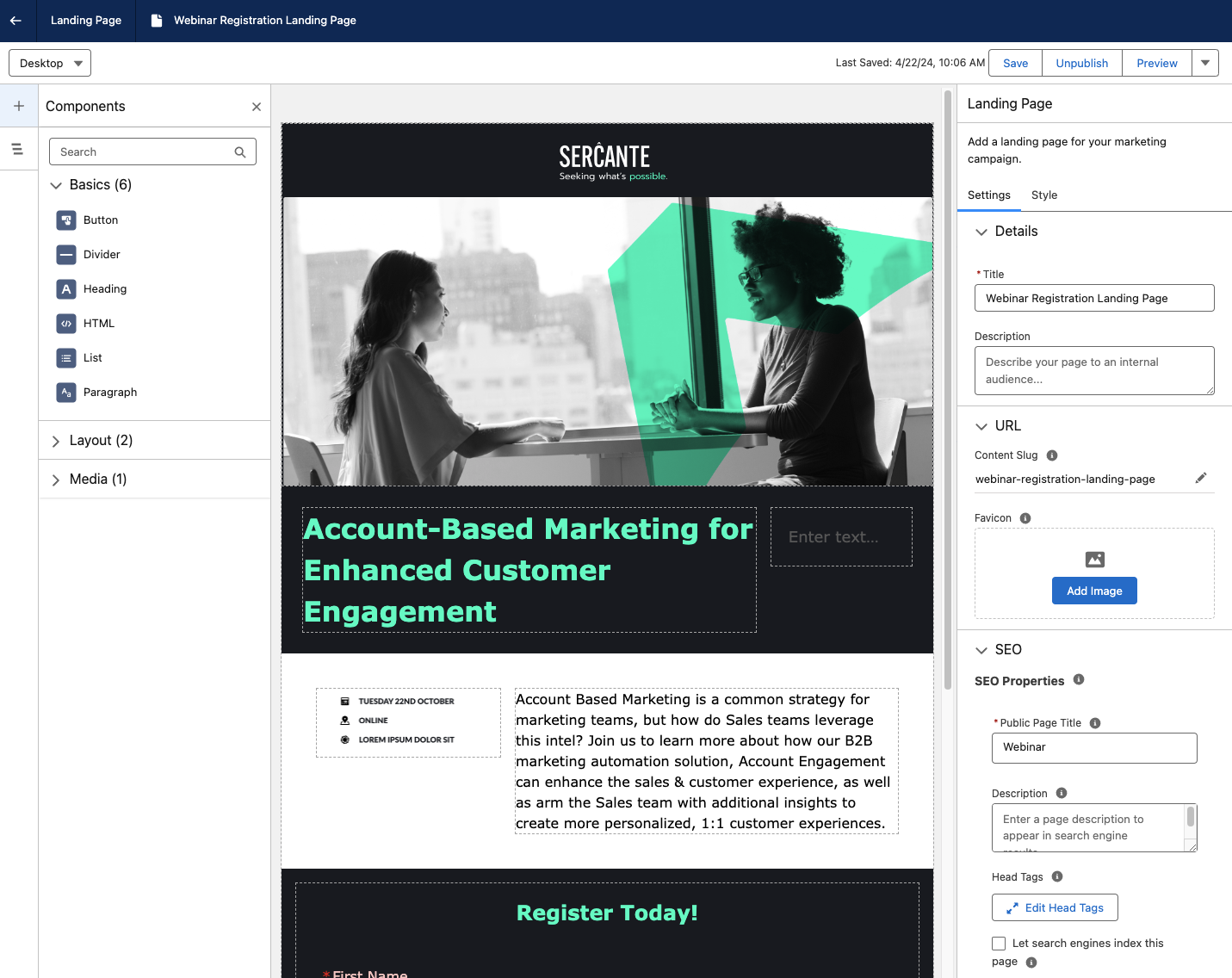
The Single Form Template option is what you would use to create the registration form and landing page for the webinar. The platform starts you out with creating a landing page that includes a form. The Landing Page includes a form, but the form can be switched out for another form that exists in your org. This campaign also includes a flow to create new Leads when the form is completed. 

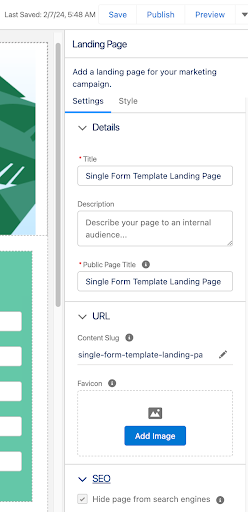
The landing page builder comes with the following features:

  • Title, Description, and Public Page Title can be customized
  • URL Content Slug can be edited for a custom landing page URL
  • Favicons can be added
  • Landing Pages can be hidden from Search Engine indexing 

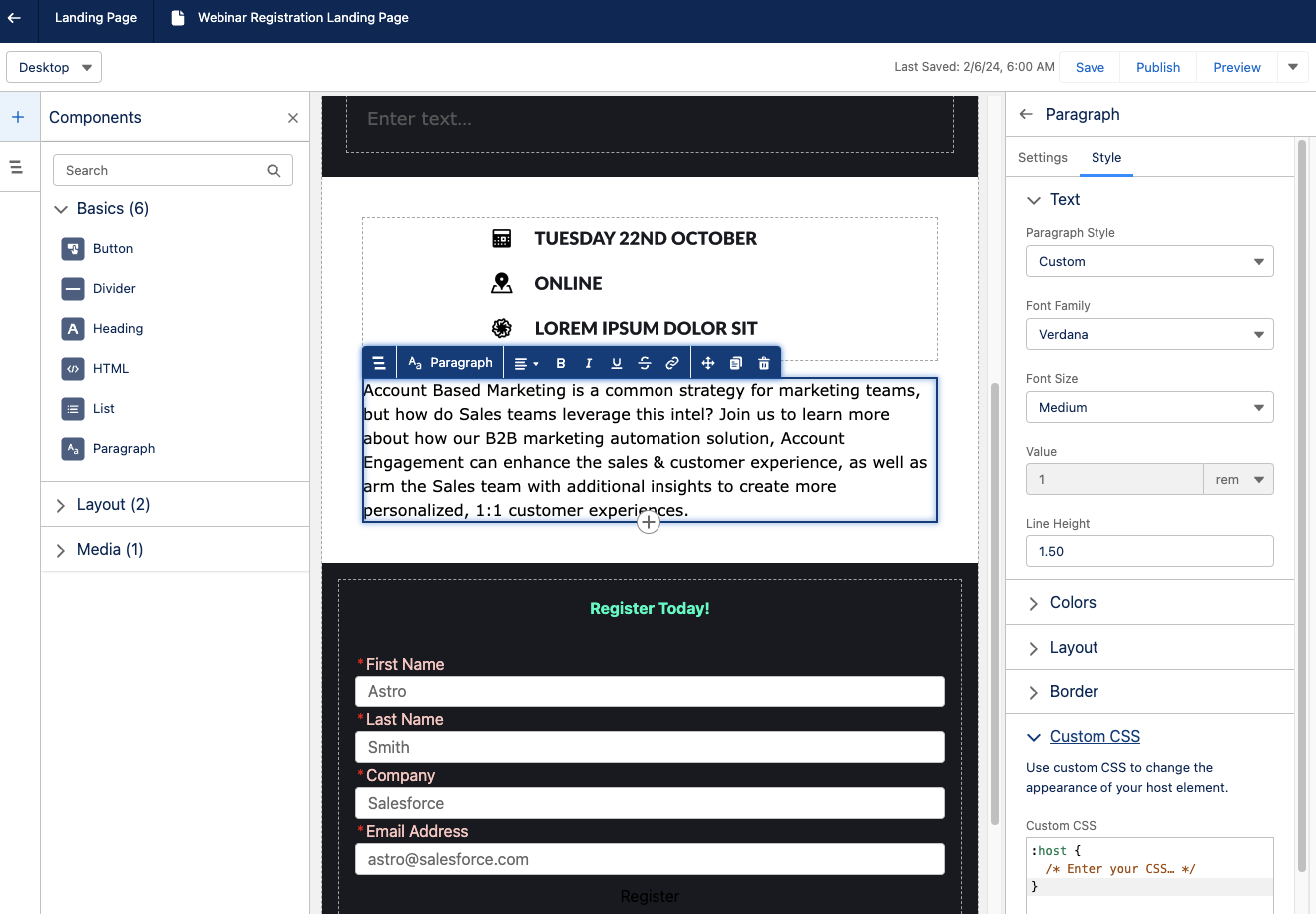
Building the landing page content is similar to the Lightning Builder experience for Account Engagement. Each component on the Landing page also includes a Custom CSS field. 

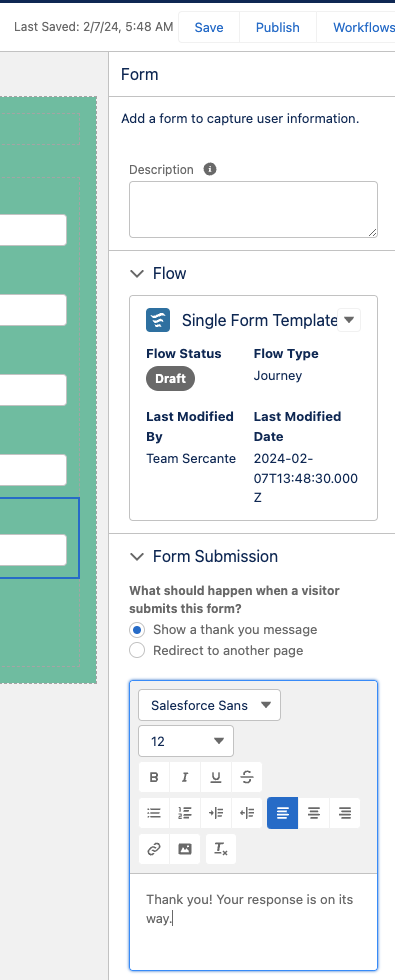
As you build the landing page for the webinar, you can then move to the registration form. The form features for Marketing Cloud Growth Edition can show a Thank You message or redirect to another URL, such as a thank you page.

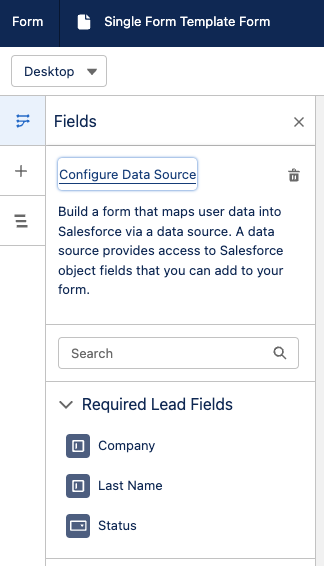
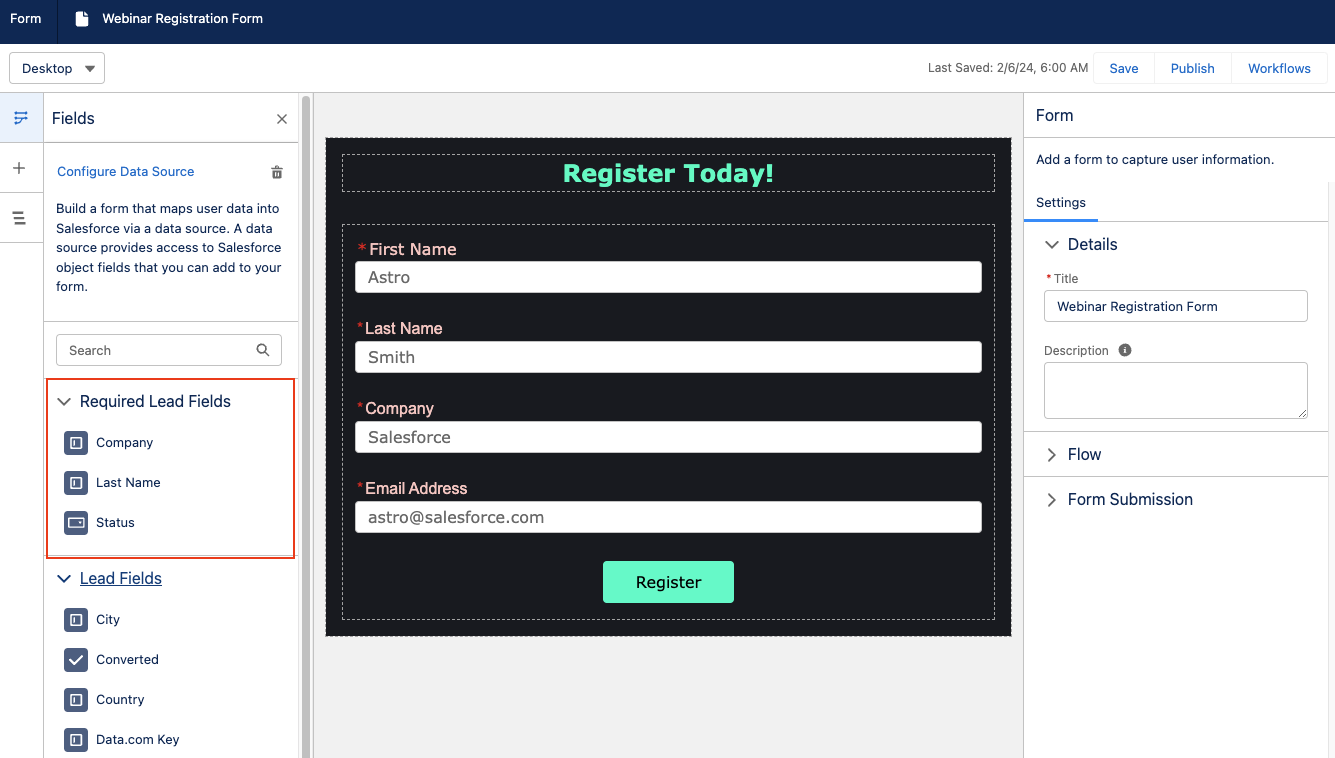
When adding the fields to your form, you can use the Configure Data Source feature to pull in Lead, Contact, or Account fields into your form. If you do not want to use this feature to pull in the fields, you can simply add the fields to your form and then map them accordingly in the flow.

By default, the flow will create new Leads upon form submission. If you have existing leads and contacts that are expected to be registering for the webinar, you will need to customize the flow to update existing records.

Keep in mind that editing the fields on the form does not update the flow. Make sure you edit the flow to include the final fields selected for the form.

As you continue moving through building your registration form, there are quite a few form options to choose from such as adding dividers, text, and new sections as well as adding images to forms. If your team has not tried any of these options before, it could be worth a test to see if this increases registrations. The main thing to keep in mind here though is user experience. Will the registration form you are creating provide the best experience for your audience? Delighting and connecting with them is the focus.

Blank Email Campaign

The last option you can choose from for the campaign asset creation process is the Blank Email Campaign. This selection only contains a Flow to send an email message. For this you will need to:

  • Create or select a segment
  • Create an email or use an email that already exists in the org
  • Currently, you can only add one email to this campaign type. There is no option to add a Landing page or form to these campaigns.
  • Customize and activate your flow

The process with this option is a little more manual, but it is an option in case your team wants this type of experience.

No matter the platform, campaign creation comes back to the strategy.

We are all smiles about the announcement of Marketing Cloud Growth Edition and are looking forward to having SMB marketing teams dive into the platform and experience all that can be accomplished with it. The new technology may seem overwhelming, but remember your foundational approach to marketing campaign strategy remains the same, which guides you through the campaign asset creation process. 
It is just a matter of getting used to where to click and pull in the different features that you want to use to get the best results. And if at any point it seems scary and you want an expert guide, we’ll be here to help you.

Product Note: Marketing Cloud Growth and Advanced are editions of Marketing Cloud Next and have also been referred to as Agentforce Marketing.

Marketing Cloud Growth Edition builders enable marketers to build beautiful landing pages and forms with ease. The builders have a robust set of styling and functionality options that allow Marketers to customize their assets without needing extensive custom coding. Let’s dive into the features of these builders and walk through how to build your first Growth Edition assets. 

Creating a New Landing Page

Users can create a new landing page in two ways:

Option 1

  1. Navigate to Content > CMS Workspace for Marketing Cloud
  2. Select Add > Content
  3. Select Landing Page

This option starts you with a completely blank canvas and does not auto-generate a form or flow for your page.

Option 2

  1. Navigate to Campaigns and create a new campaign
  2. Select Save
  3. Select the Signup Form Template

This option starts you with a Salesforce Landing Page that can be easily customized with your own content and styling. It also auto-generates a form and flow for the form. 

Landing Page Builder

Once you’re in the landing page builder, you can begin setting up the landing page’s basic info. 

This includes:

  • Internal title and description
  • URL content slug, this is the URL-friendly name for your page (a.k.a. vanity URL)
  • Favicon
  • Public page title (max 70 characters)
  • Public Description (max 2000 characters)
    • If SEO indexing is enabled and this field is blank, the search engine results display the first text that the search engine finds on the page.
  • Head Tags
  • Whether or not the Landing Page should be hidden from search engine indexing

You can also optionally set a background image for the Landing Page on the Style tab. 

Drag-and-drop components

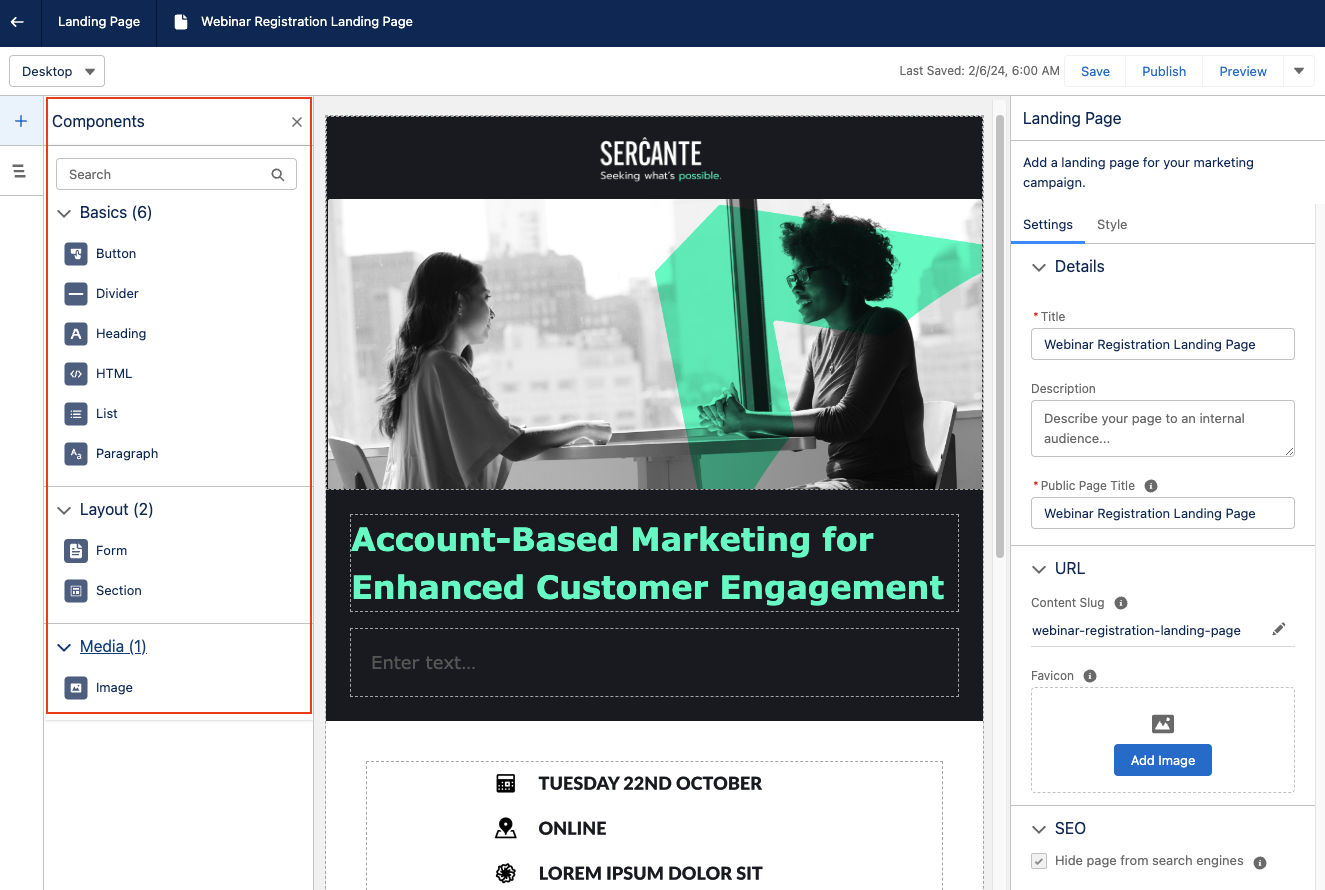
Similar to the Lightning Builder experience for Account Engagement, you can begin building your Landing Page by dragging and dropping components from the left-hand components menu. 

I always like to start with a Sections component so I can divide up my section and set the style before dragging in another component for my content. The Sections component can be divided up to 12 and includes an option to stack columns when the page is viewed on mobile.

Add more components to the section

Once you’ve formatted your section, you can drag and drop additional components into said section. This includes:

  • Buttons
  • Dividers
  • Headings
  • HTML
  • Lists
  • Paragraphs
  • Forms
  • Images

All components and sections have robust editing options and have an optional area to enter Custom CSS for more granular customization.

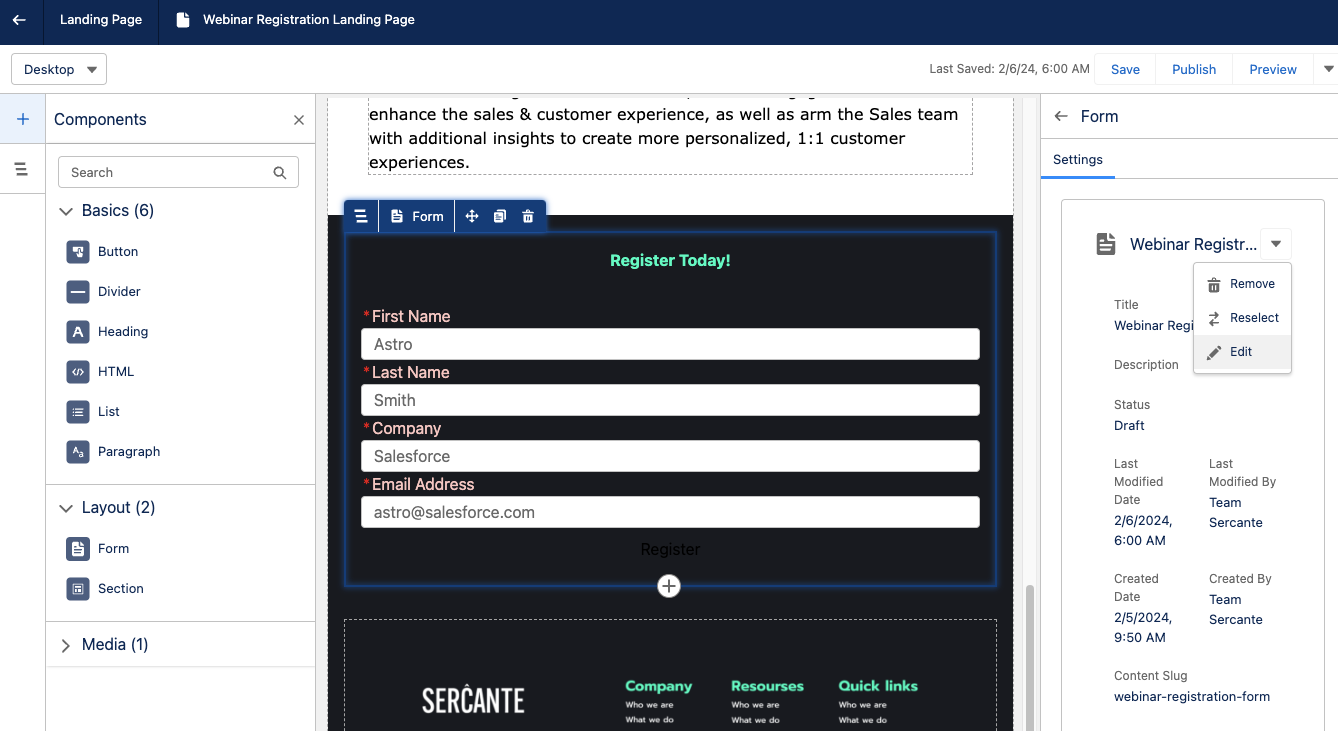
Add form to landing page

To add a form to your Landing Page, drag and drop a form component anywhere on the builder canvas. Once a form component is added, select the existing form you’d like to use. You cannot create a new form while in the landing page builder, but you can open the form builder to edit an existing form or switch out the form later. You can only have one form on your Landing Page.

Form Builder

Build your form by selecting edit within the form component on your landing page. Once in the form builder, you have the option to configure a data source to pull in Lead, Contact, or Account fields into your form. Doing so allows you to easily see which fields are required to create a new record of that type. 

If you opt to not configure a data source, just ensure your fields are mapped accordingly within the flow. 

Customize your form

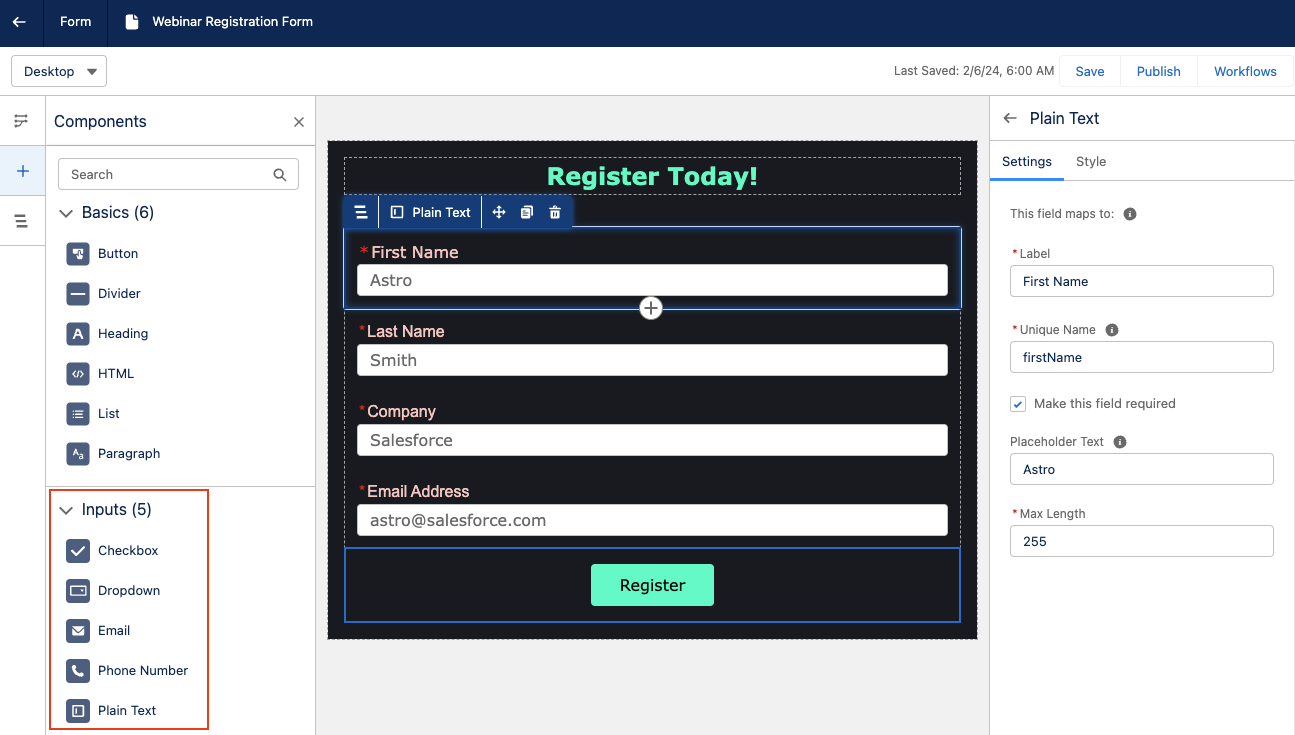
The components panel has several options for customizing your form. You can enter buttons, dividers, headings, HTML, lists, and paragraphs above, below, or in between form fields. You can also create a new section or insert images. The following form field types (aka Inputs) are supported in this form builder: 

  • Email
  • Phone Number
  • Plain Text
  • Checkbox
    • This is an individual checkbox, but multiple checkbox components can be added in if you want a multi-picklist.
  • Dropdown
  • You must manually enter the picklist options for dropdown components. Labels and Unique Names can be set for each value within the field.

Drag and drop Inputs into your form to add new fields. Options to add placeholder text, make the field required, and set the max length of the entered data are available on the right-side panel. You can also fully customize the field’s text styling, background, padding, border etc., as well as insert Custom CSS.

Edit any flows

Keep in mind that adding or removing fields from the form does not automatically update the flow that is associated with it. When you are done building your form, you will need to edit your flow to correctly map the final form fields to their destinations.

Publishing your Landing Page

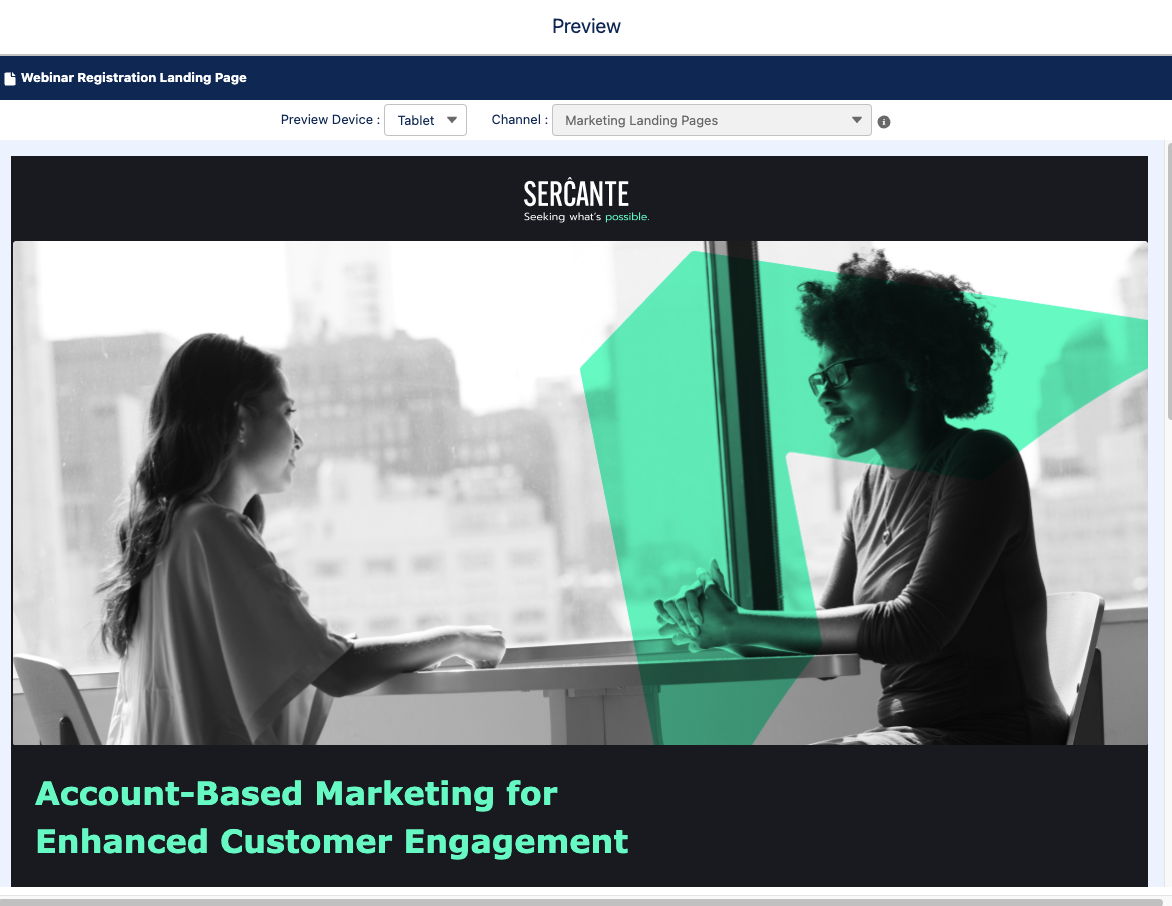
Once you’re ready to test and publish your landing page, select the Preview option from the top right-hand corner. The Preview will allow you to view your landing page in Desktop, Tablet, and Mobile views to ensure everything looks good no matter how your audience is viewing the page. 

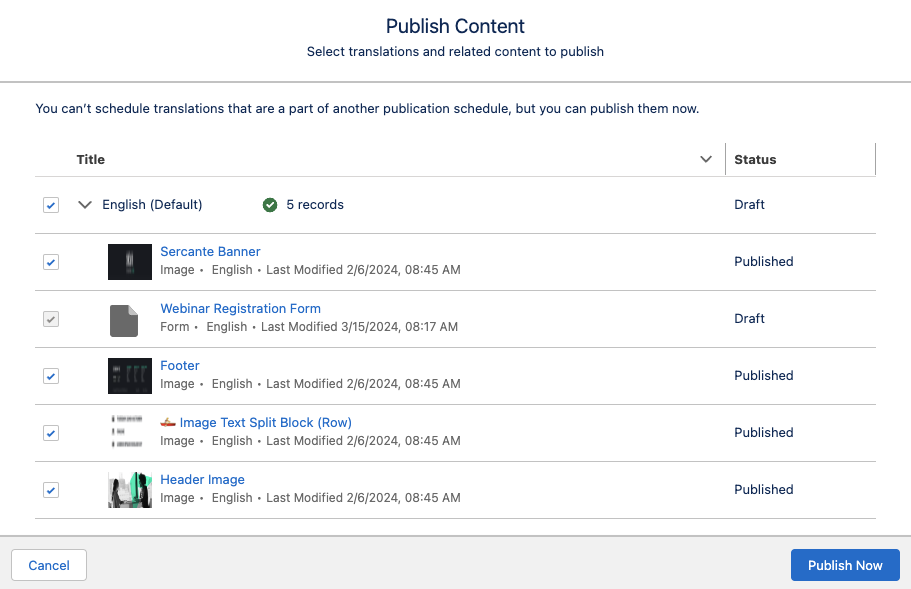
When you are ready to push the landing page live, select the Publish button in the top right-hand corner. You can then confirm the related content that needs to be published with your landing page, such as images used on the page, translations, and your form. 

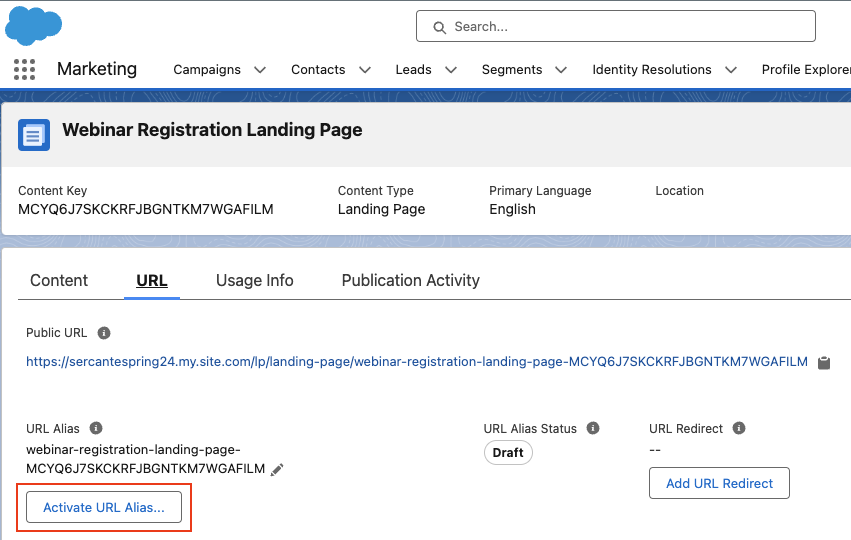
Activate URL Alias

Once published, you also need to activate your URL alias. Publishing a landing page indicates that the content is ready to be made available online, but the content isn’t accessible until you also activate the URL alias. To do so, 

  1. Navigate to Content > CMS Workspace for Marketing Cloud 
  2. Select your landing page
  3. Select the URL tab
  4. Select Activate URL Alias
  1. Select Activate

Start Building in Growth!

Now you’re ready to build your first landing page in Marketing Cloud Growth Edition! Be sure to return to The Spot for more posts about Marketing Cloud Growth. We’ll dive into Flows, building emails and all our other Growth learnings in future blog posts.  

Want to know more about Marketing Cloud Growth, like, today? Then reach out to the team at Sercante to start a conversation.

Before we dive into the details of finding success with your Salesforce Data Cloud implementation, let’s set the stage. Whether you’re a seasoned Salesforce admin or just stepping into the realm of cloud-powered data solutions, Data Cloud is a game-changer, and here’s why you should care.

Navigating the Data Cloud Landscape

Salesforce Data Cloud is a platform that takes all of your data and turns it into actionable insights. It’s for anyone eager to supercharge their Salesforce experience. Whether you’re a department manager or an admin serving sales, marketing, customer service, or any other department, Data Cloud is your ticket to streamlined processes, informed decision-making, and ultimately, success.

The key to success is covering your bases early — before and during implementation. That means asking the right questions, collaborating with the right people, and establishing processes that keep everything running smoothly. 

Why Data Cloud Matters

Imagine having a centralized hub where diverse data streams — from identity platforms and purchase history to website interactions — seamlessly come together. Data Cloud does just that, offering a unified space to make sense of the data chaos. You may also be wondering what to do with the free Data Cloud license that you got as part of another cloud package.

You might wonder, “Why should I care?” Well, the answer is simple — efficiency, effectiveness, and exponential growth.

How to Ensure a Successful Salesforce Data Cloud Implementation

Now that we’ve set the groundwork, let’s delve into five practical tips you can use to guide your Data Cloud implementation with the ultimate goal of unlocking the platform’s full potential. We’ll explore how to propel your Salesforce Data Cloud implementation to new heights. You can also check out this post for a few ‘gotchas’ you may encounter during your Data Cloud implementation.

5 Tips for a Successful Data Cloud Implementation:

  1. Reach for organizational alignment
  2. Choose impactful use cases
  3. Measure success effectively
  4. Use out-of-the-box data models
  5. Be intentional with your data

Tip#1: Reach for organizational alignment

Now, let’s talk tactics. Aligning your organization before embarking on a Data Cloud implementation is paramount. Here are a few specific tactics to ensure everyone is on the same page:

Establish a Clear Owner

Designate a dedicated owner for the Data Cloud implementation. This individual should be someone with a comprehensive understanding of your organization’s goals and processes. Having a clear owner ensures accountability and a streamlined decision-making process.

Conduct Cross-Functional Workshops

Bring together representatives from various departments for workshops. Discuss the potential impact of Data Cloud on each team and encourage open communication. These sessions not only educate team members but also foster a collaborative spirit.

Define Roles and Responsibilities

Clearly outline the roles and responsibilities of each team involved in the implementation. From data management teams to end-users, everyone should know their part in the process. This clarity prevents confusion and sets the stage for a smoother implementation.

Communicate the Benefits

Emphasize the benefits of Data Cloud to every stakeholder. Whether it’s time savings, improved insights, or enhanced customer experiences, make sure everyone understands how Data Cloud aligns with the organization’s overarching goals.

Address Concerns Proactively

Open the floor for questions and concerns. Addressing potential roadblocks early on builds confidence among team members. Proactively seeking and resolving concerns sets the tone for a collaborative and supportive implementation journey.

Tip#2: Choose impactful use cases

Now, let’s talk about choosing the right use case — the cornerstone of a successful Data Cloud implementation. We urge you to start with the end goal in mind (instead of a technology-first approach, which many of us are so tempted to do). Focus on one or two initial use cases that drive team optimization and deliver tangible results within a reasonable timeframe. Whether it’s streamlining contact behaviors or enhancing customer segmentation, these impactful use cases showcase the value of the platform and generate positive buy-in across the organization.

Start with end goals in mind

Begin by identifying the desired outcomes of your Data Cloud implementation. What specific business objectives are you aiming to achieve? Whether it’s improving sales efficiency, enhancing marketing targeting, or optimizing customer service, starting with clear end goals ensures alignment and focus.

Evaluate business processes

Conduct a thorough assessment of your organization’s existing business processes. Identify pain points, inefficiencies, and areas for improvement. Look for processes that rely heavily on data and could benefit from the insights provided by Data Cloud. Consider areas where you’ve got trapped data and manual flows/processes.

Prioritize use cases with high impact and feasibility

Once you’ve identified potential use cases, prioritize them based on their potential impact and feasibility. Focus on use cases that offer significant benefits with manageable implementation efforts. Consider factors such as resource availability, data availability, and technical complexity.

Involve stakeholders in use case selection

Engage stakeholders from relevant departments in the use case selection process. Gather input from sales, marketing, customer service, and other teams to ensure alignment with their needs and priorities. Collaborative decision-making increases buy-in and promotes cross-functional synergy.

Prototype and validate use cases

Before committing to a full-scale implementation, consider prototyping and validating selected use cases. Build prototypes to test the feasibility and effectiveness of the proposed solutions. Use feedback from stakeholders and pilot tests to refine and iterate on use case designs. This is a great use case of taking advantage of the $0 Data Cloud SKU as well.

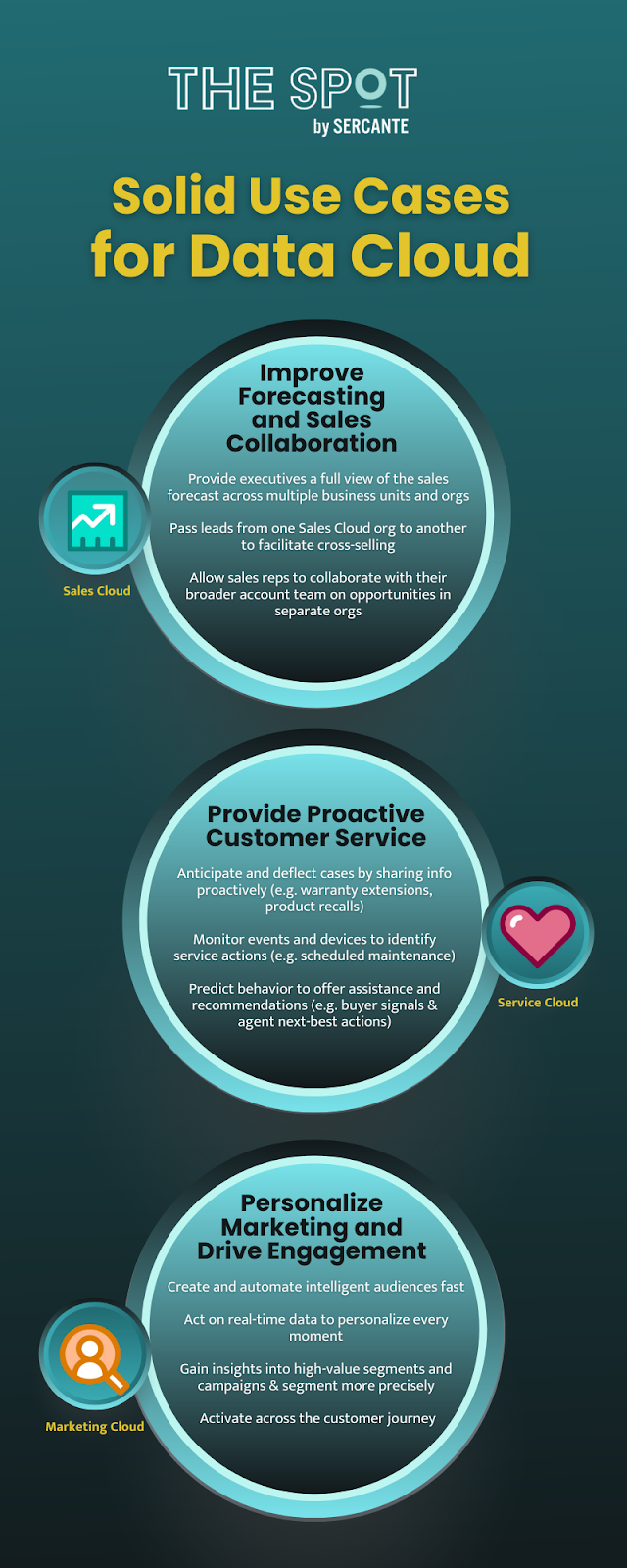
Data Cloud Use Case Examples

Examples of how customers across Salesforce Clouds are using Data Cloud

Improve Forecasting and Sales Collaboration 

Admin Type: Sales Cloud

  • Provide executives a full view of the sales forecast across multiple business units and orgs
  • Pass leads from one Sales Cloud org to another to facilitate cross-selling
  • Allow sales reps to collaborate with their broader account team on opportunities in separate orgs

Provide Proactive Customer Service

Admin Type: Service Cloud

  • Anticipate and deflect cases by sharing info proactively
    • Examples:  warranty extension notifications, product recalls 
  • Monitor events and devices to identify service actions
    • Examples: proactively avoid usage or entitlement overcharges or schedule proactive maintenance based on device data
  • Predict behavior to offer assistance and recommendations
    • Examples: provide agents with customer’s propensity to buy and next-best action

Personalize Marketing and Drive Engagement 

Admin Type: Marketing Cloud

  • Create and automate intelligent audiences fast
  • Act on real-time data to personalize every moment 
  • Gain insights into high-value segments and campaigns
  • Segment more precisely 
  •  Activate across the Customer Journey

Tip#3: Measure success effectively

Now, let’s discuss how to measure the success of your Data Cloud implementation effectively. Here are a few specific tactics to guide you.

Define key performance indicators (KPIs)

Identify measurable metrics that align with your organization’s goals. Whether it’s increased revenue, improved customer satisfaction, or enhanced operational efficiency, define KPIs that reflect the impact of Data Cloud on your business outcomes. And don’t forget to keep them SMART (specific, measurable, attainable, realistic, and timely)

Establish baseline metrics

Before implementing Data Cloud, establish baseline metrics to benchmark your current performance. This allows you to track progress over time and quantify the impact of the implementation.

Monitor data quality

Ensure that the data ingested into Data Cloud is of high quality and accuracy. Implement data quality checks and validation processes to maintain data integrity throughout the implementation. This is where taking advantage of our Data Cloud Readiness Assessment is key.

Track user adoption and engagement

Monitor user adoption and engagement with Data Cloud tools and features. Track user logins, usage patterns, and feedback to gauge the effectiveness of training and support initiatives.

Iterate and improve

Once you’ve successfully implemented, continuously review and iterate on your measurement approach. Get feedback from stakeholders, analyze performance data, and identify areas for improvement. Adjust your measurement strategy accordingly to ensure ongoing success.

Tip#4: Use out-of-the-box data models

You have to walk before you can run. Let’s delve into using the out-of-the-box data models during your Data Cloud implementation.

Explore standard data models

Familiarize yourself with the standard data models offered by Data Cloud. These pre-built models cover common data structures and relationships, saving you time and effort in designing custom solutions. Take advantage of these models wherever possible to accelerate your implementation.

Align with Salesforce Einstein 1 (Core) data model

Ensure alignment between the Data Cloud data models and the Salesforce core data model. By aligning these models, you facilitate seamless integration and interoperability between Data Cloud and other Salesforce products. This alignment simplifies data management and enhances overall system efficiency.

Customize only when necessary

While out-of-the-box data models provide a solid foundation, don’t hesitate to customize them to meet your specific requirements. However, exercise caution and prioritize customization only when absolutely necessary. Striking the right balance between standardization and customization ensures long-term scalability and maintainability.

Tip#5: Be intentional with your data

Now, let’s take a look at how you can be intentional with your data. Careful planning on how to use it within Data Cloud is crucial. Whether it’s analytics, segmentation, or real-time data actions, understanding the tools available and selecting the right ones for your use case is key. From calculated insights to data segmentation and AI capabilities with Einstein Studio, being intentional with data ensures effective utilization and actionability.

Data governance framework

Establish a robust data governance framework to govern the lifecycle of data within your organization. Define policies, procedures, and standards for data collection, usage, and management. Ensure compliance with regulatory requirements and industry best practices to maintain data integrity and security.

Data quality management

Implement data quality management processes to ensure the accuracy, completeness, and consistency of your data. Utilize data cleansing tools and techniques to identify and rectify errors, duplicates, and inconsistencies. Regularly monitor data quality metrics and address any issues promptly to maintain the reliability of your data.

Data privacy and security measures

Prioritize data privacy and security by implementing robust measures to protect sensitive information. Encrypt data in transit and at rest, restrict access to authorized users, and implement multi-factor authentication. Stay informed about data privacy regulations such as GDPR and CCPA, and ensure compliance to safeguard customer data.

It’s crucial to promote ethical data practices and mitigate bias in data analysis and decision-making. Educate stakeholders about the ethical implications of data usage and the potential impact on individuals and communities. Implement fairness, accountability, and transparency principles to ensure equitable outcomes and build trust in your data-driven initiatives.

Data lifecycle management

Develop a data lifecycle management strategy to govern the flow of data from creation to archival or deletion. Define retention policies based on regulatory requirements and business needs, and automate data archival and deletion processes where possible. Regularly review and update data lifecycle policies to adapt to evolving business and regulatory requirements.

Data-driven decision-making culture

Foster a data-driven decision-making culture within your organization by promoting data literacy and empowering employees to leverage data in their day-to-day activities. Provide training and resources to enhance data skills across departments, and encourage collaboration and knowledge sharing around data insights and best practices.

Bonus: Tap into expert guidance

Salesforce Data Cloud implementation requires strategic planning, thoughtful execution, and continuous refinement. By aligning your organization, selecting impactful use cases, leveraging out-of-the-box data models, measuring success effectively, and being intentional with data, you can unlock the full potential of Data Cloud and drive transformative outcomes for your business. 

As a bonus tip, we suggested looking toward expertise available in the Salesforce community. Seeking guidance from those who have navigated Data Cloud’s complexities can be invaluable. Whether through expert coaching sessions, community groups, or support office hours, connecting with experienced professionals can enhance your success with Data Cloud.

However, if you find yourself in need of expert guidance or support along the way, don’t hesitate to reach out to the Sercante team. Our experienced consultants are equipped with the knowledge and expertise to help you navigate every step of your Data Cloud journey and ensure success. Contact us today to learn more about our Data Cloud readiness assessment so you can embark on your Data Cloud implementation with confidence.

Related Resources:

No more posts to show