Category

Setup & Admin

Like the title says — if you’re a Salesforce user, then you should be deleting your marketing contacts on a regular basis.

Okay, hear me out.

Of course I don’t mean all your contacts. And I don’t even necessarily mean delete delete (in some cases). Let me explain.

As marketers, we hoard and protect our contacts like dragons guarding our treasure. Our instinct is to grow — and keep — our contacts database as large as possible. After all, more contacts mean more people for the ever-demanding funnel.

But I’m here to tell you: stop it.

Why? Because as with many things in life, quality over quantity is what should matter here, even within the gaping maw that is the top of the funnel. 

And for more reasons than you think. Here are the three main ones.

Reason #1: Salesforce Puts a Cap on Contacts

Let’s start with the purely technical and perhaps thoroughly obvious: Salesforce gives you a finite number of contacts to keep. The number you can have varies depending on the plan you’re on and the optional number contact block add-ons you purchase.

No matter how adequate that number may seem at the time, it will start being not enough very shortly if you don’t have any safeguards in place.

Furthermore, the criteria for what counts towards this limit differs between Marketing Cloud Engagement (or MCE, formerly Marketing Cloud) and Marketing Cloud Account Engagement (MCAE, formerly Pardot… I know one day we’ll get used to the rebrand).

In Marketing Cloud Engagement:

MCE EditionProCorporateEnterprise
Base Contact Count15k45k500k

Any Contact record (aka, any record on a sendable data extension with a unique ContactKey) on the All Contacts list counts towards MCE’s Contact Count limit. This includes:

  • Mobile contacts
  • Email subscribers
  • Any contacts from synchronized data sources (e.g., Salesforce objects). 

This is also why it is best practice to use a single ContactKey across Mobile, Email, and Synced Data Sources to prevent duplicates from unnecessarily eating up your Contact Count. 

You can monitor your Contact Count using the All Contacts list in Contact Builder.

Fun gotcha moment: If you’re syncing Salesforce Leads and Contacts and a Lead converts into a Contact, MCE will still count that synced Lead record and the new synced Contact record as two Contacts because they will still have two separate ContactKeys.
Fun gotcha moment #2: Even if you reduce the number of records on your synced sendable data extension, your All Contacts list count may not change. 

You will need to do some additional manual work here to enable contacts deletion from MCE if you haven’t done so already. Go to Contact Builder > Contacts Configuration and then choose the contacts you want to delete. 

If you want to mass delete a large number of contacts, you will either need to:
a) import a list of contacts back into MCE (counter-intuitive, I know) and then configure MCE to delete your contacts based off of that list 
– or –
b) create a REST API call to mass delete your contacts.

In Marketing Cloud Account Engagement (Pardot):

MCAE EditionGrowthPlusAdvancedPremium
Contact Blocks10k (additional 10k blocks are $100/month10k (additional 10k blocks are $150/month)10k (additional 10k blocks are $300/month)75k (additional 10k blocks are $400/month)

Fortunately, this is more straightforward. Any prospect record with a mailable status counts towards your mailable database limit. 

That’s it. You can keep an eye on your mailable database limit from the Pardot Settings tab.

Reason #2: Privacy Features Aren’t Going Away

In September 2021 as part of the iOS 15 updates, Apple rolled out Mail Privacy functionality that allowed its users to easily create throwaway email addresses for form fills (a common practice that many were already doing, Apple just automated it). 

Eight years prior to that, Google had broken up its Gmail inbox into tabbed categories in a better effort to keep “less important” emails — like marketing emails — from clogging up your immediate inbox. This year, Google will officially sunset its use of third-party cookies for tracking.

Suffice to say: more privacy features are coming into play and more consumers are concerned with how their data is being collected, stored, and used.

This is all great for consumer privacy, but less so for our marketing efforts.

Without intervention, we could face the possibility of having a database where a sizable portion of our contacts are, at best, completely unengaged, or, at worst, aren’t actually legitimate contacts in the first place.

Reason #3: You’re Skewing Your Metrics

Now take the nightmare scenario in Reason #2 and think about what this does to our precious email metrics. If we consistently send to a database of unengaged or non-legitimate contacts, leading to artificially low open rates and potentially high bounce rates, we’re skewing our own engagement rates from the start.

And if we’re relying on our engagement rates to determine campaign KPIs and attribution, we’ll have already introduced flawed data into our analysis.

How to Keep Your Marketing Contact Database as Clean as Possible

Okay, you’ve made some good points, I hopefully assume you’re thinking. So what can I do?

Well I’m glad you asked, because I have some tips for both Marketing Cloud Engagement and Marketing Cloud Account Engagement users.

Implement a Cold Leads Strategy

This is where I’m asking you to look deep inside yourself and fight against the marketer’s urge to hold onto all your contacts (or leads or prospects or whatever terminology you want to use here) for as long as possible under the hope that they’ll re-engage if you happen to send the right message at the right time.

Sure, you can always purchase additional space for more contacts, but why keep throwing more money after bad? Showing a little less mercy now will improve your marketing efforts later. As an additional consideration for MCE users, you also have to contend with a cap on how many communications you can send per subscription term. So why waste them?

Use Automations to Keep Your Database Clean

To start with, you can automate this process through features like: Automation Rules and Engagement Studio Programs (for MCAE) or Automation Studio and Journey Builder journeys (for MCE). 

But the rough idea is to do the following:

Step 1: Put a quantifiable limit on how long you’ll consider someone who hasn’t engaged with any of your communications as “active.” This can be an actual time limit or after a certain number of consecutively unopened emails.

Step 2: Move these cold contacts somewhere else. Take them out of your regular communications, whether it’s through tags, a separate list segment, or a separate data extension. It’s time to put these contacts on a separate slower, low-frequency campaign.

Step 3: Send them an email again in a few weeks, maybe even months. Maybe send them another one later if you’re still full of hope. Give them a few more last chances to show engagement. The goal here is to check for a pulse, not necessarily to market anything at this point. This may also be the place where you can A/B test a few subject lines with pretty low stakes.

Step 4: If they re-engage: great! You can return them to the fold (or better still, use this opportunity to find out what their content preferences are by pointing them to an email preference center and letting them self-select their interests). If they don’t engage, get rid of them. 

  • Put them in the recycle bin if you’re a Marketing Cloud Account Engagement user (bonus: if you keep these prospects in the recycle bin, MCAE will automatically restore the prospect if they show signs of activity later on). 
  • Or, delete their record and unsync them in Marketing Cloud Engagement (we’ll talk about how to do this in a moment). 
  • You may even want to consider deleting the corresponding Salesforce record, because Salesforce has a data storage limit too.

If the idea of permanent deletion is too daunting, you can always export them to a spreadsheet and archive them elsewhere. You’ll still have the contact information, but it won’t be taking up space within your database.

Clean Out Your Hard Bounces

Make it routine to regularly clean out (or update) your contacts who have a hard bounce status. 

  • In addition to viewing your engagement metrics for each email send, MCAE also offers a helpful overall Email Bounce report on your prospects (you can find this under Pardot Reports > Marketing Assets > Emails > Email Bounces). 
  • With MCE, you can automate a query of the Bounce Data view and Subscriber statuses in Automation Studio.

Yes, both MCE and MCAE will (eventually) stop emailing any address with a hard bounce status. Yes, MCAE will automatically render a prospect with a hard bounce status as unmailable, meaning that the prospect won’t count towards your contact limit.

But in MCE, even if you can’t send emails to a Contact with a Bounced status, the contact will still count towards your Contact Count. And whether you’re using MCE or MCAE, if the contact has a corresponding Salesforce record, that record will also contribute to Salesforce’s overall data storage limit.

Furthermore, discrepancies between your segmentation lists or data extension numbers and what your email deliverability numbers actually are could cause some initial confusion among any users who aren’t aware of the automated mechanisms MCAE and MCE use to keep you from sending to unmailable addresses.

Be Selective about Salesforce Syncing

Being selective about who in your Salesforce database gets synced to MCE or MCAE will not only ensure that you aren’t sending marketing emails to contacts who shouldn’t be getting them (e.g. contacts who have not explicitly opted in, partners, vendors, and other operational contacts), but will also help you manage your contacts cap. 

In both cases, you will need to have automations in place that will determine the criteria for your sync trigger.

Now with MCE, let’s talk about the vexing problem of Leads and Contacts and the potential for duplicates. As mentioned earlier, even if your synced Salesforce Lead converts into a now synced Contact, your now defunct Lead record will still count towards your Contact Count. 

How to manage this? Build criteria into the automation that updates your MCE boolean syncing field to unsync the Lead when it converts. 

The Leads object has a number of different Lead Conversion-related fields you can use for your criteria — I like using the IsConverted boolean field, for example.

Use a Double Opt-in Signup Process

Using a double opt-in signup process for when a new contact is created is good practice to comply with various global data privacy laws and confirm a contact’s genuine interest in receiving your marketing emails. It also has the helpful benefit of verifying whether or not the email address on record is real. 

While this isn’t a 100% foolproof guarantee that a contact still isn’t using a throwaway email address, it will cut down on the number of outright junk emails entering your database.

Pay Attention to Auto-Replies

The deluge of autoresponders and out-of-office replies that result when you send an email to a large list can be a painful constant in a marketer’s life depending on a) whether you’re using MCE or MCAE (MCE has pretty robust Reply Mail Management functionality) and b) what processes you or your organization have set up to manage auto-replies. 

But there’s a silver lining to all this: what is being said in these auto-replies can be telling, especially in cases where the auto-reply lets you know that the contact is no longer going to be using the email address you have on record for them (usually in cases where the contact used an educational or organizational email address).

Creating a filter for key phrases often found in auto-replies where a contact is moving on from their organization (“moving on,” “leaving,” “no longer affiliated,” etc.) can give you a heads-up on removing that contact from your own database instead of waiting for the pending hard bounce when that email account is deactivated (which can range from very soon to months to never, depending on the organization’s offboarding process, or lack thereof). 

Save yourself from another auto-reply in your inbox, the contact taking up space in your database, and sending who-knows-how-many emails to an abandoned address.

Keeping Your Database Clean is an Ongoing Thing

Contact caps in your marketing database can feel like imaginary numbers to contacts-hungry marketers until their Salesforce Account Executive sends that dreaded over-limits notification. While it’s tempting to simply pay more to keep expanding your database cap, the cost does add up and it doesn’t address the root issues that could be impacting your database.

Without a little routine maintenance and ruthlessness to weed out your unengaged contacts and outright bad email addresses, your database can very easily become a hot mess, and any cleanup efforts thereafter will only become more challenging the longer it is allowed to go on. 

But a smart strategy (with help from a little automation) to filter and clean up your marketing database will not only be more cost-effective, but will maintain the integrity of your data.

Have any hot tips to share for keeping your contact list clean? Tell us in the comments.

In the Myth of Sisyphus, an essay by French philosopher Albert Camus, Sisyphus is sentenced to a punishment where for eternity, he must roll a boulder up a mountain. When he reaches the top, the boulder rolls back down the mountain and he must go back and start over.

Sound familiar? Some days our Salesforce platform administrators feel like they take one step forward and five steps back. 

Salesforce admins might get a bunch of requests that are handled swiftly, which just leads to more questions and requests. And then what about the latest Salesforce release that just went live? When will they have time to review much less implement all of the new sales efficiency features that the company is paying for? Oh, and they heard about some new Pardot features that could help the marketing team streamline their efforts, but…when will they be able to test, implement, and train them? 

Even the best admins really can feel like they are rolling the boulder of Salesforce up the hill to the top only to have it roll back down to the bottom. But your admins ​​don’t have to feel like Sisyphus!

Those Poor Sisyphus Admins

Luckily, we’re in the best ecosystem in the world. Not only are there many other admins in the Ohana to commiserate with, but there are more resources for support than you can shake a stick at. 

What can be done to help with the Salesforce boulder?

There are lots of options out there. So, I’m starting with the top 6 types of Salesforce resources that your admins can call on when the boulder has them feeling defeated.

Resource #1: The Trailblazer Community

There are thousands of people all over the world online at any hour of the day who are ready and willing to answer questions. This is great for difficult puzzles and you don’t know where to turn. It is also a place to research solutions and maybe even answer some questions. The Trailblazer community questions and answers are invaluable for Salesforce and Pardot administrators. I am also a huge fan of groups that push out information regularly which will be helpful for learning too! I recommend setting up your email preferences to get a weekly digest to stay on top of updates.
Top picks:

Resource #2: Salesforce Slack Communities

There are quite a few slack communities that have sprung up over the years that offer a way to have conversations with other people that can help you work through issues or puzzles in real-time. These are great not only for getting questions answered but they’re also great for community building. 

  • Ohana Slack – A Slack workspace for all the Salesforce clouds and products. This space could be a lifeline for puzzled admins.
  • Pardashian – very active Slack workspace that is all about Marketing Cloud Account Engagement (aka Pardot). All the major stars in the Pardot world are there – Lara Black, Jenna Molby, Jen Kazin to name just a few. If your tech stack touches Pardot, you will find great resources here.
  • How to SFMC – a Slack dedicated to Salesforce Marketing Cloud community of users. Expect lively conversations! If your tech stack touches Salesforce Marketing Cloud, you will find great resources here.

Resource #3: Salesforce YouTube Channels

Sometimes text and reading can only go so far in helping me. I often go to YouTube to find more members of the community and Salesforce themselves posting short-form videos that give insight into the actual clicks needed to do the thing you need to do.

  • Salesforce Support – Salesforce Support produces many short form “:how to videos” that can be just what you need to learn how to solve a problem.
  • Salesforce Admins – Salesforce Admins is another channel from Salesforce. They product videos targeted specifically towards admins – there could be interviews.
  • Salesforce Ben – This long running blog also has a top-notch channel with great explainer videos.

Resource #4: Salesforce Influencers on LinkedIn

There are some great people in the community on LinkedIn posting articles and newsletters about Salesforce, Pardot, and Marketing Cloud. What’s great about this is you can ask questions directly to the author and get answers. Because LinkedIn is such an important part of people’s digital footprint and tied so closely to their career, I’m seeing a lot of experts sharing great insights there. 

  • Apex Hours – This Community led LinkedIn newsletter leans to the technical but anyone interested in gaining skills with declarative development (i.e Flow), will find a home
  • Jordan Nelson – self-taught Salesforce wizard who shares actionable tips every single day!
  • Pei Mun Lim – writes about Salesforce through a project management and business analysis lens. Plus great cartoons!
  • Jodi Hrbek – A functional Salesforce expert who shares great content focussed on empowering admins

Resource #5: Local Trailblazer User Groups

Getting out there and meeting Salesforce users is super helpful for experienced and new administrators alike. At these free meet-ups, there are sessions about new tools, creative solutions and of course socializing with other Salesforce professionals. There are hundreds of groups around the world that are organized around roles (i.e. Developers, Admins), or interests (i.e. Women in Tech, Non Profits).

Resource #6: Bring on a Managed Services partner

What is great about this Is you get the benefit of an embedded resource without the cost associated with adding additional headcount to your team. With Salesforce Partners, like Sercante, when you sign on to the Managed Services Program you’ll not only have a dedicated engagement manager, but you’ll also have the whole Sercante team of experts behind that person providing input, guidance, and ideas. 

It’s really the best of both worlds. The right managed services partner has your back when it comes to new features and what to look out for in upcoming releases. They’ll work with you to build a roadmap based on your priorities and a backlog of items that may be under your radar.

Salesforce Community Resources are Your Admins’ Best Friends

It is true that your Salesforce platform administrators may often feel overwhelmed and like they are constantly struggling to keep up with the demands of their job. 

They may feel like they are taking one step forward and five steps back, and like they are unable to keep up with the constant stream of requests and new features. This can lead to feelings of frustration and exhaustion. 

Burnout among Salesforce admins is real. But it does not have to be that way.

With these resources, administrator support can be self-served. Or, you can reach out to Sercante today to talk about our managed services offerings!

A form on a landing page or your website is often the final step in a nurturing process and represents the crucial point of conversion. According to Manifest, 81% of people will abandon a form after beginning to fill it out. And of that 81%, more than half (67%) will not return to complete the form. 

So how do we, as marketers, improve our game and increase conversions while decreasing form abandonment? By using five native tools at your disposal within the Marketing Cloud Account Engagement (Pardot) forms tool.

Five Ways to Increase Pardot Form Submissions and Decrease Form Abandonment

When marketers first start using forms within Pardot, they’re probably inclined to keep things simple and have a primary focus on collecting information they see as required or important to their sales process. However, you can leverage a few things within Pardot to decrease form abandonment and up your marketing game. 

  1. Use Dependent Fields

Keep the form simple and limit the number of fields using dependent fields. When you are seeking relatable information based on specific field values, dependent fields are the best way to capture that additional insight.

For example, if you are a global company, you can ask for the user’s country. And if they respond with the United States, then you can ask for their state. Or if they respond with Canada, you can ask which province they are from. Whereas, if they respond with the United Kingdom, no additional information is required. 

Dependent fields eliminate unnecessary questions, shorten the form, and personalize the experience for each Prospect.

  1. Set Up Progressive Profiling

Another great way to help shorten your forms, but still collect the required information is through progressive profiling. This tool enables you to ask new questions based on each return to a form, eliminating previously completed questions from prior form fills. 

For example, if you already know their company, the next time they return to the form, you can now ask for a job title to dig in further. This is one of the best tools at your disposal as a marketer because it ensures a positive user experience for the Prospect and helps keep the sales team happy by collecting details for lead assignment, segmentation, and increased nurturing via targeted Engagement Studio Programs.

  1. Have Clear Calls to Action

Calls to action are the short persuasive text used on the form button to close the deal. You want to be straightforward while keeping it short and simple. I would recommend starting with a verb and following up with an adverb or subject thereafter. 

For example, a clear call to action could say:  “Download Your e-book Now” or “Subscribe Today.”

Ultimately, use language that promises them the delivery of something your reader wants. 

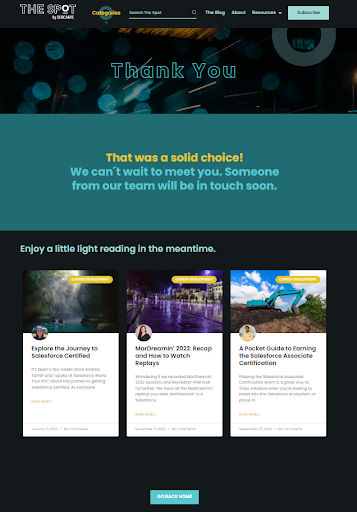
Form submission thank you page example
  1. Use Autoresponders

Creating an experience for Prospects is crucial in seeing them return to want more. This can be accomplished by ensuring that you follow through on your delivery when a form is completed through autoresponders and/or thank you pages. 

Take advantage of the redirect and follow-up by creating a personalized experience by offering them a thank you message, a downloaded asset, and/or highlighting similar content they may be interested in. 

By directing them to additional content, you can use your Progressive Profiling and they can gain additional insight into your organization and how you can help solve their issues.

  1. Enable Completion Actions

Completion Actions are similar to your Autoresponders, as they are unseen heroes of the form experience but play a critical role in delivering what was promised. A Completion Action is an action that Pardot will automatically make on your behalf as soon as the form is completed. 

Actions could include:

  • Delivering gated content
  • Adding to subscription lists
  • Notifying users
  • Adding prospects to nurture programs
  • Creating a task to follow up with the prospect

It’s the final touch to the entire experience and will keep your prospects returning for more.

Create Better Pardot Forms to Get More Conversions

With these out-of-the-box Pardot tools at your disposal, you can easily decrease form abandonment and increase Prospect engagement, growing your pipeline and improving your nurture game. 
Interested in learning more about how to get started or how to expand your Pardot form game? Contact us today!

I’m sure by now you’ve heard of Interaction Studio — or Salesforce Marketing Cloud Personalization (SFMCP) as it is now called. But if you’re similar to me, none of the buzzwords that are thrown around help to paint the picture of what SFMCP actually does.  

In this blog, I’ll be demystifying this intriguing product and detailing the features and functionality, and where possible I’ll be calling out any “gotchas” that have personally caught me out, so you can avoid them. 

What is SFMC Personalization (Interaction Studio)? 

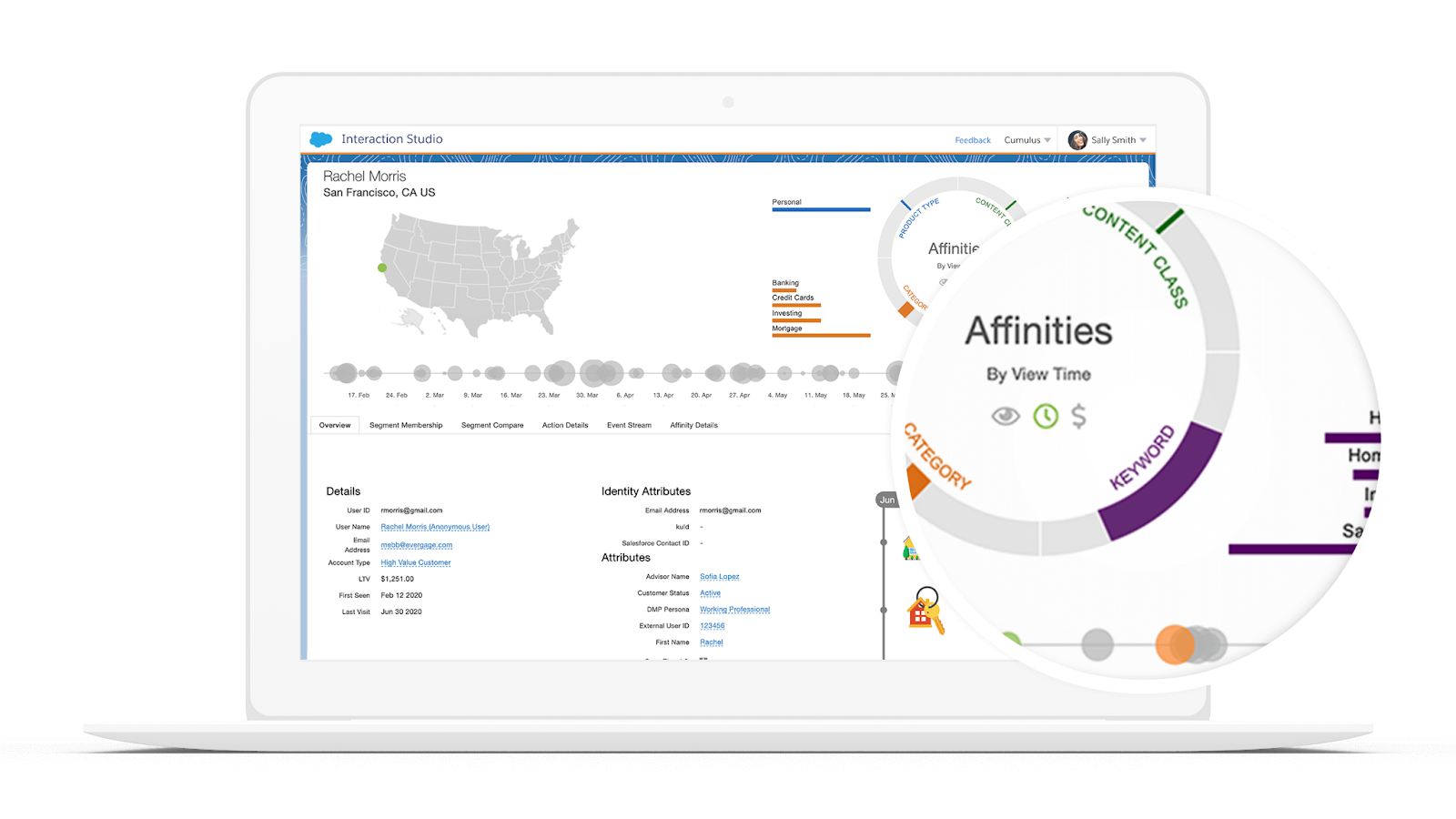
So, let me start with the easy part… What is it? Simply put, SFMCP is a real-time personalization engine. By integrating it with your website(s) and mobile app(s), you can track visitors as they interact with your digital content. 

Every page, article and product they view, click on, rate or add to cart is providing SFMCP with the data it requires to build a unique customer profile for every visitor — whether they are known or unknown. 

In other words, it allows you to dig deeper and truly understand what keeps bringing each visitor back, and when coupled with data provided by a CRM or data warehouse it is capable of delivering a hyper-personalized experience at scale and in real-time.

What does SFMCP do? 

Although accessed via Salesforce Marketing Cloud (SFMC), that’s where the similarities between SFMC and SFMCP come to an end. Having been procured rather than built by Salesforce, it has a very different look and feel. 

SFMCP is broken down into the following:

  • Reports
  • Channels & Campaigns
  • Audiences
  • Catalog
  • Machine Learning
  • Gears
  • Settings

Reports

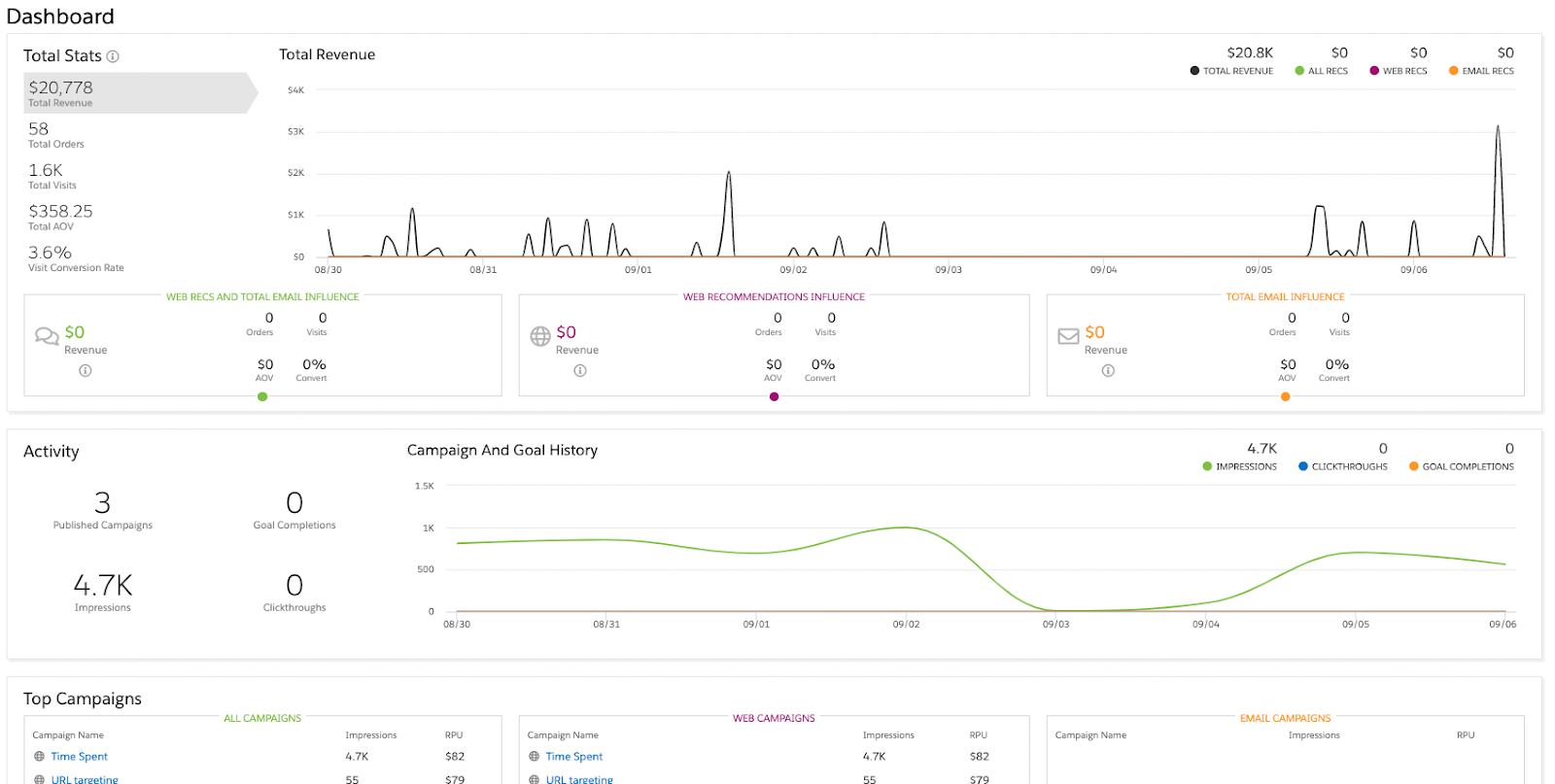
By default, all users land on the Dashboard (as shown below) which provides a high-level view of revenue, visits, orders, average order value per visit and conversion rate. It also provides details on how your campaigns are performing through metrics such as impressions, new vs. returning visitors and item actions (purchased, viewed, added to cart, etc.), all of which are filterable by date ranges. 

However, to dig a little deeper, SFMCP also provides a range of Activity, Results and Visit reports that can help understand how your personalization efforts drive success.

Activity Reports

  • Recent Visits: Stream view of all the visits occurring over the defined period
  • Event Stream: Stream view of all the events occurring over the defined period
  • Cohorts: Groupings of users by predefined criteria such as first time visiting, first time performing an action or specific statuses 
  • Actions: Linear graph showing key Sitemap actions specified that can be filtered by segments or keywords 
  • Modules: Volume of visitor actions, views/clicks that have been grouped together as Modules 
  • Paths: A page-by-page view of the paths visitors take when interacting with your site  
  • Funnels: Using Modules, create an optimal funnel for your visitors and monitor the completion of the desired sequential actions
  • Day / Time: View visits, visit length, revenue, revenue per visit and bounces by day of the week and time of day 

Results Reports

  • Revenue: User, order and revenue statistics in a grid matrix and filterable by platform, engagement, visit status, and more
  • Purchase Funnel: Using segments, compare how your audiences perform against all visitors when viewing products, adding to a cart and purchasing
  • Goal Completions: Side-by-side comparison of your configured goals and filterable by device type, browser type, user state and more
  • Goal Comparisons: A view of the goal completions and completion rate over time for created goals  

Visitor Reports

  • Behavior: Shows visits, engagement, logins and purchases over a given time frame
  • Technology: Includes information such as browser, device, and operating system commonly used by visitors
  • Referring Sources: Useful report to show how visitors access your site as well as the referring sources driving the most revenue

Channels & Campaigns

In short, it’s the marketer’s space to build campaigns and whilst it is often the most talked about, web is not the only channel SFMCP can support, it also offers mobile and email, as well as triggered and JS server-side campaigns. 

Using web campaigns, SFMCP users can create real-time personalization experiences aimed at targeting visitors who meet certain criteria. Server-side campaigns give users the ability to get more creative but will require a greater skill set. 

Triggered campaigns and email campaigns tie into the wider SFMC platform if you’re lucky enough to have it, by triggering Journeys or by providing Open-Time Content to include in your SFMC sends. 

Through mobile campaigns, SFMCP can incorporate mobile as an additional channel by including a personalised experience on both Android and iOS. 

And finally, a Third-Party section allows SFMCP to bring in data from systems such as Marketo, Act-On, LinkedIn Ads, etc. and even create custom products when and where required. 

Audiences

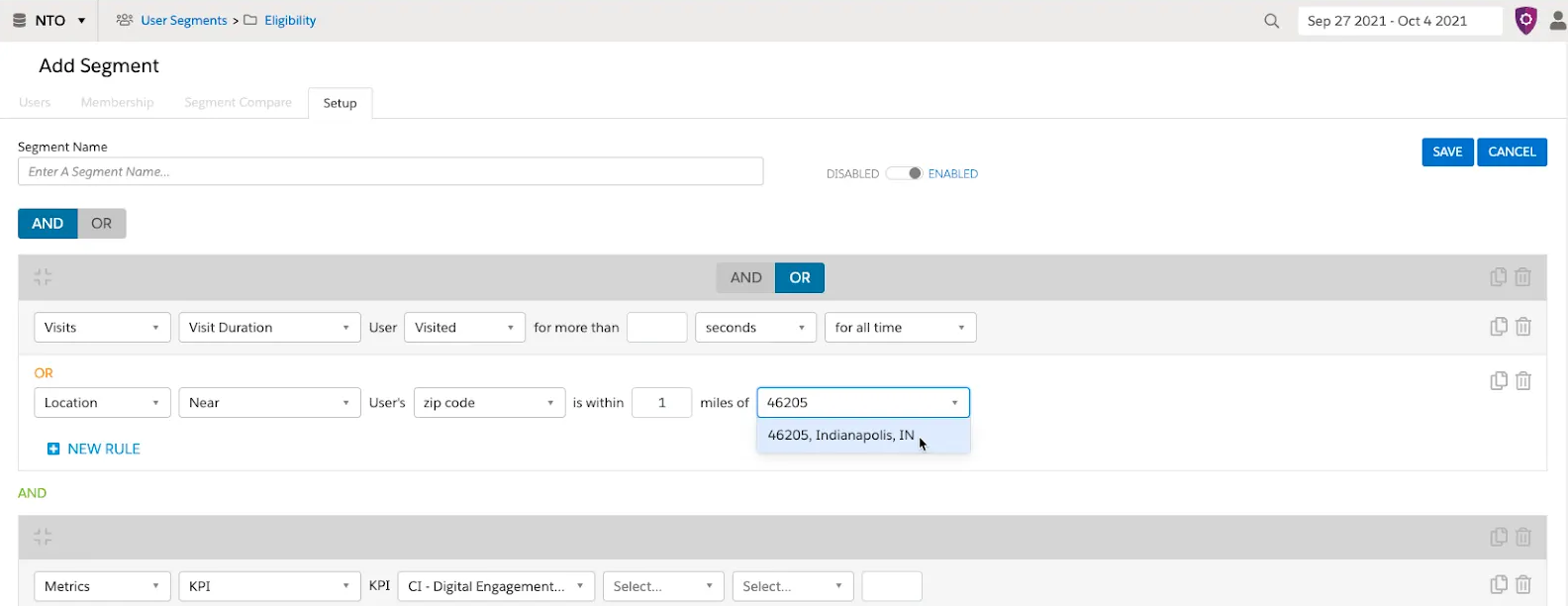
As it sounds, Audiences are where users create visitor segments. Segments are a large part of SFMCP and go beyond simple segmentation. In SFMCP, segments can be used to display AI recommendations to a selection of visitors based on your pre-defined criteria.  But they can also be used to create goals by setting the actions you wish visitors to perform (i.e., order a minimum of $xxx). 

The number of visitors who meet the criteria directly relates to your goal’s success. Furthermore, any segment created can also be added as a filter to ensure certain visitors are excluded from recommendations and personalised content (i.e., exclude visitors from the US for UK-specific campaigns). 

The audience section is also where you can see all users in your SFMCP account, whether imported via feeds or tracked through the SFMCP Sitemap. However, it is important to note, that visitors captured via the sitemap will be anonymous (created using a randomly generated profile ID) until they perform an action (i.e., create account, checkout, etc.) that provides SFMCP with a chosen identifier such as an email address or username. 

Catalog 

The Catalog section is where you begin to add business context and it will require plenty of planning. SFMCP offers standard catalog objects such as Products, Categories, Blogs and Articles but also provides the opportunity to create custom objects to support your particular business needs. The objects can then, where required, be related to each other with varying cardinalities that will provide SFMCP with the information needed to understand visitor interactions.  

For example, when a visitor clicks on a specific pair of trainers it will increase that visitor’s affinity towards that particular product, but it will also create an affinity to the categories of running and shoes. In turn, products in the same categories can then be suggested through recommendations and promotions.

Note: An important callout here is to distinguish which method will be used for consuming data: ETL or Sitemap. Passing the same attributes, such as stock, through both methods can cause issues in SFMCP. I’d recommend leveraging the ETLs where possible and using SFMCP’s Sitemap for passing IDs and activity types to avoid data discrepancy issues. 

Machine Learning

If you’re like me, this is where the fun begins. The machine learning section is all about recipes and decisions. The Machine Learning piece can be broken down into two main capabilities, Recipes and Decisions,

Recipes 

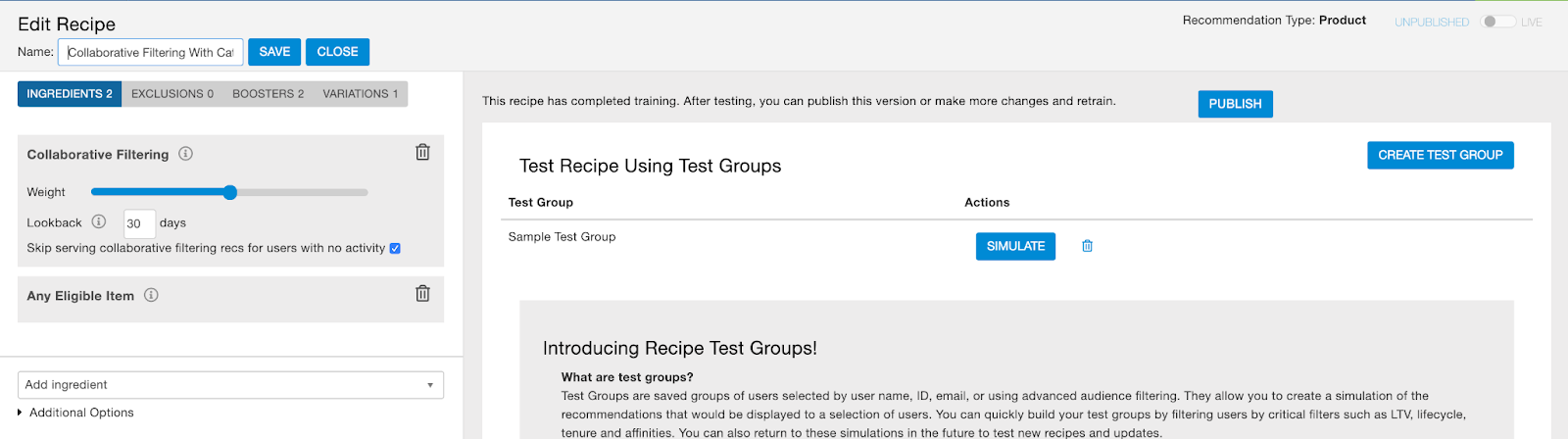
As the name suggests, by mixing ingredients SFMCP can create unique content or product recommendations for each customer. 

Ingredients make up the basis of Einstein’s machine learning-powered algorithms. Elements such as co-browse, trending or smart bundle (to name a few)  will show recommendations based on what other visitors have browsed, what’s currently trending or what products other visitors have bought together respectively. It’s important to note that these recipes can even include offline activity that is imported via ETL feeds. 

Decisions

Rather than manually creating and testing the recipes yourself, why not let AI do the hard work for you? This is where decisions come into play. Decisions use visitor data to predict and display the right promotion based on the chance of completion and the highest business value. 

Einstein automates the process of deciding who should see what content by evaluating each promotion viewed, whether or not the session is a returning visitor, device type and much more.

Gears and Feeds

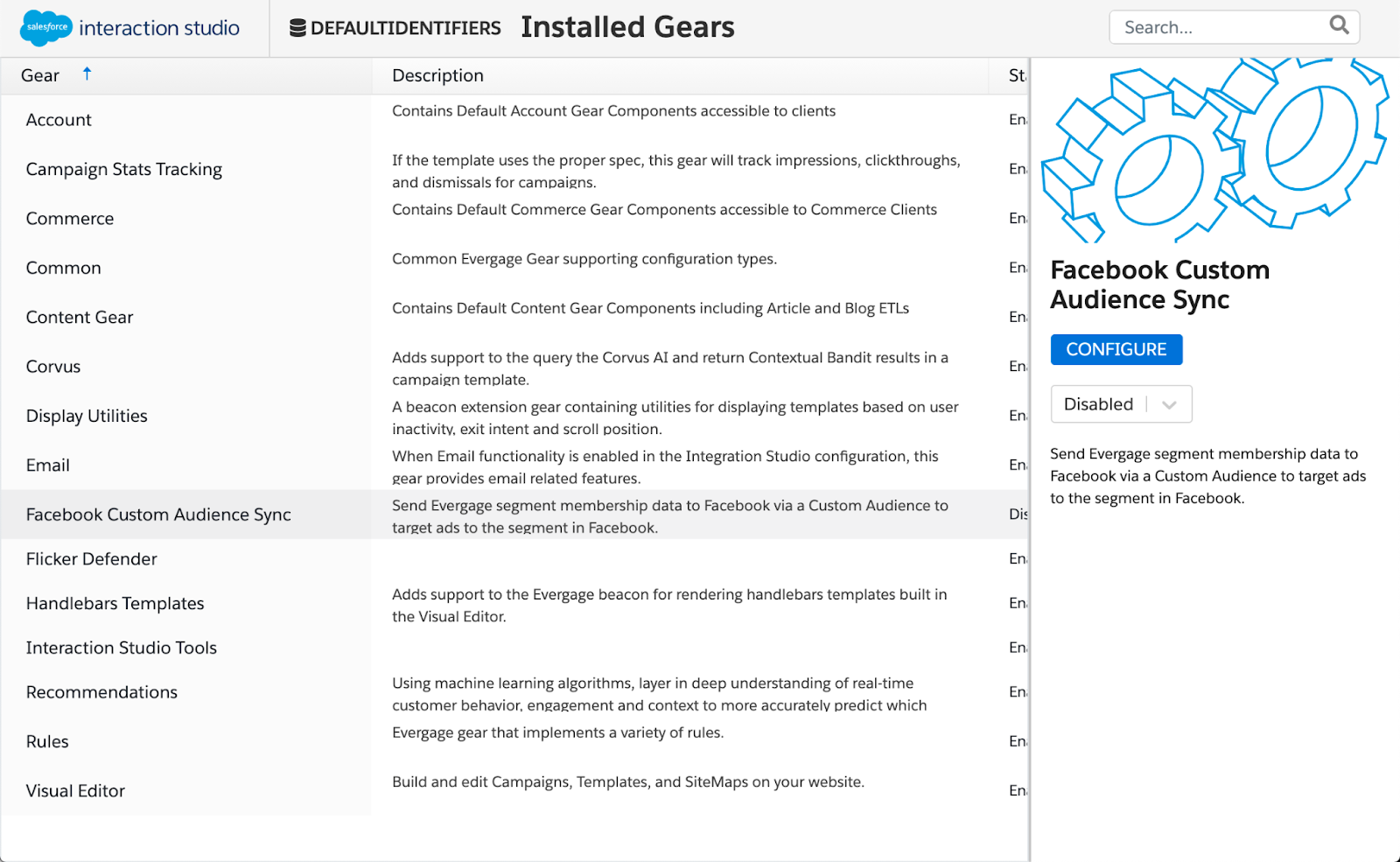
Gears are extensions for the platform that can be added based on your specific needs, although most will be enabled by default. The most important gear, in my opinion, is the Flicker Defender which, when implemented correctly, stops SFMCP sitemap from flickering on page load. 

Feeds, on the other hand, are SFMCP’s Secure File Transfer Protocol (SFTP). SFMCP has a specific feed and format for each standard object, custom object and related catalog object which you can use to ingest data to support your catalog setup. Sharing data with SFMCP provides the information it needs to turn anonymous clicks into insightful data that can be used to make informed decisions that ultimately impact the bottom line and revenue. 

Further Considerations Before Jumping Into SFMC Personalization

Before jumping straight in and procuring SFMCP, it’s worth evaluating the following considerations: 

  1. Tech Gap & Skillset – Make no mistake, this is a complex tool and deserves respect. Whilst a lot of features can be handled via point and click, to get the most out of the tool it can require the support of Web Developers and Data Scientists. It’s also worth pointing out that the Sitemap, which is a large proportion of the tool, is all JavaScript and may require ongoing support. 
  1. Personalization Requirements – As its name suggests, SFMCP is well suited to real-time personalization. But if your requirements are undemanding and single channel, it might be worth considering alternatives such as SFMC Web and Email Recommendations. However, if your requirements are omnichannel in nature and supported by a complex catalogue of data, SFMCP might be the right tool for you. 

Once you’ve made the decision to procure SFMCP, the final consideration you should take into account is the implementation approach itself — you should begin reviewing your short-term gains vs long-term strategic objectives. 

Keep it Going

If you’d like to learn more about Marketing Cloud Personalization (Interaction Studio), check out this blog post. Or reach out to the team at Sercante if you need help.

With Marketing Cloud Account Engagement (Pardot), you have the power to drive conversions through Landing Pages. This is a crucial tool in your marketing toolbox to help drive sales goals, but it needs to be used effectively in order to be successful. Providing a great first impression to win over your customer begins with you ensuring specific qualities are in place to drive expected performance and engagement.

What is a landing page?

Landing pages are targeted web pages built by marketing teams to drive traffic from campaigns, including email links, social media posts, or digital ads. The key difference between a landing page and a standard website is that a landing page focuses on a single action with the end goal of generating new leads through targeted confersions. 

Website vs. Landing Page

Key differences, in addition to the call-to-action, between a website page and a landing page include:

  • Single CTA – Websites have multiple points of navigation and include several points of conversion, whereas a landing page often has no navigation and focuses on one singular point of action.
  • Focused message to convert – Websites tend to be content heavy and filled with information from a multitude of channels, including company details, business offerings, careers, etc. A landing page uses a single persuasive message to convert a specific subset of your target audience to do something.
  • Keep visitors on the page – Websites link to additional pages, social sites, or sign ups for email communications. Landing pages typically don’t have standout links that would potentially drive traffic off its page.

Why use a landing page?

A landing page is used to convert new leads in exchange for them receiving something they find valuable. Such valuable items could include:

  • Offer Codes or Discounts
  • White Papers or Articles
  • Newsletter Registration
  • Webinar or Event Attendance
  • Free eBooks, Blogs, or Infographics
  • Free Software Trials
  • Online Course Enrollment
  • Pre-Orders or Interest Levels

Best Practices

Now that we have a better understanding of what a landing page is and how it can be used to drive conversions, let’s review a few best practices when it comes to building a landing page.

Focus on One Point of Conversion

A landing page should have one singular focus or goal for the visitor to take action on. When you have more than one item to focus on, the chances of hitting a conversion drops. That’s why we recommend:

  • Limited, if any navigation on your landing page
  • Social icons should be reserved for the footer rather than called out in copy
  • Your conversion point, whether that be a button or a form, should be located at the top of the page to draw the visitor’s attention to it from their initial landing.

Use Consistent Language

When driving traffic from an outside source to your landing page, you want to keep mirroring that language in both locations. 

What you promise with your ad, should be delivered on the landing page. Without consistency and not keeping your “promise,” you may lose trust and a potential customer. 

Use Inspiring Calls to Action

Ensure that your CTA button is obvious to your visitors by putting it in a well-placed position, using contrasting colors to make it stand out, and by using action words. Remember, visitors are seeking a solution to their problem and the CTA should be that solution! 

Not only should the words be clear and concise, but you should ensure the CTA is above the fold of the page. Here’s a blog post that dives deeper into CTA best practices.

Consider Interactive Elements

Entice your visitors and drive them to a central point of action using interactive elements, which include:

  • Videos
  • Illustrations
  • Gif images
  • Bright colors
  • Quizzes
  • Polls
  • Calculators

These offer engaging content, eye-catching art, and allows you to collect additional insights about your audience, all while showing off your organization’s unique personality.

Design for All User Experiences

As of November 2022, studies have shown that 59.5% of all web traffic is coming from mobile devices. Despite this, several organizations are still not building their websites and landing pages to be responsive. This results in a very poor user experience. 

Instead, take the time to build responsive landing pages that adapt automatically to each user. If not, you will lose valuable leads.

Pardot user? Use these templates to build your landing pages.

Be Considerate of Forms

Let’s say you get traffic to your landing page and the page looks great, but the form has 6+ required fields with invasive questions. This will drive that traffic OFF of your page. 

Instead, you should aim to have your form have no more than 5 fields and target more basic details, such as first, last name, company, and email.

From there, enable Progressive Profiling, to continuously ask more questions of your customers. In addition, whenever asking an open-ended question, try to do so using drop-down menus, radio buttons, or checkboxes, rather than open text to create a better experience.

Thank You Content is a Must

Redirecting your landing page traffic to a thank you page not only wraps up the present and puts a bow on the experience, it also allows you, as the marketer, to retarget them and drive additional traffic to like-minded content. For example, you can drive them to additional product pages, resources, engage on social media, or drive them to contact a sales team member immediately.

Need additional help? Contact Sercante today for help with templates or strategy!

The Pardot WYSIWYG (What You See Is What You Get) Editor Icon Glossary saved me SO much time and energy when I was first learning how to build email in Pardot. Recently, I noticed this page had been archived and no good replacement could be found, so I thought I’d recreate this asset so new and experienced users can still reference it as much as needed. 

The Icon Glossary

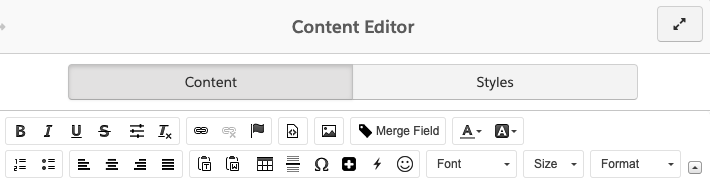
These buttons and icons are universal across Pardot, wherever you may add content (classic email builder, forms, landing pages, etc.). These buttons and icons are available to help you style your copy.

IconFunction
Bold text.
Italicize text.
Underline text.
Strikethrough text.
Additional formatting options such as font size and line height.
Remove existing formatting.
Insert a link.
Remove a link. This icon is grayed out unless an existing link is selected. 
Insert an Anchor. This is a hyperlink that will take you to another section of the email.
View the source code. This button is helpful when manually entering or editing HTML. 
Insert an image.
Insert a merge field to personalize the content for the recipient.
Set your text color.
Set your background color. 
Insert a numbered list.
Insert a bulleted list.
Left align content.
Center align content.
Right align content.
Justify content. 
Paste as plain text. This strips all formatting from the text.
Paste from Word. This retains some formatting from Microsoft Word, but strips out superfluous code. See Copying Content from Word for more info.
Insert an HTML table.
Insert a horizontal line. 
Insert a special character.
Insert Dynamic Content to personalize the content for the recipient.
Insert emojis.
Change or set your font name.
Change or set your font size.

I hope this makes building emails go a little more smoothly for you! If I missed any icons or if you have any questions, let us know in the comments!

No more posts to show