Category

New Features

The final day of MarDreamin’ 2022 kicked off with the third-annual Demo Jam, which is like speed dating for SaaS/technology product solutions. Each participant shows the audience what there is to love about the products they’re selling, and then the audience votes to select a winner.

MarDreamin’ is a Salesforce community conference for the marketer. So, this Demo Jam’s focus was on products that play nice with Salesforce Marketing Cloud Engagement and Account Engagement (Pardot).

Each participant had three minutes to present their product demo. Then, demo jam attendees weighed in with their votes after all company representatives finished their presentations. We crowned the MarDreamin’ Demo Jam Champion at the end thanks to everyone’s votes.

2022 MarDreamin’ Demo Jam Winners

This year, we had a tie and named two MarDreamin’ Demo Jam winners. The two winners are Stensul and Sercante Labs. 

Both Sercante Labs and Stensul were neck-and-neck in the end, and the hosts had to call it a tie when a few last-minute votes left both companies with the same number of votes at the end.

MarDreamin’ Demo Jam rules

Each participant had 3 minutes to demo their product and wow the audience. Then at the end of the Demo Jam, the audience voted for their favorite product through an online poll.

2022 MarDreamin’ Demo Jam participants

Richard Feist and Angelica Cabral from Sercante shared Demo Jam hosting duties and provided welcome comic relief while giving away swag to attendees throughout the competition. 

Here’s who presented their products to compete for the best Salesforce Marketing Cloud-integrated  solution:

How the products from the Demo Jam can make your life easier

Each of the presentations at the MarDreamin’ Demo Jam included demonstrations of products that ease pain points for people who work in marketing roles and use Salesforce. 

Here’s a summary of each one and a replay of each demo:

LeanData

Standing at the center of Salesforce CRM, LeanData’s family of solutions orchestrate and automate the go-to-market process to help revenue teams close more deals and drive more revenue, faster.

Click here to request a demo from LeanData’s suite of products.

Sercante Labs

Sercante has grown and built a reputation for helping marketers succeed on the Salesforce platform. We do that through our consulting services, topical training, and by sharing thought leadership content. With Sercante Labs, we take that one step further and aim to build products, wizards, and tools that help marketing & sales pros kick ass.

Sercante Labs products are born out of challenges we see our customers routinely facing and usually start with an idea submission from our team or someone in the community. If you have a request or a “wouldn’t it be nice if…” idea, let’s chat!

Click here to chat with a Sercante Labs expert.

Stensul

The Stensul™ email creation platform dramatically reduces email creation time — by up to 90% — so teams can better focus on improving email performance. Stensul streamlines collaboration and simplifies the creation process for all marketers, so they can create emails that drive stronger results. 

Stensul integrates with all leading ESPs/MAPs as well as workflow platforms, image libraries, live content, link tracking, and messaging platforms. Top brands that trust Stensul to solve their most demanding email problems include Accolade, BMW, Cisco, Codecademy, Electric, Equifax, Lucidworks, MURAL, and Yahoo.

Click here to get an email efficiency analysis from Stensul.

Stack Moxie

Anyone who has managed a complex tech stack has experienced how minor inconsistencies can wreak havoc across integrated systems.

Typos, spelling errors, permission sets, and other simple problems can break systems sync, preventing proper lead routing, which stops the sales team from knowing when great leads are interested in your company.

Stack Moxie’s army of robots work on your behalf to make sure each lead promptly reaches its destination as expected. If errors arise, the robots proactively notify you so problems can be mitigated quickly.

Click here to request a personalized demo.

DESelect

DESelect helps marketers unlock the full power of Salesforce Marketing Cloud without needing to write SQL. Using DESelect’s simple drag-and-drop solutions, users can create complex audience segments quickly, easily integrate new data sources, accelerate campaign execution, and reduce costs by ending technical dependencies. 

Since launching in 2019, DESelect has raised $5.5+ million, built an international team, and helped customers like T-Mobile, Volvo, Cazoo, Emerald, and Merlin.

Click here to book a demo.

Tray.io

Tray.io is a low-code automation platform that can easily turn unique business processes into repeatable and scalable workflows that evolve whenever business needs change. Powering RevOps at Mixpanel, AdRoll and other industry leading enterprises, Tray helps you accelerate revenue and win more deals.

Click here to start your trial.

Why were these companies’ products featured?

The companies featured in the MarDreamin’ Demo Jam are all essential to the success of this conference each year. That’s because they are companies that sponsor the conference. 

The MarDreamin’ team can’t bring all this free content to you without the help of these sponsors. So, be sure to check them out using the links above as a ‘thank you’ to them for their sponsorship.

How to join next year’s Demo Jam

Hey, product marketing friends — you’re probably  kicking yourself and wishing you could have had your company’s tools featured in the Demo Jam. 

It’s all good. You can get ahead and reach out to the MarDreamin’ team now by clicking on this link. Complete the form on that page so you can lock in your sponsorship for 2023.

Learn more about extending Salesforce

We hope you’ve found something helpful through the demos or have sparked ideas to implement integrations in your tech stack. Remember to watch the 2021 Demo Jam Replay and read the 2021 Demo Jam Recap to see the demos from last year and keep it going. The 2020 Demo Jam Replay is also available here.

Have something in mind that you wish Salesforce could do but you haven’t found the solution yet? Tell us about it in the comments below or reach out to Sercante Labs to see if we can help. And remember to check out each of the Demo Jam participating companies!

Alas, Salesforce External Actions for Pardot is finally here.

Until now, our options to have Marketing Cloud Account Engagement (Pardot) trigger a third-party system have been limited to either: pre-existing connectors or syncing to Salesforce and relying on a Salesforce-side integration. 

With the Salesforce Winter ‘23 release, External Actions gives us the capability to integrate into any third-party system and do cool things.

Note: This feature is available to Plus, Advanced, and Premium editions of Pardot.

The Lowdown on External Actions for Pardot

External Action allows Pardot to do things like: 

  • Send an SMS message via Twilio or MogliSMS
  • Create a new Salesforce record (such as Lead, Opportunity, any Object!)
  • Send information to your favorite Star Wars API
  • Register a Prospect in another system
  • and whatever else you dream up! 

While there are some considerations (detailed later in this post), External Actions are a great way to plow through the barriers that have prevented you from automating your entire workflow. 

It’s important to note that there’s a similarly named feature called External Activities.  With Pardot External Activities, you can receive data from third-party systems to use in Pardot. With External Actions, you can send data to third-party systems so they can do cool things.

How does a Pardot External Action work?

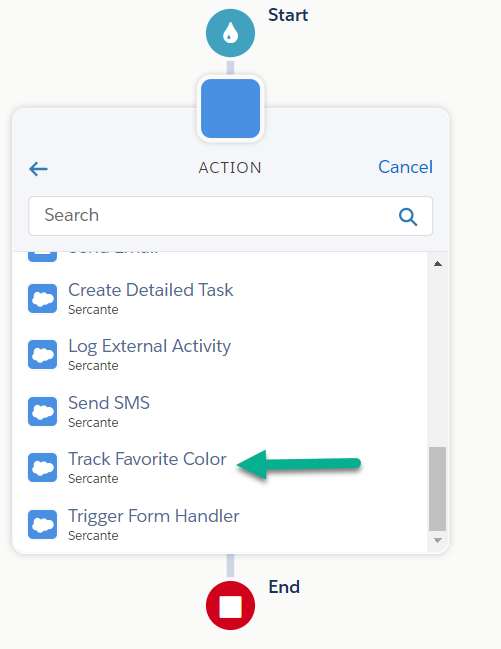
Once an External Action is built, it will appear as an Action option in an Engagement Studio Program. Depending on the action, you may need to provide additional information through text inputs. You can use HML Merge Tags here, too!

When the Engagement Studio Program is running and hits your action, Pardot will call into Salesforce (via API behind the scenes), and call the functionality.  It does this in a “fire and forget” manner, so there’s no error handling inside your Engagement Studio Program. It is also not “bulkified,” meaning it will make an API call for EACH Prospect. So, you may need to take the API limits of Salesforce AND your external system into consideration.

For this blog post, we built an External Action that tracks Favorite Color. 

Once you pick “Track Favorite Color” you have the ability to provide a value. In the screenshot below, we are using HML to pull this value from a Prospect’s record, though you can also provide static text if you want to say everyone’s favorite color is Sercante Green.

How can I set up a Pardot External Action?

To set up an External Action, there are 2 key pieces:

  1. You need something in Salesforce that can “do the thing” you want. It can be any of the following:
    • Autolaunched Flow
    • External Service
    • APEX InvocableMethod
  2. Marketing App Extensions have been configured inside Salesforce Setup

No-code options to configure Pardot External Actions

If you are looking to integrate with a third-party system, you might luck out on #1 and be able to leverage something built by that third-party in their Salesforce package. This could be your quickest way to being able to use an External Action.

If this isn’t available for you, first look at seeing if you can make an Autolaunched Flow that can meet your needs. This option is also great for creating Salesforce Records of any object type (keeping in mind you are limited to text input types in Pardot).

When working with another API, and if that API supports the OpenAPI protocol, you can use Salesforce External Services to hook things up. That will give you everything you need.

 The Trailhead Module on External Services is a great way to learn how to get started.

Code option to get started with Pardot External Actions

If the above aren’t an option, it’s time to break out your development skills (or work with someone who has them). We’ve got a sample APEX class here that gives you all the structural ingredients you need to make this work, you just have to fill in what you want it to actually do.

public class MyNewExternalAction {

    // Classes to be used by the Flow Designer
    public class FlowRequest {
        @InvocableVariable(label='Prospect Email')
        public String email;
        @InvocableVariable(label='Favorite Color')
        public String favColor;
        // add any other String or number-based attributes you need
    }

    // If you are calling an External API, this would be a great
    // place to put Classes to represent the response
    public class ApiResponse {

    }
    
    @InvocableMethod(callout=true label='My New External Action')
    public static void performActions(List<FlowRequest> flowRequests) {
        System.debug('Start performActions');
        // at time of writing, Pardot DOES NOT BATCH these, it's always 1
        // per batch
        FlowRequest flowRequest = flowRequests.get(0);
        System.Http http = new System.Http();

        try {
            // This is where you put what you want to do!
            // you can call another API, call other APEX
            // read & write Salesforce Objects.. Whatever you want

        } catch (Exception e) {
            System.debug('There was an issue executing the request');
            System.debug(e.getMessage());
            throw e;
        }
        System.debug('Done performActions');
    }
}

Once you have the functionality ready, you need to tell Pardot about it. This is done by configuring Marketing App Extensions inside Salesforce Setup.

Configuring the Marketing App Extensions

This is the “glue” that ties everything together and makes External Actions usable by Pardot. There are a few easy things to configure to make this “glue” work.

First, we need the Top-Level Marketing App Extension. Be careful with these, as you cannot delete them once created (so don’t go making a bunch of test records!).

  1. In Salesforce Setup, search for Marketing App Extensions
  2. If you don’t have one, create New
    • Provide an Extension Name and an API Name, as well as check “Active in Automations”
    • Click Save

Next, we need to enable this for Business Unit(s).

  1. With the Extension still open, go to the Related tab
  2. Click New beside Business Unit Assignments
  3. Add an assignment for each Business Unit you want this extension to be available for

Now we can create the External Action.

  1. With the Extension still open, go to the Related tab
  2. Click New beside Actions
  3. Provide an Action Name (this will be the name visible when selecting it from Engagement Studio)
  4. Provide an API Name (this does not auto-fill like you may be used to)
  5. (Recommended) Provide a description of what this Action does, since you might not remember in three months
  6. Search for your functionality. Once selected, the Action Schema will auto fill with JSON that you need to review and likely modify
  7. Review & Modify the Action Schema
    • Properties – this contains details about the parameters/values that you want to provide to the Automation.
      • type:  currently can only be “string” and “number”
      • title: the Label of the input when viewing in Engagement Studio
      • value: Allows you to provide a default value. You can use HML merge tags here!
      • Note: Sometimes when working with Flows, you might have properties that are not relevant (like flow interview id). You should remove them from Properties (assuming they aren’t an input variable that your flow requires to function)
    • View Components – this allows you to specify which properties you want to provide inputs for in Engagement Studio. Currently, definition should always be “lightning/control” and “scope” should always point to one of the properties
    • Required – a list of properties that would be required from within Engagement Studio
  8. Action Params auto fills, no changes needed
  9. When you are ready to have this available in Pardot, check the Active in Automations box.

Here’s what it would look like for our sample APEX class above. Note that we’ve chosen to only display the favorite color field in the Engagement Studio, though we are passing the Prospect’s email behind the scenes.

Save the Action and, after a few moments, it will be available for testing!

Can I use an External Action to do things in Pardot?

Imagine being able to take action on another Prospect record from an Engagement Studio Program! While not natively available within the platform, you could build this when combining External Actions with our Free package Flow Actions for Pardot. After setting up the package, you would only need to configure the Marketing App Extension to have any of our Flow Actions available as an External Action.

Create Unified Experiences with Pardot External Activities

External Actions are available with the Winter ‘23 release. These Actions, as well as External Activities, allow Marketers to automate across platforms for a more unified experience. 

How do you plan on using these features to better automate your processes? Tell us in the comments!

Summer ’23 Release Update: With this release, Salesforce is re-allowing the Account Engagement Opt-Out field to be set to “Use Most Recently Updated”. However, We’ll leave this blog post up in case it helps anyone who does want to set their Opt-Out field to “Use Account Engagement’s Value” or “Use Salesforce’s Value”.

Original Blog Post

The Salesforce Winter ’23 release is bringing some changes to the Marketing Cloud Account Engagement (Pardot) “Opted Out” field. After this release, the sync options will change and “Use most recently updated” will no longer be an option for this field. 

Pardot Admins must choose between “Use Salesforce’s Value” or “Use Pardot’s Value” before July 11th, 2023 or this field will stop syncing with Salesforce. All Pardot Orgs created after August 26th, 2022 will default to use Pardot’s Value.

So, how do you keep Pardot and Salesforce Opt Outs in sync between the two systems after this change? Well, it all depends on where your emails are coming from. 

If you are only sending emails from Pardot

If you are only sending emails from Pardot, then Pardot being the system of record should not cause any issues. 

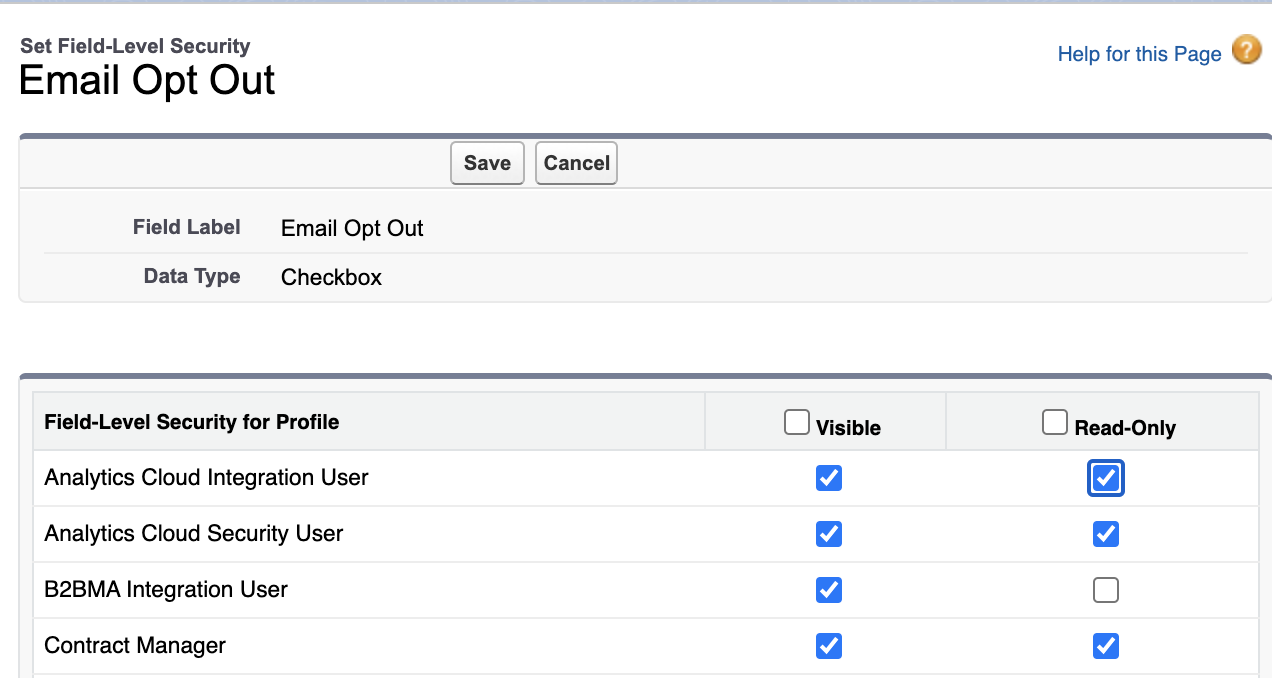
Before you change your Opt Out sync behavior in Pardot, check the permissions of your “Email Opt Out” field on the Lead and Contact Objects. You will want to ensure only the Pardot to Salesforce connector user’s profile can edit this field so Salesforce users don’t incorrectly think they can opt out Leads/Contacts from the Salesforce side. 

  1. In Salesforce navigate to Setup > Object Manager > Lead > Fields & Relationships
  2. Locate and open the Email Opt Out field
  3. Select Set Field-Level Security
  4. Ensure Read-Only is selected for any profiles who have visibility to this field except for the connector user’s profile (this will be the “B2BMA Integration User” profile if you are using the B2BMA integration user as your connector user)
  1. Select Save
  2. Repeat steps 1-5 for the Contact Object

Next, change your Pardot Opted Out field to use Pardot’s Value and voila! You are ready for this update. 

But Salesforce Users want to be able to Opt Out Leads/Contacts

If your Salesforce users need to maintain the ability to opt Leads/Contacts out of Pardot Email from the Salesforce side, they can use the “Do Not Email” field going forward. Make sure you go through the “If you are only sending emails from Pardot”  steps above, as well as:

#1 – Create a “Do Not Email” field for Leads/Contacts

  1. In Salesforce navigate to Setup > Object Manager > Lead > Fields & Relationships
  2. Select New
  3. Select the field type Checkbox, then Next
  4. Name the field “Pardot: Do Not Email”
  5. In the Help Text field, enter “Prevents this Lead/Contact from receive Marketing emails in Pardot”
  1. Select Next
  2. On the Establish field-level security screen, ensure all profiles that will need update this field have visibility to it especially the Connector user’s profile (this will be the “B2BMA Integration User” profile if you are using the B2BMA integration user as your connector user)
  3. Select Next
  4. Select the page layouts you’d like to add this field to, select Save
  5. Repeat steps 1-9 for the Contact Object 

# 2 – Map the “Pardot: Email Opt Out” field upon Conversion

  1. In Salesforce navigate to Setup > Object Manager > Lead > Fields & Relationships
  2. Select Map Lead Fields
  3. Select the Contact tab
  4. Locate the Pardot: Do Not Email field in the Lead Fields column and select the Pardot: Do Not Email  field under the Contact Fields Column
  1. Select Save

# 3 – Map the Pardot “Do Not Email” field to Salesforce

  1. In the Pardot Lightning app, navigate to Pardot Settings > Prospect Fields > Default Fields > Do Not Email
  2. Select Edit default Prospect field
  3. In the salesforce.com Field Name drop down, select Pardot: Do Not Email
  4. In the Sync Behavior field, select Use the most recently updated value
  1. Select Save default field

If you’re sending email out of multiple systems

If you’re sending emails out of Pardot and Salesforce, Marketing Cloud, or various other systems, my recommendation would be to create an Opt Out field for each system then use a Salesforce flow to keep these checkboxes in line. 

For instance, if a Lead/Contact opts out of Pardot emails, you likely want to also opt them out of Salesforce and Marketing Cloud emails coming from the same company or email domain,  otherwise you’re likely to get some SPAM complaints. 

Tell us how Pardot Opt Out Field Sync changes affect you

How are you handling the Pardot Opt Out field sync changes? Do you have any scenarios that are more complex than the examples above? Let us know in the comments!

Queue Sarah McLachlan’s “I will remember you,” because the Pardot Classic App in Salesforce is officially retiring on Monday, October 17, 2022.

Remain calm! The retirement of the Pardot Classic App is unrelated to the recent Pardot rebrand to “Marketing Cloud Account Engagement.”

The retiring of the Classic app was announced almost a year ago, in October 2021. Marketing Cloud Account Engagement (Pardot) will still be accessible at pi.pardot.com and through the Lightning App.

Check out this FAQ article for more information on what is changing with the retirement of the Pardot Classic App.

Pardot Classic App Retirement Implications

What does this mean? If you’re using the Pardot Classic App in Salesforce today, then you’re accessing the classic user interface (UI) via the “Pardot tab” in either your Salesforce Classic or Lightning experience.

On October 17, 2022, you’ll have two options to access Pardot moving forward:

  1. Logging in at pi.pardot.com: This is Pardot’s legacy application with the same classic UI experience shared by the Pardot Classic App.
  2. Enabling the Pardot Lightning App: This is the recommended application to continue using Pardot in Salesforce Lightning. The Pardot Lightning App also grants you access to the latest and greatest features not available in the Classic App or at pi.pardot.com.

Getting Salesforce Access for Pardot Users

But my Pardot users don’t have access to Salesforce!

That’s OK!

With the Winter ’23 release, users who do not require full access to Salesforce can now access the Pardot Lightning app with a new permission set. Read more about the Winter’ ’23 new release updates here.

Start Using the Pardot Lightning App

What’s the Pardot Lightning App?

I’m so glad you asked!

This app gives you access to all your favorite Pardot marketing automation features in an updated UI built on the Salesforce Platform. Check out this blog post on the benefits of using the Pardot Lightning App and the additions that come with it.

It’s Time to Switch to Pardot Lightning

Are you ready to make the switch? Check out The Salesforce Pardot Lightning Implementation Guide. Or get in touch with us for help.

Let us know how you feel about making the switch to Pardot Lightning in the comments!

The Salesforce Winter ’23 Release Notes are out, and they include important features for marketers who are on the Salesforce platform. 

We get three major releases from Salesforce each year — Spring, Summer and Winter. Each Salesforce release includes upgrades and enhancements that affect Salesforce orgs in different ways. 

So, if you’re using and managing marketing operations for your company or organization and want to know more about Salesforce CRM, then you’re in the right place. We’re going to cover everything you need to know about the Salesforce Winter ‘23 Release if you’re a marketer who uses Salesforce.

Marketing-Focused Platform Highlights  from the Salesforce Winter ‘23 Release

Marketers who use the Salesforce platform are getting lots of attention from the Salesforce Winter ‘23 Release. 

Some updates are changing the way we work to meet evolving technology demands. Others are saving us time by connecting the dots in a logical way. 

All we know is, this release includes big updates for people in the marketing world.

Highlight #1: MFA Enhancement for Smaller Orgs

The Winter ‘23 release will enable multi-factor authentication (MFA) for direct logins to Salesforce for orgs with fewer than 100 active users. This update will then become enforced when the Spring ‘23 release comes around early next year. 

If your Salesforce org falls under the 100 active user threshold, it’s best to make sure you are fully compliant with the MFA requirement now and make sure any MFA-exempt user types are prevented from being affected by this update.

Any Salesforce org that has more than 100 active users will experience this update in a future release.

Highlight #2: Dynamic Forms for Standard Objects

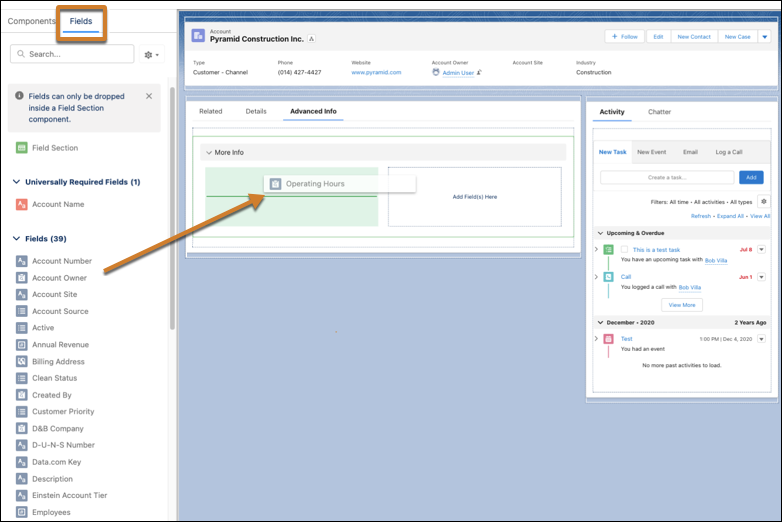
Dynamic Forms are now finally available for Accounts, Person Accounts, Contacts, and Opportunities! Dynamic Forms are components you can add to your Lightning Record Page to help customize your page layouts even more. 

Instead of using the standard page layout component, you can add specific fields and sections to the Lightning Record Page and add visibility rules to show users only what they need at that time. 

You can also automate the process of creating dynamic forms by migrating the Record Detail component to a Dynamic Form component with just one button.

Record Component

Highlight #3: Salesforce Reports and Dashboards Updates

Salesforce continues to ensure that Reports and Dashboards get new updates with each release throughout the year. 

Enhancement #1: Filter Custom Report Types by Salesforce Fields (Beta)

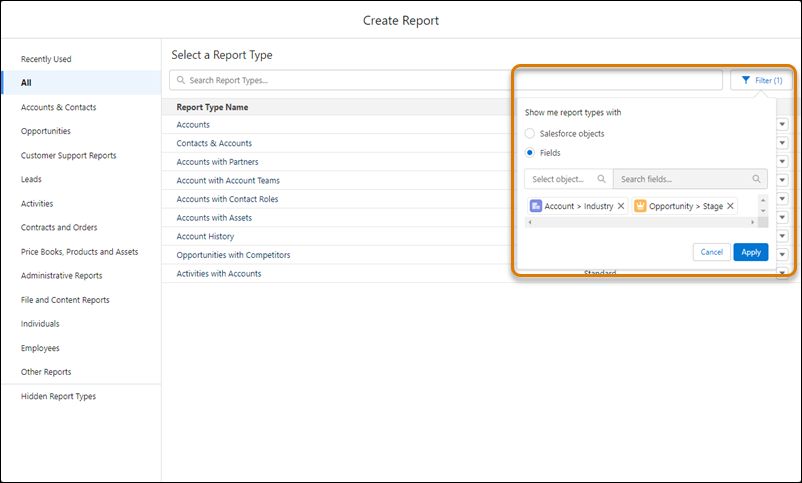
Salesforce continues to provide enhancements to help ensure users can pick the best report type for any use case. Users can now filter custom report types by specific fields to ensure that report type contains the fields needed for the report. 

This feature is extremely useful for finding the right custom report type and allows users to filter by up to 20 fields that are required for the specific report they are building.

The "Create Report" modal, with an orange box around a "Filter" button to the right of the "Search Report Types..." bar. Below the filter button is a modal that reads "Show me report types with". In the modal are an unselected "Salesforce objects" radio button and a selected "Fields" radio button. Below the options are a "Select Object" text input and a "Search Fields" text input. Below that are two sample selected fields: "Account > Industry" and "Opportunity > Stage". Below that are "Cancel" and "Apply" buttons.

Enhancement #2: Review a Custom Report Type’s Structure During Report Creation

When getting ready to select a custom report type, users are now able to review the structure of that report type before moving forward with creating a new report. 

The details panel for the custom report type will now include a section that shows the relationships between the joined objects and provides useful information on the outcomes of the joins that were set up for the report type.

Highlight #4: User Permissions Updates

Improvement #1: Manage Your Permission Assignments with the User Access and Permission Assistant

Previously known as the Permissions Helper, the User Access and Permissions Assistant is an app through the Salesforce AppExchange to help analyze and report on permission assignments. 

Following the Salesforce best practice to approach user management by applying the principle of least privilege, this tool can help with monitoring and managing permissions across your org. 

Some features available through this tool are:

  • Analyzing permissions by user, permission set, or permission set group to understand who has a particular permission.
  • Converting a profile to a permission set
  • Reporting on users, permission sets, or permission set groups to further understand who has what permissions.
    • You can also report on permission dependency and visualize it so you can see everything that’s dependent on a specific permission.

Improvement #2: Set Field-Level Security for a Field on Permission Sets During Field Creation

As Salesforce moves its customers toward using Permission Sets over Profiles, it will continue to push out new updates for Permission Sets to become more powerful. 

When creating new fields on an object, you will now have the ability to set field-level security on permission sets instead of profiles to help follow security best practices.

To use this new beta feature, you should enable it through the User Management Settings in your Salesforce Setup.

Highlight #5: Salesforce Flow Updates

You may have heard the phrase “Flow is the future” in Salesforce messaging over the past couple of years. This is because Salesforce is consistently releasing new Flow features to prepare for the retirement of Process Builder and Workflow Rules in the upcoming years. 

You should anticipate seeing awesome features for Salesforce Flow being included in every release moving forward for a while.

Here are some of our favorites from this release.

Improvement #1: Cut and Paste Flow Elements

If you’ve ever had to move a Flow element from one section to another you know how frustrating it has been in the past. We were required to copy a component, paste in the new section, update any references to the old version of the component, and then delete the old component. 

Salesforce has answered this frustration by providing a new feature where you can cut and paste a Flow element that eliminates all of the extra steps of cleaning up your Flow when you move an element.

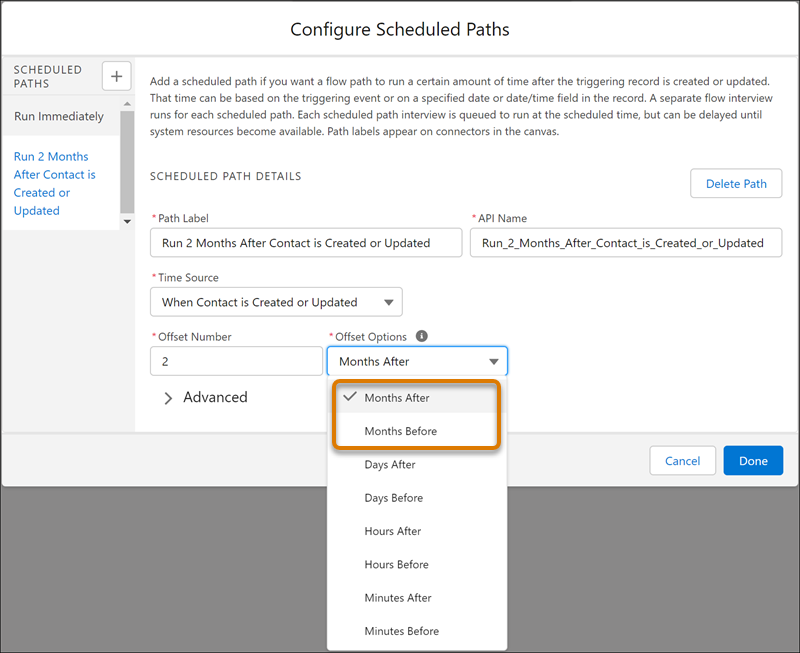
Improvement #2: Specify Time Offsets in Months for Scheduled Paths

Before the Winter ‘23 release, Salesforce users were only able to set up scheduled paths by looking at the time since a trigger in minutes, hours, or days. 

This new Salesforce feature now includes the ability to schedule your path to run on the same calendar day of another month.

configure scheduled paths

Improvement #3: Use In and Not In Operations to Find Related Records

Flows are getting new operators that can be used in Get Records, Update Records, and Delete Records elements. 

These new operators, In and Not In, can help users get related records without using a Loop element and reduce the number of SOQL queries and DML statements within the Flow.

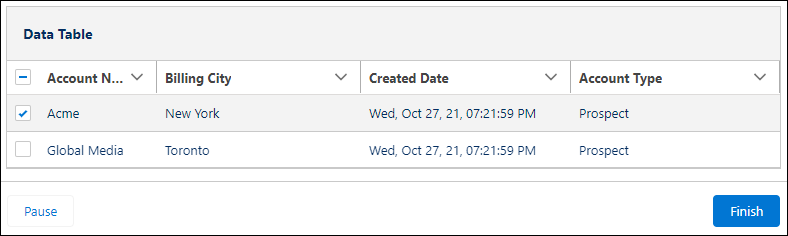
Improvement #4: Select Multiple Records from a Table in a Screen Flow (Beta)

The new Data Table screen flow component is available to display a list of records on a flow screen. When building the screen flow, you can set the table to ready only or provide your users the ability to select multiple records to use later in the flow.

Data Table

Improvement #5: Use Record-Triggered Flows to Update Related Records

The Winter ‘23 release brings a new feature where you can use record-triggered flows to update any record that is related to the record that originally triggers the Flow. 

With this feature, users are also able to set filters to only update specific related records instead of all related records.

Improvement #6: Workflow Rule Creation will no longer be available

The Winter ‘23 Release will now block Salesforce users from creating any new Workflow Rules moving forward. This is the next big step toward retiring Workflow Rules entirely as Salesforce continues to push users to move toward Flows. 

This update will not affect your current Workflow Rules as you will still be able to activate, deactivate, and edit your existing automations.

Check out our other blog post on migrating your current Workflow Rules and Process Builder to Flow through the new conversion to learn more about how you can prepare for the Workflow Rule retirement.

Highlight #6: Sales Cloud for Slack (Generally Available)

Since Salesforce purchased Slack in July 2021, they have been working hard to connect these two systems in a way that will improve Sales productivity. 

This release brings a new feature where sales teams can access important information and get notifications about their accounts and opportunities directly in Slack. The new Sales Cloud for Slack app provides the ability for your sales team to collaborate in opportunity-focused channels and to automate record update notifications to be pushed into Slack directly from Salesforce.

Highlight #7: Marketing Cloud Account Engagement (Pardot) Updates

Please check out my colleague Erin Duncan’s blog post on all things Pardot from the Winter ’23 release.

Salesforce is getting bigger and better all the time

B2B marketers who come to Salesforce are usually looking to scale their efforts and grow in a way that makes sense. These latest enhancements from the Salesforce Winter ‘23 Release get marketers closer to those goals by saving them time and resources. Contact the team at Sercante to get help implementing these enhancements in your Salesforce org. And leave us a comment below to let us know what you think about the Winter ‘23 Release.

The Salesforce Winter ’23 Release Notes are out, and they include important features for marketers who are on the Salesforce platform. 

We get three major releases from Salesforce each year — Spring, Summer and Winter. Each Salesforce release includes upgrades and enhancements that affect Salesforce orgs in different ways. 

So, if you’re using and managing marketing operations for your company or organization and want to know more about Marketing Cloud Account Engagement (Pardot), then you’re in the right place. We’re going to cover everything you need to know about the Salesforce Winter ‘23 Release for Pardot Admins.

Salesforce Winter ’23 Release: Pardot Highlights

Marketers who use the Salesforce platform are getting lots of attention from the Salesforce Winter ‘23 Release. 

Some updates are changing the way we work to meet evolving technology demands. Others are saving us time by connecting the dots in a logical way. All we know is, this release includes big updates for people in the marketing world!

Highlight #1: Send data to third-party systems with External Actions

New External Actions allow you to send data to third-party systems from within an Engagement Studio Program. For example, you may want to send a prospect a survey, send them a text message, or even log a case based off of an action they took with your marketing materials. 

External Actions, as well as External Activities, allow marketers to automate across platforms for a more unified experience. This feature is available to Plus, Advanced, and Premium editions of Pardot. 

Highlight #2: Perform full database syncs

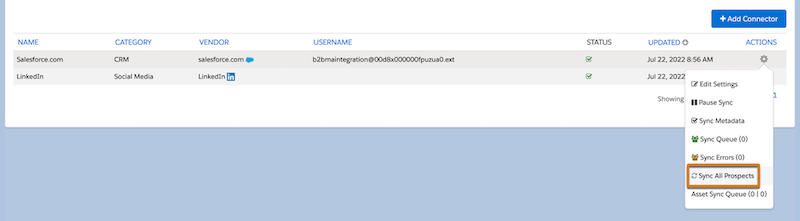
Gone are the days of adding a new prospect field just to trigger a full sync! The Winter ‘23 release is adding a new option to the Salesforce Connector to allow for a full sync of Prospect records.

sync all prospects

Image Source: Salesforce

This feature is available to all Pardot editions, but it can only be performed in Pardot Business Units with fewer than 500k prospects. A full sync can be performed once every seven days. 

Highlight #3: Pardot’s “Opt Out” Field Syncing is Changing

Starting February 26th, 2023, the Pardot “Opt Out” field’s sync behavior can no longer be set to “use most recently updated.” 

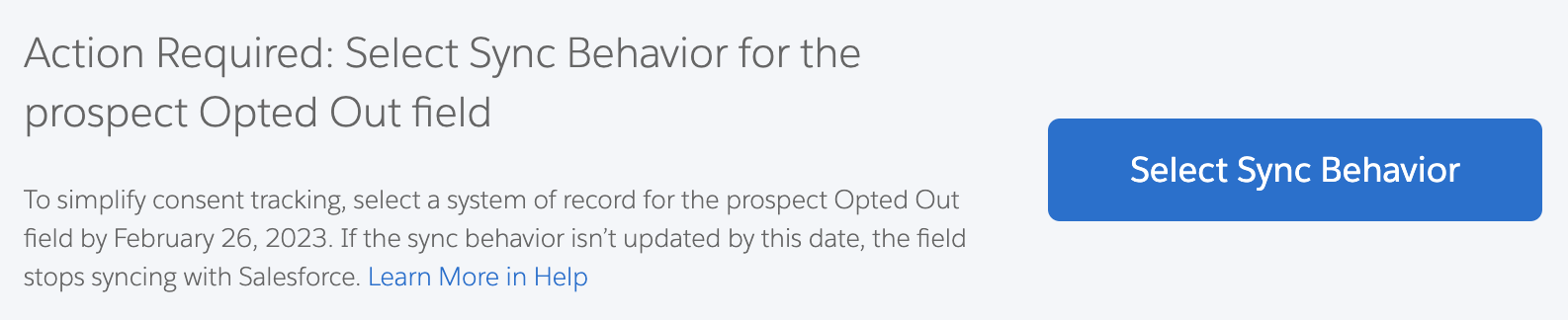
This field will be limited to “Use Pardot’s Value” or “Use Salesforce” value. If your “Opt Out” field is currently set to “use most recently updated” you likely already seeing this banner in your org:

Select sync behavior

If Pardot is the only system you are sending emails out of, you should be okay to change the syncing behavior to “Use Pardot’s Value.” 

However, if you are sending emails out of Sales Cloud, Marketing Cloud, or any other system, you’ll likely need separate Opt Out fields for each platform and then automations to keep them in line.  

This update affects all Pardot Editions. New Pardot orgs created after August 26th, 2022, will default to “Use Pardot’s Value.”

Highlight #4: Pause activity tracking for individual prospects

Do you have an onslaught of bots or prospects who are performing a massive amount of activities in a short window? 

With the Winter ‘23 release you can now pause tracking for individual prospects to keep that overactivity from being tracked. 

When a prospect’s activity tracking is paused, the following will happen:

  • An icon will appear on the prospect’s list view
  • An error will appear on the prospect record
  • The prospect will still receive marketing emails

Highlight #5: New permission sets!

When Salesforce changed over to SSO, your marketers who needed access to Pardot but not Salesforce, likely became Identity Users. However, Identity User licenses do not grant marketers access to the Pardot Lightning app. That means they were missing out on cool new features, such as the Lightning Landing Page and Email Builders

The Winter ‘23 release aims to fix this with a new permission set and permission set license that grants users access to these features. 

These new permissions will be available to all Pardot Editions purchased or upgraded after February 12th, 2019. These new permissions do not grant users full access to Salesforce Campaigns though. That means users will still need full Salesforce licenses to create and manage Salesforce Campaigns. 

Highlight #6: Running Automation Rules in real time is being retired

Being able to execute your Automation Rules in real time is being retired. 

If you are not currently using this feature, this option will be removed from your org during the Winter ‘23 release. If you are using this feature, you’ll have until the Summer ‘23 release before this option is removed. 

Execute in real time retirement

Highlight #7: The Pardot Classic App is being retired

And finally, the Pardot Classic App is officially being retired on October 17th. This retirement only affects the Classic App within Salesforce, you will still be able to access Pardot at pi.pardot.com or via the Lightning App. 

If you haven’t made the switch to the Pardot Lightning App yet, check out Salesforce’s Pardot Lightning Implementation Guide or get in touch with us for help!

Pardot is getting bigger and better all the time

B2B marketers who come to Salesforce are usually looking to scale their efforts and grow in a way that makes sense. These latest enhancements from the Salesforce Winter ‘23 Release get marketers closer to those goals by saving them time and resources. Contact the team at Sercante to get help implementing these enhancements in your Salesforce org. And leave us a comment below to let us know what you think about the Winter ‘23 Release.

No more posts to show