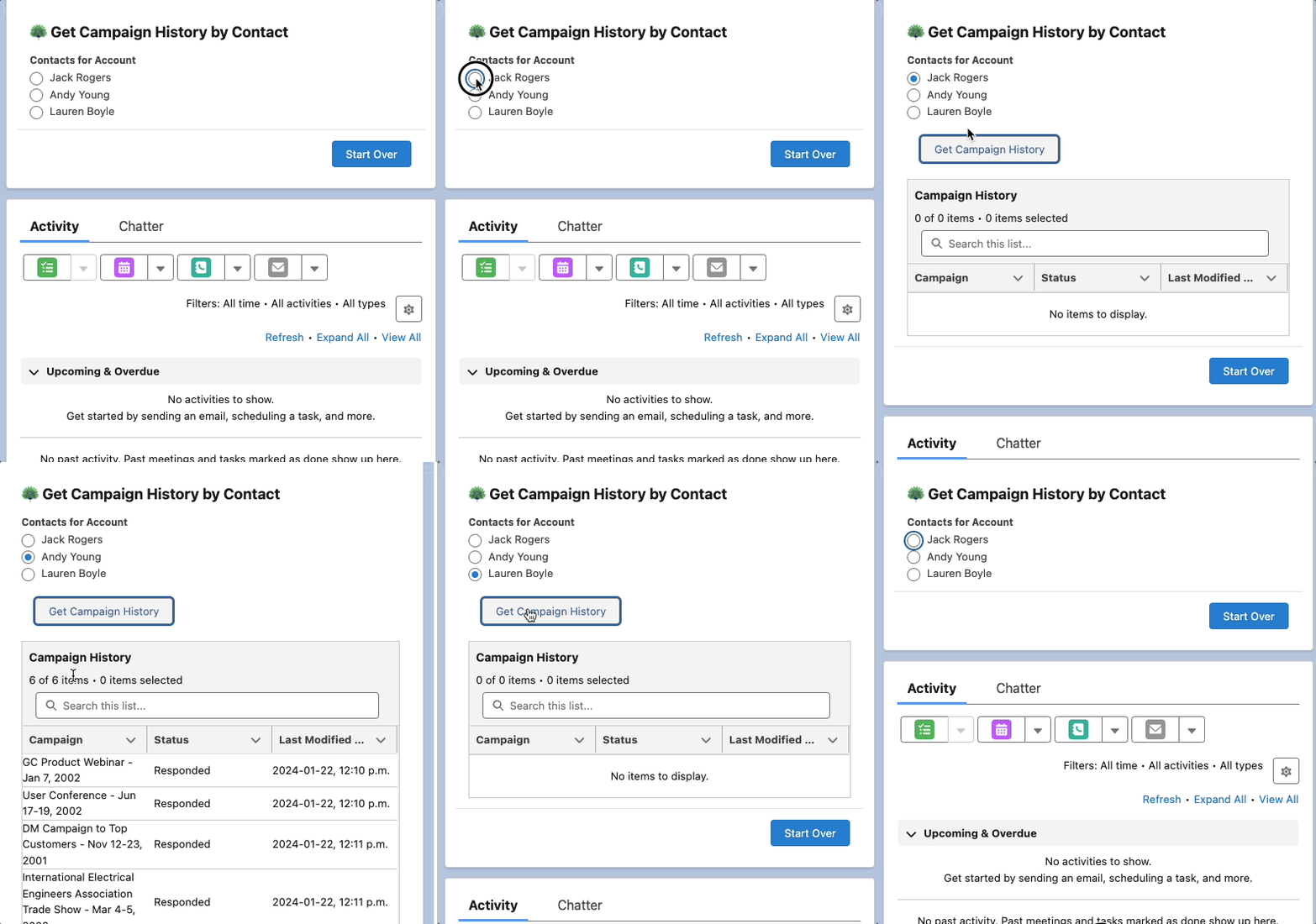
Category

New Features

The Salesforce Winter ’25 Release Notes are out, and they include important features for trailblazers who are on the Salesforce platform. 

We get three major releases from Salesforce each year — Spring, Summer and Winter. Each Salesforce release includes upgrades and enhancements that affect Salesforce orgs in different ways. 

Each release contains a substantial amount of information on a variety of products so it can often be daunting for admins or other trailblazers to find the features that are important to them and their organization.  Our team reviewed the notes for you and highlighted the following platform features as those for you to keep your eyes on the lookout when the release hits your Salesforce environments in the coming months.

Platform Highlights from the Salesforce Winter ‘25 Release

Those who use the Salesforce platform are getting lots of attention from the Salesforce Winter ‘25 Release. 

Some updates are changing the way we work to meet evolving technology demands. Others are saving us time by connecting the dots in a logical way.  Our team will guide you through these features so you will know how to take action on them before the release hits your Production org.

Highlight #1: Verifications Needed to Continue Sending Emails From Salesforce

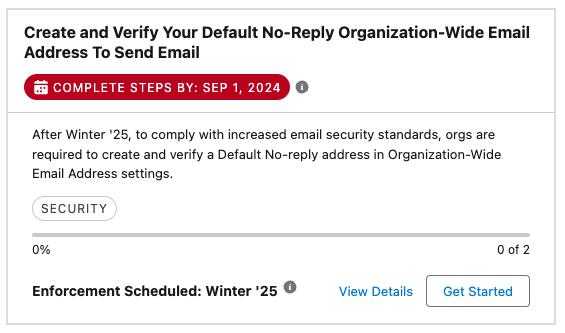
The Winter ‘25 release will require customers to Create and Verify Your Default No-Reply Organization-Wide Email Address to Send Email and Verify Your Return Email Address for Sender Verification in order to continue allowing Users and/or automations to send emails from Salesforce.

If you Users do utilize any email functionality within Salesforce it will be important to instruct them to visit their ‘My Email Settings’ so they can verify the email address associated with their User account.  Similarly, overall as an organization, you will need to ensure there is a customer-defined Default No-Reply Organization-Wide Email Address moving forward.

Although the Default No-Reply Organization-Wide Email Address feature will be enforced this release, the individual Return Email Address verification will not be enforced until Spring ‘25.

Highlight #2: Salesforce Archive (Pilot)

Salesforce recently announced their acquisition of Own Company, currently known as the most credible Salesforce archive and backup third-party tool, however, they have also announced a pilot of their own Archive product.  If your team needs assistance with archival management of your data but either cannot afford a third-party tool or do not have time/resources to implement one of those tools, Salesforce Archive might be a solution to consider.

When Salesforce Archive becomes generally available, you can use it in production and sandbox environments, however the product is available in sandboxes as a pilot right now and can be requested to be enabled by your AE.  The product will become available to production orgs on a rolling basis starting in November 2024, but when it’s released for production use, it will need to be purchased as an add-on license.

Highlight #3: New Salesforce Platform Login License

The Salesforce Platform Login license allows you to assign access to custom apps built on Platform for internal users without the requirement to buy a seat-based license. With the Salesforce Platform Login license, you can pay per daily unique login for users who need infrequent or occasional access. 

This new license will become available starting October 15th for customers on Enterprise, Performance, Unlimited, and Developer editions.  Contact your AE to learn more about pricing details for these new licenses and to determine if they’re a right fit for your organization.

Highlight #4: User Permissions Updates

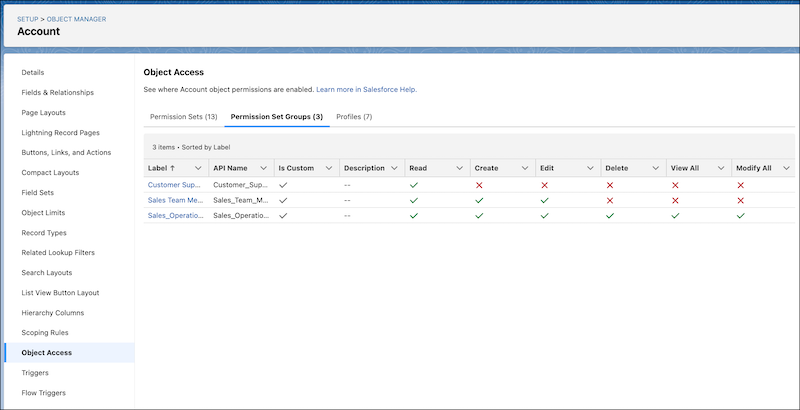
Improvement #1: See How Object Access Is Granted in Object Manager

The Winter ‘25 release continues with updates to ensure Salesforce Administrators are able to troubleshoot their User’s access and permission issues easier. One of these new features is the ability to use the Object Access Summary in Object Manager to quickly check object permissions when troubleshooting, completing reviews, or determining how to grant user access.
Improvement #2: Get Insight into How a User’s Permissions Are Granted

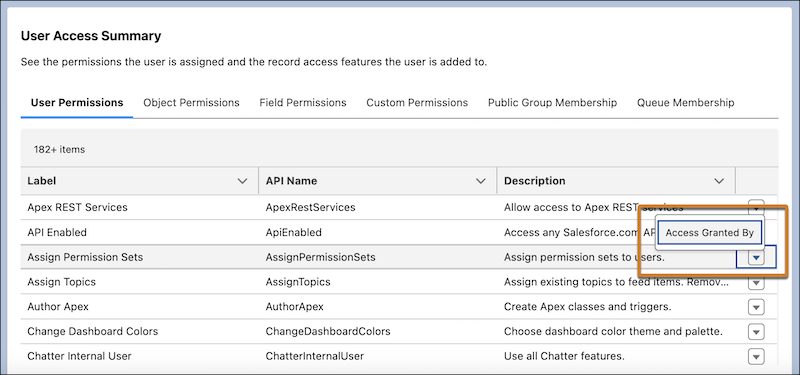
Last release we were able to access a Summary of an individual’s access and permissions directly from the user details record.  This enabled you to see what a user had access to without having to spend multiple clicks checking each profile, permission set, public group, or queue.

The Winter ‘25 release expands on that feature by including an additional feature to allow you to see what grants the User that particular permissions (i.e. via Profile or Permission Set) in case you need to revoke those permissions.
Highlight #5: Salesforce Flow Updates

You may have heard the phrase “Flow is the future” in Salesforce messaging over the past few years. This is because Salesforce is consistently releasing new Flow features to support the retirement of Process Builder and Workflow Rules in recent years. 

Here are some of our favorites from this release.

Improvement #1: New Errors and Warnings Pane in Flow Builder

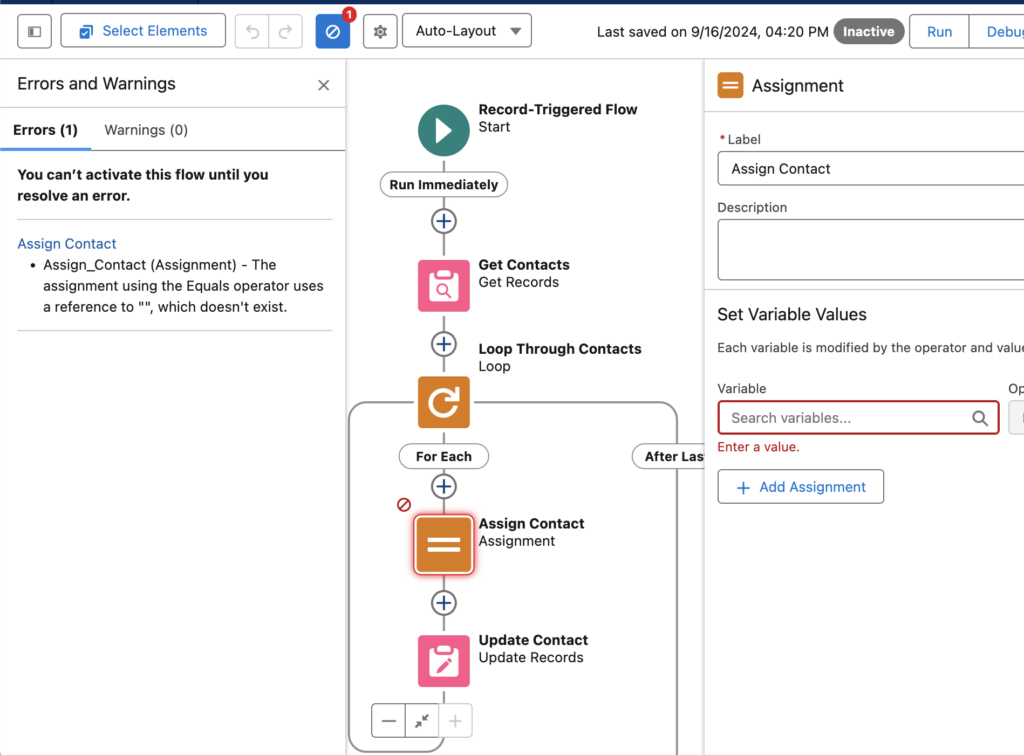
The new Errors and Warnings pane lists issues that prevent you from saving and activating your flow as you work in an easy to scan format. This feature will be automatically available when trying to activate a Flow with errors following the release.
Improvement #2: Flow Design Tips

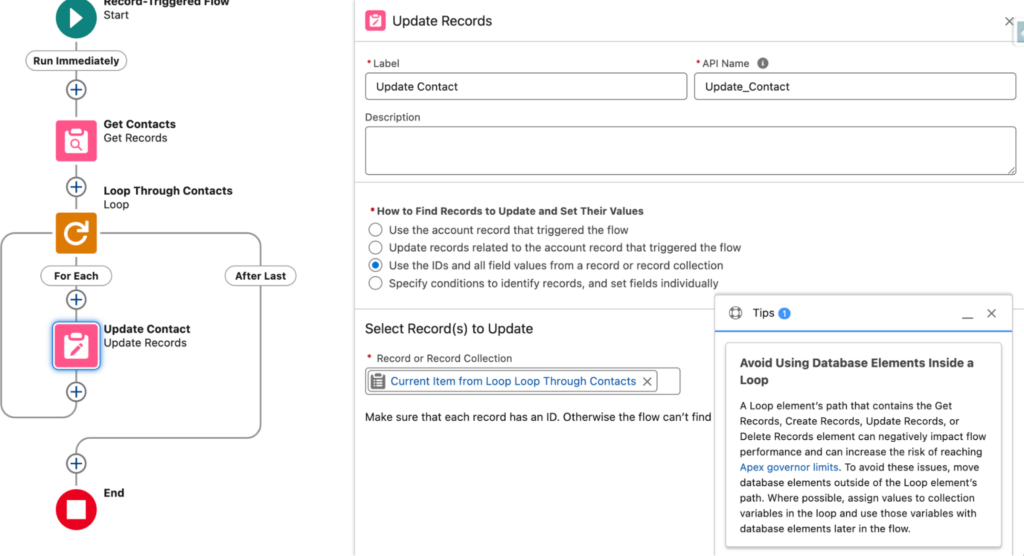
Another new feature within the Winter ‘25 release is the inclusion of new tips in Flow Builder to help you identify designs that can slow down your flows and increase the risk of reaching Apex governor limits.  This may not seem like much to some of us that have been building Flows for a couple years now, but this is a game changer for new Flow builders who are uncomfortable with the tool at first.
Improvement #3: Create or Update Records Efficiently with the Create Records Element

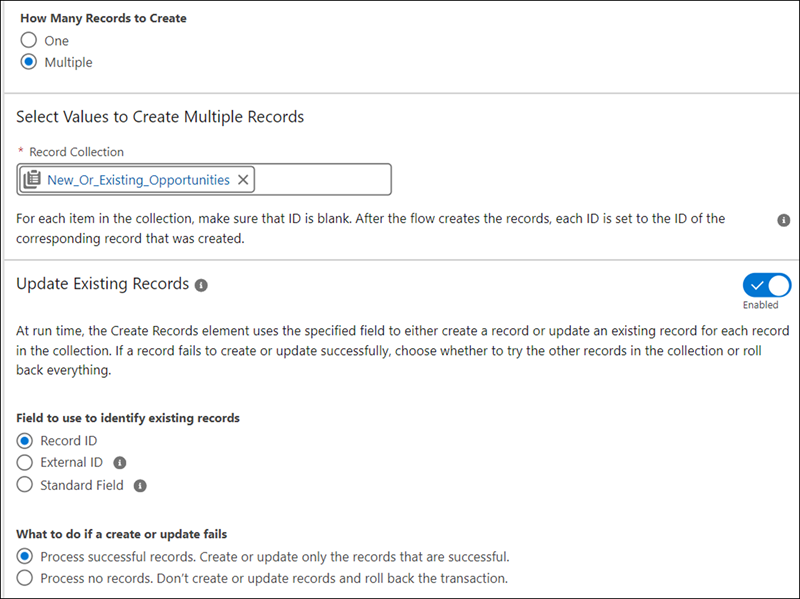
Last release we saw the beginning of an upsert feature within Flow Builder through the release of a new way to check against duplicates for a single record.  Well the Winter ‘25 releases further enhances this feature by enabling the upsert functionality against multiple records at once.  You’re able to compare against existing records with a Salesforce Id, External Id, or other field on the object.  

The Create Records element makes the process of saving records easier and faster, as you no longer check separately for existing records because the create and update elements are now merged into one element.  Admins can now configure and maintain flows more easily while reducing potential errors from separate operations.
Improvement #4: Send Email Action Expanded

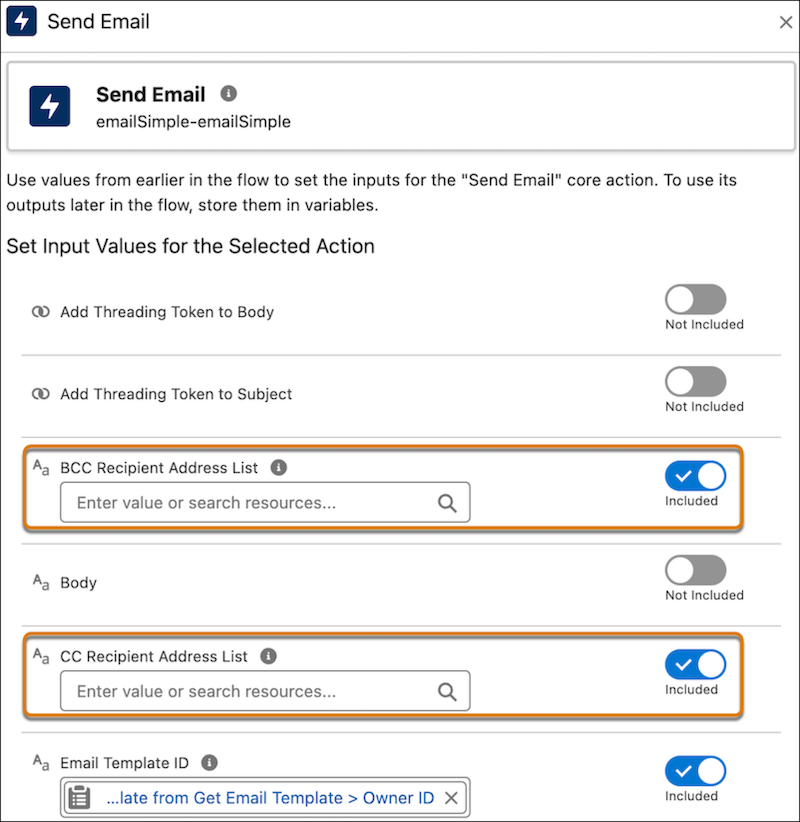
Two new enhancements have come to the ‘Send Email’ Action within Flow Builder. First, you are now able to include email addresses to include as cc or bcc on the email that is sent via the Flow. Any address entered in the CC field receives a copy of the email, and those in the BCC field also receive a copy, but their email addresses are hidden from all recipients. Secondly, there is an increase of the number of recipients you can include from originally 5 to now 150 recipients.
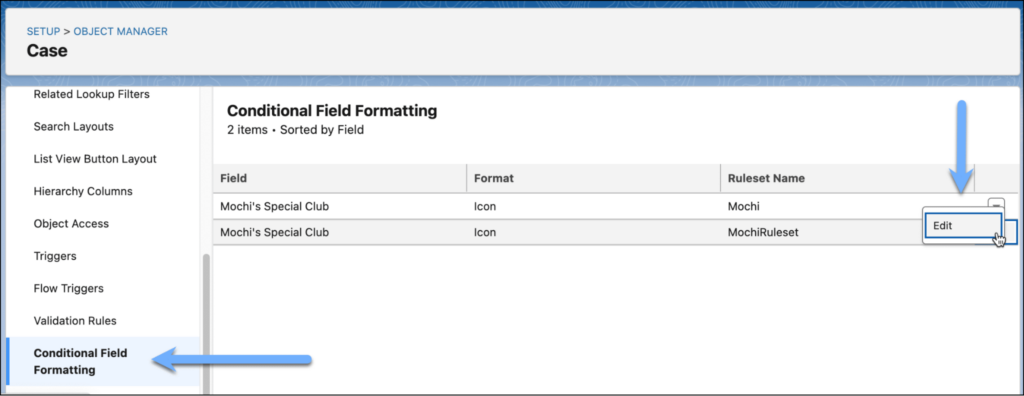
Highlight #6: Conditional Formatting on Record Pages

As Salesforce continues to push customers from Page Layouts to Lightning Record Pages, they continue to release new features in the Lightning App Builder to excite customers into the move.  Now customers will be able to give fields on Dynamic Forms-enabled pages custom icons and colors that can appear, disappear, and change color based on the criteria and rules that you define.  This can be a game changer for those of us who have previously created formula fields to manage or provide this functionality in the past.
Highlight #7: Account Plans

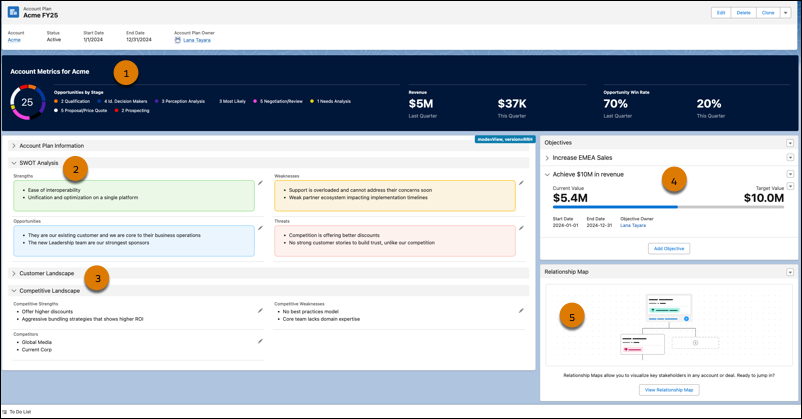
This feature is one our team is very interested in learning more about as new information is released as it can be a huge game changer for Sales teams.  The Account Plans feature provides a new UX providing a complete picture of the account with information such as metrics, objectives with actionable metrics, and tabs on growth and development, all from one repository within Salesforce.  

This feature will become available in Production on a rolling basis after the Winter ’25 release is complete and available to all customers in mid- to late November 2024.  Customers available to receive this feature are those with Enterprise, Performance, or Unlimited editions.

Once the feature becomes available in your Production org, go to the new Account Plans page in Setup and turn on Account Plans. Then, configure the Account Plans object in the Object Manager, add the Account Plans related list to the Account object, and optionally set up Relationship Maps.
Highlight #8: Marketing Cloud Account Engagement (Pardot) Updates

Please check out my colleague Erin Duncan’s blog post on all things Pardot from the Winter ’25 release.

Additional Highlight: Marketing Cloud Growth Updates

Erin Duncan has also written posted on some exciting announcements coming to Salesforce’s newest marketing product:

Salesforce is getting bigger and better all the time

Trailblazers who come to Salesforce are usually looking to scale their efforts and grow in a way that makes sense. These latest enhancements from the Salesforce Winter ‘25 Release get everyone closer to those goals by saving them time and resources.

Contact the team at Sercante to get help implementing these enhancements in your Salesforce org. And leave us a comment below to let us know what you think about the Winter ‘25 Release.

Product Note: Marketing Cloud Growth and Advanced are editions of Marketing Cloud Next and have also been referred to as Agentforce Marketing.

During the Marketing & Commerce Keynote at Dreamforce 2024, Salesforce announced the latest edition of Marketing Cloud built on Data Cloud  — Marketing Cloud Advanced Edition! Expected to be released in November 2024, this new edition expands the features and functionalities of Marketing Cloud Growth Edition, released in February of this year. 

What Comes with Advanced Edition?

Let’s dive into what Marketing Cloud Advanced Edition brings to the table. 

Path Experiment

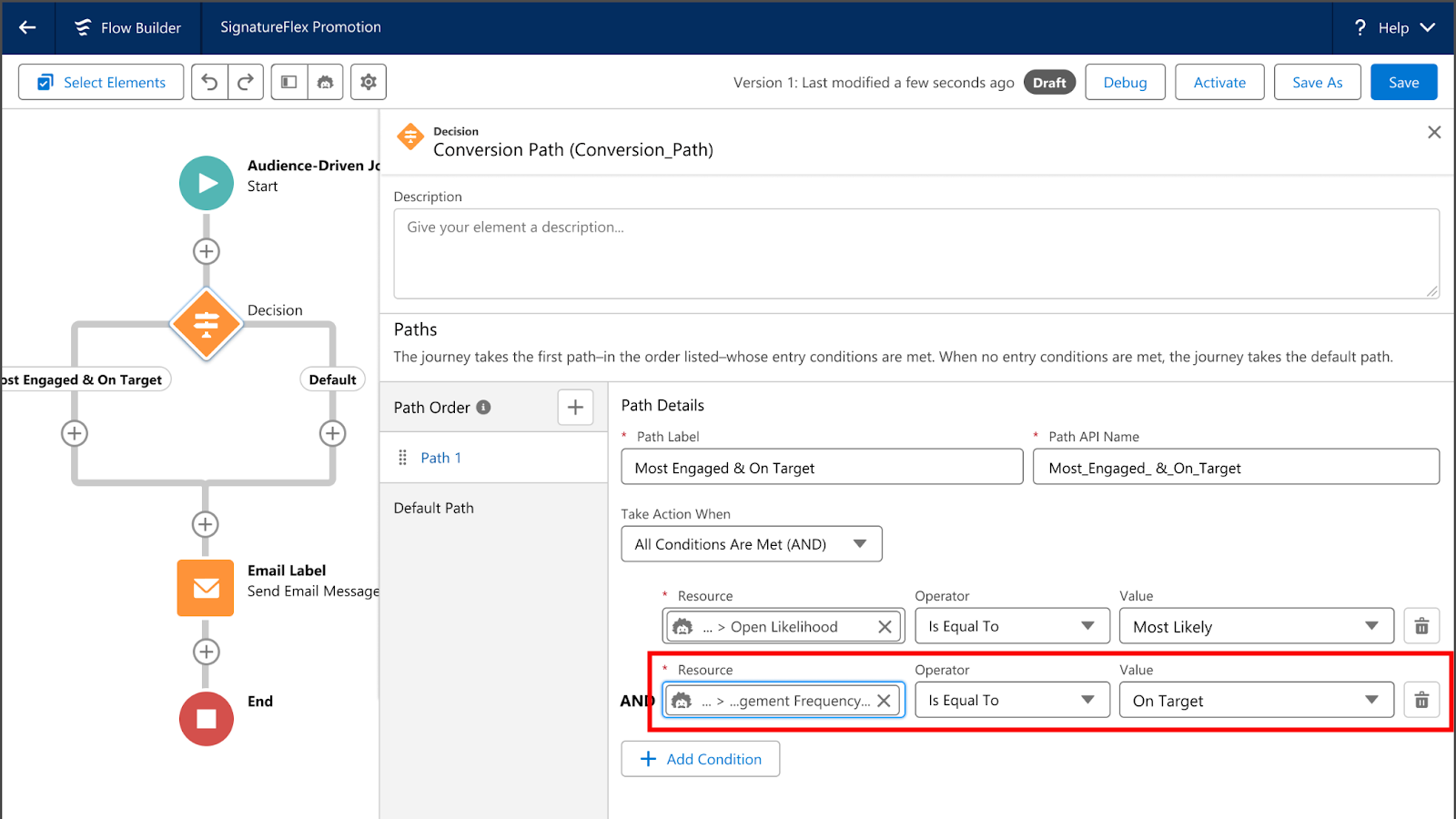
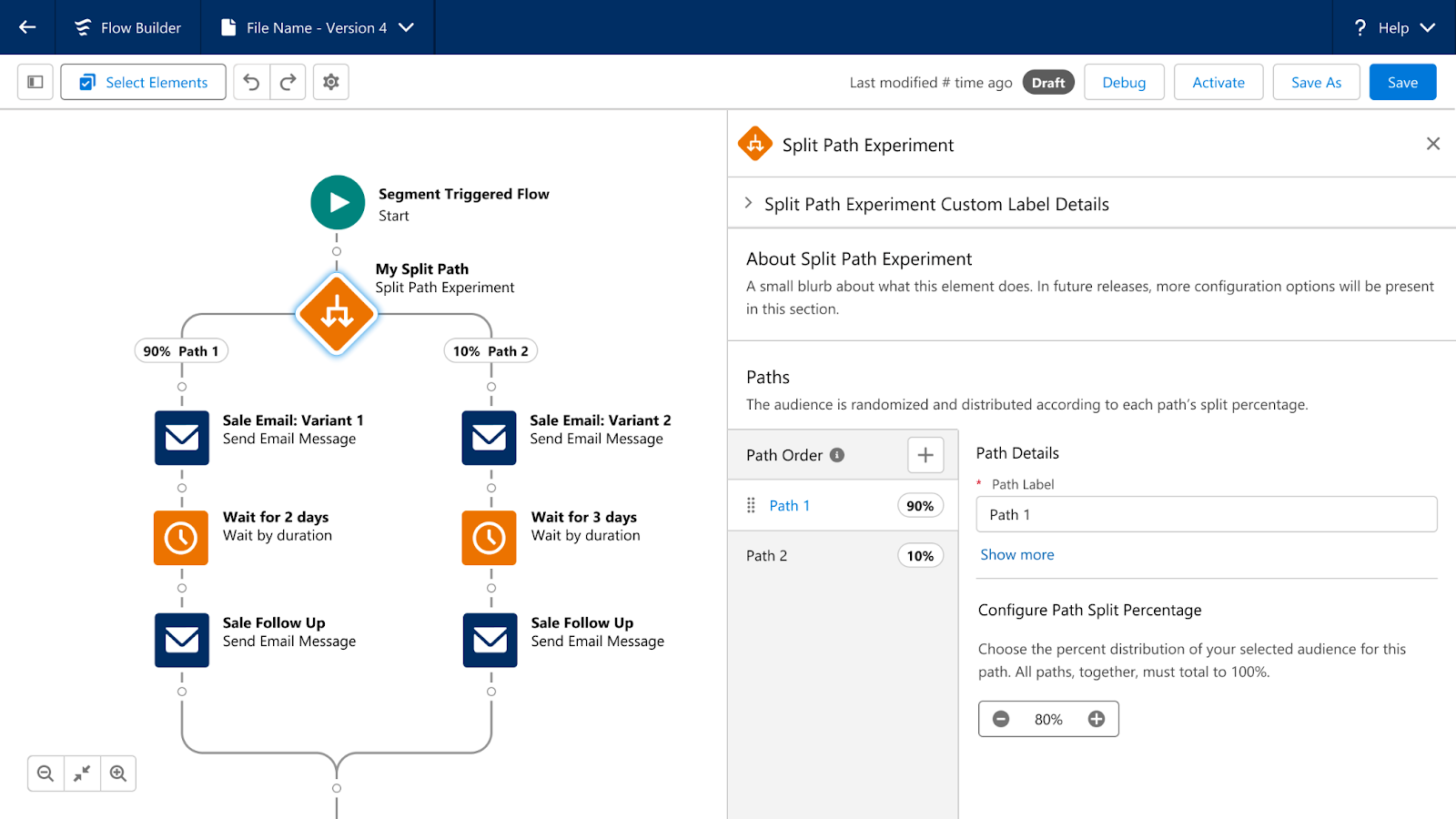
Path Experiment allows Marketers to maximize engagement with your audience through testing. This new feature allows marketers to test variations within marketing content, such as different subject lines, variations in channels, such as sending an SMS instead of an email, and even variations in cadence, such as sending an email in 3 days versus 1. Path experiment allows marketers to test up to 10 paths within a single experiment, customize the distribution percentage across the paths, and automatically randomize individuals between the paths to help ensure fair, unbiased results. There is no limit to the number of Path Experiments that can be included in one Flow. 

Marketing Cloud Advanced Edition - Path Experiment

Einstein Engagement Frequency 

Einstein’s capabilities will also be expanded in Marketing Cloud Advanced Edition. First, we have Einstein Engagement Frequency which assists Marketers in sending the right number of messages to their audience. Einstein Engagement Frequency provides insights into the distribution of email sends and subscriber engagement, suggesting the optimal frequency to maximize engagement. This data can then be used to create segments, allowing marketers to suppress or target subscribers who are over or under-saturated. 

Marketing Cloud Advanced Edition - Einstein Engagement Frequency 

Einstein Engagement Scoring

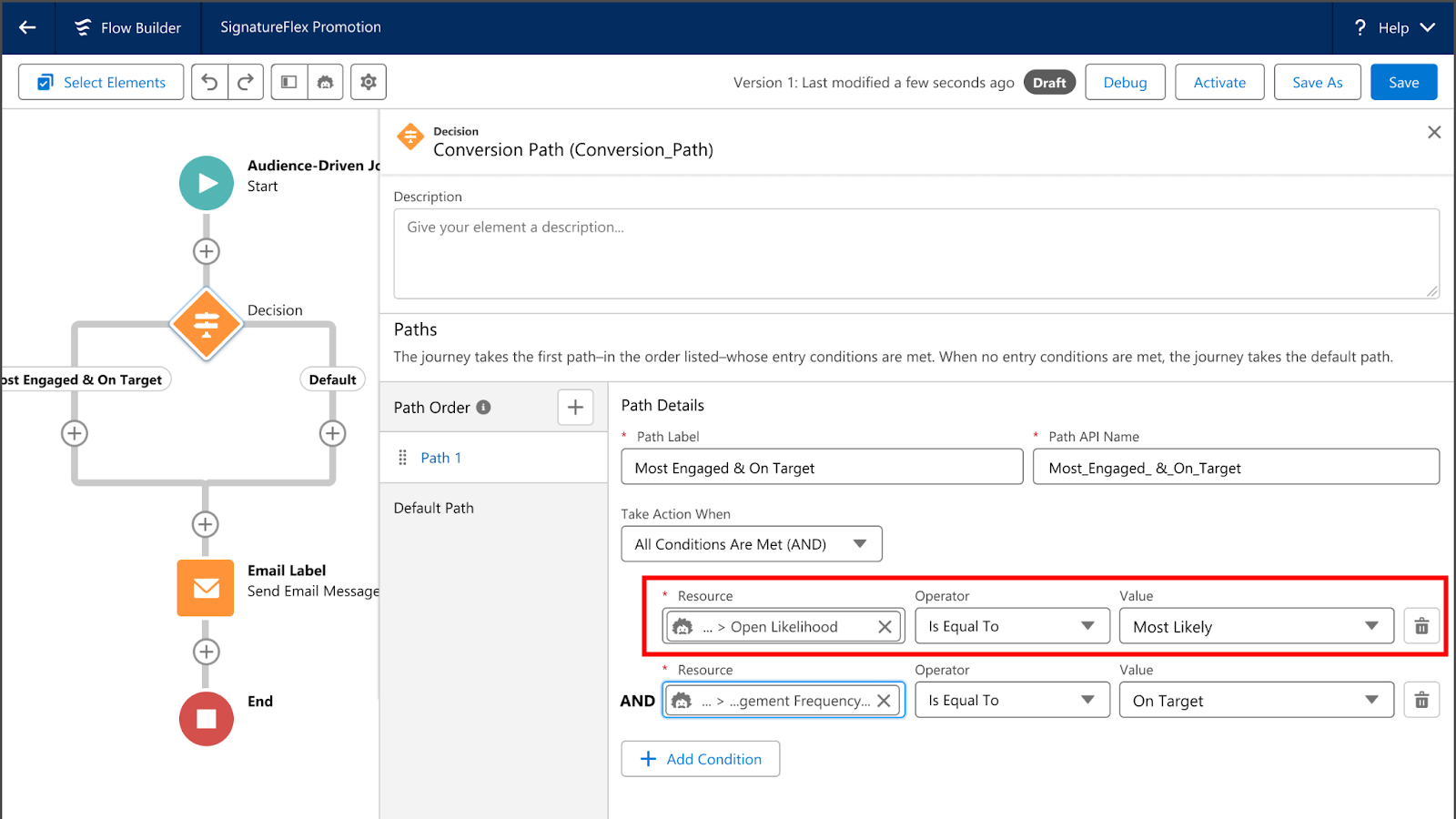
Next, we have Einstein Engagement Scoring, which helps predict how likely each subscriber is to open, click, and stay subscribed to an email communication. Einstein Engagement Scoring’s data can be used to create segments, send subscribers down different Flow paths, or even help personalize content more effectively. 

Marketing Cloud Advanced Edition - Einstein Engagement Scoring

Unified Conversations with SMS

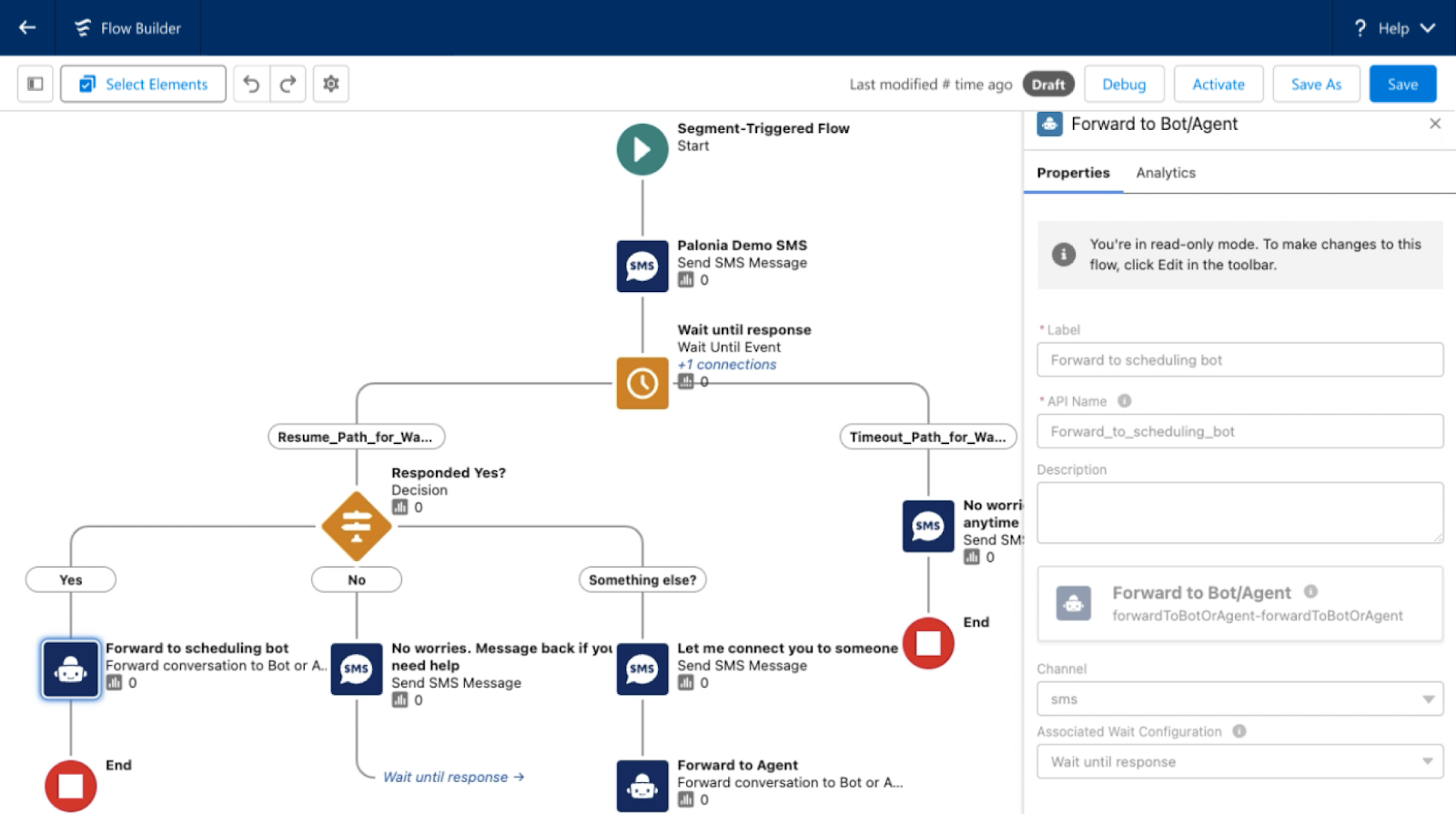
With the new Digital Engagement add-on, Marketing Cloud Advanced Edition enables marketers to transform one-way promotions into a conversation with their audience. Marketers can respond to messages in real time using the unified customer data within Data Cloud and automate interactions with connected chatbots. 

Marketing Cloud Advanced Edition - Unified Conversations with SMS

Looking Toward the Future

What other features and functionality would you like to see Salesforce bring to Marketing Cloud Growth or Advanced Edition? Let us know in the comments!

The Salesforce Winter ‘25 release notes are out! Let’s dive into Winter ’25 highlights and what Account Engagement (f.k.a. Pardot) users can expect to see come October. 

Duplicate Management!

Back in 2021 we got the Email Uniqueness field that told us whether or not a Prospect’s email address was unique to the prospect. Although this field is super handy, you can’t export its data and it only tells you if there is a duplicate email somewhere in the system. 

Now, All Account Engagement editions are getting bonafide duplicate management capabilities. 

As part of the Winter ‘25 release, Account Engagement Optimizer will help users keep their database squeaky clean by enabling them to view and merge duplicate prospect records.

Default System Emails to Lightning App Links

If you receive system notification emails from Account Engagement, for instance the Daily Prospect Activity report, then you know these emails typically include pi.pardot.com (a.k.a. Pardot Classic) links rather than the, now standard, Account Engagement Lightning App links. 

Fortunately, with the Salesforce Winter ‘25 release, all orgs will be updated to have their Account Engagement system emails to use Lightning App links, directing users to the right app or prospect without having to log into pi.pardot.com.  

Now the only link this update won’t fix is the “Account Engagement URL” field on Salesforce Leads and Contacts. This field will continue to have a pi.pardot.com link. However, you can create a Formula field on the Lead and Contact objects to display the Lightning link instead.

Use the formula: 

SUBSTITUTE( pi__url__c, “http://pi.pardot.com/prospect/read?id=”, “https://company.lightning.force.com/lightning/page/pardot/home?pardot__path=/prospect/read/id/” )

Making sure you update the section in red with your own Salesforce URL. While the Pardot Classic App will forever hold a piece of my heart. I’m excited to see this last remaining vestige of the Classic interface go away. 

Do More with Data Cloud

Account Engagement and Data Cloud’s integration continues to grow with each release. Orgs will now be able to connect form, landing page, and tracked website engagement data to Data Cloud for personalized marketing efforts, calculated insights, and improved segmentation

Speaking of Data Cloud Segments, Account Engagement can now have 25 Data Cloud segments per business unit (an increase from 5)! Currently the segment increase only applies to Account Engagement users with Growth or Plus edition. 

Copy Forms and Emails to CMS 

Building on the “Copy Images from Account Engagement to CMS” feature of Summer ‘24, All Account Engagement orgs can now also copy forms and emails to their CMS.

PDF, MP4, and Zip file types are also now supported as part of this release. 

Pause or Cancel Permanent Prospect Deletions

One of the worst feelings as an admin of any system is accidentally deleting something you shouldn’t have. Even worse is when it is a permanent deletion. 

Thankfully, Salesforce is helping you avoid that feeling of dread and doom but allowing for these table actions to be paused or outright canceled. Deletion requests can be paused/canceled in the Table Action Manager found within Account Engagement Optimizer. 

Get help understanding the Salesforce Winter ‘25 release and how it affects Account Engagement orgs

What questions do you have about the new features coming to Account Engagement? Let us know in the comments or reach out to the team at Sercante to start a conversation.

Product Note: Marketing Cloud Growth and Advanced are editions of Marketing Cloud Next and have also been referred to as Agentforce Marketing.

In February 2024, Salesforce released Marketing Cloud Growth Edition, its first marketing automation platform built fully on the Einstein 1 Platform (a.k.a. “On Core”). Marketing Cloud Growth Edition has been rapidly evolving and expanding the features of this new solution ever since, and Account Engagement (f.k.a. Pardot) users are about to get a taste of it.

Update! In the Dreamforce ‘24 Marketing Keynote, Salesforce announced that all Account Engagement orgs can get Marketing Cloud Growth provisioned at no additional cost. Previously, this offer was only for orgs with Growth Edition Account Engagement, but it now includes all orgs with a current edition of Account Engagement. A banner notifying all Account Engagement orgs that they can now get access to Marketing Cloud Growth Edition was published on October 15th. This blog has been updated to reflect the most recent news around this offering.

In this post, we’ll cover how to take advantage of the offer and use Marketing Cloud Growth alongside Account Engagement.

A Note on Naming

Now the naming of this new tool has caused quite a bit of confusion in the Salesforce community as it seems to change on a weekly basis. When launched, this new solution was referred to as “Marketing Cloud Growth Edition” or “Marketing Cloud on the Einstein 1 Platform”. During Dreamforce, Advanced Edition was announced, so this solution became “Marketing Cloud Growth or Advanced Edition” or “Marketing Cloud built on Data Cloud”. Finally, during the Winter ‘25 release, this tool started showing up in Salesforce documentation as just “Marketing Cloud” or the “Marketing Cloud App”, much to the chagrin of Marketing Cloud Engagement users. Now, if you are using Marketing Cloud Growth with Account Engagement, it is being referred to as “Account Engagement on Marketing Cloud” but also “Account Engagement powered by Data Cloud”.

Confused? Yes, me too. But all this is to say there is one new Salesforce Marketing tool that is built on core to bring users a truly unified marketing experience. For simplicity, we will continue to refer to this tool as “Marketing Cloud Growth” for this blog post.

What Account Engagement Users Need to Access Marketing Cloud Growth Edition

  1. A current instance of a Marketing Cloud Account Engagement
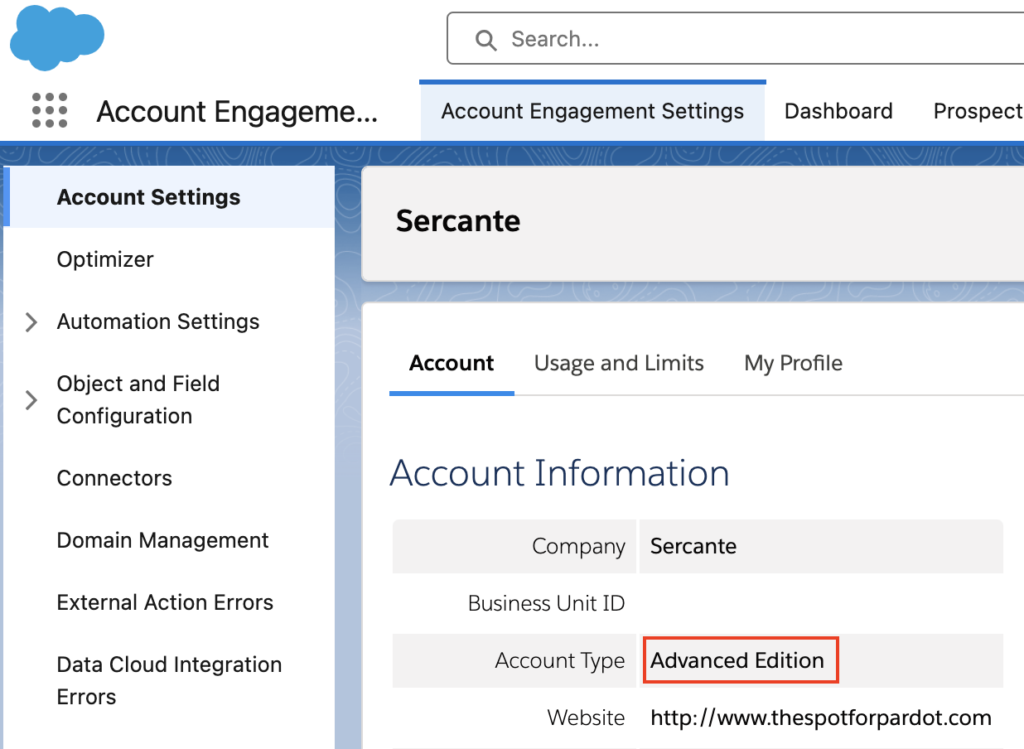
    This includes Growth, Plus, Advanced, and Premium editions of Marketing Cloud Account Engagement (MCAE). Your MCAE Admins can view your Edition by going to the Account Engagement Settings tab.
  1. Data Cloud
    Data Cloud not only unifies customer data for use within Marketing Cloud Growth, but also ensures data continuity between Account Engagement and Marketing Cloud Growth. Free Data Cloud is available for orgs with Enterprise and Unlimited Edition Salesforce customers. If you have a lower edition of Salesforce, check out more information on provisioning and access here.

    If you are brand new to Data Cloud or don’t have a Data Cloud Architect at your disposal, don’t fret! Marketing Cloud Growth comes with Data Kits that help map your Marketing and CRM Data to Data Cloud. The free Data Cloud SKU + Marketing Cloud Growth’s out of the box data kits will cover everything most orgs need to get started, but if you’d like assistance with additional Data Cloud Data Streams or want to dive into more advanced Data Cloud use cases, we’re happy to help!

Data Cloud Credits

Marketing Cloud Growth uses Data Cloud’s credits to fuel its activities. So, although MCAE users will get Marketing Cloud Growth at no additional charge, orgs still need to purchase credits to fuel Marketing Cloud Growth. Think of it like you’re being given a car, but you still have to purchase the gas to make it run.

If you’re new to Data Cloud’s consumption model, our previous blog post and this Trailhead module will help give you an idea of how this works and the different types of credits available. If you’re using the Free Data Cloud SKU to get started, note that this does include some credits to fuel data ingestion and unification. However, orgs will need to reach out to their AE to purchase the credits that fuel sending emails, sending SMS, compiling Segments, and using Einstein.

You don’t necessarily have to purchase these credits before implementing Marketing Cloud Growth for testing purposes, but you may be limited in the features you can play around with without them.

Getting Started

Here are a few things to keep in mind as you start using Account Engagement and Marketing Cloud Growth side by side.

Understanding Consent and Subscriptions

Consent works a little differently between the two systems. 

Account Engagement has a permission-based marketing policy, meaning that although there is no default “Opt-in” field, users must certify that they only contact prospects who have expressly consented to receive marketing communications. 

In Marketing Cloud Growth Edition, consent is a bit more rigid. To send marketing communications, each prospect must have a Consent Record comprising of:

  • The Contact Point (email or phone number)
  • The Marketing Channel (Email, SMS, etc.)
  • The Communication Subscription (Webinars, Events, Product updates, etc.)
  • The Date and Time the prospect opted in

More considerations for Consent and Subscriptions are available in this Salesforce Help article

Import Consent Data

Before you import consent data, make sure the contact point exists in Marketing Cloud Growth Edition. A consent import can update consent information for existing contact points, but it can’t create new leads or contacts or update other fields (at least as of the Winter ‘25 release).

First, export your list from Account Engagement:

  1. In Account Engagement, navigate to Prospects > Segmentation > Segmentation Lists
  2. Locate and open the preference list you would like to import into Growth
  3. Select Tools
  4. Select CSV Export

You’ll need to format your export before importing it into Growth, see this help article for guidance

Start Your Import

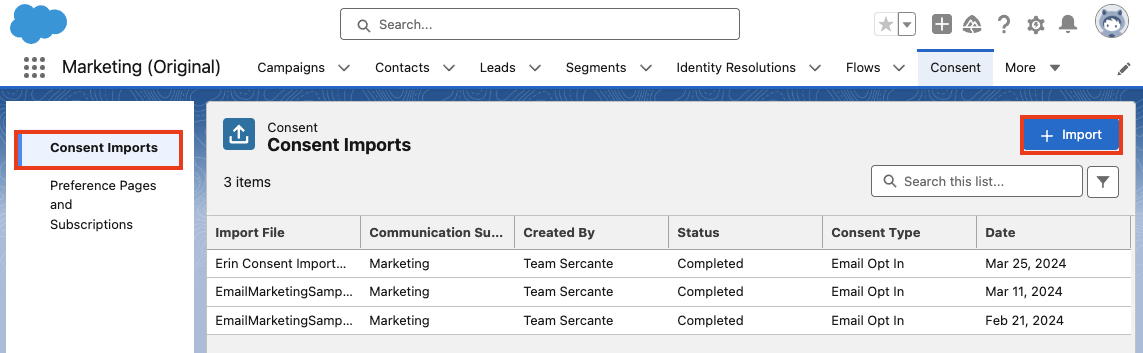
  1. Within Marketing Cloud Growth, navigate to the Consent tab
  2. Ensure you are on the Consent Imports tab, then select + Import
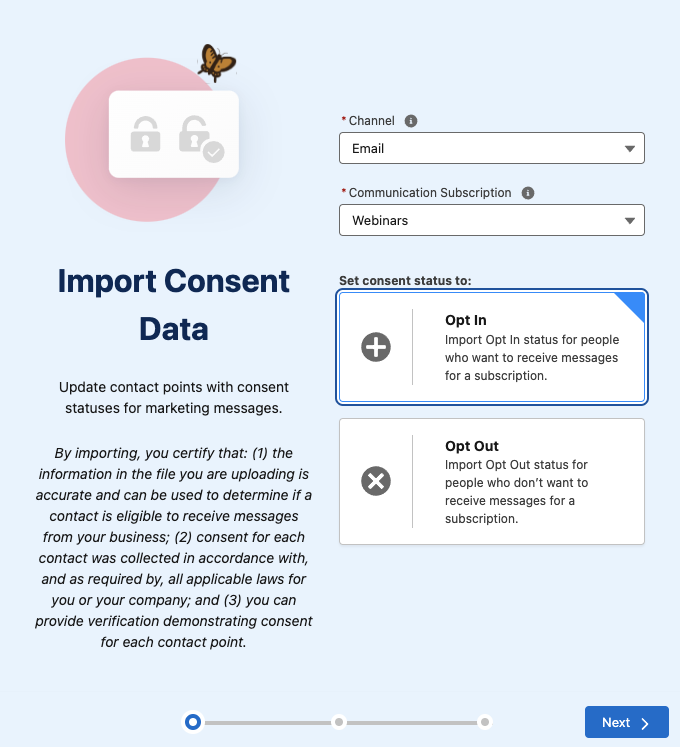
  1. Select your Channel, Communication Subscription, and whether this list is opted in or opted out
  1. Select Next
  2. Upload your CSV, select Next
  3. Review the import preview and select Import
  4. Select Done

Send Account Engagement Images to CMS

Use images in both Account Engagement and Marketing Cloud Growth by enabling “Copy to CMS”.

  1. In Salesforce, navigate to Marketing Setup > Copy to CMS
  2. Use the dropdown menu next to your Account Engagement business unit to select Enable
  3. Repeat for additional Account Engagement business units

This will create a CMS Workspace named, “Content Workspace for Marketing Cloud Account Engagement – Copied Content – [business unit name]”. To avoid issues, do not change the workspace name or remove the B2BMA Integration user as a contributor. 

Copy Images from Account Engagement to the Growth Edition CMS Workspace

Next, you’ll need to copy the images from Account Engagement to your new CMS Workspace. 

  1. In Account Engagement, navigate to Content > Files
  2. Use the checkboxes on the left-hand side to select the files you would like to move. Once selected, use the dropdown menu at the bottom of the table to select Copy to CMS 
  3. Select Go

Use the New Growth Edition Email Editing Experience

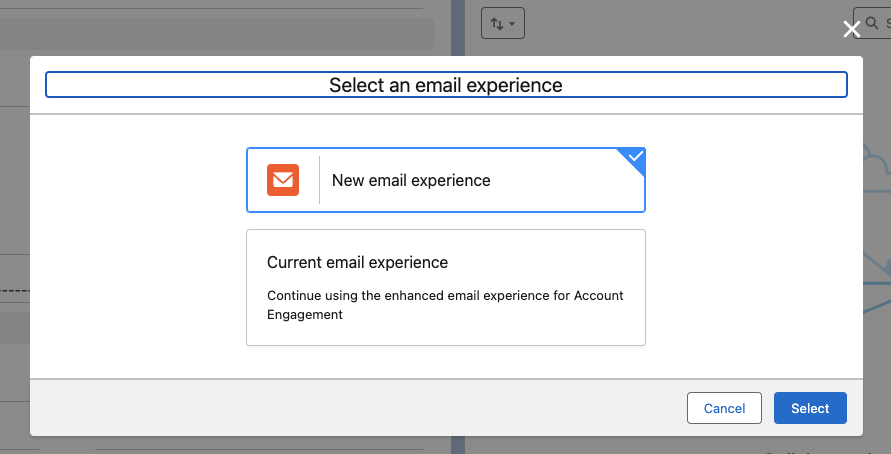
Now you can build emails that are available in both Account Engagement and Growth Edition. When creating or editing Email Content in the Lightning Email Builder, select New Email Experience to use Marketing Cloud Growth Edition’s editor.


Account Engagement Campaign Considerations 

Account Engagement and Marketing Cloud Growth Edition cannot currently share campaigns, so you’ll want to have distinct naming conventions to easily identify which campaigns belong to each platform. You can also keep Marketing Cloud Growth’s campaigns from syncing to Account Engagement by creating a new campaign record type for Growth. 

Read more about Campaigns for Marketing Cloud Growth in this help article. 

Using Account Engagement & Growth Edition Together

Current users of Account Engagement probably have long-standing engagement studio programs that are set up to run on a recurring basis. Account Engagement thrives in this situation and provides flexibility for enrolling prospects and ensuring that the marketing journey you want to happen actually happens. Let’s look at instances where you can use this existing functionality with all the bells and whistles Growth offers.

Use cases for combining the two platforms

  1. SMS functionality. In Account Engagement, You may have a pre-existing engagement studio program set up for every event your company puts on, thanking attendees for joining and sharing pertinent details. If you want to send a reminder text message to people who have registered for the event, you can now take advantage of native Marketing Cloud Growth functionality to do so.
  1. Using cross-object personalization. Say you have a recurring monthly email sent out to your customers letting them know their account status, YTD savings with your company, and other information pertinent to the customer on an ongoing basis. If this information is stored within custom objects, it’s difficult to populate an Account Engagement email with those details. With Marketing Cloud Growth Edition, users can create Data Graphs for cross-object personalization, allowing marketers to personalize emails with data from any object. 
  1. Custom processes for post-form-fill actions. Another great example of how you can use Marketing Cloud Growth Edition alongside Account Engagement is when you want to implement a custom process when someone submits a form.

Since Growth uses Flow for automation, the actions taken after a form is completed can be customized to each unique need. For instance, you can standardize field values or send data to several objects within Salesforce before the Lead/Contact record is updated. 

There you have it

You are now ready to start experiencing Marketing Cloud Growth Edition. The future of Salesforce marketing is bright and evolving every day.

Stay tuned for Growth’s next iterations. In the meantime, use these resources to get started:

If you need help implementing or learning how to use Marketing Cloud Growth Edition, send us a message!

The Salesforce Summer ’24 release notes have arrived, and with them, the delivery of one of the most highly sought-after Marketing Cloud Account Engagement (MCAE/Pardot) features ever requested. In fact, sending operational emails in Engagement Studio functionality has garnered the fifth most points in the Account Engagement category on the IdeaExchange.

What is an Operational Email?

An operational email is informational and is distinct from a marketing email. Erin Duncan has written a great article that goes in-depth about the differences between the two and when it is appropriate to use each.

When an email is marked as “operational,” it bypasses the recipient’s opt-in status and will send the message even if the subscriber has opted out. You must only use operational emails for their intended purpose, as this can affect your sending reputation and put you on the wrong side of the CAN-SPAM Act.

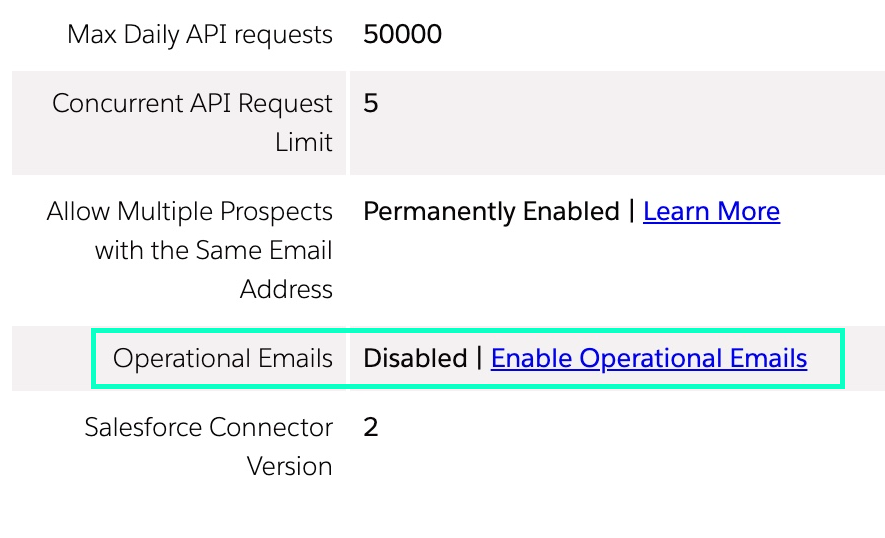
How Do I Enable Operational Emails in MCAE?

  1. Navigate to Account Engagement Settings 
  2. Click Enable Operational Emails
  3. Review the restrictions associated with sending operational emails and confirm your selection 

Keep in mind that only Account Engagement Admin users and custom user roles can send operational emails.

Sending Operational Emails with Engagement Studio

Previously, operational emails could only be sent from list sends. This required selecting an audience, building email content, and manually sending at a single point in time. Now, users can send operational emails directly from Engagement Studio, where recipients are enrolled based on user-defined criteria and emails are automatically sent based on your parameters.

Let’s put this into practice. Imagine you are a SaaS company and need to deliver communications regarding your product’s planned system outages. Instead of setting up multiple operational list sends, you could create an Engagement Studio program to automate the outage and issue-resolved notifications to your selected audience.

Another example could be letting your customers know that their product’s license is about to expire. You could create an Engagement Studio program that could send notifications to let them renew their product on a more time-based cadence. Once the Engagement Studio is set and running, you do not need to reconfigure manual email list sends.

Other use cases could include:

  • Renewal or expiration reminders
  • Order updates
  • Event registration reminders
  • Internal employee onboarding

As with all effective communications, using operational emails in engagement studios will take planning. You will need content to create your emails, data to ensure that the right emails are being sent to the right person, and, most importantly, compliance with the Marketing Cloud Account Engagement Permission Based Marketing Policy.

What are the limitations?

Salesforce has provided a list of limitations for using operational emails in Engagement Studio:

  • If a program is running and the Operational Email setting is disabled, operational emails aren’t sent. Prospects skip those steps and proceed to the next one.
  • If a program with a Send Operational Email card is paused and the account setting is disabled. To restart the program, remove the steps or re-enable the Operational Email setting.
  • If a program with a Send Operational Email card isn’t running and the account setting is disabled, the program can’t be started or resumed. To start or resume the program, you must re-enable the setting or remove the step.

One Small Step for Email Marketing, One Giant Leap Forward for Efficiency

This is a huge improvement in saving marketers time and improving customers’ experiences with your brand. It ensures that customers can receive mission-critical information at the right time without having to manually and tediously configure the email sends.

How do you plan on using Engagement Studio to send operational emails? Let us know in the comments.

The Salesforce Summer ‘24 Release is on its way! Let’s dive into the top declarative features and updates for admins.

In line with messaging from Salesforce, the Summer ‘24 Release includes new and enhanced features that all center on the relationships between CRM, data, AI, and trust.

Salesforce Summer ’24 Highlights

Security & Access

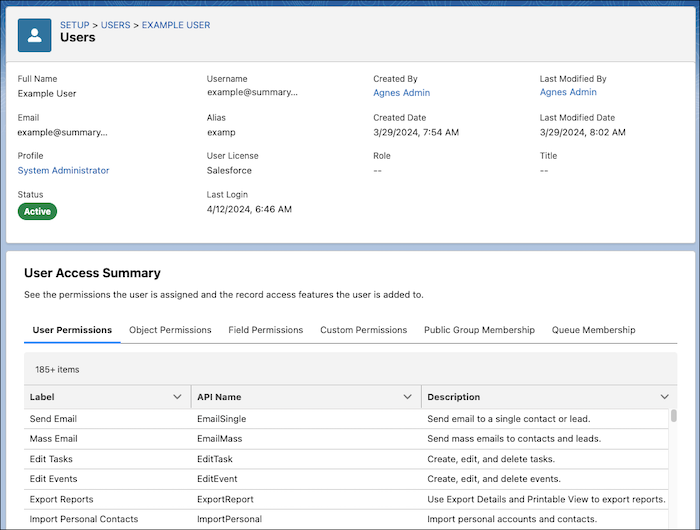
Get a Summary of a User’s Permissions and Access

Viewing what access a user has will be easier with the User Access Summary. Accessible directly from the user details record, you can see what a user has access to without having to spend multiple clicks checking each profile, permission set, public group, or queue.

Other great Security & Access Updates:

Customization

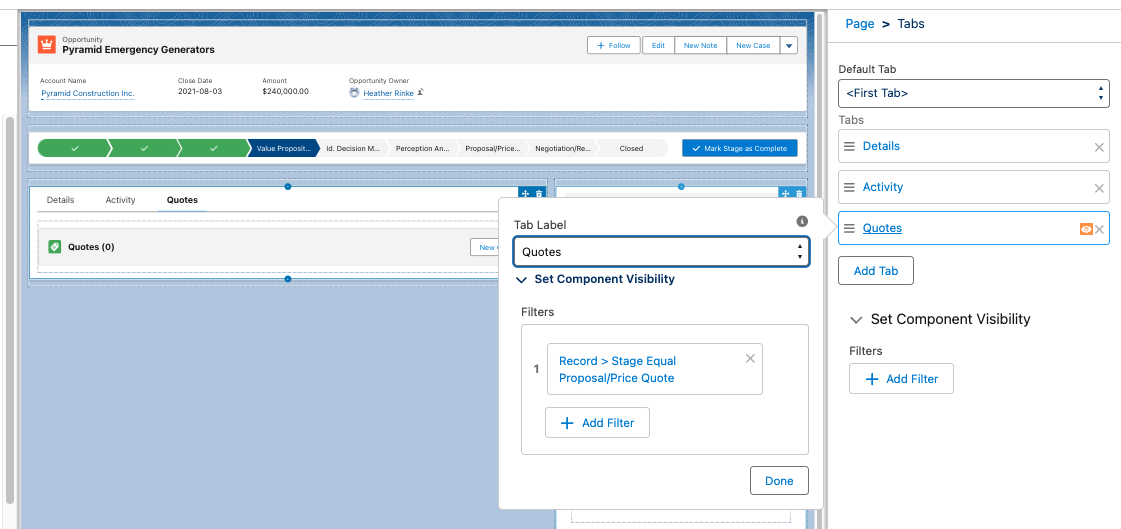
Set Conditional Visibility for Individual Tabs in Lightning App Builder

Now you can control visibility to tabs and their contents in the Lightning App Builder, based on specific criteria, giving you another tool to customize the user experience, and what users can see and when. 

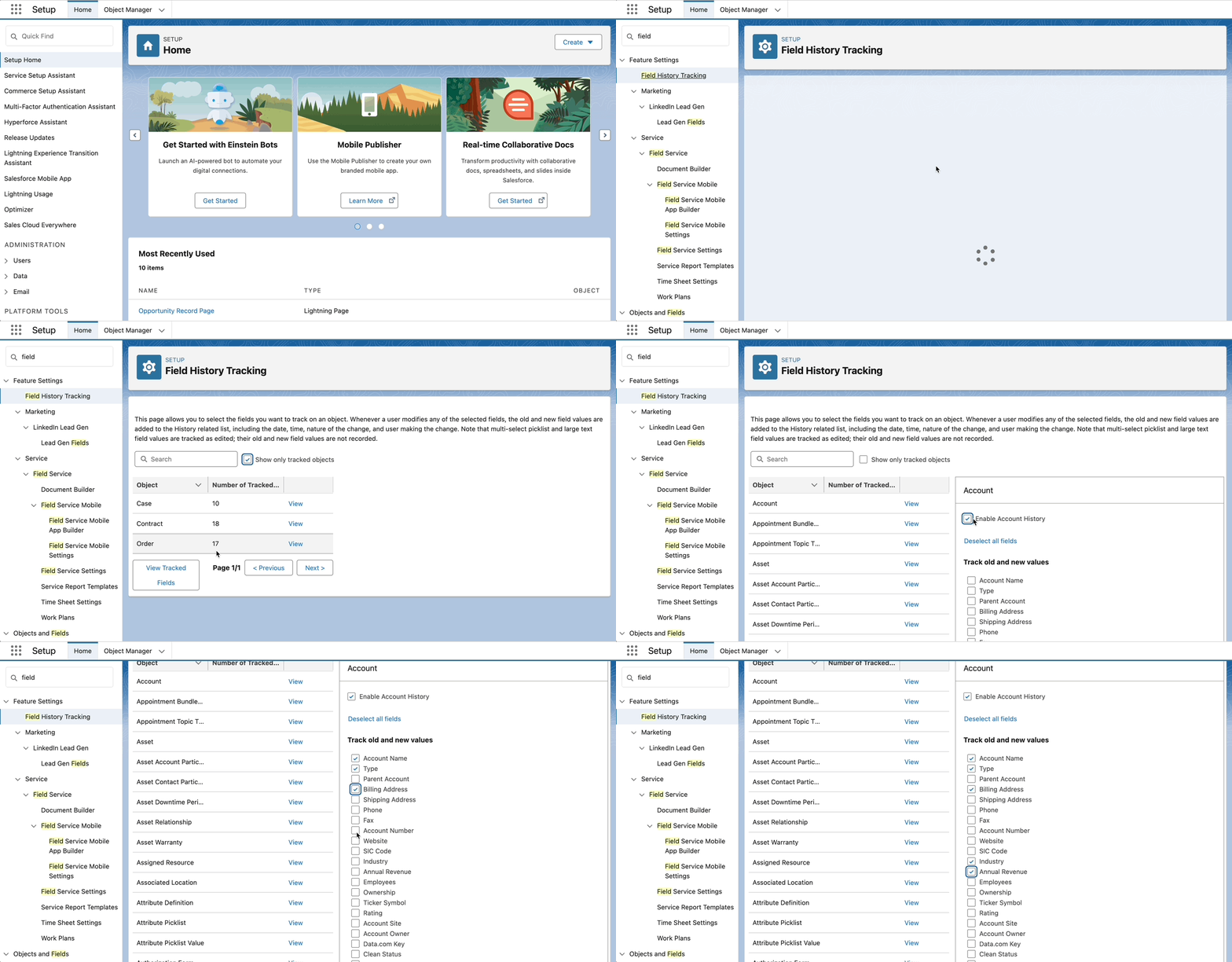
View Field History Tracking from Setup

Admins can now view and control field history tracking across objects in on place, from the Setup menu. From here you can view and control the objects that have tracking en tracked, and enable, view and update the fields. 

Other Customization updates worth mentioning:

Sales Productivity

Do More in the Intelligence Views

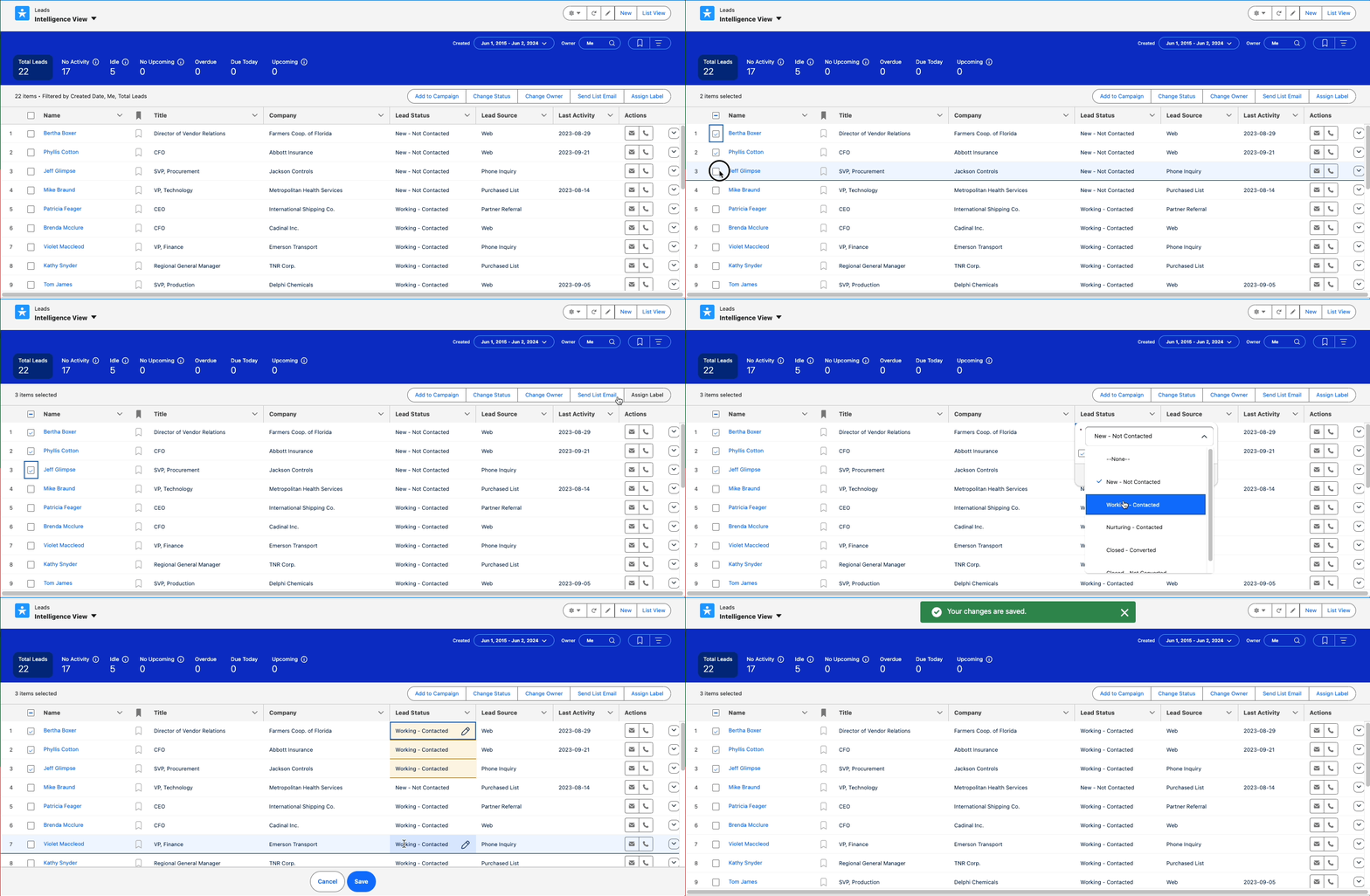
More functionality is coming to Account, Contact, Lead and Pipeline Intelligence views to help users do more in one place. Now it’s possible to perform mass actions like Add to Campaign or Send Email, and inline editing of the same field, from these Intelligence views.

Organize and Find Records Easily with Personal Labels

Users can apply their own private labels to records to help them organize, track, and find the records they need quickly and easily. Labels work on several objects including:

  • Account
  • Campaign
  • Contact
  • Case
  • Email Template
  • Lead
  • Opportunity
  • Task
  • …and more

The once added to the page layout, a Labels related list will appear on the record page, allowing users to add their labels. Then the Labels tab provide a view to all of the records that have that Label applied.

Note: Users will need access to the Labels object. This is enabled by default in standard profiles but will need to be granted in custom profiles or permission sets.

Flows

Flow Management 

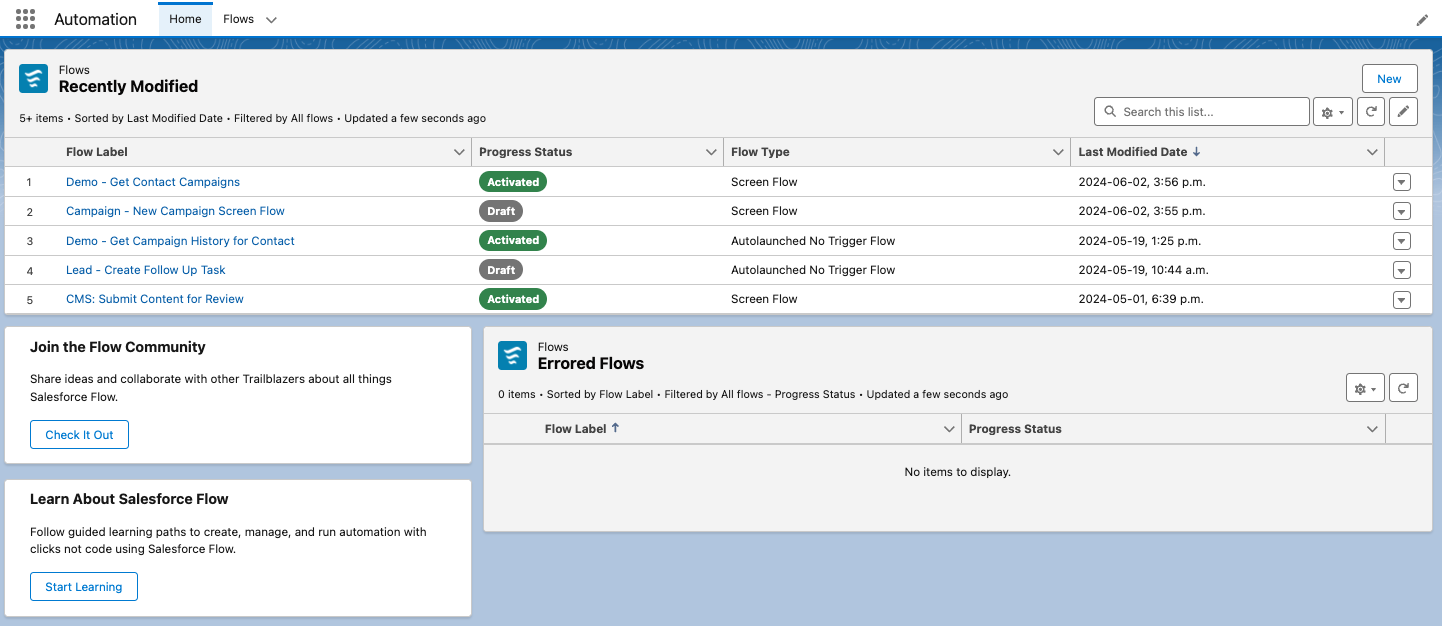
Automation Lightning App

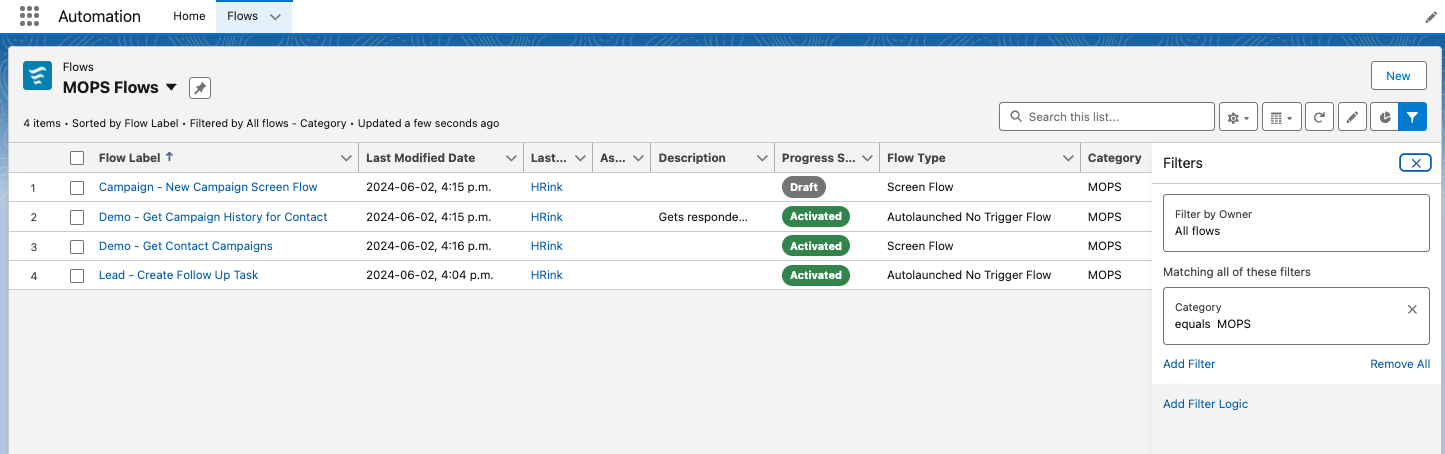
The Automation Lighning App includes a Home page showing recently modified flows, and flow errors, as well as quick links to flow topics on Trailhead and to the Flow Community. 

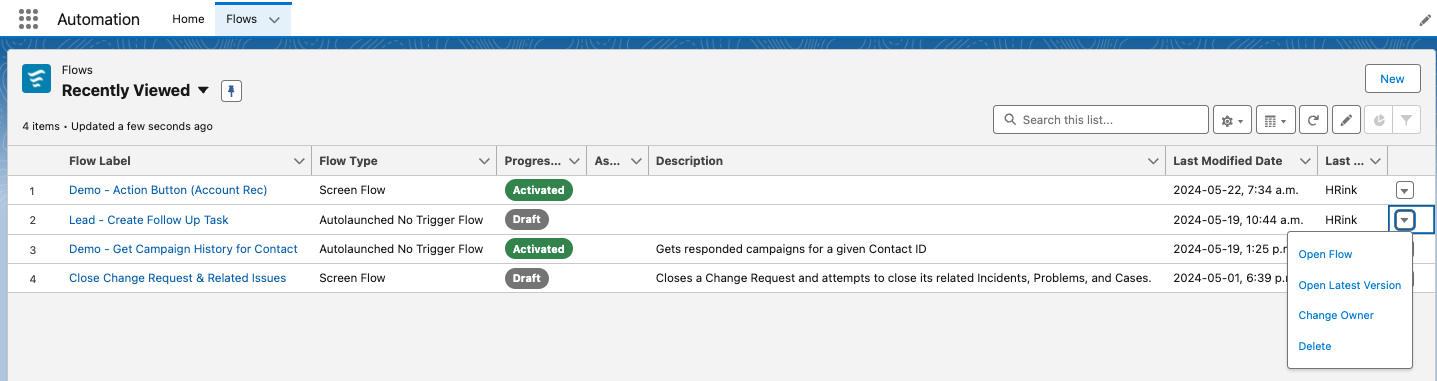
The app also includes a Flows tab where list views to access standard and custom list views of existing flows. From here you can open a flow, open the latest version, change the owner, or delete the flow.

Note you may have to enable this features from Setup > Process Automation Settings, and checking the Enable the Automation Lighting App checkbox.

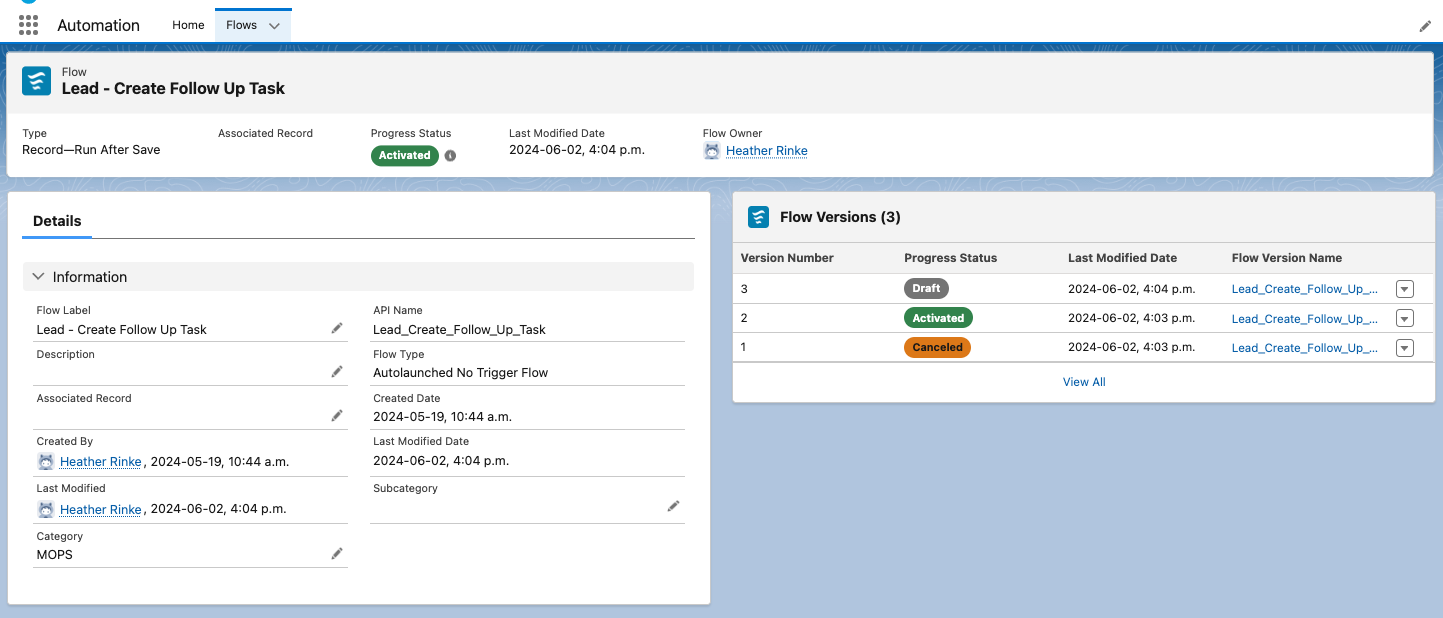
View Flow Details from a Lighting Page

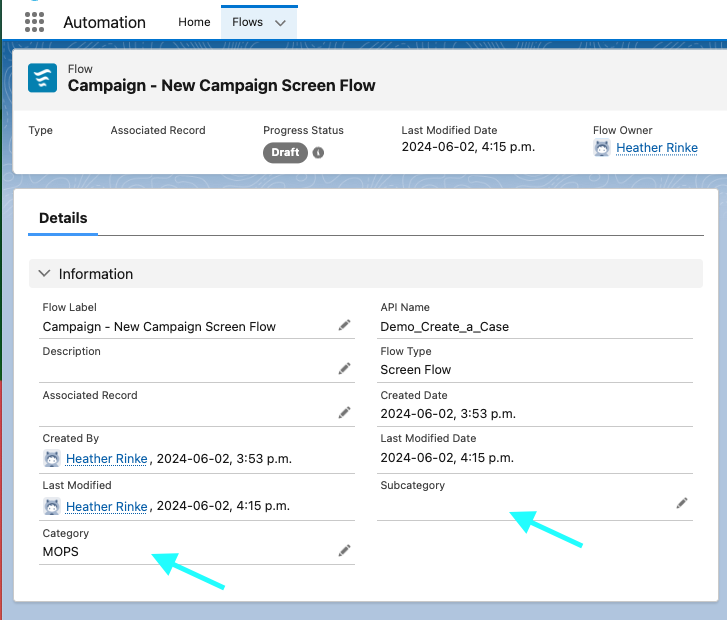
When using the Automation App and list views, you’ll notice that clicking on a flow shows the details on a Lightning record page. This lets you take advantage of customizing your page layout as I’ve done in the screenshot below. 

Organize Your Flows Based on Categories and Subcategories That You Define

Another new flow admin feature, new Category & Subcategory text fields are now available on the Flow object, and accessible when creating custom list views, which can be a handy tool for organizing long lists of flows. 

Control User Access to Specific Flow Elements

Use new permissions to enable users who don’t have the Manage Flows permission, to use specific flow elements when building segment-triggered and form-triggered flows. Elements supported include:  Assignment, Collection Filter, Collection Sort, Delete Records, Get Records, Loop, and Subflow. 

Keep in mind that these permissions are available for Enterprise and Unlimited Edition with Marketing Cloud Growth. 

Flow Builder

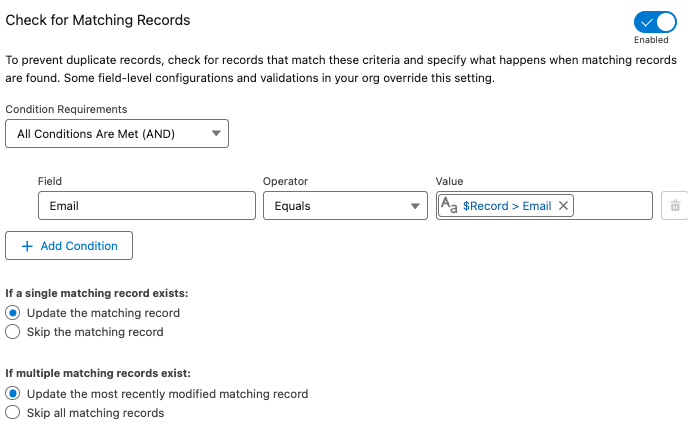
Check for Duplicates Before Creating Records in a Flow

The Create Records element in flow just got more intelligent for preventing duplicates. Now you can first check to see if another record with specific criteria exists before creating a new record.  If an existing record is found, the field values are applied to the existing record, otherwise a new record is created. 

Before you would have to use a Get element to search for an existing record and a decision to check if anything was found before creating a new record. Having this all rolled into one element makes the flow build and maintenance much simpler and more efficient.

Required fields automatically added for Create elements

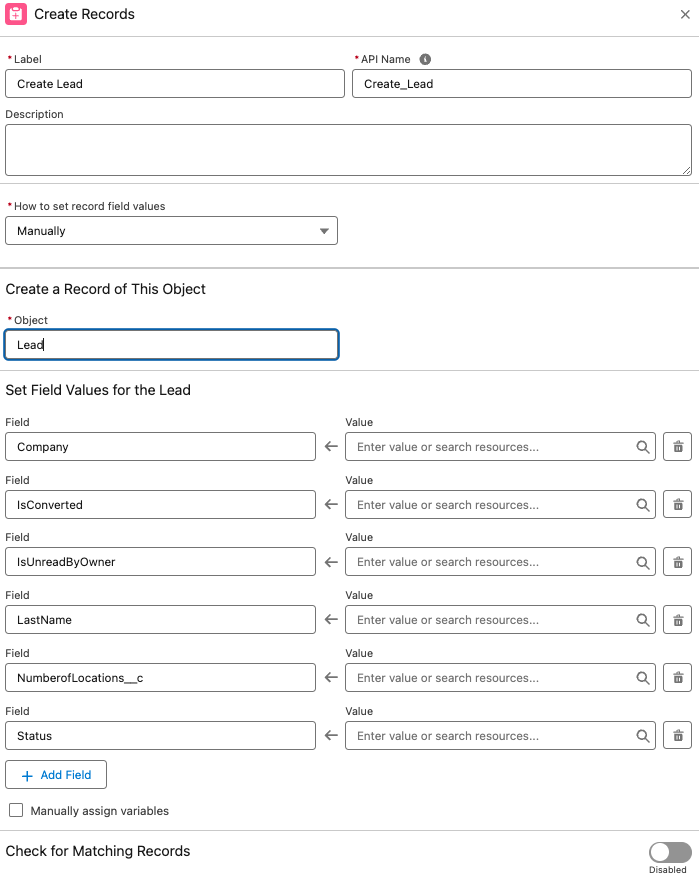
Another cool feature spotted in the pre-release org is that Create elements also automatically include required fields.

I didn’t see this feature mentioned in the Release Notes, but as this could be a super helpful I’m hoping it will turn up in the Release. Admins can probably relate to the headache of building a flow that creates a record, hitting error when a required fields are not included, then having to go back the flow to make sure that field is populated… maybe more than once!

A couple of notes to consider for this to be useful: 

  • Only fields that are marked required at the field level are included. Fields that are flagged as required on the page layout are not included. 
  • Also, the element may include other non-required fields. For example when creating a Lead, the IsConverted and IsReadbyOwner fields were also added to the element automatically.  This may be something only seen in the pre-release org, so it may look a bit different in the actual release.

Other cool Flow Builder Updates:

Screen flows

New Action Button Component (Beta)

Now you can Add an Action Button to a flow screen to run and retrieve information from an active autolaunched flow, without leaving the screen. This is a huge win for creating a better user experience. Before you’d have to use one screen to collect some information, then click next to do the necessary actions and display the output on a second screen. 

Other Updates

Other Notable Updates

A few other updates in this release that are worth noting.

Default No-Reply Email Required

To stay in line with increased email security standards, orgs are required to create and verify a Default No-reply address in their Organization-Wide Email Address settings (replacing [email protected]). This will affect any orgs that send emails from Salesforce. Think automated emails like Lead or Case assignment, or even emails sent from a flow. This is will be enforced starting in Winter’25, meaning that some emails may not send, so its a good idea to set up a default no-reply email address sooner rather than later.

Get Ready for the Salesforce Summer ’24 Release

This is just a handful of platform features planned for the Salesforce Summer ‘24 Release. If you’re interested in diving in to learn more about the updates in this release, I highly recommend reading through the full release notes

You can also check out our post on the Salesforce Summer ’24 Release for Marketing Cloud Account Engagement (Pardot) here.

Which Salesforce Summer ‘24 features have you the most excited? Let us know in the comments!

No more posts to show