While we were all preparing for the New Year, Salesforce was busy getting the Spring ‘25 release notes posted! Let’s dive into what this release has in store for Marketing Cloud Account Engagement (f.k.a Pardot) users.
Support for the Enhanced Email Builder is Being Phased Out
Support for the Enhanced Email Experience, aka the Account Engagement Lightning Email Builder or the Drag-and-drop builder, is being phased out—meaning that Salesforce is only committed to fixing significant issues going forward, the builder will still be available for use.
If you saw the release notes right after they were published, they did say that the Enhanced Email Builder was going to be fully retired, but this retirement has since been put on hold.
Again, users of the Enhanced Email Experience can continue to use this builder, but users also have the option to use the New Email Experience (aka the Marketing Cloud Builder). Salesforce has provided a comparison of the three builders here. Keep in mind that the New Email Experience will continue to get updates every release.
Once this new release is available I will do a deeper dive into using the New Email Experience as an Account Engagement User, so keep an eye out for more info!
Einstein Generative AI supports additional languages
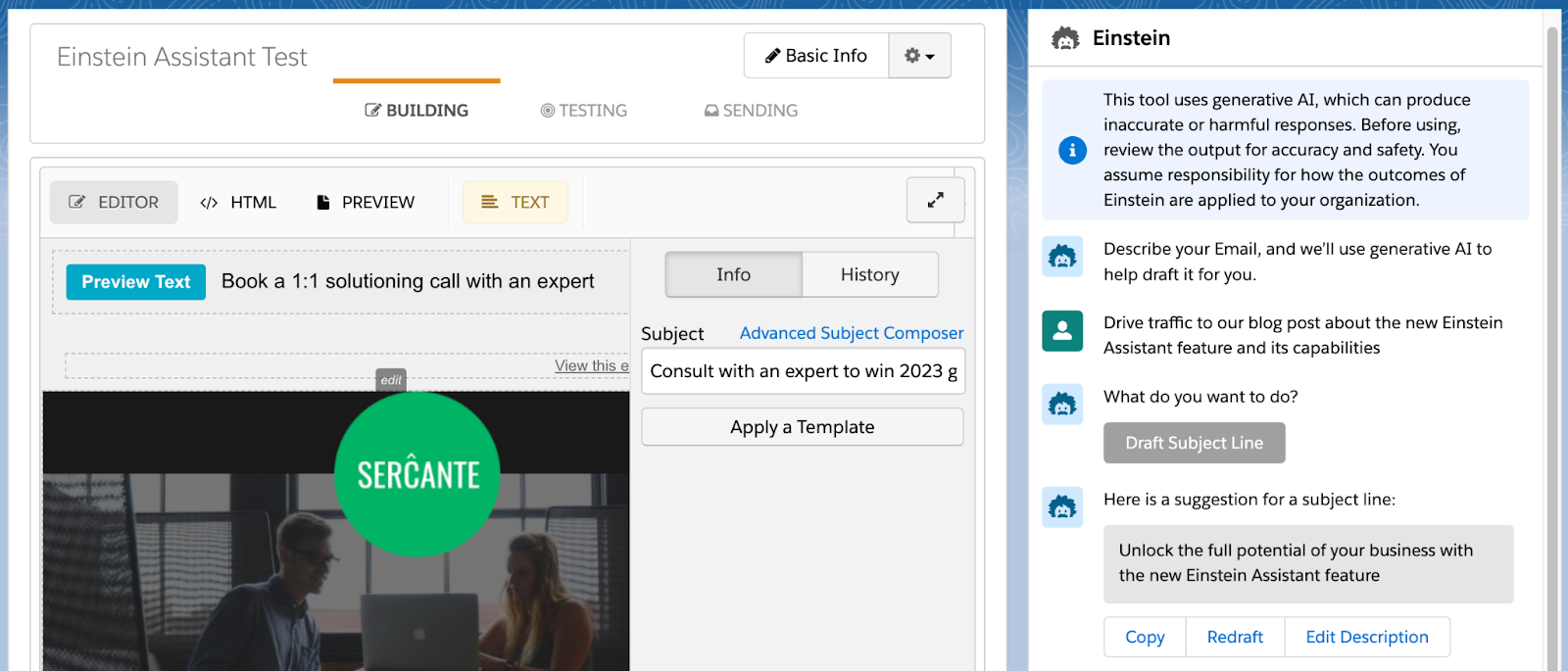
Einstein Gen AI, aka Einstein Assistant, has been expanded to support five new languages: French, German, Japanese, Portuguese (Brazil), and Spanish. Einstein Assistant helps users create landing pages, forms, and email copy and is available to users with Advanced or Premium Editions of Account Engagement.
Easily Enable Marketing Cloud from within the Account Engagement Optimizer
During Dreamforce ‘24, Salesforce announced that all Account Engagement orgs with a current edition (Growth, Plus, Advanced, or Premium) can get access to Marketing Cloud Growth or Advanced Edition at no additional cost. This new platform runs on Data Cloud and can be used alongside Account Engagement to bring more features and functionalities to the Marketing tech stack. The Spring ‘25 release introduces a streamlined setup process for Account Engagement orgs, enabling them to deploy Marketing Cloud Growth or Advanced Edition via the Account Engagement Optimizer.
Additional Visibility into Email Send Issues
It’s always frustrating when an Account Engagement email fails to send to a prospect and the error message is vague at best. With the Spring release, List Email will provide more reasons on why a send fails and will help point you to configuration issues that can help prevent additional failures. The new Failed Email Sends table will be available in the Account Engagement Optimizer and will display the Prospect’s name, company, failure reason, and other details.
Copying Assets to Salesforce’s CMS now includes Landing Pages and inline CSS for Forms. Also, orgs can now use V5 of the Account Engagement API to expedite copying Email, Forms, Files, and Landing Pages to CMS.
Which Spring’ 25 Account Engagement features are you most excited about? Which features do you want to know more about? Let us know in the comments!
Product Note:Marketing Cloud Growth and Advanced are editions of Marketing Cloud Next and have also been referred to as Agentforce Marketing.
Spring has sprung at Salesforce, and it comes in the form of the Salesforce Spring ‘25 Release Notes! Whether you’re a seasoned pro or a budding marketer, this release is packed with goodies that will make your campaigns bloom brighter than ever. Let’s dive into the highlights for Marketing Cloud Growth and Advanced Edition!
Take Your Marketing Global
Marketing Cloud is getting a boost with a WhatsApp integration, making it easier to incorporate this channel into your marketing strategy. Whether you share updates, promotions, or ongoing support, WhatsApp helps you connect with your customers worldwide. The integration includes a campaign template, communication subscription support, and a default Email Preference Center. In addition, it supports 2-way conversations, and the message builder supports audio, video, and file sharing.
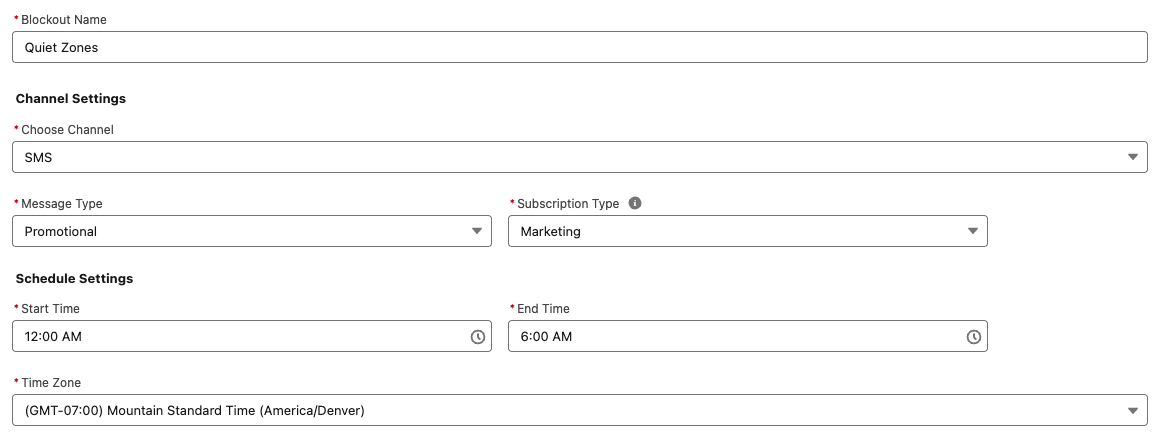
WhatsApp is not the only feature going global this Spring; SMS is joining the fun! With sending capabilities expanding to more than 50 countries, your messages can reach more customers. The new update includes identity validation to enhance trust and effectiveness and ensure reliable delivery. Additionally, blackout windows for SMS and WhatsApp allow you to respect your audience’s downtime, ensuring your messages land at the right time.
AI: Your Marketing Superpower
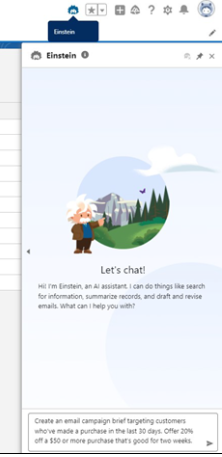
Salesforce is supercharging your marketing strategy with expanded AI capabilities, bringing unparalleled efficiency and creativity to your campaigns. With Agentforce, you can generate landing pages and email content in seconds, freeing time for more strategic tasks. Need to plan a campaign? Agentforce also crafts detailed campaign briefs, ensuring you start with a strong foundation. For Marketing Cloud Advanced Edition users, the Agentforce Campaign Designer (Beta) takes it even further, providing a single interface to edit and refine your campaign strategies, multi-channel flows, and content. These tools empower you to create more innovative, impactful campaigns.
Spring into Smarter Campaigns and Content
Marketing Cloud’s Spring ‘25 Release is focused on making campaigns smarter and your content work harder. From reusable personalization tools to seamless flows, Salesforce has designed the release to help marketers craft successful campaigns from start to finish.
Personalization That Packs a Punch
Stop spinning your wheels! Simplify your workflow and create tailored campaigns effortlessly with reusable content and personalization points. These features save you time and help you connect more deeply with your audience. Reusing merge fields withExpressions across campaigns will keep your messaging sharp, consistent, and right on target—making every interaction count.
Smarter Segmentation for Better Results
Segmentation is getting a makeover! The Spring ‘25 release features new tools that filter attributes—like new leads—right from the Campaign record, saving you time and speeding up your campaign’s delivery. Plus, you can preview up to 1,000 segment members before activating your campaign flow, giving you confidence in your targeting strategy.
Meet the CRM Prospect Object
Say hello to your new best friend: the CRM Prospect Object. It’s here to help you manage prospects like a pro. Create prospects with forms, nurture them automatically, and convert them into loyal customers. With account scoring based on engagement, fit, and intent, you can prioritize the leads most likely to convert.
Forms That Go Where Your Customers Are
Why make your customers come to you when you can bring the form to them? With the new ability to embed forms on external sites, you can deliver them to your hosted web page. After a quick setup in Salesforce and your external site, grab the form’s code block from its detail page and drop it into your site’s HTML. It’s as simple as copy-paste! (Just make sure your site supports iframes, is secure, and uses HTTPS.)
Flow Like a Pro
Managing Flows is easier and more intuitive than ever. You can handle more of the process directly from the Campaign record, track flow statuses in the new Marketing Calendar (fully integrated with the Sales Calendar), and view flow versions and failures to provide quicker, seamless resolutions. The new Campaign Stage field offers insight into the current campaign and keeps your team updated. Need a little extra customization? Add custom fields to your campaign briefs to make them truly yours.
Content Updates That Shine
Marketing Cloud is releasing new content creation features. With a new “Processing” content status, you’ll always know when landing pages, forms, and branding updates are pending publication. While changes can’t be made during this time, you can relax knowing your updates are locked in. Need to duplicate content? Cloned content is easier to manage by saving it in a shared workspace, keeping your team aligned. Consistent branding has never been more straightforward—assign default branding to your workspace to ensure emails, landing pages, and forms all have the same polished look. Ensure brand consistency across all your forms by assigning a brand, with forms automatically adapting to reflect your workspace, landing page, or external site branding.
Tracking and Source Information for Consent helps you comply with global laws and regulations to review the source and consent status change via the Consent Audit Trail in Data Explorer.
Setup Enhancements aim to save users time. They include tracking setup progress, installing or updating the Sales Data Kit, a guided experience for authenticating domains, and the ability to autogenerate an Identity Resolution Ruleset.
Autonomous AI is transforming the way organizations operate, and Salesforce’s Agentforce is at the forefront of this revolution. The product was made generally available by Salesforce in October 2024. Whether you want to streamline case management, enhance lead nurturing, or delight customers, Agentforce empowers businesses to accomplish more with fewer resources. In this post, we’ll share five practical tips to help you successfully implement and use Agentforce.
Before diving into the tips, let’s take a closer look at what Agentforce is.
Agentforce enables autonomous AI agents to perform tasks without human intervention, acting as digital workers within Salesforce or external customer channels. These agents enhance productivity by automating routine tasks and assisting with complex ones. With tools like Agent Builder, you can customize agents using pre-built topics and actions or create entirely new ones tailored to your organization’s needs.
Agentforce integrates seamlessly across the Salesforce platform, leveraging Data Cloud for reasoning and learning. Out-of-the-box agents include Service Agents for case deflection, with more capabilities to be released in December 2024, such as SDR and sales coaching agents.
Unleashing the Power of Agentforce: Five Steps to Get Started
Follow these five steps to get started on the right foot when you dive into Agentforce.
Tip 1: Identify Use Cases
Start by identifying where Agentforce can deliver the most value in your organization. Ask yourself:
How are you using your CRM today?
What are the current pain points in your processes?
Are there routine tasks that could be automated to free up team capacity?
Are there new processes you’ve avoided due to resource constraints?
Examples of use cases include automating FAQ responses for service teams, generating campaign briefs for marketing, or assisting sales reps with lead prioritization and moving deals faster.
Then for each use case, think about what would be needed to transition to an agent:
What job should they do?
What actions will they need to take?
What actions should they NOT take? (This is just as if not more important to make sure you have defined the lane where an agent should operate within that use case)
Your responses to those questions are going to help you to understand the level of effort involved in use case. This in turn is going to help you to prioritize based on the level of effort and potential value
Tip 2: Define Success Metrics
To gauge the success of your Agentforce implementation, establish clear goals and KPIs.
Questions you can ask:
What does success mean? How will we know we have addressed our problem?
What metrics are we tracking today that we want to see improvement on?
Are there additional metrics that will let us know we are seeing success?
For example:
Reducing average case handling time by 20%
Improving lead response times
Increasing campaign ROI by automating content creation
Ensure you have baseline data for comparison and that the necessary measurement tools are in place to help you track success.
Tip 3: Assess Your Data
Your AI agents are only as good as the data they access. For the use cases identified, evaluate your data readiness:
What data do need?
Where is it located? Is it in your CRM, Data Cloud, or other external systems?
Is it accessible from your CRM? If it’s stored in an external system, do you have APIs in place to get that information?
Is the data clean, accurate, and up-to-date?
Follow this blog post for tips on how to keep your imported Pardot prospect data clean.
Do you have a single view of the customer across systems?
Lastly, are knowledge bases and metadata structured for easy access?
Agents need knowledge to inform how they will operate and answer questions. This is all of the background configurations your agents actions will rely on — flows, prompts, and Apex for example — they need to also be clearly identifiable and accessible.
When you add actions to your topics, it uses the descriptions to help fuel the instructions. The naming conventions of your resources will also make it easier to determine what the inputs and outputs need to be.
Data and metadata are the backbone of AI performance, so this is an important area to pay attention to.
Tip 4: Start Small
After completing the previous steps, you may have more than one great use case to start with. Here’s where you ask yourself: What are the quick wins that we can get started on that can move the needle and that we can expand on as we mature?
It’s really easy to get caught up on how this can solve ALL the things. There are many challenges to starting a complex process all at once. If a lot of effort is required to get the data in place or to get the actions set up, it will be more difficult to roll out, not to mention making it potentially disruptive and prone to issues
Avoid the temptation to tackle complex processes right away. Instead, focus on a simple, high-impact use case to pilot Agentforce. There are many out-of-the-box topics and actions that make getting started easier. For example, automating a single FAQ response or generating summaries for sales reps.
Starting small helps build confidence, momentum, and organizational buy-in, and it also reduces the risk of missteps.
Tip 5: Nail Down Clear Instructions
When designing agents, clarity is key. Use the Agent Builder to create and test well-defined topics and actions:
Topics – Include precise instructions for classifying user requests, setting guardrails, and outlining scope.
Actions – Clearly define what the agent should do, including required inputs and expected outputs.
Salesforce Agentforce Topic Instruction Best Practices
Instructions are the foundation for grounding how agents perform. They set the guardrails for how the agent should behave and give the agent the context it needs to do its job.
Here are a few best practices for writing Agentforce topic instructions:
Start simple
Start with the main use case first to ensure the agent is performing as expected. Then, add in more detail to address edge cases. Be sure to test existing instructions for any conflict. You don’t want to confuse the agent!
Use plain language
Use concise natural language to describe what your action does. Keep it to 1-3 sentences, and it can include the goal of the action, any use cases, and the objects or records it uses or modifies.
In general, the more relevant detail you include in your instructions, the easier it is for the agent to differentiate between actions. Also, be sure to vary the words you use. For example, use a mix of “Get,” “Find,” “Retrieve,” or “Identify” for actions that will query records.
Avoid industry or company jargon
Write like you are instructing someone who doesn’t know your business. Even terms like ‘qualified lead’ could mean something different from one organization to another. Give context where necessary, and reference clear criteria using the data it will have access to.
For example, instead of vague terms like “qualify lead,” specify conditions such as “lead status equals MQL.”
The agent isn’t not going to know your business processes either, so be explicit about the sequence of instructions or any conditions a conversation must meet for an agent to apply an action.
Think of all the paths
You want to go through every possible permutation to determine the actions required. For example: a customer reaches out because they didn’t receive their order.
First think about the order status ( Order Shipped, Delayed, Not Found, Processing). If the status is Shipped then there could be different tracking statuses (In Transit or Delivered for example). If the order is showing as Delivered, was it delivered to the customer’s correct address? Was it stolen? …and so on.
Remember the Guardrails
Keep the Agent in its lane by providing clear instructions on what the agent should not do to prevent unwanted responses. In cases where the agent is customer-facing, be sure to also give clear direction on when an interaction should be routed to a human.
Test these instructions thoroughly in the Agent Builder’s testing environment to ensure your agents behave as expected.
Ready to Explore Agentforce?
Agentforce offers an exciting opportunity to enhance productivity and streamline operations. By identifying the right use cases, preparing your data, and starting with manageable projects, you can set your organization up for success.
We get three major releases from Salesforce each year — Spring, Summer and Winter. Each Salesforce release includes upgrades and enhancements that affect Salesforce orgs in different ways.
Each release contains a substantial amount of information on a variety of products so it can often be daunting for admins or other trailblazers to find the features that are important to them and their organization. Our team reviewed the notes for you and highlighted the following platform features as those for you to keep your eyes on the lookout when the release hits your Salesforce environments in the coming months.
Platform Highlights from the Salesforce Winter ‘25 Release
Those who use the Salesforce platform are getting lots of attention from the Salesforce Winter ‘25 Release.
Some updates are changing the way we work to meet evolving technology demands. Others are saving us time by connecting the dots in a logical way. Our team will guide you through these features so you will know how to take action on them before the release hits your Production org.
Highlight #1: Verifications Needed to Continue Sending Emails From Salesforce
If you Users do utilize any email functionality within Salesforce it will be important to instruct them to visit their ‘My Email Settings’ so they can verify the email address associated with their User account. Similarly, overall as an organization, you will need to ensure there is a customer-defined Default No-Reply Organization-Wide Email Address moving forward.
Although the Default No-Reply Organization-Wide Email Address feature will be enforced this release, the individual Return Email Address verification will not be enforced until Spring ‘25.
Salesforce recently announced their acquisition of Own Company, currently known as the most credible Salesforce archive and backup third-party tool, however, they have also announced a pilot of their own Archive product. If your team needs assistance with archival management of your data but either cannot afford a third-party tool or do not have time/resources to implement one of those tools, Salesforce Archive might be a solution to consider.
When Salesforce Archive becomes generally available, you can use it in production and sandbox environments, however the product is available in sandboxes as a pilot right now and can be requested to be enabled by your AE. The product will become available to production orgs on a rolling basis starting in November 2024, but when it’s released for production use, it will need to be purchased as an add-on license.
The Salesforce Platform Login license allows you to assign access to custom apps built on Platform for internal users without the requirement to buy a seat-based license. With the Salesforce Platform Login license, you can pay per daily unique login for users who need infrequent or occasional access.
This new license will become available starting October 15th for customers on Enterprise, Performance, Unlimited, and Developer editions. Contact your AE to learn more about pricing details for these new licenses and to determine if they’re a right fit for your organization.
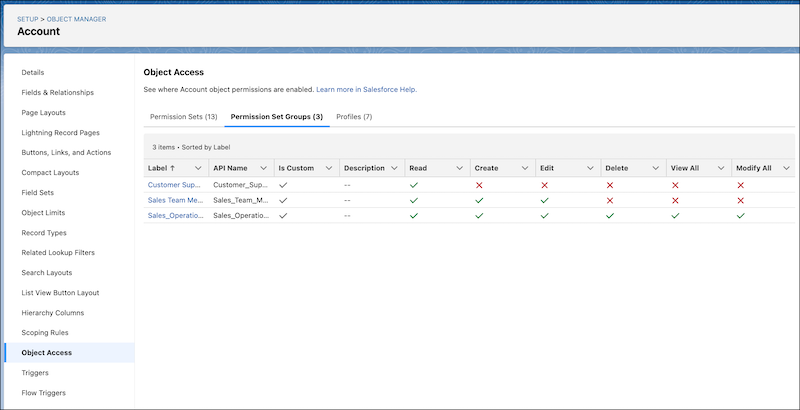
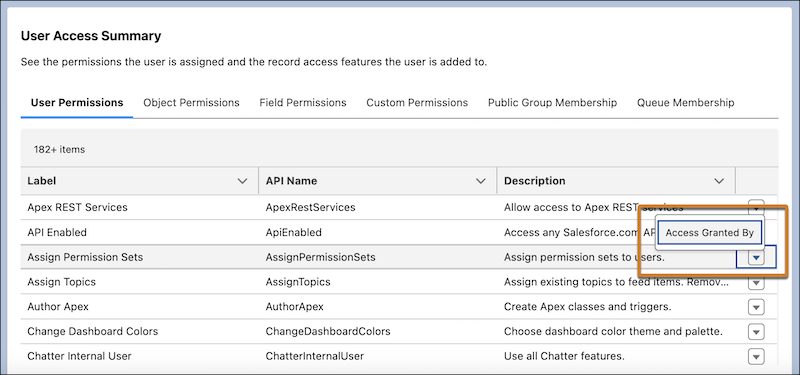
The Winter ‘25 release continues with updates to ensure Salesforce Administrators are able to troubleshoot their User’s access and permission issues easier. One of these new features is the ability to use the Object Access Summary in Object Manager to quickly check object permissions when troubleshooting, completing reviews, or determining how to grant user access.
Last release we were able to access a Summary of an individual’s access and permissions directly from the user details record. This enabled you to see what a user had access to without having to spend multiple clicks checking each profile, permission set, public group, or queue.
The Winter ‘25 release expands on that feature by including an additional feature to allow you to see what grants the User that particular permissions (i.e. via Profile or Permission Set) in case you need to revoke those permissions.
Highlight #5: Salesforce Flow Updates
You may have heard the phrase “Flow is the future” in Salesforce messaging over the past few years. This is because Salesforce is consistently releasing new Flow features to support the retirement of Process Builder and Workflow Rules in recent years.
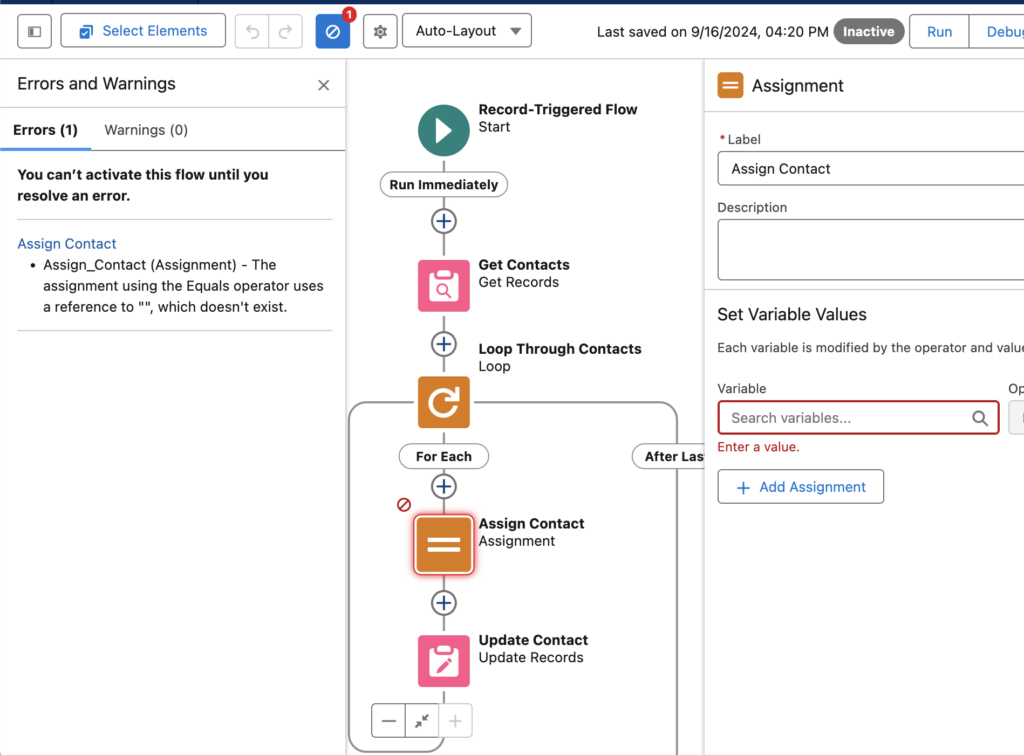
The new Errors and Warnings pane lists issues that prevent you from saving and activating your flow as you work in an easy to scan format. This feature will be automatically available when trying to activate a Flow with errors following the release.
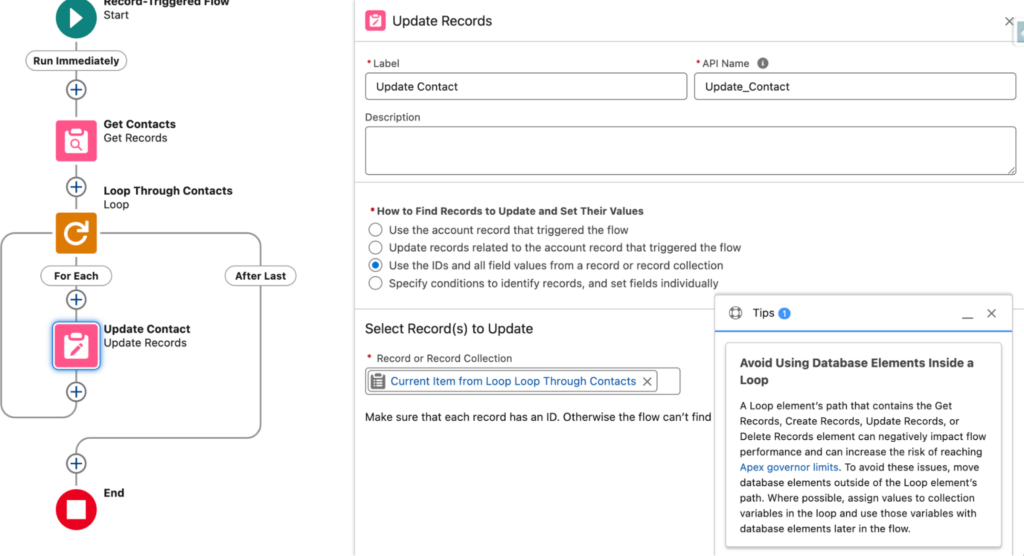
Another new feature within the Winter ‘25 release is the inclusion of new tips in Flow Builder to help you identify designs that can slow down your flows and increase the risk of reaching Apex governor limits. This may not seem like much to some of us that have been building Flows for a couple years now, but this is a game changer for new Flow builders who are uncomfortable with the tool at first.
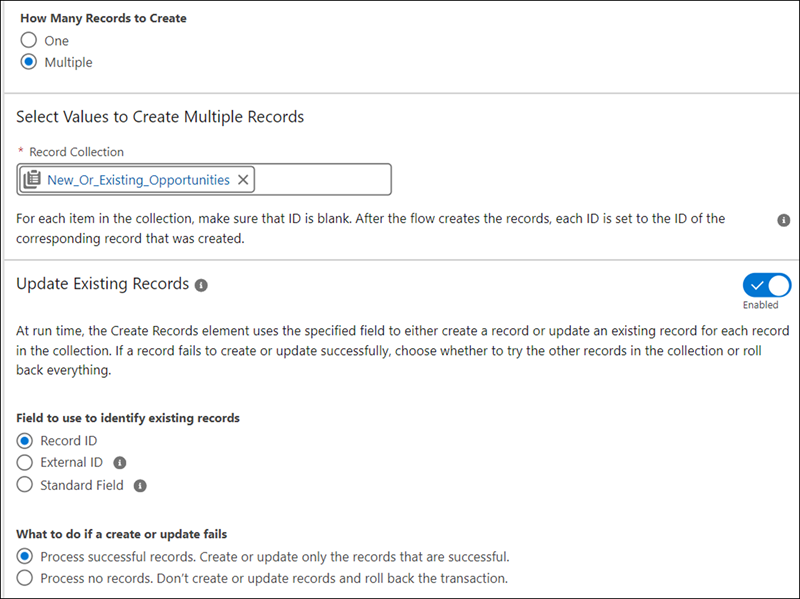
Last release we saw the beginning of an upsert feature within Flow Builder through the release of a new way to check against duplicates for a single record. Well the Winter ‘25 releases further enhances this feature by enabling the upsert functionality against multiple records at once. You’re able to compare against existing records with a Salesforce Id, External Id, or other field on the object.
The Create Records element makes the process of saving records easier and faster, as you no longer check separately for existing records because the create and update elements are now merged into one element. Admins can now configure and maintain flows more easily while reducing potential errors from separate operations.
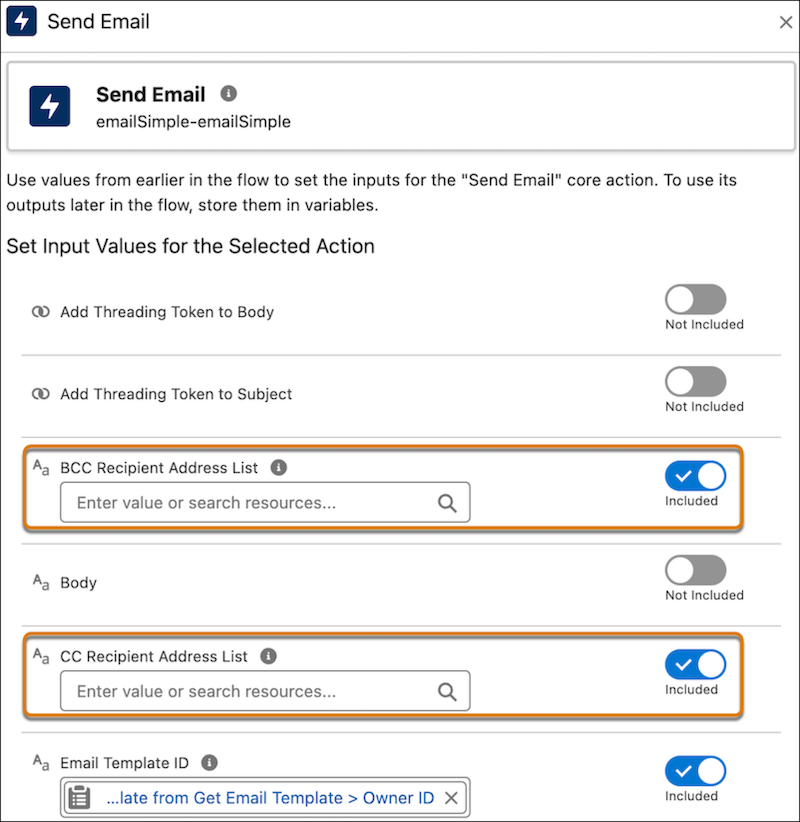
Two new enhancements have come to the ‘Send Email’ Action within Flow Builder. First, you are now able to include email addresses to include as cc or bcc on the email that is sent via the Flow. Any address entered in the CC field receives a copy of the email, and those in the BCC field also receive a copy, but their email addresses are hidden from all recipients. Secondly, there is an increase of the number of recipients you can include from originally 5 to now 150 recipients.
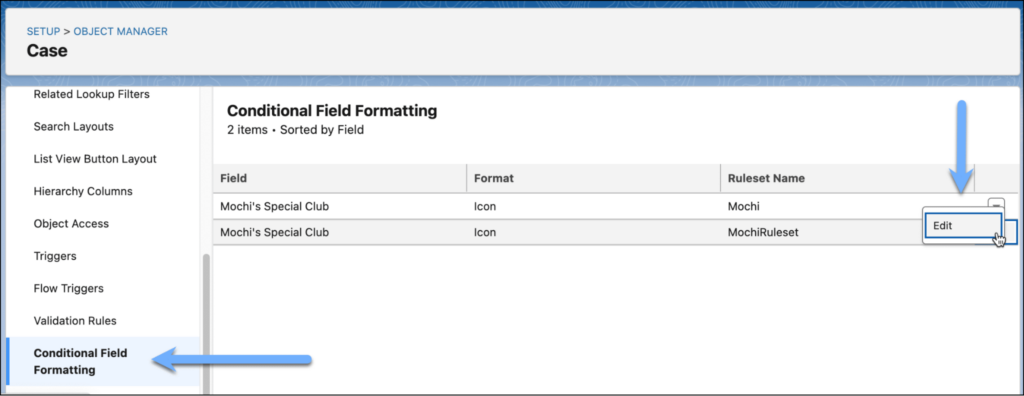
As Salesforce continues to push customers from Page Layouts to Lightning Record Pages, they continue to release new features in the Lightning App Builder to excite customers into the move. Now customers will be able to give fields on Dynamic Forms-enabled pages custom icons and colors that can appear, disappear, and change color based on the criteria and rules that you define. This can be a game changer for those of us who have previously created formula fields to manage or provide this functionality in the past.
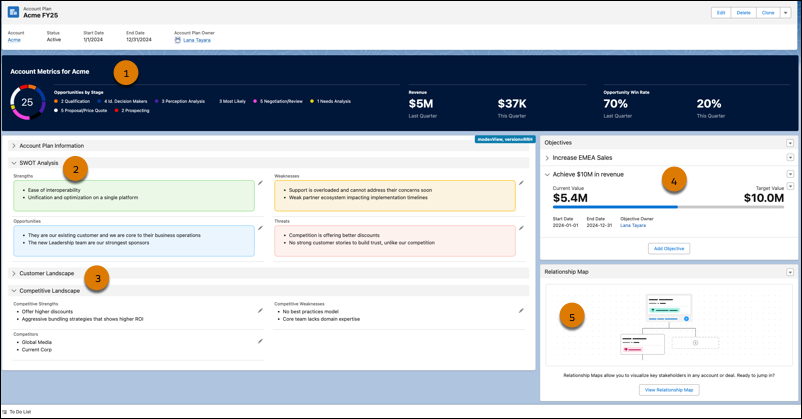
This feature is one our team is very interested in learning more about as new information is released as it can be a huge game changer for Sales teams. The Account Plans feature provides a new UX providing a complete picture of the account with information such as metrics, objectives with actionable metrics, and tabs on growth and development, all from one repository within Salesforce.
This feature will become available in Production on a rolling basis after the Winter ’25 release is complete and available to all customers in mid- to late November 2024. Customers available to receive this feature are those with Enterprise, Performance, or Unlimited editions.
Once the feature becomes available in your Production org, go to the new Account Plans page in Setup and turn on Account Plans. Then, configure the Account Plans object in the Object Manager, add the Account Plans related list to the Account object, and optionally set up Relationship Maps.
Salesforce is getting bigger and better all the time
Trailblazers who come to Salesforce are usually looking to scale their efforts and grow in a way that makes sense. These latest enhancements from the Salesforce Winter ‘25 Release get everyone closer to those goals by saving them time and resources.
Contact the team at Sercante to get help implementing these enhancements in your Salesforce org. And leave us a comment below to let us know what you think about the Winter ‘25 Release.
Product Note:Marketing Cloud Growth and Advanced are editions of Marketing Cloud Next and have also been referred to as Agentforce Marketing.
During the Marketing & Commerce Keynote at Dreamforce 2024, Salesforce announced the latest edition of Marketing Cloud built on Data Cloud — Marketing Cloud Advanced Edition! Expected to be released in November 2024, this new edition expands the features and functionalities of Marketing Cloud Growth Edition, released in February of this year.
What Comes with Advanced Edition?
Let’s dive into what Marketing Cloud Advanced Edition brings to the table.
Path Experiment
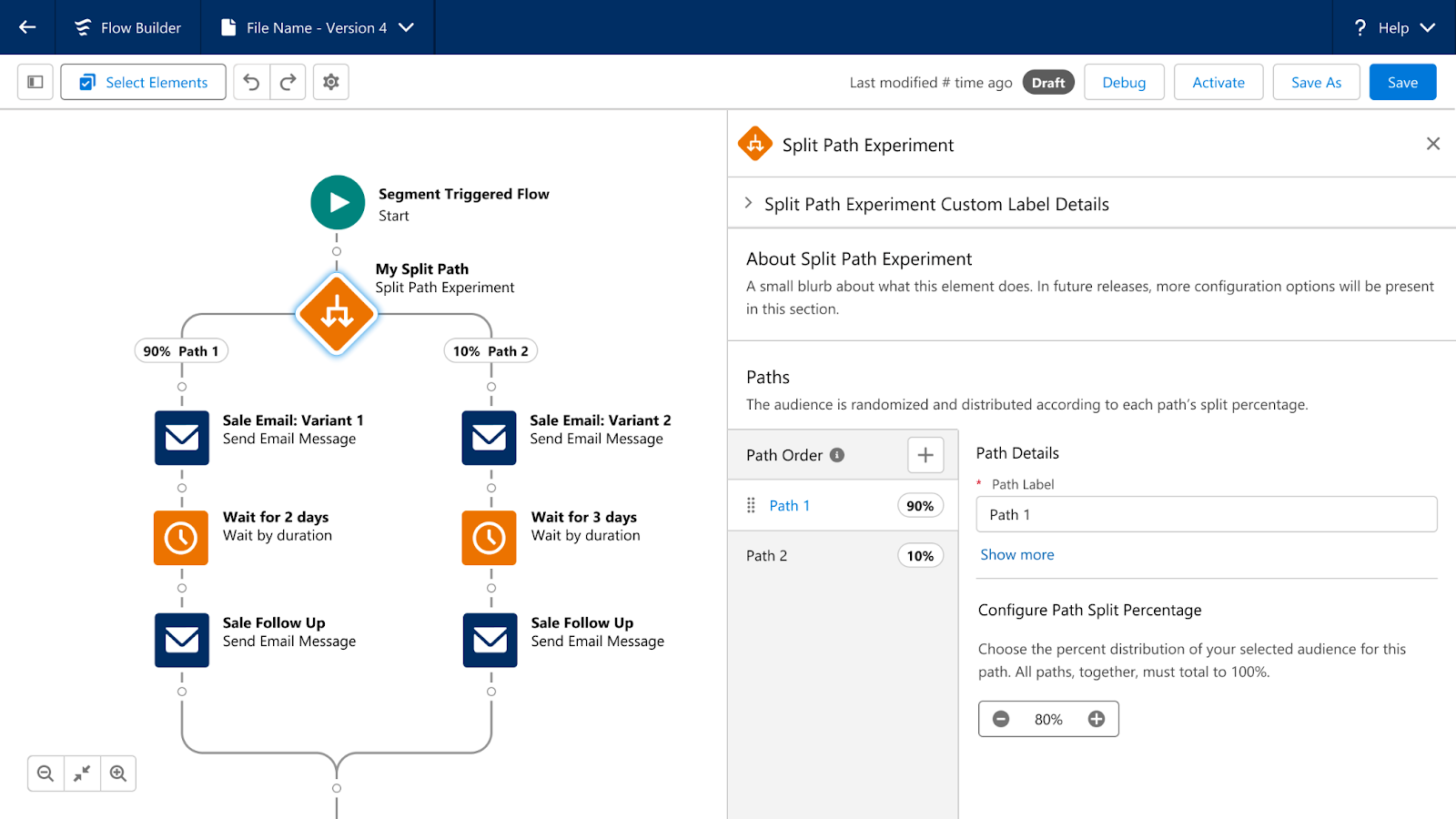
Path Experiment allows Marketers to maximize engagement with your audience through testing. This new feature allows marketers to test variations within marketing content, such as different subject lines, variations in channels, such as sending an SMS instead of an email, and even variations in cadence, such as sending an email in 3 days versus 1. Path experiment allows marketers to test up to 10 paths within a single experiment, customize the distribution percentage across the paths, and automatically randomize individuals between the paths to help ensure fair, unbiased results. There is no limit to the number of Path Experiments that can be included in one Flow.
Einstein Engagement Frequency
Einstein’s capabilities will also be expanded in Marketing Cloud Advanced Edition. First, we have Einstein Engagement Frequency which assists Marketers in sending the right number of messages to their audience. Einstein Engagement Frequency provides insights into the distribution of email sends and subscriber engagement, suggesting the optimal frequency to maximize engagement. This data can then be used to create segments, allowing marketers to suppress or target subscribers who are over or under-saturated.
Einstein Engagement Scoring
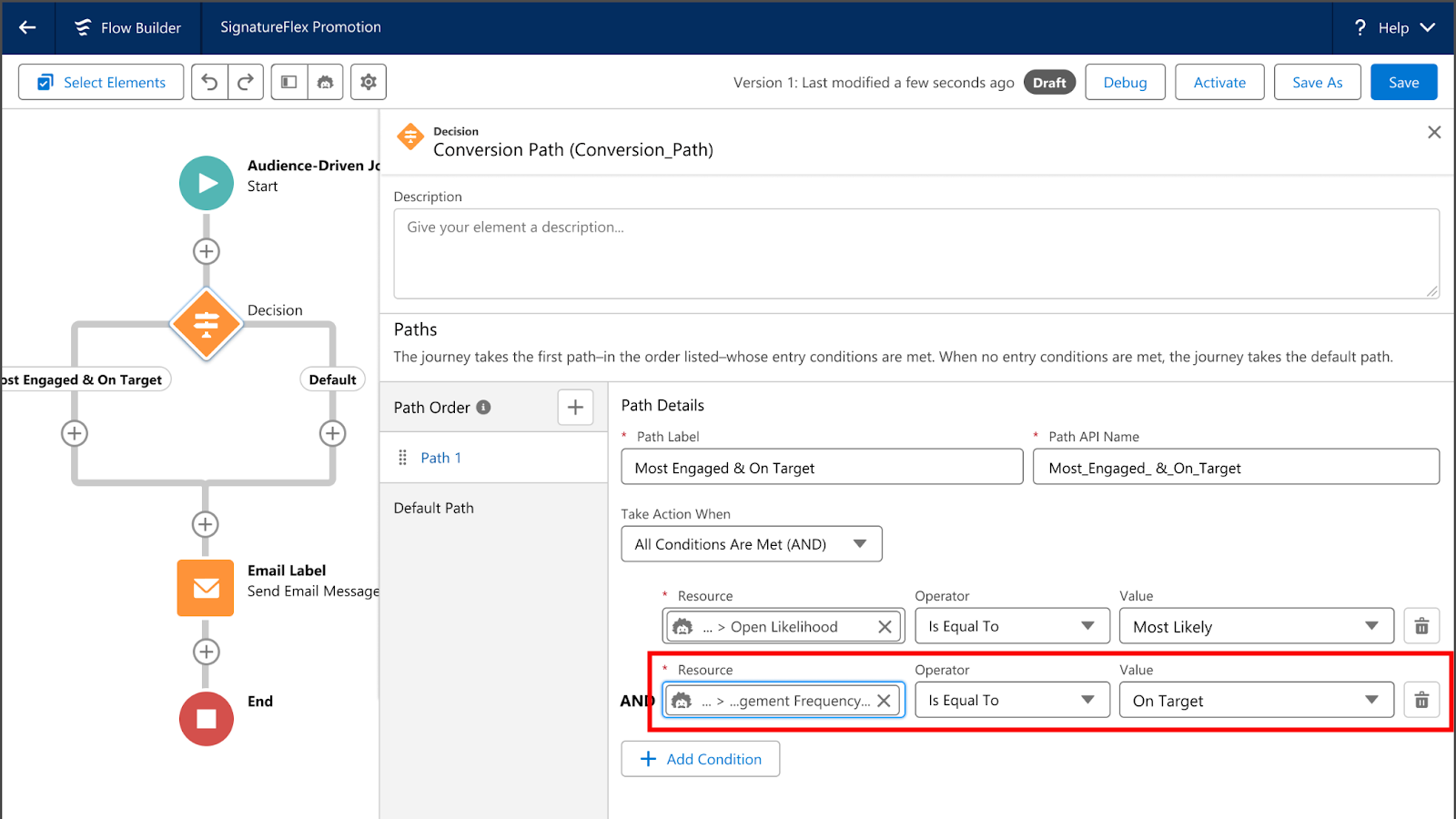
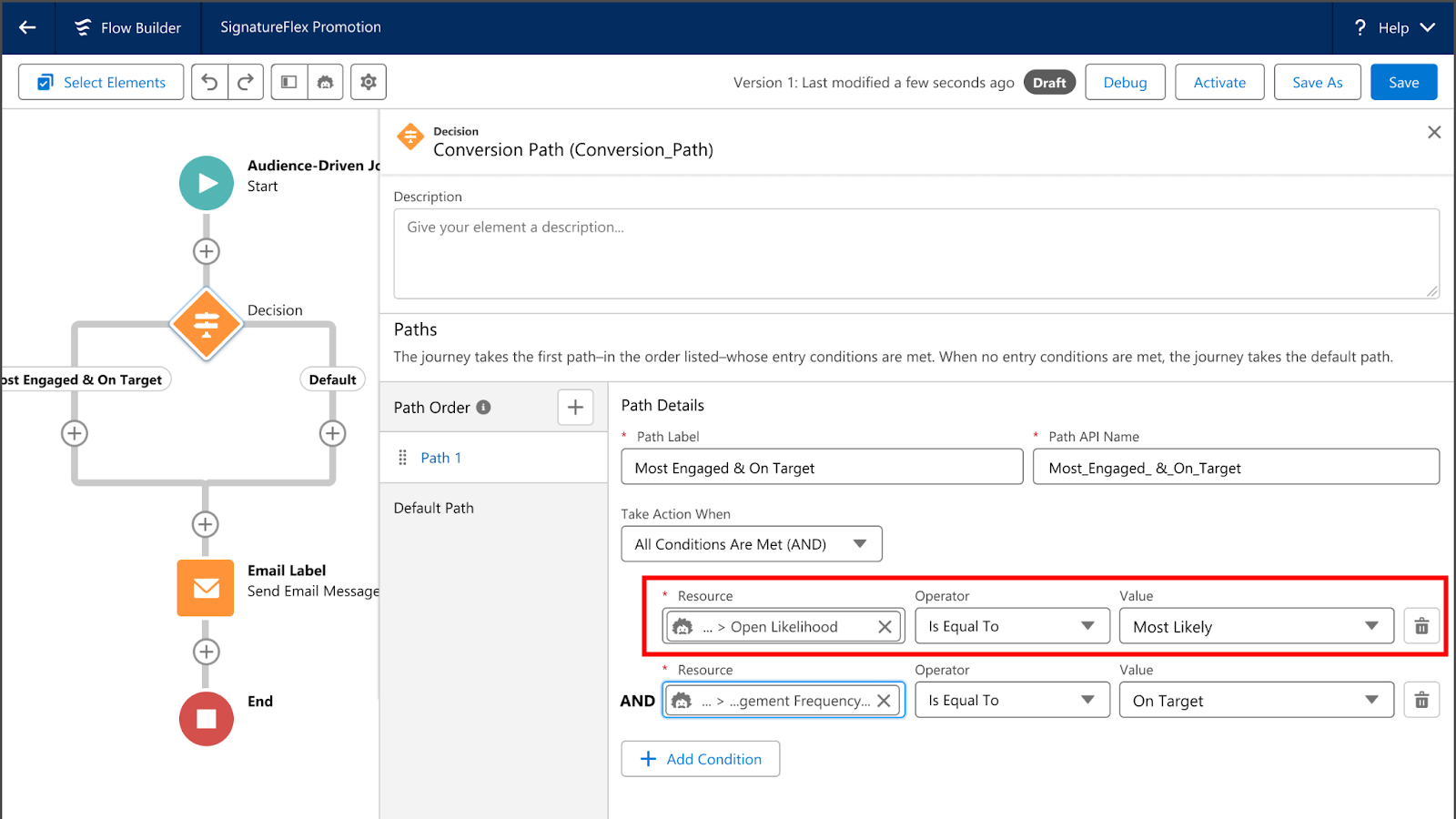
Next, we have Einstein Engagement Scoring, which helps predict how likely each subscriber is to open, click, and stay subscribed to an email communication. Einstein Engagement Scoring’s data can be used to create segments, send subscribers down different Flow paths, or even help personalize content more effectively.
Unified Conversations with SMS
With the new Digital Engagement add-on, Marketing Cloud Advanced Edition enables marketers to transform one-way promotions into a conversation with their audience. Marketers can respond to messages in real time using the unified customer data within Data Cloud and automate interactions with connected chatbots.
Looking Toward the Future
What other features and functionality would you like to see Salesforce bring to Marketing Cloud Growth or Advanced Edition? Let us know in the comments!
The Salesforce Winter ‘25 release notes are out! Let’s dive into Winter ’25 highlights and what Account Engagement (f.k.a. Pardot) users can expect to see come October.
Back in 2021 we got the Email Uniqueness field that told us whether or not a Prospect’s email address was unique to the prospect. Although this field is super handy, you can’t export its data and it only tells you if there is a duplicate email somewhere in the system.
Now, All Account Engagement editions are getting bonafide duplicate management capabilities.
As part of the Winter ‘25 release, Account Engagement Optimizer will help users keep their database squeaky clean by enabling them to view and merge duplicate prospect records.
If you receive system notification emails from Account Engagement, for instance the Daily Prospect Activity report, then you know these emails typically include pi.pardot.com (a.k.a. Pardot Classic) links rather than the, now standard, Account Engagement Lightning App links.
Fortunately, with the Salesforce Winter ‘25 release, all orgs will be updated to have their Account Engagement system emails to use Lightning App links, directing users to the right app or prospect without having to log into pi.pardot.com.
Now the only link this update won’t fix is the “Account Engagement URL” field on Salesforce Leads and Contacts. This field will continue to have a pi.pardot.com link. However, you can create a Formula field on the Lead and Contact objects to display the Lightning link instead.
Making sure you update the section in red with your own Salesforce URL. While the Pardot Classic App will forever hold a piece of my heart. I’m excited to see this last remaining vestige of the Classic interface go away.
Account Engagement and Data Cloud’s integration continues to grow with each release. Orgs will now be able to connect form, landing page, and tracked website engagement data to Data Cloud for personalized marketing efforts, calculated insights, and improved segmentation.
Speaking of Data Cloud Segments, Account Engagement can now have 25 Data Cloud segments per business unit (an increase from 5)! Currently the segment increase only applies to Account Engagement users with Growth or Plus edition.
One of the worst feelings as an admin of any system is accidentally deleting something you shouldn’t have. Even worse is when it is a permanent deletion.
Thankfully, Salesforce is helping you avoid that feeling of dread and doom but allowing for these table actions to be paused or outright canceled. Deletion requests can be paused/canceled in the Table Action Manager found within Account Engagement Optimizer.
Get help understanding the Salesforce Winter ‘25 release and how it affects Account Engagement orgs
What questions do you have about the new features coming to Account Engagement? Let us know in the comments or reach out to the team at Sercante to start a conversation.