Category

New Features

Einstein Assistant is the latest AI functionality for Account Engagement. With the Spring ‘24 release, Account Engagement Advanced and Premium editions can utilize generative AI when creating marketing assets. Let’s deep dive into the features of Einstein Assistant and how to enable it for your Account Engagement Business Units!

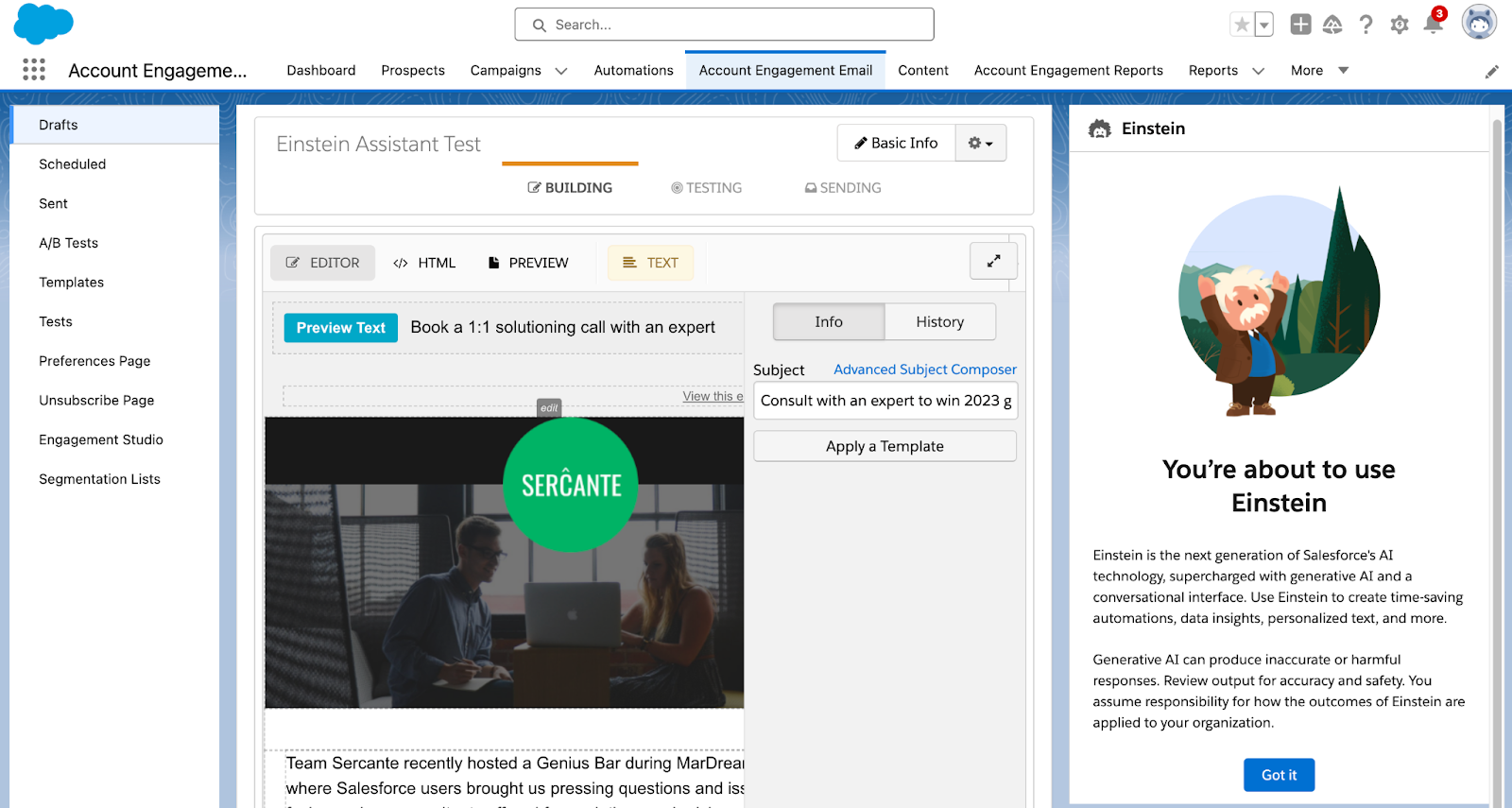
Einstein Assistant helps you create landing pages, forms, and list emails. When creating a new asset, or editing an existing one, the Einstein Assistant window appears so you can describe what you are creating. 

Einstein Assistant will then recommend content that you can copy or revise for each of your assets. 

Using Einstein Assistant with List Emails

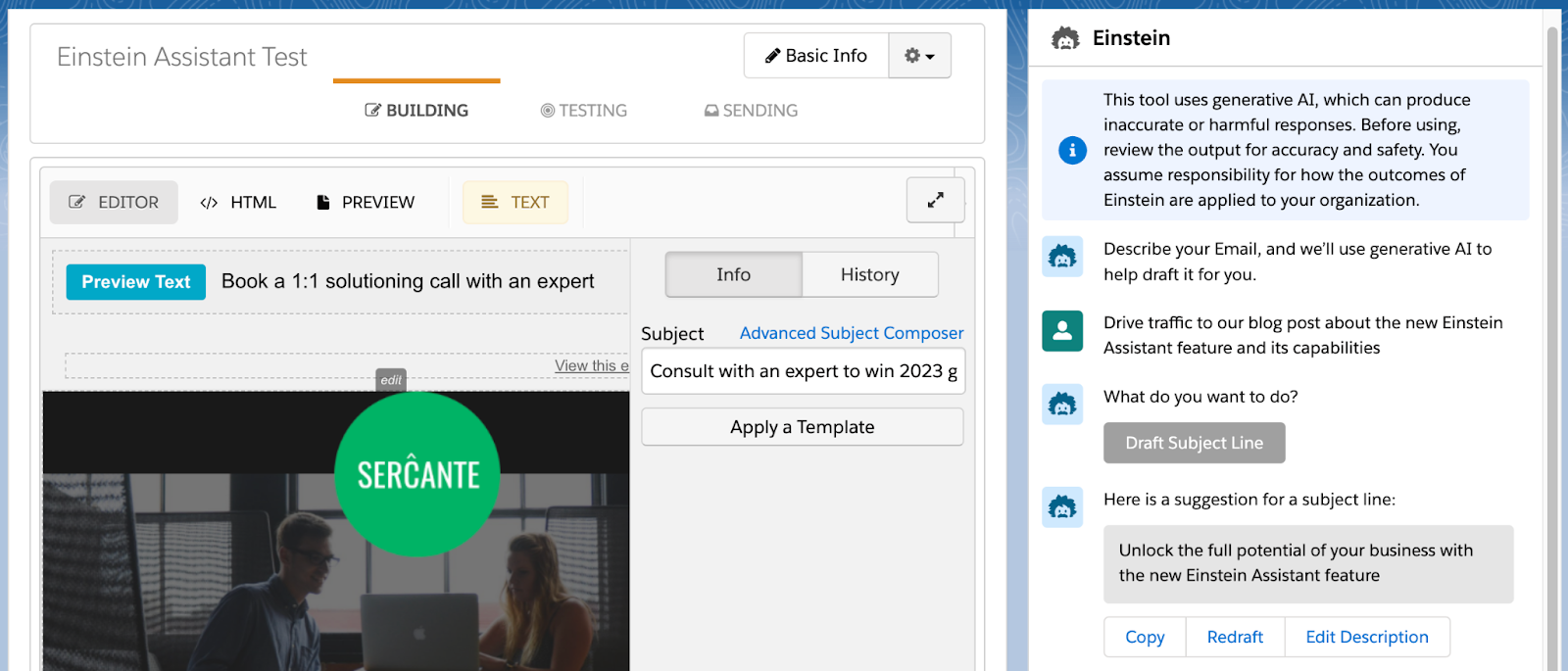
Einstein Assistant gives you the option to draft an email Headline, Paragraph, and/or Subject Line. Once drafted, you can copy or redraft the content, or edit the prompt provided to Einstein Assistant.

Using Einstein Assistant with Landing Pages

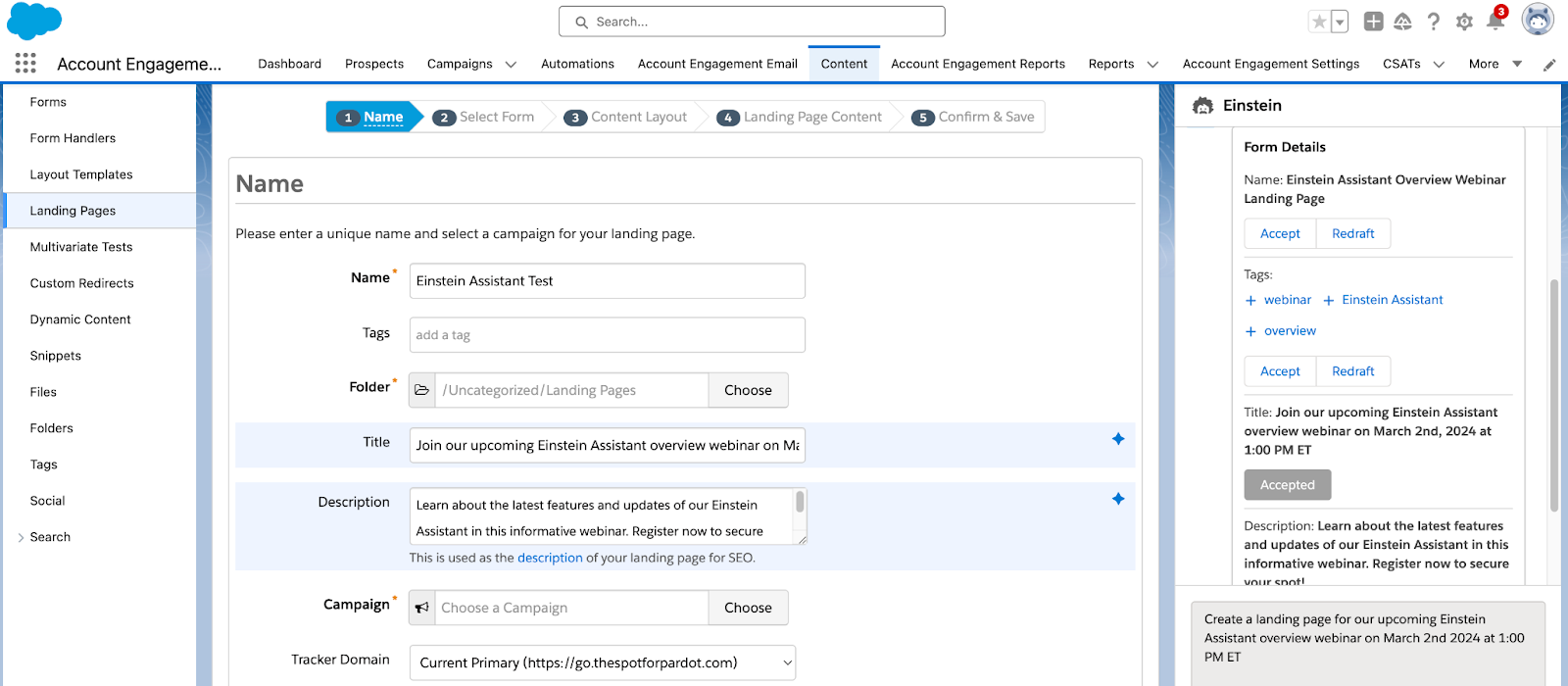
When building Landing Pages, Einstein Assistant can generate the Landing Page’s name, tags, title, and description. Here you have the option to accept, and the copy will automatically be entered into the associated Landing Page field, or redraft the content.

Once you navigate to the Landing Page Content tab, you can then generate a Landing Page Headline and/or paragraph for your page.  

Using Einstein Assistant with Forms

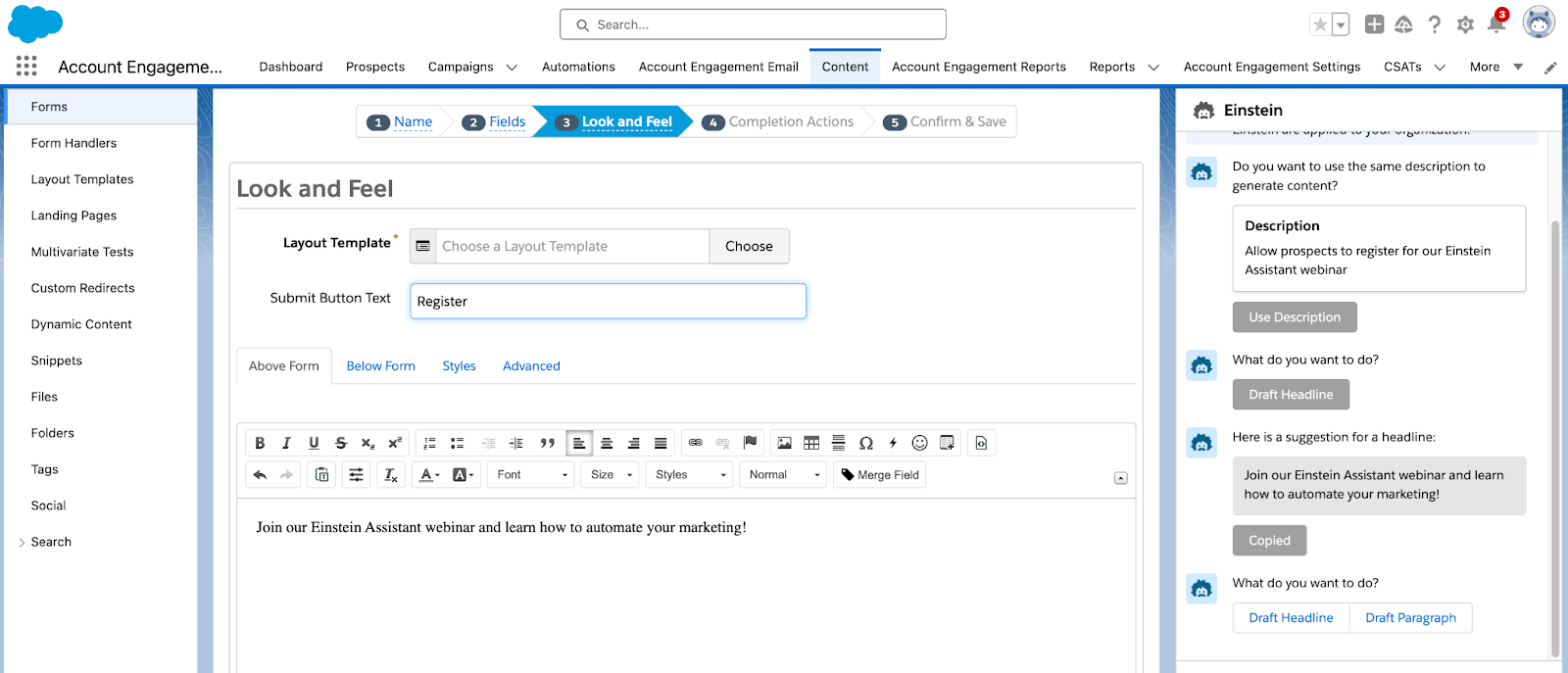
When building Forms, Einstein Assistant will first allow you to generate a name and tags for your new form. You can accept Einstein’s suggestions and the content will auto-fill into the name and tag fields, or select redraft. On the Look and Feel tab, Einstein can generate a Headline or Paragraph to be used above or below the form.

Finally, on the Completion Actions tab, you can again use Einstein Assistant to generate a headline or paragraph for your Thank You Content.

Ready to get started?

Here is how to enable Einstein Assistant

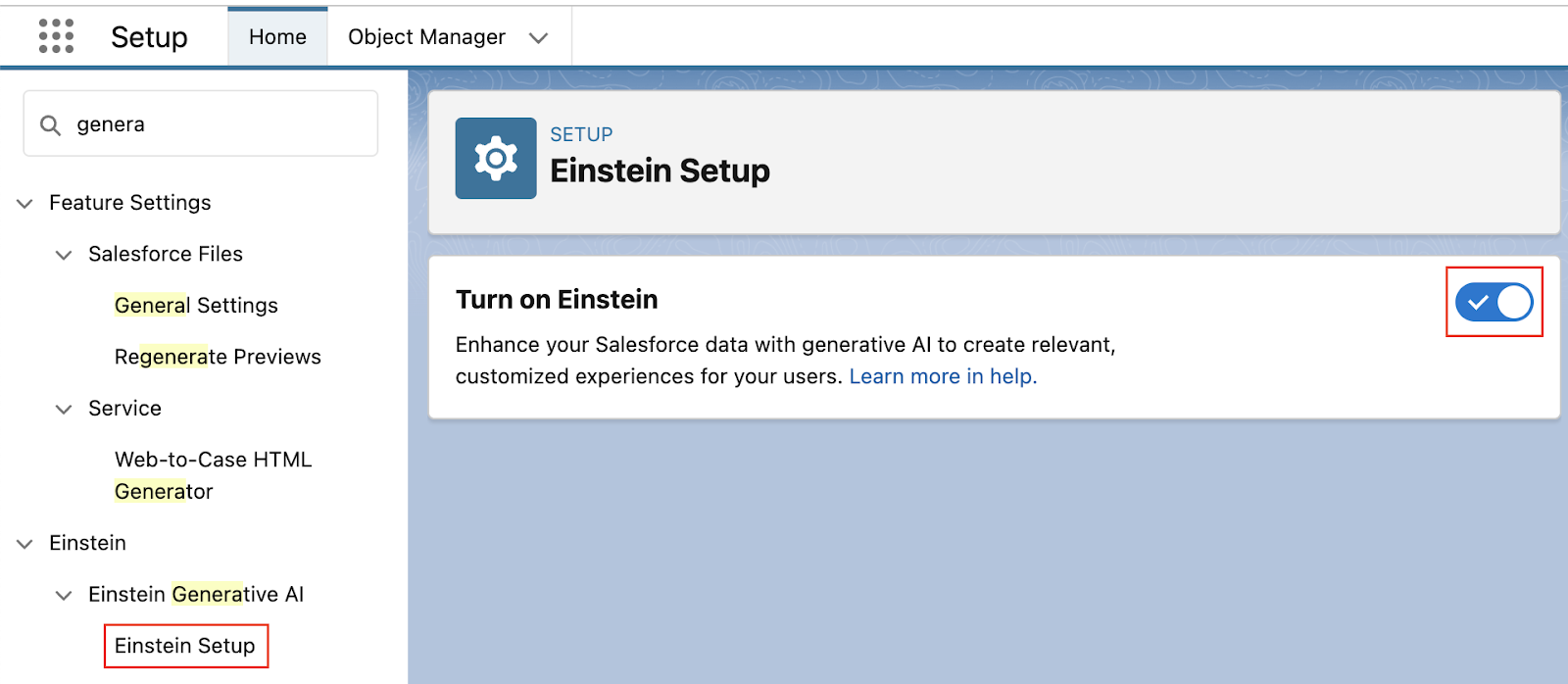
  1. In Salesforce, navigate to Setup > Einstein Generative AI
  2. Select Einstein Setup then Enable
  1. Still in Setup, navigate to Einstein Account Engagement > Einstein Assistant
  2. Select any Account Engagement Business Units that will be using Einstein Assistant
    • Note: even if you only have one Business Unit, you still need to do this step!
  3. Select Connect

If you’re interested in what else Einstein can do for Account Engagement, check out our previous blog posts:

Tap into Salesforce generative AI functionality

Salesforce is releasing new generative AI features all the time. Reach out to the team at Sercante to build strong foundations so you can tap into these features and stand apart from the pack.

Product Note: Marketing Cloud Growth and Advanced are editions of Marketing Cloud Next and have also been referred to as Agentforce Marketing.

I want to clear up a misconception that I’m hearing in the Salesforce world about the great $0 SKU Data Cloud debacle.

As you may recall, Salesforce announced at Dreamforce 2023 that a Data Cloud edition would be available at no cost to Sales and Service Cloud Enterprise Edition clients. This was also mentioned in Salesforce’s February 2024 press release around Marketing Cloud Growth Edition

To be clear, you still need Sales or Service Enterprise Edition to take advantage of this offer. Having just Marketing Cloud does not make you eligible.

Sales and Service Enterprise Edition Customers: What to do about no-cost Data Cloud offer

Now that we’ve clarified any confusion, you might say, “Great, I have Enterprise Edition — I want to get an account provisioned today!” And I would say, “Get prepared first.”

Data Cloud is a game-changer capable of driving remarkable transformation within your organization. Hence, having a well-crafted plan, strategy, and vision in place is paramount.

It’s the basis and foundation of change management — without a plan, vision, consensus, understanding, etc., you might as well stop before you even start.

Speaking from experience, diving into Data Cloud without a clear plan often leads to:

  1. Misconceptions: A perceived lack of product value.
  2. Tension: Without a collaborative mindset, conflicts can arise.
  3. Loss of Momentum: Initial interest and excitement wane over time.

However, before devising a plan, it’s crucial to assess your organization’s readiness. 

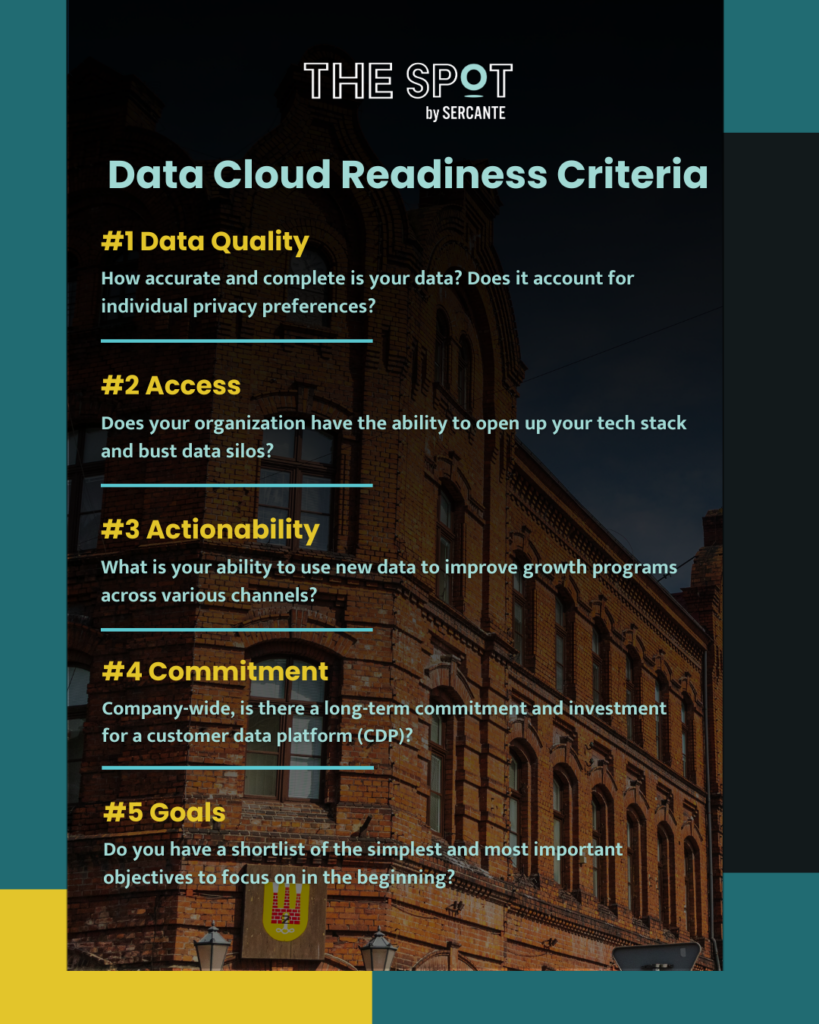
Data Cloud Readiness Criteria

Consider these five key aspects:

  1. Data Quality: How accurate and complete is your data? Does it account for individual privacy preferences? 
  2. Access: Does your organization have the ability to open up your tech stack and bust data silos?
  3. Actionability: What is your ability to use new data to improve growth programs across various channels?
  4. Commitment: Company-wide, is there a long-term commitment and investment for a customer data platform (CDP)?
  5. Goals: Do you have a shortlist of the simplest and most important objectives to begin with?
data cloud readiness criteria

Get a Data Cloud Readiness Assessment

We’re here to assist you in preparing for Data Cloud. Reach out to explore our Data Cloud Readiness Assessment offering so you can be sure your organization is primed for success.

Product Note: Marketing Cloud Growth and Advanced are editions of Marketing Cloud Next and have also been referred to as Agentforce Marketing.

ICYMI: Salesforce dropped a hot product announcement yesterday. And she’s called Marketing Cloud Growth Edition

There was a flurry of blogs and social postings following the official drop of the Salesforce press release, notably: 

To hear some talk, MC Growth Edition is going to instantly change everything and be the best thing in the world. 

On the flip side of the spectrum, I’ve seen some hyper-skeptical commentary around MC Growth Edition. “It’s SMB only”, “It’s going to take years to catch up”, and “You don’t have to worry about this now,” (I’m sensing a twinge of fear/self-doubt intermingled in these statements, though).

Like most things involving extreme opposites, the current reality and answer to “What is Marketing Cloud Growth Edition?” is somewhere in the middle of these two takes.

Let’s dig into some of the nuances here and read the tea leaves. If I could boil this down to a top 5 highlights, they would be: 

1) Marketing Cloud Growth Edition is built on “Core,” and that’s a fundamental advantage for innovation 

Marketing Cloud Growth Edition is built on the Einstein 1 platform — aka the same underlying infrastructure as Sales Cloud, Service Cloud, Experience Cloud, Data Cloud, and recently, Commerce Cloud. 

Marketing Cloud Engagement is NOT on core today (but it’s integrated).

Pardot / Marketing Cloud Account Engagement IS on core… kind of. It’s a blend of on and off-core. Call it “near core” if you need another buzzword for your collection.

Many long-time Pardot customers have been rallying around the vision for “Pardot on Platform” for the last several years. And if you’ve been watching closely, you may have noticed that many of the product enhancements delivered in recent years have been either built-in core, rely heavily on components from core, or had prerequisites of things like enabling SSO with core. 

Why does this “on core” distinction matter, though? The simplified answer is that as new things are released, you can take advantage of those within other “on-core” tools. Examples would include things like Flow for automation, UI enhancements like Path, improvements to Salesforce reporting functionality, etc. These product innovations can be leveraged for the most part across objects and clouds that are built on core. 

So TL;DR — MC Growth Edition being on the Einstein 1 platform means that when enhancements are added to Salesforce and Data Cloud, we don’t have to wait for an integration to come out to use them in the marketing department. We will be able to take advantage of these enhancements immediately, in many cases.

2) The significance isn’t what’s available now — it’s about the vision 

In subsequent posts on The Spot, we’re going to be getting way in the weeds of how MC Growth Edition works and outlining functions and constraints of the current builders. 

There will be edition comparison guides.

Screenshots.

Pros & cons lists.

But amidst all of this, I would emphasize that what’s generally available now isn’t the important thing to look at unless you are actively evaluating a platform to purchase in the next 30 days. The exciting thing about MC Growth Edition is about where the product is headed.

Salesforce has an aggressive vision for this, and looking at the speed with which Data Cloud has grown, I’m betting on them to move FAST.

3) Expect to see a focus on unifying builders & tooling 

A friction point for existing customers is there are usually several ways to do things in different clouds. We have two email builders in Pardot. Another email builder in Salesforce. And an entirely different content builder in Marketing Cloud Engagement. 

Expect to see these tools start to converge, with Marketing Cloud Growth Edition as the first mover for shared functionality. 

One email builder. 

One landing page builder. 

One segmentation engine (built on Data Cloud).

(P.S. The buzzword for this concept is “composable services” — as a new tool is built, expect to see it designed in a way that it can be used and leveraged in multiple parts of Salesforce. We’re already seeing examples of today for more behind-the-scenes things of Pardot/Marketing Cloud, like the backend email sending engine.)

4) This makes AI real 

I’ve been listening quietly to all of the headlines about generative AI for the last year. 

Listening, because as Thumper says, “if you can’t say something nice, don’t say nothing at all.” 

The picture has been painted like this: 

  • You’re working with smart marketing automation tooling
  • You log in and the system can suggest a target audience for you 
  • It can suggest a product offer for you 
  • Heck, it can write your content from a campaign brief 
  • AI tells you when to send your email
  • AI makes it omnichannel 
  • Campaign results come flooding in… and yes, AI analyzes that for you too 
  • We cheers with our Mad Men era old fashioneds because the computers do all of the heavy lifting for us

That sounds nice, but also super unattainable with today’s tooling.

The elephant in the room: No one’s data is that organized. Systems remain super siloed. And the systems most customers are on today don’t solve for that. 

Until now. 

Marketing Cloud Growth Edition is the vision for how we move past that. It’s the beginnings of the shared infrastructure and unified data that get us to the AI-shaped pot of gold at the end of the rainbow.

Bring on the robots.

5) Existing customers are going to see the benefits too… without switching

Customers new to marketing automation, or new to marketing with Salesforce should absolutely evaluate MC Growth Edition.

Pardot and Marketing Cloud Engagement customers should wait a bit before asking themselves “Should I switch?” Largely because they may find they get some of the “good stuff” without having to switch.

We had two team members (one from a Pardot background, and one who’s an OG ExactTarget pro) participate in the pilot of MC Growth. What we saw is that Salesforce is thinking very carefully about how to share the value of the development work being done in MC Growth with its existing customer base. 

Over the next few months, customers will start to see new features you can opt into or just turn on in your org. It’s not going to be a “migration” or a requirement to move anything — just a gradual transformation and growth in the tools that are available to you as more of these composable services are built and shared.

The future looks bright 

One thing is for sure — the next chapter is going to be anything but boring for marketing technologists on the Salesforce platform!  I’ve never been more excited to grow in this ecosystem <3

Product Note: Marketing Cloud Growth and Advanced are editions of Marketing Cloud Next and have also been referred to as Agentforce Marketing.

Earlier today, Salesforce announced the release of Marketing Cloud Growth Edition. This innovative new product is another option for marketing automation built natively on the Salesforce platform and comes with Einstein Generative AI and Data Cloud out of the box. 

You might be wondering: What is this new product, really? What does this mean for the future of Marketing Cloud Account Engagement and Marketing Cloud Engagement? Well, we have answers to help you understand the ins and outs of the platform, what to expect, and what to consider for the near future. Let’s get started!

What is Marketing Cloud Growth Edition?

Marketing Cloud Growth Edition is the culmination of years of Salesforce working to bring marketing automation into the Salesforce platform (also known as “Einstein 1”). This new marketing automation platform allows you to build multi-channel campaigns with the unified customer data of Data Cloud, build personalized marketing assets with the power of Experience Cloud, and automate customer journeys with Salesforce Flow

Marketing Cloud Growth Edition also includes Generative AI and content approval processes out of the box to help streamline your Marketing efforts. 

What does this mean for the future of Marketing Cloud Engagement and Account Engagement?

If you’re an Engagement or Account Engagement customer, you may be thinking “But what does this mean for the future of my product?”

This is what we’re most excited about. Because Marketing Cloud Growth Edition is built on Einstein 1, existing customers of Engagement and Account Engagement will eventually get access to features and functionality introduced to this new product. In addition, Marketing Cloud Engagement and Account Engagement continue to have a robust product roadmap. 

Said differently: Marketing Cloud Growth Edition is another option for organizations that want to bring their marketing operations into Salesforce. If you’re a current Engagement or Account Engagement user, you’ll eventually have the option to use Growth alongside your current platform. So, think of it more as an additional set of features that are available to you. 

Who is Marketing Cloud Growth Edition meant for?

Marketing Cloud Growth Edition is a logical option for small and medium-sized businesses that are new to the Salesforce platform but aren’t currently using marketing automation tools. 

If you’re already using Marketing Cloud Engagement and Account Engagement, then you don’t have to take any action right now. However, watch for future announcements to see when you’ll get access to Marketing Cloud Growth features to use along with your existing tools.

What marketing functionality is included?

Marketing Cloud Growth Edition is feature-rich when it comes to building assets, and the builders provide a flexible and intuitive user experience. 

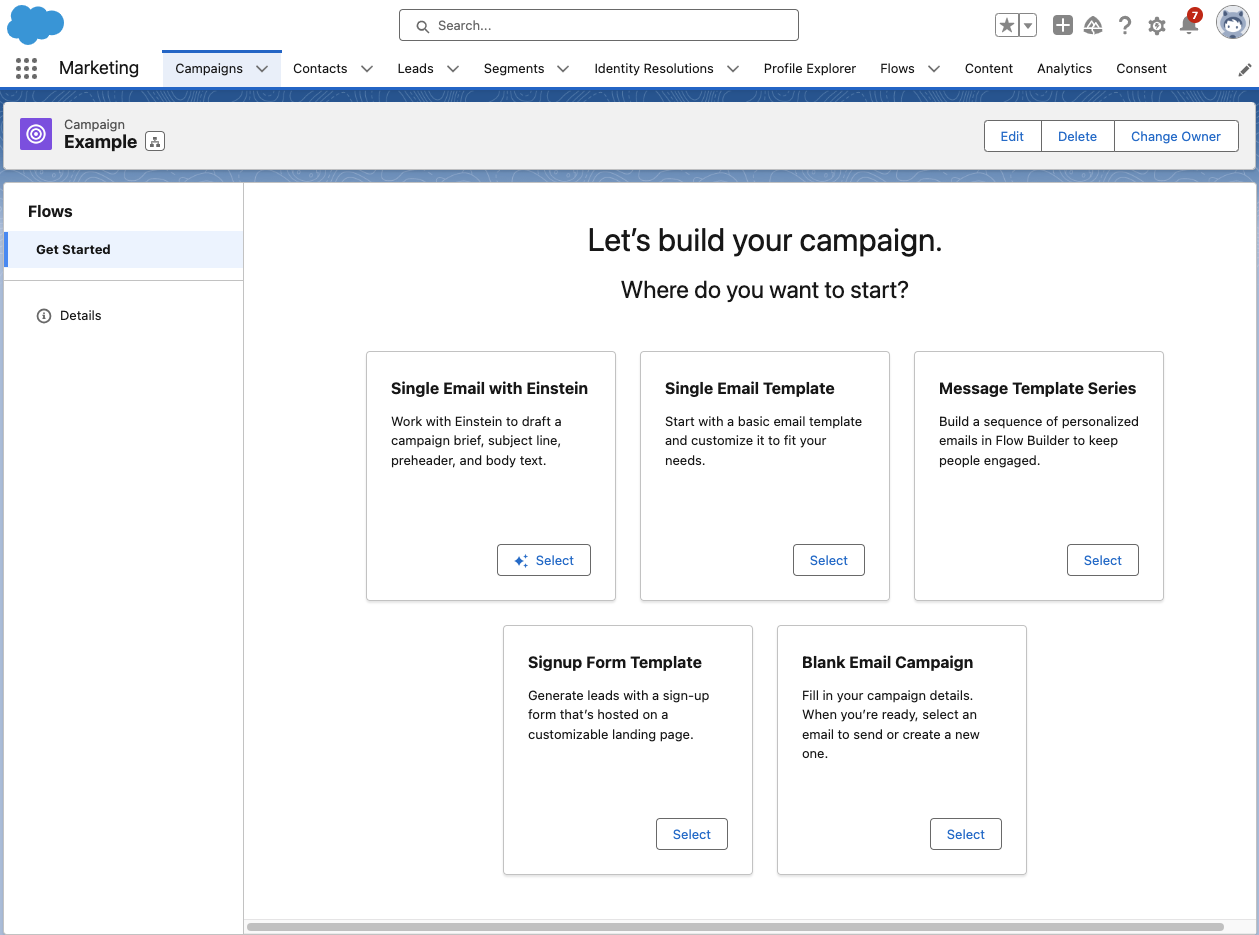
Growth has a campaign-centric workflow and guides users through the process of setting up a new campaign with five pre-set options:

Let’s go through each of these options and what they provide.

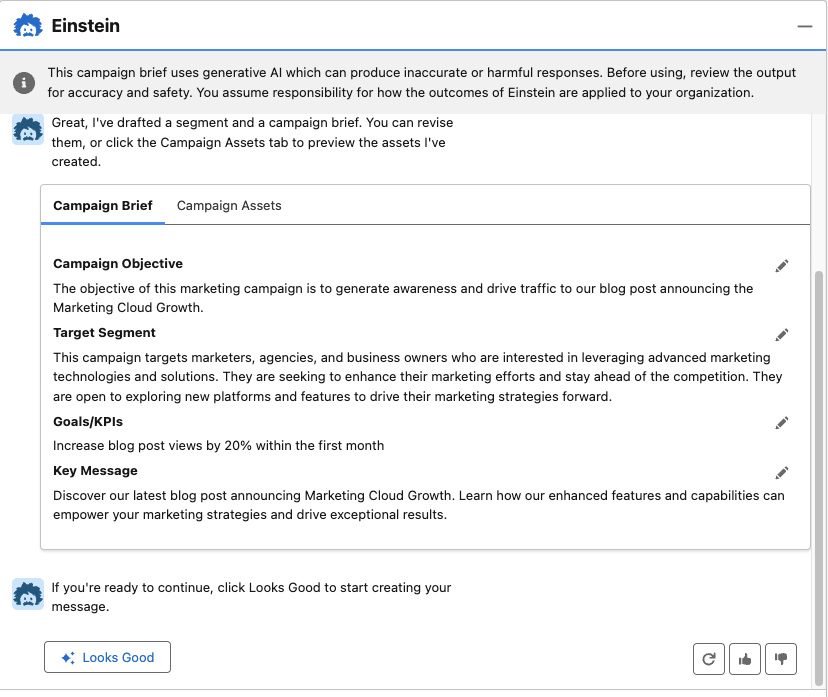
  • Single Email with Einstein: Build your email campaign using Einstein’s generative AI. With this option, you are prompted to describe your email objective (the more detail the better), and Einstein will generate a campaign brief and campaign assets. With all of the content Einstein provides, you can choose to edit, regenerate, and/or upvote and downvote to help the AI learn how to produce better results. 
  • Single Email Template: Begin with a responsive Salesforce email template that you can customize for your campaign.
  • Blank Email Campaign: Start completely from scratch. With this option, you’ll need to add/create your email and segment. A Flow with an empty send email element will also be created to help when you’re ready to send your email. 
  • Message Template Series: Begin with two responsive Salesforce email templates that you can customize for your campaign. This option also provides a flow with a 1-day wait step between emails, but you can customize the flow further to fit your email journey. 
  • Single Form Template: Begin your campaign with a responsive Landing Page template, form, and a flow to create Leads when the form is filled out. 

Building marketing assets with Marketing Cloud Growth 

Marketing Cloud Growth’s assets are built with Experience Cloud, enabling users to easily build responsive assets with a drag-and-drop builder. We’ll do a deep dive into each builder in future blog posts, but, for now, here are some highlights to get excited about:

  • Landing Page SEO capabilities: Landing page public page titles, descriptions, URLs, and even favicons can be customized to improve SEO.
  • Form flexibility: The form builder is intuitive and flexible, allowing users to easily add text, new sections, dividers, placeholder text, and images to forms. 
  • View required form fields: The form builder also allows users to easily view which fields are required for new Lead/Contact creation to ensure any new records can be created successfully.
  • Salesforce Flow automation: All assets are automated with Salesforce Flow, allowing marketers to get granular and customize the next steps and follow-up activities for every asset.
  • Wait step flexibility: Users can set Salesforce Flow wait steps to wait minutes, hours, days, months, or to resume at a specific time.
  • Asset approval workflow: All marketing assets have an optional approval workflow that you can integrate into your marketing team’s existing approval process flow.

(As I mentioned above, we’ll be doing a deep dive on the builders in subsequent posts — so if you have a question on a specific feature, let me know in the comments!)

Marketing Cloud Growth AI capabilities

Marketing Cloud Growth Edition includes AI out of the box so you can take your marketing initiatives to the next level. 

Marketing Cloud Growth Edition AI features include:

  • Einstein Co-Create: Easily build campaign briefs, email assets, and Data Cloud segments with the power of Einstein generative AI.
  • Einstein Send Time Optimization: Ensure prospects receive marketing messages on the day and time they are most likely to engage. 
  • Einstein Metrics Guard: Protects your email activity data by filtering out email security scanner clicks and opens.
  • Einstein Segment Creation: Assists marketers with creating specific audience segments in Data Cloud.

Get ready for Marketing Cloud Growth

I’m excited about the announcement of Marketing Cloud Growth Edition and for the vision of “Marketing Cloud on Einstein 1.” Remember, it will not replace Marketing Cloud Engagement or Account Engagement. If you’re part of a team that’s on the Salesforce platform but not using Salesforce tools for marketing automation, then you may want to explore if this new tool is the right option for you.

Be sure to return to The Spot for more posts about Marketing Cloud Growth. We’ll share all our learnings, tips, and tricks here to help all of you to be successful.

Want to know more about Marketing Cloud Growth, like, today? Then reach out to the team at Sercante to start a conversation.

Wow, where did the time go? The Salesforce Spring ‘24 Release notes are out and some cool new features are right around the corner!  Here are the key Salesforce platform features marketers and Salesforce admins should know about. You can also get a closer look at the features from an Account Engagement admin’s perspective in this blog post.

Salesforce Spring ’24 User Interface (UI) Updates

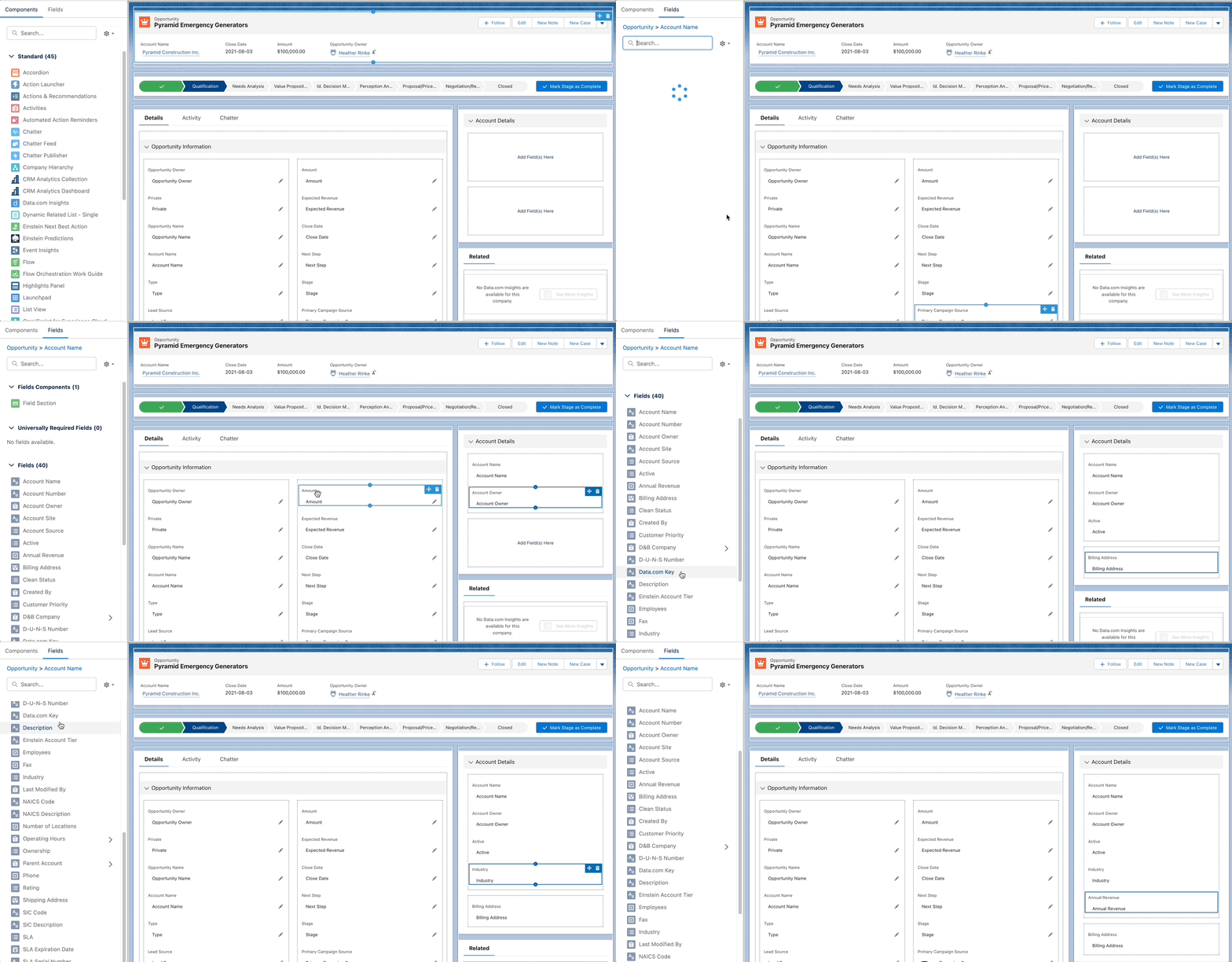
Add Fields from Related Objects to Dynamic Forms-Enabled Pages 

Salesforce continues to build on Dynamic form capabilities by extending the functionality to access fields from related objects. I’m very excited to see this in place, as this is a common ask that previously would have to be delivered using less-than-simple methods. This Idea has been around since 2006 and has logged more than 35,000 points!

Customization Updates for mobile:

This release also includes features that will bring more design flexibility by device, and making the user experience more relevant based on how they are working:

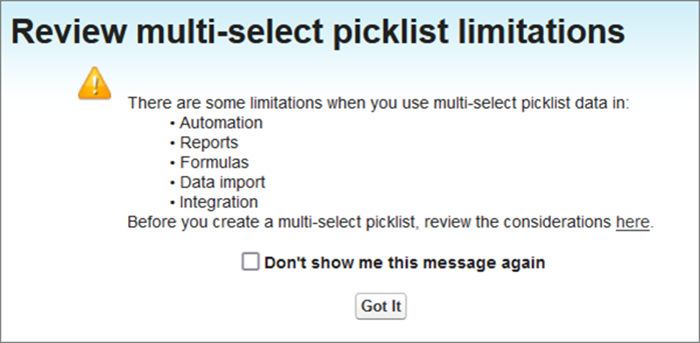
Confirmation Message When You Select the Multi-Select Picklist Field Type

You can say Multi-Select picklists are sort of like raisins much like tags in Account Engagement. For some they are useful for their use case, and for others, they are a no-go because of their limitations (if you’ve tried to use them in reporting or automation you know what I mean 😉) 

Now, when you create a new field and select the Mutli-Select picklist data type, you will be presented with this pop-up highlighting the limitations to make sure this is the right approach before creating.

Reporting & Dashboard Updates

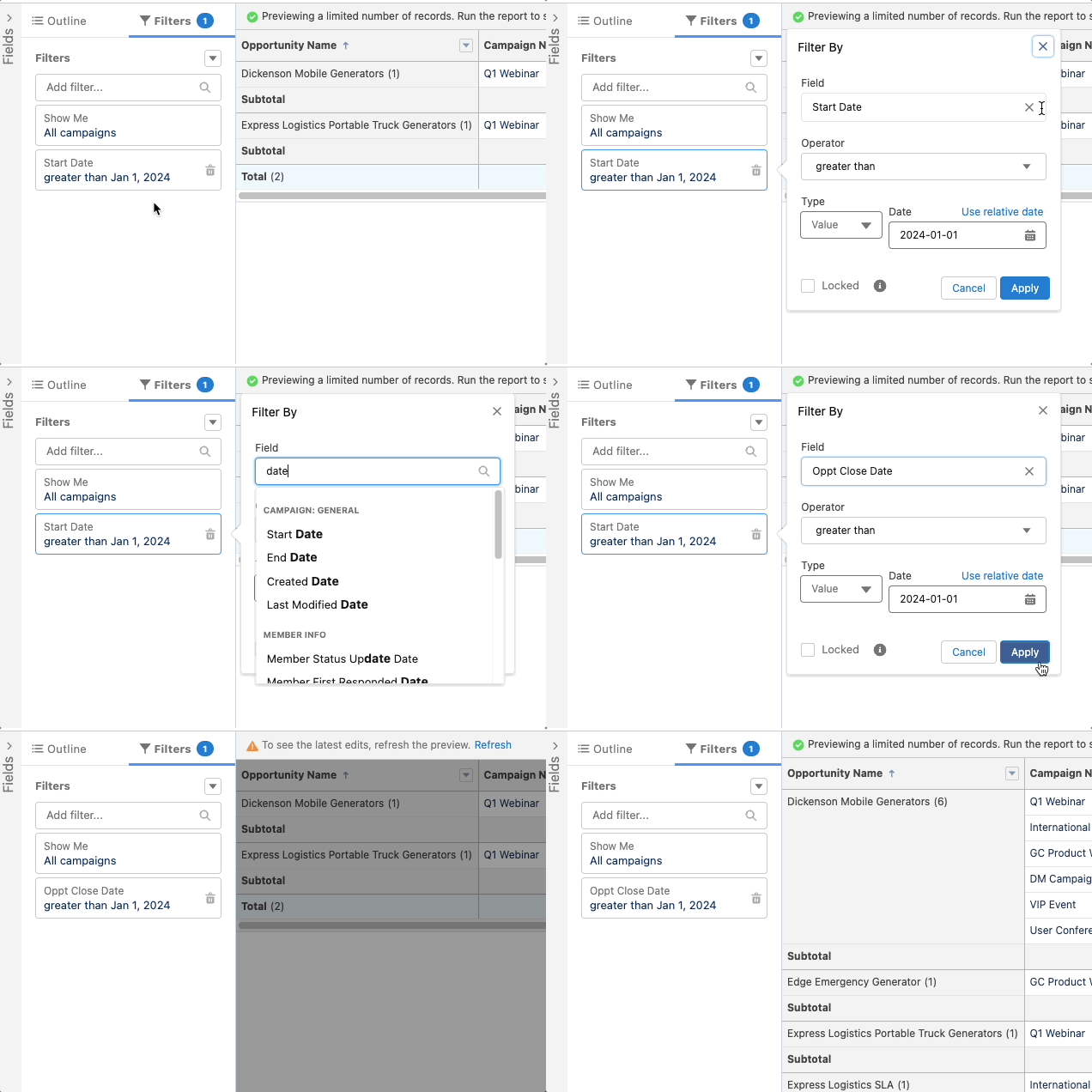
Easily Update Fields in Lightning Report Filters

This little update will probably save admins a lot of headaches. No more having to completely remove a filter to update it.  Now you can update the field being used in the filter. If you realize after building a report that you used the wrong date filter, all you have to do is swap the data field. The criteria remain intact.

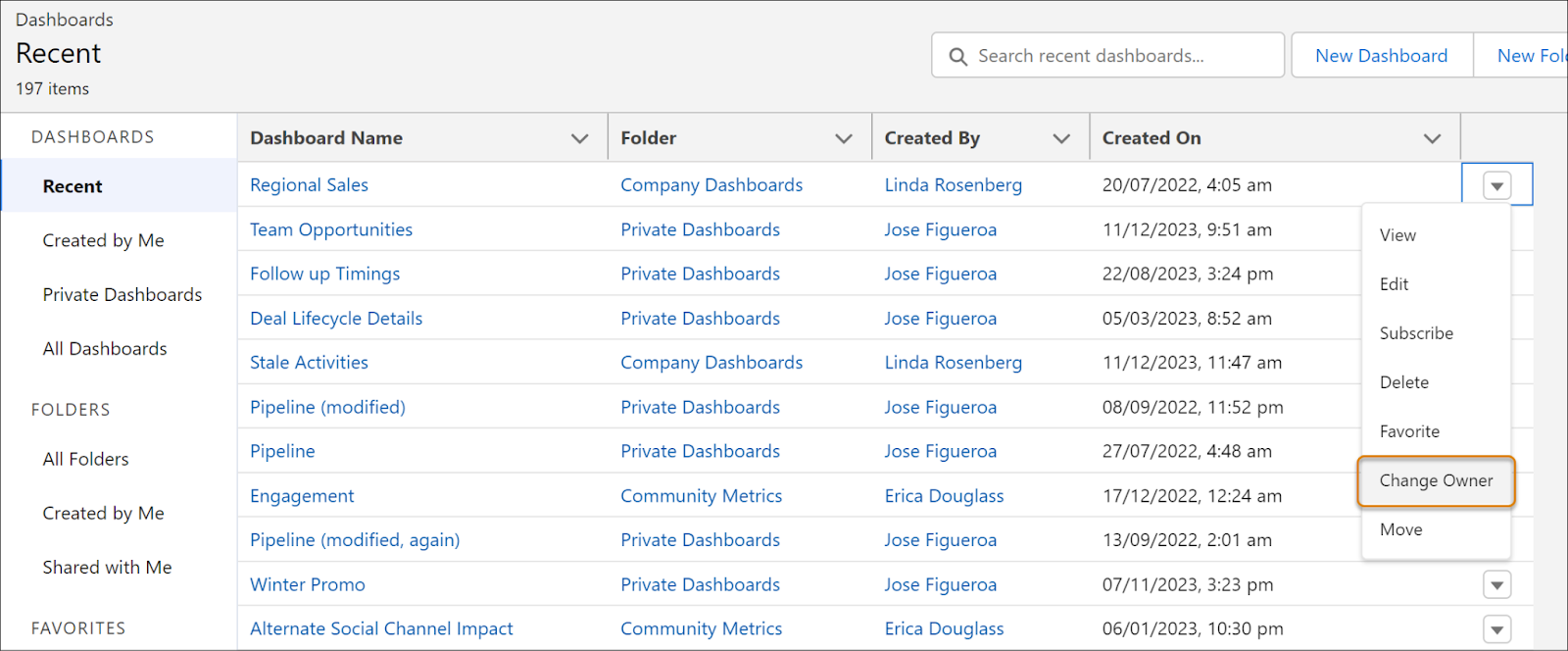
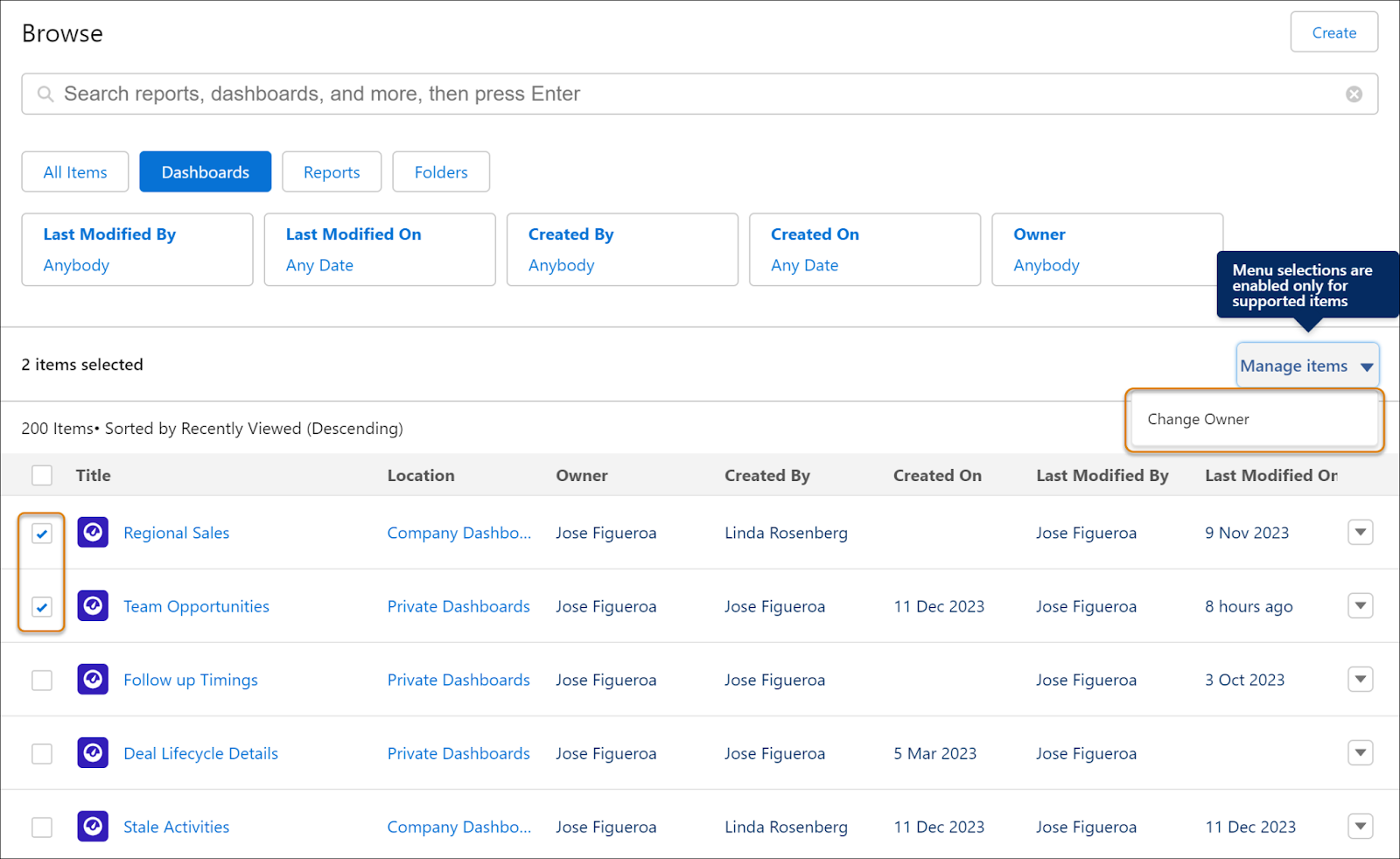
Transfer Lightning Dashboard Ownership (Generally Available)

When someone leaves your organization, it’s now easier to transfer ownership of the dashboard to another user. In the past this had to be achieved by cloning or recreating the dashboard. 

In the Lightning Dashboard view, you can transfer ownership one dashboard at a time 

If you’re using the new Analytics tab, you can select multiple dashboards and change the owner for all selected at once.

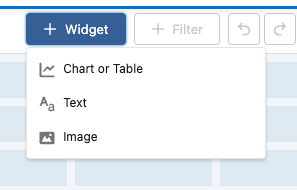
Add Images, Rich Text, and Widgets to Dashboards in All Editions

Now you can add images or rich text widgets to make your dashboards more engaging with logos, contextual images, titles and descriptions. This feature previously available only in Unlimited and Premium editions is now available for all editions!

Five dashboard Filters now in All Editions

When creating dashboards you now can use up to five filters to give users even more ways to slice and dice the way they want and get the key information they need.

Automation Updates 

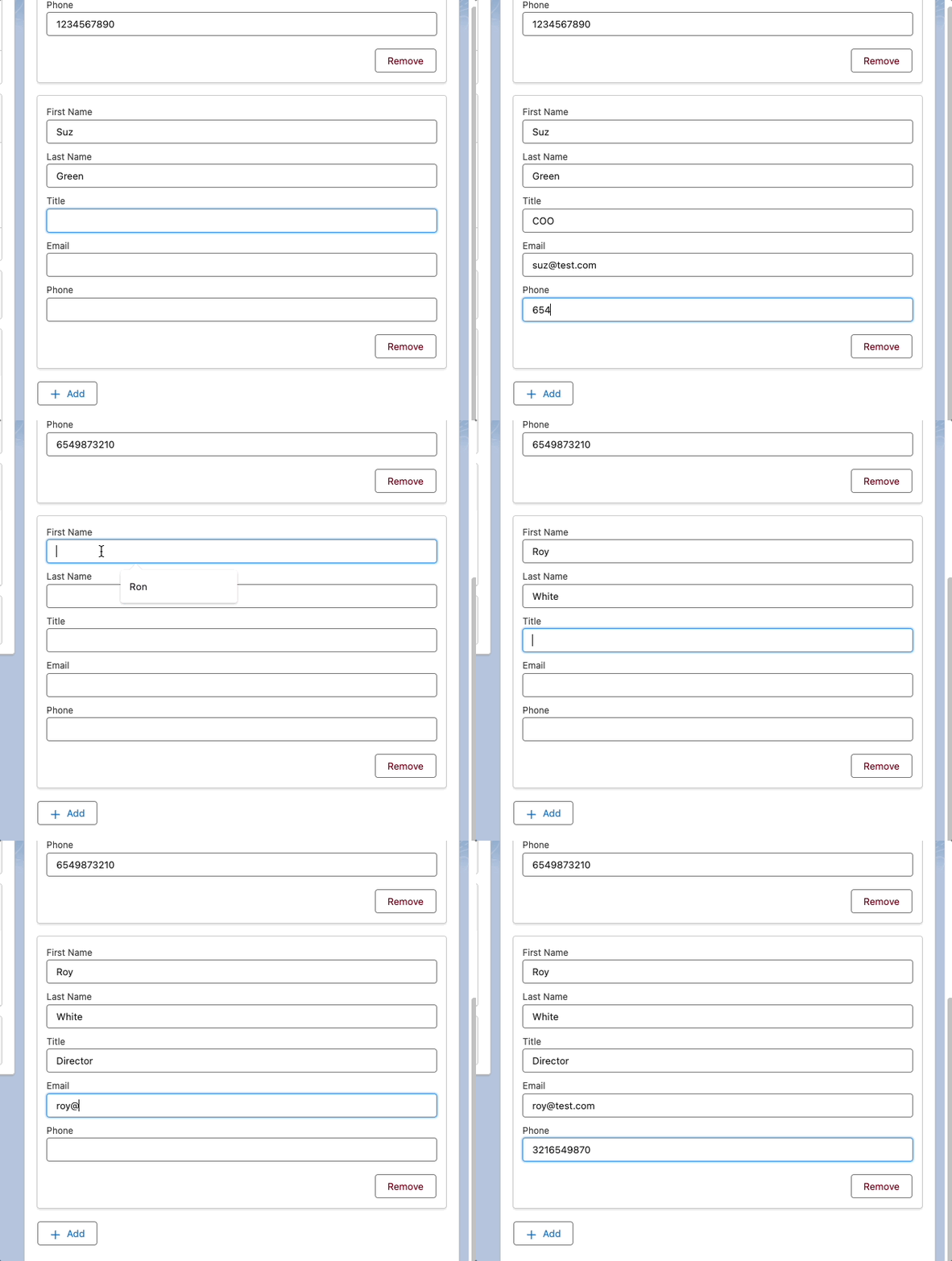
Create Multiple Instances of a Set of Fields with the New Repeater Component (Beta) 

I was very excited to see this feature, which lets users create multiple records in a single screen element. This will be ideal in situations like adding project members to a project team, or even providing a quick custom Create Contact flow. Users just populate the info for one record, then hit Add Item and new form appears allowing them to create the next one!

Supported fields include: Text, Number, Checkbox, Date, DateTime, Currency,Choices (except Choice Lookup), Display Text, Long Text Area

More Awesome Reactivity in Screen Flows

Screen flows have been getting a lot of reactivity love over the last few releases, and Spring ‘24 is no exception. Here’s a summary of features from this release:

Identify Flows Containing Email Alerts

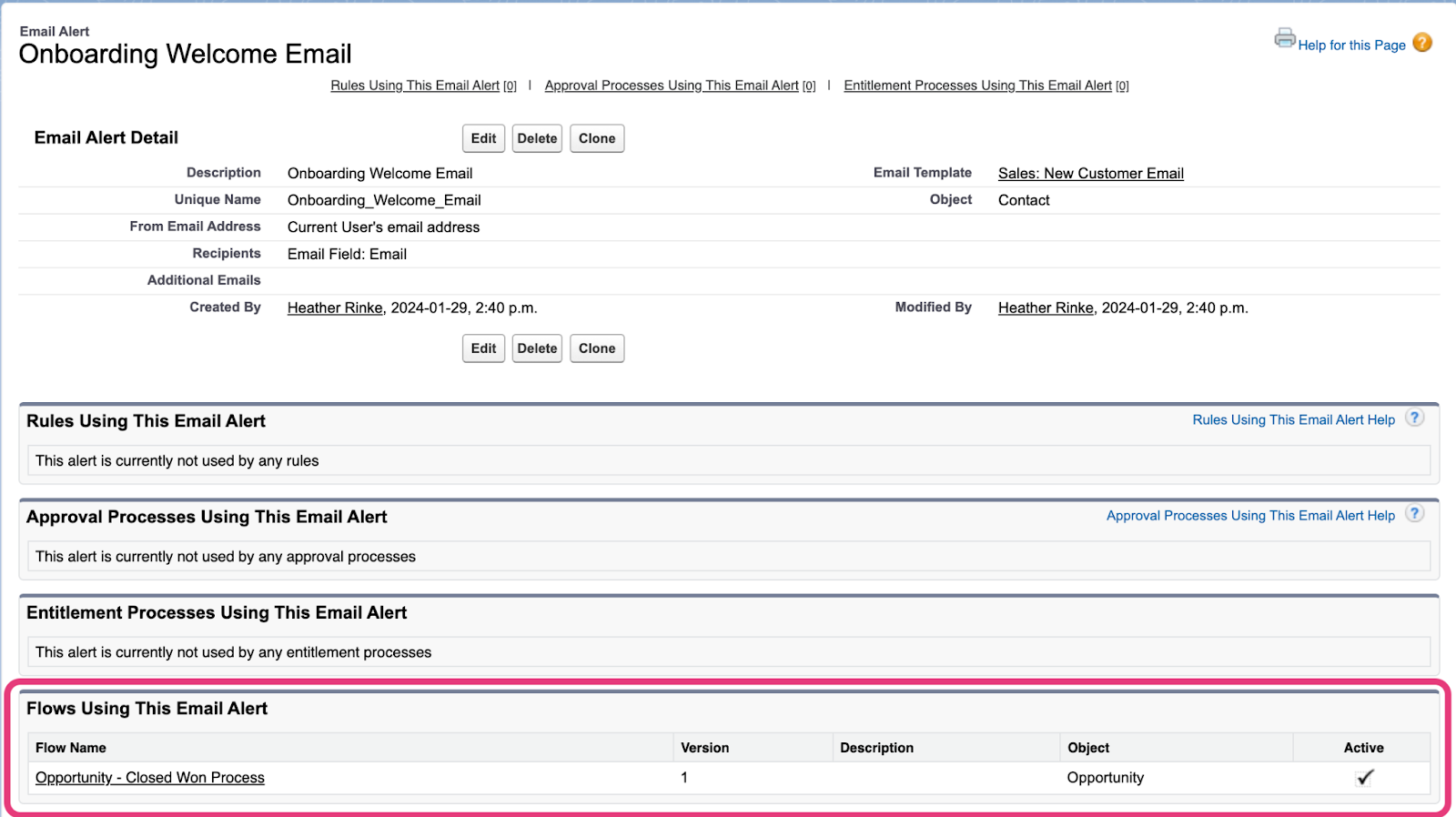
On the Email Alerts page, you can now see what flows are using that alert, and whether the flow is active. This can be great if you’re looking to update your emails and want to understand what processes will be impacted by the change.

Other Notable Spring ’24 Release Updates

Marketing App is being Renamed

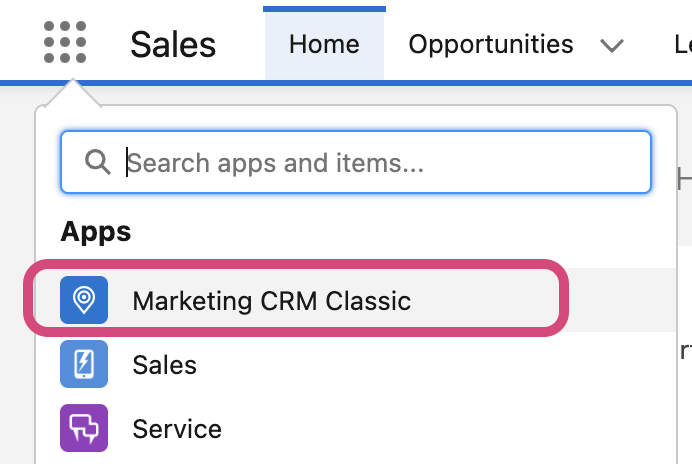
If you typically use the out-of-the-box Marketing App to access your Campaigns, Leads or Contacts, you’ll notice that the all has been renamed to ‘Marketing CRM Classic’. There doesn’t seem to be any change to the features available beyond the name change, though.

Get Help Understanding Salesforce Spring ’24 Release Enhancements

Contact the team at Sercante to get help implementing these enhancements in your Salesforce org. And leave us a comment below to let us know what you think about the Spring ’24 Release.

Salesforce Spring ‘24 release notes are out! Here are the most important features coming to Account Engagement that marketers should know about.

Einstein Assistant

More AI functionality is coming to Account Engagement! With the Spring ‘24 release, Account Engagement Advanced and Premium editions can now utilize generative AI to create Landing Pages, Forms, and List Emails. When creating or editing assets, Einstein Assistant will prompt you to describe what you’re building to auto-generate copy or details for each asset type.

  • Landing Pages: Einstein Assistant will suggest a name, tags, title, and description.
  • Forms: Einstein Assistant will suggest a name, tags, “look and feel” tab description, headlines, and paragraphs. 
  • List Emails: Einstein Assistant will suggest subject line, header, and body copy content.

Once this feature is available, Einstein Assistant will need to be enabled per Account Engagement Business Unit

Interested in what else Einstein for Account Engagement can do? Check out our previous blog posts!

Updated Lightning Email Builder

The Lightning Email Builder is getting an update! Details are sparse on what additional features this new builder will bring to the table, but I am excited to see the Lightning Builders continue to grow. What we know for now is that users will be able to choose between the new builder and the existing builder when creating or editing Email Content. This feature won’t be out until after the Spring ‘24 release, so keep an eye out for more info once the updated builder is released. 

Check out our blog post, Everything to Know About the Pardot Lightning Email Builder, for more on the existing features and functionality.

Account Engagement + Data Cloud

The connection between Account Engagement and Data Cloud continues to grow stronger, allowing you to better personalize your marketing efforts. With the Spring ‘24 release, you can import your email engagement data into Data Cloud and create an email engagement data stream. Ensure you’ve connected your Account Engagement Business Units to Data Cloud with the new connector that was released as part of Summer ‘23.

2024 Email Platform Changes

Gmail and Yahoo recently announced changes to their spam prevention methods that create new requirements for bulk senders. These changes have three main impacts for Account Engagement users:

  1. Ensure your Account Engagement sending domain is verified with DKIM.
  2. Provide a one-click unsubscribe that is processed within a two-day timeframe.
    • Account Engagement users are already covered with native functionality. All Account Engagement emails automatically contain a list-unsubscribe header and an email preference center and/or unsubscribe link is required on all emails. Account Engagement processes unsubscribes immediately, so no need to worry about the two-day window. 
  3. Keep Spam Rates below 0.3%
    • Account Engagement requires users to keep Spam Rates below 0.1%, so users are again covered with native functionality. 

Other Updates

The Twitter Connector is officially retired as of October 31st, 2023

Last August, Twitter, or “X”, changed its API terms, which in turn broke the Account Engagement to Twitter connector. Without this connector, users will no longer be able to use Social Posting for Twitter and can no longer ingest engagement statistics for existing Twitter posts. 

API Updates

Version 5 of the Account Engagement API now supports creating and managing forms and returns start and stop fields for Engagement Studio Programs. Version 5 has also been updated to provide better error reporting when using the Bulk Asset Copy Flow.

Get Help Understanding Salesforce Spring ’24 Release Enhancements

Contact the team at Sercante to get help implementing these enhancements in your Salesforce org. And leave us a comment below to let us know what you think about the Spring ’24 Release.

No more posts to show