Category

New Features

As part of the Winter ‘24 release, Account Engagement users gained the ability to copy assets to and from Account Engagement Sandboxes. This allows marketers to test automations and assets before pushing them to their Production Account Engagement org. It also allows them to pre-populate Sandboxes with assets so they don’t have to start from scratch. 

The Account Engagement to Sandbox-to-Production Flow currently supports seven asset types: 

  1. Email Templates
  2. Custom Redirects
  3. Custom Fields
  4. Files
  5. Engagement Studio Programs
  6. Layout Templates
  7. Form Handlers

Account Engagement Sandbox-to-Production Flow Installation Instructions

To start using the Sandbox-to-Production flow, you will need to create a Connected App and two named credentials. 

Step 1: Create the Connected App in the Sandbox Org

This provides the interface to authenticate into an org.

  1. In your source org (Production), grab the Sandbox Asset Auth Flow callback URL.
    • Go to Setup > Auth. Providers
    • Open the Sandbox Asset Flow Auth
    • Copy the Callback URL, you will need this shortly
  2. In your Sandbox org, navigate to Salesforce Setup > App Manager and then select New Connected App.
  3. Configure the Connected App as follows:
    • Connected App Name: MCAE Sandbox to Production
    • Contact Email: Email Address of the admin who will be managing the Sandbox-to-Production promotion process. 
    • Enable OAuth Settings: Checked
    • Callback URL: The Source Org Callback URL you copied in step #1
    • Selected OAuth Scopes:
      1. Access the Salesforce API Platform (sap api)
      2. Access unique user identifiers (openid)
      3. Manage Pardot services (pardot_api)
      4. Manage user data via APIs (api)
      5. Manage user data via Web browsers (web)
      6. Perform requests at any time (refresh token, offline_ access)
    • Require Secret for Web Server Flow: checked
    • Require Secret for Refresh Token Flow: checked
  4. Select Save
    • Note: It may take 10-15 minutes for the connected app to be ready for authentication.
  5. Select Manage Consumer Details
  6. Copy your Consumer Key and Consumer Secret for later use.

Step 2: Update Auth Provider in Production Org

This handles the authentication process.

  1. In your Source Org (Production), enter the Consumer Key and Consumer Secret from your Connected App
    1. Go to Setup > Auth. Providers
    2. Open the Sandbox Asset Flow Auth
    3. Select Edit
    4. Enter the Consumer Key and Consumer Secret
  2. Select Save

Step 3: Create an Account Engagement API Named Credential

This establishes access via an integration user to the Account Engagement API.

  1. In your Source Org (Production), navigate to Setup > Named Credentials
  2. Select New Legacy
    1. Note: Do not select “New”, it should be “New Legacy”!
  3. Configure the Named Credential as Follows:
    1. Label/Name: MCAE API Access
    2. URL: https://pi.demo.pardot.com
    3. Identity Type:  Named Principle
    4. Authentication Protocol: OAuth 2.0
    5. Authentication Provider:  Sandbox Asset Flow Auth
    6. Scope: Pardot_api refresh_token
      1. Make sure this says “pardot_api refresh_token”, not just “api refresh_token”
  1. Start Authentication Flow on Save: Checked
  2. Generate Authorization Headers: Checked
  1. Select Save
  2. Log back into the Sandbox org with your credentials. Doing so finalizes the authentication for the named credential.

Step 4: Salesforce Metadata API Named Credential

This establishes access via an integration user to the Metadata API to retrieve BU details.

  1. In your Source Org (Production), navigate to Setup > Named Credentials
  2. Select New Legacy
    • Note: Do not select “New”, it should be “New Legacy”!
  3. Configure the Named Credential as Follows:
    • Label/Name: Metadata API Access
    • URL: https://mydomainsandboxname.sandbox.my.salesforce.com, but replace “mydomain” and “sandboxname” with the value from your sandbox url.
      1. ex: https://sercante–testing.sandbox.my.salesforce.com
    • Identity Type:  Named Principle
    • Authentication Protocol: OAuth 2.0
    • Authentication Provider:  Sandbox Asset Flow Auth
    • Scope: api refresh_token
    • Start Authentication Flow on Save: Checked
    • Generate Authorization Headers: Checked
  4. Select Save
  5. Log back into the Sandbox org with your credentials. Doing so finalizes the authentication for the named credential.

Running the Flow

Before you run the flow, ensure the destination org has at least one Folder, Campaign, and Tracker Domain. If your destination does not have these assets, you will run into issues with the flow.

  1. In your Source Org (Production), navigate to Setup > Flow
  2. Open the Account Engagement Sandbox-Production Bulk Asset Copy Flow
  3. Select Run
  4. For “Named Credential for Salesforce API Access” select the Metadata API Access (step 4 above)
  5. For “Named Credential for Account Engagement API Access” select the MCAE API Access (step 3 above)
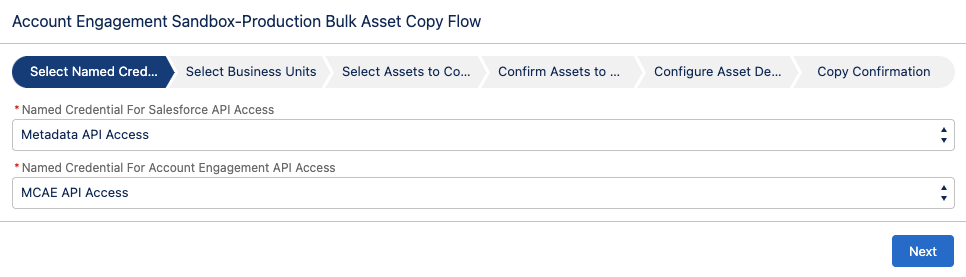
  1. Select Next
  2. Select your direction of Copy
    • From a Sandbox to Production
    • From Production to a Sandbox
  3. Select your Production and Sandbox Business Units
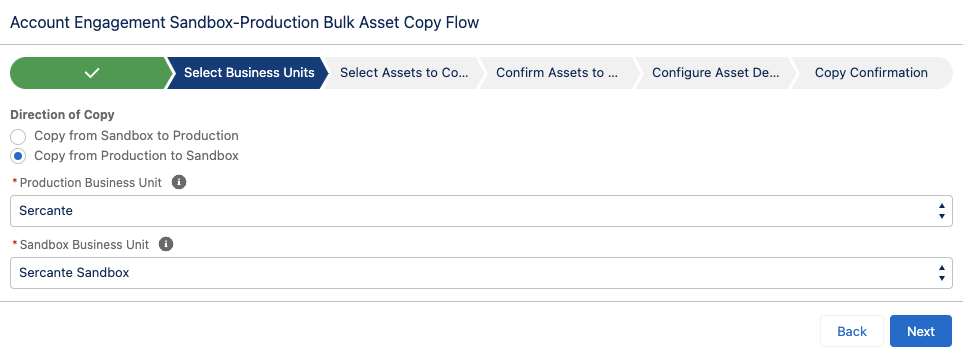
  1. Select Next
  2. Select assets to copy over, select Next
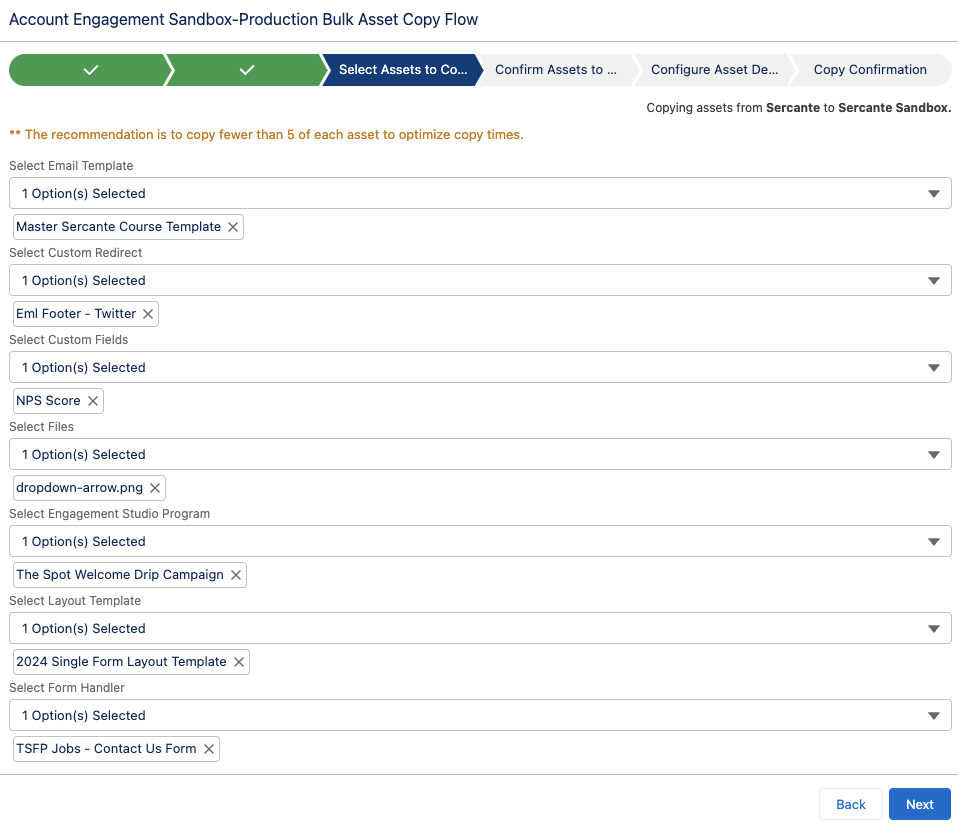
  1. Confirm the Assets, select Next
  2. Select your Folder, Campaign, and Tracker Domain for your new assets
  3. Select Copy Assets
  4. The final screen will provide details regarding the copied assets as well as let you know if there were any errors.
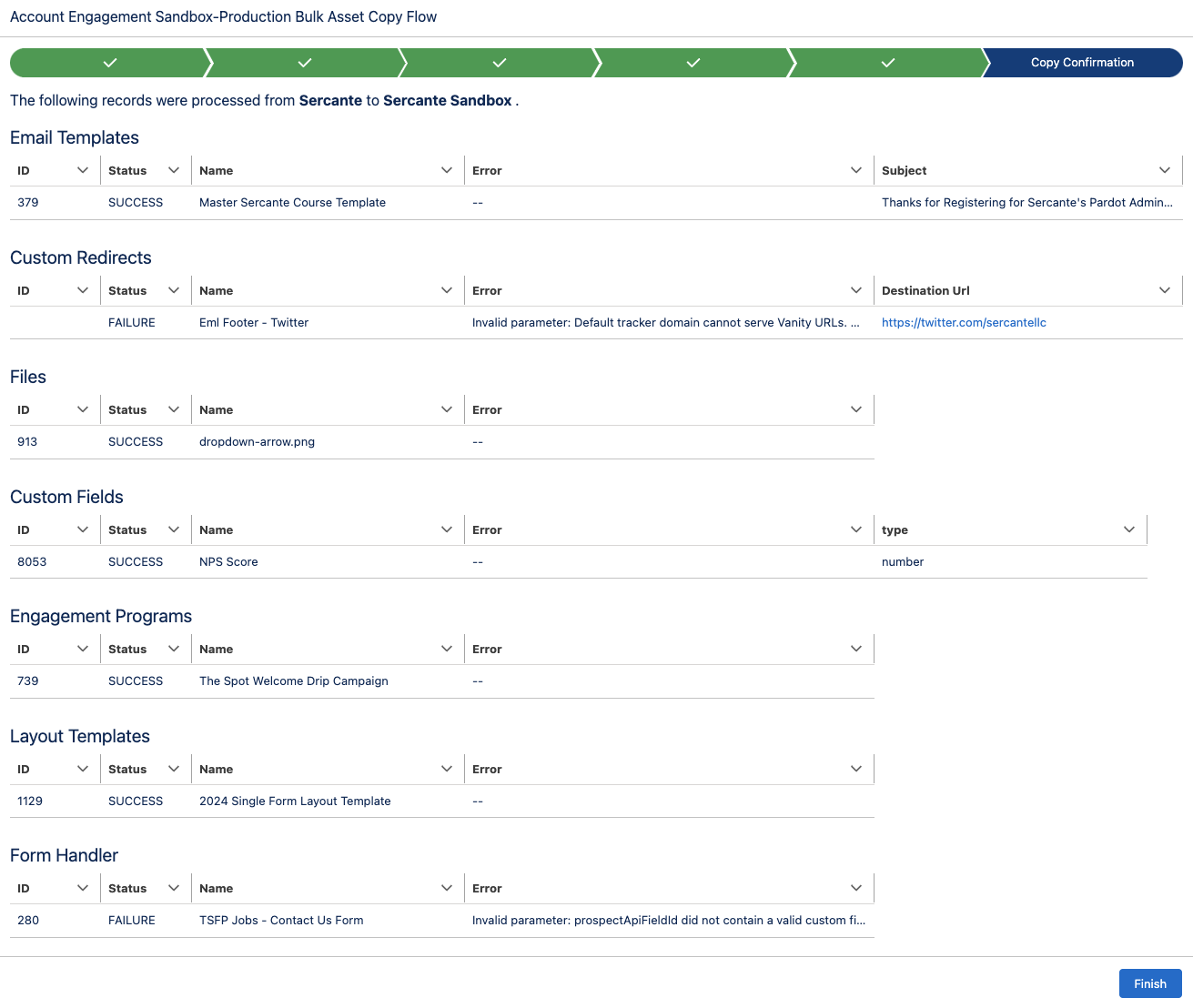
Considerations for Using the Sandbox to Production Flow

Since this is a new capability for Account Engagement, there are some details and settings that do not come over when copied. I thoroughly tested each asset type and below are the considerations that I found.

Tracker Domain

You must verify the Tracker Domain in your Sandbox. Otherwise, Email Templates, Custom Redirects, and Files will fail when the unverified Tracker Domain is selected. You can use the default tracker domain (go.pardot.com) but this will cause issues when copying over any Custom Redirects with a Vanity URL.

Email Templates

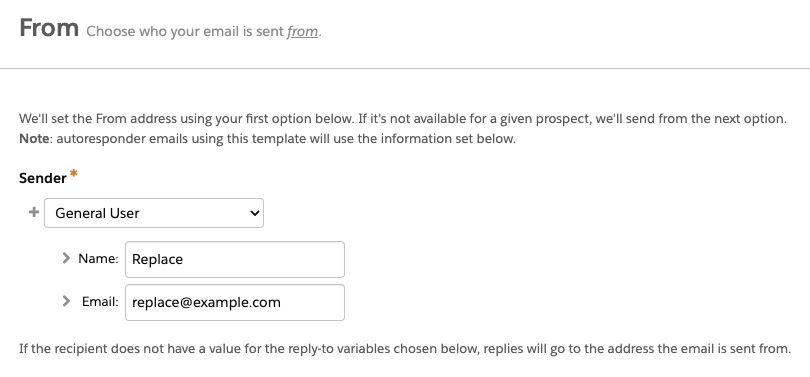
  • When copied, the email sender will be replaced by a General User with the email [email protected]. This applies even if you have a sender hierarchy specified using “Assigned User” and ‘Account Owner.”
  • Email Templates containing Dynamic Content will not copy over. This is because dynamic content is unique to the Business Unit. Even if you have the same Dynamic Content in each Business Unit, they will have a different asset ID and merge tag.
  • If the Email Template contains a merge tag for a field that is not in the destination org, the flow will fail. Ensure all needed fields are copied to the destination org before copying over any assets that use custom field merge tags.

Custom Redirects

A Custom Redirect’s Completion Action(s) will not copy over, however, the Google Analytics Parameter values do.

Files

During my testing, I tested PNG, JS, JPG, GIF, SVG, CSS, and PDF file types, and all successfully copied over!

Custom Fields

When you copy custom fields, only the following information comes over:

  • Field Name
  • Field API Name
  • Field Type

Engagement Programs

  • When you copy an Engagement Studio Program (ESP) only the ESP structure is copied. The Recipient List, Suppression lists, Send days/times, and “Allow prospects to enter more than once” settings do not come over and will need to be reconfigured.
  • The assets specified in a Trigger or Action node, such as email templates, landing pages, and forms, will need to be reselected in the new ESP. However, the number of wait days specified in the node will copy over. 
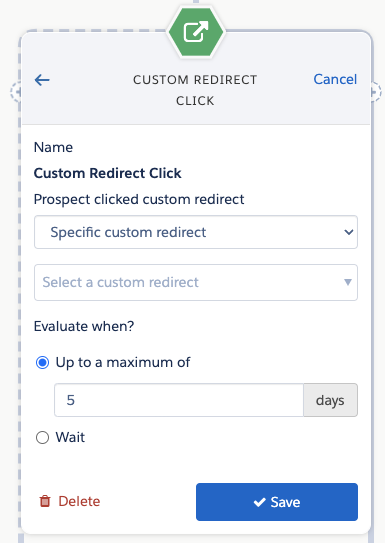


  • If an Action node looks at a Prospect field (i.e. Prospect default field “Job Title” is not blank) and that field is in both Production and Sandbox, then the node will be copied to the new ESP with the field and value/settings specified. If the field does not exist in both Production and Sandbox, then the Action node will still be in the ESP but the field and value/settings will need to be reconfigured. 

Layout Templates

If you use Dynamic Content within your Layout Templates, keep in mind that the Dynamic Content will not come over when the Layout Template is copied. You can copy the Dynamic Content over as a separate asset, but you will still need to edit the Layout Template in your destination Business Unit to make sure it has the correct Dynamic Content ID.

Form Handler

  • Ensure all the fields on the Form Handler exist in the environment you are copying to before copying the Form Handler.
  • If your Form Handler only uses Default Prospect Fields, then all of the fields will come over when the Form Handler is copied. However, if your Form Handler uses any Custom Prospect Fields, the custom field needs to be in the destination org before you copy the Form Handler.
  • When copied, the Success Location and Error Location details will copy over to the new asset. Completion Actions do not copy over.

Now it’s even easier to work with Account Engagement Sandboxes!

This new Flow is a huge step toward making Account Engagement Sandboxes user-friendly for testing and staging. What other capabilities would you like to see in this Flow? Let us know in the comments!

Welcome to the marketing side of Salesforce! As a Salesforce admin, you may occasionally need to assist your marketing team in developing processes or generating reports from data in Salesforce and Marketing Cloud Account Engagement (Pardot). Understanding Account Engagement and how it affects your Salesforce org can enhance your ability to contribute to those initiatives. 

7 Account Engagement Facts Salesforce Admins Must Know

In this blog, we will review several fundamental concepts in Account Engagement and how they relate to your role as a Salesforce Administrator. This guide is designed to provide you with insights from a Salesforce perspective about Account Engagement so that you can best support marketing and other teams using the platform. While these features are available to all organizations, access to the features can vary based on your org configuration and tier.

Tip 1: We call people “prospects”

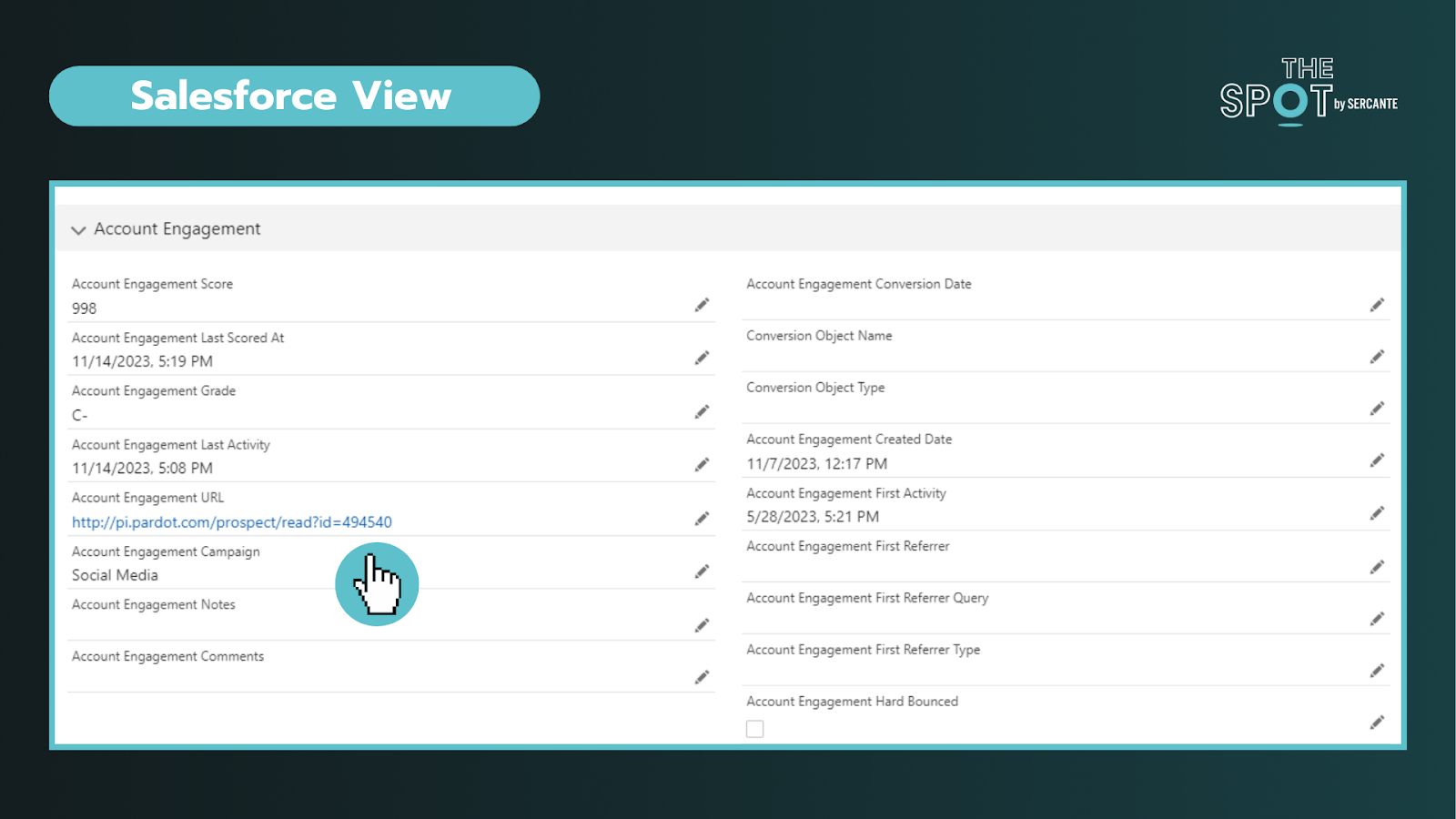
In Salesforce, you are accustomed to working with Leads and Contacts. While this does carry over, the platform labels “people-records” as Prospects. Prospects can exist solely in Account Engagement or be synced with existing Salesforce records.

Verifying Prospects are linked to Salesforce records

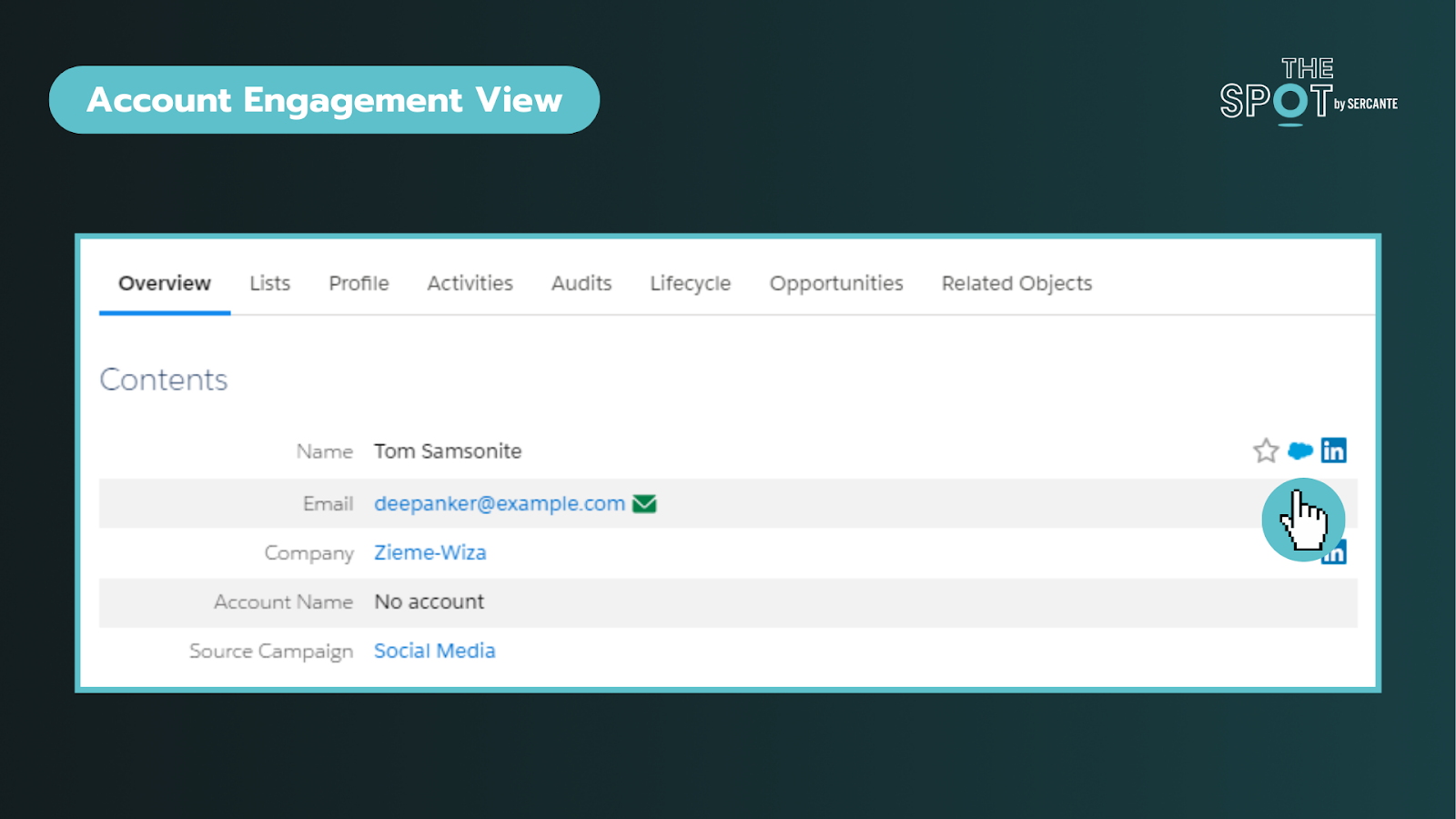
To verify that a Prospect is linked to a Salesforce record, you can click on an individual record and look for the Salesforce cloud icon listed on the right of their name (see above) or by the CRM ID listed at the bottom of the record. Clicking on this cloud icon will take you to the connected Salesforce record. In Salesforce, you can click the Account Engagement URL to bring you into the platform. This is particularly helpful when you are trying to diagnose data sync issues. 

Key reminders:

  • Records are matched using 18-digit IDs and email (if no matching record is found)
  • You can navigate from Salesforce to Account Engagement records and vice versa
  • Managing deleted records and duplicates may require additional effort across both platforms

Tip 2: Add visibility for sales and marketing teams in Salesforce

Enabling Account Engagement introduces several new fields, components, and features exclusive to the integration. You should review the implementation guide and work with your team to align on what information is valuable for sales and marketing to deliver on their respective functions.

The package includes fields like engagement score, fit (grading), what “object” they converted on, and a log of their latest activity in Account Engagement, to name a few. Additionally, depending on your tier, you may also find additional components you can take advantage of, such as B2B Marketing Analytics.

When mapping fields, not all Salesforce field types transfer seamlessly to Account Engagement. To avoid data loss, review your fields (including matching API names) and ensure they are mapped across objects in Salesforce before attempting to sync any data into Account Engagement.

Key reminders:

  • Field types may affect your ability to map fields into Account Engagement
  • Beware that Formula fields do not trigger sync updates in Account Engagement
  • Field level permissions and user profile access on the integration user can affect dataflow

Tip 3: Security matters but looks and works differently

Security is the #1 pillar of any Salesforce Admin role.

There are different levels of access you can give to Salesforce users via permission sets. Those levels include:

  • No access to Account Engagement data – on either platform: This is usually for operations teams who don’t need access
  • Access to Account Engagement data on a page layout in Salesforce: This is usually for sales/SDR teams
  • Access to the Account Engagement app: This is usually for marketing and creative teams


To enter the Account Engagement app, the user’s record must be mapped into Account Engagement. No user in Account Engagement, no access to it regardless of permissions in Salesforce.

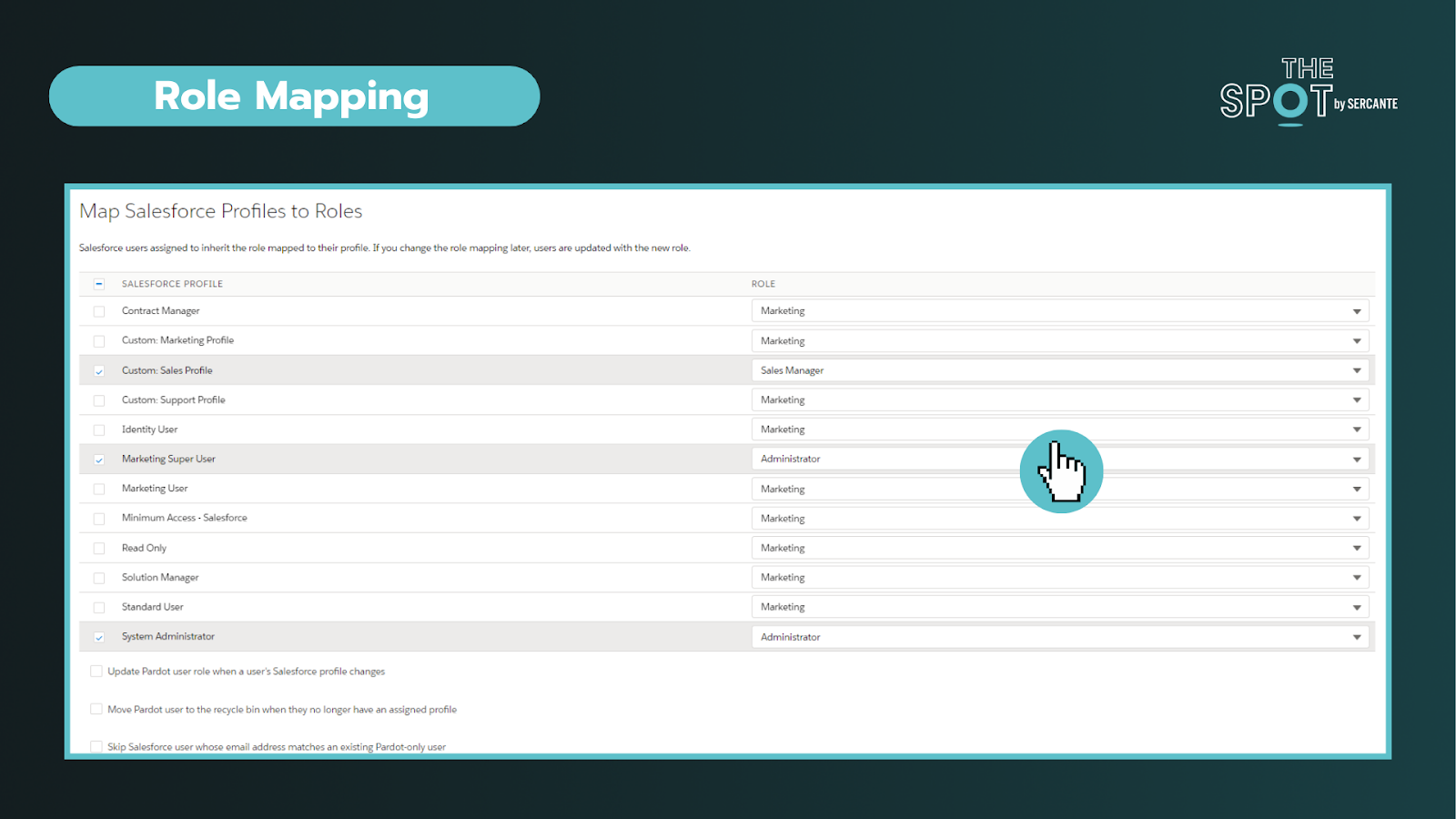
Secondly. while you may be familiar with profiles and roles in Salesforce, well Account Engagement adds another layer of complexity to the mix. Account Engagement has its own “roles” and they do completely different things. These roles only apply within Account Engagement and allow you to see and do specific activities (build segments, forms, etc) on the platform. 

Default Account Engagement user roles include Administrators, Marketing, Sales Manager, and Sales. You can configure these roles under the account settings section and connect profiles to roles within the Salesforce connector section in Account Engagement.


To conclude, you can personalize the levels of access to different Users. You’ll ultimately need two “keys” to get into Account Engagement (a Salesforce permission set and an Account Engagement role assigned to a synced User). It is important to work with marketing to outline the level of access needed to perform daily tasks.


Key reminders:

  • You can create custom roles in Account Engagement (may require an add-on)
  • All the users with the same role, have the same access in Account Engagement, regardless of their permissions in Salesforce

Tip 4: The Salesforce Integration is flexible

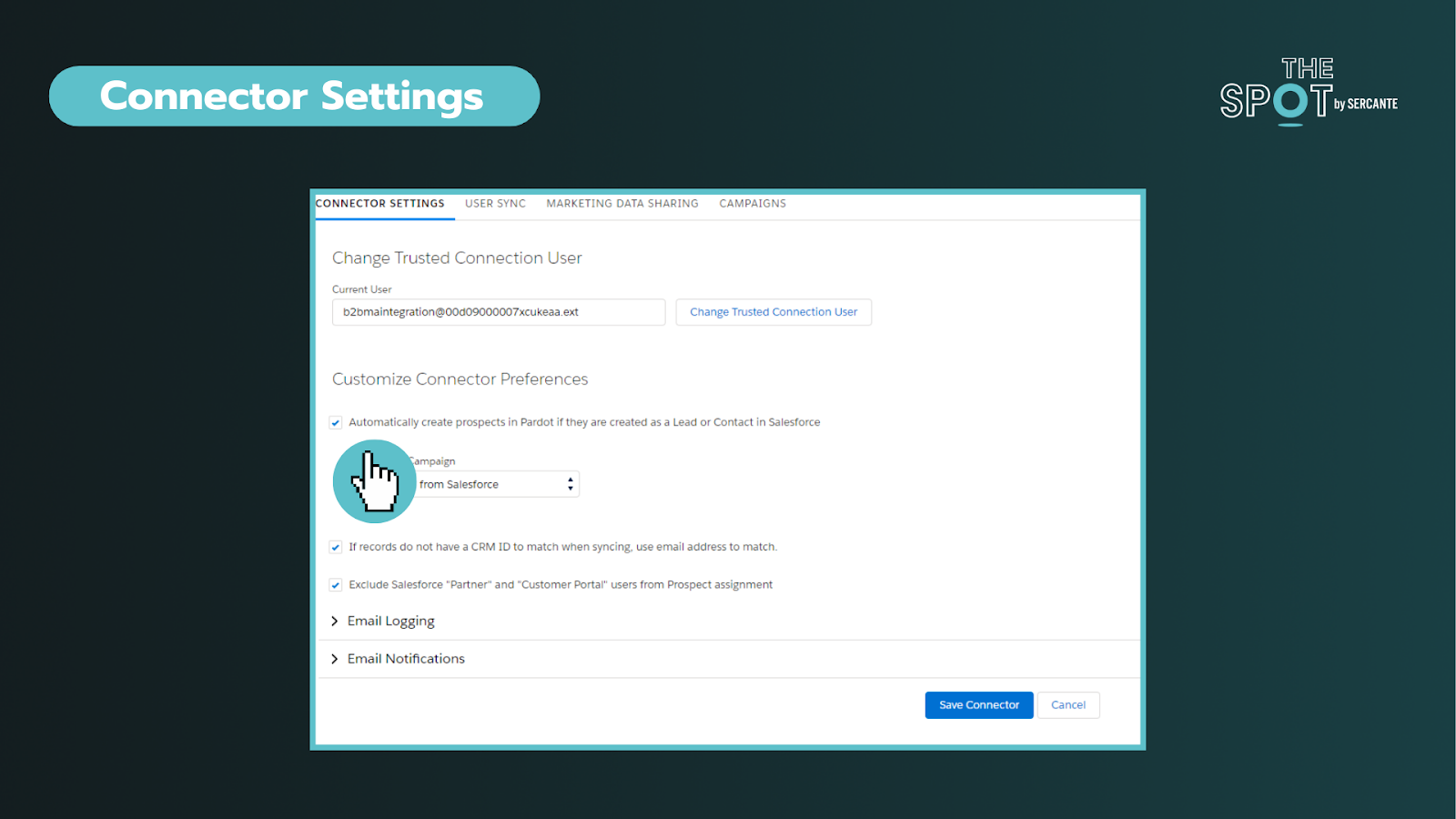
This integration (or connector) is the key to aligning your data between two systems. Through the connector, we can sync everything from Users, objects, fields, and campaigns. You can deep dive into the individual components here.


In these settings, you can choose if you want to allow a bi-directional sync or not. This is your on/off switch. Most customers want this feature enabled. 


Additionally, you can control data flow on a field-to-field level. It is important to discuss how data will be used and by what team. 

You can allow data to be managed by:

  • Salesforce only
  • Account Engagement only
  • Whichever system makes the most recent update

As data comes circulates between the platforms we can be met with conflicts between the two systems. For most teams, these conflicts can be attributed to their use of validation rules or restricted field values and dependencies. The conflicts are called sync errors in Account Engagement

These conflicts can be found under the Salesforce connector gear icon (under Connectors) and can range from:

  • Access issues – Connector user lacks access to read/write to an object
  • Data formatting issues – Issues with field types or values
  • Process alignment issues – dependencies between fields or steps in a process

As an admin, is important to support your team in resolving these issues as quickly as possible to restore data sync on those records. These sync errors offer opportunities to improve communication between teams and for process improvements. Our team at Sercante often uses ProspectUpdater to help customers fix data formatting issues at a scale.

Key reminders:

  • Enabling a bi-directional sync of data is recommended but optional
  • Large imports can cause bottlenecks – if you notice this becoming an issue you may want to check daily processes as well

Tip 5: Account settings are the key to understanding your org

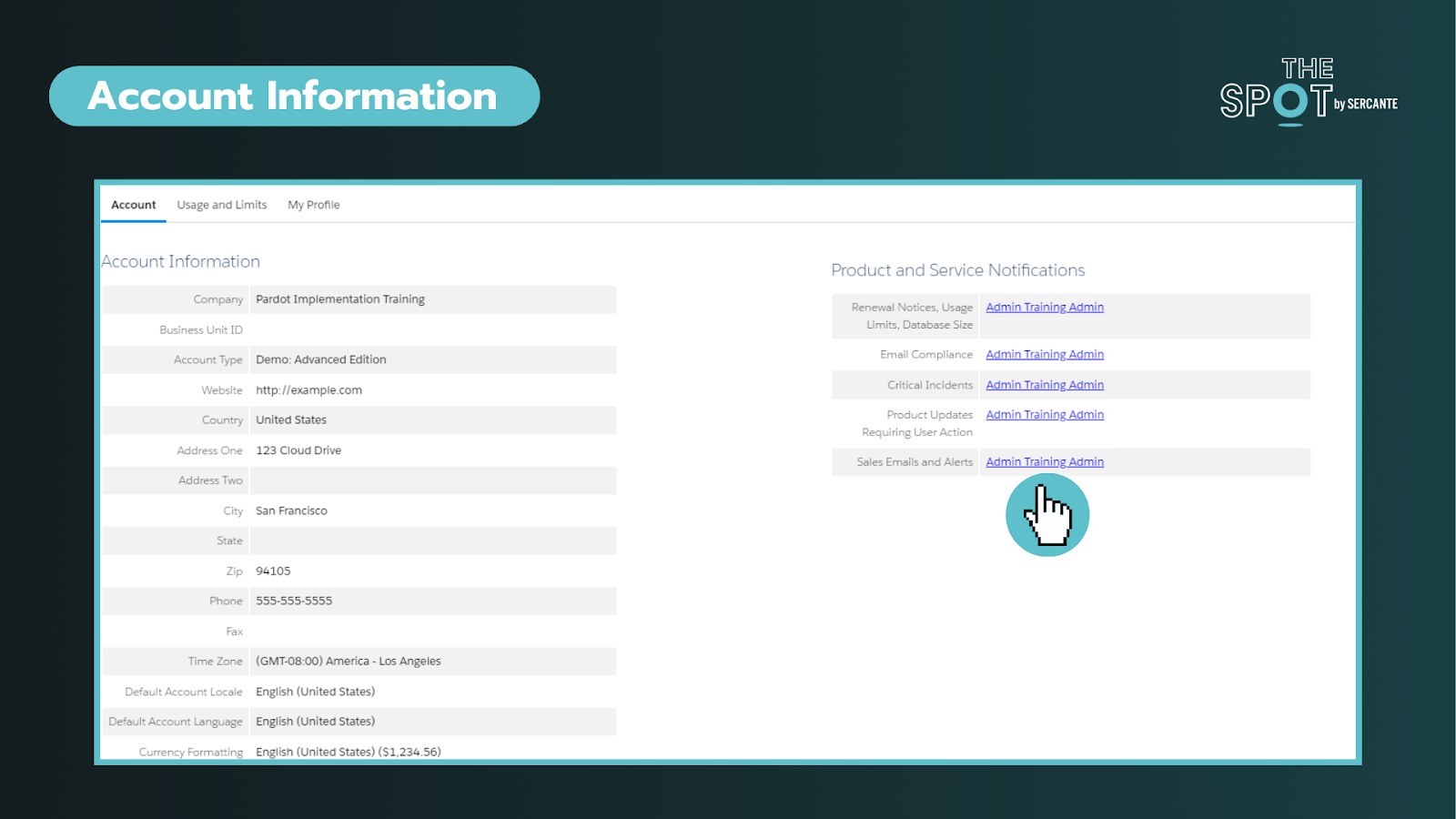
This section can help you identify important information about your account such as the Business Unit ID, when the account was enabled, admin alerts, and account limits. On the right side of the screenshot below, you will find the ability to personalize who gets alerts about these items. To ensure these alerts are taken seriously, ensure these are received by team members who are active in the org.


The most common way that admins discover this page is when they have to increase the number of prospects that can be kept in the account or run out of storage.

Key reminders:

Tip 6: Leverage Account Engagement forms

You’re probably familiar with web-to-lead forms. While these mechanisms can help do more with Salesforce they do not cookie leads or contacts upon completion. Why does that matter? Cookies help us identify prospects and avoid duplicates.

With Account Engagement you can simplify the form creation and management (say goodbye to your external tools) or form handlers (similar to webhooks) to streamline your inbound marketing and processes. The forms can be embedded as Iframes on your website, Account Engagements’ landing pages, or stand-alone.

Upon completing a form, you can set a cookie on the Prospect. You can still do notifications (email and Slack), send emails, add to segments, and so much more without complex flows or other Salesforce automation. 

Key reminders:

  • Testing forms incognito mode is strongly recommended
  • Cookie length can be adjusted under your account settings or by individual user browser settings

Tip 7: Encourage campaign collaboration

First thing is first, Account Engagement has campaigns too! However, these are exclusively used in Account Engagement for capturing the 1st touch interactions (all time). This makes it challenging to see the life of the lead across time and also makes reporting difficult.

Luckily, we can create and sync Salesforce campaigns into Account Engagement for the same purposes AND to capture the multiple touches on their journey to conversion and beyond.

By leveraging Account Engagement’s automation to add prospects to Salesforce campaigns, we avoid doing multiple imports to update the Campaign member records. This functionality also allows us to take advantage of standard Campaign reports in Salesforce that can help us see ROI and campaign influence across our initiatives. To help find the latter, we created a Campaign Influence Started Pack, go check it out. 

Key reminders:

  • When creating campaigns, leverage campaign member statuses and make sure to check the “active” checkbox to sync over into Account Engagement
  • Keep an eye on campaign members and campaign influence records, which can eat up your Salesforce storage if created in large volumes over time

Learn the essential Account Engagement concepts for Salesforce admins

While Account Engagement predominately serves marketing functions, Salesforce Admins play a crucial role in understanding and supporting its broader impact. By acting as the bridge between IT and marketing, admins can help facilitate more collaboration and more effective project rollouts on projects affecting users across the organization.

If you are struggling with any of these tasks/concepts, please reach out for assistance. Together, we can foster more seamless experiences that drive transformative outcomes!

Product Note: Marketing Cloud Growth and Advanced are editions of Marketing Cloud Next and have also been referred to as Agentforce Marketing.

There’s some fear in the air.

I’m sensing major mixed emotions swirling for many with the announcement of Marketing Cloud Growth Edition and the vision of marketing automation on the Einstein 1 (a.k.a. Salesforce core) platform.

On the one hand — it’s everything we’ve all been asking for. True one platform, no-integration-needed shared infrastructure for marketing to work seamlessly with all customer data. 

But there’s a glimmer of doubt with people thinking: “What does this mean for me? Are my skills still relevant? What does this mean for my product, my team, or my consulting business?” 

Don’t bet on innovation being slow 

There is a very large population of people who benefit from the status quo as it sits today. 

Employees benefit from their skills being in demand to drive up compensation. 

Consultants benefit from their experience being rare and slow to accumulate to stay relevant.

Product companies have grown to address a specific product gap or market need in today’s toolset.

But if the technology changes, all of that gets disrupted. When I hear people asking about timelines for the expansion of Marketing Cloud Growth Edition, I feel like they’re actually hoping that the pace of innovation on this will be slow. When I tell them I don’t think that’s going to be the case, that statement is met with uneasiness, and it’s clear that‘s not what they were hoping to hear.

Big change takes time, for sure. But I really wouldn’t bet on this freight train moving slowly. This has been a long time coming, and there’s momentum behind this new product that is incredibly exciting.

Remember that the technology is only one piece of the puzzle

I think that the fear of change here is somewhat misplaced.

Yes, there is a lot of power in the technical knowledge of any platform — Marketing Cloud Engagement, Account Engagement (Pardot), Salesforce, and any number of new tools.

But even harder to come by are the soft and business skills that make you successful with those platforms. Things like: 

  • Understanding business process
  • Mapping out data relationships 
  • Wrangling colleagues from across sales, marketing, customer service, and product to get agreement on content 
  • Training and driving the adoption of a new tool or process
  • Defining project plans and dependencies with the work of other teams 
  • The logistics that go into the execution of any complex campaign 
  • Spotting a gap or a need, and the extreme ownership you bring to “I’m going to figure out how to solve it” 
  • Spreading best practices & defining standard processes
  • Breaking complex terminology into terms anyone on your team can understand

Just think about your job today: How much of it is actually hands-on configuration in a tech platform, and how much of it is “tech-adjacent” planning, organizing, collaborating, and communicating? 

I bet it’s a blend of both, and as you move up the ladder in your career the “tech adjacent” becomes more critical.

Time to go back to school 

So, if we could flip a switch and change all customers to the new platform overnight — the skills and experience we’ve all gained from many years on Pardot and Marketing Cloud are still super useful, even if we’re logging in at a different URL. 

We’re not being sent back to the starting line. But we do probably have some relearning to do to keep our edge and stay relevant. But I choose to view that as exciting and not daunting. (Well maybe a little daunting. But I’m going to crack open a Red Bull and push through.) 

The way I think of it is this: Someone has to emerge as leaders, thinkers, and builders on any new platform. Who better than you and I? Let’s leverage the hard-won experience in this ecosystem as a springboard in this next chapter. 

Let’s lean into the next-gen set of tools that are going to bring marketing strategies to life on the Salesforce platform, and let’s go build some cool stuff.

Some quick shameless plugs

I can’t resist sharing two more things on this topic…

#1: Check out our Salesforce Flow for Marketers course

Flow is a big piece of how Marketing Cloud Growth Edition users can automate customer journeys. Need to brush up on your skills? Sercante has a Salesforce Flow Basics for Marketers Workshop that will kickstart your learning.

#2 Come join a team of growth-minded learners

When change is in the air, it’s a great time to be among like-minded learners. If this article resonated with you, I would invite you to come check out roles on the Sercante team. We’re committed to always learning, always chasing that edge, and we are eagerly seizing opportunities to get our team’s hands on the “next gen” ASAP. It’s a great spot to try on new skills and figure out the role you want to play in the next chapter of your career. Drop us a note at [email protected] if you’d like to chat!

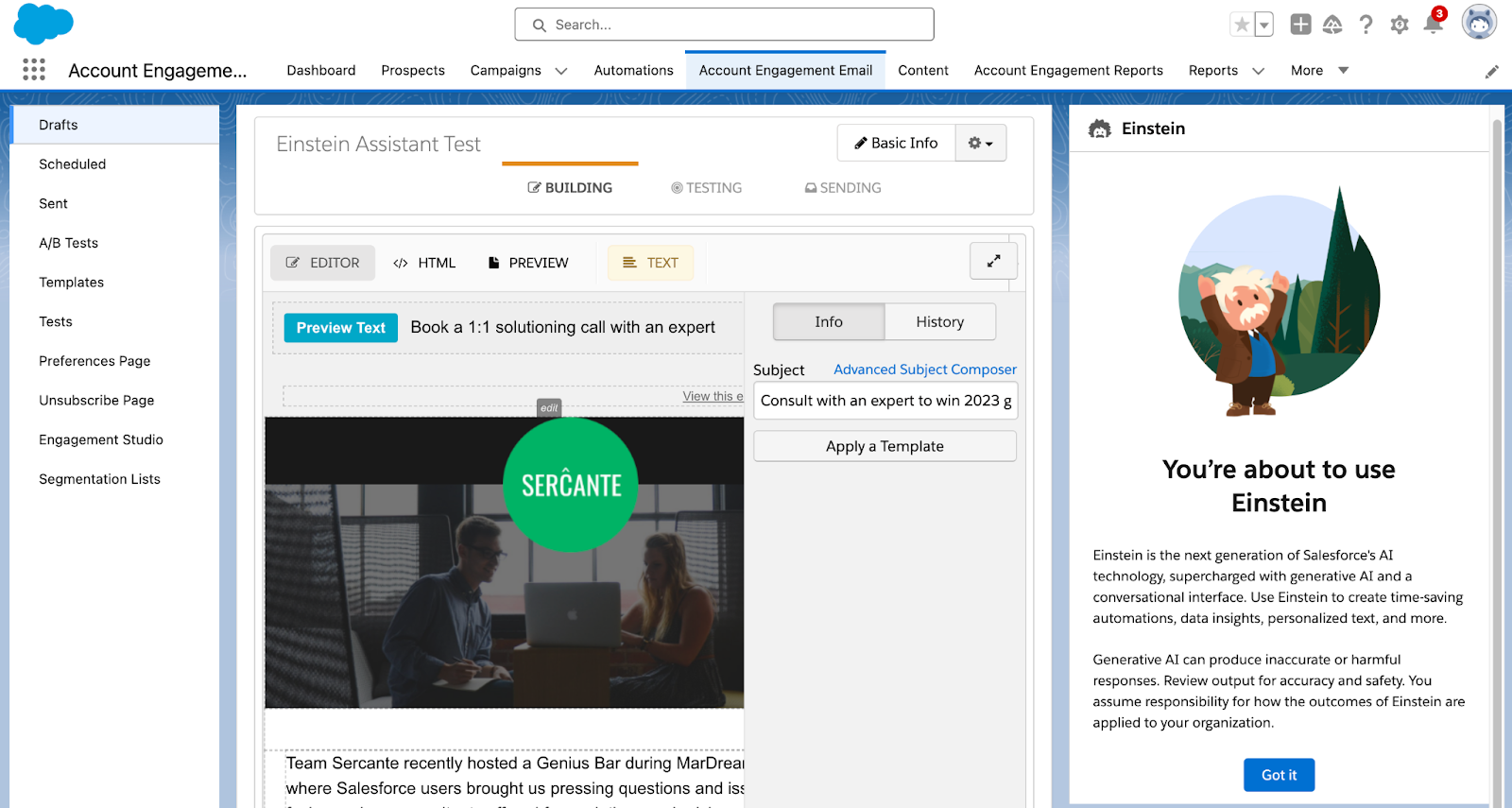
Einstein Assistant is the latest AI functionality for Account Engagement. With the Spring ‘24 release, Account Engagement Advanced and Premium editions can utilize generative AI when creating marketing assets. Let’s deep dive into the features of Einstein Assistant and how to enable it for your Account Engagement Business Units!

Einstein Assistant helps you create landing pages, forms, and list emails. When creating a new asset, or editing an existing one, the Einstein Assistant window appears so you can describe what you are creating. 

Einstein Assistant will then recommend content that you can copy or revise for each of your assets. 

Using Einstein Assistant with List Emails

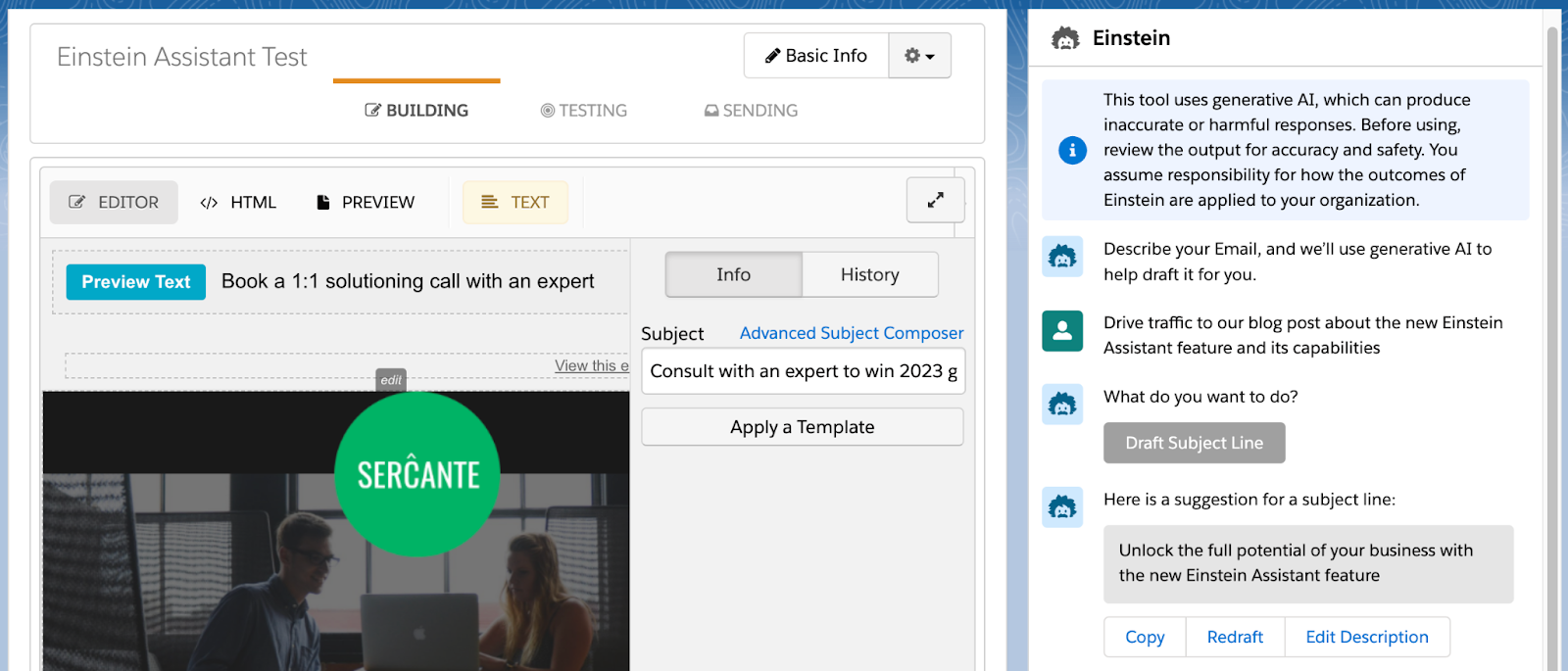
Einstein Assistant gives you the option to draft an email Headline, Paragraph, and/or Subject Line. Once drafted, you can copy or redraft the content, or edit the prompt provided to Einstein Assistant.

Using Einstein Assistant with Landing Pages

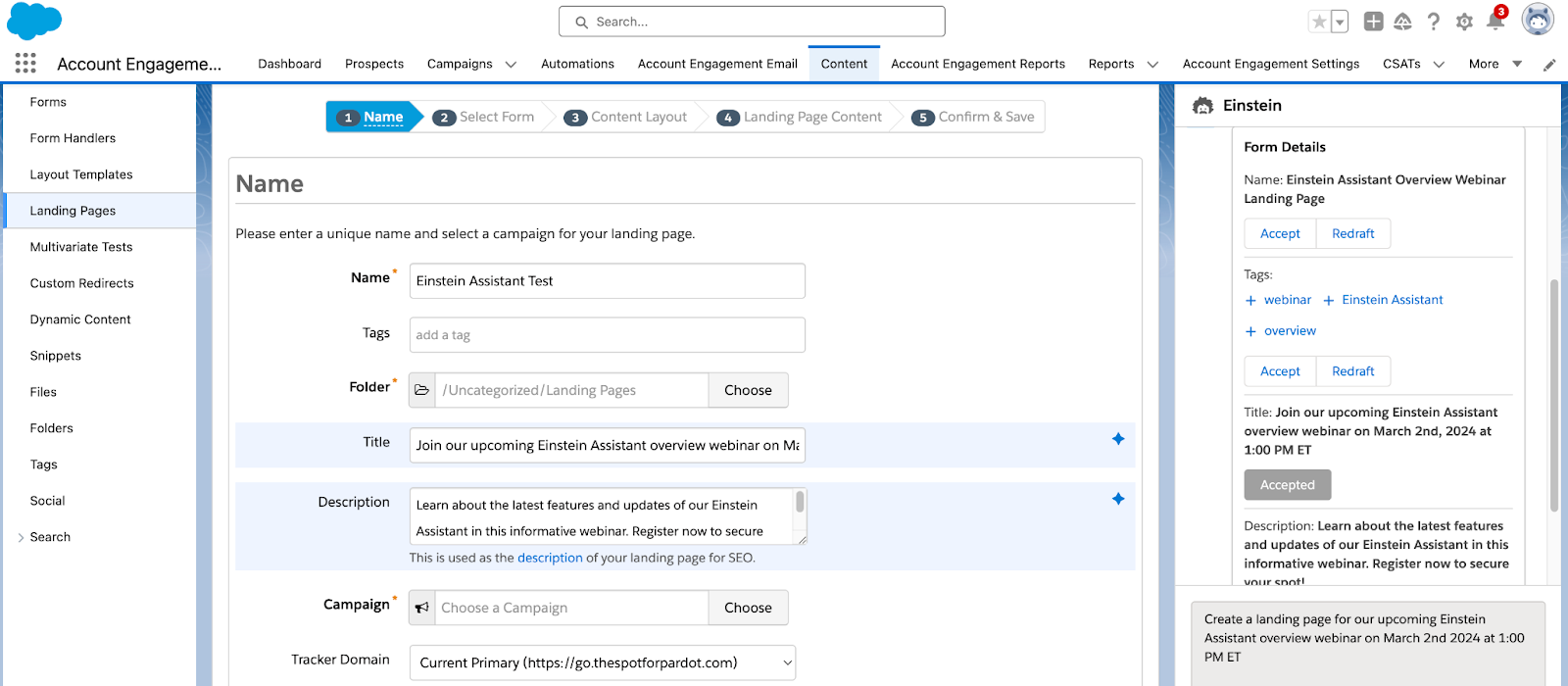
When building Landing Pages, Einstein Assistant can generate the Landing Page’s name, tags, title, and description. Here you have the option to accept, and the copy will automatically be entered into the associated Landing Page field, or redraft the content.

Once you navigate to the Landing Page Content tab, you can then generate a Landing Page Headline and/or paragraph for your page.  

Using Einstein Assistant with Forms

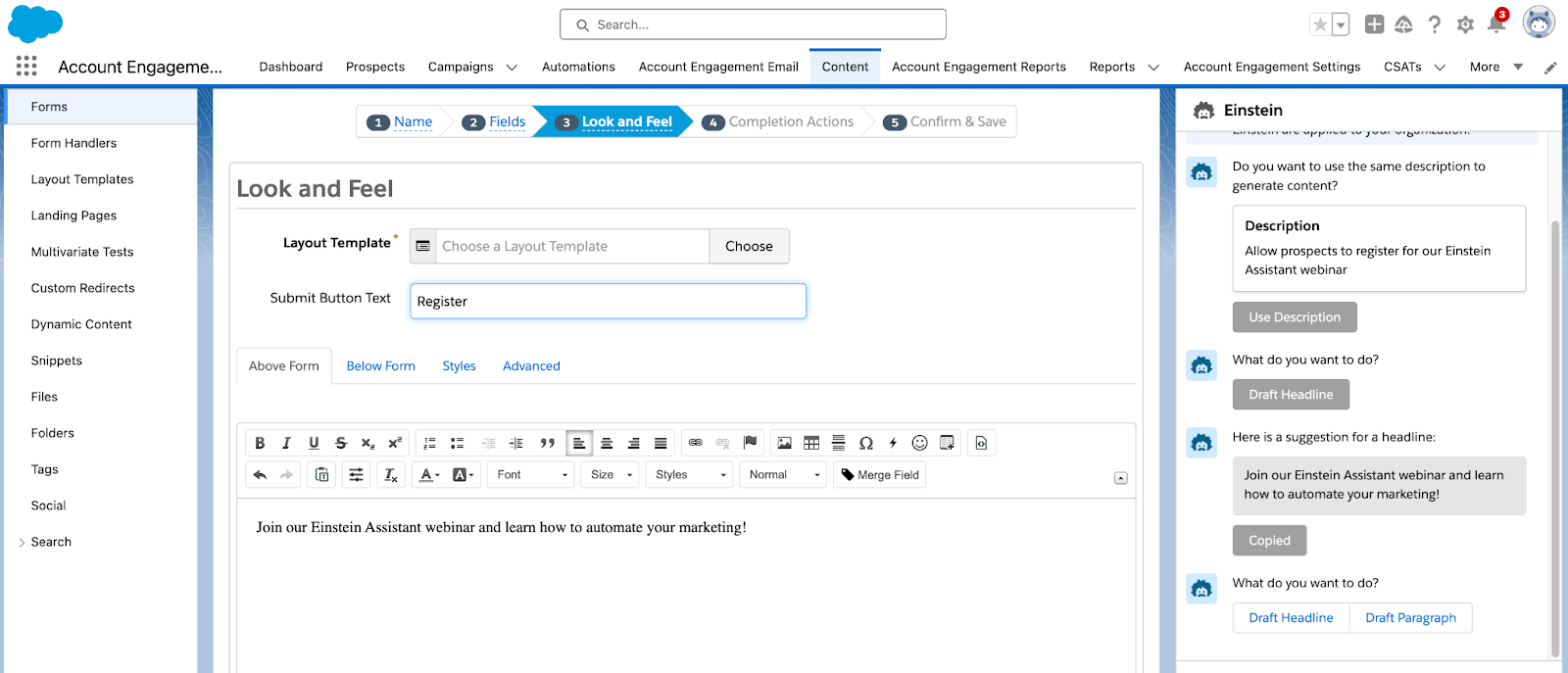
When building Forms, Einstein Assistant will first allow you to generate a name and tags for your new form. You can accept Einstein’s suggestions and the content will auto-fill into the name and tag fields, or select redraft. On the Look and Feel tab, Einstein can generate a Headline or Paragraph to be used above or below the form.

Finally, on the Completion Actions tab, you can again use Einstein Assistant to generate a headline or paragraph for your Thank You Content.

Ready to get started?

Here is how to enable Einstein Assistant

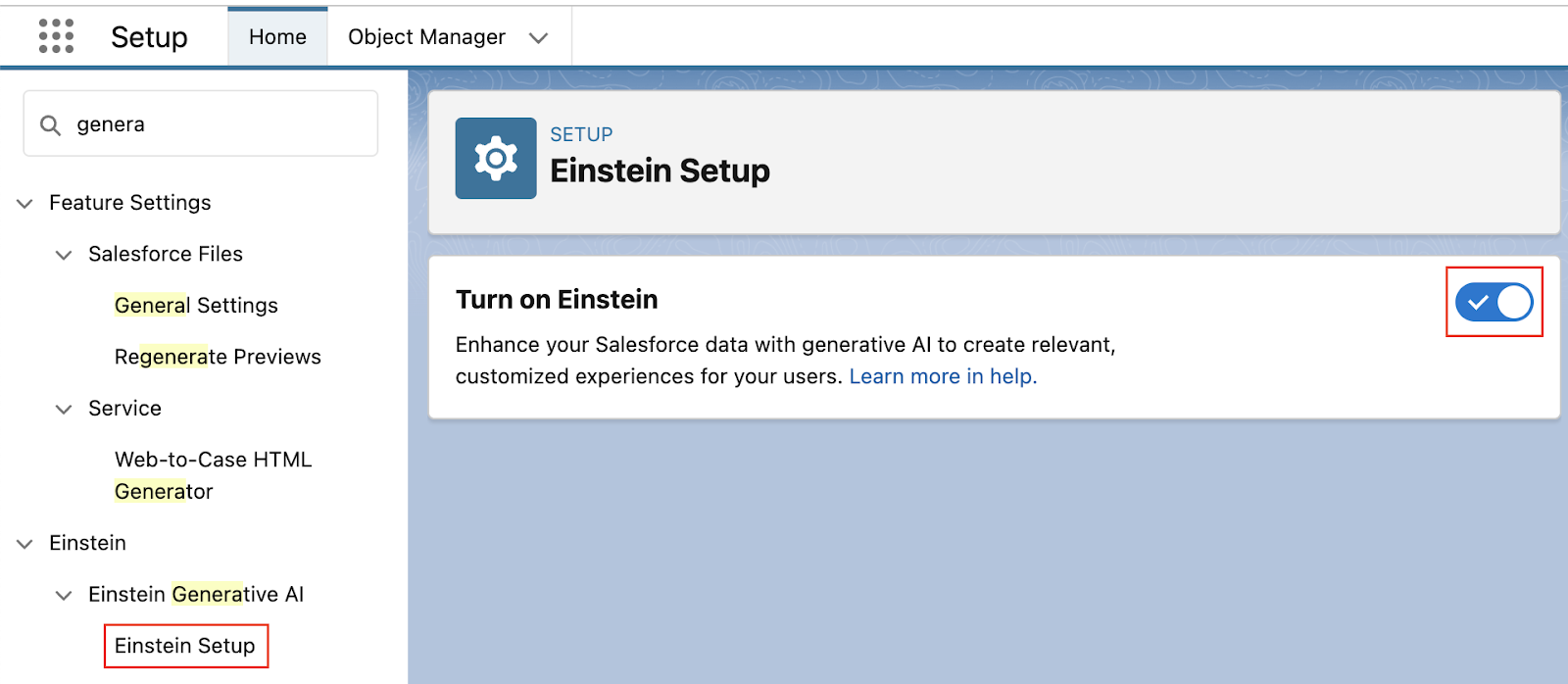
  1. In Salesforce, navigate to Setup > Einstein Generative AI
  2. Select Einstein Setup then Enable
  1. Still in Setup, navigate to Einstein Account Engagement > Einstein Assistant
  2. Select any Account Engagement Business Units that will be using Einstein Assistant
    • Note: even if you only have one Business Unit, you still need to do this step!
  3. Select Connect

If you’re interested in what else Einstein can do for Account Engagement, check out our previous blog posts:

Tap into Salesforce generative AI functionality

Salesforce is releasing new generative AI features all the time. Reach out to the team at Sercante to build strong foundations so you can tap into these features and stand apart from the pack.

Product Note: Marketing Cloud Growth and Advanced are editions of Marketing Cloud Next and have also been referred to as Agentforce Marketing.

I want to clear up a misconception that I’m hearing in the Salesforce world about the great $0 SKU Data Cloud debacle.

As you may recall, Salesforce announced at Dreamforce 2023 that a Data Cloud edition would be available at no cost to Sales and Service Cloud Enterprise Edition clients. This was also mentioned in Salesforce’s February 2024 press release around Marketing Cloud Growth Edition

To be clear, you still need Sales or Service Enterprise Edition to take advantage of this offer. Having just Marketing Cloud does not make you eligible.

Sales and Service Enterprise Edition Customers: What to do about no-cost Data Cloud offer

Now that we’ve clarified any confusion, you might say, “Great, I have Enterprise Edition — I want to get an account provisioned today!” And I would say, “Get prepared first.”

Data Cloud is a game-changer capable of driving remarkable transformation within your organization. Hence, having a well-crafted plan, strategy, and vision in place is paramount.

It’s the basis and foundation of change management — without a plan, vision, consensus, understanding, etc., you might as well stop before you even start.

Speaking from experience, diving into Data Cloud without a clear plan often leads to:

  1. Misconceptions: A perceived lack of product value.
  2. Tension: Without a collaborative mindset, conflicts can arise.
  3. Loss of Momentum: Initial interest and excitement wane over time.

However, before devising a plan, it’s crucial to assess your organization’s readiness. 

Data Cloud Readiness Criteria

Consider these five key aspects:

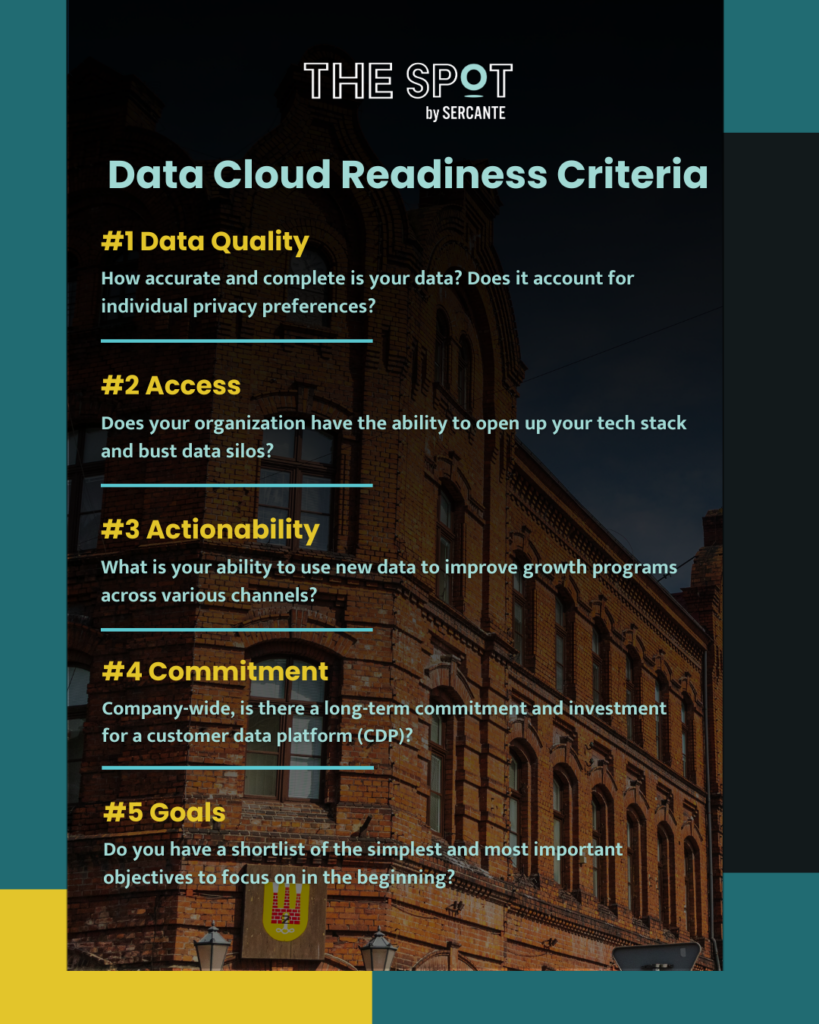
  1. Data Quality: How accurate and complete is your data? Does it account for individual privacy preferences? 
  2. Access: Does your organization have the ability to open up your tech stack and bust data silos?
  3. Actionability: What is your ability to use new data to improve growth programs across various channels?
  4. Commitment: Company-wide, is there a long-term commitment and investment for a customer data platform (CDP)?
  5. Goals: Do you have a shortlist of the simplest and most important objectives to begin with?
data cloud readiness criteria

Get a Data Cloud Readiness Assessment

We’re here to assist you in preparing for Data Cloud. Reach out to explore our Data Cloud Readiness Assessment offering so you can be sure your organization is primed for success.

Product Note: Marketing Cloud Growth and Advanced are editions of Marketing Cloud Next and have also been referred to as Agentforce Marketing.

ICYMI: Salesforce dropped a hot product announcement yesterday. And she’s called Marketing Cloud Growth Edition

There was a flurry of blogs and social postings following the official drop of the Salesforce press release, notably: 

To hear some talk, MC Growth Edition is going to instantly change everything and be the best thing in the world. 

On the flip side of the spectrum, I’ve seen some hyper-skeptical commentary around MC Growth Edition. “It’s SMB only”, “It’s going to take years to catch up”, and “You don’t have to worry about this now,” (I’m sensing a twinge of fear/self-doubt intermingled in these statements, though).

Like most things involving extreme opposites, the current reality and answer to “What is Marketing Cloud Growth Edition?” is somewhere in the middle of these two takes.

Let’s dig into some of the nuances here and read the tea leaves. If I could boil this down to a top 5 highlights, they would be: 

1) Marketing Cloud Growth Edition is built on “Core,” and that’s a fundamental advantage for innovation 

Marketing Cloud Growth Edition is built on the Einstein 1 platform — aka the same underlying infrastructure as Sales Cloud, Service Cloud, Experience Cloud, Data Cloud, and recently, Commerce Cloud. 

Marketing Cloud Engagement is NOT on core today (but it’s integrated).

Pardot / Marketing Cloud Account Engagement IS on core… kind of. It’s a blend of on and off-core. Call it “near core” if you need another buzzword for your collection.

Many long-time Pardot customers have been rallying around the vision for “Pardot on Platform” for the last several years. And if you’ve been watching closely, you may have noticed that many of the product enhancements delivered in recent years have been either built-in core, rely heavily on components from core, or had prerequisites of things like enabling SSO with core. 

Why does this “on core” distinction matter, though? The simplified answer is that as new things are released, you can take advantage of those within other “on-core” tools. Examples would include things like Flow for automation, UI enhancements like Path, improvements to Salesforce reporting functionality, etc. These product innovations can be leveraged for the most part across objects and clouds that are built on core. 

So TL;DR — MC Growth Edition being on the Einstein 1 platform means that when enhancements are added to Salesforce and Data Cloud, we don’t have to wait for an integration to come out to use them in the marketing department. We will be able to take advantage of these enhancements immediately, in many cases.

2) The significance isn’t what’s available now — it’s about the vision 

In subsequent posts on The Spot, we’re going to be getting way in the weeds of how MC Growth Edition works and outlining functions and constraints of the current builders. 

There will be edition comparison guides.

Screenshots.

Pros & cons lists.

But amidst all of this, I would emphasize that what’s generally available now isn’t the important thing to look at unless you are actively evaluating a platform to purchase in the next 30 days. The exciting thing about MC Growth Edition is about where the product is headed.

Salesforce has an aggressive vision for this, and looking at the speed with which Data Cloud has grown, I’m betting on them to move FAST.

3) Expect to see a focus on unifying builders & tooling 

A friction point for existing customers is there are usually several ways to do things in different clouds. We have two email builders in Pardot. Another email builder in Salesforce. And an entirely different content builder in Marketing Cloud Engagement. 

Expect to see these tools start to converge, with Marketing Cloud Growth Edition as the first mover for shared functionality. 

One email builder. 

One landing page builder. 

One segmentation engine (built on Data Cloud).

(P.S. The buzzword for this concept is “composable services” — as a new tool is built, expect to see it designed in a way that it can be used and leveraged in multiple parts of Salesforce. We’re already seeing examples of today for more behind-the-scenes things of Pardot/Marketing Cloud, like the backend email sending engine.)

4) This makes AI real 

I’ve been listening quietly to all of the headlines about generative AI for the last year. 

Listening, because as Thumper says, “if you can’t say something nice, don’t say nothing at all.” 

The picture has been painted like this: 

  • You’re working with smart marketing automation tooling
  • You log in and the system can suggest a target audience for you 
  • It can suggest a product offer for you 
  • Heck, it can write your content from a campaign brief 
  • AI tells you when to send your email
  • AI makes it omnichannel 
  • Campaign results come flooding in… and yes, AI analyzes that for you too 
  • We cheers with our Mad Men era old fashioneds because the computers do all of the heavy lifting for us

That sounds nice, but also super unattainable with today’s tooling.

The elephant in the room: No one’s data is that organized. Systems remain super siloed. And the systems most customers are on today don’t solve for that. 

Until now. 

Marketing Cloud Growth Edition is the vision for how we move past that. It’s the beginnings of the shared infrastructure and unified data that get us to the AI-shaped pot of gold at the end of the rainbow.

Bring on the robots.

5) Existing customers are going to see the benefits too… without switching

Customers new to marketing automation, or new to marketing with Salesforce should absolutely evaluate MC Growth Edition.

Pardot and Marketing Cloud Engagement customers should wait a bit before asking themselves “Should I switch?” Largely because they may find they get some of the “good stuff” without having to switch.

We had two team members (one from a Pardot background, and one who’s an OG ExactTarget pro) participate in the pilot of MC Growth. What we saw is that Salesforce is thinking very carefully about how to share the value of the development work being done in MC Growth with its existing customer base. 

Over the next few months, customers will start to see new features you can opt into or just turn on in your org. It’s not going to be a “migration” or a requirement to move anything — just a gradual transformation and growth in the tools that are available to you as more of these composable services are built and shared.

The future looks bright 

One thing is for sure — the next chapter is going to be anything but boring for marketing technologists on the Salesforce platform!  I’ve never been more excited to grow in this ecosystem <3

No more posts to show