Category

Data Management

Student expectations today are vastly different than they were a decade ago. It’s causing technology leaders at the most successful educational institutions to rethink their data infrastructure and student journeys through real-time interaction management strategies.

Today’s students want a personalized, seamless, engaging journey that keeps pace with their brand experiences outside of higher education. At the same time, more and more individuals are bypassing the traditional college education routes altogether. That means higher education institutions (HEIs) need to exceed student expectations to reach enrollment and retention goals and ultimately deliver successful student outcomes.

Combating Headwinds in Higher Ed: A three-part series

Throughout this three-part blog series, you will learn about using your institutional data to create personalized student experiences at scale and in real-time within your college or university. 

  1. Part one: Real-time interaction management and real-time interaction for student success  
  2. Part two: Overview of Salesforce Data Cloud for higher education professionals, potential use cases, and best practices for successfully using Data Cloud
  3. Part three: Building a unified data vision and then activating your data to build a CRM + AI + data strategy for your institution

This series was co-authored by Kirsten Schlau, VP of Technology at Sercante, and Dr. Bradley Beecher (email), Director, Student Experience at Salesforce.

Harnessing data to navigate and overcome challenges in higher education

To help combat higher ed headwinds, there’s a tremendous untapped opportunity for HEIs to use their data by improving organization-wide data infrastructure.

Yes, you’re probably reading this and thinking things like:

We do use data — we analyze our data to maximize the value of resources and stay ahead of constituent needs.

Or even…

We use our data to create strategic plans, execute them efficiently, and analyze their results to differentiate our institution, proactively improve student outcomes, and report outcomes to government agencies and ranking organizations. 

Oftentimes though, that data is trapped inside campus systems that don’t easily integrate with each other. It’s time-consuming to piece together a cohesive and accurate story when the data is trapped, but there’s a better way. It involves creating a fully integrated single source of truth to manage student data.

Unifying student data can help your institution to:

  • Generate real-time institutional reporting
  • Create a unified student record
  • Take action from the data
  • Personalize the student experience to reinforce a sense of belonging 

Taking cues from non-HEIs to use data for growth and retention

What if we told you there’s an opportunity more specifically to use that data on an individual basis, at a 1:1 scale to personalize the student experience in real-time?

This is happening in other industries. In fact, you might have experienced personalization like this as an online shopper. Here are a few examples.

What is real-time interaction management (RTIM)?

Real-time interaction management, also known as RTIM, uses customer interactions, predictive modeling, and machine learning to deliver consistent, personalized customer experiences across channels in real-time.  

“Forrester Research analyst Rob Brosman originated the term Real-Time Interaction Management in 2012, and three years later Rusty Warner, another Forrester analyst, offered the formal definition of, “Enterprise marketing technology that delivers contextually relevant experiences, value, and utility at the appropriate moment in the customer life cycle via preferred customer touchpoints.” – Source

RTIM equips marketers to gain immediate visibility into critical moments within the shopping or user experience, which can deliver better consumer experiences and outcomes. This includes generating relevant offers and product suggestions on the right devices at the right time to drive customer engagement, satisfaction, and, in turn, revenue growth. 

Impact of real-time interaction management in the real world

As an everyday consumer, you’ve likely already experienced the effects of RTIM (or you’ve experienced a scenario where you wish RTIM was in place).

Example scenario illustrating RTIM in e-commerce:

Let’s say a customer, Maria, visits an online fashion retailer’s website:

  1. Browsing Products: Maria lands on the retailer’s homepage and starts browsing through summer dresses.
  2. Real-Time Data Capture: As Maria navigates through the website, her behavior is captured in real-time. This includes the pages she visits, the products she clicks on, her past purchase history, demographic information, and any other relevant data.
  3. Real-Time Analysis: The e-commerce platform analyzes Maria’s behavior and data in real-time. It identifies her preferences based on her browsing history, past purchases, items in her shopping cart, and any other available data points.
  4. Personalized Recommendations: Using RTIM, the e-commerce platform dynamically generates personalized recommendations for Maria. It might suggest summer dresses similar to the ones she’s viewing based on her style preferences and past purchases. These recommendations are displayed prominently on the website in real-time.
  5. Real-Time Engagement: While Maria is still browsing, a pop-up notification appears offering her a limited-time discount on a dress she had previously shown interest in. This real-time engagement aims to incentivize Maria to make a purchase.
  6. Adaptive Pricing: As Maria continues to browse, she adds a couple of dresses to her cart but hesitates to complete the purchase. In response, the e-commerce platform dynamically adjusts the prices of the items in her cart, offering her personalized discounts or free shipping to encourage her to proceed to checkout.
  7. Abandoned Cart Recovery: If Maria leaves the website without completing her purchase, the e-commerce platform sends her a personalized email reminder within minutes to remind her about the items in her cart. These reminders offer her an additional discount or incentive to complete the purchase.
  8. Cross-Channel Consistency: Whether Maria interacts with the retailer’s website or mobile app, or when she receives an email, the messaging and recommendations remain consistent across all channels for a seamless and personalized shopping experience.

In this example, RTIM enables the e-commerce retailer to engage with Mary in real time, providing her with personalized recommendations, discounts, and reminders tailored to her preferences and behavior. This ultimately increases the likelihood of conversion and enhances customer satisfaction.

Additionally, some online retailers are now using RTIM not only in their marketing efforts but also as a way to offer seamless customer experiences. 

Harnessing RTIM at colleges, universities, and other post-secondary education institutions

In the e-commerce example above, the experiences were grounded in segmentation and, of course, made up of various data points. 

It’s no different for HEIs. The ability to segment and provide greater personalized content and experiences leads to a great student experience.

We’ll share a few examples of how other professionals in higher education are doing this today.

Real-time interaction for student success

Imagine a world where student advisors can gain a full 360° picture of their students in a single view. This could include:

  • Past class enrollment records and performance indicators
  • Required courses that support their designated degree path
  • Intelligence to recommend courses based on individual interests and passions outside of their degree path
  • Automatic insights into things such as on target to graduate, at risk, potential for drop-out, and any other insights unique to your institution.

Oh! And one more thing to add: this is all done at scale with minimal manual effort put on the advisor.

Step 1 to building an RTIM strategy: Unify data to create a single source of truth

This vision can become a reality when your data is not trapped in siloed campus systems. 

You might say, “How is that possible?”

Here’s how you can start building a student-centric RTIM strategy.

All of this data aggregation and related insights are powered by Salesforce Data Cloud and Einstein 1 Platform. They are the building blocks to creating personalized student experiences with real-time capabilities. And they can also help advisors to gain more time to focus on making meaningful connections with their advisees and ensuring their long-term success. 

How does the Einstein 1 Platform support RTIM strategy for HEIs?

The Salesforce Einstein 1 Platform (A.K.A. “Salesforce core”) unifies your data, AI, CRM, development, and security into a single platform. It’s an extensible AI platform (meaning, it easily connects with other Salesforce platform products and third-party integrations), and it can facilitate the fast development of generative apps and automations.

Through Einstein 1, your institution can appropriately address students’ most common, basic, or foundational questions through alerts and automated workflows. Then your advisors’ interactions with students can center on deeper and more meaningful advising conversations.

Creating unified student profiles with connected data

A unified student profile, aggregating student data into a single student record allows advisors to meet with more students and encourage those meaningful conversations. For example, instead of talking through the required courses advisees need for their program, they get automated alerts listing which courses to take next. Then, the advisee’s open office hours can become career exploration sessions or deep dives to help students better understand complex concepts.

At institutions with siloed data, creating alerts like those in the example requires a ton of manual effort and time. And let’s face it — advisors don’t have time to spare. 

How Data Cloud solves the RTIM puzzle

With Salesforce Data Cloud, advisors can provide more proactive and holistic support for students. That’s because campus data for each student is unified in a single record — something that benefits both students and the institution.

In turn, students make more informed and thoughtful decisions with this proper support from academic advisors. Getting automated alerts supports students as they navigate the university/academic program policies and procedures, and, more importantly, offers an exceptional college experience.

Ultimately, Data Cloud will help build better staff experiences with a unified student record and a seamless student experience that meets their modern expectations.

In the next post in this series, we will provide an overview of Data Cloud for Higher Education, examples of potential use cases, and best practices for using Data Cloud.  

Ready to transform your student experience through real-time interaction management?

Discover how real-time interaction management can elevate the way you engage with students, and enhance their experiences with personalized, timely interactions that make a real difference.

Learn more about Salesforce Education Cloud here to understand the platform and how it compares and relates to your current technology stack.

Then, send a message to Sercante to learn about our Salesforce consulting services for higher education institutions, including Salesforce implementations & migrations, design & architecture services, reporting & analytics, custom integrations, and everything in between.


I recently ran into a situation where a client needed to exclude select campaign types from being populated as the Primary Campaign Source field on opportunities. While this might sound unusual on the surface, the use case was very logical and likely impacts other organizations too. Read on to learn how we solved it to customize primary sources on opportunities using Salesforce flow.

Use Case

Before getting too deep into the solution, let’s first review the use case for relevancy in your organization. In this particular situation, the sales teams were leveraging Salesforce campaigns as a way to group records for outreach. Some of the outreach campaigns became quite large over time and began skewing data in the Primary Campaign Source field on opportunities.

Many reports in the organization were based on the Primary Campaign Source field and the outreach campaigns were undermining the impact of true marketing campaigns. It was determined that reporting would be more accurate if outreach campaigns were excluded and the Primary Campaign Source field was populated using the last “responded” campaign (based on the responded checkbox).

Primary Campaign Source Field Review

Before we get into the solution, let’s do a quick recap of the Primary Campaign Source field on opportunities. Campaign attribution can be a confusing topic, so it never hurts to review.

How is the Primary Campaign Source Populated?

  • Lead Conversion (with Opportunity) – The Primary Campaign Source field will be populated with the campaign that was most recently associated with the lead.
  • Opportunity Creation (from Contact) – The campaign that the contact was most recently associated with will populate the Primary Campaign Source field when a new opportunity is being created from a contact record. Users have the ability to change the value before saving the record. 
  • Manually – Users can manually update the Primary Campaign Source field on the opportunity using the picklist of active campaigns.
  • Automation – The Primary Campaign Source field can also be updated based on an automated process in Salesforce (generally a Flow).

Do Auto-Association Rules Apply?

Great question! Auto-association rules are part of campaign influence in Salesforce and are used to create campaign influence records. They are not factored into the population of the Primary Campaign Source field on opportunities.

Primary Campaign Source Field (on Opportunities) vs. Primary Source Campaign Influence Model

  • Primary Campaign Source Field (on Opportunities) – Lookup field on the opportunity that links it to a single campaign.
  • Primary Source Campaign Influence Model – Campaign influence model that attributes 100% of the influence to the campaign noted in the Primary Campaign Source field on an opportunity.  

Solution Review

Now that we’ve laid the foundation, let’s address the solution.

Step 1 – Determine Exclusions & Actions

The first question to answer is “What campaigns should be excluded from the Primary Campaign Source field?”. Depending on your organization, this could be a campaign type, a campaign record type, or a combination of both. 

Step 2 – Determine Actions

Now that we know what campaigns we would like to exclude, what should we do when we run across an opportunity with an excluded value? The default Salesforce behavior is to use the last associated campaign. We could go that route and use the last “valid” campaign that a lead or contact was associated with or we could go a step further and use the last campaign that has the “responded” box checked.

I prefer prioritizing my “valid” campaigns based on the “responded” checkbox. Similar to how I configure auto-association rules, I just don’t like giving credit to a campaign if the lead/contact has not actually engaged with it.

We also need to consider how the Primary Campaign Source will be populated if no valid campaigns are found. You can choose to keep the excluded value (as a reference point), clear the value, or populate with a default value. I elected to retain the excluded value (prefer data to no data), but you have options!

Step 3 – Build it in Flow (Sandbox)

For illustrative purposes, I created a flow in my dev org to show you how this solution could work for you. Here are the assumptions that were used.

  • Campaigns with the type of “Sales Prospecting” should be excluded.
  • When updating the Primary Campaign Source field, the most recent responded campaign (checkbox checked) should be used.
  • If a valid campaign is not found (or the only campaign has a non-responded member status), the Primary Campaign Source field should be populated with the most recent campaign (basically defer to the default Salesforce behavior).
  • Since this data is used for reporting purposes, real-time updates are not needed. 

Flow Summary 

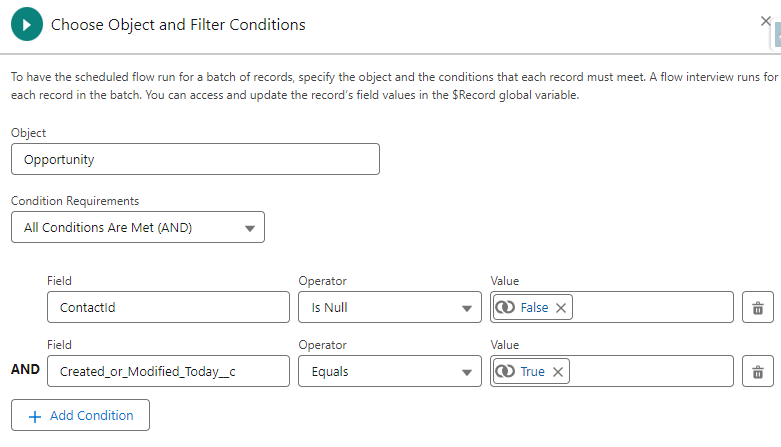
  • This solution uses a scheduled flow based on the opportunity object. The flow runs nightly and processes all opportunities that were created or updated that day.
    • Note: Relative dates can’t be used in the filter conditions of scheduled flows. To address this, create a custom checkbox field on the opportunity object that will evaluate TRUE if the opportunity was created or updated today and use it in your criteria.
    • Below is my filter. It’s selecting opportunities that have contact roles and were created or updated today.
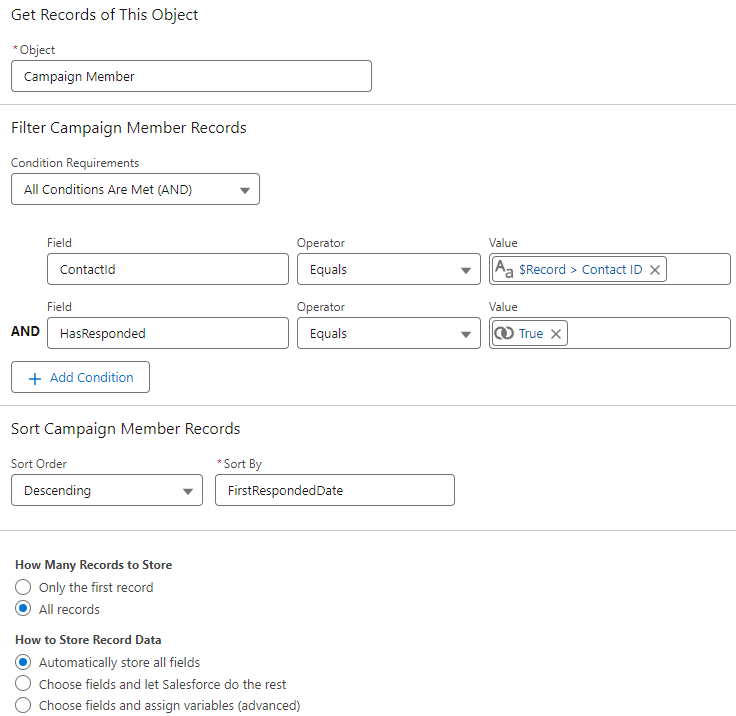
  • Get campaign members for contact roles
    • In this step, we get all the responded campaign member records (for the contact role) and sort them so the most recent is first.
  • Loop through campaign members
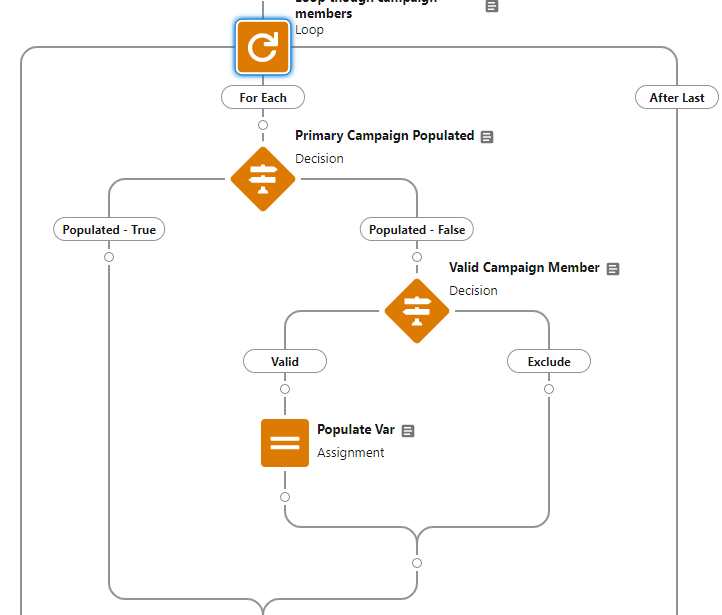
    • Next, we loop through each of the campaign member records related to the contact role, find the first valid campaign (responded), and save it to the assignment variable.
  • Update the opportunity record
    • Finally, we update the Primary Campaign Source field on the opportunity with the campaign ID stored in the assignment variable.
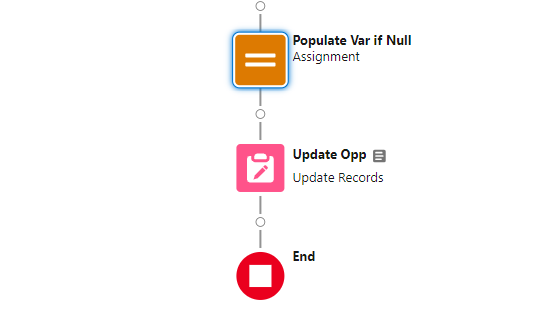
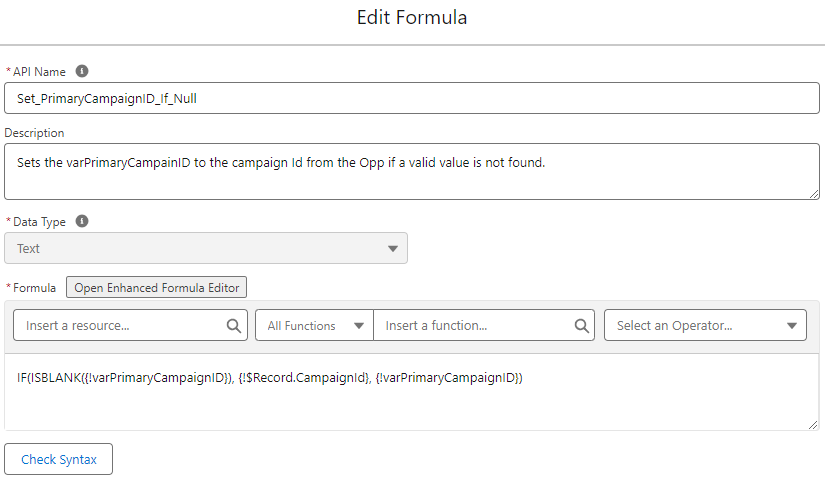
    • Note: If you decide to keep the most recent campaign as the Primary Campaign Source (if a valid campaign is not found), you will need to add a final assignment element prior to updating the record. The element uses a formula to ensure that the variable has been populated with a valid value and updates to the original campaign ID (even if it’s an excluded value) if blank. This prevents the Primary Campaign Source from being updated to a null value by the flow.

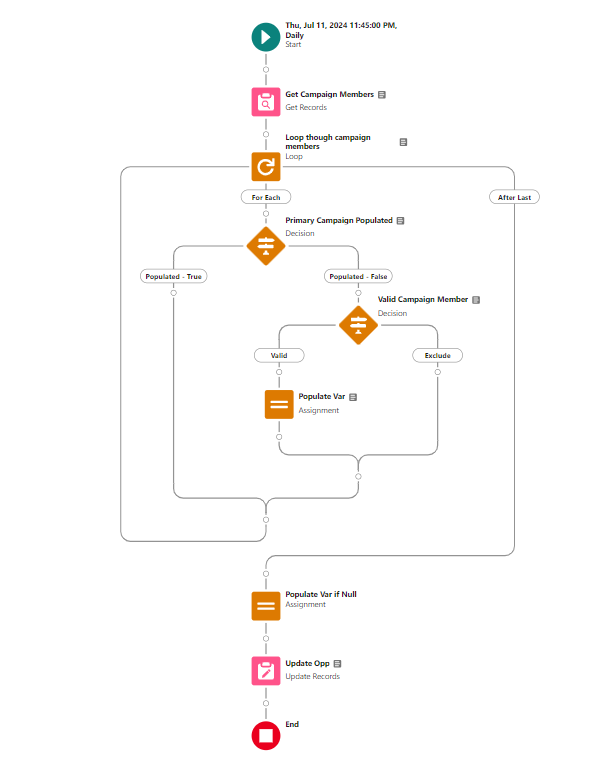
Complete Flow 

Here’s a look at my final flow.

Step 4 – Test & Validate

As with any flow, test, test, and test again before deploying to production. Below are some test scenarios to use for validation.

Create a new opportunity at lead conversion 

  • Lead with a single valid campaign
  • Lead with multiple valid campaigns 
  • Lead with an excluded campaign (most recent) and a valid campaign 
  • Lead with a single excluded campaign 
  • Lead with a single non-responded campaign membership

Create a new opportunity from a contact 

  • Contact with a single valid campaign 
  • Contact with multiple valid campaigns 
  • Contact with an excluded campaign (most recent) and a valid campaign 
  • Contact with a single excluded campaign
  • Contact with a single non-responded campaign membership

Update Primary Campaign Source on an existing opportunity

  • Update to an excluded value (make sure that there’s a contact role who has a valid campaign) 

Test Table

When testing and validating flows, I like creating tables to record results for review. This helps me organize my thoughts and ensure that everything is working as intended.

ScenarioOriginal ValueExpected ValuePass/Fail
Lead – Single Valid2023-09 TSW Dreamforce2023-09 TSW DreamforcePASS
Lead – Multiple Valid2024-06 SLS Sales Prospecting2023-06 WBR Product Update WebinarPASS
Lead – Excluded + Valid2024-06 SLS Sales Prospecting2023-09 TSW DreamforcePASS
Lead – Single Excluded2024-06 SLS Sales Prospecting2024-06 SLS Sales ProspectingPASS
Lead – Single Non-Responded2023-09 TSW Dreamforce2023-09 TSW DreamforcePASS
Contact – Single Valid2024-05 TSW Events2024-05 TSW EventsPASS
Contact – Multiple Valid2023-06 WBR Product Update Webinar2023-06 WBR Product Update WebinarPASS
Contact – Excluded + Valid2024-06 SLS Sales Prospecting2023-09 TSW DreamforcePASS
Contact – Single Excluded2024-06 SLS Sales Prospecting2024-06 SLS Sales ProspectingPASS
Contact – Single Non-Responded2023-09 TSW Dreamforce2023-09 TSW DreamforcePASS
Updated  – Existing Updated to Excluded2024-06 SLS Sales Prospecting2023-09 TSW DreamforcePASS

Is the Primary Campaign Source field meeting your needs?

If you are using the Primary Campaign Source field in your reporting I encourage you to take a closer look at your campaigns to see if your data is being skewed. If so, this solution is a great way to prioritize valid campaigns and put more emphasis on engagement. You can even completely filter out specific types of campaigns if you choose. Don’t sell your marketing efforts short!

More Salesforce Flow resources

Uh-oh. You just received an email from Salesforce saying you have exceeded your Marketing Cloud Account Engagement (Pardot) mailable database limit. That means if you don’t reduce the amount of mailable prospects in your database quickly, it’s going to cost you. 

Or maybe you were “just checking” one day & noticed that your Mailable Database limit was getting close to that 100% mark, and you need to do something quickly to prevent it from going over.

While the default Account Engagement instance allows for 10,000 mailable contacts, some companies purchase additional contact blocks of 10K prospects each based on their anticipated marketing/subscriber audience size. If you capture more mailable prospects than you’re limited to, Salesforce will allow you to capture those additional prospects in Account Engagement, but they will also invoice you for them.

At the end of the day, we’re all trying to grow our businesses and our audience size. So, hopefully, a time will come when we need to purchase another block of contacts to increase our mailable database limit. But if today isn’t that day, here are ways we can clean up our mailable database quickly and keep it tidy for the long haul.

How to check your mailable database numbers

If you get an email notice from Salesforce, the email will tell you how many mailable prospects are in your Account Engagement database compared to your database limit. Let’s log in to verify those numbers. 

There are two ways to check your mailable database numbers if you haven’t received an email from Salesforce for exceeding your mailable database limit or aren’t sure how many mailable prospects are in your database compared to your limit. 

Check your Prospects Table with the Mailable Prospects list view

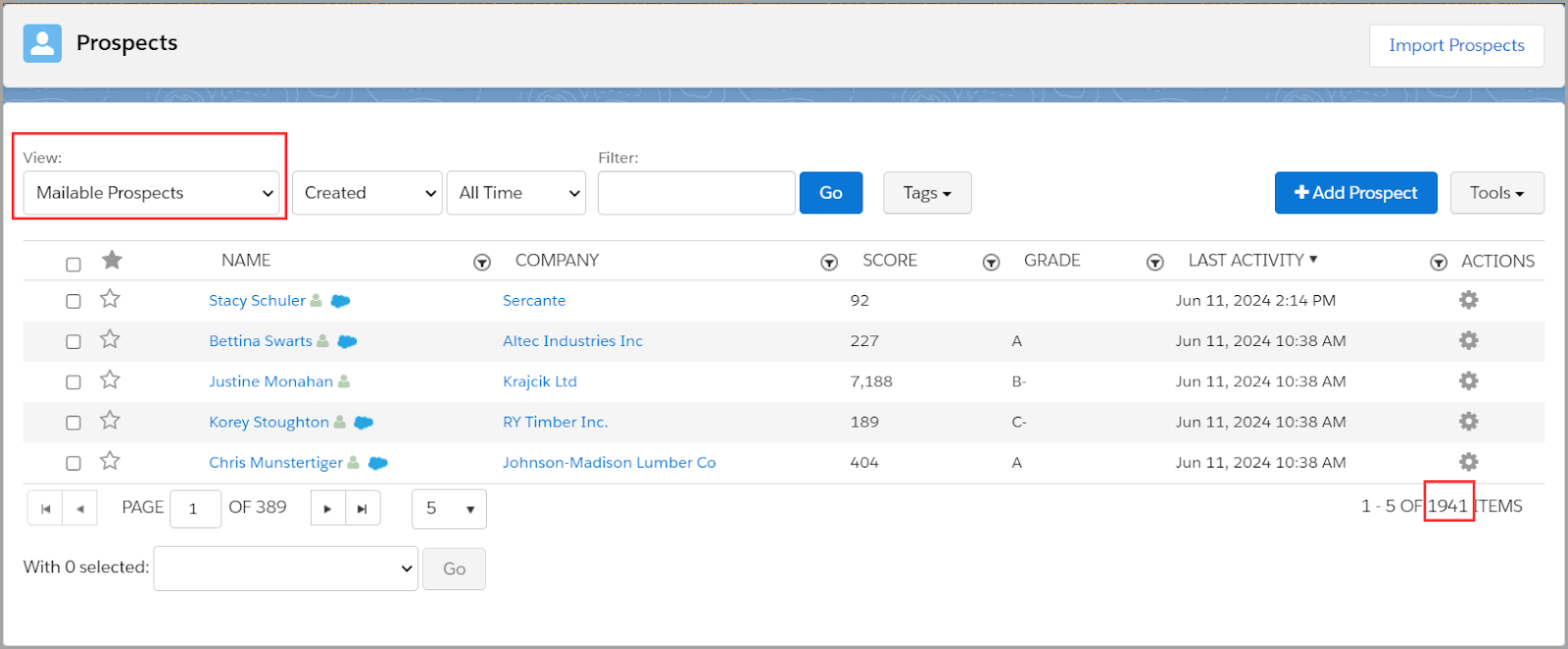
In Account Engagement (Lightning) go to your Prospects tab > List View: Mailable Prospect. This represents your total number of mailable prospects, but it doesn’t tell you what your mailable prospect limit is.

Use the Usage and Limits Tab to see your mailable prospect utilization

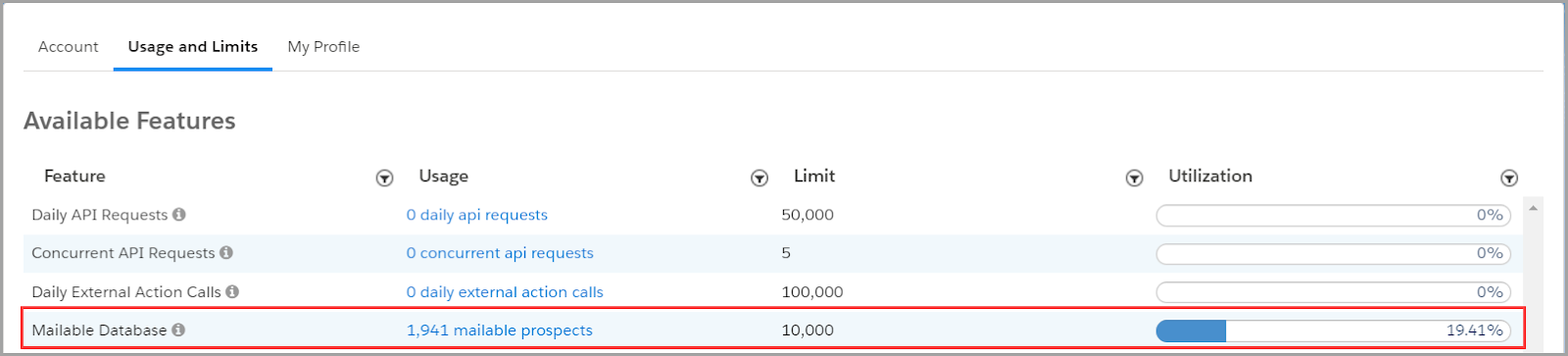
In Account Engagement (Lightning) go to your Account Settings > Usage and Limits Tab. It’s important to know that there can be up to a 24-hour delay in the total number of mailable prospects represented in this table. 

However, this table shows you your mailable prospect database limit and percent of utilization in addition to the total number of mailable prospects — just check that total number to the prospect table we just noted above.

Also – one VERY important reminder! 📣

Mailable prospect limits are shared across Account Engagement Business Units!

This means that if you have a limit of 10,000 mailable prospects, 9000 are in business unit A and 1941 are business unit B, your total database is actually at 10,941 mailable prospects! You are over your limit. This requires a little math and also an admin who is either monitoring both business units, or two Account Engagement admins who are, at the very least, communicating with one another. 

Wait, who is a mailable prospect again?

Before we can start determining who to keep in our database and who to purge, we need to understand who counts against our database limits. Mailable prospects count against your limit, but non-mailable prospects do not. 

Here are some quick bullet points to help you know which prospects are mailable and which ones aren’t.

Mailable prospects

  • Any prospect who is eligible to receive marketing and operational emails

Non-mailable prospects

  • Any prospect who has opted out
  • Any prospect who is marked as “Do Not Email”
  • Any prospect who has 1 hard bounce or 5 soft bounces
  • Any prospect who has been deleted and now lives in your Recycle Bin
  • Any prospect whose mailable status is “Operational Emails Only”

To reduce our mailable database, we need to turn our attention to mailable prospects.

Quick Wins: How to reduce your total number of mailable prospects quickly

Who should I keep in my mailable database and who is okay to purge? Here are three quick wins you can apply today.

  1. Get rid of “junk” prospects

Their mailability status may say they are mailable, but it’s probably unlikely that [email protected] is a real prospect. Run a dynamic list, or multiple dynamic lists for that matter, that look for junk prospects.

This blog post is FULL of amazing Dynamic List options to run on the four fields most often filled with spam content: First Name, Last Name, Job Title, and Email.

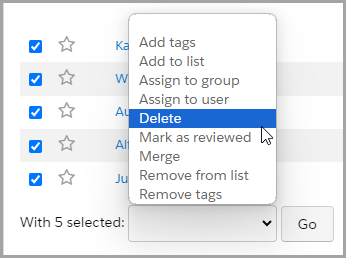
Once you have created your dynamic list(s), select the prospects to delete and use a Table Action to send these prospects off to the Recycle Bin.

  1. Delete old, unengaged prospects

Another quick win option at quickly reducing your mailable database size: delete the mailable prospects who aren’t engaging with your emails and marketing materials, and instead keep your focus on the prospects who are interested in what you are sharing with them.

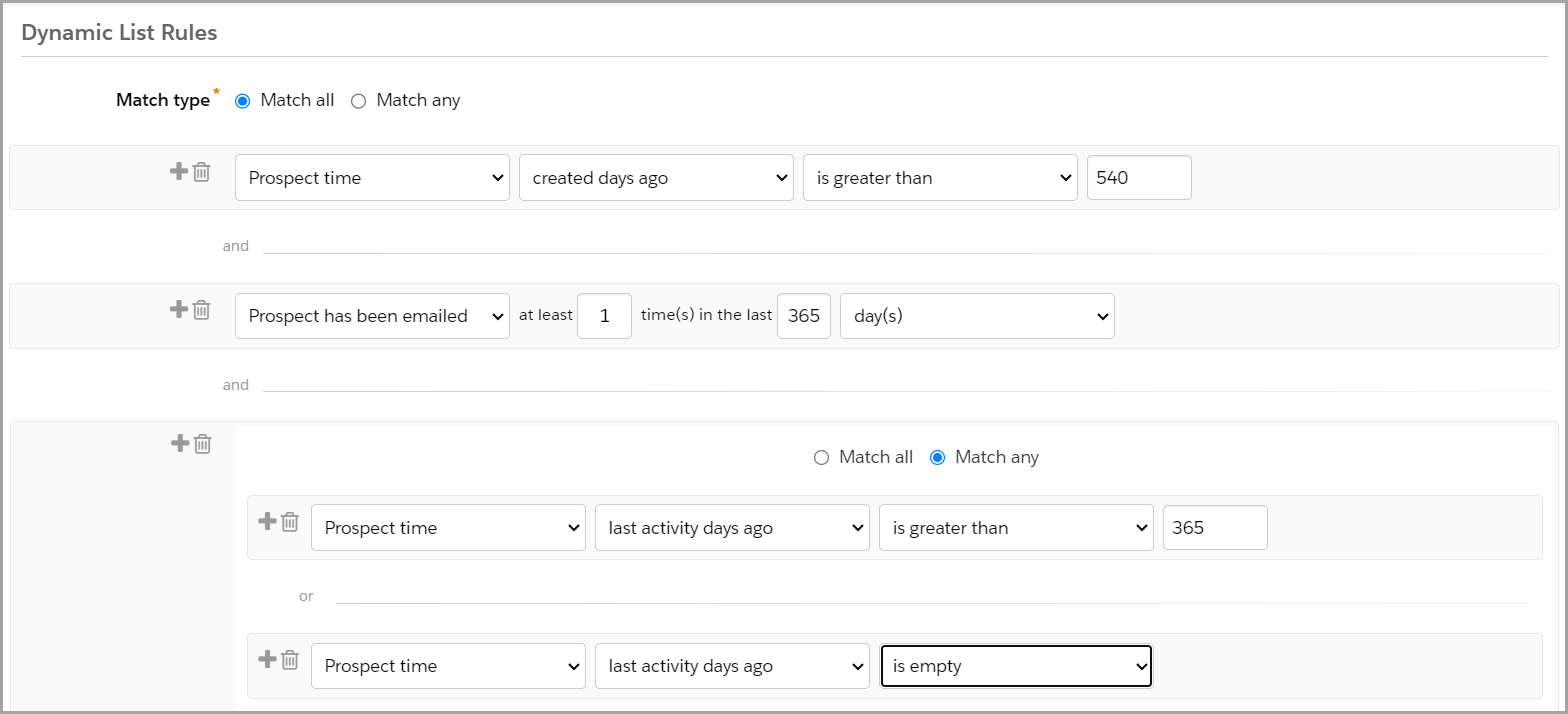
  • Create a dynamic list that looks at prospects who were created 18 months ago and haven’t engaged in the last 12 months.
  • Tweak this according to your unique business model — how you want to measure age of prospect and how you want to define engagement.
  • Run the list, select the prospects to delete, use a Table Action to delete the prospects.
  • Now, those Prospects live in the Recycle Bin — they do not count against your mailable database. However, Account Engagement will resurrect them out of the Recycle Bin, along with their historical activity information (before deletion), if they fill out a form again in the future.
  • FYI – When you delete a prospect from Account Engagement, it does not delete their Salesforce lead or contact records. 

Dynamic List Criteria Example

This type of list criteria could look something like this:

  1. Filter out your competitors

If you are prioritizing your marketing spend on prospects who are most likely to purchase at some point in the future, competitors might not be on that list. 

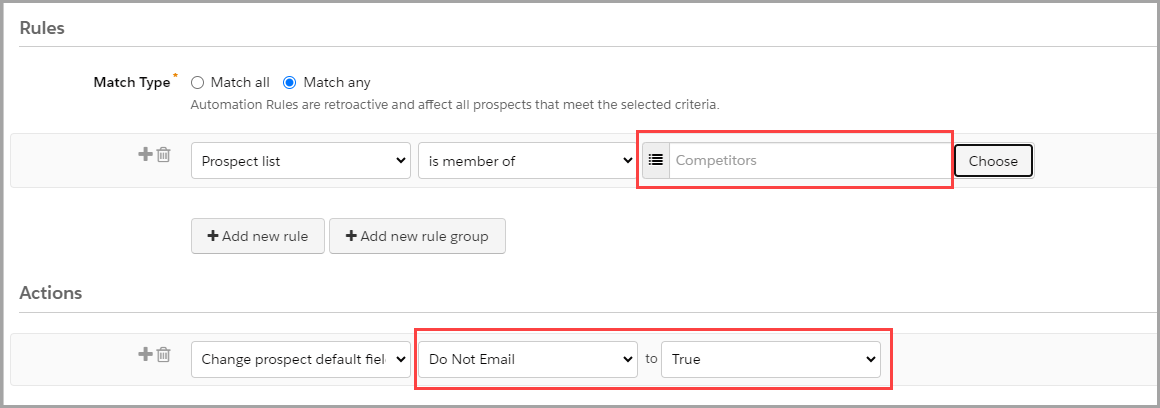
Create a dynamic list and then utilize an automation rule to mark these prospects as ‘Do Not Email.’

  • Step 1 – Write a list of all of your competitors email sending domains (or what follows the @ in their email address). 
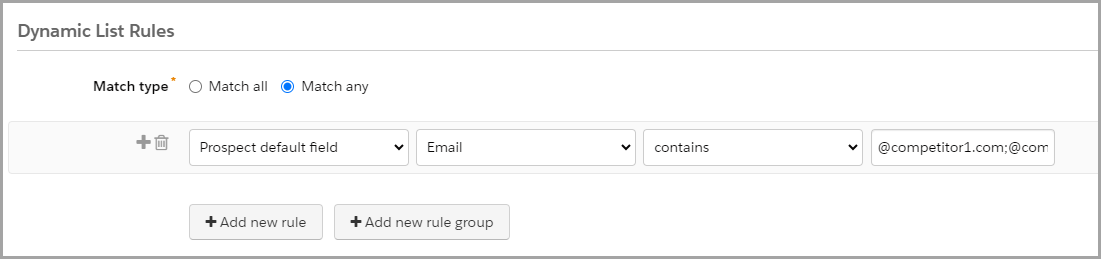
  • Step 2 – Create a dynamic list that looks at the Prospect Default Field Email Contains, and then insert your list of competitor email domains separated by a semi-colon (;). This allows you to use one line of criteria instead of each email domain requiring separate criteria entries.
    • Example: @competitor1.com;@competitor2.com;@competitor3.com
    • Note: If your list is long and you run up against character limits, utilize this sweet tool called Creuz Your Data to split your list of values into appropriate data chunk sizes with semi-colons already in place.
      • And then I recommend to bookmark that tool – you’ll thank me later 🙂
  • Step 3 – Create a repeatable automation rule to check if a prospect is a member of your Competitor List to update the prospect’s field ‘Do Not Email’ to True.
    • By setting the rule as repeatable you ensure that if the ‘Do Not Email’ field is ever cleared, it will re-update to True.

Long-Term Success: Maintain a tidy mailable database

Okay, so now you have taken quick actions to weed out clutter from your mailable database and are within your utilization limits again. Phew! Now let’s consider how we maintain this clean and tidy house. 

Use the confirmed opt-in approach

Start on the right foot when your prospects opt-in to marketing emails. Let them know what they can expect to receive from you by signing up for your mailing list and have them confirm their email address and subscription preferences from the start. This helps eliminate invalid email addresses and uninterested prospects before they fill up your mailable database. 

Want to know more about confirmed opt-in? Check out this blog post.

Set up a regular timeblock to check your lists so you can delete junk and unengaged prospects

Remember that the lists you created to weed out “junk” prospects and older, unengaged prospects are just lists. You still need to go in to delete prospects and send them to the Recycle Bin. Depending on the size of your lists, you may want to monitor this weekly, monthly, or quarterly. Create a repeating calendar event, and you’ll never have to remember not to forget about it. Easy peasy.

Create an Engagement Studio program to re-engage prospects before they make it to the unengaged list

How do you get prospects to engage with your marketing materials? Email them! 

Give prospects a chance to re-engage before they make it onto the unengaged prospect list. Create an Engagement Studio program that encourages your prospects to engage with compelling content and calls to action. Warm them up by reminding them of how great your product or service is.

Run a Permission Pass

A Permission Pass is an opportunity to reach out to your unengaged prospects and ask if they still want to give you permission to keep emailing them. Simply put, ask them if they still want to hear from you. This can be done at any time, or even better, at the end of a re-engagement program after you have tried to reconnect with them. If they do not respond to the email within the given timeframe communicated in the email, it’s time to let them go and send them to your Recycle Bin. 

It can be scary letting “real prospects” go, but remember — in the long run it is better for your bottom line and for your reputation. Spend marketing dollars and invest time and effort in prospects who are interested in your product. Also, you are less likely to have spam complaints from prospects who are just annoyed with what they perceive to be junk in their inbox.

Plan for growth

I love this part. If you are still pretty close to your mailable database limit after all these tips and tricks, start budgeting conversations now with leadership. 

Show them numbers before and after tidying up the mailable database. That way, they’ll understand the need to start planning to market to more mailable prospects and budgeting in the next 10K or 20K prospects. 

Even better, back up your numbers with reporting data on how your marketing efforts are producing great leads and increased revenue!

Bring in the experts to reach radical impact

Have you checked your Pardot mailable database usage and limits? Have you tried the suggested quick wins, but still need more help? Or do all of these tips and tricks sound good, but you need some help with the execution? Sercante is here for you! We have a great team of experts who can help audit your system and provide you with personalized recommendations.

Or… This might have just started with a need to reduce your mailable database to stay within limits, but now you’re excited about the opportunity of setting a laser focus on your mailable prospects and how you can serve them in greater ways!

Let us help you. ♥️

We have the best of the best when it comes to planning amazing nurture programs to re-engage unengaged prospects. We also have the best of the best when it comes to using analytics to support your marketing campaign ROI

Reach out to Sercante as you plan for growth by radically impacting your business with your mailable prospects today!

In the age of big data, effective audience segmentation strategies are the key to unlocking the full potential of vast datasets available to enterprise-level companies. Join me on a journey from data overload to impactful insights as we explore how enterprise segmentation strategy drives meaningful results. 

From demographic segmentation to behavioral analysis, we’ll delve into the various segmentation approaches that empower enterprise companies like yours to understand their audiences on a deeper level.

Segmentation strategies for enterprise marketers

Businesses today face a monumental challenge: how do they effectively harness and analyze the customer information that’s at their disposal? 

One powerful solution is audience segmentation. By dividing large datasets into smaller, more manageable subsets based on common characteristics or behaviors, segmentation enables enterprises to unlock the hidden value within their data and make informed decisions that significantly impact their bottom line.

 In this blog, we’ll examine the fundamental principles of segmentation, discuss its various applications, and provide practical insights into implementing segmentation strategies that deliver measurable results for marketers at enterprise companies. 

Demystifying Segmentation

At its core, segmentation is a strategy marketers use to divide their broad customer base into smaller groups based on shared characteristics, behaviors, or preferences. The end goal is that marketing has specifically targeted lists to tailor their efforts. With their extensive reach and scale, enterprise businesses typically have large target audiences spanning across different demographics, geographies, and industries. 

These audiences can encompass millions of consumers, making effective targeting and engagement a significant challenge. However, by having the marketing team segment its audience into smaller, more manageable groups, your business can tailor their marketing efforts, products, and services to meet customer needs.

Data Distilled

Identifying segmentation criteria determines the variables that will be used to divide target audiences into distinct segments. The choice of segmentation criteria depends on the specific goals of the business, the nature of the product or service being offered, and the available data. 

Standard segmentation criteria include geographic, behavioral, product interest, or demographic factors. Businesses can create meaningful segments that enable more targeted and effective marketing strategies by carefully selecting segmentation criteria that are relevant, actionable, and aligned with business objectives.

Geography

Geographic segmentation focuses on location or region. This is most often used when there is great variation between consumers based on their locale. 

One well-known enterprise to use this strategy is McDonald’s. In a recent article written by Two Teachers, they share that “By tailoring its products, services, and marketing messages to meet the unique preferences and needs of consumers in different regions, McDonald’s has been able to create a powerful global brand that resonates with people from all walks of life.” 

McDonald’s successfully uses geographic segmentation daily by tailoring their advertising and their menu items, to fit the local preferences. For example, here in the United States, we may seek the Big Mac, whereas in Japan, their HiruMac Teriyaki McBurger. Yum!

Behavioral

Behavioral segmentation includes purchase history, loyalty, and social engagement. This strategy focuses on consumer preferences and patterns, and Netflix is one of many enterprises using this method daily. 

According to Scientific American, “users discover around 80 percent of shows through algorithmic recommendations.” For Netflix, this is highly dependent on users sharing their ratings along with watching preferences and saves. With AI at our disposal, behavioral targeting is becoming even more popular and easier.

Psychological

Pscychographic segmentation prioritizes attitudes, values, lifestyles, and interests. This method targets a customer’s motivations and preferences. This is a broader method, as it can be challenging to target someone based on feelings, but some brands do it successfully. 

Let’s take a look at Nike. According to PDF Agile, Nike has very specific personalities they are targeting – men who go to the gym and love sports, women who exercise or prefer sportswear, and children who are also athletes. 

According to that article, “Nike focuses on the people who enjoy engaging in sports. The company is passionate about sports, and it makes products suitable for sports lovers.” As a result, all of their campaigns are focused on that type of individual.

Demographic

Demographic segmentation assesses age, gender, income, education, job role/title, etc. This strategy allows business to tailor their marketing efforts to meet the needs of a specific demographic. This is the easiest of the segmentation strategies as it is the easiest data to collect, and it’s also inexpensive while effective. 

Let’s look into the financial sector, which offers “different tiers of products and services based on income levels,” according to Faster Capital. Affluent customers are targeted and sold premium credit cards with high fees and exclusive perks, while a college student would be offered a credit card with low fees and a rewards program. 

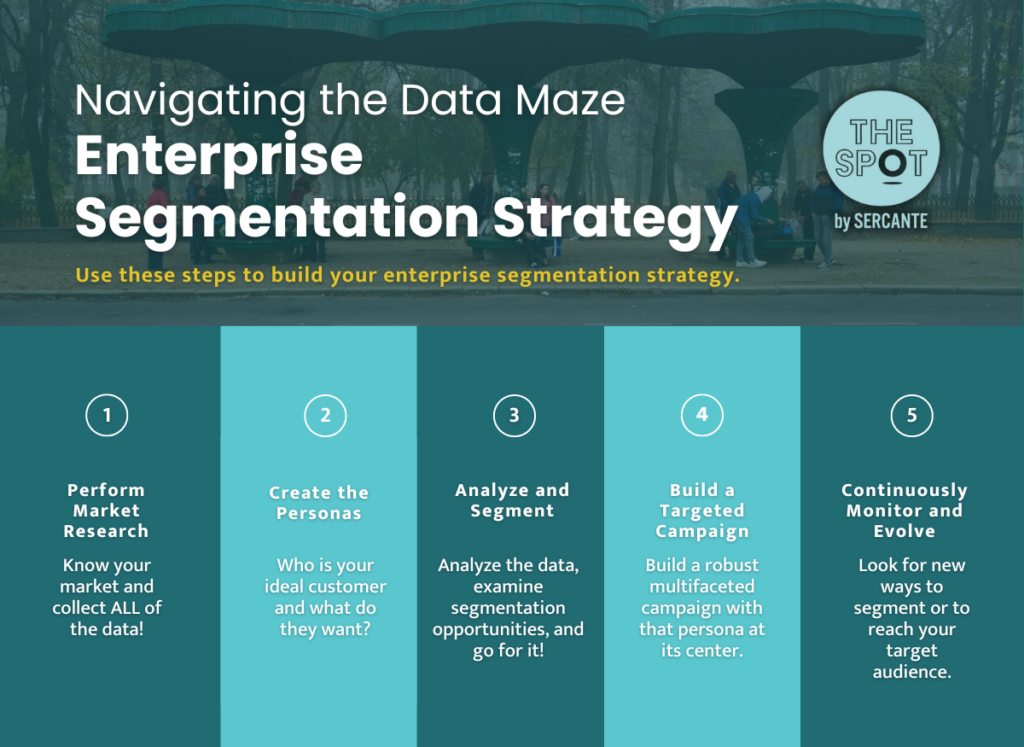
Navigating the Data Maze: Enterprise Segmentation Strategy

So, how do I get from point A to point Z? Let me walk you through it.

  1. Perform Market Research: Know your market and collect ALL of the data!
  2. Create the Personas: Who is your ideal customer and what do they want?
  3. Analyze and Segment: Analyze the data, examine segmentation opportunities, and go for it!
  4. Build a Targeted Campaign: Build a robust multifaceted campaign with that persona at its center.
  5. Continuously Monitor and Evolve: Once you’re done, keep going. Be on the lookout for new ways to segment or reach your target audience in new and creative ways.

Get help with segmentation strategies for your enterprise team

Segmentation strategies are invaluable assets for enterprises seeking to navigate the complexities of modern markets and effectively engage with diverse customer bases. 

Enterprises can gain deeper insights into customer preferences, behaviors, and needs by segmenting their audiences based on demographic, geographic, psychographic, and behavioral criteria. Moreover, the continuous refinement and optimization of segmentation strategies enable businesses to adapt to evolving market dynamics and stay ahead of competitors. 

As enterprise companies continue to embrace the power of segmentation, they will unlock new opportunities for growth, innovation, and customer satisfaction.

We’ve helped countless enterprise teams figure out the best approach to audience segmentation, and would love to solve your segmentation challenges, too. Reach out the the team at Sercante to get help with your team’s segmentation strategies.

Before we dive into the details of finding success with your Salesforce Data Cloud implementation, let’s set the stage. Whether you’re a seasoned Salesforce admin or just stepping into the realm of cloud-powered data solutions, Data Cloud is a game-changer, and here’s why you should care.

Navigating the Data Cloud Landscape

Salesforce Data Cloud is a platform that takes all of your data and turns it into actionable insights. It’s for anyone eager to supercharge their Salesforce experience. Whether you’re a department manager or an admin serving sales, marketing, customer service, or any other department, Data Cloud is your ticket to streamlined processes, informed decision-making, and ultimately, success.

The key to success is covering your bases early — before and during implementation. That means asking the right questions, collaborating with the right people, and establishing processes that keep everything running smoothly. 

Why Data Cloud Matters

Imagine having a centralized hub where diverse data streams — from identity platforms and purchase history to website interactions — seamlessly come together. Data Cloud does just that, offering a unified space to make sense of the data chaos. You may also be wondering what to do with the free Data Cloud license that you got as part of another cloud package.

You might wonder, “Why should I care?” Well, the answer is simple — efficiency, effectiveness, and exponential growth.

How to Ensure a Successful Salesforce Data Cloud Implementation

Now that we’ve set the groundwork, let’s delve into five practical tips you can use to guide your Data Cloud implementation with the ultimate goal of unlocking the platform’s full potential. We’ll explore how to propel your Salesforce Data Cloud implementation to new heights. You can also check out this post for a few ‘gotchas’ you may encounter during your Data Cloud implementation.

5 Tips for a Successful Data Cloud Implementation:

  1. Reach for organizational alignment
  2. Choose impactful use cases
  3. Measure success effectively
  4. Use out-of-the-box data models
  5. Be intentional with your data

Tip#1: Reach for organizational alignment

Now, let’s talk tactics. Aligning your organization before embarking on a Data Cloud implementation is paramount. Here are a few specific tactics to ensure everyone is on the same page:

Establish a Clear Owner

Designate a dedicated owner for the Data Cloud implementation. This individual should be someone with a comprehensive understanding of your organization’s goals and processes. Having a clear owner ensures accountability and a streamlined decision-making process.

Conduct Cross-Functional Workshops

Bring together representatives from various departments for workshops. Discuss the potential impact of Data Cloud on each team and encourage open communication. These sessions not only educate team members but also foster a collaborative spirit.

Define Roles and Responsibilities

Clearly outline the roles and responsibilities of each team involved in the implementation. From data management teams to end-users, everyone should know their part in the process. This clarity prevents confusion and sets the stage for a smoother implementation.

Communicate the Benefits

Emphasize the benefits of Data Cloud to every stakeholder. Whether it’s time savings, improved insights, or enhanced customer experiences, make sure everyone understands how Data Cloud aligns with the organization’s overarching goals.

Address Concerns Proactively

Open the floor for questions and concerns. Addressing potential roadblocks early on builds confidence among team members. Proactively seeking and resolving concerns sets the tone for a collaborative and supportive implementation journey.

Tip#2: Choose impactful use cases

Now, let’s talk about choosing the right use case — the cornerstone of a successful Data Cloud implementation. We urge you to start with the end goal in mind (instead of a technology-first approach, which many of us are so tempted to do). Focus on one or two initial use cases that drive team optimization and deliver tangible results within a reasonable timeframe. Whether it’s streamlining contact behaviors or enhancing customer segmentation, these impactful use cases showcase the value of the platform and generate positive buy-in across the organization.

Start with end goals in mind

Begin by identifying the desired outcomes of your Data Cloud implementation. What specific business objectives are you aiming to achieve? Whether it’s improving sales efficiency, enhancing marketing targeting, or optimizing customer service, starting with clear end goals ensures alignment and focus.

Evaluate business processes

Conduct a thorough assessment of your organization’s existing business processes. Identify pain points, inefficiencies, and areas for improvement. Look for processes that rely heavily on data and could benefit from the insights provided by Data Cloud. Consider areas where you’ve got trapped data and manual flows/processes.

Prioritize use cases with high impact and feasibility

Once you’ve identified potential use cases, prioritize them based on their potential impact and feasibility. Focus on use cases that offer significant benefits with manageable implementation efforts. Consider factors such as resource availability, data availability, and technical complexity.

Involve stakeholders in use case selection

Engage stakeholders from relevant departments in the use case selection process. Gather input from sales, marketing, customer service, and other teams to ensure alignment with their needs and priorities. Collaborative decision-making increases buy-in and promotes cross-functional synergy.

Prototype and validate use cases

Before committing to a full-scale implementation, consider prototyping and validating selected use cases. Build prototypes to test the feasibility and effectiveness of the proposed solutions. Use feedback from stakeholders and pilot tests to refine and iterate on use case designs. This is a great use case of taking advantage of the $0 Data Cloud SKU as well.

Data Cloud Use Case Examples

Examples of how customers across Salesforce Clouds are using Data Cloud

Improve Forecasting and Sales Collaboration 

Admin Type: Sales Cloud

  • Provide executives a full view of the sales forecast across multiple business units and orgs
  • Pass leads from one Sales Cloud org to another to facilitate cross-selling
  • Allow sales reps to collaborate with their broader account team on opportunities in separate orgs

Provide Proactive Customer Service

Admin Type: Service Cloud

  • Anticipate and deflect cases by sharing info proactively
    • Examples:  warranty extension notifications, product recalls 
  • Monitor events and devices to identify service actions
    • Examples: proactively avoid usage or entitlement overcharges or schedule proactive maintenance based on device data
  • Predict behavior to offer assistance and recommendations
    • Examples: provide agents with customer’s propensity to buy and next-best action

Personalize Marketing and Drive Engagement 

Admin Type: Marketing Cloud

  • Create and automate intelligent audiences fast
  • Act on real-time data to personalize every moment 
  • Gain insights into high-value segments and campaigns
  • Segment more precisely 
  •  Activate across the Customer Journey

Tip#3: Measure success effectively

Now, let’s discuss how to measure the success of your Data Cloud implementation effectively. Here are a few specific tactics to guide you.

Define key performance indicators (KPIs)

Identify measurable metrics that align with your organization’s goals. Whether it’s increased revenue, improved customer satisfaction, or enhanced operational efficiency, define KPIs that reflect the impact of Data Cloud on your business outcomes. And don’t forget to keep them SMART (specific, measurable, attainable, realistic, and timely)

Establish baseline metrics

Before implementing Data Cloud, establish baseline metrics to benchmark your current performance. This allows you to track progress over time and quantify the impact of the implementation.

Monitor data quality

Ensure that the data ingested into Data Cloud is of high quality and accuracy. Implement data quality checks and validation processes to maintain data integrity throughout the implementation. This is where taking advantage of our Data Cloud Readiness Assessment is key.

Track user adoption and engagement

Monitor user adoption and engagement with Data Cloud tools and features. Track user logins, usage patterns, and feedback to gauge the effectiveness of training and support initiatives.

Iterate and improve

Once you’ve successfully implemented, continuously review and iterate on your measurement approach. Get feedback from stakeholders, analyze performance data, and identify areas for improvement. Adjust your measurement strategy accordingly to ensure ongoing success.

Tip#4: Use out-of-the-box data models

You have to walk before you can run. Let’s delve into using the out-of-the-box data models during your Data Cloud implementation.

Explore standard data models

Familiarize yourself with the standard data models offered by Data Cloud. These pre-built models cover common data structures and relationships, saving you time and effort in designing custom solutions. Take advantage of these models wherever possible to accelerate your implementation.

Align with Salesforce Einstein 1 (Core) data model

Ensure alignment between the Data Cloud data models and the Salesforce core data model. By aligning these models, you facilitate seamless integration and interoperability between Data Cloud and other Salesforce products. This alignment simplifies data management and enhances overall system efficiency.

Customize only when necessary

While out-of-the-box data models provide a solid foundation, don’t hesitate to customize them to meet your specific requirements. However, exercise caution and prioritize customization only when absolutely necessary. Striking the right balance between standardization and customization ensures long-term scalability and maintainability.

Tip#5: Be intentional with your data

Now, let’s take a look at how you can be intentional with your data. Careful planning on how to use it within Data Cloud is crucial. Whether it’s analytics, segmentation, or real-time data actions, understanding the tools available and selecting the right ones for your use case is key. From calculated insights to data segmentation and AI capabilities with Einstein Studio, being intentional with data ensures effective utilization and actionability.

Data governance framework

Establish a robust data governance framework to govern the lifecycle of data within your organization. Define policies, procedures, and standards for data collection, usage, and management. Ensure compliance with regulatory requirements and industry best practices to maintain data integrity and security.

Data quality management

Implement data quality management processes to ensure the accuracy, completeness, and consistency of your data. Utilize data cleansing tools and techniques to identify and rectify errors, duplicates, and inconsistencies. Regularly monitor data quality metrics and address any issues promptly to maintain the reliability of your data.

Data privacy and security measures

Prioritize data privacy and security by implementing robust measures to protect sensitive information. Encrypt data in transit and at rest, restrict access to authorized users, and implement multi-factor authentication. Stay informed about data privacy regulations such as GDPR and CCPA, and ensure compliance to safeguard customer data.

It’s crucial to promote ethical data practices and mitigate bias in data analysis and decision-making. Educate stakeholders about the ethical implications of data usage and the potential impact on individuals and communities. Implement fairness, accountability, and transparency principles to ensure equitable outcomes and build trust in your data-driven initiatives.

Data lifecycle management

Develop a data lifecycle management strategy to govern the flow of data from creation to archival or deletion. Define retention policies based on regulatory requirements and business needs, and automate data archival and deletion processes where possible. Regularly review and update data lifecycle policies to adapt to evolving business and regulatory requirements.

Data-driven decision-making culture

Foster a data-driven decision-making culture within your organization by promoting data literacy and empowering employees to leverage data in their day-to-day activities. Provide training and resources to enhance data skills across departments, and encourage collaboration and knowledge sharing around data insights and best practices.

Bonus: Tap into expert guidance

Salesforce Data Cloud implementation requires strategic planning, thoughtful execution, and continuous refinement. By aligning your organization, selecting impactful use cases, leveraging out-of-the-box data models, measuring success effectively, and being intentional with data, you can unlock the full potential of Data Cloud and drive transformative outcomes for your business. 

As a bonus tip, we suggested looking toward expertise available in the Salesforce community. Seeking guidance from those who have navigated Data Cloud’s complexities can be invaluable. Whether through expert coaching sessions, community groups, or support office hours, connecting with experienced professionals can enhance your success with Data Cloud.

However, if you find yourself in need of expert guidance or support along the way, don’t hesitate to reach out to the Sercante team. Our experienced consultants are equipped with the knowledge and expertise to help you navigate every step of your Data Cloud journey and ensure success. Contact us today to learn more about our Data Cloud readiness assessment so you can embark on your Data Cloud implementation with confidence.

Related Resources:

You may be aware that when it comes to improving user experience on a record page,  Dynamic Forms have become more and more powerful over the last few Salesforce releases. A good example is the ‘Add Fields from Related Objects to Dynamic Forms-Enabled Pages’ feature from the Spring ‘24 release, which came from a  Salesforce IdeaExchange request.

Dynamic forms are a huge win for making more customizable and engaging user experiences, at least for custom objects and most standard objects. There are still a few that don’t have this feature yet. (I’m looking at you, Campaigns) 

Here’s a handy workaround that may help where dynamic forms in Salesforce aren’t supported.

Check out the latest Spring ‘24 Release updates here, including where you can display related record fields on a record. 

The Use Case: A “Dynamic” Campaign Page

You want to collect certain information for your campaigns, but the data differs depending on the type of campaign. 

Examples may include:

  • Events
    • Location
    • Venue Address
    • Venue Contact Info
    • # of Days
  • Webinar
    • Webinar platform
    • Presenter details
  • Partnerships
    • Partner Information
    • Type of Partnership
    • Partner Contact Info

All of this different data living on the record page can be cluttered and noisy, and forcing the user to scroll through the page to get to the data they need to fill in. It’s not a great user experience and not a great recipe for capturing quality data. 

Wouldn’t it be nice if we could bump up specific fields to more prominent areas of the page based on the type?

Unfortunately, Dynamic Forms can’t help us here (at least not yet — you can upvote the idea here). Some may choose to use record types and page layouts, but that may not be ideal for all companies. 

An Alternative Solution for Salesforce Dynamic Forms

While we may not be able to use Dynamic forms, there are some other Lightning features that can give us a potential workable solution: 

  • First we create a Quick Action, which allows us to build a mini page layout of the fields we want to highlight.
  • Then we use Lightning Page builder features to display this mini-layout above the fold so it’s easy for the user to find and update:
    • Related Record component
    • Set Component Visibility 

Here’s how.

Create an Action for Partner fields

  1. From Object Manager > Campaign > Buttons, Links, and Actions
  2. Click New Action
  3. For Object Name, select Campaign
  4. For Action Type select Update a Record
  5. For Label, enter a label that is appropriate for this purpose. It’s a good idea to make it relevant and easy to idenity what it’s for.
    • For example ‘Update Campaign – Event Details’
  6. Enter a Description outlining the purpose of this action
  7. Click Save

Edit the Action Layout

Once you have saved, you will be looking at the Action Layout page. Here is where you can choose what Campaign fields to display and the arrangement. 

  1. Just like you would for a page layout, drag and drop the fields that you want to be visible. 
  2. Click Save
  3. If you see this message, go ahead and select Yes. We won’t need the Campaign Name on this layout for our use case.
  4. You can edit this later from the Edit Layout button at the top of the page.

Now we can add our new layout to the Campaign record page

  1. From Object Manager > Campaign > Lightning Record Pages
  2. Select the Lighting Record Page you want to update and click Edit.
  3. Drag the ‘Related Record‘ component where you want it on the page
  4. In the Related Record settings panel on the right, update the following:
    • Header Label = the heading that should appear at the top of that layout on the page
    • Lookup Field = Use this Campaign
    • Update Action = the action that you created in Step 1
    • Click Save
  5. Select ‘Set Component Visibility’ for the Related Record component. 
  6. In the filter area, select Type = ‘Conference’

Voila! Now when working on a Campaign record, the Event Details will appear in their own “section” when the Campaign Type = Conference.  You can repeat this for other fields you want to appear on the page in specific circumstances.

To edit these fields, click the pencil icon next to the field you want to edit. All of the fields in that section will become editable, and notice that the other fields are not. These fields are edited separately because they are part of another component. When done, click the Save button to save the fields in that section. 

Build better experiences with this alternative to Dynamic Forms

While Dynamic Forms in Salesforce are fantastic for jazzing up user experiences, there are times when you need alternatives. Diving into Lightning features such as Quick Actions and Lightning Page Builder can help you to cook up custom solutions that do the job,  like the workaround we’ve explored here for displaying those crucial record fields based on different scenarios.

As you tinker around with ways to supercharge your Salesforce setup, remember, we’re in your corner. Want to chat about how to make your Salesforce dreams a reality? Reach out to the Sercante team today. Let’s brainstorm together and unlock the full potential of your Salesforce journey.

No more posts to show