Are you ready to ignite your digital marketing efforts? The collaboration between Marketing Cloud Account Engagement and Advertising Audiences, both powerful tools in their own right, will skyrocket your success in digital marketing. In this blog post, we’ll show you how Account Engagement and Advertising are powerful tools when they’re coupled with one another.
Marketing Cloud Account Engagement
Account Engagement is the Salesforce B2B marketing automation software. Its main uses are account-based marketing, cross-channel campaigns, and lead generation. And though it does so much more than that to optimize your marketing efforts and provide out-of-this-world analytics, it cannot help you run your digital advertising campaigns.
Marketing Cloud Advertising
Advertising Audiences, powered by Marketing Cloud Advertising, seamlessly integrates with online advertising platforms, including social media, Google Ads, and more, to target your Prospects specifically. It enables marketers to easily reach existing customers, generate new leads, suppress a subset of Prospects, and re-engage.
This all sounds great, right? Absolutely! But wouldn’t it be cool if your advertising efforts were linked to your marketing automation efforts?
Why should I connect Account Engagement with Advertising Audiences?
That’s easy! Pairing these tools can help you to automate your processes, improve cross-channel campaigns, and expand your footprint. Who doesn’t want this for their business?
Automate Processes
Getting leads from social media campaigns is often a manual process of exporting and importing. Bleh! Who has time for that? With this integration, you can automate lead transfers directly from your social media and paid ad campaigns to Account Engagement. This also lessens the chance of human error and ensures that you are staying within legal guidelines at a global level.
Improve Campaigns
There are many digital touchpoints: email, Facebook, LinkedIn, Instagram, Google Ads, etc. With Account Engagement and Advertising Audiences, you can unite all of these touch points into a centralized hub and be able to track and report on them seamlessly. This combo gives you a more accurate preview of sources and measures of what is and isn’t working for your company. It also allows you to use first-party data to create and target lookalike audiences, improving your chances of getting new leads.
Expand Your Footprint
When running campaigns via media buys and email, you can now target and re-engage inactive Prospects, target Prospects based on behavior, and enable exclusions based on data, demographics, or purchase history. And this is all done in real time. Does this not seem like a great return on investment?
I’m ready to launch Advertising and Account Engagement. How do I make this happen?
The setup can be cumbersome and often requires work with a Salesforce Partner, but it’s quite straightforward if you are comfortable in the Salesforce ecosystem.
The good news is that it’s done once it is in place. It’s all about building new audiences or tweaking existing audiences from then on.
You will need access to Sales Cloud, Marketing Cloud Account Engagement, and Marketing Cloud Advertising to get started. You will also need to ensure that all connectors are active.
Here’s a high-level look at what it takes to get this launched:
Sales Cloud
Create a Salesforce Campaign
Build a Salesforce Report
Account Engagement
Build automation(s) to populate your audience(s):
Automation Rule
Page Actions
Completion Actions
Engagement Studio
Advertising Audiences
Generate a Data Import
Create an Automation
Build your Audience
If you are ready to expand your digital footprint, the obvious next step is having all the tools you need at your fingertips. The power of Account Engagement combined with Advertising Audiences is among the most effective tools.
We get it. With all the reporting tools out there it is hard to know which one is correct (or what a tool is named this week). In this blog, we will guide you with four questions to help you decide which Salesforce reporting tool fits best with your goals.
4 Things to help you choose which Salesforce reporting tool to go with
To help you figure out what Salesforce reporting tool fits your situation, we are comparing these tools:
CRM Analytics (Formerly Tableau CRM, Einstein CRM, and Wave)
150+ APIs out of the box and numerous flat file options
Over 50 standard data connectors
If it’s a field in Salesforce, it is available to report on
Audience: Where does it live, and who needs to see it?
Lives in Analytics Studio or native in the app under the Analytics Tab. You can also embed it on Salesforce Lightning pages.
Most users will access via platform.datorama.com. You can embed dashboards for anyone you want to view.
Tableau has desktop and cloud-based versions, and you can buy licenses that include full data control or just view access
Natively in the Salesforce Org
Staffing considerations: Who will build it?
This can be done by someone who has an intimate knowledge of salesforce schema and object relations. If you can create a custom report type, you can be proficient in CRMA
Marketers can take Trailhead training and try to self-implement, or marketing agencies and consultants can also implement
Tableau is a widely adopted tool with knowledgeable users in many organizations, and there is a consultant marketplace on Tableau’s website
Whoever has a permission set that gives access in Salesforce
Licensing Costs
Additional Cost by how many seats and licenses you purchase.
Licensing is mainly determined by data row usage, with user licensing costs as well
Licensing is heavily user and enablement subscription-centric, with a pricing calculator found here
Comes out of the box with your Salesforce Edition. Wouldn’t count toward data storage, but they do have configuration limits
Data input
“Where is my data coming from, and how should I harmonize it?”
CRM Analytics
When it comes to CRM Analytics… it is all about Salesforce data. Think of it like Salesforce reports on steroids. If it is in Salesforce, you can easily pull it into CRM Analytics. That doesn’t mean there aren’t connectors for additional insight, (Hello Data Cloud!), but generally are limited to data lakes and warehouses.
Unlike Salesforce reporting, which imposes significant restrictions on the data sources (objects) you can include in a single report, CRM Analytics overcomes this limitation and lets you get pretty creative with joins. The downside is that you have to know your data really well so when you are joining you are confident what you report on is accurate.
Marketing Cloud Intelligence
When it comes to Marketing Cloud Intelligence… this is where Marketing Cloud Intelligence shines. If you have numerous marketing sources you need to report on — for instance, site data from Google Analytics, CRM data from Salesforce, and engagement data from Google AdWords — this is a marketer’s delight in terms of tools to work with.
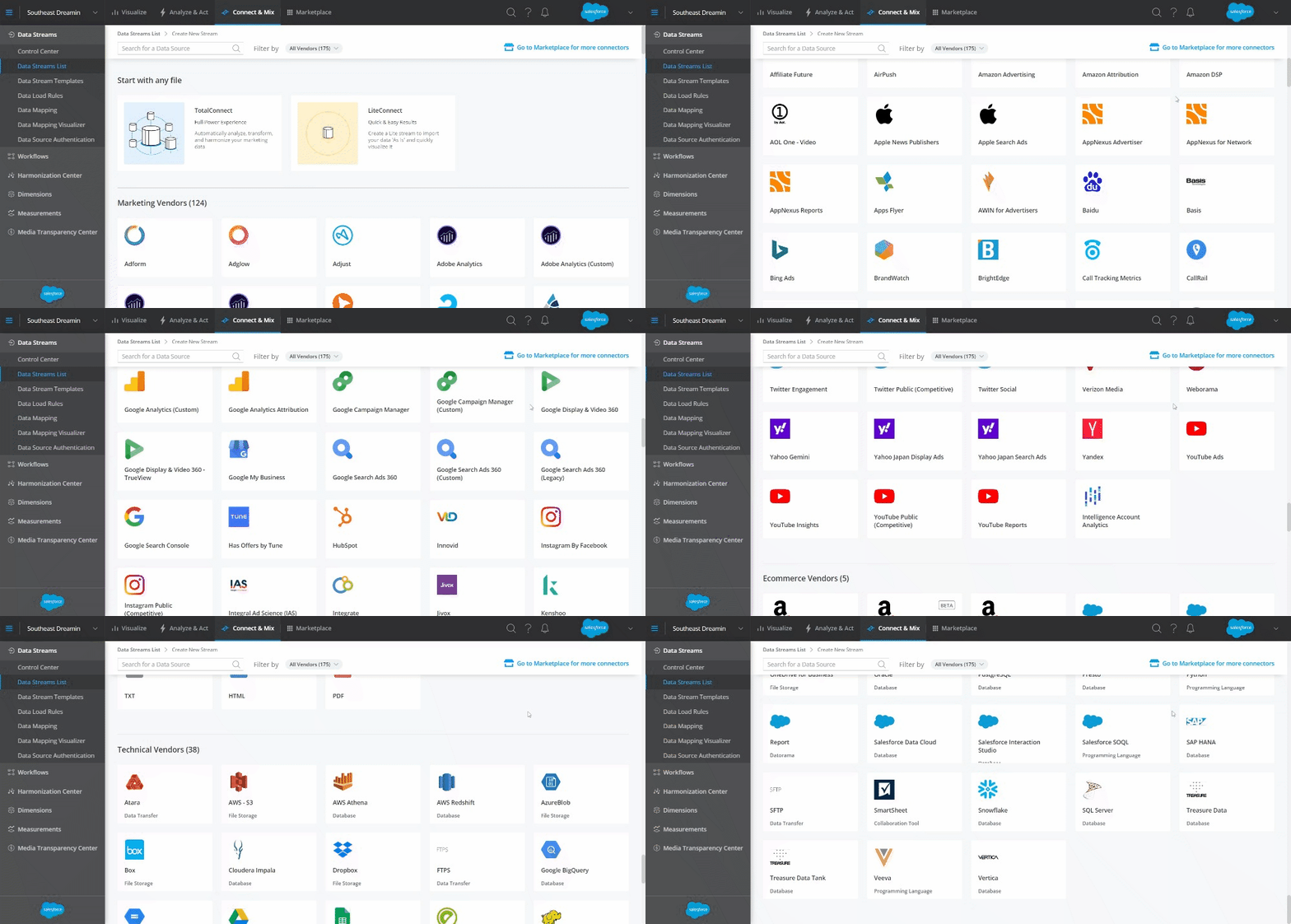
You can see the breadth of out-of-the-box marketing-centric connectors below — from Facebook, Adobe Analytics, or any other tool you have credentials to as simply as logging in, or simply uploading any data file you can imagine using the TotalConnect function. Intelligence also has a set of recommended data models for each type of connector with variation allowed upon ingestion and after the fact as well.
Tableau
When it comes to Tableau… you can find a holistic source list here (including numerous Salesforce connectors, among them Marketing Cloud Intelligence). Like Intelligence, you can upload raw files to Tableau and visualize the data accordingly with flexibility.
There are no standard data models, however, so you will need to set these up upon ingestion for your data sources (they will often mirror source data models).
Salesforce Reports
When it comes to Salesforce Reports… The adage “if it’s not in Salesforce it doesn’t count” is a phrase in the ecosystem for a reason!
Whatever data is physically available in Salesforce, generally a standard or custom Salesforce report can see it. This one is pretty easy and probably the piece you are most comfortable with, but don’t count it out.
Sometimes you need something quick and visible to a multitude of people. Let’s just say… if it was a horse, its name would be Ole Faithful. There is no limitation on company size per se, but be cognizant of data storage limits, data fatigue, and how clean that data is in your Salesforce org.
Final Thoughts
If you are an Enterprise customer, really think through different departments that need analytics and if there are data row limits for your products. Processing power can mean all the world when trying to load a report that takes 20 minutes.
What are you already paying for? There might be a way to reach your goal without purchasing an additional tool- this can help guide you to what your pain points are and to decide on a new tool if necessary.
Audience
Where does this report/dashboard live, and who needs to see it?
CRM Analytics
When it comes to CRMA… there are two answers. Most people view this in Analytics Studio, which opens a new browser window when you click on it from the app launcher in Salesforce. However, you can have a tab right in your Salesforce app that points to Analytics or embed the dashboard on objects in Salesforce. The caveat is that to view those reports you would need a license and permission set.
A great silver lining is that you can give the correct permissions to users even where they cannot edit or mess with anything just like you can in Salesforce. Based on the cost, that it requires licenses could limit who in your organization can engage with those dashboards. Another silver lining is that you can always download the dashboard as an image and include it in presentations or post in chatter.
Marketing Cloud Intelligence
When it comes to Marketing Cloud Intelligence… You need credentials to get into the Intelligence platform, and that can come in the form of admins (who can see everything and upload new data sets), power users (who can do reports and dashboard maintenance but not update data sources), and viewers who can, to certainly much surprise, view dashboards. You can also freely send out embedded versions of dashboard pages or activate reports to send to tools like Google Drive, Slack, or email regardless of platform access.
Tableau
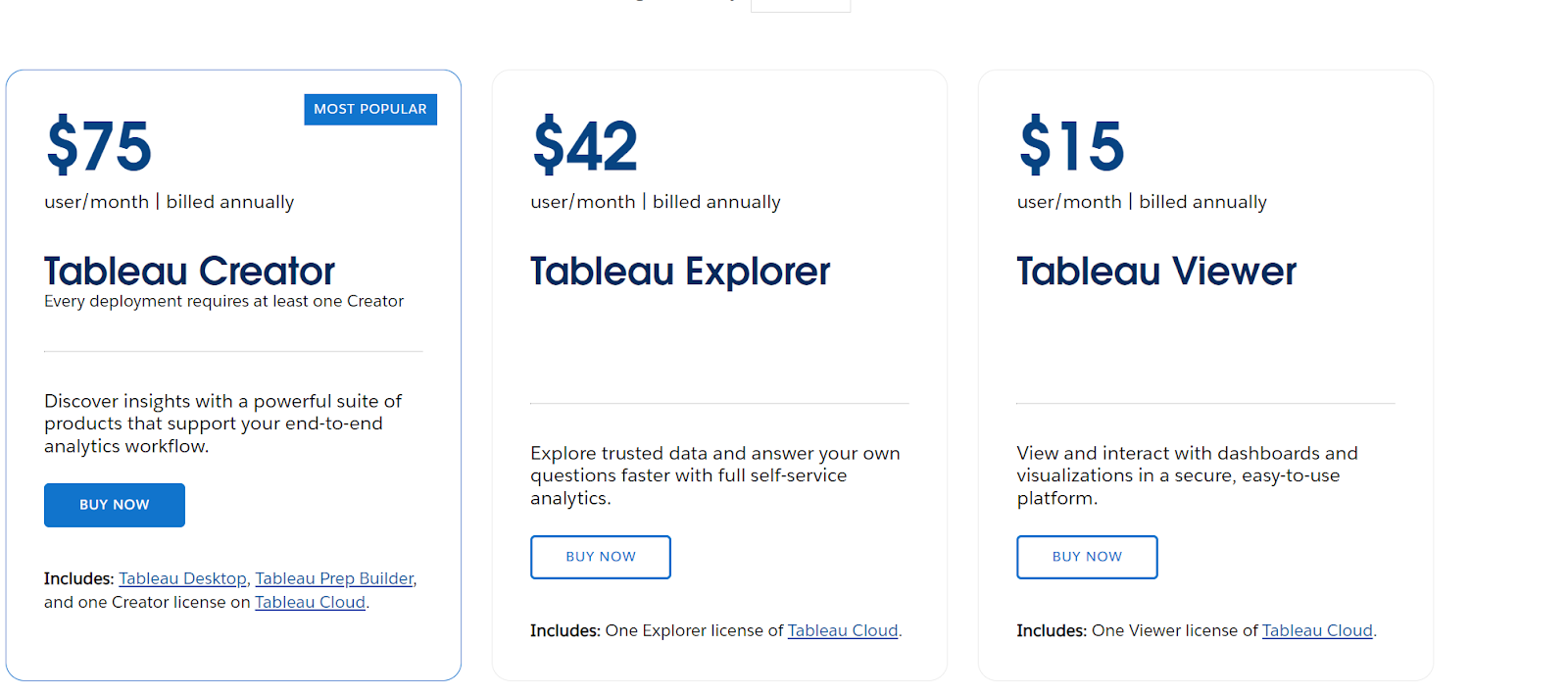
When it comes to Tableau… Tableau has numerous views and versions of the tool. There is a desktop version of the tool as well as web versions that allow users to freely access data views as they would like. Recently, Salesforce has allowed users to embed Tableau dashboards into Salesforce Lightning pages as a simple way to broaden their viewer base. Otherwise, you will be paying for different types of licenses in the form of Creators, Explorers, and Viewers.
Salesforce Reports
When it comes to Salesforce Reports…Locking down sensitive data is really easy in Salesforce and a great way to make sure you are being cognizant of data security internally. On the opposite end, Salesforce reports also let you be very open and transparent across your organization leading to the breaking down of silos. Whether you need to get super granular for one individual or macro for company reporting, Salesforce reports can get the job done for your internal teams.
✨
Final Thoughts
Some tools can host an online dashboard through a URL that your customers can see and engage with. (Great for certain industries like the public sector).
A lot of these tools are integrating or have integrated with Slack. Be aware of any gotchas or limitations if that is a priority.
Breaking down of silos can really be achieved with most of these tools. Just try and meet your audience where they live day to day. Make it easily accessible for them.
Staffing considerations
Who will build it? What do people on your team know how to use?
CRM Analytics
When it comes to CRMA… This is easy to learn if you have Salesforce experience. The interface is very user-friendly and once you get over the initial learning curve you can move pretty quickly.
But being transparent, if you haven’t really had experience with building report types on Salesforce or how objects interact in Salesforce it might be a challenge. There are also coding with SAQL and JSON that add an additional layer of flexibility and creativity that isn’t required, but really helpful.
Generally, you want someone who has a few years of Salesforce Report building experience or SQL/ JSON experience/ data modeling. To gain experience, there are great Trailhead Resources as well as getting your Salesforce Admin Certification to help get you started.
Marketing Cloud Intelligence
When it comes to Marketing Cloud Intelligence… There was previously a set of free certifications, but those have transitioned into Trailhead learning modules, found here. The tool is based on a very user-friendly UI for modeling and building out views of your data is relatively easy to learn, and is made even easier by the access to standard API connections.
This tool is also used heavily in marketing agencies and well known for marketing data. Some Salesforce Marketing Cloud users may also be familiar with Intelligence Reports for Engagement, which has some light versions of the full-fledged Intelligence platform’s features.
Tableau
When it comes to Tableau… Tableau is one of the most widely adopted visualization tools on the market right now. While the back-end processes may be a bit of a deep dive for newer users, familiarity with data mapping and formula creation in other tools will go a long way. You can also get certified or find Tableau knowledgeable on Tableau’s certification page at https://www.tableau.com/learn/certification.
Salesforce Reports
When it comes to Salesforce Reports… Salesforce reporting and who has access to build is dependent on permission sets. This means you can give the ability to users as you, the admin, see fit. The ability to create custom report types is also customizable through a permission set but should be thought of as to who would best serve to manage because that can get out of hand. (Too many cooks in the kitchen if you catch our drift).
Final Thoughts:
Who is going to build it might not be who is going to use it. Can you imagine your manager trying to piece together a Tableau report? Let’s let them spend time on other things :]
Licensing costs for users and data
CRM Analytics
When it comes to CRMA… CRM Analytics is generally an additional cost for licensing. However, some clouds have app templates in Analytics Studio that give you a degree of access. Be on the lookout for tools that have app templates (B2B Marketing Analytics) or can be added on at an additional cost (Sales Cloud Analytics).
Another thing to note, you aren’t charged for creating dashboards, transformations, or filtering, but your org has a limit on how much data is being processed called a data row limit (basically how much data you bring in). Just something to keep an eye on home data you are bringing in.
When it comes to Marketing Cloud Intelligence… You can read the full pricing breakdown here-the main difference between these options is best captured in row usage (though users also scale according to package), which is best determined by the breadth and depth of the data you are pulling (for instance, keyword level data across ten sources will be more row-heavy than campaign and media buy data across four or five sources).
Tableau
When it comes to Tableau… You can find the pricing here, which breaks down on a user-by-user basis depending on the type of user license, all of which come with different features and permissions (ranging from viewer-level permissions to interact with already built dashboards to Tableau Creators, who have the full tableau suite of features available to them). There is even a pricing calculator on Tableau’s website if you want to get a clear sense of what it would look like for your organization.
Salesforce Reports
When it comes to Salesforce Reports… Thankfully this is fairly easy! Reports and dashboards are considered metadata and are native out of the box with your Salesforce edition and wouldn’t count toward data storage. They do have configuration limits that you might want to consider when looking at your Salesforce Licensing and Cost.
No wrong answers for Salesforce reporting tools
In conclusion, there isn’t a wrong answer when it comes to which reporting tool to use. Many of them overlap and have similar functionality. But to make heads or tails of which reporting tool fits your goals best, you can start with these 4 simple questions:
Data input. “Where is my data coming from and how should I harmonize it?”
Audience. Where does this report/dashboard live, and who needs to see it?
Staffing considerations. Who will build it? What do people on your team know how to use?
Cost of use. What are Licensing costs for users and data?
We hope that the tidbits we’ve given in service of these questions are helpful, and welcome you to reach out to our team if you have any further questions on these topics or other reporting tool questions.
Keep it going
Here are a few resources to get you started as you figure out which reporting tool works best for you and what it takes to manage those tools.
Salesforce web forms can be a game changer by empowering you to create personalized experiences for customers. Complex forms using multiple steps and conditional logic tailor digital journeys to meet the unique needs of the individual. These engaging forms enable savvy sales and marketing teams to foster interest in their product or service and close deals faster.
While native Salesforce forms have many advantages, they also come with challenges. Specifically, if you want to create complex forms involving detailed steps, containing dynamic content, or with a customized UX, you will need to invest in some kind of development or code.
Using complex web forms without coding knowledge
If you have time and money to burn or in-house developers to tap for help, then this is no problem. However, if you don’t have knowledge of code or access to a development team or want to speed up time to market, you might want to consider alternatives.
In this article, we check out how you can get all the perks of complex Salesforce forms without having to write a single line of code. To do this, you will need to venture away from Salesforce native solutions, and their associated limitations, and check out some of the leading tools on the Salesforce AppExchange.
Want to learn more? Keep reading!
Creating leads in Salesforce using web-to-lead forms
Let’s take a look at web-to-lead forms for Salesforce and how these forms can further the aims and objectives of your sales and marketing teams. In the process, we will discover some of the limitations of native Salesforce functionality and find ways to navigate them.
Web-to-lead is a feature that empowers you to create leads in Salesforce via forms embedded on your website. Setting up forms with the native Salesforce web-to-lead feature is relatively easy and doesn’t require any code at all.
When a user fills in your form and submits it, real-time data gets pushed into Salesforce where the CRM automatically creates a lead. From here, your sales and marketing teams can ensure high-value leads are routed to your best salespeople. That information on your lead is analyzed against relevant metrics and consumer trends.
Finding flexibility with Salesforce web-to-lead forms
The challenge with the Salesforce web-to-lead is that the out-of-the-box version may leave teams wanting more. For example, you can’t connect your form to other objects in Salesforce such as Case or Opportunity. In addition, you can’t attach files to native web-to-lead forms to provide supporting information on your lead.
You can accomplish these things and collect detailed information on the preferences and needs of each lead, but the solution requires the implementation of custom code.
Implementing complex web-to-lead forms in Salesforce
To kickstart next-level lead generation and close deals faster, we recommend creating complex web-to-lead forms that capture robust information on a prospective customer such as their likes, dislikes, and purchasing preferences.
Using a Salesforce form that allows attachments also means you can get comprehensive data on leads and execute deals more effectively. Similarly, complex web-to-lead forms for Salesforce that contain conditional logic and multiple steps are more exciting to the user and give you a more granular picture of their personality and profile. For example, if a user says they are interested in purchasing a particular product, then you can prompt them to fill in follow-up questions such as the specifications they are looking for and the amount of money they are willing to spend.
On the other hand, if a lead expresses no interest in a product or service, then there is no need to ask them further questions. In this line of thought, if a user answers a question indicating they want to learn more about your organization, you can give them the ability to download a pamphlet or ebook. If not, you don’t need to bother them with this. This kind of dynamic logic saves time and holds the interest of users a lot longer.
You can achieve this level of flexibility and create dynamic, multi-step web-to-lead forms in Salesforce, but it will require coding and development. So, what are your options if you want to skip the heavy dev work but still get all of the perks?
Alternatives to native Salesforce forms
If you are a seasoned Salesforce user, you will know that the Salesforce AppExchange is a giant marketplace where you can find thousands of platforms that integrate with the planet’s leading CRM. And while there are countless tools with which to create forms in Salesforce, some tools do this more seamlessly than others.
The best solutions give you the freedom to build forms in Salesforce using any logic or object you want without any limitations or code. This frees up your schedule, saves you money, and requires zero compromise when it comes to your dream solution.
While it’s up to you to choose the tool that best suits your organization, we will zone in on one app: Titan for Salesforce. Taking its name from the most powerful of Greek gods, Titan is a no-code platform that can implement any custom solution for Salesforce.
Web-to-lead forms by Titan allow you to:
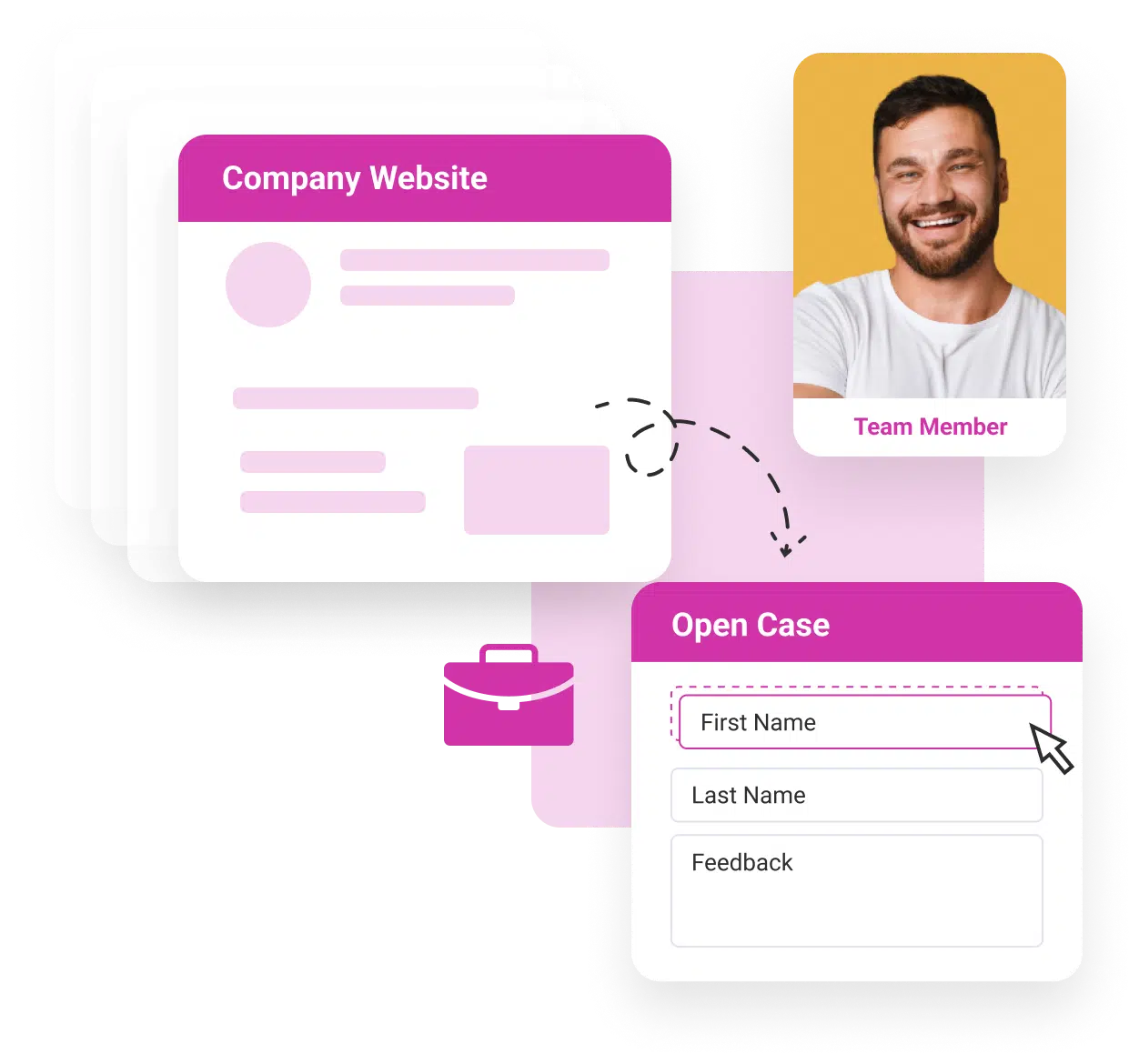
Connect your web form to any object in Salesforce such as Contact, Opportunity, and Case.
Include attachments on your web form for Salesforce.
Create tailored customer journeys with multiple steps and conditional logic.
Generate leads in Salesforce.
Make forms with a custom UX.
Gather comprehensive information on leads.
View comprehensive data on every lead in Salesforce.
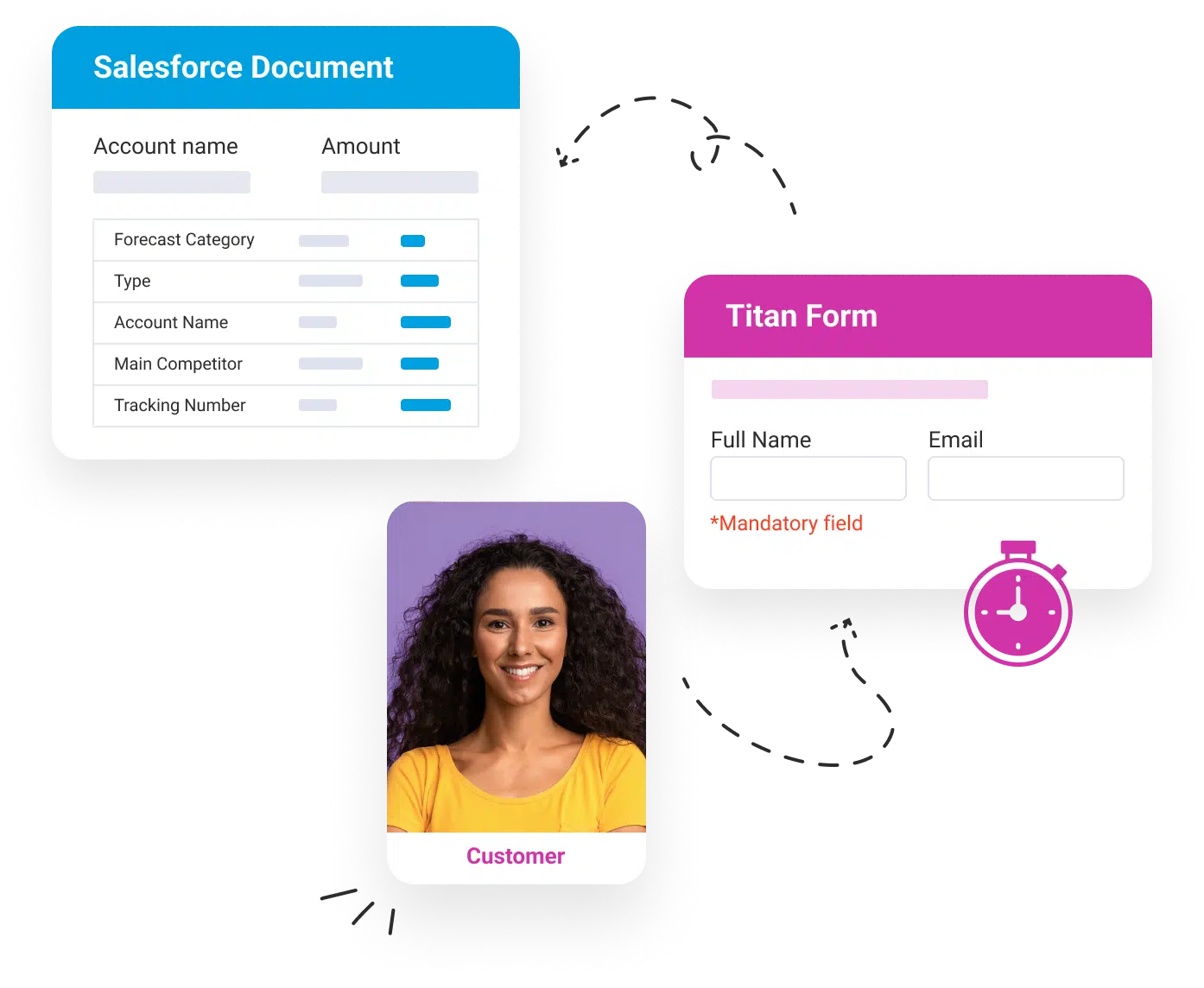
Data is validated in real-time so you can make sure form data is sent to the correct object:
Go-to-market fast!
And all this requires no code or any special technical expertise, though experience with Salesforce or having worked as a Salesforce administrator will certainly help you work at optimum speed. Learn more about Titan’s Web-to-Lead powers here:
Salesforce Forms Wrapped
And that’s a wrap on building complex forms for Salesforce using zero code. We hope you learned more about how more complex forms can create intuitive and guided digital experiences for users and help you make deals that much faster.
Web-to-lead forms automate the lead creation process for marketing and sales teams but Salesforce’s native feature is limited. We suggest finding a no-code alternative on the AppExchange. Titan is one great option, but it’s up to you to choose the perfect solution for your business needs and objectives.
One of the biggest trouble spots I see with customers customizing in CRM Analytics and B2B Marketing Analytics (B2BMA) is using recipes and joins — specifically when it comes to the Account Engagement customizable Campaign Influence model.
Recently, a customer and I were diving into their Campaign Influence Model, and the numbers were just not right. They had done a great job of knowing what objects to select in the recipe. On the surface, everything looked great, but once they started reviewing the data in a lens they saw a lot of data discrepancy. This type of recipe can get tricky if you aren’t aware of some of the nuances of CRM Analytics.
In this blog, I want to walk you through step by step so you can build your custom recipe in B2BMA utilizing Campaign Influence and feel confident about the data you have on your CRM Analytics dashboards.
What is Campaign Influence?
Now I don’t want to go on a diatribe on Campaign Influence. Chances are if you are reading this, you are already aware of it and how great it is. But on the off chance you just stumbled upon this blog, I will give you a brief overview.
Quite frankly, besides CRM Analytics, Account Engagement influence models and Campaign Influence are my favorite Salesforce reporting features. Account Engagement Campaign Influence models are a way to give a campaign credit for a closed opportunity.
As a recovering marketer myself, I know how important it is for the marketing team to identify which campaigns are performing well and leading to closed deals and revenue. The magic is that Account Engagement’s Campaign Influence Models go way beyond just the first touch like the Account Engagement’s campaign source.
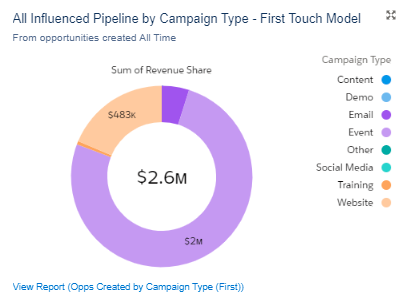
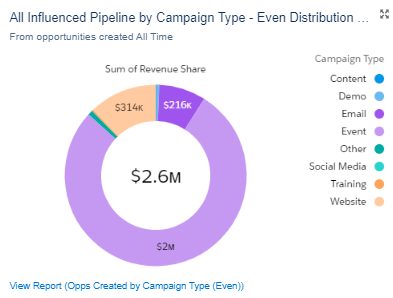
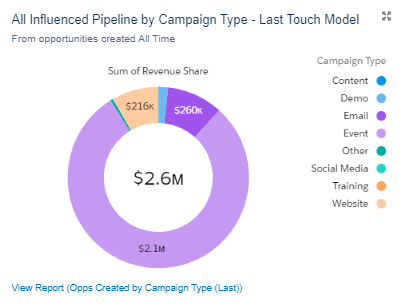
3 Models Included in the Account Agagement Customizable Campaign Influence Pack
There are three different models included in the Account Engagement Customizable Campaign Influence pack.
These different models showcase each part of the marketing funnel. The best part is, they are each reflected based on the opportunity. That means they’re great for cross-selling, add-ons, and upgrades!
First-Touch Model
Influence will be attributed to the campaign associated with a contact role whose Campaign Membership Created Date is the earliest of all contact roles associated with an opportunity.
Even Attribution Model
Attribution is divided evenly across all campaigns associated with each contact role on the opportunity. As an example, imagine a scenario where there is a contact associated with four campaigns. Each campaign would receive 25% of the attribution. If they were only on two campaigns it would be 50%.
Last-Touch Model
Influence will be attributed to the campaign associated with a contact role whose Last Modified date of the campaign member is last for all contact roles associated with the opportunity.
There is so much you can do with these models, and it gives you great insight into how assets are performing all across the marketing funnel. For even more information on why campaign influence should be a part of your strategy, check out this blog on Salesforce and Account Engagement Marketing Reporting here.
We at Sercante even have a great starter pack that has the report types built out automatically making the process easy to set up! You can check out the Campaign Influence Starter Pack here.
Step-by-Step Instructions to Build the Custom Recipe in B2BMA Using Campaign Influence Models
Now to the fun part!
Step 1: Selecting the Objects in the recipes
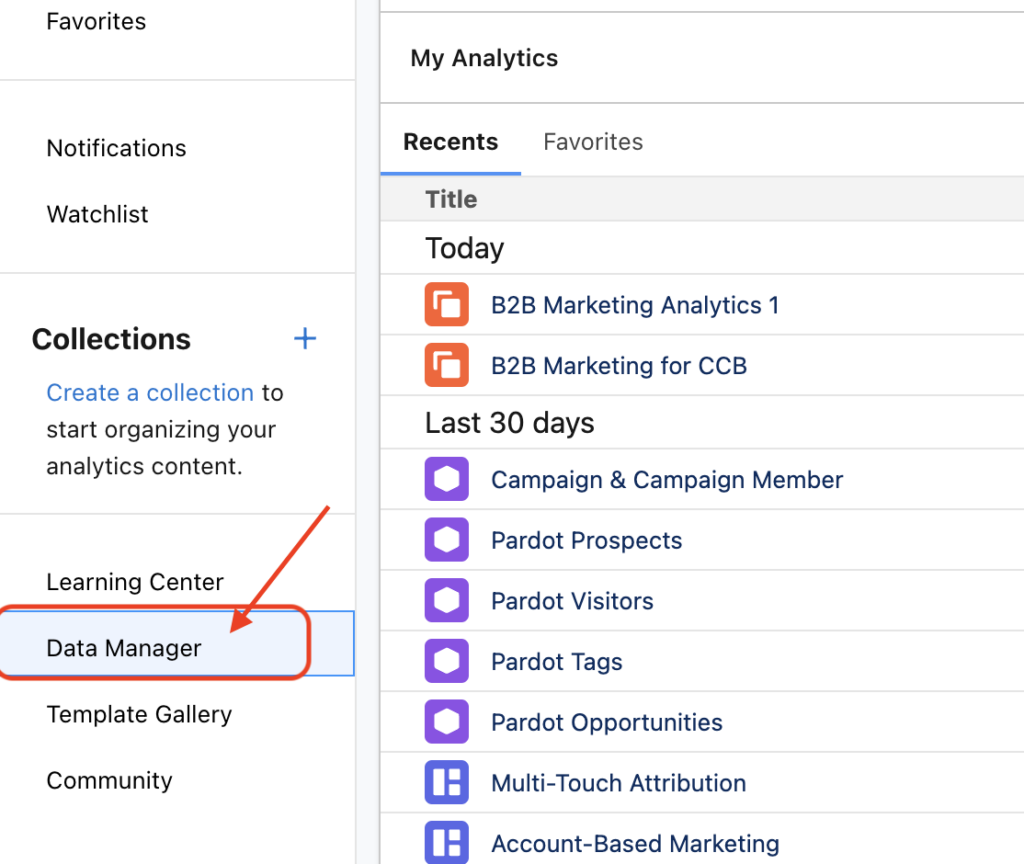
Before we get too far, we want to make sure we select the right objects in Data Manager. Open Analytics Studio from the app launcher. From there, select Data Manager.
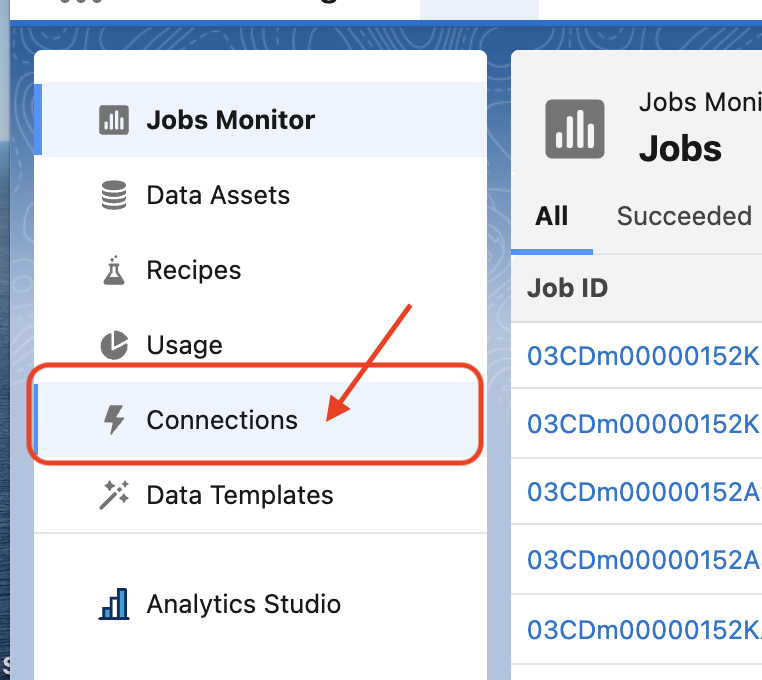
Now we are in Data Manager. We want to make sure the Campaign and Campaign influence objects are syncing. Select the Connections tab and review the list of currently syncing objects.
Once you have verified your objects are there and ready to go, we can build out the recipe!
Step 2: Selecting joins
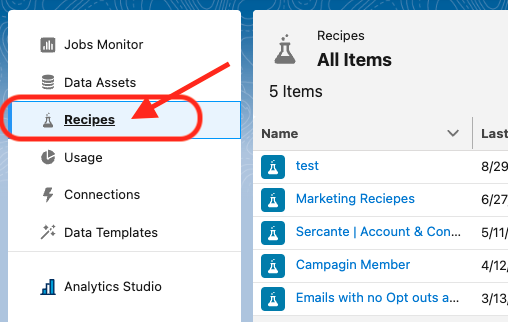
First, select the recipes tab. You can create a brand-new recipe or group it into an already-created recipe.
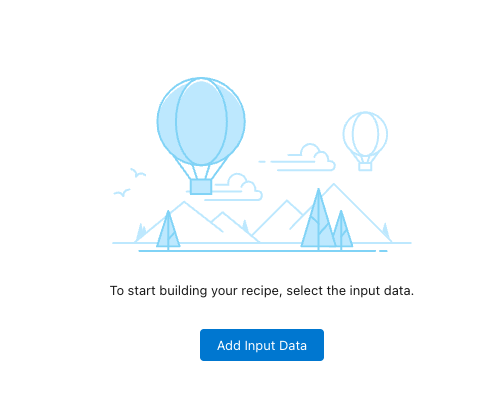
Then Add in your data. Select Add Input.
* Note: If you are using an existing recipe, you can click on the Add Input button at the top left.
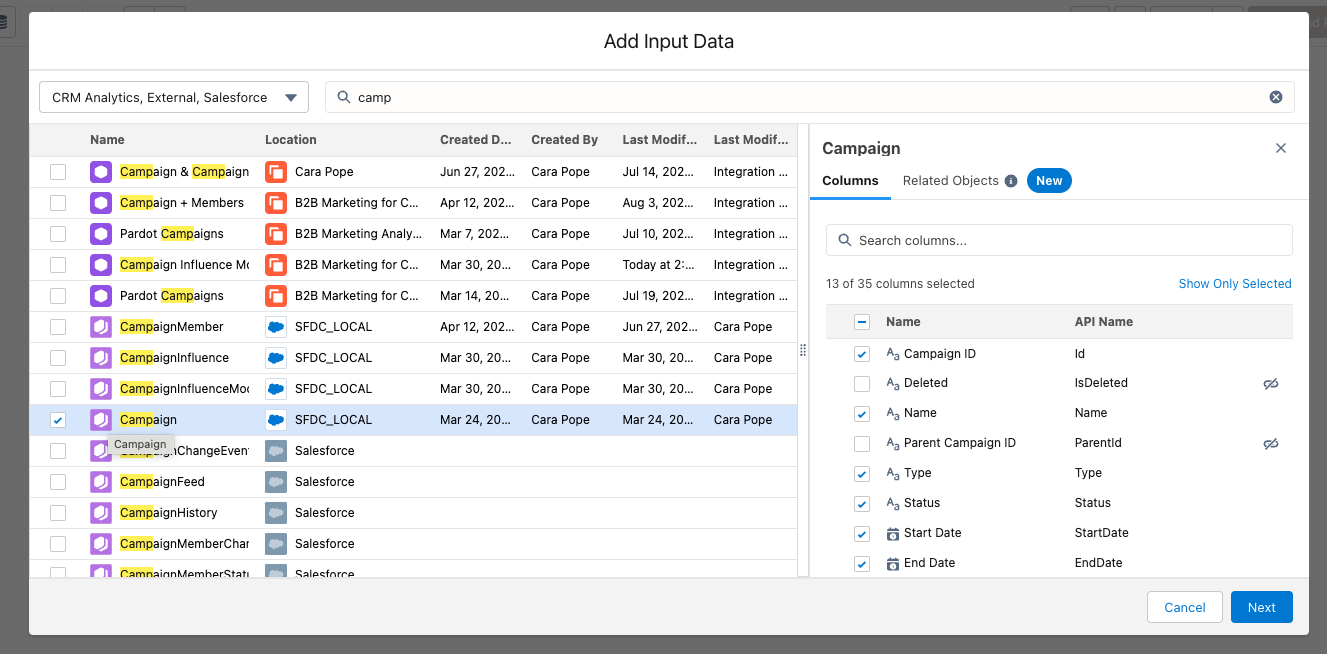
Select Campaign object.
This will be the step where if there are specific campaign fields like budget, leads in campaign, or any additional campaign fields, you will make sure they are selected in the fields’ columns.
Don’t worry, the party isn’t done yet!
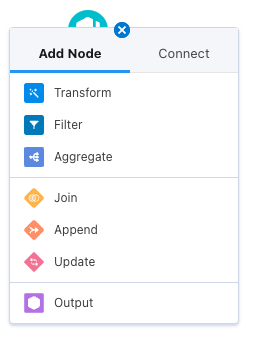
To add in Campaign Influence, hit the plus button next to the campaign. Then, select Join.
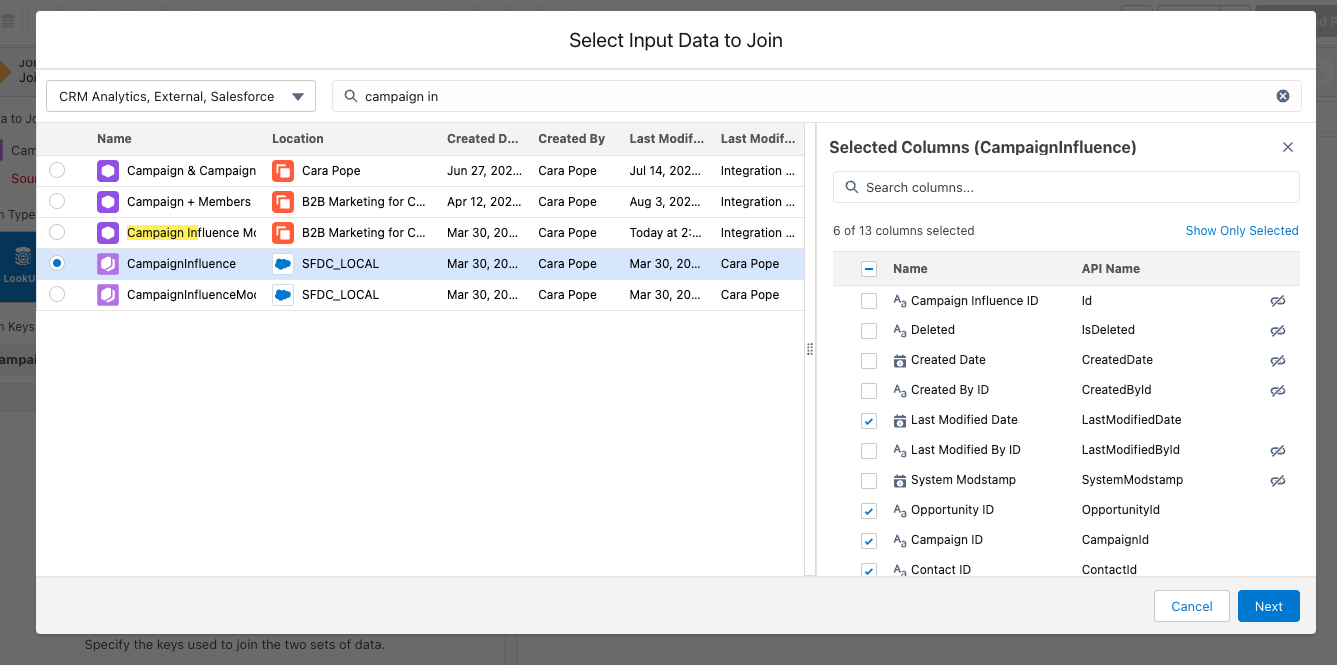
Then select Campaign Influence: again if you see any Campaign Influence field you want, select it here!
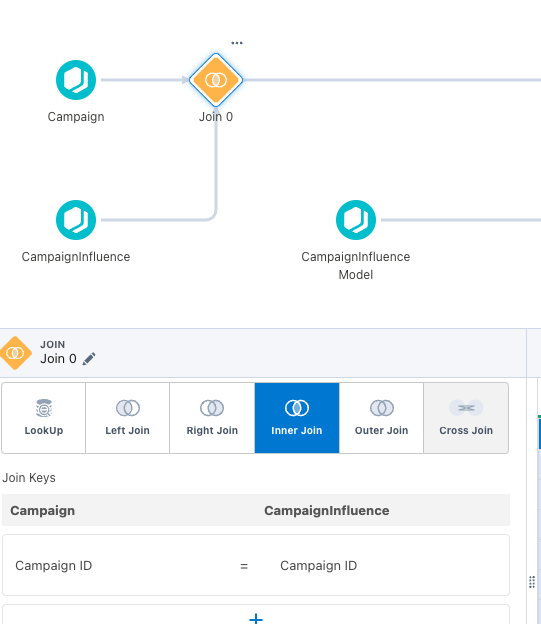
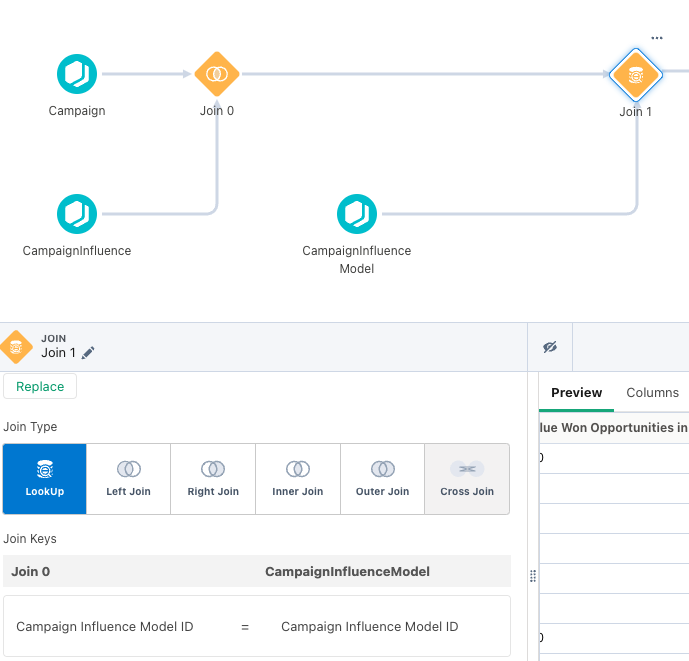
This next part is KEY to get the whole thing to work. When selecting the join make sure you select an Inner Join. Make sure your Join Keys are IDs.
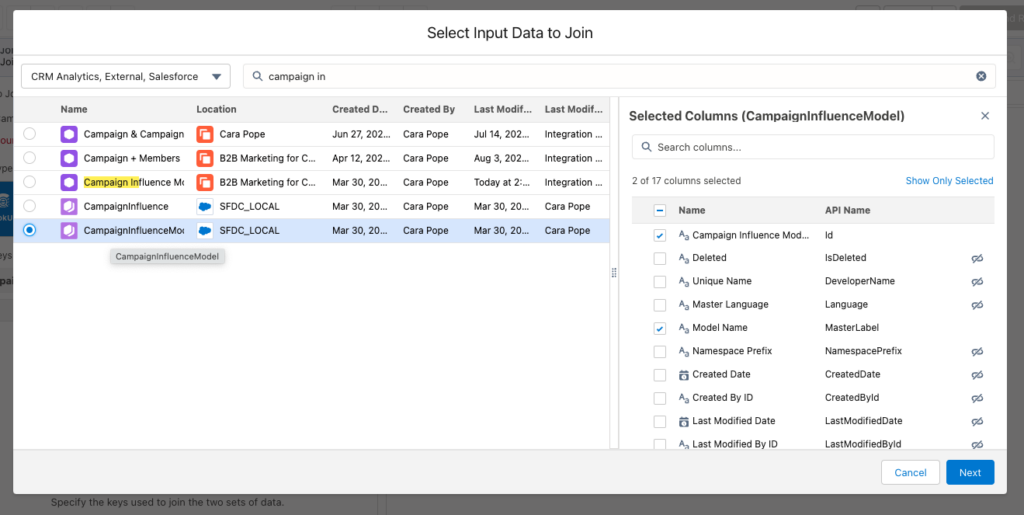
Final step: do one more join. Select the plus button again, and this time add in Campaign Influence Model.
This is key because it allows us to have the model name versus just the model ID. Jin Keys will be the Campaign Influence Model ID.
Step 3: Output and Review
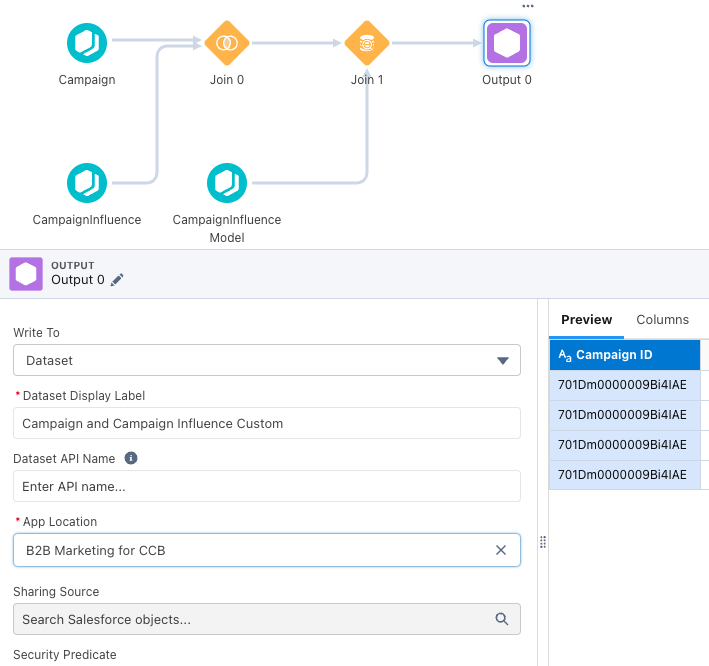
The last step is adding an output! Now from here, if you want to do any data manipulation or transformation, you can simply click the plus button and apply them in the data model. Filtering is great to break down by business units or even specific campaigns or campaign types. If you don’t need anything additional, that is it!
Your recipe should look something like this:
From there, it is always best to check naming conventions and make sure you know where the dataset will be hosted. You can leave it in your private app if you want to do some testing before you move it to the B2B Marketing Analytics app.
After the dataset has been created, you want to begin testing. Take a small set of data (I personally like using a month date filter — makes the data easier to digest!) and see if it matches up to the data you are seeing in Salesforce.
Once you feel good. you are ready to hit the ground running!
Let’s wrap it up so you can start building your custom recipe in B2BMA!
Creating this custom recipe in B2BMA can open up a ton of possibilities, from looping in additional campaign and contact fields to even making a whole dashboard that reflects your ABM Strategy and what campaigns helped influence those results!
Either way, you now have more accessible Campaign and Campaign Influence data with the enhanced features of CRM Analytics. And remember, you can always reach out to team Sercante for help along the way.
Marketing Cloud Intelligence (previously known as Datorama) is a tool that offers many potential uses. But with those uses comes the uncertainty that you are using the tool to its maximum potential or even correctly. That’s where a Marketing Cloud Intelligence audit can help.
In this blog post, we’ll cover the reasons you should audit your Marketing Cloud Intelligence instance, the steps to take during your audit, and what you should do with the information you gain.
Why would I need a Marketing Cloud Intelligence audit?
There are several reasons you could need an audit, including but not limited to the following topics.
Reason #1. You want to validate the effectiveness of your work within the platform
Having worked with this tool for years, we have seen it all. An Intelligence audit serves as a second set of eyes to ensure your performance is not being stretched or that you are governing your field usage effectively. It can make a serious difference.
Reason #2. You want to explore if you are missing value adds in the platform
Suppose you are already using Marketing Cloud Intelligence for one set use case and not the full suite of features. In that case, an Intelligence audit will review options based on your needs and ask the right questions to ensure you are maximizing value. As a constantly evolving tool, there is always a new data connector, app, or feature to utilize and build value for your team from a few clicks.
Reason #3. API connectors show inaccurate data in reporting/dashboards
It can be discouraging to set up a data flow into Marketing Cloud Intelligence only to find your output from the platform, whether it be reports or visualizations, look off. An audit can guide you on everything from filtering your data to managing redundancies in setup.
Reason #4. Your Marketing Cloud Intelligence instance has mostly sat idle
You can do so much with Marketing Cloud Intelligence, and even automate processes you may not expect. But that is not of help if the platform is sitting empty or unused. An audit will take what you currently have and guide you toward possible uses you may not have explored.
Reason #5. A key admin has recently left your company or organization
Want to understand what your admin was working on and how data flowed before disaster strikes (or perhaps after)? An audit can help put it into clean process flows and documentation that you may be missing, or even help break down existing documentation into usable guidance.
What does our audit look like in practical steps?
After going through lots of Intelligence audits, we’ve come up with a straightforward process that works in most cases.
Every audit will be a bit different (a series of 3,000+ data streams is more complex than a workspace with five streams). But these are the core processes we review during an Intelligence audit.
Step 1. Having a conversation to discover your goals with marketing analytics
With minimal dialogue, we help clients route to what steps are needed to get the most out of Marketing Cloud Intelligence and their larger tech stack.
Step 2. Combining your priorities and our standard template
We center our solutions around clients’ needs, using our standard process as a springboard to ensure there is always something to explore.
Step 3. We share a detailed breakdown of the usage of platform features
We recommend various features to explore such as Einstein Marketing Insights, Reporting, and Dashboards, and how you can maximize their functionalities for the client’s needs.
Step 4. Reviewing premium features, such as Sandbox and Granular Data Center
When you buy into the more complex and pricier features of Marketing Cloud Intelligence, it may be frustrating to find new learning accompanying these tools. We break it all down so those learnings are succinct and easy to follow.
Step 5. Breaking down the impact and effort of platform features
We showcase what tasks are high impact and low effort (and of course other levels of impact and effort) to make sure you get the most out of the platform in a swiftly actionable manner.
What will a Marketing Cloud Intelligence audit provide?
We know that an audit can unlock a powerful set of tools for you, such as the following.
Recommended platform features to utilize
We tailor our audit to your specific needs and make high-level and in-the-weeds recommendations that are centric to your business needs.
A clearer sense of data challenges to explore and recommended fixes
We showcase any glaring issues for you to skip the puzzle-solving and instead work with our tailored guidance to have a steady QA process.
Reducing redundancies for simpler data flow
We make it easy for clients to organize their data streams and remove reporting duplications so they have a clear roadmap to avoid data duplication and increase ease of navigation.
A path forward for using the platform to its full potential
At the end of our audit, you have a simple must-hit checklist based on your needs and a whole set of status updates on platform features and guidance on how to maximize their use when time allows, making a complex journey into a series of steps to explore.
How can I explore an audit with the Sercante team?
We are here to help. Our team includes Marketing Cloud Intelligence system administrator experts and readiness to explore your data to maximum effect.
You can contact our team to explore what your audit could look like and how we can best work together!
One of the great things about Account Engagement is that the same fields can be used over and over again for different interactions while keeping the full history of the field recorded in the Prospect’s Audit Table. This ensures you don’t need an endless amount of fields and you don’t have to create repeat fields such as “contact reason 1”, “contact reason 2”, etc.
However, sometimes you need a specific interaction frozen in time. For example, say every time someone fills out your “request a quote” form you want the details the Prospect inputs collected into one record that you can reference later, regardless of whether they fill out the form again.
This is a problem I recently solved for our marketing team and I am finding that the solution can be used for many different scenarios. In fact, at the Dreamforce Genius Bar, I recommended this solution for many of the questions that were brought to me by attendees.
So, let’s dive in!
Why don’t we just use Tasks?
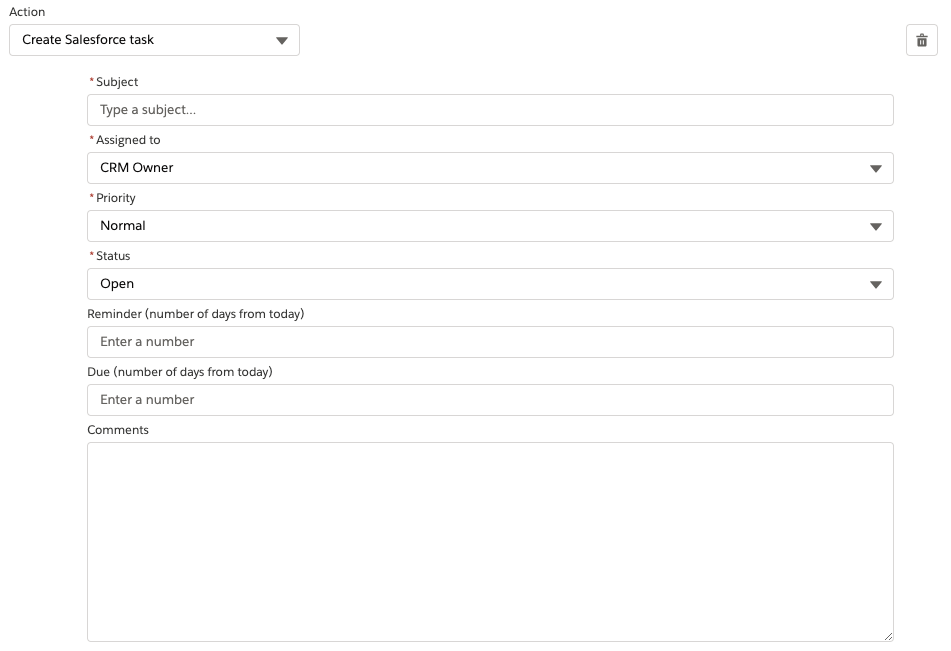
You may be asking, if you want an interaction frozen in time, why not just create a Salesforce task as a completion action? This would create a record at the time of the interaction that could later be referenced and followed up on.
While this is true, Salesforce tasks are limited in the information you can provide (example below). You also cannot use Account Engagement Merge tags within the tasks to stamp field values, and you can’t easily create custom task fields to store additional needed information.
Original Scenario
I’ll use the original scenario I solved for as my example for this blog post. Our marketing team is serious about event marketing strategies and wanted to record what they refer to as “Event Interactions.”
These interactions would be created via form fills or via imports and needed to include:
The name of the event
Details about the event
Which team member led the event
What topics were covered
What type of opportunity this is
Lead/Contact the Event Interaction is associated with
What we built
To store these Event Interactions, we created a Custom Object and fields for each data point the team wanted to record. We also created two lookup fields, one for Leads and one for Contacts, so we could associate the Event Interactions with the Lead/Contact records.
Next, we created fields 1-5 on the Lead and Contact Object and in Account Engagement so the data can move between the two systems. Finally, we created a Flow that will fire and create the Event Interaction record when these fields have data.
To recap:
Create a new Custom Object
Create the custom object fields
Create the fields on Leads and Contacts
Create and sync the fields in Account Engagement
Create the flow
Creating the Flow
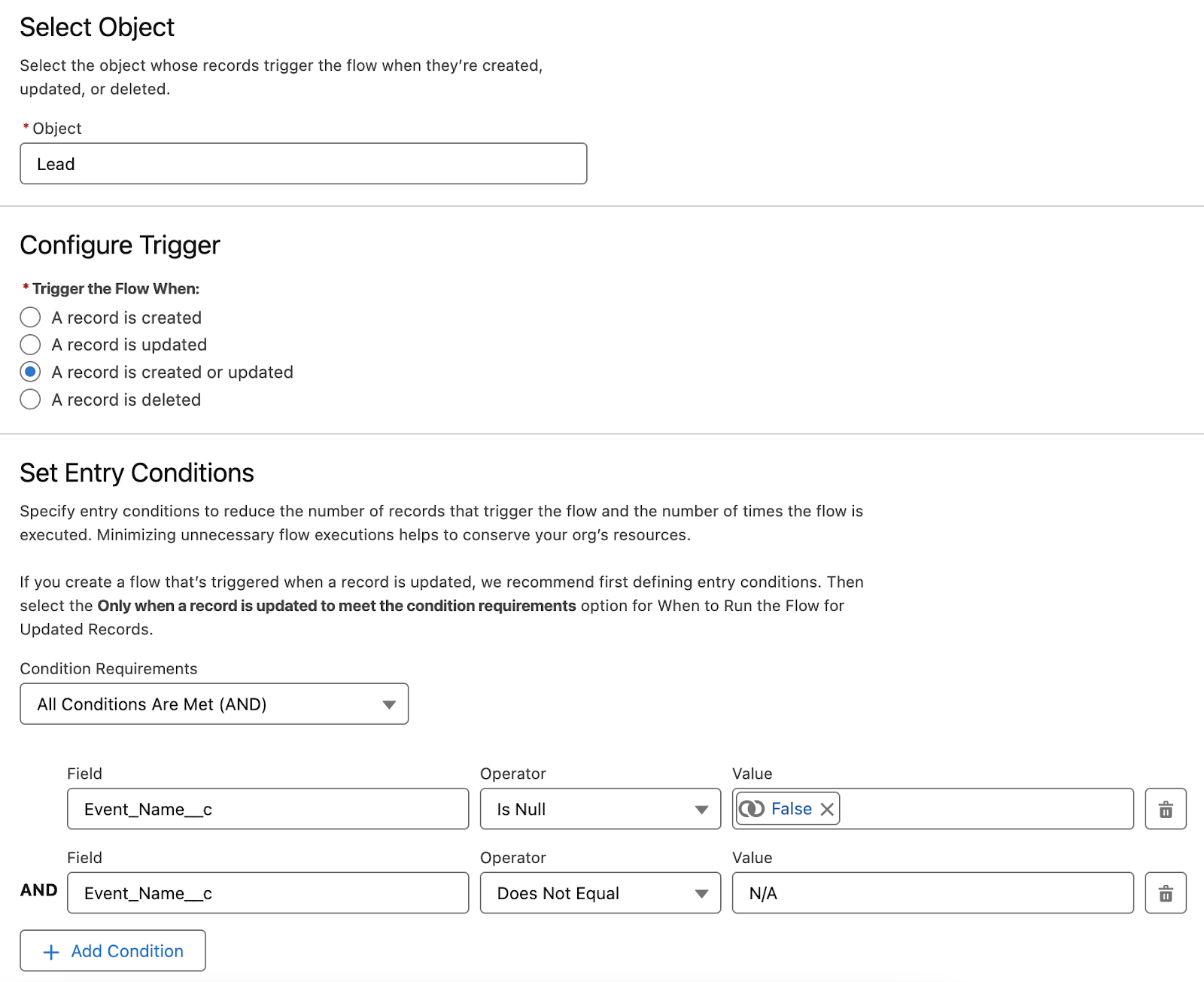
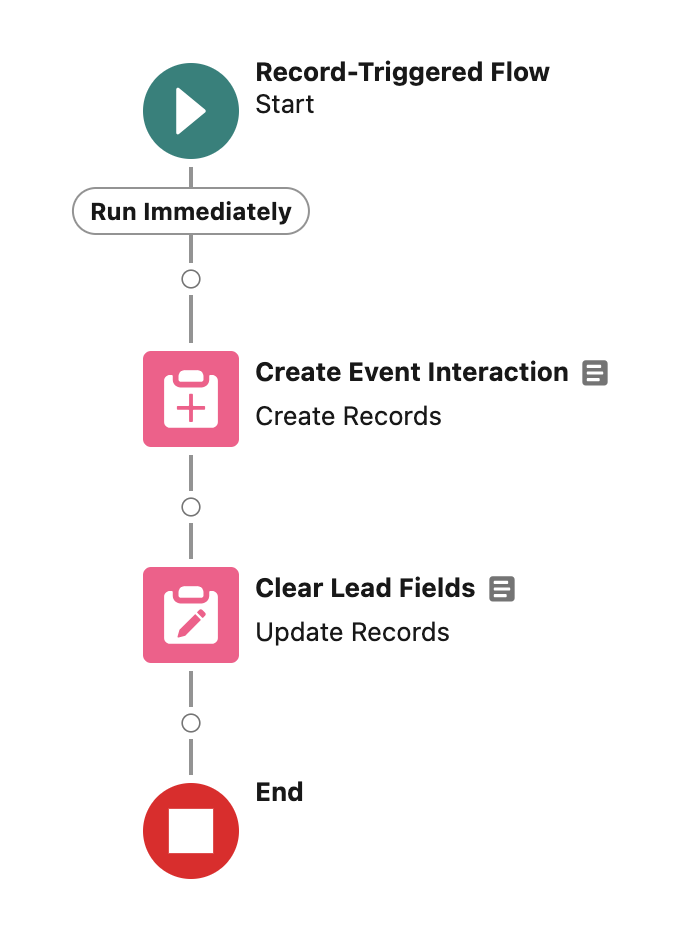
First, we want to create a flow for Leads. This flow will fire whenever a record is created or updated. The Entry Criteria are that the Event Name is not blank and is not “N/A”.
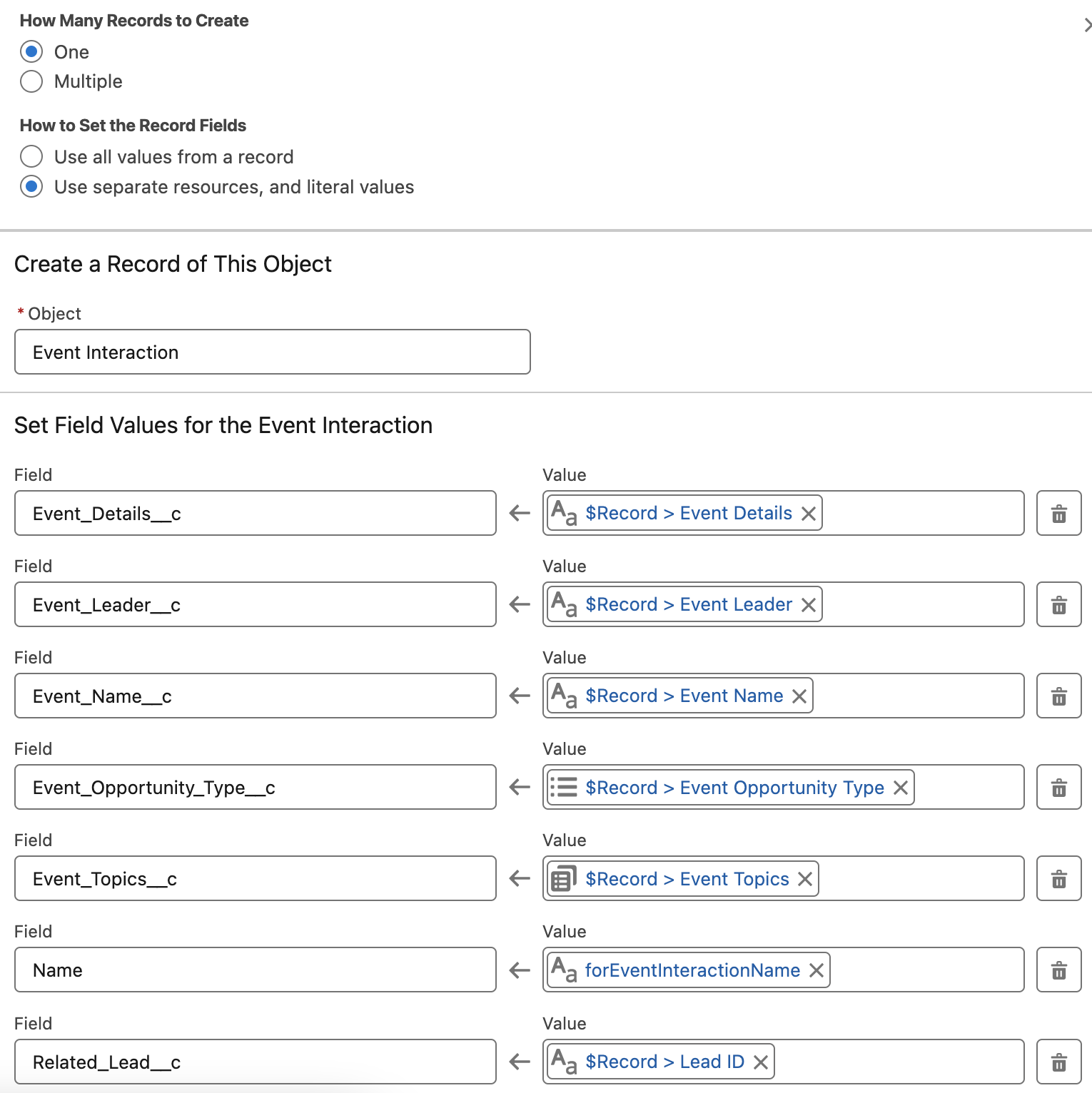
Next, use a Create Records element to create the new Custom Object record and copy the data from the Lead fields. Don’t forget to copy the Lead ID into the Lead Lookup field!
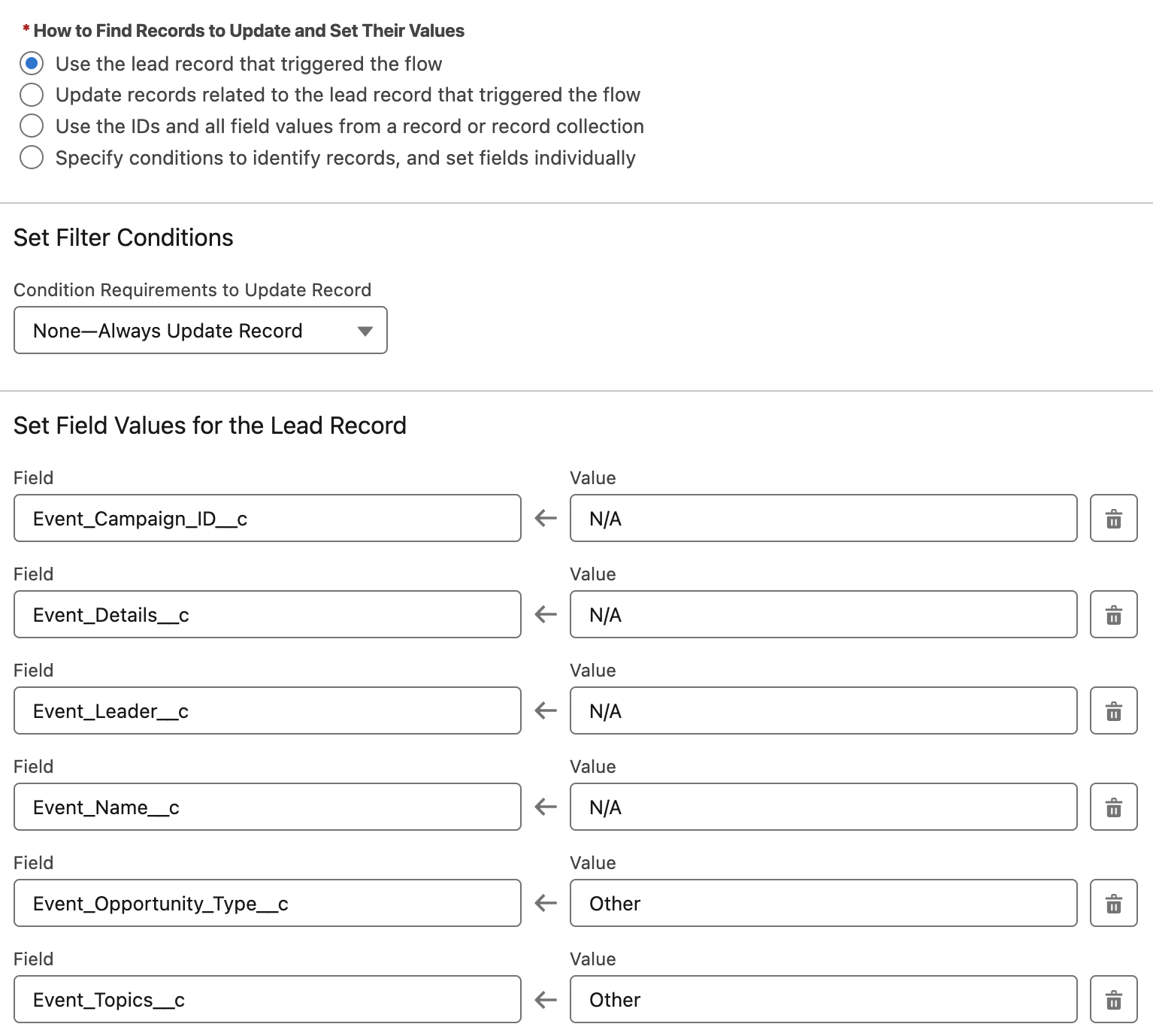
Finally, use an Update Records element to change the Lead’s Event Interaction fields to “N/A” or “Other” so that they are ready to be used for the next Event Interaction. We’re using “N/A” and “Other” rather than clearing out the fields completely to avoid Account Engagement syncing the previous data back into the fields.
Now you just need to test and activate the flow, and Voila! Well, that and also create the same flow for Contacts.
That’s It?
Yep, that’s it! This isn’t a groundbreaking process, it’s simply taking this process and using it in a new and inventive way. Since creating this process, we’ve found many uses for it in our org and client orgs, such as
Automatically creating an opportunity when specific forms are completed.
Creating custom objects that Account Engagement doesn’t typically interface with, such as Service Tickets or Cases.
Capturing form fills and their current field values at a moment in time for future reference/action.
Creating “Sales Inquiry” records rather than Leads and assigning these records to Sales.
Creating custom UTM Touchpoint records.
What other uses can you imagine for this process? Let us know in the comments!