Category

Strategy

At 8 p.m. ET on Wednesday 9/13, the second full day of Dreamforce, I was sitting in front of my computer curious and a little anxious. I was using my usual evening streaming service catch up hour to tune into the live Salesforce+ broadcast of Dreamforce session, Empowering Nonprofits in Times of Change with Data + AI + CRM + Trust

As a former boots-on-the-ground nonprofit employee and current consultant primarily working with nonprofit clients, I am acutely aware of the ever-increasing demands on nonprofits. I understand and empathize with the daunting task nonprofits face to tell their story and convey their impact in novel ways and through a multichannel approach. 

I also am acutely aware that nonprofits are frequently hindered by low ROI on donor dollars due to the immense staff effort needed to cultivate donations. I was especially eager to hear what Salesforce has to say about the future of nonprofits on their platform and how they might help solve some of these big issues for the sector.

graphic from empowering nonprofits in times of change dreamforce session

A Year of Change for Nonprofits on Salesforce

This has been a year of big changes for nonprofits and Salesforce. A few headlines were the sunset of Elevate and the rollout of the new Nonprofit Cloud platform

This session added a few more items to the list of highlights, namely the announcement of Einstein, Salesforce’s proprietary AI, for Nonprofit Cloud*. This promises to allow nonprofits to tap into predictive and generative AI to go further and dive deeper with their donor data, with their programmatic metrics and outcomes, and with their tenacious and often time-strapped staff. 

Having the ability to leverage data more robustly than ever before is further extended by the offerings of Data Cloud — Salesforce’s data management and harmonization tool. At the core of Salesforce’s Einstein for Nonprofit Cloud + Data Cloud message, they vow to help you do more with less.

* Currently, the Einstein AI features advertised in the session Empowering Nonprofits in Times of Change with Data + AI + CRM + Trust are only available as a part of the Nonprofit Cloud curated solution package.

Einstein for Nonprofit Cloud + Data Cloud Promise to Make Annual Reports Easier and Better than Ever

I am going to use the example of building an annual report (a thought that may give former or current nonprofit employees shudders of anxiety) to illustrate the key promises of Einstein for Nonprofit Cloud + Data Cloud. 

First let’s start with a short overview of what an annual report is from a nonprofit standpoint. An annual report usually serves as a physically manifested summation of the prior year for a nonprofit. They typically contain programmatic impact data (frequently with fancy charts), thank yous and recognitions of various groups from the highest dollar donors to volunteers, financial data for the year, and a call to action. They are intended to be compelling, illustrate transparency, and highlight mission, vision and outcomes. They are also an absolute BEAST to create.

Here are some of the ways Einstein for Nonprofit Cloud + Data Cloud can help nonprofits complete the daunting task of creating an annual report:

Compiling Programmatic Data and Communicating Meaning

Einstein for Nonprofit Cloud offers the ability to summarize programmatic data over a specific amount of time with consideration to the intended audience. In the case of an annual report this would look like a summary of your programmatic data for the prior year, intended for an external audience. 

Einstein for Nonprofit Cloud also allows you to choose if this summary should be long form (more detailed) or short form (less detailed) increasing flexibility to help you meet the needs of your specific annual report requirements with less manual work.

Segmenting and Standardizing People Data for Acknowledgement Lists

Data Cloud shines in its potential ability to solve the problem of disjointed data for Nonprofits. We all know the pain of manually sleuthing through and deduplicating your database and external systems of that one historical volunteer record for one of your major donors who is also an event attendee and auction lot buyer. This hypothetical generous philanthropist could have upwards of 4 records in your Salesforce CRM and connected systems! Data Cloud to the rescue! 

Through the power of the unified profile you can see all of that disorganized and disconnected data in one place. This is especially helpful in the annual report example as it allows you to be absolutely sure you are thanking and acknowledging your kind supporters for ALL the ways they support, financial contributions, event support, volunteerism through a single 360 view.

Crafting a Compelling Donation Appeal

Admit it or not, a key function of an annual report is to compel folks to donate. Einstein for Nonprofit Cloud + Data Cloud have your back in your daunting donor segmentation and compelling storytelling efforts. 

Through use of the 360 Constituent view made possible by Data Cloud, you can use Einstein for Nonprofit Cloud to segment your donors and its predictive AI capabilities to draw conclusions based on historical data. 

You could put together a segment of those donors identified as having high propensity to give, high affinity for your organization and high capacity and really hit them in the feels with your call to action. Generative AI can then help you craft an irresistible donation appeal and from there the dollars are sure to roll in to support your important work.

Einstein for Nonprofit Cloud + Data Cloud: Getting Nonprofits Closer to their Core Missions

Overall, I am cautiously optimistic that, together, Einstein for Nonprofit Cloud + Data Cloud have the potential to improve the way nonprofits communicate with their donors and the public. By automating time-consuming tasks and providing insights that were previously unavailable, or extremely time or resource-intensive to procure, these tools can help nonprofits focus on their core mission of making a difference in the world. 

I encourage nonprofit leadership to explore and invest in these powerful tools. I think they can help support and extend the capabilities and impact of a nonprofit’s greatest strength, its team.

Need help navigating these new announcements and ever growing suite of Salesforce products? Sercante is here to guide you through and help you achieve your nonprofit’s mission by leveraging the power of the Salesforce platform. Reach out!

Today’s trailblazers in the higher education industry are facing trends and challenges that they have not had to before. Navigating a recent global pandemic, the rise of artificial intelligence, marketing to Gen Z, and shifting enrollment levels. 

Dreamforce 2023 – Out of the Home for Marketers Vault

To help trailblazers gain insights into how to deal with these modern-day higher education trends and challenges in the digital age, we held an event at the Home for Marketers during Dreamforce with industry thought leaders. The top takeaways from their panel discussion are below.

Panel: Modern Day Trends in Higher Education

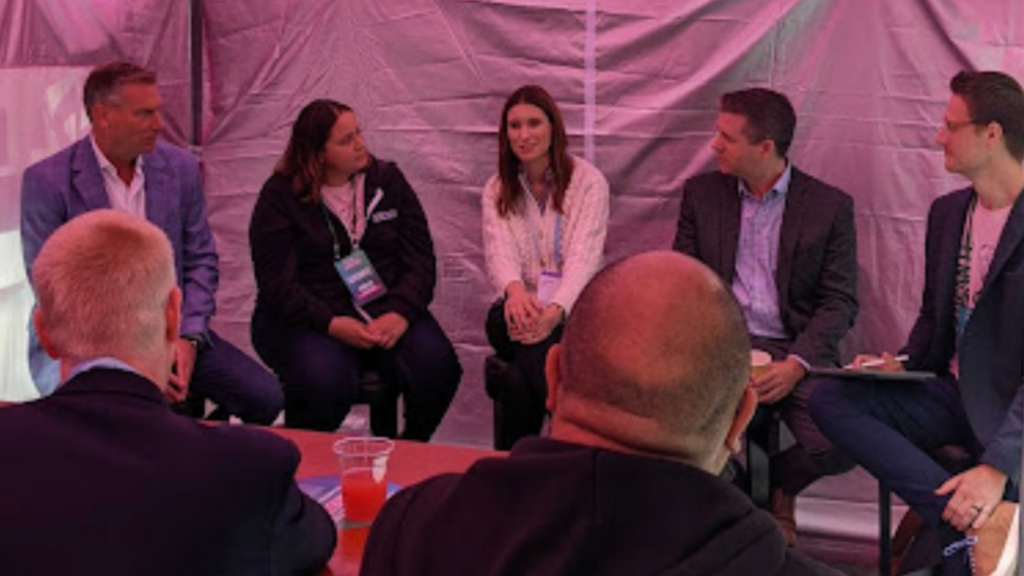
education panel at Dreamforce Home for Marketers

Moderator: Adam Berry, Senior Account Director, Sercante

Panelists (from left to right in photo):

  • Clark Burk, Chief Client Officer, Red Van Workshop
  • Jordyn Jaffer, Senior Salesforce Solution Engineer, Serante
  • Michelle Bates, Assistant Vice President for IT, CRM and Data Analytics, Purdue for Life Foundation
  • Brent Wege, VP Sales, Engagement Solutions, Salesforce

Data Silos Are Still a Major Challenge for Higher Education Institutions

Across universities there are different owners of separate subsets of data making it difficult for teams to collaborate, share insights about their constituents, and have an overall view of the organization’s performance. 

Each panelist emphasized that if universities are going to provide that personalized 1:1 experience that so many of their diversified audience, in particular Gen Z, is desiring then they are going to have to make breaking down their data siloes a priority.

Centers of Excellence Are Being Leveraged to Increase Adoption

As more higher education teams are acquiring systems to their tech stack for a digital transformation many roles and responsibilities are changing. Team members are having to learn new platforms and think through their data in a different manner and getting them to adjust to the change can be difficult.

The panel shared how they have seen teams use Centers of Excellence where education and training on the technology systems are provided to empower users to be more efficient on the platforms

Assigning champions such as administrators or power users in each department can be helpful as they support and help team members in their day-to-day to navigate and leverage the technology to achieve their goals.

It was noted that some teams may not be able to form an organized Center of Excellence in their institution, but making sure training is provided and identifying the champions in each department can be a huge first step towards increasing adoption.

Personalization is a Must in Higher Education

As people are experiencing personalized engagements across their retail, entertainment and content consumption journeys, they expect the same out of their alma mater or the university they are attending or applying for. 

Now more than ever it is critical for higher education teams to have access to all the data touchpoints that happen throughout the prospect, student, and alumni journey. Without accurate data, personalizations will not seem as relevant or authentic. 

As digital natives, Gen Z can easily spot inauthentic marketing, and, according to 2021 Forrester Technographics data, “nearly a third of Gen Z say that they unfollow, hide, or block brands on social media — at least weekly.” This means that universities need to make sure the customized communication and engagements they are crafting accurately align to each stage of the individual’s journey to provide an authentic experience.

For example, if you are starting a fundraising campaign and want to target alumni, using the clubs and organizations they were a part of during their time as a student to share where they are now and where they hope to be is a great way to make your communication to that individual relevant. Having access to this data and managing it in a way that makes it easy to execute personalizations like this is key.

University Teams Are Navigating Their Journey With Artificial Intelligence

Some higher education organizations are already using AI in their day-to-day with chatbots and smart searching in their IT knowledgebase. The biggest concern here is trust and security. Like many, trailblazers in higher education want to ensure that constituent data is secure when leveraging AI-powered tools to ensure a high level of trust.

There are so many exciting new developments happening such as conversations around how AI could track student performance and predict when they are trending towards an at-risk status to alert advisors, so they can better guide students and be more proactive to battle against dropout rates. 

However, these developments will only truly be able to be taken advantage of if all departments are accurately capturing data and have it architected in a way to be centralized and easily accessible across the organization.

A Word of Advice for Your Digital Strategy

A lasting piece of advice from our panelists was don’t just throw technology at your challenges. Consider how you are going to use it to truly deepen relationships with your audience, how it will better help you to manage your data, and who will be the champion for that system. 

There may already be solutions that you have access to that can provide a solution, so have a strategy in place for how it will be used and managed before purchasing new technology.

Reach out to the team at Sercante for help making the right decisions when you’re ready to shake things up with your digital marketing strategy.

In the world of digital marketing, a seamless and visually captivating user experience is crucial to capturing your audience’s attention and driving conversions. For Marketing Cloud Account Engagement users, optimizing both email and landing page designs is an art that requires a balance of creativity and strategy. 

Crafting Impactful Email and Landing Page Experiences

In this post, we’ll delve into five design musts that can elevate your Account Engagement-powered campaigns and help you create impactful email and landing page experiences.

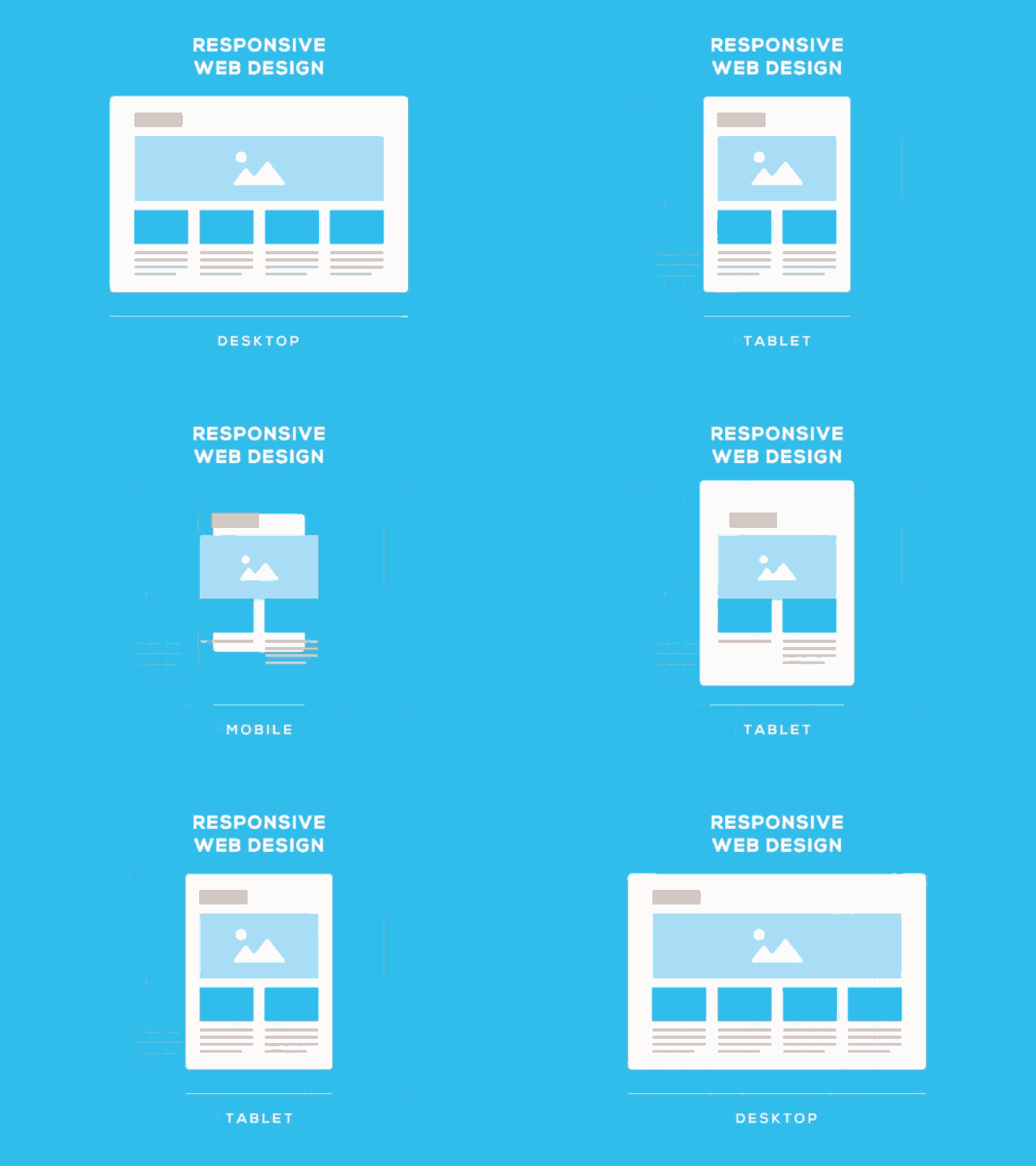
Design Must #1: Use Responsive Design to Engage Across Devices

In today’s mobile-centric landscape, responsive design is no longer an option; it’s a necessity. Whether you’re crafting an email or designing a landing page, ensure that your layout adapts flawlessly to various screen sizes, from desktops to smartphones.

Account Engagement offers responsive email templates that automatically adjust content to fit different devices, allowing you to reach your audience wherever they are. Similarly, when creating landing pages, use responsive design principles to guarantee a seamless experience and better engagement.

Design Must #2: Establish Visual Cohesion through Consistent Branding

Consistency is key in branding, and it extends to your email and landing page designs. Maintain a consistent color palette, typography, and imagery that align with your brand identity. You can leverage Account Engagement’s customizable templates to infuse your emails and landing pages with your brand’s visual elements, reinforcing familiarity and trust among your audience. 

A unified brand presence boosts recognition and enhances the overall user experience.

Design Must #3: Capture Attention Instantly through Compelling Imagery

Visuals are powerful tools for storytelling and grabbing attention. 

Incorporate high-quality, relevant images that resonate with your audience’s interests and needs. In emails, use eye-catching visuals that complement your message and entice recipients to read further. 

On landing pages, leverage impactful imagery to convey the value proposition of your offer instantly. Remember, a picture is worth a thousand words, so choose visuals that amplify your message effectively.

Example: Sercante Landing Page Created in Account Engagement

Design Must #4: Guide User Actions with Clear Call to Actions (CTAs) 

The purpose of your email and landing page is to drive specific actions. Whether it’s encouraging recipients to click through to your website or enticing them to fill out a form, your CTAs must be prominent and action-oriented. Use contrasting colors, persuasive language, and compelling design elements to draw attention to your CTAs.


The Account Engagement drag-and-drop email and landing page editors enable you to create visually appealing buttons that stand out, leading users to take the desired actions effortlessly.

Example: Bold and clear CTA

Design Must #5: Streamline Layouts to Enhance Readability and Navigation

Cluttered and confusing designs can deter users from engaging with your content. Keep your layouts clean, organized, and easy to navigate. 

In emails, use headings, subheadings, and bullet points to break up text and improve readability. On landing pages, employ a clear hierarchy to guide users’ attention toward key information. 

Account Engagement design tools empower you to structure your content in a user-friendly manner, ensuring that recipients and visitors can quickly grasp your message and offerings.

Be an Awesome Account Engagement Asset Designer 

Mastering the art of designing impactful emails and landing pages within the Pardot platform requires a blend of design aesthetics and marketing strategy. 

By adhering to these five design musts — responsive design, consistent branding, compelling imagery, clear CTAs, and streamlined layouts — you’ll create experiences that captivate your audience, encourage interaction, and ultimately drive conversions. 

Embrace these principles to unleash the full potential of Account Engagement and leave a lasting impression on your target audience. And reach out to the team at Sercante when you’re ready to take your Account Engagement Assets to the next level.

Event marketers face unique challenges. They need to create memorable, unique, and meaningful experiences that align with their brand and connect with their audience all the while staying within budget, building relationships, and generating leads. It is not an easy task. At Dreamforce 2023, The Home for Marketers hosted a panel of marketing leaders to share their recommended event marketing best practices to ensure success!

Dreamforce 2023 Event Marketers Panel – Out of The Home for Marketers Vault

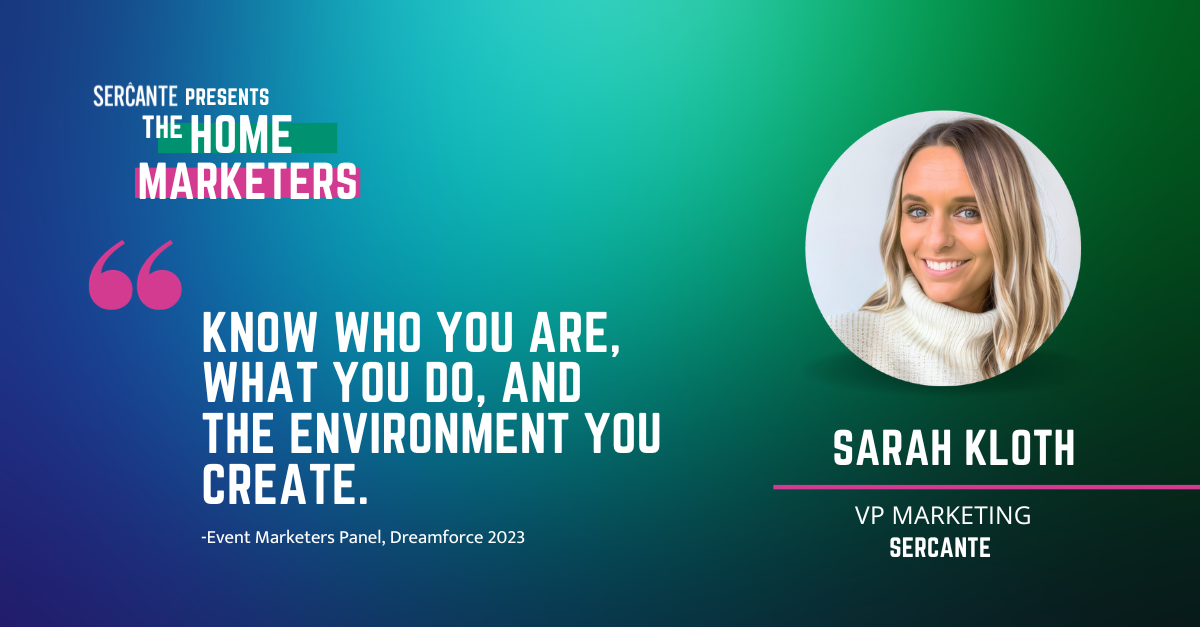
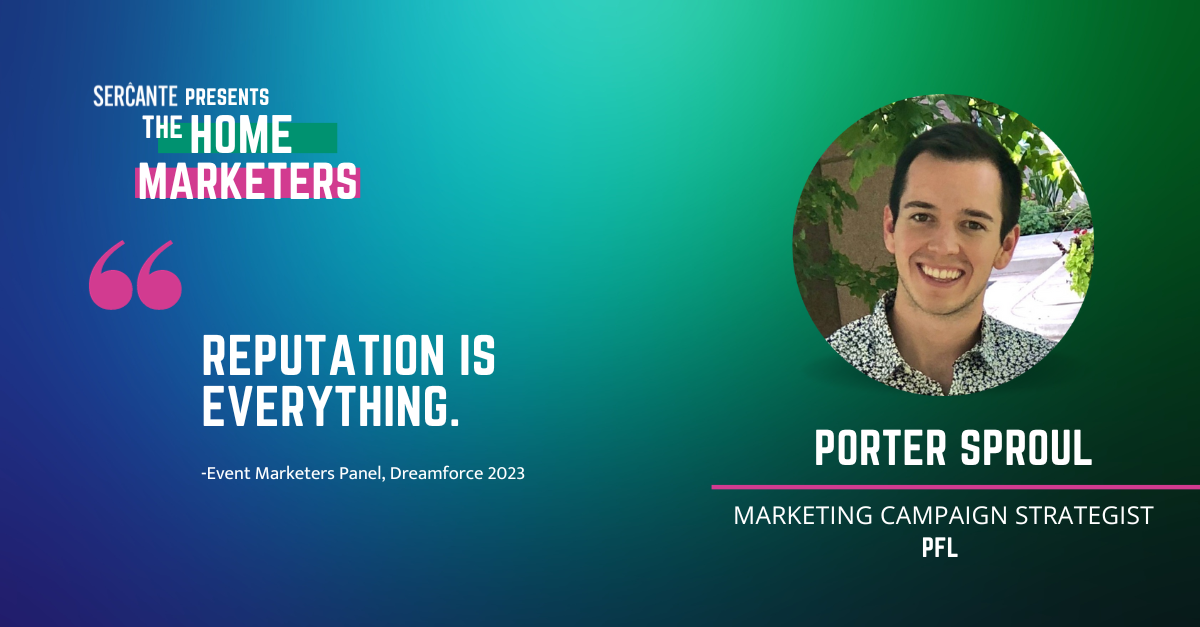
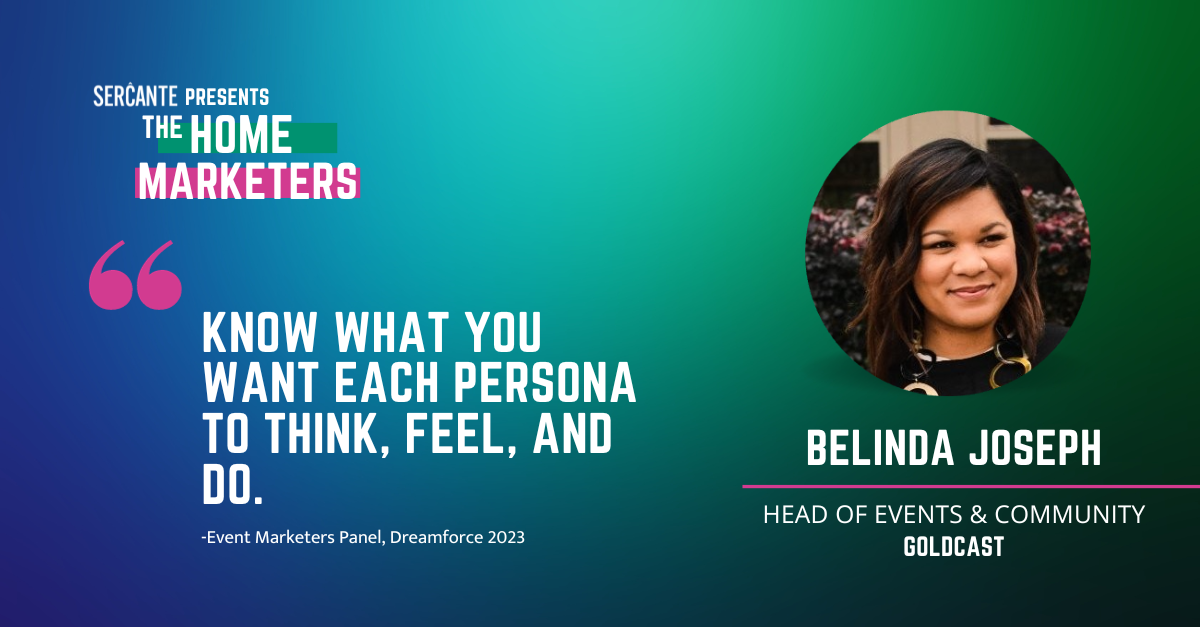
On this panel was Belinda Joseph, Head of Events & Community at Goldcast, Porter Sproul, Campaign Strategist at PFL, and Sarah Kloth, VP of Marketing at Sercante.

Here are the event marketing best practices they shared.

Best Practice #1 – Align Your Event to The Appropriate Stages of the Funnel

When you create an event, Belinda Joseph advised to think about where your event best aligns with the funnel. If you are creating an event that reaches prospects and customers at different stages of their journey, then think through what you will do at your event to meet them where they’re at and make the experience relevant to them. 

For example, an executive dinner could be considered to align with a late stage in the funnel after prospects already know who you are and the solutions you provide. They may have already spoken to someone from sales and the event could be a way to engage prospects at accounts that are in early opportunity stages.

Best Practice #2 – Define What Success Looks Like Across Departments

As you create your next event campaign don’t just think of the goals that the marketing team is working to accomplish, shared Porter Sproul, but consider how you can align with sales, service, and leadership. How can your event serve their business goals? What does each department need for your event campaign to be considered as a win for the business as a whole?

Best Practice #3 – Think About How Your Brand Will Be Represented At Your Event

Sarah Kloth emphasized that your brand is one of the most important focuses of event marketing. “Know who are you, what you do, and the environment that you create.” People will attend your event and will walk away with a certain feeling. That feeling will either bring them closer to your brand or repulse them. How do you want your brand to be remembered? 

“Reputation is everything.” added Porter Sproul. You need to have your event and the environment you create align with your brand, but you also need to be different. The panel shared that nowadays people are more selective with how they are spending their time and they will most likely always engage in what’s most convenient. How will you create an experience that will want to make your audience go out of their way to attend?

Creating an Executive Experience

Porter shared how he once experienced that creating an event that was very exclusive gained great traction. His team was planning an executive dinner adjacent to a conference that was going on, but they wanted to be different. Several other companies attending the conference were also hosting executive dinners. How could they create an experience that would make their audience want to choose theirs over the others?

They elected to do an evening dinner cruise on a boat that would only fit a small number of people. His team targeted their top prospects and soon after promotion started, all the spots for the dinner were filled. After the event, they received feedback from other prospects that missed it saying how the event sounded amazing and how they would love to be a part of it next year. Many times people want what they can’t have. The more you make an experience feel special, one-of-kind, and exclusive, the more people will be curious about it and want to seek it out.

Remembering your Personas

When planning your event and how it aligns to your brand, remember to take into account your personas. Belinda Joseph describes that for every event that Goldcast puts on, she and her team map out, “what do we want each persona to think, feel, and do from this event?” How can your event evoke action and progress your audience further down the funnel?

Best Practice #4 – Tap Into The Network Around You For Promotion

It takes a village to promote an event. Your company and your marketing team will be doing their own promotional plan, but when you have the speaker of the event, your customers, or your followers also promoting the event then you will expand your reach and the invitation will hold more weight.

Which is why our fourth event marketing best practice revolves around tapping into the network around you for promotion.

People are more likely to make a purchase when it was recommended to them by a friend. How much more likely do you think they’ll want to attend your event if your audience sees a peer of theirs sharing about it? 

Getting Help from the Community

To help build awareness about The Home for Marketers, we put together a video series interviewing different Marketing Champions and asking them to share about their previous Dreamforce experiences, including how they would describe The Home for Marketers and advice for first-time Dreamforce attendees.

The Road to the Home for Marketers series not only highlighted different champions in the space that give so much to the community, but it also provided valuable and helpful content for marketers that would be going to the conference for the first-time. In turn, they also got to hear about the Home for Marketers and listen to a peer of theirs describe it to them and hear about their positive experience there.

If you are putting on an event that happens every year, consider how you can highlight people that attended in previous years and have them share their positive experience with your intended audience. 

Ask Speakers to Promote

If your event includes a speaking session, collaborate with your speakers on promotion. Belinda Joseph shared how her team will provide a promotional kit to their speakers, making it easy to post about the event on social media and get the word out about the campaign to their networks. What can you do to help make it as seamless as possible for your speakers to promote the event?

  • Is it pre-written social posts that they can copy and paste?
  • Is there imagery that you can provide to enhance their posts?
  • Is it a video that you record with them?
  • Is it examples of previous promotions that other speakers have done in the past?

Remember, your speakers and even your sponsors for your event all want to drive registration and attendance, so for this campaign, you are all on the same team. How can you enable your team to promote this event successfully?

Best Practice #5 – Create an event that is special, creative, and gives!

This may seem challenging for brands that are in a more serious industry, but as Sarah Kloth reminded us on the panel, “We all want to be taken seriously in business, but at the end of the day we all go home and watch the same shows.” Meaning that your business executives are still people too just like you. How can you tap into the more personal side of your brand to build connections with your audience that are special?

Using Tangible Marketing

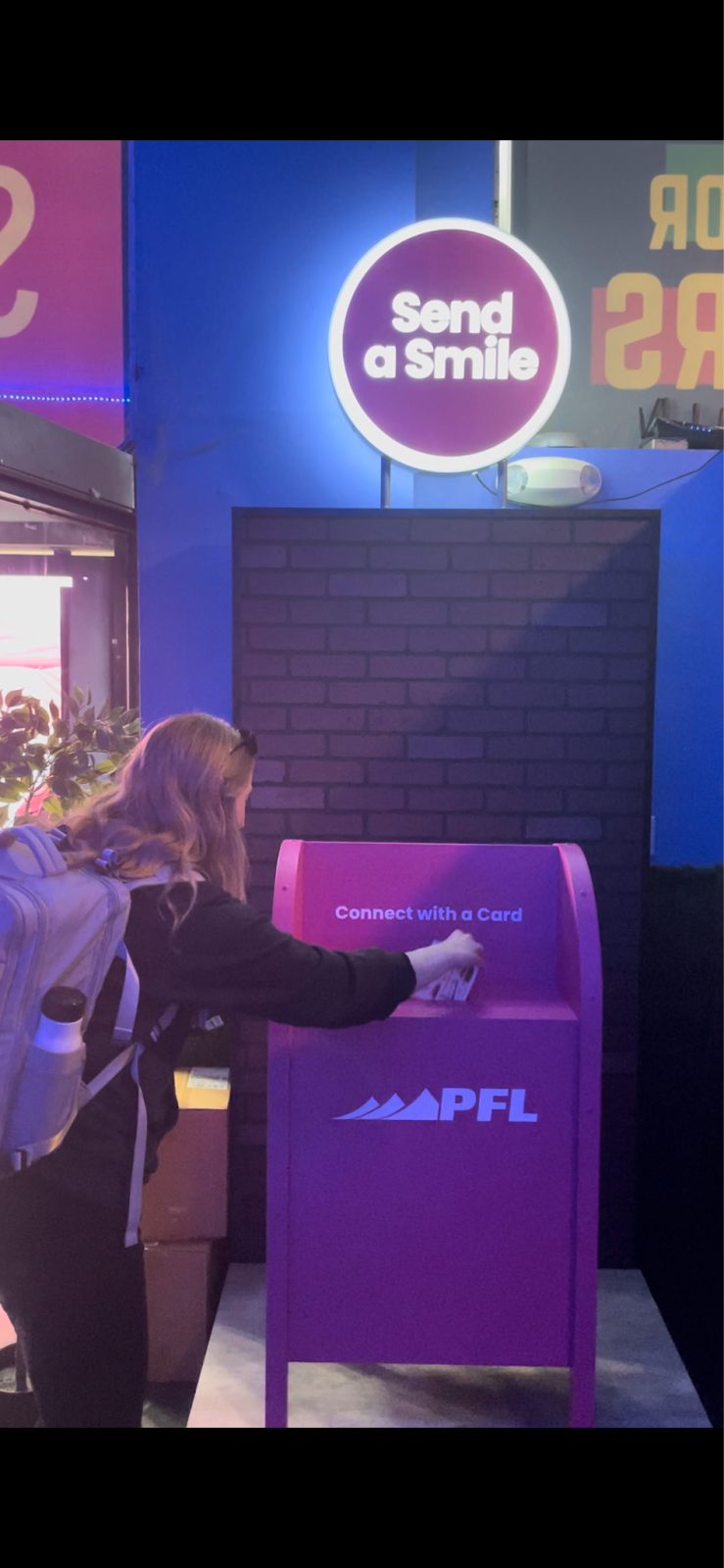
During Dreamforce Porter Sproul and the rest of the PFL team had a pink mailbox with a light-up sign that said “Send a Smile.” They had postcards and stamps that event attendees could use to send to their friends and family from the conference. Event attendees filled out the postcard and then placed them in the pink mailbox for the PFL team to send out.

One, when was the last time you sent a note with a pen and paper to someone and snail mailed it to them that was not a wedding invitation? Two, when was the last time you received a hand-written note in your mailbox that was sent “just because”?

Boom.

PFL created an experience that EVERYONE could relate to. They prompted attendees to think of their loved ones and connect with them in a less common form of communication that is tangible and memorable. 

Building Meaningful Experiences

As another example, Belinda Joseph shared about an internal event that the Goldcast team put on. It was their Sales Kick-off and it was during the time when team members were still isolated because of COVID. Prior to the event, they reached out to employees and asked them to record a video of themselves answering a few questions about what challenges they had been dealing with this past year and what they are thinking about and looking forward to in the year to come.

Their team took these responses and produced it into a 10-minute video that the team all watched together during their sales kick-off. “It was emotional.” Belinda recalled.

“We realized we were not alone in the struggles we were facing because our team members were facing similar challenges.” It created empathy among the team as they all got to hear where each person was coming from, strengthening their culture and bringing them closer together as a team just as they were about to kick-off their new fiscal year. Talk about a memorable experience that evoked an action.

When creating an event, consider how you can build a meaningful experience that will connect with your audience on a deeper level. 

Event Marketing Best Practices to Remember

Think about where your event aligns to your funnel, is it an early-, mid-, or late-stage engagement? If you will have multiple stages represented how will you interact with attendees meeting your brand for the first time versus people who have already engaged several times with you?

Align your event goals to what the other departments will consider a win. Sarah Kloth often challenges the Sercante marketing team to “define what success looks like first.”

Last, but certainly not least, remember that how your brand is represented and the feeling and environment you create for your attendees is everything. Brainstorm with your team about how you can create an experience that is special, giving, and unique.

For more event marketing best practices, connect with Belinda, Porter, and Sarah on LinkedIn!

If your Marketing Cloud Account Engagement (Pardot) email looks broken and you can’t figure out why, then you’re in the right place. In this post, we’ll look at common errors you may uncover when coding your email in Marketing Cloud Account Engagement.

Things to look for when your Account Engagement email looks broken

You may be struggling with these common problems in HTML email code within your Marketing Cloud Account Engagement. But don’t worry, we’re here to guide you through resolving these issues step by step.

Images appear broken

One common issue that marketers face is broken images in their email campaigns. It can be frustrating when images don’t load properly, especially on different devices and email clients. To address this, ensure that your image URLs are correct and properly linked in your HTML code. Additionally, optimize your images for faster loading times and consider using alternative text to provide context if an image fails to load.

Here’s a checklist of things to look for:

Is your image too big? 

Large image file sizes can cause slow loading times or may not display at all. Optimize your images for the web by compressing them without compromising quality. 

Is your image in the correct format? 

Additionally, confirm that the image is in the correct format (e.g., JPEG, PNG, GIF). At the date of this blog, not all email clients will support .webp format.

Are there SSL/HTTPS issues? 

If your Account Engagement account or website is using SSL (Secure Sockets Layer) or HTTPS, ensure that the image URLs are also updated to use HTTPS. Browsers may block or display broken images if there are mixed content warnings due to insecure (HTTP) image URLs on secure (HTTPS) pages.

Is the “pardot-region” inserted in the code correctly? 

When customizing or replacing images in Account Engagement using the WYSIWYG editor, it’s crucial to be mindful of the “pardot-regions” in the HTML code. These regions define editable sections that allow you to modify the content, including images.

When updating your HTML code, it’s important to pay attention to the “pardot-width” and “pardot-height” attributes within the code that correspond to your image holder. By explicitly matching these attributes with your image holder dimensions, you ensure that Account Engagement doesn’t automatically adjust the size, potentially distorting or exceeding the intended size of the image holder. In the example below, by setting the “pardot-height” to be auto will allow the image to automatically adjust and not stretch on a mobile device.

My image appears cut off when adding it using the text editor? 

The template may use an attribute mso-line-height-rule:exactly that controls the line-height of text in Outlook. This can crop the image to be that size. Change the attribute to mso-line-height-rule:at-least to give it more flexibility. It is okay to change all of the attributes to at-least.

Darkmode

Dark mode compatibility is another challenge to consider. With the increasing popularity of dark mode, it’s important to ensure that your emails display correctly in this setting. Test your emails in both light and dark mode to identify any color or readability issues. Use CSS media queries to adjust the styling specifically for dark mode, ensuring a seamless experience for your subscribers.

Here’s a checklist of things to look for:

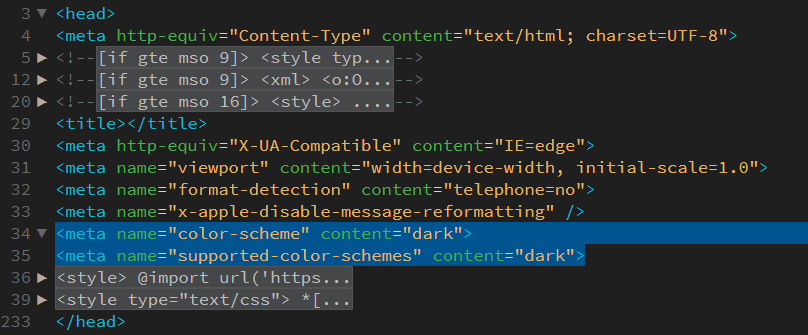
Do you have dark mode meta tags? 

Dark mode (or light mode) meta tags offer an opportunity to enhance the visual presentation and user experience of your website. These tags provide hints to the browser or email client about how the content should be displayed when the user is in dark mode.

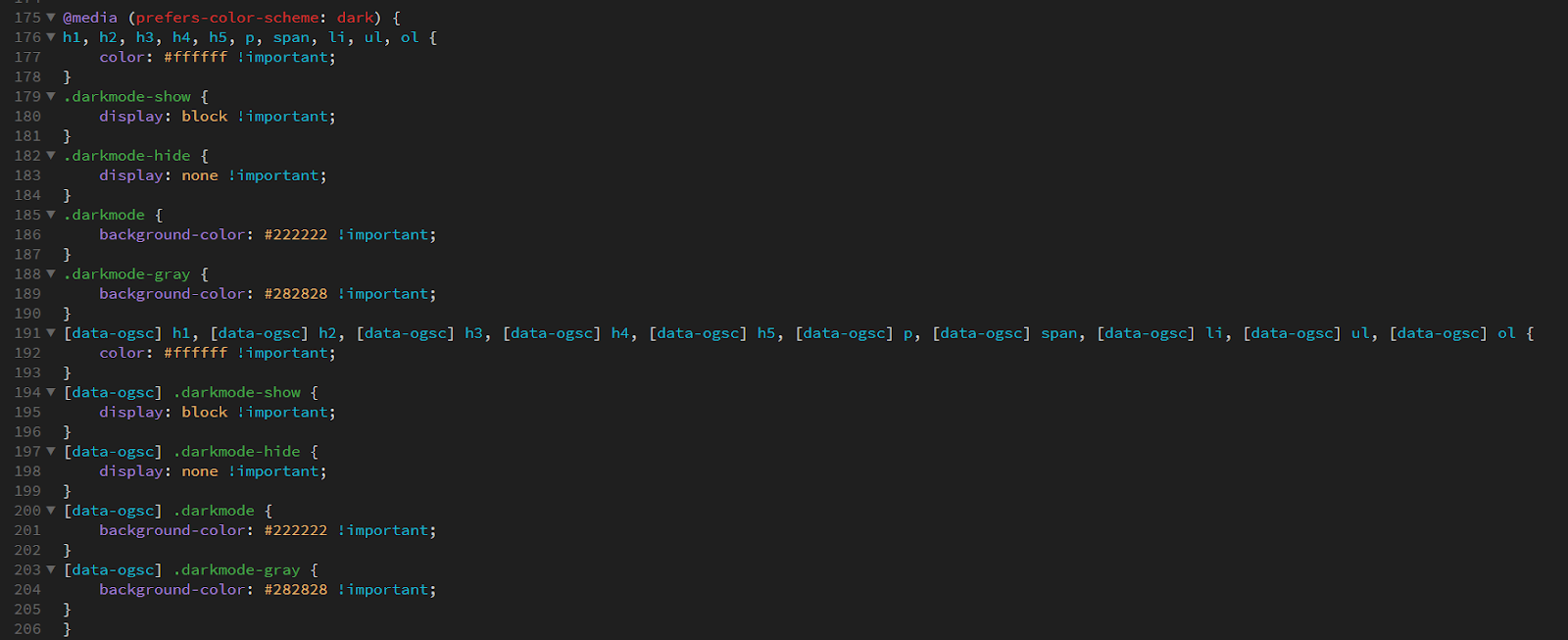
Do you have CSS media queries? 

Dark mode-specific CSS media queries are similar to mobile responsive media queries in the sense that they allow you to target specific conditions and apply different styles accordingly. While mobile responsive media queries focus on adjusting layouts and styles based on screen sizes, dark mode-specific media queries target the user’s preference for dark mode and enable you to modify the appearance of your content accordingly.

When using dark mode-specific media queries, such as (prefers-color-scheme: dark) or @media (prefers-color-scheme: dark), you can detect whether the user has enabled dark mode in their browser or operating system settings. This information helps you adapt the colors, backgrounds, and text within your HTML and CSS code to provide a more suitable and visually appealing experience for users in dark mode. See example code.

Are you swapping your image between dark and light mode? 

Certain images may rely heavily on specific colors or color combinations that work well in light mode but might not be as effective or visually appealing in dark mode. By swapping images, you can create alternative versions that are optimized for each color scheme, enhancing the overall aesthetic and cohesiveness of your email design. See example code.

Is your white text turning black in Outlook? 

Outlook’s dark mode implementation may override the color styles you’ve set for your text, resulting in white text appearing as black. In dark mode, Outlook attempts to adjust the color scheme for better visibility, which can cause unexpected changes to your email’s appearance. You can add the below code to the head tag that will target the Microsoft Outlook email only.

By utilizing this code, you can apply specific CSS styles that will only affect Microsoft Outlook emails. Adjust your desired styles within the provided <style> block.

Here’s an example of how to use a class within an element:

Here is the full tutorial by Nicole Merlin that addresses Outlook emails in dark mode.

Access a complete list of email clients that support dark mode, along with additional tips for optimizing dark mode in your emails, by referring to the following resource.

Preheader text

The preheader text, also known as a preview snippet, is essential for enticing recipients to open your emails. However, it can sometimes get cut off or displayed incorrectly. To avoid this, keep your preheader text concise and within the recommended character limit. Test it across different email clients to ensure it appears as intended.

Here’s a checklist of things to look for:

Do you need this hidden? 

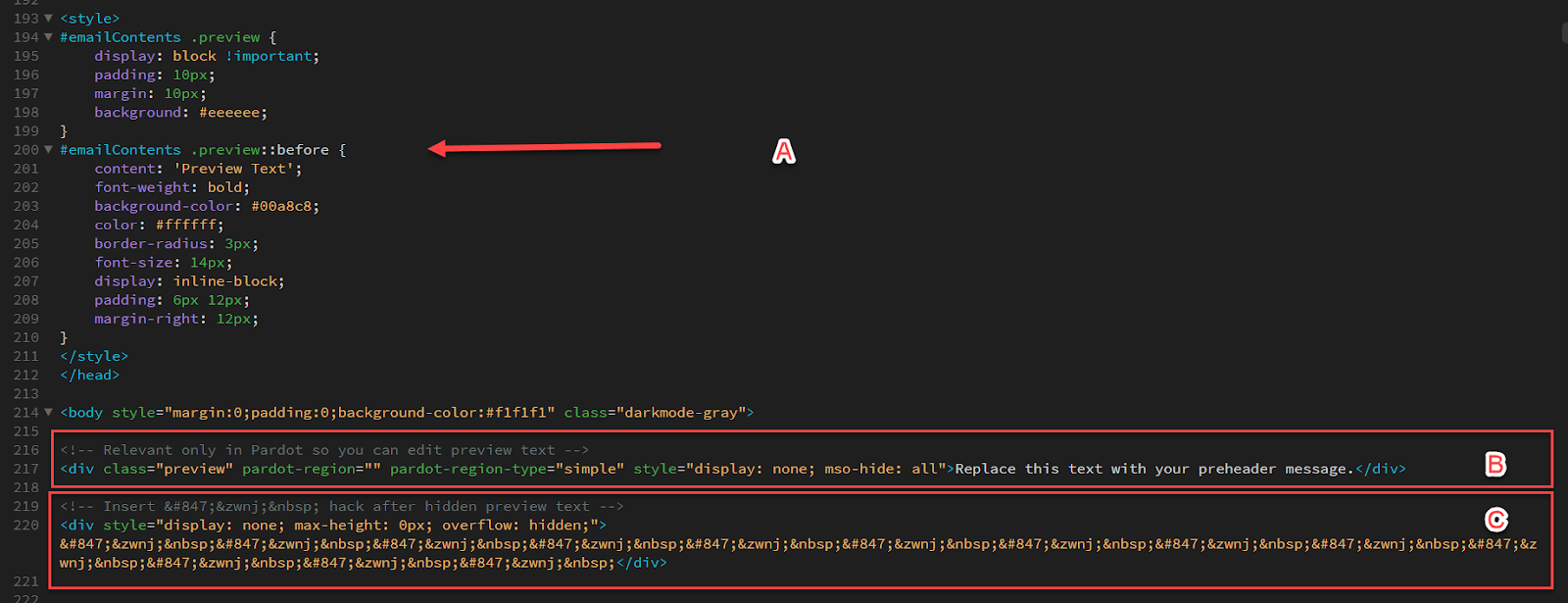
The decision to hide or display preheader text in emails can vary based on several factors, including design preferences, marketing strategies, and the specific goals of the email campaign. If you decide this needs to be hidden on the overall look of the email, you can include a <style> tag within the <head> section of your HTML code. Use CSS selectors to target the desired element and apply the appropriate styling to hide it. See example ‘A’ below.

In this example, the CSS code targets the element with the class name .preview within  the #emailContents container and applies specific styles when the screen width is at least 600 pixels. The #emailContents id is specific to Account Engagement and should allow the editor to edit the content using the WYSIWYG editor. The content within the element is otherwise hidden with the style=”display: none; mso-hide: all” inline style sets the display property to none


Remove unwanted characters from the preheader text

Preheader text should be brief and concise, ideally within the range of 80 to 100 characters. Focus on delivering a clear and compelling message that entices recipients to open your email.

If you prefer not to display any preheader text, you can simply leave the preheader content empty. However, be aware that some email clients may automatically populate the preheader with default content, such as the first line of text from the email body. To mitigate this, consider adding a space or non-breaking space (&nbsp;) in the preheader to override any auto-populated text. See example ‘C’ above.

My link’s not working

Broken links can be frustrating for subscribers and can negatively impact your click-through rates. To avoid this, thoroughly check and test all the links in your email. Double-check the URLs for accuracy and ensure they are properly formatted.

Here’s a checklist of things to look for:

Did you write the correct format? 

Double-check that the URL of the link is accurate and properly formatted. Ensure that the link includes the necessary protocols (e.g., “http://” or “https://”) and does not contain any typographical errors or missing characters.

Is your link broken? 

If the destination page of the link is no longer available or has been moved or removed, the link will not work. Verify that the target webpage is active and accessible.

URL encoding issues 

URLs with special characters or spaces may encounter encoding problems. 

Make sure that the link is correctly encoded using URL encoding standards (e.g., replacing spaces with “%20” or special characters with their corresponding encoded values).

Non-clickable link

If the link is not properly coded as an anchor <a> tag with the appropriate href attribute, it will not function as a clickable link. Ensure that the link is wrapped within the <a> tag and that the href attribute contains the correct URL.

Blocked or filtered by email client

Some email clients may block or filter certain links for security reasons. If the link appears to be working when tested in other environments, it could be due to the specific email client’s settings or policies.

Incompatibility with mobile devices

Links that are designed or formatted in a way that is not mobile-friendly may not work properly on mobile devices or within certain email clients. Optimize your links for mobile responsiveness to ensure they function as intended.

URL redirection issues

If the link involves URL redirection, make sure that the redirection configuration is correct and functioning properly. Incorrect redirection settings can cause the link to fail.

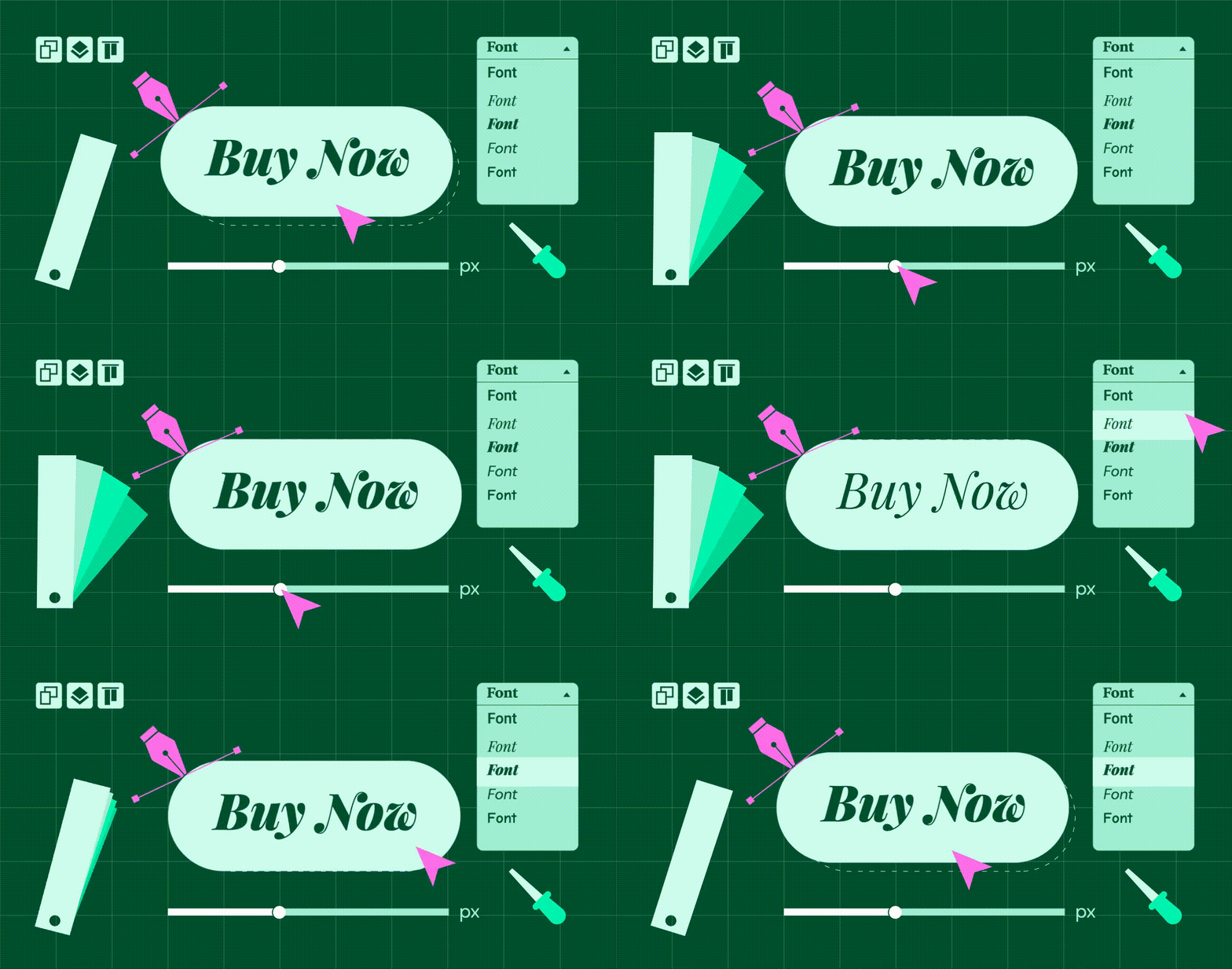
I want to use a custom font

While Account Engagement does not provide font hosting, you can still incorporate custom fonts in your email campaigns by using web-safe fonts or linking to externally hosted font files. You can host the font files on your own server or utilize third-party font hosting services, then reference them in your email’s CSS using @font-face rules. This way, you have more control over the font selection while still working within Account Engagement’s limitations.

Here’s a checklist of things to look for:

Choose a web-safe font or a font that supports email clients

Email clients have limited font support, so it’s best to use web-safe fonts or custom fonts specifically designed for email use. Select a font that is available on most operating systems and widely supported by email clients to ensure consistent rendering.

Host the font files

Upload the font files to your web server or a font hosting service. You’ll typically need the font files in different formats like WOFF, WOFF2, TTF, or EOT to maximize compatibility across email clients. 

Define font-face rules in the CSS

In your CSS code, use the @font-face rule to declare the font family and specify the font file URLs. Include the different font formats to cover a broader range of email clients.

Replace ‘YourCustomFont’ with the desired font name and adjust the file paths in the url() function to reflect the location of your font files.

My font link is being counted as a click

In Account Engagement, links are typically tracked and counted as clicks to provide valuable engagement metrics and insights for your email campaigns. However, when you include a font link in your email, it may unintentionally be counted as a click due to the way Account Engagement tracks link interactions.

This can happen because Account Engagement’s tracking mechanism treats all links as clickable elements by default. When recipients open your email and the email client fetches the font file from the linked source, Account Engagement’s tracking system registers this as a click event.

Here’s a checklist of things to look for:

How are you using custom fonts?

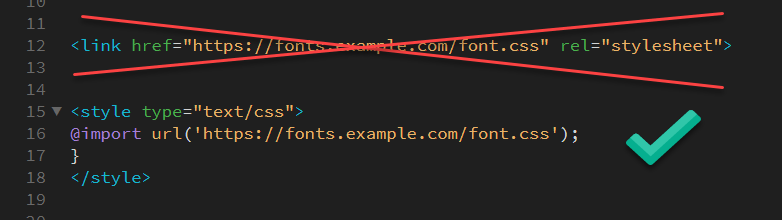
To avoid font links being counted as clicks in Account Engagement, you can use the @import method instead of the traditional <link> method to include custom fonts in your email.

Here’s an example of how to use the @import method:

Background images

Background images in HTML email templates offer creative possibilities for crafting distinctive layouts, adding depth, and showcasing products. They have gained popularity as a design element. However, it is important to consider certain factors when incorporating background images in your Account Engagement email design.

Here’s a checklist of things to look for:

Not all email clients support background images

Some clients may block or ignore background images, resulting in an email that doesn’t display the intended design. Test your email across different email clients to ensure consistent rendering. 

Inline CSS

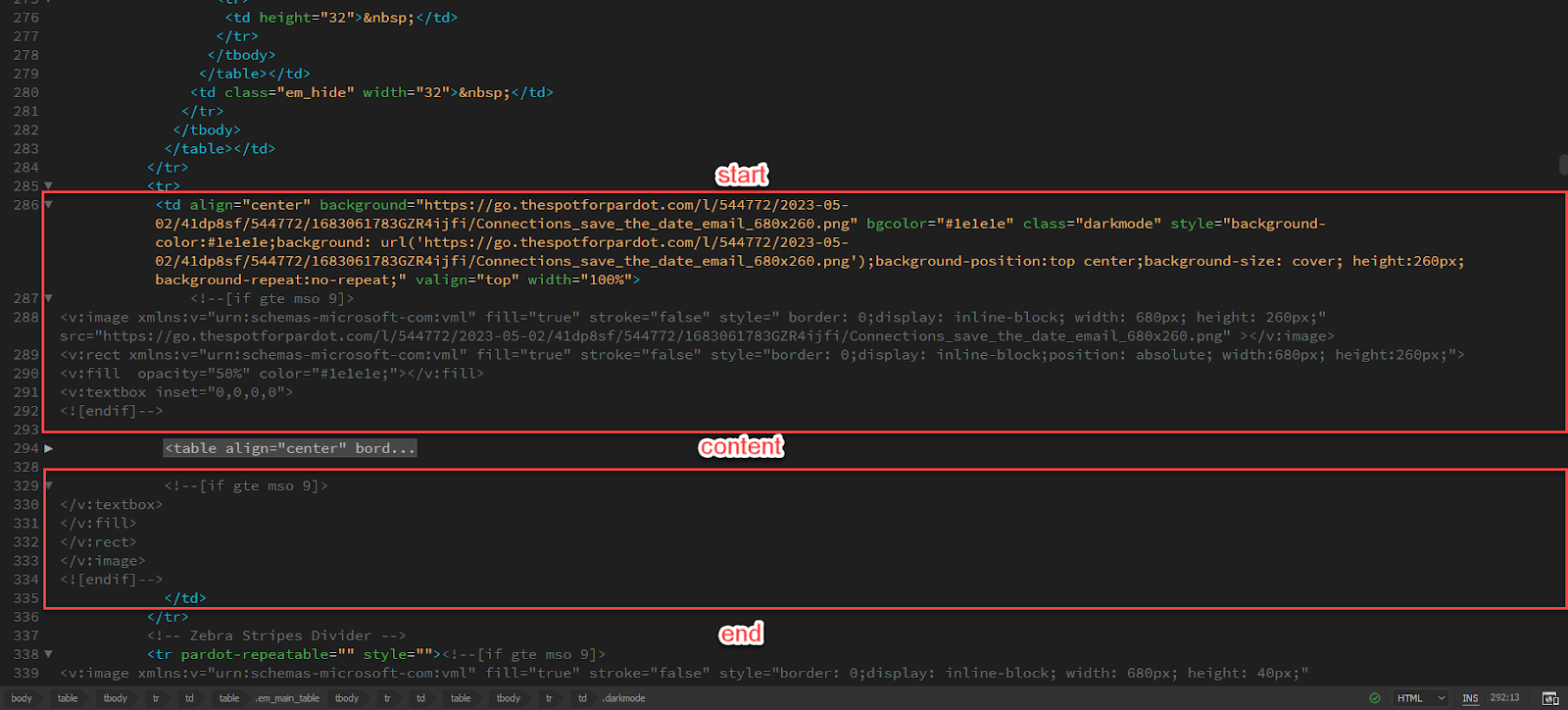
To maximize compatibility, inline CSS is typically recommended for background images in HTML emails. Use the style attribute directly within HTML elements to define the background image and related properties.

The example includes the necessary code to make the background image show in Microsoft Outlook, as well as most popular email clients.

Image size and optimization

Optimize your background image by compressing it to reduce file size while maintaining acceptable quality. Large image files can increase email size and load time, negatively impacting the recipient’s experience. Aim for an optimized image that doesn’t exceed the recommended file size for emails.

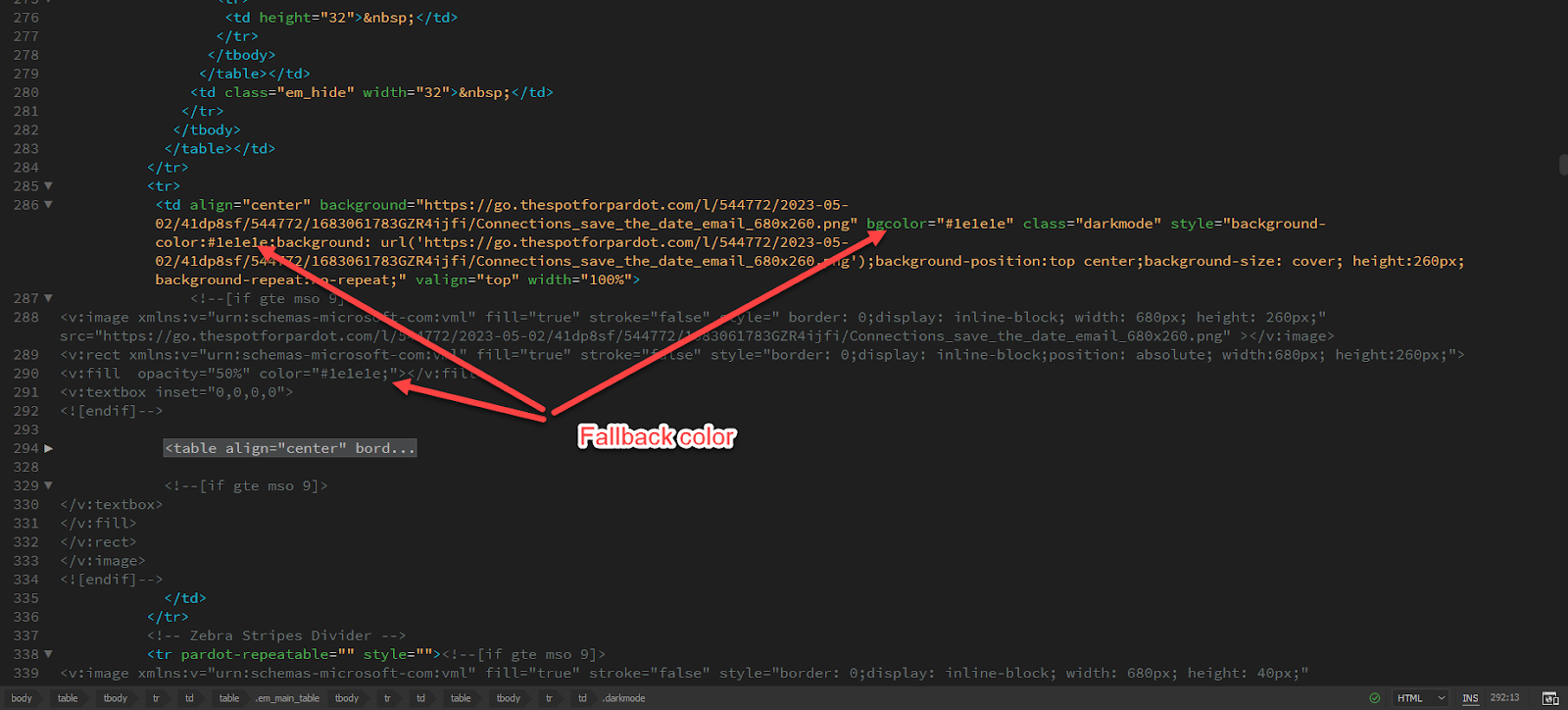
Fallback background color

In case the background image doesn’t load or isn’t supported, provide a fallback background color that complements your design. This ensures that the email still looks visually appealing even without the background image.

Accessibility

Consider accessibility guidelines when using background images. Include alt text for background images so that users with screen readers or email clients that don’t display background images can still understand the context of the email. And of course, it is not recommended or best practice to use text in background images.

Buttons in Outlook

Buttons collapsing or not displaying correctly is another challenge in HTML email coding. To avoid this, use table-based layouts for buttons and set explicit width and height values. Test your buttons across different email clients to ensure they remain consistent and clickable.

Here’s a checklist of things to look for:

I want rounded corners in Outlook. 

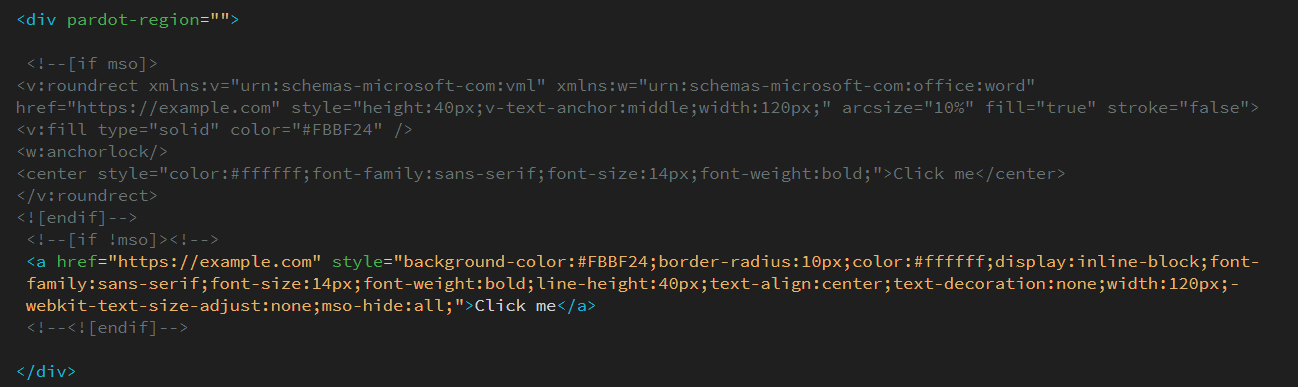
VML (Vector Markup Language) can be used to create buttons with rounded corners, especially in older versions of Outlook that don’t fully support modern CSS features like rounded borders (border-radius). VML allows you to make custom shapes and apply rounded corners to elements. 

Check out this example of an HTML button with rounded corners using VML:

We strongly advise against using this method in HTML email templates within Account Engagement, as it requires replacing the link in two separate locations, which can be easily overlooked if not approached with caution.

Why did my button padding get stripped? 

If you’re facing a situation where the padding of your button appears to be removed or stripped, it is likely because of a collapsing issue in Outlook. To troubleshoot this problem, ensure that the link you are testing is an active and valid link, rather than just using a placeholder like “#” or a dummy link. Using inactive or placeholder links can be the root cause of the problem and result in the unexpected removal of padding from your button.

Create error-free Account Engagement emails

At Sercante, we understand the common pitfalls of HTML email code in Account Engagement, and we’re dedicated to solving them for you. 

With our technical expertise and attention to detail, you can rest assured that your email campaigns will be visually appealing, engaging, and seamless across all platforms and devices. 

Deciding if you’re ready to team up with an analytics reporting partner or consultant can be a real head-scratcher. How do you even know if you are ready? But fear not, we’ve got your back! 

In this blog, we’re going to break down key areas to review and help you figure out if it’s time to bring in a marketing analytics consulting partner or if you’re good to go solo. 

Let’s dive in and find out if you’re ready to rock the CRM and marketing analytics world.

How do I know if I need a partner for analytics reporting? 

Picture this: you’re sitting at your desk, staring at a seemingly never-ending spreadsheet filled with numbers, charts, and graphs all from different marketing sources. The mere thought of analyzing and making sense of it all makes your head spin. You know that harnessing the power of data is crucial for your business’s growth, but where do you even begin? 

That’s when the idea of hiring a Salesforce partner for analytics reporting starts to flicker in your mind. Is it worth it? Will they truly make a difference? How do you even know if you need one? 

Well here are a few questions to ask yourself to help point you in the right direction.

Limited Internal Resources: Do I have enough time to do this?

Granted this is a bit of a softball point to begin with, but don’t sleep on it. Too often I see marketers spinning their wheels on the reporting instead of being able to spend their time on the actual marketing piece of the job! 

When I worked at a startup I had the head of marketing say to me “Is the money better spent with me spinning my wheel trying to get this to work or paying someone who can do it in half the time freeing me up to work on my actual job?”

That has always resonated with me.  If the marketing team lacks the necessary time, expertise, or resources to dedicate to analytics reporting, it may be a clear signal to seek a consultant’s assistance. 

Hiring a consultant can provide additional bandwidth and expertise, allowing the team to focus on their core responsibilities while ensuring that analytics reporting receives the attention it deserves. A consultant can help fill the resource gap and ensure timely and accurate reporting.

Actionable Insight: But where do we go from here? 

Next let’s start with a pretty big question. Once you get the reports, do you know what you want to do next? And I will tell you most people aren’t ready right away and that is absolutely okay. When marketers struggle to derive actionable insights from their analytics reports, it may be an indication that a consultant’s assistance is needed. 

A consultant can help interpret the data, identify trends, and provide strategic recommendations that can drive marketing performance and decision-making. They can offer a fresh perspective and expertise to unlock valuable insights that may have been overlooked. Who doesn’t like being able to bounce ideas off an expert?

How do I know if I am ready to engage an analytics partner?

Okay you’ve crunched the numbers, and after your review, you have decided your organization would benefit from working with a consultant. 

That’s fantastic! But before you jump in headfirst, are you fully prepared? 

Believe it or not, there are actions you can take right away to give your collaboration a turbo boost and get things moving swiftly. Let’s explore these steps together and make sure you’re all set for an amazing journey ahead.

Clearly Define Objectives: KPIs and goals to lead the way! 

It is essential to have a clear understanding of what you want to achieve with your analytics reporting. It is hard to reach the finish line if you don’t know where it is! 

A simple way to make sure your analytics reporting is going to have an impact is defining your marketing goals.

It doesn’t have to be every goal or that doesn’t mean it might not pivot when new insights arise, but if you know you want to improve lead generation, you might want to focus on analytics that lead to increasing website traffic, improving conversion rates, or optimizing ad spend. This clarity will help both you and the consultant align your efforts and ensure that the analytics reporting addresses your specific goals. You can see where you need to improve and where you are hitting it out of the park! 

Got reports or CSVs you are working on currently? That is a great jumping off point to see what is working and what isn’t. 

Gather Relevant Data: Is my data ready? 

Most marketers manage a multitude of different data points. From Salesforce to omni channels used for outreach, you basically have to be a trained juggler to balance it all. 

You can perform your own audit collecting and organizing the relevant data points that are required for your analysis and see where there are gaps.  By having a uniformed view on the data you are analyzing this also has the added benefit of bringing together other teams and can unify your organization on goals.

Plan of action for access 

When B2B marketers gather insight on the departments and audiences reviewing analytics reporting, it helps them create customized reports that speak directly to the needs of each department. By aligning the reports with the goals of the different teams and end users, it helps get everyone on the same page. Plus, they can communicate in a way that makes sense to each audience, using the right language and level of detail.

Knowing who will be reviewing the reports also lets marketers address any specific concerns or areas of interest upfront. By being proactive, they can provide relevant insights and solutions during the meeting. 

Also by having a plan in place, it shows that they have a clear understanding of the data and insights available, which allows them to make the most of their meeting with the consultant and each department that might need access to the reporting.

Big timelines

Timelines and important dates seem to creep up on you, especially when you are spinning your wheel on a report that just doesn’t want to cooperate. Before you jump on with your partner to cover reporting needs, make sure you note any important dates coming up. 

Include things like:

  • Product launches
  • Marketing campaigns
  • Industry events
  • Sales milestones
  • Big executive presentations

The consultant can schedule reporting activities accordingly. 

By informing your consultant about important dates, you ensure timely and customized reporting aligned with your marketing goals. It helps them schedule reporting, tailor insights, support strategic planning, solve problems proactively, and foster collaboration.

Top 3 challenges

At the end of the day, you don’t have to have everything perfect before you engage a partner. That’s what they are there for! 

But ask yourself: what are 3 things that if you got them taken off your plate or solved right now, life would be a little easier? What keeps you up at night? 

That is your starting list! The consultant can help break those down in easy digestible chunks so you can make progress.

Let’s bring it home

In conclusion, deciding whether to team up with a partner or consultant for analytics reporting can be a daunting task. However, by considering key factors, you can determine if it’s time to engage a partner or if you’re ready to tackle analytics on your own. 

If your internal resources are limited, and you find yourself spending more time on reporting than actual marketing activities, hiring a consultant can provide the necessary expertise and bandwidth to ensure timely and accurate reporting.

Additionally, if you struggle to derive actionable insights from your analytics reports, a consultant can offer fresh perspectives and strategic recommendations that drive marketing performance.

Steps when you’ve decided to contact an analytics reporting partner

 When you’ve decided to engage a partner, it’s important to:

  • Clearly define your objectives
  • Gather relevant data
  • Create a plan of action for access and timelines

By taking these steps, you can ensure that your collaboration with a consultant is productive and aligned with your marketing goals. 

Remember, a consultant can help address your top challenges and alleviate the burdens that keep you up at night, ultimately making your journey towards impactful analytics reporting a smoother and more successful one.

So, hint hint, nudge nudge. We’re a team of marketing consultants who can guide you through marketing and CRM analytics implementation and optimization. Drop us a line to start the conversation.

No more posts to show