Category

Real Talk

Hot take: I’m not ready to hop on the AI hype train just yet.

Don’t get me wrong, I understand how the possibilities of AI are there, even if much of it hasn’t been quite realized yet. AI has the potential to make our lives easier. AI will definitely increase productivity. Even if the mention of ChatGPT makes you want to roll your eyes so hard they fall out of your head and you won’t have to be subjected to another useless AI-generated “news article” littering Google’s page one search results, the technology is accelerating at an exponential rate and there’s no turning back now.

It’s just that for me, the very real harms—such as exacerbating racial discrimination in policing and surveillance and scraping struggling artists’ works without consent, to name only a few — still far outweigh AI’s currently novel but ultimately still tepid applications.

Reflecting on Three Sessions from Three 2023 Salesforce Dreamin’ Conferences

A rising tide will carry all boats, but what if you don’t have a boat to begin with? What if you are already struggling to keep your head above water, and the deluge comes?

And yet, after recently wrapping up a hat trick of conferences (Midwest Dreamin’, WITness Success, and Mile High Dreamin’) where the topic of  this year’s sessions and keynotes were inevitably dominated by some permutation of AI (an in particular, GenAI), three sessions that I attended have managed to, if not entirely change, then at least somewhat soften my bearish stance on the whole thing.

At the very least, they’ve given me a lot of food for thought around AI and accessibility: who gets to have it, who doesn’t, and what that ultimately means.

“Generative AI and Ethics: Safeguarding Privacy and Nurturing Trust in the Salesforce Ecosystem”

Robert Wieland, Mile High Dreamin’ 2023

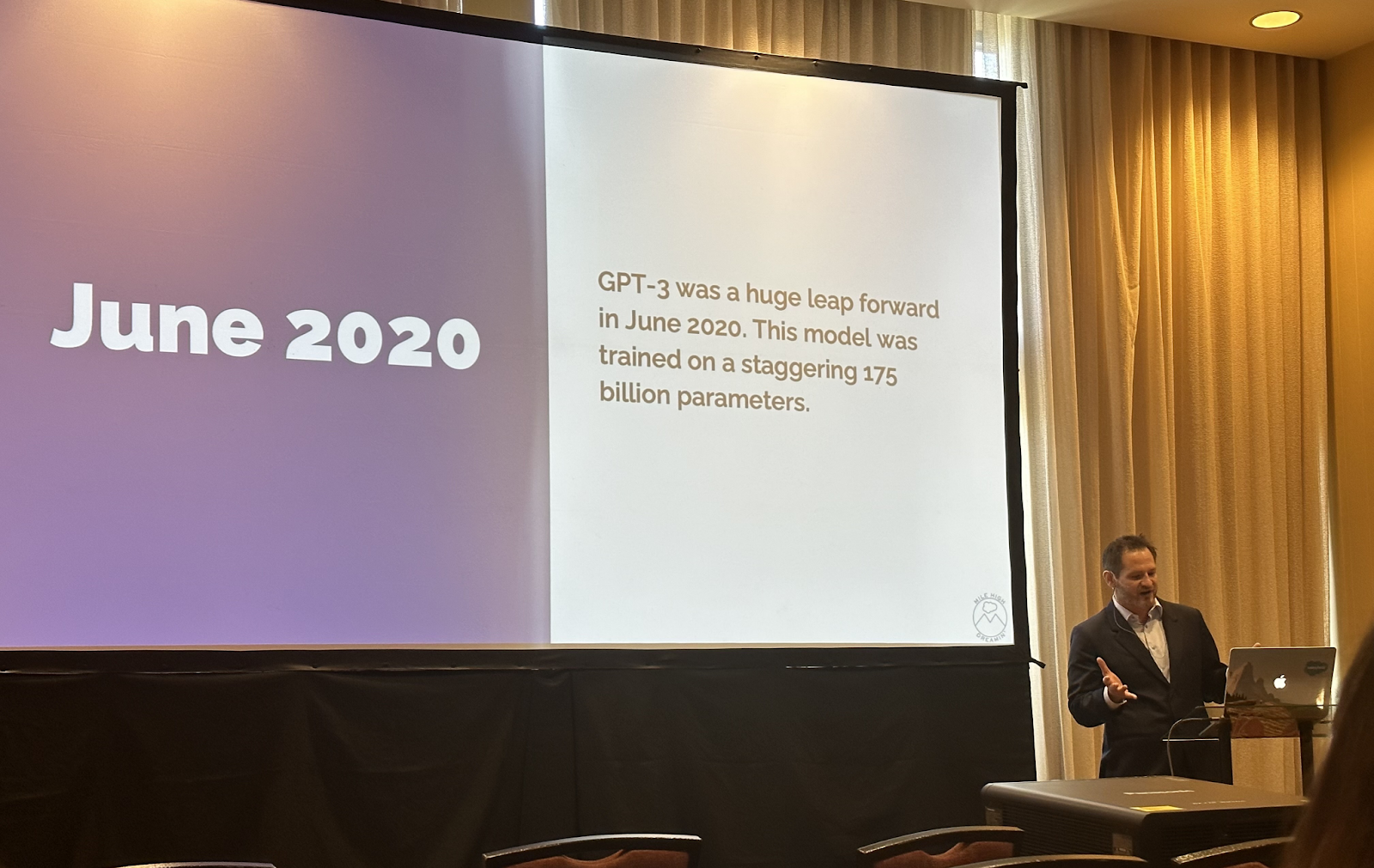
At this year’s Mile High Dreamin’, Robert Wieland, an AI Ethicist and Senior Salesforce Engineer at Verisk Analytics, led his audience through a brief but fascinating history of AI development,  which actually started as early as 1966 with the creation of ELIZA, the world’s earliest AI chatbot. His tour through AI history’s highlights and lowlights centered less on the latest groundbreaking developments and more so on the philosophies, ethical concerns, and questions that have arisen as a result, which made for a refreshing change from the usual shock and awe sales pitches I usually hear when it comes to the wonders of AI.
AI’s ethics framework can trace its roots to the 1979 Belmont Report, which laid the ethical foundation for human subjects research in medicine and the social sciences:

  • Human Autonomy, or the respect for people’s decisions and not injecting bias or manipulation into the decision-making process
  • Beneficence, or how to minimize harm while maximizing human well-being and benefits
  • Justice, or how to ensure equitable access and the equal and greatest distribution of benefits

 “In the realm of AI, ethics involves the thoughtful consideration of the potential impacts of AI technologies on individuals, society, and the environment,” Wieland said. “It prompts us to assess how these technologies align with our shared values and to ensure their responsible development and deployment.”

When it comes to predictive AI and language models, the ethical and social risks are not insubstantial, Wieland went on to explain, something we’ve unfortunately already begun to see play out in an alarming number of ways: from producing discrimination, exclusion, and toxicity to being used for misinformation by malicious actors to the incidental environmental harm as a byproduct of the sheer amount of processing power needed to run these increasingly complex processes to the unintentional harm caused by humans overly trusting a language model or treating it as human-like.

While he’s not looking at the AI world through rose-colored glasses, ultimately Wieland ended his presentation on a more optimistic note. There are, after all, a number of very smart people trying to steer this ship for whom these ethical considerations are always top of mind, including Paula Goldman, Salesforce’s Chief Ethical and Human Use Officer, and Kathy Baxter, Principal Architect of Ethical AI Practice. Together, they put out five guidelines for responsible generative AI development to act as Salesforce’s North Star.

While it’s reassuring to know that Salesforce wants to responsibly balance innovation with ethics, I’m more skeptical than Wieland on this front: I can only place so much trust in a corporate or governmental entity’s ability to be self-accountable to their self-proclaimed principles, something for which even Salesforce is not without controversy. Wieland himself noted,  “Even if you’re following the law, you can do things where people get queasy,” in reference to the 2012 controversy where Target used customer data to predict when someone was pregnant based on their shopping behavior and market to them accordingly. As we’ve seen many U.S. states begin to roll back LGBTQ+ protections and legal access to abortion, just because something is law does not necessarily mean it is ethical or just. How will the power of AI be wielded in those instances?

“Tech for Good: AI’s Role in Uplifting Marginalized and Underserved Communities”

Jaye Cherenfant, WITness Success 2023

Jaye Cherenfant is a Salesforce Administrator, tech enthusiast, and AI strategist who spent over a decade empowering Black students in the U.S. and South Africa before founding her own sustainable gardening business and then later launching Vista Tech Solutions, LLC, a tech consulting company.

As a Black, neurodivergent woman in tech, Cherenfant understands the vital importance of leveraging technology for beneficence, especially when it comes to serving the marginalized and underserved. In her session, she was especially concerned with how AI can inherit societal biases, further discrimination, and lead to data privacy violations that disproportionately impact BIPOC communities.
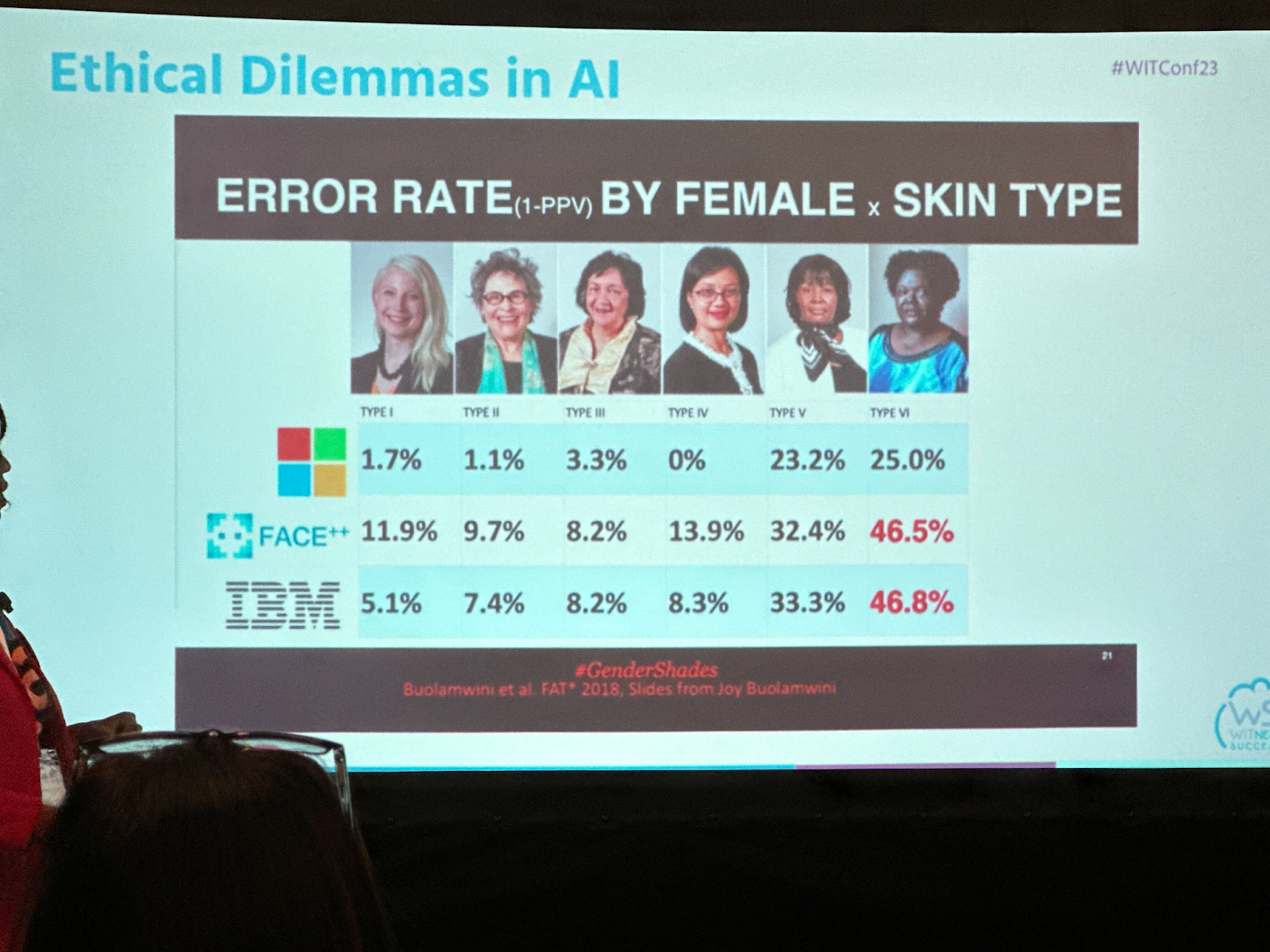
One of the best ways to begin to address these concerns, Cherenfant argued, is to ensure that tech teams, especially AI teams, diversify: Black people need a seat at the table.

But that’s far easier said than done. As of 2021, Black representation made up less than 10% of the STEM workforce, while Black women only represented 2% of the tech industry. These figures also reflect the STEM pipeline, where Black students make up only 9% of STEM degrees at all levels. According to a report from Jobs for the Future, the primary reasons for STEM underrepresentation are “systemic and structural barriers that Black learners confront from an early age into adulthood.” This includes a lack of access to a quality education and resources, which, in the U.S., are allocated based on wealth.

According to 2023 Pew Research, over half of Black households make less than $50,000 in the U.S, with 30% of Black households making less than $25,000.

One cascading effect of these inequities, Cherenfant pointed out, is a growing Digital Divide between children from low-income households and their more affluent peers, a disparity that worsened during the Covid-19 pandemic. According to the Pew Research Center, almost 60% of lower income families experienced at least one of the following digital access obstacles during the COVID-19 school shutdowns:

  • Having to use a mobile phone to complete schoolwork
  • Needing to use public Wi-Fi to complete schoolwork due to unreliable or no internet connectivity at home
  • Being unable to complete schoolwork due to not owning a computer

As the pace of technological innovation keeps accelerating, those who cannot access the knowledge and tools needed to contribute to these advances in hopes of shaping the discourse, nevermind merely being able to keep up with them, will fall further behind and eventually be shut out of these critical spheres altogether.

So where does that leave us? Where can we even begin to address these challenges? Cherenfant advocates that one’s activism can begin locally, from collaborating with her children on generative AI art projects to volunteering at local groups and community-driven events to introduce the community, and especially the youth, to the world of AI and practical AI applications. Giving underrepresented groups access to, knowledge of, and skills to use AI is the first step to giving them that much-needed seat.

My feelings on this are, as ever, somewhat mixed. On one hand, giving marginalized people equitable access to privileged white spaces to empower themselves and others  is crucially important to AI’s future and mitigating the growing harm that systemic biases like flawed racial profiling software and “predictive policing” algorithms are perpetuating.

On the other hand, as Audre Lorde said, “The master’s tools will never dismantle the master’s house.” Can we ignore how, despite assurances, companies are actively replacing or attempting to replace human creative labor, including already underrepresented Black creative labor, with generative AI to the point where even Hollywood has sat up and taken notice? Or how these technologies still betray their systemic bias even when they are being used by Black creators because of the inherently biased data sets they’re trained on?

I don’t know what the right answers are, or if there even are any to be had right now. If the goal laid out in our AI Ethics framework is to make sure AI is doing the greatest amount of good with the least amount of harm, what is an acceptable level of harm and who gets to decide what that is?

“How to Create Accessible Digital Marketing Assets”

Cara Weese, WITness Success 2023

While Cara Weese, CRM & Marketing Automation Strategist at Sercante (and, in full disclosure, one of my most favorite coworkers ever), did not directly address AI during her presentation, her topic was one that runs in the same circles of AI discussions nevertheless: accessibility, and in this case, specifically for those with disabilities.

Weese set the stage for her presentation by sharing her own powerful story as a person with a disability, which further drove home the point that people with disabilities aren’t an imaginary segment of the population to be treated as an afterthought or, worse still, acceptable collateral damage if the cost proves too high or the effort too bothersome to be ADA-compliant. In fact, according to the World Health Organization, 1.3 billion people, or 16% of the world’s population, have a significant disability. 

If us marketers don’t center accessibility-first strategies in our work, Weese said, we not only exclude a not insignificant portion of the population, we also risk a number of repercussions from missing opportunities to expand our customer base, create positive associations with our brand, encourage inclusivity in others, and improve our quality ranking score and SEO. 

And if that wasn’t convincing enough, businesses who fail to comply with ADA regulations are liable for some hefty penalties should their non-compliant practices be reported.

As Donald A. Norman, author of the influential book Design of Everyday Things, points out, “Designing for people with disabilities almost always leads to products that work better for everyone.” Using large, legible fonts and high contrast in our emails not only helps those with visual disabilities, but consider how much the elderly with failing eyesight would also appreciate these design choices. Or how about the fact that we’re all having to turn on the subtitles to watch TV shows and films these days.

Even in this, class is inextricably entwined with accessibility, furthering the Digital Divide. Assistive technologies such as screen readers are a helpful device for the visually impaired to navigate the digital world, but their high price point can pose a significant barrier for lower income households. And even if one were able to secure a lower cost device, as Weese explained, newer, more expensive screen readers are often more capable of parsing web pages and emails than cheaper ones, even when the content doesn’t entirely meet web accessibility requirements.

Conclusion

I’m not anti-AI.

I’m already eager to see how AI will get better at making inaccessible digital content accessible. I’ve already played around with gen AI for coding and generating seed data for Salesforce imports. I’m looking forward to trying out Jaye Cherenfant’s method of using gen AI to study for her Salesforce exam.

But what is more important to me than what I want AI to do is how I want it to be used — and how I don’t want it to be used. I’d love to see the rich experience of the marginalized to be welcomed and included in AI’s development to not only empower those communities but to improve the accuracy and power of AI itself. I want to see AI close the gap between the privileged and the underserved.

I don’t want to see the worst consequences of AI fall upon the most vulnerable among us: those with lower incomes, those who have been excluded from consideration, those who will suffer the most from climate change, and those who are primed to be heavily exploited by richer, and vastly more powerful entities.

The tide is rising, and the sea is rough. If we can’t stem or even slow it down, then at the very least, I hope we have the courage and strength to pull others out of the water and into the boat with us on our way up.

The majority of Salesforce training you’ll find in the world is conducted in English. But things are changing as the platform grows in other parts of the world. We’ve seen a few self-guided Salesforce courses and Trailhead content in other languages, including Spanish. But the options are limited when it comes to getting hands-on and instructor-led Salesforce training in Spanish or other languages.

In this post, we’ll cover the lessons learned while delivering a Marketing Cloud Account Engagement (Pardot) bootcamp in Spanish so more organizations can offer training in languages beyond English.

How did the Spanish Account Engagement bootcamp come to fruition?

My name is Marcos Duran and I am a Marketing Manager at Sercante. In my role, I support our team with the development and delivering of Salesforce training to our customers. I have been a Salesforce user for almost a decade and Salesforce consultant for the past 7 years. 

Part of being a #MomentMarketer is that you need to not only stay ahead of the latest trends and hot topics but also bring your tribe with you. My old Spanish professor used to use the term “Compartir la riqueza” or “share the wealth” in English.

This year I decided that I wanted to challenge myself with creating and delivering an Account Engagement (Pardot) bootcamp 100% in Spanish. My goal is to support Spanish speakers in earning their Pardot Specialist certification

For a little bit of background, this platform gave me my “real” start in the ecosystem years ago. Although I am a native Spanish speaker, this is still a challenging feat since all the content has to be dubbed into Spanish and has to be tweaked to make sense technically and also culturally.

Here’s a hot take: Google Translate can get you 70% there, but that last 30% is what differentiates a speaker versus just dropping it into a translator. Before you say anyone can do that, I’ll ask why do you think more people haven’t?

This course lasted five weeks for a total of 8 one-hour classes. During three of those five weeks, we met twice.

Six big takeaways from developing a Salesforce training course in Spanish

Here’s a few lessons I learned along the way of doing this bootcamp. I hope they will help you plan better if you are interested in offering virtual webinars/programs as a user group leader or in your own organization.

1. Lean heavily on pre-promotion

A rule of thumb for webinars is that at least 50% of your signups won’t show. 

In my case, this was close to my final numbers. I ended up with a 30% signup rate between announcing the bootcamp on LinkedIn and getting people to actually sign up. 

Lesson Learned: My mistake here was that I didn’t have the form ready when I was gauging interest. As a result, I lost on that initial wave of hype. If you do this internally, get people to register once you gauge interest.

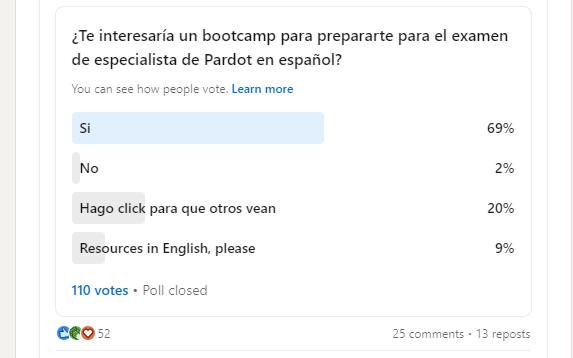
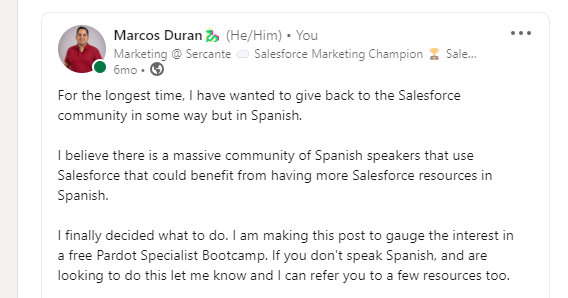
LinkedIn post I shared to see if people in my network have interest in Salesforce training in Spanish

And the poll I posted…

Question Translation: Would you be interested in a bootcamp to prepare for the Pardot Specialist exam in Spanish?

2. Reach out to your community

From promotion to content creation, I reached out to people in my network who had been through this experience, looking for advice. 

I received a lot of positive advice — special shout out to Lara Black, Daniela Galmes, Victor Alberto Pantoja, and Ben LaMothe for all their support. 

Thanks to their encouragement, I was able to support 30 students from 13 countries around the world in their native language with Account Engagement content.

Marcos Duran with fellow marketing Trailblazers from the Salesforce community

Lesson Learned: Message the people you know who can offer advice, introduce you to people in their network, or help you to promote your efforts.

3. Optimize your course content

This particular bootcamp was focused on getting ready for the Pardot Specialist certification

We used the study guide material from Trailhead to guide the format of our bootcamp and essentially focus on the goal of passing the exam. In addition, I provided our students live demos of the essential parts of Account Engagement (for the visuals), presentation decks, and links to documentation from the Salesforce Help Center for additional guidance.

Lesson Learned: Build your training course using resources from Salesforce. That’s who designed the exam you’re attempting to pass and the tools you’re using. So, that’s definitely the best place to start.

4. Encourage student engagement

This was my favorite part. To get our course going, I engaged our students with questions about their own experiences. For many, this meant comparing features with Marketing Cloud Engagement to help create the bridge between their experience with that platform and this new platform material. 

We had several long conversations throughout the course that really showed the real-life business challenges they were facing. Thank you to everyone who shared with us!

Lesson Learned: Have a sense of humor when things go wrong. Having to say automations in Spanish 30 times in one hour is not fun — it is definitely a tongue twister. Thanks to everyone for putting up with me as I searched for the correct words to illustrate my point. 

5. Send plenty of reminders

This is a tip from Google Calendars: send reminders close to the webinar start time. I would send out a message a few hours before class to remind students, “Hey – class is today, make sure you show up.” 

This was the hardest for me because through this course I would see our attendance numbers fluctuate. At the end of the day, I understand we all have lives outside of work. So it’s best to be patient and as helpful as we can with others. 

Lesson Learned: Keep on sending those course reminders. Your students appreciate them!

6. On-Demand

Finally, at the end of each week, I would send everyone the slides and recordings. I would suggest you do this once at the end of the course.

Lesson Learned: Offering the course recordings on demand is essential. Life happens, students may miss a session or two. This content is also a lot to take in, so giving the option to revisit is going to help your students to be more successful.

Changes I would make to future Salesforce training in Spanish

Now that you read a little about how this course went for me, you may be wondering what’s next?

Well, here’s a few things I would do differently:

  1. I would love to be able to do this in person to really give the students the most support I can.
  2. I would continue to team up with other Account Engagement rock stars and divide the work to ensure we bring in different experiences to the classroom.
  3. I would probably promote this a little longer than I did (initially we had just north of 100 people interested in Spanish Pardot training).

Other than that, I feel it always pays to help others power up. I look forward to continuing to support Spanish and English speakers on the Salesforce platform and continue to make the most out of their investment. 

If you are interested in watching the Spanish Bootcamp series please click here.

Sign up for marketing-focused Salesforce training courses

If you’re ready to take your strategy, technical, and creative skills to the next level, we have the marketing-focused Salesforce training courses you need.

You can join our regularly scheduled courses or ask us about private training options — like this one that was offered to Spanish speakers in the Salesforce community.
Check out our training options here.

Migrating from one marketing automation platform (MAP) to another can be nerve wracking. You are bound to be overwhelmed and not know where to start. But I once had a high school coach say “nervousness equals readiness.” And while that didn’t always ease the nerves before a big race, it has stuck with me all these years. So embrace the change as you prepare for your marketing automation platform migration!

I have been on both sides of a marketing automation platform migration project — both as a person who owns the platform and as a consultant. I want to share some of the learnings from those experiences to make the process a little less painful for anyone who’s just getting started. 

Remember the reasons you are changing MAPs

Since we work through so many marketing automation migration projects where we help our clients switch to Marketing Cloud Account Engagement (Pardot), we’ll use those migrations as an example for the purposes of this blog post. 

Marketing teams are usually migrating to Account Engagement for one of a few reasons:

  • It works better with Salesforce 
  • Their current MAP is not easy to understand
  • They are looking for better support
  • Budget

Migrating to Account Engagement means you get one unified platform for sales and marketing, which for marketers means one less system to have to log into! 

With Engagement History on leads, contacts, and accounts, your sales team has insight into engagement with marketing activities right on their record. And a lot of marketing technology (martech) integrates with Salesforce. 

That means you can, more often than not, pull that information into Account Engagement to use in your audience segmentation.

Account Engagement is not ‘Insert Marketing Automation Platform Name Here’

Regardless of the reason you are migrating to Account Engagement, you need to remember that Account Engagement might not be able to do everything the same way as your existing MAP — but that isn’t a bad thing! There is most likely a solution for it using native functionality or customizing code. 

I have seen clients say they want everything in Account Engagement to be how it is in their current MAP. This approach will most likely cause some headaches down the road. Take a step back and get an understanding of what the end goal of your process is today so it can be translated into Account Engagement, and then look at how it can be done within Account Engagement. 

Make sure you spend time on Trailhead to get an understanding of the basics of how Account Engagement works before you dive into migrating systems. 

Documentation will be critical for success — marketing ops rejoice!

The first step before starting to move over assets is to make sure that you have your processes documented. Not only will this help during migration but it will allow you to take a good look at how things are done today and try to improve where possible. 

Here are a few to make sure you document:

  • User management – Who needs access? What type of access do they need? 
  • Lead routing – When does a lead go to sales? What information is required before it goes to sales? Who is it assigned to? What happens if the lead is not ready? 
  • Reporting – What are your KPIs? What system does reporting need to happen in? How do you need reporting – by campaign, by channel, by quarter, by month? 
  • Lead and customer journeys – How and when do you engage with a lead? What about a customer? 
  • Legal requirements – Is there specific language on forms, emails, and landing pages that we need to have?
  • Overall martech stack – What tools are in your tech stack? How do they all work together? Do you have any new tech you are adding soon? 

Channel your inner Marie Kondo throughout your MAP migration

Regardless of how clean you think your current MAP is there will always be old assets and outdated processes. Channel your inner Marie Kondo and make sure you only migrate over what brings you joy — well, migrate what is still necessary for the future. Don’t worry you can always export reporting on old assets so you are losing that data.

This is not only about cleaning up your assets, now is the time to take a good look at what isn’t working well today and make improvements. This applies not only to processes but nurture programs and email and landing page experiences. 

Bonus: Account Engagement Cleanliness Resources

Marketing automation migrations take time

While yes, technically, you can do a migration in 30 days, I suggest taking as much time as you can. This is  especially true if you have lots of nurture programs, email templates, and complex processes to migrate to the new system. 

This is not always possible. There are so many factors that go into this — especially budget and resources. 

So, have an honest conversation with your team about the timeline. Don’t forget to factor in overlap with your current MAP (at least a month), and try to give yourself a little padding for the unexpected and time off. 

Something will not go as planned

No matter how much you plan and prepare for a migration, something will not go as expected. AND THAT IS OKAY!!! 

You might find some custom code on a form you weren’t aware of. Or you could experience sync errors with Salesforce due to a validation rule you didn’t know existed. 

Just take a deep breath and know that it can be fixed. 

You don’t have to go through a MAP migration alone

Again, migration projects are scary. But you can work with consulting companies that go through these MAP migrations every day. Not only do they know all the processes and logistics for migrating to the new platform, but they’ve worked with companies that weren’t fully utilizing their MAP investment and found ways to improve user experience and adoption.

Working with a partner, like Sercante, can help make it less scary and make sure you get the maximum value out of your tools. 

Reach out to the team at Sercante as you get ready for your marketing automation platform migration. We’ve seen it all, so bring us your juiciest challenges!

So, you’ve decided to take the next steps in your career and earn your Salesforce Administrator Certification. Yay!

This might be your first journey into the Salesforce platform or maybe you’ve been an Accidental Admin for years and are finally going to make it official. Either way, we hope this guide provides the extra boost you need to get started and pass! We asked our fellow #AwesomeAdmins and Sercante Dragons for their feedback on the exam, what they wish they had done differently, and what study strategies worked best for them.

Here are our favorite tips and tricks to passing the Salesforce Administrator Certification exam. Grab your go-to brain boosting beverage and let’s get started!

Step 1. Review the Salesforce Administrator Certification Exam Guide

You probably have already looked at the exam guide a couple times, but do it just once more. Salesforce occasionally updates the exam guide and the test itself so it is always a good idea to review the most recent version (the last test update was June 2021).

Plus, Salesforce recently released a new certification for those looking to break into the Salesforce ecosystem and aren’t quite experienced enough for the Administrator exam. The Salesforce Associate certification is a great place to begin and you can get started here with our blog ‘A Pocket Guide to Earning the Salesforce Associate Certification’.

salesforce administrator certification exam

Salesforce Administrator Certification Exam Outline

  • Configuration and Setup: 20%
  • Object Manager and Lightning App Builder: 20%
  • Sales and Marketing Applications: 12%
  • Service and Support Applications: 11%
  • Productivity and Collaboration: 7%
  • Data and Analytics Management: 14%
  • Workflow/Process Automation: 16%

Here is a quick link to bookmark the Salesforce Certified Administrator Exam Guide, which includes the exam overview, resources they recommend (free and paid), and a detailed breakdown of the topics you will see.

Bookmark these too! Both of these resources are the best  go-to study guides as they are Salesforce created and kept up to date. If you are overwhelmed by the amount of resources out there, just focus on studying and working through these. 

Step 2. Schedule Your Salesforce Admin Cert Exam

Nothing makes studying more productive (aka panic-studying-becasue-it-is-actually-happening-and-you-can’t-ignore-it) when you have a real date to prepare for. Yes, it will be scary to hit that schedule button. But it would be even worse to do all this work and never actually take the test. 

I promise that you are smart and capable, even if you are super worried! Once you get this out of the way, you can truly focus on the content without that hanging out in the back of your mind.

Choose your testing location 

One thing to consider is what type of test taker you are. Salesforce gives us the option of taking a test in person at a local testing center or remotely from the comfort of your or someone else’s home. 

Think about what makes you your best test-taking you. I prefer taking the certifications remotely online because I like being at my desk with my favorite chair in my comfy clothes and I don’t have to worry about traffic or a strange new place. Other team members prefer the testing center because it gets them out of their loud house of children and pets and helps their brain activate test mode.

Ready to schedule your Salesforce Admin certification date? Good! Do that here. Step two = complete!

Step 3. Organize Your Resources

The Sercante team are certification masters, and we all agreed that organizing your resources, study guides, prep decks, practice tests, etc., beforehand saves a lot of time later down your study road. Plus, they can act as a sort of to-do checklist of study tasks.

Here are some of our favorite resources that we’ve relied on.

Free Study Day

This is my favorite resource for all Salesforce certifications. You can sign up multiple times as well so I would recommend once at the beginning of your study schedule and then again close to your exam date. 

  • Salesforce Certification Days
    • Free, half-day webinars to help you prepare for your certification
    • About 1x every two months
    • Not recorded, no taking screenshots
    • Get a $40 test voucher code, can be used for retakes

Videos

Blogs

Trailheads & Trailmixes

Superbadges

Topic Problem Area Resources

Step 4. Take a Practice Test & Understand Where You’re At

You are smart! You know things! How else would you convince yourself to take the Salesforce Administrator Certification? 

So, this also means you probably know a good portion of the topics the exam will cover. Instead of deep diving into EVERYTHING, let’s focus on the medium confidence and low to no confidence topic areas. Remember to refer to the exam outline above to understand what will be on the test.

You can use this simple Google Sheet calculator for a quick confidence check: 

When you are ready, just jump in and take a practice test. Try to remember which one so this can be your truth beacon as your work through your study materials. By having this baseline score, you will be able to identify confident and if-y topic areas, plus get into the test-taking, Salesforce-speak brain space. 

Practice Tests

Be careful with relying too heavily on the questions and answers from these paid and free practice test resources outside of Salesforce. As the test and Salesforce ecosystem continue to evolve, some of these tests don’t update with it. Trust your gut and Google if you think something isn’t quite right. You can always ask the Salesforce Trailhead community to double-check, as well. 

Step 5. The Actual Study Step

Ok! Time to study!

Pace yourself and try to avoid last-minute week of the test full studying sessions. Yes, reviewing some key topics right before your certification might be helpful, but working through the Trailheads the month or two leading up to the test is probably easier on your brain and work/life schedule. 

I like to study one or two hours a day before and after my work day so it tends to take me more time to prep compared to teammates who schedule a couple of full study days the month of their exam. Try out different study schedules and find what works best for you! 

Keep in mind that you could prefer video courses to the text-based Trailheads or maybe you like creating your own flash cards with a study friend. The knowledge is out there, you just need to figure out the best way for you to unlock it.

Step 6. Rinse & Repeat

Once you feel like you have absorbed some more information or completed a couple of topic-specific Trailheads, give the practice test a shot again. This will confirm if you are focusing on the right or not quite right topic areas.

Remember, Salesforce certifications are difficult and are worded in Salesforce ways. Taking these practice tests and working through the Trailhead courses will help you understand how they phase scenarios, what they consider best practices for a standard organization, how they refer to their ecosystem, and hopefully, see which answers you can eliminate to reduce your answer options. 

Some Study & Test Taking Tips

  • Find keywords in questions that indicate the answer or what you can eliminate as an answer.
  • Keep in mind the names of Salesforce products, features, and functionality as they will try to trick you with similar-sounding answers.
  • Answers can put the Salesforce platform in a good light meaning the answer wouldn’t be something they don’t support or is outside of the standard packages (in most cases).
    • Example: How many records are saved in the recycle bin? The highest option was the answer.
  • Always refer back to the full question when you are starting to second guess yourself, there might be something key you missed when you first read it. 

Step 7. Go Eat A Snack & Take A Nap

There is only so much studying and memorization a human brain can handle. Especially with these Salesforce-style wordy technical questions and answers. We fully recommend taking breaks throughout your study journey and at least a couple of days leading up to your Salesforce Admin exam date. 

Remember to relax and breathe! You being overly stressed out is not going to help you pass the test.

Step 8. Pass The Salesforce Administration Certification Exam!

Trust us, you’ve got this!

The Day of Your Exam Tips

  • Make sure you read the requirements for your in-person exam or the online proctored exam.
    • For in-person tests, remember to arrive 15 minutes early with your ID, another form of identification, and your authorization code.
    • For online tests, double-check that your camera and microphone are working, that you have downloaded the correct software, and that your desk area and background are clean and without distractions.
  • Consider the amount of time you have as you go through the test.
    • Answering every question is more important than not finishing.
  • Mark questions you are hesitant about for review.
    • Salesforce has a built-in checkbox for this within the test – take advantage of it.
    • As you have time at the end, go through your marked questions.
    • If you start noticing that you are changing more than a handful of answers, you are probably in your head too much and overthinking things. It is best to go with your gut and your first answer unless you know for sure that it is incorrect.
  • Don’t be afraid to fail! You can always retake the Salesforce admin certification exam – trust me, I did. We recommend scheduling your retake within two months of your previous exam date so the information is fresh and you are still in testing mode.

Good luck taking your Salesforce admin certification exam!

Don’t forget to come back here and brag about your accomplishment and share any other Salesforce Administrator Certification exam tips and tricks for the next round of admins!

I saw an email pop in my inbox last week from our pals at Stensul. The subject line read “Simple and quick subject lines? The Stensul way it is.” Inside the email was a link to try out an AI-powered email subject line generator.

I had to check it out.

I spend lots of time in my role at Sercante writing and editing copy for marketing assets like emails, blog posts, landing pages, and social media posts. And I can’t tell you how many times I’ve gotten in an editing hole testing different variations of words for email subject lines until I find the perfect one.

That’s what got me so excited about the tool.

Note: Stensul has updated the tool since this post was written. It is now called the Stensul email toolkit, and it includes more features for generating email copy including CTA text, style rewrites, and preheader text assistance. This post is only about the email subject line function.

Email Subject Lines that Inspire Action and Curiosity

Each email you send through your marketing automation tool has such a small chance to get people to do the things you’re asking them to do. So, it’s especially important to write an impactful email subject line to get people curious about what your email has to offer. You also have to provide value by offering your reader clear expectations about what’s inside the email. 

I’m thinking the Stensul email subject line generator will be helpful for achieving those goals. I’m also thinking we can use it to create subject line variations for A/B testing.

Trying the Stensul Subject Line Generator on Sercante Emails

I guess the best way to see how this thing works is to dive in. First, I went to the subject line generator landing page and traded my info for access to the tool. A few seconds later, I got an email with my magic link to use it.

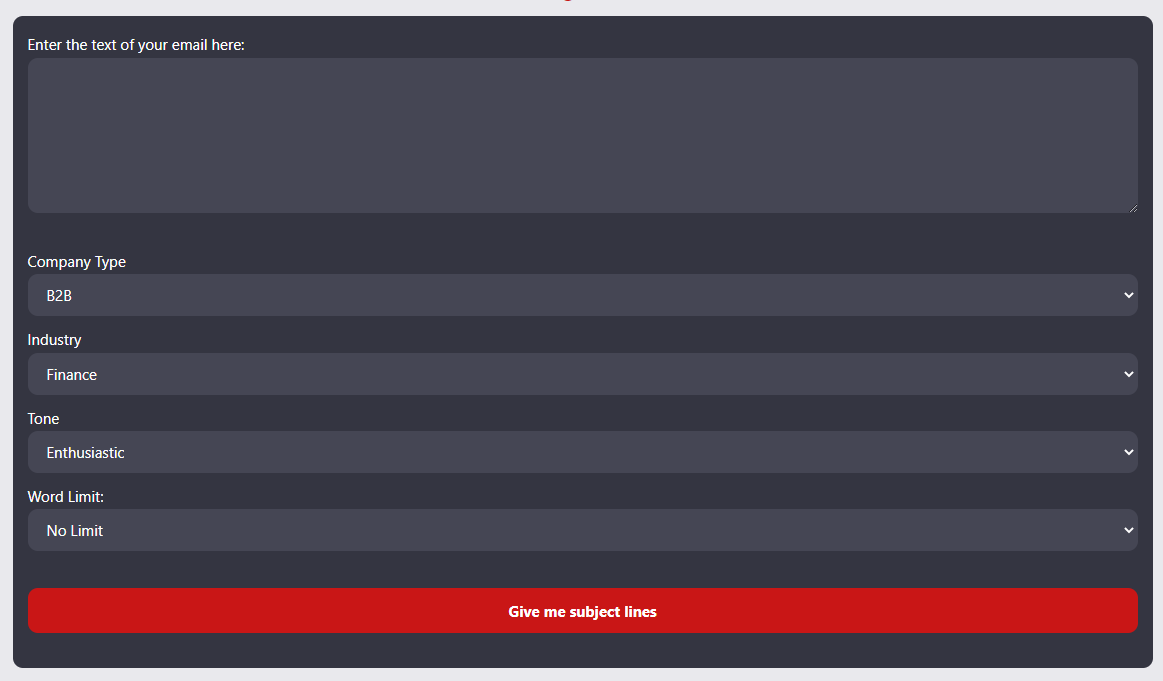
Here’s what it looks like:

You’re prompted to enter the text of your email along with details like your company type, industry, and tone of voice along with word limit for the subject line. 

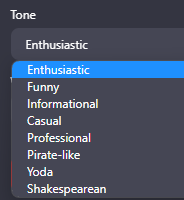
The tone of voice options range from average to entertaining. Here are the options:

Tone of voice options
  • Enthusiastic
  • Funny
  • Informational
  • Casual
  • Professional
  • Pirate-Like
  • Yoda
  • Shakespearean

I tested it out using a few older Sercante emails to see what subject lines it produces.

Here are examples from my exploration:

Sercante 2022 Year in Review Email Example

Here’s what I got when copy-pasted the content from our 2022 year in review email and asked for 10-word subject lines.

Original subject line: ➡️ Join Us In Celebrating Our Milestones ❇️

The email:

Results with Enthusiastic Tone:

  1. 🎉 Celebrating a Year of Growth & Opportunity with Sercante! 🚀
  2. 2022 Highlights: Sercante’s Unforgettable Journey 🔥
  3. 🌟 Sercante’s 2022 Milestones: Thanks for the Support!
  4. ✨ Sercante’s Incredible Growth: Join our 2023 Adventure!
  5. 🚀 Cheers to Sercante’s Success: Let’s Make 2023 Even Better!

Results with Funny Tone:

  1. Hold Our 🍾: Sercante’s Wild & Wonderful 2022 Recap!🎉
  2. 🚀Blast Off! Sercante’s Stellar 2022 Highlights Inside😄
  3. Unleashing the Fury: Sercante’s 🐉-Filled 2022 Adventures
  4. 🎂Sercante Turns 5: Our Side-Splitting, Record-Breaking Year!😂
  5. Brace Yourself: Sercante’s 2022 Rollercoaster Ride Awaits!🎢

Note: I love that it’s intuitive enough to throw a dragon emoji in there.

Results with Yoda Tone:

  1. Growth & Opportunity, 2022 We Celebrate, Yoda Says
  2. Memorable Year, Sercante’s Journey, Learn You Will
  3. Gratitude and Success, 2022 Recap, Stronger Together
  4. Salesforce Support, Sercante Achievements, Future Yoda Sees
  5. Embark 2023, Marketers’ Galactic Adventures Await Us

The Spot & Jenna Molby Partnership Email Example

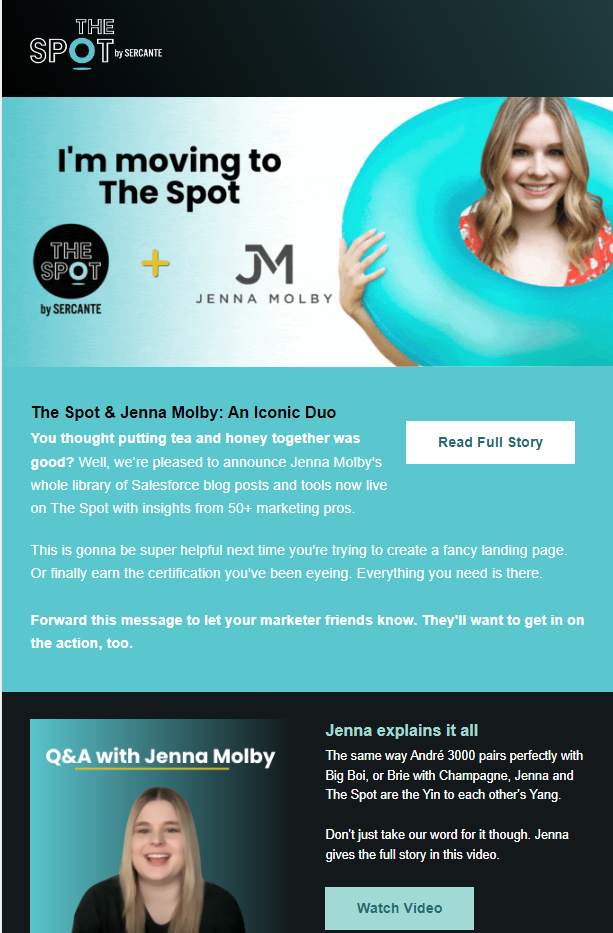
Here’s more email subject line generator exploration using an email we sent to announce Jenna Molby’s partnership with The Spot.

Original subject line: A shining Salesforce star is joining The Spot 🤩

The email: 

Results with Informational Tone:

  1. Discover Jenna Molby’s Salesforce Insights on The Spot
  2. Elevate Your Marketing with Jenna Molby & The Spot
  3. Master Pardot: Jenna Molby’s Tools & Tips Now Live
  4. Unleash Your Salesforce Potential: Jenna Molby & The Spot
  5. Jenna Molby’s Salesforce Expertise Joins The Spot Library

Results with Informational Tone:

  1. Jenna Molby Joins The Spot: Upgrade Your Salesforce Game
  2. The Spot + Jenna Molby: A Match Made in Salesforce Heaven
  3. Jenna Molby’s Salesforce Secrets Now on The Spot!
  4. Boost Your Salesforce Skills with Jenna Molby & The Spot
  5. Unleash Your Marketing Superpowers with Jenna Molby & The Spot

Results with Pirate-Like Tone:

  1. Ahoy Mateys! The Spot & Jenna Molby’s Treasure Trove Unveiled
  2. Sail into Salesforce Success with Jenna Molby’s Insights
  3. Chart Yer Course with Jenna Molby’s Ultimate Salesforce Guides
  4. Discover the Hidden Gems of Salesforce with Jenna Molby
  5. Jenna Molby’s Swashbuckling Salesforce Secrets Unleashed

Results with Shakespearean Tone:

  1. Behold! Thee Spot & Jenna Molby: A Veritable Pairing
  2. Pray, Joineth The Spot for Molby’s Salesforce Wisdom
  3. Salesforce Mastery: Jenna & The Spot Unite in Harmony
  4. Rejoice! Jenna Molby’s Tools Now Grace The Spot
  5. Hark! Jenna Molby’s Top Guides, Now on The Spot

My thoughts overall on the email subject line generator

This tool is super handy for coming up with subject line variations for emails. I especially see it being helpful when my brain is done and I simply can’t write another word — let alone something that grabs people’s attention.

And that’s the thing about email subject lines. Writing them is often the last thing we do in the email copywriting process. But we should be paying closer attention so we have greater chances of getting clicks from our email recipients.

The more copy the better

I did learn one caveat while using the subject line generator tool. It works better on emails that have a higher volume of copy. My first example was a true newsletter with 667 words of copy, while the second example had about 415 words of copy. 

The generator results were spot on in my opinion for the first email while I was underwhelmed by the results for the second email. That may be because the second example had significantly less copy and sections. It makes sense because the tool needs enough information to pull from so it can summarize into a short subject line. I’m also loving the emoji suggestions, but I didn’t get those with all of my results.

Where AI Tools Fit in Content Marketing

You’ve probably heard lots of talk lately about OpenAI’s ChatGPT tool and other AI-powered chatbots that we’re seeing in the content marketing world. The Stensul Email Subject Line generator belongs to the wave of tools that are powered by GPT4, which is the latest iteration of OpenAI’s chatbot. 

I’ve seen blog and social posts from people who aren’t seeing the potential in these tools. But I think these tools are giving more power to individual content creators.

I was recently discussing how AI tools affect content marketers with my fellow dragon, Marcos Duran. He brought up a great point that he heard in conversations with people at a martech networking event.

Someone said something to the effect of “ChatGPT turns a content creator into an editor.” And I couldn’t agree more.

I don’t know about you, but I’d rather fix a mediocre sentence than start from scratch. And that’s what these AI tools are all about. They create a starting point, and you still need highly skilled individuals to add the human touch. 

What are your thoughts on the impact of AI chatbot tools on content marketing? Be sure to let us know your thoughts on the AI debate in the comments section. Or reach out to team Sercante if you’re looking to add a human touch to your marketing campaigns.

You are 72% more likely to keep reading a blog post when the author uses a data point in the first sentence. That’s because sharing numbers makes it sound like you looked at studies related to your topic. And using those statistics in marketing content makes the information you share seem reliable so people find value in it.

But more often than not, marketing writers do a quick web search to find a statistic. Their quick web search takes them to a blog post where the author uses a statistic but doesn’t say where the stat came from. It seems legit enough, so they grab the stat to use in their blog post.

Our dear marketers have the best of intentions. But these wearers of many hats are usually short on time.

Who knows, they may just pull a number out of thin air and hope nobody looks into it. 

(seriously, don’t cite the 72% stat I just gave you)

Always Check the Numbers

As someone who’s been proofreading and editing marketing things other people write for almost 15 years, I can tell you that I always double check the statistics authors use. 

That’s because the statistics aren’t adding any real value to the piece unless the numbers are reliable and include context around them.

How to Use Statistics in Marketing Content

I’m not knocking using statistics in marketing content at all. I think it’s super important to research what you’re writing about so you can focus on collective knowledge rather than just your own thoughts. And using numbers does catch the attention of your audience and give you an authoritative voice.

But, there’s a right way to do it. And the wrong way.

Statistics in marketing

The Right Way to Use Statistics in Marketing Content

Let’s get you on the right track so you can use statistics in your marketing content and sound like a boss. 

The best way to use statistics is to provide context around the numbers. Then, the reader can understand what the numbers mean to them and truly find value in your content.

Here’s an example of a GOOD use of a stat

“According to a 2022 survey conducted by Content Marketing Institute, 47% of content marketers said they will hire or contract with content producers (writers, designers, photographers, videographers) in 2023.”

Original source that tells you how they came up with the stat

The source we cited here is linked to the original. And the original source includes all the information we need to know to accurately interpret the statistics within the full study. We know it was a 2022 survey from CMI, and the author even provided the survey’s definition of content producers.

After clicking on the link, we find out that On24 sponsored the survey as part of the B2B Content Marketing Report. And the source includes demographic and methodological information on the last slide of the PDF.

Add Context for your Statistics

There aren’t any hard-and-fast rules for providing context about stats to your readers unless your company or organization has defined those rules. 

Your company may have well-defined writing style guidelines you can refer to, and I encourage you to follow them. But if your company doesn’t have that worked out already, then you can follow these simple guidelines and share with your teammates. (consistency is awesome!)

Elements that add context to statistics

  • A link to the original source, and check that the link is working
    • Tip: Use a website plugin to check for broken links if you have a lot of content with linked statistics and resources.
  • A date to indicate the age of the statistic
  • The name of the source

Who is Your Audience?

You know your audience better than we do. That should guide what information to include with your statistics. Give your audience the information they need to understand why that statistic is important to them. 

Things to consider when determining if a source is reliable

On the surface, a statistic may seem reliable when it actually isn’t. The main questions to ask yourself about the statistic are:

  • What organization collected the information? Look for studies that were conducted by impartial organizations like universities, industry associations like the CMO Council, and research consulting companies like McKinsey and Forrester
  • When did they collect it? The study may be old. This is an especially important factor to consider when using statistics related to technology and economics.
  • How did they collect it? Look for what methodology was used to collect the data. If it was a survey, look for the sample size or geographic area from which the data was collected. These factors can have a big impact on the reliability of the data points and how the data relates to your message.
  • And why did they collect it? The source may be a study funded by a special interest group that structured the study or presented the results in a misleading way.
Tip for our Salesforce ecosystem readers

There’s a searchable Salesforce Stat Library to make it easier to find statistics from Salesforce annual reports. It includes specific stats about industry trends for people working in sales, marketing, service, IT, manufacturing, human resources, financial services, and public and nonprofit sectors.

The Wrong Way to Use Stats in Marketing

For illustrative purposes, we’ll review the WRONG way to use data points in marketing content. 

Here’s a bad example:

“You are 35% more likely to close a deal if you follow up on a lead within 48 hours.”

So what’s wrong with that statement? 

The author did not cite their source for the 35% statistic. And because of that, the reader has no idea what that statistic is based on. The study may have been completed in an industry that isn’t relevant to the reader. Or maybe the study is 15 years old, and we all know that sales processes have changed in that time.

Here’s another example:

“When text in a call to action button is changed from second-person viewpoint to first-person viewpoint, clicks improve by 90%. (www.hypothetical-source-link.com)”

The example doesn’t say where that number came from, but it includes a link to the source (www.hypothetical-source-link.com). So, you click it and find that the www.hypothetical-source-link.com article includes the original source for the 90% stat. But of course, there’s no link to click.

So, you turn to Google. A search of the stat and the original source takes us to a 2013 Unbounce blog post. The blog post author wrote the post in reference to an A/B testing case study from a consulting client, but it doesn’t provide demographic info or sample details. 

The statistic becomes less powerful and when you add context to it:

“According to a 2013 Unbounce client case study, changing text in a call to action button from second-person viewpoint to first-person viewpoint improves clicks by 90%.”

The original example sounds like a generalizable statement. But in reality, the number came from a single test that happened a decade ago. That’s why although the source provided an accurate number in their post, using the statistic in this case isn’t adding value for the reader.

(Hi Unbounce – we mean no disrespect and hope our link boosts your SEO😊)

What Do You Do When You Can’t Find Reliable or Original Sources

Nobody is forcing you to use that stat. And if they are, then send them a link to this blog post so you can educate them.

The best way to approach the use of stats in your marketing is to lean into information you CAN rely on. And if you don’t have that information, figure out what processes you can put in place to gather reliable information you can use down the road. 

You could build a process to survey your clients before and after engaging with your company, and optimize your reporting dashboards to track the results of your efforts over time. Or, maybe your company could benefit from using a subscription service like Statista to get access to original sources.

Do you have cool stats about your audience that you can share? 

Maybe it’s time to start collecting data about your audience and community. Lucky for you, there are lots of tools you can use to collect data about your audience. 

Read these blog posts about a few of our favorites:

Stats Are Better When You Add Context

Hopefully this post shines a light on using statistics in marketing content. Despite the best efforts of  marketers everywhere, it’s one of those things that I see people get wrong more often than not. 

But, you can get it right every time when you provide context to your statistics. Give the reader details like where the information is coming from, how and why it was collected, and what the date was when it was originally gathered or published. Then they can fully understand what the numbers mean to them.

What are your thoughts on using statistics in marketing content? Any fun horror stories to share? Tell us about it in the comments section.

No more posts to show