Marketers can now send Operational (aka Transactional) emails via Engagement Studio Programs! This is a game changer for any orgs that need to send renewal reminders, shipping notices, invoices etc. through Account Engagement. To use this new feature, ensure Operational emails are enabled in your Account Engagement Business Unit and make sure you’re familiar with what does, and does not, count as Operational.
Salesforce CMS workspaces rolled out for Account Engagement users with the Lightning Builders. However, if you are using both the Classic and Lightning builders, you’ve likely struggled with your content being in two places. With this new feature, you can easily copy images from your Account Engagement Business Unit over to CMS to help ensure everything is in one easily accessible place.
If you’re not yet using the Account Engagement Optimizer, I highly recommend checking it out. This feature provides critical insights into the performance of your Account Engagement Business Unit and highlights actionable measures to keep your org running smoothly. With the Summer ‘24 release, a new messaging section is being added to Optimizer to make it even easier to view alerts and feature recommendations.
Product Note:Marketing Cloud Growth and Advanced are editions of Marketing Cloud Next and have also been referred to as Agentforce Marketing.
Even though Marketing Cloud Growth Edition just launched in February, it’s already receiving a ton of new features as part of the Salesforce Summer ‘24 release! I feel like this will be par for the course for Growth Edition and I personally cannot wait to see what this application will be able to do by Dreamforce. Below are just a few of the highlights coming to Growth Edition in the upcoming release.
Flow functionality for Growth Edition is, well, growing as part of the Summer ‘24 release. Users can now create Marketing Consent records directly from form fills, set criteria for when records should exit a Flow, and check for and manage duplicates. Data Graph attributes can also be pulled in, allowing Marketers to work with related objects within their Flow logic.
Personalize your marketing assets with data from related objects! If you’ve ever wanted to pull in a Record’s Account Owner’s information or their most recent Opportunity details to personalize your marketing asset, you’ve likely experienced how this is a more complex ask than most people think. However, with the help of Data Cloud Data Graphs, Marketers can now add other objects and fields as related attributes and then use those attributes as merge fields within the Flow.
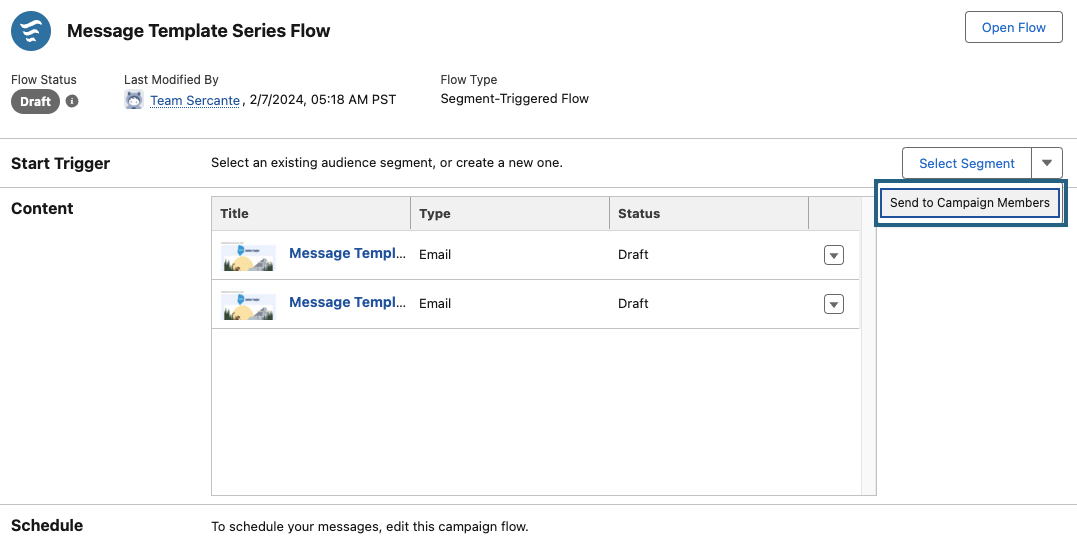
Campaigns continue to be a central part of any Marketing initiative. With the Summer ‘24 release, Growth Edition is getting a few new functionalities that will make working with Campaigns even more seamless. Users can now add templated flows to campaigns, easily preview and test campaign content, and quickly send communications to Campaign members.
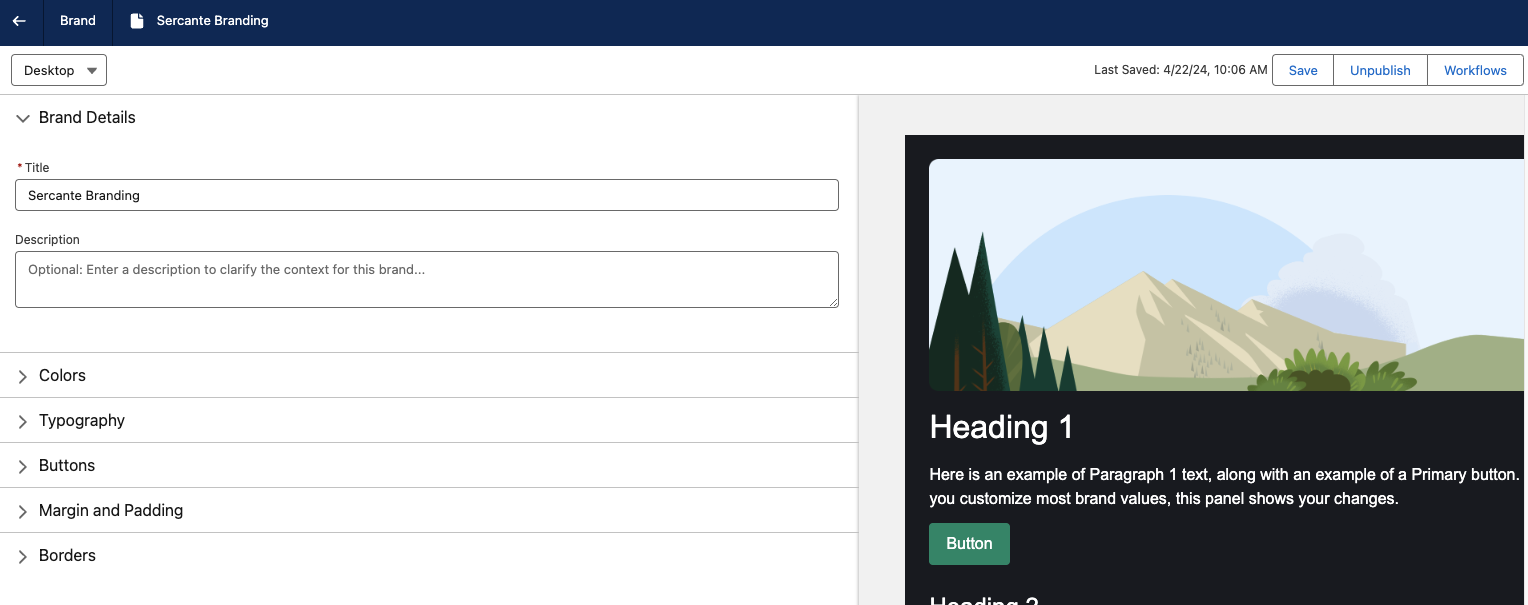
One of my favorite features of Growth Edition, Brand Guidelines, is moving from Beta to Generally Available. With this move, Marketers can now specify new aspects of their branding, such as spacing, borders, and text formatting. Marketers can also view how their branding will look within assets while configuring their guidelines. Separate Brand Guidelines can also be created for Desktop and Mobile versions of Landing Pages to ensure a great viewing experience no matter the device.
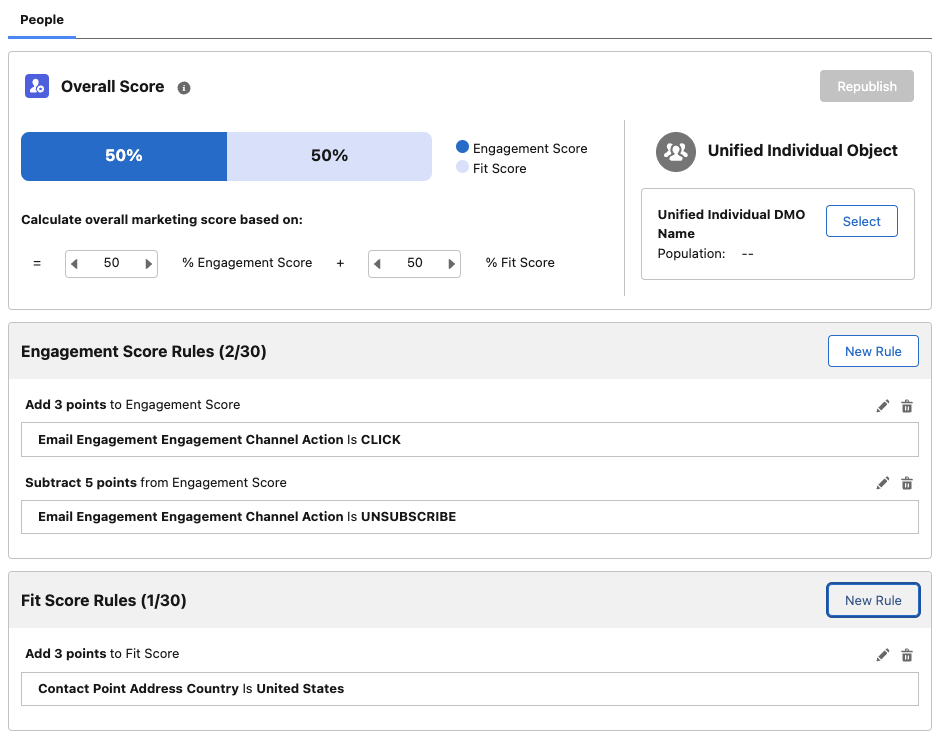
Engagement Scoring in Growth Edition can now be customized to fit your company’s needs. The updated scoring functionality allows you to add your own Engagement Score Rules (up to 30) and add or subtract points when a record meets a rule. Fit Scoring is also being introduced as part of this update. Fit Scoring is similar to Account Engagement Grading, whereas its goal is to tell Marketing and Sales how closely the individual and their company matches the ideal client persona. Fit Scoring rules can be added for the individual and/or their Account.
Again, this is just some of Marketing Cloud Growth Edition’s Summer ‘24 features. If you’re interested in using Growth Edition, I highly recommend reading through the full notes to see the long list of features coming your way!
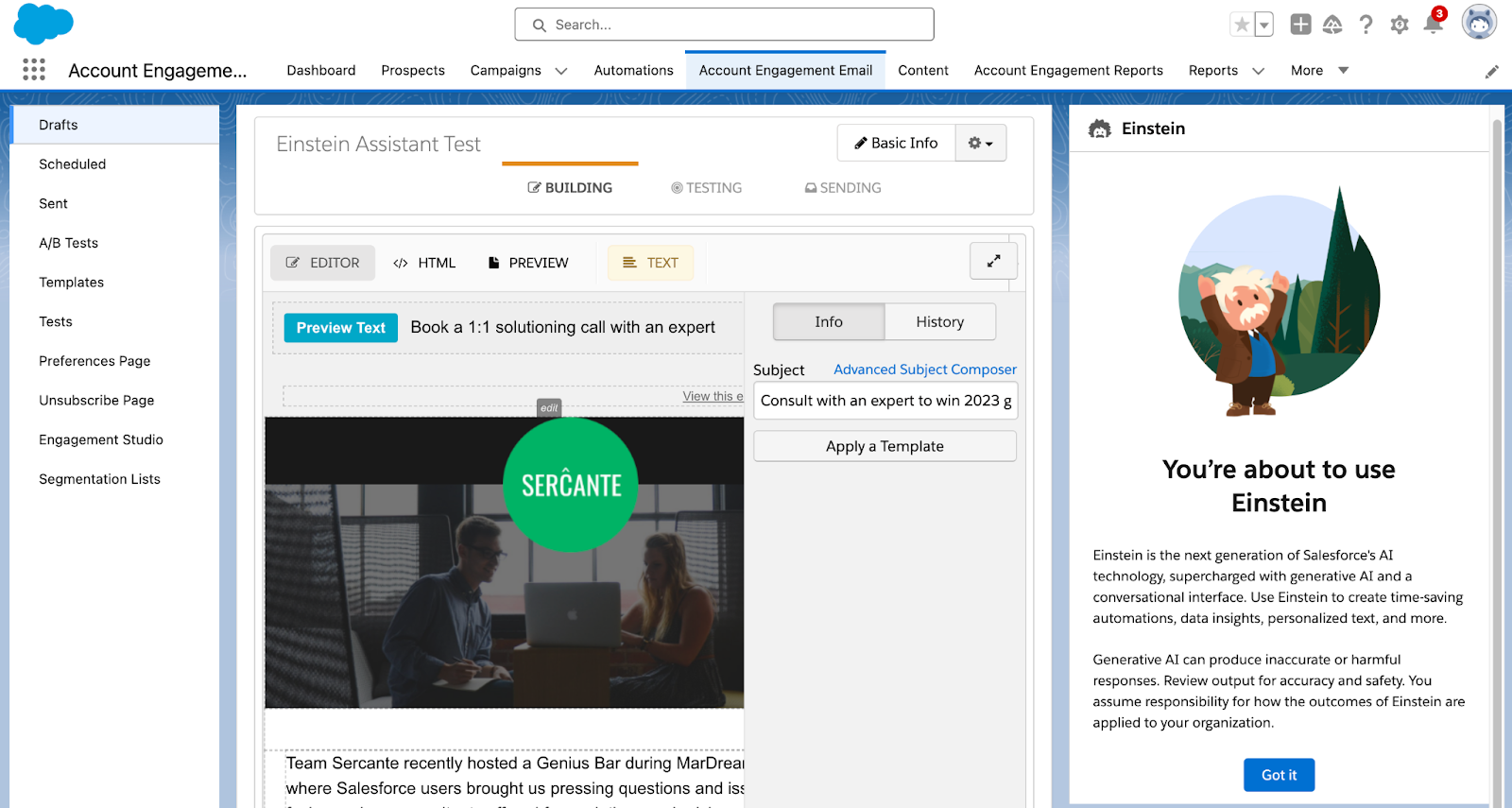
Einstein Assistant is the latest AI functionality for Account Engagement. With the Spring ‘24 release, Account Engagement Advanced and Premium editions can utilize generative AI when creating marketing assets. Let’s deep dive into the features of Einstein Assistant and how to enable it for your Account Engagement Business Units!
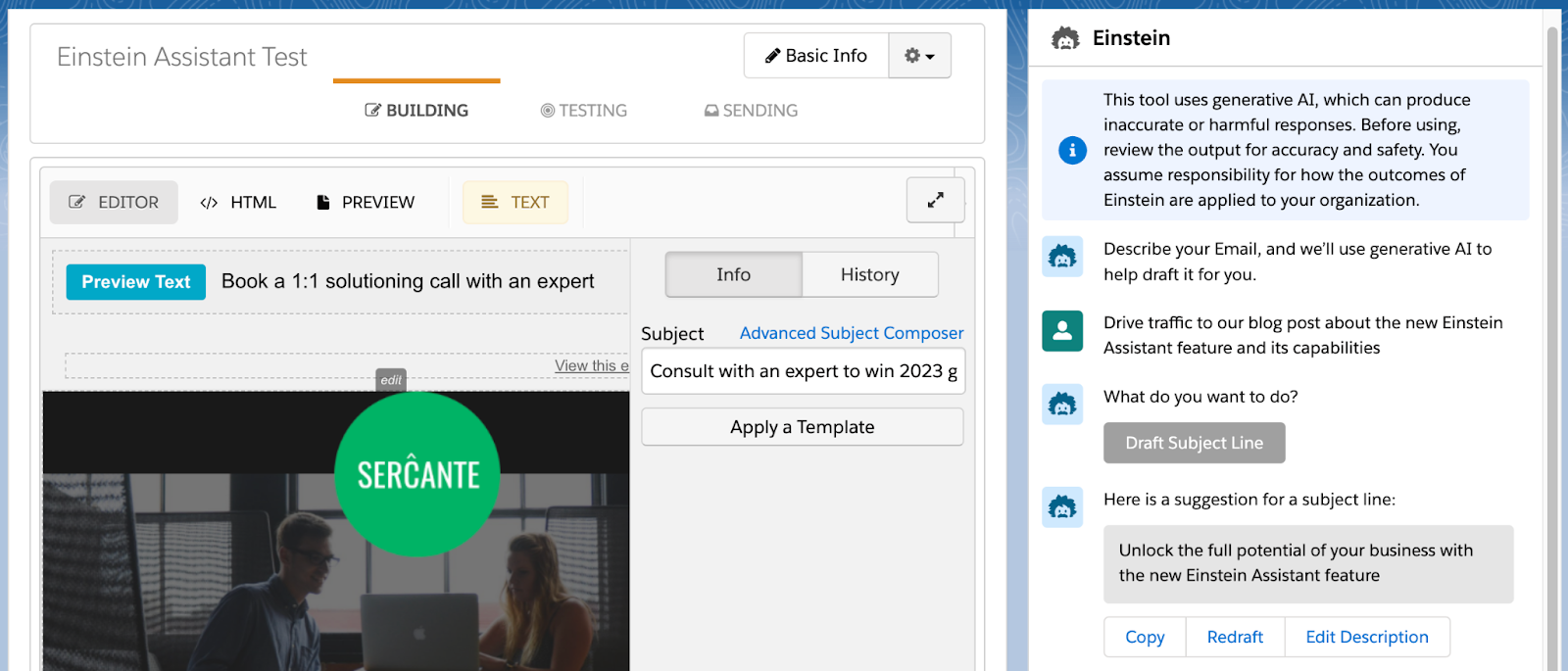
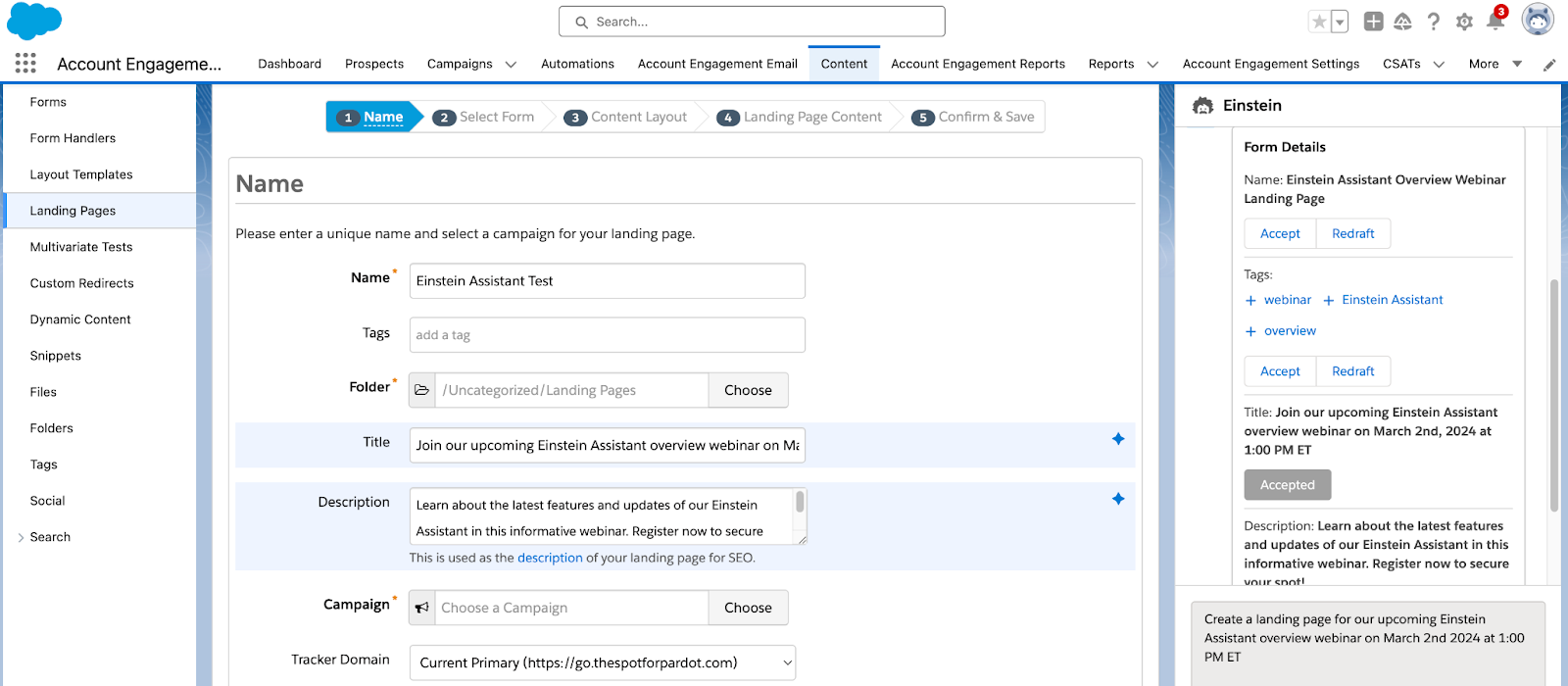
Einstein Assistant helps you create landing pages, forms, and list emails. When creating a new asset, or editing an existing one, the Einstein Assistant window appears so you can describe what you are creating.
Einstein Assistant will then recommend content that you can copy or revise for each of your assets.
Using Einstein Assistant with List Emails
Einstein Assistant gives you the option to draft an email Headline, Paragraph, and/or Subject Line. Once drafted, you can copy or redraft the content, or edit the prompt provided to Einstein Assistant.
Using Einstein Assistant with Landing Pages
When building Landing Pages, Einstein Assistant can generate the Landing Page’s name, tags, title, and description. Here you have the option to accept, and the copy will automatically be entered into the associated Landing Page field, or redraft the content.
Once you navigate to the Landing Page Content tab, you can then generate a Landing Page Headline and/or paragraph for your page.
Using Einstein Assistant with Forms
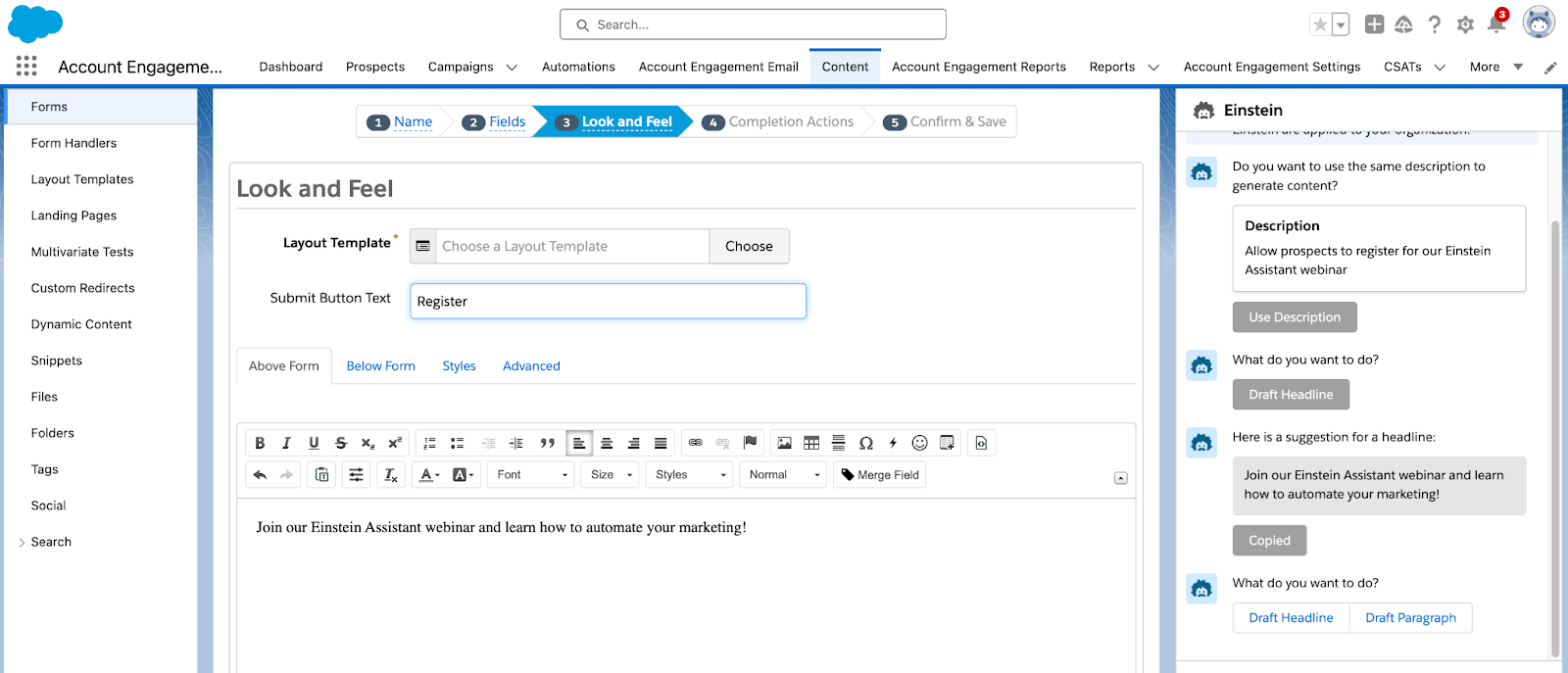
When building Forms, Einstein Assistant will first allow you to generate a name and tags for your new form. You can accept Einstein’s suggestions and the content will auto-fill into the name and tag fields, or select redraft. On the Look and Feel tab, Einstein can generate a Headline or Paragraph to be used above or below the form.
Finally, on the Completion Actions tab, you can again use Einstein Assistant to generate a headline or paragraph for your Thank You Content.
Ready to get started?
Here is how to enable Einstein Assistant
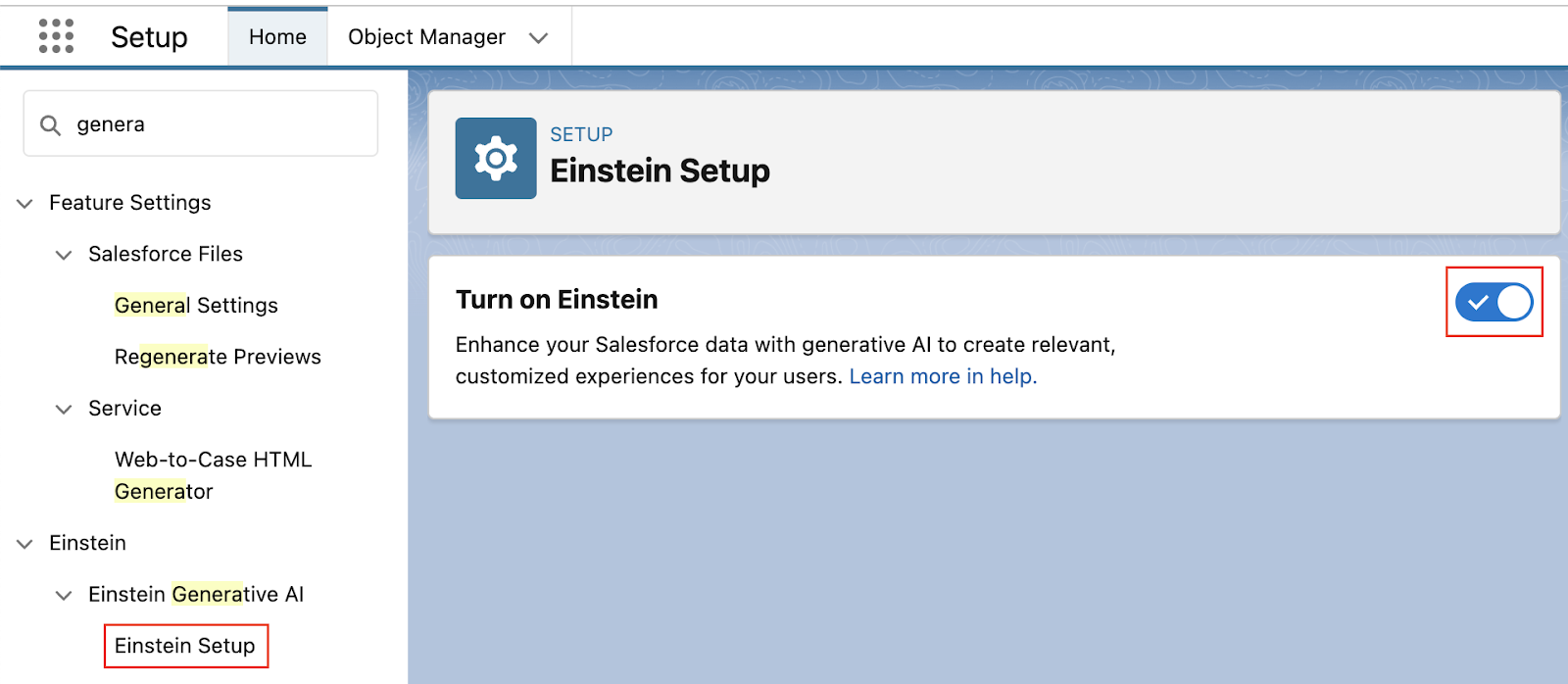
In Salesforce, navigate to Setup > Einstein Generative AI
Select Einstein Setup then Enable
Still in Setup, navigate to Einstein Account Engagement > Einstein Assistant
Select any Account Engagement Business Units that will be using Einstein Assistant
Note: even if you only have one Business Unit, you still need to do this step!
Select Connect
If you’re interested in what else Einstein can do for Account Engagement, check out our previous blog posts:
Salesforce is releasing new generative AI features all the time. Reach out to the team at Sercante to build strong foundations so you can tap into these features and stand apart from the pack.
Wow, where did the time go? The Salesforce Spring ‘24 Release notes are out and some cool new features are right around the corner! Here are the key Salesforce platform features marketers and Salesforce admins should know about. You can also get a closer look at the features from an Account Engagement admin’s perspective in this blog post.
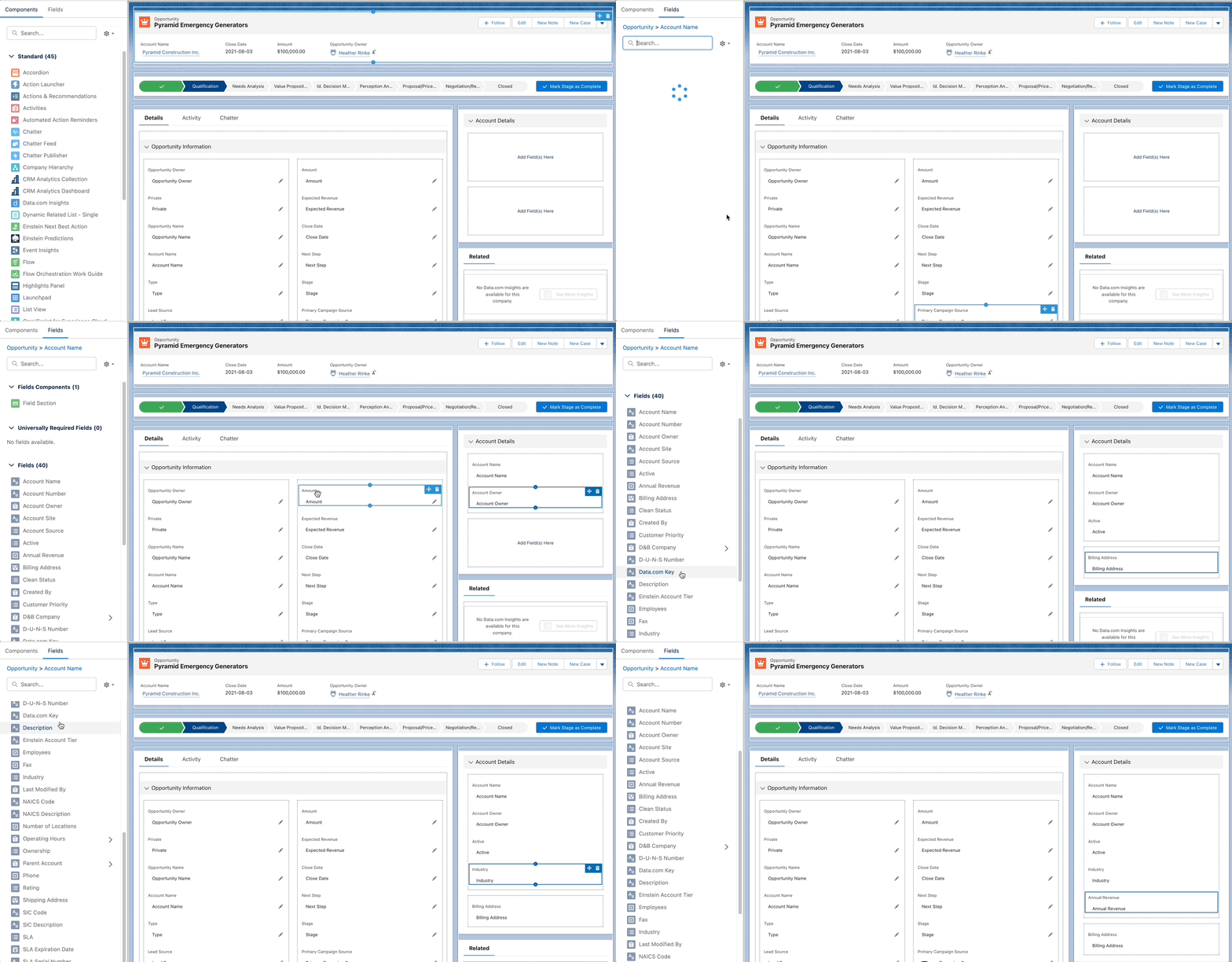
Salesforce continues to build on Dynamic form capabilities by extending the functionality to access fields from related objects. I’m very excited to see this in place, as this is a common ask that previously would have to be delivered using less-than-simple methods. This Idea has been around since 2006 and has logged more than 35,000 points!
Customization Updates for mobile:
This release also includes features that will bring more design flexibility by device, and making the user experience more relevant based on how they are working:
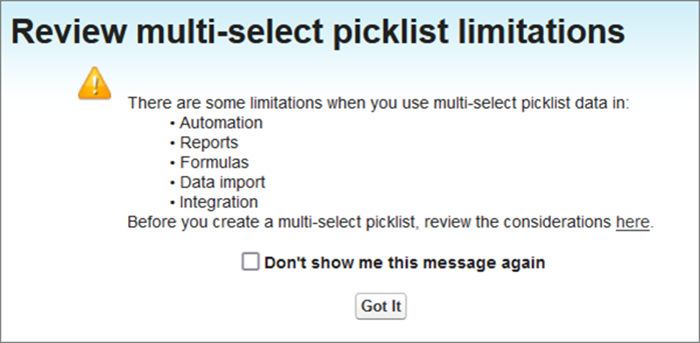
You can say Multi-Select picklists are sort of like raisins much like tags in Account Engagement. For some they are useful for their use case, and for others, they are a no-go because of their limitations (if you’ve tried to use them in reporting or automation you know what I mean 😉)
Now, when you create a new field and select the Mutli-Select picklist data type, you will be presented with this pop-up highlighting the limitations to make sure this is the right approach before creating.
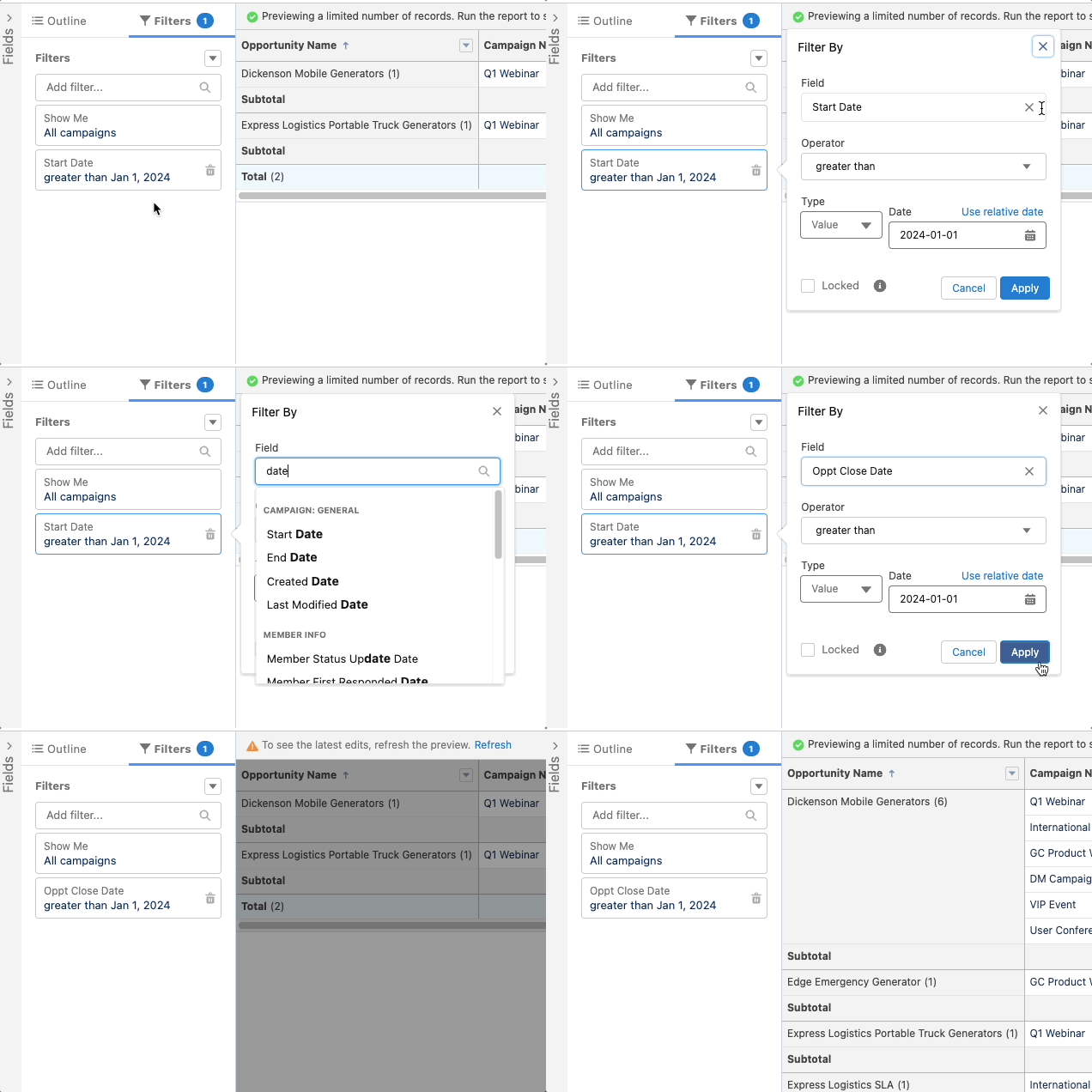
This little update will probably save admins a lot of headaches. No more having to completely remove a filter to update it. Now you can update the field being used in the filter. If you realize after building a report that you used the wrong date filter, all you have to do is swap the data field. The criteria remain intact.
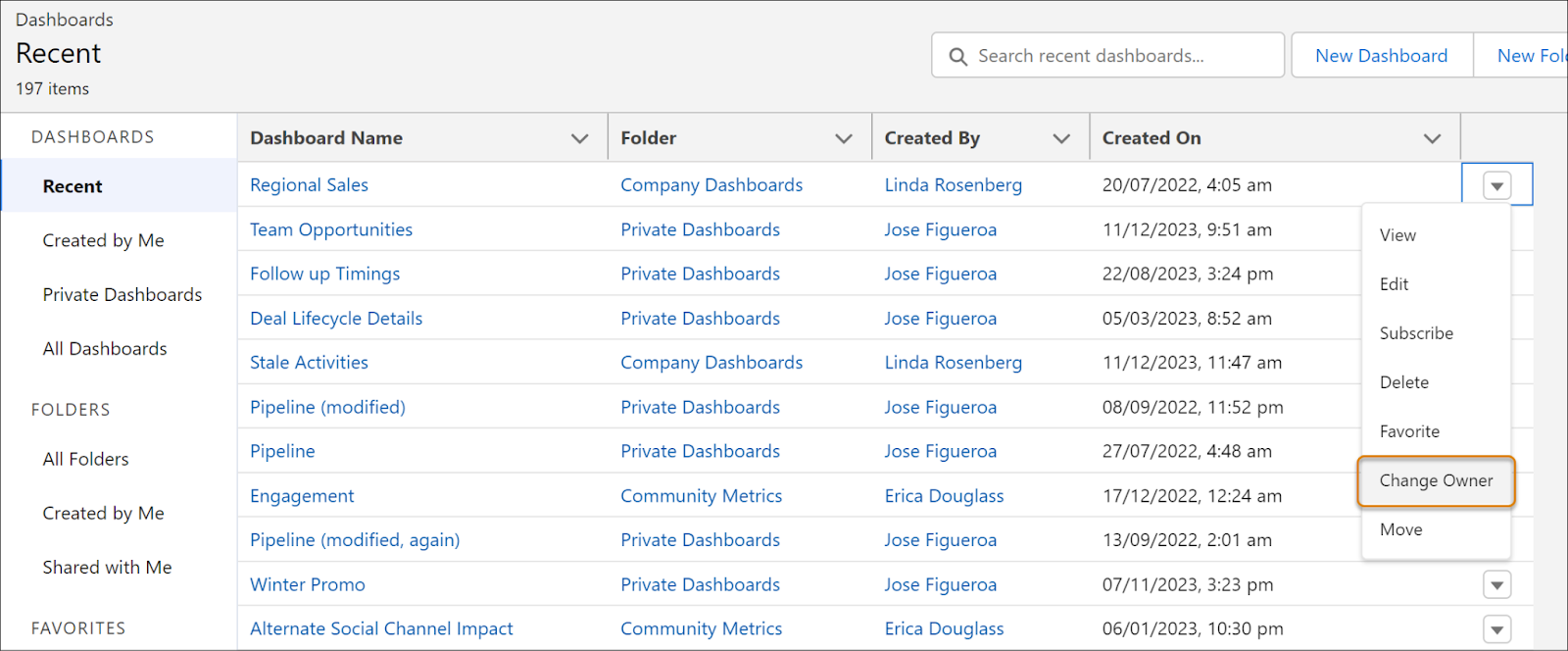
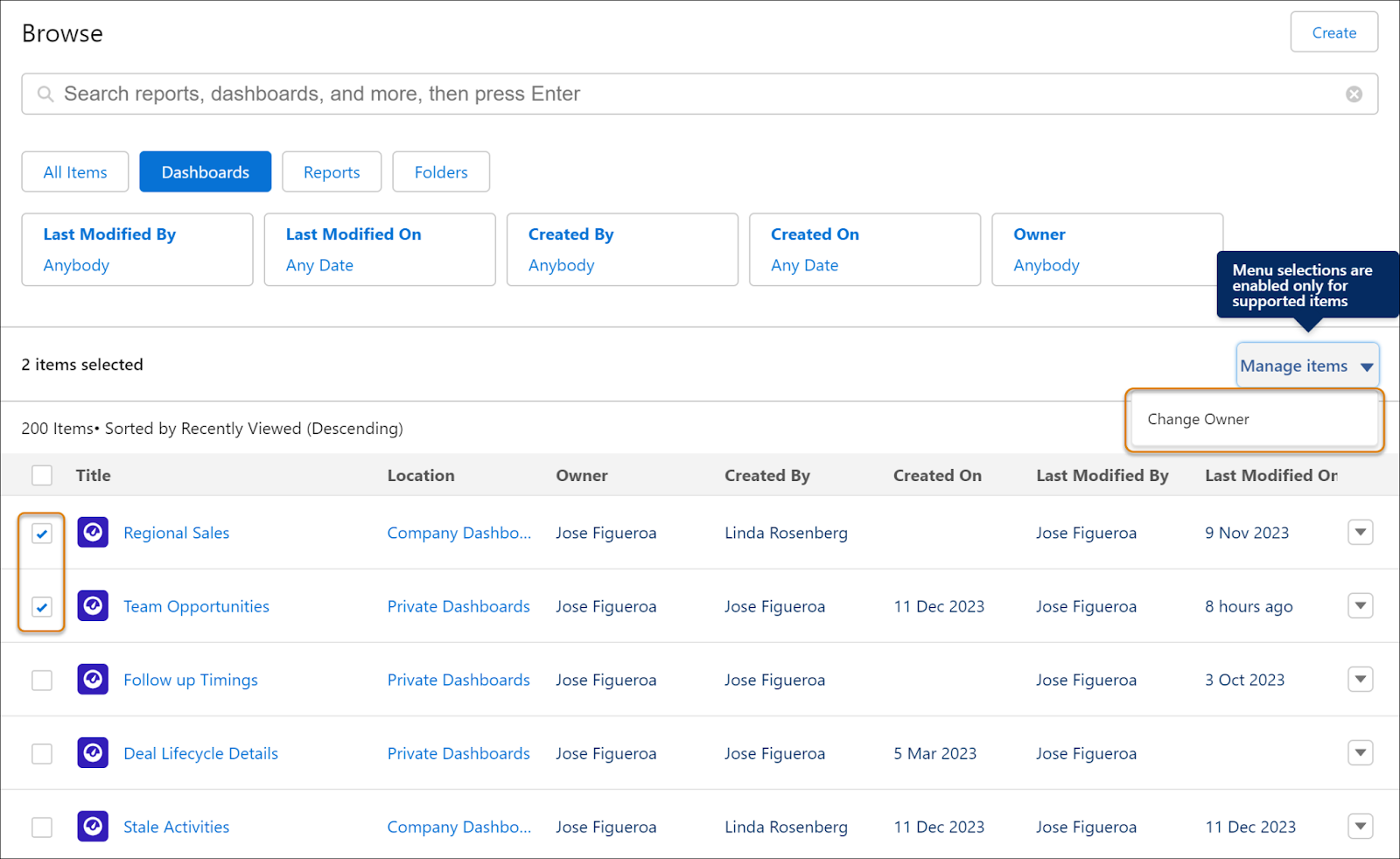
When someone leaves your organization, it’s now easier to transfer ownership of the dashboard to another user. In the past this had to be achieved by cloning or recreating the dashboard.
In the Lightning Dashboard view, you can transfer ownership one dashboard at a time
If you’re using the new Analytics tab, you can select multiple dashboards and change the owner for all selected at once.
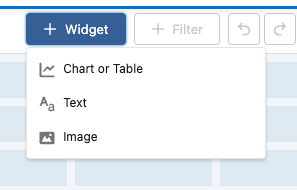
Now you can add images or rich text widgets to make your dashboards more engaging with logos, contextual images, titles and descriptions. This feature previously available only in Unlimited and Premium editions is now available for all editions!
When creating dashboards you now can use up to five filters to give users even more ways to slice and dice the way they want and get the key information they need.
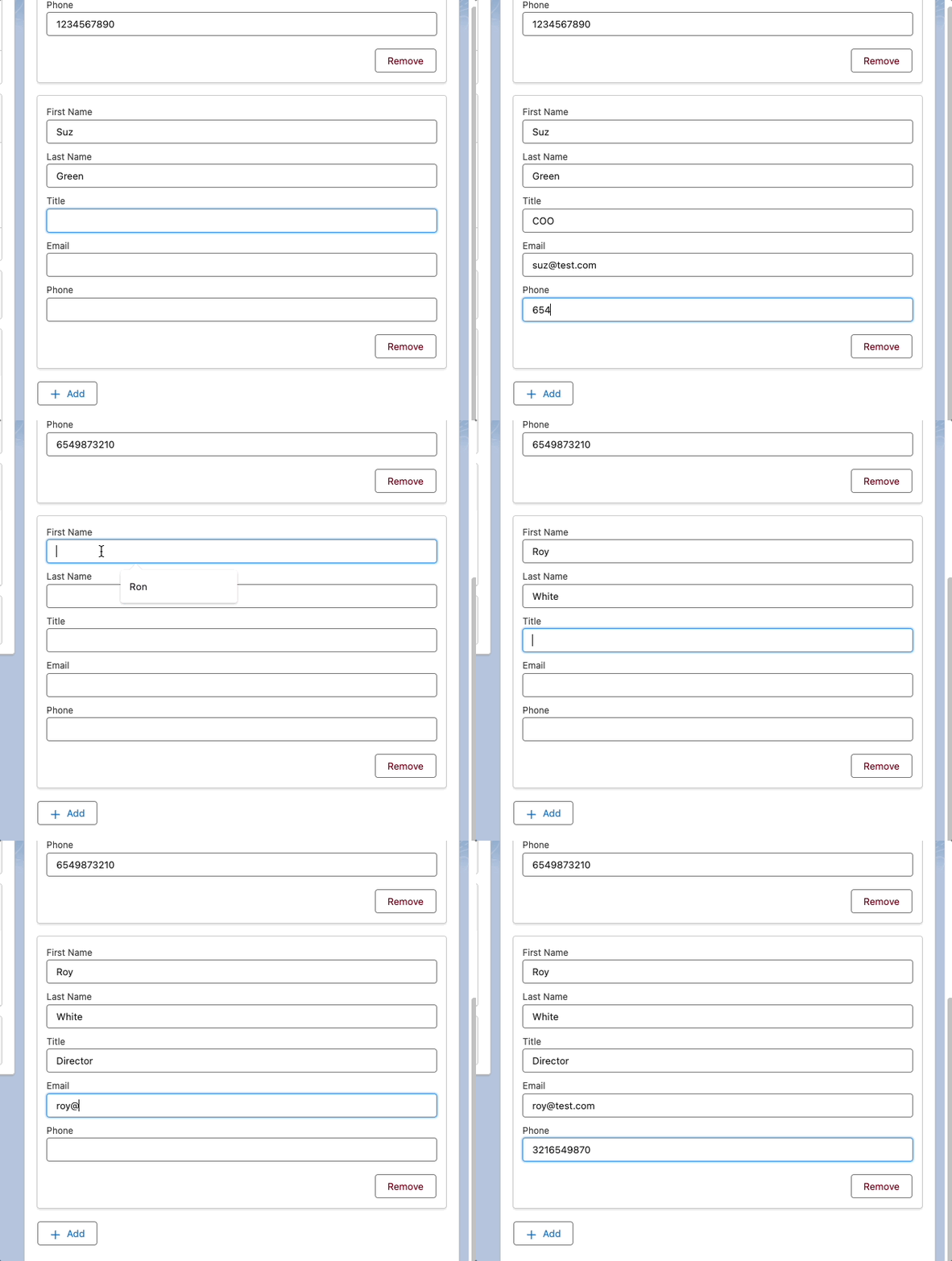
I was very excited to see this feature, which lets users create multiple records in a single screen element. This will be ideal in situations like adding project members to a project team, or even providing a quick custom Create Contact flow. Users just populate the info for one record, then hit Add Item and new form appears allowing them to create the next one!
Supported fields include: Text, Number, Checkbox, Date, DateTime, Currency,Choices (except Choice Lookup), Display Text, Long Text Area
More Awesome Reactivity in Screen Flows
Screen flows have been getting a lot of reactivity love over the last few releases, and Spring ‘24 is no exception. Here’s a summary of features from this release:
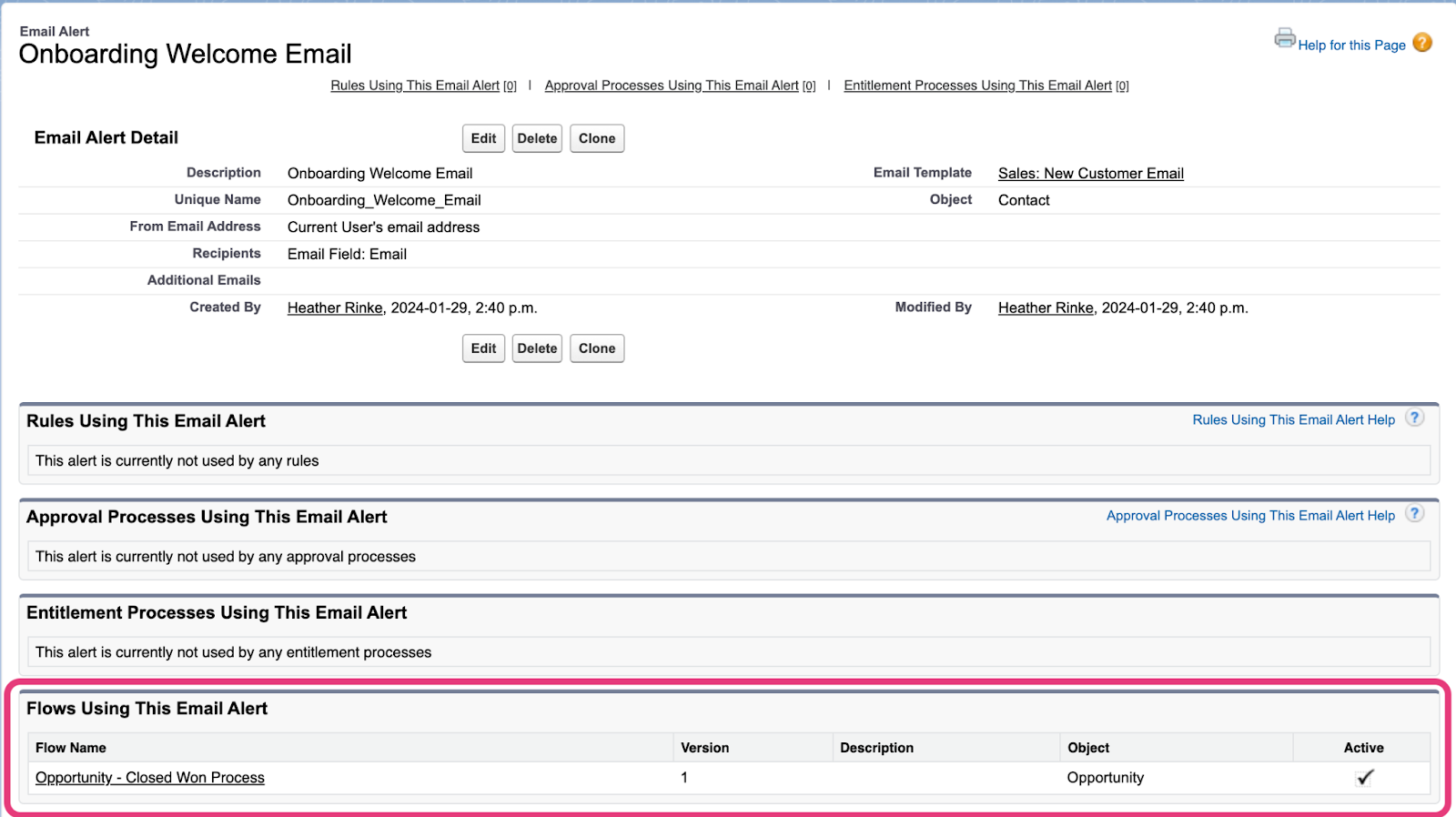
On the Email Alerts page, you can now see what flows are using that alert, and whether the flow is active. This can be great if you’re looking to update your emails and want to understand what processes will be impacted by the change.
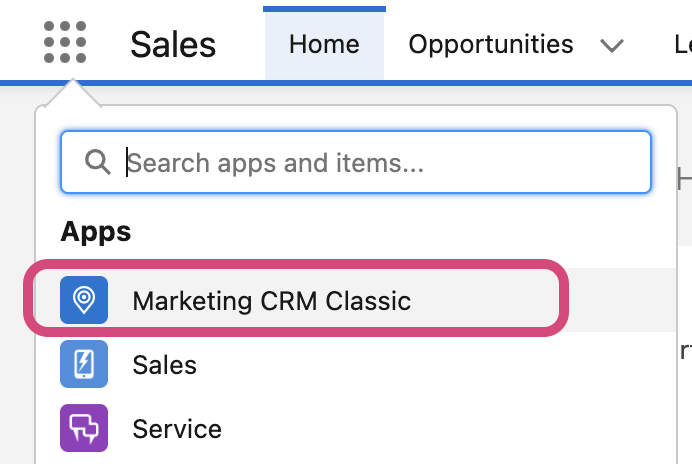
If you typically use the out-of-the-box Marketing App to access your Campaigns, Leads or Contacts, you’ll notice that the all has been renamed to ‘Marketing CRM Classic’. There doesn’t seem to be any change to the features available beyond the name change, though.
Get Help Understanding Salesforce Spring ’24 Release Enhancements
Contact the team at Sercante to get help implementing these enhancements in your Salesforce org. And leave us a comment below to let us know what you think about the Spring ’24 Release.
More AI functionality is coming to Account Engagement! With the Spring ‘24 release, Account Engagement Advanced and Premium editions can now utilize generative AI to create Landing Pages, Forms, and List Emails. When creating or editing assets, Einstein Assistant will prompt you to describe what you’re building to auto-generate copy or details for each asset type.
Landing Pages: Einstein Assistant will suggest a name, tags, title, and description.
Forms: Einstein Assistant will suggest a name, tags, “look and feel” tab description, headlines, and paragraphs.
List Emails: Einstein Assistant will suggest subject line, header, and body copy content.
The Lightning Email Builder is getting an update! Details are sparse on what additional features this new builder will bring to the table, but I am excited to see the Lightning Builders continue to grow. What we know for now is that users will be able to choose between the new builder and the existing builder when creating or editing Email Content. This feature won’t be out until after the Spring ‘24 release, so keep an eye out for more info once the updated builder is released.
The connection between Account Engagement and Data Cloud continues to grow stronger, allowing you to better personalize your marketing efforts. With the Spring ‘24 release, you can import your email engagement data into Data Cloud and create an email engagement data stream. Ensure you’ve connected your Account Engagement Business Units to Data Cloud with the new connector that was released as part of Summer ‘23.
Gmail and Yahoo recently announced changes to their spam prevention methods that create new requirements for bulk senders. These changes have three main impacts for Account Engagement users:
Ensure your Account Engagement sending domain is verified with DKIM.
Provide a one-click unsubscribe that is processed within a two-day timeframe.
Account Engagement users are already covered with native functionality. All Account Engagement emails automatically contain a list-unsubscribe header and an email preference center and/or unsubscribe link is required on all emails. Account Engagement processes unsubscribes immediately, so no need to worry about the two-day window.
Keep Spam Rates below 0.3%
Account Engagement requires users to keep Spam Rates below 0.1%, so users are again covered with native functionality.
Last August, Twitter, or “X”, changed its API terms, which in turn broke the Account Engagement to Twitter connector. Without this connector, users will no longer be able to use Social Posting for Twitter and can no longer ingest engagement statistics for existing Twitter posts.
Version 5 of the Account Engagement API now supports creating and managing forms and returns start and stop fields for Engagement Studio Programs. Version 5 has also been updated to provide better error reporting when using the Bulk Asset Copy Flow.
Get Help Understanding Salesforce Spring ’24 Release Enhancements
Contact the team at Sercante to get help implementing these enhancements in your Salesforce org. And leave us a comment below to let us know what you think about the Spring ’24 Release.
Dreamforce 2023 has come and gone, and wow, it did not disappoint. Not only was this my first Dreamforce, I had the honor of co-presenting the Marketing Cloud Release Highlights session with two amazing members of Salesforce product team: Ruth Bolster, product marketing manager, and Whitni Freeman, lead solution engineer.
In this session, we covered key Winter ’24 release highlights across each of the Marketing Cloud products:
Data Cloud
Intelligence
Engagement
Account Engagement
Personalization
Here’s a recap of the Marketing Cloud Winter ‘24 release features covered…
Highlight #1: Segment Intelligence (Data Cloud)
Source: Salesforce
A new Data Cloud for Marketing feature, Segment Intelligence connects and harmonizes customer and marketing performance data — like revenue data, first party data, as well as paid media data — so you can understand how your segments are interacting with your marketing.
Using out of the box dashboards, you can see how segments are performing across channels, and gives you an executive understanding of how segments are performing across channels.
Plus, you can use Einstein to optimize existing segments, or create new ones based on performance data.
With all that data in one place this allows marketers to have a more holistic view of how segments are doing, without being bogged down by time consuming data management and reconciliation. And having those insights to optimize channel performance by segment – that level of visibility and adaptability means more impactful and relevant marketing campaigns, which leads to better marketing ROI.
And the built in dashboards and connections means that marketers can get started right away!
This feature will be available for select customers starting in October, and will be available to all customers later this winter.
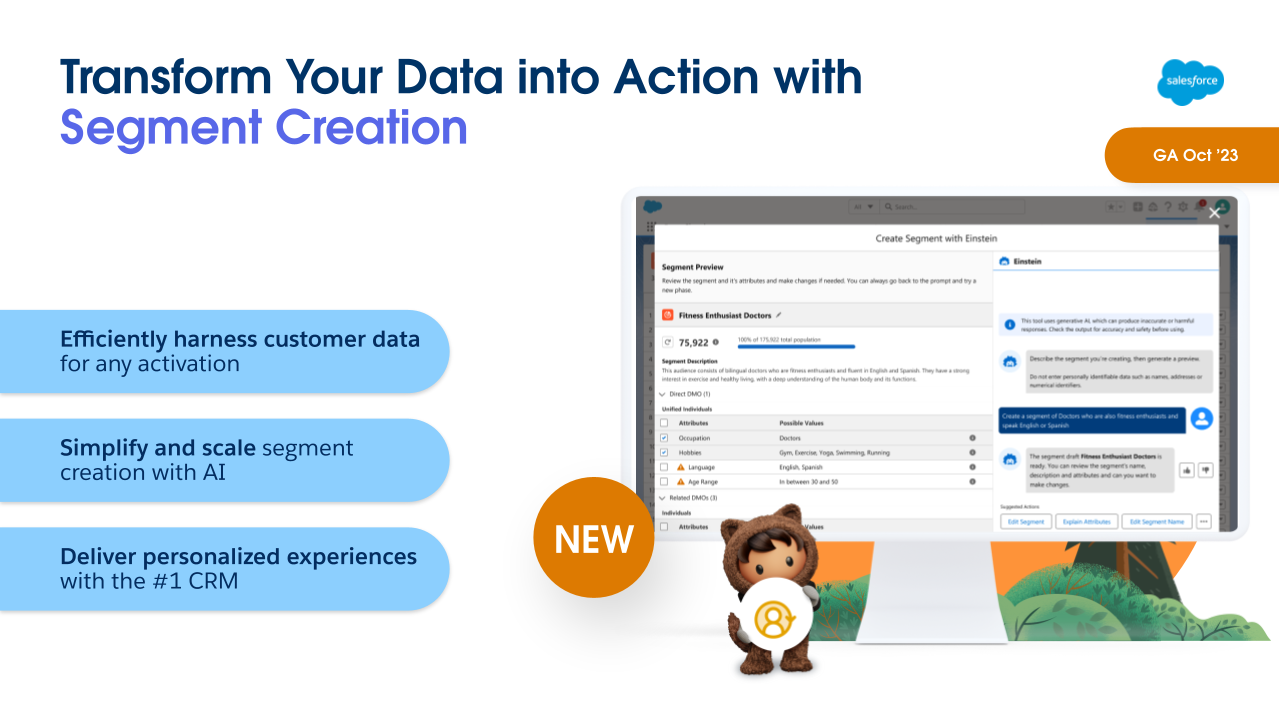
Another Winter ‘24 feature for Data Cloud for Marketing is Segment Creation. Powered by Einstein, this allows marketers to build complex segments using a descriptive prompt.
So, for example, I can just tell Einstein “Big spenders in North America who made a purchase in the last 3 months and love hiking”, and it will generate the segment for me, showing what that segment looks like, and the attributes used.
This means that marketers can build their segments without having to be a data scientist to do it. Being able to pull data based on specific criteria has often required technical knowledge of the data model to know where to look, and SQL skills to query the data to know how to access it. This feature will allow marketers to be more self-sufficient to get the data they need when they need it.
This will be Generally Available in October for Data Cloud Customers.
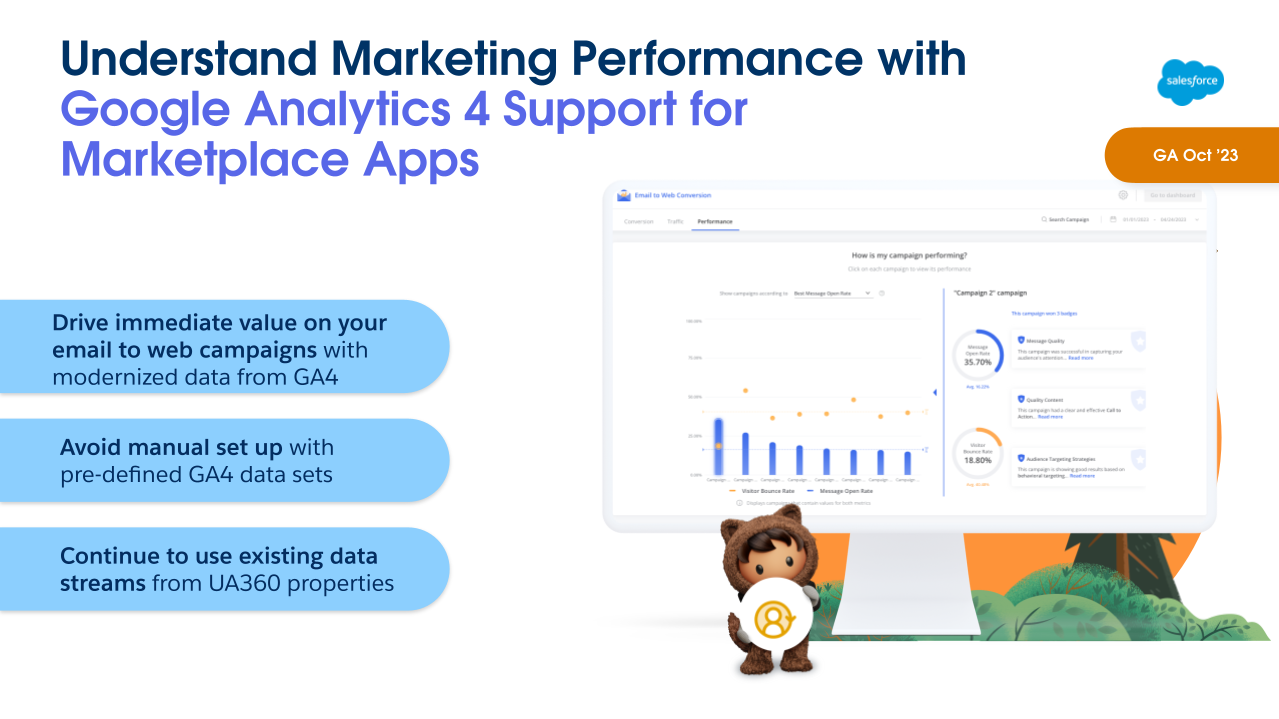
As of Winter ‘24, Marketing Cloud Intelligence will have a built-in GA4 connector and pre-defined data sets available to ingest GA4 data. Marketing data is the foundation of Marketing Cloud Intelligence. Its data models, dashboards and guidance are built for marketers. There are already more than 100 native connectors available, and now with GA4 data connector this is a natural addition to the platform to have relevant marketing data in one place.
How this will work: When setting up data streams, GA4 properties will appear under the ‘Website’ dropdown. These new properties will be supported in API connectors as well as Marketplace apps.
Marketplace apps will replace previous UA 360 websites and support the new GA4 web properties, dimensions, and other fields for data retrieval.
One thing to keep in mind: Due to the differences between GA4 and UA properties, the new connector will pull different, yet very similar, datasets into the platform when the GA4 property is selected, so your visualization may need to be tweaked when setting up the data stream for the first time. Marketplace will discontinue support of UA360 properties after the GA4 support begins.
Highlight #4: Trigger Action on GA4 Data (Engagement)
Source: Salesforce
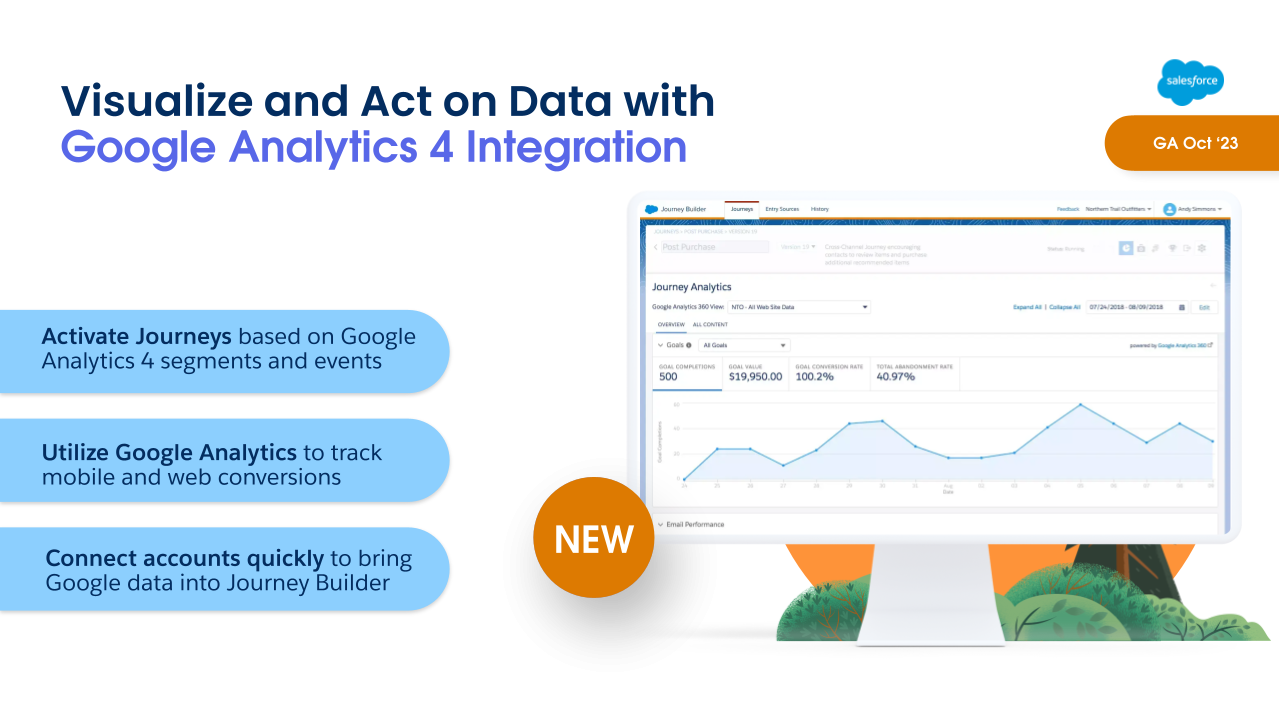
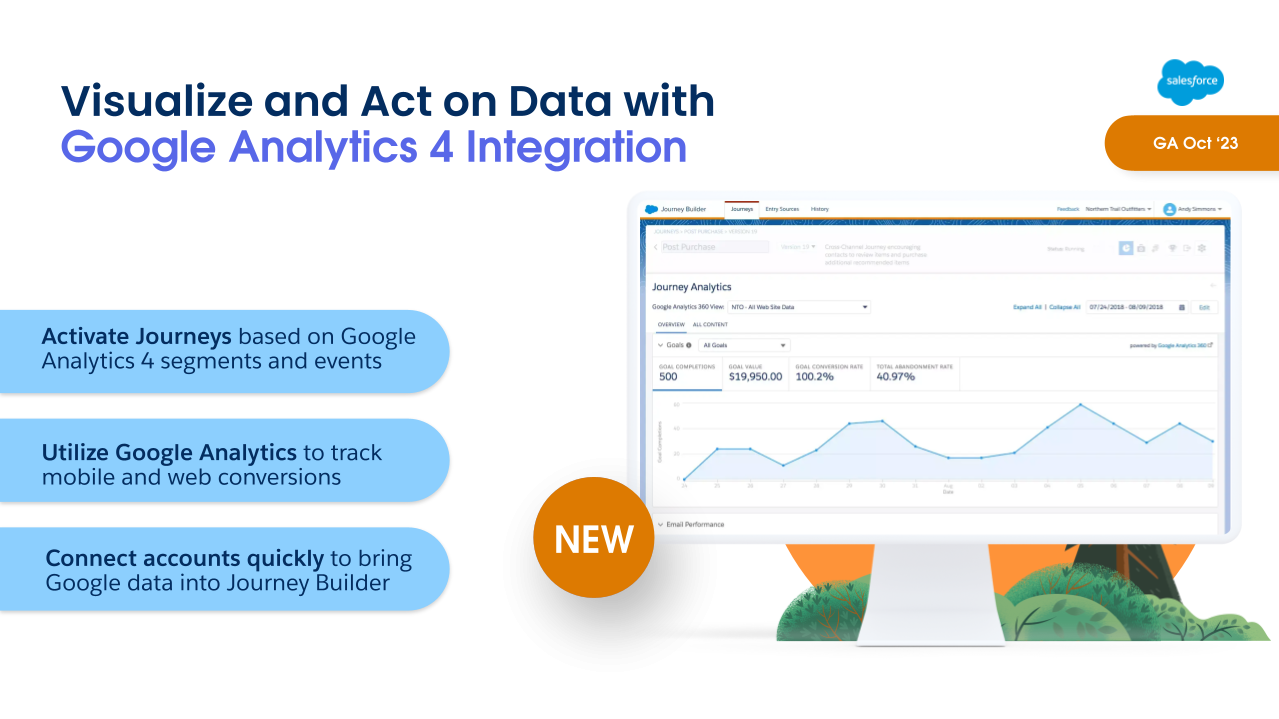
Marketing Cloud Engagement has some goodies in the Winter ‘24 Release as well. The first is Google Analytics 4 Integration, which lets marketers activate journeys based on Google Analytics 4 segments and events.
This new integration will include two key features in one:
Visual dashboards embedded within Engagement reporting so that marketers can see real time impact on revenue, AOV, and conversion metrics.
Audience activation, which allows marketers to create engagement and re-engagement campaigns based on customer interactions using that GA4 data.
So for example, if you had a customer that viewed your product pages for backpacks and hiking boots, then abandon the session, you can use audience activation to trigger an abandoned browse journey. This also allows you to get cross-channel insights across mobile, web, and email.
There is a fully paid version which includes both Reporting and Audience Activation. There is also a free version that will feature the Reporting feature only.
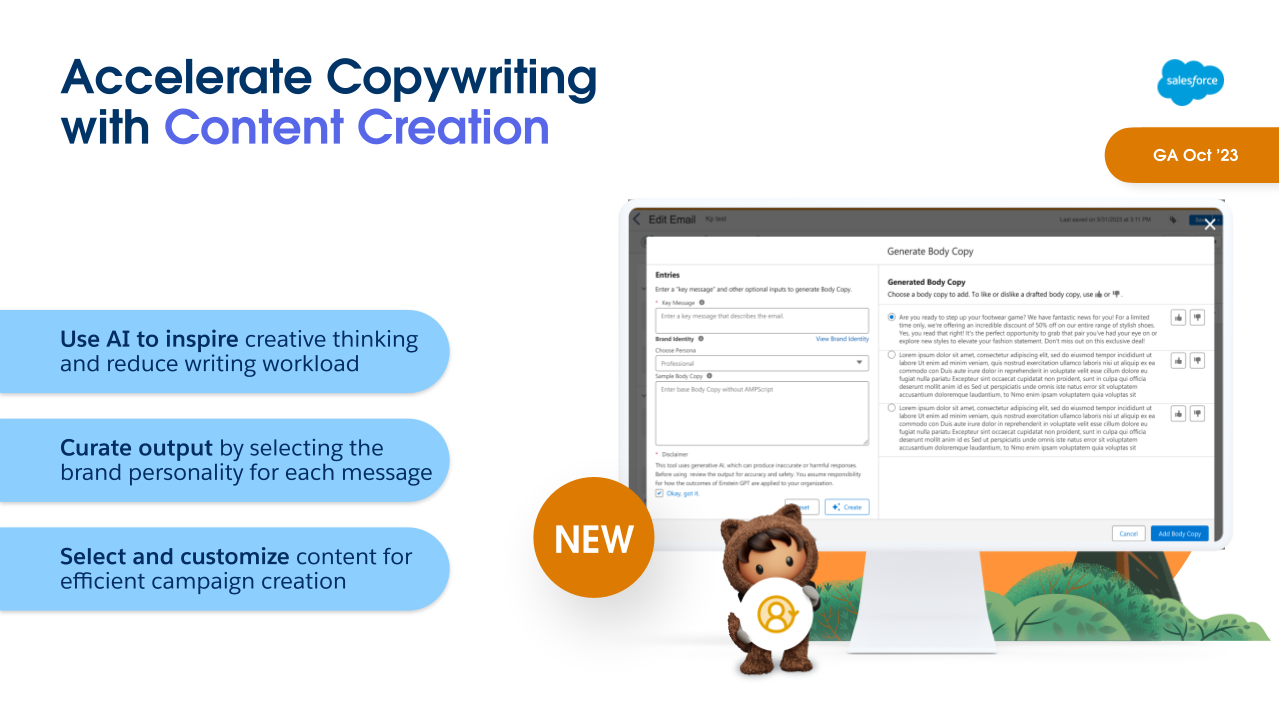
AI is coming to Marketing Cloud Engagement with Email Content Creation, including Typeface partnership!
Marketers can set up and specify personalities with brand voice and tone, and using natural language prompts can get draft ideas on subject, body copy and images. With the ability to give feedback on what works and what doesn’t this lets the model learn and improve over time.
Marketers can consider this a tool to help them get a first draft in place. They still have control over the content throughout. They’re given choices based on their prompts, which they can use, like or dislike.
That human element and judgment is a crucial part of the whole process.
Content Creation will be available in Marketing Cloud Engagement this October, and it is currently scheduled to be in Marketing Cloud Account Engagement next February
Highlight #6: Transfer Assets from Sandbox to Production (Account Engagement)
Source: Salesforce
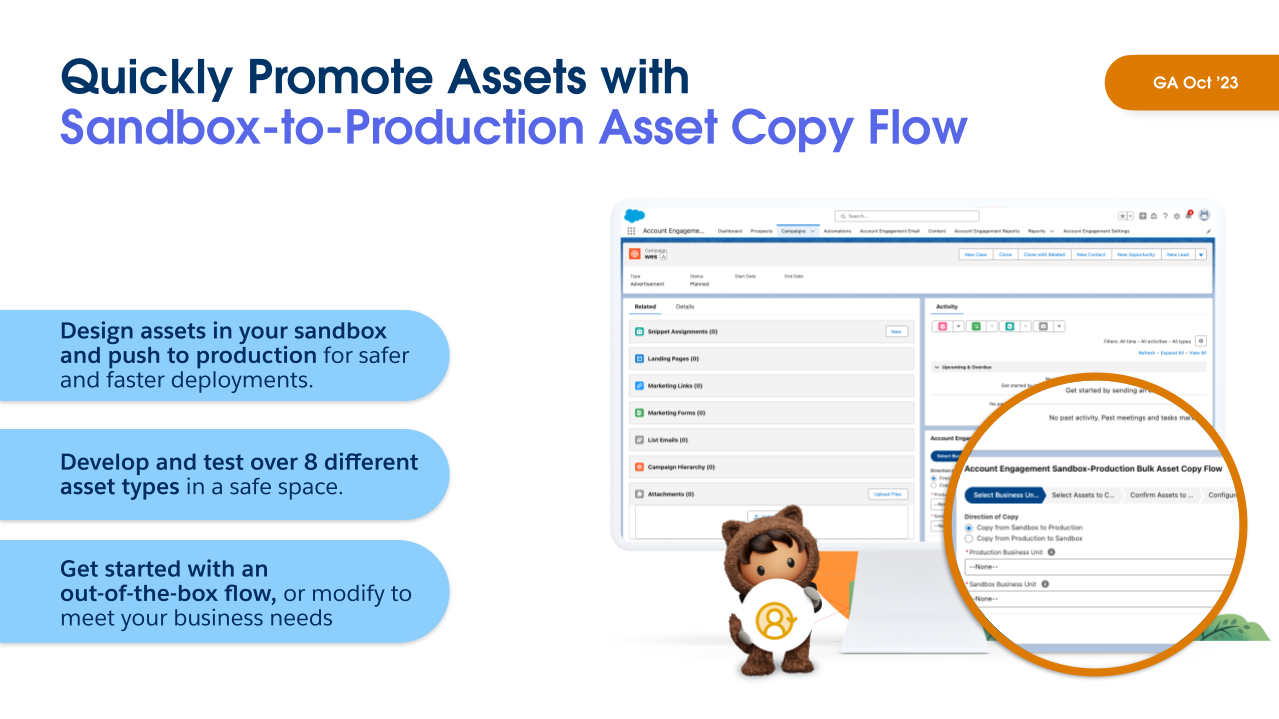
Speaking of Account Engagement… With the Summer ‘23 Release we saw the ability to move assets between business units, which is fantastic! But that still left a gap with sandboxes. Anyone that has used Salesforce sandboxes has been used to building and promoting configurations, and unfortunately that hasn’t been possible with Account Engagement sandboxes, which has been painful to work around. Any assets built in a sandbox had to be built again in production, which is of course time-consuming and also prone to error if something is missed.
In the Winter ’24 release, marketers can now copy assets from sandbox to production using Salesforce Flow. After installing the flow on your campaign, all you need to do is select your sandbox environment and your production environment, select your assets, and then copy it over. And this supports 8 asset types, including email templates, dynamic content, form handlers, custom redirects, custom fields, landing pages, and more.
This allows for a more useful Account Engagement sandbox, to perform all asset testing and avoid conflicts – and all that test data – when trying to build in production. Not to mention saving time because you won’t have to build assets multiple times. You can even use this to set up a QA process, giving a subset of users access to build in the Sandbox only and then have another subset of users review the assets and push them to production when approved.
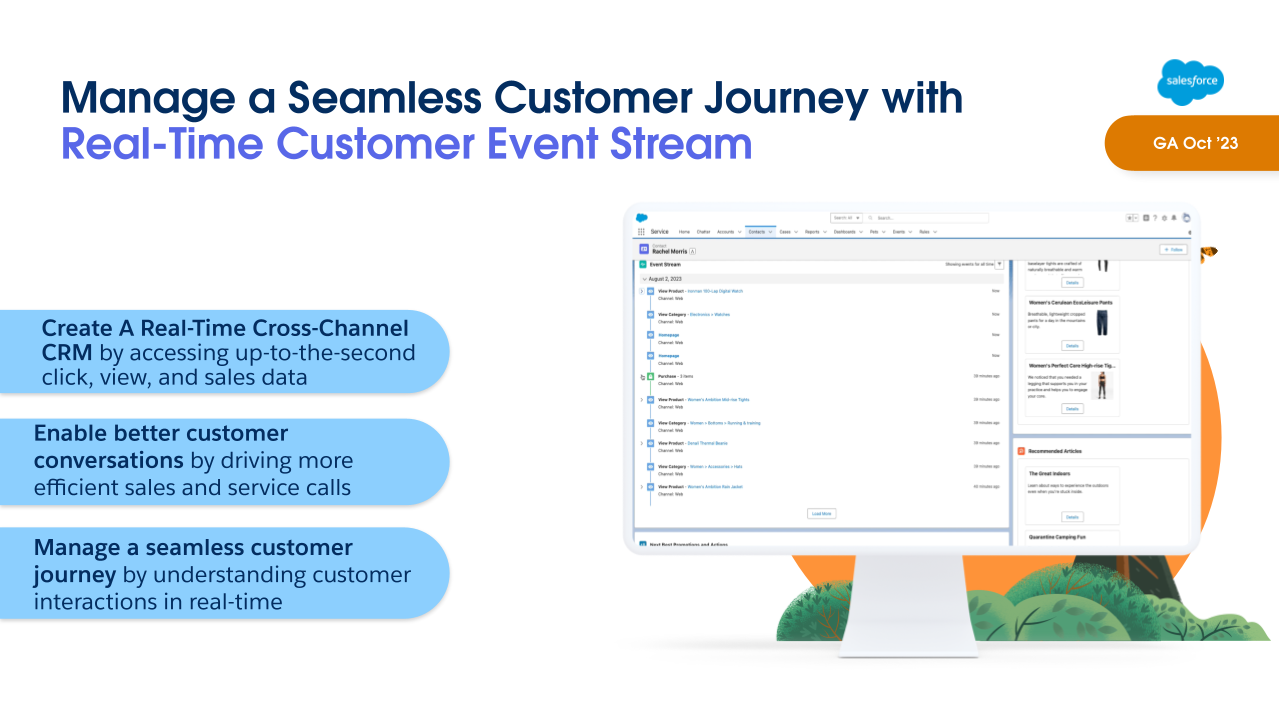
With Winter ‘24 Release, Personalization will now include Real Time Customer Event Stream, a Lightning component that can be added to record pages, giving users a real-time view of the marketing assets that a lead or contact has interacted with.
This gives sales and service teams better insight into the types of content their customers have been engaging with. They can then have more relevant and informed conversations with them about their current needs and interests, and provide a better overall customer experience.
Learn more about the Marketing Cloud release highlights
If you want to learn more about the Marketing Cloud release features covered, here are a few resources: