Category

Strategy

If you’re getting ready for a Salesforce Data Cloud implementation, then this post will get you ready for it.

There are so many buzzwords with this particular Salesforce product that it often makes it hard to understand what Data Cloud is and what it can do for your business. If that sounds familiar, this article should help you understand the product’s core capabilities and key considerations. 

Having been lucky enough to work on a Data Cloud implementation, I’ll be drawing on both my theoretical knowledge from countless Trailheads and accreditation courses as well as my practical understanding from the challenges I faced when implementing this intricate cloud. 

What is Salesforce Data Cloud?

First things first, Data Cloud, like a lot of Salesforce marketing products, has been through a lot of rebranding and was formerly known as CDP. However, it is not to be confused with Salesforce 360, which will leverage the power of Data Cloud across the whole Salesforce Ecosystem.

So what actually is Data Cloud? 

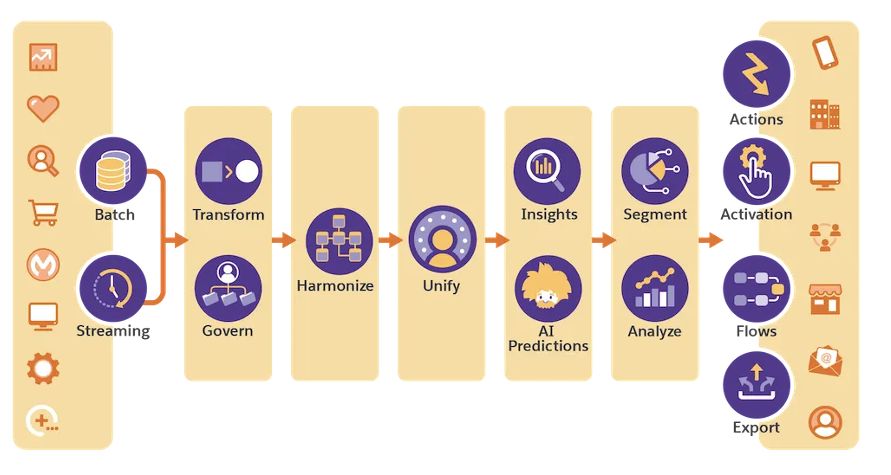
Simply put, it is Salesforce’s long-term customer data platform (CDP) solution. The platform allows users to create a unified view of their customers by integrating data from multiple sources, both internal and external. This data can include demographic and behavioral information, purchase and order history, digital and non-digital interactions, and much more. By combining these diverse datasets, users can gain a deeper understanding of their customer’s preferences, behaviors and most importantly, needs. 
Source: Salesforce

What are Data Cloud’s Capabilities?

If you’re looking at implementing Data Cloud and wondering whether or not it is right for you, let me talk you through its capabilities in a little more detail: 

Data Unification

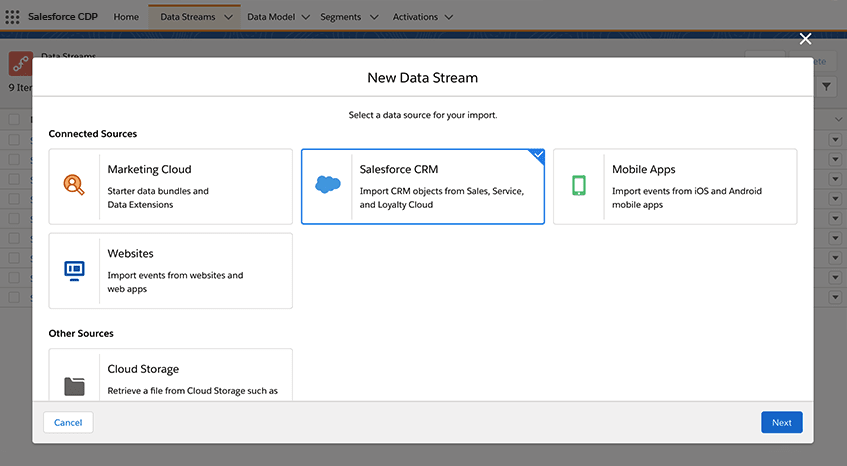
First and foremost, Data Cloud’s primary function is to unify data from multiple sources into a single, consolidated view of the customer. Data can come directly from Salesforce Core, Salesforce Marketing Cloud or it can come from an external system such as an in-house data warehouse. However, as I’ll go on to explain later on, Data Cloud works best when your data is in a healthy position. 
Data Enrichment

With a plethora of connection options ranging from out-of-the-box (OOTB) connectors to FTPs to APIs and more, Data Cloud offers its customers the ability to enrich customer profiles by appending additional information to existing datasets. In other words, imagine using both lifetime value (LTV) metrics and social engagement metrics to truly understand who your most loyal customers are. 
Segmentation

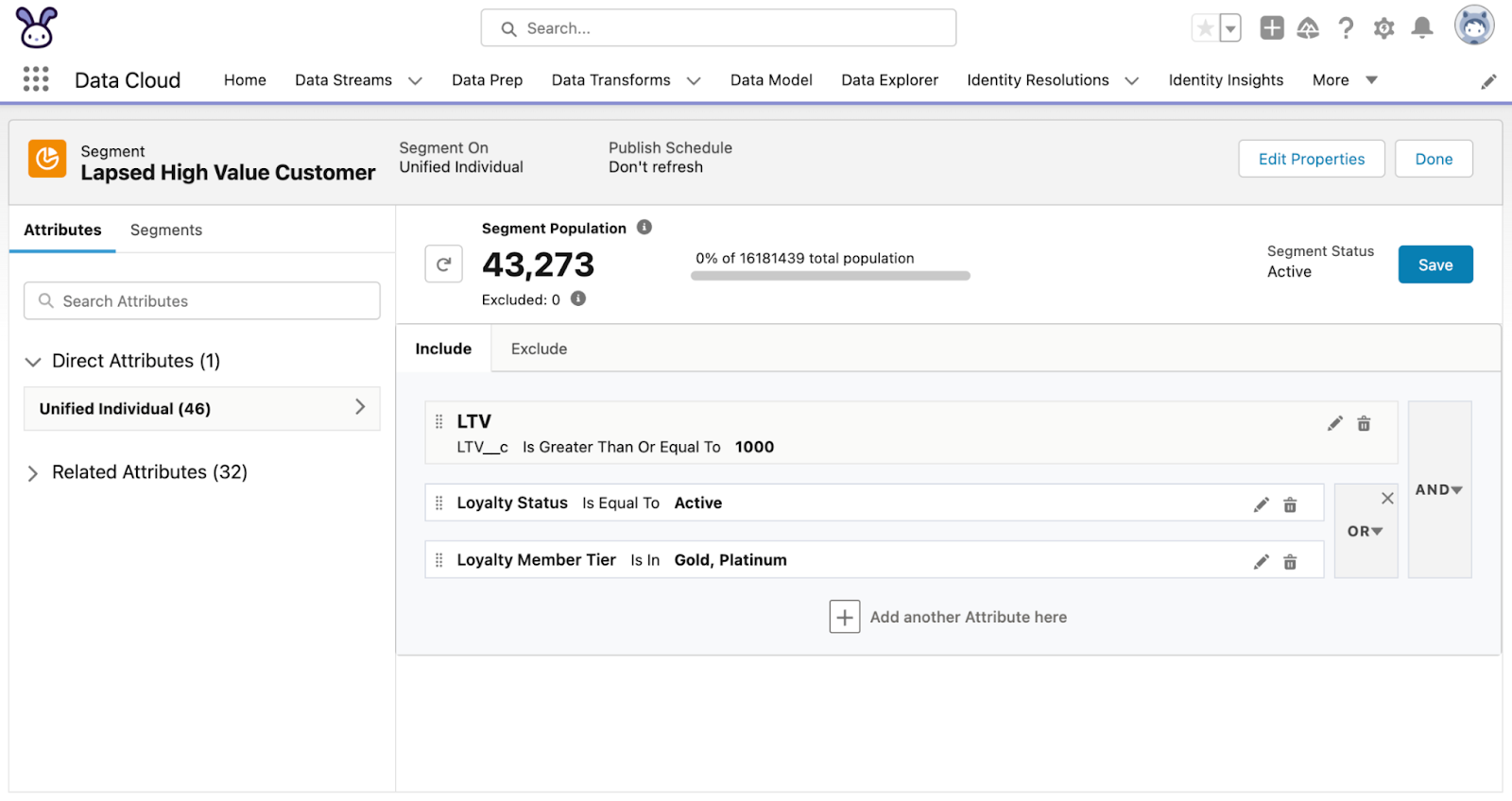
There is no point in having all this data if you’re unable to use it. Data Cloud offers users the ability to create Segments using all of the data ingested by Data Cloud. Segments and Calculated Insights — multi-dimensional metrics (i.e. calculate LTV by summing all completed orders) — can then be pushed into external systems such as Marketing Cloud for future use. 

Better yet, Segments and Calculated Insights can be created without needing knowledge of SQL, although there are limitations as I’ll go on to explain. 
Real-time Data Updates

If you’re in need of up-to-the-minute data and insights, Data Cloud might just be for you. Its streaming insights and real-time Data Streams allow users to work on the most up-to-date data instead of outdated insights and decisions. 

This list is by no means an extensive list of Data Cloud’s capabilities but a list of what I believe are Data Cloud’s most useful tools. For a full list of capabilities, it’s worth checking out the product in more detail.

What are key considerations during Data Cloud implementation?

So at this point, Data Cloud sounds pretty fantastic. And don’t get me wrong, it is! 

However, like any software out there, there are key considerations to take during Data Cloud implementation. Here they are.

Data Quality

Data Cloud is only as good as the data it is supplied. I was, and I’m sure among many, one of those Salesforce marketing enthusiasts who thought Data Cloud would solve all my data silo issues. 

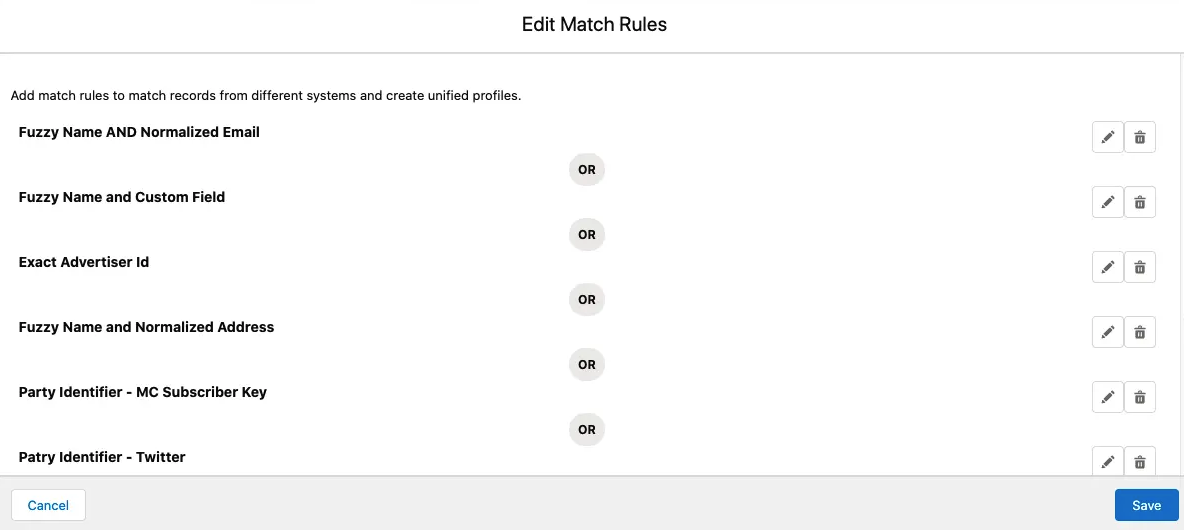
Data Cloud works on reconciliation rules, it uses these rules to unify data coming from different sources, so if your data sources don’t have commonalities between them, you’ll have a hard time creating your unified profile. Likewise, if your data sources are providing inconsistent data in each run, your Segments and Calculated Insights are only going to be so effective. 

Set-up Complexity

Data Cloud is a very flexible platform, and it allows users to consume a variety of Data Streams and utilize a wide range of Data Model Objects. However, this also brings complications as it requires users to have a broad understanding of Data Mapping, APIs and Data Transformation, as well as having a solid understanding of Salesforce. 

This is particularly important when Unified Profiles are involved. And furthermore, it requires a deep understanding of the platform’s very intricate nuances. 

To list a few of the nuances:

  • Unified Individual – The Unified Individual Object itself is non-editable. It essentially acts as a carbon copy of the Individual Object and is only created once Reconciliation Rules have been set up. 
  • Activations – Only fields that are mapped to the Individual Object are available as fields in segments pushed from Data Cloud. Related Objects and their fields are pushed as parsed fields,  which adds complexity for using tools like Marketing Cloud Engagement.
  • Profile Explorer – The OTTB Profile object is very limited and will require a lot of Salesforce expertise to build a usable page for viewing Unified Customers. 
  • Learning Curve – Data Cloud is a data-heavy tool and, at least in my experience, usually falls under the MarTech umbrella. Whilst this provides marketers with data-driven insights and segments, it also means a lot of learning is required. 

As mentioned above, there are new concepts as well as new terminology such as Data Streams, Data Bundles and Data Lake Objects, but the biggest learning curve will come from the Segmentation and Calculated Insights. 

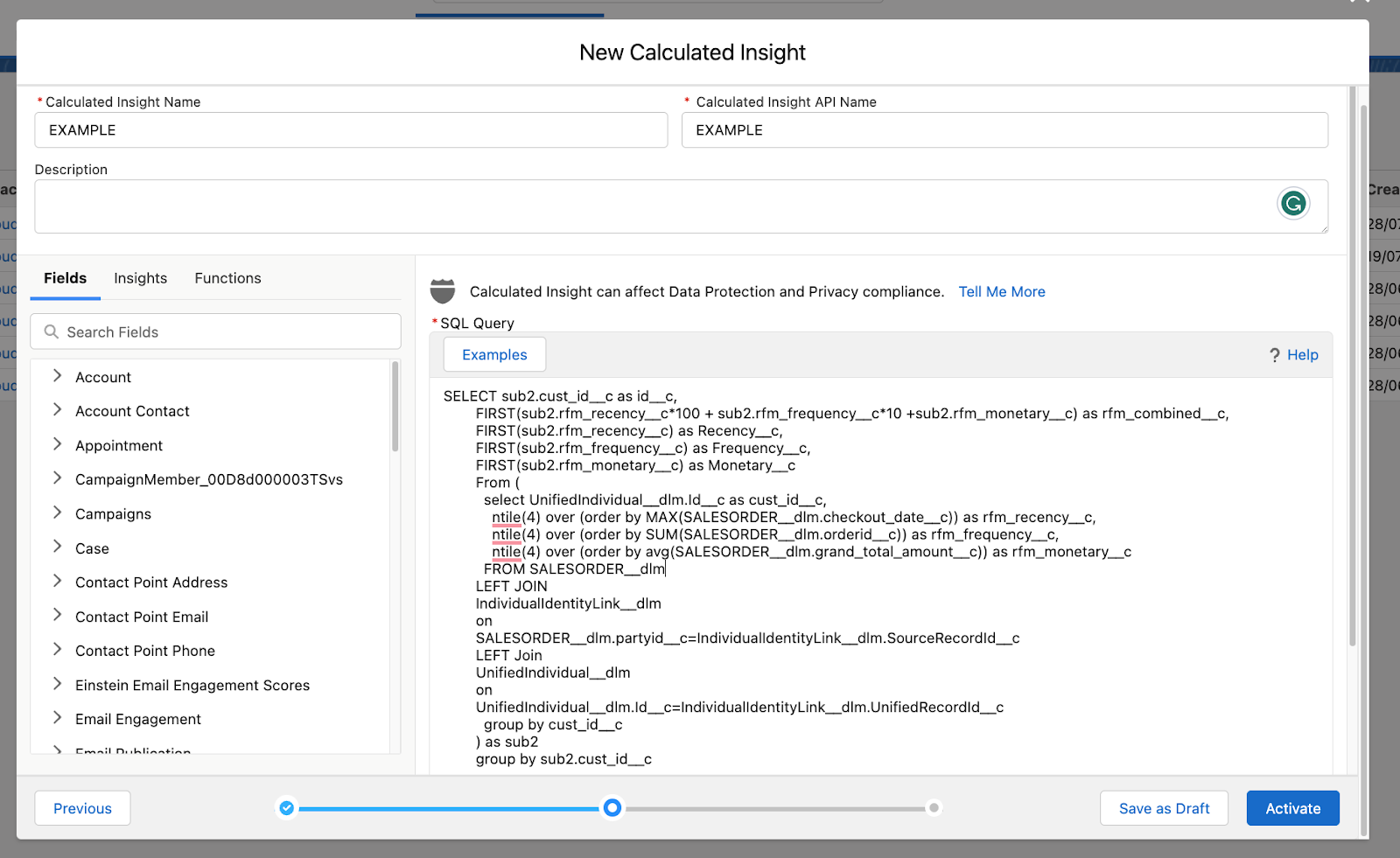
Whilst Data Cloud does offer a ‘Builder,’ creating both insights and segments using the Unified Individual (the main reason for using Data Cloud) is achieved via SQL due to how the Unified Individual reconciles multiple profiles from multiple sources. 
Use these tips for a successful Data Cloud implementation

I don’t want to sound like I’m being negative as, in reality, Data Cloud is a fantastic tool and can help drive meaningful engagement. But I do want to stress that understanding the detailed capabilities and key considerations of Data Cloud is the only true way of ensuring your Data Cloud implementation will be successful. 

Questions to ask before Data Cloud implementation

If I was procuring Data Cloud for myself, I would consider the following; 

  • Where is my data coming from? If the majority already sits within a Salesforce product, then the chances are I can get a unified customer profile through smart architecture.  
  • What is the state of my data? As mentioned, Data Cloud won’t fix your data health issues. If your data is generally incomplete and lacks consistency, then you’re not going to be ready for Data Cloud yet — it doesn’t mean it won’t be right in the future. 
  • Who is going to own this product? It’s often marketers who will benefit from the segments and insights. But more often than not they don’t have SQL experience. If you’re hoping the segment and insights builders will make up for a lack of SQL knowledge, it might be worth reconsidering.

Need help with your Data Cloud implementation? Reach out to the Sercante team who can walk you through it and get you the results you’re trying to achieve.

The last blog post in this 3-part series may have left you wondering if you should buy or build a customer data platform (CDP). We’ll answer that question in this last installment.

In the first post, we looked at six reasons to implement a CDP. Then in the second blog post, we discussed the five major CDP components.

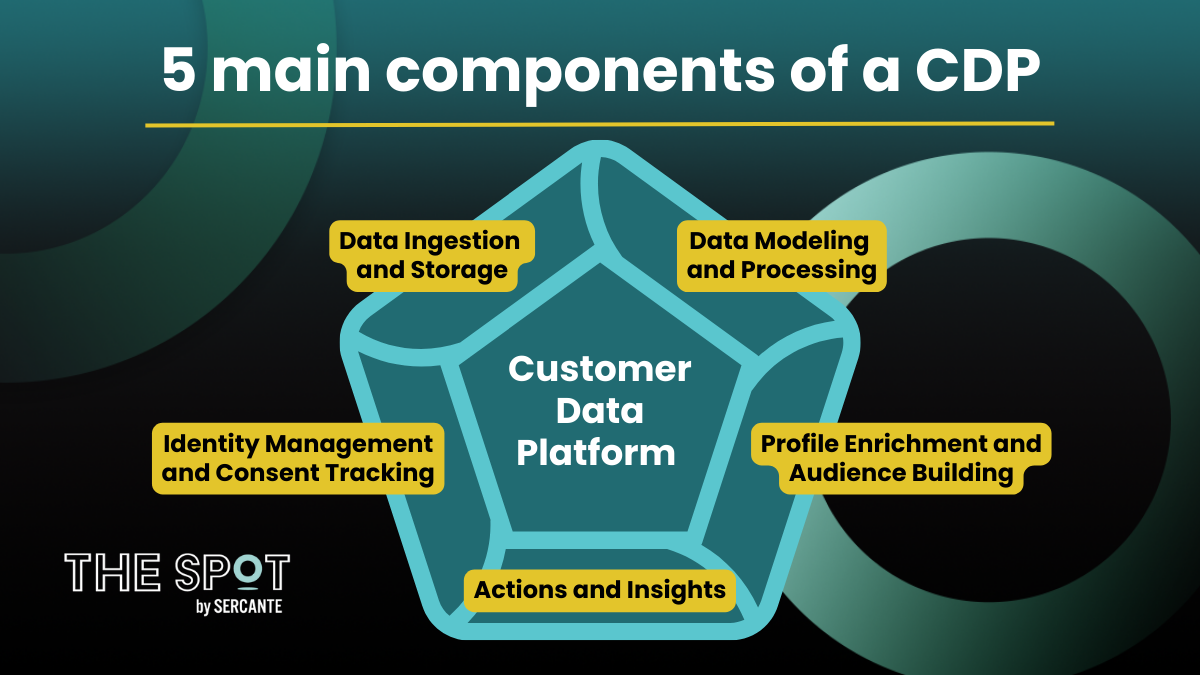
The five main CDP components are:

  1. Data Ingestion and Storage
  2. Data Modelling and Data Processing
  3. Identity Management and Consent Tracking (for Marketing)
  4. Profile Enrichment and Audience Building
  5. Actions and Insights

We briefly discussed Consent Management as an important part of any CDP marketing use case.

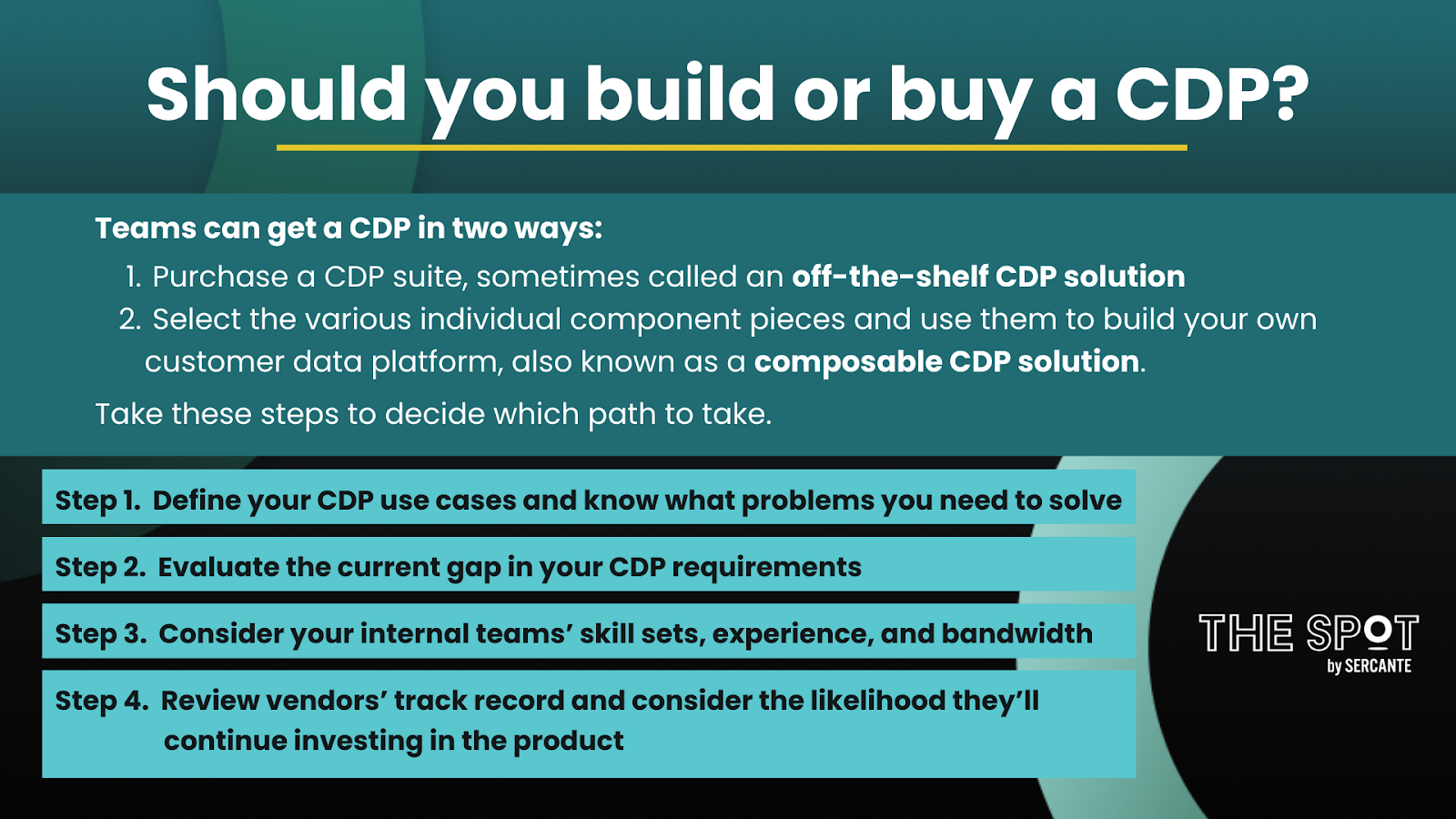
Obtaining a customer data platform can be achieved by purchasing a CDP suite, sometimes called an  off-the-shelf CDP solution, or by selecting the various individual component pieces and using them to build your own customer data platform.  The latter is known as a composable CDP solution.

Assembling a CDP team

In either case, CDP implementations need people with deep expertise and knowledge of data architecture, data modeling, and data engineering.  These skills are needed to achieve data ingestion of internal and external sources into a data storage repository in a well-architected way that is both scalable and cost-effective.  For composable CDP solutions, it is critical that the team construct a workable plan that incorporates how each of the pieces will be combined.

Platform Expert

Beyond that, it’s important to have tool or platform-specific knowledge to build out the capabilities of the various components of the selected customer data platform.  For example, it would be beneficial to have Salesforce Administrator skills to assist with the Salesforce Data Cloud implementation and administration of the Data Cloud afterward.  

Marketing Operations

It’s also important to have marketing domain expertise, especially for use cases that involve audience building for marketing purposes.  Not all CDP use cases involve the marketing function, but there are a significant number that do involve marketing use cases.  

Advanced Technical Experts

No matter whether you choose to buy or build a CDP, there’s a variety of skills needed to get up and running on a customer data platform, so it’s likely going to take several different people, each with varied skills.  

How to fill the skill gaps

Large enterprises that employ a big IT department experienced at building applications or SaaS companies of any size where the core business is building applications, are more likely to consider composable CDPs as an option.  And organizations with use cases that require real-time capabilities will need to carefully consider whether an off-the-shelf CDP solution will provide the needed functionality.

That said, the quickest way to get up and running on a customer data platform is usually by purchasing a CDP suite that includes all the major components ready to go out-of-the-box.  In addition to accelerating the time to value, a customer data platform suite is a great choice when your organization lacks the IT support and skills needed to evaluate, select and piece together all the various components of a CDP.  

Salesforce as a CDP suite

Choosing Salesforce as the CDP suite to buy is pretty straightforward if you already have Salesforce Sales and Service cloud, or an industry equivalent such as Salesforce Nonprofit Cloud or Health Cloud, and/or Salesforce Commerce Cloud.  

Those Salesforce platforms have a direct connection to the Salesforce Data Cloud as well as a connector to the Salesforce Marketing Cloud.  This removes the need to build pipelines between these systems as would be needed for a composable CDP solution.  As a result, security is ensured by Salesforce because all data is contained within the Salesforce system. 

Considerations for composable (build-your-own) CDP solutions 

Composable CDP solutions are an option to consider if your first-party data doesn’t live in a CRM like Salesforce and your IT team has the skills, experience, and bandwidth to build out a solution for the organization. Composable CDP solutions are a great choice if your organization already has some of the five major CDP components installed and working well.  

If your first-party data is already ingested into your data warehouse or data lakehouse, is being processed and transformed, and you have robust machine learning tools in place, then your existing system likely meets several of the CDP requirements already.  In that case, it might make sense to just add the missing pieces to your existing platform rather than purchase a CDP suite.

Steps to decide if you should buy or build a customer data platform (CDP)

There is a lot to consider when making a CDP choice.  Both CDP suites and composable CDP solutions are viable options but to help you figure out which one might be a better choice for you and your organization, here are four things you can do.

1. Define your CDP use cases and know what problems you need to solve

For what purposes do you want to use unified customer data?  Do your use cases need to be solved for only marketing concerns or will the sales and service teams benefit from a unified customer profile?  Do any of these use cases require real-time capabilities? 

2. Evaluate the current gap in your CDP requirements

Where does your current first-party data reside today?  Of the given CDP components you need, how many does your organization already have in place?  Are there any digital transformations or architectural upgrades planned in your organization for the next 12-15 months that you are aware of and should consider?

3. Consider your internal teams’ skill sets, experience, and bandwidth

Does your IT team have the skills and experience to select the right pieces and compose a CDP from different vendors?  Will your IT team be able to prioritize building a CDP over other internal projects?

4. Review vendors’ track record and consider the likelihood they’ll continue investing in the product

What is the vendor(s) track record in the CDP space?  Are they new to the modern marketing tech stack or have they been in the CDP space for quite a while and perhaps considered to be more of a legacy product?  How likely are they to continue investing in their product(s).  

Consider your long-term plan when making a CDP build or buy decision

Customer data platforms are a long-term investment — you want to know your CDP vendor(s) will continue to improve their product.  And you’ll want to make sure you’re setting your team up for success by considering the level of effort needed to administer and support the tool and platform choices for your CDP.  

Whether you choose to acquire an off-the-shelf CDP suite or build a composable CDP, there are many reasons why your organization would want a customer data platform.

Remember to reach out to the team at Sercante for guidance when you’re ready to implement a CDP at your company or organization.

Thinking about implementing a CDP? Understanding the main components of a customer data platform (CDP) is a good way to make the decision.

A CDP is not a marketing campaign execution tool, but it does provide a solid foundation for marketing personalization. While a CDP is frequently employed to better orchestrate the customer journey, that isn’t the only reason you’d want to consider using a customer data platform. The unified customer profiles built in a CDP can be made available to sales and service teams so that they can close more and bigger deals and provide better customer support.

In the previous blog post, we discussed why your organization would want to consider implementing a customer data platform solution. 

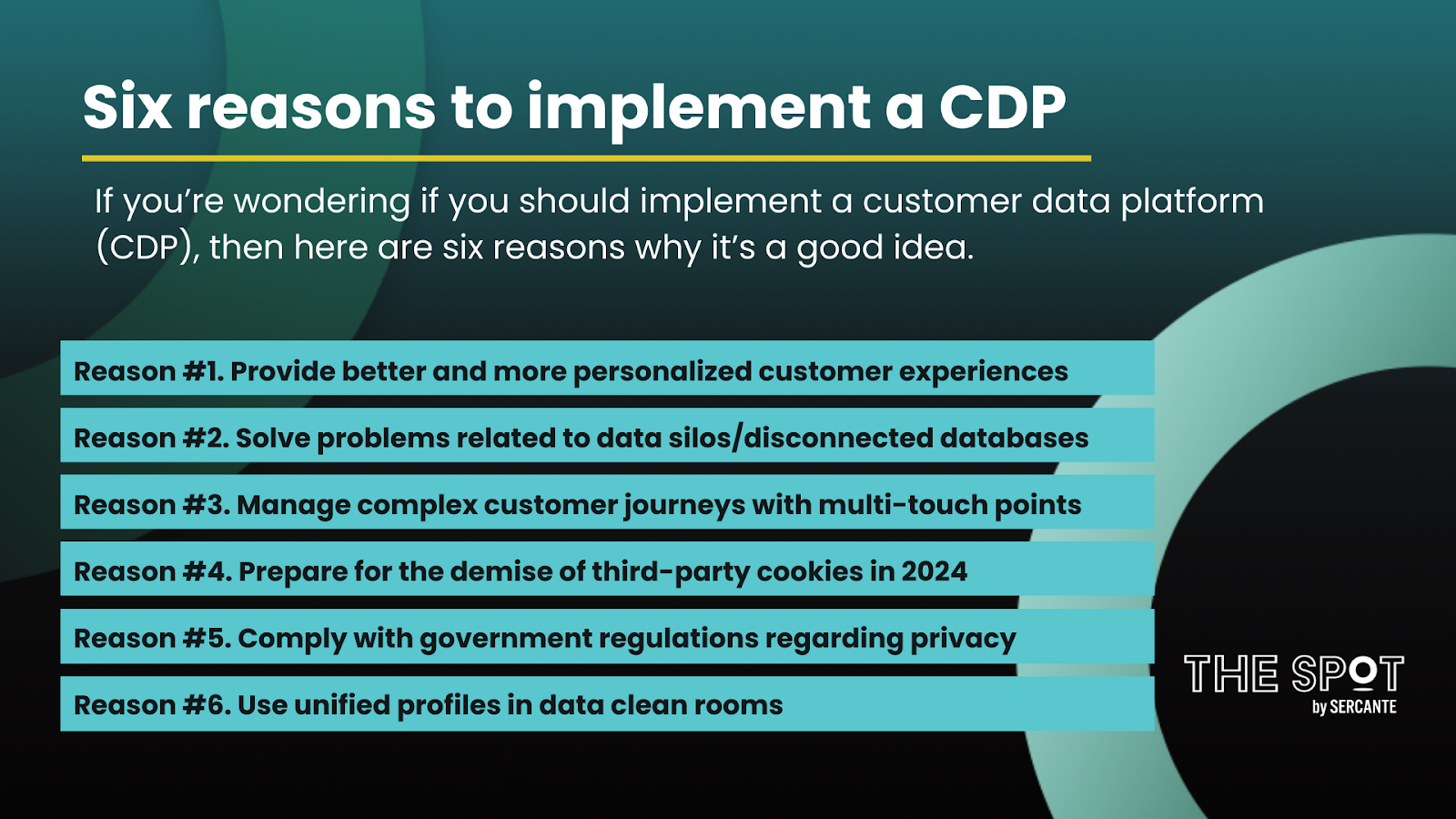
There were six main reasons discussed

  1. Increased demand for personalized customer experiences
  2. The customer data problem of siloed data
  3. Need to track multi-touch points 
  4. Demise of third-party cookies in 2024
  5. Government regulations regarding privacy
  6. Unified profiles can be used in data clean rooms

It’s not unusual for sales and service teams to work with some of the same technology tools. For example, an organization’s customer relationship management (CRM) system is a commonly shared platform. 

CRM systems were designed to collect first-party data about an individual customer, member, patient, or donor, depending on the use case. A CRM can also be used to collect first-party data about companies or organizations. First-party CRM data will likely include name and contact information, at a minimum. 

In contrast, there are some tools and platforms used primarily by marketers. One such example is a data management platform (DMP) that can be used to segment audiences and optimize ad spend. A DMP is a cookie-based solution that temporarily stores second and third-party data about audiences and advertising campaigns. As we learned in the previous blog post article, third-party cookies are going away in 2024, which is an important reason why a CDP implementation could be worth considering sooner rather than later. 

Five main components of a customer data platform (CDP)

A customer data platform is a repository for large quantities of internal and external customer data. CDP input data sources often include data from an organization’s customer relationship management (CRM) system and data management platform (DMP). Both CDPs and CRMs are persistent, long-term storage solutions, whereas DMPs generally have shorter retention periods around 90 days or so.

Customer data platforms generally include at least five major components which are described next (see figure below). There is one caveat. Consent management is a very important item not always included in the requirements for a customer data platform. If you use a CDP for marketing use cases, however, you’ll need to consider how to manage and track consent.

1. Data Ingestion and Storage

At its core, a CDP must provide a data storage component where all the customer data is securely stored and managed. Additionally, you will need to have a way to bring all the customer data into the storage layer. Data ingestion for external data sources is usually automated by using various connectors. It’s very important to consider data governance as part of this component. Depending on the CDP selected, your organization could be responsible for all data governance requirements. 

2. Data Modeling and Processing 

Before ingesting data into your CDP, you’ll want to design and create your data models. It’s a good idea to build a data dictionary as part of the data modeling exercise, prior to data ingestion. Creating a data dictionary will help highlight any formula fields to be created and data transformations to be undertaken. 

3. Identity Management and Consent Tracking

Data matching and identity resolution are the next critical steps to achieving a unified customer profile once data is ingested and securely stored in a CDP. Identity stitching, accomplished by analyzing and resolving data across multiple touchpoints, systems, and attributes, ultimately helps us better understand a customer’s interests and needs. Identity resolution can be achieved using both deterministic matching, best used with first-party data, and probabilistic matching. 

4. Profile Enrichment and Audience Building

After reconciling identities, you’ll be able to enrich those identities with external data sources. Once the holistic unified profiles are available, you’ll be able to extract information to be used for analytical purposes. For marketing use cases, you can also use unified profiles to create segments and audiences for marketing campaigns. 

5. Actions and Insights 

This component makes data in the data layer accessible to machine learning tools or other platforms where the data can be used to achieve actionable insights. With actionable data, organizations can better orchestrate the customer journey. Targeted actions also make it possible to engage with customers in real-time. For example, a customer searching for product installation instructions on the website for a recently purchased item could automatically be sent an email with the needed information. 

Explore types of CDP solutions available

Some customer data platform solutions, such as Salesforce Data Cloud can be purchased as a full product suite with all major components included in one platform. Another approach to acquiring a CDP would be to build your own customer data platform. 

Most organizations that build a customer data platform opt for a composable CDP which allows individual best-in-breed module selection and combination to satisfy their CDP requirements. Both of these customer data platform acquisition approaches are discussed in more detail in the next blog post.

Remember to reach out to the team at Sercante for guidance when you’re ready to implement a CDP at your company or organization.

A customer data platform (CDP) is a unified customer database where many different external and internal sources are collected, cleaned, and aggregated to build rich individual customer profiles. These unified customer profiles can then be made available to marketing, sales, and support teams for achieving increased sales, enhanced customer experiences, and improved customer support. If you’re wondering if you should implement a customer data platform, then read on to get six reasons why it’s a good idea.

Building personalized customer experiences

Customers expect more personalized experiences today — they’re demanding more in return for sharing their personal information with an organization. When customers supply their information to one department, they expect the updated information to be available company wide.

However, that is frequently not possible because customer data often exists separately within many different departments. There is rarely a single source of truth. In this situation, a CDP can connect these siloed customer data sources.

CDPs create a complete view of the customer journey

It’s not just that customer data is siloed. The amount of data continues to grow exponentially for many reasons, one is that there are more touch points now in a customer journey. 

A customer may start their morning searching for an item on their home computer then continue their search on their mobile device while in transit to work. Later, they may spend their lunch hour browsing on their laptop, ultimately making their final purchasing decision on their tablet in the evening. 

A CDP can help stitch together these interactions to provide a more complete view of a customer journey.

Six reasons to implement a customer data platform

  • Reason #1. Provide better and more personalized customer experiences
  • Reason #2. Solve problems related to data silos/disconnected databases
  • Reason #3. Manage more complex customer journeys with multi-touch points
  • Reason #4. Prepare for the demise of third-party cookies in 2024
  • Reason #5. Comply with government regulations regarding privacy
  • Reason #6. Use unified profiles in data clean rooms

These first three reasons why you’d want a customer data platform aren’t necessarily new. It’s a marketer’s goal to deliver the right message at the right time through the right channel by building an understanding of who the customer is and what they want. However, there is a new sense of urgency. 

Creating unified customer profiles has become much more important due to recent external driving factors. Those driving factors are the fourth and fifth reasons included in the list below.

Data privacy and the end of third-party cookies

With the availability of information from third-party cookies, it wasn’t a priority for most organizations to expend the resources developing a complete view of their customers. Indeed, it’s expensive to build a complete 360-view of the customer that would allow for more personalized experiences, and it’s been relatively inexpensive for marketers to frequently send communication blasts to a wide audience. 

Soon, however, marketers will no longer have a cheap and easy source of consumer information gathered from third-party cookies. Today, third-party cookies are already being blocked by some browsers such as Safari and Mozilla Firefox. In the latter half of 2024, Google plans to completely deprecate all third-party cookies. 

The excessive exploitation of technology, including the misuse of third-party cookies, has had the unintended consequence of governments stepping in to create regulations to better protect the privacy of consumers. Obtaining consumer consent and keeping track of this consent, now required, is an important reason marketers should consider using a customer data platform. 

Building unified customer profiles within a CDP

A CDP offers organizations a way to bring together customer data to develop a more clear and complete picture. With the unified profiles developed in a CDP, organizations can now develop a first-party data strategy that can be extended with the use of other tools and platforms like a data clean room. 

A data clean room, the ultimate in data sharing and data collaboration, provides new opportunities for organizations to process and analyze data more efficiently while still managing the data in a compliant way. 

Other departments feel benefits of implementing a CDP 

Marketers may initially have the most to gain by using a customer data platform, but unified customer profiles can also result in many benefits for sales and service teams. Importantly, the enterprise must adhere to new regulations and privacy laws. 

A customer data platform is often the best way to ensure that the customer profile is complete and accurate. That way, when a customer makes a request related to privacy, the organization can comply with the request.

So, how does a CDP actually work? In the next blog post, we’ll discuss the five major components of a customer data platform. 

Remember to reach out to the team at Sercante for guidance when you’re ready to implement a CDP at your company or organization.

It’s time to launch another email campaign and the anxiety sets in. You have a variety of people on different teams who want their eyes (and opinions) on your emails before you can launch them. This back and forth can be overwhelming and gets buried in 50+ long email threads

Stop the madness! Let’s talk about how to organize the chaos — making your life easier when it’s time to launch an email campaign. Here are a few email campaign tips.

Use an Email Brief

It’s a blank sheet of paper for most clients and they get overwhelmed with where and how to start. Sometimes you need to partner with someone who has a plan you can easily take, customize it to your needs, and boom! You have a starting place now. 

Let’s talk about what exactly you should include in an email brief.

What to include in the email brief

Campaign Overview and Objective 

  • Start with a brief description of the campaign’s purpose and main objective
  • Use it as an opportunity to define its purpose with absolute clarity and give helpful background to your team who will be viewing the brief
  • Clearly state what you want to achieve, such as increasing sales, promoting a new product, driving traffic to a website, or building brand awareness

Metrics and Reporting

  • Clearly define the key performance indicators (KPIs) you’ll use to measure the success of the campaign
  • Stick to goals that translate into clear, measurable objectives
  • Link to the report you plan to use once the campaign is launched

Email Content and Format Crafted for the Target Audience

  • Specify the type of content you want to include in the email, such as text, images, videos, or interactive elements
  • Indicate any personalization elements or segmentation strategies you want to implement to make the email more relevant and engaging to the recipients

Email Schedule

  • Provide the proposed sending date and time for the email

Call-to-Action (CTA)

Internal Timeline 

  • A clear timeline can let team members get involved and stay moving quickly. 
  • Include internal deadlines for teams to owe you items or are giving you approval

Identify and Fix Recurring Pain Points

Continuous edits to email HTML and copy is a common pain point among clients. There are tools like Stensul that can make your life easier because it keeps all the edits out of email threads. 

It is essential to have integrations and features like these to have the capacity to scale operations and to accommodate increases in volume while meeting requester’s timing requirements, all without the need to hire additional staff or compromise on quality. 

Check out this webinar with Sercante & Stensul together where they share tips for integrating an email creation platform into your strategy to ease common pain points.

Create a plan, look for ways to add efficiency, and repeat

Ok so let’s recap!

The first thing you’re going to do is draft and use a brief. If you’re stuck, start with the email brief items listed in this post.

Then you’re going to document your process and iterate on it! 

The goal is to make your campaign launch life easier each time. When you identify a pain point, test out a solution for it and see if the process gets even better.

Account Engagement (fka Pardot) Scoring Categories and Lightning Builders are two great features to amp up your marketing and segmentation efforts, but they don’t exactly connect like typical Account Engagement assets. This blog will walk you through what you can and cannot do when it comes to combining these two features.

Where we run into issues

Account Engagement Scoring Categories can be super impactful for orgs with multiple services, offerings, products etc. These categories allow you to break down a Prospect’s interest in your different offerings so you can better tailor your messaging and next steps. 

However, Scoring Categories rely on Account Engagement folders, if an asset lives in a folder that is assigned to a Scoring Category then any engagement with that asset is attributed to the Scoring Category, but the Lightning Builders don’t use folders. So can Scoring Categories be used with Lightning Builder assets? The answer is yes, but it’s complicated. 

Scoring Categories and the Lightning Email Builder

When List Emails or Email Templates are sent from Account Engagement, your default Scoring model will adjust the Prospect’s score as the Prospect engages with the email. If this List Email or Email Template is saved in a Scoring Category folder, then the resulting Score would be associated with that category. 

When Lightning Builder Email Content is sent to Prospects as a List Email or “activated for automation” and used as a template, there is no association with folders and therefore Scoring Categories. However, you can still adjust the Scoring Category in three ways:

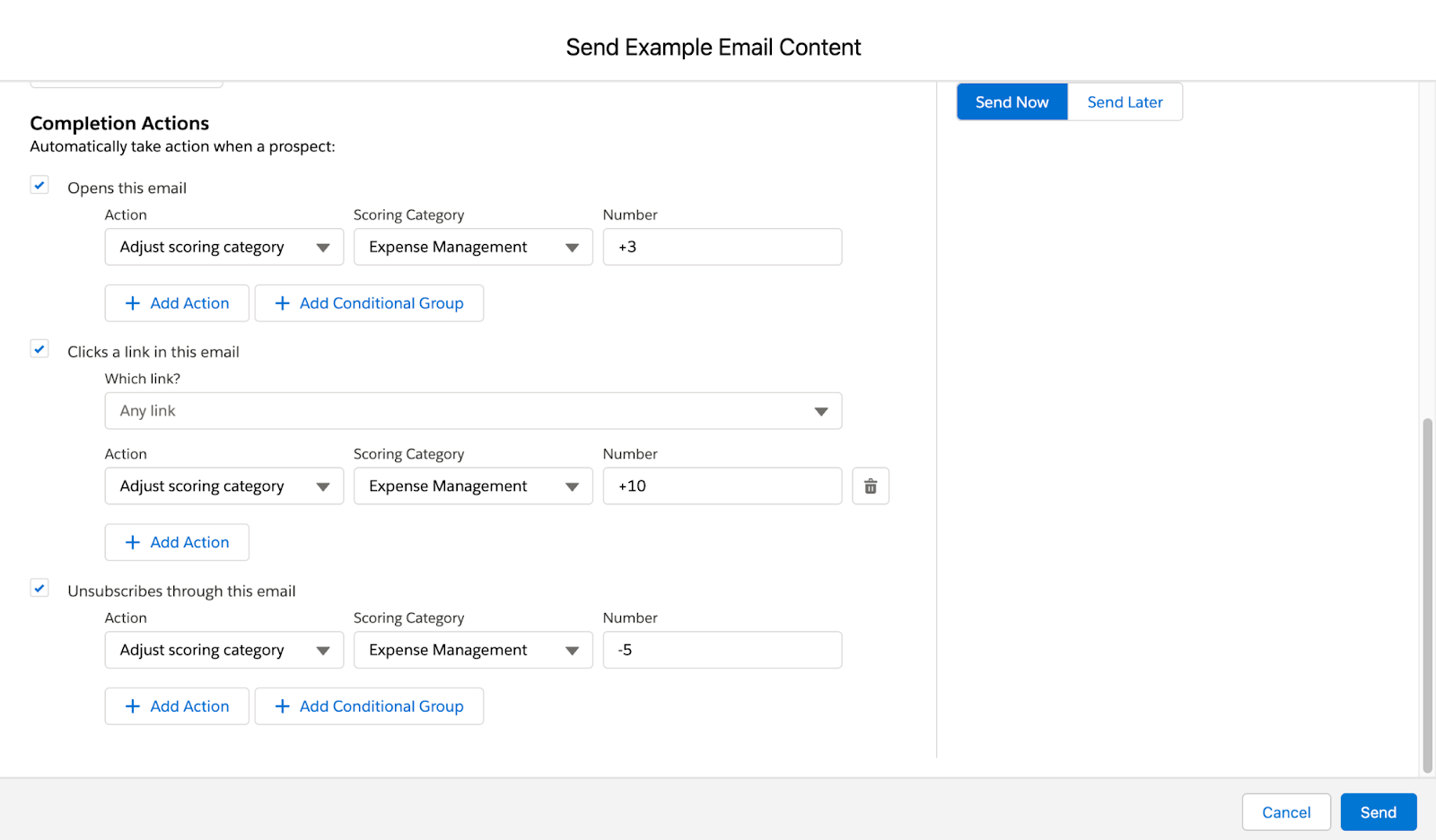
1. Email Content Completion Actions

When sending Email Content you have the option to add completion actions for email opens, email clicks, and unsubscribes. Any of these options can be used to add or remove points from a Scoring Category.

2. Engagement Studio Program Actions

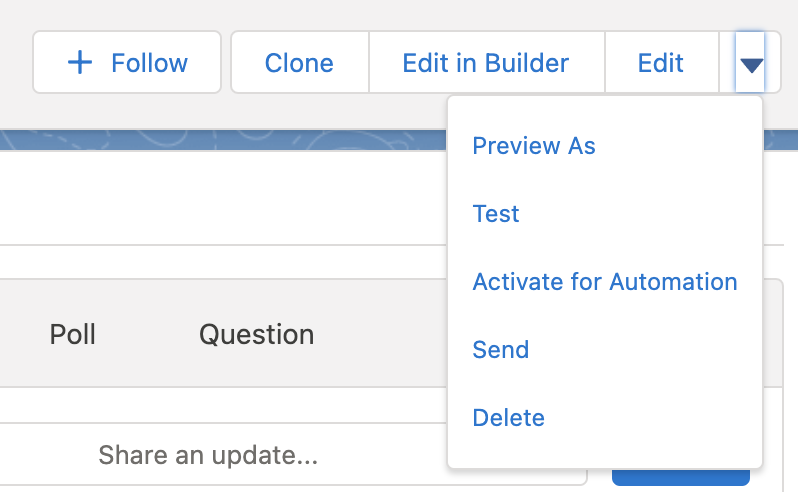
Lightning Builder Email Content can also be used within Engagement Studio programs. Just make sure you’ve selected “activate for automation” to push the Email Content down to Account Engagement:

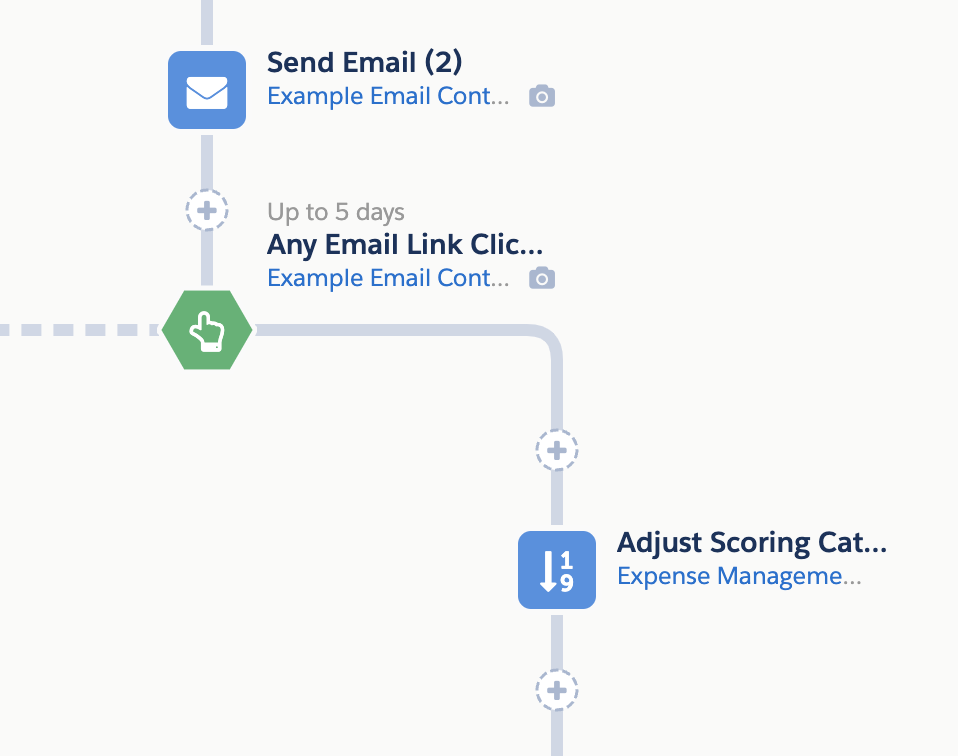
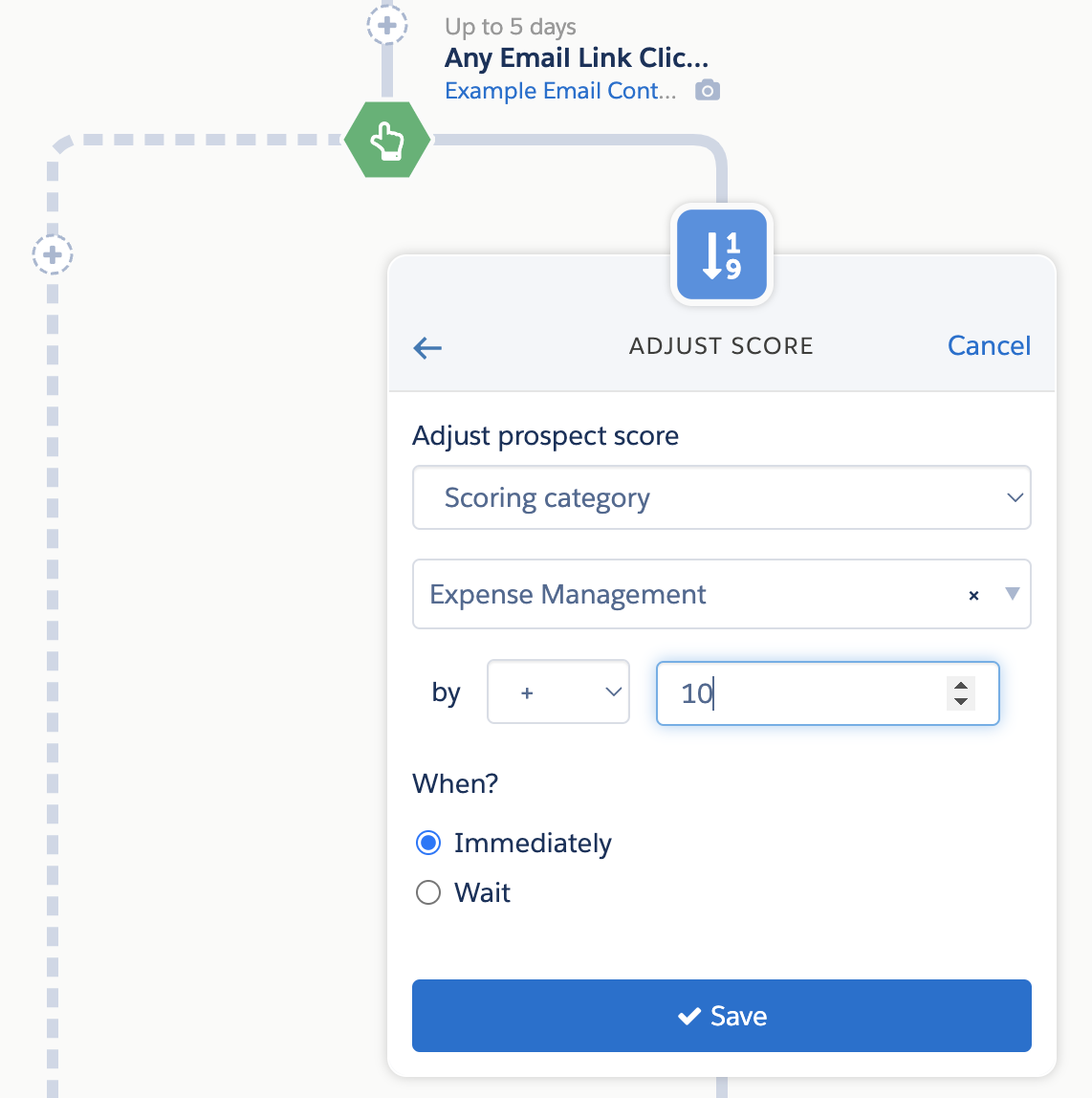
In your Engagement Studio program, select the Email Content in your “Send Email” Action, add the relevant trigger (Email Click, Email Open, etc.), and then adjust the Prospect’s Scoring Category if they take said action. 

3. Custom Redirect used in the Email Content

If you have an especially important link in your email, such as a button to register for an event, you can also create a Custom Redirect for the link. 

Custom Redirects are associated with Folders, so any engagement with the link will update the Prospect’s Score within the category. You can also add a Completion Action to the Custom Redirect to add additional points above your default Scoring model. 

Scoring Categories and the Lightning Landing Page Builder

When Landing Pages are built within Account Engagement, Page Views, Landing Page Successes, and Landing Page Errors will automatically update the Prospect’s Score in accordance with your default Scoring model. If that Landing Page is stored in a folder associated with a Scoring Category then the default scores will go to the Scoring Category rather than the overall score. 

When the Landing Page is built in the Lightning Landing Page Builder, there is no association with folders and therefore Scoring Categories. However, you can still adjust the Scoring Category in two ways:

1. Form Completion Actions

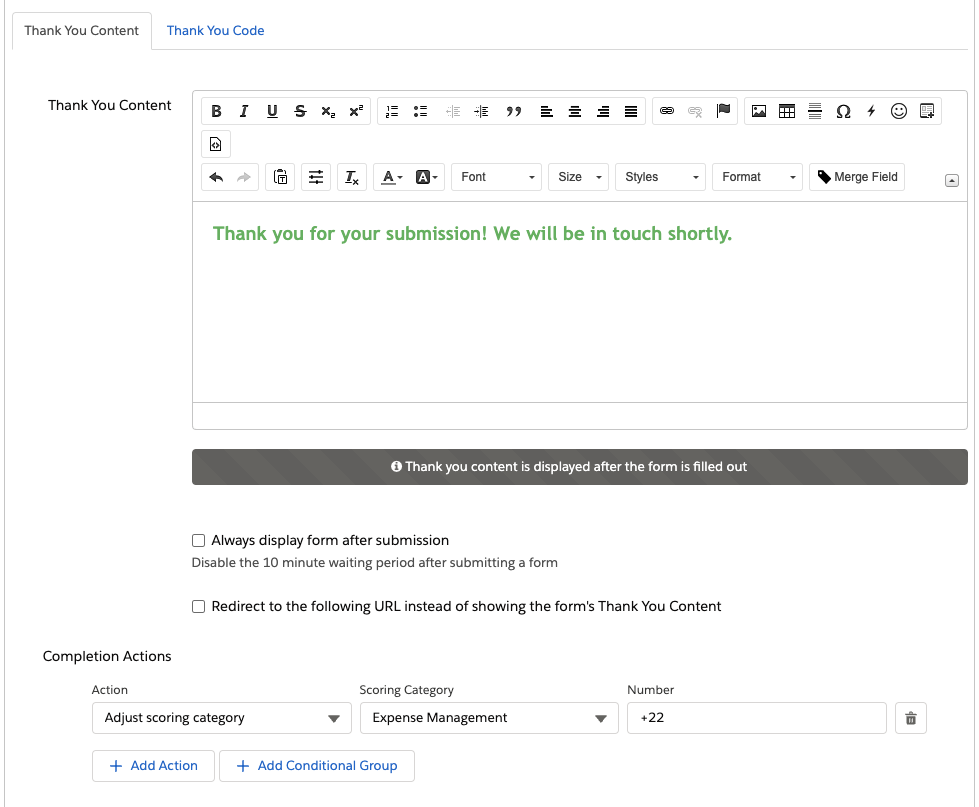
The Form the Lightning Landing Page is using will be stored within Account Engagement and associated with a folder, but form fills completed via a Landing Page are associated with the Landing Page only. However, if your Form has a Completion Action to update a Scoring Category when it is filled out, this will be fired when the Prospect fills out the Form via a Lightning Landing Page.

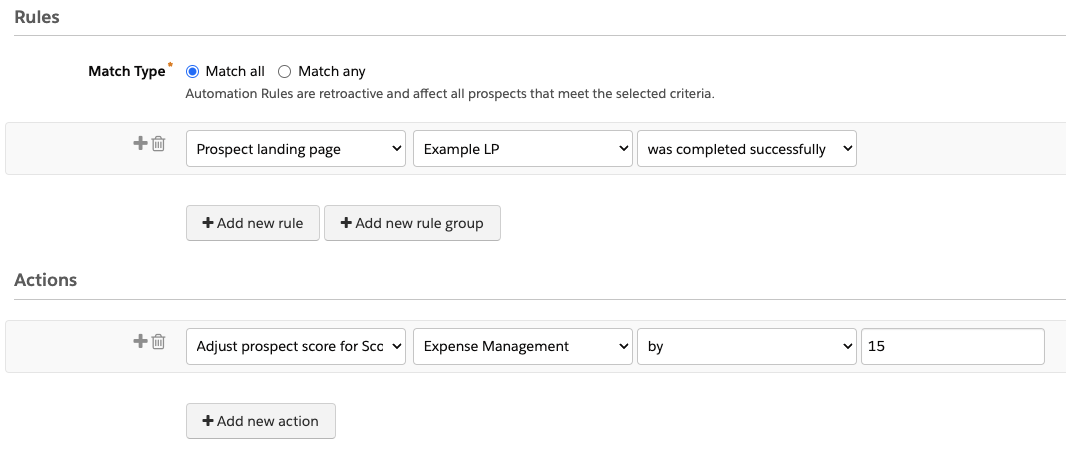
2. Automation Rules

You can also create an Automation Rule to adjust a Prospect’s score if they have filled out a Lightning Landing Page. However, keep in mind this would only fire on the initial Landing Page completion. You can have the Automation Rule repeat, but it would keep giving the Prospect points each repeat even if they did not fill out the Landing Page again.

Go Use Scoring Categories with the Lightning Builder

So there you have it! Yes, you can use Scoring Categories with Lightning Builder assets, but it’s not in the ways you’d expect. 

What other questions do you have about the Lightning Builders? Let us know in the comments!

No more posts to show