Category

Analytics & Reporting

Email marketers swim in constant data. While analytics often inform decision making, the flip side of that coin means your competitors also use data to do the same. To truly ensure campaigns remain fully optimized for engagement, conversions, and ROI, you need to look beyond the simple email metrics everyone tracks.

Simple statistics such as open and unsubscribe rates definitely have their place, but a deeper dive into what’s impactful and what needs improvement gives you and your teams the understanding necessary to drive effective marketing campaigns.

In this post, we look at two other advanced analytics you can use to further refine content. Then, we’ll dive into two ultra-advanced analytics that may be harder to source but offer practical, personalized insights on an individual subscriber level.

Email Metric 1: Complaint Rate

Unsubscribes tend to indicate when recipients find messages irrelevant, but when contacts mark content as spam it indicates major antagonism against your content. Measuring the complaint rate, or the percentage of times recipients mark your outbound emails as spam, ensures your team has a grasp on when content has become dangerously misaligned from consumer expectations.

Nearly half of all emails sent get classified as spam, so to hit the inbox marketers need to know how to differentiate between content subscribers will find valuable or irrelevant.

What Makes Spam Indications Unique?

Spam designations happen for many reasons, but some of the most common stem from a disconnect between the marketer and contact.

  • The recipient cannot easily find a way to unsubscribe (e.g., the link is in small font or a similar color to the background)
  • There is no option to unsubscribe (e.g., emails from sales reps marked as spam will affect the entire company domain)
  • Marketers do not respect unsubscribe requests and continue to send unwanted communications
  • Oversaturated contacts opt to skip an unsubscribe attempt and directly mark a message as spam

While some of these may not necessarily result from marketing decisions, the unique danger of spam designations rather than regular unsubscribes affect every team’s future campaigns. High spam rates discredit a brand and more importantly cause future emails to go straight to spam folders.

Overcoming Poor Email Deliverability

Marketers must keep the complaint rate low to maintain a good sender reputation and to avoid email providers marking content as spam. Email marketers generally accept a complaint rate of less than 0.1 percent, while a rate above 0.5 percent often indicates issues with email content or list quality.

To avoid this, marketers can take several steps to reduce complaint rates and boost deliverability. Here are some best practices to consider.

  • Permission-based email lists: Only source subscribers who have given explicit permission to receive emails through a confirmed opt-in process. Avoid buying email lists, as these often contain contacts who haven’t opted in to receive emails from your organization.
  • Segmented email lists: Personalizing email lists based on subscriber behavior, demographics, or interests provides recipients with relevant content they are more likely to engage with, reducing the likelihood of spam designations while boosting conversion rates.
  • Engaging subject lines and content: A/B test and experiment with email subject lines that accurately describe the content of the email while ensuring the content doesn’t mislead or come off as overly promotional. Engaging content typically includes useful tips, exclusive discounts/promotions, or relevant industry insights.
  • Professional designs and mobile-optimized emails: Seeing as how the majority of emails are now opened on mobile devices and younger consumers prefer mobile shopping and user experiences, brands need to give the right first impression with clean-looking emails optimized for mobile as well as desktop engagements.
  • Include an easy-to-find unsubscribe link: Sometimes it’s better to cut your losses rather than risk long-term damage. Make it easy for contacts to opt out with a noticeable unsubscribe link in the footer of emails, otherwise you incentivize spam designations. The good news – if you follow the above steps, the risk of unsubscribes is low.

Be sure to consistently monitor campaigns after the fact for further insights. When you do encounter feedback such as spam complaints, unsubscribes, and email replies, respond in a timely and professional manner to not only build trust with subscribers but also spot any developing issues.

Email Metric 2: Event Lag

In a utopia, subscribers receive communications and immediately convert. Unfortunately, that rarely does happen, so marketers need to investigate whenever a delay between send time, open, and click happens. Event lag, which measures the time between these milestones, provides marketers with insights into content effectiveness.

You can easily measure event lag: just subtract the time at which a contact took the desired action (e.g., link click, website purchase) from when the email was sent. For campaigns across time zones, adjust expectations to account for the difference. You can also swap conversion time for open time(s). With this data, you can understand whether content prompts immediate action or leaves an email wasting away in subscriber inboxes.

According to a Campaign Monitor study, the median click-to-open rate, which tracks how many subscribers who opened an email went on to click a link, across all industries clocks in at around 10.5 percent. Campaigns that perform below this benchmark should make good candidates for further speculation into event lag and supplemental analysis.

Creating More Actionable Emails

Improving subscriber response times is crucial to optimal engagement, conversions, and customer satisfaction. Here are some tips to improve response times in your marketing emails.

  • Scrutinize your offers: Event lag times vary depending on the type of desired action. For example, consumers often take longer purchasing high-ticket products compared to low-cost items or requests. Therefore, if lengthy event lag times hold back your campaigns, switch up your calls-to-action to encourage easier conversions. For example, a B2B SaaS company can lower the stakes of their email CTA by switching from a demo request to a product page that lets recipients make decisions at their own pace.
  • Adjust timing: Sometimes event lag stems from an easily determined source — timing. If you find most emails to certain geographies have extended lag times, then since the content clearly gets clicks, adjusting to more palatable local send times could be the necessary fix.
  • Automated emails: Implementing automated follow-up email campaigns to welcome new subscribers, encourage action on abandoned carts, or send personalized behavior-based recommendations take advantage of recent positive engagements to foster immediate action.
  • Segmented email lists and content: Again, sending personalized emails based on subscriber behavior (for example, see above) or preferences creates more relevant experiences, improving response time.

Ultimately, the most important factor is to track and analyze your event lag data regularly, using that information to optimize your email campaigns over time to improve engagement and conversions.

Now that we’ve established advanced metrics to determine who is most/least engaged, let’s take a look at how to apply insights to your most radical subscribers.

Email Metric 3: Most-Engaged Subscribers

Every brand loves their MVPs, but are you doing enough to truly maximize the value they bring to your organization?

The Pareto Principle notes roughly 80 percent of sales come from just 20 percent of customers. Knowing this, maximizing loyalty and upsell opportunities among your most-engaged subscribers becomes crucial for marketers.

How to Recognize

To determine which subscribers have the highest brand loyalty, aggregate the following metrics.

  • Open Rates: The subscribers who consistently open your emails clearly find value in the content you send. Look at how often contacts open emails (and when they don’t) at an individual level to gain future segmentation insights.
  • Click-Through Rates: Use a similar approach for click-through statistics. Subscribers who consistently follow calls-to-action trust your brand.
  • Conversion Rates: Identify the subscribers who consistently take the desired actions of your emails. You can further segment contacts based on what actions they take post-click (e.g., those who purchase a certain product).

Create a scoring system out of these metrics that ranks subscribers based on their level of engagement. To do so, assign a score to each metric, add up the scores for each subscriber, then rank subscribers based on their total score. Going forward, target the most-engaged subscribers with personalized content or special offers to encourage continued engagement.

Priming for Further Action

Once you’ve determined your most-engaged subscribers, foster further conversions and long-term brand loyalty with the following strategies.

  • Personalized content: Segment your most engaged subscribers and personalize your content to cater to their specific desires. Effective segmentations pull data from past purchase history, browsing behavior, and engagement to create more relevant content that drives repeat conversions.
  • Exclusive offers and promotions: Reward your most-engaged subscribers with exclusive offers and promotions, including early access to sales, discounts, or freebies. These can even become personalized, such as promos for birthdays or anniversaries.
  • Ask for feedback: Use your most-engaged subscribers as a focus group to gather feedback on new products or services, website updates, or other business initiatives. This feedback from your best revenue stream identifies pain points and areas to improve, and fixing these shortcomings minimize the risk of churning your other subscribers.
  • Encourage social sharing: Take advantage of strong brand loyalty to encourage word-of-mouth sharing through social media or conversations with friends and family. These campaigns expand your reach and help attract new subscribers who are likely to engage in a similar manner.

Engagement is a two-way street, so ensure you continue to engage your brand’s most loyal followers with creative and personalized communications. In the long run, these customers become your organization’s foundation.

Email Metric 4: Least-Engaged Subscribers

Finding ways to elicit just an open from your least-engaged subscribers, on the other hand, fills marketers with migraines. These contacts have high event lag (or no engagement at all) and are at high risk to increase your complaint rate.

Knowing this, marketers must discern when to retarget low-engaged subscribers and when to remove them from lists altogether. With email deliverability and brand reputation at stake, list quality trumps quantity.

Improving relationships with your least engaged subscribers is a tall task, but several strategies can reset the relationship.

  • Segmented email lists: Notice a theme? Build audience segmentations based on engagement levels, and use this info to create campaigns that target your least-engaged subscribers. Use data such as their past purchase history or browsing behavior to create personalized messages tailored to these groups’ interests that resonate and drive conversions.
  • Re-opt-in campaigns: A re-opt-in campaign involves sending an email asking if identified subscribers still want to receive your emails and allowing them to confirm their subscription. This measure helps clean up email database and ensures you only target subscribers interested in hearing from you.
  • Evaluate email frequency: If you’re sending too many emails to your least engaged subscribers, they may tune out or unsubscribe. If you see high unsubscribe or complaint rates, evaluate how to reduce email frequency, reprioritize campaigns, or change the timing of email sends to see if engagement levels improve.
  • Prioritize: Multiple teams sending multiple email campaigns to the same contacts in theory increase the likelihood of conversion, but in practice it leads to marketing fatigue and high unsubscribe rates. Develop a system for campaign prioritization to ensure subscribers do not disengage due to an overwhelming amount of messages.
  • Incentives and promos: For true holdouts, consider offering incentives such as personalized discounts or freebies to rekindle interest in your brand and increase the chances of future engagement.
  • Different types of content: Try experimenting with different types of content, such as videos, interactive quizzes, or infographics, to see what resonates with your least-engaged subscribers. This keeps your content fresh and encourages continual engagement.

Overall, re-engaging with your least engaged subscribers in email marketing can take time and effort, but by focusing on personalized content, segmentation, and incentives, you can increase the chances of them engaging more with your brand over time.

Final Thoughts

As with all things email marketing, knowing how each subscriber interacts with your messages informs how to best continue each relationship. To really understand who is at risk for dis-engagement, monitor in-depth trends like complaint rate and event lag, so you have an accurate and fresh view of which campaigns resonate and which ones alienate.


It all starts with audience segmentation. If you feel your emails lack the personalization that drives action and conversions, learn how DESelect Segment empowers marketers of all technical abilities to create complex, personalized audiences in half the time.

Looking for a way to view your Marketing Cloud Account Engagement (Pardot) data within Salesforce? Not fully satisfied with data you’re able to view in the Account Engagement Reports? Well, you’re not alone. This is a comprehensive guide to B2B Marketing Analytics — what it is, what you’ll get out-of-the-box, and how you use the B2BMA dashboards.

What is B2B Marketing Analytics?

B2B Marketing Analytics (B2BMA) is a CRM Analytics App designed specially for B2B Marketers. It uses your Salesforce-Account Engagement connector to package up and display your Account Engagement data and enables several datasets to help you assess your sales and marketing performance. B2BMA comes out-of-the-box with default dashboards intended for various stakeholders on your team.

If you’re trying to view Account Engagement data within Salesforce, B2BMA should be your primary tool. It offers a wide range of data that can significantly improve your visibility into the ROI of your marketing campaigns, combining both marketing and sales pipeline data.

Key terminology within B2BMA

Dataset

Datasets are simply sets of source data (like an Excel table). These datasets are formatted and optimized for interactive exploration. 

Note: With B2BMA Plus (a feature available with an upgrade) you can actually control how frequently the data syncs between Account Engagement and Salesforce.

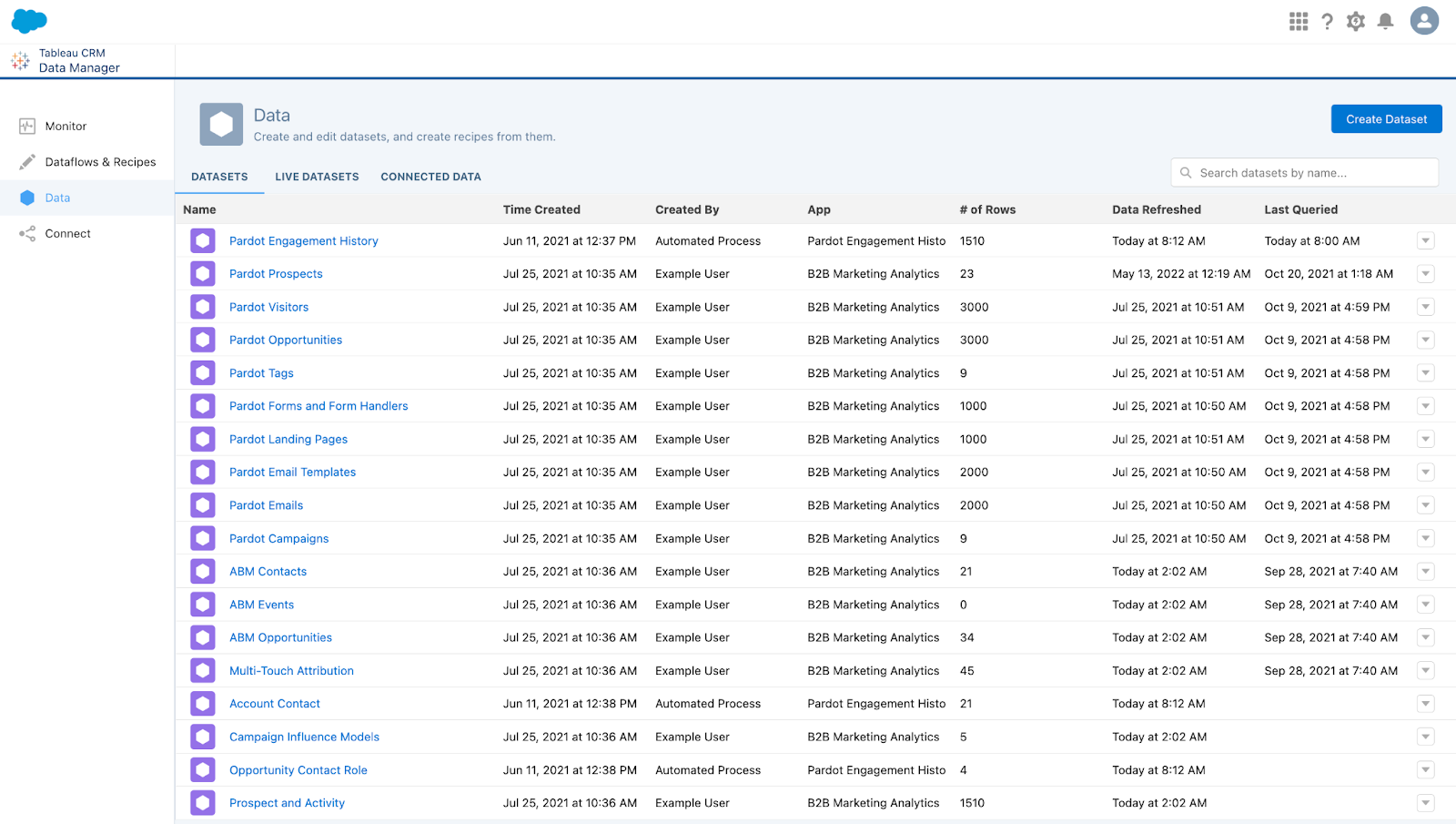
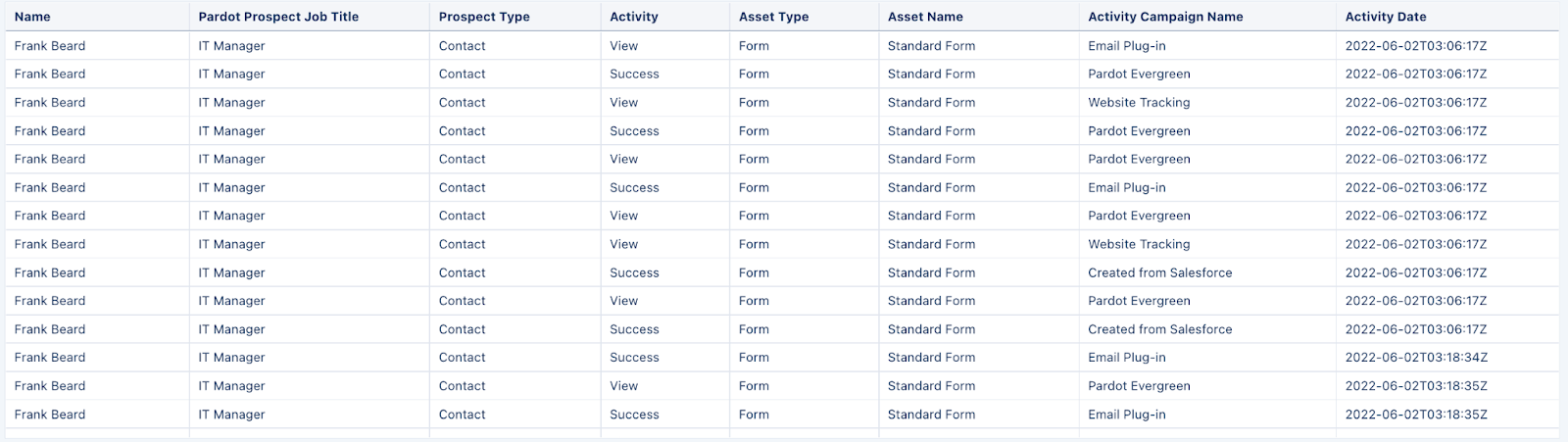
One example of a dataset may be your Account Engagement Prospects (see screenshot below).

Lens

A particular view into a dataset’s data (like a query). Use a lens to visualize your data and perform exploratory analysis. 

You’ll get these four lenses out-of-the-box:

  • Pipeline Deals
  • Campaigns (Pardot Campaigns)
  • Lead Sources
  • Lifecycle Snapshot

Navigation: CRM Analytics App  > All Items > Lenses

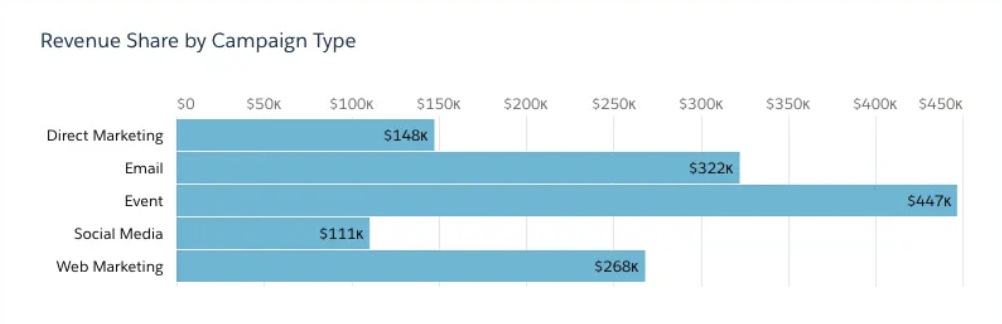
Example: Revenue by Campaign Type (see screenshot below)

Filter

Filters are used to narrow down results. Standard filters vary by dashboard. Keep in mind, you can add filters to a dashboard, but they may not filter all lenses within the dashboard. Some filters may also require customization.

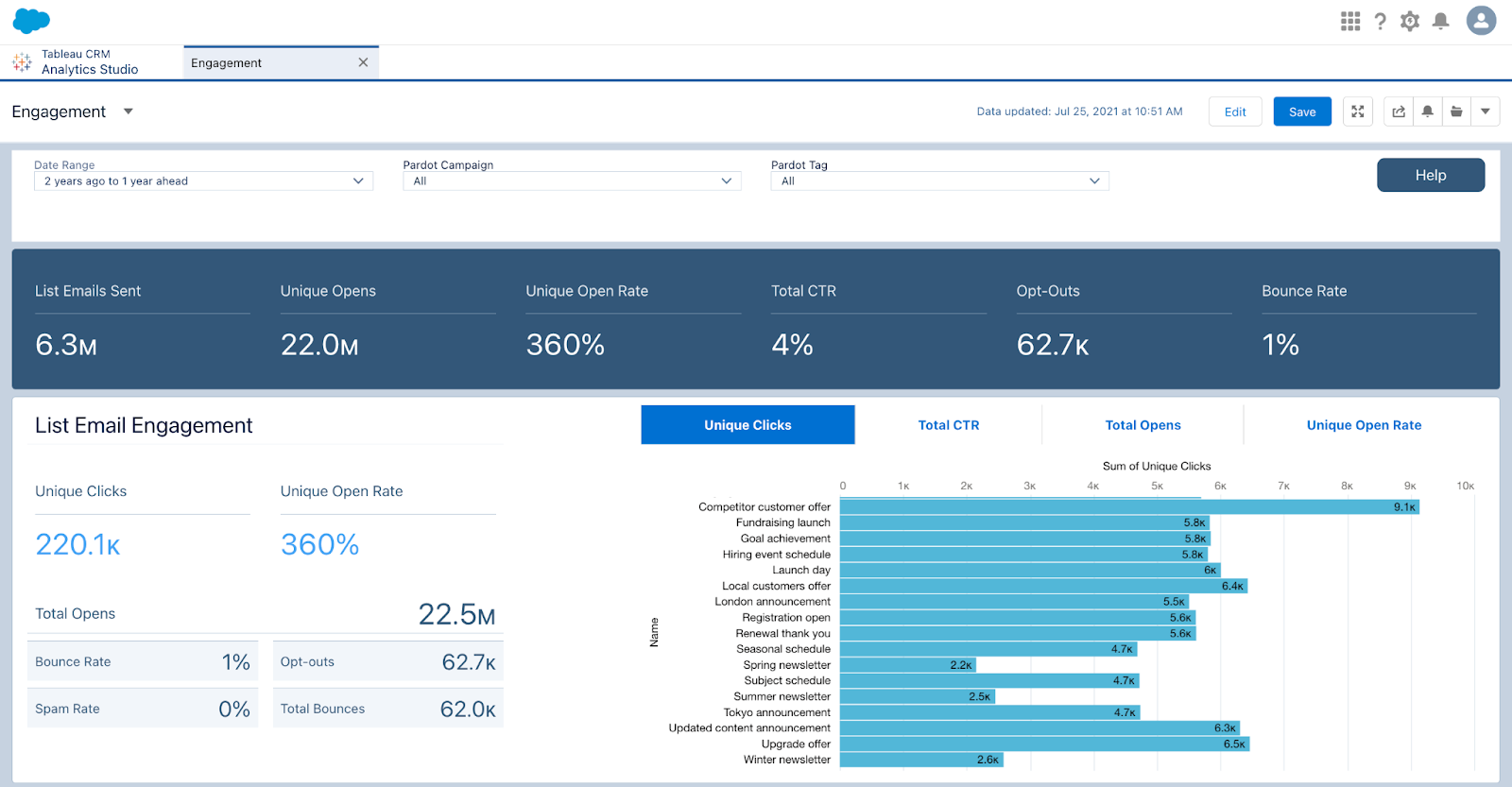
Example: See all email engagement in a fiscal year

Dashboard

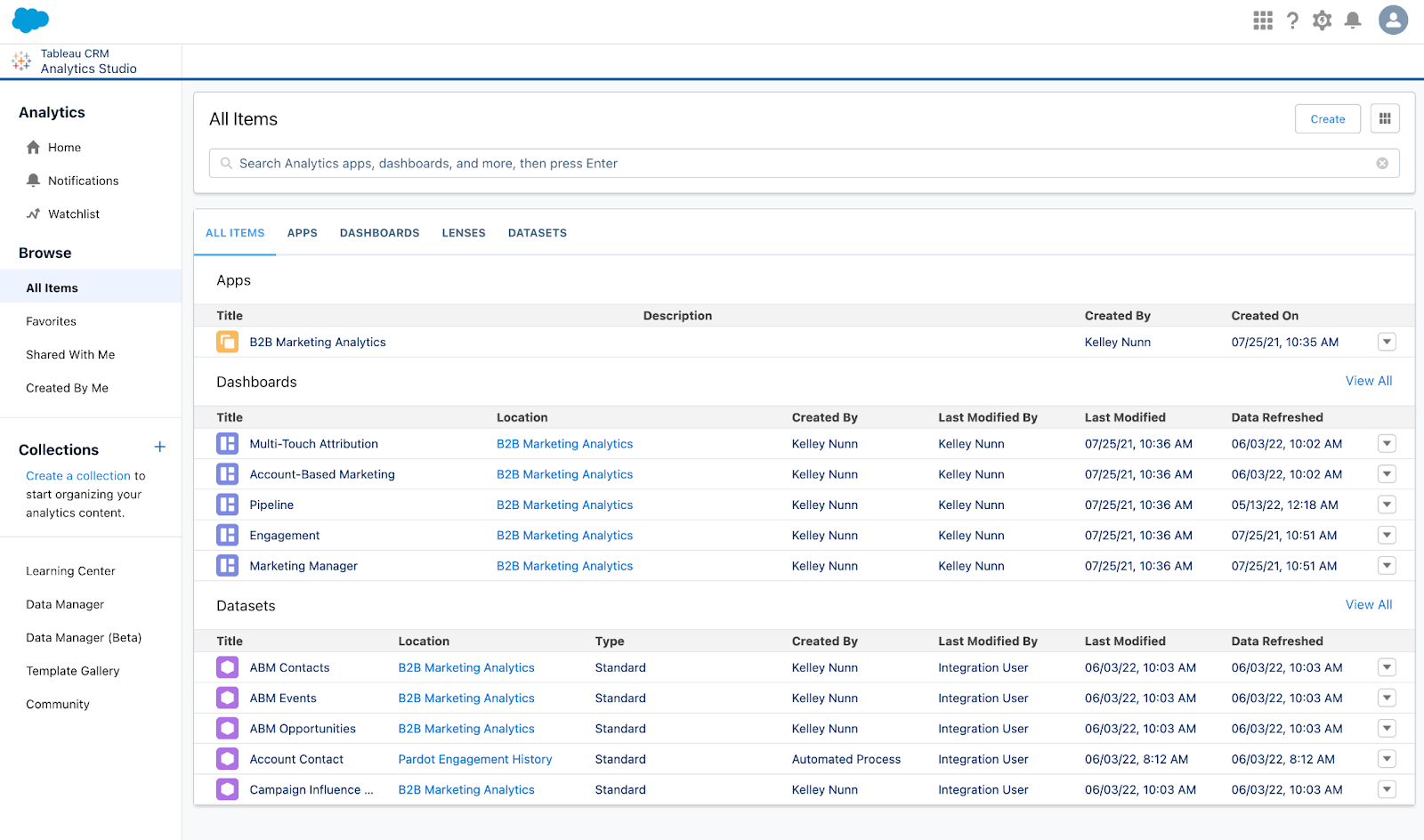
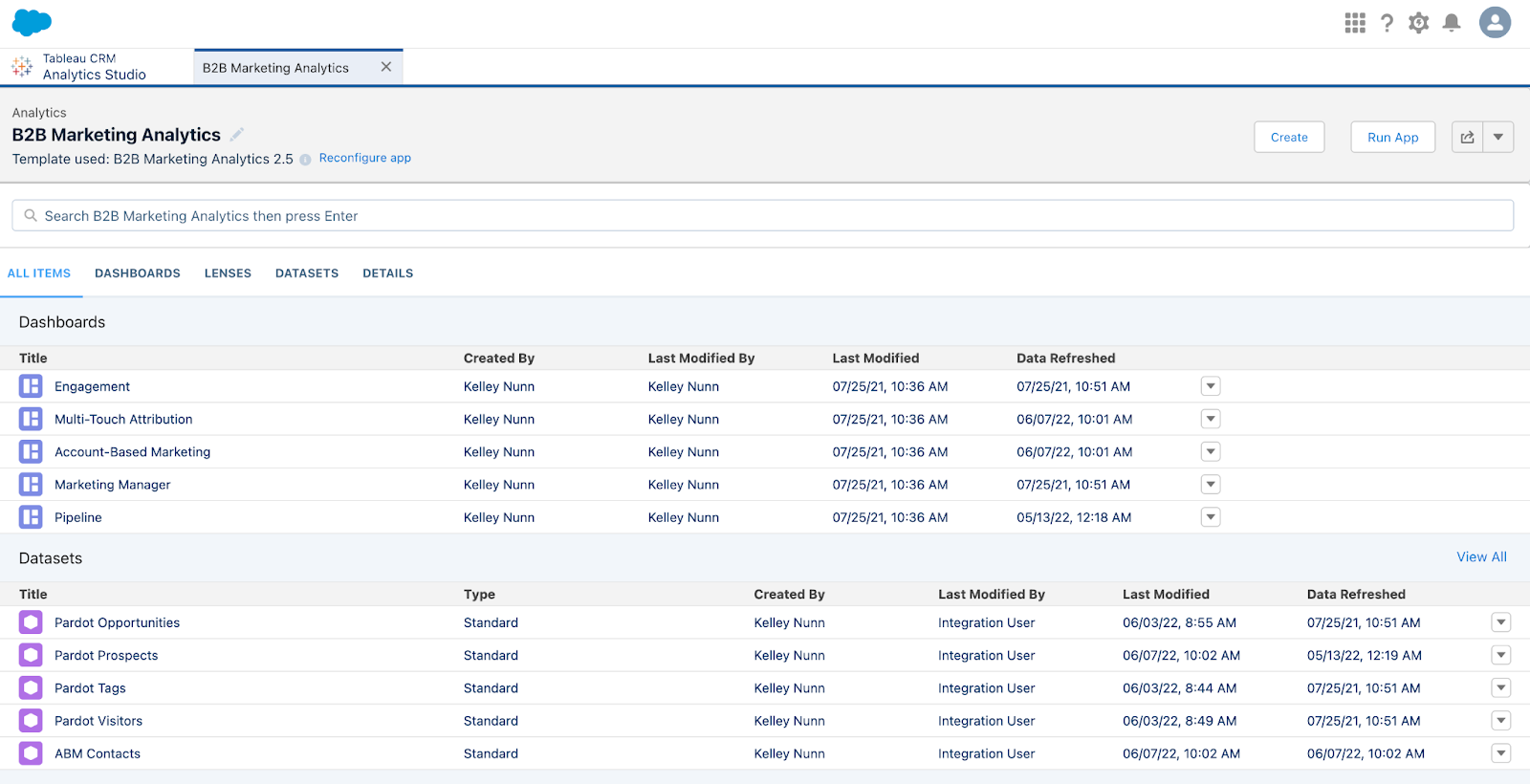
A Dashboard in B2BMA is a curated set of charts, metrics, and tables based on the filtered data from one or more lenses. These are typically designed to be used by a specific audience (e.g. Marketing & Sales Leadership). You’ll get these five dashboards out-of-the-box:

Navigation: CRM Analytics App  > All Items > Dashboards

Pipeline Dashboard

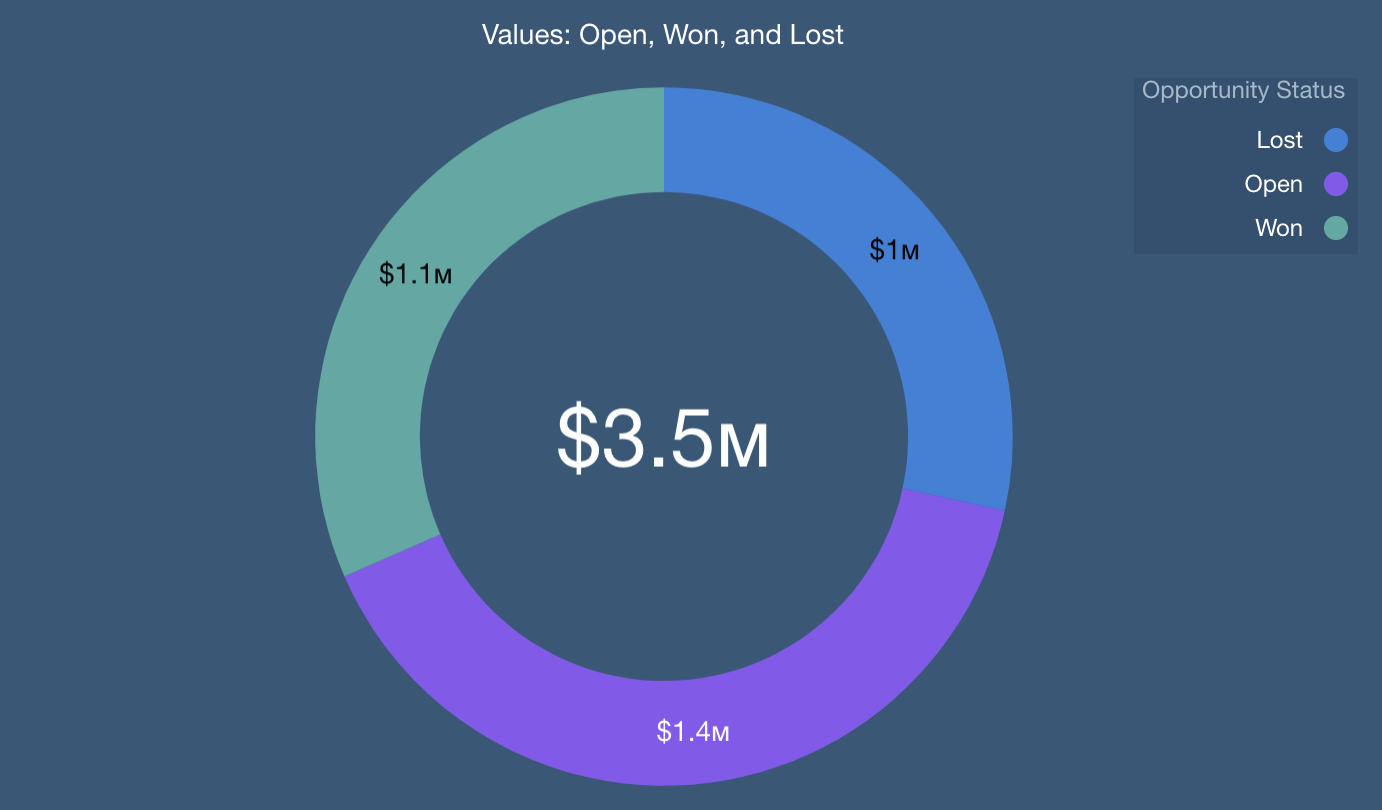
Offers you a view of your sales funnel from Visitor to Prospect to Opportunity (Won/Lost). You’ll see the following metrics:

  • Visitors
  • Prospects
  • Marketing Qualified Leads (MQLs)
  • Opportunities (Open and Closed)
  • Velocity metrics

Engagement Dashboard

Offers a comprehensive view of your Account Engagement assets (think: forms, landing pages, emails, etc.) and how they’re performing and influencing your pipeline. You’ll see engagement metrics (opens, clicks, CTR, submissions, submission rate, etc.)

Marketing Manager

This is a combination of the previous two dashboards (Pipeline + Engagement) allowing you to see the overall performance and influence of your campaigns. You’ll see the following metrics:

  • Marketing Asset Engagement
  • Pipeline Deals
  • Revenue per Campaign

Account-Based Marketing

You’ve likely heard of ABM before — but did you know there was a B2BMA dashboard built specifically for that purpose? 

This dashboard monitors your ABM campaign performance and helps you take a deeper look at how Contacts and Opportunities from a specific Account are engaging with your marketing assets. You’ll see the following metrics:

  • Account details
  • Pipeline by Account
  • Revenue win percentage
  • Stage value by Account

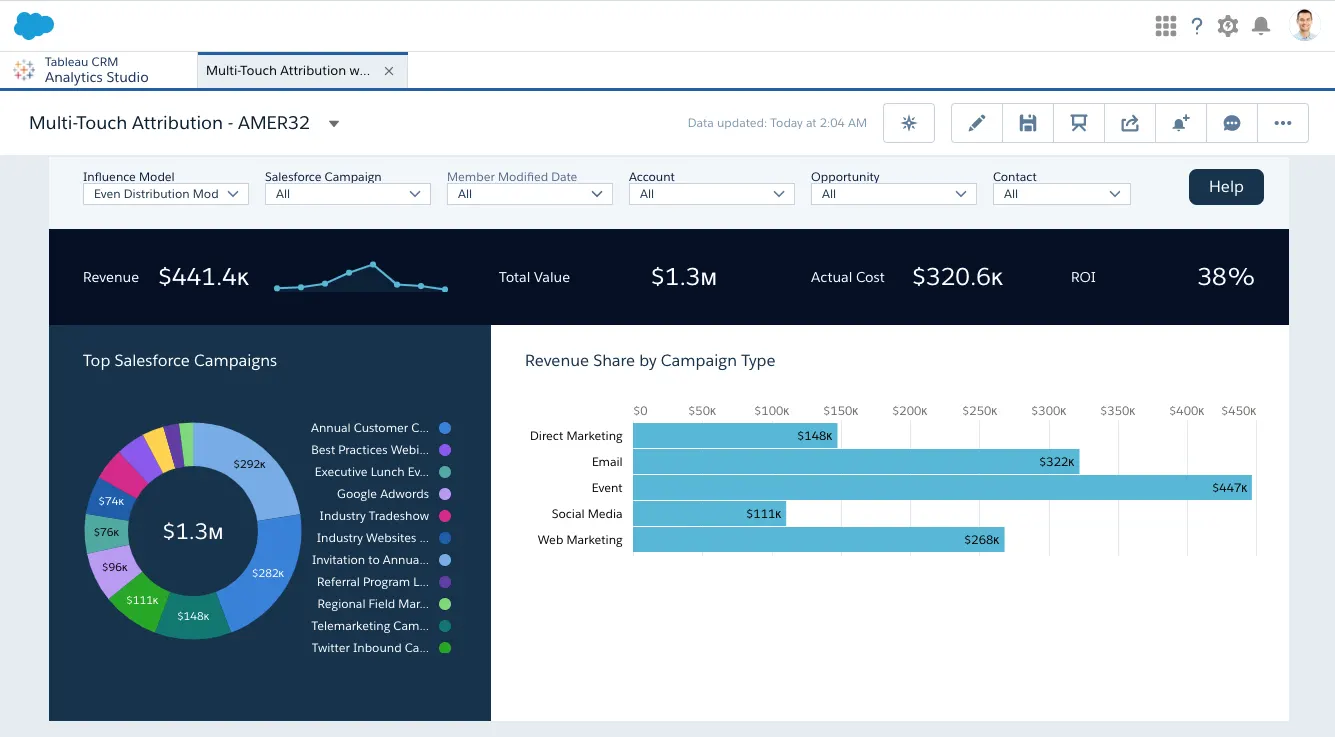
Multi-Touch Attribution Dashboard

This dashboard shows you how influential each of your marketing campaigns are during each stage of the sales lifecycle. It offers you three different attribution models to choose from: First Touch, Last Touch, and Even Distribution.

Within this dashboard, you’ll see these metrics:

  • Revenue
  • Total Value
  • Cost
  • ROI
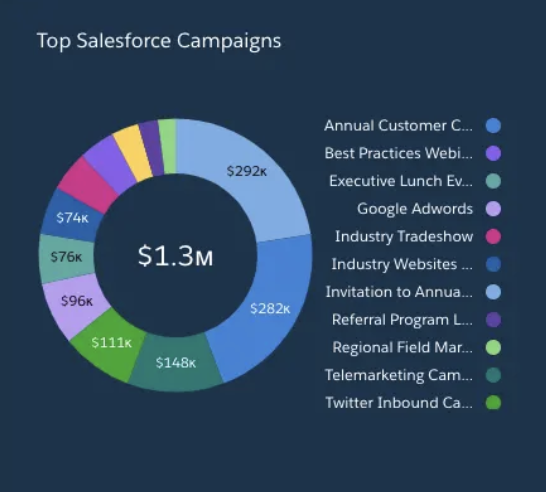
  • Top Campaigns
  • Revenue by Channel

Example: Multi-Touch Attribution Dashboard with Even Distribution (see screenshot below)

App

A CRM Analytics (B2BMA) App contains dashboards, lenses, and datasets in any combination that makes sense for sharing your data analysis with colleagues. Apps are like folders — they let you organize your data projects and control sharing across your team.

The included apps depend on your specific licenses. 

Navigation: CRM Analytics App > All Items > Apps

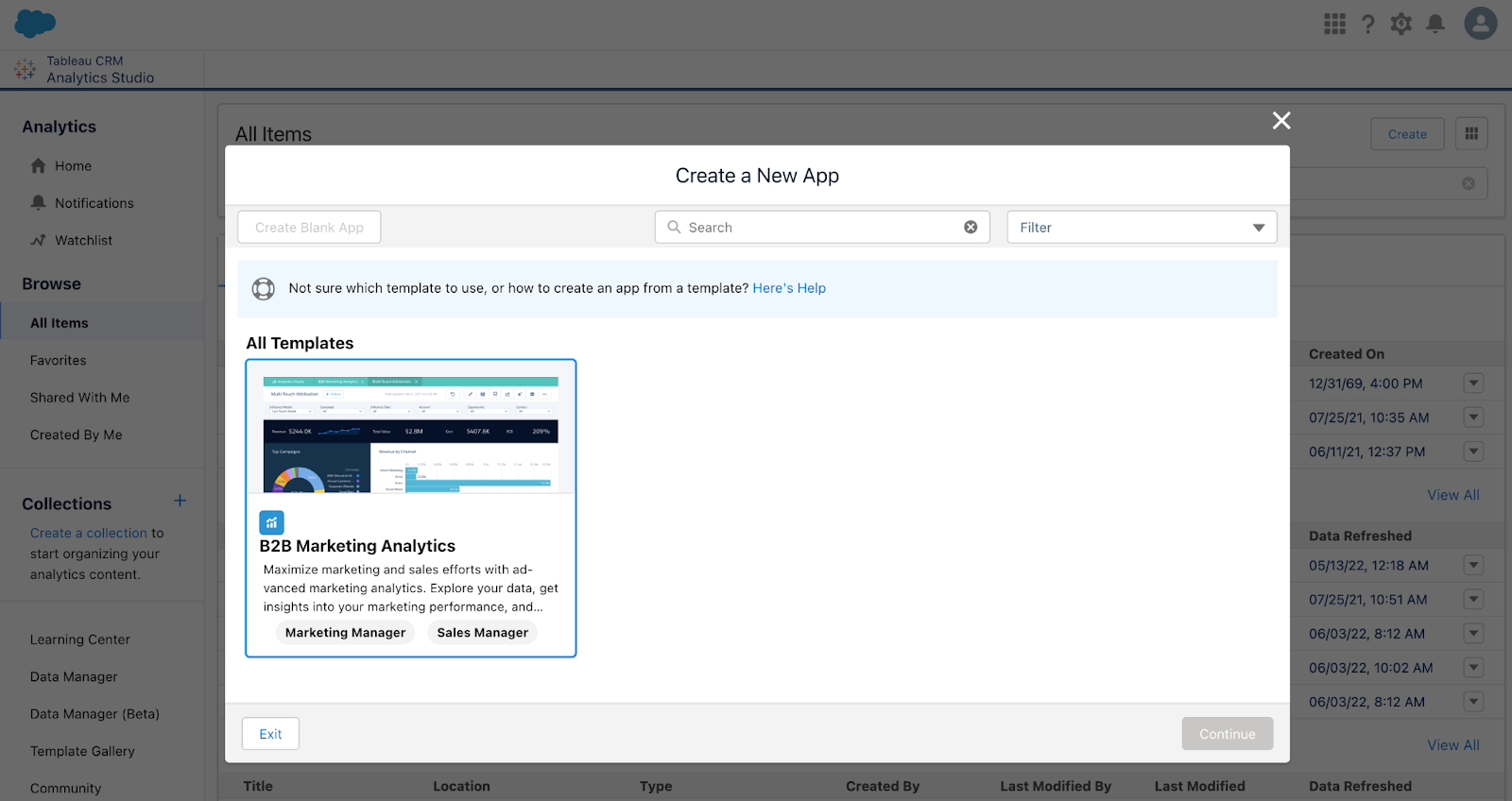
Template

A Template is a framework for analytics apps that comes preset with KPIs and data visualizations. 

Navigation: CRM Analytics > “Create” > “App”

Functional terminology

Faceting

When Faceting within a dashboard, you can select part of a graphic, and the rest of the metrics on the dashboard filter by that selection.

Example: In “Revenue Share by Campaign Type”, click on “Web Marketing”

The dashboard will update to show to “Web Marketing” Salesforce Campaigns

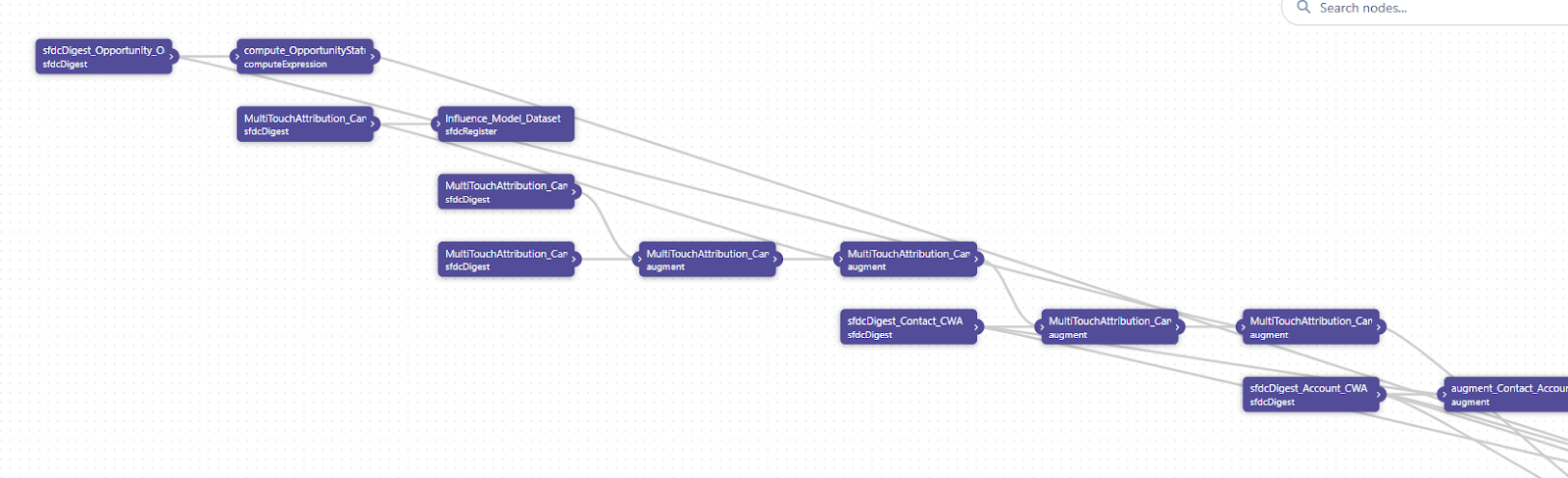
Data Flow

A Data Flow is a process that combines and summarizes several objects into datasets.

Examples: 

  • Connecting your Opportunities to your Accounts
  • Modifying or creating datasets requires customization

Navigation: CRM Analytics > Data Manager > Data Flows & Recipes > Data Flows

Metric

A Metric is a quantitative value, such as revenue or exchange rate. You can “do math” on measures.

Example: Calculating total revenue

Dimension

A Dimension is a qualitative value that’s useful for grouping and filtering your data.

Example: Region, product name, model number, or Opportunity Status

Group

A Group is a collection of data based on a specific dimension.

Example: Product name or account.

Access and navigation within B2BMA

How do I get a license?

Access to B2B Marketing Analytics is dictated by the number of licenses you have. To check your licenses, go to Setup > “Company Information” via the Quick Find box > Scroll down to “Permission Set Licenses” and look for “B2B Marketing Analytics”.

Where do I find it?

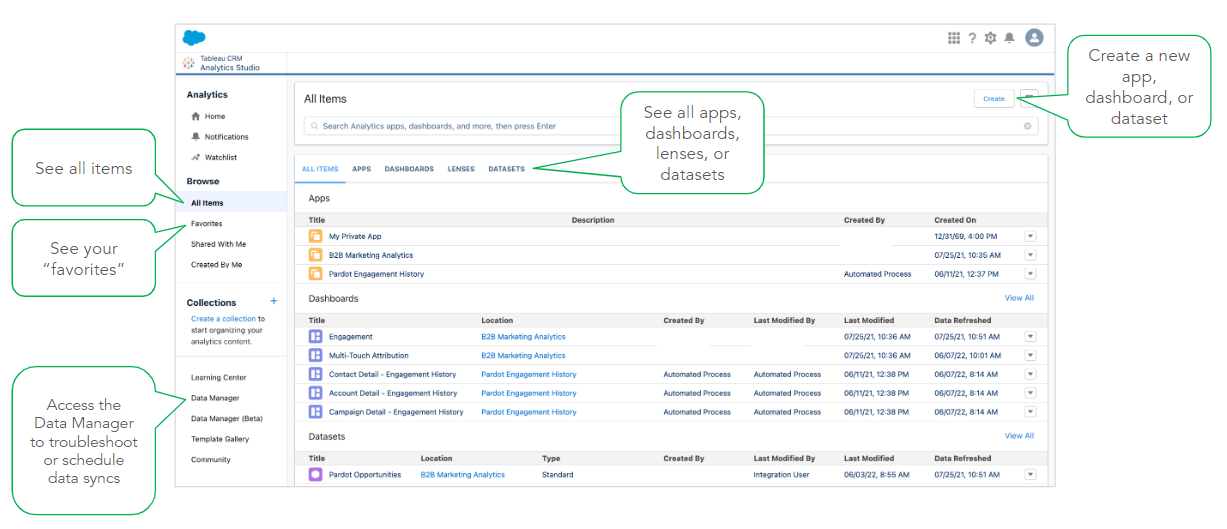
Access the Analytics Studio App by clicking the App Launcher and typing in “Analytics Studio.” Select “All Items” in the sidebar under “Browse,” then click “B2BMA Analytics” under “Apps.” Open the default dashboards and start exploring them

How to navigate B2BMA

Considerations for default B2BMA dashboards

The default dashboards are designed for a general audience, so they may need to be customized to suit your organization 

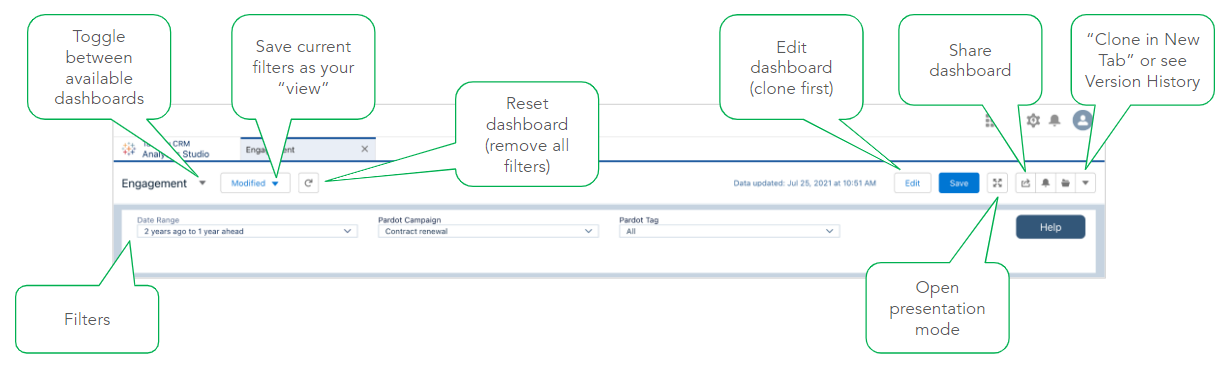
We don’t recommend editing or saving over the default dashboards. Instead, make a copy of the dashboard by clicking the “Clone in New Tab” option. Salesforce makes regular updates to the default dashboards, which will overwrite any changes you have made (only when you choose to “reconfigure” the app).

Reach out to Sercante with any questions regarding B2BMA customization capabilities.

Exploring and sharing B2BMA dashboards and datasets

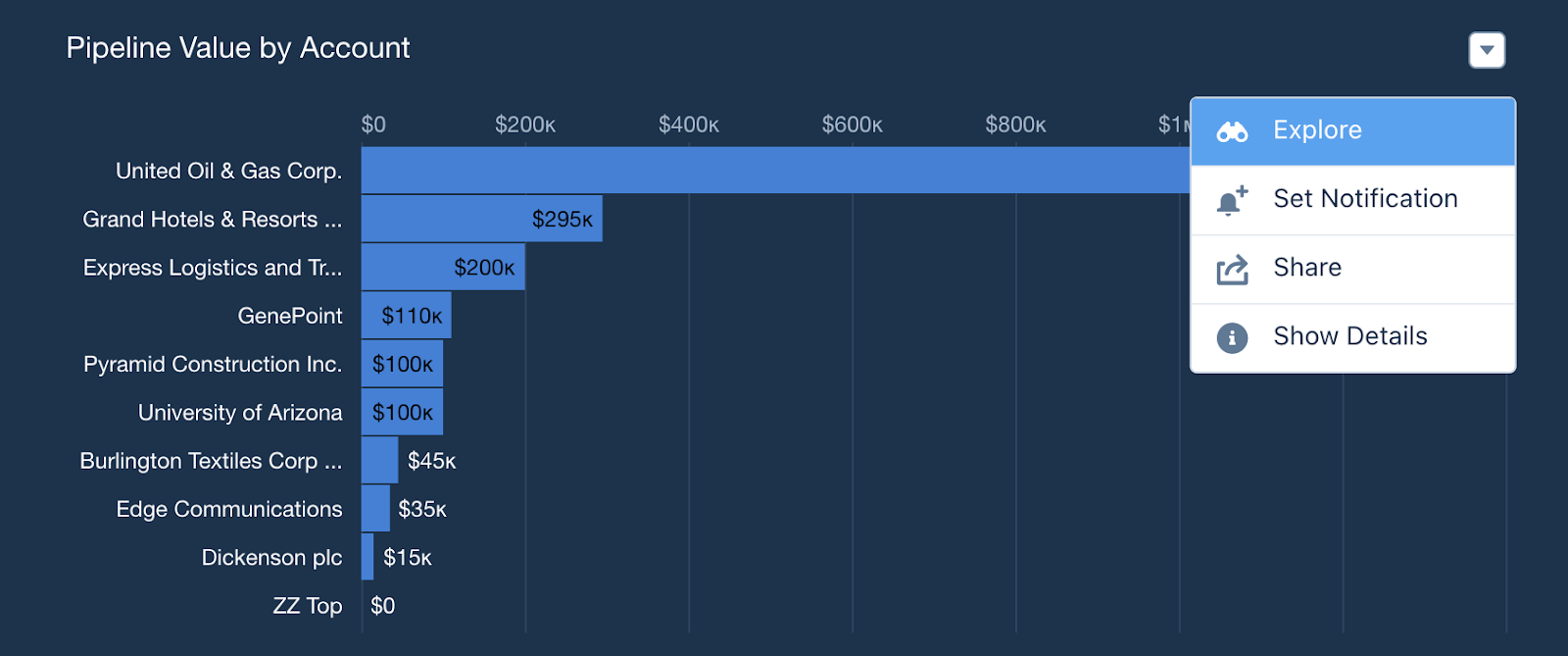
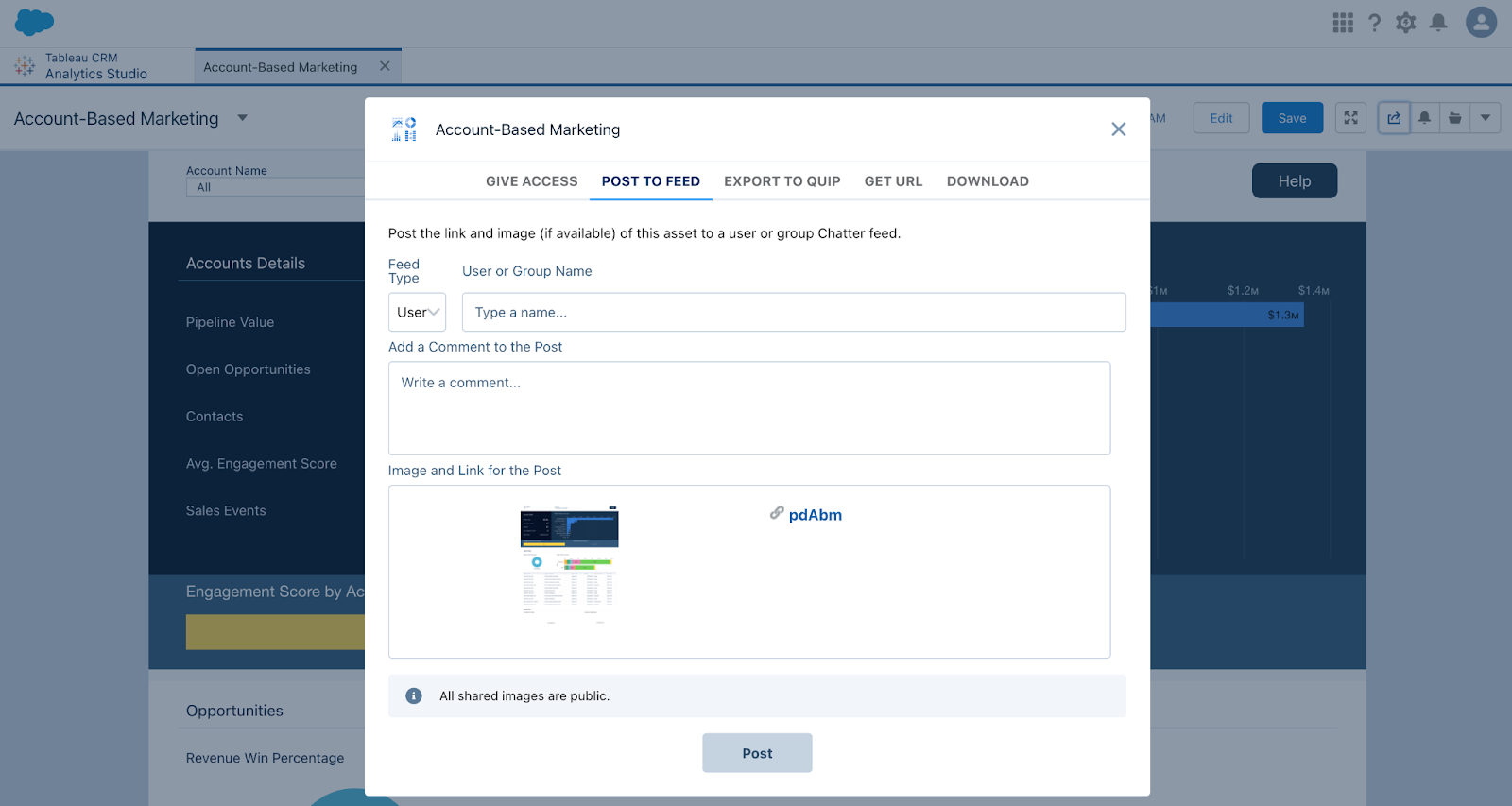
Within B2BMA, you can dive deep into the data using “Explore” functionality, viewing different lenses and reviewing the datasets, fields and filters. You can also share dashboards, giving access to critical team members, post the dashboards to feeds, export them or download them.

Exploring

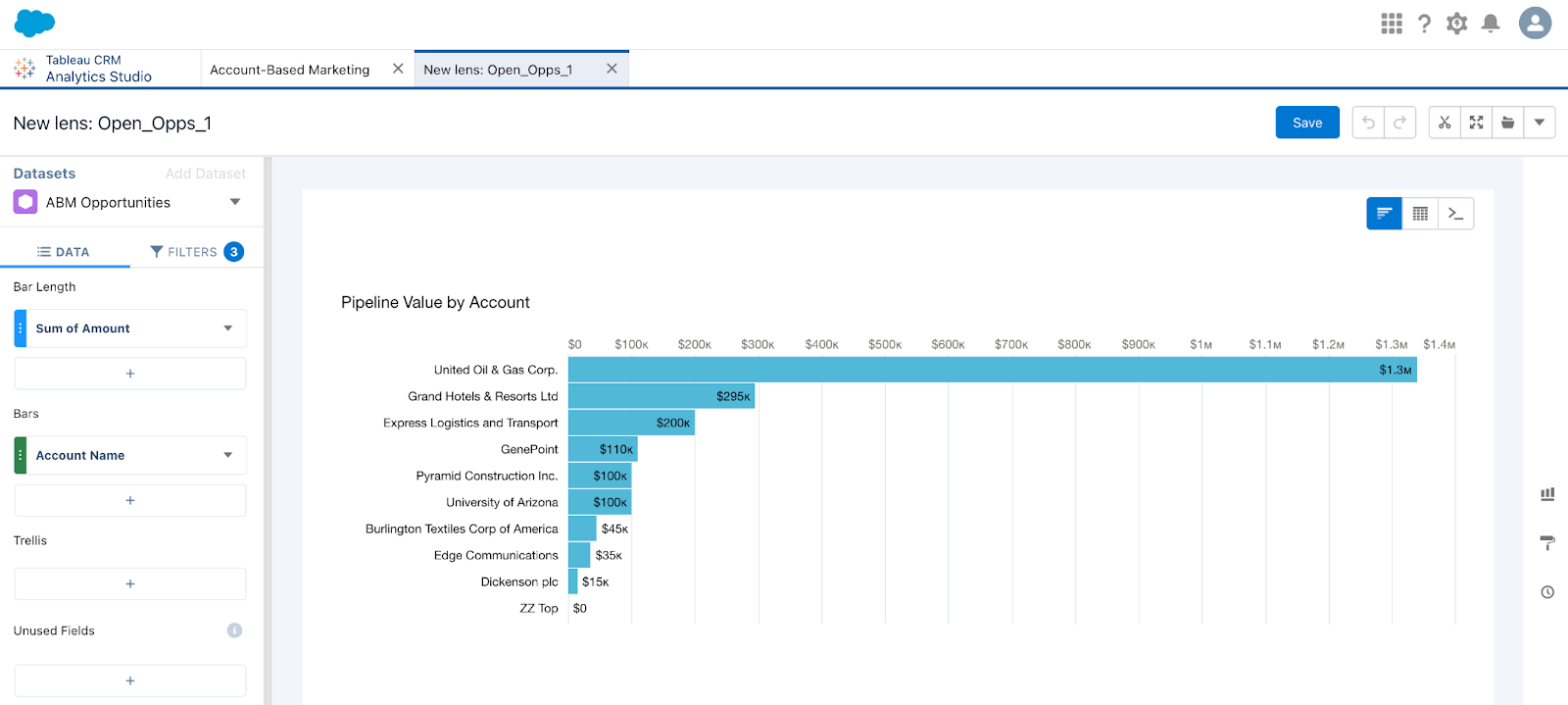
Want to know more about the data behind the chart? Click “Explore” to open a copy of the lens and review the datasets, fields, and filters. You can switch the visualization to a table view

Note: Not all filters will be shown here – click the “query mode” button to see all details

Sharing

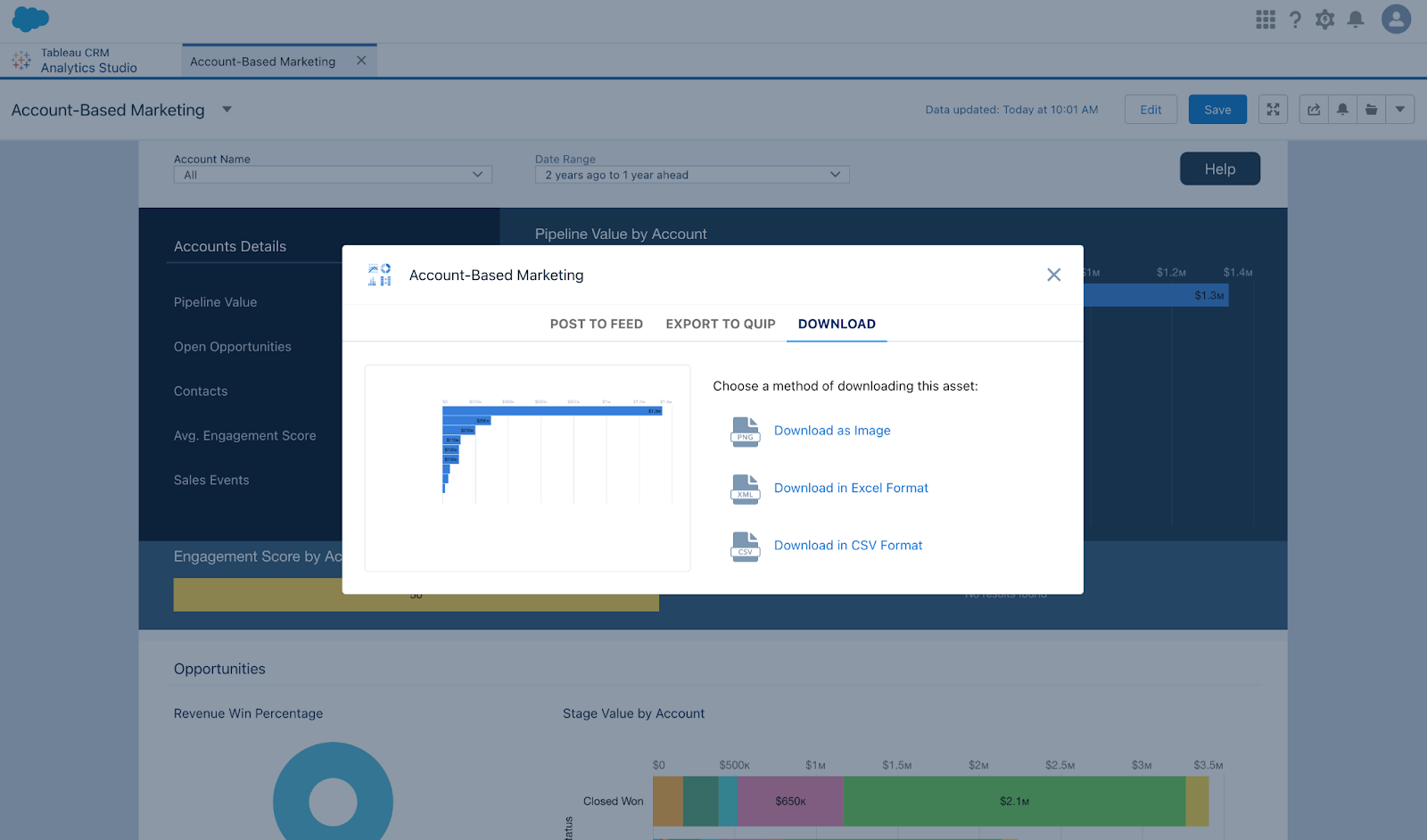
Clicking the “Share” button at the dashboard level gives you:

  • Give access – Showing who has access to the dashboard
  • Post to a Chatter feed
  • Export to quip
  • Get URL – only users with access to the dashboard can view the link
  • Download – download an image of the full dashboard

Clicking the “Share” button at the lens level gives you:

  • Post to a Chatter feed
  • Export to quip
  • Download – download an image of the full dashboard or a CSV/Excel file

Adding to Lightning Pages:

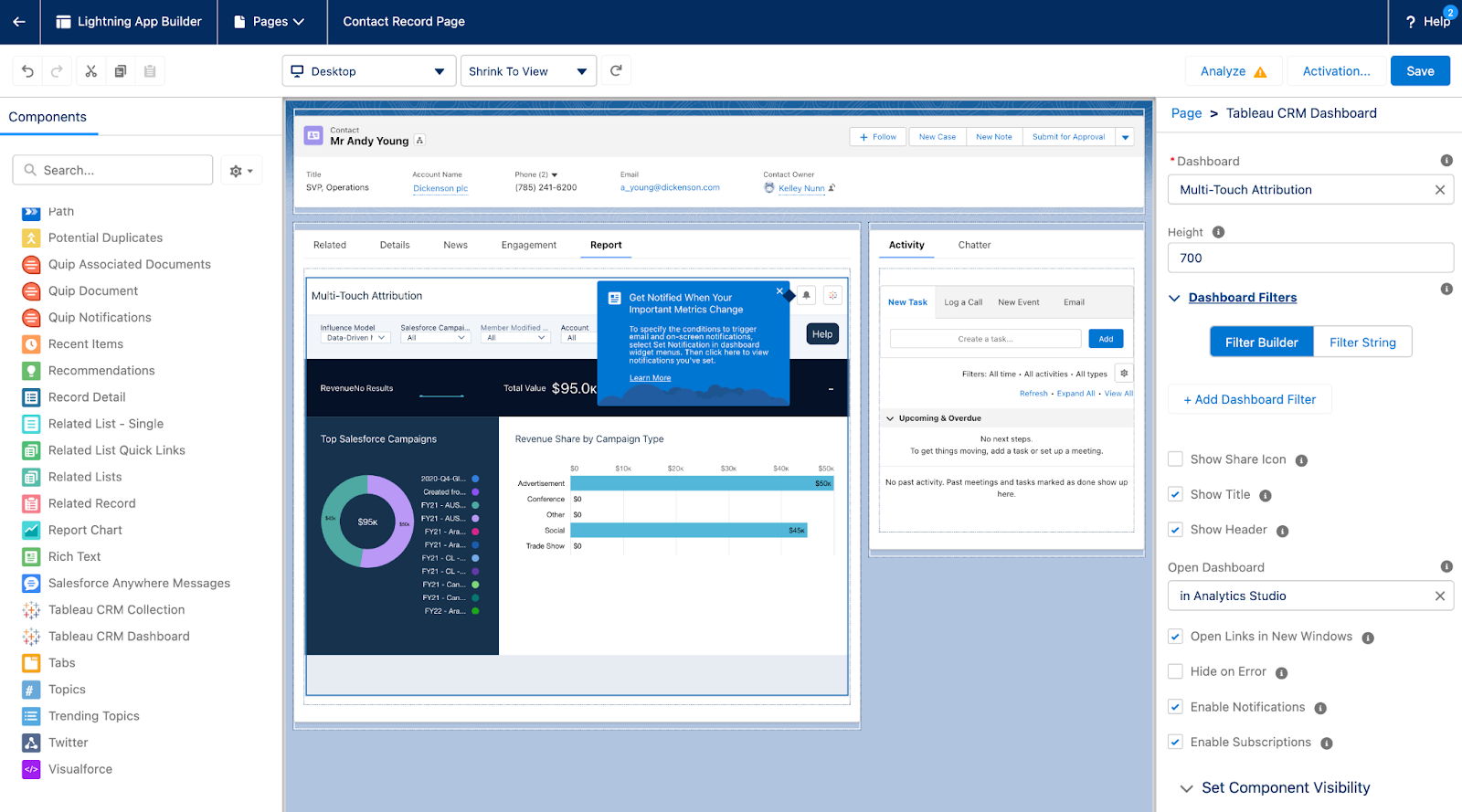
  • You can embed your B2BMA dashboards in Lightning Record Pages in SFDC
    • Use the “Tableau CRM Dashboard” component
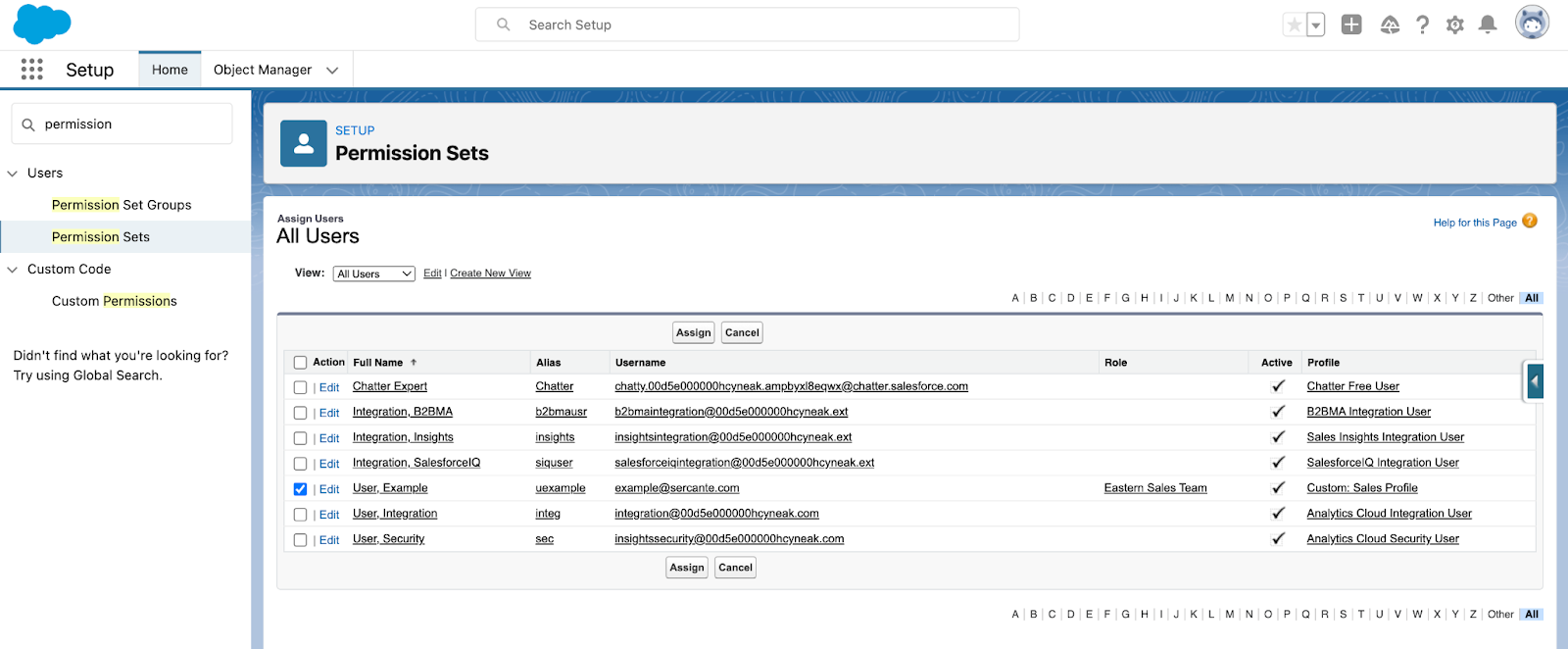
  • Only users with the B2B Marketing Analytics permission set assigned will be able to view the embedded dashboard

Ok – I understand everything else. Now how do I make updates to B2BMA?

B2BMA updates become available on the regular SFDC release schedule.

How do I know if there’s an update?

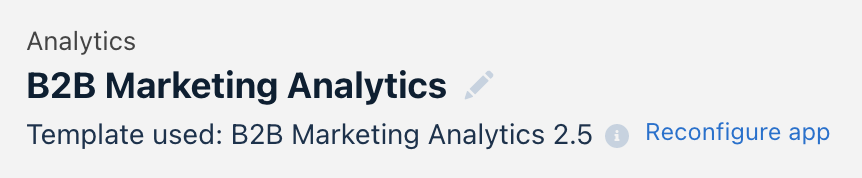
  • If an update is available, you’ll see the “Reconfigure app” option when you open the B2B Marketing Analytics app
    • Click “Reconfigure app” and go through the steps to update
  • The updates aren’t required – you don’t have to do them if you don’t want to
    • Click the info icon to see what new features are available so you can determine if it’s worth upgrading

Engagement History Dashboards

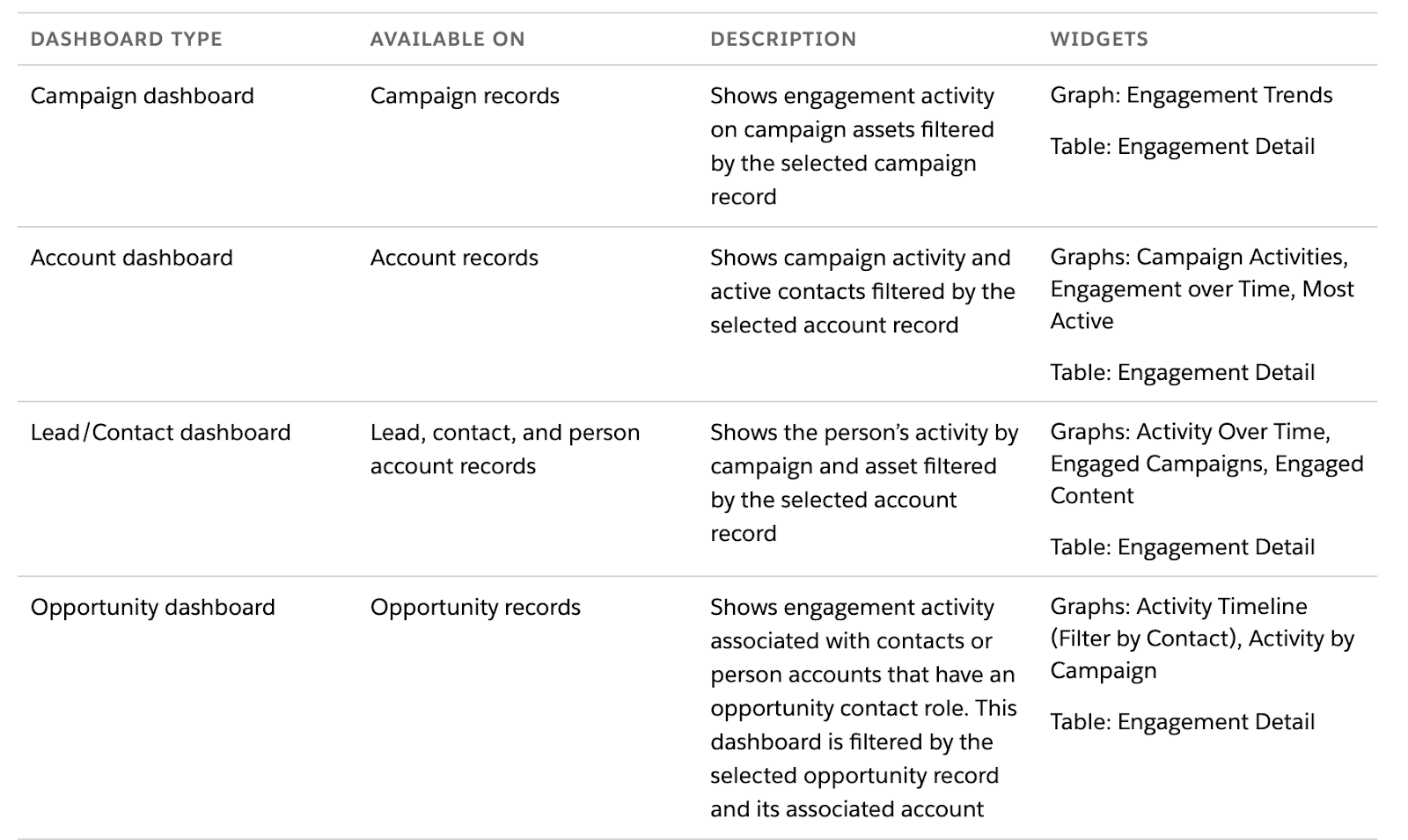
Engagement History Dashboards looks at your various marketing assets (forms, landing pages, emails, etc.) and how they are performing. They also look at how they contribute to your opportunity and sales pipeline.  

Engagement History Dashboards are powered by CRM Analytics. 

They allow you to:

  • Visualize engagement data on a variety of records
  • Show slightly different data based on the object (e.g. Opportunities, etc.)
  • Filter to show data relevant to the specific record that’s being viewed

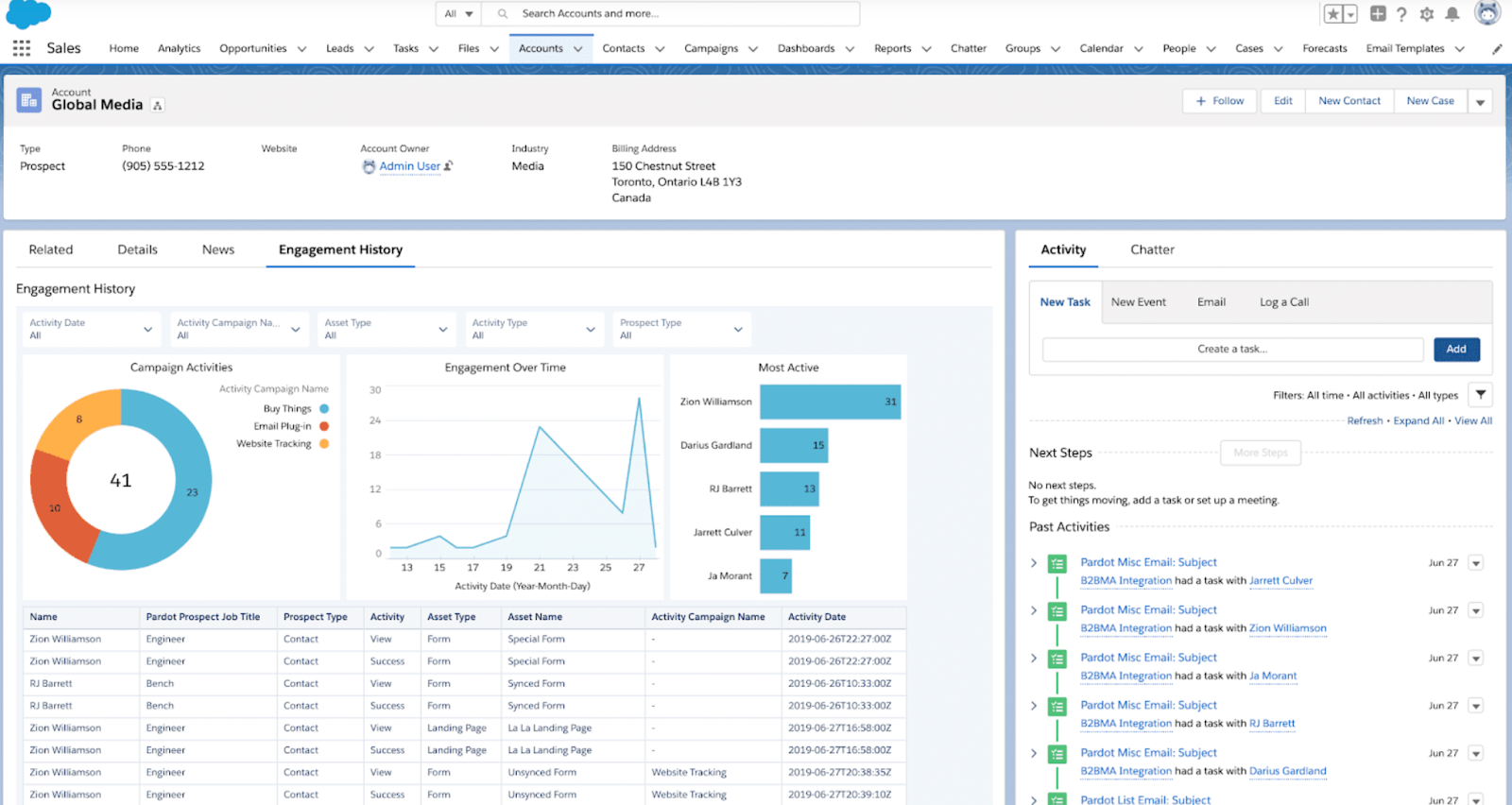
What does this look like on the Account object?

On a given Account, click the “Engagement” tab to see the most active Contacts and the Campaigns they’re engaging with. Use the filters to apply a date range, choose an asset type, etc.

Engagement History Dashboards on Page Layouts

At this point, you’ve probably added Engagement History Dashboards to these Page Layouts:

  • Campaigns
  • Accounts
  • Contacts
  • Opportunities

Only users that have been assigned the “Analytics View Only Embedded App” permission set can see these dashboards. Your Account Engagement edition determines how many licenses are available.

Considerations for Engagement History Dashboards

Here are a few things you should keep in mind about these dashboards:

  • The “Analytics View Only Embedded App” gives users access to Engagement History Dashboards, but not Analytics Studio/B2B Marketing Analytics
    • We recommend assigning this permission set to your Sales & Marketing leads
  • Engagement History Dashboards aren’t supported in Internet Explorer 11
  • Dashboards embedded on Leads, Contacts, or Person Accounts can only show data for one Business Unit at a time (delete if your client doesn’t have multiple MCAE BUs)
  • The Opportunity dashboard relies on Opportunity Contact Roles and dates
    • If data is missing from the Opportunity dashboard, it’s usually because no Opportunity Contact Roles are assigned
  • For emails sent through Engagement Studio, the Account Engagement Engagement History dataset includes send data only for programs that were created after December 14, 2018

Learn more about B2B Marketing Analytics

B2BMA is an incredibly valuable CRM analytics tool to help improve your visibility into your marketing and sales data, including many out-of-the-box dashboards built for a variety of stakeholders in your business.

Here at Sercante, we’re a huge fan of the Salesforce Trailblazer community. We highly recommend bookmarking the B2B Marketing Analytics Implementation Guide – a comprehensive resource that includes dataset information, field definitions, etc.

You should also check out these blog posts to learn more about B2BMA and what it can do for you:

Have any B2BMA roadblocks you’re looking to solve? Reach out to the team at Sercante or tell us about it in the comments.

The marketing magician has many tricks in the Marketing Cloud Account Engagement (Pardot) toolkit. One of those magical tools is the Pardot custom redirect. 

What makes a Pardot custom redirect special? It allows you to segment and get the right data at the right time as your customers and potential customers interact with your marketing assets. This in turn allows you to better target interests and hone in on what’s working and what’s just cluttering your audience’s feeds. 

So, what can you get out of using Pardot custom redirects? Read on to find out!

Pardot custom redirect uses

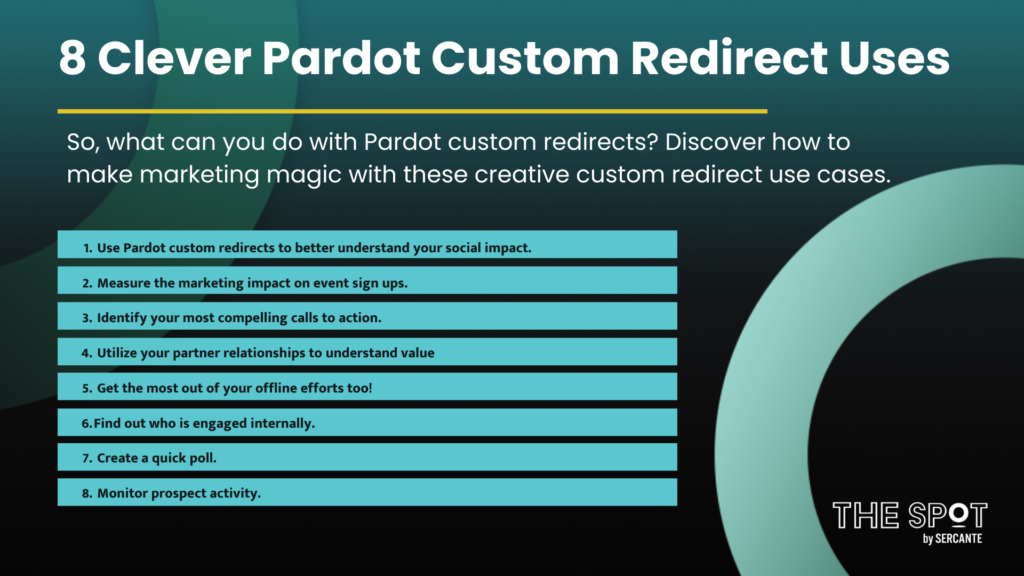
Use Pardot Custom Redirects to Better Understand Your Social Impact

Every social media channel contributes a unique insight about your offerings to your audience. When promoting content through social media channels, it’s important to make sure you measure what your audience reaction is to ensure your message is effective and not ignored (or worse, annoys your target audience).

If you’re publishing the same content to multiple platforms, you should create separate custom redirects for each platform. Not only will you see which of your social sites receives the most traffic, but patterns of engagement will emerge and help you draw conclusions about the specific interests of each audience.

Measure the Marketing Impact on Event Sign Ups

Every marketing department wants to show the impact they are making. One of the key drivers of revenue is based around events. It’s important to place custom redirects behind any event promotions created by marketing. 

You should also give your sales reps custom redirects to use when they pitch the event as well. Better yet, create separate custom redirects for each channel that you use to promote the event for more insight into what’s working and what’s not.

Identify Your Most Compelling Calls to Action

There is a lot of buzz around the importance of “calls to action.” But how do you know which are most impactful? 

The answer: a custom redirect! You can “play” with wording, placement and who clicked (did you get a response from your intentional target audience or someone else?). Now you can measure and make adjustments that will help ensure the right action from the right audience.

Utilize Your Partner Relationships to Understand Value

Want to get even more reach for very little investment? Use custom redirects with partners that show how their site is impacting traffic to your site. This information can help you make decisions about the value of the partnership and where you should invest more.

Get The Most Out of Your Offline Efforts Too!

While it might seem obvious, the value of creating custom redirects that are specific to written and offline content is critical. An engaged audience will interact with your content and their next step will be to visit your site. 

Knowing which pieces generated the most interest (or sales in the long haul) helps you make the most of your marketing budget and determine what efforts are worth investing in. Offline is expensive… do you know what it’s doing for your business? Now you can.

Find Out Who is Engaged Internally

Most businesses send important information to their employees. But, do you know who actually reads those communications? Are they effective? Is your desired message being received? Are there patterns based on subject? Or frequency? Or send time? 

We often consider these questions when we are dealing with our external audiences, but they are just as critical internally. Consider custom redirects as another tool that human resources, marketing or any department internally can use to ensure your company’s internal resources are engaged as well.

Check out this blog post for more creative ways to use Pardot to increase employee engagement.

Get Creative with Pardot Custom Redirects: Create a Quick Poll

How can you get quick input from your audience without a full online survey? Custom redirects might be the answer. 

The process is simple. Create custom redirects to the separate links, buttons, or images used for voting and they will automatically record the clicks on each link. 

A great example of this would be something like a Net Promoter score. You can create links with one question (example: Would you recommend our company/product/service to someone else?). 

From the reporting side, you could now segment between “Yes” (raving fan) and “No” (potential detractor) answers. Then you can address any concerns from those who need follow up or are ready to promote your brand for you!

Monitor Prospect Activity

Ever wished you could be alerted to a certain prospect’s activity on your site? Imagine you’ve had a prospect close to close for over a month now, but they want time and space to make their own decision. Wouldn’t it be nice to know when that person gets serious and looks at your pricing options? 

Custom redirects allow you to track such activity in a few different ways. For example, If using email to contact prospects, create custom redirects to monitor prospect clicks. 

Using a service like Account Engagement (Pardot)? You can create an automation to notify your team that an action has been taken by a prospect, allowing you to be super responsive to high probability prospect activity. Strike while the iron is hot!

When you’re ready to level-up your sales team response skills, check out Salesforce Engage. Here’s a blog post that walks you through the tool.

Experience the Magical Insights Pardot Custom Redirects Can Offer

The most important thing when preparing any marketing effort is to determine how you will measure success. Custom redirects allow you to effectively collect relevant and timely data on who did what and why. 

Used correctly, they can greatly improve the efficacy of your marketing activities and help you “prove” what you already know: Effective marketing strategies work. Even beyond that (and maybe more importantly) understanding what’s not working and being able to “fail fast” and move on to more impactful actions.

Need help understanding the full impact of your marketing efforts? Here’s a blog post that provides insight into proving the impact of your marketing efforts through connected campaigns. And if you’re still feeling lost, you can reach out to the Sercante team for help.

If you’re like me, you hate spending half your life looking for things that have been filed already. I have reports in CRM Analytics and Salesforce, and it feels like a waste of time to have to look in two places. 

I also hate having to “guess” what previous reports/ dashboard might already exist before I add to the fray by creating a new one. On top of that, in Salesforce I have to use up to 2 navigation tabs if I frequent both Reports and Dashboards often, using up valuable visual real estate…

Well, your “search” for a solution is over! In the Salesforce Winter ‘23 Release, you now have access to a really cool way to see ALL your reports and dashboards through a single pane of glass.

Introducing… The Unified Experience For Analytics Home.

unified analytics view

How will Unified Analytics change my life?

While it might not be life altering, the Unified Analytics experience is magical on many levels and will give you back precious moments throughout your day! 

How, you ask? A few examples:

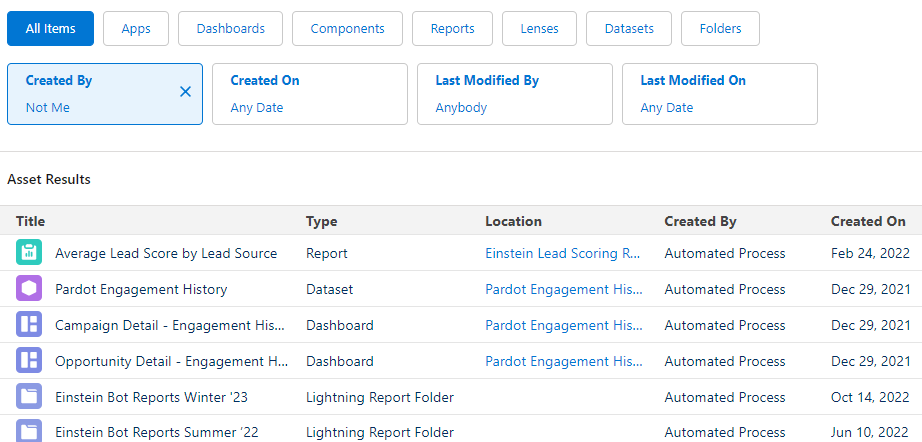
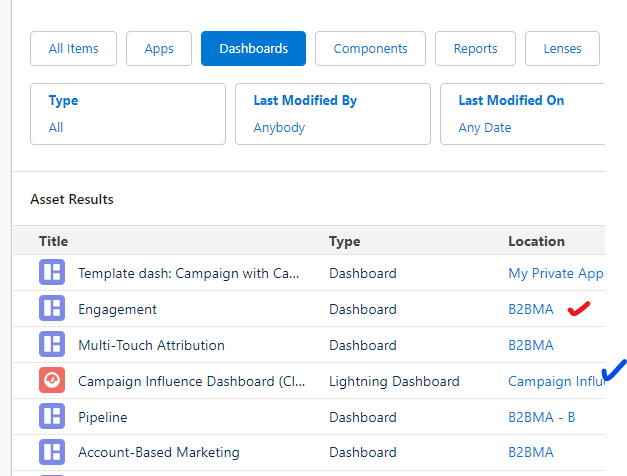
  1. Filter by Dashboard or reports (or lenses or Apps or Components) and see BOTH Salesforce AND CRM Analytics assets
unified analytics dashboard
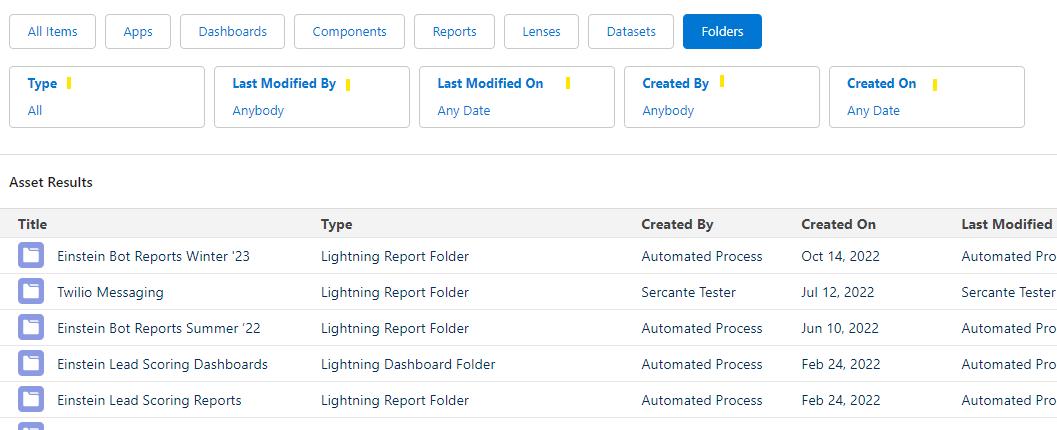
  1. Explore all reporting assets by date, type, modified date, created date creator
unified analytics folders
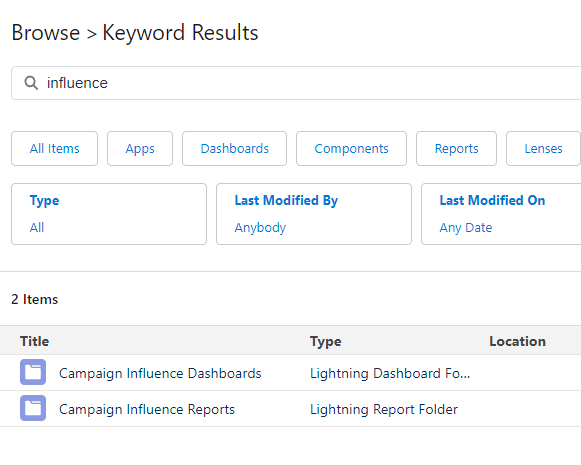
  1. Search across all analytics assets to find what you need with a single search
unified analytics keyword results

Turning on Unified Analytics

You can turn on Unified Analytics in a few simple steps:

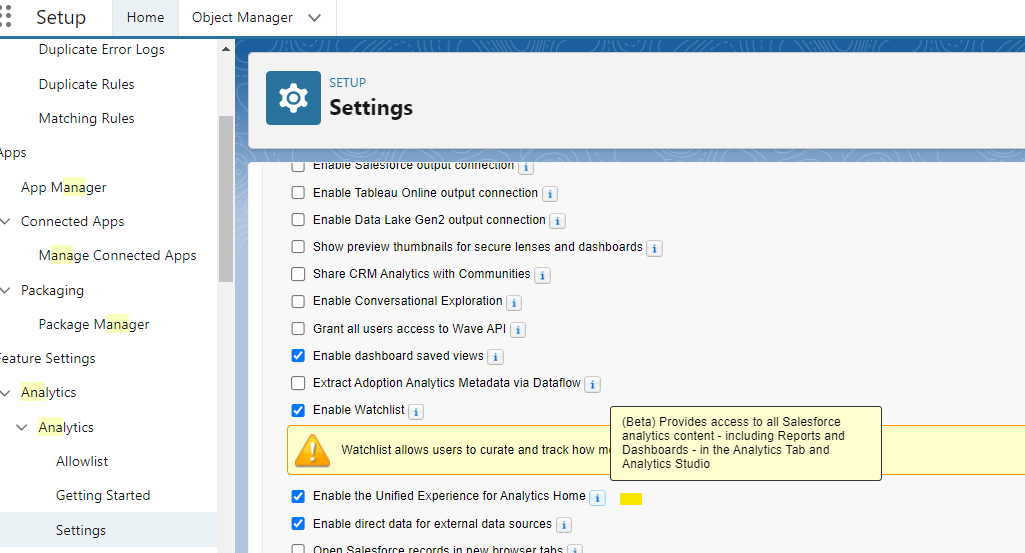
  1. Go To Setup > Analytics > Setting
  2. Check the box for “Enable the Unified Experience for Analytics Home”

That’s it!

home object manager

Some Important notes

  • You need an Analytics CRM license to use this new feature
  • Once enabled, the experience will be available on Salesforce apps and through the browser
  • Collections can be created or accessed from apps or through the browser

There are tons of tidbits in the Winter ‘23 release. This one might be small, but if your organization is one of those with lots of reporting assets (and lots of people writing reports), then this little nugget might just be the gold you’ve been looking for. 

Onto the next adventure.

Learn more about Unified Analytics and Salesforce reporting

How often do your Salesforce and marketing platform admins talk to each other? 

  • Very little
  • Not at all
  • Only when things go wrong  

If you selected any of the above, you’re not alone. 

I’m here to tell you, no matter how awkward or challenging starting that conversation may be, it’s one that needs to happen (and continue) sooner rather than later. Having a solid bridge between Salesforce marketing and Sales Cloud admins will (I promise!) make both your lives so much easier. Here’s why…

Benefits of marketing and Salesforce admins working together 

#1 Keep your data clean in both places

Whether you’re using Marketing Cloud Account Engagement (Pardot) or the OG Marketing Cloud, the way data flows between your marketing automation platform and Salesforce was probably one of the reasons you purchased the tool. So, let’s keep it flowing. 

By working together you can avoid the following pitfalls:

  • Duplicate fields
  • Data being overwritten 
  • Sync errors (Marketing Cloud Account Engagement (Pardot)):
    • Fun fact – most common sync errors can be avoided by knowing the Salesforce set up.
      • Field values = prevents invalid picklist errors
      • Expected data = Prevents validation  rule errors
      • Field types = Prevents invalid field format errors 

If both admins are communicating, you can ensure any updates that happen are accurately reflected in both systems.

#2 Prevent loss of access for users and systems 

When marketing and Salesforce admins stop working together, systems can stop working together. 

True story, I’ve worked with clients who have seen automations stop working and users unable to access the systems and data because of updates that the other admins were not aware of — permissions, profiles, field accessibility. When these changes are not communicated, frustrations can arise and time can be wasted looking into the cause. 

Additionally, If you’re using a sandbox environment, understanding the refresh schedule can help prevent loss of work when it’s unexpectedly refreshed. 

Include both admins in conversations around any updates in either system. The changes may not affect the opposing team but it’s good to know just in case.

#3 Experience Team and Business Benefits

The above are all technical reasons why marketing and Salesforce admins should be best friends. But, we haven’t even touched on the business and team building benefits, which are huge.

Here are a few reasons why:

  • Improve productivity. Stop looking for the cause of a problem but rather plan for the update as a team.
  • You can help advocate for each other with other decision-makers. We are both on the same team and we should both want the same thing. But when one team of admins is working on something and leaves the other out, they can be left to play catch up and try and figure out what’s going on… increasing the frustration and silo.
  • Ultimately, it comes down to $$$ –  Two sets of admins working independently = Mo $ Mo time
  • Teach each other. The great thing about being an admin is that every day is a school day, we are always learning about the latest tools, security updates and new ways of doing things. Let’s share that knowledge. Get to know what the other team does and find out how you can help each other and make each other’s lives easier.

How to build relationships between Salesforce admins

So what can you do to improve or build a relationship between marketing and Salesforce admins?

  • Documentation, documentation and yes, more documentation. Having a record of changes that have been made and how that change relates to the other system will be a huge help in marketing and Salesforce admins working together. 
Tip: Using Pardot? Create a shared spreadsheet with all the Salesforce fields and note if they are synced with a Pardot field. What’s that field for? What’s the sync behavior? What are the values? Admins can then refer to this document when field changes need to be made and ensure the other admin knows if it’s going to affect them 
  • Schedule a regular sync up and use this time as a feedback loop, planning session. This can be monthly or quarterly, depending on how often changes are made. Here are some questions you can ask during these meetings:
    • What plans do each admin have for the month ahead?
    • How will this impact the other team?
    • Consideration you hadn’t thought about
    • What does each team need to do to prepare? How long will it take to get things in order? 
    • What’s not working at the moment and what can be done? 
  • Create a joint Slack, Teams, Google Hangouts channel. Whatever your choice of instant messaging channel, use it to inform admins on both sides of any upcoming changes. Use it to post reminders, questions, updates. This will become your go to place to find answers and work with your admins. 
  • Consider an overview training session of your respective platform. Does your Salesforce admin understand the impact on Marketing cloud when field visibility is changed in Salesforce? Probably not. Work with them to help them understand the implications of such changes. They simply may not know what affects the connection between Salesforce and Marketing Cloud.

Wouldn’t it just be easier to just give Marketing admins Salesforce admin access? 

Yes and no… If you’ve read our blog on Why Should Marketing Admins Have Salesforce Access?, you would have noticed a lot of very good reasons as to why marketing admins should have salesforce access. This is great if you can hand out this access but what happens when you can’t? Should each admin go their separate ways, never to speak again? Absolutely not! 

Even if you can get Salesforce access you should still be opening up communication between yourself and other Salesforce admins.

Strengthen those relationships between marketing and Salesforce admins

Creating a harmonious relationship between both marketing and Salesforce admins starts with the basics… communication and understanding for each other’s roles. When this is followed the benefits can be huge, both personally and technically. 

What tips do you have for improving the relationship between both admins? Let us know in the comments.

Sometimes the standard Campaign Influence models that come with Marketing Cloud Account Engagement (Pardot) just don’t quite fit what you are looking to measure. We recently went through the exercise of creating a Custom Model, and it wasn’t quite as straightforward as we would have liked it to be. 

To save you some ramp-up time we’ve decided to share some of the things we learned. Here they are!

Lessons Learned the Hard Way while Creating a Custom Pardot Campaign Influence Model

We went ahead and created a custom Pardot Campaign Influence model and took excellent notes so you can reap all the benefits. 

Here’s what you should know before you start your own custom Pardot Campaign Influence Model project.

Simplify your Custom Model, then nail it down

There’s a lot of calculations needed in Campaign Influence, and the last thing you want to do is build this a few times as you discover exactly what you are looking for. 

Spend some time with the business and really think about which touches you really want to measure and if having them measured will drive meaningful business value. Can you explain it in 20 seconds or less? No? Your model might be too complex.

You have 2 options for integrating your Model

The simple example Salesforce provides as part of its documentation is to have a Trigger on the CampaignInfluence object, which allows you to create your records when Salesforce creates theirs.  This example is okay for demonstrative purposes, and it avoids a lot of the complexities. 

The example also works okay if the Model that you are “watching out for” creates and deletes CampaignInfluence records at the same time you need to. Though for us, often we discovered that we wanted our Model to recalculate, but it never did. This is because the default model didn’t need recalculating so no new records were created/edited. As a result, ours never had the chance to run. 

One way around this is to watch out for the b2bmaEvenDistributionModel as it has the most chance of adding/removing records, and firing off your trigger.

Another thing to consider (if you are relying on another model’s calculation to trigger your custom one) is that Salesforce doesn’t properly batch influence calculation. We learned this when turning off the Even Distribution Model and turning it back on hoping it would trigger calculation on all Opportunities. We ended up having our own Batch APEX class run to initially populate data for our new model.

If you need a little more control, you would need to introduce triggers on various objects (such as CampaignMember, OpportunityContactRole, Opportunity) looking for the events that would have an impact on your Model and cause it to recalculate. You might find luck here using Platform Events to separate the triggering event from all the processing that the Model might need, especially important as Opportunities often already have a lot of custom automations hanging around them.

Campaign Influence code runs as a special User

Salesforce’s CampaignInfluence records are created by a Special Salesforce User “Salesforce Administrator” which you can’t pick when setting up debug logs. You can find this User’s ID by looking at the CreatedById field of any of the CampaignInfluence records in your org.

Setting up a Debug log for this user is a bit more involved than normal, and needs you to manually create a TraceFlag entry referencing the special User as well as the Id of DebugLevel. We used https://workbench.developerforce.com ‘s REST explorer to create the record, and we used the SFDC_DevConsole DebugLevel allowing us to use the DeveloperConsole to check out the logs as we were testing.  A bit of setup for each debugging session, but worth it.

Break your code into debuggable chunks

We ran into a few different challenges as we were putting this together, and we found having our code broken up really sped up our debugging process. Each chunk of code had debug statements giving us an idea of the overall state / progress, which made it easy to quickly diagnose where things might be going awry.

While we aren’t yet ready to share a precise recipe, we can at least give you the ingredients we used!

  1. Build a list of Opportunity IDs of the Opportunities that need to be calculated
  2. Get all Opportunity details (including Opportunity Contact Roles)
  3. Get all needed CampaignMember records
  4. Calculate the “winning” CampaignMember records for each Opportunity
  5. Calculate the CampaignInfluence records needed from the “winning” CampaignMember records
  6. Insert final results

Plan for custom Campaign Influence Model success

Creating a Custom Campaign Influence Model is not for the faint of heart. It takes quite a bit of planning and work to put together even the simplest of Models (which might be why there’s so little out there when we tried googling for examples). 

If you are looking to take this on, hopefully these tips save you a bit of frustration and colorful language. If it still looks daunting and you need some help, we would love to have a chat!

Further Reading

No more posts to show